
Quantum Intraday KPG
- Indicators
- Version: 1.20
- Updated: 29 May 2026

Quantum Intraday KPG – Intraday / Swing Buy Sell Signal with Multi-Timeframe Forecast Table
Quantum Intraday KPG is an indicator for MT5 that helps identify short-term (intraday) and medium-term (swing) trends based on a combination of price, volume and volatility. The indicator focuses on clear, easy-to-use signals without requiring deep programming knowledge.
Key Advantages
1. Adaptive Dynamic Trend Line
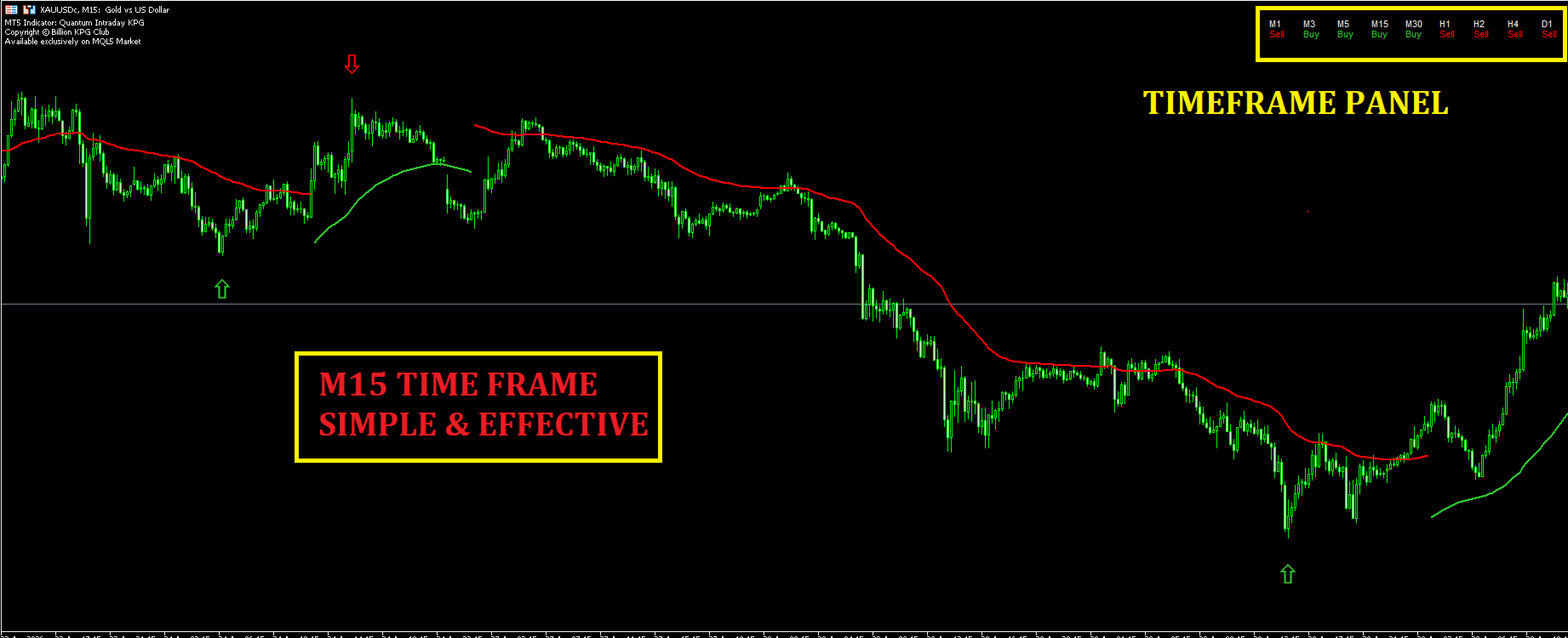
- Green line shows uptrend.
- Red line shows downtrend.
2. Reversal Signals with Arrows
- When the trend changes, the indicator immediately draws a green up arrow (potential upward move) or a red down arrow (potential downward move) on the chart.
- The arrow distance from the candle is based on ATR and is adjustable.
- It is recommended to use the indicator on M5, M15, M30 or higher timeframes (avoid M1 due to high noise).
3. Multi-Timeframe Forecast Table
- Displays 9 timeframes simultaneously: M1, M3, M5, M15, M30, H1, H2, H4, D1.
- Each timeframe shows the current trend: Buy (green), Sell (red) or N/A (gray).
- A summary line shows the Buy/Sell percentage based on weighted timeframes, giving a quick overview of the overall trend.
4. Comprehensive Alert System
- Supports alerts via popup, sound (custom .wav file), email and push notification to mobile through the MT5 app.
- Alerts can be enabled/disabled individually for each timeframe (M1, M5, M15, ...).
5. Flexible Customization
- Adjust swing detection period, price adaptation factor, and volatility sensitivity.
- Change arrow colors, thickness, and arrow distance based on ATR.
- Turn the forecast table on/off, adjust position and font size.
6. Optimized Performance
- Calculates only when needed, does not slow down the system.
- Clean interface, no clutter.
Important Notes
- The indicator is designed to support technical analysis, not as a fully automated trading system.
- Effectiveness depends on the user's skill and risk management strategy.
- Always test on a demo account before using on a live account.
Support
Support is provided through the product comments section or via the mql5.com internal messaging system. Support is not offered via Telegram, other messengers, or external websites.


































ver good inddicator thanks everthing