FlashTrader Pro
- Experts
- Version: 1.0
- Activations: 5

📌 General Description
FlashTrader Pro is an automated trading Expert Advisor specifically designed for scalping and short-term trading in the Forex market. This EA reacts to sharp price movements by opening positions when predetermined time and volatility conditions are met.
The system utilizes a small order grid, implements trailing stop functionality to secure profits, and incorporates spread monitoring to minimize trading costs. Optimized for trading low-spread currency pairs such as EURUSD and GBPUSD.
⚙ Expert Advisor Settings
1. Risk Management Parameters
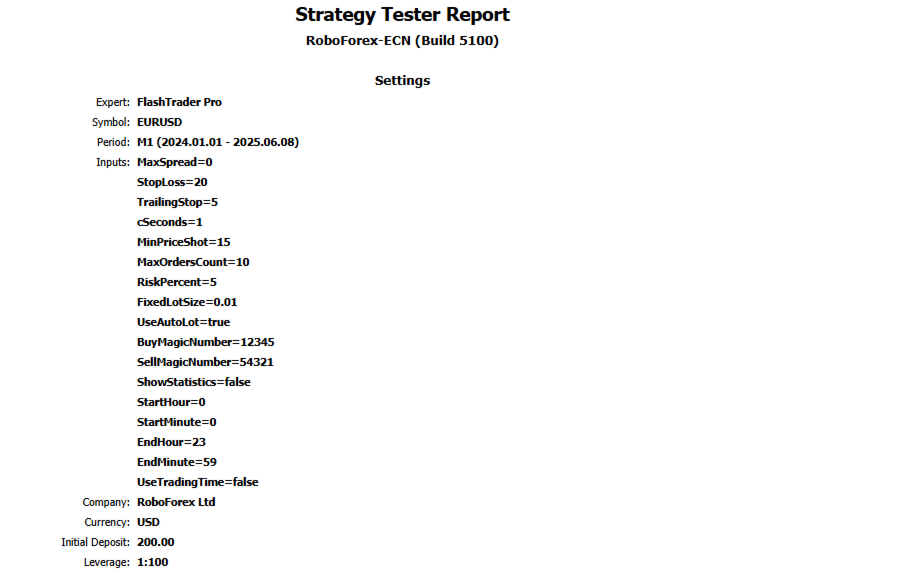
| Parameter | Description |
|---|---|
| MaxSpread | Maximum allowable spread (in pips). Trading is suspended when spread exceeds this value. |
| StopLoss | Stop-loss level in pips ( 0 = no stop-loss). |
| TrailingStop | Trailing stop distance in pips ( 0 = feature disabled). |
| UseAutoLot | Enables automatic lot size calculation when set to true . Uses fixed lot size when false . |
| FixedLotSize | Fixed trade volume (applies when UseAutoLot = false ). |
| RiskPercent | Risk percentage from account balance (applies when UseAutoLot = true ). |
2. Entry Conditions Configuration
| Parameter | Description |
|---|---|
| cSeconds | Time window (in seconds) for price movement analysis. |
| MinPriceShot | Minimum required price movement (in pips) to trigger trade execution. |
3. Order Management Settings
| Parameter | Description |
|---|---|
| MaxOrdersCount | Maximum number of simultaneous open positions. |
| BuyMagicNumber | Unique identifier for buy orders. |
| SellMagicNumber | Unique identifier for sell orders. |
4. Trading Session Configuration
| Parameter | Description |
|---|---|
| UseTradingTime | When enabled ( true ), restricts trading to specified hours. |
| StartHour | Trading session start hour (0-23). |
| StartMinute | Trading session start minute (0-59). |
| EndHour | Trading session end hour (0-23). |
| EndMinute | Trading session end minute (0-59). |
| ShowStatistics | Displays real-time trading statistics on chart when enabled. |
📊 Operational Methodology
Price Analysis Mechanism
-
Conducts price movement assessment every cSeconds interval
-
Generates trading signals when price fluctuation exceeds MinPriceShot threshold:
-
Buy signal triggered by upward price movement
-
Sell signal triggered by downward price movement
-
Trade Execution Protocol
-
Automatically applies StopLoss (when configured)
-
Implements TrailingStop to protect accumulated profits
-
Enforces MaxOrdersCount limitation to prevent overexposure
-
Calculates position size based on either:
-
Fixed lot size (when UseAutoLot = false )
-
Risk percentage model (when UseAutoLot = true )
-
Operational Restrictions
-
❌ Suspends trading during high spread conditions (exceeding MaxSpread)
-
⏳ Adheres strictly to configured trading sessions (when UseTradingTime enabled)
🚀 Optimal Usage Guidelines
Testing Recommendations
-
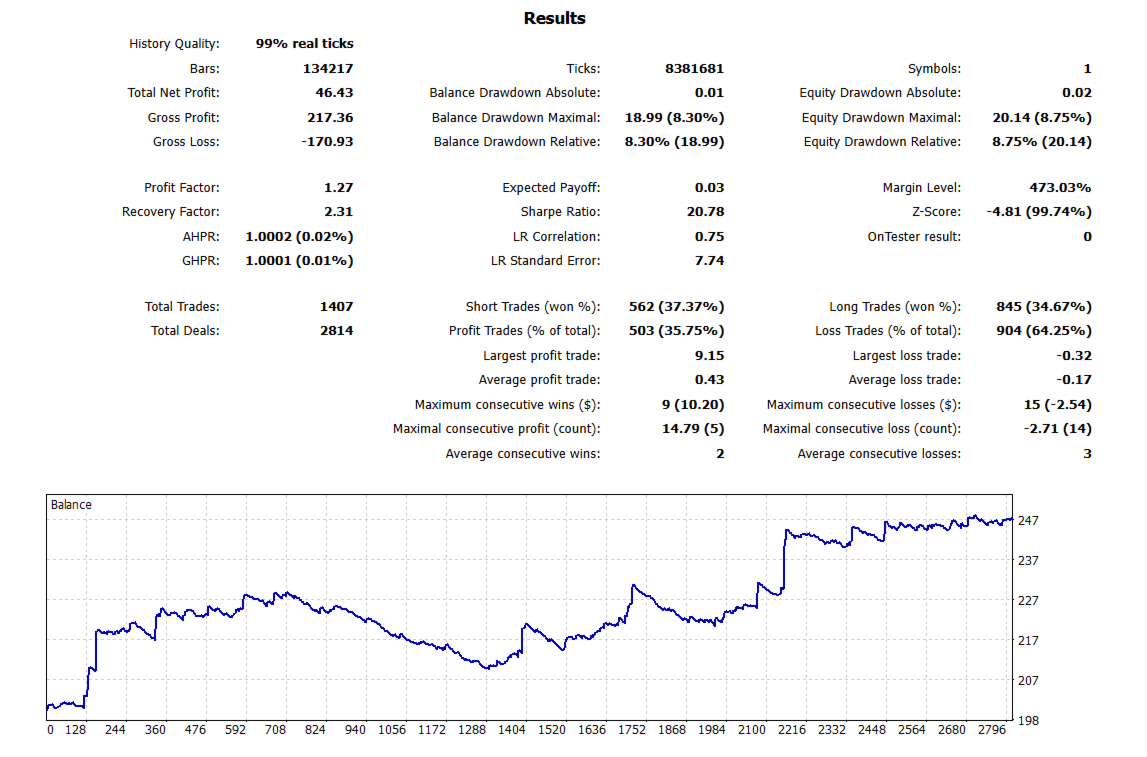
Testing Mode: Every tick based on real ticks for accurate simulation
-
VPS Requirements: Mandatory use of low-latency Virtual Private Server
-
Timeframe Selection: M1 recommended, though adaptable to other timeframes
Account Specifications
-
Account Types: ECN, STP, Prime (low-commission environments)
-
Minimum Deposit: $200 USD (or equivalent) recommended
Configuration Resources
📥 Download pre-optimized settings and configuration files:
👉 Yandex Disk Download Link
📈 Competitive Advantages
✅ Rapid Trade Execution - Capitalizes on short-term price movements
✅ Dynamic Risk Management - Flexible position sizing options
✅ Profit Protection - Advanced trailing stop functionality
✅ Cost Efficiency - Strict spread monitoring eliminates unfavorable entries
✅ Time Management - Precise trading session control
💡 Ideal Trading Solution
🔹 Market Adaptive - Performs consistently across various market conditions
🔹 Cost-Conscious - Minimizes trading expenses through spread control
🔹 Automation Excellence - Provides complete trade automation
🚀 Implement FlashTrader Pro to enhance your trading strategy today!