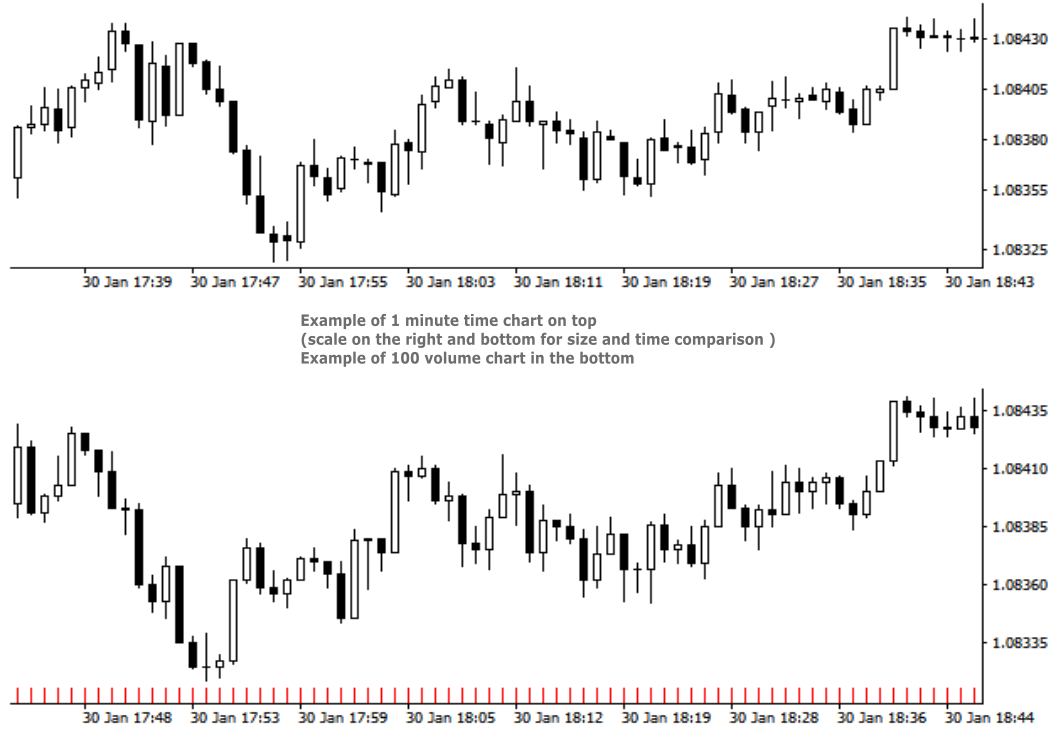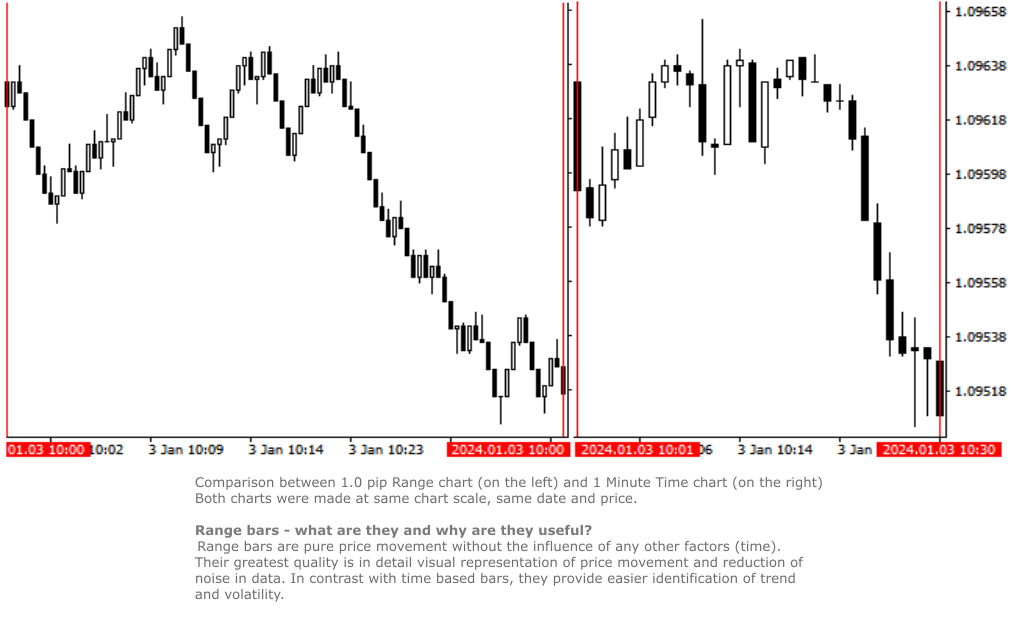
Real Range Bar and Custom Time Charts

RRBCTC uses real Tick data to create custom Range, Time, Renko and Volume bar charts for MT4. Tick data use is RRBCTC unique feature, which allows highest quality charting of current and historical price movement. Custom inputs provide option to create range bars with sizes from 0.1 pip all the way to 100+ pip and time bars periods from second all the way to a month. Charts are updated with new data in real time, allowing user use of MT4 indicators and advisors (EA). RRBCTC greatly extends MT4 charting options.


LEGEND (acronyms used in description) 

  • RRBCTC - Real Range Bar and Custom Time Charts (MT4 component)
  • DE - Data Extractor (MT5 component)
  • EA - Expert advisor
  • MT4 - MetaTrader4 terminal
  • MT5 - MetaTrader5 terminal


WHY SHOULD YOU CHOOSE TO BUY RRBCTC ?

MT4 by default only provides 9 time periods for displaying market movement. This limited options are simply not good enough for quality market analysis. Even if you were to purchase one of the range, renko or custom timeframe creation tools available to extend MT4 charting options, such tools would still be limited by MT4 build-in restrictions. Existing tools create custom charts by extrating data from 1 minute time chart, a method which does not allow for accurate construction of bars. Faulty chart data leads into inaccurate analysis and improperly placed trades. As former user of charts created in such manner, I have a lot of experience and knowledge with how inaccurate such data really is. RRBCTC was created to solve this problem, by importing tick data and use it to build every (real) bar piece by piece. This process is done quickly and efficiently, so that user want be able to spot a difference between ordinary MT4 chart and a RRBCTC custom chart. Not only does RRBCTC provide you with quality data, it also combines all different charting options into one indicator, eliminating need for any other tool. Create any custom range, time, renko and equal volume charts you can imagine. If you have ever wanted to use some odd time period, like 7 min 30 second, now you can. Beside chart creation, RRBCTC also provides chart management, accessible through on chart user interface. Functions, like opening new custom chart and switching periods are designed to make life easier for the user. Continuous chart updates, make charts suitable for live trading and for use with any standard indicator or EA. Simple put, RRBCTC was designed to be the last chart creation tool for MT4 you will ever need. For more details on individual RRBCTC capabilities, please read section (Features).


FATURES

  • External component - RRBCTC uses external component to retrieve tick data it needs to build charts. Default external component for RRBCTC is called Data Extractor (DE) and is available for free on MT5 market. Experienced users are free to import tick data trough the use of there own tools. DE is free MT5 tool which can be used on any demo or live MT5 account to process and save data RRBCTC needs to function at full capacity. For more details on how this works, please read section (How to use). Link to Data Extractor is listed on the end of description, under section LINKS.
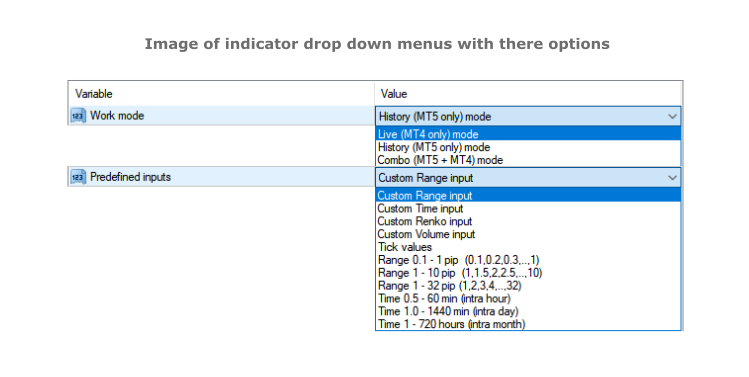
  • Work modes - RRBCTC can operate in 3 different work modes. Live (MT4 only) mode creates charts from data it collects in real time from MT4. History (DE MT5 only) mode uses only external data to create charts. Combo (DE MT5 + MT4) mode uses combination of live data from MT4 and data from external component.
  • Custom input and predefined sequences - Through use of custom input, user can define sequence of values which will be used to create charts. Custom sequences provide user the ability to create only charts it needs and under conditions he chooses. RRBCTC also has a selection of predefined range and time sequences, for users who do no want or need to use custom input.
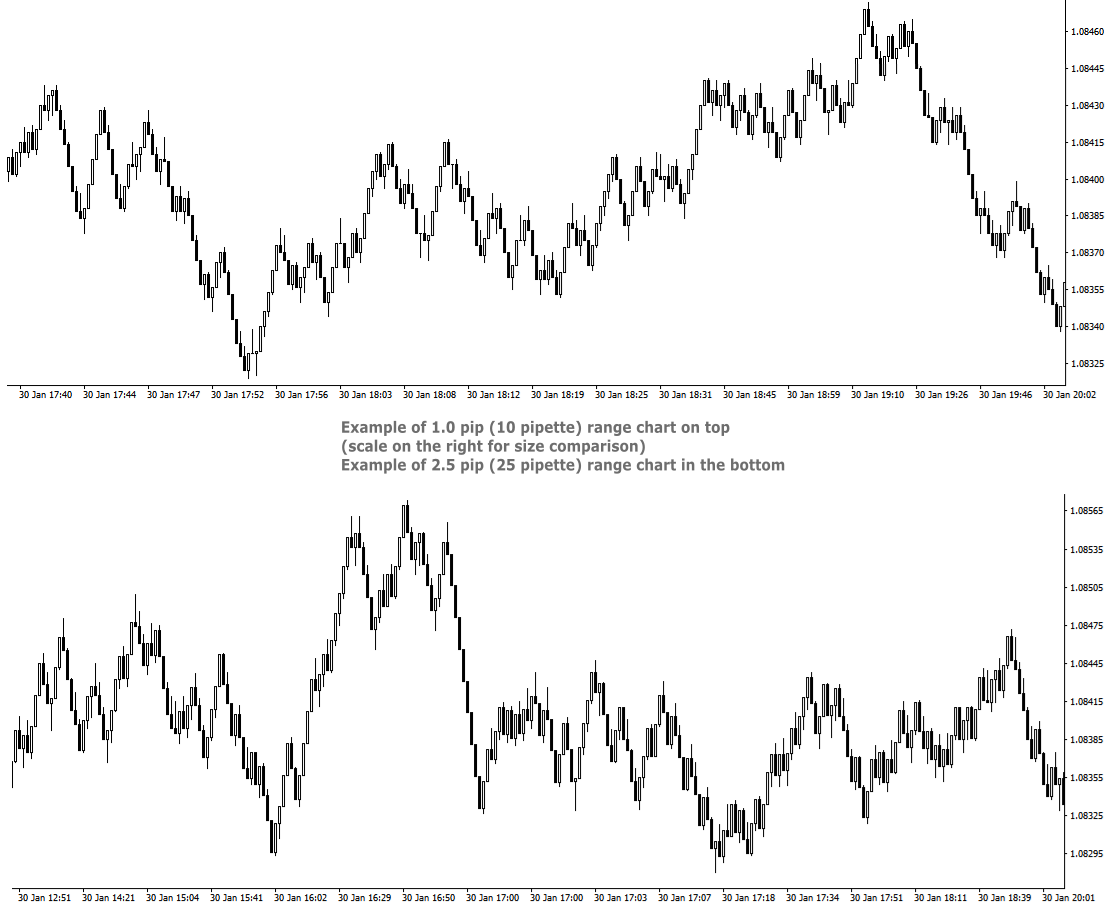
  • Custom Range chart creation - Range bars consider only price, thereby eliminating time from the equation. RRBCTC allows user custom selection of range bar size, starting from 0.1 pip (1 pipette) all the way up to 100 pip or more. Smallest increment is 0.1 pip (Example: 1.2, 1.3, 1.4 pip and so on). Values in pipettes are available for instruments using extra decimal (most of them do). 
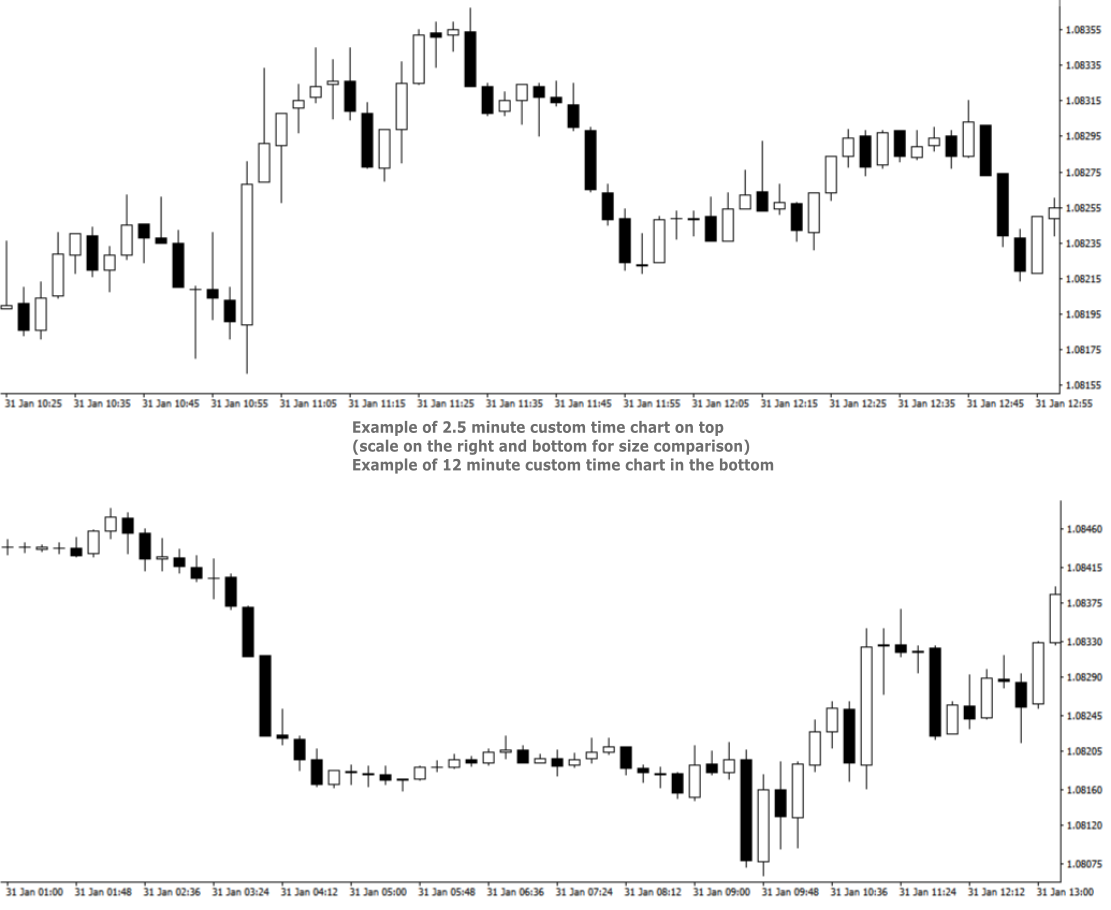
  • Custom Time chart creation - RRBCTC allows user custom selection of time frame size in minutes or/and hours, starting from 0.02 min (1 second) all the way up to 720 hours (30 days). Smallest increment is 0.01 min. Scientific decimal system is used for time values (3.5 minutes = 3 min 30 sec)
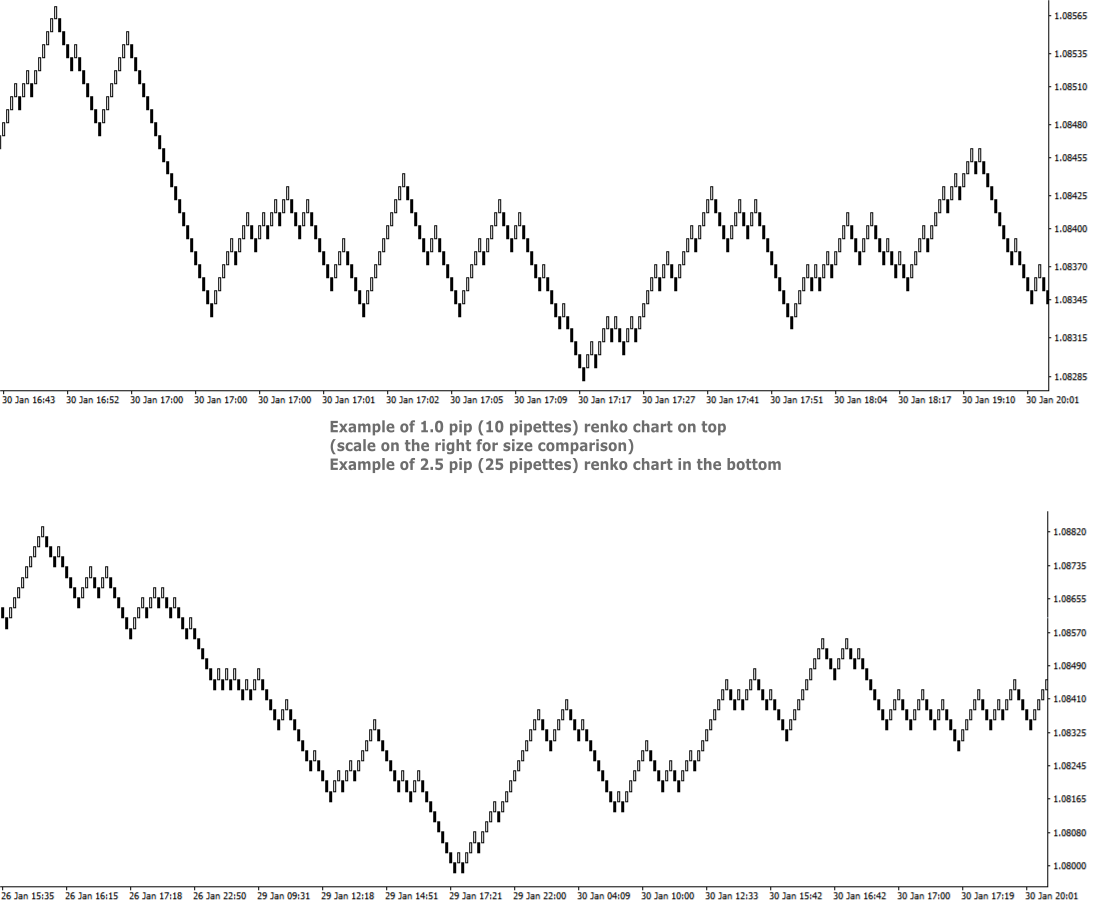
  • Custom Renko chart creation - Renko are bricks created at 45-degree and filter out minor price movements. RRBCTC allows user custom selection of renko bar size, starting from 0.1 pip (1 pipette) all the way up to 100 pip or more. Smallest increment is 0.1 pip. (Example: 1.2, 1.3, 1.4 pip and so on). Values in pipettes are available for instruments using extra decimal (most of them do).
  • Custom Volume chart creation - Volume bars are all created with the same amount of tick volume and represent price movement within that volume value. RRBCTC allows user custom selection of volume bar size, starting from 1 unit of volume all the way up to 100000 units or more. Smallest increment is 1 unit of volume. 
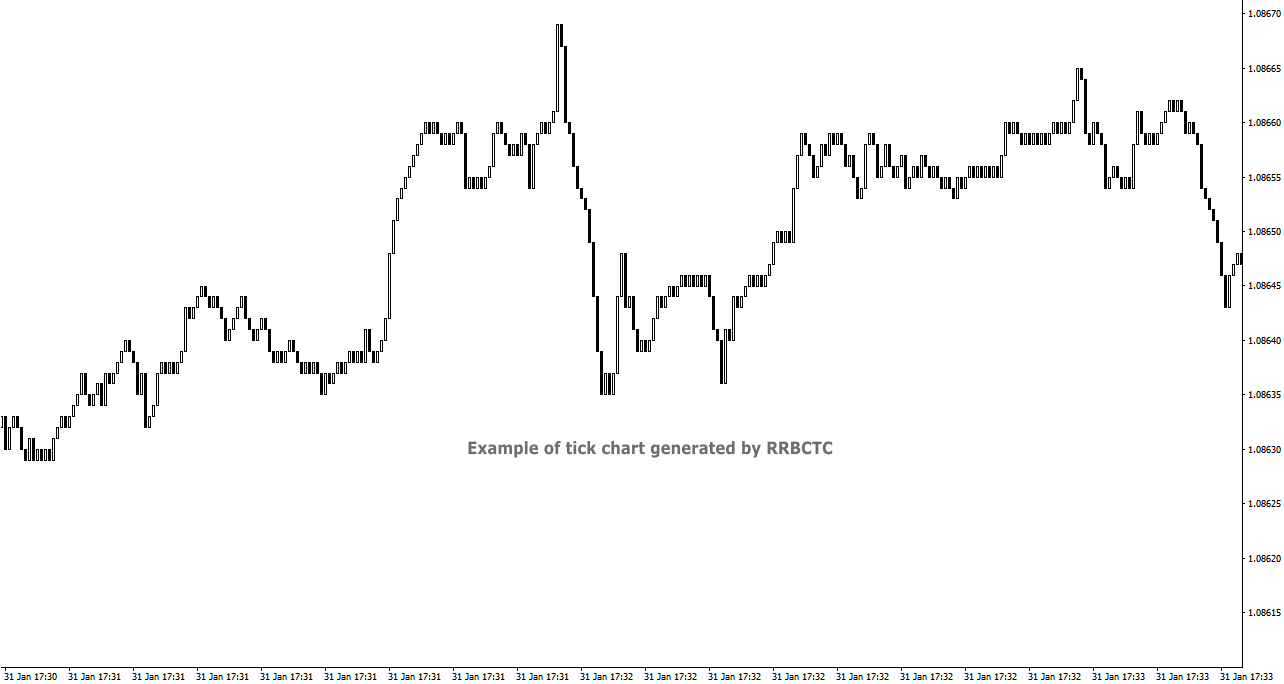
  • Tick chart creation - Tick bars are minimum measurement of price change. RRBCTC allows user display of pure tick bars.
  • Real time chart update - Opened charts are continuously updated (around 20 times a second), displaying new data and allowing MT4 indicators or EAs to function just as they do on regular MT4 charts. User will not be able to notice any delay in market movement. 
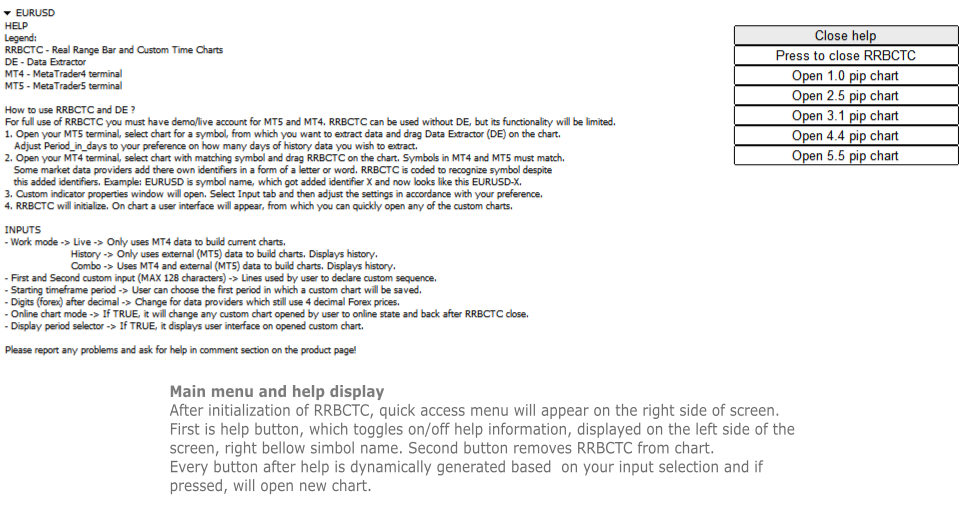
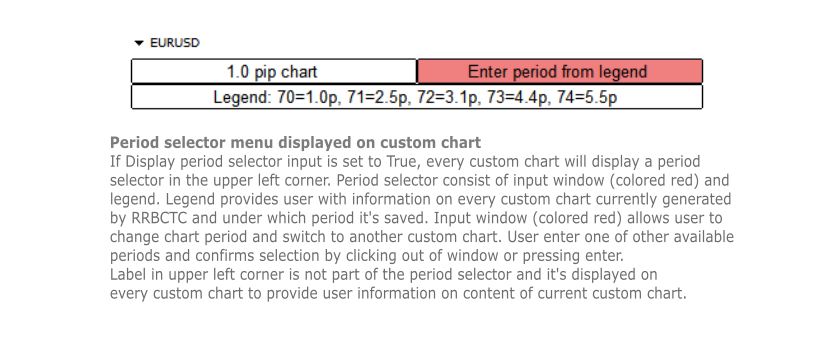
  • User interface - Build in user help and interface. There are 2 versions of on chart interface. The first is displayed on the chart, where indicator was attached to and shows help, close and open chart buttons. Second interface is attached to every custom chart opened and provides user with information about the chart and option to change chart period directly.
  • Chart management - User can choose to use RRBCTC in more manual way or to leave chart management to auto function. In automatic mode RRBCTC will manage charts online/offline state and save data if needed. 
  • Error prevention - Integrated user error prevention functions, which should handle most potential user errors.
  • Compatibility - Designed to work with all types of financial instruments, with automatic symbol recognition build in. 


SETTINGS (INPUTS)

  • Work mode 
    • Live -> Only uses MT4 data to build current charts, does not build history past the point of RRBCTC initialization. Recommended work mode for live trading, where past data is not needed. 
    • History -> Only uses external (MT5) data to build charts. History is build for a time interval defined by a user. Recommended work mode for long term chart analysis, where a large quantity of data is needed. 
    • Combo -> Uses MT4 and external (MT5) data to build charts. History is build for a time interval defined by a user. Recommended work mode for live trading and short/medium term chart analysis.
  • Predefined inputs
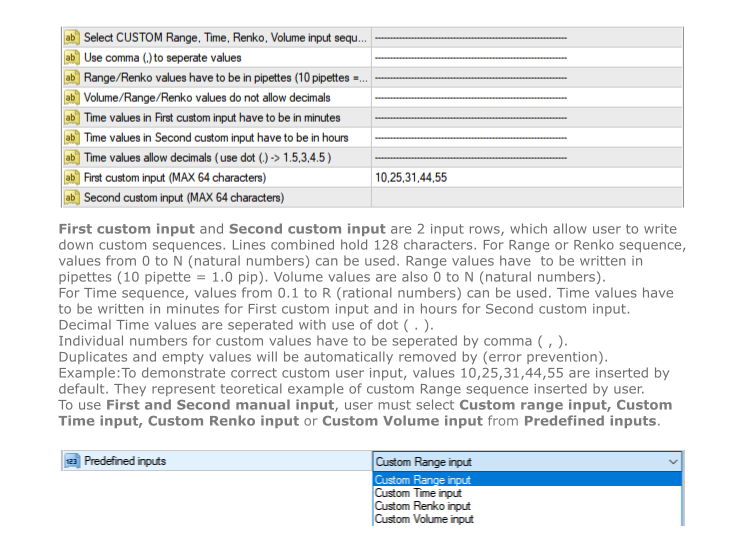
    • Custom Range input -> Allows use of First and Second custom input lines, where user can define range bar sizes for which charts will be build.
    • Custom Time input -> Allows use of First and Second custom input lines, where user can define time frame sizes for which charts will be build.
    • Custom Renko input -> Allows use of First and Second custom input lines, where user can define renko box sizes for which charts will be build.
    • Custom Volume input -> Allows use of First and Second custom input lines, where user can define volume sizes for which charts will be build.
    • Tick values - Creates only tick chart. Can also be created alongside Range charts, by entering 0 as one of the values in custom input.
    • Range 0.1 - 1 pip -> 1. st predefined sequence. No user input. Creates 10 charts from 0.1 - 1.0 pip, with increments of 0.1 pip.
    • Range 1 - 10 pip -> 2. nd predefined sequence. No user input. Creates 19 charts from 1.0 - 10.0 pip, with increments of 0.5 pip.
    • Range 1 - 32 pip -> 3. rd predefined sequence. No user input. Creates 32 charts from 1.0 - 32.0 pip, with increments of 1.0 pip.
    • Time 0.5 - 60 min -> 4. th predefined sequence. No user input. Creates 15 charts from 0.5 (half) minute - 60.0 min (1 hour), with 1.5x or 2.0x increments. Intra hour time frames.
    • Time 1.0 - 1440 min -> 5. th predefined sequence. No user input. Creates 17 charts from 1.0 minute - 1440.0 min (1 day), with 1.5x or 2.0x increments. Intra day time frames.
    • Time 1 - 720 hours -> 6. th predefined sequence. No user input. Creates 17 charts from 1.0 hour - 720.0 hour (1 month), with 1.5x or 2.0x increments. Intra month time frames.
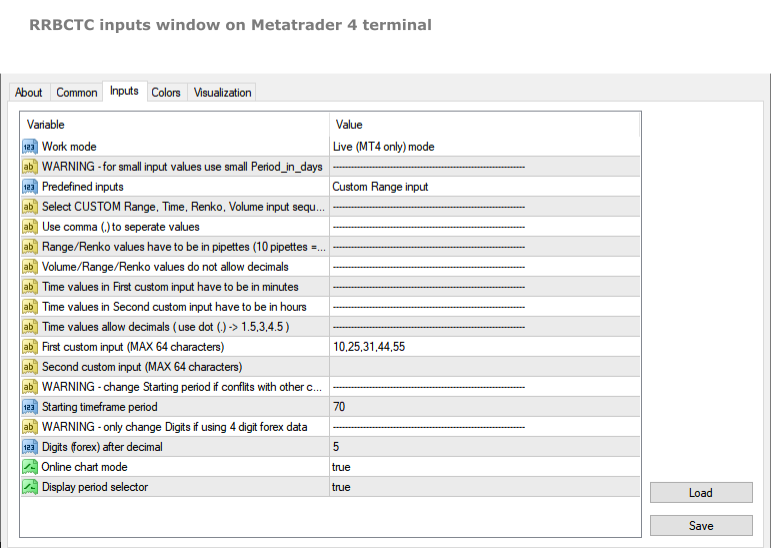
  • First custom input (MAX 64 characters) -> First line to be used to declare custom sequence. Based on Custom input type, it allows values in pipettes or minutes or volume. 
  • Second custom input (MAX 64 characters) -> Second line to be used to declare custom sequence. Based on Custom input type, it allows values in pipettes or hours or volume. Both lines can be used simultaneously. Instructions, for how to input values correctly, are stated in the settings above the first custom input line.
  • Starting time frame period -> Chart build by RRBCTC need to be saved in selected symbol history. User can choose the first period in which a custom chart will be saved. Charts after the first get assigned period by RRBCTC.
  • Digits (forex) after decimal -> This setting should only be used by users who still receive symbol data with one less decimal spot. Forex example: if your EURUSD price value only has 4 decimals, then you are one of the few, whose forex data provider, still hasn't switched to 5 decimal data.
  • Online chart mode -> If set to true, it will automatically  change any custom chart opened by user to online state and back to offline state after RRBCTC close. Chart must be in online state to allow live trading and updating of indicators and/or EAs attached to custom chart.
  • Display period selector -> If set to true, it displays user interface on any opened custom chart. The interface allows user to switch between custom charts generated by RRBCTC.


HOW TO USE RRBCTC and Data Extractor

For full use of RRBCTC, you must have demo or live account for MT5 and MT4. RRBCTC can be used without Data Extractor (DE), but its functionality will be limited. Only Live mode will work without it. Once you have downloaded RRBCTC for MT4 and DE for MT5, you must locate them in your terminal market indicator folder.

Recommended procedure on how to use RRBCTC:

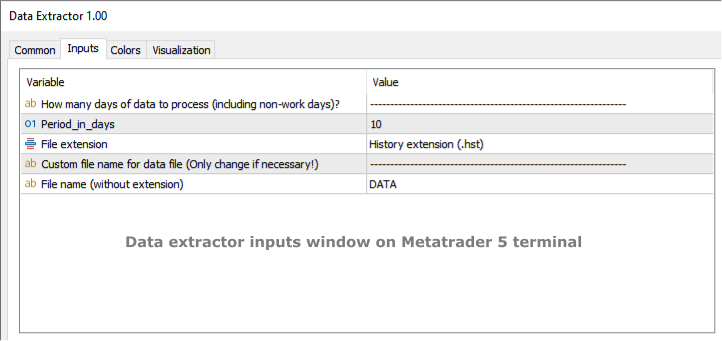
  1. Open your MT5 terminal, select chart for a symbol, from which you want to extract data and drag Data Extractor (DE) on the chart. The only DE setting you might need to adjust according to your preference is called Period_in_days. This setting controls how many days of history data you wish to extract. It's recommended to leave this setting unchanged on your first use of RRBCTC. Other DE setting should never be changed (ignore them).
  2. Open your MT4 terminal, select chart with matching symbol and drag RRBCTC on the chart. Symbols in MT4 and MT5 must match, but they do not need to match perfectly. Some market data providers add there own identifiers in a form of a letter or word. RRBCTC is coded to recognize symbol despite this added identifiers. You as the user only need to match the symbol name. Example: EURUSD is the symbol name, sometimes symbol name get added identifier, which may look like this EURUSD-X. 
  3. When dragged to chart, RRBCTC custom indicator properties window will open. Select Input tab and then adjust the settings in accordance with your preference. For best experience, please follow instructions stated in this product description or in the indicator itself. 
  4. Once settings have been confirmed and properties window closed, RRBCTC will initialize. The length of this process depends on the quantity of data RRBCTC need to process. For most use cases this will only take a couple of seconds. On chart a user interface will appear, from which you can quickly open any of the custom charts.

From this point onwards, you a free to explore custom charts and experiment with changing of RRBCTC input settings. RRBCTC has many user error prevention functions, so there is no need to worry about doing any damage to your existing charts or MT4 terminal. Example of such function: RRBCTC does not allow you to write over any of MT4 default time frames (like M15, H1,..). 


FREQUENTLY ASKED QUESTIONS (recommended reading)

  • Q -> What happens with open custom charts, if user removes (closes) RRBCTC from the chart?

A -> All opened custom charts will remain open. If setting Online chart mode is set to TRUE, then any open online chart will be set to offline state, before RRBCTC closes. If setting Online chart mode is set to FALSE, then charts will remain in the state user manually set them to. By default such charts are in offline state. Objects and indicators attached to open custom chart will be preserved.

  • Q -> What happens with open custom charts, if user closes MT4 terminal without removing RRBCTC from chart?

A -> On next MT4 terminal start up, RRBCTC will initialize and set open custom charts to state they were in before closing of MT4 terminal.

  • Q -> Can user switch between custom charts in the same way one can switch between time frames on normal MT4 time charts?

A -> If setting Display period selector is set to TRUE, every open custom chart will have user interface displayed in the upper left corner of the chart. This interface allows user to switch between custom charts, without opening new chart. Interface displays information about current chart, a legend containing information about other custom charts and input field, where period of other custom chart can be entered. Simply click on the input, write period number of chart you wish to display and confirm input by pressing Enter or clicking out of input field. Chart switch might take a second to happen, this is because MT4 terminal does not prioritize this function. If setting Online chart mode is set to FALSE, all custom charts are in offline state. Period selector will not work in offline state!

  • Q -> Can RRBCTC be used for financial instruments, other than forex?

A -> RRBCTC should be able to recognize all symbols (even more obscure ones) and correctly build custom charts for them. There is a however a chance, RRBCTC might struggle with correct chart construction for some symbols. If you encounter such an example, please inform me, so that error can be fixed.

  • Q -> Can more then one RRBCTC run at the same time?

A -> Several RRBCTC can run simultaneously, but only one can be attached to a unique chart. You can even run 2 or more RRBCTC for one symbol, as long as they are attached to separate chart and periods used for saving custom charts don't overlap. If the periods do overlap, it is likely that will cause error.

  • Q -> How many custom charts can RRBCTC create?

A -> RRBCTC has no theoretical hard limit on how many custom charts it can create, but in practice the number is limited by the length of user defined custom sequence. There are 2 input lines, each can hold 64 characters, so 128 characters combined. The max value depends on the values inserted by the user, but on average you can expect RRBCTC to create maximum of around 32 custom charts. It's advised to only create as many custom charts as is needed. Maintaining custom charts, that will not be used, is a draw on resources.

  • Q -> How safe are RRBCTC created charts for live trading?

A -> Custom charts are as safe as the default MT4 time charts, provided user follows instructions. Live and Custom modes should be used for live trading, because they update current price values directly from MT4. History mode can also be used for live trading, but since it only uses external data, there could potentially be slight differences in price values. If you use quality market data provider, there should be no difference between values. Market data should always be the same, regardless of data provider. If you observe mismatch in charts, there are 2 potential problems. Either you have set up RRBCTC wrong or your market data provider has low quality data.

  • Q -> Is RRBCTC use of external data a potential safety risk?

A -> RRBCTC only uses data needed to construct charts correctly. This data is read-only and processed in very specific order. Any interference with this data would only result in error. RRBCTC does not collect, process or communicate any data related to user account. 

  • Q -> What happens, if user applies template to custom chart and overrides previous custom chart content?

A -> RRBCTC was coded to handle such situation. Users are free to use templates to quickly move chart content to custom chart. After user applies template, RRBCTC will restore its custom chart user interface and  leave content created by template intact. User might notice slight delay and chart switching to 1 hour (H1) period for a moment. This is normal and unavoidable part of how MT4 handles custom online charts.


REQUIREMENTS AND SYSTEM INFORMATION 

  • OS Windows (any version), might work on other OS, but not verified
  • RRBCTC and DE will work with portable version of MT4


DISCLOSURE STATEMENT

Data from different market providers may result in slight differences on some custom charts.

RRBCTC and DE will be supported as long as author has capabilities to do so. Author does not take responsibility for updating software, if external factors beyond his control, prevent it.

Please report any problems and ask questions for more details!


LINKS

Link to Data Extractor:  https://www.mql5.com/en/market/product/112293

Recommended products
Linker
Roman Lipatov
5 (1)
"LINKER" is an indicator that links any number of windows of the charts it is running on. A synchronized crosshair is also available, toggled by the (Ctrl) key or the (L) button. The visibility of the trade levels can be toggled on each chart separately using the (Shift) key or the (V) button. The buttons and the crosshair have customizable settings and colors. For instance, you need to analyze a trading instrument on different timeframes, for example, on H1, H4 and D1. Doing this in a single ch
The indicator displays Renko bars on the chart, uses their data to calculate and display the moving average, PriceChannel and generates buy/sell signals. Renko is a non-trivial price display method. Instead of displaying each bar within a time interval, only the bars where the price moved a certain number of points are shown. Renko bars do not depend on a time interval, therefore the indicator works on any timeframe without losing its efficiency. The PriceChannel indicator displays the upper, lo
This indicator is a great utilities tools for Fibonacci Trader that draw their chart manually. This indicator do not draw any Fibonacci Retracement or Fibonacci Expansion. It is a utilities tool for modifying the Fibonacci level for Fibonacci object manually drawn on the chart. Just draw using the Fibonacci Retracement or other Fibonacci tool in MT4 as per normal. The select the Fibonacci you have just drawn. Make sure you have only 1 object selected. Then open up this Fibonacci Level Management
Choch Pattern
Rodion Matveichuk
5 (1)
Профессиональный индикатор "Choch Pattern Levels" с RSI-фильтром для MT4 Описание: Вы устали от ложных пробоев и хотите находить точки разворота тренда с высокой точностью? Индикатор Choch Pattern Levels — это ваш профессиональный инструмент для определения смены характера рынка (Change of Character), дополненный мощным фильтром RSI и анализом объемов , чтобы вы входили в рынок только по самым надежным сигналам. Этот индикатор автоматически находит и отрисовывает на графике ключевые паттерны раз
FREE
Before
Nadiya Mirosh
The Before indicator predicts the most likely short-term price movement based on complex mathematical calculations. Most of the standard indicators commonly used in trading strategies are based on fairly simple calculations. This does not mean that there were no outstanding mathematicians in the world at the time of their creation. It is just that computers did not yet exist in those days, or their power was not enough for the sequential implementation of complex mathematical operations. Nowad
The indicator calculates and displays renko bars using MA and PSAR data as well as provides buy/sell signals. Renko is a non-trivial price display method. Instead of displaying each bar within a time interval, only the bars where the price moved a certain number of points are shown. Renko bars do not depend on a time interval, therefore the indicator works on any timeframe without losing its efficiency. Buy signal forms when PSAR readings are moving down, MA is moving up, the price is closing ab
Power Renko MT4
Pierce Vallieres
Power Renko is an indicator which plots Renko bricks underneath the chart using a histogram. You can select the brick size and the timeframe of the Renko bricks as well as whether or not to use the close price or the high/low price of the candles. Renko bricks are based on price alone, not time, therefor the Renko bricks will not be aligned with the chart's time. They are extremely useful for trend trading and many different strategies can be formed from them. Buffers are provided allowing you t
Trades Extractor
Medilane Bernard Philippe Couratier
Jarfac Trades Extractor Description: Le "Jarfac Trades Extractor" est un script MQL4 conçu pour les traders qui souhaitent exporter et analyser leurs trades historiques. En un seul clic, le script génère un fichier CSV contenant des informations détaillées sur chaque trade exécuté pendant une période spécifiée. Caractéristiques principales : Filtrage par Période : Définissez une période personnalisée pour l'extraction. Possibilité de désactiver le filtrage par période. Filtrage par Commentaire :
FREE
Renko Live Chart — Real-Time Offline Renko Chart Generator Short Description Transform any symbol in your terminal into a genuine real-time offline Renko chart, updated tick by tick, with bricks that accurately reflect price movement — no delays, no freezing, and no reliance on indicators that merely "draw" bricks on top of a standard chart. Full Description Renko Live Chart creates and maintains a genuine offline chart with real historical data recorded in the terminal, converting price movemen
Order Closer Manager Order Closer Manager Order Closer Manager is a powerful and easy-to-use MetaTrader 4 (MT4) Expert Advisor designed to help traders efficiently manage their open orders. This EA is ideal for traders who want precise control over their trades with minimal manual intervention. Key Features: Close Orders by Percentage: Automatically close a specified percentage of your total open lot size with a single click. Breakeven Management: Apply breakeven levels to buy, sell, or all open
Candle Average
Mahmoud Helmy Sedik Mohamed Mansour
Candlestick patterns have little value without the right   price action   context. If you’ve been studying candlestick formations, you must have heard this principle many times over. You cannot trade patterns in a vacuum. But what do we mean by   context ? It is an overall technical assessment that encompasses: The market’s trend Support and resistance structure Recent price formations Volatility It seems intimidating at first, but a simple trading indicator can help us out here - the   moving a
The indicator calculates and displays Renko bars using PSAR and CCI data as well as provides buy/sell signals. Renko is a non-trivial price display method. Instead of displaying each bar within a time interval, only the bars where the price moved a certain number of points are shown. Renko bars do not depend on a time interval, therefore the indicator works on any timeframe without losing its efficiency. The buy signal is generated when the CCI indicator crosses the 100 level upwards, and the PS
Introduction to Smart Renko The main characteristics of Renko Charting concern price movement. To give you some idea on its working principle, Renko chart is constructed by placing a brick over or below when the price make the movement beyond a predefined range, called brick height. Therefore, naturally one can see clear price movement with less noise than other charting type. Renko charting can provide much clearer trend direction and it helps to identify important support and resistance level
The Renko indicator is a technical analysis tool used in the forex market to visualize price movements and trends by eliminating market "noise." Unlike traditional candlestick or bar charts, Renko is built based on price changes of a specified number of points, called the "brick size." When the price moves by this amount of points, a new "brick" is added to the chart. This indicator ignores time and volume, focusing exclusively on price changes. The main features of the Renko indicator include:
Reanimator was made not like an ExpertAdvisor which make deals for taking Big Profit or something like that. His target is - to try to go back from big looses using the formula for Lot calculation. This formula based on our Drawndawn and Target-Price to get Breakeven. Sometime we have situation where we have big drawdawn and the price should go, for example, up. And we are sure, the price will move 100 points higher. For example: "Oh! The price will reach the Target 100 points, for sure!". In
EurUsd Binary Options
Daniel Joseph Kibe Wangewa -
YOU CAN ONLY FOWARD TEST THIS INDICATOR. USE DEMO FOR THIS AND SHARE YOUR RESULTS This indicator is a combination of different strategies that in theory drive the market.  Multi-Currency - Using the separate currencies; Euro and Dollar. RSI - from the separate currencies I get two different RSI values that are used to measure the market strength and direction It is important to note that this is not the Holy Grail and you should use a good money management system.  Two signals will appear from
Price Trend Light
Chantal Sala
4 (1)
Price Trend Light indicator is a beautiful indicator that shows purchasing areas and sales areas. This indicator is designed to follow the movement of the price which rounds on the opening price. It also provides information of trend follow on the break of the minimum and maximum. The indicator has a very simple graphic but effective, above the opening price you will have a light green color and under the opening price there is a red light. On every Break Out of the minimum or maximum sets in in
PipMaster is built using a powerful trend + momentum following algorithm. Made after years of testing and with market noise filtering built-in.  Aggressive traders can enter a trade as soon as an arrow appear. Conservative traders should wait for a visual alert after a closed candle bar. This indicator is a great tool to be used with your most trusted trend/momentum trading strategy and with solid money management rules. Key Benefits: -Super easy to use by following color coded arrow pointing t
The indicator for Forex and Binary options is based on 2 standard indicators in MT4: ADX and RVI. The signals are received when the lines of both indicators intersect simultaneously. But the reverse of the signals is also written into the codes. This is when the signals are converted in the opposite direction. You can also enable and disable each of the indicators. And also 2 types of signals can be used in RVI: 1) Just when one line is above/below the other (this is good to use as a recoilles
Trade Direction
Gevorg Hakobyan
5 (1)
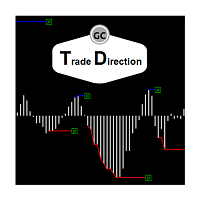
The oscillator shows trend direction using its own algorithm, which is based on calculating price values ​​by analyzing prices of separate currencies (original valuation of currencies). The histogram shows the average value of physical price change over the selected period. When the histogram has a positive value, the trend is rising, if negative - the trend id falling. The indicator uses standard RSI to determine the current market direction on a selected period as follows: the default value of
EMACrossRenko
Hong Ling Mu
1 (1)
<LOGIC> The EMA RENKO EA should run in Renko chart to show the best performance. The EA will entry based on 2 EMA line cross. (it is changeable in parameter.) As a result of FT , the best box size for XAUUSD (GOLD) is BOX 60 to 100.  Renko box size should be larger than spread value. Normally 3 times of spread. Please decide your box size with yourself. The EA will place addtional order as Grid if the trend move  to xxx pips from the last order. You can turn on/off in the parameter. The MAC

Velas RENKO
Ramon Sobrevals Arce
Immediately plots renko bars in an external/indicator window.  One of the distinctive advantages Renko charts offer is the fact that they are not time dependent. Therefore, the new Renko blocks are only traced when the price moves higher or lower by the specified number of points.  For example, a 10 pip (100 points) Renko chart would plot the blocks when price moves 10 pips higher in an uptrend or 10 pips lower in a downtrend. Renko charts removes "noises" from the Market and i t helps to identi
Bigger chart labels would allow the user to be entirely aware of which chart he/she is on. Each chart window is unique, containing different patterns and economic motives so acknowledging the chart window would be absolutely essential! There are well known Economic Time Zones included in clear view, by choice!    Simple does it! Use your computing mouse scroller, clicking with the right finger on the label, in order to customize the label properties. From there, choose your preferred color, fon
FREE
Orynth P&F Chart Overlay – Clean Trend Visualizer Orynth is a professional technical analysis tool that brings the power of Point and Figure (P&F) charting directly onto your standard candlestick chart. It filters out market noise by focusing solely on meaningful price movement, allowing traders to identify clear trends and reversals without the distraction of minor fluctuations. Unlike traditional P&F charts that open in a separate window, Orynth overlays price "boxes" directly on your main cha
Advanced CRT Indicator MT4 — Candle Range Theory Tool Advanced CRT Indicator MT4 is a professional analysis tool that automates Candle Range Theory. It identifies consolidation ranges, breakout levels, Fair Value Gaps (FVG), and profit targets, with a real-time dashboard and alerts. Overview - Multi-timeframe candle range detection   - Automatic breakout levels with buffer settings   - Fair Value Gap identification and tracking   - Up to three customizable target levels (Risk:Reward ratios)  
RenkoChart
Boris Sedov
5 (1)
Renko Chart — opens renko charts for MetaTrader 4. Renko charts can be created using this utility with all bars being in the form of Renko "bricks". All bars on the renko chart are the same size, which can be changed to get the desired chart. You can add indicators, EAs and scripts to the resulting chart. You get the completely operational chart which can be processed just like a regular one. The Renko Chart utility is not only history based, but also builds online. At the same time, the data is
Renko HMA
Bogdan Mihail Moise
Renko HMA  Channel is a professional EA the uses Renko charts in combination with the Hull Moving Average. Time Frame :   This expert advisor works on all timeframes; Account balance:   it doesn't matter, but I recommend at least 1000 EUR or 1500 USD; Currency pair :       Doesn't matter ; Warning! Do not use the default settings, always use optimization option in strategy tester to find the best settings for your broker, preferred chart and timeframe! - Multiple user options, for finetuning
RSI TrendLine Divergency Message is an indicator for the MetaTrader 4 trading platform. Unlike the original indicator, this three in one version has a system of alerts that inform on market situation changes. It consists of the following signals: when the Main line crosses the levels of extreme zones and 50% level; when the Main line crosses the Trend line in the indicator window; divergence on the last bar. Parameters of levels of extremum, 50-level and divergence are adjustable. Parameters La
BeST Darvas Boxes
Eleni Koulocheri
5 (5)
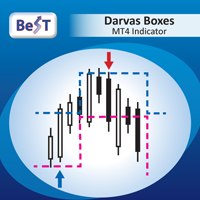
BeST_Darvas Boxes is an MT4  Indicator based on the trading method developed in the 50’s by the Hungarian Nicolas Darvas . BeST_Darvas Boxes indicator draws the Top and the Bottom of every Darvas Box  that can be confirmed on the current Chart. draws Buy and Sell Arrows  for every confirmed Upwards or Downwards Breakout of the above levels. draws always only after the bar closing and so is non-repainting or backpainting . Note : Every customer who wants to have the older version v_1.75 with th
This is an indicator for additional signal filtering. It can be used as an additional filter in a trading system. The indicator does not redraw its data and can be used both in forex trading and with binary options. It has 3 operation modes and flexible sensitivity settings. The indicator uses multiple buffers, therefore it can be easily used in various Expert Advisors.
Buyers of this product also purchase
Trade Indicator Assistant is a powerful MT4 utility designed to turn indicators into automated trading systems. Its main feature is the ability to automatically detect an indicator’s   BUY and SELL signal buffers , without requiring you to know the buffer numbers, search through indicator settings, or modify the indicator source code. Bonus Indicator: After purchasing Trade Indicator Assistant, contact me to receive Trade Signal Pro completely free as a bonus indicator. [Download Demo Version]
Exp COPYLOT CLIENT for MT4
Vladislav Andruschenko
4.69 (65)
Professional Trade Copier for MetaTrader 4 Fast, professional, and reliable trade copier for MetaTrader 4 . COPYLOT helps you copy Forex trades between MetaTrader 4 and MetaTrader 5 terminals with flexible synchronization for different account setups. COPYLOT MT4 version supports: MetaTrader 4 to MetaTrader 4 MetaTrader 5 Hedge to MetaTrader 4 MetaTrader 5 Netting to MetaTrader 4   MT5 version Full Description + DEMO + PDF How To Buy How To Install How to get Log Files How To Test and Optimize A
Local Trade Copier EA MT4
Juvenille Emperor Limited
4.96 (112)
Local Trade Copier EA MT4 is a fast and flexible trade copier for copying and managing trades between multiple MetaTrader 4 accounts on the same Windows computer or Windows VPS. It combines local trade synchronization with Receiver-side controls for lot sizing, risk management, trade filtering, symbol mapping, trade management and account protection. Set up your Transmitter and Receiver terminals in about 1 minute and copy manual or EA trades between accounts at the same or different brokers. U
Forex Trade Manager MT4
InvestSoft
4.98 (445)
Trade Manager MT4 is an advanced position size calculator and trade management tool for MetaTrader 4, designed to help traders plan trades faster, control risk more precisely, and manage open positions directly from the chart. It combines order placement, risk based lot calculation, Stop Loss and Take Profit management, Break Even, Trailing Stop, Partial Close, Equity Protection, and external trade management in one panel. Whether you trade forex, indices, metals, commodities, or crypto, Trade M
Trade Assistant MT4
Evgeniy Kravchenko
4.43 (197)
It helps to calculate the risk per trade, the easy installation of a new order, order management with partial closing functions, trailing stop of 7 types and other useful functions. Additional materials and instructions Installation instructions   -   Application instructions   -   Trial version of the application for a demo account Line function -   shows on the chart the Opening line, Stop Loss, Take Profit. With this function it is easy to set a new order and see its additional characteris
TradePanel MT4
Alfiya Fazylova
4.84 (95)
Trade Panel is a multi-functional trading assistant. The app contains over 50 trading functions for manual trading and allows you to automate most trading tasks. Application instructions + video instructions: https://www.mql5.com/en/blogs/post/772292 Trial version of the application for a demo account: https://www.mql5.com/en/blogs/post/750865 How to install the application: https://www.mql5.com/en/blogs/post/756239 How to test the application in visual mode: https://www.mql5.com/en/blogs/post/7
Telegram to MT4 Multi-Channel Copier   automatically copies trading signals from your Telegram channels straight to MetaTrader 4. No bots, no browser extensions, no manual copying. A signal arrives in Telegram and the EA opens the trade in your terminal within seconds. And before you copy a channel, the built-in backtester shows you what that channel would have done in your account. The product has two components: a Windows application that listens to your Telegram channels, and this Expert Advi
Currency strength meter for MetaTrader 4 This currency strength indicator reads up to 28 major pairs and turns them into one number per currency, for the 8 majors: USD, EUR, GBP, JPY, CHF, CAD, AUD and NZD. Instead of opening chart after chart to work out who is leading, you read one panel on your MetaTrader 4 chart and you know which currency is being bought and which one is being sold. What you see on the chart A ranked strength bar for each of the 8 currencies, with its percentage A multi-tim
Partial Closure EA MT4
Juvenille Emperor Limited
5 (3)
Partial Closure EA MT4   allows you to partially close any trade on your account, manually by a chosen percentage of the lot size and/or by trade ticket, or automatically at specified percentages of the TP/SL level, closing a percentage of the initial lot size across up to 10 take profit and 10 stop loss levels.  It can manage all or selected trades in your account by specifying or excluding certain magic numbers, comments, or symbols. Tip: Download the free demo version of the Partial Closure E
The product will copy all telegram signal to MT4   ( which you are member  ) , also it can work as remote copier.  Easy to set up, copy order instant, can work with almost signal formats, image signal, s upport to translate other language to English Work with all type of channel or group, even channel have "Restrict Saving Content", work with  multi channel, multi MT5 Work as remote copier: with signal have ticket number, it will copy exactly via ticket number. Support to backtest signal. How to
Telegram to MT4 Coppy
Sergey Batudayev
4.09 (11)
Telegram to MT4: The Ultimate Signal Copying Solution Streamline your trading with Telegram to MT4 , the cutting-edge utility designed to copy trading signals directly from Telegram channels and chats to your MetaTrader 4 platform—without the need for DLLs. This robust solution ensures seamless execution of signals with unparalleled precision and customization options, saving you time and boosting your efficiency. [ Instructions and DEMO ] [ FAQ ] [ How atach logs properly ] [Settings descrition
Trade Manager MT4 DaneTrades
Levi Dane Benjamin
4.09 (11)
DaneTrades Trade Manager is a professional trade panel for MetaTrader 4, designed for fast, accurate execution with built‑in risk control. Place market or pending orders directly from the chart while the panel automatically calculates position size from your chosen risk, helping you stay consistent and avoid emotional decision‑making. The Trade Manager is built for manual traders who want structure: clear risk/reward planning, automation for repeatable management, and safeguards that help reduc
Trade copier MT4
Alfiya Fazylova
4.61 (36)
Trade Copier is a professional utility designed to copy and synchronize trades between trading accounts. Copying occurs from the account / terminal of the supplier to the account / terminal of the recipient, which are installed on the same computer or VPS . PROMOTION - If you have already purchased the "Trade Copier MT4," you can receive the "Trade Copier MT5" for free (for copying MT4 > MT5 and MT4 < MT5). For more detailed information about the conditions, please contact us via private message
Trailing Stop and Breakeven Manager - Trail Architect MT4 Auto Trailing Stop and Breakeven Manager for MT4. Protect profit with automatic break even, then trail your stop loss using Classic, Step, ATR or Candle trailing - all from one professional panel. Every trader knows the pain: a winning trade turns into a loss because the stop loss was never moved. Watching the chart all day just to move your stop to break even and trail the stop loss by hand is exhausting - and one missed move can wipe o
Bar Replay MT4
Hoang The Manh
3.43 (7)
Don't purchase before testing the Demo version first. DEMO version:   https://www.mql5.com/en/market/product/76917 __________________________________________________ This EA  - Tool allow you replay bar in Meta Trader 4 for back test. This Tool can back test in multi timeframe in only one chart. This Tool is very useful for Price action trader. It can work with Indicators, some indicators cannot works. So please download Demo to test before purchase.  Demo Version We do not accept refund in any
Working Trial Download Copy Cat More Trade Copier MT4 is not just a simple local trade copier; it is a complete risk management and execution framework designed for today’s trading challenges. From prop firm challenges to personal portfolio management, it adapts to every situation with its blend of robust execution, capital protection, flexible configuration, and advanced trade handling. The copier works in both   Master (sender) and Slave (receiver)   modes, with real-time synchronization of
Copier->Convenient and fast interface interaction, users can use it right away   ->>>> Recommended to use on Windows computers or VPS Windows Features: Diversified and personalized copy trading settings: 1. Different lot modes can be set for different signal sources 2. Different signal sources can be set for forward and reverse copy trading 3. Signals can be set with comments 4. Whether to calibrate the lot according to the contract lot Diversified and personalized copy order settings 2: 1. Dif
King Trade Copier MT4
Mohammed Maher Al-sayed Mohammed Ahmed Saleh
5 (1)
King Trade Copier MT4 – Lightning-Fast Local Trade Copier (Master + Slave in ONE file) King Trade Copier is a professional local trade copier that mirrors every trading action from one Master account to unlimited Slave accounts on the same PC or VPS — with an internal copy latency of just a few milliseconds. It was built by a real trader for daily real-money use, with one goal: whatever happens on the Master must happen on the Slave, instantly and without exceptions. Watch the demo video to s
News Filter EA MT4
Rashed Samir
5 (10)
News Filter EA: Advanced Algo Trading Assistant News Filter EA is an advanced algo trading assistant designed to enhance your trading experience. By using the   News Filter EA , you can integrate a Forex economic news filter into your existing expert advisor, even if you do not have access to its source code. In addition to the news filter, you can also specify   trading days   and   hours   for your expert. The News Filter EA also includes   risk management   and   equity protection   features
Prop Guardian Risk Manager MT4 – Drawdown, Risk & Hedge Protection for Prop Firm and Managed Accounts Prop Guardian Risk Manager is a professional risk-control utility for MetaTrader 4, designed for prop firm traders, money managers and anyone who wants strict account-level risk protection. It does not generate trading signals, strategy entries or trading decisions. Instead, it runs in the background, monitors your account risk and can automatically block new exposure, close managed trades or ac
X2 Copy MT4
Liubov' Shkandrii
Fast. Accurate. Innovative. Tech-Driven. Discover instant trade copying with the revolutionary X2 Copy MT4. With just a 10-second simple setup, you'll get a powerful tool for syncing trades between MetaTrader terminals on a single computer or Windows VPS with unprecedented speed. Whether you're managing multiple accounts, following signals, or scaling your strategy, X2 Copy MT4 adapts to your workflow with unparalleled precision and control. Work faster and more reliably with the most tech-drive
Multi Copy
Kaijun Wang
5 (1)
Copier->Convenient and fast interface interaction, users can use it right away   ->>>> Recommended to use on Windows computers or VPS Windows Basic functions: The normal interaction speed of copy trading is less than 0.5s Automatically detect signal sources and display a list of signal source accounts Automatically match symbols, 95% of commonly used trading symbols on different platforms (special cases such as different suffixes) are automatically matched, basically no manual settings are requ
Risk manager Risk manager - it will simplify the tracking of drawdown and will notify you (alert) when the specified risk is reached, and close/lock orders when the critical DD risk level is reached. If the specified drawdown is exceeded, you can choose two options for actions: All orders will be closed that mean loss will be fixed on depo. The terminal also closes. Instead of fixing the loss on depo, the opposite order will be opened - orders locking will occure. Not a single order will be c
TPSpro Risk Manager
Roman Podpora
3.67 (3)
TPSpro Risk Manager       – is a unique system of professional risk control for traders of any level and any capital. Allows you to avoid losses in trading and serious mistakes in transactions. TPSpro Risk Manager is a must have for risk management and is primarily used by scalpers and day traders, but is successfully used by traders of any trading style. The panel has 3 columns, each of which contains useful information. The first column displays information about the account as of the beginn
Trade Reverse Copie4
Chukwuemeka Kingsley Anyanwu
5 (1)
Feel free to contact me for any extra features :) [SEE MT5 VERSION  https://www.mql5.com/en/market/product/128846 The Local Reverse Copier is an Expert Advisor designed to synchronize positions between a Master account and a Slave account with a twist: it reverses the trades. When a buy position is opened on the Master account, the EA opens a sell position on the Slave account, and vice versa. This allows for a unique form of trade copying where positions are mirrored in opposite directions bet
Lot Architect MT4
Do Thi Phuong Anh
Lot Architect — Trade Panel and Position Size Calculator for MT4 Lot Architect is a trade panel and risk-based position size calculator for MetaTrader 4. It helps calculate lot size from the selected risk, displays trade parameters before entry, and supports Market, Limit and Stop orders from the chart. The utility is designed for traders who want a structured workflow for position sizing, stop-loss placement, take-profit planning and order execution. Purpose Before opening a trade, a trader nee
EA Local Trade Copier Pro MT4: The Ultimate DLL-Free Trade Duplicator Are you tired of complicated trade copiers that require unsafe external DLLs, crash your terminal, or confuse you with separate "Master" and "Client" files? Experience the next generation of trade copying with EA Local Trade Copier Pro MT4. Engineered for maximum stability, lightning-fast execution, and ultimate simplicity, this utility allows you to seamlessly copy trades between multiple MetaTrader terminals on the same Wind
Basket EA MT4
Juvenille Emperor Limited
5 (5)
Basket EA MT4 is a powerful profit-harvesting tool and a comprehensive account protection system, all combined into a simple and easy-to-use solution. Its core purpose is to give you complete control over your trading account’s overall profit and loss by managing all open positions at the basket level, rather than individually. The EA offers a full range of basket-level features, including take profit, stop loss, break even, and trailing stop loss. These can be configured as a percentage of your
MT4 to Telegram Signal Provider   turns your trading account into a signal provider. Every trade action, whether manual, by EA or from your phone, is instantly sent as a message to Telegram. You can fully customize the format or use a ready-made template for quick setup. [ Demo ] [ Manual ] [ MT5 Version ] [ Discord Version ]  New: [ Telegram To MT5 ] Setup A step by step user guide is available. Key Features Ability to customize order details sent to subscribers You can create a tiered subs
Fast Trade MT4
Alexey Valeev
4.8 (5)
This trading panel has been developed for fast and comfortable operation of the financial markets. It is equipped with the necessary functions for manual and semi-automated trading. Due to the presence of the order trailing feature, trailing stop and automatic closure by equity, profit, time. You can use it to automate your trading system. All you have to do is open a position and set the parameters for maintenance, everything else will be handled by the EA. If you want to limit your losses, set
Filter:
No reviews
Reply to review