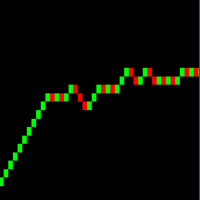
Real Range Bar and Custom Time Charts

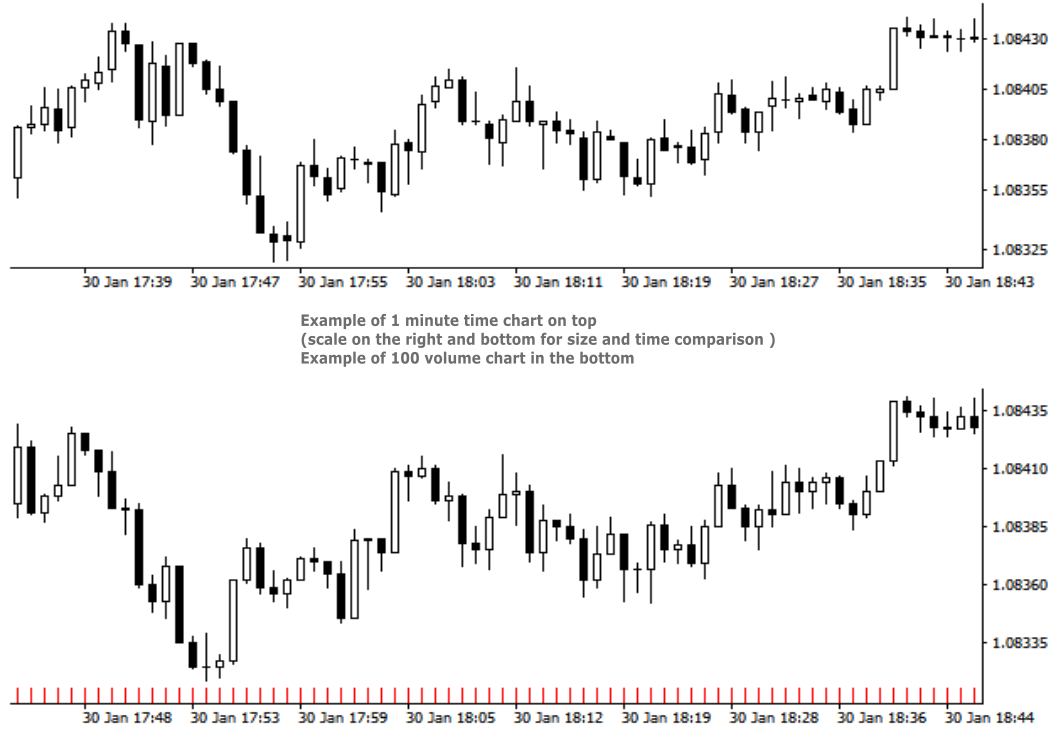
RRBCTC uses real Tick data to create custom Range, Time, Renko and Volume bar charts for MT4. Tick data use is RRBCTC unique feature, which allows highest quality charting of current and historical price movement. Custom inputs provide option to create range bars with sizes from 0.1 pip all the way to 100+ pip and time bars periods from second all the way to a month. Charts are updated with new data in real time, allowing user use of MT4 indicators and advisors (EA). RRBCTC greatly extends MT4 charting options.


LEGEND (acronyms used in description) 

  • RRBCTC - Real Range Bar and Custom Time Charts (MT4 component)
  • DE - Data Extractor (MT5 component)
  • EA - Expert advisor
  • MT4 - MetaTrader4 terminal
  • MT5 - MetaTrader5 terminal


WHY SHOULD YOU CHOOSE TO BUY RRBCTC ?

MT4 by default only provides 9 time periods for displaying market movement. This limited options are simply not good enough for quality market analysis. Even if you were to purchase one of the range, renko or custom timeframe creation tools available to extend MT4 charting options, such tools would still be limited by MT4 build-in restrictions. Existing tools create custom charts by extrating data from 1 minute time chart, a method which does not allow for accurate construction of bars. Faulty chart data leads into inaccurate analysis and improperly placed trades. As former user of charts created in such manner, I have a lot of experience and knowledge with how inaccurate such data really is. RRBCTC was created to solve this problem, by importing tick data and use it to build every (real) bar piece by piece. This process is done quickly and efficiently, so that user want be able to spot a difference between ordinary MT4 chart and a RRBCTC custom chart. Not only does RRBCTC provide you with quality data, it also combines all different charting options into one indicator, eliminating need for any other tool. Create any custom range, time, renko and equal volume charts you can imagine. If you have ever wanted to use some odd time period, like 7 min 30 second, now you can. Beside chart creation, RRBCTC also provides chart management, accessible through on chart user interface. Functions, like opening new custom chart and switching periods are designed to make life easier for the user. Continuous chart updates, make charts suitable for live trading and for use with any standard indicator or EA. Simple put, RRBCTC was designed to be the last chart creation tool for MT4 you will ever need. For more details on individual RRBCTC capabilities, please read section (Features).


FATURES

  • External component - RRBCTC uses external component to retrieve tick data it needs to build charts. Default external component for RRBCTC is called Data Extractor (DE) and is available for free on MT5 market. Experienced users are free to import tick data trough the use of there own tools. DE is free MT5 tool which can be used on any demo or live MT5 account to process and save data RRBCTC needs to function at full capacity. For more details on how this works, please read section (How to use). Link to Data Extractor is listed on the end of description, under section LINKS.
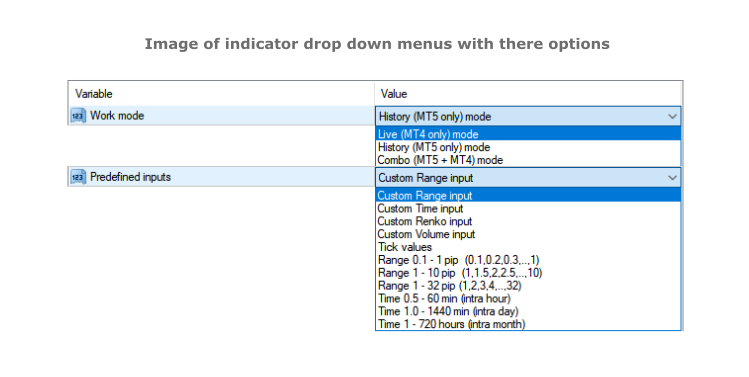
  • Work modes - RRBCTC can operate in 3 different work modes. Live (MT4 only) mode creates charts from data it collects in real time from MT4. History (DE MT5 only) mode uses only external data to create charts. Combo (DE MT5 + MT4) mode uses combination of live data from MT4 and data from external component.
  • Custom input and predefined sequences - Through use of custom input, user can define sequence of values which will be used to create charts. Custom sequences provide user the ability to create only charts it needs and under conditions he chooses. RRBCTC also has a selection of predefined range and time sequences, for users who do no want or need to use custom input.
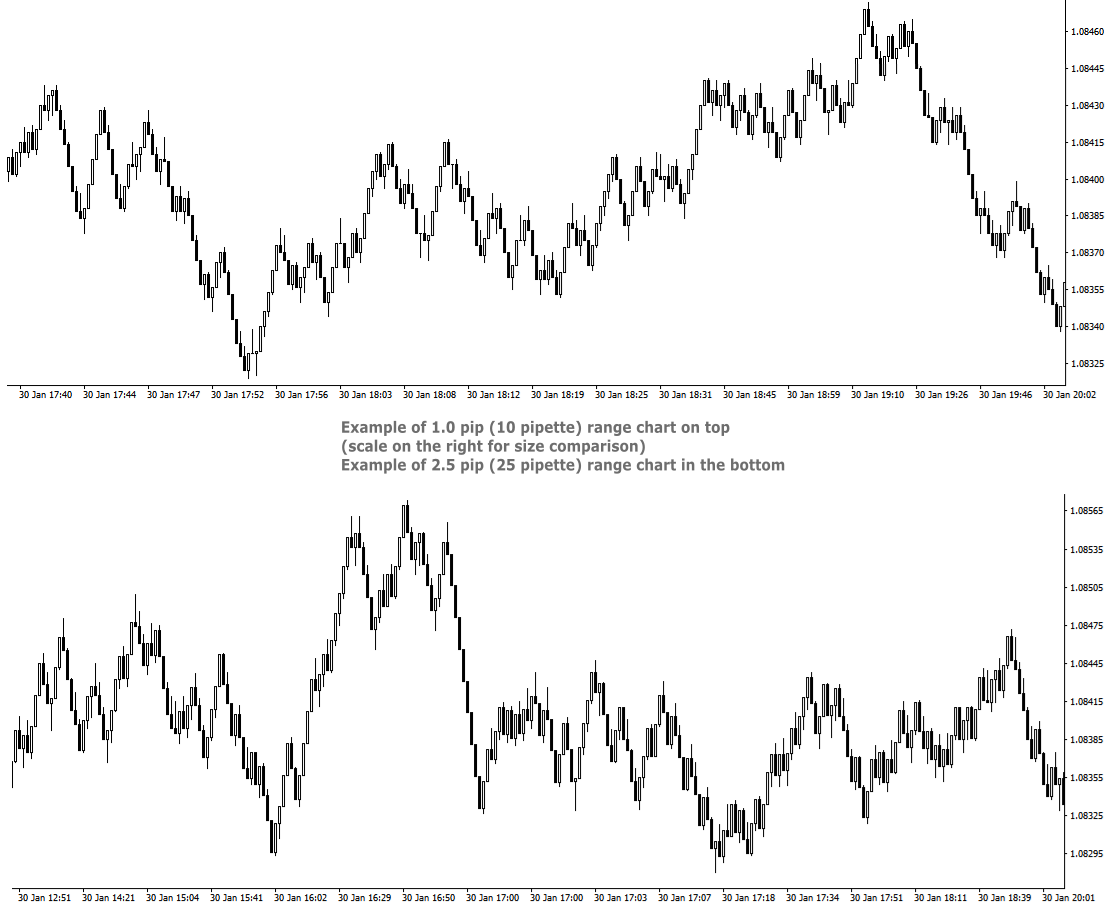
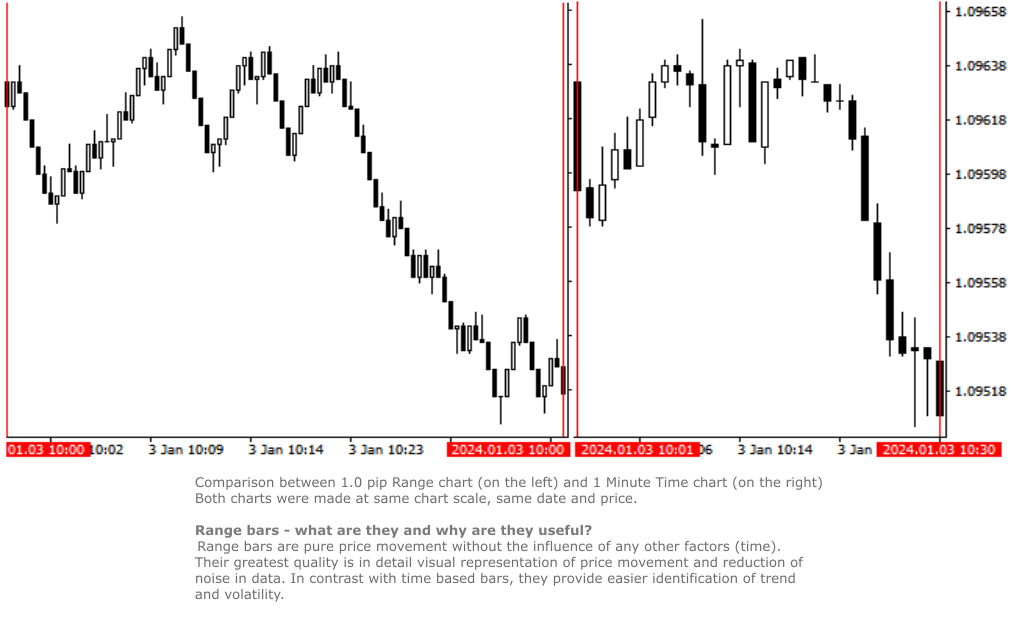
  • Custom Range chart creation - Range bars consider only price, thereby eliminating time from the equation. RRBCTC allows user custom selection of range bar size, starting from 0.1 pip (1 pipette) all the way up to 100 pip or more. Smallest increment is 0.1 pip (Example: 1.2, 1.3, 1.4 pip and so on). Values in pipettes are available for instruments using extra decimal (most of them do). 
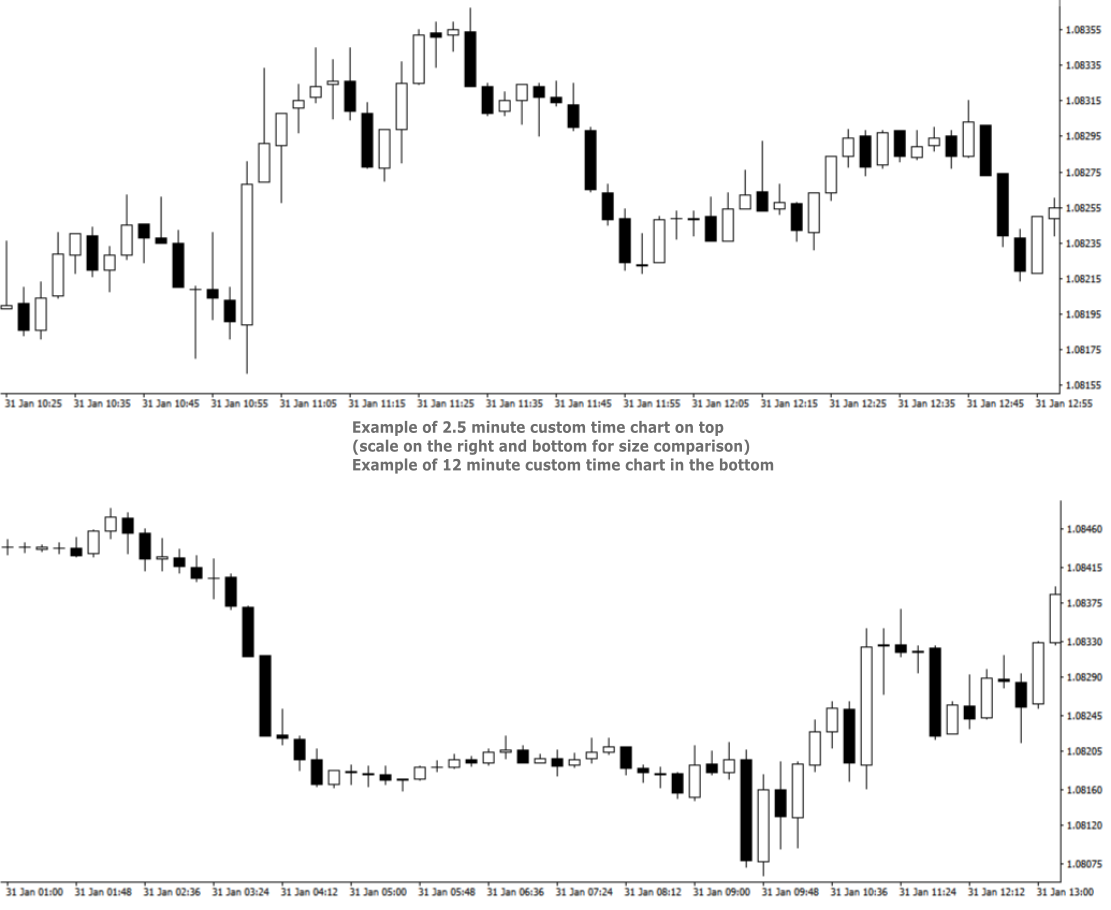
  • Custom Time chart creation - RRBCTC allows user custom selection of time frame size in minutes or/and hours, starting from 0.02 min (1 second) all the way up to 720 hours (30 days). Smallest increment is 0.01 min. Scientific decimal system is used for time values (3.5 minutes = 3 min 30 sec)
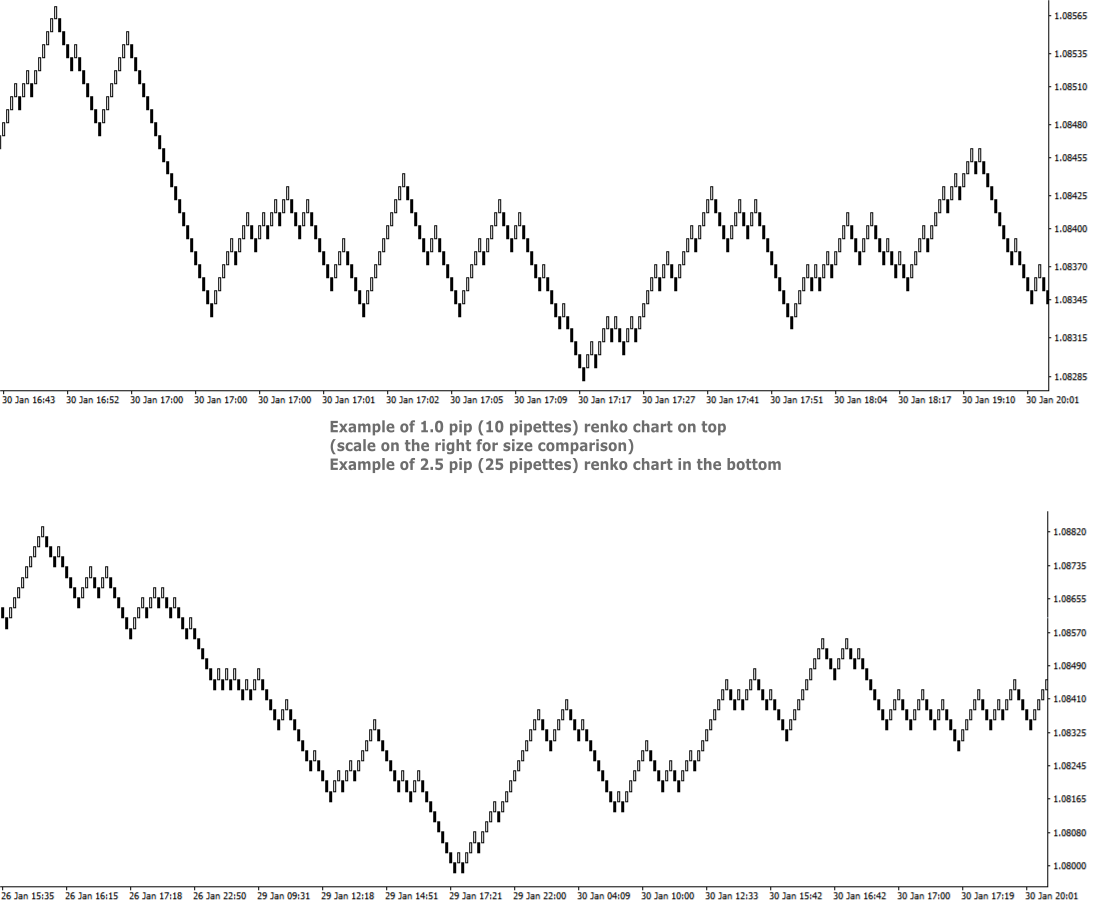
  • Custom Renko chart creation - Renko are bricks created at 45-degree and filter out minor price movements. RRBCTC allows user custom selection of renko bar size, starting from 0.1 pip (1 pipette) all the way up to 100 pip or more. Smallest increment is 0.1 pip. (Example: 1.2, 1.3, 1.4 pip and so on). Values in pipettes are available for instruments using extra decimal (most of them do).
  • Custom Volume chart creation - Volume bars are all created with the same amount of tick volume and represent price movement within that volume value. RRBCTC allows user custom selection of volume bar size, starting from 1 unit of volume all the way up to 100000 units or more. Smallest increment is 1 unit of volume. 
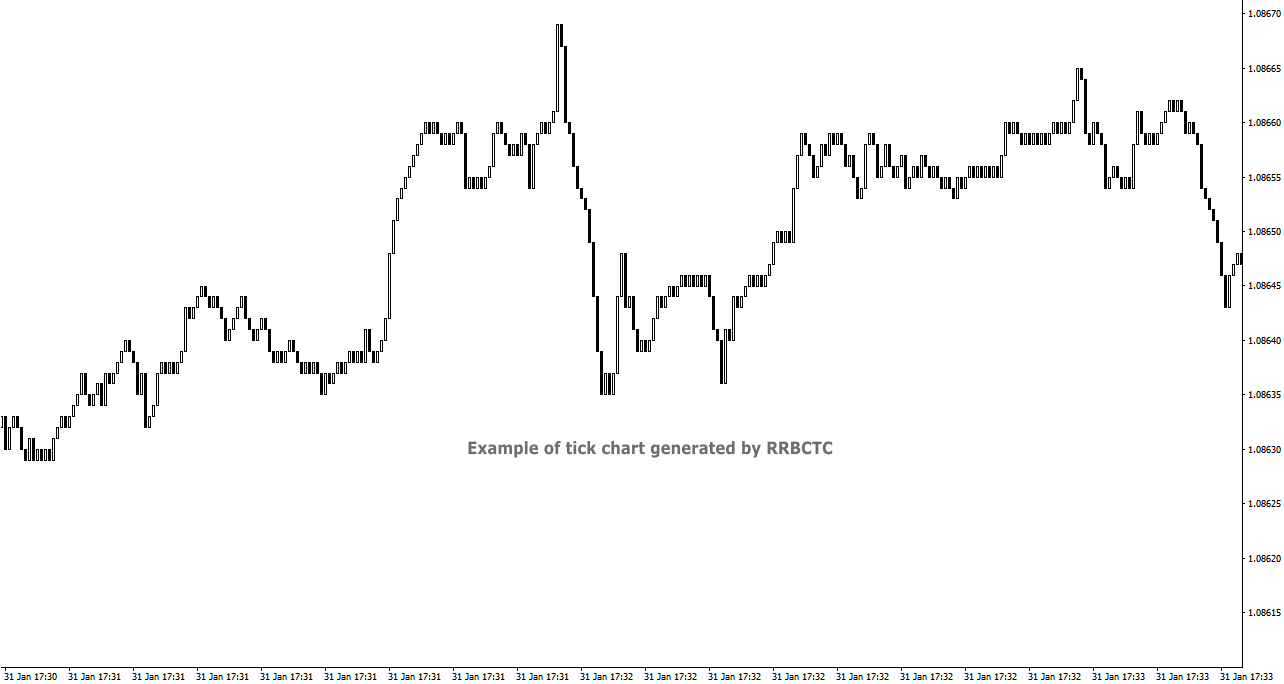
  • Tick chart creation - Tick bars are minimum measurement of price change. RRBCTC allows user display of pure tick bars.
  • Real time chart update - Opened charts are continuously updated (around 20 times a second), displaying new data and allowing MT4 indicators or EAs to function just as they do on regular MT4 charts. User will not be able to notice any delay in market movement. 
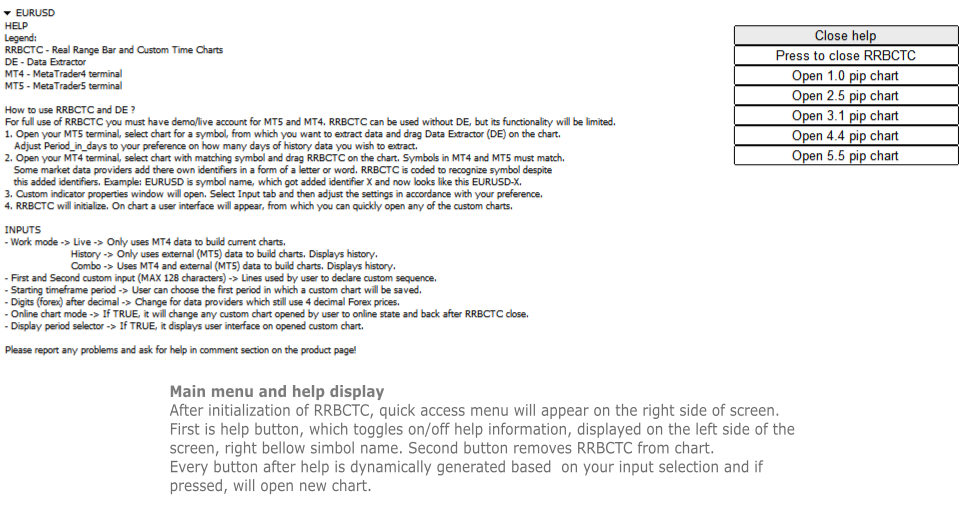
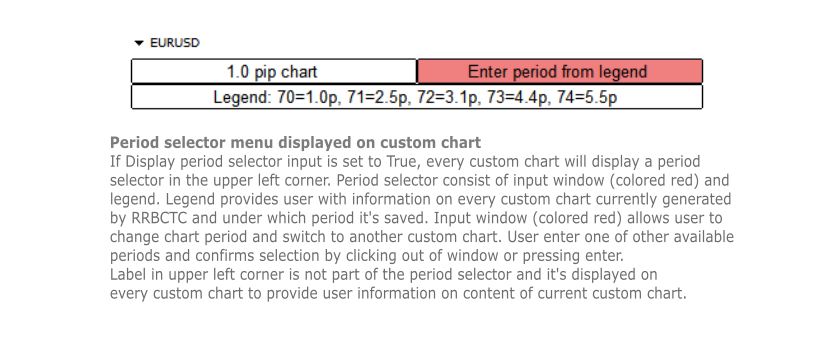
  • User interface - Build in user help and interface. There are 2 versions of on chart interface. The first is displayed on the chart, where indicator was attached to and shows help, close and open chart buttons. Second interface is attached to every custom chart opened and provides user with information about the chart and option to change chart period directly.
  • Chart management - User can choose to use RRBCTC in more manual way or to leave chart management to auto function. In automatic mode RRBCTC will manage charts online/offline state and save data if needed. 
  • Error prevention - Integrated user error prevention functions, which should handle most potential user errors.
  • Compatibility - Designed to work with all types of financial instruments, with automatic symbol recognition build in. 


SETTINGS (INPUTS)

  • Work mode 
    • Live -> Only uses MT4 data to build current charts, does not build history past the point of RRBCTC initialization. Recommended work mode for live trading, where past data is not needed. 
    • History -> Only uses external (MT5) data to build charts. History is build for a time interval defined by a user. Recommended work mode for long term chart analysis, where a large quantity of data is needed. 
    • Combo -> Uses MT4 and external (MT5) data to build charts. History is build for a time interval defined by a user. Recommended work mode for live trading and short/medium term chart analysis.
  • Predefined inputs
    • Custom Range input -> Allows use of First and Second custom input lines, where user can define range bar sizes for which charts will be build.
    • Custom Time input -> Allows use of First and Second custom input lines, where user can define time frame sizes for which charts will be build.
    • Custom Renko input -> Allows use of First and Second custom input lines, where user can define renko box sizes for which charts will be build.
    • Custom Volume input -> Allows use of First and Second custom input lines, where user can define volume sizes for which charts will be build.
    • Tick values - Creates only tick chart. Can also be created alongside Range charts, by entering 0 as one of the values in custom input.
    • Range 0.1 - 1 pip -> 1. st predefined sequence. No user input. Creates 10 charts from 0.1 - 1.0 pip, with increments of 0.1 pip.
    • Range 1 - 10 pip -> 2. nd predefined sequence. No user input. Creates 19 charts from 1.0 - 10.0 pip, with increments of 0.5 pip.
    • Range 1 - 32 pip -> 3. rd predefined sequence. No user input. Creates 32 charts from 1.0 - 32.0 pip, with increments of 1.0 pip.
    • Time 0.5 - 60 min -> 4. th predefined sequence. No user input. Creates 15 charts from 0.5 (half) minute - 60.0 min (1 hour), with 1.5x or 2.0x increments. Intra hour time frames.
    • Time 1.0 - 1440 min -> 5. th predefined sequence. No user input. Creates 17 charts from 1.0 minute - 1440.0 min (1 day), with 1.5x or 2.0x increments. Intra day time frames.
    • Time 1 - 720 hours -> 6. th predefined sequence. No user input. Creates 17 charts from 1.0 hour - 720.0 hour (1 month), with 1.5x or 2.0x increments. Intra month time frames.
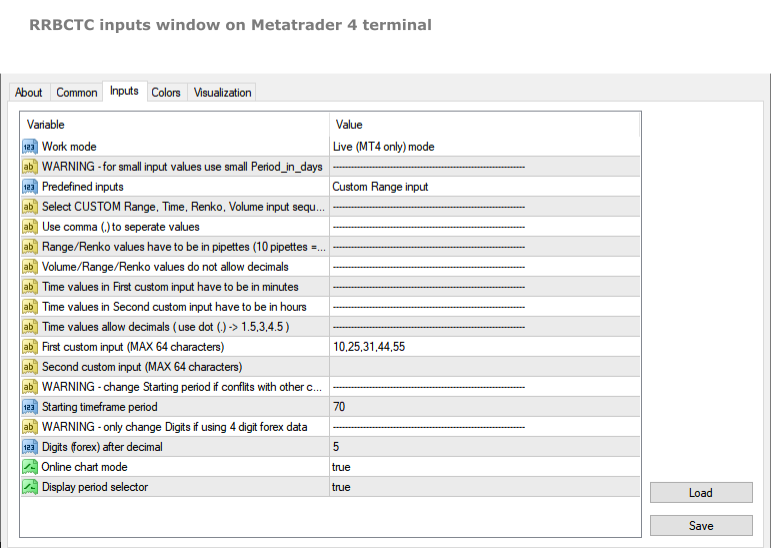
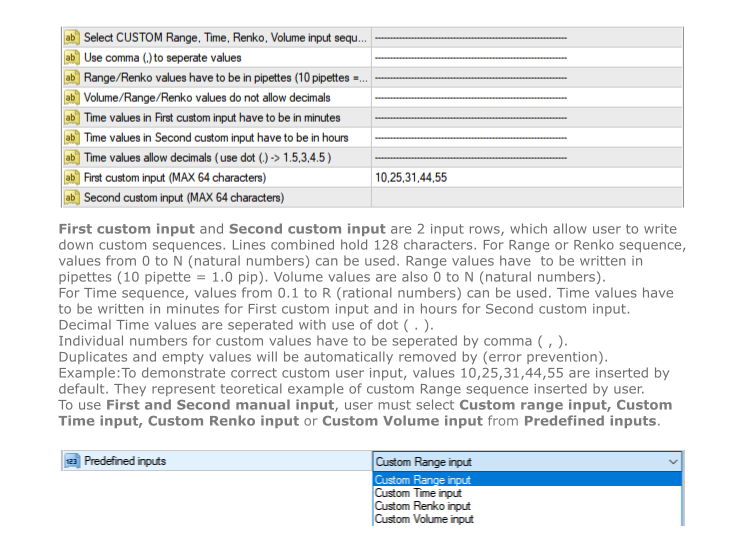
  • First custom input (MAX 64 characters) -> First line to be used to declare custom sequence. Based on Custom input type, it allows values in pipettes or minutes or volume. 
  • Second custom input (MAX 64 characters) -> Second line to be used to declare custom sequence. Based on Custom input type, it allows values in pipettes or hours or volume. Both lines can be used simultaneously. Instructions, for how to input values correctly, are stated in the settings above the first custom input line.
  • Starting time frame period -> Chart build by RRBCTC need to be saved in selected symbol history. User can choose the first period in which a custom chart will be saved. Charts after the first get assigned period by RRBCTC.
  • Digits (forex) after decimal -> This setting should only be used by users who still receive symbol data with one less decimal spot. Forex example: if your EURUSD price value only has 4 decimals, then you are one of the few, whose forex data provider, still hasn't switched to 5 decimal data.
  • Online chart mode -> If set to true, it will automatically  change any custom chart opened by user to online state and back to offline state after RRBCTC close. Chart must be in online state to allow live trading and updating of indicators and/or EAs attached to custom chart.
  • Display period selector -> If set to true, it displays user interface on any opened custom chart. The interface allows user to switch between custom charts generated by RRBCTC.


HOW TO USE RRBCTC and Data Extractor

For full use of RRBCTC, you must have demo or live account for MT5 and MT4. RRBCTC can be used without Data Extractor (DE), but its functionality will be limited. Only Live mode will work without it. Once you have downloaded RRBCTC for MT4 and DE for MT5, you must locate them in your terminal market indicator folder.

Recommended procedure on how to use RRBCTC:

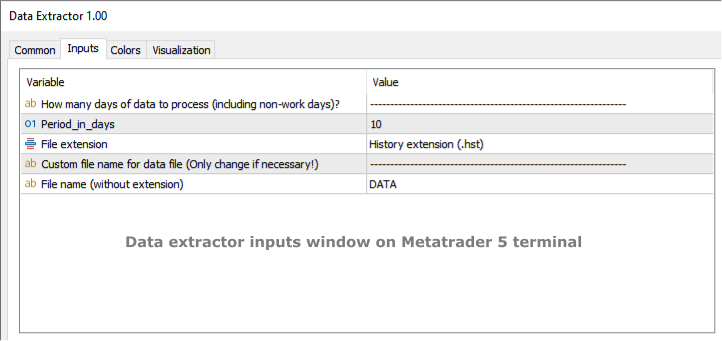
  1. Open your MT5 terminal, select chart for a symbol, from which you want to extract data and drag Data Extractor (DE) on the chart. The only DE setting you might need to adjust according to your preference is called Period_in_days. This setting controls how many days of history data you wish to extract. It's recommended to leave this setting unchanged on your first use of RRBCTC. Other DE setting should never be changed (ignore them).
  2. Open your MT4 terminal, select chart with matching symbol and drag RRBCTC on the chart. Symbols in MT4 and MT5 must match, but they do not need to match perfectly. Some market data providers add there own identifiers in a form of a letter or word. RRBCTC is coded to recognize symbol despite this added identifiers. You as the user only need to match the symbol name. Example: EURUSD is the symbol name, sometimes symbol name get added identifier, which may look like this EURUSD-X. 
  3. When dragged to chart, RRBCTC custom indicator properties window will open. Select Input tab and then adjust the settings in accordance with your preference. For best experience, please follow instructions stated in this product description or in the indicator itself. 
  4. Once settings have been confirmed and properties window closed, RRBCTC will initialize. The length of this process depends on the quantity of data RRBCTC need to process. For most use cases this will only take a couple of seconds. On chart a user interface will appear, from which you can quickly open any of the custom charts.

From this point onwards, you a free to explore custom charts and experiment with changing of RRBCTC input settings. RRBCTC has many user error prevention functions, so there is no need to worry about doing any damage to your existing charts or MT4 terminal. Example of such function: RRBCTC does not allow you to write over any of MT4 default time frames (like M15, H1,..). 


FREQUENTLY ASKED QUESTIONS (recommended reading)

  • Q -> What happens with open custom charts, if user removes (closes) RRBCTC from the chart?

A -> All opened custom charts will remain open. If setting Online chart mode is set to TRUE, then any open online chart will be set to offline state, before RRBCTC closes. If setting Online chart mode is set to FALSE, then charts will remain in the state user manually set them to. By default such charts are in offline state. Objects and indicators attached to open custom chart will be preserved.

  • Q -> What happens with open custom charts, if user closes MT4 terminal without removing RRBCTC from chart?

A -> On next MT4 terminal start up, RRBCTC will initialize and set open custom charts to state they were in before closing of MT4 terminal.

  • Q -> Can user switch between custom charts in the same way one can switch between time frames on normal MT4 time charts?

A -> If setting Display period selector is set to TRUE, every open custom chart will have user interface displayed in the upper left corner of the chart. This interface allows user to switch between custom charts, without opening new chart. Interface displays information about current chart, a legend containing information about other custom charts and input field, where period of other custom chart can be entered. Simply click on the input, write period number of chart you wish to display and confirm input by pressing Enter or clicking out of input field. Chart switch might take a second to happen, this is because MT4 terminal does not prioritize this function. If setting Online chart mode is set to FALSE, all custom charts are in offline state. Period selector will not work in offline state!

  • Q -> Can RRBCTC be used for financial instruments, other than forex?

A -> RRBCTC should be able to recognize all symbols (even more obscure ones) and correctly build custom charts for them. There is a however a chance, RRBCTC might struggle with correct chart construction for some symbols. If you encounter such an example, please inform me, so that error can be fixed.

  • Q -> Can more then one RRBCTC run at the same time?

A -> Several RRBCTC can run simultaneously, but only one can be attached to a unique chart. You can even run 2 or more RRBCTC for one symbol, as long as they are attached to separate chart and periods used for saving custom charts don't overlap. If the periods do overlap, it is likely that will cause error.

  • Q -> How many custom charts can RRBCTC create?

A -> RRBCTC has no theoretical hard limit on how many custom charts it can create, but in practice the number is limited by the length of user defined custom sequence. There are 2 input lines, each can hold 64 characters, so 128 characters combined. The max value depends on the values inserted by the user, but on average you can expect RRBCTC to create maximum of around 32 custom charts. It's advised to only create as many custom charts as is needed. Maintaining custom charts, that will not be used, is a draw on resources.

  • Q -> How safe are RRBCTC created charts for live trading?

A -> Custom charts are as safe as the default MT4 time charts, provided user follows instructions. Live and Custom modes should be used for live trading, because they update current price values directly from MT4. History mode can also be used for live trading, but since it only uses external data, there could potentially be slight differences in price values. If you use quality market data provider, there should be no difference between values. Market data should always be the same, regardless of data provider. If you observe mismatch in charts, there are 2 potential problems. Either you have set up RRBCTC wrong or your market data provider has low quality data.

  • Q -> Is RRBCTC use of external data a potential safety risk?

A -> RRBCTC only uses data needed to construct charts correctly. This data is read-only and processed in very specific order. Any interference with this data would only result in error. RRBCTC does not collect, process or communicate any data related to user account. 

  • Q -> What happens, if user applies template to custom chart and overrides previous custom chart content?

A -> RRBCTC was coded to handle such situation. Users are free to use templates to quickly move chart content to custom chart. After user applies template, RRBCTC will restore its custom chart user interface and  leave content created by template intact. User might notice slight delay and chart switching to 1 hour (H1) period for a moment. This is normal and unavoidable part of how MT4 handles custom online charts.


REQUIREMENTS AND SYSTEM INFORMATION 

  • OS Windows (any version), might work on other OS, but not verified
  • RRBCTC and DE will work with portable version of MT4


DISCLOSURE STATEMENT

Data from different market providers may result in slight differences on some custom charts.

RRBCTC and DE will be supported as long as author has capabilities to do so. Author does not take responsibility for updating software, if external factors beyond his control, prevent it.

Please report any problems and ask questions for more details!


LINKS

Link to Data Extractor:  https://www.mql5.com/en/market/product/112293

Рекомендуем также
Linker
Roman Lipatov
5 (1)
"LINKER" - индикатор, который линкует любое количество окон, на графиках которых он установлен. Также имеется синхронизированное перекрестие, включаемое клавишей (Ctrl) или кнопкой (L). Есть возможность отключать видимость торговых уровней по отдельности на каждом графике, клавиша (Shift) или кнопка (V). Кнопки и перекрестие имеют настройки и смену цветов. Допустим, вам необходимо произвести анализ торгового инструмента на разных таймфреймах, к примеру, на H1, H4 и D1. Делать это в одном окне гр
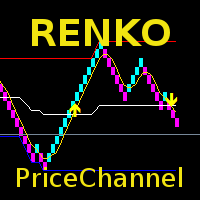
Индикатор отображает на графике ренко-бары, вычисляет и отображает по их данным скользящую среднюю, PriceChannel и выделяет сигналы для покупки/продажи. Ренко - специализированное отображение движения цены, при котором на график выводится бар временного интервала лишь при условии, что цена прошла более заданного количества пунктов. Ренко-бары не привязаны к временному интервалу, поэтому индикатор с одинаковой эффективностью может работать на любом таймфрейме. PriceChannel - индикатор, отображающ
This indicator is a great utilities tools for Fibonacci Trader that draw their chart manually. This indicator do not draw any Fibonacci Retracement or Fibonacci Expansion. It is a utilities tool for modifying the Fibonacci level for Fibonacci object manually drawn on the chart. Just draw using the Fibonacci Retracement or other Fibonacci tool in MT4 as per normal. The select the Fibonacci you have just drawn. Make sure you have only 1 object selected. Then open up this Fibonacci Level Management
Choch Pattern
Rodion Matveichuk
5 (1)
Профессиональный индикатор "Choch Pattern Levels" с RSI-фильтром для MT4 Описание: Вы устали от ложных пробоев и хотите находить точки разворота тренда с высокой точностью? Индикатор Choch Pattern Levels — это ваш профессиональный инструмент для определения смены характера рынка (Change of Character), дополненный мощным фильтром RSI и анализом объемов , чтобы вы входили в рынок только по самым надежным сигналам. Этот индикатор автоматически находит и отрисовывает на графике ключевые паттерны раз
FREE
Индикатор Before предсказывает наиболее вероятное краткосрочное движение цен на основе сложных математических расчетов. Большинство стандартных индикаторов, обычно использующихся в торговых стратегиях, основаны на довольно простых расчетах. Это не значит, что в период их создания в мире не было выдающихся математиков. Просто в те времена еще не существовало компьютеров или их мощности не хватало для последовательного проведения сложных математических операций. В наши дни любой смартфон намного
KT Renko Live Chart MT4
KEENBASE SOFTWARE SOLUTIONS
Утилита KT Renko Live Chart создает графики Ренко в терминале MT5, которые можно использовать как для спекулятивной торговли, так и для реальной торговли в режиме онлайн. Графики Ренко, создаваемые с помощью этой утилиты, поддерживают большинство пользовательских индикаторов и автоматических торговых советников. Полностью совместима с нашим индикатором Renko Patterns и советником Renko Patterns EA. Особенности Простая и понятная утилита Ренко, предоставляющая график Ренко на MT5 без сложных нас
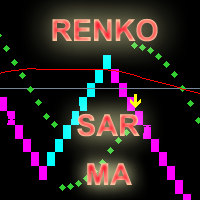
Индикатор отображает на графике ренко-бары, вычисляет и отображает по их данным индикаторы MA, PSAR и выделяет сигналы для покупки/продажи. Ренко - специализированное отображение движения цены, при котором на график выводится бар временного интервала лишь при условии, что цена прошла более заданного количества пунктов. Ренко-бары не привязаны к временному интервалу, поэтому индикатор с одинаковой эффективностью может работать на любом таймфрейме. Сигнал на покупку формируется когда показания PSA
Power Renko is an indicator which plots Renko bricks underneath the chart using a histogram. You can select the brick size and the timeframe of the Renko bricks as well as whether or not to use the close price or the high/low price of the candles. Renko bricks are based on price alone, not time, therefor the Renko bricks will not be aligned with the chart's time. They are extremely useful for trend trading and many different strategies can be formed from them. Buffers are provided allowing you t
Identify Take
Oleksii Ferbei
4.5 (2)
Identify Take - стратегия для торговли по тренду, фильтрация рыночного шума и все необходимые функции, встроенные в один инструмент! Система сама показывает в виде стрелок когда покупать и когда продавать. Использует всего один параметр для настроек. Простое, визуальное и эффективное обнаружение тренда.  Интеллектуальный алгоритм индикатора Identify Take показывает точки потенциального разворота рынка. Чаще всего хороший тренд виден на ценовом графике визуально. Но опытный трейдер перед входом
Trades Extractor
Medilane Bernard Philippe Couratier
Jarfac Trades Extractor Description: Le "Jarfac Trades Extractor" est un script MQL4 conçu pour les traders qui souhaitent exporter et analyser leurs trades historiques. En un seul clic, le script génère un fichier CSV contenant des informations détaillées sur chaque trade exécuté pendant une période spécifiée. Caractéristiques principales : Filtrage par Période : Définissez une période personnalisée pour l'extraction. Possibilité de désactiver le filtrage par période. Filtrage par Commentaire :
FREE
Order Closer Manager Order Closer Manager Order Closer Manager is a powerful and easy-to-use MetaTrader 4 (MT4) Expert Advisor designed to help traders efficiently manage their open orders. This EA is ideal for traders who want precise control over their trades with minimal manual intervention. Key Features: Close Orders by Percentage: Automatically close a specified percentage of your total open lot size with a single click. Breakeven Management: Apply breakeven levels to buy, sell, or all open
Candle Average
Mahmoud Helmy Sedik Mohamed Mansour
Candlestick patterns have little value without the right   price action   context. If you’ve been studying candlestick formations, you must have heard this principle many times over. You cannot trade patterns in a vacuum. But what do we mean by   context ? It is an overall technical assessment that encompasses: The market’s trend Support and resistance structure Recent price formations Volatility It seems intimidating at first, but a simple trading indicator can help us out here - the   moving a
Индикатор отображает на графике ренко-бары, вычисляет и отображает по их данным индикаторы PSAR, CCI и выделяет сигналы для покупки/продажи. Ренко - специализированное отображение движения цены, при котором на график выводится бар временного интервала лишь при условии, что цена прошла более заданного количества пунктов. Ренко-бары не привязаны к временному интервалу, поэтому индикатор с одинаковой эффективностью может работать на любом таймфрейме. Сигнал на покупку формируется когда индикатор CC
В основе графиков Ренко лежит отслеживание ценового движения. Если цена выходит за пределы определенного диапазона, на графике отображается бар ("кирпичик") выше или ниже предыдущего. В результате мы четко видим движение цены и важные уровни поддержки/сопротивления. Так как классический график Ренко не зависит от времени, его довольно трудно использовать вместе с другими техническими индикаторами. Это особенно касается тестирования вашей стратегии на истории. Именно для преодоления этого неудобс
Индикатор Ренко (Renko) - это инструмент технического анализа, используемый на форекс-рынке для визуализации ценовых движений и трендов, устраняя рыночный "шум". В отличие от традиционных свечных или баровых графиков, Ренко строится на основе изменения цены на заданное количество пунктов, называемое "размером кирпича". Когда цена движется на это количество пунктов, добавляется новый "кирпич" в диаграмму. Этот индикатор игнорирует время и объем, концентрируясь исключительно на ценовых изменениях.
Реаниматор был сделан не как Советник, который выполняет сделки с целью заработка. Его задача - попытаться выйти из большой просадки путём высчета Лота по формуле, включаяющая в себя расстояние до нашей цели и текущей просадки. Быбают случаи, когда при просадке мы видим, что цена должна пойти, например, вверх. И мы думаем, что знаем, до какой точки цена ТОЧНО дойдет. К примеру: "Вот! Сейчас точно цена пойдет на 100-120 пипсов ввех!".  В таком случае мы указываем наши те самые 100 пипсов, а Сове
EurUsd Binary Options
Daniel Joseph Kibe Wangewa -
YOU CAN ONLY FOWARD TEST THIS INDICATOR. USE DEMO FOR THIS AND SHARE YOUR RESULTS This indicator is a combination of different strategies that in theory drive the market.  Multi-Currency - Using the separate currencies; Euro and Dollar. RSI - from the separate currencies I get two different RSI values that are used to measure the market strength and direction It is important to note that this is not the Holy Grail and you should use a good money management system.  Two signals will appear from
Price Trend Light - красивый индикатор, показывающий области покупок и продаж. Индикатор следует за движением цены вокруг цены открытия. Он также отображает информацию о тренде, следующем за пробоем минимума и максимума. У индикатора очень простая, но эффективная графика: выше цены открытия отображается светло-зеленый цвет, ниже цены открытия - красный свет. На каждом пробое минимума или максимума, установленного во входных параметрах, цвет области индикатора меняется, становится более интенсивн
PipMaster is built using a powerful trend + momentum following algorithm. Made after years of testing and with market noise filtering built-in.  Aggressive traders can enter a trade as soon as an arrow appear. Conservative traders should wait for a visual alert after a closed candle bar. This indicator is a great tool to be used with your most trusted trend/momentum trading strategy and with solid money management rules. Key Benefits: -Super easy to use by following color coded arrow pointing t
Индикатор для Форекс и Бинарных опционов написан на основе 2-х стандартных индикаторов в МТ4: ADX и RVI. Сигналы поступают при одновременных пересечениях линий обоих индикаторов. Но также в коды прописаны и реверс сигналов. Это когда сигналы преобразуются в обратном направлении. Также можно включать и отключать каждый из индикаторов. И также в RVI можно применять 2 типа сигналов: 1) Просто когда одна линия выше/ниже другой (это хорошо применять как безоткатное трендовое движение цены); и 2) Имен
Осциллятор, показывающий направление тренда с помощью вычислений собственного алгоритма, который основывается на вычислении значений цены, просчитывая цены отдельных валют (своеобразная оценка стоимости валют). Гистограмма показывает усредненное значение физического изменения цены на выбранном периоде. Когда гистограмма имеет положительное значение, это означает что тренд восходящий, при отрицательном значении - нисходящий. С помощью стандартного RSI определяется текущее направление рынка для вы
<LOGIC> The EMA RENKO EA should run in Renko chart to show the best performance. The EA will entry based on 2 EMA line cross. (it is changeable in parameter.) As a result of FT , the best box size for XAUUSD (GOLD) is BOX 60 to 100.  Renko box size should be larger than spread value. Normally 3 times of spread. Please decide your box size with yourself. The EA will place addtional order as Grid if the trend move  to xxx pips from the last order. You can turn on/off in the parameter. The MAC
Velas RENKO
Ramon Sobrevals Arce
Immediately plots renko bars in an external/indicator window.  One of the distinctive advantages Renko charts offer is the fact that they are not time dependent. Therefore, the new Renko blocks are only traced when the price moves higher or lower by the specified number of points.  For example, a 10 pip (100 points) Renko chart would plot the blocks when price moves 10 pips higher in an uptrend or 10 pips lower in a downtrend. Renko charts removes "noises" from the Market and i t helps to identi
Bigger chart labels would allow the user to be entirely aware of which chart he/she is on. Each chart window is unique, containing different patterns and economic motives so acknowledging the chart window would be absolutely essential! There are well known Economic Time Zones included in clear view, by choice!    Simple does it! Use your computing mouse scroller, clicking with the right finger on the label, in order to customize the label properties. From there, choose your preferred color, fon
FREE
Orynth P&F Overlay — Визуализатор чистых трендов Orynth — это профессиональный инструмент технического анализа, который переносит логику графиков «Крестики-Нолики» (Point and Figure) прямо на стандартный свечной график. Индикатор эффективно фильтрует рыночный шум, фокусируясь исключительно на значимых движениях цены. В отличие от классических P&F графиков, которые открываются в отдельном окне, Orynth накладывает ценовые «боксы» поверх основного графика , позволяя совмещать анализ Price Action с
Advanced CRT Indicator MT4 — Candle Range Theory Tool Advanced CRT Indicator MT4 is a professional analysis tool that automates Candle Range Theory. It identifies consolidation ranges, breakout levels, Fair Value Gaps (FVG), and profit targets, with a real-time dashboard and alerts. Overview - Multi-timeframe candle range detection   - Automatic breakout levels with buffer settings   - Fair Value Gap identification and tracking   - Up to three customizable target levels (Risk:Reward ratios)  
RenkoChart
Boris Sedov
5 (1)
Renko Chart — графики рэнко для MetaTrader 4. Утилита позволяет создавать графики рэнко, на которых все бары имеют вид Renko-"кирпичей". Все бары на графике рэнко одинакового размера, который можно изменять для получения нужного графика. На полученный график можно прикреплять индикаторы, советники и скрипты. Получается полностью рабочий график, на котором можно работать точно так же, как и на обычном графике. График рэнко строится не только на истории, но и онлайн. Данные обновляются синхронно с
Renko HMA
Bogdan Mihail Moise
Renko HMA  Channel is a professional EA the uses Renko charts in combination with the Hull Moving Average. Time Frame :   This expert advisor works on all timeframes; Account balance:   it doesn't matter, but I recommend at least 1000 EUR or 1500 USD; Currency pair :       Doesn't matter ; Warning! Do not use the default settings, always use optimization option in strategy tester to find the best settings for your broker, preferred chart and timeframe! - Multiple user options, for finetuning
Индикатор торговой платформы MetaTrader 4, RSI TrendLine Divergency Message - три в одном, в отличие от стандартного имеет систему оповещений об изменении рыночной ситуации, состоящую из сигналов: Пересечение Главной линией уровней крайних зон и уровня 50%; Пересечение Главной линией Трендовой линии в окне индикатора; Дивергенция на последнем баре. Параметры экстремальных, среднего уровней и зон дивергенции - настраиваемые. Параметры Language – выбрать русский/английский язык; Options – настрой
BeST_Darvas Boxes is an MT4  Indicator based on the trading method developed in the 50’s by the Hungarian Nicolas Darvas . BeST_Darvas Boxes indicator draws the Top and the Bottom of every Darvas Box  that can be confirmed on the current Chart. draws Buy and Sell Arrows  for every confirmed Upwards or Downwards Breakout of the above levels. draws always only after the bar closing and so is non-repainting or backpainting . Note : Every customer who wants to have the older version v_1.75 with th
С этим продуктом покупают
Exp COPYLOT CLIENT for MT4
Vladislav Andruschenko
4.69 (65)
Профессиональный копировщик сделок для MetaTrader 4 Быстрый, профессиональный и надежный копировщик сделок для MetaTrader 4 . COPYLOT позволяет копировать сделки Forex между терминалами MetaTrader 4 и MetaTrader 5 , обеспечивая гибкую синхронизацию для разных типов счетов и сценариев торговли. Версия COPYLOT MT4 поддерживает: MetaTrader 4 → MetaTrader 4 MetaTrader 5 Hedge → MetaTrader 4 MetaTrader 5 Netting → MetaTrader 4   Версия MT5 Полное описание + DEMO + PDF Как купить Как установить Как по
Добро пожаловать в Trade Manager EA — лучший инструмент для управления рисками, предназначенный для упрощения, точности и эффективности торговли. Это не просто инструмент для размещения ордеров; это комплексное решение для удобного планирования торгов, управления позициями и усиленного контроля над рисками. Независимо от того, начинающий вы трейдер, опытный специалист или скальпер, нуждающийся в быстром исполнении, Trade Manager EA адаптируется к вашим потребностям и работает с любыми активами:
Local Trade Copier EA MT4
Juvenille Emperor Limited
4.96 (110)
Опыт экстремально быстрого копирования сделок с помощью Local Trade Copier EA MT4 . Благодаря простой установке в течение 1 минуты этот копировщик сделок позволяет вам копировать сделки между несколькими терминалами MetaTrader на одном компьютере с Windows или на Windows VPS с крайне быстрыми скоростями копирования менее 0.5 секунды. Независимо от того, новичок вы или профессиональный трейдер, Local Trade Copier EA MT4 предлагает широкий спектр опций, чтобы настроить его под ваши конкретные пот
Trade Assistant MT4
Evgeniy Kravchenko
4.43 (196)
Помогает рассчитать риск на сделку, простая установка нового ордера с помощью линий, управление ордерами с функциями частичного закрытия, 7 типов трейлинг-стопа и другие полезные функции. Дополнительные материалы и инструкции Инструкция по установке   -   Инструкция к приложению   -   Пробная версия приложения для демо счета Функция Линии   - отображает на графике линию открытия, стоп-лосс, тейк-профит. С помощью этой функции легко установить новый ордер и увидеть его дополнительные характери
TradePanel MT4
Alfiya Fazylova
4.84 (95)
Trade Panel — это многофункциональный торговый помощник. Приложение содержит более 50 торговых функций для ручной торговли и позволяет автоматизировать большинство торговых операций. Перед покупкой вы можете протестировать демоверсию на демо-счете. Скачать пробную версию приложения для демонстрационного аккаунта: https://www.mql5.com/ru/blogs/post/750864 . Полная инструкция здесь . Торговля. Позволяет совершать торговые операции в один клик: Открыть отложенные ордера и позиции с автоматическим р
PZ Trade Pad Pro MT4
PZ TRADING SLU
3.67 (3)
Это визуальная торговая панель, которая помогает вам легко размещать сделки и управлять ими, избегая человеческих ошибок и повышая вашу торговую активность. Он сочетает в себе простой в использовании визуальный интерфейс с надежным подходом к управлению рисками и положением [ Руководство по установке | Руководство по обновлению | Устранение неполадок | FAQ | Все продукты ] Удивительно простой в использовании Торгуйте легко с графика Торгуйте с точным управлением рисками, без проблем Сохранение
Copy Cat More Trade Copier MT4 (Копия Кот MT4) — это не просто локальный торговый копировщик; это полноценная система управления рисками и исполнения, созданная для современных условий торговли. От испытаний в prop-фирмах до личного управления счетами — он адаптируется к любой ситуации, сочетая надежное исполнение, защиту капитала, гибкую настройку и расширенные функции обработки сделок. Копировщик работает как в режиме Master (отправитель), так и в режиме Slave (получатель), обеспечивая синхрон
Trade Manager MT4 DaneTrades
Levi Dane Benjamin
4.09 (11)
Trade Manager, который поможет вам быстро входить и выходить из сделок, автоматически рассчитывая риск. Включает функции, которые помогут предотвратить чрезмерную торговлю, торговлю из мести и эмоциональную торговлю. Сделками можно управлять автоматически, а показатели эффективности счета можно визуализировать в виде графика. Эти функции делают эту панель идеальной для всех трейдеров, занимающихся ручной торговлей, и помогают улучшить платформу MetaTrader 4. Многоязычная поддержка. Версия MT5  |
Trade copier MT4
Alfiya Fazylova
4.56 (32)
Trade Copier — это профессиональная утилита, предназначенная для копирования и синхронизации сделок между торговыми счетами. Копирование происходит от счета/терминала поставщика к счету/терминалу получателя, которые установлены на одном компьютере или vps. АКЦИЯ - Если вы уже приобрели "Trade copier MT5", вы можете получить "Trade copier MT4" бесплатно (для копирования MT4 > MT5 и MT4 < MT5). Для получения более подробной информации об условиях, пожалуйста, свяжитесь с нами через личные сообщени
Coppy Master MT4
Sergey Batudayev
4 (3)
Coppy Master MT4  — инструмент для копирования сделок между терминалами MetaTrader 4 и MetaTrader 5. Поддерживает копирование в обоих направлениях: от MT4 к MT5, от MT5 к MT4, а также между счетами одного типа. Для корректной работы все терминалы должны быть запущены на одном компьютере или VPS. [ Инструкция и Демо ]  Для копирования на MetaTrader 4 требуется отдельная версия продукта —   Coppy Master MT5 . Основные функции: Тип подключения Режимы Master и Receiver. Возможность гибкой настройки
CloseIfProfitorLoss with Trailing
Vladislav Andruschenko
4.87 (31)
Close If Profit or Loss with Trailing для MetaTrader 4 — автоматическое закрытие по общей прибыли или убытку Надёжная торговая утилита для MetaTrader 4, которая автоматически закрывает позиции, когда общая прибыль или общий убыток достигает заданного уровня. Советник контролирует открытые сделки, считает плавающий результат, может использовать трейлинг прибыли и помогает закрывать позиции быстрее, чем ручная реакция трейдера. MetaTrader 4 до сих пор активно используют ручные трейдеры, скальперы
Exp4 Duplicator
Vladislav Andruschenko
4.5 (22)
Duplicator для MetaTrader 4 — профессиональный дубликатор позиций и ордеров внутри одного терминала Мощный советник для трейдеров, которым нужно автоматически дублировать уже открытые сделки, усиливать объём, применять собственные параметры лота и сопровождать дубликаты по заданной логике. Это удобный рабочий инструмент для ручной торговли, алгоритмических систем и гибкого управления уже существующими позициями. Duplicator не открывает сделки по своей торговой стратегии. Его задача — отслеживат
DrawDown Limiter MT4
Haidar Lionel Haj Ali
5 (8)
Drawdown Limiter EA You are in the right place if you were searching for Drawdown control, Drawdown limiter, Balance protection, Equity Protection or Daily Drawdown Limit related to Prop Firm, FTMO, or Funded account trading, or if you want to protect your trading account. Have you suffered from controlling your drawdown when trading funded accounts? This EA is meant for you. Prop firms usually set a rule called “Trader Daily Drawdown”, and if it is not respected, you are disqualified.  I am an
Trade Dashboard MT4
Fatemeh Ameri
4.96 (53)
Trade Dashboard simplifies how you open, manage, and control your trades, with built-in lot size calculation. It allows you to execute trades, manage risk, and control positions directly on the chart, with tools such as partial close, breakeven, and trailing stop. Designed to reduce manual work and help you stay focused on your trading decisions. A demo version is available for testing. Detailed explanations of features are provided within the MQL5 platform. Installation instructions are include
Close by percentage MT4
Konstantin Kulikov
5 (1)
Привет, друзья. Эту утилиту я написал специально для использования в своем профиле с большим количеством экспертов и сетов ("Joint_profiles_from_grid_sets" https://www.mql5.com/en/blogs/post/747929 ).  Теперь, чтобы ограничить убытки на счёте, нет необходимости менять параметр "Close_positions_at_percentage_of_loss" на каждом чарте. Просто откройте один дополнительный чарт, прикрепите данную утилиту и настройте желаемый процент по закрытию всех сделок на счёте. Утилита имеет следующий функциона
Telegram to MT4 Coppy
Sergey Batudayev
4 (10)
Telegram to MT4: Идеальное решение для копирования сигналов Упростите свою торговлю с Telegram to MT4 — современным инструментом, который копирует торговые сигналы прямо из каналов и чатов Telegram на вашу платформу MetaTrader 4, без необходимости использования DLL. Это мощное решение обеспечивает точное исполнение сигналов, широкие возможности настройки, экономит время и повышает вашу эффективность. [ Instructions and DEMO ] [ FAQ ] [ How atach logs properly ] [ Settings descrition ] Ключевые
MT4 к Telegram Signal Provider - это простой в использовании и полностью настраиваемый инструмент, который позволяет отправлять сигналы в Telegram, превращая ваш аккаунт в поставщика сигналов. Формат сообщений полностью настраиваем! Однако для простого использования вы также можете выбрать предопределенный шаблон и включать или отключать определенные части сообщения. [ Демо ]  [ Руководство ] [ Версия для MT5 ] [ Версия для Discord ] [ Телеграм-канал ]  New: [ Telegram To MT5 ] Настройка Шаг за
Unlimited Trade Copier Pro - это мощный инструмент для удаленного копирования сделок между несколькими счетами MetaTrader 4/MetaTrader 5, расположенными удаленно друг от друга, по сети интернет. Это идеальное решение для провайдеров сигналов, которые хотят поделиться своей торговлей с другими трейдерами по всему миру. Один поставщик может копировать сделки на неограниченное количество счетов-получателей, а один получатель также может копировать сделки неограниченного количества провайдеров. Пост
Custom Alerts AIO: Универсальный сканер рынка — Без настройки Обзор Custom Alerts AIO — это самый быстрый и простой способ отслеживать рыночные сигналы в реальном времени на множестве инструментов без дополнительной настройки и без необходимости покупать другие продукты. В состав входят все необходимые индикаторы от Stein Investments, что делает этот инструмент идеальным решением «всё в одном» для трейдеров, ценящих простоту и эффективность. Просто установите на график и сразу получайте сигнал
The product will copy all telegram signal to MT4   ( which you are member  ) , also it can work as remote copier.  Easy to set up, copy order instant, can work with almost signal formats, image signal, s upport to translate other language to English Work with all type of channel or group, even channel have "Restrict Saving Content", work with  multi channel, multi MT5 Work as remote copier: with signal have ticket number, it will copy exactly via ticket number. Support to backtest signal. How to
VirtualTradePad PRO SE MT4 — расширенная торговая панель и рабочее пространство на графике для MetaTrader 4 VirtualTradePad PRO SE — это профессиональная торговая панель и рабочая среда управления сделками для MetaTrader 4 . Она помогает трейдерам быстрее открывать, сопровождать, защищать, закрывать и анализировать сделки из одного интерфейса на графике. Продукт создан для активных ручных трейдеров, которым нужно больше, чем простой набор кнопок. PRO SE объединяет исполнение в один клик, отложен
MT4 to Discord Signal Provider — это удобный, полностью настраиваемый инструмент, предназначенный для отправки торговых сигналов напрямую в Discord. Этот инструмент превращает ваш торговый счет в эффективного поставщика сигналов. Настройте формат сообщений под свой стиль! Для удобства выберите из предварительно разработанных шаблонов и решите, какие элементы сообщения включить или исключить. [ Демо ] [ Руководство ] [ Версия MT5 ] [ Версия Telegram ]  New: [ Telegram To MT5 ] Настройка Следуйте
ManHedger MT4
Peter Mueller
5 (2)
THIS EA IS A SEMI-AUTO EA, IT NEEDS USER INPUT. Manual & Test Version Please TEST this product before   BUYING  and watch my video about it. Contact me for user support or bug reports, or if you want the MT5 version! MT5 Version I do not guarantee any profits or financial success using this EA. With this Expert Advisor, you can: Implement your own   Zone Recovery   strategy to capitalize on trending markets. Create   Grid   trading strategies, to profit from ranging markets. Place orders easil
RS Trade Copier - сверхбыстрый локальный копировщик сделок с полноценным графическим интерфейсом. Хватит вбивать номера счетов вручную. Никаких 200+ непонятных параметров в настройках. Надёжный и гибкий инструмент для копирования торговых операций между несколькими терминалами MT4 и MT5. Подходит как опытным трейдерам и сигнал-сервисам, так и частным инвесторам. Позволяет синхронизировать торговлю от одного или нескольких источников к одному или нескольким приёмникам с высокой точностью и минима
Trading History MT4
Siarhei Vashchylka
5 (9)
Trading History - Программа для торговли и управления капиталом на истории котировок в тестере стратегий. Может работать с отложенными и немедленными ордерами, оснащена функциями трейлинг стопа, безубытка и тейкпрофита. Очень хорошо подходит для тренировок и тестирования различных стратегий. Инструкция/Мануал ( Обязательно читайте перед приобретением ) Преимущества 1. В кратчайшие сроки позволяет протестировать любую торговую стратегию 2. Отличный тренажёр для тренировок трейдинга. Можно получи
Seconds Chart - уникальный инструмент для создания секундных графиков в MetaTrader 4 . С помощью Seconds Chart вы можете построить график с таймфреймом, заданным в секундах, получая идеальную гибкость и точность анализа, недоступную на стандартных минутных или часовых графиках. Например, таймфрейм S15 обозначает график со свечами продолжительностью 15 секунд. Вы можете использовать любые индикаторы, советники и скрипты. Работать с ними так же удобно, как и на стандартных графиках. В отличие от с
News Filter EA: Advanced Algo Trading Assistant News Filter EA is an advanced algo trading assistant designed to enhance your trading experience. By using the   News Filter EA , you can integrate a Forex economic news filter into your existing expert advisor, even if you do not have access to its source code. In addition to the news filter, you can also specify   trading days   and   hours   for your expert. The News Filter EA also includes   risk management   and   equity protection   features
Telegram to MT4 Multi-Channel Copier автоматически копирует торговые сигналы из ваших каналов Telegram напрямую в MetaTrader 4. Никаких ботов, никаких расширений браузера, никакого ручного копирования. Вы получаете сигнал в Telegram, и советник открывает сделку на вашем терминале за несколько секунд. Продукт включает два компонента: Windows-приложение, которое слушает ваши каналы Telegram, и этот эксперт (EA), который исполняет сигналы на вашем терминале MT4. Также доступна версия для MT5. Руков
Exp SafetyLock PRO
Vladislav Andruschenko
4.57 (28)
SAFETYLOCK for MetaTrader 4 — это премиальная утилита защиты сделок, созданная для защиты открытых позиций от резких разворотов рынка с помощью автоматического размещения противоположного защитного ордера. Как только трейдер или советник (EA) открывает позицию, SAFETYLOCK for MT4 создает соответствующий отложенный ордер (Buy Stop или Sell Stop) в противоположном направлении. Если рынок движется против исходной сделки, отложенный ордер активируется и формирует защитный лок, помогая трейдеру контр
VirtualTradePad mt4 Extra
Vladislav Andruschenko
4.85 (61)
Торговая Панель для торговли в 1 клик.  Работа с позициями и ордерами!  Торговля с  чарта  (график) или с  клавиатуры . С помощью нашей торговой панели Вы можете торговать   в один клик с графика   и совершать торговые операции в   30   раз быстрее стандартного управления в MetaTrader.  Автоматические расчеты параметров и функции, которые облегчают жизнь трейдеру и помогают трейдеру вести свою торговую деятельность в разы быстрее и удобнее. Графические подсказки и полная информация по торговым с
Фильтр:
Нет отзывов
Ответ на отзыв