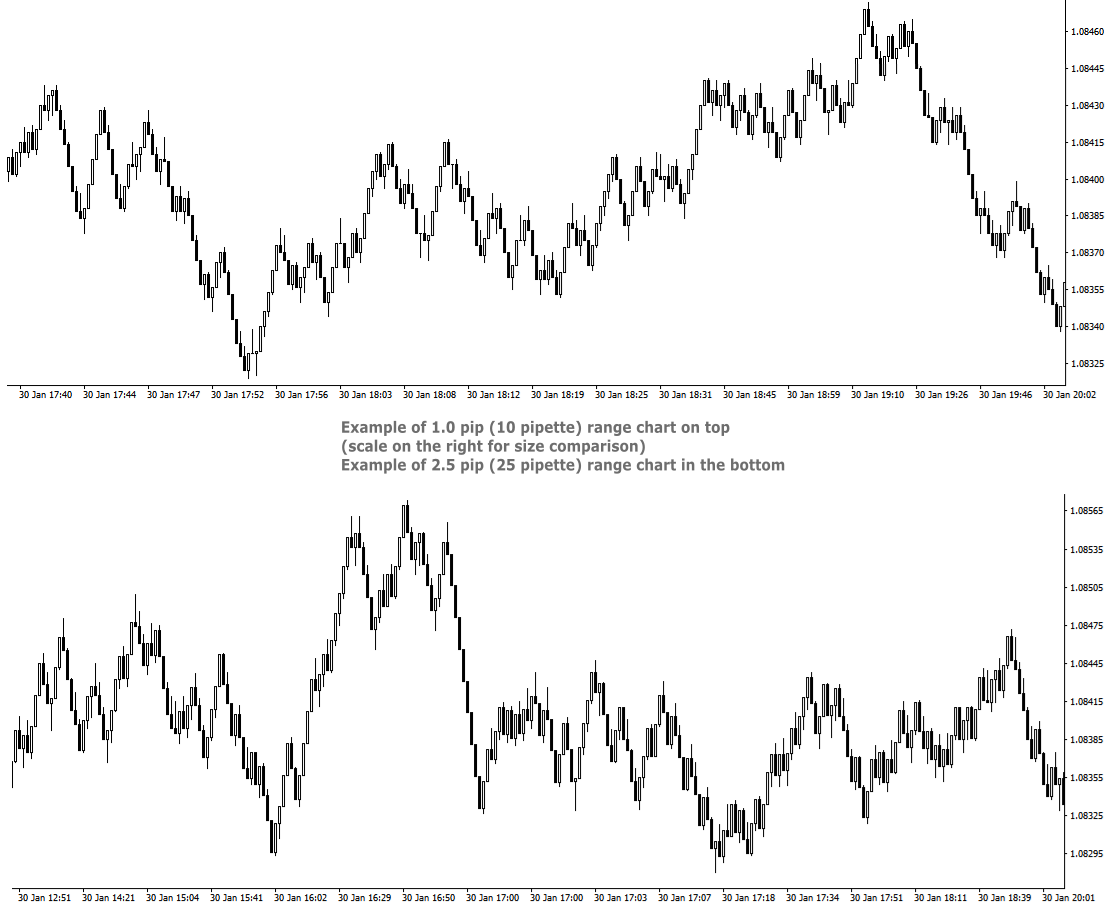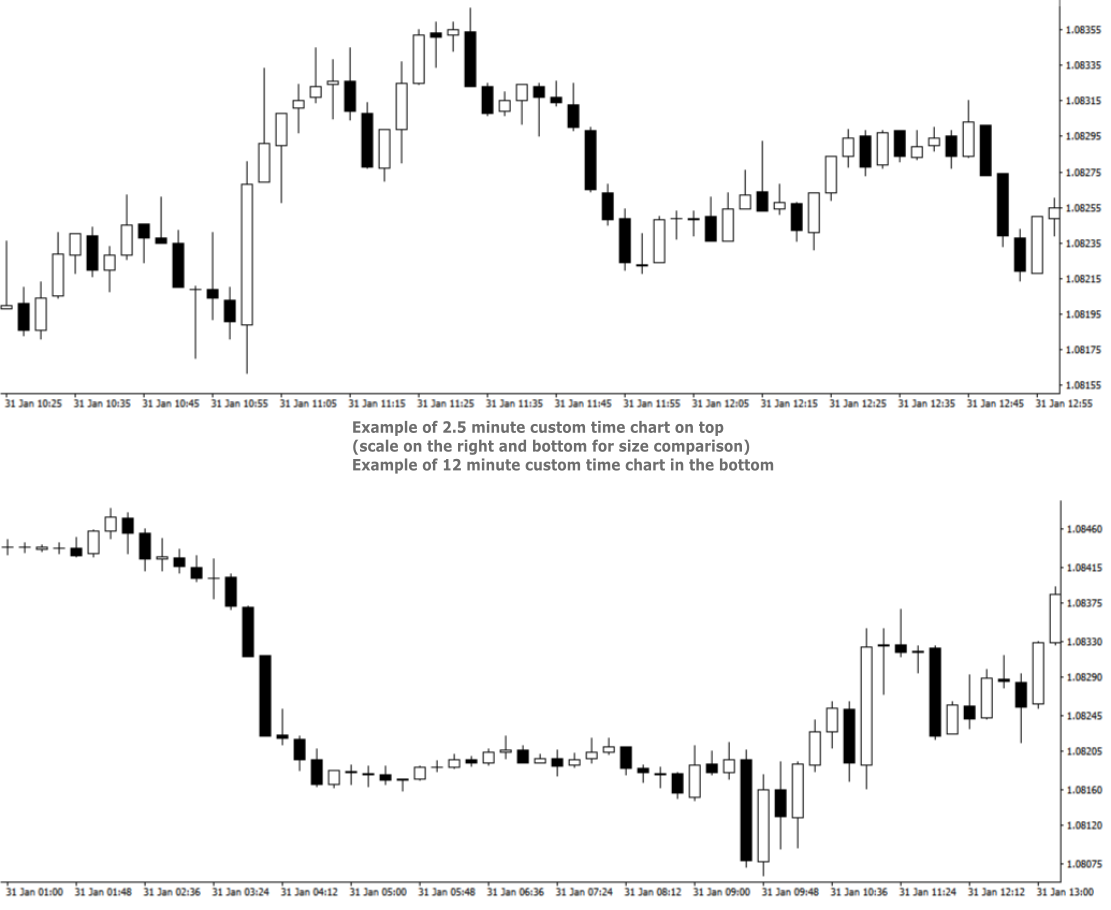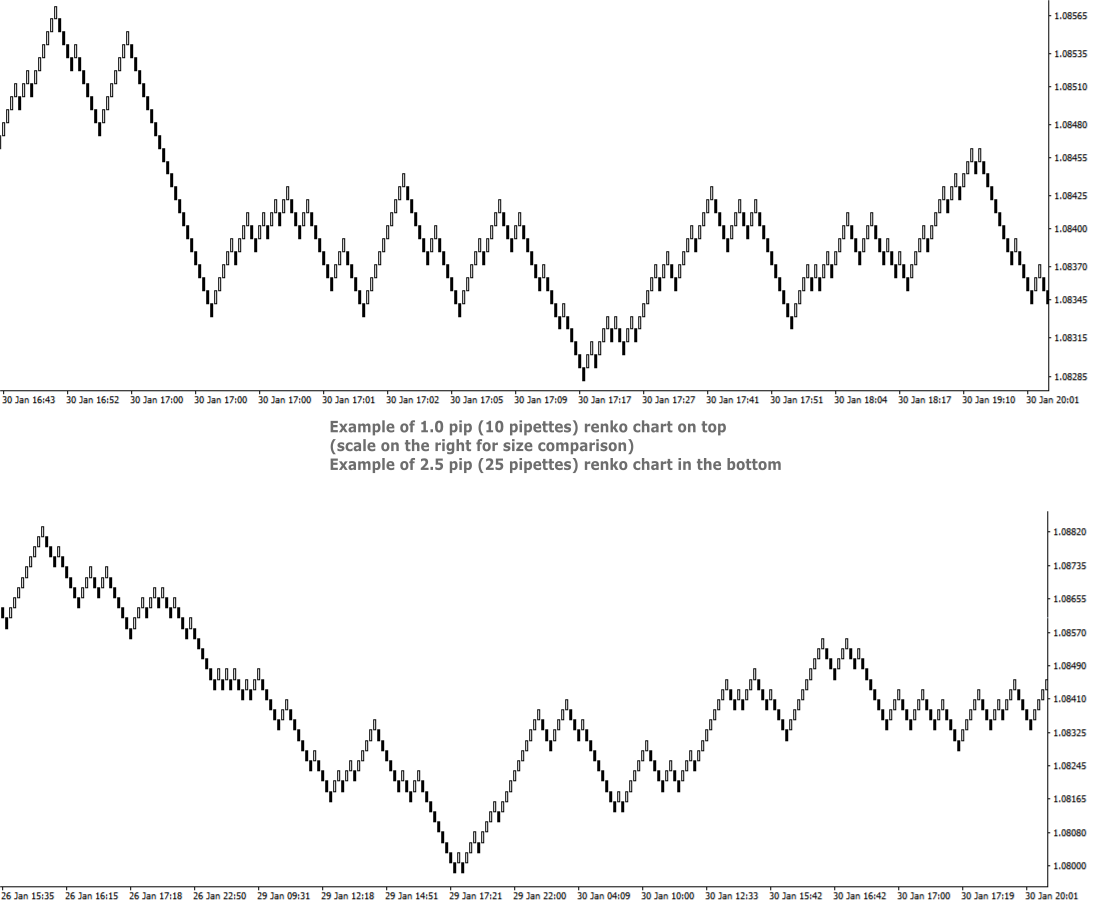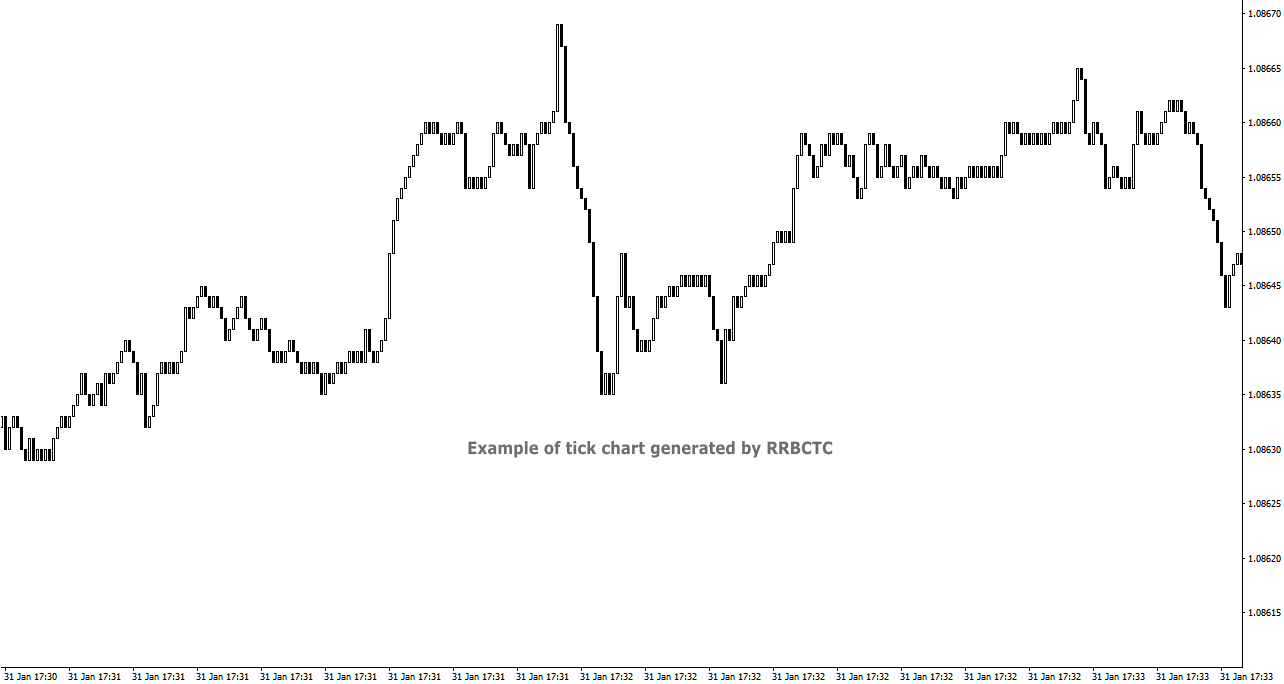
Real Range Bar and Custom Time Charts

RRBCTC uses real Tick data to create custom Range, Time, Renko and Volume bar charts for MT4. Tick data use is RRBCTC unique feature, which allows highest quality charting of current and historical price movement. Custom inputs provide option to create range bars with sizes from 0.1 pip all the way to 100+ pip and time bars periods from second all the way to a month. Charts are updated with new data in real time, allowing user use of MT4 indicators and advisors (EA). RRBCTC greatly extends MT4 charting options.


LEGEND (acronyms used in description) 

  • RRBCTC - Real Range Bar and Custom Time Charts (MT4 component)
  • DE - Data Extractor (MT5 component)
  • EA - Expert advisor
  • MT4 - MetaTrader4 terminal
  • MT5 - MetaTrader5 terminal


WHY SHOULD YOU CHOOSE TO BUY RRBCTC ?

MT4 by default only provides 9 time periods for displaying market movement. This limited options are simply not good enough for quality market analysis. Even if you were to purchase one of the range, renko or custom timeframe creation tools available to extend MT4 charting options, such tools would still be limited by MT4 build-in restrictions. Existing tools create custom charts by extrating data from 1 minute time chart, a method which does not allow for accurate construction of bars. Faulty chart data leads into inaccurate analysis and improperly placed trades. As former user of charts created in such manner, I have a lot of experience and knowledge with how inaccurate such data really is. RRBCTC was created to solve this problem, by importing tick data and use it to build every (real) bar piece by piece. This process is done quickly and efficiently, so that user want be able to spot a difference between ordinary MT4 chart and a RRBCTC custom chart. Not only does RRBCTC provide you with quality data, it also combines all different charting options into one indicator, eliminating need for any other tool. Create any custom range, time, renko and equal volume charts you can imagine. If you have ever wanted to use some odd time period, like 7 min 30 second, now you can. Beside chart creation, RRBCTC also provides chart management, accessible through on chart user interface. Functions, like opening new custom chart and switching periods are designed to make life easier for the user. Continuous chart updates, make charts suitable for live trading and for use with any standard indicator or EA. Simple put, RRBCTC was designed to be the last chart creation tool for MT4 you will ever need. For more details on individual RRBCTC capabilities, please read section (Features).


FATURES

  • External component - RRBCTC uses external component to retrieve tick data it needs to build charts. Default external component for RRBCTC is called Data Extractor (DE) and is available for free on MT5 market. Experienced users are free to import tick data trough the use of there own tools. DE is free MT5 tool which can be used on any demo or live MT5 account to process and save data RRBCTC needs to function at full capacity. For more details on how this works, please read section (How to use). Link to Data Extractor is listed on the end of description, under section LINKS.
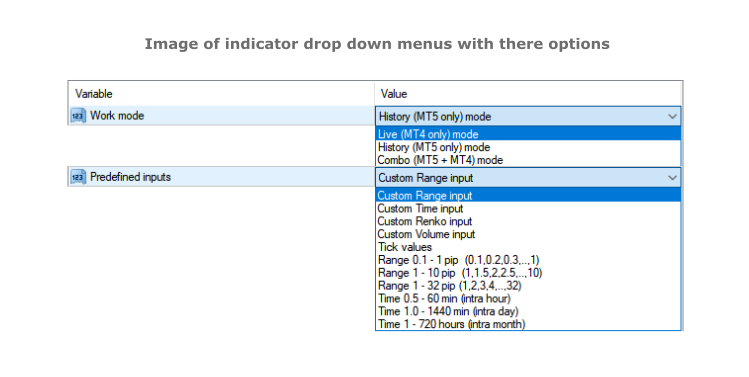
  • Work modes - RRBCTC can operate in 3 different work modes. Live (MT4 only) mode creates charts from data it collects in real time from MT4. History (DE MT5 only) mode uses only external data to create charts. Combo (DE MT5 + MT4) mode uses combination of live data from MT4 and data from external component.
  • Custom input and predefined sequences - Through use of custom input, user can define sequence of values which will be used to create charts. Custom sequences provide user the ability to create only charts it needs and under conditions he chooses. RRBCTC also has a selection of predefined range and time sequences, for users who do no want or need to use custom input.
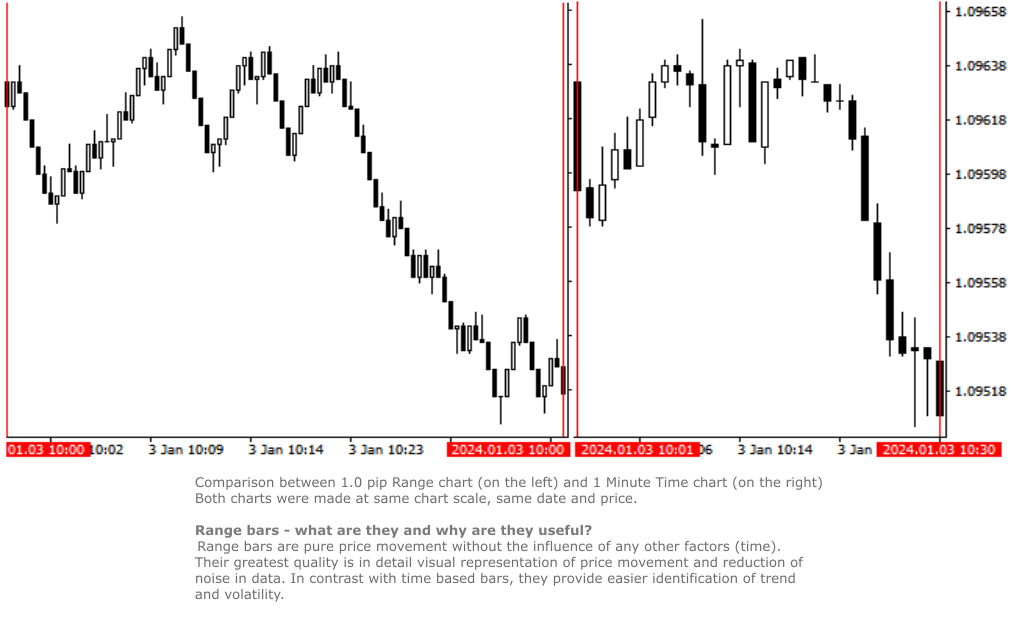
  • Custom Range chart creation - Range bars consider only price, thereby eliminating time from the equation. RRBCTC allows user custom selection of range bar size, starting from 0.1 pip (1 pipette) all the way up to 100 pip or more. Smallest increment is 0.1 pip (Example: 1.2, 1.3, 1.4 pip and so on). Values in pipettes are available for instruments using extra decimal (most of them do). 
  • Custom Time chart creation - RRBCTC allows user custom selection of time frame size in minutes or/and hours, starting from 0.02 min (1 second) all the way up to 720 hours (30 days). Smallest increment is 0.01 min. Scientific decimal system is used for time values (3.5 minutes = 3 min 30 sec)
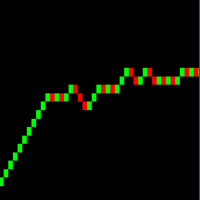
  • Custom Renko chart creation - Renko are bricks created at 45-degree and filter out minor price movements. RRBCTC allows user custom selection of renko bar size, starting from 0.1 pip (1 pipette) all the way up to 100 pip or more. Smallest increment is 0.1 pip. (Example: 1.2, 1.3, 1.4 pip and so on). Values in pipettes are available for instruments using extra decimal (most of them do).
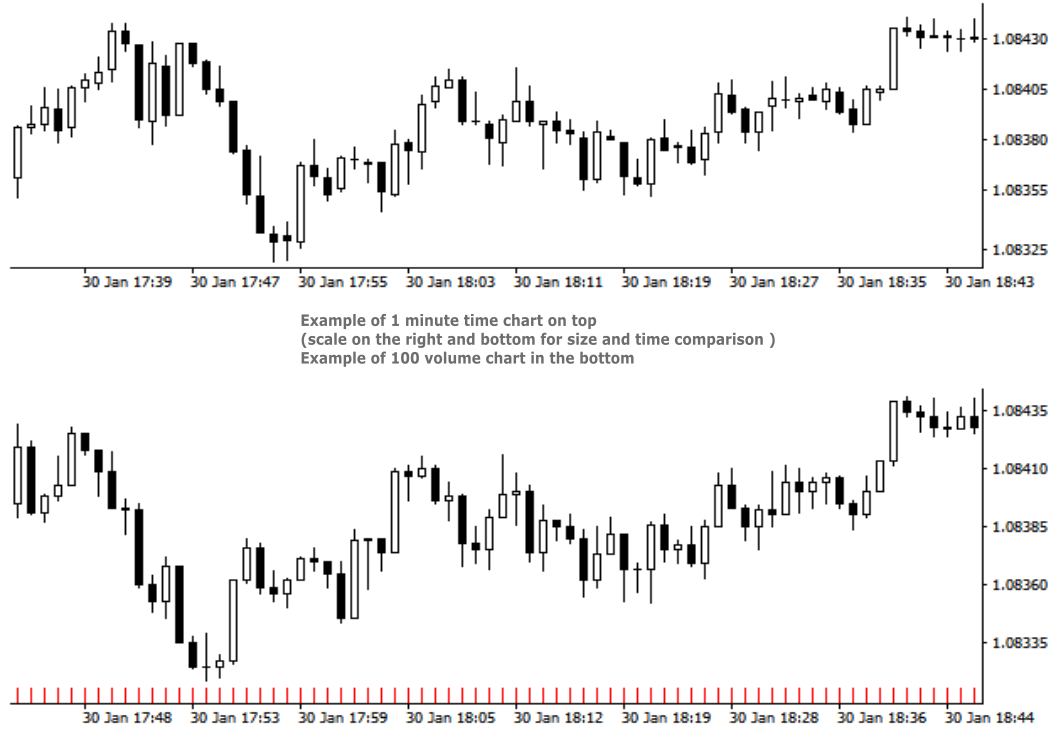
  • Custom Volume chart creation - Volume bars are all created with the same amount of tick volume and represent price movement within that volume value. RRBCTC allows user custom selection of volume bar size, starting from 1 unit of volume all the way up to 100000 units or more. Smallest increment is 1 unit of volume. 
  • Tick chart creation - Tick bars are minimum measurement of price change. RRBCTC allows user display of pure tick bars.
  • Real time chart update - Opened charts are continuously updated (around 20 times a second), displaying new data and allowing MT4 indicators or EAs to function just as they do on regular MT4 charts. User will not be able to notice any delay in market movement. 
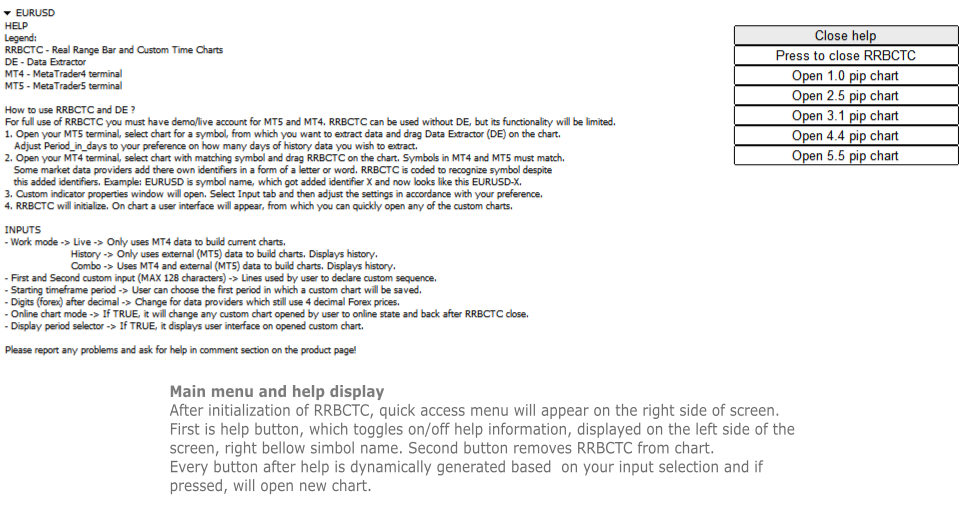
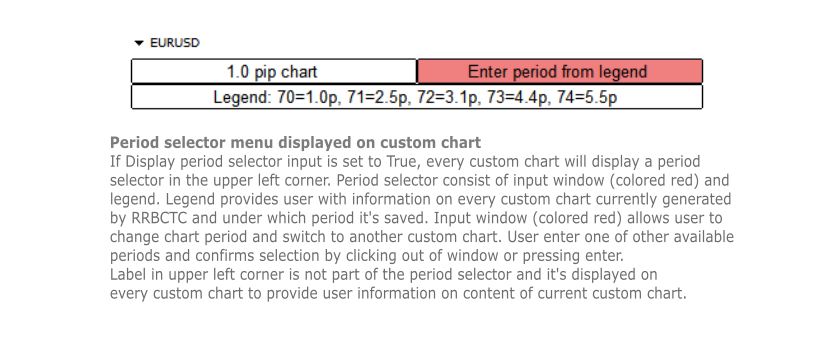
  • User interface - Build in user help and interface. There are 2 versions of on chart interface. The first is displayed on the chart, where indicator was attached to and shows help, close and open chart buttons. Second interface is attached to every custom chart opened and provides user with information about the chart and option to change chart period directly.
  • Chart management - User can choose to use RRBCTC in more manual way or to leave chart management to auto function. In automatic mode RRBCTC will manage charts online/offline state and save data if needed. 
  • Error prevention - Integrated user error prevention functions, which should handle most potential user errors.
  • Compatibility - Designed to work with all types of financial instruments, with automatic symbol recognition build in. 


SETTINGS (INPUTS)

  • Work mode 
    • Live -> Only uses MT4 data to build current charts, does not build history past the point of RRBCTC initialization. Recommended work mode for live trading, where past data is not needed. 
    • History -> Only uses external (MT5) data to build charts. History is build for a time interval defined by a user. Recommended work mode for long term chart analysis, where a large quantity of data is needed. 
    • Combo -> Uses MT4 and external (MT5) data to build charts. History is build for a time interval defined by a user. Recommended work mode for live trading and short/medium term chart analysis.
  • Predefined inputs
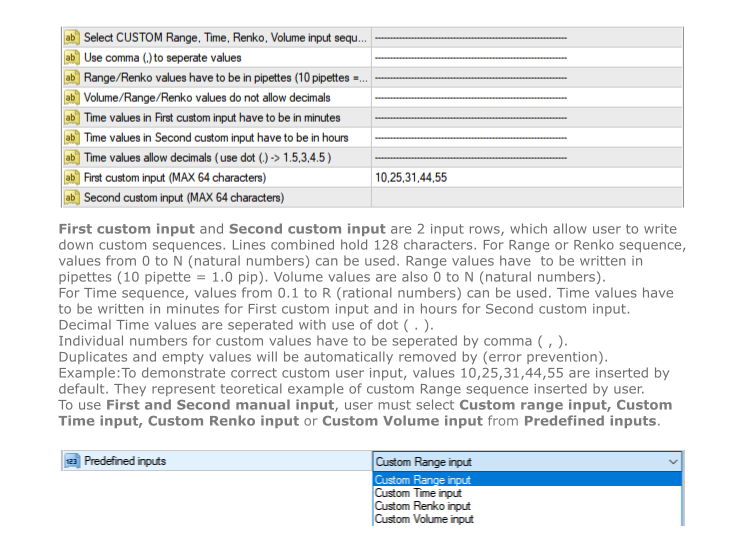
    • Custom Range input -> Allows use of First and Second custom input lines, where user can define range bar sizes for which charts will be build.
    • Custom Time input -> Allows use of First and Second custom input lines, where user can define time frame sizes for which charts will be build.
    • Custom Renko input -> Allows use of First and Second custom input lines, where user can define renko box sizes for which charts will be build.
    • Custom Volume input -> Allows use of First and Second custom input lines, where user can define volume sizes for which charts will be build.
    • Tick values - Creates only tick chart. Can also be created alongside Range charts, by entering 0 as one of the values in custom input.
    • Range 0.1 - 1 pip -> 1. st predefined sequence. No user input. Creates 10 charts from 0.1 - 1.0 pip, with increments of 0.1 pip.
    • Range 1 - 10 pip -> 2. nd predefined sequence. No user input. Creates 19 charts from 1.0 - 10.0 pip, with increments of 0.5 pip.
    • Range 1 - 32 pip -> 3. rd predefined sequence. No user input. Creates 32 charts from 1.0 - 32.0 pip, with increments of 1.0 pip.
    • Time 0.5 - 60 min -> 4. th predefined sequence. No user input. Creates 15 charts from 0.5 (half) minute - 60.0 min (1 hour), with 1.5x or 2.0x increments. Intra hour time frames.
    • Time 1.0 - 1440 min -> 5. th predefined sequence. No user input. Creates 17 charts from 1.0 minute - 1440.0 min (1 day), with 1.5x or 2.0x increments. Intra day time frames.
    • Time 1 - 720 hours -> 6. th predefined sequence. No user input. Creates 17 charts from 1.0 hour - 720.0 hour (1 month), with 1.5x or 2.0x increments. Intra month time frames.
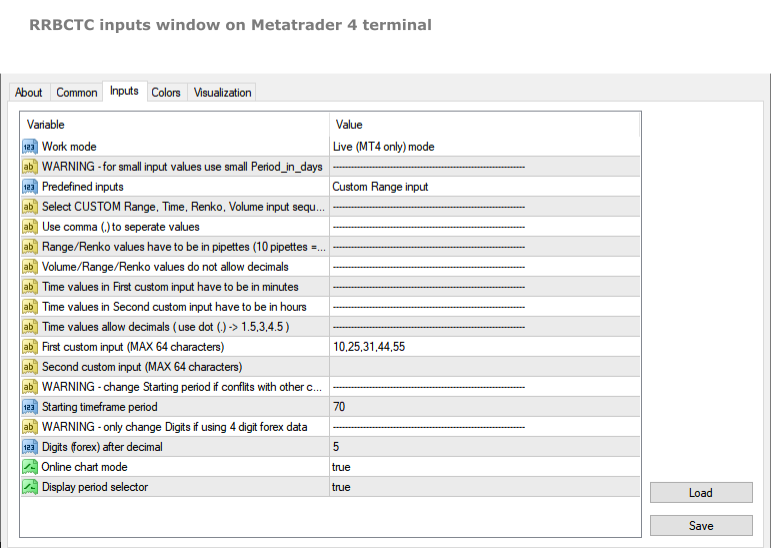
  • First custom input (MAX 64 characters) -> First line to be used to declare custom sequence. Based on Custom input type, it allows values in pipettes or minutes or volume. 
  • Second custom input (MAX 64 characters) -> Second line to be used to declare custom sequence. Based on Custom input type, it allows values in pipettes or hours or volume. Both lines can be used simultaneously. Instructions, for how to input values correctly, are stated in the settings above the first custom input line.
  • Starting time frame period -> Chart build by RRBCTC need to be saved in selected symbol history. User can choose the first period in which a custom chart will be saved. Charts after the first get assigned period by RRBCTC.
  • Digits (forex) after decimal -> This setting should only be used by users who still receive symbol data with one less decimal spot. Forex example: if your EURUSD price value only has 4 decimals, then you are one of the few, whose forex data provider, still hasn't switched to 5 decimal data.
  • Online chart mode -> If set to true, it will automatically  change any custom chart opened by user to online state and back to offline state after RRBCTC close. Chart must be in online state to allow live trading and updating of indicators and/or EAs attached to custom chart.
  • Display period selector -> If set to true, it displays user interface on any opened custom chart. The interface allows user to switch between custom charts generated by RRBCTC.


HOW TO USE RRBCTC and Data Extractor

For full use of RRBCTC, you must have demo or live account for MT5 and MT4. RRBCTC can be used without Data Extractor (DE), but its functionality will be limited. Only Live mode will work without it. Once you have downloaded RRBCTC for MT4 and DE for MT5, you must locate them in your terminal market indicator folder.

Recommended procedure on how to use RRBCTC:

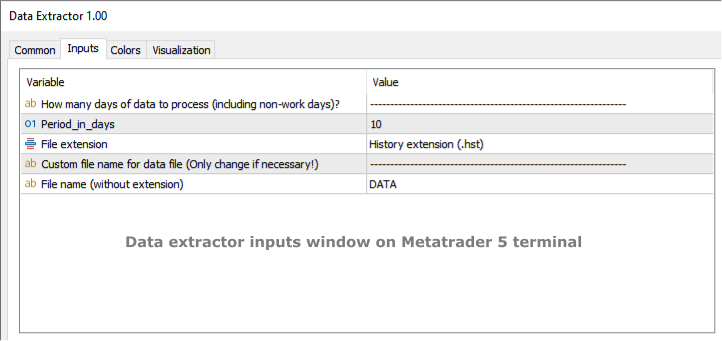
  1. Open your MT5 terminal, select chart for a symbol, from which you want to extract data and drag Data Extractor (DE) on the chart. The only DE setting you might need to adjust according to your preference is called Period_in_days. This setting controls how many days of history data you wish to extract. It's recommended to leave this setting unchanged on your first use of RRBCTC. Other DE setting should never be changed (ignore them).
  2. Open your MT4 terminal, select chart with matching symbol and drag RRBCTC on the chart. Symbols in MT4 and MT5 must match, but they do not need to match perfectly. Some market data providers add there own identifiers in a form of a letter or word. RRBCTC is coded to recognize symbol despite this added identifiers. You as the user only need to match the symbol name. Example: EURUSD is the symbol name, sometimes symbol name get added identifier, which may look like this EURUSD-X. 
  3. When dragged to chart, RRBCTC custom indicator properties window will open. Select Input tab and then adjust the settings in accordance with your preference. For best experience, please follow instructions stated in this product description or in the indicator itself. 
  4. Once settings have been confirmed and properties window closed, RRBCTC will initialize. The length of this process depends on the quantity of data RRBCTC need to process. For most use cases this will only take a couple of seconds. On chart a user interface will appear, from which you can quickly open any of the custom charts.

From this point onwards, you a free to explore custom charts and experiment with changing of RRBCTC input settings. RRBCTC has many user error prevention functions, so there is no need to worry about doing any damage to your existing charts or MT4 terminal. Example of such function: RRBCTC does not allow you to write over any of MT4 default time frames (like M15, H1,..). 


FREQUENTLY ASKED QUESTIONS (recommended reading)

  • Q -> What happens with open custom charts, if user removes (closes) RRBCTC from the chart?

A -> All opened custom charts will remain open. If setting Online chart mode is set to TRUE, then any open online chart will be set to offline state, before RRBCTC closes. If setting Online chart mode is set to FALSE, then charts will remain in the state user manually set them to. By default such charts are in offline state. Objects and indicators attached to open custom chart will be preserved.

  • Q -> What happens with open custom charts, if user closes MT4 terminal without removing RRBCTC from chart?

A -> On next MT4 terminal start up, RRBCTC will initialize and set open custom charts to state they were in before closing of MT4 terminal.

  • Q -> Can user switch between custom charts in the same way one can switch between time frames on normal MT4 time charts?

A -> If setting Display period selector is set to TRUE, every open custom chart will have user interface displayed in the upper left corner of the chart. This interface allows user to switch between custom charts, without opening new chart. Interface displays information about current chart, a legend containing information about other custom charts and input field, where period of other custom chart can be entered. Simply click on the input, write period number of chart you wish to display and confirm input by pressing Enter or clicking out of input field. Chart switch might take a second to happen, this is because MT4 terminal does not prioritize this function. If setting Online chart mode is set to FALSE, all custom charts are in offline state. Period selector will not work in offline state!

  • Q -> Can RRBCTC be used for financial instruments, other than forex?

A -> RRBCTC should be able to recognize all symbols (even more obscure ones) and correctly build custom charts for them. There is a however a chance, RRBCTC might struggle with correct chart construction for some symbols. If you encounter such an example, please inform me, so that error can be fixed.

  • Q -> Can more then one RRBCTC run at the same time?

A -> Several RRBCTC can run simultaneously, but only one can be attached to a unique chart. You can even run 2 or more RRBCTC for one symbol, as long as they are attached to separate chart and periods used for saving custom charts don't overlap. If the periods do overlap, it is likely that will cause error.

  • Q -> How many custom charts can RRBCTC create?

A -> RRBCTC has no theoretical hard limit on how many custom charts it can create, but in practice the number is limited by the length of user defined custom sequence. There are 2 input lines, each can hold 64 characters, so 128 characters combined. The max value depends on the values inserted by the user, but on average you can expect RRBCTC to create maximum of around 32 custom charts. It's advised to only create as many custom charts as is needed. Maintaining custom charts, that will not be used, is a draw on resources.

  • Q -> How safe are RRBCTC created charts for live trading?

A -> Custom charts are as safe as the default MT4 time charts, provided user follows instructions. Live and Custom modes should be used for live trading, because they update current price values directly from MT4. History mode can also be used for live trading, but since it only uses external data, there could potentially be slight differences in price values. If you use quality market data provider, there should be no difference between values. Market data should always be the same, regardless of data provider. If you observe mismatch in charts, there are 2 potential problems. Either you have set up RRBCTC wrong or your market data provider has low quality data.

  • Q -> Is RRBCTC use of external data a potential safety risk?

A -> RRBCTC only uses data needed to construct charts correctly. This data is read-only and processed in very specific order. Any interference with this data would only result in error. RRBCTC does not collect, process or communicate any data related to user account. 

  • Q -> What happens, if user applies template to custom chart and overrides previous custom chart content?

A -> RRBCTC was coded to handle such situation. Users are free to use templates to quickly move chart content to custom chart. After user applies template, RRBCTC will restore its custom chart user interface and  leave content created by template intact. User might notice slight delay and chart switching to 1 hour (H1) period for a moment. This is normal and unavoidable part of how MT4 handles custom online charts.


REQUIREMENTS AND SYSTEM INFORMATION 

  • OS Windows (any version), might work on other OS, but not verified
  • RRBCTC and DE will work with portable version of MT4


DISCLOSURE STATEMENT

Data from different market providers may result in slight differences on some custom charts.

RRBCTC and DE will be supported as long as author has capabilities to do so. Author does not take responsibility for updating software, if external factors beyond his control, prevent it.

Please report any problems and ask questions for more details!


LINKS

Link to Data Extractor:  https://www.mql5.com/en/market/product/112293

Produits recommandés
Linker
Roman Lipatov
5 (1)
"LINKER" is an indicator that links any number of windows of the charts it is running on. A synchronized crosshair is also available, toggled by the (Ctrl) key or the (L) button. The visibility of the trade levels can be toggled on each chart separately using the (Shift) key or the (V) button. The buttons and the crosshair have customizable settings and colors. For instance, you need to analyze a trading instrument on different timeframes, for example, on H1, H4 and D1. Doing this in a single ch
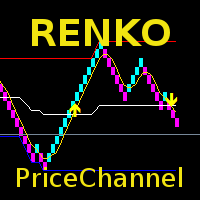
The indicator displays Renko bars on the chart, uses their data to calculate and display the moving average, PriceChannel and generates buy/sell signals. Renko is a non-trivial price display method. Instead of displaying each bar within a time interval, only the bars where the price moved a certain number of points are shown. Renko bars do not depend on a time interval, therefore the indicator works on any timeframe without losing its efficiency. The PriceChannel indicator displays the upper, lo
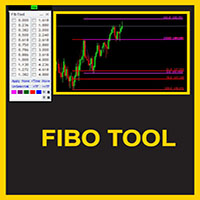
This indicator is a great utilities tools for Fibonacci Trader that draw their chart manually. This indicator do not draw any Fibonacci Retracement or Fibonacci Expansion. It is a utilities tool for modifying the Fibonacci level for Fibonacci object manually drawn on the chart. Just draw using the Fibonacci Retracement or other Fibonacci tool in MT4 as per normal. The select the Fibonacci you have just drawn. Make sure you have only 1 object selected. Then open up this Fibonacci Level Management
Choch Pattern
Rodion Matveichuk
5 (1)
Профессиональный индикатор "Choch Pattern Levels" с RSI-фильтром для MT4 Описание: Вы устали от ложных пробоев и хотите находить точки разворота тренда с высокой точностью? Индикатор Choch Pattern Levels — это ваш профессиональный инструмент для определения смены характера рынка (Change of Character), дополненный мощным фильтром RSI и анализом объемов , чтобы вы входили в рынок только по самым надежным сигналам. Этот индикатор автоматически находит и отрисовывает на графике ключевые паттерны раз
FREE
Before
Nadiya Mirosh
The Before indicator predicts the most likely short-term price movement based on complex mathematical calculations. Most of the standard indicators commonly used in trading strategies are based on fairly simple calculations. This does not mean that there were no outstanding mathematicians in the world at the time of their creation. It is just that computers did not yet exist in those days, or their power was not enough for the sequential implementation of complex mathematical operations. Nowad
KT Renko Live Chart MT4
KEENBASE SOFTWARE SOLUTIONS
L’utilitaire KT Renko Live Chart crée des graphiques Renko sur MT5, utilisables pour la spéculation, l’analyse ou le trading en temps réel. Les graphiques Renko générés par cet outil sont compatibles avec la majorité des indicateurs personnalisés et des Expert Advisors automatisés. Entièrement compatible avec notre indicateur Renko Patterns et le Renko Patterns EA. Fonctionnalités Un outil Renko simple et intuitif qui fournit un graphique Renko sur MT5 sans réglages complexes. Compatible avec l
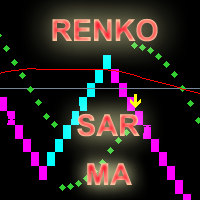
The indicator calculates and displays renko bars using MA and PSAR data as well as provides buy/sell signals. Renko is a non-trivial price display method. Instead of displaying each bar within a time interval, only the bars where the price moved a certain number of points are shown. Renko bars do not depend on a time interval, therefore the indicator works on any timeframe without losing its efficiency. Buy signal forms when PSAR readings are moving down, MA is moving up, the price is closing ab
Power Renko is an indicator which plots Renko bricks underneath the chart using a histogram. You can select the brick size and the timeframe of the Renko bricks as well as whether or not to use the close price or the high/low price of the candles. Renko bricks are based on price alone, not time, therefor the Renko bricks will not be aligned with the chart's time. They are extremely useful for trend trading and many different strategies can be formed from them. Buffers are provided allowing you t
Identify Take
Oleksii Ferbei
4.5 (2)
Identify Take - trend trading strategy, market noise filtering and all necessary functions built into one tool! The system itself shows in the form of arrows when to buy and when to sell. Uses only one setting parameter. Simple, visual and effective trend detection. The intelligent algorithm of the Identify Take indicator shows the points of a potential market reversal. Most often, a good trend can be seen visually on the price chart. But an experienced trader must clearly understand the curre
Trades Extractor
Medilane Bernard Philippe Couratier
Jarfac Trades Extractor Description: Le "Jarfac Trades Extractor" est un script MQL4 conçu pour les traders qui souhaitent exporter et analyser leurs trades historiques. En un seul clic, le script génère un fichier CSV contenant des informations détaillées sur chaque trade exécuté pendant une période spécifiée. Caractéristiques principales : Filtrage par Période : Définissez une période personnalisée pour l'extraction. Possibilité de désactiver le filtrage par période. Filtrage par Commentaire :
FREE
Order Closer Manager Order Closer Manager Order Closer Manager is a powerful and easy-to-use MetaTrader 4 (MT4) Expert Advisor designed to help traders efficiently manage their open orders. This EA is ideal for traders who want precise control over their trades with minimal manual intervention. Key Features: Close Orders by Percentage: Automatically close a specified percentage of your total open lot size with a single click. Breakeven Management: Apply breakeven levels to buy, sell, or all open
Candle Average
Mahmoud Helmy Sedik Mohamed Mansour
Candlestick patterns have little value without the right   price action   context. If you’ve been studying candlestick formations, you must have heard this principle many times over. You cannot trade patterns in a vacuum. But what do we mean by   context ? It is an overall technical assessment that encompasses: The market’s trend Support and resistance structure Recent price formations Volatility It seems intimidating at first, but a simple trading indicator can help us out here - the   moving a
The indicator calculates and displays Renko bars using PSAR and CCI data as well as provides buy/sell signals. Renko is a non-trivial price display method. Instead of displaying each bar within a time interval, only the bars where the price moved a certain number of points are shown. Renko bars do not depend on a time interval, therefore the indicator works on any timeframe without losing its efficiency. The buy signal is generated when the CCI indicator crosses the 100 level upwards, and the PS
Introduction to Smart Renko The main characteristics of Renko Charting concern price movement. To give you some idea on its working principle, Renko chart is constructed by placing a brick over or below when the price make the movement beyond a predefined range, called brick height. Therefore, naturally one can see clear price movement with less noise than other charting type. Renko charting can provide much clearer trend direction and it helps to identify important support and resistance level
The Renko indicator is a technical analysis tool used in the forex market to visualize price movements and trends by eliminating market "noise." Unlike traditional candlestick or bar charts, Renko is built based on price changes of a specified number of points, called the "brick size." When the price moves by this amount of points, a new "brick" is added to the chart. This indicator ignores time and volume, focusing exclusively on price changes. The main features of the Renko indicator include:
Reanimator was made not like an ExpertAdvisor which make deals for taking Big Profit or something like that. His target is - to try to go back from big looses using the formula for Lot calculation. This formula based on our Drawndawn and Target-Price to get Breakeven. Sometime we have situation where we have big drawdawn and the price should go, for example, up. And we are sure, the price will move 100 points higher. For example: "Oh! The price will reach the Target 100 points, for sure!". In
EurUsd Binary Options
Daniel Joseph Kibe Wangewa -
YOU CAN ONLY FOWARD TEST THIS INDICATOR. USE DEMO FOR THIS AND SHARE YOUR RESULTS This indicator is a combination of different strategies that in theory drive the market.  Multi-Currency - Using the separate currencies; Euro and Dollar. RSI - from the separate currencies I get two different RSI values that are used to measure the market strength and direction It is important to note that this is not the Holy Grail and you should use a good money management system.  Two signals will appear from
Price Trend Light
Chantal Sala
4 (1)
Price Trend Light indicator is a beautiful indicator that shows purchasing areas and sales areas. This indicator is designed to follow the movement of the price which rounds on the opening price. It also provides information of trend follow on the break of the minimum and maximum. The indicator has a very simple graphic but effective, above the opening price you will have a light green color and under the opening price there is a red light. On every Break Out of the minimum or maximum sets in in
PipMaster is built using a powerful trend + momentum following algorithm. Made after years of testing and with market noise filtering built-in.  Aggressive traders can enter a trade as soon as an arrow appear. Conservative traders should wait for a visual alert after a closed candle bar. This indicator is a great tool to be used with your most trusted trend/momentum trading strategy and with solid money management rules. Key Benefits: -Super easy to use by following color coded arrow pointing t
Indicateur pour le Forex et les options Binaires est écrit sur la base de 2 indicateurs standard dans MT4: ADX et RVI. Les signaux sont reçus lors des intersections simultanées des lignes des deux indicateurs. Mais aussi dans les codes prescrits et les signaux d'inversion. C'est quand les signaux sont convertis en sens inverse. Vous pouvez également activer ou désactiver chacun des indicateurs. Et aussi dans RVI, vous pouvez utiliser 2 types de signaux: 1) Juste quand une ligne est au-dessus/a
Trade Direction
Gevorg Hakobyan
5 (1)
The oscillator shows trend direction using its own algorithm, which is based on calculating price values ​​by analyzing prices of separate currencies (original valuation of currencies). The histogram shows the average value of physical price change over the selected period. When the histogram has a positive value, the trend is rising, if negative - the trend id falling. The indicator uses standard RSI to determine the current market direction on a selected period as follows: the default value of
EMACrossRenko
Hong Ling Mu
1 (1)
<LOGIC> The EMA RENKO EA should run in Renko chart to show the best performance. The EA will entry based on 2 EMA line cross. (it is changeable in parameter.) As a result of FT , the best box size for XAUUSD (GOLD) is BOX 60 to 100.  Renko box size should be larger than spread value. Normally 3 times of spread. Please decide your box size with yourself. The EA will place addtional order as Grid if the trend move  to xxx pips from the last order. You can turn on/off in the parameter. The MAC

Velas RENKO
Ramon Sobrevals Arce
Immediately plots renko bars in an external/indicator window.  One of the distinctive advantages Renko charts offer is the fact that they are not time dependent. Therefore, the new Renko blocks are only traced when the price moves higher or lower by the specified number of points.  For example, a 10 pip (100 points) Renko chart would plot the blocks when price moves 10 pips higher in an uptrend or 10 pips lower in a downtrend. Renko charts removes "noises" from the Market and i t helps to identi
Bigger chart labels would allow the user to be entirely aware of which chart he/she is on. Each chart window is unique, containing different patterns and economic motives so acknowledging the chart window would be absolutely essential! There are well known Economic Time Zones included in clear view, by choice!    Simple does it! Use your computing mouse scroller, clicking with the right finger on the label, in order to customize the label properties. From there, choose your preferred color, fon
FREE
Orynth P&F Chart Overlay – Clean Trend Visualizer Orynth is a professional technical analysis tool that brings the power of Point and Figure (P&F) charting directly onto your standard candlestick chart. It filters out market noise by focusing solely on meaningful price movement, allowing traders to identify clear trends and reversals without the distraction of minor fluctuations. Unlike traditional P&F charts that open in a separate window, Orynth overlays price "boxes" directly on your main cha
Advanced CRT Indicator MT4 — Candle Range Theory Tool Advanced CRT Indicator MT4 is a professional analysis tool that automates Candle Range Theory. It identifies consolidation ranges, breakout levels, Fair Value Gaps (FVG), and profit targets, with a real-time dashboard and alerts. Overview - Multi-timeframe candle range detection   - Automatic breakout levels with buffer settings   - Fair Value Gap identification and tracking   - Up to three customizable target levels (Risk:Reward ratios)  
RenkoChart
Boris Sedov
5 (1)
Renko Chart — opens renko charts for MetaTrader 4. Renko charts can be created using this utility with all bars being in the form of Renko "bricks". All bars on the renko chart are the same size, which can be changed to get the desired chart. You can add indicators, EAs and scripts to the resulting chart. You get the completely operational chart which can be processed just like a regular one. The Renko Chart utility is not only history based, but also builds online. At the same time, the data is
Renko HMA
Bogdan Mihail Moise
Renko HMA  Channel is a professional EA the uses Renko charts in combination with the Hull Moving Average. Time Frame :   This expert advisor works on all timeframes; Account balance:   it doesn't matter, but I recommend at least 1000 EUR or 1500 USD; Currency pair :       Doesn't matter ; Warning! Do not use the default settings, always use optimization option in strategy tester to find the best settings for your broker, preferred chart and timeframe! - Multiple user options, for finetuning
RSI TrendLine Divergency Message is an indicator for the MetaTrader 4 trading platform. Unlike the original indicator, this three in one version has a system of alerts that inform on market situation changes. It consists of the following signals: when the Main line crosses the levels of extreme zones and 50% level; when the Main line crosses the Trend line in the indicator window; divergence on the last bar. Parameters of levels of extremum, 50-level and divergence are adjustable. Parameters La
BeST Darvas Boxes
Eleni Koulocheri
5 (5)
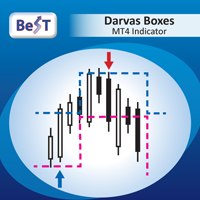
BeST_Darvas Boxes is an MT4  Indicator based on the trading method developed in the 50’s by the Hungarian Nicolas Darvas . BeST_Darvas Boxes indicator draws the Top and the Bottom of every Darvas Box  that can be confirmed on the current Chart. draws Buy and Sell Arrows  for every confirmed Upwards or Downwards Breakout of the above levels. draws always only after the bar closing and so is non-repainting or backpainting . Note : Every customer who wants to have the older version v_1.75 with th
Les acheteurs de ce produit ont également acheté
Bienvenue sur Trade Manager EA, l’outil ultime de gestion des risques conçu pour rendre le trading plus intuitif, précis et efficace. Ce n’est pas seulement un outil d’exécution d’ordres ; c’est une solution complète pour la planification des trades, la gestion des positions et le contrôle des risques. Que vous soyez débutant, trader expérimenté ou scalpeur ayant besoin d’une exécution rapide, Trade Manager EA s’adapte à vos besoins, offrant une flexibilité sur tous les marchés, des devises et i
Local Trade Copier EA MT4
Juvenille Emperor Limited
4.96 (110)
Découvrez une expérience exceptionnellement rapide de copie de trades avec le Local Trade Copier EA MT4 . Avec sa configuration facile en 1 minute, ce copieur de trades vous permet de copier des trades entre plusieurs terminaux MetaTrader sur le même ordinateur Windows ou Windows VPS avec des vitesses de copie ultra-rapides de moins de 0.5 seconde. Que vous soyez un trader débutant ou professionnel, le Local Trade Copier EA MT4 offre une large gamme d'options pour le personnaliser en fonction d
Trade Assistant MT4
Evgeniy Kravchenko
4.43 (197)
It helps to calculate the risk per trade, the easy installation of a new order, order management with partial closing functions, trailing stop of 7 types and other useful functions. Additional materials and instructions Installation instructions   -   Application instructions   -   Trial version of the application for a demo account Line function -   shows on the chart the Opening line, Stop Loss, Take Profit. With this function it is easy to set a new order and see its additional characteris
Exp COPYLOT CLIENT for MT4
Vladislav Andruschenko
4.69 (65)
Copieur de trades professionnel pour MetaTrader 4 Un copieur de trades rapide, fiable et professionnel pour MetaTrader 4 . COPYLOT permet de copier des opérations Forex entre les terminaux MetaTrader 4 et MetaTrader 5 , avec une synchronisation flexible adaptée à différents types de comptes et styles de trading. La version COPYLOT MT4 prend en charge : MetaTrader 4 → MetaTrader 4 MetaTrader 5 Hedge → MetaTrader 4 MetaTrader 5 Netting → MetaTrader 4   Version MT5 Description complète + DEMO + PDF
Un panneau professionnel pour le trading manuel qui réunit tout le cycle d'une opération dans une seule fenêtre sur le graphique, de l'entrée précise à la protection du compte. Calibrez chaque position au plus près du risque que vous fixez, dessinez votre trade avec des lignes directement sur le graphique grâce au RR Tool, et passez des ordres au marché et en attente, des grilles et de l'OCO. Le panneau prend en charge le suivi de la position : clôture partielle jusqu'à cinq niveaux, six types d
News Filter EA: Advanced Algo Trading Assistant News Filter EA is an advanced algo trading assistant designed to enhance your trading experience. By using the   News Filter EA , you can integrate a Forex economic news filter into your existing expert advisor, even if you do not have access to its source code. In addition to the news filter, you can also specify   trading days   and   hours   for your expert. The News Filter EA also includes   risk management   and   equity protection   features
Verrouillage automatique des bénéfices lors de l'atteinte du bénéfice cible EquityTargetCloser   — est un conseiller expert utilitaire pour MetaTrader 5 qui ferme automatiquement toutes les positions de marché et supprime les ordres en attente dès que   les capitaux propres (Equity) dépassent le solde actuel du montant de bénéfice spécifié . Après la fermeture de toutes les positions, l'objectif est automatiquement relevé : le nouveau seuil = nouveau solde + bénéfice spécifié. L'EA n'ouvre pas d
Trading History MT4
Siarhei Vashchylka
5 (9)
Trading History - A program for trading and money management on the history of quotes in stratagy tester. It can work with pending and immediate orders, and is equipped with trailing stop, breakeven and take profit functions. Very good for training and testing different strategies. Manual (Be sure to read before purchasing) Advantages 1. Allows you to test any trading strategy in the shortest possible time 2. An excellent simulator for trading training. You can gain months of trading experience
King Trade Copier MT4
Mohammed Maher Al-sayed Mohammed Ahmed Saleh
King Trade Copier MT4 – Lightning-Fast Local Trade Copier (Master + Slave in ONE file) King Trade Copier is a professional local trade copier that mirrors every trading action from one Master account to unlimited Slave accounts on the same PC or VPS — with an internal copy latency of just a few milliseconds. It was built by a real trader for daily real-money use, with one goal: whatever happens on the Master must happen on the Slave, instantly and without exceptions. Watch the demo video to s
SmartFastTrade AI
Muhammad Faisal Sagala
Transform Your Trading with SmartFastTrade AI: Speed and Ease at Your Fingertips! Introduction Are you a trader struggling with slow order execution? Do you want a tool that can assist you in making quick and accurate trading decisions? If yes, then SmartFastTrade AI is the answer to all your trading needs. With its unique combination of speed, user-friendliness, and advanced features, SmartFastTrade AI will help you unlock your full trading potential. Let's delve deeper into why this innovativ
Télécharger la version d'essai fonctionnelle Copy Cat More (Chat Copieur) — Copieur de Trades (Trade Copier) MT4 n'est pas un simple copieur de trades local ; c'est un cadre complet de gestion du risque et d'exécution (risk management and execution framework) conçu pour les défis du trading d'aujourd'hui. Des challenges de prop firm à la gestion de portefeuille personnel, il s'adapte à chaque situation grâce à sa combinaison d' exécution robuste, de protection du capital, de configuration fle
Telegram to MT4 Multi-Channel Copier copie automatiquement les signaux de trading de vos canaux Telegram directement vers MetaTrader 4. Pas de bots, pas d'extensions de navigateur, pas de copie manuelle. Vous recevez un signal sur Telegram et l'EA ouvre l'opération sur votre terminal en quelques secondes. Le produit comprend deux composants : une application Windows qui écoute vos canaux Telegram, et cet Expert Advisor qui exécute les signaux sur votre terminal MT4. Une version MT5 est également
The product will copy all telegram signal to MT4   ( which you are member  ) , also it can work as remote copier.  Easy to set up, copy order instant, can work with almost signal formats, image signal, s upport to translate other language to English Work with all type of channel or group, even channel have "Restrict Saving Content", work with  multi channel, multi MT5 Work as remote copier: with signal have ticket number, it will copy exactly via ticket number. Support to backtest signal. How to
TradePanel MT4
Alfiya Fazylova
4.84 (95)
Trade Panel est un assistant commercial multifonction. L'application contient plus de 50 fonctions de trading pour le trading manuel et permet d'automatiser la plupart des tâches commerciales. Avant l'achat, vous pouvez tester la version de démonstration sur un compte de démonstration. Télécharger la version d'essai de l'application pour un compte de démonstration : https://www.mql5.com/fr/blogs/post/762644 . Instructions complètes ici . Commerce. Permet d'effectuer des opérations commerciales e
Strategy Builder offers an incredible amount of functionality. It combines a trade panel with configurable automation (covert indicators into an EA), real-time statistics (profit & draw down) plus automatic optimization of SL, TP/exit, trading hours, indicator inputs. Multiple indicators can be combined into an single alert/trade signal and can include custom indicators, even if just have ex4 file or purchased from Market. The system is easily configured via a CONFIG button and associated pop-up
Le MT4 to Telegram Signal Provider est un outil facile à utiliser et entièrement personnalisable qui permet d'envoyer des signaux à Telegram, transformant ainsi votre compte en fournisseur de signaux. Le format des messages est entièrement personnalisable ! Cependant, pour une utilisation simple, vous pouvez également opter pour un modèle prédéfini et activer ou désactiver des parties spécifiques du message. [ Démonstration ]   [ Manuel ] [ Version MT5 ] [ Version Discord ] [ Canal Telegram ]  N
PZ Trade Pad Pro MT4
PZ TRADING SLU
3.67 (3)
Effortlessly calculate lot sizes and manage trades to save time and avoid costly errors The Trade Pad Pro EA is a tool for the Metatrader Platform that aims to help traders manage their trades more efficiently and effectively. It has a user-friendly visual interface that allows users to easily place and manage an unlimited number of trades, helping to avoid human errors and enhance their trading activity. [ Installation Guide | Update Guide | Troubleshooting | FAQ | All Products ] One of the k
TradeMirror est un outil de copie d'ordres localisé, spécialement conçu pour les plateformes MT4/MT5, qui synchronise les opérations de trading en temps réel. Tutoriel Veuillez cliquer sur le lien Tutoriel Trademirror pour voir plus de tutoriels. Avantages du produit En se basant sur les normes élevées des logiciels financiers en matière de sécurité, de stabilité et de protection de la vie privée, nous avons procédé à des optimisations en profondeur sur trois dimensions principales : Une interfa
VOUS CHERCHEZ LA VERSION MT5 ? Si vous utilisez MetaTrader 5, cliquez ici pour obtenir la version native : https://www.mql5.com/fr/market/product/155546 Multi-Currency Strength Dashboard PRO — Indicateur professionnel de force des devises (MT4) Multi-Currency Strength Dashboard PRO est un indicateur avancé pour MetaTrader 4 qui mesure en temps réel la force relative des principales devises du marché Forex. Il analyse jusqu’à 28 paires majeures, calcule la force normalisée des 8 devises pr
Trade copier MT4
Alfiya Fazylova
4.56 (32)
Trade Copier est un utilitaire professionnel conçu pour copier et synchroniser les commandesentre les comptes de trading. Les commandes sont copiées du compte/terminal du fournisseur vers le compte/terminal du destinataire, qui sont installés sur le même ordinateur ou vps. PROMOTION - Si vous avez déjà acquis le "Trade copier MT5", vous pouvez obtenir le "Trade copier MT4" gratuitement (pour la copie MT4 > MT5 et MT4 < MT5). Pour obtenir des informations plus détaillées sur les conditions, veuil
Trade Copier Global
Laszlo Tormasi
5 (15)
Trade Copier Global: The name speaks for itself. This copier allows you to copy orders between MT4 terminals even if they are not installed on the same computer. Features Copying trades between MT4 terminals around the world with a short delay. Automatically recognizes symbol prefixes. Can connect many Slaves to the same Master. Supports pending and market orders. Supports partial order close (with limitations, see below) Can send messages and notifications to the Slaves from the Master Several
Copieur ->Interaction d'interface pratique et rapide, les utilisateurs peuvent l'utiliser immédiatement       ->>>> Recommandé pour une utilisation sur des ordinateurs Windows ou VPS Windows Caractéristiques: Paramètres de copy trading diversifiés et personnalisés : 1. Différents modes de lot peuvent être définis pour différentes sources de signaux 2. Différentes sources de signaux peuvent être définies pour le copy trading avant et arrière 3. Les signaux peuvent être définis avec des commentai
Trade panel Sniper
Andrey Kaunov
5 (4)
Простая в управлении Торговая панель обеспечит безопасную торговлю. Вычислит объём сделки от заданного уровня Stop Loss и величины убытка. Поможет рассчитать сейф, и в ноль закрыть неверную сделку. Интуитивно понятный интерфейс делает панель удобной в управлении, освобождая внимание трейдера для принятия решения о входе в сделку. Программа сделает все расчёты за вас. Поэтому работа с помощью панели Снайпер - оптимальное решение для торговли с соблюдением Мани-менеджмента. А это главный ключ к по
Grid Manual MT4
Alfiya Fazylova
4.71 (17)
Grid Manual est un panneau de trading permettant de travailler avec une grille d'ordres. L'utilitaire est universel, possède des paramètres flexibles et une interface intuitive. Il fonctionne avec une grille d'ordres non seulement dans le sens des pertes, mais aussi dans le sens de l'augmentation des profits. Le commerçant n'a pas besoin de créer et de maintenir une grille d'ordres, l'utilitaire le fera. Il suffit d'ouvrir une ordre et "Grid Manual" créera automatiquement une grille de ordres po
Trader Evolution MT4
Siarhei Vashchylka
5 (2)
" Trader Evolution " - A utility designed for traders who use wave and technical analysis in their work. One tab of the utility is capable of money management and opening orders, and the other can help in making Elliott wave and technical analysis. Manual (Be sure to read before purchasing) | Version for MT5 Advantages 1. Trading in a few clicks. Immediate and pending orders are available in the panel 2. Money management. The program automatically selects the appropriate lot size 3. Simplifies
RS Trade Copier
Boris Sedov
5 (1)
RS Trade Copier - le copieur de trades local ultra-rapide avec une véritable interface graphique. Arrêtez de saisir les numéros de compte manuellement. Fini les listes interminables de 200+ paramètres dans l'onglet Inputs. Un outil fiable et flexible pour copier les opérations de trading entre plusieurs terminaux MT4 et MT5. Il convient aux traders expérimentés, aux services de signaux ainsi qu'aux investisseurs privés. Il permet la synchronisation du trading d'un ou plusieurs Providers vers un
Auto Trade Copier
Vu Trung Kien
4.76 (85)
Auto Trade Copier is designed to copy trades to multiple MT4, MT5 and cTrader accounts/terminals with 100% accuracy. The provider and receiver accounts must be on the same PC/VPS. With this tool, you can copy trades to receiver accounts on the same PC/VPS. All trading actions will be copied from provider to receiver perfectly. This version can be used on MT4 accounts only. For MT5 accounts, you must use Auto Trade Copier for MT5 . Reference: - For MT4 receiver, please download Trade Receiver Fre
Drawdown Protector MT4
Konstantinos Kalaitzidis
5 (2)
Le protecteur de tirage est utilisé pour gérer votre tirage quotidien maximum souhaité. C'est un outil très précieux pour les traders, en particulier pour les traders des sociétés d'accessoires, vous devez faire attention aux limites de prélèvement.    Il s'agit d'un EA efficace et simple à utiliser à des fins de gestion des prélèvements de capitaux propres. Il fonctionne en bloquant les nouvelles transactions et en fermant les transactions existantes lorsque les capitaux propres flottants (et
Telegram to MT4 Coppy
Sergey Batudayev
4.09 (11)
Télégramme vers MT4 :   la solution ultime pour copier des signaux Simplifiez votre trading avec   Telegram vers MT4   , l'utilitaire de pointe conçu pour copier les signaux de trading directement depuis les canaux et chats Telegram vers votre plateforme MetaTrader 4, sans DLL. Cette solution robuste garantit une exécution fluide des signaux avec une précision et des options de personnalisation inégalées, vous faisant gagner du temps et optimisant votre efficacité. [ Instructions and DEMO ] Cara
X2 Copy MT4
Liubov' Shkandrii
Rapide. Précis. Innovant. Technologique. Découvrez la copie instantanée de transactions avec le révolutionnaire X2 Copy MT4. Avec seulement 10 secondes d'installation simple, vous obtenez un outil puissant pour synchroniser les transactions entre les terminaux MetaTrader sur un seul ordinateur ou Windows VPS avec une vitesse sans précédent. Que vous gériez plusieurs comptes, suiviez des signaux ou déployiez votre stratégie, X2 Copy MT4 s'adapte à votre flux de travail avec une précision et un co
Filtrer:
Aucun avis
Répondre à l'avis