

Automating Market Memory Zones Indicator: Where Price is Likely to Return
 4 368
4 368
 0
0

Table of contents
Introduction
In the previous discussion, we developed the Market Memory Zones indicator by identifying key areas where price demonstrated meaningful intent—whether through displacement, structural transition, or liquidity sweeps. We translated raw price movement into structured zones that visually represent where imbalances, control shifts, or liquidity events occurred. Rather than marking arbitrary support and resistance, the indicator was designed to highlight locations backed by behavioral evidence: impulsive expansion beyond normal volatility, clear Change of Character (CHoCH) events, and decisive liquidity grabs followed by reversal.
Now, we take the next logical step: transforming this analytical framework into a fully automated Expert Advisor capable of executing trades. Instead of treating zones as passive visual references, the automation process will convert them into structured decision points—detecting their formation in real time, evaluating their validity, and executing trades only when price interaction confirms intent. By embedding confirmation logic, behavioral filters, and risk management rules directly into the system, we move from observation to execution.
Automation Overview
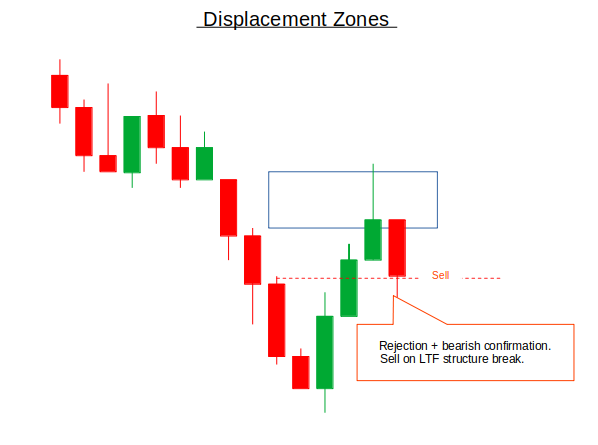
Displacement Zones are automated by detecting unusually strong impulsive candles that signal urgency and imbalance in the market. The EA identifies these zones when a candle’s range significantly exceeds the ATR, has a large body relative to its total range, shows minimal overlap with the previous candle, and closes near its extreme. Once detected, the entire candle range becomes the zone, and its closing direction defines bias. Rather than trading the breakout itself, the EA waits for price to move away and later return to the zone. A buy is triggered in a bullish displacement when price revisits the zone and shows lower-timeframe confirmation, such as rejection or a microstructure shift, with stops placed beyond the zone and targets set at nearby structure highs. The sell scenario mirrors this logic for bearish displacement.
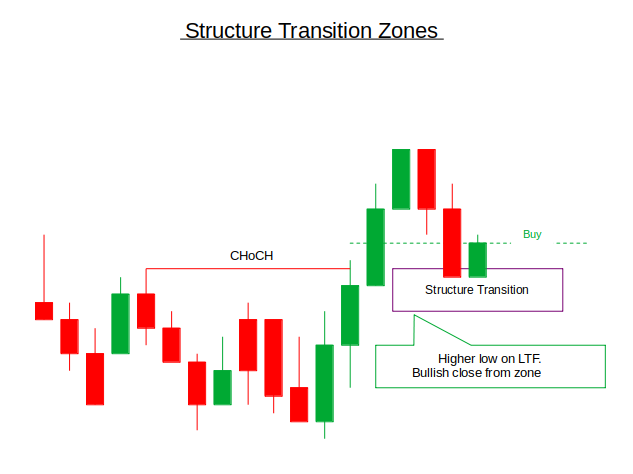
Structure Transition Zones are automated by identifying breaks in prior market structure, signaling a change in control between buyers and sellers. The EA tracks swing highs and lows and detects a Change of Character when price breaks against the prevailing trend, such as a swing high being broken in a downtrend. The zone is defined as the last opposing candle before the structural break. In a bullish transition, the EA waits for price to pull back into this zone and confirm strength through higher lows or bullish closes before entering a buy trade. Stops are placed beyond the transition swing, and targets aim for prior range highs or continuation levels. The sell setup follows the same logic in reverse.
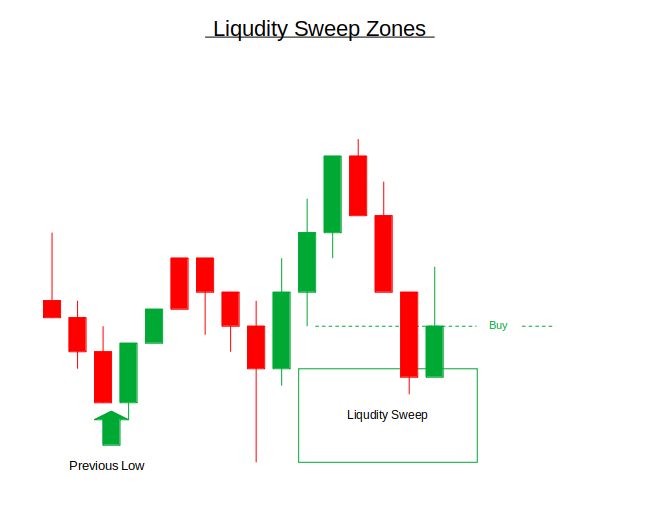
Liquidity Sweep Zones are automated by detecting candles that briefly break above prior highs or below prior lows, then quickly reverse back inside the range. These sweeps often represent stop-hunts followed by strong directional intent. The EA marks the sweep candle’s range as the zone and waits for price to move away before monitoring its return. In a buy scenario, the price sweeps below a low, reverses upward, and later revisits the zone; the EA looks for confirmation, such as failure to create a new low or a bullish engulfing move, before entering. Stops are placed beyond the sweep extreme, and targets aim for opposing liquidity or resistance levels. The sell scenario mirrors this logic after highs are swept.
Getting Started
//+------------------------------------------------------------------+
//|                                                     Auto MMZ.mq5 |
//|                        GIT under Copyright 2025, MetaQuotes Ltd. |
//|                     https://www.mql5.com/en/users/johnhlomohang/ |
//+------------------------------------------------------------------+
#property copyright "GIT under Copyright 2025, MetaQuotes Ltd."
#property link      "https://www.mql5.com/en/users/johnhlomohang/"
#property version   "1.00"

#include <Trade/Trade.mqh>
#include <Math/Stat/Math.mqh>
CTrade trade;

//+------------------------------------------------------------------+
//| Input Parameters                                                 |
//+------------------------------------------------------------------+
input ENUM_TIMEFRAMES HTF = PERIOD_H1;          // Higher Timeframe
input ENUM_TIMEFRAMES LTF = PERIOD_M5;          // Lower Timeframe
input ENUM_TIMEFRAMES ATF = PERIOD_M15;         // Analysis Timeframe (for zones)
input int             SwingBars = 3;            // Bars for swing detection

// Displacement Zone Parameters
input double          Displacement_ATR_Multiplier = 1.8;    // ATR multiplier for displacement
input double          Displacement_Body_Percent = 60.0;     // Minimum body percentage
input double          Displacement_Overlap_Max = 30.0;      // Maximum overlap with previous candle
input double          Displacement_Close_Extreme = 20.0;    // Close near extreme percentage

// Risk Management
input double          RiskPercent = 1.0;        // Risk per trade (%)
input int             StopLoss_Pips = 150;      // Stop Loss in pips
input double          RiskRewardRatio = 2.0;    // Risk/Reward ratio
input bool            UseDynamicSL = true;      // Use zone-based SL
input bool            UseStructureTP = true;    // Use structure for TP

// Trade Management
input int             MaxTradesPerDay = 10;     // Maximum trades per day
input bool            AllowConsecutiveTrades = true;  // Allow multiple trades in same direction
input double          TrailingStop_ATR = 1.5;   // ATR multiple for trailing stop

// Visualization
input bool            ShowZones = true;         // Show zone rectangles
input bool            ShowArrows = true;        // Show entry arrows
input bool            ShowLabels = true;        // Show trade labels
input bool            DebugMode = true;         // Show debug information

//+------------------------------------------------------------------+
//| Zone Structure                                                   |
//+------------------------------------------------------------------+
enum ZONE_TYPE
{
   ZONE_DISPLACEMENT,
   ZONE_STRUCTURE_TRANSITION,
   ZONE_LIQUIDITY_SWEEP
};

struct TradeZone
{
   datetime          time;
   double            high;
   double            low;
   double            mid;
   ZONE_TYPE         type;
   int               direction;      // 1 for bullish, -1 for bearish
   double            atr;            // ATR at time of zone formation
   datetime          expiry;         // Zone expiry time
   bool              active;
   bool              triggered;
   string            symbol;
   ENUM_TIMEFRAMES   tf;

   // Constructor to initialize with default values
   TradeZone()
   {
      Reset();
   }

   // Reset method
   void Reset()
   {
      time = 0;
      high = 0;
      low = 0;
      mid = 0;
      type = ZONE_DISPLACEMENT;
      direction = 0;
      atr = 0;
      expiry = 0;
      active = false;
      triggered = false;
      symbol = _Symbol;
      tf = PERIOD_CURRENT;
   }
};
Getting started, we establish the foundation of the Expert Advisor by importing the trading and statistical libraries, initializing the CTrade object for order execution, and defining all configurable inputs that control multi-timeframe analysis, displacement detection rules, risk management, trade management, and visualization behavior. The inputs allow the system to detect zones across higher, lower, and analysis timeframes; evaluate displacement strength using ATR-based conditions; and control risk through percentage-based sizing, stop loss logic, and risk–reward ratios.
We then define an enumerated ZONE_TYPE to classify Displacement, Structure Transition, and Liquidity Sweep zones, followed by a structured TradeZone data model that stores all relevant zone information such as price boundaries, direction, ATR at formation, expiry timing, activation status, and metadata. The constructor and Reset() method ensure every zone starts from a clean, controlled state, providing a structured and scalable framework for managing multiple dynamic market memory zones within the EA.
//+------------------------------------------------------------------+
//| Global Variables                                                 |
//+------------------------------------------------------------------+
SwingPoint htf_lastHigh, htf_prevHigh;
SwingPoint htf_lastLow, htf_prevLow;
SwingPoint atf_lastHigh, atf_prevHigh;
SwingPoint atf_lastLow, atf_prevLow;

TradeZone zones[100];
int zoneCount = 0;

TradeInfo activeTrades[10];
int activeTradeCount = 0;

datetime lastTradeDay = 0;
int tradesToday = 0;

double currentATR = 0;
int atrHandle = -1;

MqlDateTime today;

//+------------------------------------------------------------------+
//| Expert initialization function                                   |
//+------------------------------------------------------------------+
int OnInit()
{
   // Initialize ATR indicator
   atrHandle = iATR(_Symbol, PERIOD_CURRENT, 14);
   if(atrHandle == INVALID_HANDLE)
   {
      Print("Failed to create ATR indicator");
      return INIT_FAILED;
   }

   // Initialize swing points
   htf_lastHigh.Reset();
   htf_prevHigh.Reset();
   htf_lastLow.Reset();
   htf_prevLow.Reset();
   atf_lastHigh.Reset();
   atf_prevHigh.Reset();
   atf_lastLow.Reset();
   atf_prevLow.Reset();

   // Initialize zones array
   for(int i = 0; i < ArraySize(zones); i++)
      zones[i].Reset();
   zoneCount = 0;

   // Initialize active trades array
   for(int i = 0; i < ArraySize(activeTrades); i++)
      activeTrades[i].Reset();
   activeTradeCount = 0;

   // Initialize trade tracking
   lastTradeDay = 0;
   tradesToday = 0;

   // Set magic number for trades
   trade.SetExpertMagicNumber(12345);

   Print("EA Initialized. Zone Types: Displacement, Structure Transition, Liquidity Sweep");

   return INIT_SUCCEEDED;
}
In this section we establish the core global state of the Expert Advisor by declaring swing point trackers for both higher and analysis timeframes, arrays to store up to 100 detected trade zones and 10 active trades, and variables to manage daily trade limits and ATR-based volatility tracking. In the OnInit() function, we initialize the ATR indicator handle to handle volatility calculations, we reset all swing structures to ensure clean starting values, we clear and prepare the zones and active trades arrays, and we reset daily trade counters. Overall, this setup ensures the system starts in a controlled, organized state with properly initialized data structures ready for real-time zone detection and trade execution.
//+------------------------------------------------------------------+
//| Expert deinitialization function                                 |
//+------------------------------------------------------------------+
void OnDeinit(const int reason)
{
   if(atrHandle != INVALID_HANDLE)
      IndicatorRelease(atrHandle);

   ObjectsDeleteAll(0, "ZONE_");
   ObjectsDeleteAll(0, "TRADE_");
   ChartRedraw();

   Print("EA Deinitialized");
}

//+------------------------------------------------------------------+
//| Expert tick function                                             |
//+------------------------------------------------------------------+
void OnTick()
{
   // Update current ATR
   UpdateATR();

   // Check for new bars on analysis timeframe
   static datetime lastAtfBar = 0;
   datetime currentAtfBar = iTime(_Symbol, ATF, 0);

   if(currentAtfBar != lastAtfBar)
   {
      lastAtfBar = currentAtfBar;

      if(DebugMode) Print("New ATF bar: ", TimeToString(currentAtfBar));

      // Update market structure
      UpdateMarketStructure();

      // Detect new zones
      DetectDisplacementZones();
      DetectStructureTransitionZones();
      DetectLiquiditySweepZones();

      // Clean up expired zones
      CleanupZones();
   }

   // Check zone entries on every tick
   CheckZoneEntries();

   // Manage open positions
   ManageOpenTrades();

   // Update visualization
   if(ShowZones) UpdateVisualization();
}

//+------------------------------------------------------------------+
//| Update Market Structure                                          |
//+------------------------------------------------------------------+
void UpdateMarketStructure()
{
   // Update HTF structure
   UpdateSwingPoints(HTF, htf_lastHigh, htf_prevHigh, htf_lastLow, htf_prevLow);

   // Update Analysis TF structure
   UpdateSwingPoints(ATF, atf_lastHigh, atf_prevHigh, atf_lastLow, atf_prevLow);

   if(DebugMode && atf_lastHigh.price > 0 && atf_lastLow.price > 0)
   {
      Print("Market Structure - ATF High: ", atf_lastHigh.price,
            " Low: ", atf_lastLow.price,
            " ATR: ", currentATR);
   }
}
The OnDeinit() function ensures a clean shutdown of the Expert Advisor by releasing the ATR indicator handle to free system resources and deleting all chart objects associated with zones and trades using their prefixes. It then refreshes the chart to remove any remaining graphical artifacts and logs a confirmation message. This guarantees that when the EA is removed or restarted, no leftover indicators, drawings, or memory allocations interfere with future executions, maintaining stability and preventing resource leaks.
The OnTick() function serves as the operational engine of the EA, coordinating detection, execution, and management logic in real time. On every tick, it updates the current ATR and checks whether a new bar has formed on the analysis timeframe before recalculating market structure and scanning for new Displacement, Structure Transition, and Liquidity Sweep zones. Expired zones are cleaned up systematically, while entry conditions are evaluated continuously on every tick to ensure timely trade execution. Open trades are actively managed, and visual elements are refreshed when enabled. The UpdateMarketStructure() function supports this workflow by updating swing points on both higher and analysis timeframes, keeping the EA aligned with evolving structural context and volatility conditions.
//+------------------------------------------------------------------+
//| Detect Displacement Zones                                        |
//+------------------------------------------------------------------+
void DetectDisplacementZones()
{
   MqlRates rates[];
   ArraySetAsSeries(rates, true);
   int copied = CopyRates(_Symbol, ATF, 0, 5, rates);

   if(copied < 2) return;

   // Check latest candle for displacement
   MqlRates candle = rates[0];
   MqlRates prevCandle = rates[1];

   // Calculate candle metrics
   double range = candle.high - candle.low;
   if(range <= 0) return;

   double body = MathAbs(candle.close - candle.open);
   double bodyPercent = (body / range) * 100;

   // Calculate overlap with previous candle
   double overlapHigh = MathMin(candle.high, prevCandle.high);
   double overlapLow = MathMax(candle.low, prevCandle.low);
   double overlap = (overlapHigh > overlapLow) ? overlapHigh - overlapLow : 0;
   double overlapPercent = (overlap / range) * 100;

   // Check close near extreme (for bullish or bearish)
   double closeToHigh = candle.high - candle.close;
   double closeToLow = candle.close - candle.low;
   double closePercent;

   if(candle.close > candle.open) // Bullish candle
      closePercent = (closeToHigh / range) * 100;
   else // Bearish candle
      closePercent = (closeToLow / range) * 100;

   // Debug information
   if(DebugMode)
   {
      Print("Checking displacement - Range: ", range,
            " ATR*Mult: ", currentATR * Displacement_ATR_Multiplier,
            " Body%: ", bodyPercent, " Req: ", Displacement_Body_Percent,
            " Overlap%: ", overlapPercent, " Max: ", Displacement_Overlap_Max,
            " Close%: ", closePercent, " Max: ", Displacement_Close_Extreme);
   }

   // Check displacement conditions
   bool isDisplacement =
      (range >= currentATR * Displacement_ATR_Multiplier) &&
      (bodyPercent >= Displacement_Body_Percent) &&
      (overlapPercent <= Displacement_Overlap_Max) &&
      (closePercent <= Displacement_Close_Extreme);

   if(isDisplacement)
   {
      // Check if similar zone already exists (within last 5 bars)
      bool zoneExists = false;
      for(int i = 0; i < zoneCount; i++)
      {
         if(zones[i].active && MathAbs(zones[i].time - candle.time) < PeriodSeconds(ATF) * 5)
         {
            zoneExists = true;
            break;
         }
      }

      if(!zoneExists)
      {
         // Create displacement zone
         TradeZone zone;
         zone.time = candle.time;
         zone.high = candle.high;
         zone.low = candle.low;
         zone.mid = (zone.high + zone.low) / 2.0;
         zone.type = ZONE_DISPLACEMENT;
         zone.direction = (candle.close > candle.open) ? 1 : -1;
         zone.atr = currentATR;
         zone.expiry = zone.time + (24 * 60 * 60);  // 24 hour expiry
         zone.active = true;
         zone.triggered = false;
         zone.symbol = _Symbol;
         zone.tf = ATF;

         // Add to zones array
         int index = zoneCount % 100;
         zones[index] = zone;
         zoneCount++;

         Print("Displacement Zone Detected: ",
               (zone.direction == 1) ? "BULLISH" : "BEARISH",
               " | High: ", zone.high, " Low: ", zone.low,
               " | Time: ", TimeToString(zone.time));
      }
   }
}

//+------------------------------------------------------------------+
//| Detect Structure Transition Zones (CHoCH)                        |
//+------------------------------------------------------------------+
void DetectStructureTransitionZones()
{
   // Check for bullish CHoCH (downtrend to uptrend)
   if(atf_prevHigh.price > 0 && atf_lastHigh.price > atf_prevHigh.price &&
      atf_prevLow.price > 0 && atf_lastLow.price > atf_prevLow.price)
   {
      // Bullish transition - look for last bearish candle before break
      MqlRates rates[];
      ArraySetAsSeries(rates, true);
      int startBar = MathMax(0, atf_lastHigh.barIndex - 10);
      int copied = CopyRates(_Symbol, ATF, startBar, 20, rates);

      if(DebugMode) Print("Checking Bullish CHoCH - PrevHigh: ", atf_prevHigh.price,
                        " LastHigh: ", atf_lastHigh.price);

      for(int i = 0; i < copied; i++)
      {
         if(rates[i].close < rates[i].open)  // Bearish candle
         {
            CreateStructureTransitionZone(rates[i], 1);
            break;
         }
      }
   }

   // Check for bearish CHoCH (uptrend to downtrend)
   if(atf_prevLow.price > 0 && atf_lastLow.price < atf_prevLow.price &&
      atf_prevHigh.price > 0 && atf_lastHigh.price < atf_prevHigh.price)
   {
      // Bearish transition - look for last bullish candle before break
      MqlRates rates[];
      ArraySetAsSeries(rates, true);
      int startBar = MathMax(0, atf_lastLow.barIndex - 10);
      int copied = CopyRates(_Symbol, ATF, startBar, 20, rates);

      if(DebugMode) Print("Checking Bearish CHoCH - PrevLow: ", atf_prevLow.price,
                        " LastLow: ", atf_lastLow.price);

      for(int i = 0; i < copied; i++)
      {
         if(rates[i].close > rates[i].open)  // Bullish candle
         {
            CreateStructureTransitionZone(rates[i], -1);
            break;
         }
      }
   }
}
The DetectDisplacementZones() function scans the most recent candle on the analysis timeframe and evaluates whether it qualifies as a true displacement move using strict quantitative filters. It calculates the candle’s total range, body size percentage, overlap with the previous candle, and how close the close is to the candle’s extreme. These metrics are compared against ATR-based and percentage thresholds to confirm strong, low-overlap, high-momentum intent. If all displacement conditions are satisfied and no similar recent zone already exists, the function constructs a new TradeZone object, assigns its price boundaries, midpoint, direction, ATR context, expiry time, and activation status, and then stores it in the zones array. This ensures that only statistically significant impulsive moves are recorded as potential return zones.
The DetectStructureTransitionZones() function focuses on identifying Change of Character (CHoCH) events by analyzing swing structure shifts on the analysis timeframe. A bullish transition is detected when both higher highs and higher lows form after a prior downtrend, while a bearish transition is identified when lower lows and lower highs break a prior uptrend. Once a structural shift is confirmed, the function searches backward to locate the last opposing candle before the break—bearish for bullish transitions and bullish for bearish transitions—and uses it to create a Structure Transition Zone via a dedicated creation function.
//+------------------------------------------------------------------+
//| Detect Liquidity Sweep Zones                                     |
//+------------------------------------------------------------------+
void DetectLiquiditySweepZones()
{
   MqlRates rates[];
   ArraySetAsSeries(rates, true);
   int copied = CopyRates(_Symbol, ATF, 0, 5, rates);

   if(copied < 3) return;

   // Check for buy-side liquidity sweep (sweep of lows)
   if(atf_lastLow.price > 0 && rates[1].low < atf_lastLow.price)
   {
      // Check if there's a bullish reversal after the sweep
      bool bullishReversal = rates[1].close > rates[1].open ||
                            (rates[0].close > rates[0].open && rates[0].close > rates[1].high);

      if(bullishReversal)
      {
         if(DebugMode) Print("Buy-side Liquidity Sweep detected - Swept Low: ", atf_lastLow.price,
                           " Sweep Candle Low: ", rates[1].low);

         CreateLiquiditySweepZone(rates[1], 1);  // Bullish reversal
      }
   }

   // Check for sell-side liquidity sweep (sweep of highs)
   if(atf_lastHigh.price > 0 && rates[1].high > atf_lastHigh.price)
   {
      // Check if there's a bearish reversal after the sweep
      bool bearishReversal = rates[1].close < rates[1].open ||
                            (rates[0].close < rates[0].open && rates[0].close < rates[1].low);

      if(bearishReversal)
      {
         if(DebugMode) Print("Sell-side Liquidity Sweep detected - Swept High: ", atf_lastHigh.price,
                           " Sweep Candle High: ", rates[1].high);

         CreateLiquiditySweepZone(rates[1], -1);  // Bearish reversal
      }
   }
}

//+------------------------------------------------------------------+
//| Create Structure Transition Zone                                 |
//+------------------------------------------------------------------+
void CreateStructureTransitionZone(MqlRates &candle, int direction)
{
   // Check if similar zone already exists (within last 5 bars)
   bool zoneExists = false;
   for(int i = 0; i < zoneCount; i++)
   {
      if(zones[i].active && zones[i].type == ZONE_STRUCTURE_TRANSITION &&
         MathAbs(zones[i].time - candle.time) < PeriodSeconds(ATF) * 5)
      {
         zoneExists = true;
         break;
      }
   }

   if(!zoneExists)
   {
      TradeZone zone;
      zone.time = candle.time;
      zone.high = candle.high;
      zone.low = candle.low;
      zone.mid = (zone.high + zone.low) / 2.0;
      zone.type = ZONE_STRUCTURE_TRANSITION;
      zone.direction = direction;
      zone.atr = currentATR;
      zone.expiry = zone.time + (12 * 60 * 60);  // 12 hour expiry
      zone.active = true;
      zone.triggered = false;
      zone.symbol = _Symbol;
      zone.tf = ATF;

      // Add to zones array
      int index = zoneCount % 100;
      zones[index] = zone;
      zoneCount++;

      Print("Structure Transition Zone Detected: ",
            (zone.direction == 1) ? "BULLISH (CHoCH)" : "BEARISH (CHoCH)",
            " | High: ", zone.high, " Low: ", zone.low,
            " | Time: ", TimeToString(zone.time));
   }
}
The DetectLiquiditySweepZones() function automates the identification of stop-hunt behavior by scanning recent candles for sweeps beyond prior swing highs or lows. It checks whether the price temporarily breaks a known swing level and then confirms that a reversal follows, either within the same candle or the next one. If a prior low is swept and followed by bullish confirmation, a buy-side liquidity sweep zone is created; conversely, if a prior high is swept and followed by bearish confirmation, a sell-side liquidity sweep zone is formed. Debug outputs provide transparency during detection.
The CreateStructureTransitionZone() function formalizes the creation of a CHoCH-based zone once a structural break has been identified. Before creating a new zone, it first checks whether a similar active Structure Transition zone already exists within a recent time window to prevent duplication. If no recent equivalent zone is found, it initializes a new TradeZone object using the candle that preceded the structural break, assigning its price boundaries, midpoint, direction (bullish or bearish), ATR context, and a 12-hour expiry period. The zone is then stored in the zones array using a rolling index mechanism, activated for monitoring, and logged to the terminal, ensuring that each structural transition is cleanly recorded and managed within the EA’s memory framework.
//+------------------------------------------------------------------+
//| Check Zone Entries                                               |
//+------------------------------------------------------------------+
void CheckZoneEntries()
{
   // Reset daily trade count if new day
   TimeToStruct(TimeCurrent(), today);
   if(lastTradeDay != today.day)
   {
      tradesToday = 0;
      lastTradeDay = today.day;
      if(DebugMode) Print("New day started. Trade counter reset.");
   }

   // Check if we can take more trades today
   if(MaxTradesPerDay > 0 && tradesToday >= MaxTradesPerDay)
   {
      if(tradesToday == MaxTradesPerDay)
         Print("Maximum daily trades (", MaxTradesPerDay, ") reached for today.");
      return;
   }

   double currentBid = SymbolInfoDouble(_Symbol, SYMBOL_BID);
   double currentAsk = SymbolInfoDouble(_Symbol, SYMBOL_ASK);

   for(int i = 0; i < zoneCount; i++)
   {
      if(!zones[i].active || zones[i].triggered) continue;

      // Check if zone is expired
      if(TimeCurrent() > zones[i].expiry)
      {
         zones[i].active = false;
         continue;
      }

      // Check BUY entries (bullish zones)
      if(zones[i].direction == 1)
      {
         // Check if price is returning to zone (using Ask for buys)
         if(currentAsk >= zones[i].low && currentAsk <= zones[i].high)
         {
            // Get LTF confirmation
            if(CheckLTFConfirmation(true))
            {
               Print("BUY Signal: Price in ", ZoneTypeToString(zones[i].type),
                     " zone | Entry: ", currentAsk, " Zone: [", zones[i].low, "-", zones[i].high, "]");
               ExecuteZoneTrade(true, zones[i], currentAsk);
               zones[i].triggered = true;
               tradesToday++;
               break;  // Take only one trade per tick
            }
         }
      }
      // Check SELL entries (bearish zones)
      else if(zones[i].direction == -1)
      {
         // Check if price is returning to zone (using Bid for sells)
         if(currentBid >= zones[i].low && currentBid <= zones[i].high)
         {
            // Get LTF confirmation
            if(CheckLTFConfirmation(false))
            {
               Print("SELL Signal: Price in ", ZoneTypeToString(zones[i].type),
                     " zone | Entry: ", currentBid, " Zone: [", zones[i].low, "-", zones[i].high, "]");
               ExecuteZoneTrade(false, zones[i], currentBid);
               zones[i].triggered = true;
               tradesToday++;
               break;  // Take only one trade per tick
            }
         }
      }
   }
}

//+------------------------------------------------------------------+
//| Check LTF Confirmation                                           |
//+------------------------------------------------------------------+
bool CheckLTFConfirmation(bool forBuy)
{
   MqlRates ltfRates[];
   ArraySetAsSeries(ltfRates, true);
   int copied = CopyRates(_Symbol, LTF, 0, 5, ltfRates);

   if(copied < 3) return false;

   // For BUY confirmation
   if(forBuy)
   {
      // Simple confirmation: bullish candle closing above midpoint
      if(ltfRates[0].close > ltfRates[0].open &&
         ltfRates[0].close > ((ltfRates[0].high + ltfRates[0].low) / 2))
      {
         return true;
      }

      // Alternative: bullish engulfing
      if(ltfRates[0].close > ltfRates[0].open &&
         ltfRates[0].close > ltfRates[1].high &&
         ltfRates[0].open < ltfRates[1].low)
      {
         return true;
      }
   }
   // For SELL confirmation
   else
   {
      // Simple confirmation: bearish candle closing below midpoint
      if(ltfRates[0].close < ltfRates[0].open &&
         ltfRates[0].close < ((ltfRates[0].high + ltfRates[0].low) / 2))
      {
         return true;
      }

      // Alternative: bearish engulfing
      if(ltfRates[0].close < ltfRates[0].open &&
         ltfRates[0].close < ltfRates[1].low &&
         ltfRates[0].open > ltfRates[1].high)
      {
         return true;
      }
   }

   return false;
}
Here, we implement the core execution engine that decides when a detected Market Memory Zone becomes a live trade. The function begins by managing daily trade limits, resetting the counter at the start of a new trading day, and preventing further entries once the maximum number of trades is reached. It then retrieves the current Bid and Ask prices and iterates through all active, non-triggered zones. For each zone, it first checks expiry conditions to ensure outdated zones are deactivated. If the price returns inside a valid zone’s boundaries, the EA evaluates whether it is a bullish or bearish setup and proceeds to request lower timeframe confirmation before executing a trade. Once a trade is placed, the zone is marked as triggered to prevent duplicate entries, and the daily trade count is incremented, ensuring disciplined execution control.
The CheckLTFConfirmation() function provides behavioral validation before any order is sent, acting as a refinement filter to avoid blind level trading. For buy setups, it confirms either a strong bullish candle closing above its midpoint or a bullish engulfing pattern; for sell setups, it looks for the bearish equivalents. By requiring momentum evidence from the lower timeframe, the EA ensures that entries are based on reaction and intent rather than mere price contact within a zone.
//+------------------------------------------------------------------+
//| Execute Zone Trade                                               |
//+------------------------------------------------------------------+
void ExecuteZoneTrade(bool isBuy, TradeZone &zone, double entryPrice)
{
   // Check if position already exists for this symbol
   if(PositionSelect(_Symbol))
   {
      if(!AllowConsecutiveTrades)
      {
         Print("Position already exists and AllowConsecutiveTrades is false, skipping trade");
         return;
      }
   }

   ENUM_ORDER_TYPE orderType = isBuy ? ORDER_TYPE_BUY : ORDER_TYPE_SELL;

   // Calculate stop loss
   double stopLoss = CalculateZoneStopLoss(isBuy, zone, entryPrice);

   // Calculate take profit
   double takeProfit = CalculateZoneTakeProfit(isBuy, zone, entryPrice, stopLoss);

   // Calculate lot size
   double volume = CalculateLotSize(entryPrice, stopLoss);

   if(volume <= 0)
   {
      Print("Invalid lot size calculated: ", volume, ". Trade cancelled.");
      return;
   }

   // Execute trade
   string comment = StringFormat("%s_%s_%s",
      (isBuy ? "BUY" : "SELL"),
      ZoneTypeToString(zone.type),
      TimeToString(TimeCurrent(), TIME_MINUTES));

   bool success = trade.PositionOpen(_Symbol, orderType, volume,
                                     entryPrice, stopLoss, takeProfit, comment);

   if(success)
   {
      ulong ticket = trade.ResultOrder();
      Print("Trade Executed Successfully: ", comment,
            " | Ticket: ", ticket,
            " | Entry: ", entryPrice,
            " | SL: ", stopLoss,
            " | TP: ", takeProfit,
            " | Lots: ", volume);

      // Store trade info
      if(activeTradeCount < ArraySize(activeTrades))
      {
         activeTrades[activeTradeCount].entryTime = TimeCurrent();
         activeTrades[activeTradeCount].entryPrice = entryPrice;
         activeTrades[activeTradeCount].stopLoss = stopLoss;
         activeTrades[activeTradeCount].takeProfit = takeProfit;
         activeTrades[activeTradeCount].direction = isBuy ? 1 : -1;
         activeTrades[activeTradeCount].zone = zone;
         activeTrades[activeTradeCount].ticket = ticket;
         activeTradeCount++;
      }
   }
   else
   {
      Print("Trade failed: Error Code=", trade.ResultRetcode(),
            " Description=", trade.ResultRetcodeDescription());
   }
}

//+------------------------------------------------------------------+
//| Calculate Zone Stop Loss                                         |
//+------------------------------------------------------------------+
double CalculateZoneStopLoss(bool isBuy, TradeZone &zone, double entryPrice)
{
   double point = SymbolInfoDouble(_Symbol, SYMBOL_POINT);

   if(UseDynamicSL)
   {
      // Zone-based stop loss with buffer
      double buffer = 50 * point;  // 50 pip buffer
      if(isBuy)
      {
         double sl = zone.low - buffer;
         // Ensure SL is below entry
         if(sl >= entryPrice)
            sl = entryPrice - (100 * point);
         return NormalizeDouble(sl, _Digits);
      }
      else
      {
         double sl = zone.high + buffer;
         // Ensure SL is above entry
         if(sl <= entryPrice)
            sl = entryPrice + (100 * point);
         return NormalizeDouble(sl, _Digits);
      }
   }
   else
   {
      // Fixed pip stop loss
      double slDistance = StopLoss_Pips * 10 * point;
      if(isBuy)
         return NormalizeDouble(entryPrice - slDistance, _Digits);
      else
         return NormalizeDouble(entryPrice + slDistance, _Digits);
   }
}

//+------------------------------------------------------------------+
//| Calculate Zone Take Profit                                       |
//+------------------------------------------------------------------+
double CalculateZoneTakeProfit(bool isBuy, TradeZone &zone, double entry, double sl)
{
   double risk = MathAbs(entry - sl);
   double point = SymbolInfoDouble(_Symbol, SYMBOL_POINT);

   if(UseStructureTP)
   {
      if(isBuy)
      {
         // Take profit at next structure high
         double target = entry + (risk * RiskRewardRatio);

         if(atf_lastHigh.price > entry)
            target = atf_lastHigh.price;
         else if(htf_lastHigh.price > entry)
            target = htf_lastHigh.price;

         // Ensure minimum distance
         double minDistance = 50 * point;
         if(target - entry < minDistance)
            target = entry + (risk * RiskRewardRatio);

         return NormalizeDouble(target, _Digits);
      }
      else
      {
         // Take profit at next structure low
         double target = entry - (risk * RiskRewardRatio);

         if(atf_lastLow.price < entry)
            target = atf_lastLow.price;
         else if(htf_lastLow.price < entry)
            target = htf_lastLow.price;

         // Ensure minimum distance
         double minDistance = 50 * point;
         if(entry - target < minDistance)
            target = entry - (risk * RiskRewardRatio);

         return NormalizeDouble(target, _Digits);
      }
   }
   else
   {
      // Fixed risk/reward ratio
      if(isBuy)
         return NormalizeDouble(entry + (risk * RiskRewardRatio), _Digits);
      else
         return NormalizeDouble(entry - (risk * RiskRewardRatio), _Digits);
   }
}
The ExecuteZoneTrade() function manages the complete process of placing a trade once a valid zone entry has been confirmed. It first checks whether a position already exists for the symbol and respects the AllowConsecutiveTrades setting to prevent unwanted stacking of trades. The function then determines the order type (buy or sell), calculates a stop loss and take profit using dedicated zone-based logic, and computes the appropriate lot size based on risk parameters. If the calculated volume is valid, it sends the trade using PositionOpen() and attaches a structured comment that includes direction, zone type, and timestamp. Upon successful execution, the trade details are stored in the activeTrades array for future management and tracking; if the order fails, the system logs the broker return code and description for debugging purposes.
The stop-loss and take-profit calculations are designed to align with the Market Memory concept. When UseDynamicSL is enabled, the stop loss is positioned beyond the zone boundary with a safety buffer, ensuring logical invalidation if price fully breaches the zone; otherwise, a fixed pip-based stop is applied. The take profit can dynamically target recent structural highs or lows from the analysis or higher timeframe when UseStructureTP is enabled, while still respecting a minimum distance requirement to avoid overly tight targets. If structure-based targeting is disabled, a fixed risk–reward multiple is applied instead.
//+------------------------------------------------------------------+
//| Update Visualization                                             |
//+------------------------------------------------------------------+
void UpdateVisualization()
{
   ObjectsDeleteAll(0, "ZONE_");
   ObjectsDeleteAll(0, "TRADE_");

   // Draw zones
   int activeZoneCount = 0;
   for(int i = 0; i < zoneCount; i++)
   {
      if(zones[i].active)
      {
         DrawZone(zones[i], i);
         activeZoneCount++;
      }
   }

   // Draw structure levels
   if(ShowLabels)
   {
      if(atf_lastHigh.price > 0)
         CreateHorizontalLine("ATF_High", atf_lastHigh.price, clrRed, STYLE_DASH);

      if(atf_lastLow.price > 0)
         CreateHorizontalLine("ATF_Low", atf_lastLow.price, clrBlue, STYLE_DASH);

      if(htf_lastHigh.price > 0)
         CreateHorizontalLine("HTF_High", htf_lastHigh.price, clrDarkRed, STYLE_DOT);

      if(htf_lastLow.price > 0)
         CreateHorizontalLine("HTF_Low", htf_lastLow.price, clrDarkBlue, STYLE_DOT);
   }

   // Show zone count in corner
   if(ShowLabels)
   {
      string labelText = "Active Zones: " + IntegerToString(activeZoneCount);
      CreateLabel("ZoneCount", labelText, 10, 180, clrWhite);
   }
}

//+------------------------------------------------------------------+
//| Draw Zone                                                        |
//+------------------------------------------------------------------+
void DrawZone(TradeZone &zone, int index)
{
   string name = "ZONE_" + IntegerToString(index);

   // Calculate zone width (4 bars forward)
   datetime endTime = zone.time + (PeriodSeconds(zone.tf) * 4);

   // Draw rectangle
   if(ObjectCreate(0, name, OBJ_RECTANGLE, 0, zone.time, zone.high, endTime, zone.low))
   {
      // Set color based on zone type and direction
      color zoneColor;
      int zoneStyle = STYLE_SOLID;

      switch(zone.type)
      {
         case ZONE_DISPLACEMENT:
            zoneColor = (zone.direction == 1) ? clrLimeGreen : clrIndianRed;
            zoneStyle = STYLE_SOLID;
            break;
         case ZONE_STRUCTURE_TRANSITION:
            zoneColor = (zone.direction == 1) ? clrDodgerBlue : clrOrangeRed;
            zoneStyle = STYLE_DASH;
            break;
         case ZONE_LIQUIDITY_SWEEP:
            zoneColor = (zone.direction == 1) ? clrGold : clrMagenta;
            zoneStyle = STYLE_DOT;
            break;
         default:
            zoneColor = clrGray;
      }

      ObjectSetInteger(0, name, OBJPROP_COLOR, zoneColor);
      ObjectSetInteger(0, name, OBJPROP_STYLE, zoneStyle);
      ObjectSetInteger(0, name, OBJPROP_WIDTH, 2);
      ObjectSetInteger(0, name, OBJPROP_BACK, true);
      ObjectSetInteger(0, name, OBJPROP_FILL, true);
      ObjectSetInteger(0, name, OBJPROP_ZORDER, 0);

      // Add label
      if(ShowLabels)
      {
         string labelName = name + "_LABEL";
         if(ObjectCreate(0, labelName, OBJ_TEXT, 0, zone.time, zone.high))
         {
            string typeText;
            switch(zone.type)
            {
               case ZONE_DISPLACEMENT: typeText = "DISP"; break;
               case ZONE_STRUCTURE_TRANSITION: typeText = "CHoCH"; break;
               case ZONE_LIQUIDITY_SWEEP: typeText = "LIQ"; break;
               default: typeText = "UNK";
            }

            string directionText = (zone.direction == 1) ? "BULL" : "BEAR";
            ObjectSetString(0, labelName, OBJPROP_TEXT, typeText + " " + directionText);
            ObjectSetInteger(0, labelName, OBJPROP_COLOR, clrWhite);
            ObjectSetInteger(0, labelName, OBJPROP_FONTSIZE, 8);
            ObjectSetInteger(0, labelName, OBJPROP_BACK, true);
         }
      }

      if(DebugMode && ShowZones)
         Print("Drawing zone: ", name, " Type: ", ZoneTypeToString(zone.type),
               " Dir: ", zone.direction, " High: ", zone.high, " Low: ", zone.low);
   }
}
The UpdateVisualization() function manages all graphical elements on the chart to ensure the display accurately reflects the EA’s current internal state. It begins by clearing previously drawn zones and trade objects to prevent duplication or outdated visuals. It then loops through all stored zones and redraws only those that remain active, keeping the chart synchronized with live market memory logic. If label display is enabled, the function also plots horizontal lines representing the most recent swing highs and lows from both the analysis and higher timeframes, giving clear structural context.
The DrawZone() function handles the detailed rendering of each individual zone. It creates a forward-projecting rectangle from the zone’s origin time and price boundaries, extending it several bars into the future to visualize its area of influence. Each zone type—Displacement, Structure Transition (CHoCH), or Liquidity Sweep—is assigned a distinct color and line style, while bullish and bearish directions are visually differentiated. Optional text labels identify the zone type and direction (e.g., “DISP BULL” or “CHoCH BEAR”), making it easy to interpret at a glance.
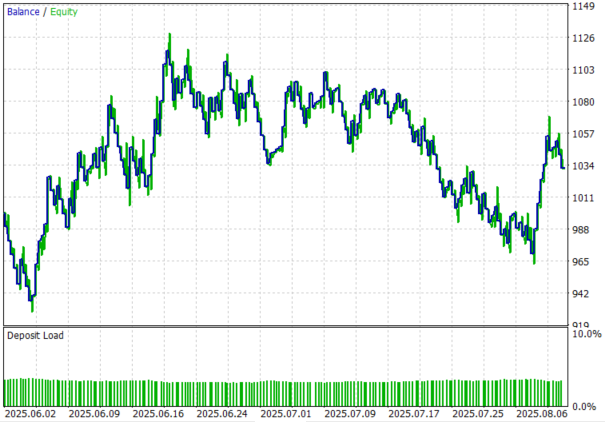
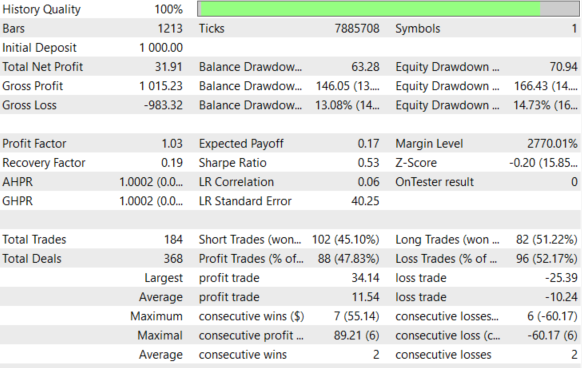
Back Test Results
The back-testing was evaluated on the H1 timeframe across a 2-month testing window (01 June 2025 to 14 August 2025), with the default settings:
Conclusion
In summary, we transformed the Market Memory Zones concept from a visual analytical tool into a fully automated trading engine by encoding its structural logic directly into the Expert Advisor. We implemented systematic detection of displacement candles, structure transitions (CHoCH), and liquidity sweeps, then stored these zones in a controlled circular buffer to ensure long-term stability during backtesting and live execution. Each zone now carries contextual data such as direction, ATR conditions, expiry timing, and structure references, allowing the EA to monitor price behavior in real time. Automated entry logic, lower-timeframe confirmation, dynamic stop-loss placement, structure-based take-profit targeting, and risk-based position sizing complete the transformation from discretionary interpretation to rule-driven execution.
In conclusion, automating Market Memory Zones removes emotional bias while preserving the structural intelligence behind the strategy. The system continuously tracks where price is likely to return, validates reactions with multi-timeframe confirmation, and executes trades with predefined risk management—making the entire process consistent, scalable, and testable. By converting price memory into structured, programmable logic, traders gain clarity, repeatability, and the ability to optimize performance across instruments and timeframes.
Warning: All rights to these materials are reserved by MetaQuotes Ltd. Copying or reprinting of these materials in whole or in part is prohibited.
This article was written by a user of the site and reflects their personal views. MetaQuotes Ltd is not responsible for the accuracy of the information presented, nor for any consequences resulting from the use of the solutions, strategies or recommendations described.
 Risk Management (Part 5): Integrating the Risk Management System into an Expert Advisor
 Introduction to MQL5 (Part 40): Beginner Guide to File Handling in MQL5 (II)
 Market Simulation (Part 12): Sockets (VI)
 MQL5 Trading Tools (Part 18): Rounded Speech Bubbles/Balloons with Orientation Control

- Free trading apps
- Over 8,000 signals for copying
- Economic news for exploring financial markets
You agree to website policy and terms of use