

MQL5 Trading Tools (Part 11): Correlation Matrix Dashboard (Pearson, Spearman, Kendall) with Heatmap and Standard Modes
 3 735
3 735
 1
1

Introduction
In our previous article (Part 10), we developed a strategy tracker system in MetaQuotes Language 5 (MQL5) with visual levels and success metrics that detected moving average crossover signals, tracked trades with multiple take-profit levels and stop-losses, and visualized outcomes on the chart. In Part 11, we develop a correlation matrix dashboard with Pearson, Spearman, and Kendall methods featuring a heatmap and standard modes. This dashboard computes asset relationships using the selected method over a configurable timeframe and bars. It supports standard mode with color thresholds and p-value significance stars, as well as heatmap mode with gradient visuals. Additionally, it includes an interactive user interface with timeframe selectors, mode toggles, and a dynamic legend. We will cover the following topics:
- Understanding the Correlation Matrix Dashboard Framework
- Implementation in MQL5
- Backtesting
- Conclusion
By the end, you’ll have a functional MQL5 correlation matrix dashboard for analyzing asset interdependencies, ready for customization—let’s dive in!
Understanding the Correlation Matrix Dashboard Framework
The correlation matrix dashboard framework analyzes relationships between financial assets by computing correlation coefficients, helping us identify interdependencies that influence portfolio diversification, hedging, or multi-asset strategies. It processes price changes across user-selected symbols over a defined period and timeframe, applying one of three statistical methods—Pearson for linear relationships, Spearman for rank-based monotonic associations, or Kendall for concordance in rankings—to quantify how assets move together or in opposite directions. Significance is evaluated through p-values to indicate reliability, with visual cues like color thresholds or gradients highlighting strong positive, strong negative, mild, or neutral correlations, enabling quick pattern recognition without manual calculations.
In standard mode, the dashboard uses predefined thresholds to categorize correlations, applying distinct colors for strong positives or negatives and adding stars for p-value significance levels to denote statistical confidence. Heatmap mode employs a continuous color gradient for finer visualization of correlation intensities from negative to positive, making subtle variations more apparent. The interface includes interactive elements such as timeframe selectors for switching analysis periods, toggle buttons for modes or themes, and a dynamic legend to interpret colors and values, all arranged in a grid with symbols on axes and cells showing pairwise correlations.
Our plan is to parse a list of symbols, compute correlations and p-values using the chosen method on price deltas, render a user interface with panels for headers, timeframes, symbols, cells, and legends, and update visuals dynamically based on modes and thresholds. We will incorporate event handling for interactions like mode switching or timeframe changes, ensuring the dashboard refreshes on new data for real-time insights. In brief, here is a visual representation of our objectives.

Implementation in MQL5
To create the program in MQL5, open the MetaEditor, go to the Navigator, locate the Experts folder, click on the "New" tab, and follow the prompts to create the file. Once it is made, in the coding environment, we will need to declare some input parameters and global variables that we will use throughout the program.
//+------------------------------------------------------------------+
//|                           Correlation Matrix Dashboard PART1.mq5 |
//|                           Copyright 2026, Allan Munene Mutiiria. |
//|                                   https://t.me/Forex_Algo_Trader |
//+------------------------------------------------------------------+
#property copyright "Copyright 2026, Allan Munene Mutiiria."
#property link "https://t.me/Forex_Algo_Trader"
#property version "1.00"

#include <Math\Stat\Math.mqh>

//+------------------------------------------------------------------+
//| Inputs                                                           |
//+------------------------------------------------------------------+
input string SymbolsList                   = "EURUSDm,GBPUSDm,USDJPYm,AUDUSDm,BTCUSDm,NZDUSDm,US500m,XAUUSDm"; // Comma-separated symbols (up to 30)
input ENUM_TIMEFRAMES CorrelationTimeframe = PERIOD_CURRENT;                                                   // Timeframe for correlation calculation
input int CorrelationBars                  = 100;                                                              // Number of bars for correlation calculation (min 20)
input double StrongPositiveThresholdPct    = 70.0;                                                             // Strong positive threshold in % (e.g., 70.0 for >=0.70)
input double StrongNegativeThresholdPct    = -70.0;                                                            // Strong negative threshold in % (e.g., -70.0 for <=-0.70)
input double PValueThreshold1              = 0.01;                                                             // P-value for *** significance
input double PValueThreshold2              = 0.05;                                                             // P-value for ** significance
input double PValueThreshold3              = 0.10;                                                             // P-value for * significance
input color ColorStrongPositiveBg          = clrLimeGreen;                                                     // Background for strong positive
input color ColorStrongNegativeBg          = clrOrangeRed;                                                     // Background for strong negative
input color ColorNeutralBg                 = C'70,70,70';                                                      // Background for neutral/mild/zero/diagonal cells
input color ColorDiagonalBg                = C'40,40,40';                                                      // Background for diagonal cells
input color ColorTextStrong                = clrWhite;                                                         // Text color for strong correlations
input color ColorTextPositive              = clrDeepSkyBlue;                                                   // Text color for mild positive
input color ColorTextNegative              = clrRed;                                                           // Text color for mild negative
input color ColorTextZero                  = clrWhite;                                                         // Text color for zero or diagonal

//+------------------------------------------------------------------+
//| Enumerations                                                     |
//+------------------------------------------------------------------+
enum DisplayMode
{
   MODE_STANDARD, // Standard Thresholds
   MODE_HEATMAP   // Heatmap Gradient
};
input DisplayMode DashboardMode = MODE_STANDARD; // Dashboard Display Mode

enum CorrelationMethod
{
   PEARSON,   // Pearson correlation
   SPEARMAN,  // Spearman rank correlation
   KENDALL    // Kendall tau correlation
};
input CorrelationMethod CorrMethod = PEARSON; // Correlation calculation method

//+------------------------------------------------------------------+
//| Defines                                                          |
//+------------------------------------------------------------------+
#define MAIN_PANEL              "PANEL_MAIN"                     // Define main panel rectangle identifier
#define HEADER_PANEL            "PANEL_HEADER"                   // Define header panel rectangle identifier
#define LEGEND_PANEL            "PANEL_LEGEND"                   // Define legend panel rectangle identifier
#define HEADER_PANEL_ICON       "PANEL_HEADER_ICON"              // Define header icon label identifier
#define HEADER_PANEL_TEXT       "PANEL_HEADER_TEXT"              // Define header title label identifier
#define CLOSE_BUTTON            "BUTTON_CLOSE"                   // Define close button identifier
#define TOGGLE_BUTTON           "BUTTON_TOGGLE"                  // Define toggle (minimize/maximize) button identifier
#define HEATMAP_BUTTON          "BUTTON_HEATMAP"                 // Define heatmap toggle button identifier
#define PVAL_BUTTON             "BUTTON_PVAL"                    // Define P-value toggle button identifier
#define SORT_BUTTON             "BUTTON_SORT"                    // Define sort button identifier
#define THEME_BUTTON            "BUTTON_THEME"                   // Define theme toggle button identifier
#define TF_CELL_RECT            "TF_CELL_RECT_"                  // Define timeframe cell rectangle prefix
#define TF_CELL_TEXT            "TF_CELL_TEXT_"                  // Define timeframe cell text prefix
#define SYMBOL_ROW_RECTANGLE    "SYMBOL_ROW_"                    // Define row symbol rectangle prefix
#define SYMBOL_ROW_TEXT         "SYMBOL_ROW_TEXT_"               // Define row symbol text label prefix
#define SYMBOL_COL_RECTANGLE    "SYMBOL_COL_"                    // Define column symbol rectangle prefix
#define SYMBOL_COL_TEXT         "SYMBOL_COL_TEXT_"               // Define column symbol text label prefix
#define CELL_RECTANGLE          "CELL_"                          // Define correlation cell rectangle prefix
#define CELL_TEXT               "CELL_TEXT_"                     // Define correlation cell text label prefix
#define LEGEND_CELL_RECTANGLE   "LEGEND_CELL_"                   // Define legend cell rectangle prefix
#define LEGEND_CELL_TEXT        "LEGEND_CELL_TEXT_"              // Define legend cell text prefix
#define WIDTH_SYMBOL            80                               // Define width of symbol rectangles
#define WIDTH_CELL              80                               // Define width of correlation cells
#define WIDTH_TF_CELL           45                               // Define width of TF cells
#define WIDTH_LEGEND_CELL       45                               // Define width of legend cells
#define HEIGHT_RECTANGLE        30                               // Define height of all rectangles
#define HEIGHT_HEADER           27                               // Define height of header
#define HEIGHT_TF_CELL          25                               // Define height of TF cells
#define HEIGHT_LEGEND           30                               // Define height of legend cells
#define HEIGHT_LEGEND_PANEL     34                               // Define height of legend panel (with padding)
#define LEGEND_SPACING          5                                // Define spacing between legend cells
#define NUM_LEGEND_ITEMS        15                               // Define increased to cover max possible (e.g., 11 in heatmap)
#define GAP_HEIGHT              8                                // Define gap between sections
#define GAP_MAIN_LEGEND         2                                // Define vertical gap between main panel and legend
#define COLOR_WHITE             clrWhite                         // Define white color for text and backgrounds
#define COLOR_BLACK             clrBlack                         // Define black color for borders and text
#define COLOR_LIGHT_GRAY        C'230,230,230'                   // Define light gray for neutral cells
#define COLOR_DARK_GRAY         C'105,105,105'                   // Define dark gray for headers
#define MAX_SYMBOLS             30                               // Define maximum symbols supported
#define NUM_TF                  8                                // Define number of timeframes

//+------------------------------------------------------------------+
//| Global Variables                                                 |
//+------------------------------------------------------------------+
int panel_x = 20, panel_y = 40;                                  //--- Initialize panel position coordinates
string symbols_array[MAX_SYMBOLS];                               //--- Declare array to store symbols
int num_symbols = 0;                                             //--- Initialize number of valid symbols
double correlation_matrix[MAX_SYMBOLS][MAX_SYMBOLS];             //--- Declare matrix to store correlations
double pvalue_matrix[MAX_SYMBOLS][MAX_SYMBOLS];                  //--- Declare matrix to store p-values
DisplayMode global_display_mode;                                 //--- Declare runtime display mode
ENUM_TIMEFRAMES global_correlation_tf;                           //--- Declare runtime timeframe
int current_tf_index = -1;                                       //--- Initialize index of current TF
int num_tf_visible;                                              //--- Declare dynamic number of visible TF cells
int num_legend_visible;                                          //--- Declare dynamic number of visible legend items
double visible_corr_vals[];                                      //--- Declare array of visible correlation values for legend

ENUM_TIMEFRAMES tf_list[NUM_TF] = {PERIOD_M1, PERIOD_M5, PERIOD_M15, PERIOD_M30, PERIOD_H1, PERIOD_H4, PERIOD_D1, PERIOD_W1}; //--- Initialize timeframe list
string tf_strings[NUM_TF] = {"M1", "M5", "M15", "M30", "H1", "H4", "D1", "W1"};                                            //--- Initialize timeframe strings

// Enhanced gradient colors for heatmap
color heatmap_colors[] = {clrRed, clrOrangeRed, clrOrange, clrYellow, clrLightGray, clrLime, clrLimeGreen, clrGreen}; //--- Initialize heatmap color gradient array
We begin the implementation by including the Math library with "#include <Math\Stat\Math.mqh>", which provides statistical functions essential for correlation calculations. Next, we define the input parameters that allow us to customize the dashboard. These include the "SymbolsList" as a comma-separated string for up to thirty symbols, "CorrelationTimeframe" using the ENUM_TIMEFRAMES enumeration for the calculation period, "CorrelationBars" as an integer specifying the number of bars with a minimum of twenty, thresholds like "StrongPositiveThresholdPct" and "StrongNegativeThresholdPct" in percentage for categorizing correlations, p-value thresholds such as "PValueThreshold1" for significance levels, and color inputs like "ColorStrongPositiveBg" set to lime green for strong positive backgrounds, along with others for negative, neutral, diagonal, and text colors.
We then create enumerations for configuration options. The "DisplayMode" enumeration offers "MODE_STANDARD" for threshold-based displays and "MODE_HEATMAP" for gradient visuals, with "DashboardMode" as an input defaulting to standard. Similarly, the "CorrelationMethod" enumeration provides "PEARSON" for linear correlations, "SPEARMAN" for rank-based, and "KENDALL" for tau, with "CorrMethod" as an input defaulting to Pearson. Following that, we use defines to set constants for user interface elements and layout using the #define directive. These include identifiers like "MAIN_PANEL" for the main rectangle, "HEADER_PANEL" for the header, and prefixes such as "TF_CELL_RECT" for timeframe cells, along with dimensions like "WIDTH_SYMBOL" at eighty pixels, "HEIGHT_RECTANGLE" at thirty, gaps such as "GAP_HEIGHT" at eight, and color defines like "COLOR_WHITE" aliased to white.
We declare global variables to manage state and data. These include "panel_x" and "panel_y" initialized to twenty and forty for position, "symbols_array" as a string array of maximum symbols size, "num_symbols" starting at zero, two-dimensional double arrays "correlation_matrix" and "pvalue_matrix" for storing values, "global_display_mode" from the display enumeration, "global_correlation_tf" from timeframes, "current_tf_index" at negative one, and integers like "num_tf_visible" and "num_legend_visible", plus a double array "visible_corr_vals" for legend values. Finally, we initialize arrays for timeframes and colors: "tf_list" as an "ENUM_TIMEFRAMES" array with values from one-minute to weekly, "tf_strings" as corresponding string labels, and "heatmap_colors" as a color array for gradients ranging from red to green. The next thing we will do is define some helper functions to do the statistical analysis.
//+------------------------------------------------------------------+
//| Approximate Normal CDF                                           |
//+------------------------------------------------------------------+
bool NormalCDF(double mean, double stddev, double x, double &cdf) {
   if (stddev <= 0.0) return false;                             //--- Check for invalid standard deviation
   double z = (x - mean) / stddev;                              //--- Compute z-score
   if (z < -10) {                                               //--- Handle extreme low z-value
      cdf = 0.0;                                                //--- Set CDF to 0
      return true;                                              //--- Return success
   }
   if (z > 10) {                                                //--- Handle extreme high z-value
      cdf = 1.0;                                                //--- Set CDF to 1
      return true;                                              //--- Return success
   }
   double t = 1 / (1 + 0.2316419 * MathAbs(z));                 //--- Compute t for approximation
   double d = 0.3989423 * MathExp(-z * z / 2);                  //--- Compute density d
   cdf = d * t * (0.3193815 + t * (-0.3565638 + t * (1.7814779 + t * (-1.821256 + t * 1.3302744)))); //--- Calculate CDF approximation
   if (z > 0) cdf = 1 - cdf;                                    //--- Adjust for positive z
   return true;                                                 //--- Return success
}

//+------------------------------------------------------------------+
//| Approximate Student t CDF                                        |
//+------------------------------------------------------------------+
bool StudentCDF(int df, double x, double &cdf) {
   if (df <= 0) return false;                                   //--- Check for invalid degrees of freedom
   double a = df / 2.0;                                         //--- Compute alpha parameter
   double b = 0.5;                                              //--- Set beta parameter
   double xt = df / (df + x * x);                               //--- Compute xt for incomplete beta
   double ib = MathBetaIncomplete(xt, a, b);                    //--- Compute incomplete beta
   double beta = MathExp(MathGammaLog(a) + MathGammaLog(b) - MathGammaLog(a + b)); //--- Compute beta function
   double regularized = ib / beta;                              //--- Compute regularized incomplete beta
   if (x >= 0) {                                                //--- Handle non-negative x
      cdf = 1 - 0.5 * regularized;                              //--- Set CDF for positive side
   } else {                                                     //--- Handle negative x
      cdf = 0.5 * regularized;                                  //--- Set CDF for negative side
   }
   return true;                                                 //--- Return success
}

//+------------------------------------------------------------------+
//| Calculate p-value based on method and correlation                |
//+------------------------------------------------------------------+
double calculate_pvalue(double corr, CorrelationMethod method, int n) {
   if (n < 3) return 1.0;                                       //--- Return invalid if insufficient samples

   double cdf = 0.0;                                            //--- Initialize CDF variable
   if (method == KENDALL) {                                     //--- Handle Kendall method
      double sigma = MathSqrt((4.0 * n + 10.0) / (9.0 * n * (n - 1.0))); //--- Compute sigma
      if (sigma == 0) return 1.0;                               //--- Return invalid if sigma zero
      double z = corr / sigma;                                  //--- Compute z-score
      if (!NormalCDF(0, 1, MathAbs(z), cdf)) return 1.0;        //--- Compute Normal CDF or return invalid
      return 2 * (1 - cdf);                                     //--- Return two-tailed p-value
   } else {                                                     //--- Handle PEARSON or SPEARMAN
      double r2 = corr * corr;                                  //--- Compute squared correlation
      if (r2 >= 1.0) return 0.0;                                //--- Return zero for perfect correlation
      double denom = 1.0 - r2;                                  //--- Compute denominator
      if (denom <= 0.0) return 0.0;                             //--- Avoid division by zero
      double t = corr * MathSqrt((n - 2.0) / denom);            //--- Compute t-statistic
      if (!StudentCDF(n - 2, MathAbs(t), cdf)) return 1.0;      //--- Compute Student CDF or return invalid
      return 2 * (1 - cdf);                                     //--- Return two-tailed p-value
   }
}
First, we define the "NormalCDF" function to approximate the cumulative distribution function (CDF) for a normal distribution, which is used in p-value calculations. It takes parameters for mean, standard deviation, the value x, and a reference to store the CDF result. We first check if the standard deviation is invalid and return false if so. Then, we compute the z-score by standardizing x. For extreme z values below negative ten or above ten, we set the CDF to zero or one, respectively, and return true. Otherwise, we calculate an approximation using a polynomial expansion based on t and density d, adjusting the CDF for positive z before returning true. A normal CDF graph would look as follows.

Next, we implement the "StudentCDF" function to approximate the cumulative distribution function (CDF) for Student's t-distribution, essential for p-values in Pearson and Spearman methods, which we will define later. It accepts degrees of freedom df, the value x, and a reference for the CDF. We validate df and return false if invalid. We then compute parameters a and b, followed by xt for the incomplete beta function. Using "MathBetaIncomplete" to get ib and calculating the full beta with gamma logs, we derive the regularized incomplete beta. Depending on whether x is non-negative or negative, we adjust the CDF accordingly and return true. A student CDF graph would look as follows.

We then create the "calculate_pvalue" function to compute the p-value based on the correlation coefficient, method, and sample size n. If n is less than three, we return one to indicate invalidity. We initialize a cumulative distribution function variable and handle Kendall separately by computing sigma, checking for zero, deriving z, and using "NormalCDF" to get the two-tailed p-value. For Pearson or Spearman, we calculate the squared correlation r2, handle perfect correlations by returning zero, compute the denominator and t-statistic, then use "StudentCDF" with adjusted df to obtain the two-tailed p-value. The next thing we need to do is create a function to parse the symbols' list into arrays that we can manage. Here is the logic we used to achieve that.
//+------------------------------------------------------------------+
//| Parse symbols list into array                                    |
//+------------------------------------------------------------------+
void parse_symbols() {
   string temp = SymbolsList;                                   //--- Copy input symbols list
   num_symbols = 0;                                             //--- Reset symbol count
   while (StringFind(temp, ",") >= 0 && num_symbols < MAX_SYMBOLS) { //--- Loop through comma-separated symbols
      int pos = StringFind(temp, ",");                          //--- Find comma position
      string sym = StringSubstr(temp, 0, pos);                  //--- Extract symbol
      if (SymbolSelect(sym, true)) {                            //--- Select symbol if available
         symbols_array[num_symbols] = sym;                      //--- Store valid symbol
         num_symbols++;                                         //--- Increment count
      } else {                                                  //--- Handle unavailable symbol
         Print("Warning: Symbol ", sym, " not available.");     //--- Print warning
      }
      temp = StringSubstr(temp, pos + 1);                       //--- Update remaining string
   }
   if (StringLen(temp) > 0 && num_symbols < MAX_SYMBOLS) {      //--- Handle last symbol
      if (SymbolSelect(temp, true)) {                           //--- Select last symbol if available
         symbols_array[num_symbols] = temp;                     //--- Store last valid symbol
         num_symbols++;                                         //--- Increment count
      } else {                                                  //--- Handle unavailable last symbol
         Print("Warning: Symbol ", temp, " not available.");    //--- Print warning
      }
   }
   if (num_symbols < 2) {                                       //--- Check minimum symbols
      Print("Error: At least 2 valid symbols required. Found: ", num_symbols); //--- Print error
      ExpertRemove();                                           //--- Remove expert
   }
}
Here, we implement the "parse_symbols" function to process the user-provided list of symbols into a usable array for the dashboard. It starts by copying the "SymbolsList" input to a temporary string variable and resetting the "num_symbols" counter to zero. We then enter a loop that continues as long as a comma is found in the temporary string and the symbol count is below the "MAX_SYMBOLS" limit. Inside the loop, we locate the position of the next comma using StringFind, extract the symbol substring from the start to that position with StringSubstr, and attempt to select the symbol in the market watch using SymbolSelect with true to add it if necessary. If successful, we store the symbol in the "symbols_array" at the current index and increment "num_symbols"; otherwise, we print a warning message for unavailable symbols. We update the temporary string to the remainder after the comma using another "StringSubstr".
After the loop, we check if any remaining text exists in the temporary string—indicating the last symbol—and if the count is still under the limit. We attempt to select and store this final symbol similarly, printing a warning if unavailable. Finally, if fewer than two valid symbols were found, we print an error message and remove the program with ExpertRemove to ensure the matrix requires at least two assets for correlations. Printing the array gives us the following outcome.

We can now move on to defining our statistical functions for use in calculations.
//+------------------------------------------------------------------+
//| Rank data for Spearman correlation                               |
//+------------------------------------------------------------------+
void rank_data(const double &data[], double &ranks[]) {
   int size = ArraySize(data);                                  //--- Get data size
   int indices[];                                               //--- Declare indices array
   ArrayResize(indices, size);                                  //--- Resize indices
   for (int i = 0; i < size; i++) indices[i] = i;               //--- Initialize indices

   // Sort indices based on data values
   for (int i = 0; i < size - 1; i++) {                         //--- Loop outer for sorting
      for (int j = i + 1; j < size; j++) {                      //--- Loop inner for comparison
         if (data[indices[i]] > data[indices[j]]) {             //--- Check if swap needed
            int temp = indices[i];                              //--- Store temporary
            indices[i] = indices[j];                            //--- Swap indices
            indices[j] = temp;                                  //--- Complete swap
         }
      }
   }

   // Assign ranks, handling ties
   for (int i = 0; i < size; ) {                                //--- Loop through sorted indices
      int start = i;                                            //--- Set start of tie group
      double value = data[indices[i]];                          //--- Get current value
      while (i < size && data[indices[i]] == value) i++;        //--- Skip ties
      double rank = (start + i - 1) / 2.0 + 1.0;                //--- Compute average rank
      for (int k = start; k < i; k++) {                         //--- Assign rank to group
         ranks[indices[k]] = rank;                              //--- Set rank
      }
   }
}

//+------------------------------------------------------------------+
//| Calculate Pearson correlation                                    |
//+------------------------------------------------------------------+
double pearson_correlation(const double &deltas1[], const double &deltas2[], int size) {
   double mean1 = 0, mean2 = 0;                                 //--- Initialize means
   for (int i = 0; i < size; i++) {                             //--- Loop to compute sums
      mean1 += deltas1[i];                                      //--- Accumulate first deltas
      mean2 += deltas2[i];                                      //--- Accumulate second deltas
   }
   mean1 /= size;                                               //--- Compute first mean
   mean2 /= size;                                               //--- Compute second mean

   double var1 = 0, var2 = 0, cov = 0;                          //--- Initialize variances and covariance
   for (int i = 0; i < size; i++) {                             //--- Loop to compute deviations
      double dev1 = deltas1[i] - mean1;                         //--- Compute first deviation
      double dev2 = deltas2[i] - mean2;                         //--- Compute second deviation
      var1 += dev1 * dev1;                                      //--- Accumulate first variance
      var2 += dev2 * dev2;                                      //--- Accumulate second variance
      cov += dev1 * dev2;                                       //--- Accumulate covariance
   }
   if (var1 == 0 || var2 == 0) return 0.0;                      //--- Return zero if no variance
   return cov / MathSqrt(var1 * var2);                          //--- Return correlation
}

//+------------------------------------------------------------------+
//| Calculate Spearman correlation                                   |
//+------------------------------------------------------------------+
double spearman_correlation(const double &deltas1[], const double &deltas2[], int size) {
   double ranks1[], ranks2[];                                   //--- Declare rank arrays
   ArrayResize(ranks1, size);                                   //--- Resize first ranks
   ArrayResize(ranks2, size);                                   //--- Resize second ranks
   rank_data(deltas1, ranks1);                                  //--- Rank first deltas
   rank_data(deltas2, ranks2);                                  //--- Rank second deltas
   return pearson_correlation(ranks1, ranks2, size);            //--- Return Pearson on ranks
}

//+------------------------------------------------------------------+
//| Calculate Kendall correlation                                    |
//+------------------------------------------------------------------+
double kendall_correlation(const double &deltas1[], const double &deltas2[], int size) {
   int concordant = 0, discordant = 0;                          //--- Initialize pair counts
   for (int i = 0; i < size - 1; i++) {                         //--- Loop outer pairs
      for (int j = i + 1; j < size; j++) {                      //--- Loop inner pairs
         double sign1 = deltas1[i] - deltas1[j];                //--- Compute first sign
         double sign2 = deltas2[i] - deltas2[j];                //--- Compute second sign
         if (sign1 * sign2 > 0) concordant++;                   //--- Increment concordant
         else if (sign1 * sign2 < 0) discordant++;              //--- Increment discordant
         // Ties are ignored in basic Kendall tau
      }
   }
   int total_pairs = size * (size - 1) / 2;                     //--- Compute total pairs
   if (total_pairs == 0) return 0.0;                            //--- Return zero if no pairs
   return (concordant - discordant) / (double)total_pairs;      //--- Return tau
}
First, we implement the "rank_data" function to assign ranks to an array of data values, which is crucial for the Spearman correlation method to handle non-parametric ranking. It takes a constant reference to the data array and a reference to the ranks array. We first determine the size using ArraySize and declare an indices array, resizing it to match and initializing it with sequential values from zero to size minus one. We then perform a bubble sort on the indices based on the corresponding data values, swapping indices if the data at the current index is greater than that at the next. After sorting, we loop through the sorted indices to assign ranks, handling ties by identifying groups with the same value, computing an average rank for the group using the formula (start + end - 1) / 2.0 + 1.0, and applying that rank back to the original positions via the indices.
Next, we define the "pearson_correlation" function to calculate the Pearson correlation coefficient between two arrays of price deltas over a given size. It initializes means for both arrays to zero, then loops to sum the deltas and computes the means by dividing by the size. We then initialize variances and covariance to zero and loop again to calculate deviations from the means, accumulating squared deviations for variances and the product for covariance. If either variance is zero, we return 0.0 to avoid division by zero; otherwise, we return the covariance divided by the square root of the product of variances using the MathSqrt function. We then create the "spearman_correlation" function to compute Spearman's rank correlation. It declares and resizes two rank arrays to the input size, calls "rank_data" on each deltas array to populate the ranks, and returns the result of "pearson_correlation" applied to these rank arrays instead of the original deltas.
Finally, we implement the "kendall_correlation" function for Kendall's tau coefficient. Counters for concordant and discordant pairs are initialized to zero. We use nested loops over the data size to compare every pair of elements and compute signs as differences in each array. If the product of signs is positive, concordant is incremented; if negative, discordant—ignoring ties. Total pairs are calculated as size times (size - 1) / 2. We return 0.0 if there are no pairs, or the difference between concordant and discordant divided by the total pairs. In a normal bivariate population comparison, they look as follows.
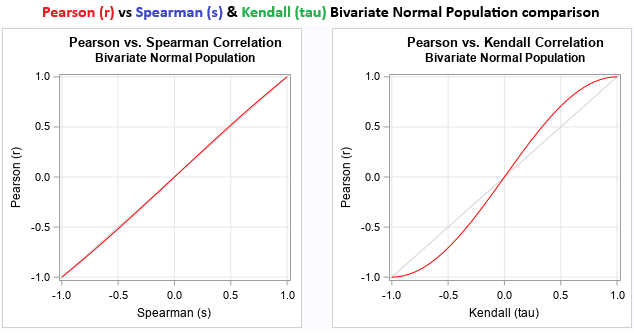
Using the analysis functions, we can create helper functions to handle the standardised correlation computations now as follows.
//+------------------------------------------------------------------+
//| Calculate correlation based on method                            |
//+------------------------------------------------------------------+
double calculate_correlation(string sym1, string sym2) {
   if (sym1 == sym2) return 1.0;                                //--- Return self-correlation

   double prices1[], prices2[];                                 //--- Declare price arrays
   ArrayResize(prices1, CorrelationBars);                       //--- Resize first prices
   ArrayResize(prices2, CorrelationBars);                       //--- Resize second prices
   if (CopyClose(sym1, global_correlation_tf, 0, CorrelationBars, prices1) < CorrelationBars || //--- Copy first closes or check failure
       CopyClose(sym2, global_correlation_tf, 0, CorrelationBars, prices2) < CorrelationBars) {
      return 0.0;                                               //--- Return insufficient data
   }

   // Compute price changes (deltas)
   double deltas1[], deltas2[];                                 //--- Declare delta arrays
   ArrayResize(deltas1, CorrelationBars - 1);                   //--- Resize first deltas
   ArrayResize(deltas2, CorrelationBars - 1);                   //--- Resize second deltas
   for (int i = 0; i < CorrelationBars - 1; i++) {              //--- Loop to compute deltas
      deltas1[i] = prices1[i + 1] - prices1[i];                 //--- Set first delta
      deltas2[i] = prices2[i + 1] - prices2[i];                 //--- Set second delta
   }

   int size = CorrelationBars - 1;                              //--- Set effective size
   switch (CorrMethod) {                                        //--- Switch on method
      case PEARSON:                                             //--- Handle Pearson
         return pearson_correlation(deltas1, deltas2, size);    //--- Return Pearson result
      case SPEARMAN:                                            //--- Handle Spearman
         return spearman_correlation(deltas1, deltas2, size);   //--- Return Spearman result
      case KENDALL:                                             //--- Handle Kendall
         return kendall_correlation(deltas1, deltas2, size);    //--- Return Kendall result
      default:                                                  //--- Handle default
         return 0.0;                                            //--- Return zero
   }
}

//+------------------------------------------------------------------+
//| Update correlation matrix values                                 |
//+------------------------------------------------------------------+
void update_correlations() {
   int n = CorrelationBars - 1;                                 //--- Set sample size
   if (n < 2) {                                                 //--- Check minimum bars
      Print("Error: Insufficient bars for correlation (need at least 3)."); //--- Print error
      return;                                                   //--- Exit function
   }
   for (int i = 0; i < num_symbols; i++) {                      //--- Loop rows
      for (int j = 0; j < num_symbols; j++) {                   //--- Loop columns
         double corr = calculate_correlation(symbols_array[i], symbols_array[j]); //--- Compute correlation
         correlation_matrix[i][j] = corr;                       //--- Store correlation
         if (i == j) {                                          //--- Handle diagonal
            pvalue_matrix[i][j] = 0.0;                          //--- Set p-value to zero
         } else if (corr == 0.0 && n < 3) {                     //--- Handle insufficient data
            pvalue_matrix[i][j] = 1.0;                          //--- Set p-value to one
         } else {                                               //--- Handle normal case
            pvalue_matrix[i][j] = calculate_pvalue(corr, CorrMethod, n); //--- Compute and store p-value
         }
      }
   }
}
We create the "calculate_correlation" function to compute the correlation coefficient between two symbols, returning a double value. It takes string parameters for sym1 and sym2. If they are identical, it immediately returns 1.0 to represent perfect self-correlation. We declare and resize two double arrays "prices1" and "prices2" to the size of "CorrelationBars". We use CopyClose to fetch closing prices for each symbol from the "global_correlation_tf" timeframe, starting from the current bar zero. If either copy fails to retrieve the full amount, we return 0.0 to indicate insufficient data.
To focus on price changes, we declare and resize delta arrays "deltas1" and "deltas2" to one less than "CorrelationBars". We loop to calculate each delta as the difference between consecutive prices. The effective size is set to "CorrelationBars" minus one. A switch statement on the "CorrMethod" enumeration calls the relevant correlation function. For "PEARSON", we call "pearson_correlation" with the deltas and size. For "SPEARMAN", we call "spearman_correlation". For "KENDALL", we call "kendall_correlation". The default case returns 0.0.
Next, we implement the "update_correlations" function to populate the correlation and p-value matrices with fresh calculations. It computes the sample size n as "CorrelationBars" minus one and checks if it's less than two, printing an error if so, since at least three bars are needed for meaningful correlations, then exits early. We use nested loops over "num_symbols" for rows i and columns j, calling "calculate_correlation" with the corresponding symbols from "symbols_array" to get corr and storing it in "correlation_matrix" at [i][j]. For p-values, if i equals j for the diagonal, we set "pvalue_matrix" at [i][j] to 0.0; if corr is 0.0 and n is less than three, set it to 1.0; otherwise, compute it using "calculate_pvalue" with corr, "CorrMethod", and n, storing the result. Next, we will need helpers for the heatmap.
//+------------------------------------------------------------------+
//| Get significance stars based on p-value                          |
//+------------------------------------------------------------------+
string get_significance_stars(double pval) {
   if (pval < PValueThreshold1) return "***";                   //--- Return three stars
   if (pval < PValueThreshold2) return "**";                    //--- Return two stars
   if (pval < PValueThreshold3) return "*";                     //--- Return one star
   return "";                                                   //--- Return empty
}

//+------------------------------------------------------------------+
//| Interpolate between multiple colors based on value (-1 to 1)     |
//+------------------------------------------------------------------+
color interpolate_heatmap_color(double value) {
   if (value == 0.0) return ColorNeutralBg;                     //--- Return neutral for zero
   double abs_val = MathAbs(value);                             //--- Compute absolute value
   int num_stops = ArraySize(heatmap_colors) / 2;               //--- Compute stops per side
   double step = 1.0 / (num_stops - 1);                         //--- Compute step size

   if (value > 0.0) {                                           //--- Handle positive
      int idx = (int)MathFloor(abs_val / step);                 //--- Compute index
      if (idx >= num_stops - 1) idx = num_stops - 2;            //--- Clamp index
      double factor = (abs_val - idx * step) / step;            //--- Compute factor
      return interpolate_color(heatmap_colors[idx + num_stops], heatmap_colors[idx + num_stops + 1], factor); //--- Interpolate positive
   } else {                                                     //--- Handle negative
      int idx = (int)MathFloor(abs_val / step);                 //--- Compute index
      if (idx >= num_stops - 1) idx = num_stops - 2;            //--- Clamp index
      double factor = (abs_val - idx * step) / step;            //--- Compute factor
      return interpolate_color(heatmap_colors[idx], heatmap_colors[idx + 1], factor); //--- Interpolate negative
   }
}

//+------------------------------------------------------------------+
//| Interpolate between two colors based on factor (0 to 1)          |
//+------------------------------------------------------------------+
color interpolate_color(color c1, color c2, double factor) {
   uchar r1 = (uchar)(c1 & 0xFF), g1 = (uchar)((c1 >> 8) & 0xFF), b1 = (uchar)((c1 >> 16) & 0xFF); //--- Extract RGB from first color
   uchar r2 = (uchar)(c2 & 0xFF), g2 = (uchar)((c2 >> 8) & 0xFF), b2 = (uchar)((c2 >> 16) & 0xFF); //--- Extract RGB from second color
   uchar r = (uchar)MathMax(0, MathMin(255, r1 + factor * (r2 - r1) + 0.5)); //--- Interpolate red
   uchar g = (uchar)MathMax(0, MathMin(255, g1 + factor * (g2 - g1) + 0.5)); //--- Interpolate green
   uchar b = (uchar)MathMax(0, MathMin(255, b1 + factor * (b2 - b1) + 0.5)); //--- Interpolate blue
   return (color)((b << 16) | (g << 8) | r);                    //--- Return interpolated color
}
We define the "get_significance_stars" function to determine the number of asterisk symbols representing statistical significance based on a given p-value, returning a string. It takes a double parameter "pval" and uses conditional checks: if "pval" is less than "PValueThreshold1", we return "***" for the highest significance; if less than "PValueThreshold2", return "**"; if less than "PValueThreshold3", return "*"; otherwise, return an empty string for no significance.
Next, we implement the "interpolate_heatmap_color" function to generate a color for the heatmap mode by interpolating within the gradient array based on a correlation value between negative one and one, returning a color type. It handles zero by returning "ColorNeutralBg" directly. We compute the absolute value "abs_val", determine the number of stops per side by dividing the "heatmap_colors" array size by two, and calculate the step size as one divided by stops minus one. For positive values, we find the index with MathFloor of "abs_val" over step, clamp it if at or beyond the last interval, compute a factor as the remainder over step, and call "interpolate_color" with colors from the positive half of the array plus the factor. For negative values, we do similarly but use the negative half of the array.
We then create the "interpolate_color" function to blend two colors linearly based on a factor from zero to one, returning the resulting color. It extracts red, green, and blue components as unsigned chars from "c1" and "c2" using bitwise operations: masking with 0xFF for red, shifting right by eight and masking for green, and shifting by sixteen for blue. We interpolate each channel by starting from the first color's value, adding the factor times the difference to the second, adding 0.5 for rounding, and clamping between zero and 255 with the MathMax and MathMin functions. Finally, we combine the interpolated components into a single color value using bit shifts: blue left by sixteen, green by eight, and red, then bitwise OR them together. We can now begin the creation of the dashboard since we have most of the helper functions that we need to do the computations.
//+------------------------------------------------------------------+
//| Create rectangle for UI                                          |
//+------------------------------------------------------------------+
bool create_rectangle(string object_name, int x_distance, int y_distance, int x_size, int y_size,
                      color background_color, color border_color = clrNONE) {
   if (!ObjectCreate(0, object_name, OBJ_RECTANGLE_LABEL, 0, 0, 0)) {        //--- Create rectangle or check failure
      Print(__FUNCTION__, ": failed to create Rectangle: ", GetLastError()); //--- Print error
      return false;                                                          //--- Return failure
   }
   ObjectSetInteger(0, object_name, OBJPROP_XDISTANCE, x_distance);          //--- Set x distance
   ObjectSetInteger(0, object_name, OBJPROP_YDISTANCE, y_distance);          //--- Set y distance
   ObjectSetInteger(0, object_name, OBJPROP_XSIZE, x_size);                  //--- Set x size
   ObjectSetInteger(0, object_name, OBJPROP_YSIZE, y_size);                  //--- Set y size
   ObjectSetInteger(0, object_name, OBJPROP_CORNER, CORNER_LEFT_UPPER);      //--- Set corner
   ObjectSetInteger(0, object_name, OBJPROP_BGCOLOR, background_color);      //--- Set background
   ObjectSetInteger(0, object_name, OBJPROP_COLOR, border_color);            //--- Set border color
   ObjectSetInteger(0, object_name, OBJPROP_BORDER_TYPE, BORDER_FLAT);       //--- Set border type
   ObjectSetInteger(0, object_name, OBJPROP_BACK, false);                    //--- Set back property
   return true;                                                              //--- Return success
}

//+------------------------------------------------------------------+
//| Create text label for UI                                         |
//+------------------------------------------------------------------+
bool create_label(string object_name, string text, int x_distance, int y_distance, int font_size = 10,
                  color text_color = COLOR_WHITE, string font = "Arial Rounded MT Bold") {
   if (!ObjectCreate(0, object_name, OBJ_LABEL, 0, 0, 0)) {                 //--- Create label or check failure
      Print(__FUNCTION__, ": failed to create Label: ", GetLastError());    //--- Print error
      return false;                                                         //--- Return failure
   }
   ObjectSetInteger(0, object_name, OBJPROP_XDISTANCE, x_distance);         //--- Set x distance
   ObjectSetInteger(0, object_name, OBJPROP_YDISTANCE, y_distance);         //--- Set y distance
   ObjectSetInteger(0, object_name, OBJPROP_CORNER, CORNER_LEFT_UPPER);     //--- Set corner
   ObjectSetString(0, object_name, OBJPROP_TEXT, text);                     //--- Set text
   ObjectSetString(0, object_name, OBJPROP_FONT, font);                     //--- Set font
   ObjectSetInteger(0, object_name, OBJPROP_FONTSIZE, font_size);           //--- Set font size
   ObjectSetInteger(0, object_name, OBJPROP_COLOR, text_color);             //--- Set text color
   ObjectSetInteger(0, object_name, OBJPROP_ANCHOR, ANCHOR_CENTER);         //--- Set anchor
   return true;                                                             //--- Return success
}


//+------------------------------------------------------------------+
//| Create full dashboard UI                                         |
//+------------------------------------------------------------------+
void create_full_dashboard() {
   color main_bg = C'30,30,30';                                 //--- Set main background
   color header_bg = C'60,60,60';                               //--- Set header background
   color text_color = COLOR_WHITE;                              //--- Set text color
   color neutral_bg = ColorNeutralBg;                           //--- Set neutral background
   color button_text = clrGold;                                 //--- Set button text color
   color theme_icon_color = clrWhite;                           //--- Set theme icon color
   color close_text = clrWhite;                                 //--- Set close text color
   color header_icon_color = clrAqua;                           //--- Set header icon color
   int panel_width = WIDTH_SYMBOL + num_symbols * (WIDTH_CELL - 1) + 4; //--- Compute panel width
   int panel_height = HEIGHT_HEADER + HEIGHT_TF_CELL + GAP_HEIGHT + HEIGHT_RECTANGLE * (num_symbols + 1) - num_symbols + 2; //--- Compute panel height
   create_rectangle(MAIN_PANEL, panel_x, panel_y, panel_width, panel_height, main_bg); //--- Create main panel
   create_rectangle(HEADER_PANEL, panel_x, panel_y, panel_width, HEIGHT_HEADER, header_bg); //--- Create header panel
   create_label(HEADER_PANEL_ICON, CharToString(181), panel_x + 12, panel_y + 14, 18, header_icon_color, "Wingdings"); //--- Create header icon
   create_label(HEADER_PANEL_TEXT, "Correlation Matrix", panel_x + 90, panel_y + 12, 13, text_color); //--- Create header text
   create_label(CLOSE_BUTTON, CharToString('r'), panel_x + (panel_width - 17), panel_y + 14, 18, close_text, "Webdings"); //--- Create close button
   create_label(TOGGLE_BUTTON, CharToString('r'), panel_x + (panel_width - 47), panel_y + 14, 18, button_text, "Wingdings"); //--- Create toggle button
   string heatmap_icon = CharToString(global_display_mode == MODE_STANDARD ? (uchar)82 : (uchar)110); //--- Set heatmap icon
   create_label(HEATMAP_BUTTON, heatmap_icon, panel_x + (panel_width - 77), panel_y + 14, 18, button_text, "Wingdings"); //--- Create heatmap button
   create_label(PVAL_BUTTON, CharToString('X'), panel_x + (panel_width - 107), panel_y + 14, 18, button_text, "Wingdings"); //--- Create PVAL button
   string sort_icon = CharToString('N');                        //--- Set sort icon
   create_label(SORT_BUTTON, sort_icon, panel_x + (panel_width - 137), panel_y + 14, 18, button_text, "Wingdings 3"); //--- Create sort button
   create_label(THEME_BUTTON, CharToString('['), panel_x + (panel_width - 167), panel_y + 14, 18, theme_icon_color, "Wingdings"); //--- Create theme button

   // Timeframe cells row
   int tf_y = panel_y + HEIGHT_HEADER;                          //--- Compute TF y position
   int tf_x_start = panel_x + 2;                                //--- Set TF start x
   for (int i = 0; i < num_tf_visible; i++) {                   //--- Loop visible TFs
      int x_offset = tf_x_start + i * WIDTH_TF_CELL;            //--- Compute offset
      string rect_name = TF_CELL_RECT + IntegerToString(i);     //--- Get rectangle name
      string text_name = TF_CELL_TEXT + IntegerToString(i);     //--- Get text name
      color bg = (i == current_tf_index) ? ColorStrongPositiveBg : header_bg; //--- Set background
      create_rectangle(rect_name, x_offset, tf_y, WIDTH_TF_CELL, HEIGHT_TF_CELL, bg); //--- Create TF rectangle
      create_label(text_name, tf_strings[i], x_offset + (WIDTH_TF_CELL / 2), tf_y + (HEIGHT_TF_CELL / 2), 10, text_color, "Arial Bold"); //--- Create TF text
   }

   // Create row symbols (left column), pushed down
   int matrix_y = tf_y + HEIGHT_TF_CELL + GAP_HEIGHT;           //--- Compute matrix y
   create_rectangle("SYMBOL_ROW_HEADER", panel_x + 2, matrix_y, WIDTH_SYMBOL, HEIGHT_RECTANGLE, header_bg); //--- Create row header rectangle
   create_label("SYMBOL_ROW_HEADER_TEXT", "Symbols", panel_x + (WIDTH_SYMBOL / 2 + 2), matrix_y + (HEIGHT_RECTANGLE / 2), 10, text_color, "Arial Bold"); //--- Create row header text
   for (int i = 0; i < num_symbols; i++) {                      //--- Loop row symbols
      int y_offset = matrix_y + HEIGHT_RECTANGLE * (i + 1) - (1 + i); //--- Compute y offset
      create_rectangle(SYMBOL_ROW_RECTANGLE + IntegerToString(i), panel_x + 2, y_offset, WIDTH_SYMBOL, HEIGHT_RECTANGLE, header_bg); //--- Create row rectangle
      create_label(SYMBOL_ROW_TEXT + IntegerToString(i), symbols_array[i], panel_x + (WIDTH_SYMBOL / 2 + 2), y_offset + (HEIGHT_RECTANGLE / 2 - 1), 10, text_color, "Arial Bold"); //--- Create row text
   }

   // Create column symbols (top row), pushed down
   for (int j = 0; j < num_symbols; j++) {                      //--- Loop column symbols
      int x_offset = panel_x + WIDTH_SYMBOL + j * WIDTH_CELL - j + 1; //--- Compute x offset
      create_rectangle(SYMBOL_COL_RECTANGLE + IntegerToString(j), x_offset, matrix_y, WIDTH_CELL, HEIGHT_RECTANGLE, header_bg); //--- Create column rectangle
      create_label(SYMBOL_COL_TEXT + IntegerToString(j), symbols_array[j], x_offset + (WIDTH_CELL / 2), matrix_y + (HEIGHT_RECTANGLE / 2), 10, text_color, "Arial Bold"); //--- Create column text
   }

   // Create correlation cells, pushed down
   for (int i = 0; i < num_symbols; i++) {                      //--- Loop rows for cells
      int y_offset = matrix_y + HEIGHT_RECTANGLE * (i + 1) - (1 + i); //--- Compute y offset
      for (int j = 0; j < num_symbols; j++) {                   //--- Loop columns for cells
         string cell_name = CELL_RECTANGLE + IntegerToString(i) + "_" + IntegerToString(j); //--- Get cell name
         string text_name = CELL_TEXT + IntegerToString(i) + "_" + IntegerToString(j); //--- Get text name
         int x_offset = panel_x + WIDTH_SYMBOL + j * WIDTH_CELL - j + 1; //--- Compute x offset
         create_rectangle(cell_name, x_offset, y_offset, WIDTH_CELL, HEIGHT_RECTANGLE, neutral_bg); //--- Create cell rectangle
         create_label(text_name, "0.00", x_offset + (WIDTH_CELL / 2), y_offset + (HEIGHT_RECTANGLE / 2 - 1), 10, text_color, "Arial"); //--- Create cell text
      }
   }

   ChartRedraw(0);                                              //--- Redraw chart
}
Here, we define the "create_rectangle" function to generate a rectangular graphical object for the user interface, returning a boolean for success. It takes parameters including object name as a string, integers for x and y distances, sizes, background color, and an optional border color defaulting to none. We attempt to create the object using ObjectCreate with subwindow zero, the name OBJ_RECTANGLE_LABEL type, and default coordinates, printing an error with the function name and last error code if it fails, and returning false. If successful, we configure properties with ObjectSetInteger: x and y distances, sizes, corner to left upper, background color, border color, border type to flat, and back to false, then return true.
Next, we implement the "create_label" function to produce a text label object for the user interface, also returning boolean success. It accepts object name and text as strings, x and y distances, optional font size defaulting to ten, text color defaulting to white, and font defaulting to Arial Rounded MT Bold. We use "ObjectCreate" with OBJ_LABEL type, printing an error if failed. On success, we set x and y distances, corner to left upper, text, font, font size, text color, and anchor to center using appropriate "ObjectSetInteger" and ObjectSetString calls, returning true.
We then create the "create_full_dashboard" function to build the entire user interface structure using the above helpers. It sets local colors such as the main background to a dark gray, the header background to a medium gray, the text color to white, the neutral background from input, the button text to gold, the theme and close icons to white, and the header icon to aqua. We calculate panel width based on symbol width plus cells adjusted for the number of symbols, and height incorporating the header, timeframe row, gap, and matrix rows.
We call "create_rectangle" for the main and header panels, then "create_label" for elements like header icon with character 181 from Wingdings, title as Correlation Matrix, close button with 'r' from Webdings, toggle button similarly, heatmap button with dynamic icon based on display mode using CharToString and uchar casts, p-value button with 'X' from Wingdings, sort button with 'N' from Wingdings 3, and theme button with '[' from Wingdings. You can use any of your choosing from the font symbols list below.
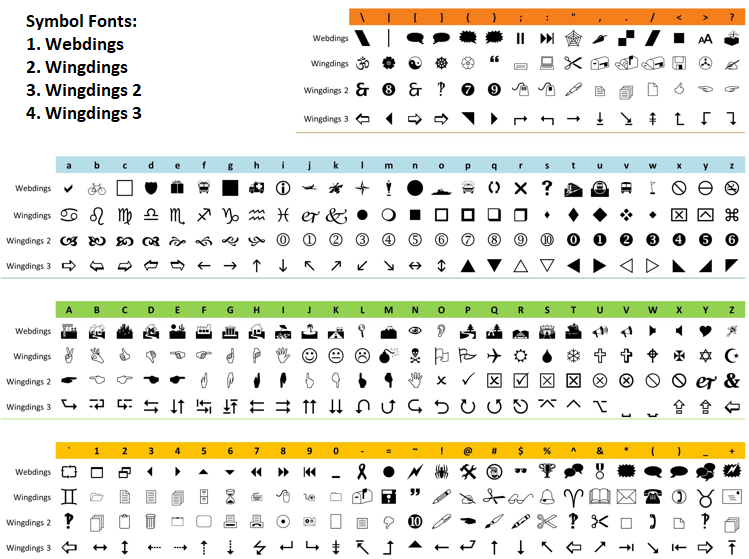
For the timeframe row, we compute y position below the header and starting x, then loop over visible timeframes to create rectangles and labels: calculating offsets, forming names with timeframe cell prefix and index string, setting background conditionally to strong positive or header color based on current index, and labeling with timeframe strings in Arial Bold. We set the matrix y position below the timeframe row plus gap, then create the row header rectangle and label it as Symbols. For row symbols on the left, we loop to compute y offsets, create rectangles with row prefix and index, and labels with symbol names from the array in Arial Bold. Similarly, for column symbols on top, we loop to compute x offsets, create rectangles with column prefixes, and labels with symbol names.
For correlation cells, we nest loops over rows and columns, computing offsets, forming cell names with rectangle prefix and indices separated by underscore, and text names similarly, then calling "create_rectangle" with neutral background and "create_label" initialized to 0.00 in Arial. Finally, we redraw the chart with ChartRedraw at subwindow zero. We can now call this function in the "OnInit" event handler to do the heavy lifting.
//+------------------------------------------------------------------+
//| Initialize expert                                                |
//+------------------------------------------------------------------+
int OnInit() {
   global_display_mode = DashboardMode;                         //--- Set display mode
   global_correlation_tf = (CorrelationTimeframe == PERIOD_CURRENT ? (ENUM_TIMEFRAMES)_Period : CorrelationTimeframe); //--- Set timeframe
   for (int i = 0; i < NUM_TF; i++) {                           //--- Loop to find index
      if (tf_list[i] == global_correlation_tf) {                //--- Check match
         current_tf_index = i;                                  //--- Set index
         break;                                                 //--- Exit loop
      }
   }
   if (current_tf_index == -1) current_tf_index = 3;            //--- Default to H1
   global_correlation_tf = tf_list[current_tf_index];           //--- Update timeframe
   parse_symbols();                                             //--- Parse symbols
   int panel_width = WIDTH_SYMBOL + num_symbols * (WIDTH_CELL - 1) + 4; //--- Compute width
   num_tf_visible = MathMin(NUM_TF, (panel_width - 2) / WIDTH_TF_CELL); //--- Set visible TFs
   if (current_tf_index >= num_tf_visible) current_tf_index = num_tf_visible - 1; //--- Clamp index
   global_correlation_tf = tf_list[current_tf_index];           //--- Update timeframe
   ArrayInitialize(pvalue_matrix, 1.0);                         //--- Initialize p-values
   create_full_dashboard();                                     //--- Create dashboard
   return(INIT_SUCCEEDED);                                      //--- Return success
}
In the OnInit event handler, we initialize the program's runtime settings and user interface. We set the "global_display_mode" to the input "DashboardMode" and determine the "global_correlation_tf" by checking if "CorrelationTimeframe" is PERIOD_CURRENT, in which case we cast the current chart period _Period to ENUM_TIMEFRAMES; otherwise, we use the input directly. We then loop through the "tf_list" array to find the index matching "global_correlation_tf" and assign it to "current_tf_index", exiting early on a match. If no match is found—leaving "current_tf_index" at negative one—we default it to three, corresponding to the hourly timeframe. We update "global_correlation_tf" to the value at that index in "tf_list" for consistency.
Next, we call "parse_symbols" to process the symbol list. We compute the "panel_width" based on "WIDTH_SYMBOL" plus an adjustment for the number of symbols times "WIDTH_CELL". The "num_tf_visible" is set to the minimum of "NUM_TF" and the available space in the panel divided by "WIDTH_TF_CELL". If "current_tf_index" exceeds this visible count, we clamp it to the last visible index minus one, and update "global_correlation_tf" again accordingly. We initialize the "pvalue_matrix" array to 1.0 using ArrayInitialize as a default state before calculations. Finally, we call "create_full_dashboard" to build the user interface and return INIT_SUCCEEDED to indicate successful initialization. Upon compilation, we get the following outcome.

From the image, we can see that the dashboard was created successfully. What we need to do is extend it by adding the legend panel so it is created in conjunction with the dashboard.
//+------------------------------------------------------------------+
//| Recreate legend objects based on current mode                    |
//+------------------------------------------------------------------+
void recreate_legend() {
   // Delete existing legend objects
   for (int i = 0; i < NUM_LEGEND_ITEMS; i++) {                 //--- Loop legend items
      ObjectDelete(0, LEGEND_CELL_RECTANGLE + IntegerToString(i)); //--- Delete rectangle
      ObjectDelete(0, LEGEND_CELL_TEXT + IntegerToString(i));   //--- Delete text
   }

   // Define full correlation values based on mode (more points for finer legend)
   double full_corr_vals[];                                     //--- Declare full values array
   if (global_display_mode == MODE_HEATMAP) {                   //--- Handle heatmap mode
      double heatmap_vals[] = {-1.0, -0.8, -0.6, -0.4, -0.2, 0.0, 0.2, 0.4, 0.6, 0.8, 1.0}; //--- Set heatmap values
      ArrayCopy(full_corr_vals, heatmap_vals);                  //--- Copy to full
   } else {                                                     //--- Handle standard mode
      double standard_vals[] = {StrongNegativeThresholdPct / 100.0, -0.75, -0.5, -0.25, 0.0, 0.25, 0.5, 0.75, StrongPositiveThresholdPct / 100.0, 1.0}; //--- Set standard values
      ArrayCopy(full_corr_vals, standard_vals);                 //--- Copy to full
   }

   // Copy to visible and reduce dynamically if needed
   ArrayCopy(visible_corr_vals, full_corr_vals);                //--- Copy to visible
   int panel_width = WIDTH_SYMBOL + num_symbols * (WIDTH_CELL - 1) + 4; //--- Compute panel width
   int available_width = panel_width - 4;                       //--- Compute available width
   double item_cost = WIDTH_LEGEND_CELL + LEGEND_SPACING;       //--- Compute item cost
   int max_fit = (int)MathFloor((available_width + LEGEND_SPACING) / item_cost); //--- Compute max fit
   if (max_fit < 1) max_fit = 1;                                //--- Ensure minimum fit

   while (ArraySize(visible_corr_vals) > max_fit) {             //--- Loop to reduce
      int sz = ArraySize(visible_corr_vals);                    //--- Get current size
      int zero_pos = -1;                                        //--- Initialize zero position
      for (int p = 0; p < sz; p++) {                            //--- Loop to find zero
         if (visible_corr_vals[p] == 0.0) {                     //--- Check for zero
            zero_pos = p;                                       //--- Set position
            break;                                              //--- Exit loop
         }
      }
      if (zero_pos >= 0) {                                      //--- Handle found zero
         ArrayRemove(visible_corr_vals, zero_pos, 1);           //--- Remove zero
         continue;                                              //--- Continue reduction
      }

      // Find min abs > 0
      double min_abs = DBL_MAX;                                 //--- Initialize min abs
      for (int p = 0; p < sz; p++) {                            //--- Loop to find min
         double av = MathAbs(visible_corr_vals[p]);             //--- Get absolute
         if (av > 0 && av < min_abs) min_abs = av;              //--- Update min
      }
      if (min_abs == DBL_MAX) break;                            //--- Exit if no more

      // Remove all == ±min_abs
      for (int p = sz - 1; p >= 0; p--) {                       //--- Loop backward to remove
         if (MathAbs(visible_corr_vals[p]) == min_abs) ArrayRemove(visible_corr_vals, p, 1); //--- Remove match
      }
   }

   num_legend_visible = ArraySize(visible_corr_vals);           //--- Set visible count

   // Calculate positions
   int panel_height = HEIGHT_HEADER + HEIGHT_TF_CELL + GAP_HEIGHT + HEIGHT_RECTANGLE * (num_symbols + 1) - num_symbols + 2; //--- Compute panel height
   int legend_y = panel_y + panel_height + GAP_MAIN_LEGEND;     //--- Compute legend y
   int total_legend_width = num_legend_visible * WIDTH_LEGEND_CELL + (num_legend_visible - 1) * LEGEND_SPACING; //--- Compute total width
   int x_start = panel_x + (panel_width - total_legend_width) / 2; //--- Compute start x

   color neutral_bg = ColorNeutralBg;                           //--- Set neutral background
   color text_color = COLOR_WHITE;                              //--- Set text color

   // Create new legend objects
   for (int i = 0; i < num_legend_visible; i++) {               //--- Loop to create
      int x_offset = x_start + i * (WIDTH_LEGEND_CELL + LEGEND_SPACING); //--- Compute offset
      string rect_name = LEGEND_CELL_RECTANGLE + IntegerToString(i); //--- Get rectangle name
      string text_name = LEGEND_CELL_TEXT + IntegerToString(i); //--- Get text name
      create_rectangle(rect_name, x_offset, legend_y + 2, WIDTH_LEGEND_CELL, HEIGHT_LEGEND, neutral_bg); //--- Create rectangle
      create_label(text_name, "0%", x_offset + WIDTH_LEGEND_CELL / 2, legend_y + 2 + HEIGHT_LEGEND / 2 - 1, 10, text_color, "Arial"); //--- Create label
   }
}

//+------------------------------------------------------------------+
//| Create full dashboard UI                                         |
//+------------------------------------------------------------------+
void create_full_dashboard() {

   //--- Other dashboard creation logic

   // Create separate legend panel
   int legend_y = panel_y + panel_height + GAP_MAIN_LEGEND;     //--- Compute legend y
   create_rectangle(LEGEND_PANEL, panel_x, legend_y, panel_width, HEIGHT_LEGEND_PANEL, main_bg); //--- Create legend panel
   recreate_legend();                                           //--- Recreate legend
   ChartRedraw(0);                                              //--- Redraw chart
}
We implement the "recreate_legend" function to dynamically rebuild the legend objects based on the current display mode, ensuring it fits the panel and reflects appropriate correlation values. We loop to delete existing legend rectangles and text labels using ObjectDelete with names formed from prefixes and index strings.
We declare a full correlation values array and populate it conditionally: for heatmap mode, using a local array with values from negative 1.0 to 1.0 in 0.2 increments copied over; for standard mode, using thresholds converted to decimals and fixed points like negative 0.75. To fit the space, we copy to the visible array, compute panel width, available width, item cost including spacing, and maximum fit with a floor division, ensuring at least one. In a loop while oversized, we remove zero if present, or find and remove all instances of the smallest non-zero absolute value by scanning and using ArrayRemove backward.
We set the visible count to the updated array size. For positioning, we calculate panel height from constants and rows, legend y below the panel with a gap, total legend width with cells and spacings, and starting x for centering. We set a neutral background and text color, then loop to create rectangles and labels: computing offsets, forming names, using "create_rectangle" with a neutral background, and "create_label" initialized to 0% in Arial. In the "create_full_dashboard" function, after other interface logic, we compute legend y and create the legend panel rectangle with main background, call "recreate_legend" to populate it, and redraw the chart. On compilation, we get the following outcome.

With the legend added, we now just need to update the dashboard and the legend so the computations take effect.
//+------------------------------------------------------------------+
//| Update TF highlights                                             |
//+------------------------------------------------------------------+
void update_tf_highlights() {
   color inactive_bg = C'60,60,60';                             //--- Set inactive background
   for (int i = 0; i < num_tf_visible; i++) {                   //--- Loop visible TFs
      string rect_name = TF_CELL_RECT + IntegerToString(i);     //--- Get rectangle name
      color bg = (i == current_tf_index) ? ColorStrongPositiveBg : inactive_bg; //--- Set background
      ObjectSetInteger(0, rect_name, OBJPROP_BGCOLOR, bg);      //--- Update background
   }
   ChartRedraw(0);                                              //--- Redraw chart
}

//+------------------------------------------------------------------+
//| Update legend colors and texts based on mode                     |
//+------------------------------------------------------------------+
void update_legend() {
   color default_txt = ColorTextStrong;                         //--- Set default text color
   for (int i = 0; i < num_legend_visible; i++) {               //--- Loop visible legends
      string rect_name = LEGEND_CELL_RECTANGLE + IntegerToString(i); //--- Get rectangle name
      string text_name = LEGEND_CELL_TEXT + IntegerToString(i); //--- Get text name
      double corr = visible_corr_vals[i];                       //--- Get correlation value
      int decimals = (MathAbs(corr) == 0.5 || corr == 0.0 || MathAbs(corr) == 1.0) ? 0 : 1; //--- Set decimals
      string txt_str = DoubleToString(corr * 100, decimals) + "%"; //--- Format text
      color bg_color = ColorNeutralBg;                          //--- Initialize background
      color txt_color = default_txt;                            //--- Initialize text color

      if (corr == 1.0) {                                        //--- Handle perfect positive
         bg_color = ColorDiagonalBg;                            //--- Set diagonal background
         txt_color = default_txt;                               //--- Set text color
      } else if (corr == 0.0) {                                 //--- Handle zero
         bg_color = ColorNeutralBg;                             //--- Set neutral background
         txt_color = default_txt;                               //--- Set text color
      } else {                                                  //--- Handle other values
         if (global_display_mode == MODE_STANDARD) {            //--- Handle standard mode
            double strong_pos = StrongPositiveThresholdPct / 100.0; //--- Set positive threshold
            double strong_neg = StrongNegativeThresholdPct / 100.0; //--- Set negative threshold
            if (corr >= strong_pos) {                           //--- Check strong positive
               bg_color = ColorStrongPositiveBg;                //--- Set positive background
               txt_color = default_txt;                         //--- Set text color
            } else if (corr <= strong_neg) {                    //--- Check strong negative
               bg_color = ColorStrongNegativeBg;                //--- Set negative background
               txt_color = default_txt;                         //--- Set text color
            } else {                                            //--- Handle mild
               bg_color = ColorNeutralBg;                       //--- Set neutral background
               txt_color = (corr > 0.0) ? ColorTextPositive : ColorTextNegative; //--- Set mild text color
            }
         } else {                                               //--- Handle heatmap mode
            txt_color = default_txt;                            //--- Set text color
            bg_color = interpolate_heatmap_color(corr);         //--- Interpolate background
         }
      }

      ObjectSetInteger(0, rect_name, OBJPROP_BGCOLOR, bg_color); //--- Update background
      ObjectSetString(0, text_name, OBJPROP_TEXT, txt_str);     //--- Update text
      ObjectSetInteger(0, text_name, OBJPROP_COLOR, txt_color); //--- Update text color
   }
   ChartRedraw(0);                                              //--- Redraw chart
}

//+------------------------------------------------------------------+
//| Update dashboard cells with correlation values and colors        |
//+------------------------------------------------------------------+
void update_dashboard() {
   update_correlations();                                       //--- Update correlations
   double strong_pos = StrongPositiveThresholdPct / 100.0;      //--- Set positive threshold
   double strong_neg = StrongNegativeThresholdPct / 100.0;      //--- Set negative threshold
   color text_base = ColorTextStrong;                           //--- Set base text color
   for (int i = 0; i < num_symbols; i++) {                      //--- Loop rows
      for (int j = 0; j < num_symbols; j++) {                   //--- Loop columns
         double corr = correlation_matrix[i][j];                //--- Get correlation
         double pval = pvalue_matrix[i][j];                     //--- Get p-value
         string text = DoubleToString(corr * 100, 1) + "%" + get_significance_stars(pval); //--- Format text
         color bg_color = ColorNeutralBg;                       //--- Initialize background
         color txt_color = ColorTextZero;                       //--- Initialize text color

         if (i == j) {                                          //--- Handle diagonal
            bg_color = ColorDiagonalBg;                         //--- Set diagonal background
            txt_color = text_base;                              //--- Set text color
         } else {                                               //--- Handle off-diagonal
            if (global_display_mode == MODE_STANDARD) {         //--- Handle standard mode
               if (corr >= strong_pos) {                        //--- Check strong positive
                  bg_color = ColorStrongPositiveBg;             //--- Set positive background
                  txt_color = text_base;                        //--- Set text color
               } else if (corr <= strong_neg) {                 //--- Check strong negative
                  bg_color = ColorStrongNegativeBg;             //--- Set negative background
                  txt_color = text_base;                        //--- Set text color
               } else {                                         //--- Handle mild
                  bg_color = ColorNeutralBg;                    //--- Set neutral background
                  if (corr > 0.0) {                             //--- Check positive mild
                     txt_color = ColorTextPositive;             //--- Set positive text
                  } else if (corr < 0.0) {                      //--- Check negative mild
                     txt_color = ColorTextNegative;             //--- Set negative text
                  } else {                                      //--- Handle zero
                     txt_color = text_base;                     //--- Set base text
                  }
               }
            } else {                                             //--- Handle heatmap mode
               txt_color = text_base;                            //--- Set text color
               bg_color = interpolate_heatmap_color(corr);       //--- Set interpolated background
            }
         }
         string cell_name = CELL_RECTANGLE + IntegerToString(i) + "_" + IntegerToString(j); //--- Get cell name
         string text_name = CELL_TEXT + IntegerToString(i) + "_" + IntegerToString(j); //--- Get text name
         ObjectSetInteger(0, cell_name, OBJPROP_BGCOLOR, bg_color); //--- Update background
         ObjectSetString(0, text_name, OBJPROP_TEXT, text);      //--- Update text
         ObjectSetInteger(0, text_name, OBJPROP_COLOR, txt_color); //--- Update text color
      }
   }
   update_legend();                                              //--- Update legend
   ChartRedraw(0);                                               //--- Redraw chart
}
Here, we implement the "update_tf_highlights" function to visually highlight the selected timeframe cell in the dashboard. We set an inactive background color to a medium gray and loop over the number of visible timeframes. For each, we form the rectangle name using the "TF_CELL_RECT" prefix and index string, then conditionally set the background color to "ColorStrongPositiveBg" if it matches the "current_tf_index" or to the inactive color otherwise. We update the object's background property with ObjectSetInteger using "OBJPROP_BGCOLOR" and redraw the chart.
Next, we define the "update_legend" function to refresh the legend's colors and texts according to the mode. We set a default text color from "ColorTextStrong" and loop over visible legend items. For each, we retrieve names for rectangle and text using prefixes and index, get the correlation value from "visible_corr_vals", determine decimals based on absolute value checks for clean formatting, and format the text string as a percentage with the DoubleToString function.
We initialize background and text colors, then handle special cases: for 1.0, use a diagonal background; for 0.0, a neutral background—both with default text. For others, in standard mode, we compute strong thresholds from percentages, setting backgrounds and text colors for strong positive, strong negative, or mild based on comparisons, using positive or negative mild text for non-zero. In heatmap mode, we set the default text and interpolate the background with "interpolate_heatmap_color". We update the rectangle's "OBJPROP_BGCOLOR", text's "OBJPROP_TEXT", and "OBJPROP_COLOR" using object setters, then redraw the chart.
We then create the "update_dashboard" function to refresh all cells with current correlations and visuals. We call "update_correlations" first, compute strong thresholds from percentages, and set a base text color from "ColorTextStrong".
In nested loops over symbols for rows and columns, we retrieve correlation and p-value from matrices, format cell text as percentage plus significance stars from "get_significance_stars", and initialize colors. For diagonal cells where indices match, we use a diagonal background and base text. For off-diagonal, in standard mode, we set backgrounds and text for strong positive, strong negative, or mild with conditional positive/negative/zero text; in heatmap mode, base text and interpolated background from "interpolate_heatmap_color". We form cell and text names with prefixes and indices, update background with OBJPROP_BGCOLOR, text content with "OBJPROP_TEXT", and text color with "OBJPROP_COLOR" via setters.
Finally, we call "update_legend" and redraw the chart. We call these functions in the initialization as tick events to apply the full effects as below.
//+------------------------------------------------------------------+
//| Initialize expert                                                |
//+------------------------------------------------------------------+
int OnInit() {
   global_display_mode = DashboardMode;                         //--- Set display mode
   global_correlation_tf = (CorrelationTimeframe == PERIOD_CURRENT ? (ENUM_TIMEFRAMES)_Period : CorrelationTimeframe); //--- Set timeframe
   for (int i = 0; i < NUM_TF; i++) {                           //--- Loop to find index
      if (tf_list[i] == global_correlation_tf) {                //--- Check match
         current_tf_index = i;                                  //--- Set index
         break;                                                 //--- Exit loop
      }
   }
   if (current_tf_index == -1) current_tf_index = 3;            //--- Default to H1
   global_correlation_tf = tf_list[current_tf_index];           //--- Update timeframe
   parse_symbols();                                             //--- Parse symbols
   int panel_width = WIDTH_SYMBOL + num_symbols * (WIDTH_CELL - 1) + 4; //--- Compute width
   num_tf_visible = MathMin(NUM_TF, (panel_width - 2) / WIDTH_TF_CELL); //--- Set visible TFs
   if (current_tf_index >= num_tf_visible) current_tf_index = num_tf_visible - 1; //--- Clamp index
   global_correlation_tf = tf_list[current_tf_index];           //--- Update timeframe
   ArrayInitialize(pvalue_matrix, 1.0);                         //--- Initialize p-values
   create_full_dashboard();                                     //--- Create dashboard
   update_tf_highlights();                                      //--- Update highlights
   update_dashboard();                                          //--- Update initial
   return(INIT_SUCCEEDED);                                      //--- Return success
}

//+------------------------------------------------------------------+
//| Handle tick event                                                |
//+------------------------------------------------------------------+
void OnTick() {
   update_dashboard();                                          //--- Update on tick
}
In the OnInit event handler, we call "update_tf_highlights" for timeframe visuals, and "update_dashboard" for initial data population, returning INIT_SUCCEEDED. In the OnTick event handler, we simply call "update_dashboard" to refresh correlations and visuals on each new tick. If you want to handle the calculations on every bar, you can add a control logic but for now, we leave it as is since we only have a few symbol sets. Upon compilation, we get the following outcome.

From the image, we can see that we have correctly set up the correlation matrix dashboard with all the populations done, hence achieving our objectives. What now remains is testing the workability of the system, and that is handled in the preceding section.
Backtesting
We did the testing, and below is the compiled visualization in a single Graphics Interchange Format (GIF) bitmap image format.
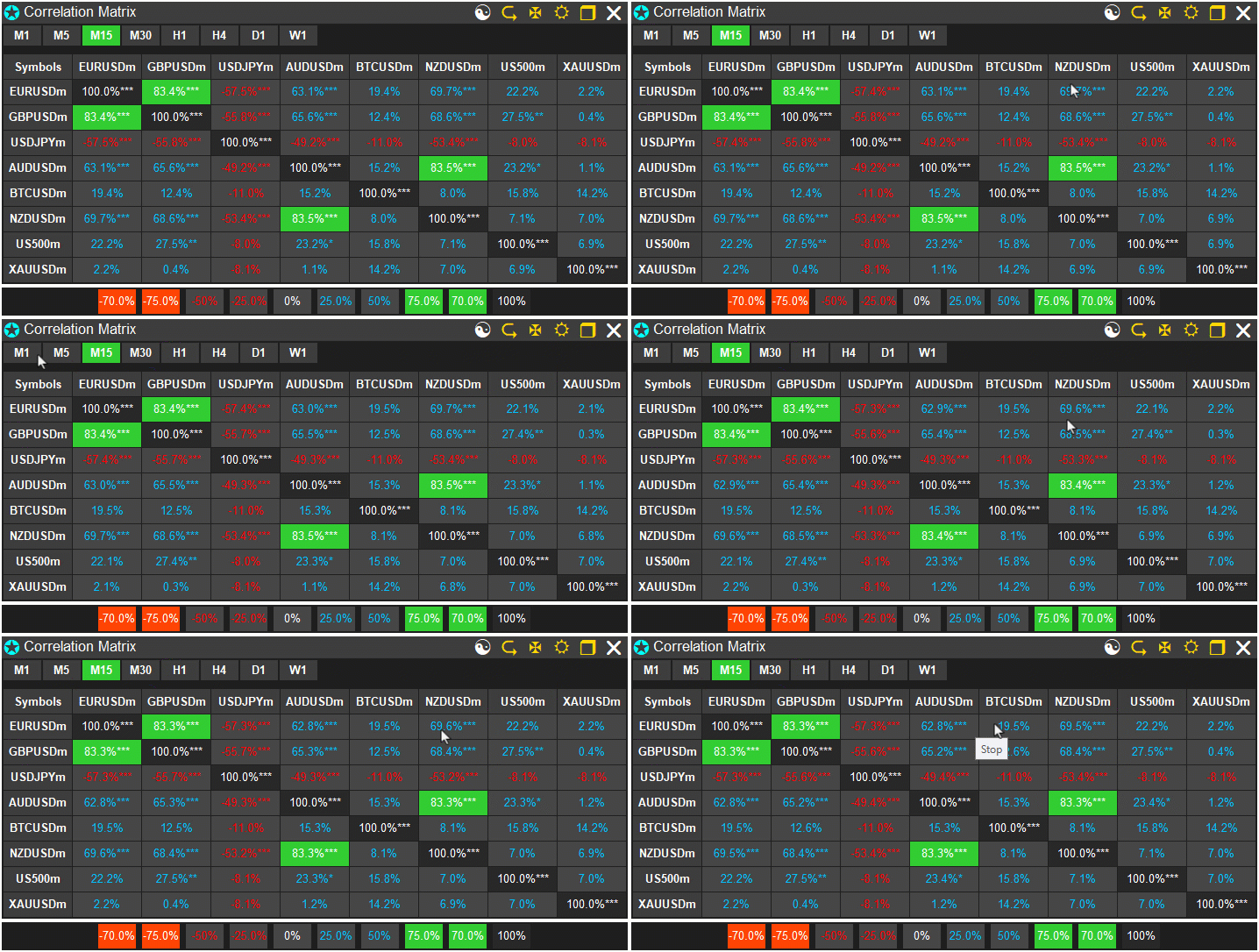
Conclusion
In conclusion, we’ve developed a correlation matrix dashboard in MQL5 that computes relationships between user-specified symbols using Pearson, Spearman, or Kendall methods over a configurable timeframe and bars, incorporating p-value significance testing for reliability. The system supports standard mode with threshold-based coloring and stars for significance levels, as well as heatmap mode with gradient interpolation for visual representation of correlation strengths, featuring an interactive user interface with timeframe selectors, mode toggles, and a dynamic legend for analyzing asset interdependencies. In the next parts, we will bring life to the dashboard to make it hoverable, draggable, and make the clicking icons responsive by performing their respective functions. Keep tuned!
Warning: All rights to these materials are reserved by MetaQuotes Ltd. Copying or reprinting of these materials in whole or in part is prohibited.
This article was written by a user of the site and reflects their personal views. MetaQuotes Ltd is not responsible for the accuracy of the information presented, nor for any consequences resulting from the use of the solutions, strategies or recommendations described.

 Reimagining Classic Strategies (Part 21): Bollinger Bands And RSI Ensemble Strategy Discovery
 Forex arbitrage trading: Analyzing synthetic currencies movements and their mean reversion
 Neural Networks in Trading: Two-Dimensional Connection Space Models (Final Part)
 Optimizing Trend Strength: Trading in Trend Direction and Strength

- Free trading apps
- Over 8,000 signals for copying
- Economic news for exploring financial markets
You agree to website policy and terms of use
Hello Allan Munene Mutiiria,
Thank you for sharing a brillant idea through your article. In return, I made your source code ready for production use
.ex5 file removed by moderator - only source code is allowed on the forum