

Automating Trading Strategies in MQL5 (Part 46): Liquidity Sweep on Break of Structure (BoS)
 22 884
 5
5

Introduction
In our previous article (Part 45), we developed an Inverse Fair Value Gap (IFVG) system in MetaQuotes Language 5 (MQL5) that detected gaps with minimum size filtering, tracked states as normal/mitigated/inverted, ignored overlaps, traded inversions with fixed stop levels, trade modes, trailing stops, and visualized rectangles with labels/icons. In Part 46, we develop a Liquidity Sweep on the Break of Structure (BoS) system.
This system detects swings over a defined length, labels as swings to identify BoS (HH in uptrends, LL in downtrends), spots sweeps when price wicks beyond swings but closes inside on directional candles, trades buys on Sell Side Liquidity (SSL) sweeps in bullish BoS or sells on Buy Side Liquidity (BSL) in bearish with dynamic stop levels, maximum trades, closes opposites, and visualizes with icons/labels, rectangles, dashed lines, and arrows plus dynamic fonts. We will cover the following topics:
- Understanding the Liquidity Sweep on Break of Structure (BoS) Strategy
- Implementation in MQL5
- Backtesting
- Conclusion
By the end, you’ll have a functional MQL5 strategy for trading BoS liquidity sweeps with visuals and risk controls—let’s dive in!
Understanding the Liquidity Sweep on Break of Structure (BoS) Strategy
The Liquidity Sweep on Break of Structure (BoS) is a price action strategy that combines trend identification through swing points with the detection of manipulative sweeps beyond those points to capture liquidity before a reversal. We scan surrounding bars to find swing highs (higher than left/right neighbors) and lows (lower), labeling them relative to priors: HH (higher high) or LH (lower high) for highs, HL (higher low) or LL (lower low) for lows. BOS occurs on HH in uptrends (bullish continuation) or LL in downtrends (bearish), signaling structure break; a sweep happens when price wicks beyond the swing (SSL below low in uptrend, BSL above high in downtrend) but closes inside on a directional candle, indicating trap of stops before true move.
Our plan is to detect swings over input length, label HH/HL/LH/LL to set BOS trend, spot sweeps on BOS with wick beyond swing and close inside directional candle, trade buys on SSL in bullish BOS or sells on BSL in bearish with dynamic trade levels, maximum trades limit, close opposites, and visualize with icons/labels on swings, rectangles on sweeps, dashed lines on BOS breaks, arrows on entries, plus dynamic fonts on scale changes. Liquidity sweep can be on any setup; we just chose the break of structure strategy because it is straightforward, but it can be switched for any other setup, like imbalance setups. In brief, here is a visual representation of our objectives.

Implementation in MQL5
To create the program in MQL5, open the MetaEditor, go to the Navigator, locate the Experts folder, click on the "New" tab, and follow the prompts to create the file. Once it is made, in the coding environment, we will need to declare some input parameters and global variables that we will use throughout the program.
//+------------------------------------------------------------------+
//|                                       BOS Liquidity Sweep EA.mq5 |
//|                           Copyright 2025, Allan Munene Mutiiria. |
//|                                   https://t.me/Forex_Algo_Trader |
//+------------------------------------------------------------------+
#property copyright "Copyright 2025, Allan Munene Mutiiria."
#property link      "https://t.me/Forex_Algo_Trader"
#property version   "1.00"

#include <Trade/Trade.mqh>

//+------------------------------------------------------------------+
//| Global Variables                                                 |
//+------------------------------------------------------------------+
CTrade obj_Trade;                                                 //--- Trade object

//+------------------------------------------------------------------+
//| Input Parameters                                                 |
//+------------------------------------------------------------------+
input group "EA GENERAL SETTINGS"
input int    SwingLength       = 5;                               // Swing Length in Bars (left/right check)
input double LotSize           = 0.01;                            // Fixed lot size
input double SL_Buffer_Pips    = 10.0;                            // SL buffer in pips below/above sweep
input double RiskRewardRatio   = 2.0;                             // Take profit multiplier (e.g., 2:1 RR)
input int    MaxTrades         = 1;                               // Max open trades
input long   MagicNumber       = 12345;                           // Unique magic number
input group "VISUALIZATION SETTINGS"
input color  clr_Bullish       = clrBlue;                         // Bullish Color (HH/HL)
input color  clr_Bearish       = clrRed;                          // Bearish Color (LL/LH)
input color  clr_SSL_Rect      = clrLightBlue;                    // SSL Sweep Rectangle Color
input color  clr_BSL_Rect      = clrLightCoral;                   // BSL Sweep Rectangle Color
input color  clr_SSL_Line      = clrBlue;                         // SSL Sweep Line Color
input color  clr_BSL_Line      = clrRed;                          // BSL Sweep Line Color
input color  clr_BullBOS       = clrGreen;                        // Bullish BOS Line Color
input color  clr_BearBOS       = clrMaroon;                       // Bearish BOS Line Color
input int    LineWidth         = 2;                               // Line Width
input bool   PrintLogs         = true;                            // Print Statements

//+------------------------------------------------------------------+
//| Global Variables Continued                                       |
//+------------------------------------------------------------------+
static double   current_swing_high = -1.0, current_swing_low = -1.0; //--- Current swing high and low
static datetime swing_high_time = 0, swing_low_time = 0;          //--- Swing high and low times
int    MarketTrend = 0;                                           //--- Market trend (1: Bullish BOS, -1: Bearish BOS, 0: Neutral)
int    OpenTrades = 0;                                            //--- Open trades count
int    current_font_size = 10;                                    //--- Current font size
int    object_code = 174;                                         //--- Wingdings arrow code for swings
int    buy_arrow_code = 233;                                      //--- Wingdings up arrow for buy
int    sell_arrow_code = 234;                                     //--- Wingdings down arrow for sell
string ObjPrefix = "BOSLiqSweep_";                                //--- Object prefix
We begin the implementation by including the trade library with "#include <Trade/Trade.mqh>", which provides the CTrade class for order and position management. We declare "obj_Trade" as a global instance of "CTrade" to handle trading operations. We group the input parameters under "EA GENERAL SETTINGS" for the properties dialog: "SwingLength" to set the number of bars for left/right swing checks, "LotSize" for fixed lots, "SL_Buffer_Pips" as a buffer below/above sweeps for stop-loss, "RiskRewardRatio" for take-profit multiples, "MaxTrades" to limit open positions, and "MagicNumber" for trade identification. Under "VISUALIZATION SETTINGS", we have colors like "clr_Bullish" for HH/HL (blue), "clr_Bearish" for LL/LH (red), "clr_SSL_Rect" for SSL rectangles (light blue), "clr_BSL_Rect" for BSL (light coral), "clr_SSL_Line" for SSL lines (blue), "clr_BSL_Line" for BSL (red), "clr_BullBOS" for bullish BOS (green), "clr_BearBOS" for bearish (maroon), "LineWidth" for line thickness, and "PrintLogs" to toggle logging.

Then, we continue with more global variables: static "current_swing_high" and "current_swing_low" initialized to -1.0 for tracking recent swings, static "swing_high_time" and "swing_low_time" for their timestamps, "MarketTrend" as 1 for bullish BOS, -1 for bearish, 0 for neutral, "OpenTrades" to count current positions, "current_font_size" at 10 for dynamic text, "object_code" as 174 for Wingdings swings, "buy_arrow_code" as 233 for buy arrows, "sell_arrow_code" as 234 for sell, and "ObjPrefix" as "BOSLiqSweep_" for naming objects. With that ready, we can initialize the program logic in the initialization event handler. We want to delete the objects that we create on initialization to get rid of existing clutter. We will define some helper functions first.
//+------------------------------------------------------------------+
//| Update font sizes                                                |
//+------------------------------------------------------------------+
void UpdateFontSizes() {
   long scale = 0;                                                //--- Init scale
   if (ChartGetInteger(0, CHART_SCALE, 0, scale)) {               //--- Get scale
      current_font_size = (int)(7 + scale * 0.7);                 //--- Calculate font size
      if (current_font_size < 6) current_font_size = 6;           //--- Set minimum font size
      if (current_font_size > 15) current_font_size = 15;         //--- Set maximum font size
      for (int i = ObjectsTotal(0, -1, -1) - 1; i >= 0; i--) {    //--- Iterate objects reverse
         string name = ObjectName(0, i, -1, -1);                  //--- Get object name
         long type = ObjectGetInteger(0, name, OBJPROP_TYPE);     //--- Get object type
         if (type == OBJ_TEXT) {                                  //--- Check text type
            ObjectSetInteger(0, name, OBJPROP_FONTSIZE, current_font_size); //--- Set font size
         }
      }
      ChartRedraw(0);                                             //--- Redraw chart
   }
}

//+------------------------------------------------------------------+
//| Delete objects by prefix                                         |
//+------------------------------------------------------------------+
void DeleteObjectsByPrefix(string prefix) {
   int total = ObjectsTotal(0, 0, -1);                            //--- Get total objects
   for (int i = total - 1; i >= 0; i--) {                         //--- Iterate reverse
      string name = ObjectName(0, i, 0, -1);                      //--- Get name
      if (StringFind(name, prefix) == 0) {                        //--- Check prefix
         ObjectDelete(0, name);                                   //--- Delete object
      }
   }
}

//+------------------------------------------------------------------+
//| Count open trades                                                |
//+------------------------------------------------------------------+
int CountOpenTrades() {
   int count = 0;                                                 //--- Init count
   for (int i = PositionsTotal() - 1; i >= 0; i--) {              //--- Iterate reverse
      ulong ticket = PositionGetTicket(i);                        //--- Get ticket
      if (PositionSelectByTicket(ticket)) {                       //--- Select position
         if (PositionGetString(POSITION_SYMBOL) == _Symbol && PositionGetInteger(POSITION_MAGIC) == MagicNumber) { //--- Check symbol and magic
            count++;                                              //--- Increment count
         }
      }
   }
   return count;                                                  //--- Return count
}
Here, we implement the "UpdateFontSizes" function to dynamically adjust the size of text objects on the chart based on the current zoom level, ensuring readability. We initialize "scale" to 0 and retrieve the chart's scale value with ChartGetInteger using CHART_SCALE. If successful, we calculate "current_font_size" as 7 plus 70% of the scale, limiting it between 6 and 15. We then loop backward through all objects on the chart with ObjectsTotal specifying -1 for all windows and types, fetching each name via ObjectName and type with ObjectGetInteger and OBJPROP_TYPE. For OBJ_TEXT objects, we update the font size using ObjectSetInteger and OBJPROP_FONTSIZE, then redraw the chart.
We define the "DeleteObjectsByPrefix" function to remove all chart objects matching a given prefix, used for cleanup. We get the total objects on the main chart and all types, then loop backward: for each, we fetch the name, check if it starts with the prefix using StringFind returning 0, and delete it via ObjectDelete if matched. We create the "CountOpenTrades" function to tally current open positions belonging to this program. We initialize "count" to 0, loop backward through PositionsTotal, retrieve each ticket with PositionGetTicket, and select the position via the PositionSelectByTicket function. If it matches our symbol with PositionGetString and POSITION_SYMBOL and magic number via "PositionGetInteger" and "POSITION_MAGIC", we increment "count" before returning it. We will define some more helper functions for visualization.
//+------------------------------------------------------------------+
//| Draw swing point with label                                      |
//+------------------------------------------------------------------+
void DrawSwingPoint(string objName, datetime time, double price, int arrCode, color clr, int direction, string label) {
   UpdateFontSizes();                                             //--- Update font sizes
   objName = ObjPrefix + label + TimeToString(time);              //--- Set obj name
   if (ObjectFind(0, objName) < 0) {                              //--- Check no object
      string iconName = objName + "_icon";                        //--- Icon name
      ObjectCreate(0, iconName, OBJ_TEXT, 0, time, price);        //--- Create icon
      ObjectSetString(0, iconName, OBJPROP_FONT, "Wingdings");    //--- Set font
      ObjectSetInteger(0, iconName, OBJPROP_FONTSIZE, current_font_size); //--- Set font size
      ObjectSetString(0, iconName, OBJPROP_TEXT, CharToString((uchar)arrCode)); //--- Set text
      ObjectSetInteger(0, iconName, OBJPROP_COLOR, clr);          //--- Set color
      ObjectSetInteger(0, iconName, OBJPROP_ANCHOR, ANCHOR_RIGHT); //--- Set anchor
      string txtName = objName + "_txt";                          //--- Text name
      ObjectCreate(0, txtName, OBJ_TEXT, 0, time, price);         //--- Create text
      ObjectSetString(0, txtName, OBJPROP_FONT, "Arial");         //--- Set font
      ObjectSetInteger(0, txtName, OBJPROP_COLOR, clr);           //--- Set color
      ObjectSetInteger(0, txtName, OBJPROP_FONTSIZE, current_font_size); //--- Set font size
      ObjectSetInteger(0, txtName, OBJPROP_ANCHOR, ANCHOR_LEFT);  //--- Set anchor
      ObjectSetString(0, txtName, OBJPROP_TEXT, label);           //--- Set text
   }
   ChartRedraw(0);                                                //--- Redraw chart
}

//+------------------------------------------------------------------+
//| Draw sweep rectangle (no text)                                   |
//+------------------------------------------------------------------+
void DrawSweepRectangle(string objName, datetime time, double level, double extremum, color clr, bool is_ssl) {
   UpdateFontSizes();                                             //--- Update font sizes
   objName = ObjPrefix + objName + TimeToString(time, TIME_SECONDS); //--- Set obj name
   if (ObjectFind(0, objName) < 0) {                              //--- Check no object
      double top = MathMax(level, extremum);                      //--- Calc top
      double bottom = MathMin(level, extremum);                   //--- Calc bottom
      datetime end_time = time + PeriodSeconds(_Period);          //--- Calc end time
      ObjectCreate(0, objName, OBJ_RECTANGLE, 0, time, top, end_time, bottom); //--- Create rectangle
      ObjectSetInteger(0, objName, OBJPROP_COLOR, clr);           //--- Set color
      ObjectSetInteger(0, objName, OBJPROP_BACK, true);           //--- Set back
      ObjectSetInteger(0, objName, OBJPROP_FILL, true);           //--- Set fill
      ObjectSetInteger(0, objName, OBJPROP_STYLE, STYLE_SOLID);   //--- Set style
      // No text inside rectangle to reduce clutter
   }
   ChartRedraw(0);                                                //--- Redraw chart
}

//+------------------------------------------------------------------+
//| Draw horizontal dashed break level                               |
//+------------------------------------------------------------------+
void DrawBreakLevel(string objName, datetime time1, double price, datetime time2, double price2, color clr, int direction, string label) {
   UpdateFontSizes();                                             //--- Update font sizes
   objName = ObjPrefix + objName + label + TimeToString(time2, TIME_SECONDS); //--- Set obj name
   if (ObjectFind(0, objName) < 0) {                              //--- Check no object
      ObjectCreate(0, objName, OBJ_TREND, 0, time1, price, time2, price); //--- Create trend line
      ObjectSetInteger(0, objName, OBJPROP_COLOR, clr);           //--- Set color
      ObjectSetInteger(0, objName, OBJPROP_WIDTH, LineWidth);     //--- Set width
      ObjectSetInteger(0, objName, OBJPROP_STYLE, STYLE_DASH);    //--- Set style
      ObjectSetInteger(0, objName, OBJPROP_RAY_RIGHT, false);     //--- Set no ray right
      string txt = label + " Sweep";                              //--- Set text
      string txtName = objName + "_txt";                          //--- Text name
      ObjectCreate(0, txtName, OBJ_TEXT, 0, time2, price);        //--- Create text
      ObjectSetInteger(0, txtName, OBJPROP_COLOR, clr);           //--- Set color
      ObjectSetInteger(0, txtName, OBJPROP_FONTSIZE, current_font_size); //--- Set font size
      if (direction > 0) {                                        //--- Check positive
         ObjectSetInteger(0, txtName, OBJPROP_ANCHOR, ANCHOR_RIGHT_UPPER); //--- Set anchor
         ObjectSetString(0, txtName, OBJPROP_TEXT, " " + txt);    //--- Set text
      } else {                                                    //--- Negative
         ObjectSetInteger(0, txtName, OBJPROP_ANCHOR, ANCHOR_RIGHT_LOWER); //--- Set anchor
         ObjectSetString(0, txtName, OBJPROP_TEXT, " " + txt);    //--- Set text
      }
   }
   ChartRedraw(0);                                                //--- Redraw chart
}

//+------------------------------------------------------------------+
//| Draw entry arrow with Wingdings                                  |
//+------------------------------------------------------------------+
void DrawEntryArrow(datetime time, double price, bool is_buy) {
   UpdateFontSizes();                                             //--- Update font sizes
   string objName = ObjPrefix + "Entry_" + TimeToString(time, TIME_SECONDS); //--- Set obj name
   if (ObjectFind(0, objName) < 0) {                              //--- Check no object
      int arrCode = is_buy ? buy_arrow_code : sell_arrow_code;    //--- Set arrow code
      color arrow_color = is_buy ? clrBlue : clrRed;              //--- Set color
      ObjectCreate(0, objName, OBJ_TEXT, 0, time, price);         //--- Create text
      ObjectSetString(0, objName, OBJPROP_FONT, "Wingdings");     //--- Set font
      ObjectSetInteger(0, objName, OBJPROP_FONTSIZE, current_font_size); //--- Set font size
      ObjectSetString(0, objName, OBJPROP_TEXT, CharToString((uchar)arrCode)); //--- Set text
      ObjectSetInteger(0, objName, OBJPROP_COLOR, arrow_color);   //--- Set color
      ObjectSetInteger(0, objName, OBJPROP_ANCHOR, is_buy ? ANCHOR_UPPER : ANCHOR_LOWER); //--- Set anchor
   }
   ChartRedraw(0);                                                //--- Redraw chart
}
First, we define the "DrawSwingPoint" function to visualize detected swing points on the chart with an icon and label. We call "UpdateFontSizes" to ensure current sizing, form a unique object name by combining "ObjPrefix", the label, and the time string. If no object exists per ObjectFind, we create a Wingdings icon as OBJ_TEXT with suffixed "_icon" at the time and price, setting font to Wingdings, size to "current_font_size", text to the character from "arrCode" via CharToString, color to "clr", and anchor as right. We then create the text label with suffixed "_txt" as another "OBJ_TEXT", using Arial font, same color and size, anchor as left, and set the text to "label". We redraw the chart with the ChartRedraw function.
Then, we implement the "DrawSweepRectangle" function to draw a filled rectangle highlighting the sweep area without internal text to avoid clutter. We call "UpdateFontSizes", form the name with "ObjPrefix" and the time seconds string. If no object, we calculate top as max of level and extremum, bottom as min, end time as time plus one bar period, create OBJ_RECTANGLE spanning time at top to end at bottom, set color to "clr", back true, fill true, solid style, and redraw the chart. We create the "DrawBreakLevel" function to mark BOS breaks with a horizontal dashed line and text. We call "UpdateFontSizes", form name with "ObjPrefix", label, and time 2 seconds string. If no object, we create OBJ_TREND from time1 at price to time 2 at price (horizontal), set color to "clr", width to "LineWidth", style to dash, no right ray. We add text as "OBJ_TEXT" at time 2 and price with suffixed "_txt", color to "clr", size to "current_font_size", anchor as right-upper if direction positive or right-lower if negative, text
Finally, we define the "DrawEntryArrow" function to place a Wingdings arrow indicating trade entries. We call "UpdateFontSizes", form name with "ObjPrefix + "Entry_" + time seconds string". If no object, we select "arrCode" as "buy_arrow_code" for buys or "sell_arrow_code" for sells, color as blue for buys or red for sells, create "OBJ_TEXT" at time and price, set font to "Wingdings", size to "current_font_size", text to the character from "arrCode", color, anchor as upper for buys or lower for sells, and redraw the chart. We can now continue with the initialization to do the cleanup and verification of the input variables.
//+------------------------------------------------------------------+
//| Expert initialization function                                   |
//+------------------------------------------------------------------+
int OnInit() {
   obj_Trade.SetExpertMagicNumber(MagicNumber);                   //--- Set magic number for trade object
   if (SwingLength < 1 || LotSize <= 0 || SL_Buffer_Pips < 0 || RiskRewardRatio < 1.0 || MaxTrades < 1) { //--- Check invalid inputs
      Print("Invalid input parameters.");                         //--- Log invalid parameters
      return(INIT_PARAMETERS_INCORRECT);                          //--- Return incorrect parameters
   }
   DeleteObjectsByPrefix(ObjPrefix);                              //--- Delete objects by prefix
   UpdateFontSizes();                                             //--- Update font sizes
   Print("EA Initialized Successfully.");                         //--- Log initialization success
   return(INIT_SUCCEEDED);                                        //--- Return success
}

//+------------------------------------------------------------------+
//| Expert deinitialization function                                 |
//+------------------------------------------------------------------+
void OnDeinit(const int reason) {
   DeleteObjectsByPrefix(ObjPrefix);                              //--- Delete objects by prefix
   Print("EA Deinitialized.");                                    //--- Log deinitialization
}
In the OnInit event handler, which executes when the program is attached to a chart or loaded, we set the input "MagicNumber" on "obj_Trade" using "SetExpertMagicNumber" to identify our trades. We then validate key inputs: if "SwingLength" is less than 1, "LotSize" is non-positive, "SL_Buffer_Pips" is negative, "RiskRewardRatio" is below 1.0, or "MaxTrades" is less than 1, we log "Invalid input parameters" with Print and return INIT_PARAMETERS_INCORRECT. Otherwise, we call "DeleteObjectsByPrefix" to clear existing visuals, "UpdateFontSizes" to set initial text sizing, log "EA Initialized Successfully", and return INIT_SUCCEEDED. In the OnDeinit event handler, called when the program is removed or the terminal closes, we invoke "DeleteObjectsByPrefix" to remove all chart objects matching our prefix, ensuring a clean exit without leftover visuals. We can now continue with the next logic in the OnTick event handler to do all the heavy lifting. We will begin with the detection of swings and breaks.
//+------------------------------------------------------------------+
//| Detect swings and BOS                                            |
//+------------------------------------------------------------------+
void DetectSwingsAndBOS() {
   int curr_bar = SwingLength;                                    //--- Set current bar
   bool isSwingHigh = true, isSwingLow = true;                    //--- Init swing flags
   for (int j = 1; j <= SwingLength; j++) {                       //--- Iterate length
      int right_index = curr_bar - j;                             //--- Calc right index (newer)
      int left_index = curr_bar + j;                              //--- Calc left index (older)
      if (iHigh(_Symbol, _Period, curr_bar) <= iHigh(_Symbol, _Period, right_index) || iHigh(_Symbol, _Period, curr_bar) < iHigh(_Symbol, _Period, left_index)) { //--- Check not high
         isSwingHigh = false;                                     //--- Set not high
      }
      if (iLow(_Symbol, _Period, curr_bar) >= iLow(_Symbol, _Period, right_index) || iLow(_Symbol, _Period, curr_bar) > iLow(_Symbol, _Period, left_index)) { //--- Check not low
         isSwingLow = false;                                      //--- Set not low
      }
   }
   if (isSwingHigh) {                                             //--- Check swing high
      double new_high = iHigh(_Symbol, _Period, curr_bar);        //--- Get new high
      string label = "H";                                         //--- Init label
      color clr = clr_Bullish;                                    //--- Set color
      if (current_swing_high > 0) {                               //--- Check existing high
         if (new_high > current_swing_high) {                     //--- Check higher
            label = "HH";                                         //--- Set HH
            MarketTrend = 1;                                      //--- Set bullish trend
            if (PrintLogs) Print("Bullish BOS Detected");         //--- Log bullish BOS
            datetime break_time = FindBreakTime(swing_high_time, current_swing_high, true); //--- Find break time
            if (break_time > 0) DrawBreakLevel("Bull_BOS_", swing_high_time, current_swing_high, break_time, current_swing_high, clr_BullBOS, -1, "Bullish BOS"); //--- Draw BOS
         } else {                                                 //--- Lower
            label = "LH";                                         //--- Set LH
            clr = clr_Bearish;                                    //--- Set bearish color
         }
      }
      if (PrintLogs) Print("SWING HIGH @ BAR INDEX ", curr_bar, " of High: ", new_high, " Label: ", label); //--- Log high
      DrawSwingPoint(TimeToString(iTime(_Symbol, _Period, curr_bar)), iTime(_Symbol, _Period, curr_bar), new_high, object_code, clr, -1, label); //--- Draw high point
      current_swing_high = new_high;                              //--- Update high
      swing_high_time = iTime(_Symbol, _Period, curr_bar);        //--- Update high time
   }
   if (isSwingLow) {                                              //--- Check swing low
      double new_low = iLow(_Symbol, _Period, curr_bar);          //--- Get new low
      string label = "L";                                         //--- Init label
      color clr = clr_Bearish;                                    //--- Set color
      if (current_swing_low > 0) {                                //--- Check existing low
         if (new_low < current_swing_low) {                       //--- Check lower
            label = "LL";                                         //--- Set LL
            MarketTrend = -1;                                     //--- Set bearish trend
            if (PrintLogs) Print("Bearish BOS Detected");         //--- Log bearish BOS
            datetime break_time = FindBreakTime(swing_low_time, current_swing_low, false); //--- Find break time
            if (break_time > 0) DrawBreakLevel("Bear_BOS_", swing_low_time, current_swing_low, break_time, current_swing_low, clr_BearBOS, 1, "Bearish BOS"); //--- Draw BOS
         } else {                                                 //--- Higher
            label = "HL";                                         //--- Set HL
            clr = clr_Bullish;                                    //--- Set bullish color
         }
      }
      if (PrintLogs) Print("SWING LOW @ BAR INDEX ", curr_bar, " of Low: ", new_low, " Label: ", label); //--- Log low
      DrawSwingPoint(TimeToString(iTime(_Symbol, _Period, curr_bar)), iTime(_Symbol, _Period, curr_bar), new_low, object_code, clr, 1, label); //--- Draw low point
      current_swing_low = new_low;                                //--- Update low
      swing_low_time = iTime(_Symbol, _Period, curr_bar);         //--- Update low time
   }
}

//+------------------------------------------------------------------+
//| Find break candle time (based on close)                          |
//+------------------------------------------------------------------+
datetime FindBreakTime(datetime prev_time, double prev_level, bool is_high_break) {
   int prev_shift = iBarShift(_Symbol, _Period, prev_time);       //--- Get prev shift
   if (prev_shift < 0) return 0;                                  //--- Return invalid
   for (int i = prev_shift - 1; i >= 0; i--) {                    //--- Iterate reverse
      if (is_high_break) {                                        //--- Check high break
         if (iClose(_Symbol, _Period, i) > prev_level) return iTime(_Symbol, _Period, i); //--- Return time if break
      } else {                                                    //--- Low break
         if (iClose(_Symbol, _Period, i) < prev_level) return iTime(_Symbol, _Period, i); //--- Return time if break
      }
   }
   return 0;                                                      //--- Return no break
}
To house the detection logic, we define the "DetectSwingsAndBOS" function to identify swing points and detect breaks of structure on each new bar, updating trend direction and visuals accordingly. We set "curr_bar" to "SwingLength" as the target bar for scanning, initialize "isSwingHigh" and "isSwingLow" to true. We then loop from 1 to "SwingLength": for each j, we calculate "right_index" as "curr_bar - j" (newer bars) and "left_index" as "curr_bar + j" (older bars), checking if the current bar's high is not strictly higher than both right and left highs — if any condition fails, we set "isSwingHigh" false; similarly for lows, setting "isSwingLow" false if not strictly lower.
If "isSwingHigh" remains true, we capture the high into "new_high", initialize the label as "H", and color as "clr_Bullish". If a prior "current_swing_high" exists, we compare: if higher, label "HH", set "MarketTrend" to 1 (bullish), log "Bullish BOS Detected" if "PrintLogs" true, find the break time with "FindBreakTime" using "swing_high_time", "current_swing_high", and true for high break, and if valid, call "DrawBreakLevel" with prefix "Bull_BOS_", times, level, "clr_BullBOS", direction -1, and text "Bullish BOS".
If lower, label "LH" and color "clr_Bearish". We log the swing if "PrintLogs", call "DrawSwingPoint" with time string, time, price, "object_code", color, direction -1, label, update "current_swing_high" and "swing_high_time". We mirror for swing low. We implement the "FindBreakTime" function to locate the first bar closing beyond a prior swing level. We get the shift of "prev_time" with "iBarShift", and return 0 if invalid. We loop backward from prev_shift -1 to 0: for high breaks, if close exceeds "prev_level", return that bar's time with iTime; for low breaks, if close is below. Return 0 if no break is found. We now use this function to make the detection per bar by calling it as below.
//+------------------------------------------------------------------+
//| Expert tick function                                             |
//+------------------------------------------------------------------+
void OnTick() {
   static bool isNewBar = false;                                  //--- New bar flag
   int currBars = iBars(_Symbol, _Period);                        //--- Get current bars
   static int prevBars = currBars;                                //--- Previous bars
   if (prevBars == currBars) {                                    //--- Check same bars
      isNewBar = false;                                           //--- Set not new bar
   } else if (prevBars != currBars) {                             //--- Check new bars
      isNewBar = true;                                            //--- Set new bar
      prevBars = currBars;                                        //--- Update previous bars
   }
   if (!isNewBar) return;                                         //--- Return if not new bar
   OpenTrades = CountOpenTrades();                                //--- Count open trades
   if (OpenTrades >= MaxTrades) return;                           //--- Return if max trades reached
   DetectSwingsAndBOS();                                          //--- Detect swings and BOS
}
Here, in the OnTick event handler, which runs on every price tick to manage the core logic, we use a static "isNewBar" flag and "prevBars" to detect bar changes: we fetch the total bars with iBars into "currBars", compare to "prevBars" — if unchanged, set "isNewBar" false; if increased, set true and update "prevBars". If not a new bar, we return early. Otherwise, we update "OpenTrades" by calling "CountOpenTrades", and if at or above "MaxTrades", return to prevent new entries. We then invoke "DetectSwingsAndBOS" to scan for swings and structure breaks. Upon compilation, we get the following outcome.
Bearish Sweep Setup:

Bullish Sweep Setup:

With the detection done, we now need to trade on the liquidity sweeps. We will house the logic in a function for modularity.
//+------------------------------------------------------------------+
//| Detect and trade sweep on BOS                                    |
//+------------------------------------------------------------------+
void DetectAndTradeSweepOnBOS() {
   if (MarketTrend == 0) return;                                  //--- Return if neutral
   double bid = SymbolInfoDouble(_Symbol, SYMBOL_BID);            //--- Get bid
   double ask = SymbolInfoDouble(_Symbol, SYMBOL_ASK);            //--- Get ask
   // Bullish BOS + SSL Sweep for Buy
   if (MarketTrend == 1 && current_swing_low > 0.0 && iLow(_Symbol, _Period, 1) < current_swing_low && iClose(_Symbol, _Period, 1) > current_swing_low && iClose(_Symbol, _Period, 1) > iOpen(_Symbol, _Period, 1)) { //--- Check bullish sweep
      if (PrintLogs) Print("Bullish BOS + SSL Sweep Detected");   //--- Log sweep
      double sweep_low = iLow(_Symbol, _Period, 1);               //--- Get sweep low
      datetime sweep_time = iTime(_Symbol, _Period, 1);           //--- Get sweep time
      DrawSweepRectangle("SSL_Rect_", sweep_time, current_swing_low, sweep_low, clr_SSL_Rect, true); //--- Draw SSL rect
      DrawBreakLevel("SSL_Line_", swing_low_time, current_swing_low, sweep_time, current_swing_low, clr_SSL_Line, 1, "SSL"); //--- Draw SSL line
      CloseOpposite(true);                                        //--- Close opposite
      double sl = NormalizeDouble(sweep_low - SL_Buffer_Pips * _Point, _Digits); //--- Calc SL
      double entry = ask;                                         //--- Set entry
      double risk = entry - sl;                                   //--- Calc risk
      double tp = NormalizeDouble(entry + risk * RiskRewardRatio, _Digits); //--- Calc TP
      obj_Trade.Buy(LotSize, _Symbol, entry, sl, tp, "BOS SSL Buy"); //--- Open buy
      if (obj_Trade.ResultRetcode() == TRADE_RETCODE_DONE) {      //--- Check success
         DrawEntryArrow(sweep_time, iLow(_Symbol,_Period, 1), true);                 //--- Draw buy arrow
         MarketTrend = 0;                                         //--- Reset trend
      } else Print("Buy order failed: ", obj_Trade.ResultRetcodeDescription()); //--- Log failure
   }
   // Bearish BOS + BSL Sweep for Sell
   if (MarketTrend == -1 && current_swing_high > 0.0 && iHigh(_Symbol, _Period, 1) > current_swing_high && iClose(_Symbol, _Period, 1) < current_swing_high && iClose(_Symbol, _Period, 1) < iOpen(_Symbol, _Period, 1)) { //--- Check bearish sweep
      if (PrintLogs) Print("Bearish BOS + BSL Sweep Detected");   //--- Log sweep
      double sweep_high = iHigh(_Symbol, _Period, 1);             //--- Get sweep high
      datetime sweep_time = iTime(_Symbol, _Period, 1);           //--- Get sweep time
      DrawSweepRectangle("BSL_Rect_", sweep_time, current_swing_high, sweep_high, clr_BSL_Rect, false); //--- Draw BSL rect
      DrawBreakLevel("BSL_Line_", swing_high_time, current_swing_high, sweep_time, current_swing_high, clr_BSL_Line, -1, "BSL"); //--- Draw BSL line
      CloseOpposite(false);                                       //--- Close opposite
      double sl = NormalizeDouble(sweep_high + SL_Buffer_Pips * _Point, _Digits); //--- Calc SL
      double entry = bid;                                         //--- Set entry
      double risk = sl - entry;                                   //--- Calc risk
      double tp = NormalizeDouble(entry - risk * RiskRewardRatio, _Digits); //--- Calc TP
      obj_Trade.Sell(LotSize, _Symbol, entry, sl, tp, "BOS BSL Sell"); //--- Open sell
      if (obj_Trade.ResultRetcode() == TRADE_RETCODE_DONE) {      //--- Check success
         DrawEntryArrow(sweep_time, iHigh(_Symbol,_Period,1), false);                //--- Draw sell arrow
         MarketTrend = 0;                                         //--- Reset trend
      } else Print("Sell order failed: ", obj_Trade.ResultRetcodeDescription()); //--- Log failure
   }
}
Here, we define the "DetectAndTradeSweepOnBOS" function to identify liquidity sweeps following a break of structure and execute trades accordingly, while updating visuals and managing existing positions. We first return early if "MarketTrend" is 0, indicating neutral conditions with no active BOS. We retrieve the current bid and ask prices using SymbolInfoDouble with SYMBOL_BID and SYMBOL_ASK. For a bullish BOS ("MarketTrend == 1") with a valid "current_swing_low" above 0.0, we check for an SSL sweep: if the previous bar's low ("iLow" at shift 1) dipped below "current_swing_low" but its close ("iClose" at 1) ended above it and above the open (iOpen at 1), confirming a bullish candle that trapped shorts. If detected, we log "Bullish BOS + SSL Sweep Detected" if "PrintLogs" is true, capture the sweep low and time with iLow and "iTime" at shift 1, call "DrawSweepRectangle" with prefix "SSL_Rect_", time, "current_swing_low", sweep low, "clr_SSL_Rect", and true for SSL.
We mirror the logic for bearish BOS ("MarketTrend == -1") with a valid "current_swing_high": check if the previous high exceeded "current_swing_high" but closed below it and below the open, confirming a bearish candle. If so, log "Bearish BOS + BSL Sweep Detected", capture sweep high and time, draw rectangle with "BSL_Rect_", "clr_BSL_Rect", false for BSL, and break level with "BSL_Line_", "clr_BSL_Line", direction -1, label "BSL". Call "CloseOpposite" with false to close buys, set stop-loss above sweep high plus buffer, entry as bid, risk as stop-loss minus entry, take-profit as entry minus risk times ratio, open sell with "obj_Trade.Sell" and comment "BOS BSL Sell". On success, draw an arrow with false for sell, reset the trend; log failure if not. With that done, we just call the function on the tick function, and we get the following outcome.
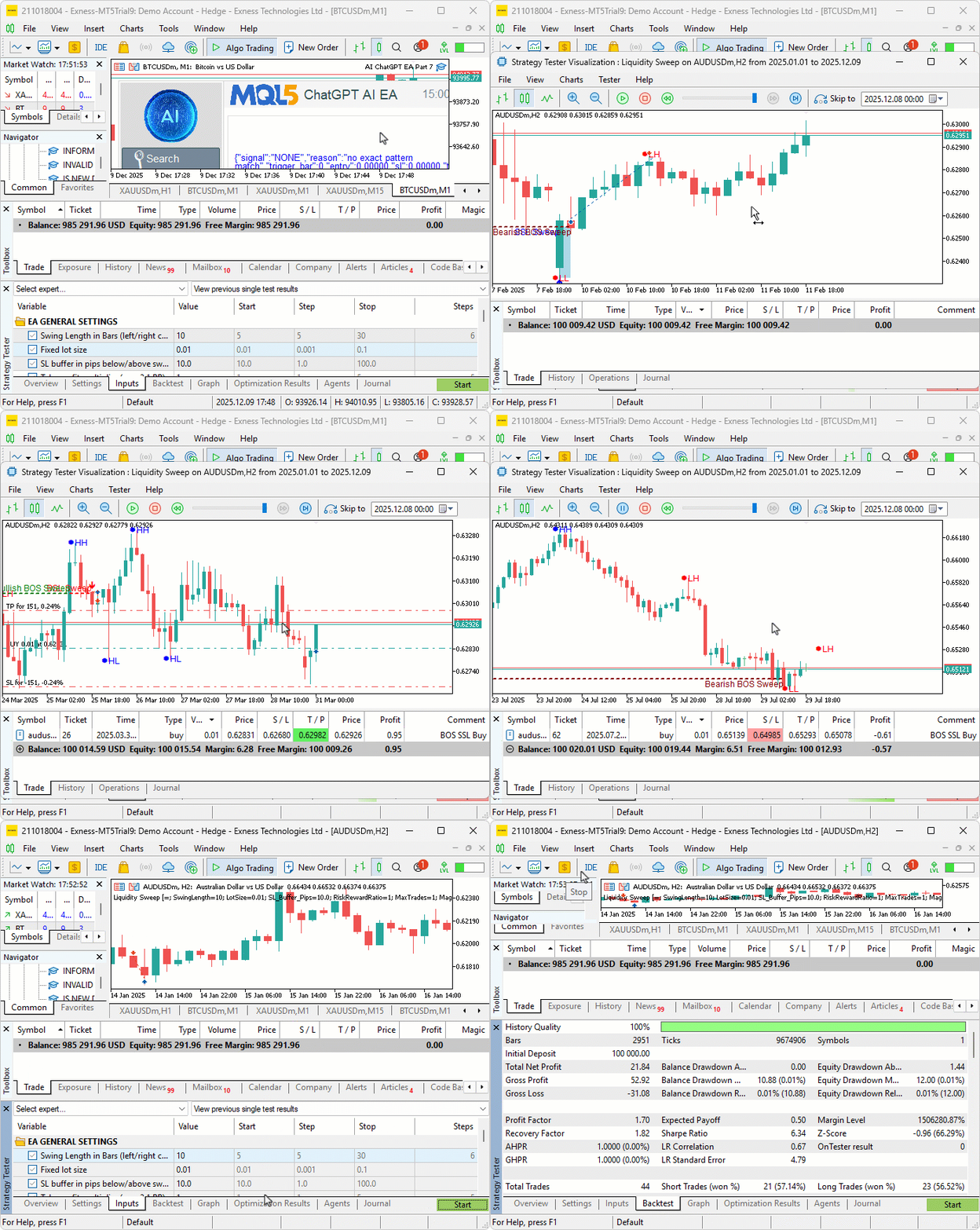
From the visualization, we can see that we detect, trade, and manage the liquidity sweep setups, hence achieving our objectives. The thing that remains is backtesting the program, and that is handled in the next section.
Backtesting
After thorough backtesting, we have the following results.
Backtest graph:

Backtest report:

Conclusion
In conclusion, we’ve developed a Liquidity Sweep on Break of Structure (BoS) system in MQL5. It detects swings over the input length and labels swing points to set the trend. It spots sweeps when there is a wick beyond a swing and a close inside the directional candle. The system trades buy on Sell Side Liquidity (SSL) in bullish BOS, or sells on Buy Side Liquidity (BSL) in bearish. It uses dynamic trade levels, a maximum trades limit, and closes opposites. Visualization includes icons for swings, dashed lines for breaks, filled rectangles for sweeps, arrows for entries, and adaptive font sizes when scaling.
Disclaimer: This article is for educational purposes only. Trading carries significant financial risks, and market volatility may result in losses. Thorough backtesting and careful risk management are crucial before deploying this program in live markets.
With this Liquidity Sweep on Break of Structure strategy, you can detect manipulative wicks after BOS. You’re equipped to trade reversal setups, ready for further optimization in your trading journey. Happy trading!
Warning: All rights to these materials are reserved by MetaQuotes Ltd. Copying or reprinting of these materials in whole or in part is prohibited.
This article was written by a user of the site and reflects their personal views. MetaQuotes Ltd is not responsible for the accuracy of the information presented, nor for any consequences resulting from the use of the solutions, strategies or recommendations described.

 Introduction to MQL5 (Part 31): Mastering API and WebRequest Function in MQL5 (V)
 Automated Risk Management for Passing Prop Firm Challenges
 From Novice to Expert: Trading the RSI with Market Structure Awareness
 Codex Pipelines: From Python to MQL5 for Indicator Selection — A Multi-Quarter Analysis of the FXI ETF

- Free trading apps
- Over 8,000 signals for copying
- Economic news for exploring financial markets
You agree to website policy and terms of use
The file attached is not working on mt5
Hi Allan, compliments of the new year. Thank you for the article, it is helping me on my way to figuring out how to code my Multi Timeframe BOS EA by following your steps and typing out everything as I'm going along instead of just copy pasting. I have now however run into an error at the "Detect Swings and BOS" section of the code, when compiling I get an "undeclared identifier" error for the "FindBreakTime" line of code. How did you get it to work using "FindBreakTime" as it looks like it wants me to rather use something like "SymbolInfoSessionsTrade"?
Thank you.
Hi Allan, compliments of the new year. Thank you for the article, it is helping me on my way to figuring out how to code my Multi Timeframe BOS EA by following your steps and typing out everything as I'm going along instead of just copy pasting. I have now however run into an error at the "Detect Swings and BOS" section of the code, when compiling I get an "undeclared identifier" error for the "FindBreakTime" line of code. How did you get it to work using "FindBreakTime" as it looks like it wants me to rather use something like "SymbolInfoSessionsTrade"?
Thank you.