

Introduction to MQL5 (Part 29): Mastering API and WebRequest Function in MQL5 (III)
 5 876
5 876
 0
0

Introduction
Greetings and welcome back to Part 29 of the Introduction to MQL5 series! In the previous article, we covered the elements of a URL and discovered how to use MQL5's API to get the most recent prices from external platforms. Additionally, you learned how to read the JSON response and retrieve the precise information you require.
We will go one step further in this article by working on a more useful project. We will link to an external platform and obtain complete candlestick data, including the time, open, high, low, and close prices of multiple candles, rather than just the current price. In this article, we will also extract each different element from this data once we get it and store it in several arrays. For instance, we would save all open prices in one array, all high prices in another, and so on. Your understanding of managing structured JSON responses, processing arrays in MQL5, and effectively structuring incoming market data will all improve as a result of this project.
Retrieving Candlestick Data Using WebRequest
This project's initial stage involves using the WebRequest function to retrieve candlestick data. This time, we will ask for full candlestick information rather than just the current price, like we did in the last article. Time, open, high, low, and closing values are all included in this.
In this article, we will ask an external platform for the previous five candles each day. Upon receiving the data, we will subsequently break it down and save each price category into distinct arrays, including all open prices, all high prices, and so on.
The method is the first parameter in the WebRequest function. The method has to be set to GET since we are only trying to request data from the server and not transmit or update anything. This indicates to the server that all we want is information.
Example:string method = "GET";
I talked about the different parts of a URL in the previous article. These are the protocol, domain, path, and query string. Understanding the components helps you know exactly where the request is going and what resource you want the server to send back.
Example:
string method = "GET";
string url = "https://api.binance.com/api/v3/klines?symbol=BTCUSDT&interval=1d&limit=5";
All the Binance server's instructions are included in the URL. The protocol that always appears first and denotes a secure connection is https://. The domain api.binance.com comes next, informing MetaTrader of the precise server to connect to. The URL /api/v3/klines, which comes after the domain, informs the server that we are looking for candlestick data.
The query string is anything that comes after the path. A question mark always appears at the beginning of the query string to indicate that more instructions are being sent. The trading pair for which we are looking for data is specified by the first instruction, symbol=BTCUSDT. We utilize the question mark symbol to add a command. For instance, limit=5 instructs the server to return the latest five candles, while interval=1d instructs it that we want daily candles.
Analogy:
Consider yourself going to a huge office complex to get a specific piece of information. A safe and encrypted connection is indicated by the first component, https://, which is similar to the main road you take to get to the building. The building itself, the primary server where Binance stores all of its data services, is api.binance.com, which comes next.
The journey starts as soon as you enter the building. Imagine going through a number of rooms to get to the department you require. The /api room, which serves as the hub for all API services, is where you start. You can access the version 3 portion of the API by going via the door marked /v3 inside that room. Lastly, the department that specifically stores candlestick data is located at the /klines door. You get closer to the precise data you want with each step of the road.
The query string starts with a question mark once it reaches the correct room. This is the first time you are providing the server instructions. You start by entering symbol=BTCUSDT, which indicates that you are looking for Bitcoin data in relation to the US dollar.
The '&' character is used to separate each command from itself. For example, after the first command to specify which symbol, we used the character for additional commands. When we used &interval=1d, that means we wanted the daily candle. We also used &limit=5, which means we want the last 5 candles.
When you properly arrange the query string, it helps the server know the exact data you are requesting. It is important to know that the formats used by various platforms vary, so it's important to read their documentations. We may now set the other arguments for the WebRequest function, like the headers, timeout, data array, result array, and result headers text. We can use the WebRequest function to send our request and get the candlestick data directly from the Binance API once they are set up.
Example:
string method = "GET";
string url = "https://api.binance.com/api/v3/klines?symbol=BTCUSDT&interval=1d&limit=5";
string headers = "";
int time_out = 5000;
char   data[];
char   result[];
string result_headers;

//+------------------------------------------------------------------+
//| Expert initialization function                                   |
//+------------------------------------------------------------------+
int OnInit()
  {
//---

   WebRequest(method, url, headers, time_out, data, result, result_headers);
   string server_result = CharArrayToString(result);

//---
   return(INIT_SUCCEEDED);
  }
//+------------------------------------------------------------------+
//| Expert deinitialization function                                 |
//+------------------------------------------------------------------+
void OnDeinit(const int reason)
  {
//---

  }
//+------------------------------------------------------------------+
//| Expert tick function                                             |
//+------------------------------------------------------------------+
void OnTick()
  {
//---

  }
It functions similarly to mailing a letter to a business and waiting for a response when the program submits a request to the server. The contents of the envelope, such as the address, the sort of inquiry, and any information you want them to respond to, are called the method, URL, headers, timeout, and data. The envelope is delivered to the server once it is prepared.
Imagine entering a sizable office building where a central mailroom receives all incoming mail. Everything is crammed into mailbags, illegible, and mixed. Before anyone can understand what was sent, these letters must be sorted. The first step is similar to getting a courier's sealed mailbag. You are holding the mailbag now, but you are still unable to read what is within. It is merely an unstructured container full of raw materials.
It's similar to emptying the mailbag onto a table and setting up the letters so you can read them. The disorganized and unintelligible mass becomes clear, well-organized information once the items are arranged correctly. Now that each letter makes sense, you can start utilizing its contents. Here, the same concept holds true. The first thing you get is the raw response, which comes in an unhelpful format. After that, you transform it into a clear, readable format so you can at last comprehend what the server sent.
Output:

Result:
[

  [

1763337600000, "94261.45000000", "96043.00000000", "91220.00000000", "92215.14000000", "39218.59806000", 1763423999999, "3674562070.23860600", 8134322, "18690.19245000", "1750979467.78626070", "0"

  ],

  [

1763424000000, "92215.14000000", "93836.01000000", "89253.78000000", "92960.83000000", "39835.14769000", 1763510399999, "3641033186.30045840", 8786593, "20130.95957000", "1841176605.14182350", "0"

  ],

  [

1763510400000, "92960.83000000", "92980.22000000", "88608.00000000", "91554.96000000", "32286.63760000", 1763596799999, "2925773651.25595790"
We were unable to print the entire server response due to the MetaTrader 5 Expert log, but the software may still read the complete data.
Understanding the Format of Returned Candle Data
After getting the candlestick data, the next step is to understand the JSON pattern used by the server. This is highly significant because different systems send data in different ways. You won't know how to get the right values if you don't first study the pattern. It is always a good idea to look at the structure of the response before developing any extraction logic.
We can see the pattern that Binance uses clearly in the small section of the response that MetaTrader 5 was able to print. An array represents each candle, and each value in that array has a distinct meaning. The pattern is seen in the example below:
[

  [

    1763337600000, "94261.45000000", "96043.00000000", "91220.00000000", "92215.14000000", "39218.59806000",

    1763423999999, "3674562070.23860600", 8134322, "18690.19245000", "1750979467.78626070", "0"

  ],

  [

    1763424000000, "92215.14000000", "93836.01000000", "89253.78000000", "92960.83000000", "39835.14769000",

    1763510399999, "3641033186.30045840", 8786593, "20130.95957000", "1841176605.14182350", "0"

  ],

  [

    1763510400000, "92960.83000000", "92980.22000000", "88608.00000000", "91554.96000000", "32286.63760000",

    1763596799999, "2925773651.25595790"
Each inner array stands for one full candle and is in the same order. The open time of the candle comes first, then the open price, high price, low price, close price, and volume. After this, you'll see other numbers like the close time, the quote asset volume, the number of trades, and more. MetaTrader 5 couldn't publish the whole response since it has a character limit, but the part that was printed is enough for us to understand the format.
Format:
[

  [array 1],

  [array 2],

  [array 3],

  [array 4],

  [array 5]

]
Commas divide these inner arrays, each of which represents a single full candlestick. Each array contains the actual data for each candle, which is sorted according to a certain order used by Binance.
For example, one of the arrays looks like this:
[

  1763337600000, "94261.45000000", "96043.00000000",

  "91220.00000000", "92215.14000000", "39218.59806000",

  1763423999999, "3674562070.23860600", 8134322,

  "18690.19245000", "1750979467.78626070", "0"

]
One complete candlestick is represented by this entire array. The first number, represents the candle's opening time in milliseconds, and the second one is the opening price, followed by the high price, low price, and close price. Going forward, the candle will close at 1763423999999. The quotation asset volume is indicated by the big quantity "3674562070.23860600" that follows, and the number of trades is shown by 8134322. The taker purchase base asset volume "18690.19245000" and the taker buy quote asset volume "1750979467.78626070" follow. Lastly, "0" is a compatibility-related unused field.
Understanding the pattern makes it simple to extract the precise values you require, including open, high, low, and close, and store each one in its own array.
Separating Candle Values into Individual Arrays
The next step is to divide these values into distinct arrays now that we are aware of the nature of the response we get from the server and that the data for each candle is organized in a specific sequence. This makes it simpler to analyze and utilize the opening time, open price, high price, low price, close price, and volume in our indicator or Expert Advisor later on by allowing us to save them separately.
We may treat index 0 as the most recent candle, index 1 as the one that came before it, and the remaining candles as following the same pattern because each inner array has the complete data for a single candle. It is simple to access each candle independently and retrieve just the values we require thanks to this structure.
The first step in converting the raw server response into distinct arrays is selecting a character that will enable us to distinguish between different complete candles. Because commas also occur inside each candle's values, attempting to divide the candles using the comma character would never succeed. This implies that everything will disperse and that it will be impossible to put the right values back together. We require a character that does not appear within the values themselves, but only at the end of each candle data set.
Result:
[

  [

    1763337600000, "94261.45000000", "96043.00000000", "91220.00000000", "92215.14000000", "39218.59806000",

    1763423999999, "3674562070.23860600", 8134322, "18690.19245000", "1750979467.78626070", "0"

  ],

  [

    1763424000000, "92215.14000000", "93836.01000000", "89253.78000000", "92960.83000000", "39835.14769000",

    1763510399999, "3641033186.30045840", 8786593, "20130.95957000", "1841176605.14182350", "0"

  ],

  [

    1763510400000, "92960.83000000", "92980.22000000", "88608.00000000", "91554.96000000", "32286.63760000",

    1763596799999, "2925773651.25595790"
We cannot use the comma so separate the elements of the array because we want to group all the daily data for each day together. Many of the figures on each candle, including opening time, open, high, low, close, and volume, are divided by commas. The function would separate each value within the candle rather than considering the candle as a single unit if we attempted to isolate the candles using commas. Knowing which numbers correspond to which candle would be extremely challenging as a result.
The data would be dispersed, and the individual candle values would be effectively mixed up if commas were used as separators. It would become difficult and error-prone to reassemble each candle's correct number sequence. The goal of organizing the candle data for analysis would be defeated, since each candle's integrity as a separate data collection would be lost.
We must utilize a character that isn't one of the candle's actual numbers to solve this difficulty. For each candle, this character should only occur once, ideally near the conclusion of the candle data collection. We make sure that each candle can be clearly distinguished from the others without compromising the values they represent by selecting such a character.
Because it always shows up at the end of each candle block, the closing bracket is ideal for this function. We may separate each candle into its own array by using the closing bracket as a separator. Without running the danger of confusion brought on by commas in the data, this method enables us to preserve the structure of the candle data and makes it simple to access, process, and analyze each candle separately.
Example:
//+------------------------------------------------------------------+
//| Expert initialization function                                   |
//+------------------------------------------------------------------+
int OnInit()
  {
//---

   WebRequest(method, url, headers, time_out, data, result, result_headers);
   string server_result = CharArrayToString(result);
// Print(server_result);

   string candle_data[];
   int array_count = StringSplit(server_result,']', candle_data);

   Print(array_count);

//---
   return(INIT_SUCCEEDED);
  }
Explanation:
We declared a dynamic string array named candle_data initially so that we could keep each candle independently after breaking up the large Binance API response into smaller pieces.
Next, we instructed MQL5 to cut the server_result string whenever it encountered the character ']'. Because every candle in the returned data pattern ends with a ']', we decided to use that character. It is the sole distinct character that consistently indicates the end of each block of candles. Commas appear inside the candle values themselves, such as when separating open, high, low, and close prices; hence, we are unable to utilize them as a separator. However, ']' is the safest option because it only appears after each candle array.
Three parameters are required for the StringSplit function. The string you wish to divide, in this case server_result, is the first parameter. The character ']' that we wish to utilize to split the string is the second parameter. The third parameter is our candle_data array, which is where the divided pieces will be kept. The function returns the total number of pieces identified after splitting the text, and we save that amount in array_count.
Consider a straightforward sample string such as "MQL5, ALGO, TRADING" to understand how the function counts. The function will identify two commas if we split it with the comma character, but the number it gives will be three. This occurs as a result of StringSplit's constant assumption that an element follows each separator. Therefore, it counts even if the final portion is empty. Our candle data is separated using the same logic. Each time the function encounters a ']', it counts the next candle after treating it as the end of the previous one.
Output:
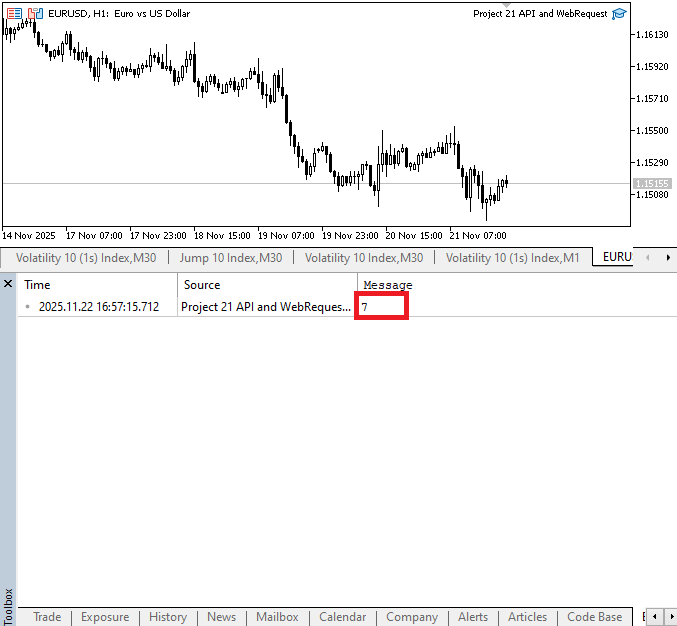
In this instance, the StringSplit function returns a count of 7. Examining the number of ']' characters in the server response helps us understand why. Since each of the five candles for which we requested data ends in a ']', we already have five closing brackets. A '[' character appears at the beginning of the entire answer before the first candle starts, and there is another ']' at the very end of the entire structure. This means that the response has six closing brackets in total.
Because StringSplit always thinks that there is another piece of text that follows the separator, it will create one extra element after the last ']' because it splits the text whenever it encounters one. Therefore, the method returns 7 even though the response has 6 closing square bracket characters, indicating that it has counted 6 splits plus one extra empty segment at the conclusion. This explains why array_count displays 7 even though we only asked for 5.
The next step is to print out each component of the array individually after successfully dividing the server response into distinct parts using the StringSplit method. This will enable us to verify that the split functioned as intended and plainly understand what each portion includes. We can determine which portions of the text relate to each candle and which are merely leftover blank sections produced during the splitting procedure by looking at each component separately.
Example:
//+------------------------------------------------------------------+
//| Expert initialization function                                   |
//+------------------------------------------------------------------+
int OnInit()
  {
//---

   WebRequest(method, url, headers, time_out, data, result, result_headers);
   string server_result = CharArrayToString(result);
// Print(server_result);

   string candle_data[];
   int array_count = StringSplit(server_result,']', candle_data);

   Print(candle_data[0]);

//---
   return(INIT_SUCCEEDED);
  }
candle_data[0]:
[[1763424000000,

  "92215.14000000",

  "93836.01000000",

  "89253.78000000",

  "92960.83000000",

  "39835.14769000",

  1763510399999,

  "3641033186.30045840",

  8786593,

  "20130.95957000",

  "1841176605.14182350",

  "0"
candle_data[1]:
,[

  1763510400000,

  "92960.83000000",

  "92980.22000000",

  "88608.00000000",

  "91554.96000000",

  "32286.63760000",

  1763596799999,

  "2925773651.25595790",

  6822174,

  "15060.08451000",

  "1365200809.17455710",

  "0"
candle_data[2]:
[

  1763596800000,

  "91554.96000000",

  "93160.00000000",

  "86100.00000000",

  "86637.23000000",

  "39733.19073000",

  1763683199999,

  "3548950335.09842180",

  7841395,

  "18283.84047000",

  "1634256490.95743210",

  "0"
Extracting Time and OHLC Values from the First Candle Data
We have several entries in the array after dividing the server response, each of which represents a portion of the original data. Determining which element corresponds to which candle is critical at this point. Opening time, open price, high price, low price, and closing price are among the particular values found in each candle, and these data are arranged predictably. It would be difficult to determine which number corresponds to whatever characteristic of the candle without accurately specifying the ingredients.
The initial step in the identifying process is to look at the array's first element's pattern. We can observe how the various values are arranged by examining the structure of this element, which often reflects the most recent candle. We can assign each number to its matching candle characteristic by knowing the order, which guarantees accurate data interpretation. Likewise, we can use the same reasoning for the other components after we comprehend the pattern for the first candle. Every following member in the array will have the same values because the server response has a uniform structure for every candle. This uniformity guarantees proper mapping of each candle's data and facilitates automation of the identification procedure.
Finally, each component must be identified to proceed with processing and analysis. We can conduct calculations, combine related values together for comparison, or convert the string representations into numbers once each value has been accurately allocated to its corresponding candle. This phase is essential to working with API replies in MQL5 since it serves as the basis for all further operations on the candle data.
candle_data[0]:
[[

  1763424000000,       // opening time

  "92215.14000000",    // open price

  "93836.01000000",    // high price

  "89253.78000000",    // low price

  "92960.83000000",    // close price

  "39835.14769000",    // volume

  1763510399999,       // closing time

  "3641033186.30045840", // quote asset volume

  8786593,             // number of trades

  "20130.95957000",    // taker buy base asset volume

  "1841176605.14182350", // taker buy quote asset volume

  "0"                  // placeholder
Only the opening time and the OHLC values may be readily extracted from index 0 of the candle data by simply removing the unwanted characters and dividing the string by commas.
Example://+------------------------------------------------------------------+ //| Expert initialization function | //+------------------------------------------------------------------+ int OnInit() { //--- WebRequest(method, url, headers, time_out, data, result, result_headers); string server_result = CharArrayToString(result); // Print(server_result); string candle_data[]; int array_count = StringSplit(server_result,']', candle_data); string day1_data = candle_data[0]; StringReplace(day1_data,"[[",""); StringReplace(day1_data,"\"",""); Print(day1_data); //--- return(INIT_SUCCEEDED); }
Explanation:
To store the information from the first element of the candle data array, we first create a string variable. This facilitates working on that one candle without impacting the remaining data. Before we can extract the useful values, we must clean up the value contained in this variable, which still contains unwanted characters like double brackets and quote marks.
The StringReplace method is used to remove these irrelevant characters. Three parameters are needed for this function to work. The text you wish to clean is the first parameter. The precise character or group of characters you wish to eliminate is the second parameter. What you wish to replace it with is specified by the third parameter. The irrelevant characters will just be removed if the replacement parameter is an empty string. So, we eliminate the quote marks and double brackets from the text by using this function. The candle data is easier to work with and may be divided into different sections, such as the opening time, open price, high price, low price, and closure price, after this cleaning phase.
Analogy:
Imagine you visited a library and pulled out an ancient book with several pages glued together. You would need to carefully peel the layers covering the actual content before you could see the first page clearly. Writing string day1_data = candle_data[0]; is similar to selecting the first page from a large, multi-page book. The large book is the complete server response from the API, with one page for each candle. We are just extracting the first page so we can work on it independently by choosing candle_data[0].
Next, StringReplace(day1_data, "[[", ""); functions similarly to eliminating an extraneous wrapper that is affixed to the top of the page. Old books occasionally have sticky items, labels, or tape affixed to the first page. Until you remove them, the page cannot be read correctly. Similar to that undesired tape are the characters [[ in the data]. We carefully remove them as they are not part of the information we require.
Next, StringReplace(day1_data,", ""); is similar to wiping away all the little dust particles or marks that are strewn all over the paper. When we wish to handle the numbers correctly, these double quote marks that surround the values are useless. They are eliminated, making the page clear and simple to read. Lastly, we hold the cleaned page up in a bright light to examine it at Print(day1_data);. We make sure the dust has been removed, the wrapper has been taken off, and what's left is legible text that we can now comprehend and utilize for more processing.
Output:
1763510400000,

92960.83000000,

92980.22000000,

88608.00000000,

91554.96000000,

32286.63760000,

1763596799999,

2925773651.25595790,

6822174,

15060.08451000,

1365200809.17455710,

0
The raw candle data has been correctly recovered; however, it is still all merged into a single, lengthy string. We cannot maintain it as a single block of text since we must work with each value independently, including the opening time, open, high, low, and close. This cleaned string must then be divided and transformed into an array so that each component may be accessed separately and utilized in our computations.
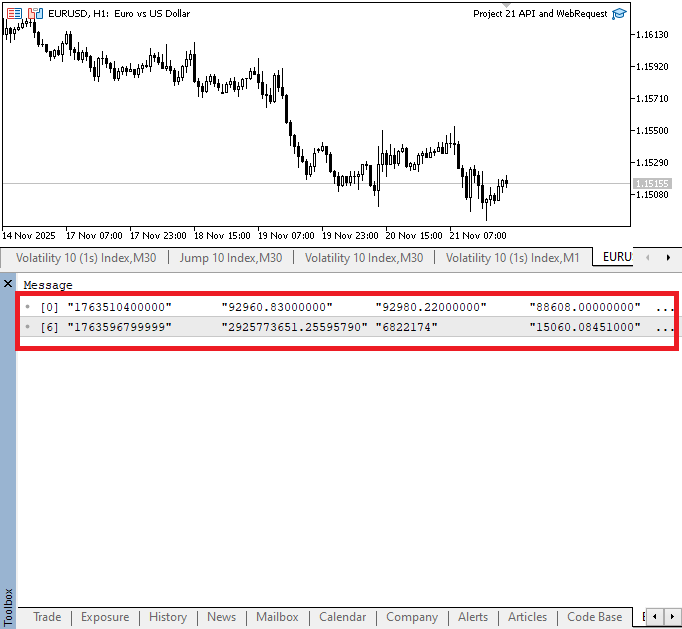
Example:WebRequest(method, url, headers, time_out, data, result, result_headers); string server_result = CharArrayToString(result); // Print(server_result); string candle_data[]; int array_count = StringSplit(server_result,']', candle_data); string day1_data = candle_data[0]; StringReplace(day1_data,"[[",""); StringReplace(day1_data,"\"",""); string day1_data_array[]; StringSplit(day1_data,',',day1_data_array); ArrayPrint(day1_data_array);
Output:
Explanation:
We started by declaring a dynamic array variable to hold a lengthy string after eliminating the unnecessary characters. The string must be an array because its contents will be transformed into different elements. Since commas are used to separate the strings, it will be helpful to utilize them to separate the strings into separate elements.
Imagine the candle data as a lengthy railroad with numerous interconnected coaches: time, open, high, low, close, etc. You can't work with any one coach unless you separate them all because they are all connected. The first line, string day1_data_array[];, is similar to setting up a large, empty parking lot where each coach will be positioned separately after it has been separated.
The second line, StringSplit(day1_data, ',', day1_data_array);, resembles a gadget that disconnects the train at each comma. The train is cut at the comma. Each coach, which stands for a value like opening time, open price, high, low, or close, is given its own spot in the parking lot following the split. All the information is now easily accessible and separated. The final line, ArrayPrint(day1_data_array);, is similar to standing in front of a parking lot and making a list of every coach to make sure they were properly separated and arranged.
Extracting Time and OHLC Values from the Second Candle Data
After handling the first candle, the second candle is the next in line. The process is still the same as it was for the first candle to ensure accuracy and maintain the same structure. We reduce the likelihood of values being mixed up and enable precise data analysis and storage by processing each candle independently.
Examining the raw pattern in detail is crucial before attempting to split the data for the second candle. By printing the raw response, we can identify any irrelevant characters that can impede the splitting process, including commas, brackets, or quote marks. By doing this step, we can prevent the extraction of numerical values from being impacted by inadvertently adding undesired characters to the array.
We can verify that the server response keeps a consistent structure by understanding the precise format of the raw data for the second candle. Likewise, we can be certain that the order of values—like the opening time, open, high, low, and close price—remains constant by comparing it to the first candle. We will also use the same cleaning and splitting procedure without having to make adjustments for variations in the data format thanks to this consistency.
Example:
//+------------------------------------------------------------------+
//| Expert initialization function                                   |
//+------------------------------------------------------------------+
int OnInit()
  {
//---

   WebRequest(method, url, headers, time_out, data, result, result_headers);
   string server_result = CharArrayToString(result);
// Print(server_result);

   string candle_data[];
   int array_count = StringSplit(server_result,']', candle_data);

//DAY 1
   string day1_data = candle_data[0];
   StringReplace(day1_data,"[[","");
   StringReplace(day1_data,"\"","");

   string day1_data_array[];
   StringSplit(day1_data,',',day1_data_array);

//DAY 2
   Print(candle_data[1]);

//---
   return(INIT_SUCCEEDED);
  }
Output:
, [

1763596800000, // Opening time

"91554.96000000", // Open price

"93160.00000000", // High price

"86100.00000000", // Low price

"86637.23000000", // Close price

"39733.19073000",

1763683199999,

"3548950335.09842180",

7841395,

"18283.84047000",

"1634256490.95743210",

"0"
After reviewing the format, we identify certain characters that need to be removed, including the comma followed by an initial opening square bracket and the double quote marks. We might declare a string array to store the data for the second day after eliminating the unnecessary characters.
Example:
//+------------------------------------------------------------------+
//| Expert initialization function                                   |
//+------------------------------------------------------------------+
int OnInit()
  {
//---

   WebRequest(method, url, headers, time_out, data, result, result_headers);
   string server_result = CharArrayToString(result);
// Print(server_result);

   string candle_data[];
   int array_count = StringSplit(server_result,']', candle_data);

//DAY 1
   string day1_data = candle_data[0];
   StringReplace(day1_data,"[[","");
   StringReplace(day1_data,"\"","");

   string day1_data_array[];
   StringSplit(day1_data,',',day1_data_array);

//DAY 2
   string day2_data = candle_data[1];
   StringReplace(day2_data,",[","");
   StringReplace(day2_data,"\"","");
   Print(day2_data);

   string day2_data_array[];
   StringSplit(day2_data,',',day2_data_array);
//---
   return(INIT_SUCCEEDED);
  }
Output:
1763596800000,

91554.96000000,

93160.00000000,

86100.00000000,

86637.23000000,

39733.19073000,

1763683199999,

3548950335.09842180,

7841395,

18283.84047000,

1634256490.95743210,

0
You can tell that all the extra characters have been taken out because of the output. After that, we used the StringSplit method with a comma as the separator to break the data up into independent parts of a single array. This made it easy to work with each value on its own.
Extracting Time and OHLC Values from the Third Candle Data
We will sort the data for the third candle in the same manner as we did for the first two. We will first print it out, understand the format, and remove any unnecessary characters. After removing the unnecessary characters, we declare a string array to hold the data for the third candle. The data is then divided into separate elements using the StringSplit function and a comma as the separator. As with the preceding candles, this enables us to access each variable independently, including opening time, open, high, low, and close. All candle data is reliably arranged and prepared for additional processing in this manner.
Print(candle_data[2]);
Output:
,[

1763683200000,

"86637.22000000",

"87498.94000000",

"80600.00000000",

"85129.43000000",

"72256.12679000",

1763769599999,

"6061348756.34156410",

11826480,

"34071.85828000",

"2859133223.22405230",

"0"
Example:
//+------------------------------------------------------------------+
//| Expert initialization function                                   |
//+------------------------------------------------------------------+
int OnInit()
  {
//---

   WebRequest(method, url, headers, time_out, data, result, result_headers);
   string server_result = CharArrayToString(result);
// Print(server_result);

   string candle_data[];
   int array_count = StringSplit(server_result,']', candle_data);

//DAY 1
   string day1_data = candle_data[0];
   StringReplace(day1_data,"[[","");
   StringReplace(day1_data,"\"","");

   string day1_data_array[];
   StringSplit(day1_data,',',day1_data_array);

//DAY 2
   string day2_data = candle_data[1];
   StringReplace(day2_data,",[","");
   StringReplace(day2_data,"\"","");

   string day2_data_array[];
   StringSplit(day2_data,',',day2_data_array);

//DAY 3
   string day3_data = candle_data[2];
   StringReplace(day3_data,",[","");
   StringReplace(day3_data,"\"","");

   string day3_data_array[];
   StringSplit(day3_data,',',day3_data_array);

//---
   return(INIT_SUCCEEDED);
  }
We can easily eliminate quotation marks and leading characters from the numbers using the consistent candle format. The cleaned values may then be divided and stored in an array for simpler numerical processing.
Example:
//+------------------------------------------------------------------+
//| Expert initialization function                                   |
//+------------------------------------------------------------------+
int OnInit()
  {
//---

   WebRequest(method, url, headers, time_out, data, result, result_headers);
   string server_result = CharArrayToString(result);
// Print(server_result);

   string candle_data[];
   int array_count = StringSplit(server_result,']', candle_data);

//DAY 1
   string day1_data = candle_data[0];
   StringReplace(day1_data,"[[","");
   StringReplace(day1_data,"\"","");

   string day1_data_array[];
   StringSplit(day1_data,',',day1_data_array);

//DAY 2
   string day2_data = candle_data[1];
   StringReplace(day2_data,",[","");
   StringReplace(day2_data,"\"","");

   string day2_data_array[];
   StringSplit(day2_data,',',day2_data_array);

//DAY 3

   string day3_data = candle_data[2];
   StringReplace(day3_data,",[","");
   StringReplace(day3_data,"\"","");

   string day3_data_array[];
   StringSplit(day3_data,',',day3_data_array);

//DAY 4

   string day4_data = candle_data[3];
   StringReplace(day4_data,",[","");
   StringReplace(day4_data,"\"","");

   string day4_data_array[];
   StringSplit(day4_data,',',day4_data_array);

//DAY 5

   string day5_data = candle_data[4];
   StringReplace(day5_data,",[","");
   StringReplace(day5_data,"\"","");

   string day5_data_array[];
   StringSplit(day5_data,',',day5_data_array);

//---
   return(INIT_SUCCEEDED);
  }
To avoid overwhelming you, we will now take a break from this article. We will proceed by combining comparable data from various daily candles into a single array in the next article. For instance, all the opening timings will be combined into a single array, and the high, low, and close prices will follow suit. Working with the candle data will become easier to manage and more structured as a result.
Conclusion
This article showed you how to use MQL5's WebRequest function to receive candlestick data from an external platform API and how to start organizing that data. We looked at how to separate the data into separate arrays for each candle, eliminate irrelevant characters, and analyze the server response to identify its pattern.
Warning: All rights to these materials are reserved by MetaQuotes Ltd. Copying or reprinting of these materials in whole or in part is prohibited.
This article was written by a user of the site and reflects their personal views. MetaQuotes Ltd is not responsible for the accuracy of the information presented, nor for any consequences resulting from the use of the solutions, strategies or recommendations described.

 Price Action Analysis Toolkit Development (Part 53): Pattern Density Heatmap for Support and Resistance Zone Discovery
 The MQL5 Standard Library Explorer (Part 4): Custom Signal Library
 Automating Trading Strategies in MQL5 (Part 43): Adaptive Linear Regression Channel Strategy
 From Basic to Intermediate: Struct (I)

- Free trading apps
- Over 8,000 signals for copying
- Economic news for exploring financial markets
You agree to website policy and terms of use