

The View component for tables in the MQL5 MVC paradigm: Base graphical element
 1 582
1 582
 0
0

Contents
Introduction
In modern programming, the MVC (Model-View-Controller) paradigm is one of popular approaches to developing complex applications. It allows dividing the application logic into three independent components: Model (data model), View (display) and Controller. This approach simplifies code development, testing, and maintenance, making it more structured and readable.
Within the framework of this series of articles, we look at the process of table creating in the MVC paradigm in MQL5. In the first two articles, we implemented data models (Model) and the base architecture of tables. Now it is time we should move on to the View component responsible for data visualization and, in part, for user interaction.
In this article, we will implement a base object for drawing on canvas, which will be the basis for building all the visual components of tables and any other controls. The object will include:
- color management in various states (standard state, focus, press, lock);
- support for transparency and dynamic resizing;
- object trim feature along the container borders;
- managing the visibility and object blocking;
- dividing graphics into two layers: background and foreground.
Here, we will not consider integration with the already created Model component. Moreover, with the Controller component that has not yet been created, but we will design the classes under development taking into account future integration. This will further make it easy to link visual elements with data and control logic, ensuring full interaction within the framework of the MVC paradigm. As a result, we get a flexible tool for creating tables and other graphical elements to be used in our projects.
Since the implementation of architecture of the View component in MQL5 is quite time-consuming, including many auxiliary classes and inheritances, let us agree on a fairly brief summary. Define a class, provide a brief description of it, and then, again briefly, consider its implementation. Today, we have five such classes:
- a base class for all the graphical objects,
- a class for color management,
- a class for managing the colors of various states of a graphic element,
- rectangular area control class,
- a base class for drawing graphic elements on canvas.
In the end, all these classes are necessary for the base class to draw graphic elements. All other classes that will be created when implementing various controls, in particular, the Table Control, will inherit from it.
The first four classes of this list are auxiliary classes for convenient implementation of the functionality of the base class for drawing graphic elements (5), from which we will further inherit to create all controls and their components.
Auxiliary Classes
If not available yet, in terminal directory \MQL5\Scripts\ create a new folder Tables\, and in that folder — Controls folder. It will store files to be created within the frames of articles on creating the View component for tables.
In this new folder, create a new include file Base.mqh. Today we will implement the base object class codes in it to create controls. Preliminary implement macro substitutions, enumerations, and functions:
//+------------------------------------------------------------------+
//|                                                         Base.mqh |
//|                                  Copyright 2025, MetaQuotes Ltd. |
//|                                             https://www.mql5.com |
//+------------------------------------------------------------------+
#property copyright "Copyright 2025, MetaQuotes Ltd."
#property link      "https://www.mql5.com"

//+------------------------------------------------------------------+
//| Include libraries                                                |
//+------------------------------------------------------------------+
#include <Canvas\Canvas.mqh>              // CCanvas class
#include <Arrays\List.mqh>                // CList class

//+------------------------------------------------------------------+
//| Macro substitutions                                              |
//+------------------------------------------------------------------+
#define  clrNULL              0x00FFFFFF  // Transparent color for CCanvas
#define  MARKER_START_DATA    -1          // Data start marker in a file

//+------------------------------------------------------------------+
//| Enumerations                                                     |
//+------------------------------------------------------------------+
enum ENUM_ELEMENT_TYPE                    // Enumeration of graphical element types
  {
   ELEMENT_TYPE_BASE = 0x10000,           // Basic object of graphical elements
   ELEMENT_TYPE_COLOR,                    // Color object
   ELEMENT_TYPE_COLORS_ELEMENT,           // Color object of the graphical object element
   ELEMENT_TYPE_RECTANGLE_AREA,           // Rectangular area of the element
   ELEMENT_TYPE_CANVAS_BASE,              // Basic canvas object for graphical elements
  };

enum ENUM_COLOR_STATE                     // Enumeration of element state colors
  {
   COLOR_STATE_DEFAULT,                   // Normal state color
   COLOR_STATE_FOCUSED,                   // Color when hovering over an element
   COLOR_STATE_PRESSED,                   // Color when clicking on an element
   COLOR_STATE_BLOCKED,                   // Blocked element color
  };
//+------------------------------------------------------------------+
//| Functions                                                        |
//+------------------------------------------------------------------+
//+------------------------------------------------------------------+
//|  Return the element type as a string                             |
//+------------------------------------------------------------------+
string ElementDescription(const ENUM_ELEMENT_TYPE type)
  {
   string array[];
   int total=StringSplit(EnumToString(type),StringGetCharacter("_",0),array);
   string result="";
   for(int i=2;i<total;i++)
     {
      array[i]+=" ";
      array[i].Lower();
      array[i].SetChar(0,ushort(array[i].GetChar(0)-0x20));
      result+=array[i];
     }
   result.TrimLeft();
   result.TrimRight();
   return result;
  }
//+------------------------------------------------------------------+
//| Classes                                                          |
//+------------------------------------------------------------------+
In previous articles we implemented the function that returns the object type as a string. The function that returns the control type as a string description is absolutely identical to the one previously implemented. The enumeration string is simply divided into substrings using the "_” separator and the resulting substrings are used to create the final string.
As long as these two identical functions are in different files, let them be. Next, when combining all the files into a single project, we will rework both functions into a single one, which will return the name not from the enumeration, but from the passed string. In this case, the same algorithm will return the name of the object, element, etc. in the same way. It is important that the constants of all enumerations contain the same structure of the constant name: OBJECT_TYPE_XXX_YYY, ELEMENT_TYPE_XXX_YYY, ANYOTHER_TYPE_XXX_YYY_ZZZ ... In this case, what is written in XXX_YYY (XXX_YYY_ZZZ, etc.) will be returned, and what is marked here in yellow will be cut off.
In all objects of graphic elements and in auxiliary classes, each of them contains the same variables and methods of accessing them — the identifier and the object name. And by these properties, items in the lists can be searched and sorted. It is reasonable to put these variables and their access methods in a separate class, from which all other elements will inherit.
This will be the base class of graphic element objects:
//+------------------------------------------------------------------+
//| Base class of graphical elements                                 |
//+------------------------------------------------------------------+
class CBaseObj : public CObject
  {
protected:
   int               m_id;                                     // ID
   ushort            m_name[];                                 // Name

public:
//--- Set (1) name and (2) ID
   void              SetName(const string name)                { ::StringToShortArray(name,this.m_name);    }
   void              SetID(const int id)                       { this.m_id=id;                              }
//--- Return (1) name and (2) ID
   string            Name(void)                          const { return ::ShortArrayToString(this.m_name);  }
   int               ID(void)                            const { return this.m_id;                          }

//--- Virtual (1) comparison and object type (2) methods
   virtual int       Compare(const CObject *node,const int mode=0) const;
   virtual int       Type(void)                          const { return(ELEMENT_TYPE_BASE); }

//--- Constructors/destructor
                     CBaseObj (void) : m_id(-1) {}
                    ~CBaseObj (void) {}
  };
//+------------------------------------------------------------------+
//| CBaseObj::Compare two objects                                    |
//+------------------------------------------------------------------+
int CBaseObj::Compare(const CObject *node,const int mode=0) const
  {
   const CBaseObj *obj=node;
   switch(mode)
     {
      case 0   :  return(this.Name()>obj.Name() ? 1 : this.Name()<obj.Name() ? -1 : 0);
      default  :  return(this.ID()>obj.ID()     ? 1 : this.ID()<obj.ID()     ? -1 : 0);
     }
  }
Brief description:
A base class for all the graphical objects:
- contains common properties such as identifier (m_id) and name (m_name),
- provides basic methods for comparing objects (Compare) and retrieving the object type (Type),
- it is used as the parent class for all other classes, ensuring the uniformity of the hierarchy.
The class provides a minimal set of properties inherent in each of the objects of graphic elements. Inheriting from this class will save us from declaring these variables in each new class, and implementing access methods to them for these variables — these variables and methods will be available in inherited classes. Accordingly, the Compare method will provide for each of the objects inherited from the base one, a feature for searching and sorting by these two properties.
Color Management Classes
When making the Controller component, it is necessary to make a visual design of user's interaction with graphic elements. One of the ways to show object activity is to change its color when hovering the cursor over the area of the graphic element, its reaction to mouse clicks, or software lock.
Each object has three constituent elements that can change color during various user interaction events — the color of the background, border, and text. Each of these three elements can contain its own set of colors for different states. To conveniently control the color of one element, as well as to control the colors of all elements that change their color, implement two auxiliary classes.
Color Class
//+------------------------------------------------------------------+
//| Color class                                                      |
//+------------------------------------------------------------------+
class CColor : public CBaseObj
  {
protected:
   color             m_color;                                  // Color

public:
//--- Set color
   bool              SetColor(const color clr)
                       {
                        if(this.m_color==clr)
                           return false;
                        this.m_color=clr;
                        return true;
                       }
//--- Return color
   color             Get(void)                           const { return this.m_color;              }

//--- (1) Return and (2) display the object description in the journal
   virtual string    Description(void);
   void              Print(void);

//--- Virtual methods of (1) comparing, (2) saving to file, (3) loading from file, (4) object type
   virtual int       Compare(const CObject *node,const int mode=0) const;
   virtual bool      Save(const int file_handle);
   virtual bool      Load(const int file_handle);
   virtual int       Type(void)                          const { return(ELEMENT_TYPE_COLOR);       }

//--- Constructors/destructor
                     CColor(void) : m_color(clrNULL)                          { this.SetName("");  }
                     CColor(const color clr) : m_color(clr)                   { this.SetName("");  }
                     CColor(const color clr,const string name) : m_color(clr) { this.SetName(name);}
                    ~CColor(void) {}
  };
//+------------------------------------------------------------------+
//| CColor::Return the object description                            |
//+------------------------------------------------------------------+
string CColor::Description(void)
  {
   string color_name=(this.Get()!=clrNULL ? ::ColorToString(this.Get(),true) : "clrNULL (0x00FFFFFF)");
   return(this.Name()+(this.Name()!="" ? " " : "")+"Color: "+color_name);
  }
//+------------------------------------------------------------------+
//| CColor::Display object description in the journal                |
//+------------------------------------------------------------------+
void CColor::Print(void)
  {
   ::Print(this.Description());
  }
//+------------------------------------------------------------------+
//| CColor::Save to file                                             |
//+------------------------------------------------------------------+
bool CColor::Save(const int file_handle)
  {
//--- Check the handle
   if(file_handle==INVALID_HANDLE)
      return false;
//--- Save data start marker - 0xFFFFFFFFFFFFFFFF
   if(::FileWriteLong(file_handle,-1)!=sizeof(long))
      return false;
//--- Save the object type
   if(::FileWriteInteger(file_handle,this.Type(),INT_VALUE)!=INT_VALUE)
      return false;

//--- Save the color
   if(::FileWriteInteger(file_handle,this.m_color,INT_VALUE)!=INT_VALUE)
      return false;
//--- Save the ID
   if(::FileWriteInteger(file_handle,this.m_id,INT_VALUE)!=INT_VALUE)
      return false;
//--- Save the name
   if(::FileWriteArray(file_handle,this.m_name)!=sizeof(this.m_name))
      return false;

//--- All is successful
   return true;
  }
//+------------------------------------------------------------------+
//| CColor::Load from file                                           |
//+------------------------------------------------------------------+
bool CColor::Load(const int file_handle)
  {
//--- Check the handle
   if(file_handle==INVALID_HANDLE)
      return false;
//--- Load and check the data start marker - 0xFFFFFFFFFFFFFFFF
   if(::FileReadLong(file_handle)!=-1)
      return false;
//--- Load the object type
   if(::FileReadInteger(file_handle,INT_VALUE)!=this.Type())
      return false;

//--- Load the color
   this.m_color=(color)::FileReadInteger(file_handle,INT_VALUE);
//--- Load the ID
   this.m_id=::FileReadInteger(file_handle,INT_VALUE);
//--- Load the name
   if(::FileReadArray(file_handle,this.m_name)!=sizeof(this.m_name))
      return false;

//--- All is successful
   return true;
  }
Brief class description:
Color management class:
- stores the color as a value of color (m_color) type,
- it provides methods for setting and retrieving a color (SetColor, Get),
- implements methods for saving and loading colors to/from a file (Save, Load),
- it can be used to represent any color in graphic elements.
The color class of the graphic object element
//+------------------------------------------------------------------+
//| Color class of a graphical object element                        |
//+------------------------------------------------------------------+
class CColorElement : public CBaseObj
  {
protected:
   CColor            m_current;                                // Current color. It could be one of the following
   CColor            m_default;                                // Normal state color
   CColor            m_focused;                                // Color on hover
   CColor            m_pressed;                                // Color on click
   CColor            m_blocked;                                // Blocked element color

//--- Convert RGB to color
   color             RGBToColor(const double r,const double g,const double b) const;
//--- Write RGB component values to variables
   void              ColorToRGB(const color clr,double &r,double &g,double &b);
//--- Return (1) Red, (2) Green, (3) Blue color components
   double            GetR(const color clr)                     { return clr&0xFF;                           }
   double            GetG(const color clr)                     { return(clr>>8)&0xFF;                       }
   double            GetB(const color clr)                     { return(clr>>16)&0xFF;                      }

public:
//--- Return a new color
   color             NewColor(color base_color, int shift_red, int shift_green, int shift_blue);

//--- Initialize colors for different states
   bool              InitDefault(const color clr)              { return this.m_default.SetColor(clr);       }
   bool              InitFocused(const color clr)              { return this.m_focused.SetColor(clr);       }
   bool              InitPressed(const color clr)              { return this.m_pressed.SetColor(clr);       }
   bool              InitBlocked(const color clr)              { return this.m_blocked.SetColor(clr);       }

//--- Set colors for all states
   void              InitColors(const color clr_default, const color clr_focused, const color clr_pressed, const color clr_blocked);
   void              InitColors(const color clr);

//--- Return colors of different states
   color             GetCurrent(void)                    const { return this.m_current.Get();               }
   color             GetDefault(void)                    const { return this.m_default.Get();               }
   color             GetFocused(void)                    const { return this.m_focused.Get();               }
   color             GetPressed(void)                    const { return this.m_pressed.Get();               }
   color             GetBlocked(void)                    const { return this.m_blocked.Get();               }

//--- Set one of the colors from the list as the current one
   bool              SetCurrentAs(const ENUM_COLOR_STATE color_state);

//--- (1) Return and (2) display the object description in the journal
   virtual string    Description(void);
   void              Print(void);

//--- Virtual methods of (1) comparing, (2) saving to file, (3) loading from file, (4) object type
   virtual int       Compare(const CObject *node,const int mode=0) const;
   virtual bool      Save(const int file_handle);
   virtual bool      Load(const int file_handle);
   virtual int       Type(void)                          const { return(ELEMENT_TYPE_COLORS_ELEMENT);       }

//--- Constructors/destructor
                     CColorElement(void);
                     CColorElement(const color clr);
                     CColorElement(const color clr_default,const color clr_focused,const color clr_pressed,const color clr_blocked);
                    ~CColorElement(void) {}
  };
//+-----------------------------------------------------------------------------+
//| CColorControl::Constructor with setting the transparent colors of the object|
//+-----------------------------------------------------------------------------+
CColorElement::CColorElement(void)
  {
   this.InitColors(clrNULL,clrNULL,clrNULL,clrNULL);
   this.m_default.SetName("Default"); this.m_default.SetID(1);
   this.m_focused.SetName("Focused"); this.m_focused.SetID(2);
   this.m_pressed.SetName("Pressed"); this.m_pressed.SetID(3);
   this.m_blocked.SetName("Blocked"); this.m_blocked.SetID(4);
   this.SetCurrentAs(COLOR_STATE_DEFAULT);
   this.m_current.SetName("Current");
   this.m_current.SetID(0);
  }
//+------------------------------------------------------------------+
//| CColorControl::Constructor specifying the object colors          |
//+------------------------------------------------------------------+
CColorElement::CColorElement(const color clr_default,const color clr_focused,const color clr_pressed,const color clr_blocked)
  {
   this.InitColors(clr_default,clr_focused,clr_pressed,clr_blocked);
   this.m_default.SetName("Default"); this.m_default.SetID(1);
   this.m_focused.SetName("Focused"); this.m_focused.SetID(2);
   this.m_pressed.SetName("Pressed"); this.m_pressed.SetID(3);
   this.m_blocked.SetName("Blocked"); this.m_blocked.SetID(4);
   this.SetCurrentAs(COLOR_STATE_DEFAULT);
   this.m_current.SetName("Current");
   this.m_current.SetID(0);
  }
//+------------------------------------------------------------------+
//| CColorControl::Constructor specifying the object colors          |
//+------------------------------------------------------------------+
CColorElement::CColorElement(const color clr)
  {
   this.InitColors(clr);
   this.m_default.SetName("Default"); this.m_default.SetID(1);
   this.m_focused.SetName("Focused"); this.m_focused.SetID(2);
   this.m_pressed.SetName("Pressed"); this.m_pressed.SetID(3);
   this.m_blocked.SetName("Blocked"); this.m_blocked.SetID(4);
   this.SetCurrentAs(COLOR_STATE_DEFAULT);
   this.m_current.SetName("Current");
   this.m_current.SetID(0);
  }
//+------------------------------------------------------------------+
//| CColorControl::Set colors for all states                         |
//+------------------------------------------------------------------+
void CColorElement::InitColors(const color clr_default,const color clr_focused,const color clr_pressed,const color clr_blocked)
  {
   this.InitDefault(clr_default);
   this.InitFocused(clr_focused);
   this.InitPressed(clr_pressed);
   this.InitBlocked(clr_blocked);
  }
//+----------------------------------------------------------------------+
//| CColorControl::Set the colors for all states based on the current one|
//+----------------------------------------------------------------------+
void CColorElement::InitColors(const color clr)
  {
   this.InitDefault(clr);
   this.InitFocused(this.NewColor(clr,-3,-3,-3));
   this.InitPressed(this.NewColor(clr,-6,-6,-6));
   this.InitBlocked(clrSilver);
  }
//+---------------------------------------------------------------------+
//|CColorControl::Set one of the colors from the list as the current one|
//+---------------------------------------------------------------------+
bool CColorElement::SetCurrentAs(const ENUM_COLOR_STATE color_state)
  {
   switch(color_state)
     {
      case COLOR_STATE_DEFAULT   :  return this.m_current.SetColor(this.m_default.Get());
      case COLOR_STATE_FOCUSED   :  return this.m_current.SetColor(this.m_focused.Get());
      case COLOR_STATE_PRESSED   :  return this.m_current.SetColor(this.m_pressed.Get());
      case COLOR_STATE_BLOCKED   :  return this.m_current.SetColor(this.m_blocked.Get());
      default                    :  return false;
     }
  }
//+------------------------------------------------------------------+
//| CColorControl::Convert RGB to color                              |
//+------------------------------------------------------------------+
color CColorElement::RGBToColor(const double r,const double g,const double b) const
  {
   int int_r=(int)::round(r);
   int int_g=(int)::round(g);
   int int_b=(int)::round(b);
   int clr=0;
   clr=int_b;
   clr<<=8;
   clr|=int_g;
   clr<<=8;
   clr|=int_r;

   return (color)clr;
  }
//+------------------------------------------------------------------+
//| CColorControl::Get RGB component values                          |
//+------------------------------------------------------------------+
void CColorElement::ColorToRGB(const color clr,double &r,double &g,double &b)
  {
   r=this.GetR(clr);
   g=this.GetG(clr);
   b=this.GetB(clr);
  }
//+------------------------------------------------------------------+
//| CColorControl::Return color with a new color component           |
//+------------------------------------------------------------------+
color CColorElement::NewColor(color base_color, int shift_red, int shift_green, int shift_blue)
  {
   double clrR=0, clrG=0, clrB=0;
   this.ColorToRGB(base_color,clrR,clrG,clrB);
   double clrRx=(clrR+shift_red  < 0 ? 0 : clrR+shift_red  > 255 ? 255 : clrR+shift_red);
   double clrGx=(clrG+shift_green< 0 ? 0 : clrG+shift_green> 255 ? 255 : clrG+shift_green);
   double clrBx=(clrB+shift_blue < 0 ? 0 : clrB+shift_blue > 255 ? 255 : clrB+shift_blue);
   return this.RGBToColor(clrRx,clrGx,clrBx);
  }
//+------------------------------------------------------------------+
//| CColorElement::Return the object description                     |
//+------------------------------------------------------------------+
string CColorElement::Description(void)
  {
   string res=::StringFormat("%s Colors. %s",this.Name(),this.m_current.Description());
   res+="\n  1: "+this.m_default.Description();
   res+="\n  2: "+this.m_focused.Description();
   res+="\n  3: "+this.m_pressed.Description();
   res+="\n  4: "+this.m_blocked.Description();
   return res;
  }
//+------------------------------------------------------------------+
//| CColorElement::Display object description in the journal         |
//+------------------------------------------------------------------+
void CColorElement::Print(void)
  {
   ::Print(this.Description());
  }
//+------------------------------------------------------------------+
//| CColorElement::Save to file                                      |
//+------------------------------------------------------------------+
bool CColorElement::Save(const int file_handle)
  {
//--- Check the handle
   if(file_handle==INVALID_HANDLE)
      return false;
//--- Save data start marker - 0xFFFFFFFFFFFFFFFF
   if(::FileWriteLong(file_handle,-1)!=sizeof(long))
      return false;
//--- Save the object type
   if(::FileWriteInteger(file_handle,this.Type(),INT_VALUE)!=INT_VALUE)
      return false;

//--- Save the ID
   if(::FileWriteInteger(file_handle,this.m_id,INT_VALUE)!=INT_VALUE)
      return false;
//--- Save the name of the element colors
   if(::FileWriteArray(file_handle,this.m_name)!=sizeof(this.m_name))
      return false;
//--- Save the current color
   if(!this.m_current.Save(file_handle))
      return false;
//--- Save the color of the normal state
   if(!this.m_default.Save(file_handle))
      return false;
//--- Save the color when hovering the cursor
   if(!this.m_focused.Save(file_handle))
      return false;
//--- Save the color when clicking
   if(!this.m_pressed.Save(file_handle))
      return false;
//--- Save the color of the blocked element
   if(!this.m_blocked.Save(file_handle))
      return false;

//--- All is successful
   return true;
  }
//+------------------------------------------------------------------+
//| CColorElement::Load from file                                    |
//+------------------------------------------------------------------+
bool CColorElement::Load(const int file_handle)
  {
//--- Check the handle
   if(file_handle==INVALID_HANDLE)
      return false;
//--- Load and check the data start marker - 0xFFFFFFFFFFFFFFFF
   if(::FileReadLong(file_handle)!=-1)
      return false;
//--- Load the object type
   if(::FileReadInteger(file_handle,INT_VALUE)!=this.Type())
      return false;

//--- Load the ID
   this.m_id=::FileReadInteger(file_handle,INT_VALUE);
//--- Load the name of the element colors
   if(::FileReadArray(file_handle,this.m_name)!=sizeof(this.m_name))
      return false;
//--- Load the current color
   if(!this.m_current.Load(file_handle))
      return false;
//--- Load the normal state color
   if(!this.m_default.Load(file_handle))
      return false;
//--- Load the color on hover
   if(!this.m_focused.Load(file_handle))
      return false;
//--- Load the color on click
   if(!this.m_pressed.Load(file_handle))
      return false;
//--- Load the color of the blocked element
   if(!this.m_blocked.Load(file_handle))
      return false;

//--- All is successful
   return true;
  }
Brief class description:
A class for managing the colors of various states of a graphic element:
- stores colors for four states: normal (m_default), focus (m_focused), pressed (m_pressed) and block (m_blocked),
- supports the current color (m_current), which can be set to one of the states,
- provides methods for initializing the colors of all states (InitColors) and switching the current color (SetCurrentAs),
- includes a method for getting a new color from the base color, indicating the offsets of color components (NewColor),
- implements methods for saving and loading all the colors to/from a file (Save, Load),
- is useful for creating interactive elements such as buttons, table rows or cells.
Rectangular Area Control Class
In the terminal, an interesting CRect structure is presented in the Rect.mqh file in the \MQL5\Include\Controls\ folder. It provides a set of methods for controlling a rectangular window that can frame a specified outline on a graphic element. Using these outlines, you can virtually highlight several areas of a single element and track their coordinates and boundaries. This will allow you to track mouse cursor coordinates on the highlighted areas and organize mouse interaction with the area of the graphic element.
The simplest example would be the borders of the entire graphic element. Another example of a defined area can be, for example, the area for the status bar, scroll bars, or table header.
Using the presented structure, we can create a special object that allows setting a rectangular area on a graphic element. And a list of such objects will allow you to store multiple monitored areas on a single graphical element, where each one is designated for its own purposes, and which are accessed by the name or identifier of the area.
In order to store such structures in object lists we must create an object inherited from CObject. In it declare this structure:
//+------------------------------------------------------------------+
//| Rectangular region class                                         |
//+------------------------------------------------------------------+
class CBound : public CBaseObj
  {
protected:
   CRect             m_bound;                                  // Rectangular area structure

public:
//--- Change the bounding rectangular (1) width, (2) height and (3) size
   void              ResizeW(const int size)                   { this.m_bound.Width(size);                        }
   void              ResizeH(const int size)                   { this.m_bound.Height(size);                       }
   void              Resize(const int w,const int h)           { this.m_bound.Width(w); this.m_bound.Height(h);   }

//--- Set (1) X, (2) Y and (3) both coordinates of the bounding rectangle
   void              SetX(const int x)                         { this.m_bound.left=x;                             }
   void              SetY(const int y)                         { this.m_bound.top=y;                              }
   void              SetXY(const int x,const int y)            { this.m_bound.LeftTop(x,y);                       }

//--- (1) Set and (2) shift the bounding rectangle by the specified coordinates/offset size
   void              Move(const int x,const int y)             { this.m_bound.Move(x,y);                          }
   void              Shift(const int dx,const int dy)          { this.m_bound.Shift(dx,dy);                       }

//--- Returns the object coordinates, dimensions, and boundaries
   int               X(void)                             const { return this.m_bound.left;                        }
   int               Y(void)                             const { return this.m_bound.top;                         }
   int               Width(void)                         const { return this.m_bound.Width();                     }
   int               Height(void)                        const { return this.m_bound.Height();                    }
   int               Right(void)                         const { return this.m_bound.right-1;                     }
   int               Bottom(void)                        const { return this.m_bound.bottom-1;                    }

//--- (1) Return and (2) display the object description in the journal
   virtual string    Description(void);
   void              Print(void);

//--- Virtual methods of (1) comparing, (2) saving to file, (3) loading from file, (4) object type
   virtual int       Compare(const CObject *node,const int mode=0) const;
   virtual bool      Save(const int file_handle);
   virtual bool      Load(const int file_handle);
   virtual int       Type(void)                          const { return(ELEMENT_TYPE_RECTANGLE_AREA);             }

//--- Constructors/destructor
                     CBound(void) { ::ZeroMemory(this.m_bound); }
                     CBound(const int x,const int y,const int w,const int h) { this.SetXY(x,y); this.Resize(w,h); }
                    ~CBound(void) { ::ZeroMemory(this.m_bound); }
  };
//+------------------------------------------------------------------+
//| CBound::Return the object description                            |
//+------------------------------------------------------------------+
string CBound::Description(void)
  {
   string nm=this.Name();
   string name=(nm!="" ? ::StringFormat(" \"%s\"",nm) : nm);
   return ::StringFormat("%s%s: x %d, y %d, w %d, h %d",
                         ElementDescription((ENUM_ELEMENT_TYPE)this.Type()),name,
                         this.X(),this.Y(),this.Width(),this.Height());
  }
//+------------------------------------------------------------------+
//| CBound::Display the object description in the journal            |
//+------------------------------------------------------------------+
void CBound::Print(void)
  {
   ::Print(this.Description());
  }
//+------------------------------------------------------------------+
//| CBound::Save to file                                             |
//+------------------------------------------------------------------+
bool CBound::Save(const int file_handle)
  {
//--- Check the handle
   if(file_handle==INVALID_HANDLE)
      return false;
//--- Save data start marker - 0xFFFFFFFFFFFFFFFF
   if(::FileWriteLong(file_handle,-1)!=sizeof(long))
      return false;
//--- Save the object type
   if(::FileWriteInteger(file_handle,this.Type(),INT_VALUE)!=INT_VALUE)
      return false;

//--- Save the ID
   if(::FileWriteInteger(file_handle,this.m_id,INT_VALUE)!=INT_VALUE)
      return false;
//--- Save the name
   if(::FileWriteArray(file_handle,this.m_name)!=sizeof(this.m_name))
      return false;
   //--- Save the area structure
   if(::FileWriteStruct(file_handle,this.m_bound)!=sizeof(this.m_bound))
      return(false);

//--- All is successful
   return true;
  }
//+------------------------------------------------------------------+
//| CBound::Load from file                                           |
//+------------------------------------------------------------------+
bool CBound::Load(const int file_handle)
  {
//--- Check the handle
   if(file_handle==INVALID_HANDLE)
      return false;
//--- Load and check the data start marker - 0xFFFFFFFFFFFFFFFF
   if(::FileReadLong(file_handle)!=-1)
      return false;
//--- Load the object type
   if(::FileReadInteger(file_handle,INT_VALUE)!=this.Type())
      return false;

//--- Load the ID
   this.m_id=::FileReadInteger(file_handle,INT_VALUE);
//--- Load the name
   if(::FileReadArray(file_handle,this.m_name)!=sizeof(this.m_name))
      return false;
   //--- Load the region structure
   if(::FileReadStruct(file_handle,this.m_bound)!=sizeof(this.m_bound))
      return(false);

//--- All is successful
   return true;
  }
Brief class description:
Rectangular area control class:
- stores boundaries of an area as a CRect (m_bound) structure,
- provides methods for resizing (Resize, ResizeW, ResizeH), setting coordinates (SetX, SetY, SetXY), and shifting the area (Move, Shift),
- allows retrieving coordinates and dimensions of the area (X, Y, Width, Height, Right, Bottom),
- implements methods for saving and loading the area to/from a file (Save, Load),
- is used to define boundaries of graphic elements or rectangular areas inside them.
Using the auxiliary classes described above, we can start creating a base class for all graphic elements.
Drawing Base Class
The class will be quite voluminous, so before you start creating it, and for a better understanding, read its brief description:
A base class for manipulating graphic elements on canvas:
- contains two canvases: for background (m_background) and foreground (m_foreground),
- stores element bounds (m_bound), as well as information about the container (m_container),
- supports color management via CColorElement objects for background, foreground, and border,
- implements methods for managing visibility (Hide, Show), blocking (Block, Unblock), and trimming along container boundaries (ObjectTrim),
- supports dynamic resizing and coordinate changing (ObjectResize, ObjectSetX, ObjectSetY),
- provides methods for drawing (Draw), updating (Update), and clearing (Clear) of a graphic element,
- implements methods for saving and loading an object to/from a file (Save, Load),
- is the basis for creating complex graphical elements such as table cells, rows, and headers.
The base class of the graphic elements canvas
//+------------------------------------------------------------------+ //| Base class of graphical elements canvas | //+------------------------------------------------------------------+ class CCanvasBase : public CBaseObj { protected: CCanvas m_background; // Background canvas CCanvas m_foreground; // Foreground canvas CBound m_bound; // Object boundaries CCanvasBase *m_container; // Parent container object CColorElement m_color_background; // Background color control object CColorElement m_color_foreground; // Foreground color control object CColorElement m_color_border; // Border color control object long m_chart_id; // Chart ID int m_wnd; // Chart subwindow index int m_wnd_y; // Cursor Y coordinate offset in the subwindow int m_obj_x; // Graphical object X coordinate int m_obj_y; // Graphical object Y coordinate uchar m_alpha; // Transparency uint m_border_width; // Frame width string m_program_name; // Program name bool m_hidden; // Hidden object flag bool m_blocked; // Blocked element flag bool m_focused; // Element flag in focus private: //--- Return the offset of the initial drawing coordinates on the canvas relative to the canvas and the object coordinates int CanvasOffsetX(void) const { return(this.ObjectX()-this.X()); } int CanvasOffsetY(void) const { return(this.ObjectY()-this.Y()); } //--- Return the adjusted coordinate of a point on the canvas, taking into account the offset of the canvas relative to the object int AdjX(const int x) const { return(x-this.CanvasOffsetX()); } int AdjY(const int y) const { return(y-this.CanvasOffsetY()); } protected: //--- Returns the adjusted chart ID long CorrectChartID(const long chart_id) const { return(chart_id!=0 ? chart_id : ::ChartID()); } //--- Get the boundaries of the parent container object int ContainerLimitLeft(void) const { return(this.m_container==NULL ? this.X() : this.m_container.LimitLeft()); } int ContainerLimitRight(void) const { return(this.m_container==NULL ? this.Right() : this.m_container.LimitRight()); } int ContainerLimitTop(void) const { return(this.m_container==NULL ? this.Y() : this.m_container.LimitTop()); } int ContainerLimitBottom(void) const { return(this.m_container==NULL ? this.Bottom() : this.m_container.LimitBottom()); } //--- Return the graphical object coordinates, boundaries and dimensions int ObjectX(void) const { return this.m_obj_x; } int ObjectY(void) const { return this.m_obj_y; } int ObjectWidth(void) const { return this.m_background.Width(); } int ObjectHeight(void) const { return this.m_background.Height(); } int ObjectRight(void) const { return this.ObjectX()+this.ObjectWidth()-1; } int ObjectBottom(void) const { return this.ObjectY()+this.ObjectHeight()-1; } //--- Change the bounding rectangular (1) width, (2) height and (3) size void BoundResizeW(const int size) { this.m_bound.ResizeW(size); } void BoundResizeH(const int size) { this.m_bound.ResizeH(size); } void BoundResize(const int w,const int h) { this.m_bound.Resize(w,h); } //--- Set (1) X, (2) Y and (3) both coordinates of the bounding rectangle void BoundSetX(const int x) { this.m_bound.SetX(x); } void BoundSetY(const int y) { this.m_bound.SetY(y); } void BoundSetXY(const int x,const int y) { this.m_bound.SetXY(x,y); } //--- (1) Set and (2) shift the bounding rectangle by the specified coordinates/offset size void BoundMove(const int x,const int y) { this.m_bound.Move(x,y); } void BoundShift(const int dx,const int dy) { this.m_bound.Shift(dx,dy); } //--- Change the graphical object (1) width, (2) height and (3) size bool ObjectResizeW(const int size); bool ObjectResizeH(const int size); bool ObjectResize(const int w,const int h); //--- Set the graphical object (1) X, (2) Y and (3) both coordinates bool ObjectSetX(const int x); bool ObjectSetY(const int y); bool ObjectSetXY(const int x,const int y) { return(this.ObjectSetX(x) && this.ObjectSetY(y)); } //--- (1) Set and (2) relocate the graphical object by the specified coordinates/offset size bool ObjectMove(const int x,const int y) { return this.ObjectSetXY(x,y); } bool ObjectShift(const int dx,const int dy) { return this.ObjectSetXY(this.ObjectX()+dx,this.ObjectY()+dy); } //--- Limit the graphical object by the container dimensions virtual void ObjectTrim(void); public: //--- Return the pointer to the canvas (1) background and (2) foreground CCanvas *GetBackground(void) { return &this.m_background; } CCanvas *GetForeground(void) { return &this.m_foreground; } //--- Return the pointer to the color management object for the (1) background, (2) foreground and (3) border CColorElement *GetBackColorControl(void) { return &this.m_color_background; } CColorElement *GetForeColorControl(void) { return &this.m_color_foreground; } CColorElement *GetBorderColorControl(void) { return &this.m_color_border; } //--- Return the (1) background, (2) foreground and (3) border color color BackColor(void) const { return this.m_color_background.GetCurrent(); } color ForeColor(void) const { return this.m_color_foreground.GetCurrent(); } color BorderColor(void) const { return this.m_color_border.GetCurrent(); } //--- Set background colors for all states void InitBackColors(const color clr_default, const color clr_focused, const color clr_pressed, const color clr_blocked) { this.m_color_background.InitColors(clr_default,clr_focused,clr_pressed,clr_blocked); } void InitBackColors(const color clr) { this.m_color_background.InitColors(clr); } //--- Set foreground colors for all states void InitForeColors(const color clr_default, const color clr_focused, const color clr_pressed, const color clr_blocked) { this.m_color_foreground.InitColors(clr_default,clr_focused,clr_pressed,clr_blocked); } void InitForeColors(const color clr) { this.m_color_foreground.InitColors(clr); } //--- Set border colors for all states void InitBorderColors(const color clr_default, const color clr_focused, const color clr_pressed, const color clr_blocked) { this.m_color_border.InitColors(clr_default,clr_focused,clr_pressed,clr_blocked); } void InitBorderColors(const color clr) { this.m_color_border.InitColors(clr); } //--- Initialize the color of (1) background, (2) foreground and (3) frame with initial values void InitBackColorDefault(const color clr) { this.m_color_background.InitDefault(clr); } void InitForeColorDefault(const color clr) { this.m_color_foreground.InitDefault(clr); } void InitBorderColorDefault(const color clr) { this.m_color_border.InitDefault(clr); } //--- Initialize the color of (1) background, (2) foreground and (3) frame on hover with initial values void InitBackColorFocused(const color clr) { this.m_color_background.InitFocused(clr); } void InitForeColorFocused(const color clr) { this.m_color_foreground.InitFocused(clr); } void InitBorderColorFocused(const color clr) { this.m_color_border.InitFocused(clr); } //--- Initialize the color of (1) background, (2) foreground and (3) frame on click with initial values void InitBackColorPressed(const color clr) { this.m_color_background.InitPressed(clr); } void InitForeColorPressed(const color clr) { this.m_color_foreground.InitPressed(clr); } void InitBorderColorPressed(const color clr) { this.m_color_border.InitPressed(clr); } //--- Initialize the color of (1) background, (2) foreground and (3) frame of a blocked object with initial values void InitBackColorBlocked(const color clr) { this.m_color_background.InitBlocked(clr); } void InitForeColorBlocked(const color clr) { this.m_color_foreground.InitBlocked(clr); } void InitBorderColorBlocked(const color clr) { this.m_color_border.InitBlocked(clr); } //--- Set the current background color to different states bool BackColorToDefault(void) { return this.m_color_background.SetCurrentAs(COLOR_STATE_DEFAULT); } bool BackColorToFocused(void) { return this.m_color_background.SetCurrentAs(COLOR_STATE_FOCUSED); } bool BackColorToPressed(void) { return this.m_color_background.SetCurrentAs(COLOR_STATE_PRESSED); } bool BackColorToBlocked(void) { return this.m_color_background.SetCurrentAs(COLOR_STATE_BLOCKED); } //--- Set the current foreground color to different states bool ForeColorToDefault(void) { return this.m_color_foreground.SetCurrentAs(COLOR_STATE_DEFAULT); } bool ForeColorToFocused(void) { return this.m_color_foreground.SetCurrentAs(COLOR_STATE_FOCUSED); } bool ForeColorToPressed(void) { return this.m_color_foreground.SetCurrentAs(COLOR_STATE_PRESSED); } bool ForeColorToBlocked(void) { return this.m_color_foreground.SetCurrentAs(COLOR_STATE_BLOCKED); } //--- Set the current frame color to different states bool BorderColorToDefault(void) { return this.m_color_border.SetCurrentAs(COLOR_STATE_DEFAULT); } bool BorderColorToFocused(void) { return this.m_color_border.SetCurrentAs(COLOR_STATE_FOCUSED); } bool BorderColorToPressed(void) { return this.m_color_border.SetCurrentAs(COLOR_STATE_PRESSED); } bool BorderColorToBlocked(void) { return this.m_color_border.SetCurrentAs(COLOR_STATE_BLOCKED); } //--- Set the current colors of the element to different states bool ColorsToDefault(void); bool ColorsToFocused(void); bool ColorsToPressed(void); bool ColorsToBlocked(void); //--- Set the pointer to the parent container object void SetContainerObj(CCanvasBase *obj); //--- Create OBJ_BITMAP_LABEL bool Create(const long chart_id,const int wnd,const string name,const int x,const int y,const int w,const int h); //--- Return (1) the object's belonging to the program, the flag (2) of a hidden element, (3) a blocked element and (4) the graphical object name bool IsBelongsToThis(void) const { return(::ObjectGetString(this.m_chart_id,this.NameBG(),OBJPROP_TEXT)==this.m_program_name); } bool IsHidden(void) const { return this.m_hidden; } bool IsBlocked(void) const { return this.m_blocked; } bool IsFocused(void) const { return this.m_focused; } string NameBG(void) const { return this.m_background.ChartObjectName(); } string NameFG(void) const { return this.m_foreground.ChartObjectName(); } //--- (1) Return and (2) set transparency uchar Alpha(void) const { return this.m_alpha; } void SetAlpha(const uchar value) { this.m_alpha=value; } //--- (1) Return and (2) set the frame width uint BorderWidth(void) const { return this.m_border_width; } void SetBorderWidth(const uint width) { this.m_border_width=width; } //--- Returns the object coordinates, dimensions, and boundaries int X(void) const { return this.m_bound.X(); } int Y(void) const { return this.m_bound.Y(); } int Width(void) const { return this.m_bound.Width(); } int Height(void) const { return this.m_bound.Height(); } int Right(void) const { return this.m_bound.Right(); } int Bottom(void) const { return this.m_bound.Bottom(); } //--- Set the new (1) X, (2) Y, (3) XY coordinate for the object bool MoveX(const int x); bool MoveY(const int y); bool Move(const int x,const int y); //--- Shift the object by (1) X, (2) Y, (3) XY xis by the specified offset bool ShiftX(const int dx); bool ShiftY(const int dy); bool Shift(const int dx,const int dy); //--- Return the object boundaries considering the frame int LimitLeft(void) const { return this.X()+(int)this.m_border_width; } int LimitRight(void) const { return this.Right()-(int)this.m_border_width; } int LimitTop(void) const { return this.Y()+(int)this.m_border_width; } int LimitBottom(void) const { return this.Bottom()-(int)this.m_border_width; } //--- (1) Hide and (2) display the object on all chart periods, //--- (3) bring the object to the front, (4) block, (5) unblock the element, //--- (6) fill the object with the specified color with the set transparency virtual void Hide(const bool chart_redraw); virtual void Show(const bool chart_redraw); virtual void BringToTop(const bool chart_redraw); virtual void Block(const bool chart_redraw); virtual void Unblock(const bool chart_redraw); void Fill(const color clr,const bool chart_redraw); //--- (1) Fill the object with a transparent color, (2) update the object to reflect the changes, //--- (3) draw the appearance and (4) destroy the object virtual void Clear(const bool chart_redraw); virtual void Update(const bool chart_redraw); virtual void Draw(const bool chart_redraw); virtual void Destroy(void); //--- (1) Return and (2) display the object description in the journal virtual string Description(void); void Print(void); //--- Virtual methods of (1) comparing, (2) saving to file, (3) loading from file, (4) object type virtual int Compare(const CObject *node,const int mode=0) const; virtual bool Save(const int file_handle); virtual bool Load(const int file_handle); virtual int Type(void) const { return(ELEMENT_TYPE_CANVAS_BASE); } //--- Constructors/destructor CCanvasBase(void) : m_program_name(::MQLInfoString(MQL_PROGRAM_NAME)), m_chart_id(::ChartID()), m_wnd(0), m_alpha(0), m_hidden(false), m_blocked(false), m_focused(false), m_border_width(0), m_wnd_y(0) { } CCanvasBase(const long chart_id,const int wnd,const string name,const int x,const int y,const int w,const int h); ~CCanvasBase(void); };
A class is a list of properties of a graphic element, a list of objects of the classes discussed above, and a list of methods for accessing variables and methods of auxiliary classes.
As a result, we get a fairly flexible object that allows us to control the properties and appearance of a graphic element. This is an object that provides all its descendants with basic functionality implemented in the object and extensible in inherited classes.
Let us consider class methods.
Parametric constructor
//+------------------------------------------------------------------+
//| CCanvasBase::Constructor                                         |
//+------------------------------------------------------------------+
CCanvasBase::CCanvasBase(const long chart_id,const int wnd,const string name,const int x,const int y,const int w,const int h) :
   m_program_name(::MQLInfoString(MQL_PROGRAM_NAME)), m_wnd(wnd<0 ? 0 : wnd), m_alpha(0), m_hidden(false), m_blocked(false), m_focused(false), m_border_width(0)
  {
//--- Get the adjusted chart ID and the distance in pixels along the vertical Y axis
//--- between the upper frame of the indicator subwindow and the upper frame of the chart main window
   this.m_chart_id=this.CorrectChartID(chart_id);
   this.m_wnd_y=(int)::ChartGetInteger(this.m_chart_id,CHART_WINDOW_YDISTANCE,this.m_wnd);
//--- If the graphical resource and graphical object are created
   if(this.Create(this.m_chart_id,this.m_wnd,name,x,y,w,h))
     {
      //--- Clear the background and foreground canvases and set the initial coordinate values,
      //--- names of graphic objects and properties of text drawn in the foreground
      this.Clear(false);
      this.m_obj_x=x;
      this.m_obj_y=y;
      this.m_color_background.SetName("Background");
      this.m_color_foreground.SetName("Foreground");
      this.m_color_border.SetName("Border");
      this.m_foreground.FontSet("Calibri",12);
      this.m_bound.SetName("Perimeter");
     }
  }
The initial properties of the object being created are passed to the constructor, graphic resources and objects for drawing the background and foreground are created, coordinate values and names of graphic objects are set, font parameters for displaying texts in the foreground are set.
In the class destructor, the object is destroyed:
//+------------------------------------------------------------------+
//| CCanvasBase::Destructor                                          |
//+------------------------------------------------------------------+
CCanvasBase::~CCanvasBase(void)
  {
   this.Destroy();
  }
A method that creates graphic objects for the background and foreground
//+------------------------------------------------------------------+
//| CCanvasBase::Create background and foreground graphical objects  |
//+------------------------------------------------------------------+
bool CCanvasBase::Create(const long chart_id,const int wnd,const string name,const int x,const int y,const int w,const int h)
  {
//--- Get the adjusted chart ID
   long id=this.CorrectChartID(chart_id);
//--- Create a graphical object name for the background and create a canvas
   string obj_name=name+"_BG";
   if(!this.m_background.CreateBitmapLabel(id,(wnd<0 ? 0 : wnd),obj_name,x,y,(w>0 ? w : 1),(h>0 ? h : 1),COLOR_FORMAT_ARGB_NORMALIZE))
     {
      ::PrintFormat("%s: The CreateBitmapLabel() method of the CCanvas class returned an error creating a \"%s\" graphic object",__FUNCTION__,obj_name);
      return false;
     }
//--- Create a graphical object name for the foreground and create a canvas
   obj_name=name+"_FG";
   if(!this.m_foreground.CreateBitmapLabel(id,(wnd<0 ? 0 : wnd),obj_name,x,y,(w>0 ? w : 1),(h>0 ? h : 1),COLOR_FORMAT_ARGB_NORMALIZE))
     {
      ::PrintFormat("%s: The CreateBitmapLabel() method of the CCanvas class returned an error creating a \"%s\" graphic object",__FUNCTION__,obj_name);
      return false;
     }
//--- If created successfully, enter the program name into the OBJPROP_TEXT property of the graphical object
   ::ObjectSetString(id,this.NameBG(),OBJPROP_TEXT,this.m_program_name);
   ::ObjectSetString(id,this.NameFG(),OBJPROP_TEXT,this.m_program_name);

//--- Set the dimensions of the rectangular area and return 'true'
   this.m_bound.SetXY(x,y);
   this.m_bound.Resize(w,h);
   return true;
  }
Using the OBJ_BITMAP_LABEL graphic object creation methods of the CCanvas class, objects for drawing the background and foreground are created, and the coordinates and dimensions of the entire object are set. It is worth noting that program name is inserted into the properties of created OBJPROP_TEXT graphic objects. This allows identifying which graphic objects belong to a particular program without specifying its name in the names of the graphic objects.
A method that sets the pointer to the parent container object
//+------------------------------------------------------------------+
//| CCanvasBase::Set the pointer                                     |
//| to the parent container object                                   |
//+------------------------------------------------------------------+
void CCanvasBase::SetContainerObj(CCanvasBase *obj)
  {
//--- Set the passed pointer to the object
   this.m_container=obj;
//--- If the pointer is empty, leave
   if(this.m_container==NULL)
      return;
//--- If an invalid pointer is passed, zero it in the object and leave
   if(::CheckPointer(this.m_container)==POINTER_INVALID)
     {
      this.m_container=NULL;
      return;
     }
//--- Clip the object along the boundaries of the container assigned to it
   this.ObjectTrim();
  }
Each graphic element can be part of its parent element. For example, buttons, drop-down lists, and any other controls can be located on the panel. In order for subordinate objects to be trimmed along their parent’s bounds, a pointer to this parent element must be passed to them.
Any parent element has methods that return its coordinates and bounds. It is along these bounds that child elements are trimmed if for any reason they exceed the bounds of the container. This reason may be scrolling through the contents of a large table, for example.
A method that trims a graphic object along the container contour
//+-----------------------------------------------------------------------+
//| CCanvasBase::Crop a graphical object to the outline of its container  |
//+-----------------------------------------------------------------------+
void CCanvasBase::ObjectTrim()
  {
//--- Get the container boundaries
   int container_left   = this.ContainerLimitLeft();
   int container_right  = this.ContainerLimitRight();
   int container_top    = this.ContainerLimitTop();
   int container_bottom = this.ContainerLimitBottom();

//--- Get the current object boundaries
   int object_left   = this.X();
   int object_right  = this.Right();
   int object_top    = this.Y();
   int object_bottom = this.Bottom();

//--- Check if the object is completely outside the container and hide it if it is
   if(object_right <= container_left || object_left >= container_right ||
      object_bottom <= container_top || object_top >= container_bottom)
     {
      this.Hide(true);
      this.ObjectResize(this.Width(),this.Height());
      return;
     }

//--- Check whether the object extends horizontally and vertically beyond the container boundaries
   bool modified_horizontal=false;     // Horizontal change flag
   bool modified_vertical  =false;     // Vertical change flag

//--- Horizontal cropping
   int new_left = object_left;
   int new_width = this.Width();
//--- If the object extends beyond the container left border
   if(object_left<=container_left)
     {
      int crop_left=container_left-object_left;
      new_left=container_left;
      new_width-=crop_left;
      modified_horizontal=true;
     }
//--- If the object extends beyond the container right border
   if(object_right>=container_right)
     {
      int crop_right=object_right-container_right;
      new_width-=crop_right;
      modified_horizontal=true;
     }
//--- If there were changes horizontally
   if(modified_horizontal)
     {
      this.ObjectSetX(new_left);
      this.ObjectResizeW(new_width);
     }

//--- Vertical cropping
   int new_top=object_top;
   int new_height=this.Height();
//--- If the object extends beyond the top edge of the container
   if(object_top<=container_top)
     {
      int crop_top=container_top-object_top;
      new_top=container_top;
      new_height-=crop_top;
      modified_vertical=true;
     }
//--- If the object extends beyond the bottom border of the container
   if(object_bottom>=container_bottom)
     {
      int crop_bottom=object_bottom-container_bottom;
      new_height-=crop_bottom;
      modified_vertical=true;
     }
//--- If there were vertical changes
   if(modified_vertical)
     {
      this.ObjectSetY(new_top);
      this.ObjectResizeH(new_height);
     }

//--- After calculations, the object may be hidden, but is now in the container area - display it
   this.Show(false);

//--- If the object has been changed, redraw it
   if(modified_horizontal || modified_vertical)
     {
      this.Update(false);
      this.Draw(false);
     }
  }
This is a virtual method, which means it can be redefined in inherited classes. The logic of the method is explained in detail in the comments to the code. Any graphic element, with some of its transformations (moving, resizing, etc.), is always checked to go beyond its container. If an object does not have a container, it is not trimmed.
A method that sets the X coordinate of a graphic object
//+------------------------------------------------------------------+
//| CCanvasBase::Set the X coordinate of the graphical object        |
//+------------------------------------------------------------------+
bool CCanvasBase::ObjectSetX(const int x)
  {
//--- If an existing coordinate is passed, return 'true'
   if(this.ObjectX()==x)
      return true;
//--- If failed to set a new coordinate in the background and foreground graphical objects, return 'false'
   if(!::ObjectSetInteger(this.m_chart_id,this.NameBG(),OBJPROP_XDISTANCE,x) || !::ObjectSetInteger(this.m_chart_id,this.NameFG(),OBJPROP_XDISTANCE,x))
      return false;
//--- Set the new coordinate to the variable and return 'true'
   this.m_obj_x=x;
   return true;
  }
Only when the coordinate are successfully set to two graphic objects — the background canvas and the foreground canvas, the method returns true.
A method that sets the Y coordinate of a graphic object
//+------------------------------------------------------------------+
//| CCanvasBase::Set the Y coordinate of the graphical object        |
//+------------------------------------------------------------------+
bool CCanvasBase::ObjectSetY(const int y)
  {
//--- If an existing coordinate is passed, return 'true'
   if(this.ObjectY()==y)
      return true;
//--- If failed to set a new coordinate in the background and foreground graphical objects, return 'false'
   if(!::ObjectSetInteger(this.m_chart_id,this.NameBG(),OBJPROP_YDISTANCE,y) || !::ObjectSetInteger(this.m_chart_id,this.NameFG(),OBJPROP_YDISTANCE,y))
      return false;
//--- Set the new coordinate to the variable and return 'true'
   this.m_obj_y=y;
   return true;
  }
The method is identical to the one discussed above.
A method that changes the width of a graphic object
//+------------------------------------------------------------------+
//| CCanvasBase::Change the graphical object width                   |
//+------------------------------------------------------------------+
bool CCanvasBase::ObjectResizeW(const int size)
  {
//--- If an existing width is passed, return 'true'
   if(this.ObjectWidth()==size)
      return true;
//--- If the passed size is greater than 0, return the result of changing the background and foreground widths, otherwise - 'false'
   return(size>0 ? (this.m_background.Resize(size,this.ObjectHeight()) && this.m_foreground.Resize(size,this.ObjectHeight())) : false);
  }
Only the width with a value greater than zero is accepted for handling. The method returns true only if the width of the background canvas and foreground canvas has been successfully changed.
A method that changes the height of a graphic object
//+------------------------------------------------------------------+
//| CCanvasBase::Change the graphical object height                  |
//+------------------------------------------------------------------+
bool CCanvasBase::ObjectResizeH(const int size)
  {
//--- If an existing height is passed, return 'true'
   if(this.ObjectHeight()==size)
      return true;
//--- If the passed size is greater than 0, return the result of changing the background and foreground heights, otherwise - 'false'
   return(size>0 ? (this.m_background.Resize(this.ObjectWidth(),size) && this.m_foreground.Resize(this.ObjectWidth(),size)) : false);
  }
The method is identical to the one discussed above.
A method that resizes a graphic object
//+------------------------------------------------------------------+
//| CCanvasBase::Change the graphical object size                    |
//+------------------------------------------------------------------+
bool CCanvasBase::ObjectResize(const int w,const int h)
  {
   if(!this.ObjectResizeW(w))
      return false;
   return this.ObjectResizeH(h);
  }
Here, the methods for changing the width and height are called alternately. It returns true only if both width and height are changed successfully.
A method that sets new X and Y coordinates for an object
//+------------------------------------------------------------------+
//| CCanvasBase::Set new X and Y object coordinates                  |
//+------------------------------------------------------------------+
bool CCanvasBase::Move(const int x,const int y)
  {
   if(!this.ObjectMove(x,y))
      return false;
   this.BoundMove(x,y);
   this.ObjectTrim();
   return true;
  }
First, the graphic objects of the background and foreground are shifted to the specified coordinates. If new coordinates for the graphic objects are successfully set, the same coordinates are set to the object itself. After that it is checked that the object has not gone beyond the container bounds and true is returned.
A method that sets a new X coordinate for an object
//+------------------------------------------------------------------+
//| CCanvasBase::Set the object new X coordinate                     |
//+------------------------------------------------------------------+
bool CCanvasBase::MoveX(const int x)
  {
   return this.Move(x,this.ObjectY());
  }
An auxiliary method that sets only the horizontal coordinate. The vertical coordinate remains current.
A method that sets a new Y coordinate for an object
//+------------------------------------------------------------------+
//| CCanvasBase::Set the object new Y coordinate                     |
//+------------------------------------------------------------------+
bool CCanvasBase::MoveY(const int y)
  {
   return this.Move(this.ObjectX(),y);
  }
An auxiliary method that sets only the vertical coordinate. The horizontal coordinate remains current.
A method that shifts an object along the X and Y axes by a specified offset
//+--------------------------------------------------------------------------------+
//| CCanvasBase::Offset the object along the X and Y axes by the specified offset  |
//+--------------------------------------------------------------------------------+
bool CCanvasBase::Shift(const int dx,const int dy)
  {
   if(!this.ObjectShift(dx,dy))
      return false;
   this.BoundShift(dx,dy);
   this.ObjectTrim();
   return true;
  }
Unlike the Move method, which sets the screen coordinates for an object, the Shift method specifies a local offset by the number of pixels relative to the screen coordinates of the object. First, graphic objects of the background and foreground are shifted. And then the same offsets are set to the object itself. Next, it is checked whether the object goes beyond container bounds and true is returned.
A method that shifts an object along the X axis by a specified offset
//+-------------------------------------------------------------------------------+
//| CCanvasBase::Offset the object along the X axis by the specified offset       |
//+-------------------------------------------------------------------------------+
bool CCanvasBase::ShiftX(const int dx)
  {
   return this.Shift(dx,0);
  }
An auxiliary method that moves the object horizontally only. The vertical coordinate remains current.
A method that shifts an object along the Y axis by a specified offset
//+-------------------------------------------------------------------------------+
//| CCanvasBase::Offset the object along the Y axis by the specified offset       |
//+-------------------------------------------------------------------------------+
bool CCanvasBase::ShiftY(const int dy)
  {
   return this.Shift(0,dy);
  }
An auxiliary method that moves the object vertically only. The horizontal coordinate remains current.
A method that hides an object on all chart periods
//+------------------------------------------------------------------+
//| CCanvasBase::Hide the object on all chart periods                |
//+------------------------------------------------------------------+
void CCanvasBase::Hide(const bool chart_redraw)
  {
//--- If the object is already hidden, leave
   if(this.m_hidden)
      return;
//--- If the visibility change for background and foreground is successfully set
//--- in the chart command queue - set the hidden object flag
   if(::ObjectSetInteger(this.m_chart_id,this.NameBG(),OBJPROP_TIMEFRAMES,OBJ_NO_PERIODS) &&
      ::ObjectSetInteger(this.m_chart_id,this.NameFG(),OBJPROP_TIMEFRAMES,OBJ_NO_PERIODS)
      ) this.m_hidden=true;
//--- If specified, redraw the chart
   if(chart_redraw)
      ::ChartRedraw(this.m_chart_id);
  }
To hide a graphical object on the chart, set the OBJ_NO_PERIODS value for its OBJPROP_TIMEFRAMES property. If the property has been successfully set for the background object and the foreground object (queued up for chart events), set the hidden object flag and, if specified, redraw the chart.
A method that displays an object on all chart periods
//+------------------------------------------------------------------+
//| CCanvasBase::Display an object on all chart periods              |
//+------------------------------------------------------------------+
void CCanvasBase::Show(const bool chart_redraw)
  {
//--- If the object is already visible, leave
   if(!this.m_hidden)
      return;
//--- If the visibility change for background and foreground is successfully set
//--- in the chart command queue - reset the hidden object flag
   if(::ObjectSetInteger(this.m_chart_id,this.NameBG(),OBJPROP_TIMEFRAMES,OBJ_ALL_PERIODS) &&
      ::ObjectSetInteger(this.m_chart_id,this.NameFG(),OBJPROP_TIMEFRAMES,OBJ_ALL_PERIODS)
      ) this.m_hidden=false;
//--- If specified, redraw the chart
   if(chart_redraw)
      ::ChartRedraw(this.m_chart_id);
  }
To display a graphical object on the graph, set the OBJ_ALL_PERIODS value for its OBJPROP_TIMEFRAMES property. If the property has been successfully set for the background object and the foreground object (queued up for chart events), remove the hidden object flag and, if specified, redraw the chart.
A method that puts an object in the foreground
//+------------------------------------------------------------------+
//| CCanvasBase::Bring an object to the foreground                   |
//+------------------------------------------------------------------+
void CCanvasBase::BringToTop(const bool chart_redraw)
  {
   this.Hide(false);
   this.Show(chart_redraw);
  }
In order to place a graphic object on the chart above all others, it is necessary to sequentially hide the object and immediately display it, which is what this method does.
Methods for color management of an object in its various states
//+------------------------------------------------------------------+
//| CCanvasBase::Set the current element colors                      |
//| to default state                                                 |
//+------------------------------------------------------------------+
bool CCanvasBase::ColorsToDefault(void)
  {
   bool res=true;
   res &=this.BackColorToDefault();
   res &=this.ForeColorToDefault();
   res &=this.BorderColorToDefault();
   return res;
  }
//+------------------------------------------------------------------+
//| CCanvasBase::Set the current element colors                      |
//| to on-hover state                                                |
//+------------------------------------------------------------------+
bool CCanvasBase::ColorsToFocused(void)
  {
   bool res=true;
   res &=this.BackColorToFocused();
   res &=this.ForeColorToFocused();
   res &=this.BorderColorToFocused();
   return res;
  }
//+------------------------------------------------------------------+
//| CCanvasBase::Set the current element colors                      |
//| to on-click state                                                |
//+------------------------------------------------------------------+
bool CCanvasBase::ColorsToPressed(void)
  {
   bool res=true;
   res &=this.BackColorToPressed();
   res &=this.ForeColorToPressed();
   res &=this.BorderColorToPressed();
   return res;
  }
//+------------------------------------------------------------------+
//| CCanvasBase::Set the current element colors                      |
//| to blocked state                                                 |
//+------------------------------------------------------------------+
bool CCanvasBase::ColorsToBlocked(void)
  {
   bool res=true;
   res &=this.BackColorToBlocked();
   res &=this.ForeColorToBlocked();
   res &=this.BorderColorToBlocked();
   return res;
  }
The graphic element has three parts, the colors for which are set separately:
- background color,
- text color,
- border color.
These three elements can change their color depending on the state of the element. Such states can be:
- a normal state of the graphic element,
- when hovering over the element (focus),
- when clicking on the element (click),
- element is blocked.
The color of each individual element (background, text, border) can be set and adjusted separately. But usually these three components change their colors synchronously, depending on the element state when interacting with the user.
The methods discussed above allow you to simultaneously set colors of an object for its various states, for three elements.
A method that blocks the element
//+------------------------------------------------------------------+
//| CCanvasBase::Block the element                                   |
//+------------------------------------------------------------------+
void CCanvasBase::Block(const bool chart_redraw)
  {
//--- If the element has already been blocked, leave
   if(this.m_blocked)
      return;
//--- Set the current colors as the colors of the blocked element,
//--- redraw the object and set the block flag
   this.ColorsToBlocked();
   this.Draw(chart_redraw);
   this.m_blocked=true;
  }
When an element is locked, the colors of the locked state are set for it, the object is redrawn to display new colors, and the lock flag is set.
A method that unblocks the element
//+------------------------------------------------------------------+
//| CCanvasBase::Unblock the element                                 |
//+------------------------------------------------------------------+
void CCanvasBase::Unblock(const bool chart_redraw)
  {
//--- If the element has already been unblocked, leave
   if(!this.m_blocked)
      return;
//--- Set the current colors as the colors of the element in its normal state,
//--- redraw the object and reset the block flag
   this.ColorsToDefault();
   this.Draw(chart_redraw);
   this.m_blocked=false;
  }
When an element is unlocked, the colors of the normal state are set for it, the object is redrawn to display new colors, and the lock flag is removed.
A method that fills in an object with the specified color
//+------------------------------------------------------------------+
//| CCanvasBase::Fill an object with the specified color             |
//| with transparency set to                                         |
//+------------------------------------------------------------------+
void CCanvasBase::Fill(const color clr,const bool chart_redraw)
  {
   this.m_background.Erase(::ColorToARGB(clr,this.m_alpha));
   this.m_background.Update(chart_redraw);
  }
Sometimes it is necessary to fill in the entire background of an object completely with some color. This method fills in the object background with a color without affecting the foreground. The transparency is used for filling in, which is pre-set to the m_alpha class variable. And further, the canvas is updated to fix the changes with the chart redrawing flag.
If the flag is raised, the changes will be displayed immediately after the canvas is updated. If the chart update flag is reset, the object appearance will update either with a new tick, or with any next call of the chart update command. This is necessary if several objects are repainted at the same time. The redraw flag should be raised only for the last object to be repainted.
This logic generally applies to all cases of changing graphic objects — either it is a single element that is updated immediately after it is changed, or it is batch processing of multiple elements, where redrawing of the graph is necessary only after changing the last graphic element.
A method that fills in an object with the transparent color
//+------------------------------------------------------------------+
//| CCanvasBase::Fill an object with transparent color               |
//+------------------------------------------------------------------+
void CCanvasBase::Clear(const bool chart_redraw)
  {
   this.m_background.Erase(clrNULL);
   this.m_foreground.Erase(clrNULL);
   this.Update(chart_redraw);
  }
The background canvas and the foreground canvas are filled in with a transparent color, and both objects are updated with pointing the graph redraw flag.
A method that updates an object to display changes
//+------------------------------------------------------------------+
//| CCanvasBase::Update the object to display the changes            |
//+------------------------------------------------------------------+
void CCanvasBase::Update(const bool chart_redraw)
  {
   this.m_background.Update(false);
   this.m_foreground.Update(chart_redraw);
  }
The background canvas is updated without redrawing the graph, and when updating the foreground canvas, the specified value of the graph redraw flag is used. This allows updating both CCanvas objects at a time, while controlling the redrawing of the graph for multiple objects by specifying the redraw flag for the method.
A method that draws the appearance
//+------------------------------------------------------------------+
//| CCanvasBase::Draw the appearance                                 |
//+------------------------------------------------------------------+
void CCanvasBase::Draw(const bool chart_redraw)
  {
   return;
  }
This is a virtual method. Its implementation must be performed in inherited classes. This method does not do anything here since no rendering on the graph must be in place for the base object — it is just a base object on which basis controls are implemented.
A method that destroys the object
//+------------------------------------------------------------------+
//| CCanvasBase::Destroy the object                                  |
//+------------------------------------------------------------------+
void CCanvasBase::Destroy(void)
  {
   this.m_background.Destroy();
   this.m_foreground.Destroy();
  }
Both canvases are destroyed using Destroy methods of CCanvas class.
A method that returns description of an object
//+------------------------------------------------------------------+
//| CCanvasBase::Return the object description                       |
//+------------------------------------------------------------------+
string CCanvasBase::Description(void)
  {
   string nm=this.Name();
   string name=(nm!="" ? ::StringFormat(" \"%s\"",nm) : nm);
   string area=::StringFormat("x %d, y %d, w %d, h %d",this.X(),this.Y(),this.Width(),this.Height());
   return ::StringFormat("%s%s (%s, %s): ID %d, %s",ElementDescription((ENUM_ELEMENT_TYPE)this.Type()),name,this.NameBG(),this.NameFG(),this.ID(),area);
  }
It returns object description with the description, identifier, names of graphic objects of the background and foreground set for it, and specifying the coordinates and dimensions of the object in the following format:
Canvas Base "Rectangle 1" (TestScr1_BG, TestScr1_FG): ID 1, x 100, y 40, w 100, h 100
Canvas Base "Rectangle 2" (TestScr2_BG, TestScr2_FG): ID 2, x 110, y 50, w 80, h 80
A method that prints out object description to the log
//+------------------------------------------------------------------+
//| CCanvasBase::Display the object description in the journal       |
//+------------------------------------------------------------------+
void CCanvasBase::Print(void)
  {
   ::Print(this.Description());
  }
Prints the object description being returned by the Description method in the log.
The methods of saving a graphic element to a file and uploading it from a file have not yet been implemented — just a blank has been made for them:
//+------------------------------------------------------------------+
//| CCanvasBase::Save to file                                        |
//+------------------------------------------------------------------+
bool CCanvasBase::Save(const int file_handle)
  {
//--- Method temporarily disabled
   return false;

//--- Check the handle
   if(file_handle==INVALID_HANDLE)
      return false;
//--- Save data start marker - 0xFFFFFFFFFFFFFFFF
   if(::FileWriteLong(file_handle,-1)!=sizeof(long))
      return false;
//--- Save the object type
   if(::FileWriteInteger(file_handle,this.Type(),INT_VALUE)!=INT_VALUE)
      return false;

/*
//--- Store the properties

*/
//--- All is successful
   return true;
  }
//+------------------------------------------------------------------+
//| Load from file                                                   |
//+------------------------------------------------------------------+
bool CCanvasBase::Load(const int file_handle)
  {
//--- Method temporarily disabled
   return false;

//--- Check the handle
   if(file_handle==INVALID_HANDLE)
      return false;
//--- Load and check the data start marker - 0xFFFFFFFFFFFFFFFF
   if(::FileReadLong(file_handle)!=-1)
      return false;
//--- Load the object type
   if(::FileReadInteger(file_handle,INT_VALUE)!=this.Type())
      return false;

/*
//--- Load properties

*/
//--- All is successful
   return true;
  }
Since this is the first version of the base object, and it is likely to be further developed, the methods of working with files have not yet been implemented. When refining this class, adding new properties and optimizing existing ones, you will have to make changes to the methods of working with files at the same time. In order not to do unnecessary work, leave the implementation of the Save and Load methods until the work on the base object of graphic elements is fully completed.
We are now ready for testing.
Testing the Result
To test how the class runs, create two objects one on top of the other. The first object will be a container for the second one. And the second object will be programmatically shifted within the parent element in all possible directions. This will give us understanding of correct operation of the methods for shifting, resizing elements, and trimming the child element to the size of the container. Before completing the work, set the flag of the blocked element to the second object to check how it works.
But there is one “but”, anyway. The Draw method does nothing in the base object, and we simply will not see the class operation, since the developed objects will be completely transparent.
Let us do this: just fill in the first object with color and draw a border. Since it does not move anywhere and does not change its size, you do not have to redraw it either. It is enough to draw something on the object once after creating it. At the same time, for the second object, its appearance must be constantly updated so far as the ObjectTrim() method calls the object redrawing method. But in this class, this method does nothing. Thus, temporarily modify the Draw method so that something is drawn on the object:
//+------------------------------------------------------------------+
//| CCanvasBase::Draw the appearance                                 |
//+------------------------------------------------------------------+
void CCanvasBase::Draw(const bool chart_redraw)
  {
   //return;
   Fill(BackColor(),false);
   m_background.Rectangle(this.AdjX(0),this.AdjY(0),AdjX(this.Width()-1),AdjY(this.Height()-1),ColorToARGB(this.BorderColor()));

   m_foreground.Erase(clrNULL);
   m_foreground.TextOut(AdjX(6),AdjY(6),StringFormat("%dx%d (%dx%d)",this.Width(),this.Height(),this.ObjectWidth(),this.ObjectHeight()),ColorToARGB(this.ForeColor()));
   m_foreground.TextOut(AdjX(6),AdjY(16),StringFormat("%dx%d (%dx%d)",this.X(),this.Y(),this.ObjectX(),this.ObjectY()),ColorToARGB(this.ForeColor()));

   Update(chart_redraw);
  }
Here, for the background canvas, fill in the background with the set background color and draw the border with the set border color.
For the foreground canvas, clear it and display two texts, one under the other, in the set text color:
- with the width/height of the object and in parentheses with the width/height of graphic objects of the background and foreground;
- with the X/Y coordinates of the object and in parentheses with the X/Y coordinates of graphic objects of the background and foreground.
After testing, remove this code from the method.
In \MQL5\Scripts\Tables\ folder create the test script file TestControls.mq5:
//+------------------------------------------------------------------+
//|                                                 TestControls.mq5 |
//|                                  Copyright 2025, MetaQuotes Ltd. |
//|                                             https://www.mql5.com |
//+------------------------------------------------------------------+
#property copyright "Copyright 2025, MetaQuotes Ltd."
#property link      "https://www.mql5.com"
#property version   "1.00"

//+------------------------------------------------------------------+
//| Include libraries                                                |
//+------------------------------------------------------------------+
#include "Controls\Base.mqh"

CCanvasBase *obj1=NULL;       // Pointer to the first graphical element
CCanvasBase *obj2=NULL;       // Pointer to the second graphical element

//+------------------------------------------------------------------+
//| Script program start function                                    |
//+------------------------------------------------------------------+
void OnStart()
  {
//--- Create the first graphical element
   obj1=new CCanvasBase(0,0,"TestScr1",100,40,160,160);
   obj1.SetAlpha(250);        // Transparency
   obj1.SetBorderWidth(6);    // Frame width
//--- Fill the background with color and draw a frame with an indent of one pixel from the set frame width
   obj1.Fill(clrDodgerBlue,false);
   uint wd=obj1.BorderWidth();
   obj1.GetBackground().Rectangle(wd-2,wd-2,obj1.Width()-wd+1,obj1.Height()-wd+1,ColorToARGB(clrWheat));
   obj1.Update(false);
//--- set the name and ID of the element and display its description in the journal
   obj1.SetName("Rectangle 1");
   obj1.SetID(1);
   obj1.Print();

//--- Create a second element inside the first one, set its transparency
//--- and specify the first element as a container for the second one
   int shift=10;
   int x=obj1.X()+shift;
   int y=obj1.Y()+shift;
   int w=obj1.Width()-shift*2;
   int h=obj1.Height()-shift*2;
   obj2=new CCanvasBase(0,0,"TestScr2",x,y,w,h);
   obj2.SetAlpha(250);
   obj2.SetContainerObj(obj1);

//--- Initialize the background color, specify the color for the blocked element
//--- and set the default background color of the element as the current color
   obj2.InitBackColors(clrLime);
   obj2.InitBackColorBlocked(clrLightGray);
   obj2.BackColorToDefault();

//--- Initialize the foreground color, specify the color for the blocked element
//--- and set the default text color of the element as the current foreground color
   obj2.InitForeColors(clrBlack);
   obj2.InitForeColorBlocked(clrDimGray);
   obj2.ForeColorToDefault();

//--- Initialize the frame color, specify the color for the blocked element
//--- and set the default frame color of the element as the current color
   obj2.InitBorderColors(clrBlue);
   obj2.InitBorderColorBlocked(clrSilver);
   obj2.BorderColorToDefault();
//--- Set the element name and ID,
//--- display its description in the journal and draw the element
   obj2.SetName("Rectangle 2");
   obj2.SetID(2);
   obj2.Print();
   obj2.Draw(true);

//--- Check if the element is clipped by its container boundaries
   int ms=1;         // Offset delay in milliseconds
   int total=obj1.Width()-shift; // Number of offset loop iterations

//--- Wait a second and move the inner object beyond the left edge of the container
   Sleep(1000);
   ShiftHorisontal(-1,total,ms);
//--- Wait a second and return the internal object to its original location
   Sleep(1000);
   ShiftHorisontal(1,total,ms);

//--- Wait a second and move the inner object beyond the right edge of the container
   Sleep(1000);
   ShiftHorisontal(1,total,ms);
//--- Wait a second and return the internal object to its original location
   Sleep(1000);
   ShiftHorisontal(-1,total,ms);


//--- Wait a second and move the inner object beyond the top edge of the container
   Sleep(1000);
   ShiftVertical(-1,total,ms);
//--- Wait a second and return the internal object to its original location
   Sleep(1000);
   ShiftVertical(1,total,ms);

//--- Wait a second and move the inner object beyond the bottom edge of the container
   Sleep(1000);
   ShiftVertical(1,total,ms);
//--- Wait a second and return the internal object to its original location
   Sleep(1000);
   ShiftVertical(-1,total,ms);

//--- Wait a second and set the blocked element flag for the inside object
   Sleep(1000);
   obj2.Block(true);

//--- Clean up in three seconds before finishing work
   Sleep(3000);
   delete obj1;
   delete obj2;
  }
//+------------------------------------------------------------------+
//| Shift the object horizontally                                    |
//+------------------------------------------------------------------+
void ShiftHorisontal(const int dx, const int total, const int delay)
  {
   for(int i=0;i<total;i++)
     {
      if(obj2.ShiftX(dx))
         ChartRedraw();
      Sleep(delay);
     }
  }
//+------------------------------------------------------------------+
//| Shift the object vertically                                      |
//+------------------------------------------------------------------+
void ShiftVertical(const int dy, const int total, const int delay)
  {
   for(int i=0;i<total;i++)
     {
      if(obj2.ShiftY(dy))
         ChartRedraw();
      Sleep(delay);
     }
  }
//+------------------------------------------------------------------+
The script code is commented in detail. All its logic is easy to understand from the comments provided.
Compile and run the script on the chart:
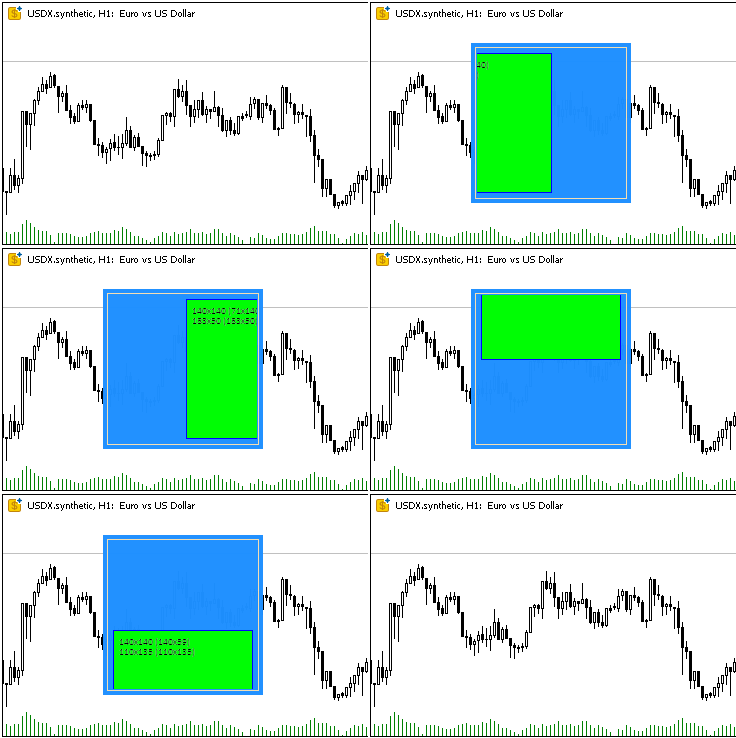
The child object is correctly trimmed along the borders of the container area (not along the edges of the object, but with an offset by the width of the border), blocking the object causes it to be redrawn in the colors of the blocked element.
Small "twitches" when moving an object nested in the container are caused by defects in recording a GIF image, not by delays in the operation of class methods.
After running the script, two lines describing the two created objects will be printed to the log:
Canvas Base "Rectangle 1" (TestScr1_BG, TestScr1_FG): ID 1, x 100, y 40, w 160, h 160
Canvas Base "Rectangle 2" (TestScr2_BG, TestScr2_FG): ID 2, x 110, y 50, w 140, h 140
Conclusion
Today we have laid the foundation for creating any graphic elements where each class performs a clearly defined task, which makes the architecture modular and easily extensible.
Implemented classes lay a solid foundation for creating complex graphic elements and integrating them into Model and Controller components in the MVC paradigm.
In the next article, we will start creating all the necessary elements for building and managing tables. Since in the MQL language the event model is integrated into created objects using chart events, event handling will be organized in all subsequent controls to implement the connection between the View component and the Controller component.
Programs used in the article:
| # | Name | Type | Description |
|---|---|---|---|
| 1 | Base.mqh | Class Library | Classes for creating a base object of controls |
| 2 | TestControls.mq5 | Test Script | Script for testing manipulations with the base object class |
| 3 | MQL5.zip | Archive | An archive of the files presented above for unpacking into the MQL5 directory of the client terminal |
Classes within the Base.mqh library:
| # | Name | Description |
|---|---|---|
| 1 | CBaseObj | A base class for all the graphical objects |
| 2 | CColor | Color management class |
| 3 | CColorElement | A class for managing the colors of various states of a graphic element |
| 4 | CBound | Rectangular area control class |
| 5 | CCanvasBase | A base class for manipulating graphic elements on canvas |
Translated from Russian by MetaQuotes Ltd.
Original article: https://www.mql5.com/ru/articles/17960
Warning: All rights to these materials are reserved by MetaQuotes Ltd. Copying or reprinting of these materials in whole or in part is prohibited.
This article was written by a user of the site and reflects their personal views. MetaQuotes Ltd is not responsible for the accuracy of the information presented, nor for any consequences resulting from the use of the solutions, strategies or recommendations described.

 The MQL5 Standard Library Explorer (Part 5): Multiple Signal Expert
 Automating Trading Strategies in MQL5 (Part 43): Adaptive Linear Regression Channel Strategy
 Neural Networks in Trading: Multi-Task Learning Based on the ResNeXt Model
 Price Action Analysis Toolkit Development (Part 53): Pattern Density Heatmap for Support and Resistance Zone Discovery

- Free trading apps
- Over 8,000 signals for copying
- Economic news for exploring financial markets
You agree to website policy and terms of use