
Automating Trading Strategies in MQL5 (Part 20): Multi-Symbol Strategy Using CCI and AO
 9 099
9 099
 0
0

Introduction
In our previous article (Part 19), we explored the Envelopes Trend Bounce Scalping Strategy, focusing on trade execution and risk management to complete its automation in MetaQuotes Language 5 (MQL5). In Part 20, we introduce a multi-symbol trading strategy that utilizes the Commodity Channel Index (CCI) and Awesome Oscillator (AO) to capture trend reversals across multiple currency pairs. We will cover the following topics:
By the end, you’ll have a robust MQL5 trading system for multi-symbol trading, ready for optimization and deployment—let’s dive in!
Strategy Roadmap and Architecture
In Part 19, we built the Envelopes Trend Bounce Scalping Strategy, focusing on trade execution and risk management to act on signals generated by price interactions with the Envelopes indicator, confirmed by trend filters. Now, in Part 20, we shift to a multi-symbol trading strategy that uses the Commodity Channel Index (CCI) and Awesome Oscillator (AO) to identify trend reversals across multiple currency pairs on two timeframes (M5 for signals and H1 for trend confirmation). Our roadmap for this article focuses on designing a scalable system that efficiently processes signals, executes trades, and manages risk across multiple symbols.
Our architectural plan emphasizes modularity and robustness, utilizing a class-based structure in MQL5 to organize the strategy’s components. We aim to create a common class that handles indicator calculations (CCI and AO), signal generation based on predefined thresholds, and trade execution with stop-loss and take-profit settings while ensuring no open orders exist for a symbol before placing new trades. This design incorporates safeguards like spread checks and supports trading on new bars or tick-by-tick, providing flexibility for various market conditions, and ultimately delivering a cohesive multi-symbol trading system. In a nutshell, here is what we aim to achieve.
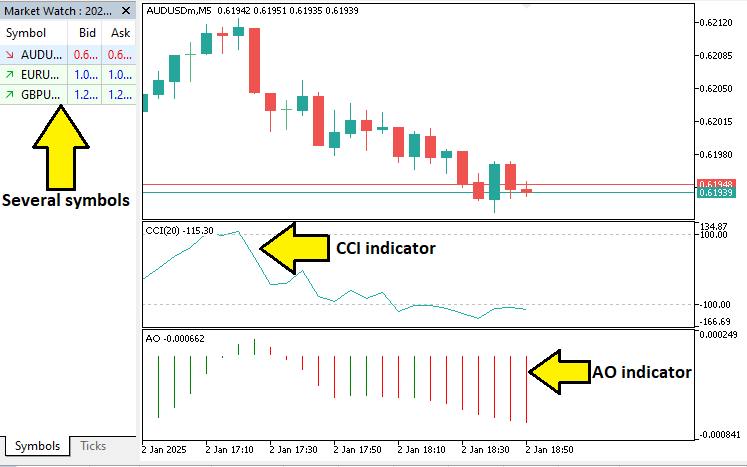
Implementation in MQL5
To create the program in MQL5, open the MetaEditor, go to the Navigator, locate the Indicators folder, click on the "New" tab, and follow the prompts to create the file. Once it is made, in the coding environment, we will start by declaring some structures and classes that we will use since we want to apply an Object Oriented Programming (OOP) approach.
//+------------------------------------------------------------------+
//|                                          MultiSymbolCCIAO_EA.mq5 |
//|                           Copyright 2025, Allan Munene Mutiiria. |
//|                                   https://t.me/Forex_Algo_Trader |
//+------------------------------------------------------------------+
#property copyright "Copyright 2025, Allan Munene Mutiiria."
#property link      "https://t.me/Forex_Algo_Trader"
#property version   "1.00"
#property strict
#property description "Multi-symbol trading strategy using CCI and AO indicators"

#include <Trade/Trade.mqh> //--- Include the Trade library for trading operations

//+------------------------------------------------------------------+
//| Input Parameters Structure                                       | //--- Define a structure for trading parameters
//+------------------------------------------------------------------+
struct TradingParameters {
   string            symbols;                  //--- Store comma-separated symbol list
   int               per_signal_cci;           //--- Set period for CCI signal
   int               per_trend_cci;            //--- Set period for CCI trend
   ENUM_APPLIED_PRICE price_cci;               //--- Specify applied price for CCI
   int               cci_signal_buy_value;     //--- Define CCI buy signal threshold
   int               cci_signal_sell_value;    //--- Define CCI sell signal threshold
   ENUM_TIMEFRAMES   tf_signal;                //--- Set timeframe for signal
   ENUM_TIMEFRAMES   tf_trend;                 //--- Set timeframe for trend
   bool              use_ao_for_trend;         //--- Enable AO for trend confirmation
   int               take;                     //--- Set take-profit in points
   int               stop;                     //--- Set stop-loss in points
   double            lots;                     //--- Specify trade lot size
   int               slip;                     //--- Set maximum slippage
   int               max_spread;               //--- Define maximum allowed spread
   int               magic;                    //--- Set magic number for trades
   bool              trade_anytime;            //--- Allow trading at any time
   string            comment;                  //--- Store trade comment
   int               tester_max_balance;       //--- Set tester balance limit
   bool              debug_mode;               //--- Enable debug mode
};

//+------------------------------------------------------------------+
//| Symbol Data Structure                                            | //--- Define a structure for symbol-specific data
//+------------------------------------------------------------------+
struct SymbolData {
   string            name;                     //--- Store symbol name
   datetime          last_bar_time;            //--- Track last bar timestamp
   int               cci_signal_handle;        //--- Hold CCI signal indicator handle
   int               cci_trend_handle;         //--- Hold CCI trend indicator handle
   int               ao_signal_handle;         //--- Hold AO signal indicator handle
   int               ao_trend_handle;          //--- Hold AO trend indicator handle
   double            cci_signal_data[];        //--- Store CCI signal data
   double            cci_trend_data[];         //--- Store CCI trend data
   double            ao_signal_data[];         //--- Store AO signal data
   double            ao_trend_data[];          //--- Store AO trend data
};
We begin the implementation of the multi-symbol CCI and AO trading strategy in MQL5 by setting up the foundational components for robust trade execution. We include the "Trade.mqh" library to enable trading operations through the "CTrade" class, which provides methods for opening and closing positions. This inclusion ensures we have access to essential trading functionality required for executing buy and sell orders across multiple symbols.
Next, we create the "TradingParameters" structure to organize all input parameters for the strategy. This structure holds critical variables such as "symbols" for the comma-separated list of currency pairs, "per_signal_cci" and "per_trend_cci" for CCI indicator periods, and "price_cci" for the applied price type. We also define "cci_signal_buy_value" and "cci_signal_sell_value" to set signal thresholds, "tf_signal" and "tf_trend" for timeframes, and risk management variables like "take", "stop", "lots", and "max_spread". Additionally, "magic" ensures unique trade identification, "trade_anytime" controls trade timing, and "debug_mode" enables diagnostic logging, providing a centralized configuration for the strategy.
Finally, we establish the "SymbolData" structure to manage data for each symbol in the trading system. This structure contains "name" for the symbol identifier, "last_bar_time" to track the latest bar timestamp, and handles like "cci_signal_handle" and "ao_trend_handle" for CCI and AO indicators on both signal and trend timeframes. We also include arrays such as "cci_signal_data" and "ao_trend_data" to store indicator values, enabling efficient data management for multi-symbol processing. These structures lay the groundwork for a modular and scalable trading system. The next thing we need to do is declare a trading class for the control logic.
//+------------------------------------------------------------------+
//| Trading Strategy Class                                           | //--- Implement a class for trading strategy logic
//+------------------------------------------------------------------+
class CTradingStrategy {
private:
   CTrade            m_trade;                  //--- Initialize trade object for trading operations
   TradingParameters m_params;                 //--- Store trading parameters
   SymbolData        m_symbols[];              //--- Store array of symbol data
   int               m_array_size;             //--- Track number of symbols
   datetime          m_last_day;               //--- Store last day timestamp
   bool              m_is_new_day;             //--- Indicate new day detection
   int               m_candle_shift;           //--- Set candle shift for signal calculation
   const int         CCI_TREND_BUY_VALUE;      //--- Define constant for CCI trend buy threshold
   const int         CCI_TREND_SELL_VALUE;     //--- Define constant for CCI trend sell threshold
}
Here, we implement the core logic of the strategy by creating the "CTradingStrategy" class, which encapsulates all trading functionality in a modular and organized manner. We define private member variables to manage the strategy’s state and operations, starting with "m_trade", an instance of the "CTrade" class from the Trade library, to handle trade execution tasks like opening and closing positions. Next, we include "m_params", an instance of the "TradingParameters" structure, to store all configuration settings such as symbol lists, indicator periods, and risk parameters, ensuring centralized access to user-defined inputs.
We also declare "m_symbols", an array of the "SymbolData" structure, to hold data for each symbol, including indicator handles and data buffers, facilitating multi-symbol processing. To track the number of symbols, we use "m_array_size", while "m_last_day" and "m_is_new_day" manage daily timestamp updates for detecting new trading days. Additionally, we set "m_candle_shift" to control whether signals are generated on the current or previous bar, based on the "trade_anytime" parameter. Finally, we define constants "CCI_TREND_BUY_VALUE" and "CCI_TREND_SELL_VALUE" to establish fixed CCI thresholds for trend confirmation, ensuring consistent signal logic throughout the strategy. We can now include more methods under the private access modifier as below for utility.
void PrintDebug(string text) {              //--- Define method to print debug messages
   if(m_params.debug_mode && !MQLInfoInteger(MQL_OPTIMIZATION)) { //--- Check debug mode and optimization status
      Print(text);                          //--- Output debug message
   }
}

void PrintMessage(string text) {            //--- Define method to print informational messages
   if(!MQLInfoInteger(MQL_OPTIMIZATION)) {  //--- Check if not in optimization mode
      Print(text);                          //--- Output message
   }
}

void PrepareSymbolsList() {                 //--- Define method to prepare symbol list
   string symbols_array[];                  //--- Initialize temporary array for symbols
   ushort sep = StringGetCharacter(",", 0); //--- Get comma separator character
   m_array_size = StringSplit(m_params.symbols, sep, symbols_array); //--- Split symbols string into array
   ArrayResize(m_symbols, m_array_size);    //--- Resize symbol data array
   for(int i = 0; i < m_array_size; i++) {  //--- Iterate through symbols
      m_symbols[i].name = symbols_array[i]; //--- Set symbol name
      m_symbols[i].last_bar_time = 0;       //--- Initialize last bar time
      SymbolSelect(m_symbols[i].name, true); //--- Ensure symbol is in market watch
   }
}
We implement utility methods within the "CTradingStrategy" class to handle debugging and symbol preparation for the multi-symbol CCI and AO strategy. We create the "PrintDebug" function to output diagnostic messages when "m_params.debug_mode" is enabled and the EA is not in optimization mode, using Print to log the "text" parameter for troubleshooting. Similarly, we define the "PrintMessage" function to log informational messages, ensuring output only occurs outside optimization mode by checking "MQLInfoInteger(MQL_OPTIMIZATION)" and using "Print" for the "text" input.
Additionally, we develop the "PrepareSymbolsList" function to initialize the symbol data array. We declare a temporary "symbols_array" to hold the split symbols, use StringGetCharacter to get the comma separator for "sep", and apply StringSplit to parse "m_params.symbols" into "symbols_array". We resize "m_symbols" using ArrayResize based on "m_array_size" and iterate to set each "m_symbols[i].name" to a symbol, initialize "m_symbols[i].last_bar_time" to zero, and call SymbolSelect to ensure each symbol is available in the market watch for trading. Next, we need to initialize and update the indicator values.
bool InitializeIndicators(int index) {      //--- Define method to initialize indicators
   m_symbols[index].cci_signal_handle = iCCI(m_symbols[index].name, m_params.tf_signal, m_params.per_signal_cci, m_params.price_cci); //--- Create CCI signal indicator
   if(m_symbols[index].cci_signal_handle == INVALID_HANDLE) { //--- Check for invalid handle
      Print("INITIALIZATION OF CCI SIGNAL FAILED: ", m_symbols[index].name); //--- Log error
      return false;                         //--- Return failure
   }
   m_symbols[index].cci_trend_handle = iCCI(m_symbols[index].name, m_params.tf_trend, m_params.per_trend_cci, m_params.price_cci); //--- Create CCI trend indicator
   if(m_symbols[index].cci_trend_handle == INVALID_HANDLE) { //--- Check for invalid handle
      Print("INITIALIZATION OF CCI TREND FAILED: ", m_symbols[index].name); //--- Log error
      return false;                         //--- Return failure
   }
   m_symbols[index].ao_signal_handle = iAO(m_symbols[index].name, m_params.tf_signal); //--- Create AO signal indicator
   if(m_symbols[index].ao_signal_handle == INVALID_HANDLE) { //--- Check for invalid handle
      Print("INITIALIZATION OF AO SIGNAL FAILED: ", m_symbols[index].name); //--- Log error
      return false;                         //--- Return failure
   }
   m_symbols[index].ao_trend_handle = iAO(m_symbols[index].name, m_params.tf_trend); //--- Create AO trend indicator
   if(m_symbols[index].ao_trend_handle == INVALID_HANDLE) { //--- Check for invalid handle
      Print("INITIALIZATION OF AO TREND FAILED: ", m_symbols[index].name); //--- Log error
      return false;                         //--- Return failure
   }
   ArraySetAsSeries(m_symbols[index].cci_signal_data, true); //--- Set CCI signal data as series
   ArraySetAsSeries(m_symbols[index].cci_trend_data, true); //--- Set CCI trend data as series
   ArraySetAsSeries(m_symbols[index].ao_signal_data, true); //--- Set AO signal data as series
   ArraySetAsSeries(m_symbols[index].ao_trend_data, true); //--- Set AO trend data as series
   return true;                             //--- Return success
}

bool UpdateIndicatorData(int index) {       //--- Define method to update indicator data
   if(CopyBuffer(m_symbols[index].cci_signal_handle, 0, 0, 3, m_symbols[index].cci_signal_data) < 3) { //--- Copy CCI signal data
      Print("UNABLE TO COPY CCI SIGNAL DATA: ", m_symbols[index].name); //--- Log error
      return false;                         //--- Return failure
   }
   if(CopyBuffer(m_symbols[index].cci_trend_handle, 0, 0, 3, m_symbols[index].cci_trend_data) < 3) { //--- Copy CCI trend data
      Print("UNABLE TO COPY CCI TREND DATA: ", m_symbols[index].name); //--- Log error
      return false;                         //--- Return failure
   }
   if(CopyBuffer(m_symbols[index].ao_signal_handle, 0, 0, 3, m_symbols[index].ao_signal_data) < 3) { //--- Copy AO signal data
      Print("UNABLE TO COPY AO SIGNAL DATA: ", m_symbols[index].name); //--- Log error
      return false;                         //--- Return failure
   }
   if(CopyBuffer(m_symbols[index].ao_trend_handle, 0, 0, 3, m_symbols[index].ao_trend_data) < 3) { //--- Copy AO trend data
      Print("UNABLE TO COPY AO TREND DATA: ", m_symbols[index].name); //--- Log error
      return false;                         //--- Return failure
   }
   return true;                             //--- Return success
}
Here, we implement indicator setup and updates in the "CTradingStrategy" class. We create the "InitializeIndicators" function to set "m_symbols[index].cci_signal_handle" and "m_symbols[index].cci_trend_handle" using the iCCI function, and "m_symbols[index].ao_signal_handle" and "m_symbols[index].ao_trend_handle" using the iAO function for a symbol at "index", logging errors with "Print" if handles are INVALID_HANDLE. We configure data arrays as time series with ArraySetAsSeries.
We also develop the "UpdateIndicatorData" function to copy three data points into "m_symbols[index].cci_signal_data", "m_symbols[index].cci_trend_data", "m_symbols[index].ao_signal_data", and "m_symbols[index].ao_trend_data" using the CopyBuffer function, logging errors with "Print" if insufficient data is retrieved. Next, we need to do an order count so we can track the position's threshold.
int CountOrders(string symbol, int magic, ENUM_POSITION_TYPE type) { //--- Define method to count orders
   int count = 0;                           //--- Initialize order counter
   for(int i = PositionsTotal() - 1; i >= 0; i--) { //--- Iterate through positions
      ulong ticket = PositionGetTicket(i);   //--- Get position ticket
      if(PositionSelectByTicket(ticket)) {   //--- Select position by ticket
         if(PositionGetInteger(POSITION_MAGIC) == magic && //--- Check magic number
            PositionGetString(POSITION_SYMBOL) == symbol && //--- Check symbol
            PositionGetInteger(POSITION_TYPE) == type) { //--- Check position type
            count++;                        //--- Increment counter
         }
      }
   }
   return count;                            //--- Return order count
}

long OpenOrder(string symbol, ENUM_ORDER_TYPE type, double price, double sl, double tp, double lots, int magic, string comment) { //--- Define method to open orders
   long ticket = m_trade.PositionOpen(symbol, type, lots, price, sl, tp, comment); //--- Execute position open
   if(ticket < 0) {                         //--- Check for order failure
      PrintMessage(StringFormat("Info - OrderSend %s %d_%s_%.5f error %.5f_%.5f_%.5f_#%d", //--- Log error
         comment, type, symbol, price, price, sl, tp, GetLastError()));
   } else {                                 //--- Handle successful order
      PrintMessage(StringFormat("Info - OrderSend done. Comment:%s, Type:%d, Sym:%s, Price:%.5f, SL:%.5f, TP:%.5f", //--- Log success
         comment, type, symbol, price, sl, tp));
   }
   return ticket;                           //--- Return order ticket
}
Here, we implement trade management functions within the "CTradingStrategy" class to handle order counting and execution. We create the "CountOrders" function to tally open positions for a given "symbol" and "magic" number of type ENUM_POSITION_TYPE. We initialize "count" to zero, iterate through positions using "PositionsTotal" and PositionGetTicket, and use PositionSelectByTicket to check if "PositionGetInteger(POSITION_MAGIC)", "PositionGetString(POSITION_SYMBOL)", and "PositionGetInteger(POSITION_TYPE)" match the inputs, incrementing "count" for matches before returning it.
We also develop the "OpenOrder" function to execute trades for a specified "symbol" and "type" with parameters for "price", "sl" (stop-loss), "tp" (take-profit), "lots", "magic", and "comment". We call "m_trade.PositionOpen" to open the position, storing the result in "ticket", and use "PrintMessage" with StringFormat to log errors if "ticket" is negative, including GetLastError, or log success details if the order is placed, returning "ticket" for tracking. With that being done, we can define a public class from which we can initialize the members.
public:
   CTradingStrategy() : CCI_TREND_BUY_VALUE(-114), CCI_TREND_SELL_VALUE(134) { //--- Initialize constructor with constants
      m_last_day = 0;                          //--- Set initial last day
      m_is_new_day = true;                     //--- Set new day flag
      m_array_size = 0;                        //--- Set initial array size
   }

   bool Init() {                               //--- Define initialization method
      m_params.symbols = "EURUSDm,GBPUSDm,AUDUSDm"; //--- Set default symbols
      m_params.per_signal_cci = 20;            //--- Set CCI signal period
      m_params.per_trend_cci = 24;             //--- Set CCI trend period
      m_params.price_cci = PRICE_TYPICAL;      //--- Set CCI applied price
      m_params.cci_signal_buy_value = -90;     //--- Set CCI buy signal threshold
      m_params.cci_signal_sell_value = 130;    //--- Set CCI sell signal threshold
      m_params.tf_signal = PERIOD_M5;          //--- Set signal timeframe
      m_params.tf_trend = PERIOD_H1;           //--- Set trend timeframe
      m_params.use_ao_for_trend = false;       //--- Disable AO trend by default
      m_params.take = 200;                     //--- Set take-profit
      m_params.stop = 300;                     //--- Set stop-loss
      m_params.lots = 0.01;                    //--- Set lot size
      m_params.slip = 5;                       //--- Set slippage
      m_params.max_spread = 20;                //--- Set maximum spread
      m_params.magic = 123456789;              //--- Set magic number
      m_params.trade_anytime = false;          //--- Disable trade anytime
      m_params.comment = "EA_AO_BP";           //--- Set trade comment
      m_params.tester_max_balance = 0;         //--- Set tester balance limit
      m_params.debug_mode = false;             //--- Disable debug mode

      m_candle_shift = m_params.trade_anytime ? 0 : 1; //--- Set candle shift based on trade mode
      m_trade.SetExpertMagicNumber(m_params.magic); //--- Set magic number for trade object

      PrepareSymbolsList();                    //--- Prepare symbol list
      for(int i = 0; i < m_array_size; i++) {  //--- Iterate through symbols
         if(!InitializeIndicators(i)) {         //--- Initialize indicators
            return false;                      //--- Return failure on error
         }
      }
      PrintMessage("Current Spread on " + Symbol() + ": " + //--- Log current spread
         IntegerToString((int)SymbolInfoInteger(Symbol(), SYMBOL_SPREAD)));
      return true;                             //--- Return success
   }
In the public access modifier, we implement the initialization logic. We define the constructor "CTradingStrategy" to initialize "CCI_TREND_BUY_VALUE" and "CCI_TREND_SELL_VALUE" as constants set to -114 and 134, respectively, and set "m_last_day" to zero, "m_is_new_day" to true, and "m_array_size" to zero for initial state management.
We also create the "Init" function to configure the strategy’s parameters and resources. We assign default values to "m_params" members, including "m_params.symbols" for currency pairs, "m_params.per_signal_cci" and "m_params.per_trend_cci" for CCI periods, "m_params.price_cci" as "PRICE_TYPICAL", and thresholds like "m_params.cci_signal_buy_value" and "m_params.cci_signal_sell_value".
We set "m_params.tf_signal" to PERIOD_M5, "m_params.tf_trend" to "PERIOD_H1", and risk parameters such as "m_params.take", "m_params.stop", and "m_params.lots". We configure "m_candle_shift" based on "m_params.trade_anytime", call "m_trade.SetExpertMagicNumber" with "m_params.magic", and invoke "PrepareSymbolsList" to set up symbols. We iterate through "m_array_size" to call "InitializeIndicators" for each symbol, returning "false" on failure, and log the current spread using "PrintMessage" before returning "true" for success.
Finally, after initializing everything, we can define the OnTick event handler within our class still so that we can only call the method inside the actual event handler. That is why it needs to be public here. You can also set it as virtual but for now, we will keep things simple.
void OnTick() {                             //--- Define tick handling method
   datetime new_day = iTime(Symbol(), PERIOD_D1, 0); //--- Get current day timestamp
   m_is_new_day = (m_last_day != new_day);  //--- Check for new day
   if(m_is_new_day) {                       //--- Handle new day
      m_last_day = new_day;                 //--- Update last day
   }

   for(int i = 0; i < m_array_size; i++) {  //--- Iterate through symbols
      bool is_new_bar = false;              //--- Initialize new bar flag
      bool buy_signal = false, sell_signal = false; //--- Initialize signal flags
      bool buy_trend = false, sell_trend = false; //--- Initialize trend flags

      datetime new_time = iTime(m_symbols[i].name, m_params.tf_signal, 0); //--- Get current bar time
      if(!m_params.trade_anytime && m_symbols[i].last_bar_time != new_time) { //--- Check for new bar
         is_new_bar = true;                 //--- Set new bar flag
         m_symbols[i].last_bar_time = new_time; //--- Update last bar time
      }

      if(!UpdateIndicatorData(i)) continue; //--- Update indicators, skip on failure

      double ask = SymbolInfoDouble(m_symbols[i].name, SYMBOL_ASK); //--- Get ask price
      double bid = SymbolInfoDouble(m_symbols[i].name, SYMBOL_BID); //--- Get bid price
      double point = SymbolInfoDouble(m_symbols[i].name, SYMBOL_POINT); //--- Get point value
      long spread = SymbolInfoInteger(Symbol(), SYMBOL_SPREAD); //--- Get current spread

      int total_orders = CountOrders(m_symbols[i].name, m_params.magic, POSITION_TYPE_BUY) + //--- Count buy orders
                        CountOrders(m_symbols[i].name, m_params.magic, POSITION_TYPE_SELL); //--- Count sell orders

      // Generate signals
      buy_signal = m_symbols[i].cci_signal_data[m_candle_shift+1] < m_params.cci_signal_buy_value && //--- Check CCI buy signal condition
                  m_symbols[i].cci_signal_data[m_candle_shift] > m_params.cci_signal_buy_value && //--- Confirm CCI buy signal
                  m_symbols[i].ao_signal_data[m_candle_shift+1] < m_symbols[i].ao_signal_data[m_candle_shift]; //--- Confirm AO buy signal

      sell_signal = m_symbols[i].cci_signal_data[m_candle_shift+1] > m_params.cci_signal_sell_value && //--- Check CCI sell signal condition
                   m_symbols[i].cci_signal_data[m_candle_shift] < m_params.cci_signal_sell_value && //--- Confirm CCI sell signal
                   m_symbols[i].ao_signal_data[m_candle_shift+1] > m_symbols[i].ao_signal_data[m_candle_shift]; //--- Confirm AO sell signal

      buy_trend = m_symbols[i].cci_trend_data[m_candle_shift+1] < m_symbols[i].cci_signal_data[m_candle_shift] && //--- Check CCI trend buy condition
                 m_symbols[i].cci_trend_data[m_candle_shift] > CCI_TREND_BUY_VALUE && //--- Confirm CCI trend buy threshold
                 m_symbols[i].cci_trend_data[m_candle_shift] < CCI_TREND_SELL_VALUE && //--- Confirm CCI trend sell threshold
                 (!m_params.use_ao_for_trend || //--- Check AO trend condition
                  (m_symbols[i].ao_trend_data[m_candle_shift+1] < m_symbols[i].ao_trend_data[m_candle_shift])); //--- Confirm AO trend buy

      sell_trend = m_symbols[i].cci_trend_data[m_candle_shift+1] > m_symbols[i].cci_signal_data[m_candle_shift] && //--- Check CCI trend sell condition
                  m_symbols[i].cci_trend_data[m_candle_shift] > CCI_TREND_BUY_VALUE && //--- Confirm CCI trend buy threshold
                  m_symbols[i].cci_trend_data[m_candle_shift] < CCI_TREND_SELL_VALUE && //--- Confirm CCI trend sell threshold
                  (!m_params.use_ao_for_trend || //--- Check AO trend condition
                   (m_symbols[i].ao_trend_data[m_candle_shift+1] > m_symbols[i].ao_trend_data[m_candle_shift])); //--- Confirm AO trend sell

      // Execute trades
      if(spread < m_params.max_spread && total_orders == 0 && //--- Check spread and open orders
         (m_params.trade_anytime || is_new_bar)) { //--- Check trade timing
         if(buy_signal && buy_trend) {         //--- Check buy conditions
            double sl = m_params.stop == 0 ? 0 : ask - m_params.stop * point; //--- Calculate stop-loss
            double tp = m_params.take == 0 ? 0 : ask + m_params.take * point; //--- Calculate take-profit
            OpenOrder(m_symbols[i].name, ORDER_TYPE_BUY, ask, sl, tp, m_params.lots, //--- Open buy order
                     m_params.magic, "Open BUY " + m_params.comment);
         }
         if(sell_signal && sell_trend) {       //--- Check sell conditions
            double sl = m_params.stop == 0 ? 0 : bid + m_params.stop * point; //--- Calculate stop-loss
            double tp = m_params.take == 0 ? 0 : bid - m_params.take * point; //--- Calculate take-profit
            OpenOrder(m_symbols[i].name, ORDER_TYPE_SELL, bid, sl, tp, m_params.lots, //--- Open sell order
                     m_params.magic, "Open SELL " + m_params.comment);
         }
      }

      // Debug output
      if((m_params.trade_anytime || is_new_bar) && (buy_signal || sell_signal)) { //--- Check debug conditions
         PrintDebug(StringFormat("Debug - IsNewBar: %b - candle_shift: %d - buy_signal: %b - " //--- Log debug information
                               "sell_signal: %b - buy_trend: %b - sell_trend: %b",
                               is_new_bar, m_candle_shift, buy_signal, sell_signal,
                               buy_trend, sell_trend));
      }
   }
}
Here, we implement the trading logic for the multi-symbol CCI and AO strategy by creating the OnTick function in the "CTradingStrategy" class. We retrieve the current day’s timestamp with iTime into "new_day" and update "m_is_new_day" and "m_last_day" to track daily changes. For each symbol in "m_array_size", we initialize "is_new_bar", "buy_signal", "sell_signal", "buy_trend", and "sell_trend" flags, and use "iTime" to detect new bars, updating "m_symbols[i].last_bar_time" if "m_params.trade_anytime" is false.
We call "UpdateIndicatorData" to refresh indicators, skipping on failure, and fetch "ask", "bid", "point", and "spread" with SymbolInfoDouble and SymbolInfoInteger. We compute "total_orders" using "CountOrders" for buy and sell positions. We set "buy_signal" by checking "m_symbols[i].cci_signal_data" against "m_params.cci_signal_buy_value" and "m_symbols[i].ao_signal_data" for confirmation, and "sell_signal" with "m_params.cci_signal_sell_value". We determine "buy_trend" and "sell_trend" using "m_symbols[i].cci_trend_data", "CCI_TREND_BUY_VALUE", "CCI_TREND_SELL_VALUE", and optionally "m_symbols[i].ao_trend_data".
If "spread" is below "m_params.max_spread", "total_orders" is zero, and trading is allowed, we calculate "sl" and "tp" using "m_params.stop" and "m_params.take", then call "OpenOrder" for buy or sell trades. We log signal states with "PrintDebug" and StringFormat when debugging is triggered, ensuring effective trade monitoring. To close the positions, we implement this function below.
bool CloseAllTrades() {                     //--- Define method to close all trades
   for(int i = PositionsTotal() - 1; i >= 0; i--) { //--- Iterate through positions
      ulong ticket = PositionGetTicket(i);   //--- Get position ticket
      if(PositionSelectByTicket(ticket) &&   //--- Select position
         PositionGetInteger(POSITION_MAGIC) == m_params.magic) { //--- Check magic number
         ENUM_POSITION_TYPE type = (ENUM_POSITION_TYPE)PositionGetInteger(POSITION_TYPE); //--- Get position type
         if(type == POSITION_TYPE_BUY || type == POSITION_TYPE_SELL) { //--- Check position type
            m_trade.PositionClose(ticket);   //--- Close position
            PrintMessage("Position close " + IntegerToString(ticket)); //--- Log closure
         }
      }
   }
   for(int i = OrdersTotal() - 1; i >= 0; i--) { //--- Iterate through orders
      ulong ticket = OrderGetTicket(i);      //--- Get order ticket
      if(OrderSelect(ticket) && OrderGetInteger(ORDER_MAGIC) == m_params.magic) { //--- Select order and check magic
         ENUM_ORDER_TYPE type = (ENUM_ORDER_TYPE)OrderGetInteger(ORDER_TYPE); //--- Get order type
         if(type >= ORDER_TYPE_BUY_STOP && type <= ORDER_TYPE_SELL_LIMIT) { //--- Check order type
            m_trade.OrderDelete(ticket);   //--- Delete order
            PrintMessage("Order delete " + IntegerToString(ticket)); //--- Log deletion
         }
      }
   }
   return true;                             //--- Return success
}
Here, we implement trade closure functionality for the multi-symbol CCI and AO strategy by creating the "CloseAllTrades" function within the "CTradingStrategy" class. We iterate through all open positions using PositionsTotal and retrieve each position’s ticket with PositionGetTicket into "ticket". For each position selected by "PositionSelectByTicket", we verify if "PositionGetInteger(POSITION_MAGIC)" matches "m_params.magic", and if "PositionGetInteger(POSITION_TYPE)" is "POSITION_TYPE_BUY" or "POSITION_TYPE_SELL", we call "m_trade.PositionClose" to close it and log the action with "PrintMessage" and IntegerToString.
Additionally, we loop through pending orders using OrdersTotal, obtaining each order’s ticket with "OrderGetTicket" into "ticket". If OrderSelect succeeds and "OrderGetInteger(ORDER_MAGIC)" equals "m_params.magic", we check if OrderGetInteger(ORDER_TYPE)" is between "ORDER_TYPE_BUY_STOP" and "ORDER_TYPE_SELL_LIMIT", then use "m_trade.OrderDelete" to remove the order and log it with "PrintMessage" and "IntegerToString". We return "true" to indicate the successful closure of all relevant trades and orders. And that is all! All we now need to do is use the classes.
//+------------------------------------------------------------------+
//| Global Variables and Functions                                   | //--- Define global variables and functions
//+------------------------------------------------------------------+
CTradingStrategy g_strategy;                   //--- Initialize global strategy object

//+------------------------------------------------------------------+
//| Expert Advisor Functions                                         | //--- Define EA core functions
//+------------------------------------------------------------------+
int OnInit() {                                 //--- Define initialization function
   return g_strategy.Init() ? INIT_SUCCEEDED : INIT_FAILED; //--- Initialize strategy and return status
}
We finalize the implementation of the multi-symbol CCI and AO strategy by defining global and core Expert Advisor functions. We declare "g_strategy" as a global instance of the "CTradingStrategy" class to manage all trading operations across symbols, ensuring centralized access to the strategy’s logic and state throughout the EA’s lifecycle.
We also create the "OnInit" function to handle the EA’s initialization. We call the "Init" function of "g_strategy" to set up parameters, symbols, and indicators, and return INIT_SUCCEEDED if successful or "INIT_FAILED" if an error occurs, ensuring proper initialization status for the MetaTrader 5 platform. On initialization, we have the following outcome.
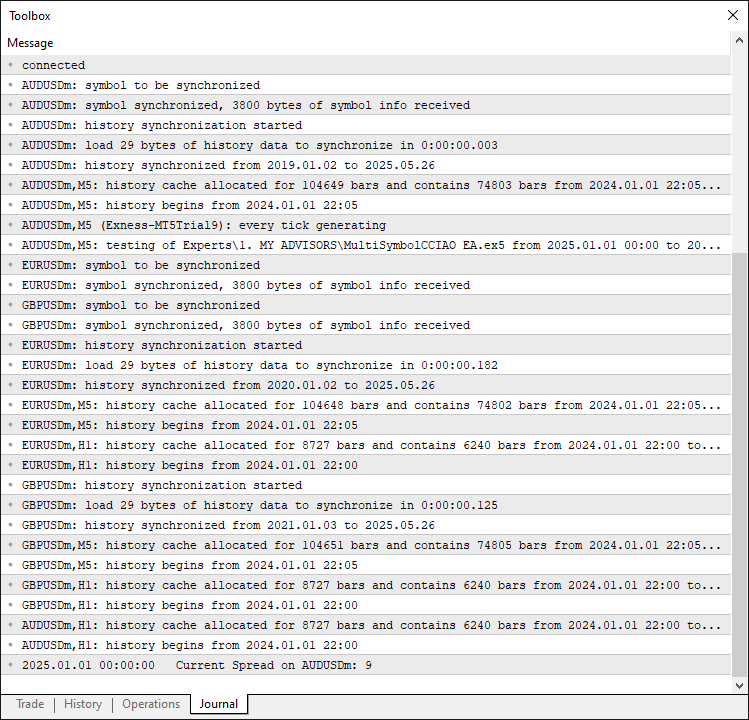
From the image, we can see that we have all the data for the 3 symbols that we selected. We can now move on to calling the OnTick event handler to do the heavy lifting and that will be done.
//+------------------------------------------------------------------+
//| Expert Advisor Functions                                         | //--- Define EA core functions
//+------------------------------------------------------------------+
int OnInit() {                                                         //--- Define initialization function
   return g_strategy.Init() ? INIT_SUCCEEDED : INIT_FAILED;            //--- Initialize strategy and return status
}

//+------------------------------------------------------------------+
We just call the "Init" function of the global "g_strategy" object, an instance of the "CTradingStrategy" class, to initialize trading parameters, symbol lists, and indicators. We return INIT_SUCCEEDED if the initialization succeeds or "INIT_FAILED" if it encounters an error, ensuring the MetaTrader 5 platform receives the appropriate status to proceed or halt execution. Upon compilation, we have the following outcome.
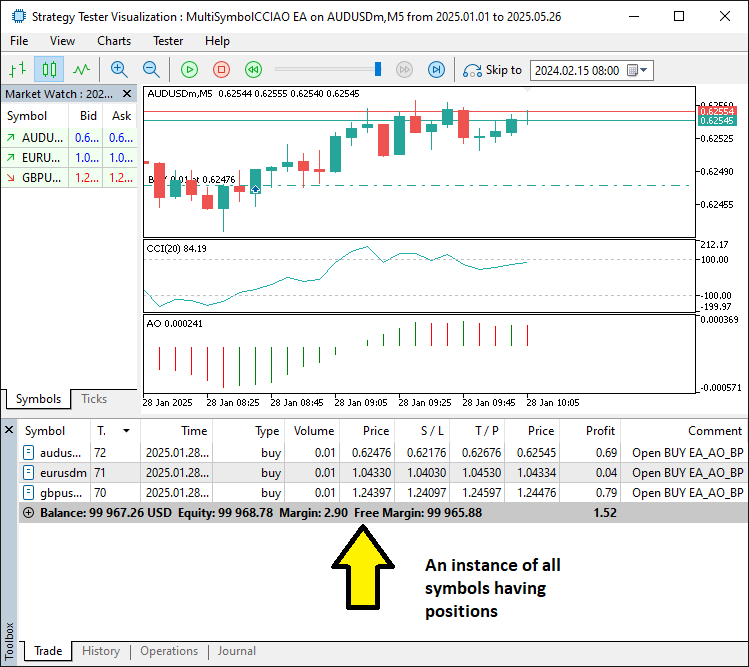
From the image, we can see that we are able to open trades based on confirmed signals for the respective symbols and manage them individually. The thing that remains is backtesting the program, and that is handled in the next section.
Backtesting and Optimization
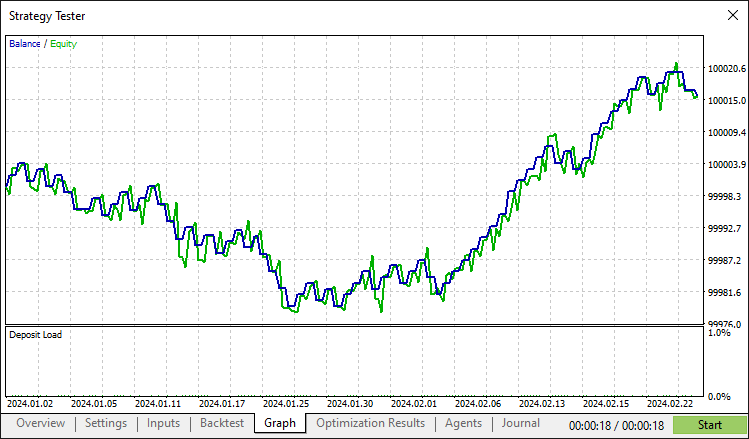
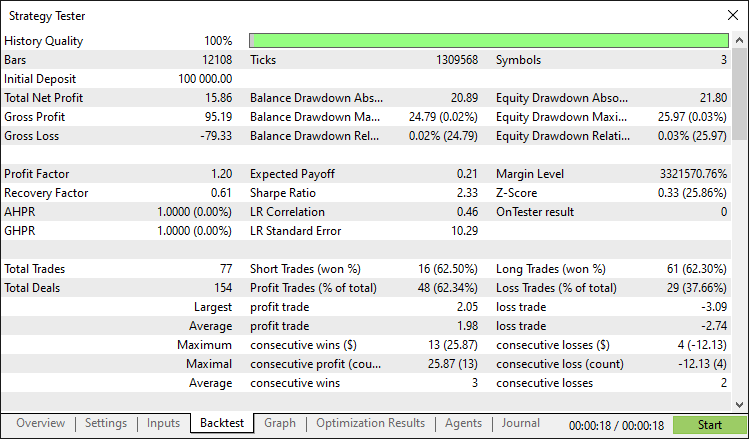
After thorough backtesting, we have the following results.
Backtest graph:
Backtest report:
Conclusion
In conclusion, we have developed an MQL5 program that automates the Multi-Symbol CCI and AO Strategy, executing trades across multiple currency pairs using the "CTradingStrategy" class for signal generation with CCI and AO indicators and robust trade management via the "CTrade" library. With modular components alongside risk controls such as spread validation and stop-loss settings, this system offers a scalable framework that you can customize by tweaking parameters or integrating additional filters.
Disclaimer: This article is for educational purposes only. Trading carries significant financial risks, and market volatility may result in losses. Thorough backtesting and careful risk management are crucial before deploying this program in live markets.
By leveraging the skills and concepts presented, you can refine this multi-symbol trading system or adapt its architecture to create new strategies, advancing your expertise in MQL5 algorithmic trading.
Warning: All rights to these materials are reserved by MetaQuotes Ltd. Copying or reprinting of these materials in whole or in part is prohibited.
This article was written by a user of the site and reflects their personal views. MetaQuotes Ltd is not responsible for the accuracy of the information presented, nor for any consequences resulting from the use of the solutions, strategies or recommendations described.

 Mastering Log Records (Part 9): Implementing the builder pattern and adding default configurations
 Self Optimizing Expert Advisors in MQL5 (Part 8): Multiple Strategy Analysis (2)
 Volumetric neural network analysis as a key to future trends
 Fast trading strategy tester in Python using Numba

- Free trading apps
- Over 8,000 signals for copying
- Economic news for exploring financial markets
You agree to website policy and terms of use