

From Novice to Expert: Automating Trade Discipline with an MQL5 Risk Enforcement EA
 5 451
5 451
 0
0

Contents
Introduction
Every trader knows the rules—cut your losses, protect your profits, and never risk more than a set percentage of your capital. Yet, in the heat of the moment—amid market volatility, a string of losses, or the greed of a winning streak—these rules are often the first casualty. This disconnect between intellectual strategy and practical execution is not a failure of analysis but a fundamental challenge of human psychology. It is the primary reason why disciplined backtests frequently unravel into undisciplined live trading.
This article provides a definitive MQL5 algorithmic trading solution to this psychological problem. We move beyond theory and simple reminders to build an automated, objective, and unwavering enforcer: a Risk Enforcement Expert Advisor (EA) for MetaTrader 5. Unlike signal-generating EAs, this utility acts as a foundational layer of protection. It does not tell us when to trade but ensures us how to trade strictly within the guardrails that we define.
Manual risk management is susceptible to critical failures:
- Emotional Overrides: "This loss is getting big, but it has to reverse soon." (Disable the stop-loss).
- Revenge Trading: "I need to make that loss back immediately." (Double the position size on the next hunch).
- Oversight & Fatigue: Forgetting to account for open positions before entering a new trade, breaching your maximum exposure.
- Scale Breaches: A successful day morphs into an overtrading spree, wiping out gains with uncontrolled commissions and slippage.
Our Proposed Solution
In this discussion we will develop an expert advisor that transforms subjective rules into executable code. This Risk Enforcer will operate as a background supervisor, performing real-time checks on every trading action and the overall state of the account. Its core mandate is prevention and protection.
Core Enforcement Mechanisms:
- Pre-Trade Validation: Intercepting and blocking any new order request that violates your pre-set rules (e.g., excessive lot size, prohibited trading times, exceeding maximum allowed concurrent trades).
- Active Account Guardianship: Continuously monitoring the live portfolio. If the cumulative daily loss, weekly profit, or any other defined threshold is breached, it will not only block new trades but can also actively close existing positions to neutralize risk immediately.
- Multi-Timeframe & Multi-Dimensional Limits: Moving beyond simple stop-losses per trade to implement holistic limits: Daily Loss/Profit, Weekly Loss/Profit, Maximum Drawdown from Equity Peak, Consecutive Loss Limit, and Symbol-Specific Exposure
Benefits of this discussion
By the end of this implementation, we will have built a powerful professional tool and, more importantly, deepened your MQL5 expertise in critical areas:
- Advanced Trade & Account Interfacing: Master the PositionInfo, OrderInfo, HistoryOrders, and AccountInfo classes to programmatically audit the trading environment.
- Real-Time Event Handling: Implement logic within OnTick(), OnTradeTransaction(), and OnChartEvent() to create responsive, event-driven monitoring.
- Robust State Management: Learn to use global variables and file operations to persist risk states across MT5 platform restarts, ensuring rules are never forgotten.
- Professional EA Structure: Design a non-signal-based utility EA with a clear configuration interface, comprehensive logging, and user feedback via charts and alerts.
- From Theory to Practice: Bridge the gap between understanding risk management concepts and deploying them as functional, automated systems.
Today's development is the most important layer of your trading system. It ensures that our strategic edge, whether from manual discretion or other automated systems, is executed within a framework of survival. It makes discipline not an act of will, but a default state of our platform.
Let's now transition from concept to code, where we will build this system line by line, ensuring every rule we set is a rule the market cannot break because it's no longer the emotion in control but the algorithm at work.
The following section contains the detailed code implementation, where we will construct the Risk Enforcer module by module.
Implementation
Step 1: Laying the Foundation—Headers, Inputs, and State Management
Every professional EA begins with a solid foundation. We begin by declaring dependencies, creating a user-configurable interface, and establishing a persistent memory system for critical variables.
Key Development Concepts:
1. Standard Library Inclusion (#include): We leverage MetaTrader 5's built-in libraries. The Trade header provides the CTrade class for executing orders, while PositionInfo gives us the CPositionInfo class to inspect open positions. The ChartObjectsTxtControls header is crucial for building our interactive control panel directly on the chart.
2. User Input Parameters (input): These directives create the EA's settings window. A professional tool offers granular control. Here, we define multi-tiered limits (daily, weekly, monthly), behavioral switches (like InpAutoCloseOnStop), and operational controls (like InpMaxPositionSize). Each is initialized with a sensible default.
3. Persistent Global State (string GV_...): An EA's memory is wiped on reinitialization. To maintain state (like today's running P/L or the block reason) across MetaTrader 5 restarts, we use global variables. The unique string names (e.g., "RE_DailyPL") act as keys to store and retrieve double values in the terminal's global cache. This is a fundamental technique for stateful expert advisors.
//+------------------------------------------------------------------+
//|                                         RiskEnforcementSystem.mq5|
//|                                 Copyright 2025, Clemence Benjamin|
//+------------------------------------------------------------------+
#property copyright "2025 Clemence Benjamin"
#property description "A system that helps trading discipline by controlling risk based on set measures"
#property version   "1.00"
#property strict

#include <Trade/Trade.mqh>
#include <Trade/PositionInfo.mqh>
#include <ChartObjects/ChartObjectsTxtControls.mqh>

CTrade trade;
CPositionInfo positionInfo;

//----------------- Inputs --------------------------------------------
input double InpDailyProfitLimit   = 100.0;   // Daily Profit Limit ($)
input double InpDailyLossLimit     = -300.0;  // Daily Loss Limit ($)
input double InpWeeklyProfitLimit  = 1000.0;  // Weekly Profit Limit ($)
input double InpWeeklyLossLimit    = -1000.0; // Weekly Loss Limit ($)
input double InpMonthlyProfitLimit = 5000.0;  // Monthly Profit Limit ($)
input double InpMonthlyLossLimit   = -5000.0; // Monthly Loss Limit ($)
input bool   InpCountFloatingPL    = true;    // Include open position P/L in limits
input bool   InpAutoCloseOnStop    = true;    // Close positions when a limit is hit
// ... (Additional inputs for Consecutive Loss, Drawdown, Position Size, etc.)

//----------------- Globals & Names ----------------------------------
string GV_ENGAGED           = "RE_Engaged";        // 1.0 if EA is actively enforcing
string GV_ALLOW             = "RE_AllowTrading";   // 1.0 if trading is currently permitted
string GV_DAILY_PL          = "RE_DailyPL";        // Running total of today's profit/loss
string GV_DAILY_PROF        = "RE_DailyProfitLimit"; // Stores the daily profit limit
string GV_DAILY_LOSS        = "RE_DailyLossLimit";   // Stores the daily loss limit
string GV_BLOCK_REASON      = "RE_BlockReason";    // Code indicating why trading is blocked
string GV_LAST_BLOCK_CHECK  = "RE_LastBlockCheck"; // Timestamp of last block enforcement
// ... (Additional global variable identifiers)
Step 2: The Control Center—Initialization (OnInit)
The OnInit() function is the EA's constructor. It runs once upon start-up and is responsible for preparing the system. A professional OnInit is defensive, ensuring no required state is missing, and is fully instrumented with logs.
Key Development Concepts:
1. State Verification & Initialization: We use GlobalVariableCheck() to see if a variable (like GV_ENGAGED) already exists from a previous run. If not, we create it with GlobalVariableSet(), using the user's input (InpAutoEngageOnStart) or a safe default. This prevents resetting the user's state on every EA restart.
2. Logging System Setup: Responsible systems must log their actions. We open (or create) a CSV log file and write the column headers if the file is new. The FileSeek(logHandle, 0, SEEK_END) ensures we always append new data, preserving history.
3. UI Creation & Initial Update: We call CreatePanel() to draw the interface. Then, we perform the initial risk calculation (UpdateAllowFlag()), set the panel color accordingly (UpdateUIColors()), and populate the info display (UpdateInfoDisplay()). This ensures the user sees an accurate state immediately.
int OnInit()
{
   trade.SetExpertMagicNumber(123456);
   trade.SetDeviationInPoints(10);

   // Initialize Global Variables if they don't exist
   if(!GlobalVariableCheck(GV_ENGAGED))    GlobalVariableSet(GV_ENGAGED, InpAutoEngageOnStart ? 1.0 : 0.0);
   if(!GlobalVariableCheck(GV_ALLOW))      GlobalVariableSet(GV_ALLOW,1.0);
   if(!GlobalVariableCheck(GV_DAILY_PL))   GlobalVariableSet(GV_DAILY_PL,0.0);
   // ... (Initialize other critical state variables)

   // Set limit values from inputs into global variables
   if(!GlobalVariableCheck(GV_DAILY_PROF)) GlobalVariableSet(GV_DAILY_PROF,InpDailyProfitLimit);
   if(!GlobalVariableCheck(GV_DAILY_LOSS)) GlobalVariableSet(GV_DAILY_LOSS,InpDailyLossLimit);
   // ... (Initialize other limits)

   // Setup Logging
   logHandle = FileOpen(InpLogFileName, FILE_WRITE|FILE_CSV|FILE_ANSI);
   if(logHandle == INVALID_HANDLE) {
      Print("[RiskEnforcer] Could not open log file: ", InpLogFileName);
   } else {
      if(FileTell(logHandle) == 0) { // File is new, write headers
         FileWrite(logHandle,"Timestamp","Event","Symbol","Type","Ticket","Volume","Price","Profit","DailyPL","AccountEquity");
      }
      FileSeek(logHandle, 0, SEEK_END); // Move to the end to append
   }

   // Build UI and Show Initial State
   CreatePanel();
   UpdateAllowFlag();
   UpdateUIColors();
   UpdateInfoDisplay();

   Print("[RiskEnforcer] Initialized. Engaged:", (int)GlobalVariableGet(GV_ENGAGED), " Allowed:", (int)GlobalVariableGet(GV_ALLOW));
   return(INIT_SUCCEEDED);
}
Step 3: Core Monitoring (OnTick)
OnTick() is the main event loop, called on every price change. Its logic must be efficient and clear. Here, it orchestrates the three pillars of enforcement: evaluation, action, and notification.
Key Development Concepts:
1. Orchestration, Not Heavy Lifting: OnTick doesn't calculate P/L itself; it calls CalculateDailyPL(). It doesn't decide the block state; it calls UpdateAllowFlag(). This separation of concerns keeps the main loop clean and modular.
2. Active Enforcement Loop: The core of our "active blocking" is here. If trading is not allowed (GV_ALLOW == 0), it periodically (every 3 seconds) checks for and force-closes all open positions. It also calls BlockNewTradesImmediately() to catch any positions that slipped through.
3. State-Based Alerts: Alerts are shown only when the state changes (e.g., when a block first occurs), not on every tick, to avoid spamming the user.
void OnTick()
{
   // 1. HOUSEKEEPING: Check if it's a new day/week/month for counter resets
   CheckForAutoReset();

   // 2. EVALUATION: Calculate current risk state
   double dailyPL = CalculateDailyPL(InpCountFloatingPL);
   GlobalVariableSet(GV_DAILY_PL,dailyPL); // Update persistent state
   UpdateAllowFlag(); // Decides if GV_ALLOW is 1 or 0

   // 3. FEEDBACK: Update the user interface
   UpdateUIColors(); // Change panel color (Green/Yellow/Red)
   UpdateInfoDisplay(); // Refresh numbers and status text

   // 4. ACTIVE ENFORCEMENT (The Core)
   if((int)GlobalVariableGet(GV_ALLOW) == 0) { // If trading is BLOCKED
      if(TimeCurrent() - lastTradeCheck >= 3) { // Throttle checks to every 3 sec
         lastTradeCheck = TimeCurrent();
         if(PositionsTotal() > 0) {
            Print("[RiskEnforcer] Trading blocked - closing open positions");
            ForceCloseAllPositionsNow(); // AGGRESSIVE ACTION
         }
      }
      BlockNewTradesImmediately(); // Catch-All Safety Net
   }

   // 5. NOTIFICATION: Manage alerts and warnings
   if(InpEnableAlerts) CheckAndAlertLimits();

   // Show a one-time alert when trading first gets blocked
   if((int)GlobalVariableGet(GV_ALLOW) == 0 && !blockAlertShown) {
      string reason = "Unknown";
      switch((int)GlobalVariableGet(GV_BLOCK_REASON)) { // Translate reason code to text
         case 1: reason = "Daily Profit Limit"; break;
         case 2: reason = "Daily Loss Limit"; break;
         // ... other cases
         case 99: reason = "Emergency Stop"; break;
      }
      Alert("[RiskEnforcer] TRADING BLOCKED: ", reason);
      blockAlertShown = true;
   }
}
Step 4: The Enforcer's Logic—Decision Making (UpdateAllowFlag)
This function is the brain of the EA. It queries all current metrics, compares them against the stored limits, and makes the definitive decision: to allow trading (1) or block it (0). It encapsulates the entire rulebook.
Key Development Concepts:
1. Holistic Risk Assessment: It evaluates multiple, independent conditions: daily P/L, weekly P/L, monthly P/L, consecutive losses, and drawdown. Violating any one triggers a block, implementing a true multi-layered safety net.
2. Stateful Blocking: When a block occurs, it records the blockReason code and sets GV_LAST_BLOCK_CHECK to the current time. This timestamp is used by BlockNewTradesImmediately() to identify "new" positions that opened after the block was supposed to be in effect.
3. Clear Logging: It uses PrintFormat to log specific, actionable messages when key limits (daily profit/loss, consecutive losses) are hit, which is invaluable for post-analysis.
void UpdateAllowFlag()
{
   // Fetch current metrics
   double dailyPL = GlobalVariableGet(GV_DAILY_PL);
   double prof = GlobalVariableGet(GV_DAILY_PROF);
   double loss = GlobalVariableGet(GV_DAILY_LOSS);
   double weekPL = CalculateWeeklyPL(InpCountFloatingPL);
   // ... (Fetch other metrics: monthPL, symPL, consecLoss, drawdown)

   int allow = 1; // Start with trading allowed
   int blockReason = 0;

   // Only enforce rules if the EA is in "Engaged" mode
   if((int)GlobalVariableGet(GV_ENGAGED) == 1) {
      // Check Emergency Stop first (highest priority)
      if((int)GlobalVariableGet(GV_EMERGENCY_ACTIVE) == 1) {
         allow = 0; blockReason = 99;
      }
      // Evaluate all risk rules
      else if(dailyPL >= prof)          { allow = 0; blockReason = 1; }
      else if(dailyPL <= loss)          { allow = 0; blockReason = 2; }
      else if(weekPL >= wkProf)         { allow = 0; blockReason = 3; }
      else if(weekPL <= wkLoss)         { allow = 0; blockReason = 4; }
      // ... (Check other limits: monthly, symbol, consecutive losses, drawdown)
      else if(consecLoss >= InpConsecLossLimit) { allow = 0; blockReason = 9; }
      else if(drawdown >= InpMaxDrawdown)       { allow = 0; blockReason = 10; }
   }

   // If state just changed from ALLOW to BLOCK, record the time
   if(allow == 0 && (int)GlobalVariableGet(GV_ALLOW) == 1) {
      GlobalVariableSet(GV_LAST_BLOCK_CHECK, (double)TimeCurrent());
   }

   // Commit the final decision to global state
   GlobalVariableSet(GV_ALLOW, (double)allow);
   GlobalVariableSet(GV_BLOCK_REASON, (double)blockReason);
}
Step 5: Aggressive Position Closing (ForceCloseAllPositionsNow)
When a rule is breached, passive blocking isn't enough. This function guarantees that exposure is neutralized. It demonstrates professional-grade defensive programming.
Key Development Concepts:
1. Two-Stage Closing Strategy: The primary method uses trade.PositionClose(). If that fails (e.g., because of market conditions), the secondary, more aggressive method sends an opposing market order (trade.Sell() to close a Buy, trade.Buy() to close a Sell) of equal volume. This "hedge close" is a reliable last resort.
2. Defensive Iteration: It loops through positions backwards (for(int i = total-1; i >= 0; i--)). This is critical because PositionsTotal() changes as positions are closed; iterating backwards prevents skipping positions.
3. Comprehensive Logging: Every action, success, or failure is logged with Print or PrintFormat. This audit trail is non-negotiable for a professional tool, allowing the user to verify the EA's actions.
void ForceCloseAllPositionsNow()
{
   int total = PositionsTotal();
   if(total <= 0) return;

   Print("[RiskEnforcer] FORCE CLOSING ALL POSITIONS NOW!");

   // STAGE 1: Attempt normal closure for each position
   for(int i = total-1; i >= 0; i--) {
      ulong ticket = PositionGetTicket(i);
      if(ticket > 0) {
         string symbol = PositionGetString(POSITION_SYMBOL);
         if(trade.PositionClose(ticket)) {
            PrintFormat("Closed position #%d for %s", ticket, symbol);
         }
      }
   }

   // STAGE 2: If any positions remain, use opposing market orders
   int remaining = PositionsTotal();
   if(remaining > 0) {
      Print("[RiskEnforcer] Normal close failed, using opposite orders...");
      for(int i = remaining-1; i >= 0; i--) {
         ulong ticket = PositionGetTicket(i);
         if(ticket > 0 && PositionSelectByTicket(ticket)) {
            string symbol = PositionGetString(POSITION_SYMBOL);
            double volume = PositionGetDouble(POSITION_VOLUME);
            ENUM_POSITION_TYPE type = (ENUM_POSITION_TYPE)PositionGetInteger(POSITION_TYPE);

            if(type == POSITION_TYPE_BUY) {
               trade.Sell(volume, symbol, 0, 0, 0, "FORCE CLOSE");
               PrintFormat("Sent SELL to close BUY on %s", symbol);
            } else if(type == POSITION_TYPE_SELL) {
               trade.Buy(volume, symbol, 0, 0, 0, "FORCE CLOSE");
               PrintFormat("Sent BUY to close SELL on %s", symbol);
            }
         }
      }
   }
}
Step 6: The Bridge—Reacting to External Trades (OnTradeTransaction)
The EA must also respond to trades placed outside its control (e.g., manually or by another EA). The OnTradeTransaction handler is the event listener for this.
Key Development Concepts:
1. Event-Driven Logic: It only acts when a new deal is added (trans.type == TRADE_TRANSACTION_DEAL_ADD), a precise and efficient hook into the trading lifecycle.
2. Post-Trade Analysis & Logging: It logs every deal to CSV and updates internal counters (consecutive wins/losses, max equity, total trades). This maintains our risk metrics in real-time, regardless of the trade's origin.
3. Defensive Catch-All: Crucially, it contains a final safety check: if a new entry deal (DEAL_ENTRY_IN) occurs while GV_ALLOW is 0, it immediately identifies and closes that specific position. This is the ultimate enforcement layer.
void OnTradeTransaction(const MqlTradeTransaction &trans, const MqlTradeRequest &request, const MqlTradeResult &result)
{
   if(trans.type == TRADE_TRANSACTION_DEAL_ADD) {
      ulong dealTicket = trans.deal;
      double profit = HistoryDealGetDouble(dealTicket, DEAL_PROFIT);
      ENUM_DEAL_ENTRY entryType = (ENUM_DEAL_ENTRY)HistoryDealGetInteger(dealTicket, DEAL_ENTRY);

      LogLastDealToCSV(); // Record the trade

      // ULTIMATE SAFETY: If a trade snuck in while blocked, close it!
      if((int)GlobalVariableGet(GV_ALLOW) == 0 && entryType == DEAL_ENTRY_IN) {
         Print("[RiskEnforcer] WARNING: Trade executed while blocked! Closing immediately...");
         // ... (Code to find and close the specific new position)
      }

      // Update risk statistics
      if(profit > 0) {
         GlobalVariableSet(GV_CONSEC_WIN, GlobalVariableGet(GV_CONSEC_WIN) + 1.0);
         GlobalVariableSet(GV_CONSEC_LOSS, 0.0);
      } else if(profit < 0) {
         GlobalVariableSet(GV_CONSEC_LOSS, GlobalVariableGet(GV_CONSEC_LOSS) + 1.0);
         GlobalVariableSet(GV_CONSEC_WIN, 0.0);
      }
      // ... (Update other stats)
   }
}
Now that we have constructed our Risk Enforcement EA from the ground up, theory must meet practice. Before considering any live deployment, rigorous testing in a simulated environment is essential. This allows you to validate the logic of every rule—daily limits, consecutive loss blocking, emergency stops—and observe the EA's active intervention without financial risk.
I strongly recommend attaching this EA to a chart on a DEMO account first. Monitor its behavior through various scenarios: let winning trades approach your profit cap, simulate a string of losses to trigger the consecutive loss rule, and manually test the emergency stop button. This process will build confidence in the system's reliability and give you crucial insight into its interaction with your broader trading setup. For your convenience, the complete, compact source code of the RiskEnforcementSystem.mq5 EA is attached at the end of this article, ready for you to compile, test, and adapt.
The following section presents the empirical findings from testing the Risk Enforcement EA on a live demo chart, analyzing its performance, and discussing the practical implications for daily trading discipline.
Testing
To validate the EA's functionality, we deployed it on a live chart using a demo account. The animated screenshot below captures the testing process, showcasing the responsive control panel that allows for dynamic adjustment of risk parameters. In the background, the EA successfully enforces trading rules based on these inputs. I have also collected log data that clearly documents the behavior triggered by each control state (Engage, Disengage, Emergency Stop).
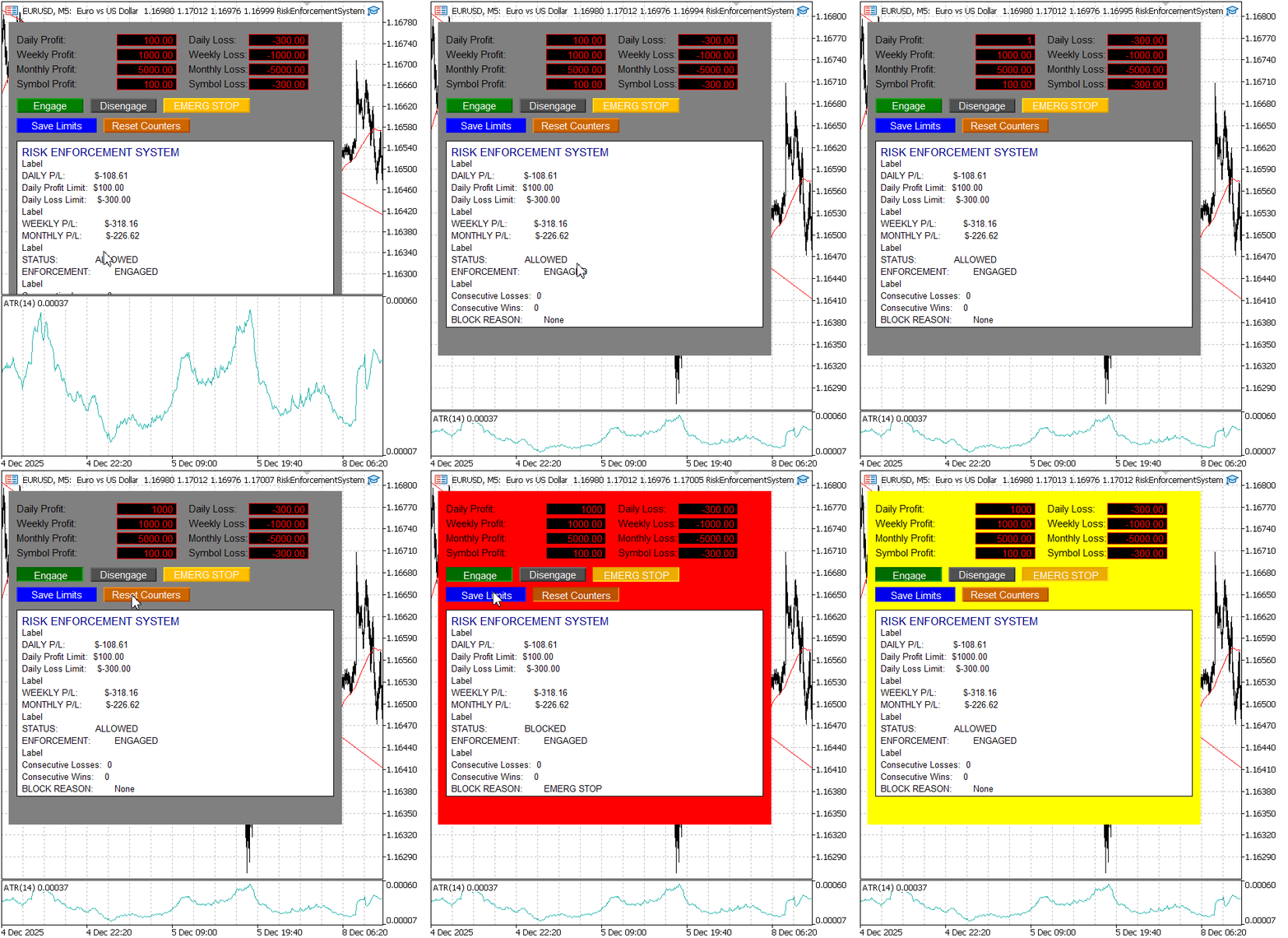
Testing the RiskEnforcementSystem on EURUSD, M5
Here are some testing observations from the Expert tab, showing how the buttons behaved during execution.
1. Engaged State (GV_ENGAGED = 1, GV_ALLOW = 1)
Clicking the engage button logs the information below. It demonstrates a successful user-driven state change. The first is a Print() statement to the Experts tab for record-keeping. The second is an Alert()—a pop-up dialog and sound—providing immediate, unambiguous feedback that the command was received and executed.
2025.12.09 10:23:36.563 RiskEnforcementSystem (EURUSD,M5)       [RiskEnforcer] Engaged: 1
2025.12.09 10:28:18.709 RiskEnforcementSystem (EURUSD,M5)       [RiskEnforcer] Engaged by user.
2025.12.09 10:28:18.709 RiskEnforcementSystem (EURUSD,M5)       Alert: [RiskEnforcer] Enforcement ENGAGED
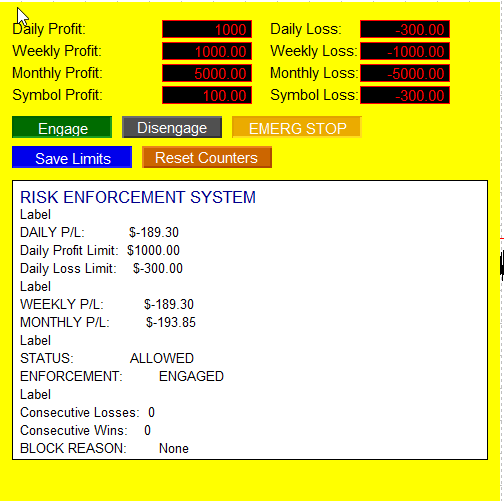
Engaged
2. Disengaged State (GV_ENGAGED = 0, GV_ALLOW = 1)
Below is a log for clicking the Disengage button. This log demonstrates the EA's fundamental duality. It's not just an always-on enforcer; it's a tool under your command. You can deliberately suspend its authority.
2025.12.09 10:36:22.275 RiskEnforcementSystem (EURUSD,M5)       [RiskEnforcer] Disengaged by user.
2025.12.09 10:36:22.275 RiskEnforcementSystem (EURUSD,M5)       Alert: [RiskEnforcer] Enforcement DISENGAGED - Trading allowed
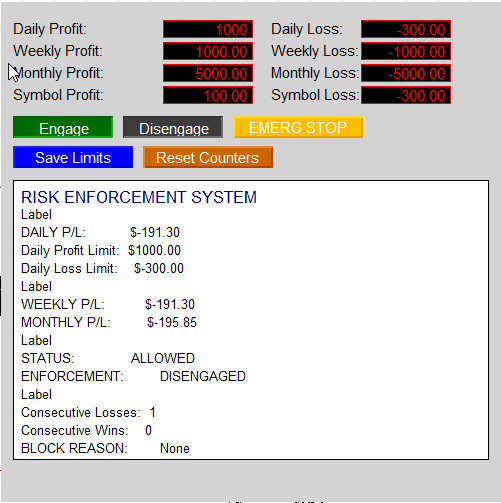
Disengaged state
3. Emergency stop state (GV_ENGAGED = 1, GV_ALLOW = 0, GV_EMERGENCY_ACTIVE = 1):
I clicked the "EMERG STOP" button.
2025.12.09 10:36:21.105 RiskEnforcementSystem (EURUSD,M5)       Alert: [RiskEnforcer] Alert triggered.
2025.12.09 10:36:21.632 RiskEnforcementSystem (EURUSD,M5)       [RiskEnforcer] TRADING BLOCKED. Reason: Emergency Stop
2025.12.09 10:36:21.730 RiskEnforcementSystem (EURUSD,M5)       Alert: Approaching daily loss limit! Current: -191.30, Limit: -300.00
2025.12.09 10:36:21.731 RiskEnforcementSystem (EURUSD,M5)       Alert: [RiskEnforcer] Alert triggered.
2025.12.09 10:36:21.948 RiskEnforcementSystem (EURUSD,M5)       [RiskEnforcer] TRADING BLOCKED. Reason: Emergency Stop
2025.12.09 10:36:21.958 RiskEnforcementSystem (EURUSD,M5)       [RiskEnforcer] Trading blocked - monitoring for new positions
The log confirms that the emergency stop works instantly and decisively. It does not wait for other conditions to be met; it imposes a top-level block that overrides all other rules. The concurrent "approaching limit" warnings are not an error—they are proof that the EA's different monitoring systems (the emergency command layer and the analytical warning layer) operate correctly in parallel, providing a complete audit trail.
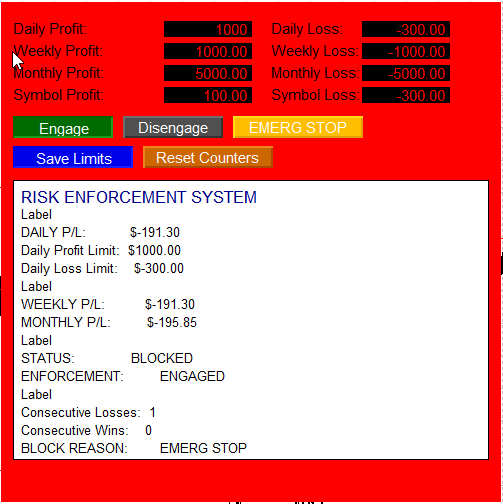
Emergency Stop Pressed
Conclusion
Risk management is the non-negotiable foundation of successful trading. This principle is perfectly encapsulated by Warren Buffett's most famous rule: "Rule No. 1: Never lose money. Rule No. 2: Never forget Rule No. 1." This timeless wisdom underscores that protecting capital is not merely a tactic but the absolute prerequisite for long-term growth.
This discussion has put that principle into practice, moving from theory to executable code. We have unveiled the critical process of automating trading discipline, focusing squarely on constructing a system that enforces risk management rules without emotion or exception. While the core idea—a guardian Expert Advisor—is conceptual, we successfully brought it to life as a testable, functional tool on a live demo account, proving its operational viability.
The primary advantage of this automation is its power to override the two most common causes of failure: emotional decision-making and the psychological pressure of volatile market conditions. By codifying rules, we transform discipline from a conscious struggle into an automated background process. A significant practical outcome of this project is the demonstrated application of the MQL5 language to solve real-world trading problems, showcasing how programming skills can directly translate into enhanced trading integrity and account protection.
While the provided EA is a robust starting point, it serves an important educational purpose. With further practice, testing, and refinement, this foundational idea can be developed into a more personalized and sophisticated solution tailored to individual strategies and risk profiles. The journey from novice to expert is continuous; stay tuned until our next publication.
You are welcome for comments, and for further study, find the table of attached files below.
Key Lessons
| Key Lessons | Description: |
|---|---|
| Automate Discipline, Not Just Strategy. | The most valuable trading tool addresses psychology. A Risk EA automates the enforcement of rules, acting as an unwavering guardian to eliminate emotional decisions and oversight, which are more common causes of failure than a poor strategy. |
| Implement a clear state machine. | Professional systems require defined operational modes. Designing distinct states—engaged, disengaged, emergency stop—provides clear control and predictable behavior, managed through central flags that dictate the system's actions. |
| Prioritize Active Prevention. | True risk control is proactive. The system must be designed to actively prevent violations by blocking new orders and force-closing existing positions, not just passively alerting you after a rule is broken. |
| Build for Transparency and Trust. | For users to rely on an automated guardian, it must be transparent. Detailed logging, clear alerts, and a real-time visual interface are essential to verify functionality and understand every action the system takes. |
| Create an Interactive User Interface: | A functional control panel on the chart transforms complex code into a usable tool. Buttons, editable fields, and live displays allow dynamic control and adjustment of risk parameters without needing to modify the source code. |
| Leverage Event-Driven Architecture: | A robust EA uses both event handlers and the main tick cycle. Immediate reactions to trades and user clicks are handled by events, while continuous monitoring and updates are managed on each tick, ensuring comprehensive coverage. |
| Test Rigorously in Simulation: | Exhaustive demo account testing is mandatory. It is the only safe way to validate all interactions between the EA, the trading platform, and simulated market conditions before real capital is involved. |
| Use Persistent State Management. | Critical data like daily P/L or engagement status must persist. Using global variables ensures that rules and system state are maintained consistently, even after the terminal or computer is restarted. |
| Employ a multi-layered defense. | Professional risk management uses independent checks across different dimensions (trade size, daily loss, consecutive losses, drawdown). This creates a safety net where multiple layers protect against a single point of failure. |
| Include a fail-safe emergency stop. | A dedicated emergency function is a critical safety feature. It must operate with the highest priority to instantly neutralize all market exposure by closing positions and blocking trading, independent of other system logic. |
| Structure Code for Readability and Maintenance | Writing clear, modular code with logical separation of functions (calculations, rule checks, UI updates) and consistent naming conventions is essential for long-term maintenance, debugging, and future enhancements. |
| Master Utility Development | Advanced MQL5 expertise involves building tools that manage the trading environment—like risk managers and trackers—not just signal generators. This deepens your understanding of the platform's full API and provides immense practical value. |
Attachments
| Source Filename | Description |
|---|---|
| RiskEnforcementSystem.mq5 | The complete, ready-to-compile source code for the Risk Enforcement Expert Advisor developed in this discussion. This MQL5 file contains all functions discussed, including the core state engine, multi-timeframe profit/loss calculators, the interactive chart panel, and the active trade blocking and closing logic. Use this file to implement the automated trading guardian on your MetaTrader 5 platform. |
Warning: All rights to these materials are reserved by MetaQuotes Ltd. Copying or reprinting of these materials in whole or in part is prohibited.
This article was written by a user of the site and reflects their personal views. MetaQuotes Ltd is not responsible for the accuracy of the information presented, nor for any consequences resulting from the use of the solutions, strategies or recommendations described.

 Introduction to MQL5 (Part 32): Mastering API and WebRequest Function in MQL5 (VI)
 Building AI-Powered Trading Systems in MQL5 (Part 7): Further Modularization and Automated Trading
 Tables in the MVC Paradigm in MQL5: Integrating the Model Component into the View Component
 Codex Pipelines, from Python to MQL5, for Indicator Selection: A Multi-Quarter Analysis of the XLF ETF with Machine Learning

- Free trading apps
- Over 8,000 signals for copying
- Economic news for exploring financial markets
You agree to website policy and terms of use