

Python-MetaTrader 5 策略测试器(第一部分):交易模拟器
 225
225
 2
2

内容
- 引言
- 交易模拟器 101
- 持仓盈亏计算
- 模拟持仓
- 交易参数校验
- 修改持仓
- 持仓监控
- 市场中的挂单
- 删除挂单
- 修改挂单
- 挂单监控
- 账户监控
- Python 实时交易模拟
- 实时模拟图形界面程序
- 外部管控持仓与订单
- 成交记录处理
- 结论
着手行动,好过空想万事齐备再行动。
—— 温斯顿・丘吉尔
引言
MetaTrader5-Python 程序包是一款实用模块,让 Python 开发者能够面向 MetaTrader 5 平台开发交易应用程序。开发者可借助该模块对接交易平台,获取行情数据、发送交易指令并监控订单状态。
该模块彻底改变了人们对 MetaTrader 5 桌面端的固有认知:平台不再局限于原生编程语言 MQL5 开发交易机器人。这款交易软件具备良好扩展性,除 MQL5 以外,还能够接收外部编程语言下发的交易指令。
尽管 MetaTrader5 模块支持通过 Python 在 MetaTrader 5 平台开仓交易,但 缺少所有基于 MQL5 的交易程序都具备的一项核心能力 ——在策略测试器中对开发完成的交易程序进行测试。
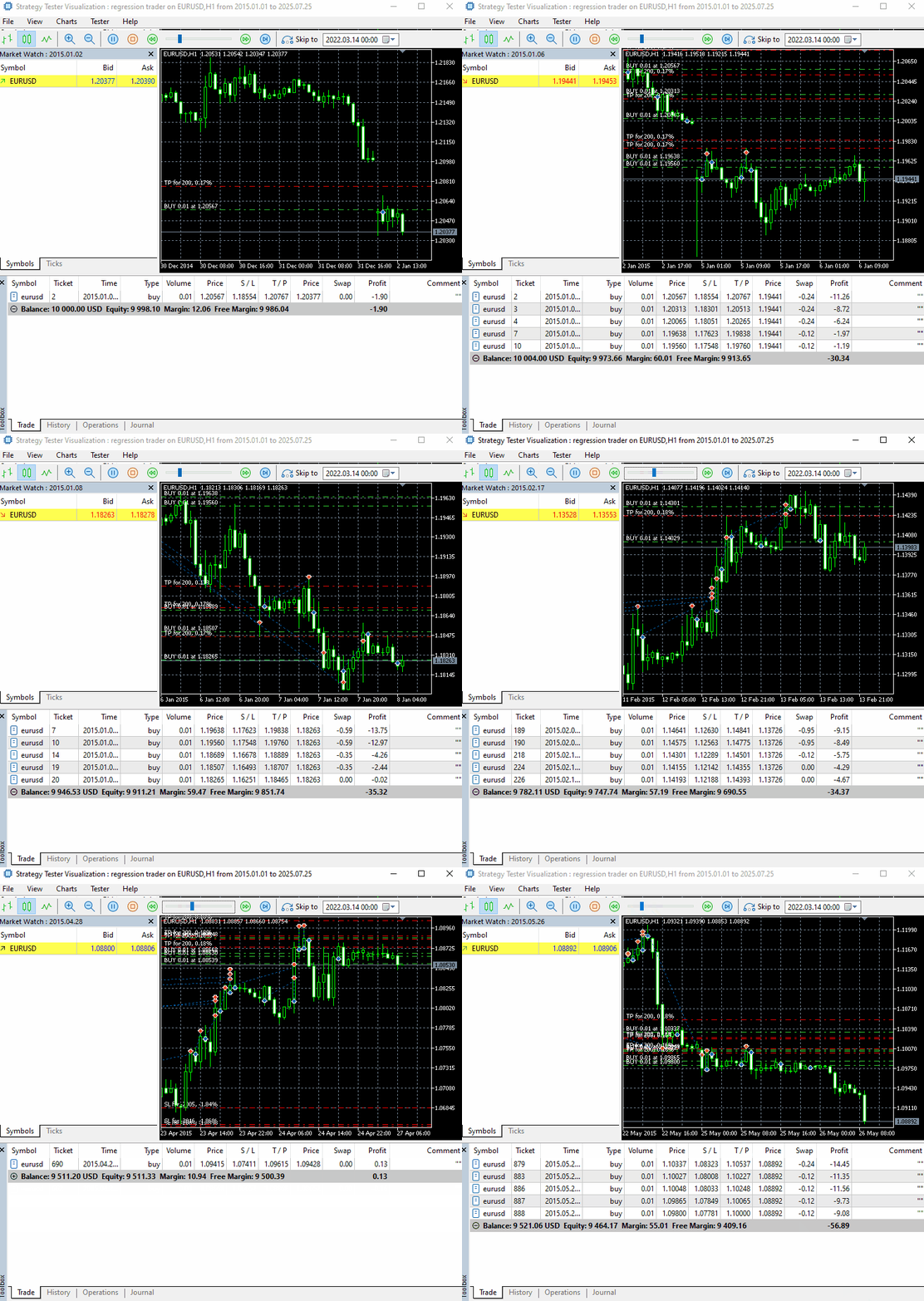
试想,开发完成交易机器人却无法测试,会是什么局面?
Python 生态中并不缺少工具,市面上有大量成熟模块、函数库与框架可用于测试各类交易策略,例如 Backtrader 以及 Backtesting.py。但这类 Python 工具存在局限:它们主要用于测试较为简单的交易策略,或者在某些情况下,用于测试基于指标的交易策略。
它们仅依靠交易信号评估策略绩效。无法完整覆盖真实交易中的各类要素,例如经纪商规则、交易手续费、账户交易限制、特定交易品种参数、账户杠杆等大量关键细节,而这些因素都会在 MetaTrader 5 策略测试器中纳入计算。
MetaTrader5-Python 模块的定位,是为使用者提供基础能力,从客户端获取关键信息,降低使用 Python 对接平台的入门门槛。
依托我们对 MetaTrader 5 策略测试器运行原理的理解,在本篇系列短文中,我们将搭建并实现一套方案,模拟 MetaTrader 5 测试器,用来测试基于 Python 开发的交易机器人。
首先安装本文末尾附件 requirements.txt 内所列全部 Python 依赖库。
pip install -r requirements.txt
交易模拟器 101
想要在 Python 环境实现策略测试,我们需要自研一套交易模拟器。其功能逻辑与 MetaTrader 5 策略测试器类似:模拟市场环境,并在此环境中运行交易程序或函数(交易机器人、指标)。
需要区分清楚:MetaTrader 5 客户端自带的策略测试器本身就是一套交易模拟器。
我们暂时不实现和官方测试器一致的图形界面(至少现阶段不做),先编写 Python 类完成核心功能。
import MetaTrader5 as mt5

class TradeSimulator:
    def __init__(self, simulator_name: str, mt5_instance: mt5, deposit: float, leverage: str="1:100"):

        self.mt5_instance = mt5_instance
        self.simulator_name = simulator_name
我们的目标是实现一套构造函数,参数风格贴近 MetaTrader 5 策略测试器配置面板。
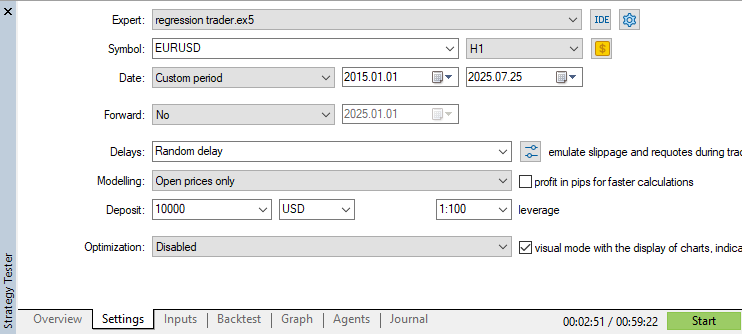
- mt5_instance 变量至关重要,用于对接并监控选定的 MetaTrader 5 客户端实例。
- simulator_name 变量可用于创建文件夹与文件路径,区分不同交易模拟器实例。你可以将它理解为交易机器人(EA 或指标)的名称。
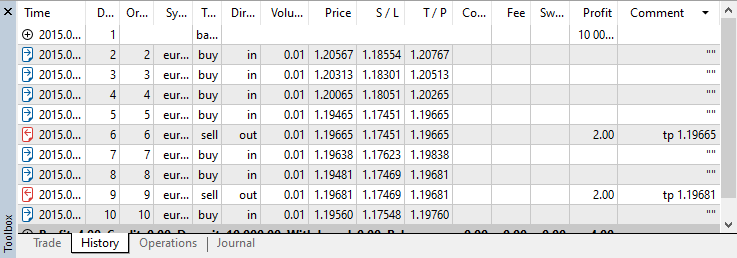
在交易模拟器类内部,我们需要一套机制,记录所有挂单、持仓以及成交记录,逻辑参照 MetaTrader 5 的数据管理方式。
class TradeSimulator:
    def __init__(self, simulator_name: str, mt5_instance: mt5, deposit: float, leverage: str="1:100"):

        # .... other variables
        # ...
        # ...

        # Position's information

        self.position_info = {
            "time": None,
            "id" : 0,
            "magic": 0,
            "symbol": None,
            "type": None,
            "volume": 0.0,
            "open_price": 0.0,
            "price": 0.0,
            "sl": 0.0,
            "tp": 0.0,
            "commission": 0.0,
            "margin_required": 0.0,
            "fee": 0.0,
            "swap": 0.0,
            "profit": 0,
            "comment": 0
        }

        # Order's information

        self.order_info = self.position_info.copy()
        self.order_info["expiry_date"] = datetime
        self.order_info["expiration_mode"] = ""

        # Deal's information

        self.deal_info = self.position_info.copy()

        self.deal_info["reason"] = None # This is used to store the reason why the trade was closed, e.g. "Take Profit", "Stop Loss", etc.
        self.deal_info["direction"] = None # The only difference btn an open trade and a closed one is that the closed one has a direction showing if at that instance it was opened or closed in history

        # Containers for positions, orders, and deals

        self.positions_container = [] # a list for storing all opened trades
        self.deals_container = [] # a list for storing all deals
        self.orders_container = []
下方表格描述了模拟器类中存储的持仓、订单以及成交记录相关信息。
| 属性 | 说明 |
|---|---|
| 时间 | 成交时间:持仓或订单的执行时间。对于成交记录,该字段代表成交发生时刻(开仓或平仓)。 |
| id | 所有订单、持仓、成交记录共用自增唯一标识。 |
| magic | 持仓、订单或成交记录对应的魔术数字(magic number)。 |
| symbol | 交易标的,例如:EURUSD、USDJPY。(EURUSD, USDJPY) |
| type | 持仓字段代表持仓类型;订单字段代表订单类型。 |
| volume | 持仓、订单、成交记录对应的交易交易量(手数)。 |
| open_price | 订单或持仓的开仓价格。对于成交记录,该值可能是开仓价或平仓价,取决于成交的触发原因。 |
| price | 市场当前价格。多头持仓与买入类挂单采用卖价(Ask);空头持仓与卖出类挂单采用买价(Bid)。 |
| sl | 订单、持仓、成交记录对应的止损价位。 |
| tp | 订单、持仓、成交记录对应的止盈价位。 |
| comission | 获取该持仓收取的comission(佣金)。 |
| margin_required | 保存开仓该持仓或订单所需占用的保证金。 |
| fee | 持仓对应的经纪商手续费。 |
| swap | 持仓产生的隔夜利息金额。 |
| profit | 持仓或成交记录计算得出的盈亏金额。 |
| comment | 持仓、订单、成交记录附带的备注信息。 |
| expiration_mode | 存储挂单对应的SYMBOL_EXPIRATION_MODE参数(保存在 self.order_info)。 |
| expiry_date | 以 UTC 时间格式保存订单到期时刻。 |
所有开仓持仓、已提交挂单、成交记录数据,分别保存在模拟器对应的数组容器内,方便统一读取。
        # Containers for positions, orders, and deals

        self.positions_container = [] # a list for storing all opened trades
        self.deals_container = [] # a list for storing all deals
        self.orders_container = [] # for storing all pending orders placed
持仓盈亏计算
站在交易者视角,模拟全部交易行为的核心目标,就是测算交易机器人在历史某一时间区间内能够实现的盈亏。
下面是实现该功能的通用函数。
def _calculate_profit(self, action: str, symbol: str, entry_price: float, exit_price: float, lotsize: float) -> float:

    """
    Calculate profit based on entry and exit prices, lot size, tick size, and tick value.

    Args:
        action (str): The action taken, either 'buy' or 'sell'.
        entry_price (float): The price at which the position was opened.
        exit_price (float): The price at which the position was closed.
        lotsize (float): The size of the lot in terms of contract units.
    """

    if action != "buy" and action != "sell":
        print(f"Unknown order type, It can be either 'buy' or 'sell'. Received '{action}' instead.")
        return 0

    order_type = self.mt5_instance.ORDER_TYPE_BUY if action == "buy" else self.mt5_instance.ORDER_TYPE_SELL

    profit = self.mt5_instance.order_calc_profit(
        order_type,
        symbol,
        lotsize,
        entry_price,
        exit_price
    )

    return profit
我们将调用该函数计算 MetaTrader 5 中所有持仓订单的盈亏。调用时传入开仓价、平仓价、交易品种以及交易手数即可。
if not mt5.initialize():
    print(f"Failed to Initialize MetaTrader5. Error = {mt5.last_error()}")
    mt5.shutdown()
    quit()

sim = TradeSimulator(simulator_name="MySimulator", mt5_instance=mt5, deposit=1000, leverage="1:500")
profit = sim._calculate_profit(action="buy",
                            symbol="EURUSD",
                            entry_price=1.17246,
                            exit_price=1.17390,
                            lotsize=0.07)

print("profit: ", profit)
输出。
(pystrategytester) C:\Users\Omega Joctan\OneDrive\Desktop\Python Strategy Tester>conda run --live-stream --name pystrategytester python "c:/Users/Omega Joctan/OneDrive/Desktop/Python Strategy Tester/trade_simulator.py"
profit:  10.08

模拟持仓
在交易模拟器中,持仓本质上就是一组经过计算并保存在内存或磁盘中的交易数据。
下面是实现开仓功能的基础函数。
    def _open_position(self, pos_type: str, volume: float, symbol: str, price: float, sl: float = 0.0, tp: float = 0.0, comment: str = "") -> bool:

        trade_info = self.trade_info.copy()

        self.m_symbol.name(symbol)

        self.id += 1  # Increment trade ID

        trade_info["time"] = self.time
        trade_info["id"] = self.id
        trade_info["magic"] = self.magic_number
        trade_info["symbol"] = symbol
        trade_info["type"] = pos_type
        trade_info["volume"] = volume
        trade_info["price"] = price
        trade_info["sl"] = sl
        trade_info["tp"] = tp
        trade_info["commission"] = 0.0
        trade_info["fee"] = 0.0
        trade_info["swap"] = 0.0
        trade_info["profit"] = 0.0
        trade_info["comment"] = comment
        trade_info["margin_required"] = self._calculate_margin(symbol=symbol, volume=volume, price=price)

        # Append to open trades
        self.open_trades_container.append(trade_info)
        print("Trade opened successfully: ", trade_info)

        return True
再次说明,id 属性对应持仓订单编号(ticket),会自动递增,为类实例内每一笔新开仓分配唯一编号。
margin_required(所需保证金) 是目前最难实现的字段。虽然 MetaTrader5 Python 模块提供保证金计算接口,但该函数会读取当前 MetaTrader 5 客户端登录账户信息,包含账户杠杆等参数。
而我们希望在 Python 模拟器内部搭建独立模拟账户,因此需要自定义函数,根据这个模拟账户的配置参数,逐笔计算每笔持仓所需保证金。
    def _calculate_margin(self, symbol: str, volume: float, open_price: float, margin_rate=1.0) -> float:

        """
        Calculates margin requirement similar to MetaTrader5 based on the margin mode.
        """
        self.m_symbol.name(symbol)

        if not self.m_symbol.select():
            print(f"Margin calculation failed: MetaTrader5 error = {self.mt5_instance.last_error()}")
            return 0.0

        contract_size = self.m_symbol.contract_size()
        leverage = self.leverage
        margin_mode = self.m_symbol.trade_calc_mode()

        print("Margin calculation mode: ",self.m_symbol.trade_calc_mode_description())

        tick_size = self.m_symbol.tick_size() or 0.0001
        tick_value = self.m_symbol.tick_value() or 0.0
        initial_margin = self.m_symbol.margin_initial() or 0.0
        face_value = self.m_symbol.trade_face_value()


        if margin_mode == self.mt5_instance.SYMBOL_CALC_MODE_FOREX:
            margin = (volume * contract_size * margin_rate) / leverage

        elif margin_mode == self.mt5_instance.SYMBOL_CALC_MODE_FOREX_NO_LEVERAGE:
            margin = volume * contract_size * margin_rate

        elif margin_mode == self.mt5_instance.SYMBOL_CALC_MODE_CFD:
            margin = volume * contract_size * open_price * margin_rate

        elif margin_mode == self.mt5_instance.SYMBOL_CALC_MODE_CFDLEVERAGE:
            margin = (volume * contract_size * open_price * margin_rate) / leverage

        elif margin_mode == self.mt5_instance.SYMBOL_CALC_MODE_CFDINDEX:
            margin = volume * contract_size * open_price * tick_value / tick_size * margin_rate

        elif margin_mode in [self.mt5_instance.SYMBOL_CALC_MODE_EXCH_STOCKS, self.mt5_instance.SYMBOL_CALC_MODE_EXCH_STOCKS_MOEX]:
            margin = volume * contract_size * open_price * margin_rate

        elif margin_mode in [self.mt5_instance.SYMBOL_CALC_MODE_FUTURES,
                             self.mt5_instance.SYMBOL_CALC_MODE_EXCH_FUTURES]:

            margin = volume * initial_margin * margin_rate

        elif margin_mode in [self.mt5_instance.SYMBOL_CALC_MODE_EXCH_BONDS, self.mt5_instance.SYMBOL_CALC_MODE_EXCH_BONDS_MOEX]:
            margin = volume * contract_size * face_value * open_price / 100

        elif margin_mode == self.mt5_instance.SYMBOL_CALC_MODE_SERV_COLLATERAL:
            margin = 0.0

        else:
            print(f"Unknown margin mode: {margin_mode}, falling back to default margin calc.")
            margin = (volume * contract_size * open_price) / leverage

        return margin
由于我无法通过 MetaTrader5-Python 模块从 MT5 客户端获取参与 MQL5保证金计算公式的margin_rate(保证金比率)变量,因此该函数尚不完善。
该参数无法从交易品种信息(symbol_info)中读取,因此我们新增入参margin_rate(默认值设为 1.0),支持手动填入该数值。
当前逻辑直接将持仓存入容器,默认这笔持仓的各项参数均合法。这种实现方式存在明显缺陷:众所周知,MetaTrader 5 客户端在接收交易指令前,会校验交易是否符合账户规则、品种参数以及经纪商限制。
举例来说,客户端会检查止损、止盈价位是否距离市价过近,不符合条件的交易将会被拒绝;同时还会校验交易手数(交易量)是否合规等。
基于上述原因,我们需要编写一个布尔返回值函数,用于对所有持仓进行校验。只有全部参数校验通过的持仓才会被接纳,否则直接拒绝。
交易校验
(a) 手数校验
校验交易手数(交易量)时,需要判断三项条件:
- 传入手数是否小于该品种允许的最小交易手数
- 传入手数是否大于该品种允许的最大交易手数
- 传入手数是否为手数步进(成交最小变动步长)的整数倍
    def _position_validation(self,
                       volume: float,
                       symbol: str,
                       pos_type: str,
                       open_price: float,
                       sl: float = 0.0,
                       tp: float = 0.0,
                       expiry_date: datetime = None) -> bool:
        """
        Validates trade parameters similar to MQL5's OrderCheck()

        Returns:
            bool: True if validation passes, False with error message if fails
        """

        self.m_symbol.name(symbol) # Assign the current symbol to the CSymbolInfo class for accessing its properties

        # Get symbol properties
        symbol_info = self.m_symbol.get_info() # Get the information about the current symbol
        if symbol_info is None:
            print(f"Trade validation failed. MetaTrader5 error = {self.mt5_instance.last_error()}")
            return False

        # Validate volume

        if volume < self.m_symbol.lots_min(): # check if the received lotsize is smaller than minimum accepted lot of a symbol
            print(f"Trade validation failed: Volume ({volume}) is less than minimum allowed ({self.m_symbol.lots_min()})")
            return False

        if volume > self.m_symbol.lots_max(): # check if the received lotsize is greater than the maximum accepted lot
            print(f"Trade validation failed: Volume ({volume}) is greater than maximum allowed ({self.m_symbol.lots_max()})")
            return False

        step_count = volume / self.m_symbol.lots_step()

        if abs(step_count - round(step_count)) > 1e-7: # check if the stoploss is a multiple of the step size
            print(f"Trade validation failed: Volume ({volume}) must be a multiple of step size ({self.m_symbol.lots_step()})")
            return False
(b):开仓价格校验与滑点检测
和 MetaTrader 5 策略测试器逻辑一致,接收持仓指令前必须校验开仓价格有效性。例如, 多头持仓的开仓价必须贴近或等于品种卖价(Ask);空头持仓的开仓价必须贴近或等于品种买价(Bid)。
滑点参数(传入时)仅用于价格对比,用于确保给定入场价与对应基准报价足够接近。
        # Validate the opening price

        self.m_symbol.refresh_rates() # Get recent ticks information

        ask = self.m_symbol.ask()
        bid = self.m_symbol.bid()

        if ask is None or bid is None or ask==0 or bid==0:
            print("Trade Validate: Failed to Get Ask and Bid prices, Call the function market_update() to update the simulator with newly simulated price values")
            return False

        # Slippage check

        actual_price = ask if pos_type == "buy" else bid
        point = self.m_symbol.point()

        # Allowable slippage range (in absolute price)

        max_deviation = self.deviation_points * point
        lower_bound = actual_price - max_deviation
        upper_bound = actual_price + max_deviation

        # Check if requested price is within allowed slippage

        if not (lower_bound <= open_price <= upper_bound):
            print(f"Trade validation failed: {pos_type.capitalize()} price ({open_price}) is out of slippage range: {lower_bound:.5f} - {upper_bound:.5f}")
            return False
(c):止损与止盈校验
并非所有市价单(持仓)的止损、止盈价位都能被 MT5 经纪商接受;部分止损止盈参数会判定无效,或是距离市价过近,导致无法开仓。
我们使用同一套逻辑校验止损距离(stops level)与冻结距离(freeze level)。
首先,先确认传入合法的止损 / 止盈数值。
对于多头订单:止损价必须低于开仓价,止盈价必须高于开仓价。空头订单则相反:止损价必须高于开仓价,止盈价必须低于开仓价。
# Validate stop loss and take profit levels

if sl > 0:
    if pos_type == "buy" and sl >= open_price:
        print(f"Trade validation failed: Buy stop loss ({sl}) must be below order opening price ({open_price})")
        return False
    if pos_type == "sell" and sl <= open_price:
        print(f"Trade validation failed: Sell stop loss ({sl}) must be above order opening price ({open_price})")
        return False
    if not self._check_stop_level(symbol, open_price, sl, pos_type):
        return False

if tp > 0:
    if pos_type == "buy" and tp <= open_price:
        print(f"Trade validation failed: Buy take profit ({tp}) must be above order opening price ({open_price})")
        return False
    if pos_type == "sell" and tp >= open_price:
        print(f"Trade validation failed: Sell take profit ({tp}) must be below order opening price ({open_price})")
        return False
    if not self._check_stop_level(symbol, open_price, tp, pos_type):
        return False
上述代码片段封装在函数 _check_stop_level 内部。
    def _check_stop_level(self, symbol: str, price: float, stop_price: float, pos_type: str) -> bool:

        """Check if stop levels comply with broker requirements"""

        self.m_symbol.name(symbol)

        # Validate symbol
        if not self.m_symbol.select():
            print(f"Failed to check stop level: Symbol {symbol}. MetaTrader5 error = {self.mt5_instance.last_error()}")
            return False

        # Check for stops level
        stop_level = self.m_symbol.stops_level()

        if pos_type == "buy":
            if stop_price > price - stop_level * self.m_symbol.point():
                print(f"Trade validation failed: Stop level too close. Must be at least {stop_level} points away")
                return False
        else:  # sell
            if stop_price < price + stop_level * self.m_symbol.point():
                print(f"Trade validation failed: Stop level too close. Must be at least {stop_level} points away")
                return False


        # Check for freeze level

        freeze_level = self.m_symbol.freeze_level()

        if pos_type == "buy":
            if stop_price > price - freeze_level * self.m_symbol.point():
                print(f"Trade validation failed: Stop level too close. Must be at least {freeze_level} points away")
                return False
        else:  # sell
            if stop_price < price + freeze_level * self.m_symbol.point():
                print(f"Trade validation failed: Stop level too close. Must be at least {freeze_level} points away")
                return False

        return True
当检测到多头或空头持仓的止损 / 止盈参数非法时,该函数返回 False,校验通过则返回 True。
最后,在底层开仓函数中调用 _position_validation。在持仓存入集合容器之前,先完成全部参数校验。
    def _open_position(self, pos_type: str, volume: float, symbol: str, price: float, sl: float = 0.0, tp: float = 0.0, comment: str = "") -> bool:

        trade_info = self.trade_info.copy()

        self.m_symbol.name(symbol)

        if not self._position_validation(volume=volume, symbol=symbol, pos_type=pos_type, price=price, sl=sl, tp=tp):
            return False

        self.id += 1  # Increment trade ID

        trade_info["time"] = self.time
        trade_info["id"] = self.id

        # ... proceeds to store a trade

        # Append to open trades
        self.open_trades_container.append(trade_info)
        print("Trade opened successfully: ", trade_info)

        return True
为了更便捷地发起多头、空头持仓,我封装了两个专用函数:buy 和 sell,分别用于开多仓、开空仓。两个函数都依赖底层函数 _open_position,唯一区别是通过 pos_type 指定持仓方向。参数在函数内部直接赋值。
    def buy(self, volume: float, symbol: str, price: float, sl: float = 0.0, tp: float = 0.0, comment: str = "") -> bool:
        return self._open_position("buy", volume, symbol, price, sl, tp, comment)

    def sell(self, volume: float, symbol: str, price: float, sl: float = 0.0, tp: float = 0.0, comment: str = "") -> bool:
        return self._open_position("sell", volume, symbol, price, sl, tp, comment)
以上函数设计灵感来源于 MQL5 标准交易库内CTrade类提供的同名方法。
修改持仓
出于各类交易策略与资金管理需求,修改持仓功能十分关键。举例:交易者经常移动持仓止损向开仓价或止盈价靠拢,以此限制亏损、保护利润,这通常被称为追踪止损(trailing stop)或保本移动(breakeven)。
下方是模拟器中用于修改持仓参数的函数。
    def position_modify(self, pos: dict, new_sl: float, new_tp) -> bool:

        new_position = pos.copy()

        if pos["type"] == "buy":
            if new_sl >= pos["price"]:
                print("Failed to modify sl, new_sl >= current price")
                return False

        if pos["type"] == "sell":
            if new_sl <= pos["price"]:
                print("Failed to modify sl, new_sl <= current price")
                return False

        if not self._check_stops_level(symbol=pos["symbol"], open_price=pos["open_price"], stop_price=new_sl, pos_type=pos["type"]):
            print("Failed to Modify the Stoploss")

        if not self._check_stops_level(symbol=pos["symbol"], open_price=pos["open_price"], stop_price=new_tp, pos_type=pos["type"]):
            print("Failed to Modify the Takeprofit")

        # new sl and tp values

        new_position["sl"] = new_sl
        new_position["tp"] = new_tp

        # Update the position in a container

        for i, p in enumerate(self.positions_container):
            if p["id"] == pos["id"]:
                self.positions_container[i] = new_position
                print(f"Position with id=[{pos['id']}] modified! new_sl={new_sl} new_tp={new_tp}")
                return True

        print("Failed to modify position: ID not found")

        return True
在 MetaTrader 5 中修改持仓,和新建订单存在不少相似校验逻辑;上述函数确认两项条件满足后,才允许修改持仓:
- 根据持仓方向校验新止损价位合法性:多头止损必须低于市价,空头止损必须高于市价;
- 保证新止损、止盈价位不会距离市价过近。
使用示例:
我们先建立一笔多头持仓,然后定期调整其止损值。示例代码中,每隔 5 秒将止损值减去 0.005。
stoploss = 500

ask = m_symbol.ask()
point = m_symbol.point()

sim.buy(volume=0.1, symbol=symbol, open_price=ask, sl=ask-stoploss*point)


while True: # constantly monitor trades and account metrics

    sim.monitor_pending_orders()
    sim.monitor_positions(verbose=False)

    for pos in sim.get_positions(): # go through all positions, same as in MQL5
        if pos["type"] == "buy" and pos["symbol"] == symbol: # select a buy position for the current symbol
            sim.position_modify(pos=pos, new_sl=pos["sl"]-0.005, new_tp=pos["tp"])

    sim.run_toolbox_gui()  # Run the simulator toolbox GUI

    time.sleep(5) # sleep for one second
输出。
Position with id=[1] modified! new_sl=1.1320700000000001 new_tp=0.0
Position with id=[1] modified! new_sl=1.1270700000000002 new_tp=0.0
Position with id=[1] modified! new_sl=1.1220700000000003 new_tp=0.0
Position with id=[1] modified! new_sl=1.1170700000000005 new_tp=0.0
持仓监控
持仓只是临时保存在内存中的一组数据,需要持续更新。
举例:开仓之后,必须跟随行情(最新买卖价)更新浮动盈亏;同时持续监控平仓条件:当市场价格(多头看 Bid、空头看 Ask)触及持仓止损或止盈时,执行平仓。
(a) 持仓盈亏监控
复用前文实现的盈亏计算函数,持续遍历并更新每一笔持仓的浮动盈亏。
    def monitor_positions(self, verbose: bool):

        # monitoring all open trades

        for pos in self.positions_container:

            self.m_symbol.name(pos["symbol"])
            self.m_symbol.refresh_rates()

            # Get ticks information for every symbol

            ask = self.m_symbol.ask()
            bid = self.m_symbol.bid()

            # update price information on all positions

            pos["price"] = ask if pos["type"] == "buy" else bid

            # Monitor and calculate the profit of a position

            pos["profit"] = self._calculate_profit(action=pos["type"], symbol=pos["symbol"], lotsize=pos["volume"], entry_price=pos["open_price"],
                                                    exit_price=(ask if pos["type"]=="buy" else bid))
(b) 持仓平仓条件监控
在策略测试器中建立持仓后,无论是否设置止盈止损,持仓不会自动平仓。
程序需要持续检测:当前市场价格(空头参考 Ask、多头参考 Bid)是否触碰目标价位。一旦触及止损或止盈,则平掉该持仓,并将成交记录存入历史成交列表。
    def monitor_positions(self, verbose: bool):

        # monitoring all open trades

        for pos in self.positions_container:

            self.m_symbol.name(pos["symbol"])
            self.m_symbol.refresh_rates()

            # Get ticks information for every symbol

            ask = self.m_symbol.ask()
            bid = self.m_symbol.bid()


            # ... other monitors


            # Monitor the stoploss and takeprofit situation of positions

            if pos["tp"] > 0 and ((pos["type"] == "buy" and bid >= pos["tp"]) or (pos["type"] == "sell" and ask <= pos["tp"])): # Take profit hit
                self.position_close(pos_id=pos) # close such position

            if pos["sl"] > 0 and ((pos["type"] == "buy" and bid <= pos["sl"]) or (pos["type"] == "sell" and ask >= pos["sl"])): # Stop loss hit
                self.position_close(pos_id=pos) # close such position
最后,我们希望在每一笔持仓数据更新时打印相关信息,效果对标 MetaTrader 5 终端工具箱(展示当前活跃持仓)。
该打印逻辑仅在参数 verbose = True 时生效。
            # Print the information about all trades (positions and orders (if any))

            if verbose:
                print(f'sim -> ticket | {trade["id"]} | symbol {trade["symbol"]} | time {trade["time"]} | type {trade["type"]} | volume {trade["volume"]} | sl {trade["sl"]} | tp {trade["tp"]} | profit {trade["profit"]:.2f}')
目前我们仅实现多头、空头持仓的监控逻辑,挂单监控部分稍后展开讨论。
市场挂单(条件挂单)
市价单(持仓)是立即以当前市价成交;与之不同,挂单是满足指定行情条件后才执行交易操作。挂单还可以附加时间约束 —— 订单有效期。
挂单分为以下类型。
- Buy Limit(限价多单)
- Buy Stop(突破多单)
- Sell Limit(限价空单)
- Sell Stop(突破空单)
- Buy Stop Limit(突破限价多单)
- Sell Stop Limit(突破限价空单)
作为起步,我们先在交易模拟器类中实现上面前四种挂单类型。
下面先搭建提交挂单的底层函数。
需要执行三类校验:
(a) 校验订单类型合法性
    def _place_a_pending_order(self,
                               order_type: str,
                               volume: float,
                               symbol: str,
                               open_price: float,
                               sl: float = 0.0,
                               tp: float = 0.0,
                               comment: str = "",
                               expiry_date: datetime = None,
                               expiration_mode: str="gtc"
                               ):

        order_types = ["buy limit", "buy stop", "sell limit", "sell stop"]

        if order_type not in order_types:
            raise ValueError(f"Invalid pending order type, available order types include: {order_types}")

        expiration_modes = ["gtc", "daily", "daily_excluding_stops"]
        if expiration_mode not in expiration_modes:
            raise ValueError(f"Invalid Expiration mode, available modes include: {expiration_modes}")
(b) 校验挂单价位不能距离市价过近
- 多头相关挂单(Buy Limit / Buy Stop)的委托价不能距离买价(Bid)过近;
- 空头相关挂单(Sell Limit / Sell Stop)的委托价不能距离卖价(Ask)过近。
# Get market info

self.m_symbol.name(symbol_name=symbol) # assign symbol's name
self.m_symbol.refresh_rates() # get recent ticks from the market using the current selected symbol

if order_type in ("buy limit", "buy stop"):

    if abs(open_price - self.m_symbol.bid()) < self.m_symbol.stops_level() * self.m_symbol.point():
        print(f"Failed to open a pending order, a '{order_type}' order is too close to the market")

if order_type in ("sell limit", "sell stop"):

    if abs(open_price - self.m_symbol.ask()) < self.m_symbol.stops_level() * self.m_symbol.point():
        print(f"Failed to open a pending order, a '{order_type}' order is too close to the market")
(c) 校验订单有效期合法性
到期时间必须晚于当前时间,也就是设置一个未来时刻。
# check if the order has a valid expiry date

if expiry_date is not None: # if an expiry date is given in the first place
    if expiry_date <= self.m_symbol.time(timezone=pytz.UTC):
        print(f"Failed to place a pending order {order_type}, Invalid datetime")
        return
三项校验全部通过后,订单信息存入模拟器内部列表。
order_info = self.order_info.copy()

self.id += 1

order_info["id"] = self.id
order_info["type"] = order_type
order_info["volume"] = volume
order_info["symbol"] = symbol
order_info["open_price"] = open_price
order_info["sl"] = sl
order_info["tp"] = tp
order_info["comment"] = comment
order_info["magic"] = self.magic_number
order_info["margin_required"] = self._calculate_margin(symbol=symbol, volume=volume, open_price=open_price)

order_info["expiry_date"] = expiry_date
order_info["expiration_mode"] = expiration_mode

self.orders_container.append(order_info) # add a valid order to its container
挂单与持仓共用同一套自增 id (订单编号)。可以这样理解:挂单本质上是 “等待开仓的持仓”,所有持仓最初都源自订单。
共用id可以避免挂单触发转为持仓时出现id 重复。
基于底层 _place_a_pending_order 函数,我们封装便捷的独立挂单接口。
提交突破多单 Buy Stop:
    def buy_stop(self, volume: float, symbol: str, open_price: float, sl: float = 0.0, tp: float = 0.0, comment: str = "", expiry_date: datetime = None,expiration_mode: str="gtc"):

        # validate an order according to its type

        self.m_symbol.name(symbol_name=symbol)
        self.m_symbol.refresh_rates()

        if self.m_symbol.bid() >= open_price:
            print("Failed to place a buy stop order, open price <= the bid price")
            return

        self._place_a_pending_order("buy stop", volume, symbol, open_price, sl, tp, comment, expiry_date, expiration_mode)
提交限价多单 Buy Limit:
    def buy_limit(self, volume: float, symbol: str, open_price: float, sl: float = 0.0, tp: float = 0.0, comment: str = "", expiry_date: datetime = None, expiration_mode: str="gtc"):

        self.m_symbol.name(symbol_name=symbol)
        self.m_symbol.refresh_rates()

        if self.m_symbol.bid() <= open_price:
            print("Failed to place a buy limit order, open price >= current bid price")
            return

        self._place_a_pending_order("buy limit", volume, symbol, open_price, sl, tp, comment, expiry_date, expiration_mode)
提交突破空单 Sell Stop:
    def sell_stop(self, volume: float, symbol: str, open_price: float, sl: float = 0.0, tp: float = 0.0, comment: str = "", expiry_date: datetime = None, expiration_mode: str="gtc"):

        self.m_symbol.name(symbol_name=symbol)
        self.m_symbol.refresh_rates()

        if self.m_symbol.ask() <= open_price:
            print("Failed to place a sell stop order, open price >= current ask price")
            return

        self._place_a_pending_order("sell stop", volume, symbol, open_price, sl, tp, comment, expiry_date, expiration_mode)
提交限价空单 Sell Limit:
    def sell_limit(self, volume: float, symbol: str, open_price: float, sl: float = 0.0, tp: float = 0.0, comment: str = "", expiry_date: datetime = None, expiration_mode: str="gtc"):

        self.m_symbol.name(symbol_name=symbol)
        self.m_symbol.refresh_rates()

        if self.m_symbol.ask() >= open_price:
            print("Failed to place a sell limit order, open price <= current ask price")
            return

        self._place_a_pending_order("sell limit", volume, symbol, open_price, sl, tp, comment, expiry_date, expiration_mode)
以上函数内置规则,保证各类挂单价位符合定义:
- Buy Stop(突破多单):委托价必须高于当前市价(卖价 Ask)
- Buy Limit(限价多单):委托价必须低于当前市价(买价 Bid)
- Sell Stop(突破空单):委托价必须低于当前市价(买价 Bid)
- Sell Limit(限价空单):委托价必须高于当前市价(卖价 Ask)
删除挂单
和创建挂单功能同样重要,我们需要实现删除挂单函数。
删除操作无需额外校验;订单删除后不会生成任何成交记录。
    def order_delete(self, selected_order: dict) -> bool:

        # delete a pending order from the orders container

        if selected_order in self.orders_container:

            self.orders_container.remove(selected_order)
            return True

        else:
            print(f"Warning: An Order with ID {selected_order['id']} not found!")
            return False
修改挂单
如同修改持仓功能,我们同样需要修改挂单的函数。
修改挂单时必须完成三项核心校验。
(a) 校验修改后的委托价位符合订单类型规则
所有挂单修改后价位必须遵守以下规则:
- Buy Stop(突破多单):委托价高于当前市价(Ask)
- Buy Limit(限价多单):委托价低于当前市价(Bid)
- Sell Stop(突破空单):委托价低于当前市价(Bid)
- Sell Limit(限价空单):委托价高于当前市价(Ask)
    def order_modify(self, order: dict, new_open_price: float, new_sl: float, new_tp: float, new_expiry: datetime = None, new_expiration_mode: str = None):
        """
         Modify an existing pending order's open price, SL/TP, and optionally its expiration settings.
        """
        new_order = order.copy()

        # Validate order type
        valid_types = ["buy limit", "buy stop", "sell limit", "sell stop"]
        if order["type"] not in valid_types:
            print(f"Invalid order type for modification: {order['type']}")
            return False

        self.m_symbol.name(order["symbol"])
        self.m_symbol.refresh_rates()

        # Ensure open price is placed logically according to type
        ask = self.m_symbol.ask()
        bid = self.m_symbol.bid()

        if order["type"] == "buy stop" and bid >= new_open_price:
            print("Failed to modify Buy Stop: new open price <= current bid price")
            return False
        if order["type"] == "buy limit" and bid <= new_open_price:
            print("Failed to modify Buy Limit: new open price >= current bid price")
            return False
        if order["type"] == "sell stop" and ask <= new_open_price:
            print("Failed to modify Sell Stop: new open price >= current ask price")
            return False
        if order["type"] == "sell limit" and ask >= new_open_price:
            print("Failed to modify Sell Limit: new open price <= current ask price")
            return False
(b) 校验修改后的委托价不能距离市价过近
# ensure the order ins't close to the market

order_type = order["type"]
if order_type in ("buy limit", "buy stop"):

    if abs(new_open_price - self.m_symbol.bid()) < self.m_symbol.stops_level() * self.m_symbol.point():
        print(f"Failed to open a pending order, a '{order_type}' order is too close to the market")
        return False

if order_type in ("sell limit", "sell stop"):

    if abs(new_open_price - self.m_symbol.ask()) < self.m_symbol.stops_level() * self.m_symbol.point():
        print(f"Failed to open a pending order, a '{order_type}' order is too close to the market")
        return False
(c) 校验新设置的订单到期时间合法有效
if new_expiry and new_expiry <= self.m_symbol.time(timezone=pytz.UTC):
    print("Invalid Expiry date, new expiry date must be a value in the future")
完成所有校验后,对订单容器内对应的订单执行更新。
# Update the order in the container
for i, o in enumerate(self.orders_container):
    if o["id"] == order["id"]:
        self.orders_container[i] = new_order
        print(f"Order with id=[{order['id']}] modified successfully.")
        return True

print("Failed to modify order: ID not found")
return False
挂单监控逻辑
和持仓一样,挂单本质上只是一组存放在类内部字典列表中的数据信息。订单存入容器后,需要持续监控:代码循环检测当前报价(卖价 Ask / 买价 Bid)是否触及挂单委托价。一旦市价触碰委托价位,挂单触发,随即从订单列表移除并转入持仓列表。
同时我们还需要监控所有带有到期时间、且匹配对应有效期模式的挂单,处理超时失效逻辑(查看更多资料)。
    def monitor_pending_orders(self):

        now = datetime.now(tz=pytz.UTC)

        expired_orders = []
        triggered_orders = []

        for order in self.orders_container: # loop through all orders

            expiration_mode = order.get("expiration_mode", "gtc")
            expiry_date = order.get("expiry_date")

            # Check for expiration based on mode
            if expiration_mode == "daily" or expiration_mode == "daily_excluding_stops":
                if expiry_date and now >= expiry_date:

                    expired_orders.append(order)
                    continue  # Skip to next order

            self.m_symbol.name(symbol_name=order["symbol"])

            if not self.m_symbol.refresh_rates():
                continue

            ask = self.m_symbol.ask()
            bid = self.m_symbol.bid()
            open_price = order["open_price"]
            order_type = order["type"].lower()

            if order_type in ("buy limit", "buy stop"):
                order["price"] = self.m_symbol.ask()

            if order_type in ("sell limit", "sell stop"):
                order["price"] = self.m_symbol.bid()

            triggered = False # store the triggered condition of an order

            if order_type == "buy limit" and ask <= open_price:
                triggered = self.buy(order["volume"], order["symbol"], ask, order["sl"], order["tp"], order["comment"]) # open a buy position with credentials taken from an order

            elif order_type == "buy stop" and ask >= open_price:
                triggered = self.buy(order["volume"], order["symbol"], ask, order["sl"], order["tp"], order["comment"]) # open a buy position

            elif order_type == "sell limit" and bid >= open_price:
                triggered = self.sell(order["volume"], order["symbol"], bid, order["sl"], order["tp"], order["comment"]) # open a sell position

            elif order_type == "sell stop" and bid <= open_price:
                triggered = self.sell(order["volume"], order["symbol"], bid, order["sl"], order["tp"], order["comment"]) # open a sell position

            if triggered:
                triggered_orders.append(order) # add a triggerd order to the list

        # Clean up expired and triggered orders
        for order in expired_orders + triggered_orders:

            if order in self.orders_container:
                self.orders_container.remove(order)
账户监控
在完成全部持仓监控、更新持仓各项数据(包含浮动盈亏)之后,我们还需要同步更新账户核心参数:基于模拟器初始入金计算账户余额、净值、占用保证金、可用保证金以及保证金比例。以上所有账户指标都会随交易行为动态变化。

模拟账户的监控逻辑封装在函数 monitor_account 内部。
| 账户参数计算 | 计算 | 说明 |
|---|---|---|
| 浮动盈亏计算 | unrealized_pl = sum(pos['profit'] or 0 for pos in self.positions_container) self.account_info["profit"] = unrealized_pl | 汇总模拟器内所有持仓产生的浮动盈亏。 |
| 更新账户净值 | self.account_info['equity'] = self.account_info['balance'] + unrealized_pl | 账户净值 = 账户余额叠加全部持仓浮动盈亏。 |
| 占用保证金 | self.account_info['margin'] = sum(pos['margin_required'] or 0 for pos in self.positions_container) | 总占用保证金等于所有持仓所需保证金之和。 |
| 可用保证金 | self.account_info['free_margin'] = self.account_info['equity'] - self.account_info['margin'] | 可用保证金 = 账户净值 − 总占用保证金。 |
| 保证金比例 | self.account_info['margin_level'] = (self.account_info['equity'] / self.account_info['margin']) * 100 \ if self.account_info['margin'] > 0 else 0.0 | 保证金比例 = 账户净值 ÷ 占用保证金,结果以百分比形式展示;仅当占用保证金大于 0 时参与计算,否则赋值为 0。 |
最后,在 monitor_account 函数末尾打印账户各项数据。
打印逻辑仅在入参 verbose = True 时生效。
    def monitor_account(self, verbose: bool):

        """Recalculates all account metrics based on current positions"""

        # 1. Calculate unrealized P/L
        unrealized_pl = sum(pos['profit'] or 0 for pos in self.open_trades_container)

        self.account_info["profit"] = unrealized_pl

        # 2. Update Equity (Balance + Floating P/L)
        self.account_info['equity'] = self.account_info['balance'] + unrealized_pl

        # 3. Calculate Used Margin
        self.account_info['margin'] = sum(pos['margin_required'] or 0 for pos in self.open_trades_container)

        # 4. Calculate Free Margin (Equity - Used Margin)
        self.account_info['free_margin'] = self.account_info['equity'] - self.account_info['margin']

        # 5. Calculate Margin Level (Equity / Margin * 100)
        self.account_info['margin_level'] = (self.account_info['equity'] / self.account_info['margin']) * 100 \
            if self.account_info['margin'] > 0 else 0.0

        if verbose:
            print(f"Balance: {self.account_info['balance']:.2f} | Equity: {self.account_info['equity']:.2f} | Profit: {self.account_info['profit']:.2f} | Margin: {self.account_info['margin']:.2f} | Free margin: {self.account_info['free_margin']} | Margin level: {self.account_info['margin_level']:.2f}%")
账户余额仅在交易平仓时更新,这部分逻辑我们回到 position_close 函数中处理。
    def position_close(self, selected_pos: dict) -> bool:

        # Update deal info

        deal_info = selected_pos.copy()
        deal_info["direction"] = "closed"

        # check if the reason was SL or TP according to recent tick/price information

        self.m_symbol.name(selected_pos["symbol"])
        self.m_symbol.refresh_rates()

        ask = self.m_symbol.ask()
        bid = self.m_symbol.bid()
        digits = self.m_symbol.digits()

        deal_info["reason"] = "Unknown" # Unkown deal reason if the stoploss or takeprofit wasn't hit

        if selected_pos["type"] == "buy":
            if np.isclose(selected_pos["tp"], bid, digits): # check if the current bid price is almost equal to the takeprofit
                deal_info["reason"] = "Take profit"

            elif np.isclose(selected_pos["sl"], bid, digits): # check if the current bid price is almost equal to the stoploss
                deal_info["reason"] = "Stop loss"


        if selected_pos["type"] == "sell":
            if np.isclose(selected_pos["tp"], ask, digits): # check if the current ask price is almost equal to the takeprofit
                deal_info["reason"] = "Take profit"

            elif np.isclose(selected_pos["sl"], ask, digits): # check if the current ask price is almost equal to the stoploss
                deal_info["reason"] = "Stop loss"


        self.deals_container.append(deal_info.copy()) # add the deal to the deals container

        print("Trade closed successfully: ", deal_info)

        # Save closed deal to database
        self._save_closed_deal(deal_info, self.history_db_name)

        # Remove trade from open positions

        if selected_pos in self.open_trades_container:

            # update the account balance
            self.account_info["balance"] += selected_pos["profit"]

            self.open_trades_container.remove(selected_pos)
        else:
            print(f"Warning: Position with ID {selected_pos['id']} not found!")

        return True
Python 实时交易模拟
依托 TradeSimulator 类具备的开仓、交易状态监控能力,我们将在模拟环境执行首批交易,同时在 MetaTrader 5 桌面客户端执行真实交易。目标是对比两套不同环境下的交易行为,寻找其中的共性。
在发起交易之前,需要留意模拟器关键交易参数的配置方法。
class TradeSimulator:
    def __init__(self, simulator_name: str, mt5_instance: mt5, deposit: float, leverage: str="1:100"):

    #... other functions

    def set_magicnumber(self, magic_number: int):

        self.magic_number = magic_number

    def set_deviation_in_points(self, deviation_points: int):

        self.deviation_points = deviation_points
函数 set_magicnumber 用于为模拟器内所有交易设置魔术数字;函数 set_deviation_in_points 为本类所有交易设置滑点(点数)。
在 simulator_test.py 文件导入全部所需模块后,通过 MetaTrader5 模块启动 MetaTrader 5 桌面客户端。
import MetaTrader5 as mt5
from Trade.SymbolInfo import CSymbolInfo
from Trade.Trade import CTrade
from datetime import datetime
import time
import pytz
from trade_simulator import TradeSimulator


if not mt5.initialize(): # Initialize MetaTrader5 instance
    print(f"Failed to Initialize MetaTrader5. Error = {mt5.last_error()}")
    mt5.shutdown()
    quit()
接下来初始化 TradeSimulator 类。
sim = TradeSimulator(simulator_name="MySimulator", mt5_instance=mt5, deposit=1078.30, leverage="1:500")

magic_number = 123456
slippage = 10

sim.set_magicnumber(magic_number=magic_number) #sets the magic number of a simulator
sim.set_deviation_in_points(deviation_points=slippage) # sets slippage of the simulator
我们将使用这篇文章中介绍的 CTrade 类在 MetaTrader 5 中下达相同交易指令,以此对比模拟器中开出的交易与 MetaTrader 5 中开出的交易表现差异。
m_trade = CTrade() # Initializing the CTrade class

symbol = "EURUSD"

m_trade.set_magicnumber(magic_number=magic_number) # sets the magic number of the CTrade class
m_trade.set_deviation_in_points(deviation_points=slippage) # sets slippage
m_trade.set_filling_type_by_symbol(symbol=symbol) #set filling type by the given symbol
我们将在交易模拟器与 MetaTrader 5 两端同时执行相同交易。
m_symbol = CSymbolInfo(mt5_instance=mt5)
m_symbol.name(symbol_name=symbol) # sets the symbol name for the class CSymbolInfo

if m_symbol.refresh_rates() is None: # Get recent ticks data from MetaTrader 5
    print("failed to get recent ticks data")

sim.monitor_account(verbose=True)  # calculate account credentials initially

# Open trades in a Simulator

lotsize = 0.01

if not sim.buy(volume=lotsize, symbol=symbol, open_price=m_symbol.ask(), sl=0.0, tp=0.0, comment="Test Buy Trade"):
    print("Failed to simulate a trade")

if not sim.sell(volume=lotsize, symbol=symbol, open_price=m_symbol.bid(), sl=0.0, tp=0.0, comment="Test Sell Trade"):
    print("Failed to simulate a trade")

# Open trades in MetaTrader5

if not m_trade.buy(volume=lotsize, symbol=symbol, price=m_symbol.ask(), sl=0.0, tp=0.0, comment="Test Buy Trade"):
    print("Failed to open a trade in MetaTrader5")

if not m_trade.sell(volume=lotsize, symbol=symbol, price=m_symbol.bid(), sl=0.0, tp=0.0, comment="Test Buy Trade"):
    print("Failed to open a trade in MetaTrader5")
我们通过无限循环持续监控模拟器内所有持仓与账户状态。
while True: # constantly monitor trades and account metrics

    sim.monitor_account(verbose=True)
    sim.monitor_positions(verbose=True)

    time.sleep(1) # sleep for one second
输出。
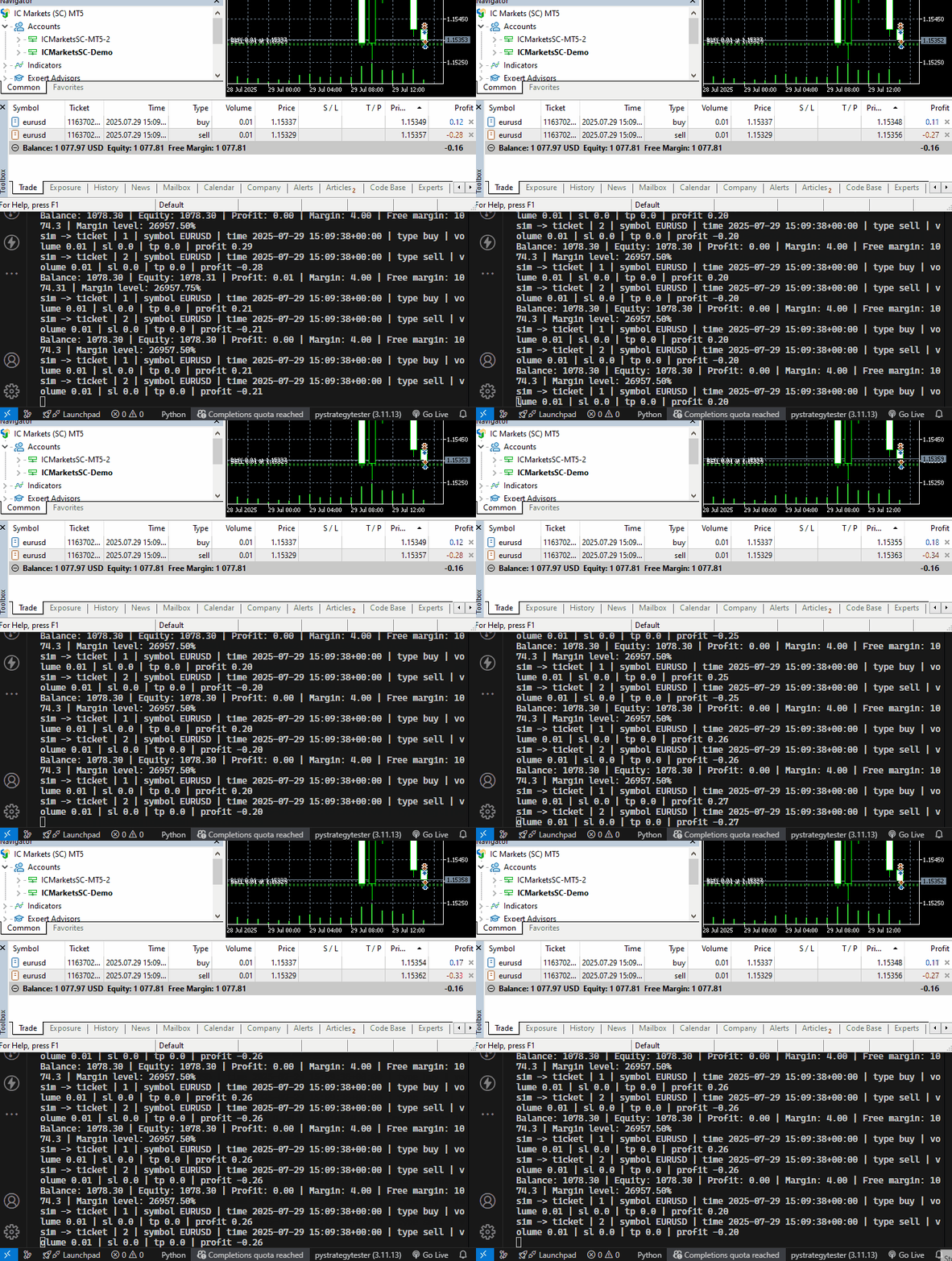
直接控制台输出观感较差。接下来我们搭建简易图形界面程序,直观展示 Python 模拟交易运行状态。
实时模拟图形界面程序
这款简易界面程序将基于 tkinter 模块开发。
import tkinter as tk
from tkinter import ttk
from datetime import datetime

class SimToolboxGUI:

    def __init__(self):
        self.root = tk.Tk()
        self.root.title("Trade Simulator Monitor")
        self.root.geometry("900x700")
        self.root.configure(bg="#f0f0f0")

        # === ACCOUNT INFO DISPLAY ===
        self.account_label = tk.Label(
            self.root,
            text="",
            font=("Courier", 8),
            anchor="w",
            justify="left",
            bg="#f0f0f0",
            fg="#333",
        )
        self.account_label.pack(fill="x", padx=5, pady=(5, 6))

        # === POSITION TABLE ===
        position_frame = tk.LabelFrame(self.root, text="Open Positions", bg="#f0f0f0")
        position_frame.pack(fill="both", expand=True, padx=10, pady=5)

        self.position_columns = [
            "id", "symbol", "time", "type", "volume", "open_price", "sl", "tp",
            "swap", "price", "profit", "comment"
        ]

        self.position_tree = ttk.Treeview(position_frame, columns=self.position_columns, show="headings", height=10)
        for col in self.position_columns:
            self.position_tree.heading(col, text=col)
            self.position_tree.column(col, anchor="center", width=80)
        self.position_tree.pack(fill="both", expand=True, padx=5, pady=5)

        vsb1 = ttk.Scrollbar(position_frame, orient="vertical", command=self.position_tree.yview)
        self.position_tree.configure(yscrollcommand=vsb1.set)
        vsb1.pack(side="right", fill="y")

        # === ORDER TABLE ===
        order_frame = tk.LabelFrame(self.root, text="Pending Orders", bg="#f0f0f0")
        order_frame.pack(fill="both", expand=True, padx=10, pady=5)

        self.order_columns = [
            "id", "symbol", "time", "type", "volume", "open_price", "sl", "tp", "price",
            "expiry_date", "expiration_mode", "comment"
        ]

        self.order_tree = ttk.Treeview(order_frame, columns=self.order_columns, show="headings", height=10)
        for col in self.order_columns:
            self.order_tree.heading(col, text=col)
            self.order_tree.column(col, anchor="center", width=100)
        self.order_tree.pack(fill="both", expand=True, padx=5, pady=5)

        vsb2 = ttk.Scrollbar(order_frame, orient="vertical", command=self.order_tree.yview)
        self.order_tree.configure(yscrollcommand=vsb2.set)
        vsb2.pack(side="right", fill="y")

    def update(self, account_info: dict, positions: list, orders: list):
        # === Update account info ===
        acc_text = (
            f"Balance: {account_info['balance']:.2f} | "
            f"Equity: {account_info['equity']:.2f} | "
            f"Profit: {account_info['profit']:.2f} | "
            f"Margin: {account_info['margin']:.2f} | "
            f"Free margin: {account_info['free_margin']:.5f} | "
            f"Margin level: {account_info['margin_level']:.2f}%"
        )
        self.account_label.config(text=acc_text)

        # === Refresh positions ===
        for row in self.position_tree.get_children():
            self.position_tree.delete(row)

        for pos in positions:
            row = [pos.get(col, "") for col in self.position_columns]
            self.position_tree.insert("", "end", values=row)

        # === Refresh orders ===
        for row in self.order_tree.get_children():
            self.order_tree.delete(row)

        for order in orders:
            row = []
            for col in self.order_columns:
                val = order.get(col, "")
                if isinstance(val, datetime):
                    val = val.strftime("%Y-%m-%d %H:%M:%S")
                row.append(val)
            self.order_tree.insert("", "end", values=row)

        self.root.update()

    def run(self):
        self.root.mainloop()
该 GUI 类会创建两张表格,一张用于展示挂单,另一张展示持仓。图形界面顶部区域展示账户信息。
我们在 TradeSimulator 类的构造函数中初始化这款模拟工具箱图形界面。
文件:trade_simulator.py
from toolbox_gui import SimToolboxGUI

class TradeSimulator:
    def __init__(self, simulator_name: str, mt5_instance: mt5, deposit: float, leverage: str="1:100"):

        # ... other variables

        self.toolbox_gui = SimToolboxGUI()  # Initialize the GUI
我们单独封装一个函数,用来更新 GUI 中展示的数据。
class TradeSimulator:

    # ... other functions

    def run_toolbox_gui(self):

        """
        Runs the simulator toolbox GUI.
        """

        self.toolbox_gui.update(self.account_info, self.open_trades_container)
在执行持仓、订单、账户监控相关函数之后,我们调用图形界面刷新函数。
while True: # constantly monitor trades and account metrics

    sim.monitor_account(verbose=False)
    sim.monitor_positions(verbose=False)
    sim.monitor_orders()

    sim.run_toolbox_gui()  # Run the simulator toolbox GUI

    time.sleep(1) # sleep for one second
接下来我们同时在 MetaTrader 5 与 Python 模拟器中建立若干持仓与挂单,观察两边运行结果差异。
文件名:simulator_test.py
if not mt5.initialize(): # Initialize MetaTrader5 instance
    print(f"Failed to Initialize MetaTrader5. Error = {mt5.last_error()}")
    mt5.shutdown()
    quit()


sim = TradeSimulator(simulator_name="MySimulator", mt5_instance=mt5, deposit=1078.30, leverage="1:500")

magic_number = 123456
slippage = 10

sim.set_magicnumber(magic_number=magic_number) #sets the magic number of a simulator
sim.set_deviation_in_points(deviation_points=slippage) # sets slippage of the simulator

m_trade = CTrade() # Initializing the CTrade class

symbol = "EURUSD"

m_trade.set_magicnumber(magic_number=magic_number) # sets the magic number of the CTrade class
m_trade.set_deviation_in_points(deviation_points=slippage) # sets slippage
m_trade.set_filling_type_by_symbol(symbol=symbol) #set filling type by the given symbol

m_symbol = CSymbolInfo(mt5_instance=mt5)
m_symbol.name(symbol_name=symbol) # sets the symbol name for the class CSymbolInfo


# Open trades in a Simulator

sim.monitor_account(verbose=False)

if m_symbol.refresh_rates() is None: # Get recent ticks data from MetaTrader5
    print("failed to get recent ticks data")

# Market Orders

sim.buy(volume=0.1, symbol=symbol, open_price=m_symbol.ask())
sim.sell(volume=0.1, symbol=symbol, open_price=m_symbol.bid())

m_trade.buy(volume=0.1, symbol=symbol, price=m_symbol.ask())
m_trade.sell(volume=0.1, symbol=symbol, price=m_symbol.bid())

# Pending Orders

expiry = datetime.now(tz=pytz.UTC) + timedelta(days=1) # expiration date for pending orders
price_gap = 0.0005

# Buy Stop: place above current ask
sim.buy_stop(volume=0.1, symbol=symbol, open_price=m_symbol.ask() + price_gap, sl=0.0, tp=0.0,
             comment="Buy Stop Example", expiry_date=expiry, expiration_mode="daily")

m_trade.buy_stop(volume=0.1, symbol=symbol, price=m_symbol.ask() + price_gap)

# Buy Limit: place below current bid
sim.buy_limit(volume=0.1, symbol=symbol, open_price=m_symbol.bid() - price_gap, sl=0.0, tp=0.0,
              comment="Buy Limit Example", expiry_date=expiry, expiration_mode="daily_excluding_stops")

m_trade.buy_limit(volume=0.1, symbol=symbol, price=m_symbol.bid() - price_gap)

# Sell Stop: place below current bid

sim.sell_stop(volume=0.1, symbol=symbol, open_price=m_symbol.bid() - price_gap, sl=0.0, tp=0.0,
              comment="Sell Stop Example", expiry_date=expiry, expiration_mode="gtc")

m_trade.sell_stop(volume=0.1, symbol=symbol, price=m_symbol.ask() - price_gap)

# Sell Limit: place above current ask
sim.sell_limit(volume=0.1, symbol=symbol, open_price=m_symbol.ask() + price_gap, sl=0.0, tp=0.0,
               comment="Sell Limit Example", expiry_date=expiry, expiration_mode="gtc")

m_trade.sell_limit(volume=0.1, symbol=symbol, price=m_symbol.bid() + price_gap)

while True: # constantly monitor trades and account metrics

    sim.monitor_account()
    sim.monitor_pending_orders()
    sim.monitor_positions(verbose=False)
    sim.monitor_orders()

    sim.run_toolbox_gui()  # Run the simulator toolbox GUI

    time.sleep(1) # sleep for one second
输出。
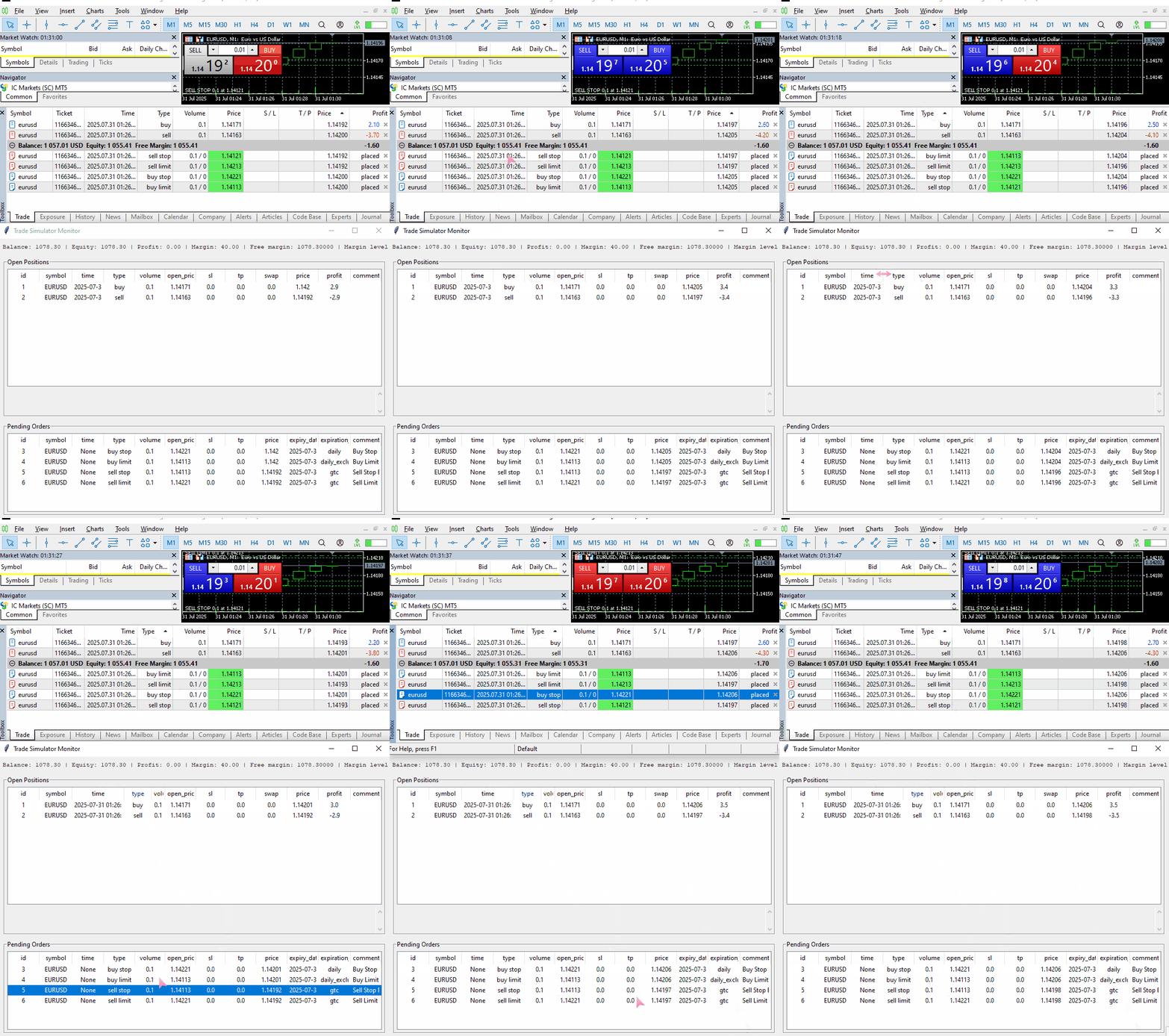
可以看到,模拟结果与真实交易结果还谈不上非常接近,但也不算相差很远,这已经是不错的进展。
外部管理与控制持仓、订单
能够在模拟器外部读取持仓信息并控制交易,这正是算法交易的核心所在。
很多交易策略都需要查询历史持仓状态。举例:某策略要求机器人仅在当前品种不存在同向持仓时,才新开多单。
接下来表格列出一系列函数,支持在 TradeSimulator 类外部访问全部订单、持仓与成交记录。
| 函数 | 返回值 |
|---|---|
def get_positions(self) -> list: | 用于返回容器内全部持仓。 |
def get_orders(self) -> list: | 用于返回容器内全部有效挂单。 |
def get_deals(self, start_time: datetime = None, end_time: datetime = None, from_db: bool = False) -> list: | 返回在 `start_time` 与 `end_time` 指定时间区间内所有已成交记录。 可选参数 from_db 用于选择数据来源:从内存临时缓存读取成交记录,或是从数据库读取。 |
使用示例:
sim.buy(volume=0.1, symbol=symbol, open_price=m_symbol.ask())
sim.sell(volume=0.1, symbol=symbol, open_price=m_symbol.bid())

price_gap = 0.0005
# Buy Stop: place above current ask
sim.buy_stop(volume=0.1, symbol=symbol, open_price=m_symbol.ask() + price_gap)


print("Positions total: ",len(sim.get_positions()))
print("Orders total: ",len(sim.get_orders()))

now = m_symbol.time(timezone=pytz.UTC)
start_time = now - timedelta(minutes=5)
end_time = now

print("Deals total: ",len(sim.get_deals(start_time=start_time,
                                        end_time=end_time,
                                        from_db=False
                              )))
输出。
(pystrategytester) C:\Users\Omega Joctan\OneDrive\Desktop\Python Strategy Tester>conda run --live-stream --name pystrategytester python "c:/Users/Omega Joctan/OneDrive/Desktop/Python Strategy
Tester/simulator_test.py"
Trade opened successfully:  {'time': datetime.datetime(2025, 7, 31, 9, 59, 51, tzinfo=<UTC>), 'id': 1, 'magic': 123456, 'symbol': 'EURUSD', 'type': 'buy', 'volume': 0.1, 'open_price': 1.14597, 'price': 0.0, 'sl': 0.0, 'tp': 0.0, 'commission': 0.0, 'margin_required': 20.0, 'fee': 0.0, 'swap': 0.0, 'profit': 0.0, 'comment': ''}
Trade opened successfully:  {'time': datetime.datetime(2025, 7, 31, 9, 59, 51, tzinfo=<UTC>), 'id': 2, 'magic': 123456, 'symbol': 'EURUSD', 'type': 'sell', 'volume': 0.1, 'open_price': 1.14589, 'price': 0.0, 'sl': 0.0, 'tp': 0.0, 'commission': 0.0, 'margin_required': 20.0, 'fee': 0.0, 'swap': 0.0, 'profit': 0.0, 'comment': ''}
Margin calculation mode:   Calculation of profit and margin for Forex
Positions total:  2
Orders total:  1
Deals total:  2
在筛选成交记录时,应当使用品种对应的 UTC 时间(和开仓、挂单时保持一致),不要直接使用本地时间,避免出现时间偏差。
依托这些接口函数,我们就可以为交易策略加入各类判定条件。
(a) 检测模拟环境中是否存在指定类型交易
这是交易监控中非常常见的需求。在不少交易策略里,我们希望仅在不存在对应持仓或挂单时,才执行新开仓操作。
if not mt5.initialize(): # Initialize MetaTrader5 instance
    print(f"Failed to Initialize MetaTrader5. Error = {mt5.last_error()}")
    mt5.shutdown()
    quit()

sim = TradeSimulator(simulator_name="MySimulator", mt5_instance=mt5, deposit=1078.30, leverage="1:500")

magic_number = 123456
slippage = 10

sim.set_magicnumber(magic_number=magic_number) #sets the magic number of a simulator
sim.set_deviation_in_points(deviation_points=slippage) # sets slippage of the simulator

symbol = "EURUSD"
m_symbol = CSymbolInfo(mt5_instance=mt5)
m_symbol.name(symbol_name=symbol) # sets the symbol name for the class CSymbolInfo


def is_position_exists(type: str) -> bool:

    for pos in sim.get_positions():
        if pos["magic"] == magic_number and pos["symbol"] == symbol and pos["type"] == type:
            return True # position exists

    return False

while True: #imitating the OnTick function offered in MQL5 language

    sim.monitor_pending_orders()
    sim.monitor_positions(verbose=False)
    sim.monitor_account(verbose=False)

    sim.run_toolbox_gui()  # Run the simulator toolbox GUI

    if m_symbol.refresh_rates() is None: # Get recent ticks data from MetaTrader5
        # print("failed to get recent ticks data")
        continue

    if not is_position_exists("buy"): # open a buy trade in a simulator if it doesn't exist
        sim.buy(volume=0.1, symbol=symbol, open_price=m_symbol.ask())

    if not is_position_exists("sell"): # open a sell trade in a simulator if it doesn't exist
        sim.sell(volume=0.1, symbol=symbol, open_price=m_symbol.bid())

    time.sleep(1) # sleep for one second
输出。
(pystrategytester) C:\Users\Omega Joctan\OneDrive\Desktop\Python Strategy Tester>conda run --live-stream --name pystrategytester python "c:/Users/Omega Joctan/OneDrive/Desktop/Python Strategy
Tester/simulator_test.py"
Trade opened successfully:  {'time': datetime.datetime(2025, 7, 31, 10, 13, 18, tzinfo=<UTC>), 'id': 1, 'magic': 123456, 'symbol': 'EURUSD', 'type': 'buy', 'volume': 0.1, 'open_price': 1.14565, 'price': 0.0, 'sl': 0.0, 'tp': 0.0, 'commission': 0.0, 'margin_required': 20.0, 'fee': 0.0, 'swap': 0.0, 'profit': 0.0, 'comment': ''}
Trade opened successfully:  {'time': datetime.datetime(2025, 7, 31, 10, 13, 18, tzinfo=<UTC>), 'id': 2, 'magic': 123456, 'symbol': 'EURUSD', 'type': 'sell', 'volume': 0.1, 'open_price': 1.14557, 'price': 0.0, 'sl': 0.0, 'tp': 0.0, 'commission': 0.0, 'margin_required': 20.0, 'fee': 0.0, 'swap': 0.0, 'profit': 0.0, 'comment': ''}
我们一共只建立了两个不同方向的持仓(多单与空单)。
这套接口和 MQL5 提供的接口十分相似,我们经常使用它来判断目标持仓是否存在。
(b) 平仓指定持仓
def close_positions(type: str):

    for pos in sim.get_positions():
        if pos["magic"] == magic_number and pos["symbol"] == symbol and pos["type"] == type:
            sim.position_close(pos)
部分策略需要在满足预设条件时平掉指定交易;上面这个函数或者同类写法就能派上用场。
我们先建立多单、空单两张持仓,然后执行平多单操作。
while True:

    sim.monitor_pending_orders()
    sim.monitor_positions(verbose=False)
    sim.monitor_account(verbose=False)

    sim.run_toolbox_gui()  # Run the simulator toolbox GUI

    if m_symbol.refresh_rates() is None: # Get recent ticks data from MetaTrader5
        # print("failed to get recent ticks data")
        continue

    if not is_position_exists("buy"): # open a buy trade in a simulator if it doesn't exist
        sim.buy(volume=0.1, symbol=symbol, open_price=m_symbol.ask())

    close_positions("buy") # close all buy positions

    if not is_position_exists("sell"): # open a sell trade in a simulator if it doesn't exist
        sim.sell(volume=0.1, symbol=symbol, open_price=m_symbol.bid())

    time.sleep(1) # sleep for one second
输出。
(pystrategytester) C:\Users\Omega Joctan\OneDrive\Desktop\Python Strategy Tester>conda run --live-stream --name pystrategytester python "c:/Users/Omega Joctan/OneDrive/Desktop/Python Strategy
Tester/simulator_test.py"
Trade opened successfully:  {'time': datetime.datetime(2025, 7, 31, 10, 50, 35, tzinfo=<UTC>), 'id': 1, 'magic': 123456, 'symbol': 'EURUSD', 'type': 'buy', 'volume': 0.1, 'open_price': 1.14447, 'price': 0.0, 'sl': 0.0, 'tp': 0.0, 'commission': 0.0, 'margin_required': 20.0, 'fee': 0.0, 'swap': 0.0, 'profit': 0.0, 'comment': ''}
Trade closed successfully:  {'time': datetime.datetime(2025, 7, 31, 10, 50, 35, tzinfo=<UTC>), 'id': 1, 'magic': 123456, 'symbol': 'EURUSD', 'type': 'buy', 'volume': 0.1, 'open_price': 1.14447, 'price': 0.0, 'sl': 0.0, 'tp': 0.0, 'commission': 0.0, 'margin_required': 20.0, 'fee': 0.0, 'swap': 0.0, 'profit': 0.0, 'comment': '', 'direction': 'closed', 'reason': 'Take profit'}
Trade opened successfully:  {'time': datetime.datetime(2025, 7, 31, 10, 50, 35, tzinfo=<UTC>), 'id': 2, 'magic': 123456, 'symbol': 'EURUSD', 'type': 'sell', 'volume': 0.1, 'open_price': 1.14439, 'price': 0.0, 'sl': 0.0, 'tp': 0.0, 'commission': 0.0, 'margin_required': 20.0, 'fee': 0.0, 'swap': 0.0, 'profit': 0.0, 'comment': ''}
Trade opened successfully:  {'time': datetime.datetime(2025, 7, 31, 10, 50, 37, tzinfo=<UTC>), 'id': 3, 'magic': 123456, 'symbol': 'EURUSD', 'type': 'buy', 'volume': 0.1, 'open_price': 1.14446, 'price': 0.0, 'sl': 0.0, 'tp': 0.0, 'commission': 0.0, 'margin_required': 20.0, 'fee': 0.0, 'swap': 0.0, 'profit': 0.0, 'comment': ''}
Trade closed successfully:  {'time': datetime.datetime(2025, 7, 31, 10, 50, 37, tzinfo=<UTC>), 'id': 3, 'magic': 123456, 'symbol': 'EURUSD', 'type': 'buy', 'volume': 0.1, 'open_price': 1.14446, 'price': 0.0, 'sl': 0.0, 'tp': 0.0, 'commission': 0.0, 'margin_required': 20.0, 'fee': 0.0, 'swap': 0.0, 'profit': 0.0, 'comment': '', 'direction': 'closed', 'reason': 'Take profit'}
成交记录处理
在 MetaTrader 5 中,**Deal(成交记录)**代表一次真实交易执行,是订单最终成交产生的结果。每一条成交记录都对应某一张订单,但一张订单可能产生多条成交记录(例如订单分批成交)。
产生成交记录的场景。
- 新建持仓;
- 持仓部分平仓或全部平仓;
- 限价单、止损单等挂单被触发并完成成交。
简单来说,开仓与平仓的每一次撮合执行,都会生成成交记录。
订单与持仓的数据可以临时修改,成交记录则与之不同:成交记录不可变更,永久保存在交易历史中。它是交易执行的永久凭证,无法修改、删除。
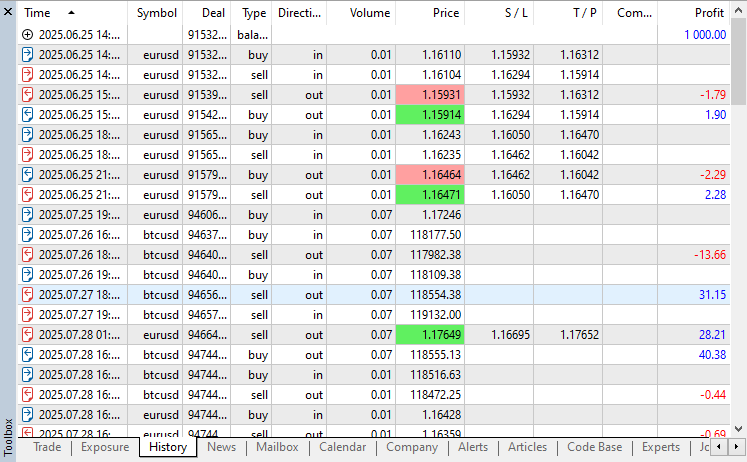
在本模拟器代码中,负责开仓的 _position_open 函数与负责平仓的 position_close 函数执行末尾,都会向类构造函数内定义的 deals_container 列表追加一条成交记录。
    def _open_position(self, pos_type: str, volume: float, symbol: str, price: float, sl: float = 0.0, tp: float = 0.0, comment: str = "") -> bool:

        trade_info = self.trade_info.copy()

        # ... other operations
        # ...

        # Append to open trades
        self.open_trades_container.append(trade_info)
        print("Trade opened successfully: ", trade_info)

        # Track deal
        self.deal_info.update(trade_info)
        self.deal_info["direction"] = "opened"
        self.deal_info["reason"] = "Expert"
        self.deals_container.append(self.deal_info.copy())
    def position_close(self, selected_pos: dict) -> bool:

        # Update deal info

        deal_info = selected_pos.copy()
        deal_info["direction"] = "closed"

        # ... other operations

        deal_info["reason"] = "Unknown" # Unkown deal reason if the stoploss or takeprofit wasn't hit

        if selected_pos["type"] == "buy":
            if np.isclose(selected_pos["tp"], bid, digits): # check if the current bid price is almost equal to the takeprofit
                deal_info["reason"] = "Take profit"

            elif np.isclose(selected_pos["sl"], bid, digits): # check if the current bid price is almost equal to the stoploss
                deal_info["reason"] = "Stop loss"


        if selected_pos["type"] == "sell":
            if np.isclose(selected_pos["tp"], ask, digits): # check if the current ask price is almost equal to the takeprofit
                deal_info["reason"] = "Take profit"

            elif np.isclose(selected_pos["sl"], ask, digits): # check if the current ask price is almost equal to the stoploss
                deal_info["reason"] = "Stop loss"


        self.deals_container.append(deal_info.copy()) # add the deal to the deals container

        print("Trade closed successfully: ", deal_info)
不过将模拟器产生的成交记录仅保存在列表 / 数组中并不理想,一旦程序关闭,这些数据就会全部丢失。我们选择使用 SQLite3 数据库实现持久化存储,这些记录会长期保留,除非开发者主动对数据库进行维护,实现方式与 MetaTrader 5 的机制相仿。
    def _create_deals_db(self, db_name: str):

        """
         Creates a SQLite database to store trade history and account information.

        Args:
            db_name (str): The name of the database file.
        """

        conn = sqlite3.connect(db_name)
        cursor = conn.cursor()

        # Create tables if they do not exist
        cursor.execute('''
            CREATE TABLE IF NOT EXISTS closed_deals (
                id INTEGER PRIMARY KEY AUTOINCREMENT,
                time TEXT,
                magic INTEGER,
                symbol TEXT,
                type TEXT,
                direction TEXT,
                volume REAL,
                price REAL,
                sl REAL,
                tp REAL,
                commission REAL,
                margin_required REAL,
                fee REAL,
                swap REAL,
                profit REAL,
                comment TEXT,
                reason TEXT
            )
        ''')

        conn.commit()
        conn.close()
上述函数在 TradeSimulator 类的构造函数内部被调用。
class TradeSimulator:
    def __init__(self, simulator_name: str, mt5_instance: mt5, deposit: float, leverage: str="1:100"):

        # ... other variables
        # ...

        # Database for trade history

        self.sim_folder = "Simulations"

        os.makedirs(self.sim_folder, exist_ok=True)  # Ensure the simulations path exists

        # Create the database file name

        self.history_db_name = os.path.join(self.sim_folder, self.simulator_name+".db")
        self._create_deals_db(self.history_db_name)
程序会根据传入的 simulator_name 创建同名数据库文件;函数 _create_deals_db 会在数据库中自动创建 closed_deals 数据表(表不存在时才新建)。
我们还需要一个函数,将每一条成交记录持久化写入数据库。
    def _save_deal(self, deal: dict, db_name: str):
        """
            Saves a closed deal to the SQLite database.
        """

        conn = sqlite3.connect(db_name)
        cursor = conn.cursor()

        cursor.execute("""
            INSERT INTO closed_deals (
                time, magic, symbol, type, direction, volume, price, sl, tp,
                commission, margin_required, fee, swap, profit, comment, reason
            ) VALUES (
                :time, :magic, :symbol, :type, :direction, :volume, :price, :sl, :tp,
                :commission, :margin_required, :fee, :swap, :profit, :comment, :reason
            );
        """, deal)

        conn.commit()
        conn.close()
留意代码:建表语句中我们没有手动定义 id 字段。数据表内的 id 字段设置为 AUTOINCREMENT(自增),保证全部成交记录拥有唯一编号,数值从 0 开始持续递增。
在开仓、平仓逻辑中,成交记录先存入内存列表 deals_container,随后同步写入数据库。
在 position_close 函数内:
    def position_close(self, selected_pos: dict) -> bool:

        # Update deal info

        deal_info = selected_pos.copy()
        deal_info["direction"] = "closed"


        #...
        #...

        print("Trade closed successfully: ", deal_info)

        # Save closed deal to database
        self._save_deal(deal_info, self.history_db_name)
在 _open_position 函数内:
    def _open_position(self, pos_type: str, volume: float, symbol: str, price: float, sl: float = 0.0, tp: float = 0.0, comment: str = "") -> bool:

        trade_info = self.trade_info.copy()

        #...
        #...
        #...

        self.deals_container.append(self.deal_info.copy())

        # Log to database
        self._save_deal(self.deal_info, self.history_db_name)

        return True
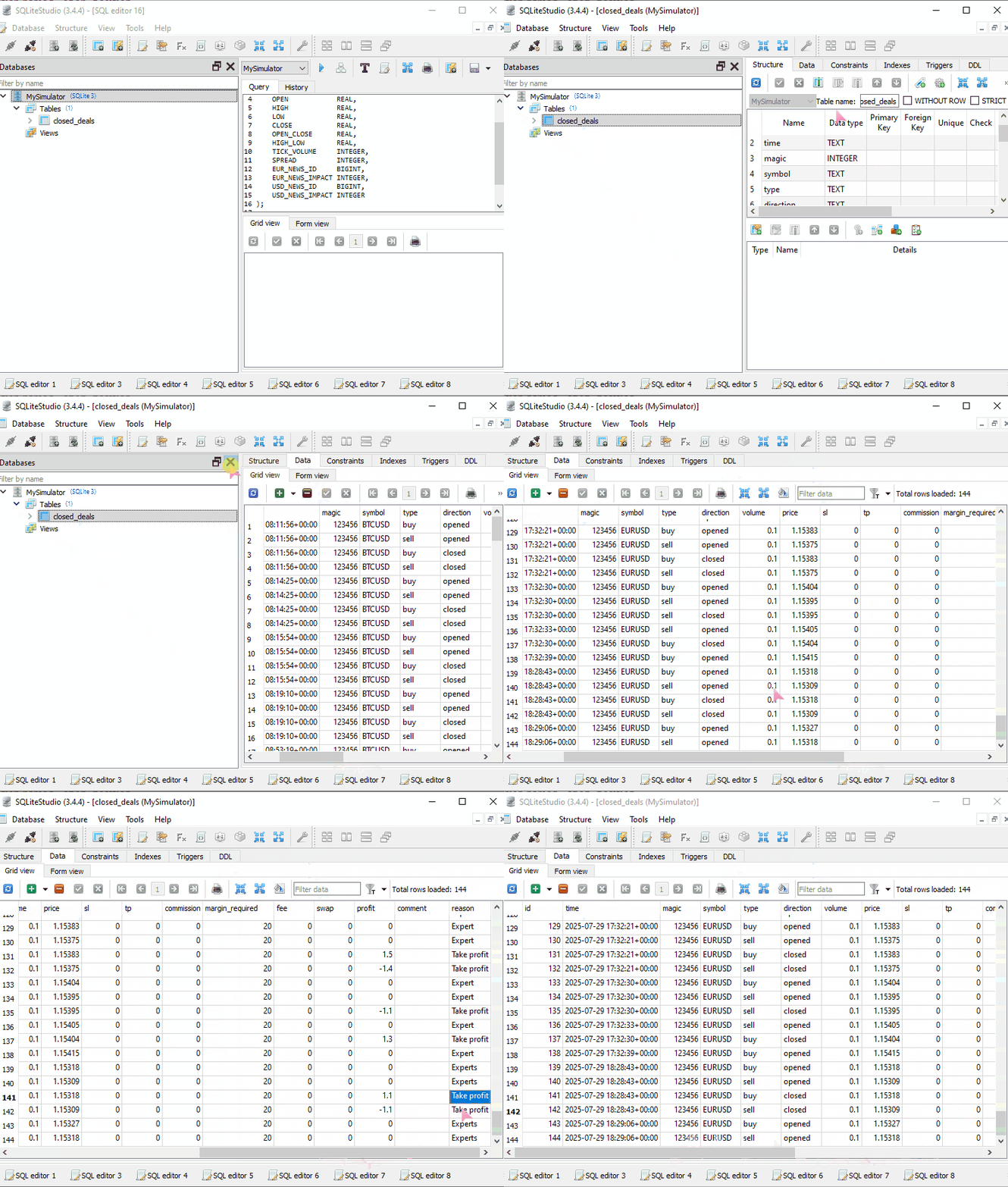
下方截图展示 SQLite 数据库,存储过去数小时、数天产生的全部成交记录。
最后的思考
在搭建这套简易 MT5 模拟器的过程中,愈发感受到 MetaTrader 5 策略测试器的精密程度。策略测试器后台远不止单纯执行交易,还有大量复杂逻辑同步运行。
看到这里你可能会产生疑问:我们有必要再造一个模拟器吗?借助 MetaTrader5-Python 库我们本身就能在真实账户环境下单,我们搭建的模拟器看起来和它功能相近。
本文的核心目标是理解交易模拟器底层运行逻辑。通过模拟简单交易,并让模拟结果尽量贴近真实账户成交表现,可以说我们已经逐步达成目标。
客观来讲,这套模拟器距离 MT5 官方策略测试器还有很大差距,远谈不上完善。仍有大量功能缺失、部分逻辑有待优化。说实话,想要兼顾所有细节十分困难。如果你有想法、建议,或是愿意参与协作开发,欢迎访问 GitHub -> https://github.com/MegaJoctan/PyMetaTester。
后续内容预告
在当前这套交易模拟器中,我们从行情接口获取关键数据,例如买卖盘报价,以及品种相关参数。后续文章将介绍多种 Tick 数据读取方案,在循环中迭代历史行情数据,复刻官方策略测试器的历史回测机制。
祝好。
附件表格
| 文件名 | 说明和用法 |
|---|---|
| requirements.txt | 存放项目全部 Python 依赖库清单。 |
| trade_simulator.py | 文件内包含 TradeSimulator 类,整套交易模拟器的核心实现都在此文件。 |
| simulator_test.py | 用于测试上文交易模拟器的演示脚本。 |
| toolbox_gui.py | 实现一款简易图形界面,界面风格参考 MetaTrader 5,用来展示交易记录与账户资金信息。 |
| Trade\SymbolInfo.py | 定义 CSymbolInfo 类,可通过 MetaTrader5 获取指定交易品种的完整行情信息。 |
| Trade\Trade.py | 定义 CTrade 类,封装各类接口,依托 metatrader5-Python 库在 MetaTrader5 中执行开仓、下达挂单等操作。 |
本文由MetaQuotes Ltd译自英文
原文地址: https://www.mql5.com/en/articles/18971
注意: MetaQuotes Ltd.将保留所有关于这些材料的权利。全部或部分复制或者转载这些材料将被禁止。
本文由网站的一位用户撰写,反映了他们的个人观点。MetaQuotes Ltd 不对所提供信息的准确性负责,也不对因使用所述解决方案、策略或建议而产生的任何后果负责。



 基于协整股票的统计套利(第二部分):EA、回测与优化
 我们如何打造最强大的机器学习驱动交易平台:通过档案、论坛与发布记录回顾 MQL 与 MetaTrader 的演进
 MQL5交易工具(第八部分):具备可拖拽与可最小化功能的增强型信息仪表盘
 精通日志记录(第十部分):通过抑制机制避免日志重复输出
