

MQL5での取引戦略の自動化(第30回):視覚的フィードバックによるプライスアクションAB-CDハーモニックパターンの作成
 267
267
 2
2

はじめに
前回の記事(第29回)では、MetaQuotes Language 5 (MQL5)で、正確なフィボナッチ比を用いて弱気と強気のガートレーハーモニックパターンを検出し、算出されたエントリー、ストップロス(SL)、テイクプロフィット(TP)レベルで取引を自動化し、三角形やトレンドラインなどのチャートオブジェクトによってパターンを可視化するhttps://www.investopedia.com/terms/g/gartley.aspガートレーパターンシステムを開発しました。第30回となる本記事では、AB=CDパターンシステムを紹介します。ガートレーシステムが複数のフィボナッチ比で定義される複雑なハーモニック構造を検出する仕組みであるのに対し、AB=CDシステムは、ピボットポイントと特定のリトレースメントおよびエクステンション比を用いて、価格の2つの区間(ABとCD)が等しくなるパターンを判定します。これにより、よりシンプルでありながら動的なパターン認識が可能になります。AB=CDシステムでは、柔軟なエントリー手法と複数段階のTPを備えた取引を実行し、三角形やトレンドライン、ラベルを活用してパターンの視認性を高めます。本記事では以下のトピックを扱います。
この記事を読み終える頃には、AB=CDハーモニックパターン取引のためのロバストなMQL5戦略を手に入れ、自由にカスタマイズできるようになります。それでは、さっそく始めましょう。
AB=CDハーモニックパターンフレームワークを理解する
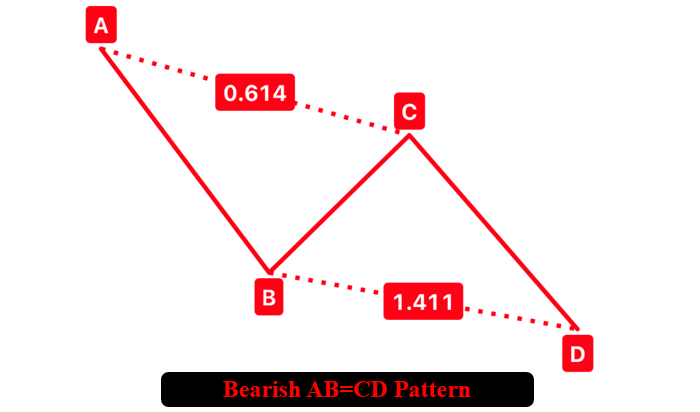
AB=CDパターンは、A、B、C、Dの4つの主要スイングポイントによって構成されるハーモニックパターンで、強気型と弱気型が存在します。フィボナッチ比率を活用して反転が起こりやすい価格帯を特定し、高い信頼性のエントリー機会を導き出すことが目的です。強気のAB=CDでは、高値-安値-高値-安値という順序で構造が形成されます。Aはスイングハイ、Bはスイングロー、Cは再びスイングハイ、DはBより下に位置するスイングローとなり、ABとCDの値幅が等しいか、あるいはフィボナッチのリトレースメントやエクステンション比で関連付けられます。弱気のAB=CDはこれと逆で、安値-高値-安値-高値という並びとなり、DはBより上に位置します。
弱気のハーモニックAB=CDパターン
強気のハーモニックAB=CDパターン
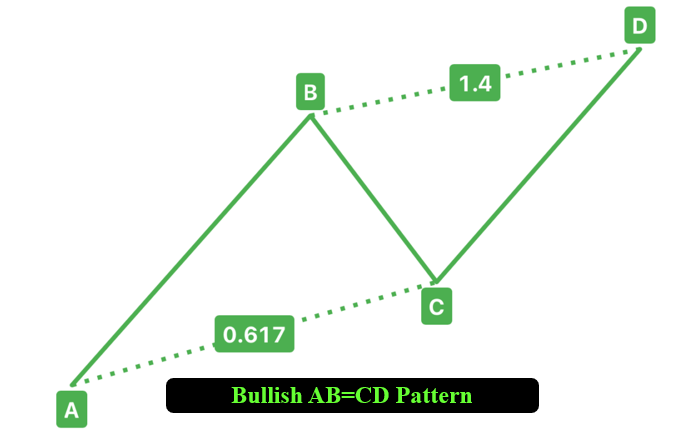
本記事で採用する手法では、指定したバー範囲内からスイングピボットを検出し、BCの戻しがABの0.382~0.886、CDの伸びがBCの1.13~2.618に収まる場合にパターンとして認証します。そのうえで、三角形やトレンドラインなどのチャートオブジェクトを用いて構造を視覚化し、Dで取引を開始します。SLと複数のTPはフィボナッチリトレースメントに基づいて算出し、想定される反転を効率よく捉えます。それでは、MQL5での実装に進みましょう。
MQL5での実装
MQL5でプログラムを作成するには、まずMetaEditorを開き、ナビゲータに移動して、Indicatorsフォルダを見つけ、[新規作成]タブをクリックして、表示される手順に従ってファイルを作成します。ファイルが作成されたら、コーディング環境で、まずプログラム全体で使用するグローバル変数をいくつか宣言する必要があります。
//+------------------------------------------------------------------+
//|                                              ABCD Pattern EA.mq5 |
//|                        Copyright 2025, Forex Algo-Trader, Allan. |
//|                                 "https://t.me/Forex_Algo_Trader" |
//+------------------------------------------------------------------+
#property copyright "Forex Algo-Trader, Allan"
#property link "https://t.me/Forex_Algo_Trader"
#property version "1.00"
#property description "This EA trades based on AB=CD Strategy"
#property strict

//--- Include the trading library for order functions
#include <Trade\Trade.mqh> //--- Include Trade library
CTrade obj_Trade; //--- Instantiate a obj_Trade object

//--- Input parameters for user configuration
input int PivotLeft = 5;          // Number of bars to the left for pivot check
input int PivotRight = 5;         // Number of bars to the right for pivot check
input double Tolerance = 0.10;    // Allowed deviation (10% of AB move)
input double LotSize = 0.01;      // Lot size for new orders
input bool AllowTrading = true;   // Enable or disable trading
//---------------------------------------------------------------------------

//--- Structure for a pivot point
struct Pivot {
   datetime time; //--- Bar time of the pivot
   double price;  //--- Pivot price (High for swing high, low for swing low)
   bool isHigh;   //--- True if swing high; false if swing low
};
//--- Global dynamic array for storing pivots in chronological order
Pivot pivots[]; //--- Declare a dynamic array to hold identified pivot points
//--- Global variables to lock in a pattern (avoid trading on repaint)
int g_patternFormationBar = -1; //--- Bar index where the pattern was formed (-1 means none)
datetime g_lockedPatternA = 0;  //--- The key A pivot time for the locked pattern
AB=CDの基盤を構築するために、まず<Trade\Trade.mqh>ライブラリをインクルードし、売買注文の実行などの取引操作を処理するためにobj_TradeをCTradeオブジェクトとしてインスタンス化します。次に、ユーザーがカスタマイズできる入力パラメータを定義します。PivotLeftとPivotRightはそれぞれ5バーに設定してピボット検出のルックバック範囲を決定し、Toleranceは0.10に設定してフィボナッチ比率の偏差許容度を10%に定め、LotSizeは0.01に設定して取引量を指定し、AllowTradingはtrueに設定して自動取引を有効化します。
続いて、スイングポイントを保存するためにtime(datetime)、price(double)、isHigh(bool)を保持するPivot構造体を定義し、これらの点を格納するためにpivotsを動的配列として宣言します。さらに、パターン形成を追跡するためにg_patternFormationBarを-1、Xピボットの時間をロックするg_lockedPatternAを0に初期化します。AB=CDパターンではABとCDの構造に焦点を当てるため、XではなくAを用いる点に留意してください。この設定により、AB=CDパターンを検出して取引するための基本的な枠組みが整います。 視覚化のために、ライン、ラベル、三角形を描画する関数を用意します。
//+------------------------------------------------------------------+
//| Helper: Draw a filled triangle                                   |
//+------------------------------------------------------------------+
void DrawTriangle(string name, datetime t1, double p1, datetime t2, double p2, datetime t3, double p3, color cl, int width, bool fill, bool back) {
   //--- Attempt to create a triangle object with three coordinate points
   if(ObjectCreate(0, name, OBJ_TRIANGLE, 0, t1, p1, t2, p2, t3, p3)) {
      //--- Set the triangle's color
      ObjectSetInteger(0, name, OBJPROP_COLOR, cl);
      //--- Set the triangle's line style to solid
      ObjectSetInteger(0, name, OBJPROP_STYLE, STYLE_SOLID);
      //--- Set the line width of the triangle
      ObjectSetInteger(0, name, OBJPROP_WIDTH, width);
      //--- Determine if the triangle should be filled
      ObjectSetInteger(0, name, OBJPROP_FILL, fill);
      //--- Set whether the object is drawn in the background
      ObjectSetInteger(0, name, OBJPROP_BACK, back);
   }
}
//+------------------------------------------------------------------+
//| Helper: Draw a trend line                                        |
//+------------------------------------------------------------------+
void DrawTrendLine(string name, datetime t1, double p1, datetime t2, double p2, color cl, int width, int style) {
   //--- Create a trend line object connecting two points
   if(ObjectCreate(0, name, OBJ_TREND, 0, t1, p1, t2, p2)) {
      //--- Set the trend line's color
      ObjectSetInteger(0, name, OBJPROP_COLOR, cl);
      //--- Set the trend line's style (solid, dotted, etc.)
      ObjectSetInteger(0, name, OBJPROP_STYLE, style);
      //--- Set the width of the trend line
      ObjectSetInteger(0, name, OBJPROP_WIDTH, width);
   }
}
//+------------------------------------------------------------------+
//| Helper: Draw a dotted trend line |
//+------------------------------------------------------------------+
void DrawDottedLine(string name, datetime t1, double p, datetime t2, color lineColor) {
   //--- Create a horizontal trend line at a fixed price level with dotted style
   if(ObjectCreate(0, name, OBJ_TREND, 0, t1, p, t2, p)) {
      //--- Set the dotted line's color
      ObjectSetInteger(0, name, OBJPROP_COLOR, lineColor);
      //--- Set the line style to dotted
      ObjectSetInteger(0, name, OBJPROP_STYLE, STYLE_DOT);
      //--- Set the line width to 1
      ObjectSetInteger(0, name, OBJPROP_WIDTH, 1);
   }
}
//+------------------------------------------------------------------+
//| Helper: Draw anchored text label (for pivots)                    |
//| If isHigh is true, anchor at the bottom (label appears above);   |
//| if false, anchor at the top (label appears below).               |
//+------------------------------------------------------------------+
void DrawTextEx(string name, string text, datetime t, double p, color cl, int fontsize, bool isHigh) {
   //--- Create a text label object at the specified time and price
   if(ObjectCreate(0, name, OBJ_TEXT, 0, t, p)) {
      //--- Set the text of the label
      ObjectSetString(0, name, OBJPROP_TEXT, text);
      //--- Set the color of the text
      ObjectSetInteger(0, name, OBJPROP_COLOR, cl);
      //--- Set the font size for the text
      ObjectSetInteger(0, name, OBJPROP_FONTSIZE, fontsize);
      //--- Set the font type and style
      ObjectSetString(0, name, OBJPROP_FONT, "Arial Bold");
      //--- Anchor the text depending on whether it's a swing high or low
      if(isHigh)
         ObjectSetInteger(0, name, OBJPROP_ANCHOR, ANCHOR_BOTTOM);
      else
         ObjectSetInteger(0, name, OBJPROP_ANCHOR, ANCHOR_TOP);
      //--- Center-align the text
      ObjectSetInteger(0, name, OBJPROP_ALIGN, ALIGN_CENTER);
   }
}
AB=CDハーモニックパターンとその取引レベルの明確なチャート表現を作成するために、可視化関数を実装していきます。まずDrawTriangle関数を作成します。この関数ではObjectCreateを使用してOBJ_TRIANGLEを作成し、3つの時刻(t1、t2、t3)と価格(p1、p2、p3)で塗りつぶされた三角形を描画します。その後、ObjectSetIntegerを使用してOBJPROP_COLORに指定の色を設定し、OBJPROP_STYLEをSTYLE_SOLIDに設定、OBJPROP_WIDTHで線幅を指定、OBJPROP_FILLで塗りつぶしの有効・無効を設定し、ObjectSetInteger 関数を用いてOBJPROP_BACKで背景か前景かを指定します。
続いて、DrawTrendLine関数を作成します。この関数は二つのポイント間にトレンドライン(OBJ_TREND)を描画します。さらに、DrawTextEx関数を開発します。この関数はObjectCreateを使って座標(t,p)にテキストラベル(OBJ_TEXT)を生成し、ObjectSetStringとObjectSetIntegerを用いて指定された文字列をOBJPROP_TEXTに設定し、OBJPROP_COLOR、OBJPROP_FONTSIZE、OBJPROP_FONTにはArial Boldを適用します。スイングハイの場合は下側、スイングローの場合は上側に表示するようOBJPROP_ANCHORを設定し、OBJPROP_ALIGNで中央揃えにします。これでOnTickイベントハンドラへ進み、後のパターン認識で使用するピボットポイントの特定をおこなう準備が整いました。そのためのロジックを以下に実装します。
//+------------------------------------------------------------------+
//| Expert tick function                                             |
//+------------------------------------------------------------------+
void OnTick() {
   //--- Declare a static variable to store the time of the last processed bar
   static datetime lastBarTime = 0;
   //--- Get the time of the current confirmed bar
   datetime currentBarTime = iTime(_Symbol, _Period, 1);
   //--- If the current bar time is the same as the last processed, exit
   if(currentBarTime == lastBarTime)
      return;
   //--- Update the last processed bar time
   lastBarTime = currentBarTime;

   //--- Clear the pivot array for fresh analysis
   ArrayResize(pivots, 0);
   //--- Get the total number of bars available on the chart
   int barsCount = Bars(_Symbol, _Period);
   //--- Define the starting index for pivot detection (ensuring enough left bars)
   int start = PivotLeft;
   //--- Define the ending index for pivot detection (ensuring enough right bars)
   int end = barsCount - PivotRight;

   //--- Loop through bars from 'end-1' down to 'start' to find pivot points
   for(int i = end - 1; i >= start; i--) {
      //--- Assume current bar is both a potential swing high and swing low
      bool isPivotHigh = true;
      bool isPivotLow = true;
      //--- Get the high and low of the current bar
      double currentHigh = iHigh(_Symbol, _Period, i);
      double currentLow = iLow(_Symbol, _Period, i);
      //--- Loop through the window of bars around the current bar
      for(int j = i - PivotLeft; j <= i + PivotRight; j++) {
         //--- Skip if the index is out of bounds
         if(j < 0 || j >= barsCount)
            continue;
         //--- Skip comparing the bar with itself
         if(j == i)
            continue;
         //--- If any bar in the window has a higher high, it's not a swing high
         if(iHigh(_Symbol, _Period, j) > currentHigh)
            isPivotHigh = false;
         //--- If any bar in the window has a lower low, it's not a swing low
         if(iLow(_Symbol, _Period, j) < currentLow)
            isPivotLow = false;
      }
      //--- If the current bar qualifies as either a swing high or swing low
      if(isPivotHigh || isPivotLow) {
         //--- Create a new pivot structure
         Pivot p;
         //--- Set the pivot's time
         p.time = iTime(_Symbol, _Period, i);
         //--- Set the pivot's price depending on whether it is a high or low
         p.price = isPivotHigh ? currentHigh : currentLow;
         //--- Set the pivot type (true for swing high, false for swing low)
         p.isHigh = isPivotHigh;
         //--- Get the current size of the pivots array
         int size = ArraySize(pivots);
         //--- Increase the size of the pivots array by one
         ArrayResize(pivots, size + 1);
         //--- Add the new pivot to the array
         pivots[size] = p;
      }
   }
}
ここでは、OnTick関数の初期ロジックを実装します。まず、最後に処理したバーを追跡するために0で初期化した静的変数lastBarTimeを宣言し、現在のシンボルと時間枠におけるシフト1のiTimeから取得したcurrentBarTimeと比較し、変化がない場合は冗長な処理を避けるため終了し、新しいバーが検出された時点でlastBarTimeを更新します。次に、ArrayResizeを使用してpivots配列をクリアし、解析をリセットします。その後、Barsでバーの総数を取得し、ピボット検出の範囲としてstartをPivotLeft、endを総バー数からPivotRightを引いた値に設定し、「end − 1」からstartまでのバーを順に処理します。
各バーについて、スイングハイ(isPivotHighがtrue)およびスイングロー(isPivotLowがtrue)であると仮定し、iHighとiLowを使ってそのバーの高値と安値を取得し、PivotLeftおよびPivotRightの範囲内にある周囲のバーをiHighとiLowでチェックし、隣接するバーにより高い高値またはより低い安値が存在する場合は、そのピボットを無効とします。最後に、バーがピボットとして有効であればPivot構造体を生成し、timeをiTimeで設定し、priceをisPivotHighに応じて高値または安値に設定し、isHighフラグを割り当てて、ArrayResizeを用いてpivots配列に追加します。ピボット構造体を印刷すると、次のデータ配列が取得されます。
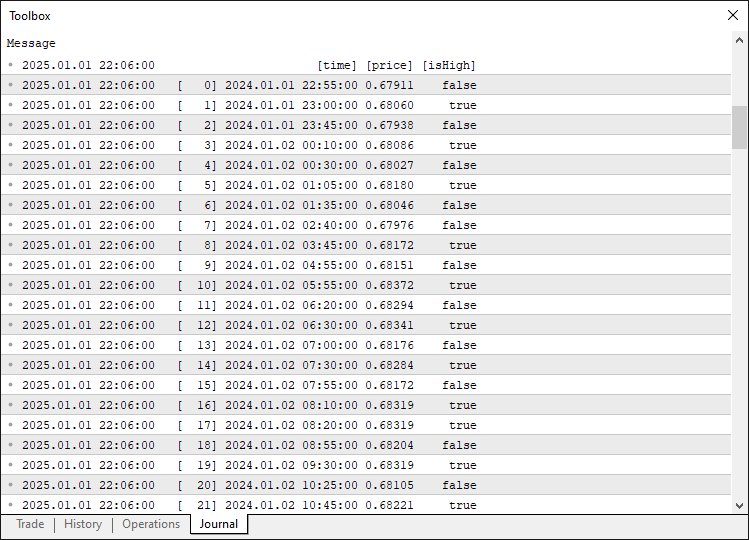
このデータを使ってピボットポイントを抽出でき、十分な数のピボットがあればパターンの解析と検出をおこなうことができます。これを実現するために、以下のロジックを実装しています。
//--- Determine the total number of pivots found
int pivotCount = ArraySize(pivots);
//--- If fewer than four pivots are found, the pattern cannot be formed
if(pivotCount < 4) {
   //--- Reset pattern lock variables
   g_patternFormationBar = -1;
   g_lockedPatternA = 0;
   //--- Exit the OnTick function
   return;
}

//--- Extract the last four pivots as A, B, C, and D
Pivot A = pivots[pivotCount - 4];
Pivot B = pivots[pivotCount - 3];
Pivot C = pivots[pivotCount - 2];
Pivot D = pivots[pivotCount - 1];

//--- Initialize a flag to indicate if a valid AB=CD pattern is found
bool patternFound = false;
//--- Initialize pattern type
string patternType = "";
double used_retr = 0.0;
double used_ext = 0.0;
//--- Check for the high-low-high-low (Bullish reversal) structure
if(A.isHigh && (!B.isHigh) && C.isHigh && (!D.isHigh)) {
   //--- Calculate the difference between pivot A and B
   double diff = A.price - B.price;
   //--- Ensure the difference is positive
   if(diff > 0) {
      //--- Calculate the BC leg length
      double BC = C.price - B.price;
      double retrace = BC / diff;
      //--- Calculate the CD leg length
      double CD = C.price - D.price;
      double extension = CD / BC;
      //--- Define fib ratios
      double fib_retr[] = {0.382, 0.5, 0.618, 0.786, 0.886};
      double fib_ext[] = {2.618, 2.0, 1.618, 1.272, 1.13};
      bool valid = false;
      for(int k = 0; k < ArraySize(fib_retr); k++) {
         if(MathAbs(retrace - fib_retr[k]) <= Tolerance && MathAbs(extension - fib_ext[k]) <= Tolerance) {
            valid = true;
            used_retr = fib_retr[k];
            used_ext = fib_ext[k];
            break;
         }
      }
      if(valid && (D.price < B.price)) {
         patternFound = true;
         patternType = "Bullish";
      }
   }
}
//--- Check for the low-high-low-high (Bearish reversal) structure
if((!A.isHigh) && B.isHigh && (!C.isHigh) && D.isHigh) {
   //--- Calculate the difference between pivot B and A
   double diff = B.price - A.price;
   //--- Ensure the difference is positive
   if(diff > 0) {
      //--- Calculate the BC leg length
      double BC = B.price - C.price;
      double retrace = BC / diff;
      //--- Calculate the CD leg length
      double CD = D.price - C.price;
      double extension = CD / BC;
      //--- Define fib ratios
      double fib_retr[] = {0.382, 0.5, 0.618, 0.786, 0.886};
      double fib_ext[] = {2.618, 2.0, 1.618, 1.272, 1.13};
      bool valid = false;
      for(int k = 0; k < ArraySize(fib_retr); k++) {
         if(MathAbs(retrace - fib_retr[k]) <= Tolerance && MathAbs(extension - fib_ext[k]) <= Tolerance) {
            valid = true;
            used_retr = fib_retr[k];
            used_ext = fib_ext[k];
            break;
         }
      }
      if(valid && (D.price > B.price)) {
         patternFound = true;
         patternType = "Bearish";
      }
   }
}
まず、ArraySize(pivots)で得られるピボットの総数をpivotCountに格納し、ピボット数が4未満の場合は処理を終了し、g_patternFormationBarとg_lockedPatternAをそれぞれ-1と0にリセットします。これは、AB=CDパターンではA、B、C、Dの4点が必須であるためです。次に、pivots配列から最後の4つのピボットを抽出し、最も古いものから順にA、B、C、Dを割り当ててパターン構造を形成します。
次に、強気のAB=CDパターン(A高値、B安値、C高値、D安値)を確認します。まずABレッグの差(A.price - B.price)を計算し、正の値であることを確認します。次にBCレッグの長さ(C.price - B.price)とABに対するリトレースメント比を計算し、CDレッグの長さ(C.price - D.price)とBCに対するエクステンション比を算出します。フィボナッチのリトレースメント比(0.382、0.5、0.618、0.786、0.886)とエクステンション比(2.618、2.0、1.618、1.272、1.13)を定義し、両方の比率がTolerance内に収まり、「D.price < B.price」であることを確認します。この条件を満たす場合、patternFoundをtrueに、patternTypeをBullishに設定し、一致したused_retrとused_extを保存します。次に、弱気のAB=CDパターン(A安値、B高値、C安値、D高値)を確認します。AB (B.price - A.price)、BC (B.price - C.price)、CD (D.price - C.price)の計算を同様におこない、同じフィボナッチ比で検証し、「D.price > B.price」であることを確認します。条件を満たす場合、patternFoundをtrueに、patternTypeをBearishに設定します。 パターンが検出された場合、チャート上にそのパターンを可視化する処理を進めることができます。
//--- If a valid AB=CD pattern is detected
if(patternFound) {
   //--- Print a message indicating the pattern type and detection time
   Print(patternType, " AB=CD pattern detected at ", TimeToString(D.time, TIME_DATE|TIME_MINUTES|TIME_SECONDS));

   //--- Create a unique prefix for all graphical objects related to this pattern
   string signalPrefix = "AB_" + IntegerToString(A.time);

   //--- Choose triangle color based on the pattern type
   color triangleColor = (patternType=="Bullish") ? clrBlue : clrRed;

   //--- Draw the first triangle connecting pivots A, B, and C
   DrawTriangle(signalPrefix+"_Triangle1", A.time, A.price, B.time, B.price, C.time, C.price,
                triangleColor, 2, true, true);
   //--- Draw the second triangle connecting pivots B, C, and D
   DrawTriangle(signalPrefix+"_Triangle2", B.time, B.price, C.time, C.price, D.time, D.price,
                triangleColor, 2, true, true);
}
パターンを可視化するには、まず、有効なパターンが検出された場合(patternFoundがtrue)、Printを用いて検出をログに記録し、patternType(BullishまたはBearish)と、TimeToStringによって日付、分、秒形式で整形されたDピボットの時間を出力します。次に、チャートオブジェクトに対して重複しない名前を付けるために、A.timeをIntegerToStringで文字列に変換し、「AB_」と連結してユニークな識別子signalPrefixを作成します。
次に、triangleColorを、強気パターンの場合は青、弱気パターンの場合は赤に設定して、視覚的に区別します。最後に、パターンを可視化するためにDrawTriangleを2回呼び出します。最初はピボットA、B、Cを結ぶ三角形ABCを、次にピボットB、C、Dを結ぶ三角形BCDを描画し、signalPrefixに「_Triangle1」と「_Triangle2」を付加したID、各ピボットの時間と価格、triangleColor、幅2、塗りつぶしと背景表示のtrueフラグを指定します。次のような結果が得られます。
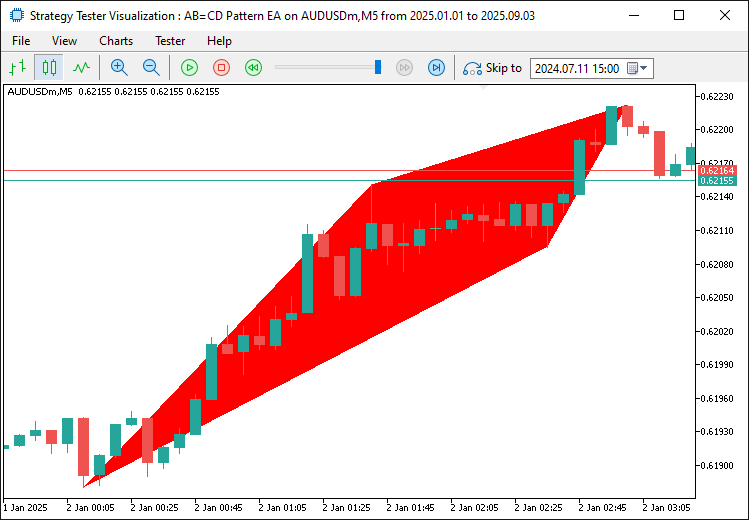
画像から、検出されたパターンを正しくマッピングおよび可視化できていることが確認できます。次に、トレンドラインを引き続きマッピングしてパターンを境界内で完全に可視化し、レベルをよりわかりやすく識別できるようにラベルを追加する必要があります。
//--- Draw boundary trend lines connecting the pivots for clarity
DrawTrendLine(signalPrefix+"_TL_AB", A.time, A.price, B.time, B.price, clrBlack, 2, STYLE_SOLID);
DrawTrendLine(signalPrefix+"_TL_BC", B.time, B.price, C.time, C.price, clrBlack, 2, STYLE_SOLID);
DrawTrendLine(signalPrefix+"_TL_CD", C.time, C.price, D.time, D.price, clrBlack, 2, STYLE_SOLID);

//--- Retrieve the symbol's point size to calculate offsets for text positioning
double point = SymbolInfoDouble(_Symbol, SYMBOL_POINT);
//--- Calculate an offset (15 points) for positioning text above or below pivots
double offset = 15 * point;

//--- Determine the Y coordinate for each pivot label based on its type
double textY_A = (A.isHigh ? A.price + offset : A.price - offset);
double textY_B = (B.isHigh ? B.price + offset : B.price - offset);
double textY_C = (C.isHigh ? C.price + offset : C.price - offset);
double textY_D = (D.isHigh ? D.price + offset : D.price - offset);

//--- Draw text labels for each pivot with appropriate anchoring
DrawTextEx(signalPrefix+"_Text_A", "A", A.time, textY_A, clrBlack, 11, A.isHigh);
DrawTextEx(signalPrefix+"_Text_B", "B", B.time, textY_B, clrBlack, 11, B.isHigh);
DrawTextEx(signalPrefix+"_Text_C", "C", C.time, textY_C, clrBlack, 11, C.isHigh);
DrawTextEx(signalPrefix+"_Text_D", "D", D.time, textY_D, clrBlack, 11, D.isHigh);

//--- Calculate the central label's time as the midpoint between pivots A and C
datetime centralTime = (A.time + C.time) / 2;
//--- Set the central label's price at pivot D's price
double centralPrice = D.price;
//--- Create the central text label indicating the pattern type
if(ObjectCreate(0, signalPrefix+"_Text_Center", OBJ_TEXT, 0, centralTime, centralPrice)) {
   ObjectSetString(0, signalPrefix+"_Text_Center", OBJPROP_TEXT,
      (patternType=="Bullish") ? "Bullish AB=CD" : "Bearish AB=CD");
   ObjectSetInteger(0, signalPrefix+"_Text_Center", OBJPROP_COLOR, clrBlack);
   ObjectSetInteger(0, signalPrefix+"_Text_Center", OBJPROP_FONTSIZE, 11);
   ObjectSetString(0, signalPrefix+"_Text_Center", OBJPROP_FONT, "Arial Bold");
   ObjectSetInteger(0, signalPrefix+"_Text_Center", OBJPROP_ALIGN, ALIGN_CENTER);
}
検出されたパターンの可視化をさらに強化するため、パターン構造を明確に示す詳細なチャートオブジェクトを追加します。まず、主要なピボット点を結ぶために、固有のsignalPrefixを付けたDrawTrendLineを使用して6本の実線トレンドラインを描画します。AB、BC、CDの各ラインは、それぞれのピボット時間と価格(例:A.time、A.price)を使用し、OBJPROP_COLORをclrBlack、OBJPROP_WIDTHを2、OBJPROP_STYLEをSTYLE_SOLIDに設定し、ObjectSetIntegerでパターンの各レッグを明確にします。次に、SymbolInfoDouble(_Symbol, SYMBOL_POINT)でシンボルの点サイズを取得し、ラベル配置のために15点のオフセットを計算し、各ピボットがスイングハイ(isHighがtrue)かスイングローかに応じてオフセットを加減してtextY_A、textY_B、textY_C、textY_Dを決定し、高値の上、安値の下にラベルを配置します。
続いて、DrawTextExを使ってピボットA、B、C、Dのテキストラベルを作成します。signalPrefixに「_Text_A」などの接尾辞を付け、それぞれの文字を表示し、ピボット時間と調整済みのY座標に配置し、clrBlack、フォントサイズ11、ピボットのisHigh値をアンカーとして設定します。最後に、中央ラベルの位置をA.timeとC.timeの中点としてcentralTimeに、価格位置をD.priceとしてcentralPriceに設定し、ObjectCreateでsignalPrefixに「_Text_Center」を付加した名前のテキストオブジェクトを生成し、OBJPROP_TEXTをpatternTypeに応じて「Bullish AB=CD」または「Bearish AB=CD」に設定し、ObjectSetStringとObjectSetIntegerでOBJPROP_COLORをclrBlack、OBJPROP_FONTSIZEを11、OBJPROP_FONTをArial Bold、OBJPROP_ALIGNをALIGN_CENTERに設定します。これによって、パターンの構造と種類をチャート上で包括的に視覚化できるようにします。プログラムを実行すると、次のような表示が得られます。
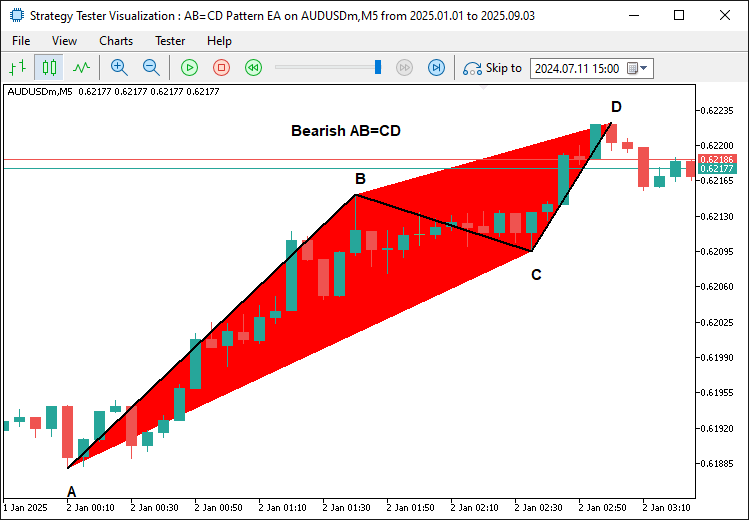
画像から、パターンにエッジ(トレンドライン)とラベルを追加したことで、より明確かつ視覚的に把握しやすくなったことが分かります。次におこなうべきことは、このパターンに基づいてトレードレベルを決定することです。
//--- Define start and end times for drawing horizontal dotted lines for trade levels
datetime lineStart = D.time;
datetime lineEnd = D.time + PeriodSeconds(_Period)*2;

//--- Declare variables for entry price and take profit levels
double entryPriceLevel, TP1Level, TP2Level, TP3Level;
//--- Calculate pattern range (CD length)
double patternRange = (patternType=="Bullish") ? (C.price - D.price) : (D.price - C.price);
//--- Calculate trade levels based on whether the pattern is Bullish or Bearish
if(patternType=="Bullish") { //--- Bullish → BUY signal
   //--- Use the current ASK price as the entry
   entryPriceLevel = SymbolInfoDouble(_Symbol, SYMBOL_ASK);
   //--- Set TP3 at pivot C's price
   TP3Level = C.price;
   //--- Set TP1 at 0.382 fib retrace from D to C
   TP1Level = D.price + 0.382 * patternRange;
   //--- Set TP2 at 0.618 fib retrace from D to C
   TP2Level = D.price + 0.618 * patternRange;
} else { //--- Bearish → SELL signal
   //--- Use the current BID price as the entry
   entryPriceLevel = SymbolInfoDouble(_Symbol, SYMBOL_BID);
   //--- Set TP3 at pivot C's price
   TP3Level = C.price;
   //--- Set TP1 at 0.382 fib retrace from D to C
   TP1Level = D.price - 0.382 * patternRange;
   //--- Set TP2 at 0.618 fib retrace from D to C
   TP2Level = D.price - 0.618 * patternRange;
}

//--- Draw dotted horizontal lines to represent the entry and TP levels
DrawDottedLine(signalPrefix+"_EntryLine", lineStart, entryPriceLevel, lineEnd, clrMagenta);
DrawDottedLine(signalPrefix+"_TP1Line", lineStart, TP1Level, lineEnd, clrForestGreen);
DrawDottedLine(signalPrefix+"_TP2Line", lineStart, TP2Level, lineEnd, clrGreen);
DrawDottedLine(signalPrefix+"_TP3Line", lineStart, TP3Level, lineEnd, clrDarkGreen);

//--- Define a label time coordinate positioned just to the right of the dotted lines
datetime labelTime = lineEnd + PeriodSeconds(_Period)/2;

//--- Construct the entry label text with the price
string entryLabel = (patternType=="Bullish") ? "BUY (" : "SELL (";
entryLabel += DoubleToString(entryPriceLevel, _Digits) + ")";
//--- Draw the entry label on the chart
DrawTextEx(signalPrefix+"_EntryLabel", entryLabel, labelTime, entryPriceLevel, clrMagenta, 11, true);

//--- Construct and draw the TP1 label
string tp1Label = "TP1 (" + DoubleToString(TP1Level, _Digits) + ")";
DrawTextEx(signalPrefix+"_TP1Label", tp1Label, labelTime, TP1Level, clrForestGreen, 11, true);

//--- Construct and draw the TP2 label
string tp2Label = "TP2 (" + DoubleToString(TP2Level, _Digits) + ")";
DrawTextEx(signalPrefix+"_TP2Label", tp2Label, labelTime, TP2Level, clrGreen, 11, true);

//--- Construct and draw the TP3 label
string tp3Label = "TP3 (" + DoubleToString(TP3Level, _Digits) + ")";
DrawTextEx(signalPrefix+"_TP3Label", tp3Label, labelTime, TP3Level, clrDarkGreen, 11, true);
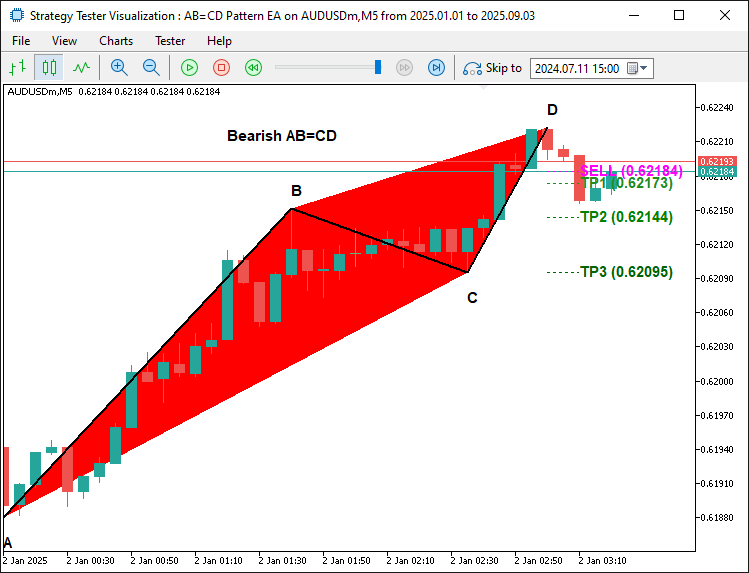
取引レベルを定義して可視化するために、lineStartをピボットDの時間(D.time)に設定し、「PeriodSeconds(_Period) * 2」を用いてlineEndを2期間先に設定します。取引計算用の変数としてentryPriceLevel、TP1Level、TP2Level、TP3Levelを宣言します。次に、patternRangeをCDレッグの長さとして計算します(強気の場合は「C.price - D.price」、弱気の場合は「D.price - C.price」)。強気パターンでは、entryPriceLevelをSymbolInfoDoubleで取得したAsk価格に設定し、TP3LevelをCの価格、TP1Levelを「D.price + 0.382 * patternRange」、TP2Levelを「D.price + 0.618 * patternRange」に設定します。弱気パターンでは、entryPriceLevelにBid価格を使用し、TP3LevelをCの価格、TP1LevelをD.price - 0.382 * patternRange、TP2Levelを「D.price - 0.618 * patternRange」に設定します。
次に、DrawDottedLineを使用して4本の点線水平線を描画します。マゼンタ色でentryPriceLevelのエントリーレベル線、TP1Levelをフォレストグリーン、TP2Levelをグリーン、TP3Levelをダークグリーンでテイクプロフィットラインとして、lineStartからlineEndまで描画します。最後に、labelTimeをlineEndに半期間を加えた値に設定し、DoubleToStringで価格をフォーマットしてラベルテキストを作成します(例:エントリーではBUY(price)またはSELL(price)、TP1はTP1(price)など)。DrawTextExを使用してこれらのラベルをlabelTimeに描画し、対応する色、フォントサイズ11、価格レベルの上にアンカー設定します。コンパイルすると、次の結果が得られます。
弱気パターン
強気パターン
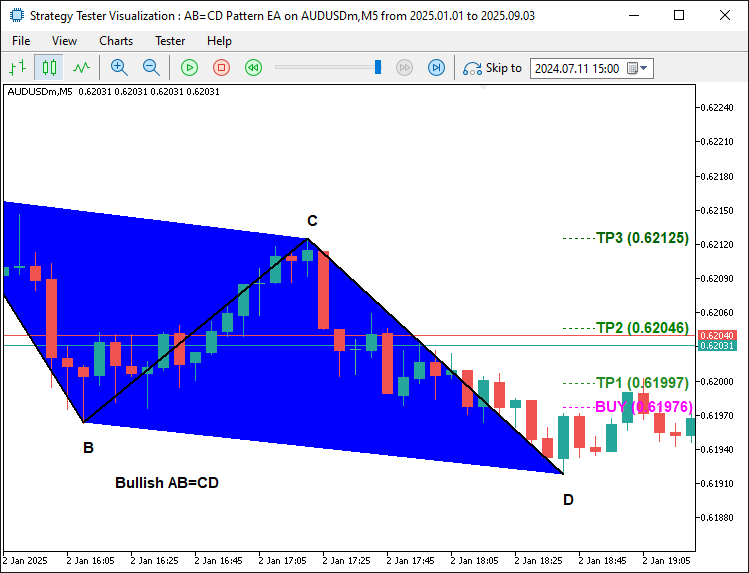
画像から、エントリーレベルが正しく表示されていることが確認できます。次に必要なのは実際にエントリーすることだけです。
//--- Retrieve the index of the current bar
int currentBarIndex = Bars(_Symbol, _Period) - 1;
//--- If no pattern has been previously locked, lock the current pattern formation
if(g_patternFormationBar == -1) {
   g_patternFormationBar = currentBarIndex;
   g_lockedPatternA = A.time;
   //--- Print a message that the pattern is detected and waiting for confirmation
   Print("Pattern detected on bar ", currentBarIndex, ". Waiting for confirmation on next bar.");
   return;
}
//--- If still on the same formation bar, the pattern is considered to be repainting
if(currentBarIndex == g_patternFormationBar) {
   Print("Pattern is repainting; still on locked formation bar ", currentBarIndex, ". No trade yet.");
   return;
}
//--- If we are on a new bar compared to the locked formation
if(currentBarIndex > g_patternFormationBar) {
   //--- Check if the locked pattern still corresponds to the same A pivot
   if(g_lockedPatternA == A.time) {
      Print("Confirmed pattern (locked on bar ", g_patternFormationBar, "). Opening trade on bar ", currentBarIndex, ".");
      //--- Update the pattern formation bar to the current bar
      g_patternFormationBar = currentBarIndex;
      //--- Only proceed with trading if allowed and if there is no existing position
      if(AllowTrading && !PositionSelect(_Symbol)) {
         double entryPriceTrade = 0, stopLoss = 0, takeProfit = 0;
         point = SymbolInfoDouble(_Symbol, SYMBOL_POINT);
         bool tradeResult = false;
         //--- Determine next extension for SL
         double next_ext = 0.0;
         if(MathAbs(used_ext - 1.13) < 0.05) next_ext = 1.272;
         else if(MathAbs(used_ext - 1.272) < 0.05) next_ext = 1.618;
         else if(MathAbs(used_ext - 1.618) < 0.05) next_ext = 2.0;
         else if(MathAbs(used_ext - 2.0) < 0.05) next_ext = 2.618;
         else if(MathAbs(used_ext - 2.618) < 0.05) next_ext = 3.618;
         else next_ext = used_ext * 1.618; // fallback
         //--- For a Bullish pattern, execute a BUY trade
         if(patternType=="Bullish") { //--- BUY signal
            entryPriceTrade = SymbolInfoDouble(_Symbol, SYMBOL_ASK);
            double BC_leg = C.price - B.price;
            stopLoss = C.price - next_ext * BC_leg;
            if(stopLoss > D.price) stopLoss = D.price - 10 * point;
            takeProfit = TP2Level;
            tradeResult = obj_Trade.Buy(LotSize, _Symbol, entryPriceTrade, stopLoss, takeProfit, "AB=CD Signal");
            if(tradeResult)
               Print("Buy order opened successfully.");
            else
               Print("Buy order failed: ", obj_Trade.ResultRetcodeDescription());
         }
         //--- For a Bearish pattern, execute a SELL trade
         else if(patternType=="Bearish") { //--- SELL signal
            entryPriceTrade = SymbolInfoDouble(_Symbol, SYMBOL_BID);
            double BC_leg = B.price - C.price;
            stopLoss = C.price + next_ext * BC_leg;
            if(stopLoss < D.price) stopLoss = D.price + 10 * point;
            takeProfit = TP2Level;
            tradeResult = obj_Trade.Sell(LotSize, _Symbol, entryPriceTrade, stopLoss, takeProfit, "AB=CD Signal");
            if(tradeResult)
               Print("Sell order opened successfully.");
            else
               Print("Sell order failed: ", obj_Trade.ResultRetcodeDescription());
         }
      }
      else {
         //--- If a position is already open, do not execute a new trade
         Print("A position is already open for ", _Symbol, ". No new trade executed.");
      }
   }
   else {
      //--- If the pattern has changed, update the lock with the new formation bar and A pivot
      g_patternFormationBar = currentBarIndex;
      g_lockedPatternA = A.time;
      Print("Pattern has changed; updating lock on bar ", currentBarIndex, ". Waiting for confirmation.");
      return;
   }
}
}
else {
   //--- If no valid AB=CD pattern is detected, reset the pattern lock variables
   g_patternFormationBar = -1;
   g_lockedPatternA = 0;
}
ここでは、取引実行と検出済みAB=CDハーモニックパターン確認を管理することで、パターンのティック実装を完了します。まず、「Bars(_Symbol, _Period) - 1」で現在のバーのインデックスを取得し、currentBarIndexに格納します。次に、パターンがロックされていない場合(g_patternFormationBar == -1)、g_patternFormationBarをcurrentBarIndexに設定し、g_lockedPatternAにA.timeを格納してAピボットの時間をロックします。パターン検出をログに記録し、確認待ちであることを示して処理を終了します。次に、まだフォーメーションバー上にある場合(currentBarIndex == g_patternFormationBar)、終了し、早すぎる取引を防ぎます。
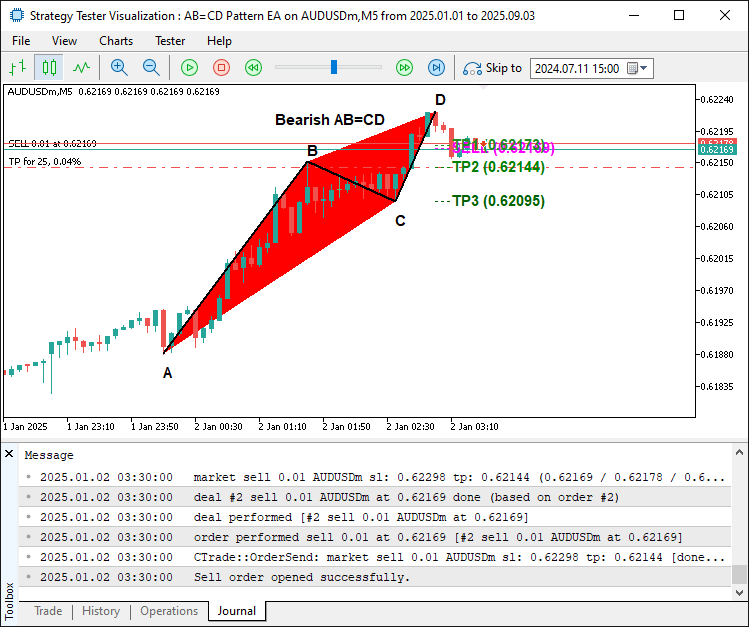
最後に、新しいバーが形成され(currentBarIndex > g_patternFormationBar)かつAピボットがg_lockedPatternAと一致する場合、パターンを確認してログに記録し、g_patternFormationBarを更新します。その上で、AllowTradingで取引が許可されているか、PositionSelectでポジションが存在しないかを確認します。強気パターンの場合、entryPriceTradeをAsk価格に設定し、BC_legを「C.price - B.price」として計算、stopLossを「C.price - next_ext * BC_leg」に設定します。ここでnext_extはused_extに基づき決定され、たとえば1.13の場合は1.272、1.272の場合は1.618、1.618の場合は 2.0、2.0の場合は2.618、2.618の場合は 3.618、いずれにも該当しない場合は「 used_ext * 1.618」とします。D.priceを上回る場合は 「D.price - 10 * point」に調整します。takeProfitはTP2Levelに設定し、LotSizeとAB=CD Signalを用いてobj_Trade.Buyで買いを実行し、成功または失敗をログに記録します。弱気パターンの場合、Bid価格を使用し、BC_legを「B.price - C.price」として計算、stopLossを「C.price + next_ext * BC_leg」に設定(D.priceを下回る場合は「 D.price + 10 * point」に調整)、obj_Trade.Sellで売りを実行します。取引が許可されていない場合、ポジションが存在する場合は取引をおこなわずログに記録します。パターンが変更された場合はロックを更新して待機し、パターンが見つからない場合はグローバル変数をリセットします。コンパイルすると、次の結果が得られます。
弱気シグナル
強気シグナル
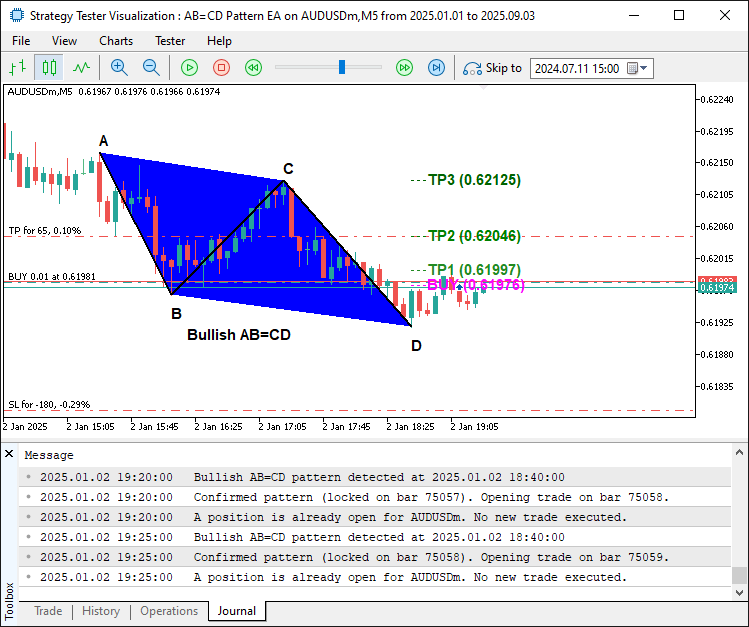
画像から、ハーモニックパターンを正しくプロットできており、パターンが確定した後にそれに応じてエントリーできていることが確認できます。これにより、パターンの識別、描画、取引という目的を達成できています。残っている作業は、このプログラムのバックテストをおこなうことです。バックテストについては次のセクションで扱います。
バックテスト
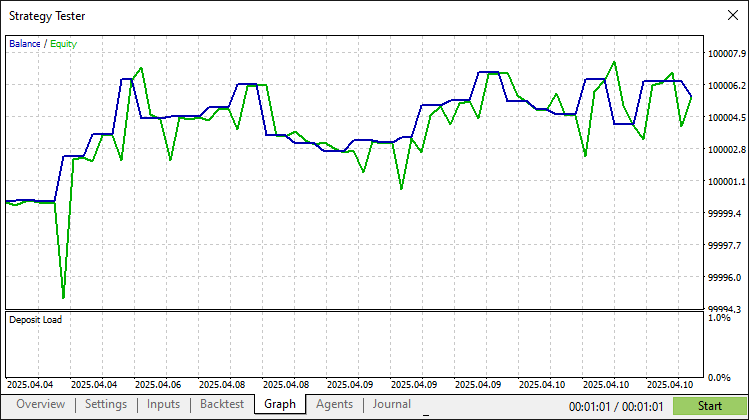
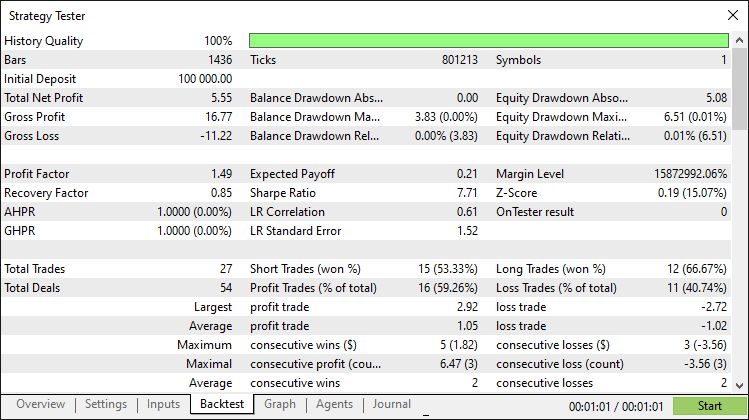
徹底的なバックテストによって、次の結果が得られました。
バックテストグラフ
バックテストレポート
結論
MQL5でAB=CDパターンシステムを開発しました。価格の動きを活用して強気と弱気のAB=CDハーモニックパターンを、正確なフィボナッチのリトレースメントおよびエクステンション比率でパターンを検出し、計算されたエントリー、ストップロス、複数レベルのTPポイントを用いて取引を自動化しました。また、三角形やトレンドラインなどのチャートオブジェクトでパターンを可視化しました。
免責条項:本記事は教育目的のみを意図したものです。取引には重大な財務リスクが伴い、市場の変動によって損失が生じる可能性があります。本プログラムを実際の市場で運用する前に、十分なバックテストと慎重なリスク管理が不可欠です。
提示された概念と実装を活用することで、このAB=CDパターンシステムを自分の取引スタイルに適応させ、アルゴリズム戦略を強化できます。取引をお楽しみください。
MetaQuotes Ltdにより英語から翻訳されました。
元の記事: https://www.mql5.com/en/articles/19442
警告: これらの資料についてのすべての権利はMetaQuotes Ltd.が保有しています。これらの資料の全部または一部の複製や再プリントは禁じられています。
この記事はサイトのユーザーによって執筆されたものであり、著者の個人的な見解を反映しています。MetaQuotes Ltdは、提示された情報の正確性や、記載されているソリューション、戦略、または推奨事項の使用によって生じたいかなる結果についても責任を負いません。

 カスタム市場センチメント指標の開発
 SMC (Smart Money Concepts)で取引のレベルアップを実現する:OB、BOS、FVG
 MQL5で自己最適化エキスパートアドバイザーを構築する(第14回):フィードバックコントローラーにおけるデータ変換を調整パラメータとして捉える
 初心者からエキスパートへ:MQL5を使ったアニメーションニュース見出し(X) - ニュース取引のための多銘柄チャート表示

- 無料取引アプリ
- 8千を超えるシグナルをコピー
- 金融ニュースで金融マーケットを探索
TMは、価格の動きによって自然に作成された任意の4つのポイントパターンによって不活性化され、記述子として割り当てられた英語の順序は、独自の知的財産でビジネスを行うTMの基準に保持することはできませんし、これらの記述の排他的権利を保持します。私はあなたをB.S.と呼び、あなたはTMオフィスで350.00~850.00ドルを無駄にし、異議を唱えられるでしょう。
これが私の意見だ。
ルイス・B・ウェッツェル
TMは、価格の動きによって自然に作成された任意の4つのポイントパターンによって不活性化され、記述子として割り当てられた英語の順序は、独自の知的財産でビジネスを行うTMの基準に保持することはできませんし、これらの記述の排他的権利を保持します。私はあなたにB.S.と呼び、あなたはTMオフィスで350.00-850.00$$を無駄にし、挑戦されるでしょう。
これが私の意見だ。
ルイス・B・ウェッツェル