Drawdown Minimizer MT4

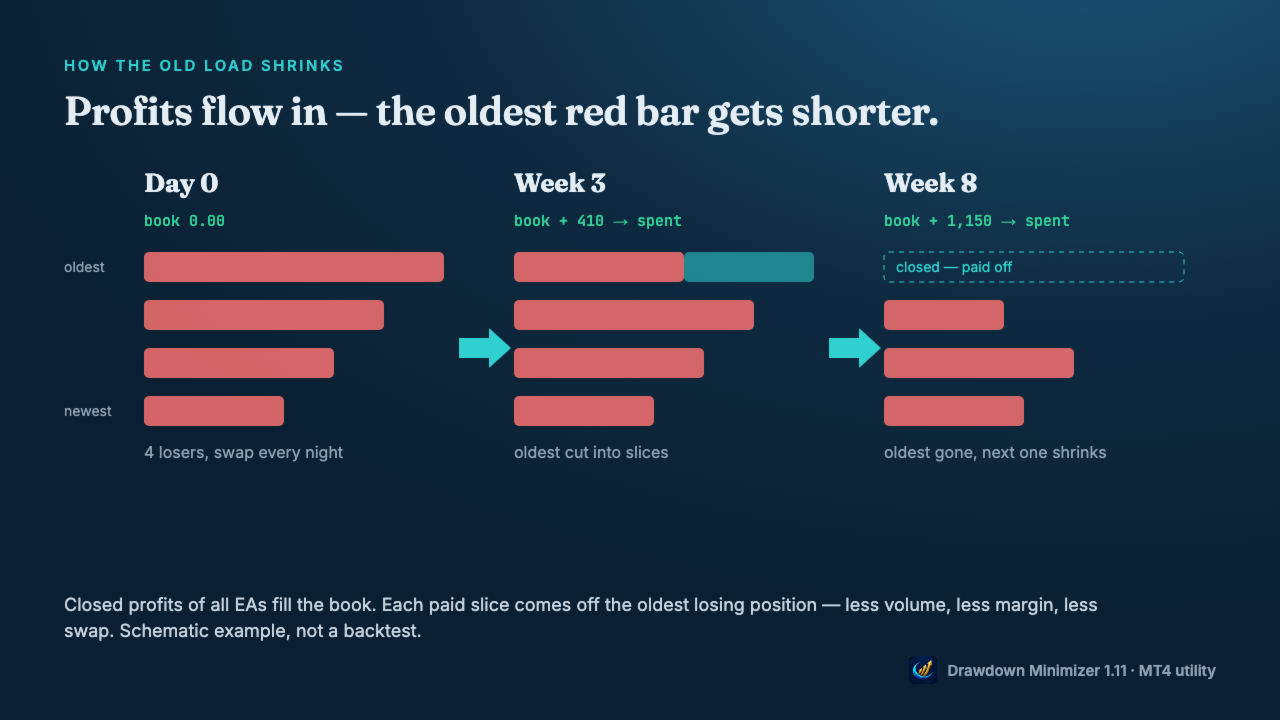
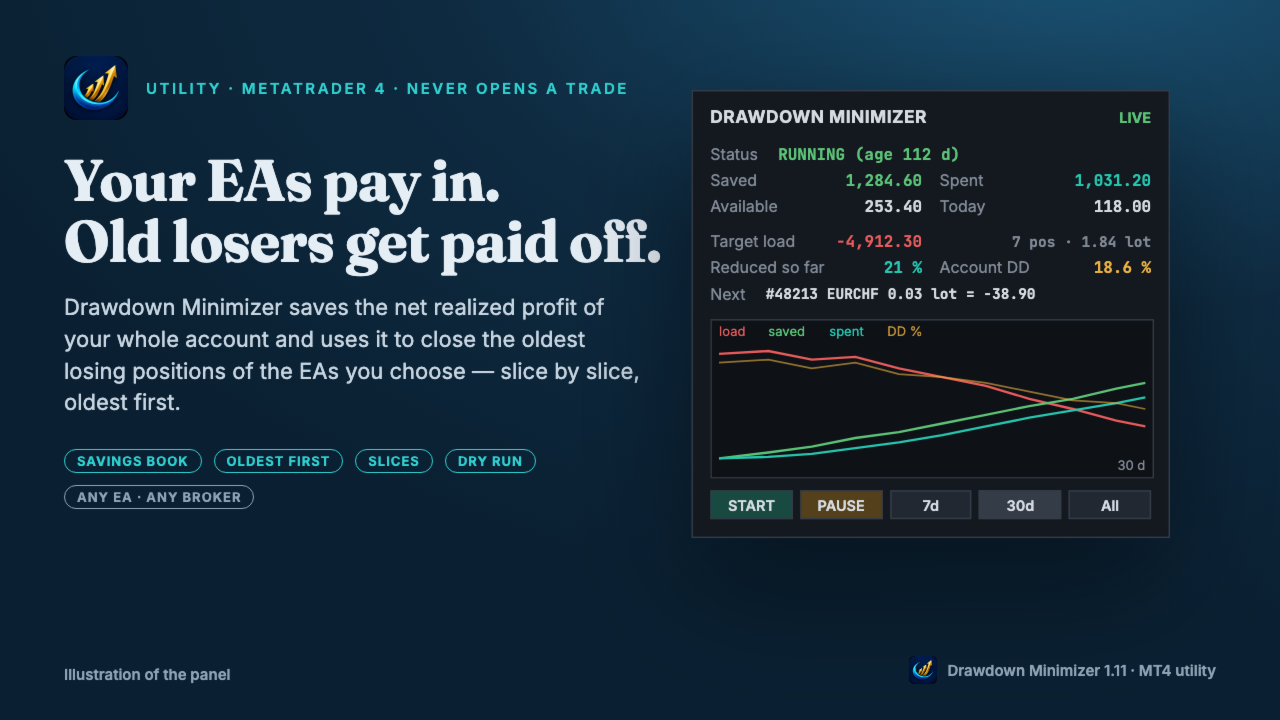
Drawdown Minimizer for MetaTrader 4 - your EAs pay in, old losers get paid off. This utility runs next to your other Expert Advisors and never opens a trade. It keeps a savings book of the net realized profit of your whole account and uses it to close the oldest losing positions of the EAs you choose - slice by slice, oldest first.

WHY IT EXISTS

Made by traders, for traders. One of our grid EAs got stuck in drawdown for months. The old positions did not come back, and they paid swap every single night. At the same time the account kept booking profits that just sat on the balance. Drawdown Minimizer connects the two.

THE SAVINGS BOOK

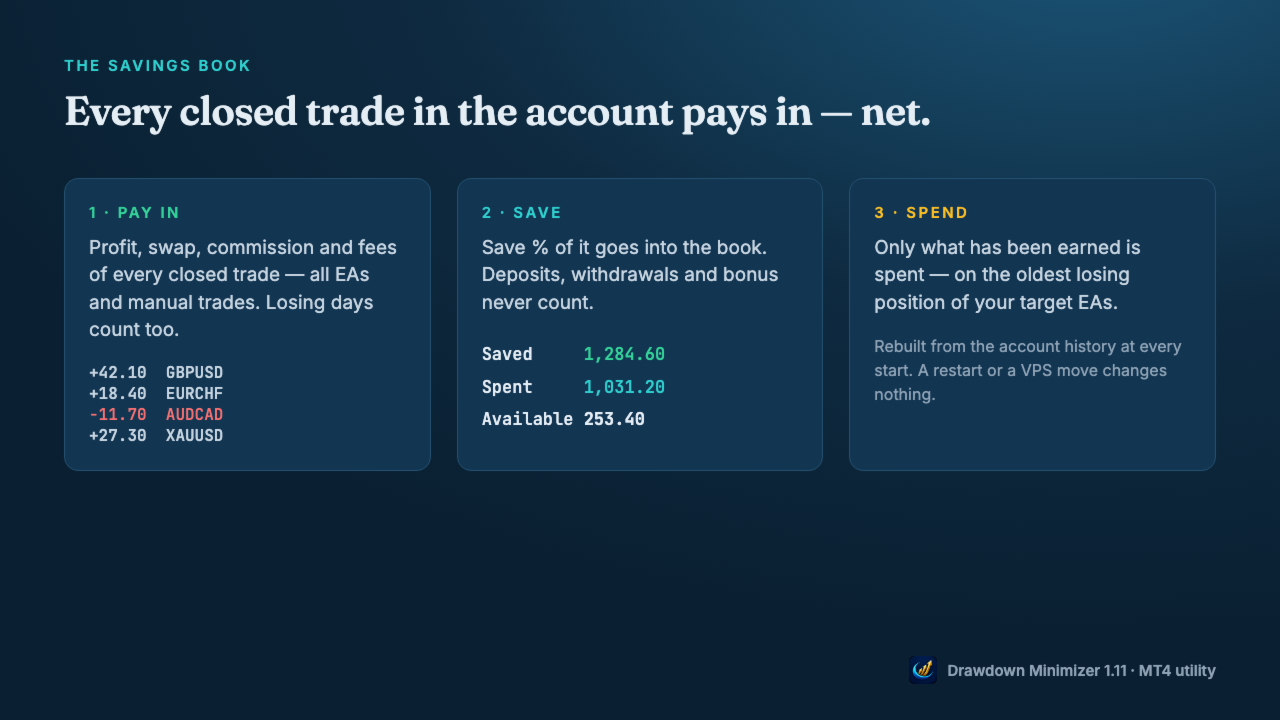
  • Every closed trade in the account pays in: profit, swap and commission - all EAs and manual trades. Losing days count too.
  • Save % decides how much of the net result goes into the book (default 100 %).
  • Deposits, withdrawals, credit and bonus never count, and neither do the tool's own closes.
  • Only what has been earned is spent. If the book drops below what was already spent, the reduction waits until money has been earned again.
  • The book is rebuilt from the account history at every start, so a restart changes nothing. In MT4 the tool recognises its own closes by a ticket list in the terminal's MQL4\Files folder - copy the DDMin_* files from there when you move to another terminal or VPS. Without them the book starts again from zero.
  • The savings book is a counter, not a separate account - the money stays on your balance and stays at risk.

OLDEST FIRST, IN SLICES

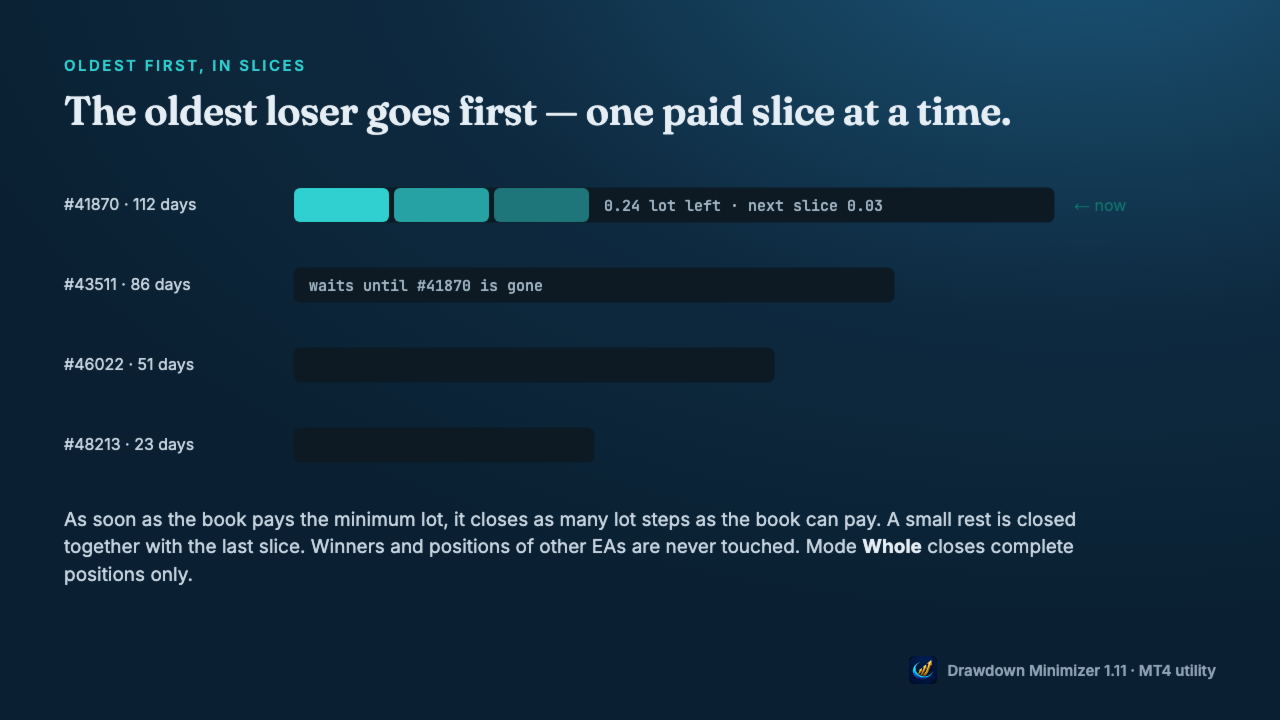
  • Only losing positions of the EAs you choose are reduced - by magic number, by a magic range like 1000-1999 (for EAs that give every grid level its own magic) or by a text in the trade comment. Winners and all other positions are never touched.
  • The oldest losing position goes first. A younger one is never preferred because it is cheaper. If the oldest one is blocked (spread, closed market, broker error), the next one in line is used.
  • As soon as the book pays the minimum lot, the tool closes as many lot steps as the book can pay. With a large book, the first close can be a big part of the position, or all of it. A small rest is closed together with the last slice.
  • Mode Whole closes complete positions only.
  • At most one close per set interval, optional spread limit, retry with pause on broker errors.

YOU DECIDE WHEN

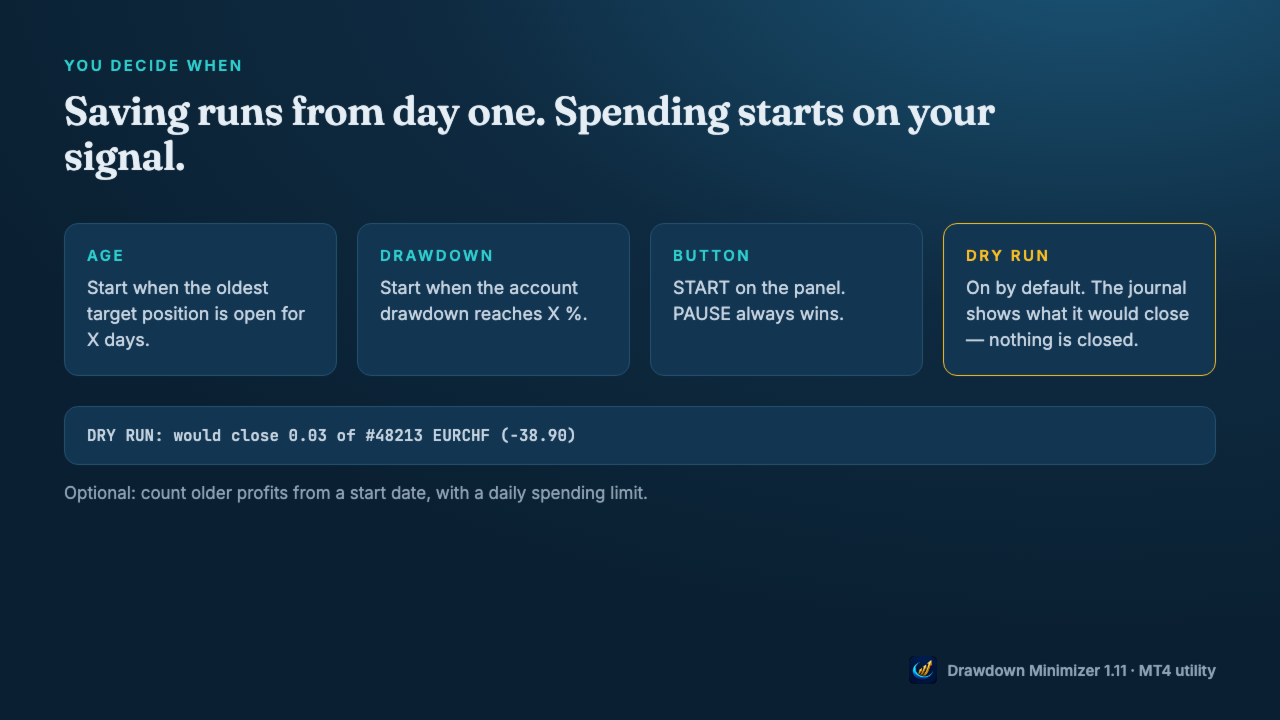
  • Saving runs from the moment the tool is attached. Spending starts when the oldest target position reaches an age, when the account drawdown reaches a level, or when you press START.
  • Once a trigger has fired, spending goes on even if the drawdown recovers (Keep running), until you press PAUSE or no target position is left. PAUSE always wins.
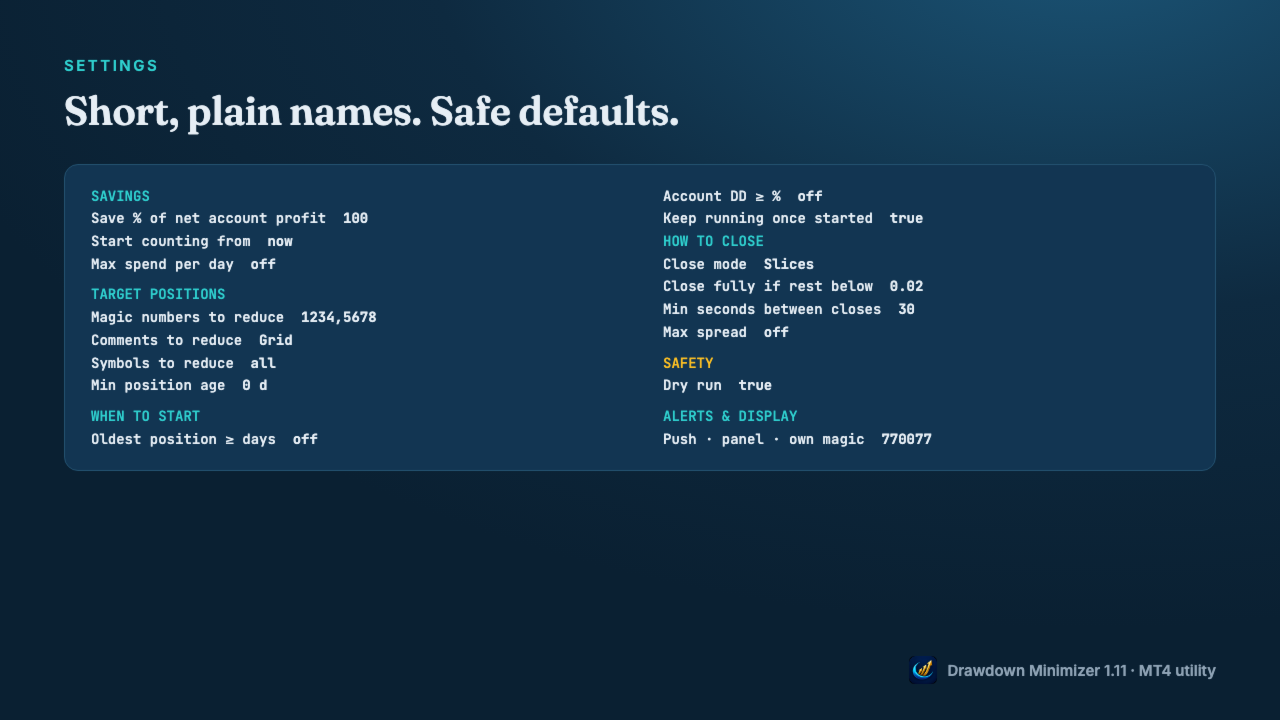
  • Dry run is on by default: the journal shows what it would close, nothing is closed.
  • Optional: count older profits from a start date, with a daily spending limit.

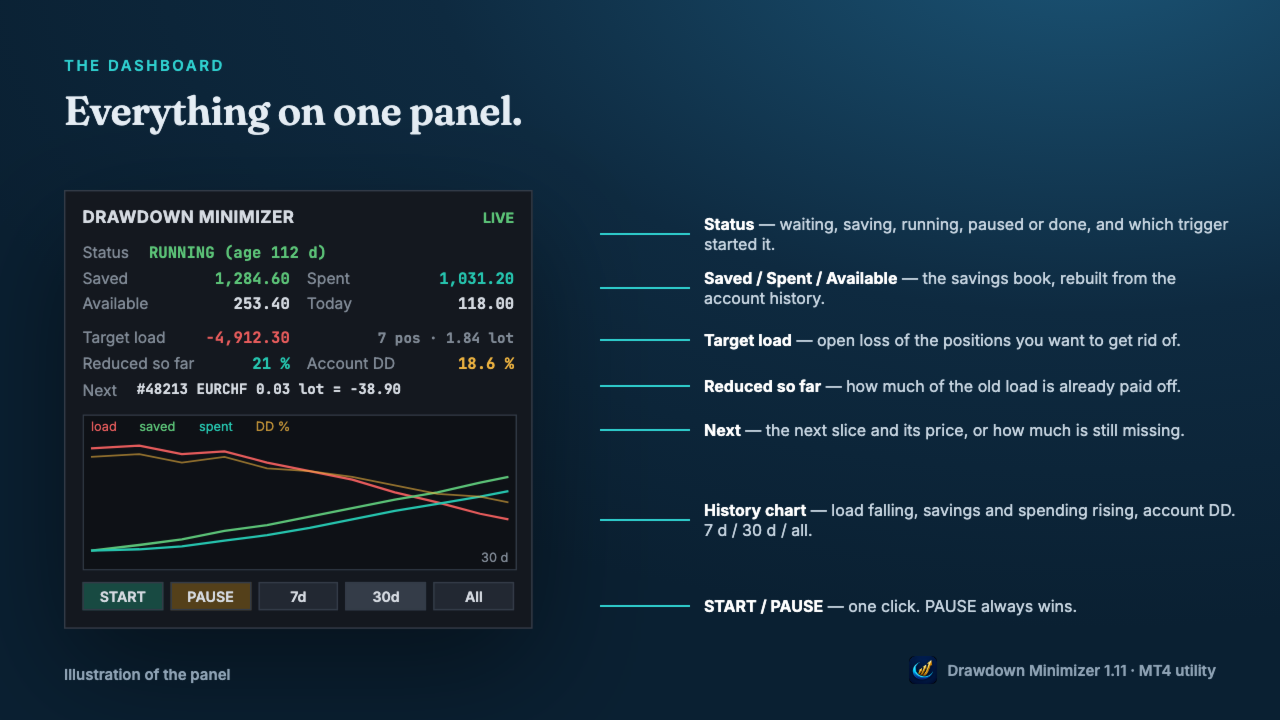
DASHBOARD

  • Status, Saved, Spent, Available and today's spending.
  • Open loss of the target positions and how much of it is already reduced.
  • The next slice and its price, or how much is still missing.
  • History chart: target load, savings, spending and account drawdown over 7 days, 30 days or all.
  • Push notifications for full closes, start and pause, a daily summary, and an alert when a close fails repeatedly.

WHAT IT CHANGES - AND WHAT IT DOES NOT

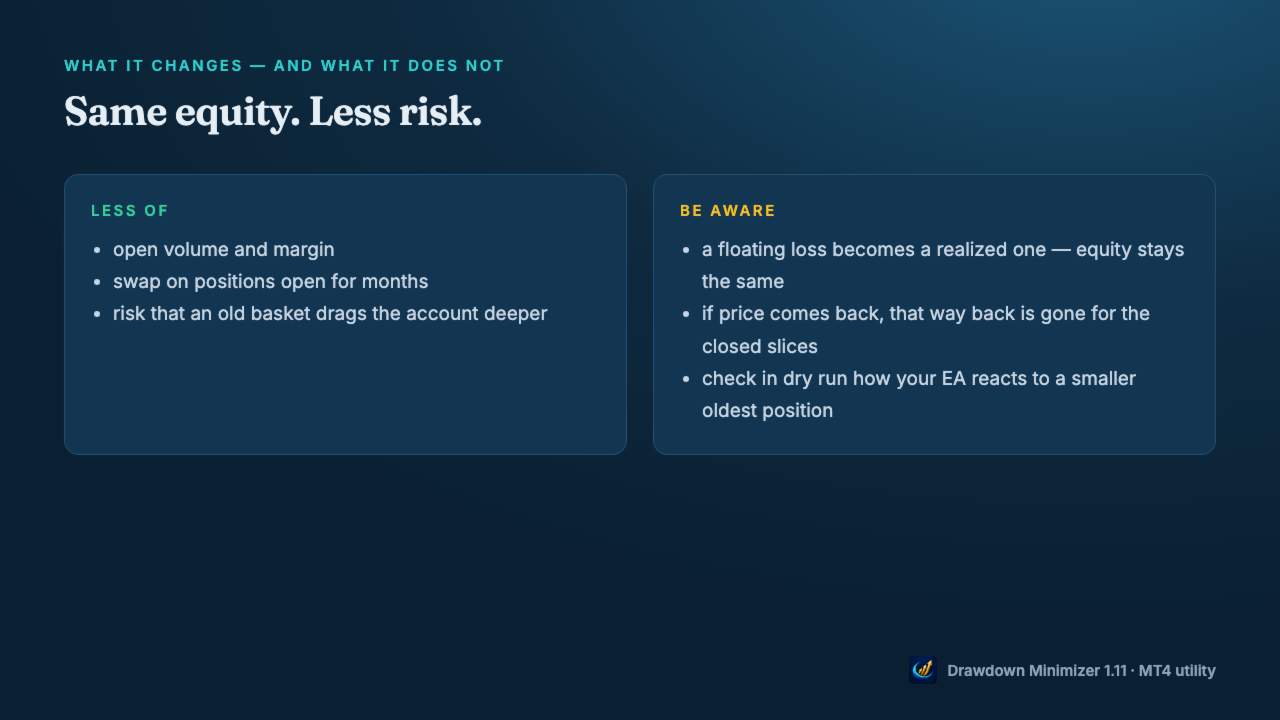
  • Closing a loser with saved profit does not change your equity, apart from slippage. A floating loss becomes a realized one.
  • What changes is the risk: less open volume, less margin, no more swap on the closed volume, and a smaller chance that an old basket drags the account deeper.
  • The price: if the market would have come back, that way back is gone for the closed slices.
  • Check in dry run how your EA reacts when part of its oldest position is closed - some grid EAs size the next level from the open volume.

MT4: PARTIAL CLOSES

  • When a slice is closed, MetaTrader 4 gives the rest of the position a new ticket with the comment "from #<old ticket>". The open time and the magic number stay the same.
  • Drawdown Minimizer follows this chain: the rest stays the oldest position, and a comment target like Waka still matches after the comment has become "from #...".
  • Your EA may not: grid EAs that identify their basket by trade comment or ticket may no longer recognise the rest. EAs that find their trades by magic number usually still see the rest, but with less volume. EAs that store ticket numbers may lose track of it. Test in dry run first, then start with Close mode Whole or a single slice.

GETTING STARTED

  • Attach the utility to a separate chart (any symbol, any timeframe) - not to the chart of the EA you want to reduce.
  • Enter the magic number(s), a magic range or a comment text of that EA, allow algo trading and press START.
  • Watch the journal in dry run, then set Dry run to false.
  • One instance per account. Hedging accounts only - not for FIFO accounts (US brokers). Set the Account History tab to All History - otherwise the book counts only the part of the history the tab shows.

Trading involves risk. Drawdown Minimizer does not predict the market and does not turn a loss into a profit - it pays old losses off with money the account has already earned.
おすすめのプロダクト
| Fully-automated Smart Money Concept (ICT) inspired trading solution with multi-strategy capabilities | Built by a grid trader >> for grid traders.  This is MT4 version, click  here  for  Blue CARA MT5  (settings and logics are same in both versions)     Real monitoring signal  -->  Cara Gold Intro Blue CARA EA   ('CARA') - short for  C omprehensive  A lgorithmic R esponsive A dvisor is a next-gen  multi-currency    multi-timeframe  EA base on the widely known (and perhapse most popular) Inn
Vizzion is a fully automated scalping Expert Advisor that can be run successfully using GBPJPY currency pair at H1 timeframe. Very Important This Expert Advisor can not run with any EAs in the same account. As part of the money management plan, it calculates and monitors the Margin Level % and assumes that all open trades are created by it. If you want an Expert Advisor that trades in a daily basis, this EA is not for you because using this requires a patience to wait for a few days or weeks on
Harvest GOLD USES THE TREND WAVE INDICATOR AND IT CAN IDENTIFY THE BEGINNING AND THE END OF A NEW WAVE TREND MOVEMENT. AS AN OSCILLATOR, THE INDICATOR IDENTIFIES THE OVERBOUGHT AND OVERSOLD ZONES. IT WORKS GREAT TO CATCH THE SHORT TERM PRICE REVERSALS AND USES A MARTINGALE STRATEGY TO CLOSE ALL TRADES IN PROFIT. USE DEFAULT SETTINGS ON H1 OR HIGHER TIME FRAME ON ANY PAIR FOR MORE ACCURATE TRADES WHY THIS EA : Smart entries calculated by 3 great strategies The EA can be run on even a $30000
H4 GBPUSD Trend Scalper is a trend signal scalper The EA trades according to the trend strategy using original built-in indicator for opening and closing orders. The external inputs for limiting trading on Fridays and Mondays are available. The purpose of the strategy is to use the current trend with the most benefit. According to the results of testing and working on demo and real accounts, the best results achieved by using the Н4 timeframe on the GBP/USD pair Works on MetaTrader 4 Build 971+
How the EA works (simple explanation) Trades on   M5   timeframe Uses   H1 timeframe   to analyze global market context Analyzes   2 or 3 timeframes simultaneously On each timeframe: Checks price position relative to one or two Moving Averages Evaluates MA angle and distance between price and MA Entry logic is based on   trend + volatility conditions , not on random signals The full algorithm is illustrated in the screenshots. Recommended usage Symbol:   EURUSD Timeframe:   M5 Trading
Gold Label  is an Expert Advisor designed specifically for trading gold.  This EA is specifically designed for   XAUUSD  with low risk and can grow your account from small capital. It is based on machine learning cluster analysis and genetic algorithms. EA contains self-adaptive market algorithm, which uses price action patterns and standard trading indicators. Expert showed stable results on XAU in 2011-2020 period. No dangerous methods of money managment used. Suitable for any broker conditi

Market Maestro: Your Ideal Partner for Automated Forex Trading If you're looking for a reliable assistant for trading in the currency market, Market Maestro is exactly what you need. This modern Forex bot is built using the latest technologies and algorithms, allowing it to effectively analyze market data and make informed trading decisions in real-time. Key Features of Market Maestro 1. Multicurrency Capability for Broad Opportunities Market Maestro can work with a wide range of currency pairs,

Magic EA MT4
Kyra Nickaline Watson-gordon
3 (1)
Magic EA is an Expert Advisor based on Scalping, Elliot Waves and with filters such as RSI, Stochastic and 3 other strategies managed and decided with the robot smartly. Large number of inputs and settings are tested and optimized and embedded in the program thus inputs are limited and very simple. Using EA doesn't need any professional information or Forex Trading Knowledge. EA can trade on all symbols and all time frames, using special and unique strategies developed by the author. The EA wo
Gyroscope        professional forex expert   (for EURUSD, GBPUSD, USDJPY, AUDUSD, USDCHF, EURGBP, EURJPY, NZDUSD, USDCAD, EURCHF, AUDJPY, CADJPY pairs)   alyzing the market using the Elliot Wave Index. Elliott wave theory is the interpretation of processes in financial markets through a system of visual models (waves) on price charts. The author of the theory, Ralph Elliott, identified eight variants of alternating waves (of which five are in the trend and three are against the trend). The mov
GOAL TIME is an expert advisor based on the notion of time, it studies the change of price according to time, and it finally detects the best time to execute a good order. The EA is based on an indicator that draws a price curve in relation to time, this curve is deduced by an algorithm that analyzes old data. Then, the EA exploits the generated curve and executes the correct order. In case of incorrect choice, the EA has the mission to limit the losses. After a thorough study of this strategy o
The Arrow Scalper
Fawwaz Abdulmantaser Salim Albaker
1 (2)
Dear Friend..  I share with you this simple Expert Adviser .. it is full automatic  this Expert Adviser following the trend of the pair you install on or any stocks or indices , it is works like that: - when the trend on H4 chart show a start of up trend the expert will wait till the 15M & 1H charts show an up trend the EA will open a buy order directly , and do the same for down trend and open a sell order the buy or sell  order lot size and take profit and stop loss will measured manually  by
FREE
The Infinity Expert Advisor is a scalper. When the resistance and support levels are broken, trades are opened in the direction of the price movement. Open positions are managed by several algorithms based on the current market situation (fixed stop loss and take profit, trailing stop, holding positions in case of trend indication, etc.). Requirements for the broker The EA is sensitive to spread, slippages and execution quality. It is strongly recommended not to use the EA for currencies with s
Reversepro Smartsma ea mt4
AL MOOSAWI ABDULLAH JAFFER BAQER
ReversePro SmartSMA EA – A Fully Customizable Moving Average Strategy ReversePro SmartSMA EA is an advanced yet fully customizable trading tool designed for traders who prefer to fine-tune their strategies. This Expert Advisor (EA) is not pre-optimized, allowing you the flexibility to adjust its settings to fit your trading style, risk management preferences, and market conditions. How It Works This EA is based on the well-known Simple Moving Average (SMA) crossover strategy, enhanced with addi
Jet Punch
Didit Haryadi Saputra
Jet Punch is another best expert advisor for MT4,  can help you make money while you sleep by automatically entering and exiting trades. It trades by opening trades every day and closing them at the right time to ensure you always earn a profit. The software is very simple and can be used by both beginner and experienced traders.  Jet Punch was tested and has successfully passed the stress test with slippage and commission approximate to the real market condition. Recommendations: Currency pair:
Renko chart pattern EA: 14 patterns, a stop loss on every trade, half banked at the first target. KT Renko Patterns EA trades the patterns of KT Renko Patterns, which is built in, from double tops to break and retest. What it does for you Enters only when a brick closes through the pattern's breakout, never on a forming brick. Places the stop loss beyond the pattern and measures three targets from its height. Closes half at the first target, moves the stop loss to the entry and holds the rest un
General Description Grid RSI Pro v3.1 is an advanced trading Expert Advisor for MetaTrader 4 that uses a grid strategy with RSI indicator filtering. The EA automatically opens orders at specified levels, creating a grid of orders to capture market fluctuations. Version 3.1 includes enhanced risk management features and improved signal filtering systems. Key Features 1. Trading Strategies RSI Strategy : Position opening when RSI reaches overbought (80) or oversold (20) levels Fixed Points : Posit
RiskGuardian Pro (MT4 Edition) - 究極のProp Firm口座セーバー 感情的な取引ミスや一時的なリスク管理の失敗により、Prop Firmチャレンジ(FTMO、MFFなど)に不合格となることにうんざりしていませんか?RiskGuardian Proは、評価に合格し、資金提供された口座を保護するために設計された、必須の規律システムです。 解決する主な問題点: * アンチチルト・ハードロック (Anti-Tilt Hard Lock): 設定された最大日次ドローダウン(例:4%)に達した瞬間、すべての取引を即座に決済し、ターミナルをロックします。リベンジトレードを完全に排除します。 * ワンクリック・ロットサイズ計算: 手動での計算は不要です。希望する現金リスクを入力するだけで、システムが自動的に最適なロットサイズを計算し、すべての取引がProp Firmのルールを遵守することを保証します。 * 資金提供された口座の保護: 厳格な日次または全体ドローダウンの制限に違反することがなくなり、高額な違反から資金提供された口座を安全に守ります。
VANDORA FX USES THE TREND WAVE INDICATOR AND IT CAN IDENTIFY THE BEGINNING AND THE END OF A NEW WAVE TREND MOVEMENT. AS AN OSCILLATOR, THE INDICATOR IDENTIFIES THE OVERBOUGHT AND OVERSOLD ZONES. IT WORKS GREAT TO CATCH THE SHORT TERM PRICE REVERSALS AND USES A MARTINGALE STRATEGY TO CLOSE ALL TRADES IN PROFIT. USE DEFAULT SETTINGS ON H1 OR HIGHER TIME FRAME ON ANY PAIR FOR MORE ACCURATE TRADES WHY THIS EA : Smart entries calculated by 5 great strategies The EA can be run on even a $20000 a
Special Launch Promotion: $30 (Limited Time Only!) To celebrate our new launch on MQL5, we are offering an exclusive introductory price of $39  for a limited time. Please note that this is a special promotion for our early supporters. The price will be adjusted back to its original retail price of $39  effective from July 31, 2026 . Don’t miss this opportunity to get our professional-grade EA at this special price before it reverts to the standard rate! CAPITAL-BASED TRADING APPROACH When pro
GoldenGrid Scalping Pro EA - Technical Description GoldenGrid Scalping Pro is an automated Expert Advisor designed for trading XAUUSD (Gold) on lower timeframes (primarily M5). The system integrates short-term momentum scalping with a controlled Dollar-Cost Averaging (DCA) position management mechanism. Strategy & Algorithm Overview Signal Confirmation Filters: Uses Average True Range (ATR) to measure volatility and Volume analysis to confirm short-term momentum before initiating entry signals.
Follow us on Instagram: https://www.instagram.com/project_oro_ea Project Oro is a trading algorithm project that I began approximately six years ago. After countless painful and excruciating hours of coding, it is finally ready to be released to the public. The Expert Advisor (EA) is built on a proprietary and unique technique that analyzes the behavior and movement of candlesticks and the price action within the gold market. It searches for short windows of opportunity to strike and exits tr
Gold Coin M5
Andrey Kozak
2.33 (9)
Gold Coin M5 は、M5 期間を使用して金市場 (XAUUSD) を取引するように設計された自動取引ロボットです。 このロボットは、短期間の間隔で自動的に取引 (スキャルピング) したいトレーダー向けに設計されています。 特徴: スキャルピング戦略: ロボットは、短期的な価格変動に基づくポジションへの即時エントリーとポジションに基づくスキャルピング戦略を使用します。 M5 の XAUUSD 用に最適化: XAUUSD スキャルパーは、M5 時間枠で XAUUSD ペアを取引するように特別に調整されており、金市場での機会を最大化できます。 最低残高: ロボットとの取引に推奨される最低残高は 1000 ドルです。 このレベルのバランスにより、リスクを管理するのに十分なマージンが提供され、ロボットが短期間で効果的に動作することが可能になります。 使いやすさ: XAUUSD Scalper は、取引口座へのインストールと設定が簡単で、初心者から経験豊富なプロまで幅広いトレーダーが利用できます。 取引に関する推奨事項: XAUUSDでの取引 M5 の時間枠 最低初期残高は$100
The algorithm of the adviser's work: When the Expert Advisor is launched at a specified distance from the price (first_step), BuyStop and SellStop orders are placed. Further, depending on which way the price went, one of them becomes market, and the other begins to crawl after the price. When the price rolls back, it also becomes market. If we have reached a set profit in some direction, the order is closed and a creeping pending order of the same direction is placed again. If the profit is no
The Super scalper universal is a fully automated scalping Expert Advisor, which uses five indicators. Each open position is protected by a hidden stop order managed by an advanced modification algorithm. When searching for the suitable signals, the EA uses the integrated indicator in conjunction with the trend and time filters, as well as the volatility filter. It use dynamic position closure, which considers the location where the order had been opened and the subsequent price action. Profit is
Santa Scalping
Morten Kruse
2.84 (19)
Santa Scalping is a fully automated Expert Advisor with no use of martingale. Night scalping strategy. The SMA indicator filter are used for entries. This EA can be run from very small accounts. As small as 50 EUR. General Recommendations The minimum deposit is 50 USD,  default settings reccomend for eurusd m5 gmt +2 . Please use max spread 10 if you will not have orders change it to -1. Use a broker with good execution and with a spread of 2-5 points. A very fast VPS is required, preferably w
Open Momentum Scalper Trade the move. Skip the chop. Most scalpers lose money in the same place: sideways markets, where they open trade after trade and give back the week's profit in an afternoon. Open Momentum Scalper is built around one rule: trade only when the market is really moving, and press hard when it is. It runs fully automatically on MetaTrader 4. It's built for Gold (XAUUSD) and index CFDs , with full protection on every trade. Why traders choose it It sits out flat markets. A mult
This Expert Advisor trades based on trend lines, as well as on the basis of volume analysis. Volumes are calculated using minute bars, in order to determine if they were ascending or descending. The trend lines are drawn based on High and Lows in the trade history. There are also additional indicators. Buy or sell signals depend on all those factors. This allows the EA to enter the market with more accuracy and to perform more deals. Input parameters Lots - lot size (if 0, a lot is calculated b
MMM Zig Zag Strategy: The Expert Advisors uses its built-in Zig Zag indicator to determine the prices trends and calculates the signal to decide to open buy or sell positions. It sends an order, closes or moves the Trailing Stop loss position as the indicator works. You can define the time period of each day of the week the EA should not trade (the bad time to trade). Usually the period of day when the impact news are published. General Inputs: Closes orders with any profit of value (currency):
EA211 Reversal Scalp
Jose Francisco Flores Rojas
Clear Reversal Scalper EA This Expert Advisor is designed to identify sharp market reversal opportunities by detecting a predefined number of consecutive bullish or bearish candles, signaling potential exhaustion of the current trend. Once the reversal pattern is detected, the EA enters a trade in the direction of the large reversal candle, capitalizing on momentum for a quick scalp. This strategy works best in volatile sessions. Key Features: Reversal Pattern Detection: Customizable setting to
Classic Market Surfer EA - A Timeless, Proven Strategy for Gold Trading For years, this powerful trading strategy has been hidden from the public-reserved for a select few. Now, for the first time, the Classic Market Surfer EA is available to traders like you.   Built on pure, time-tested trading principles, this EA doesn't rely on trendy gimmicks like AI or machine learning. Instead, it harnesses a classic, robust strategy that has consistently delivered results over the years. This is not a "g
このプロダクトを購入した人は以下も購入しています
Trade Manager EAへようこそ。これは、取引をより直感的、正確、そして効率的にするために設計された究極の リスク管理ツール です。これは単なるオーダー実行ツールではなく、包括的な取引計画、ポジション管理、リスク管理のためのソリューションです。初心者から上級者、迅速な実行を必要とするスキャルパーまで、Trade Manager EAはあらゆるニーズに対応し、為替、指数、商品、暗号通貨などさまざまな市場で柔軟に対応します。 Trade Manager EAを使用すると、複雑な計算が過去のものになります。市場を分析し、エントリーポイント、ストップロス、テイクプロフィットのレベルをチャート上のラインでマークし、リスクを設定するだけで、Trade Managerが最適なポジションサイズを即座に計算し、SLとTPをピップ、ポイント、口座通貨でリアルタイムに表示します。すべての取引が簡単かつ効果的に管理されます。 主な機能: ポジションサイズ計算機 :定義されたリスクに基づいて取引サイズを瞬時に決定します。 簡単な取引計画 :エントリー、ストップロス、テイクプロフィットを設定するためのド
Exp COPYLOT CLIENT for MT4
Vladislav Andruschenko
4.69 (65)
MetaTrader 4向け 高機能トレードコピーソフト MetaTrader 4 用の、高速・安定・高機能なトレードコピーソフトです。 COPYLOT は、 MetaTrader 4 と MetaTrader 5 間でFX取引をコピーでき、さまざまな口座タイプや運用スタイルに合わせて柔軟に同期できます。 COPYLOT MT4版の対応コピー方式: MetaTrader 4 → MetaTrader 4 MetaTrader 5 Hedge → MetaTrader 4 MetaTrader 5 Netting → MetaTrader 4   MT5版 詳細説明 + DEMO + PDF 購入方法 インストール方法 ログファイルの取得方法 テストと最適化の方法 Expforexの全製品 MetaTrader 5版 を使えば、 MetaTrader 5 → MetaTrader 5 および MetaTrader 4 → MetaTrader 5 のコピーにも対応します: COPYLOT CLIENT for MT5 COPYLOT は、2台、3台、さらには10台規模のターミナル環境でも
Local Trade Copier EA MT4
Juvenille Emperor Limited
4.96 (111)
Local Trade Copier EA MT4 は、同一の Windows PC または Windows VPS 上で稼働する複数の MetaTrader 4 口座間で、取引をコピーおよび管理するための高速で柔軟なトレードコピーツールです。 ローカルでの取引同期に加え、Receiver 側でロットサイズ、リスク管理、取引フィルター、シンボルマッピング、取引管理、口座保護を個別に設定できます。 Transmitter と Receiver のターミナルは約 1分 で設定でき、同一ブローカーまたは異なるブローカーの口座間で、手動取引や EA による取引をコピーできます。適切な条件下では、ローカルの MetaTrader ターミナル間で取引情報を 0.5秒未満 で同期できます。実際の約定速度は、ブローカーのレイテンシー、ネットワーク状況、PC/VPS の性能、ターミナルの負荷によって異なります。 ご購入前に無料デモをお試しください Local Trade Copier EA MT4 の完全機能版無料デモ を、MT4 デモ口座で 1回につき4時間 テストできます。 Local Trad
Grid Manual MT4
Alfiya Fazylova
4.71 (17)
「Grid Manual」は、注文のグリッドを操作するための取引パネルです。 ユーティリティはユニバーサルで、柔軟な設定と直感的なインターフェイスを備えています。 それは、損失を平均化する方向だけでなく、利益を増やす方向でも注文のグリッドで機能します。 トレーダーは注文のグリッドを作成して維持する必要はありません。 すべてが「Grid Manual」によって行われます。 注文を開くだけで十分であり、「Grid Manual」は注文のグリッドを自動的に作成し、非常に閉じるまでそれに付随します。 完全な説明とデモバージョン ここ。 ユーティリティの主な機能と機能 ユーティリティは、モバイル端末から開かれた注文を含め、あらゆる方法で開かれた注文を処理します。 「制限」と「停止」の2種類のグリッドで機能します。 グリッド間隔の計算には、固定と動的(ATRインジケーターに基づく)の2つの方法で機能します。 オープンオーダーグリッドの設定を変更できます。 チャート上の各注文グリッドの損益分岐点を表示します。 各注文グリッドの利益率を表示します。 ワンクリックでグリッドから収益性の高い注文を閉じるこ
Trade Indicator Assistant is a powerful MT4 utility designed to turn indicators into automated trading systems. Its main feature is the ability to automatically detect an indicator’s   BUY and SELL signal buffers , without requiring you to know the buffer numbers, search through indicator settings, or modify the indicator source code. Bonus Indicator: After purchasing Trade Indicator Assistant, contact me to receive Trade Signal Pro completely free as a bonus indicator. [Download Demo Version]
TradePanel MT4
Alfiya Fazylova
4.84 (95)
Trade Panelは多機能なトレーディングアシスタントです。アプリには手動取引用の50以上のトレーディング機能が搭載されており、ほとんどの取引作業を自動化することができます。 アプリの説明書: https://www.mql5.com/en/blogs/post/756482 デモ口座用アプリの試用版: https://www.mql5.com/en/blogs/post/750865 アプリのインストール方法: https://www.mql5.com/en/blogs/post/756239 アプリをビジュアルモードでテストする方法: https://www.mql5.com/en/blogs/post/770277 VPSのMetaTraderにアプリをインストールする方法: https://www.mql5.com/en/blogs/post/770190 取引。 ワンクリックで取引操作を行うことができます: リスクを自動計算して指値注文やポジションを開く。 複数の注文やポジションをワンクリックで開く。 注文のグリッドを開く。 保留中の注文やポジションをグループごとに閉じる
Trade Assistant MT4
Evgeniy Kravchenko
4.43 (197)
取引 ごとのリスクの 計算、新規注文 の 簡単 な 設置、部分的 な 決済機能 を 持 つ 注文管理、 7 種類 のトレーリングストップなど 、便利 な 機能 を 備 えています 。 追加の資料と説明書 インストール手順 - アプリケーションの手順   ライン機能 チャート上にオープニングライン、ストップロス、テイクプロフィットを表示します。この機能により、新規注文を簡単に設定することができ、注文を出す前にその特徴を確認することができます。   リスク計算 リスク計算機能は、設定されたリスクとストップロス注文のサイズを考慮して、新規注文のボリュームを計算します。ストップロスの大きさを自由に設定できると同時に、設定したリスクを守ることができます。 Lot calc ボタン - リスク 計算 を 有効 / 無効 にします 。 Risk フィールドでは 、必要 なリスクの 値 を 0 から 100 までのパーセンテージまたは 預金通貨 で 設定 します 。 設定」 タブで 、 リスク 計算 の 種類 を 選択 します :「 $ 通貨」、「 % 残高」、「 % エクイティ 」、「 % フリ
News Filter EA: Advanced Algo Trading Assistant News Filter EA is an advanced algo trading assistant designed to enhance your trading experience. By using the   News Filter EA , you can integrate a Forex economic news filter into your existing expert advisor, even if you do not have access to its source code. In addition to the news filter, you can also specify   trading days   and   hours   for your expert. The News Filter EA also includes   risk management   and   equity protection   features
The product will copy all telegram signal to MT4   ( which you are member  ) , also it can work as remote copier.  Easy to set up, copy order instant, can work with almost signal formats, image signal, s upport to translate other language to English Work with all type of channel or group, even channel have "Restrict Saving Content", work with  multi channel, multi MT5 Work as remote copier: with signal have ticket number, it will copy exactly via ticket number. Support to backtest signal. How to
Risk Manager MT4   is an account protection Expert Advisor for traders who want strict risk control inside MetaTrader 4. The utility monitors your account equity, daily and weekly results, drawdown, open positions, trade count, consecutive losses, and trading hours. When a configured limit is reached, it can automatically close positions, cancel pending orders, stop other EAs, send notifications, or close the terminal. Instead of relying on discipline during a stressful trading session, you defi
これは視覚的な取引パネルであり、取引を簡単に配置および管理し、人為的エラーを回避し、取引活動を強化するのに役立ちます。使いやすい視覚的なインターフェースと、健全なリスクおよび位置管理アプローチを組み合わせています。 [ インストールガイド | 更新ガイド | トラブルシューティング | よくある質問 | すべての製品 ] 驚くほど使いやすい チャートから簡単に取引 正確なリスク管理との取引、手間のかからない 資本の保存が最優先事項です 気をつけずに利益を上げましょう できるだけ早くリスクのない取引をお楽しみください 開かれているすべての取引の自動トレーリングストップ 最初のストップロスは、取引が行われるとすぐに配置されます EAは、取引を行った後に次のタスクを実行します。 最初のストップロス/テイクプロフィットは自動的に配置されます できるだけ早くフリーライドにロックします(オプション) ストップロスを初めて損益分岐点に移動します(オプション) 停止するまで、希望の方法を使用してストップロスを追跡します その他のクールな機能は次のとおりです。 優れたターミナルアクティビティレポート
注文管理やリスク管理など、手間のかかる作業をワンクリックまたは数クリックで行えるようにし、取引を楽にするためのユーティリティです。 特徴 リスク管理  リスク欄に%またはドルで指定されたリスクに基づいて自動的にロットを計算し、SL TPなどのラインを置くだけで入力でき、リスクリワードをリアルタイムで表示します。 TrueRiskは、FXペアのロットサイズ計算時に手数料を含むので、例えば1%を指定した場合、全ての取引手数料で1%のリスクを負うか、負わないかは、あなたの選択です。 シンボルごとの最大取引数量の10倍以上の取引をワンクリックで行えるビッグロッツハンドラーを搭載。 指数や他の資産で、自動計算されたロットサイズがロット単位に合わない場合でも、四捨五入して入力することができます。(1、0.1、0.01のロット単位に対応しています。) トレード管理  ワンクリックで可能です。 手数料とスプレッドを含む、または含まないブレイクイーブンのオープンポジションを設定することができます。 テキストフィールドにSLまたはTPの新しい価格を指定し、入力された新しいSLおよび
The Price Action Dashboard is an innovative tool to help the trader to control a large number of financial instruments. This tool is designed to automatically suggest signals and price conditions. The Dashboard analyzes all major Time Frame suggesting price action conditions with graphic elements. The Dashboard can suggest you the strength of the trend identifying directional movement, it is an indispensable tool for those who want to open position themselves using market trends identifiers. The
Trading History - A program for trading and money management on the history of quotes in stratagy tester. It can work with pending and immediate orders, and is equipped with trailing stop, breakeven and take profit functions. Very good for training and testing different strategies. Manual (Be sure to read before purchasing) Advantages 1. Allows you to test any trading strategy in the shortest possible time 2. An excellent simulator for trading training. You can gain months of trading experience
Shepherd Safety EA
AW Trading Software Limited
4.92 (13)
AW Shepherd Safety EA は、保有中のポジションを管理するエキスパートアドバイザーです。最初の注文はトレーダーがパネルから発注し、その後は EA がバスケットを自動で管理します。トレンドフィルターを通してリカバリー注文を追加し、TakeProfit、トレーリング、またはストップでサイドを決済し、決済の水準をチャートに表示します。 買いと売りは別々に管理され、両方のサイドを同時に保有できます。リカバリー注文は、価格が一定の間隔だけ動いたというだけでは発注されず、Parabolic SAR、2本の MA、またはローソク足の色でポジション方向への反転が確認されてから発注されます。Orders Magic number が一致していれば、手動や他の EA で発注したポジションも管理の対象になります。 EA によるポジション管理の流れ: 1 トレーダーが Open Buy または Open Sell ボタンで、Order Size 欄のロットで最初の注文を発注します。 2 価格がポジションに不利な方向へ Minimal step between recovery orders
多機能取引ツール:ロット計算機、グリッド注文、R/R比率、トレードマネージャー、需給ゾーン、プライスアクションなど デモ版   |   ユーザーマニュアル トレードアシスタント はストラテジーテスターでは動作しません:この ユーティリティ をテストするには デモ版をこちら からダウンロードしてください。 ご質問 /改善のアイデア/バグ発見 の場合は 私に連絡 してください MT5版が必要な場合は、 こちら から入手できます 取引 プロセス を簡素化、高速化、自動化します。この ダッシュボード で標準ターミナルの機能を拡張します。 取引パネル はあらゆる取引銘柄で動作します:FX、株式、指数、暗号通貨など。 1. 新規取引の開始 :ロット/リスク/RR計算:手動取引のリスク管理 ロット計算機(リスクサイズに基づく取引量計算) リスク計算機(ロットサイズに基づくリスク額) リスクリワード比率 グリッド注文: + 動的間隔オプション、分割ロットオプション 注文アクショントリガー、+ 買いストップリミット/売りストップリミット:Mt4でも可能 仮想SL、仮想TP(非表示SL、非表示TP:ブロ
RS Trade Copier - 超高速 で動作するローカルトレードコピー機。 真の グラフィカルインターフェース搭載。口座番号の手動入力はもう終わりです。200項目を超える長大なパラメータリストとも、これでおさらばです。 複数のMT4とMT5ターミナル間で取引操作をコピーするための、信頼性が高く柔軟なツールです。経験豊富なトレーダーやシグナルサービス、個人投資家に適しています。1つまたは複数のシグナルソース(Provider)から1つまたは複数のレシーバー(Client)へ、高い精度と最小限の遅延で 取引を同期 します。シンプルな自動設定と高度な手動設定の両方をサポートしています。手動または他のEAで開かれた注文に干渉しません。すべての処理は MT4内でローカルに 行われ、サードパーティサーバーを使用しません。 RS Trade Copierと他のソリューションの比較 RS Trade Copier 他のソリューション 設定 ビジュアルステップバイステップウィザード。 設定時間は約1分。 200以上の分かりにくい入力パラメータ。 設定時間は約20分。 速度 非同期トレード操作。*
Telegram to MT4 Multi-Channel Copier   は、 Telegram と Discord チャンネルのトレードシグナルを MetaTrader 4 へ自動コピーします。ボット不要、ブラウザ拡張不要、手動コピー不要。Telegram や Discord にシグナルが届くと、EA が数秒であなたのターミナルに注文を出します。 さらに、チャンネルをコピーする前に、内蔵バックテスターでそのチャンネルがあなたの口座でどう動いたかを確認できます。 製品は 2 つのコンポーネントで構成されます:Telegram チャンネルを監視する Windows アプリと、MT4 ターミナルでシグナルを執行する本 EA です。MT5 版もあります   こちら . 購入前にお試しください:   アプリは無料でダウンロードできます。ご自身のチャンネルを接続し、各シグナルがどのように読み取られるかをご確認ください。Backtest タブと実際の取引には、購入またはレンタルした EA が必要です。このページの無料デモはストラテジーテスターでのみ動作し、テスターでは Telegram と D
MT4 to Telegram Signal Provider は使いやすく、完全にカスタマイズ可能なツールで、Telegramに信号を送信し、あなたのアカウントを信号提供者に変えることができます。 メッセージのフォーマットは 完全にカスタマイズ可能です! しかし、簡単な使用のために、あらかじめ定義されたテンプレートを選択し、メッセージの特定の部分を有効または無効にすることもできます。 [ デモ ]   [ マニュアル ] [ MT5バージョン ] [ Discordバージョン ] [ Telegramチャンネル ]  New: [ Telegram To MT5 ] セットアップ ステップバイステップの ユーザーガイド が利用可能です。 Telegram APIの知識は必要ありません。開発者が必要なものをすべて提供します。 主要機能 購読者に送信される注文の詳細をカスタマイズする機能 例えばブロンズ、シルバー、ゴールドなど、階層型のサブスクリプションモデルを作成できます。ゴールドサブスクリプションでは、すべての信号が得られますなど。 ID、シンボル、またはコメントによる注文のフ
Exit Manager
Victor Christiaanse
5 (2)
Close every trade at the right moment, automatically. Most traders spend their energy on the entry and then close too early, too late, or on a feeling. Exit Manager takes the exit off your hands. Open a trade the way you always do, by hand or with any Expert Advisor, and Exit Manager watches it and closes it, fully or partly, when the indicator signal you chose appears. You can see it working on the chart. A clean panel on your chart shows, for every open trade, which rule will close it next, ho
TradeMirror は、MT4/MT5プラットフォーム向けに開発されたローカル注文同期ツールで、リアルタイム取引をサポートします。 チュートリアル Trademirror チュートリアル のリンクをクリックして、さらにチュートリアルをご覧ください。 製品の特長 金融ソフトウェアにおけるセキュリティ・安定性・プライバシー保護の高基準に準拠し、以下の3つの核心領域を最適化しました: 直感的なグラフィカルインターフェースで操作が容易 金融シナリオにおける機密データ分離のための強化されたプライバシー保護 ミリ秒単位の注文同期で信号遅延ゼロを実現 MT4/MT5完全互換、多様な取引環境にシームレス対応 システム監視機能とメール通知による取引安定性管理 主要機能 本製品には以下のプロフェッショナルコピー機能を搭載: 複数アカウント並列接続 リアルタイムメール通知 ロットサイズカスタマイズ 信号フィルタリング機構 逆方向コピーモード テイクプロフィット/ストップロス再設定 無料デモ手順 購入前に以下の手順で全機能を体験可能: ページ内の「無料デモ」ボタンをクリック 「MetaTrader 4/5
Unlimited Trade Copier Pro is a tool to copy trade remotely to multiple MT4, MT5 and cTrader accounts at different computers/locations over internet. This is an ideal solution for you if you are a signal provider and want to copy your trades to other receivers globally on your own rules. One provider can copy trades to multiple receivers and one receiver can get trade from multiple providers as well. The provider can even set the subscription expiry for each receiver, so that receiver will not b
Take a Break pauses your Expert Advisors when trading is a bad idea: before news, after a daily loss, outside your trading hours, or when a rule you wrote yourself says so. When the pause is over, your EAs simply continue. Account protection for all your EAs in one tool: news filter, drawdown and equity protection, time filter and custom rules. One EA on one chart protects the whole account, the free indicator gives every chart its own rules on top. Free demo | What is new in 26.09 | Support Ass
コピー機->便利で高速なインターフェースインタラクション、ユーザーはすぐに使用できます     ->>>> WindowsコンピュータまたはVPS Windowsでの使用を推奨 特徴: 多様でパーソナライズされたコピー取引設定:1. 異なるシグナルソースに異なるロットモードを設定できます。2. フォワードコピー取引とリバースコピー取引に異なるシグナルソースを設定できます。3. シグナルはコメントで設定できます。4. 契約ロットに応じてロットを調整するかどうか 多様でパーソナライズされたコピー注文設定2:1.品種ごとに異なるロットモードを設定できます2.順方向コピー注文と逆方向コピー注文に異なる品種を設定できます3.コメントでシグナルを設定できます4.契約ロットに応じてロットを調整するかどうか コメントフィルタリング、MAGICフィルタリング、シグナルロットフィルタリング、ローカル製品フィルタリング 勤務時間設定 逆同期SLAVE終了 注文バインド機能: 任意の注文を設定されたシグナルソース注文にバインドできます (テーブルをダブルクリックして編集します) アカウントリスク管理 基本
Trade Manager は、リスクを自動的に計算しながら、取引を迅速に開始および終了するのに役立ちます。 過剰取引、復讐取引、感情的な取引を防止する機能が含まれています。 取引は自動的に管理され、アカウントのパフォーマンス指標はグラフで視覚化できます。 これらの機能により、このパネルはすべてのマニュアル トレーダーにとって理想的なものとなり、MetaTrader 4 プラットフォームの強化に役立ちます。多言語サポート。 MT5バージョン  |  ユーザーガイド + デモ Trade Manager はストラテジー テスターでは機能しません。 デモについてはユーザーガイドをご覧ください。 危機管理 % または $ に基づくリスクの自動調整 固定ロットサイズを使用するか、ボリュームとピップに基づいた自動ロットサイズ計算を使用するオプション RR、Pips、または価格を使用した損益分岐点ストップロス設定 トレーリングストップロス設定 目標に達したときにすべての取引を自動的に終了するための 1 日あたりの最大損失 (%)。 過度のドローダウンからアカウントを保護し、オーバートレードを防ぎま
Trade Dashboard simplifies how you open, manage, and control your trades, with built-in lot size calculation. It allows you to execute trades, manage risk, and control positions directly on the chart, with tools such as partial close, breakeven, and trailing stop. Designed to reduce manual work and help you stay focused on your trading decisions. A demo version is available for testing. Detailed explanations of features are provided within the MQL5 platform. Installation instructions are include
取引したい主要エリアを特定したら、サポートとレジスタンス、または供給と需要のゾーンを自動的に取引します。この EA を使用すると、1 回のクリックで買いゾーンと売りゾーンを描画し、価格が反転すると予想される場所に正確に配置できます。EA はそれらのゾーンを監視し、ゾーンに指定した価格アクションに基づいて自動的に取引を行います。最初の取引が行われると、EA は、ターゲット エリアとなる、配置した反対のゾーンで利益を出して終了します。その後、2 つの選択肢があります。取引を終了して新しいゾーンを描画してエントリーするか、利益を出して終了し、すぐに反対方向に取引を反転して、「常に市場に参加する」スタイルの戦略を作成します。 入力と戦略を含む完全なマニュアルはこちら: https://www.mql5.com/en/blogs/post/760256 この EA は、市場で固定またはハード ストップ ロスを使用しないポジション トレーダーまたはドル コスト平均法の取引戦略向けに設計されています。代わりに、次の利用可能なサポートまたはレジスタンス ゾーンで同じ方向に新しい取引を行うことで、
King Trade Copier MT4
Mohammed Maher Al-sayed Mohammed Ahmed Saleh
5 (1)
King Trade Copier は、同じコンピューターまたは VPS 上で動作する MetaTrader ターミナル同士を接続します。ある口座で建てた取引が、ほかの口座にも現れます。このファイルは両方の役割を備えているため、同じダウンロードでも、Mode に設定した値によって送信側にも受信側にもなります。 各チャートでは、パネルがこのターミナルが送信中か受信中かを表示し、相手側の口座名を示し、応答した受信側の数を数え、最後のシグナルからの経過時間を表示します。コピーされなかった注文は、消えてしまうのではなく、その理由がパネルに残ります。 コピーされる内容 成行注文、新規と決済 指値・逆指値注文:発注、変更、削除 Stop Loss と Take Profit、最初の値とその後のすべての変更 部分決済と追加ボリューム 変更は一つずつ個別に追跡されるため、建値に移動してからトレールされるストップも、注文が建っている間は同じように受信側の口座に届きます。 速度と無人運用 送信側では、スケジュールに基づく定期的な確認は行いません。注文が変わった瞬間に更新が書き込まれ、受信側は 1 ミリ秒
VirtualTradePad mt4 Extra
Vladislav Andruschenko
4.85 (61)
ワンクリックで取引できるトレーディングパネル。ポジションと注文の操作!チャートまたはキーボードから取引。 手動取引用の取引パネル。チャート(チャートウィンドウ)またはキーボードから取引できます。開閉、リバース、ロックポジションと注文を処理する МetaТrader4のメインオーダーのトレーディングコントロールパネル:売買、売却、売却、売却、売却、閉じる、削除、修正、トレーリングストップ、ストップロス、takeproft 新しいプレミアム版が利用可能です: VirtualTradePad PRO SE   で取引ワークフローを強化できます。 MetaTrader 5   と   MetaTrader 4   に対応した次世代のプロ向け取引パネルです。 MT5のバージョン 完全な説明 +DEMO +PDF 購入する方法 インストールする方法    ログファイルの取得方法    テストと最適化の方法    Expforex のすべての製品 シンボルウィンドウからの取引とキーボードからの取引! あなたはMetaTrader 4ターミナル - バーチャルコントロールパネルVirtualTr
KT Equity Protector MT4
KEENBASE SOFTWARE SOLUTIONS
3.75 (4)
An equity protection EA for MetaTrader that enforces your loss limits and profit target for you: when your account reaches a rule you set, it closes your trades on every symbol, before one bad day turns into a lost account. It suits prop firm challenges and personal accounts alike. Attach it to one chart, answer a few questions in the on-chart setup wizard, and it watches your whole account in the background while you trade by hand or with other EAs. What it protects Daily loss limit: a percenta
作者のその他のプロダクト
特典: Dawnbreak をご購入いただくと、LongRunner または Second Wind を無料でお受け取りいただけます。ご購入後、プライベートメッセージをお送りください。 Dawnbreak は、MetaTrader 5上で固定されたセッションレンジのブレイクアウトを取引します。1チャートにつき1日1回の取引、すべての取引にストップロスを設定し、グリッド、マーチンゲール、ナンピンは一切使用しません。推奨銘柄は ゴールド(XAUUSD) と DAX(DE40) です。 アップデートはすべての購入者に無料で提供されます。まだ迷っている方は、無料デモをダウンロードし、ご利用のブローカーのデータでストラテジーテスターにかけてみてください。 全セットファイル付きの詳しいガイド: mql5.com/en/blogs/post/776683 (英語) ライブ口座(私自身の口座、同じ戦略、2026年2月から): mql5.com/ja/signals/2372831 アップデート情報のチャンネル: mql5.com/ja/channels/dawnbreak 特典の受け取り方 ご購入後
MetaTrader 5 用 Drawdown Minimizer — お使いの EA が積み立て、古い負けポジションを返済します。このユーティリティは他のエキスパートアドバイザーと並行して動作し、自ら取引を開くことはありません。口座全体の確定純利益を貯蓄帳に記録し、それを使って、選択した EA の最も古い負けポジションを分割して少しずつ、古い順に決済します。 このツールが生まれた理由 トレーダーがトレーダーのために作りました。私たちのグリッド EA の一つが、数か月間ドローダウンから抜け出せなくなりました。古いポジションは戻らず、毎晩スワップを支払い続けました。その一方で、口座は利益を計上し続けていましたが、その利益は残高に置かれたままでした。Drawdown Minimizer はこの二つを結びつけます。 貯蓄帳 口座内で決済されたすべての取引が積み立てに加わります:利益、スワップ、手数料、各種費用 — すべての EA と手動取引が対象です。損失の日も計算に含まれます。 Save % で、純損益のうちどれだけを貯蓄帳に入れるかを決めます(初期値 100%)。 入金、出金、クレジット
MetaTrader 5 用リカバリー EA – Partial Recovery、グリッド、ゾーン。RecoveryPilot は反転を期待するのではなく、含み損のポジションを取り戻していきます。メインモードの Partial Recovery (部分リカバリー)は、損失トレードをロックし、小さなパートに分割し、トレンドに沿った小さなリカバリー注文でパートごとに損失を返済します。 自動プロファイル は、シンボルごとにステップ、ロット、注文数を設定します。グリッドナンピンと Zone Recovery も代替手法として含まれています。サイクルを開始する前に、EA は失う可能性のある金額を計算します。その金額が口座に合わない場合、サイクルは開始されません。 PARTIAL RECOVERY(メインモード) ロック:トレードが 1 ステップ分の含み損になると、同じ数量の反対ポジションが損失を凍結します。その後はスワップだけが発生し続けます。 分割:損失ポジションの数量をパートに分けます(最大 8、ロットステップに丸めます)。 リカバリー注文:トレンド方向(EMA 20/50)への小さな注文
1つの口座で複数のEAを動かし、さらに手動の取引もいくつか行っているとします。残高に表示されるのは合計です。どのEAが利益を出し、どのEAがそれを失っているかは表示されません。 Magic Stats はMT5口座の約定履歴を読み込み、 マジックナンバーごとに1行 を表示します。選択した任意の期間で、各EAが実際にどのような成績だったかがわかります。インジケーターなので、どのEAの横でもチャート上に置けます。トレードを新規に建てたり、変更したり、決済したりすることは一切ありません。 各EA(マジックナンバー)について表示される内容 名前 と取引された シンボル トレード数 、 勝率 、 純利益 (損益 + スワップ + 手数料 + フィー)、口座通貨とその桁数で表示 プロフィットファクター 、 平均トレード EAの決済済みトレードによる資産曲線の 最大ドローダウン (金額)と リカバリーファクター (純利益 / 最大ドローダウン) 最終トレード 日、現在の 保有ポジション とその 含み損益 各行に小さな 資産ライン (最大20ポイント)、緑または赤 Total account (口座全
FREE
米雇用統計(Non-Farm Payrolls)、CPI、中央銀行の政策金利決定といった重要度の高いニュースは、数秒で相場を動かすことがあります。スプレッドが広がり、価格が窓を開け、未決注文が発注した位置から大きく離れて約定します。 News Filter は MetaTrader 5 に組み込まれた経済指標カレンダーを読み取り、ニュースウィンドウが近づくとお知らせします。オンにすると、未決注文の削除、ポジションの決済、そしてご自身の EA が読み取れる一時停止フラグの公開も行います。 無料、全機能、期限なし。 しつこい表示も、プログラム内のアップグレード案内もありません。新規に取引を開くことは一切ありません。 主な機能 経済指標カレンダー :MT5 内蔵のカレンダーで、今後7日分を15分ごと、および REFRESH ボタンで再読み込みします。すべての時刻はブローカーの サーバー時間 です。 ニュースウィンドウ :対象となる各イベントの前後 X 分(初期値 15 / 15)。重なったウィンドウは1つにまとめられます。 口座全体 :1つのチャート上の1つの News Filter で全銘
FREE
1日の損失上限は、守られてこそ意味があります。無視したくなる日も同じです。 Daily Loss Limit はそれを確実に守らせます。1日分のラインを1本設定し、有効証拠金がそこに達すると、Daily Loss Limit がすべてを決済し、次の日次リセットまで口座をノーポジションに保ちます。 無料、全機能、期間制限なし。 しつこい画面も、プログラム内のアップグレード案内もありません。お使いの口座で取引を開始することは一切ありません。 機能 1日の損失上限 を、金額または日次基準値に対する % で設定します(初期値:5%)。日次基準値は、日次リセット時の残高、またはリセット時の残高と有効証拠金のうち高い方です。 日次リセット は、指定した時刻にブローカーのサーバー時間で行われます(初期値 00:00)。 口座全体 :1つのチャートで動作し、手動取引、モバイルアプリ、すべての EA を監視します。ヘッジング口座とネッティング口座の両方に対応します。 決済してロック :有効証拠金がラインに達すると、まず待機注文を削除し、次に損失の大きいポジションから順に決済します。その後、口座は 次の日
FREE
完全ガイド(全設定・セットファイル、英語): https://www.mql5.com/en/blogs/post/778433 リアル口座 (私自身の口座、同じ戦略、2026年2月から)*: mql5.com/ja/signals/2372831 LongRunner は1日に1回株価指数を買い、ブローカーの日次ロールオーバーの前に売ります。株価指数は長期的に上昇してきましたが、CFDとして保有するとロールオーバーのたびに資金調達コスト(スワップ)がかかります。LongRunnerはその日の値動きを取り、このコストを避けます。固定のサーバー時刻に新しいロングポジションを建て、同じサーバー日の固定時刻に決済します。 1日・1シンボルにつき1トレードです。グリッドなし、マーチンゲールなし、ナンピンなし、ロールオーバーをまたぐポジション保有なし(決済時刻をオフにした場合を除きます)。 取引の流れ 買い :固定のサーバー時刻に買います。例えば米国指数では01:05です。オプションで、価格がその日の高値を更新した場合にのみ買います。 サイズ :ポジションサイズは固定ロット、x資金あたりのロット
完全ガイド(全設定、英語): https://www.mql5.com/en/blogs/post/778504 発売記念価格:最初の10本は39 USDです。その後59 USD、最終価格は79 USDとなります。早期購入者は今後のすべてのアップデートを受け取れます。 MetaTrader 5用 Trade Panel Sextant – すべての取引のサイズをリスクから決めます。リスクにかける額を決め、チャートが示す位置にストップを置くと、Sextantがロットサイズを計算し、注文を送信し、取引を管理します。日次損失上限、日次目標、取引数の上限を備えた口座ガードが、悪い1日が悪い1か月になるのを防ぎます。 すべてはTRADE、MANAGE、GUARD、INFOのタブを持つ、落ち着いた1つのパネルにまとまっています。3種類のテーマ、すべての操作部のツールチップ、ホットキーを備え、すべての値はシンボルごとに記憶されます。 TRADEタブ 1取引あたりのリスク :残高の%、有効証拠金の%、金額、または固定ロットで指定します。ロットサイズは切り捨てられるため、ストップでの損失がリスクを超える
FREE
完全ガイド(全設定・セットファイル、英語): https://www.mql5.com/en/blogs/post/778434 Second Wind は、株価指数で最も古く、最もよく記録されてきたカレンダー効果のひとつである Turnaround Tuesday 戦略で取引します。週末のニュースで、月曜日に指数が押し下げられることがよくあります。指数がすでに押し目の局面にあるときにこれが起きると、火曜日には回復する傾向がありました。Second Wind は、月曜日に価格が移動平均線を下回っている間に買い、火曜日の決まった時刻に売ります。 取引は1シンボルにつき週1回まで。買いのみ。グリッドなし、マーチンゲールなし、ナンピンなし。 リアル口座 (私自身の口座、同じ戦略、2026年2月から)*: mql5.com/ja/signals/2372831 取引の流れ 月曜日: 開始時刻(例:サーバー時間 01:05)から、Second Wind はその日一日中、1分ごとに指数をチェックします。 フィルター: Bid が 移動平均線を下回っている 間だけ買います(初期設定:20日SMA、現
完全ガイド(全設定、英語): https://www.mql5.com/en/blogs/post/778503 Relay は3つの戦略を1つのエキスパートアドバイザーとして動かします: Dawnbreak (朝のレンジブレイクアウト)、 LongRunner (スワップなしの日次指数ロング)、 Second Wind (Turnaround Tuesday)。Relay は1つのチャートに適用するだけです。スロットごとに1つのチャートを開いてその戦略自身のダッシュボードを表示し、ポートフォリオ全体を1つの概要パネルに表示します。 1つの銘柄上の1つの戦略を スロット と呼びます。Relay には 13のスロット が組み込まれています。各スロットには独自のマジックナンバーと、単体EAの公開済みサンプルセットがあります。時間とルールは同じで、サイズは下記のとおりです。グリッドなし、マーチンゲールなし、ナンピンなし。 3つの戦略 Dawnbreak (XAUUSD、GBPUSD、US30、DE40、EURJPY、USDJPY、BTCUSD):朝のレンジを記録し、両側にブレイクアウト注文を
完全ガイド(全設定・セットファイル、英語): mql5.com/en/blogs/post/778006 推奨ブローカー: mql5.com/en/blogs/post/778007 ライブシグナル(リアル口座、2026年10月から): mql5.com/ja/signals/2397731 Snapback は、価格が前日のレンジを大きく超えて伸びる日を待ちます。初期設定では、そのレンジの半分の4倍を超える動きです。このような動きが長く続くことはまれです。Snapback は最初の本格的な押し戻しが現れるのを待ってから、伸びと逆方向にエントリーし、 リニアグリッド としてトレードを管理します。バスケット全体をトレーリングストップで利益確定できるまで続けます。 1つのチャート上の1つの EA で最大20ペアを取引します。口座全体のルールにより、同時に リスクを負うのは最大5ペア までです。すでにトレーリング利益に入っているペアはカウントされません。 発売価格:99 USD。 10本販売されるごとに価格は15 USD上がります(99, 114, 129 …)。早期購入者は今後のすべて
完全ガイド(全設定・セットファイル、英語): https://www.mql5.com/en/blogs/post/778374 Fairway は、M5でAUDCADを平均回帰で取引します。AUDCADはほとんどの時間を横ばいで過ごし、行き過ぎた動きは戻る傾向があります。Fairwayは、価格がH1のEnvelopesバンドを超えて伸びたときにバスケットを開き、価格が進み続ける間は間隔を広げながら注文を追加し、戻る途中で利益の出たペアごとに決済します。 グリッドEAには通常ひとつの弱点があります。保有中のバスケットに逆行する長いトレンドです。Fairwayはこれに厳格な バスケットストップ で対処します。設定した損失に達したバスケットは決済され、EAは次のシグナルを待って再開します。ひとつの悪いトレンドで失うのは口座全体ではなく、あらかじめ分かっている金額です。 デフォルト設定のリアル口座: https://www.mql5.com/ja/signals/2396880 取引の仕組み シグナル: 各M5ローソク足の始まりに、Fairwayは直近の確定済みH1ローソク足のEnvelop
フィルタ:
レビューなし
レビューに返信