Drawdown Minimizer MT4

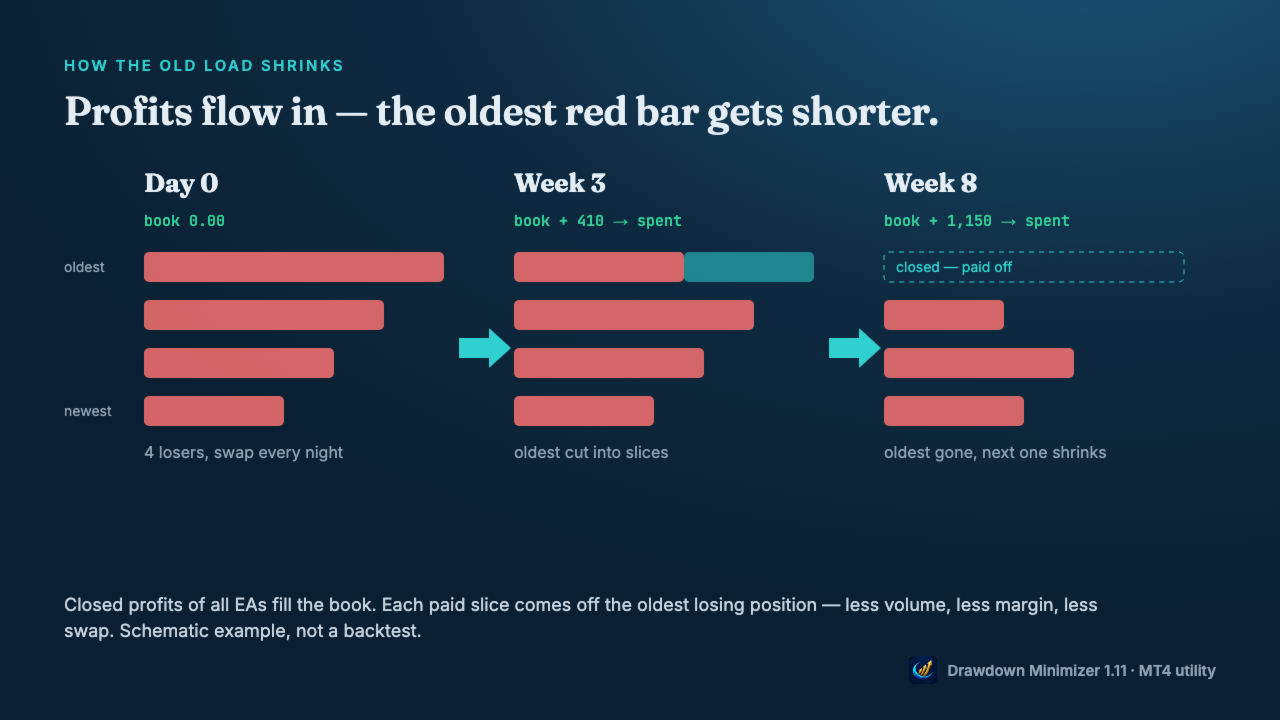
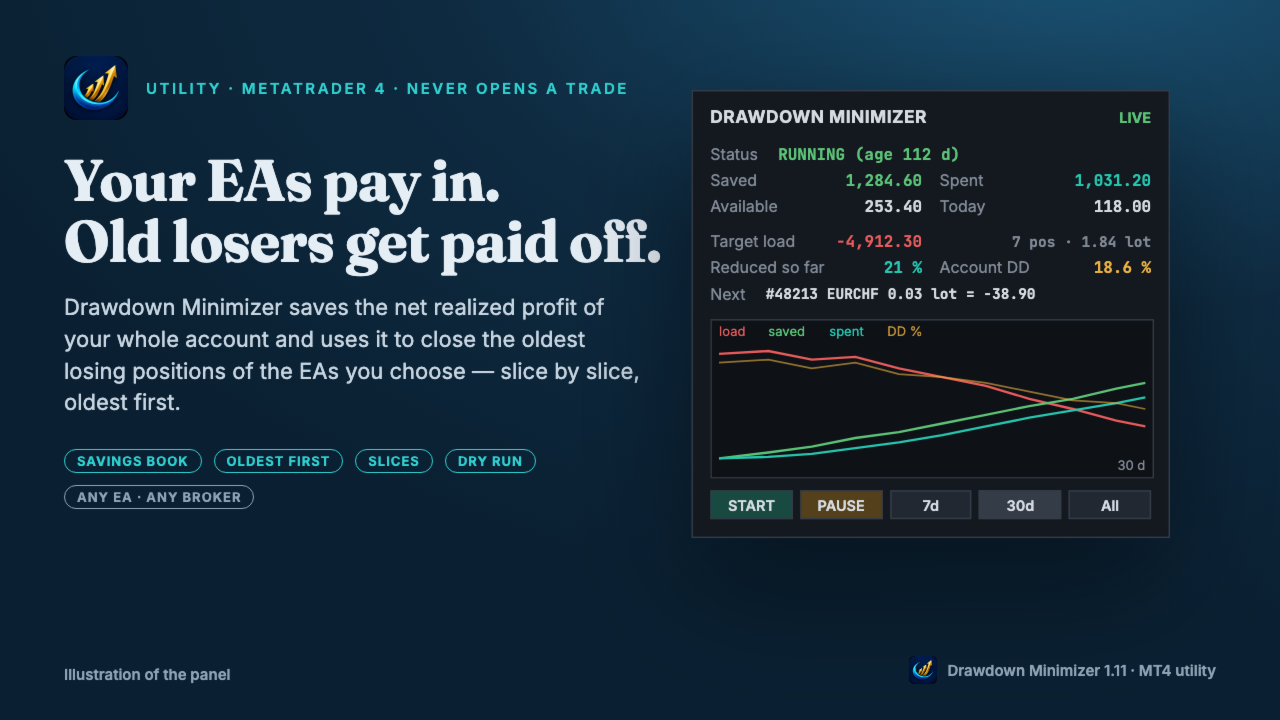
Drawdown Minimizer for MetaTrader 4 - your EAs pay in, old losers get paid off. This utility runs next to your other Expert Advisors and never opens a trade. It keeps a savings book of the net realized profit of your whole account and uses it to close the oldest losing positions of the EAs you choose - slice by slice, oldest first.

WHY IT EXISTS

Made by traders, for traders. One of our grid EAs got stuck in drawdown for months. The old positions did not come back, and they paid swap every single night. At the same time the account kept booking profits that just sat on the balance. Drawdown Minimizer connects the two.

THE SAVINGS BOOK

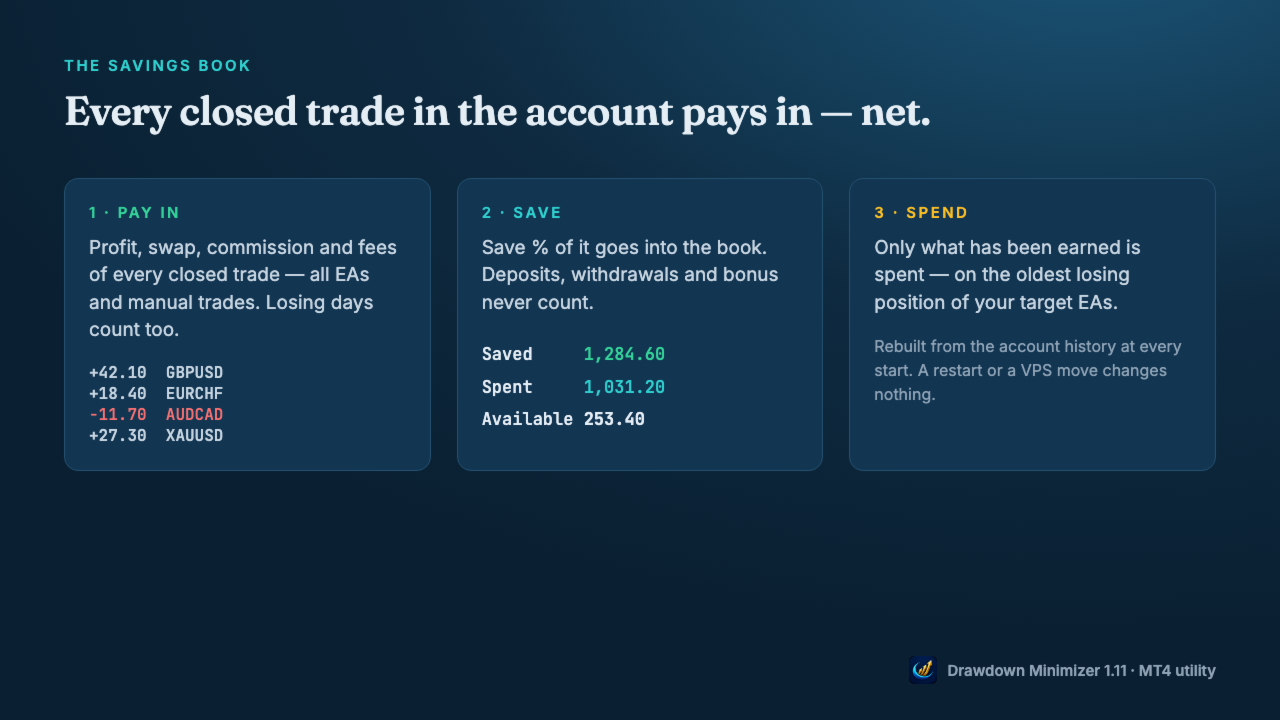
  • Every closed trade in the account pays in: profit, swap and commission - all EAs and manual trades. Losing days count too.
  • Save % decides how much of the net result goes into the book (default 100 %).
  • Deposits, withdrawals, credit and bonus never count, and neither do the tool's own closes.
  • Only what has been earned is spent. If the book drops below what was already spent, the reduction waits until money has been earned again.
  • The book is rebuilt from the account history at every start, so a restart changes nothing. In MT4 the tool recognises its own closes by a ticket list in the terminal's MQL4\Files folder - copy the DDMin_* files from there when you move to another terminal or VPS. Without them the book starts again from zero.
  • The savings book is a counter, not a separate account - the money stays on your balance and stays at risk.

OLDEST FIRST, IN SLICES

  • Only losing positions of the EAs you choose are reduced - by magic number, by a magic range like 1000-1999 (for EAs that give every grid level its own magic) or by a text in the trade comment. Winners and all other positions are never touched.
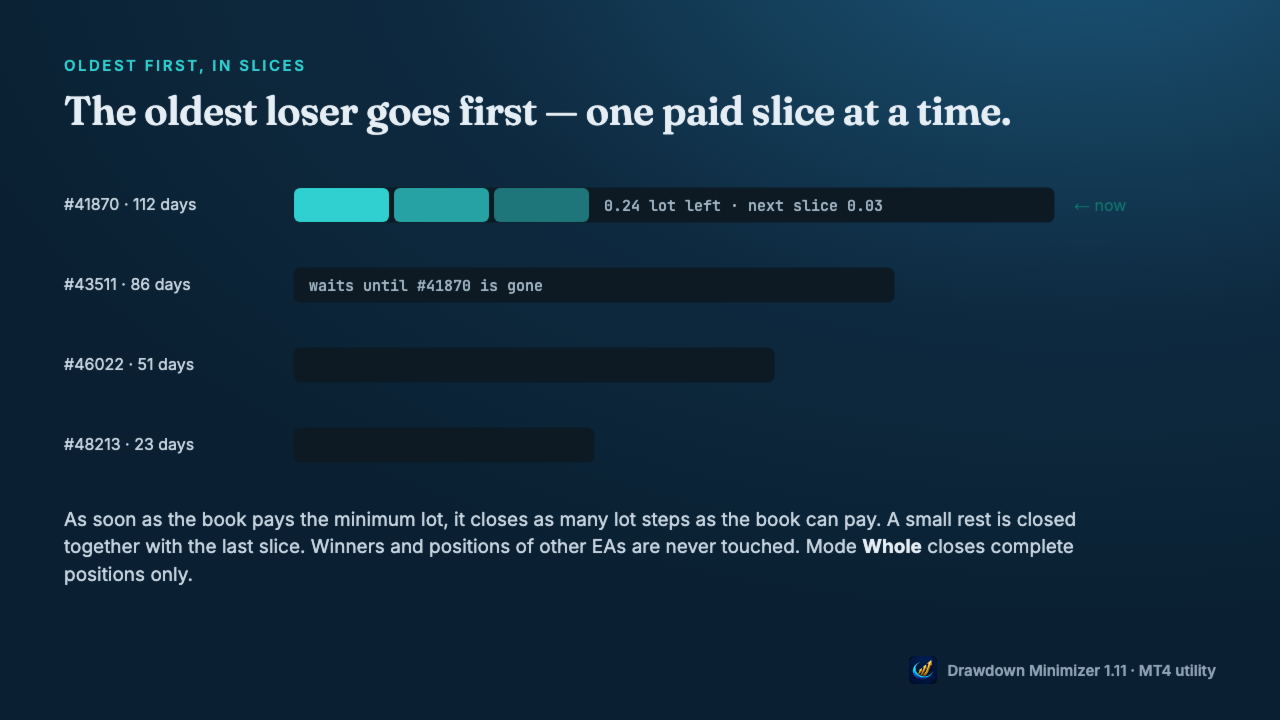
  • The oldest losing position goes first. A younger one is never preferred because it is cheaper. If the oldest one is blocked (spread, closed market, broker error), the next one in line is used.
  • As soon as the book pays the minimum lot, the tool closes as many lot steps as the book can pay. With a large book, the first close can be a big part of the position, or all of it. A small rest is closed together with the last slice.
  • Mode Whole closes complete positions only.
  • At most one close per set interval, optional spread limit, retry with pause on broker errors.

YOU DECIDE WHEN

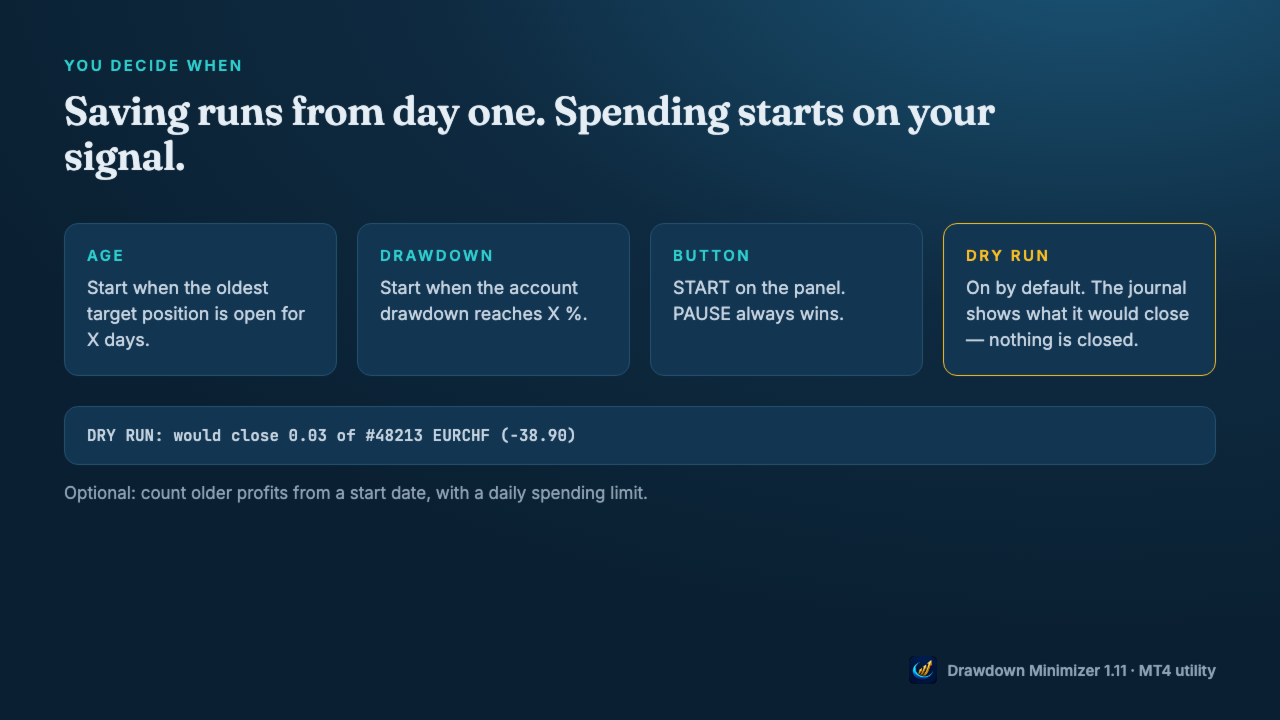
  • Saving runs from the moment the tool is attached. Spending starts when the oldest target position reaches an age, when the account drawdown reaches a level, or when you press START.
  • Once a trigger has fired, spending goes on even if the drawdown recovers (Keep running), until you press PAUSE or no target position is left. PAUSE always wins.
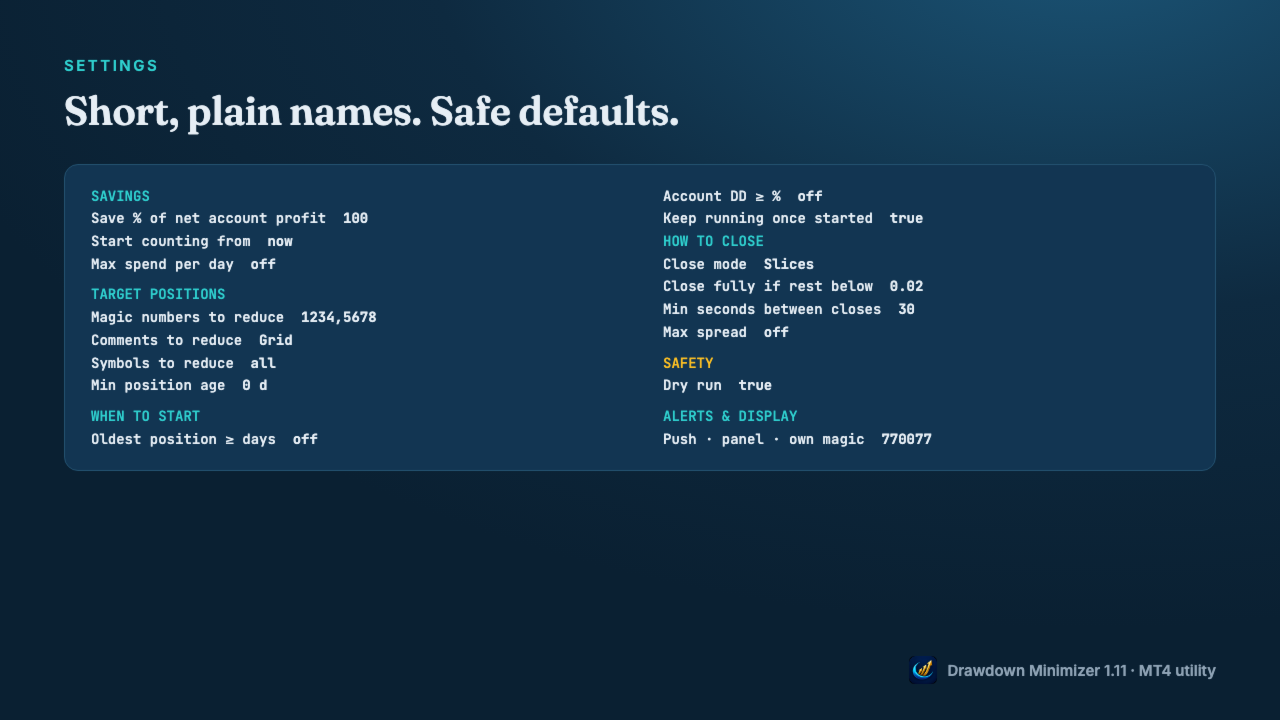
  • Dry run is on by default: the journal shows what it would close, nothing is closed.
  • Optional: count older profits from a start date, with a daily spending limit.

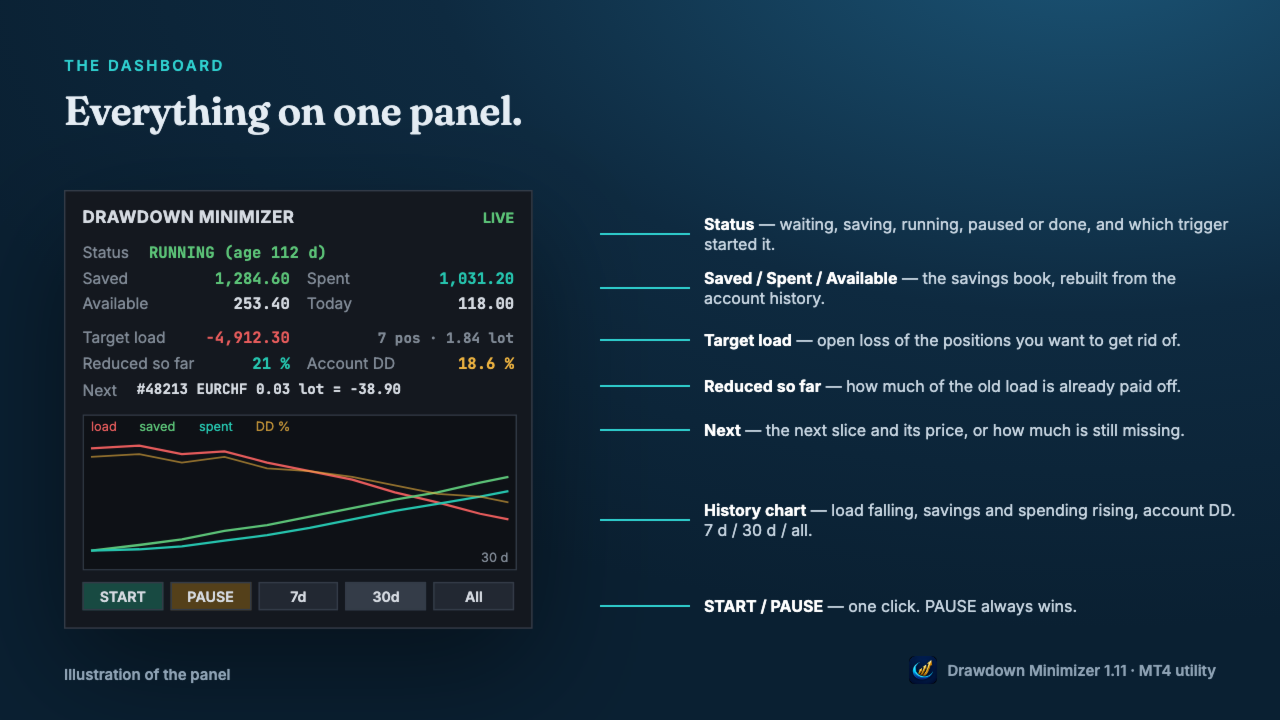
DASHBOARD

  • Status, Saved, Spent, Available and today's spending.
  • Open loss of the target positions and how much of it is already reduced.
  • The next slice and its price, or how much is still missing.
  • History chart: target load, savings, spending and account drawdown over 7 days, 30 days or all.
  • Push notifications for full closes, start and pause, a daily summary, and an alert when a close fails repeatedly.

WHAT IT CHANGES - AND WHAT IT DOES NOT

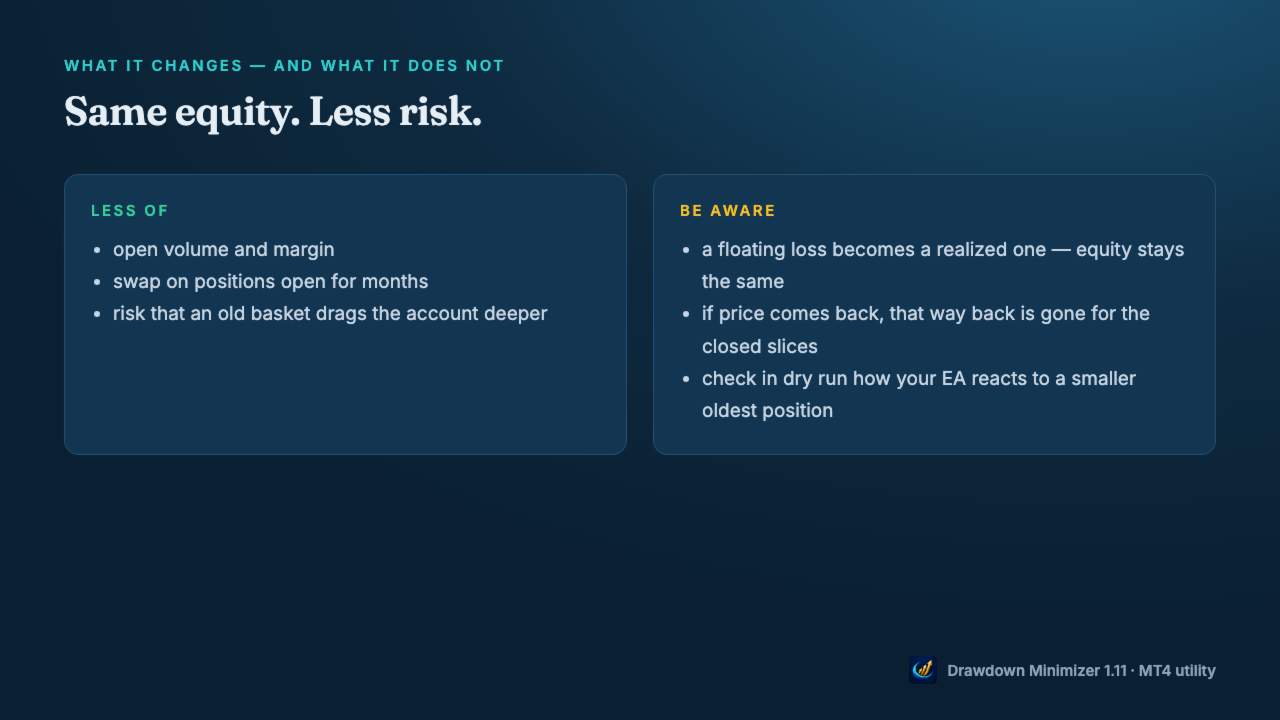
  • Closing a loser with saved profit does not change your equity, apart from slippage. A floating loss becomes a realized one.
  • What changes is the risk: less open volume, less margin, no more swap on the closed volume, and a smaller chance that an old basket drags the account deeper.
  • The price: if the market would have come back, that way back is gone for the closed slices.
  • Check in dry run how your EA reacts when part of its oldest position is closed - some grid EAs size the next level from the open volume.

MT4: PARTIAL CLOSES

  • When a slice is closed, MetaTrader 4 gives the rest of the position a new ticket with the comment "from #<old ticket>". The open time and the magic number stay the same.
  • Drawdown Minimizer follows this chain: the rest stays the oldest position, and a comment target like Waka still matches after the comment has become "from #...".
  • Your EA may not: grid EAs that identify their basket by trade comment or ticket may no longer recognise the rest. EAs that find their trades by magic number usually still see the rest, but with less volume. EAs that store ticket numbers may lose track of it. Test in dry run first, then start with Close mode Whole or a single slice.

GETTING STARTED

  • Attach the utility to a separate chart (any symbol, any timeframe) - not to the chart of the EA you want to reduce.
  • Enter the magic number(s), a magic range or a comment text of that EA, allow algo trading and press START.
  • Watch the journal in dry run, then set Dry run to false.
  • One instance per account. Hedging accounts only - not for FIFO accounts (US brokers). Set the Account History tab to All History - otherwise the book counts only the part of the history the tab shows.

Trading involves risk. Drawdown Minimizer does not predict the market and does not turn a loss into a profit - it pays old losses off with money the account has already earned.
推荐产品
| Fully-automated Smart Money Concept (ICT) inspired trading solution with multi-strategy capabilities | Built by a grid trader >> for grid traders.  This is MT4 version, click  here  for  Blue CARA MT5  (settings and logics are same in both versions)     Real monitoring signal  -->  Cara Gold Intro Blue CARA EA   ('CARA') - short for  C omprehensive  A lgorithmic R esponsive A dvisor is a next-gen  multi-currency    multi-timeframe  EA base on the widely known (and perhapse most popular) Inn
Vizzion
Joel Protusada
Vizzion is a fully automated scalping Expert Advisor that can be run successfully using GBPJPY currency pair at H1 timeframe. Very Important This Expert Advisor can not run with any EAs in the same account. As part of the money management plan, it calculates and monitors the Margin Level % and assumes that all open trades are created by it. If you want an Expert Advisor that trades in a daily basis, this EA is not for you because using this requires a patience to wait for a few days or weeks on
Harvest GOLD
Sayan Vandenhout
Harvest GOLD USES THE TREND WAVE INDICATOR AND IT CAN IDENTIFY THE BEGINNING AND THE END OF A NEW WAVE TREND MOVEMENT. AS AN OSCILLATOR, THE INDICATOR IDENTIFIES THE OVERBOUGHT AND OVERSOLD ZONES. IT WORKS GREAT TO CATCH THE SHORT TERM PRICE REVERSALS AND USES A MARTINGALE STRATEGY TO CLOSE ALL TRADES IN PROFIT. USE DEFAULT SETTINGS ON H1 OR HIGHER TIME FRAME ON ANY PAIR FOR MORE ACCURATE TRADES WHY THIS EA : Smart entries calculated by 3 great strategies The EA can be run on even a $30000
H4 GBPUSD Trend Scalper is a trend signal scalper The EA trades according to the trend strategy using original built-in indicator for opening and closing orders. The external inputs for limiting trading on Fridays and Mondays are available. The purpose of the strategy is to use the current trend with the most benefit. According to the results of testing and working on demo and real accounts, the best results achieved by using the Н4 timeframe on the GBP/USD pair Works on MetaTrader 4 Build 971+
How the EA works (simple explanation) Trades on   M5   timeframe Uses   H1 timeframe   to analyze global market context Analyzes   2 or 3 timeframes simultaneously On each timeframe: Checks price position relative to one or two Moving Averages Evaluates MA angle and distance between price and MA Entry logic is based on   trend + volatility conditions , not on random signals The full algorithm is illustrated in the screenshots. Recommended usage Symbol:   EURUSD Timeframe:   M5 Trading
Gold Label
Tran Thanh Tuyen
Gold Label  is an Expert Advisor designed specifically for trading gold.  This EA is specifically designed for   XAUUSD  with low risk and can grow your account from small capital. It is based on machine learning cluster analysis and genetic algorithms. EA contains self-adaptive market algorithm, which uses price action patterns and standard trading indicators. Expert showed stable results on XAU in 2011-2020 period. No dangerous methods of money managment used. Suitable for any broker conditi

Market Maestro: Your Ideal Partner for Automated Forex Trading If you're looking for a reliable assistant for trading in the currency market, Market Maestro is exactly what you need. This modern Forex bot is built using the latest technologies and algorithms, allowing it to effectively analyze market data and make informed trading decisions in real-time. Key Features of Market Maestro 1. Multicurrency Capability for Broad Opportunities Market Maestro can work with a wide range of currency pairs,

Magic EA MT4
Kyra Nickaline Watson-gordon
3 (1)
Magic EA is an Expert Advisor based on Scalping, Elliot Waves and with filters such as RSI, Stochastic and 3 other strategies managed and decided with the robot smartly. Large number of inputs and settings are tested and optimized and embedded in the program thus inputs are limited and very simple. Using EA doesn't need any professional information or Forex Trading Knowledge. EA can trade on all symbols and all time frames, using special and unique strategies developed by the author. The EA wo
Gyroscopes
Nadiya Mirosh
Gyroscope        professional forex expert   (for EURUSD, GBPUSD, USDJPY, AUDUSD, USDCHF, EURGBP, EURJPY, NZDUSD, USDCAD, EURCHF, AUDJPY, CADJPY pairs)   alyzing the market using the Elliot Wave Index. Elliott wave theory is the interpretation of processes in financial markets through a system of visual models (waves) on price charts. The author of the theory, Ralph Elliott, identified eight variants of alternating waves (of which five are in the trend and three are against the trend). The mov
Goal Time
Mourad Ezzaki
GOAL TIME is an expert advisor based on the notion of time, it studies the change of price according to time, and it finally detects the best time to execute a good order. The EA is based on an indicator that draws a price curve in relation to time, this curve is deduced by an algorithm that analyzes old data. Then, the EA exploits the generated curve and executes the correct order. In case of incorrect choice, the EA has the mission to limit the losses. After a thorough study of this strategy o
The Arrow Scalper
Fawwaz Abdulmantaser Salim Albaker
1 (2)
Dear Friend..  I share with you this simple Expert Adviser .. it is full automatic  this Expert Adviser following the trend of the pair you install on or any stocks or indices , it is works like that: - when the trend on H4 chart show a start of up trend the expert will wait till the 15M & 1H charts show an up trend the EA will open a buy order directly , and do the same for down trend and open a sell order the buy or sell  order lot size and take profit and stop loss will measured manually  by
FREE
Project Infinity
Sergey Yarmish
The Infinity Expert Advisor is a scalper. When the resistance and support levels are broken, trades are opened in the direction of the price movement. Open positions are managed by several algorithms based on the current market situation (fixed stop loss and take profit, trailing stop, holding positions in case of trend indication, etc.). Requirements for the broker The EA is sensitive to spread, slippages and execution quality. It is strongly recommended not to use the EA for currencies with s
Reversepro Smartsma ea mt4
AL MOOSAWI ABDULLAH JAFFER BAQER
ReversePro SmartSMA EA – A Fully Customizable Moving Average Strategy ReversePro SmartSMA EA is an advanced yet fully customizable trading tool designed for traders who prefer to fine-tune their strategies. This Expert Advisor (EA) is not pre-optimized, allowing you the flexibility to adjust its settings to fit your trading style, risk management preferences, and market conditions. How It Works This EA is based on the well-known Simple Moving Average (SMA) crossover strategy, enhanced with addi
Jet Punch
Didit Haryadi Saputra
Jet Punch is another best expert advisor for MT4,  can help you make money while you sleep by automatically entering and exiting trades. It trades by opening trades every day and closing them at the right time to ensure you always earn a profit. The software is very simple and can be used by both beginner and experienced traders.  Jet Punch was tested and has successfully passed the stress test with slippage and commission approximate to the real market condition. Recommendations: Currency pair:
KT Renko Patterns Robot MT4
KEENBASE SOFTWARE SOLUTIONS
Renko chart pattern EA: 14 patterns, a stop loss on every trade, half banked at the first target. KT Renko Patterns EA trades the patterns of KT Renko Patterns, which is built in, from double tops to break and retest. What it does for you Enters only when a brick closes through the pattern's breakout, never on a forming brick. Places the stop loss beyond the pattern and measures three targets from its height. Closes half at the first target, moves the stop loss to the entry and holds the rest un
Expert Grid rsi Pro
Mykhailo Zakervashevych
General Description Grid RSI Pro v3.1 is an advanced trading Expert Advisor for MetaTrader 4 that uses a grid strategy with RSI indicator filtering. The EA automatically opens orders at specified levels, creating a grid of orders to capture market fluctuations. Version 3.1 includes enhanced risk management features and improved signal filtering systems. Key Features 1. Trading Strategies RSI Strategy : Position opening when RSI reaches overbought (80) or oversold (20) levels Fixed Points : Posit
RiskGuardian Pro (MT4 版) - 专为 Prop Firm 考核打造 您是否厌倦了因为一次情绪失控或一次风控失误而浪费宝贵的考试报名费?RiskGuardian Pro 不仅仅是一个工具,它是您通过考核和保护资金账户的 强制纪律系统 。 核心痛点解决: 强制风控锁 (Anti-Tilt Lock): 自动平仓并锁定交易终端,一旦触及您设置的日内最大亏损(例如 4%)。彻底杜绝报复性交易。 一键算仓: 无需手动计算 Lot Size。只需设定您愿意承受的金额风险,系统自动适配手数,确保每笔交易都在风控规则内。 资金账户保护: 确保您不会因为日内/最大回撤违规而被 Prop Firm 封号。 购买逻辑: 投资 RiskGuardian Pro 的成本,远低于您重新报名一次 Prop Firm 考核的费用。它是您持续稳定交易的最佳保险。
VandoraFX Gold
Sayan Vandenhout
VANDORA FX USES THE TREND WAVE INDICATOR AND IT CAN IDENTIFY THE BEGINNING AND THE END OF A NEW WAVE TREND MOVEMENT. AS AN OSCILLATOR, THE INDICATOR IDENTIFIES THE OVERBOUGHT AND OVERSOLD ZONES. IT WORKS GREAT TO CATCH THE SHORT TERM PRICE REVERSALS AND USES A MARTINGALE STRATEGY TO CLOSE ALL TRADES IN PROFIT. USE DEFAULT SETTINGS ON H1 OR HIGHER TIME FRAME ON ANY PAIR FOR MORE ACCURATE TRADES WHY THIS EA : Smart entries calculated by 5 great strategies The EA can be run on even a $20000 a
首发限时优惠:$30 (限时特价!) 为庆祝我们的 EA 正式上架 MQL5,我们特别推出限时首发优惠价,仅需 $39 。 请注意,这是一项针对早期支持者的特别促销活动。价格将于 2026年7月31日 起调回原价 $69 。 千万不要错过以优惠价格获取我们专业级 EA 的绝佳机会!价格恢复后将不再有此优惠。 Suwan Gold Obsidian Edition XAUUSD Premier Automated Trading EA 一款专为长期投资而精心研发的专业级量化交易系统,旨在实现资产组合的可持续增长。本系统代码精雕细琢,纯净无瑕。采用独立(Standalone)运行模式,无需任何外部依赖文件,轻量高效,几乎不占用 VPS 资源且各图表独立运作,为您长期的稳健盈利保驾护航。 核心优势 资本友好型网格创新: 完美融合网格(Grid)、超短线(Scalp)与对冲(Hedge)策略。具备极低的回撤(Drawdown),依托 ThresholdOrders 与 Max Orders 函数精准把控价格区间并严格限制开仓手数,同时配备严密的单向/双向订单风控系统。 (在参数设置中,仅需
GoldenGrid Scalping Pro EA - Technical Description GoldenGrid Scalping Pro is an automated Expert Advisor designed for trading XAUUSD (Gold) on lower timeframes (primarily M5). The system integrates short-term momentum scalping with a controlled Dollar-Cost Averaging (DCA) position management mechanism. Strategy & Algorithm Overview Signal Confirmation Filters: Uses Average True Range (ATR) to measure volatility and Volume analysis to confirm short-term momentum before initiating entry signals.
Project Oro
Giacomo Donati
Follow us on Instagram: https://www.instagram.com/project_oro_ea Project Oro is a trading algorithm project that I began approximately six years ago. After countless painful and excruciating hours of coding, it is finally ready to be released to the public. The Expert Advisor (EA) is built on a proprietary and unique technique that analyzes the behavior and movement of candlesticks and the price action within the gold market. It searches for short windows of opportunity to strike and exits tr
Gold Coin M5
Andrey Kozak
2.33 (9)
金币M5是一款自动交易机器人,旨在使用M5周期交易黄金市场(XAUUSD)。 该机器人专为想要在短期时间间隔(倒卖)自动交易的交易者而设计。 特点: 剥头皮策略:机器人使用基于短期价格变动即时进场和离场的剥头皮策略。 针对 M5 上的 XAUUSD 进行了优化:XAUUSD 剥头皮交易专门针对在 M5 时间范围内交易 XAUUSD 货币对进行了调整,使其能够最大限度地提高黄金市场的机会。 最低余额:建议使用机器人进行交易的最低余额为 1000 美元。 这种水平的平衡提供了足够的余量来管理风险,并使机器人能够在短期内有效运行。 易于使用:XAUUSD Scalper 易于在交易账户上安装和配置,适合广大交易者(包括初学者和经验丰富的专业人士)使用。 交易建议: 在 XAUUSD 上交易 M5 时间表 最低初始余额 1000 美元起 在 XAUUSD 报价中,点后有 2 位数字。 ECN 账户类型。 您可以在PC和VPS上进行交易 该机器人在 FXopen 经纪商账户上进行了测试。 机器人设置: Search_trend_bar - 在此参数中,我们指示我们确定价格变动趋势的柱数。
The algorithm of the adviser's work: When the Expert Advisor is launched at a specified distance from the price (first_step), BuyStop and SellStop orders are placed. Further, depending on which way the price went, one of them becomes market, and the other begins to crawl after the price. When the price rolls back, it also becomes market. If we have reached a set profit in some direction, the order is closed and a creeping pending order of the same direction is placed again. If the profit is no
The Super scalper universal is a fully automated scalping Expert Advisor, which uses five indicators. Each open position is protected by a hidden stop order managed by an advanced modification algorithm. When searching for the suitable signals, the EA uses the integrated indicator in conjunction with the trend and time filters, as well as the volatility filter. It use dynamic position closure, which considers the location where the order had been opened and the subsequent price action. Profit is
Santa Scalping
Morten Kruse
2.84 (19)
Santa Scalping is a fully automated Expert Advisor with no use of martingale. Night scalping strategy. The SMA indicator filter are used for entries. This EA can be run from very small accounts. As small as 50 EUR. General Recommendations The minimum deposit is 50 USD,  default settings reccomend for eurusd m5 gmt +2 . Please use max spread 10 if you will not have orders change it to -1. Use a broker with good execution and with a spread of 2-5 points. A very fast VPS is required, preferably w
Open Momentum Scalper
Bernard Ndirangu Kago
Open Momentum Scalper Trade the move. Skip the chop. Most scalpers lose money in the same place: sideways markets, where they open trade after trade and give back the week's profit in an afternoon. Open Momentum Scalper is built around one rule: trade only when the market is really moving, and press hard when it is. It runs fully automatically on MetaTrader 4. It's built for Gold (XAUUSD) and index CFDs , with full protection on every trade. Why traders choose it It sits out flat markets. A mult
TrendLines And Volumes
Alexander Nikolaev
This Expert Advisor trades based on trend lines, as well as on the basis of volume analysis. Volumes are calculated using minute bars, in order to determine if they were ascending or descending. The trend lines are drawn based on High and Lows in the trade history. There are also additional indicators. Buy or sell signals depend on all those factors. This allows the EA to enter the market with more accuracy and to perform more deals. Input parameters Lots - lot size (if 0, a lot is calculated b
MMM Zig Zag Strategy: The Expert Advisors uses its built-in Zig Zag indicator to determine the prices trends and calculates the signal to decide to open buy or sell positions. It sends an order, closes or moves the Trailing Stop loss position as the indicator works. You can define the time period of each day of the week the EA should not trade (the bad time to trade). Usually the period of day when the impact news are published. General Inputs: Closes orders with any profit of value (currency):
EA211 Reversal Scalp
Jose Francisco Flores Rojas
Clear Reversal Scalper EA This Expert Advisor is designed to identify sharp market reversal opportunities by detecting a predefined number of consecutive bullish or bearish candles, signaling potential exhaustion of the current trend. Once the reversal pattern is detected, the EA enters a trade in the direction of the large reversal candle, capitalizing on momentum for a quick scalp. This strategy works best in volatile sessions. Key Features: Reversal Pattern Detection: Customizable setting to
Classic Market Surfer EA - A Timeless, Proven Strategy for Gold Trading For years, this powerful trading strategy has been hidden from the public-reserved for a select few. Now, for the first time, the Classic Market Surfer EA is available to traders like you.   Built on pure, time-tested trading principles, this EA doesn't rely on trendy gimmicks like AI or machine learning. Instead, it harnesses a classic, robust strategy that has consistently delivered results over the years. This is not a "g
该产品的买家也购买
欢迎来到 Trade Manager EA——这是一个终极风险管理工具,旨在使交易变得更直观、精准和高效。它不仅仅是一个下单工具,而是一个用于无缝交易计划、仓位管理和风险控制的全面解决方案。不论您是新手交易员、资深交易员,还是需要快速执行的剥头皮交易员,Trade Manager EA 都可以满足您的需求,适用于外汇、指数、大宗商品、加密货币等各种市场。 借助 Trade Manager EA,复杂的计算已成过去。只需分析市场,在图表上用水平线标记入场、止损和止盈,设置您的风险水平,Trade Manager 就会立即计算出理想的头寸规模,并实时显示以点、账户货币计价的止损和止盈。每笔交易都得以轻松管理。 主要功能: 头寸规模计算器 :根据定义的风险瞬间确定交易规模。 简单的交易计划 :在图表上用可拖动的水平线直接计划交易,设置入场、止损和止盈。 实时显示 SL 和 TP :以账户货币、点或分显示止损和止盈,便于分析。 高级保护工具 盈亏平衡选项 : 基本盈亏平衡 :当您的交易达到设定水平时自动保护利润。 多级盈亏平衡 :设置多达 4 个级别以逐步保护利润。 尾随止损选项 : 基本尾随
Exp COPYLOT CLIENT for MT4
Vladislav Andruschenko
4.69 (65)
MetaTrader 4 专业交易复制器 快速、专业、可靠的 MetaTrader 4 交易复制器。 COPYLOT 可在 MetaTrader 4 与 MetaTrader 5 终端之间复制外汇交易,并为不同账户类型和交易场景提供灵活的同步方案。 COPYLOT MT4 版本支持: MetaTrader 4 → MetaTrader 4 MetaTrader 5 Hedge → MetaTrader 4 MetaTrader 5 Netting → MetaTrader 4   MT5 版本 完整说明 + DEMO + PDF 如何购买 如何安装 如何获取日志文件 如何测试与优化 Expforex 的全部产品 您也可以使用 MetaTrader 5 版本,在 MetaTrader 5 → MetaTrader 5 和 MetaTrader 4 → MetaTrader 5 之间进行复制: COPYLOT CLIENT for MT5 COPYLOT 是一款专业级交易复制器,可稳定运行于 2、3 甚至 10 个终端之间。 支持从模拟账户和投资者密码账户进行复制 可同时运行在多个终端上
Local Trade Copier EA MT4
Juvenille Emperor Limited
4.96 (111)
Local Trade Copier EA MT4 是一款快速、灵活的交易复制工具,用于在同一台 Windows 电脑或 Windows VPS 上的多个 MetaTrader 4 账户之间复制和管理交易。 它将本地交易同步与 Receiver 端的手数管理、风险管理、交易过滤、品种映射、交易管理和账户保护功能结合在一起。 只需约 1 分钟 即可完成 Transmitter 和 Receiver 终端的设置,并可在同一经纪商或不同经纪商的账户之间复制手动交易或 EA 交易。在合适的条件下,本地 MetaTrader 终端之间的交易信息可以在 0.5 秒以内 完成同步。实际交易执行速度取决于经纪商延迟、网络状况、电脑/VPS 性能以及终端负载。 购买前先试用免费演示版 您可以在 MT4 模拟账户上测试 功能完整的 Local Trade Copier EA MT4 免费演示版 ,每次可使用 4 小时 : 下载 Local Trade Copier EA MT4 免费演示版 将下载的文件放入: MT4 → 文件 → 打开数据文件夹 → MQL4 → Experts 然后重新启动 MT
Grid Manual MT4
Alfiya Fazylova
4.71 (17)
Grid Manual是一个交易面板,用于处理订单网格。 该实用程序是通用的,具有灵活的设置和直观的界面。 它不仅可以在亏损方向上设置订单网格,还可以在盈利方向上设置订单网格。 交易者不需要创建和维护订单网格,实用程序会这样做。 打开一个订单就足够了,Grid manual会自动为它创建一个订单网格,并伴随它直到非常关闭。 完整说明和演示版 此處 。 该实用程序的主要特性和功能: 伴隨以任何方式打開的訂單,包括從移動終端打開的訂單。 適用於兩種類型的網格:“限制”和“停止”。 使用兩種方法計算網格間距:固定和動態(基於 ATR 指標)。 允許您更改未結訂單網格的設置。 顯示圖表上每個網格的盈虧平衡水平。 顯示每個網格的利潤率。 允許您一鍵關閉網格中的盈利訂單。 讓您一鍵關閉每個訂單網格。 允許您對訂單網格應用追踪止損功能。 允許您在訂單網格上應用將訂單網格的止損轉移到盈虧平衡水平的功能。 相對於訂單網格的盈虧平衡水平自動重新排列止盈(僅在限價網格模式下,距離取決於所選的計算類型:“保守”或“激進”)。 最多可管理 20 個訂單網格,每個網格最多可包含 100 個訂單。
Trade Indicator Assistant is a powerful MT4 utility designed to turn indicators into automated trading systems. Its main feature is the ability to automatically detect an indicator’s   BUY and SELL signal buffers , without requiring you to know the buffer numbers, search through indicator settings, or modify the indicator source code. Bonus Indicator: After purchasing Trade Indicator Assistant, contact me to receive Trade Signal Pro completely free as a bonus indicator. [Download Demo Version]
TradePanel MT4
Alfiya Fazylova
4.84 (95)
交易面板是一款多功能交易助手。该应用包含超过50种手动交易功能,并允许您自动执行大多数交易任务。 应用程序说明 : https://www.mql5.com/zh/blogs/post/761102 用于模拟账户的应用程序试用版: https://www.mql5.com/zh/blogs/post/762579 如何安装应用程序: https://www.mql5.com/zh/blogs/post/762580 如何在可视化模式下测试应用程序: https://www.mql5.com/zh/blogs/post/770278 如何在VPS MetaTrader上安装应用程序: https://www.mql5.com/zh/blogs/post/770196 贸易. 只需单击一下即可执行交易操作: 打開掛單和頭寸,並自動計算風險。 一鍵打開多個訂單和頭寸。 打開訂單網格。 按組別關閉掛單和頭寸。 反轉頭寸方向(關閉買入>打開賣出,關閉賣出>打開買入)。 鎖定頭寸(通過開啟缺少的頭寸,使買入和賣出頭寸的數量相等)。 一鍵部分關閉所有頭寸。 將所有頭寸的止盈和止損設置在同一價格水平。
Trade Assistant MT4
Evgeniy Kravchenko
4.43 (197)
它有助于计算每笔交易的风险,容易安装新的订单,具有部分关闭功能的订单管理, 7 种类型的追踪止损和其他有用的功能。 附加材料和说明 安装说明 - 应用程序说明   线条功能  - 在图表上显示开仓线、止损线、止盈线。 有了这个功能,就可以很容易地设置一个新的订单,并在开仓前看到它的附加特性。   风险管理  - 风险计算功能在考虑到设定的风险和止损单的大小的情况下,计算新订单的成交量。它允许你设置任何大小的止损,同时观察设定的风险。 批量计算按钮 - 启用 / 禁用风险计算。 在 " 风险 " 一栏中设置必要的风险值,从 0 到 100 的百分比或存款的货币。 在 " 设置 " 选项卡上选择风险计算的变量: $ 货币, % 余额, % 资产, % 自由保证金, % 自定义, %AB 前一天, %AB 前一周, %AB 前一个月。   R/TP 和 R/SL - 设置止盈和止损的关系。 这允许你设置相对于损失的利润大小。 例如, 1 : 1 - 这决定了 TP = SL 的大小。 2 : 1 - 这意味着 TP 是 SL 的两倍。 RR - 它禁用比率。   订单管理 该面板支持市场
News Filter EA: Advanced Algo Trading Assistant News Filter EA is an advanced algo trading assistant designed to enhance your trading experience. By using the   News Filter EA , you can integrate a Forex economic news filter into your existing expert advisor, even if you do not have access to its source code. In addition to the news filter, you can also specify   trading days   and   hours   for your expert. The News Filter EA also includes   risk management   and   equity protection   features
The product will copy all telegram signal to MT4   ( which you are member  ) , also it can work as remote copier.  Easy to set up, copy order instant, can work with almost signal formats, image signal, s upport to translate other language to English Work with all type of channel or group, even channel have "Restrict Saving Content", work with  multi channel, multi MT5 Work as remote copier: with signal have ticket number, it will copy exactly via ticket number. Support to backtest signal. How to
RiskManager
Roman Zhitnik
5 (4)
Risk Manager MT4   is an account protection Expert Advisor for traders who want strict risk control inside MetaTrader 4. The utility monitors your account equity, daily and weekly results, drawdown, open positions, trade count, consecutive losses, and trading hours. When a configured limit is reached, it can automatically close positions, cancel pending orders, stop other EAs, send notifications, or close the terminal. Instead of relying on discipline during a stressful trading session, you defi
PZ Trade Pad Pro MT4
PZ TRADING SLU
3.67 (3)
这是一个可视化的交易面板,可帮助您轻松进行交易管理,避免人为错误并增强交易活动。它结合了易于使用的视觉界面以及完善的风险和位置管理方法。 [ 安装指南 | 更新指南 | 故障排除 | 常见问题 | 所有产品 ] 易于使用 从图表轻松交易 精确的风险管理交易,无忧 保本是重中之重 让利润不受您的关注 尽快享受无风险交易 所有已开通交易的自动追踪止损 交易开始后立即设置初始止损 进行交易后,EA将执行以下任务: 初始止损/获利被自动放置 它会尽快锁定自由行(可选) 它将止损首次移动到盈亏平衡点(可选) 它使用您所需的方法跟踪止损,直到止损为止 其他很酷的功能是: 出色的终端活动报告 单一但功能强大的尾随止损方法 干净的图表界面 没有输入参数 我进行交易后会怎样? 这是您进行交易后EA的操作: 它放置初始止损并获利订单。 尽快搭便车并确保保本。默认情况下,这是通过在达到盈亏平衡点时关闭50%的交易来完成的,默认情况下为5点。这意味着,如果您日后被淘汰,您将一无所获(可选)。 盈亏平衡后,跟踪止损开始运行。 它跟踪止损,直到止损为止,让利润运行。 尾随止损如何运作? 追踪止损表示为所管
Trade Manager Pro MT4
Bryan Djoufack Nguessong
这是一个使你的交易更容易的工具,它将耗时的任务如订单管理和风险管理放在一个或几个点击上。 功能介绍 风险管理  根据风险字段中指定的%或$的风险自动计算手数,并让您通过放置SL TP等线来输入,并显示实时风险回报。 TrueRisk,所以在计算外汇对的手数时,它包括了佣金,所以当你指定1%时,你的风险是1%,所有的交易费用是1%,或者不是,你自己选择。 大宗交易处理程序,让你在一次点击中输入超过一个符号每个头寸最大交易量的10倍,而不是自己慢慢打开每个头寸。(必须不超过符号规格中提到的交易量限制或超过显示的每个头寸最大交易量的10倍)。 输入指数或其他资产,即使自动计算的手数不尊重四舍五入的手数。(1, 0.1 和 0.01 手的步数处理) 交易管理  只需点击一下 ,你就可以。 设置收支平衡的开仓,包括佣金和点差或不包括,由您选择。 通过在文本字段中指定SL或TP的新价格来批量改变已建仓位的SL或TP,并根据输入的新SL和TP价格来设置买入或卖出。 批量关闭头寸,而不是单独缓慢地关闭它们。 批量删除限价单。 AUTO BE功能,让您设置AUTO BREAKEV
The Price Action Dashboard is an innovative tool to help the trader to control a large number of financial instruments. This tool is designed to automatically suggest signals and price conditions. The Dashboard analyzes all major Time Frame suggesting price action conditions with graphic elements. The Dashboard can suggest you the strength of the trend identifying directional movement, it is an indispensable tool for those who want to open position themselves using market trends identifiers. The
Trading History MT4
Siarhei Vashchylka
5 (9)
Trading History - A program for trading and money management on the history of quotes in stratagy tester. It can work with pending and immediate orders, and is equipped with trailing stop, breakeven and take profit functions. Very good for training and testing different strategies. Manual (Be sure to read before purchasing) Advantages 1. Allows you to test any trading strategy in the shortest possible time 2. An excellent simulator for trading training. You can gain months of trading experience
Shepherd Safety EA
AW Trading Software Limited
4.92 (13)
AW Shepherd Safety EA 是一款用于管理已开仓位的智能交易系统。首单由交易者通过面板开出,之后由智能交易系统自行管理篮子:结合趋势过滤加开补仓单,按 TakeProfit、追踪或止损平掉该方向的订单,并在图表上显示平仓水平。 买单和卖单分开管理,两个方向可以同时持仓。补仓单并非价格走过设定间距就开出,而是要等 Parabolic SAR、两条 MA 或K线颜色显示价格朝持仓方向反转之后才开出。手动开出的仓位或由其他智能交易系统开出的仓位,只要 Orders Magic number 一致,智能交易系统同样会接管。 智能交易系统如何管理仓位: 1 交易者点击 Open Buy 或 Open Sell 按钮开出首单,手数取自 Order Size 字段。 2 当价格逆向移动达到 Minimal step between recovery orders 且趋势过滤显示反转时,智能交易系统开出补仓单,手数按 Type of increase orders 计算。 3 目标从该方向全部订单的盈亏平衡价起算:每加一张补仓单,盈亏平衡价都会向当前价格靠近。 4 该方向按 Type
Trade Assistant Pro 36 in 1
Makarii Gubaydullin
4.76 (21)
多功能交易工具:手数计算器、网格订单、风险回报比、交易管理、供需区、价格行为分析等 演示版   |   用户手册 交易助手 不能在策略测试器中运行:您可以下载 演示版 来测试此 实用工具 。 如有任何问题 /改进想法/发现错误 ,请 联系我 如需MT5版本,请点击 此处 简化、加速并自动化您的交易 流程 。通过此 仪表板 扩展标准终端功能。 交易面板 适用于任何交易品种:外汇、股票、指数、加密货币等。 1. 开立新交易 :手数/风险/风险回报比计算:手动交易的风险管理 手数计算器(基于风险规模计算交易量) 风险计算器(基于手数计算风险金额) 风险回报比 网格订单: + 动态间距选项和分割手数选项 订单激活触发器,+ 买入止损限价/卖出止损限价:MT4也可用 虚拟止损,虚拟止盈(隐藏止损,隐藏止盈:经纪商不可见) 智能止损/入场价位:如果K线收盘价超越此价位(避免错误触发) 隐藏订单(虚拟订单) 计划订单:即使市场休市也可下单(周末计划器) 附加多级止盈(多重获利了结) OCO订单(一单取消另一单),具有不同ID 交易可视化 + 图表上调整 以买入价(Bid)设置的止损/入场价位:避
RS Trade Copier - 超快 本地跟单系统,配备 真正的 图形界面。别再手动输入账号了。告别200多个晦涩的参数设置。 一款可靠且灵活的工具,用于在 MT4 和 MT5 多个终端之间复制交易操作。适合专业交易员、信号服务商以及个人投资者使用。能够以高精度和低延迟将一个或多个信号源(Provider)的 交易操作同步 到一个或多个接收端(Client)。支持简单自动配置和高级手动设置。不会干扰手动或其他 EA 开的订单。完全 在 MT4 本地运行 ,无需第三方服务器。 RS Trade Copier 与其他解决方案的对比 RS Trade Copier 其他解决方案 设置 可视化分步向导。 设置大约需要 1 分钟。 200 多个晦涩的输入参数。 设置大约需要 20 分钟。 速度 异步交易操作。* 批量平仓 50 个头寸仅需 ~1 秒。 缓慢的顺序执行。 批量平仓 50 个头寸需要约 25 秒。 界面 真正的图形界面,支持 11 种语言的工具提示。 无需手册即可上手。 EA 属性中“输入参数”选项卡下的长长参数列表。 需要阅读所有文档。 批量操作 完全支持。 接收端上的批量平仓
Telegram to MT4 Multi-Channel Copier   可将您 Telegram 和 Discord 频道中的交易信号自动复制到 MetaTrader 4。无需机器人、无需浏览器扩展、无需手动复制。信号一到 Telegram 或 Discord,EA 几秒内就在您的终端开仓。 在复制某个频道之前,内置回测器还能告诉您该频道在您的账户上会有怎样的表现。 产品包含两个组件:一个监听您 Telegram 频道的 Windows 应用程序,以及在 MT4 终端执行信号的本 EA。同时提供 MT5 版本   点此 . 购买前先试用:   应用程序可免费下载。连接您自己的频道,查看每条信号的读取结果。Backtest 选项卡和实际交易需要已购买或已租用的 EA。本页面的免费演示版只能在策略测试器中运行,而策略测试器无法读取 Telegram 和 Discord。 设置指南与应用下载:   https://www.mql5.com/zh/blogs/post/779480 了解如何 回测任何 Telegram 信号频道 。 当前价格将来会上调。 工作原理 应用通过您自己的 Te
MT4 至 Telegram 信号提供者 是一款易用、可完全自定义的工具,它使发送信号到 Telegram 成为可能,将您的账户变成信号提供者。 消息的格式 可以完全自定义! 但是,为了简便使用,您也可以选择一个预设模板,并能够启用或禁用消息的特定部分。 [ 演示 ]  [ 手册 ] [ MT5 版本 ] [ Discord 版本 ] [ Telegram 频道 ]  New: [ Telegram To MT5 ] 设置 可通过 用户指南 获取逐步说明。 无需了解 Telegram API;开发者提供所需的一切。 主要特性 自定义发送给订阅者的订单详情的能力 您可以创建分层订阅模型,例如铜牌、银牌、金牌。金牌订阅可获得所有信号等。 按订单号、符号或备注过滤订单 包括执行订单的图表的屏幕截图 在发送的屏幕截图上绘制已关闭的订单,以便额外验证 推迟发送新订单消息的可能性,以便在发送前对位置进行调整 订单详情的全透明度: 新的市场订单 *附带屏幕截图 订单修改(止损、获利点) 已关闭订单 *附带屏幕截图 部分关闭订单 ** 新的挂起订单 修改的挂起订单(进场价格) 挂起订单激活(
Exit Manager
Victor Christiaanse
5 (2)
Close every trade at the right moment, automatically. Most traders spend their energy on the entry and then close too early, too late, or on a feeling. Exit Manager takes the exit off your hands. Open a trade the way you always do, by hand or with any Expert Advisor, and Exit Manager watches it and closes it, fully or partly, when the indicator signal you chose appears. You can see it working on the chart. A clean panel on your chart shows, for every open trade, which rule will close it next, ho
神速EA跟单(TradeMirror)是一款MT4/MT5平台的订单复制软件。 使用教程 请点击 神速EA跟单使用教程 链接以查看更多使用教程 为什么选择神速EA跟单 我们深知对于金融软件而言安全、稳定和隐私的重要性,因此我们在细节处对这三大要素进行了额外的加固: 提供用户友好的图形界面,操作简单易用 注重隐私安全,适合对订单分发有隐私要求各种金融场景 精准复制订单,毫秒级分发 支持全平台,MT4/MT5全面覆盖 智能感知系统状态,邮件通知守护交易安全 核心功能列表 对于跟单软件而言,功能并不是越多越好的,因此经过严谨的需求分析,我们对程序进行了精简,并最终保留了如下核心功能: 多重连接 邮件通知 手数缩放 信号过滤 反向跟单 重置止盈/止损 免费演示 在购买Trademirror之前,你总是可以尝试免费演示。 点击本页面上的免费演示按钮 点击是的,我有Metatrader 4/5 允许浏览器打开Mt4/5 在Mt4/5中,找到专家顾问/市场/TradeMirror,打开它并点击测试 启用复盘显示(否则你将看不到GUI界面)。 点击开始 现在你可以在可视化图表上看到TradeMirro
Unlimited Trade Copier Pro is a tool to copy trade remotely to multiple MT4, MT5 and cTrader accounts at different computers/locations over internet. This is an ideal solution for you if you are a signal provider and want to copy your trades to other receivers globally on your own rules. One provider can copy trades to multiple receivers and one receiver can get trade from multiple providers as well. The provider can even set the subscription expiry for each receiver, so that receiver will not b
Take a Break
Eric Emmrich
5 (31)
Take a Break pauses your Expert Advisors when trading is a bad idea: before news, after a daily loss, outside your trading hours, or when a rule you wrote yourself says so. When the pause is over, your EAs simply continue. Account protection for all your EAs in one tool: news filter, drawdown and equity protection, time filter and custom rules. One EA on one chart protects the whole account, the free indicator gives every chart its own rules on top. Free demo | What is new in 26.09 | Support Ass
跟单->方便快捷的界面交互,用户上手即用       ->>>> 推荐在windows电脑,或者VPS Windows上使用 特色功能: 多样化个性跟单设置: 1.对不同的信号源可以设置不同的手数模式 2.不同的信号源分别设置正向反向跟单 3.信号分别设置注释 4.是否根据合约手数校准手数 多样化个性跟单设置2: 1.对不同的品种可以设置不同的手数模式 2.不同的品种分别设置正向反向跟单 3.信号分别设置注释 4.是否根据合约手数校准手数 注释过滤,MAGIC过滤,信号手数过滤,本地品种过滤 净持仓模式(该模式下手数计算仅支持倍率) 工作时间设置 反向同步接收端的平仓 订单绑定功能:任意订单可以绑定到设置信号源订单上 (双击表格更改) 账户风险控制  基本功能: 跟单正常交互速度0.5s以下 自动检测信号源,并显示信号源账号列表 自动匹配品种,不同平台常用交易品种(后缀不同等特殊情况)95%自动匹配,基本无需手动设置,品种映射表可随意双击更改对应品种.(映射表具有快速搜索品种功能) 4种手数计算模式(1.倍率 2.固定手数 3.自适应资金风险 4.源账户资金比例风险) 特殊手数模式
Trade Manager MT4 DaneTrades
Levi Dane Benjamin
4.09 (11)
交易管理器可帮助您快速进入和退出交易,同时自动计算风险。 包括帮助您防止过度交易、报复性交易和情绪化交易的功能。 交易可以自动管理,账户绩效指标可以在图表中可视化。 这些功能使该面板成为所有手动交易者的理想选择,并有助于增强 MetaTrader 4 平台。多语言支持。 MT5版本  |  用户指南+演示 交易经理在策略测试器中不起作用。 如需演示,请参阅用户指南 风险管理 根据%或$自动调整风险 可选择使用固定手数或根据交易量和点自动计算手数 使用 RR、点数或价格设置盈亏平衡止损 追踪止损设置 最大每日损失百分比,在达到目标时自动平仓所有交易。 保护账户免遭过多提款并阻止您过度交易 最大每日损失(以美元为单位)在达到目标时自动关闭所有交易。 保护账户免遭过多提款并阻止您过度交易 一键实现所有交易的盈亏平衡 自动计算从手机/电话发送的交易的风险 OCO 在设置中可用 交易和头寸管理 通过设置每月、每周、每天、每小时或每分钟的最大交易次数,停止过度交易和报复性交易。 高级挂单管理。 调整何时关闭挂单的规则 追踪挂单 支持市价订单和挂单 每日最大利润目标(以美元为单位)以确保头寸并停止
Trade Dashboard MT4
Fatemeh Ameri
4.96 (55)
疲于复杂的订单下达和手动计算?Trade Dashboard 是您的解决方案。凭借其用户友好的界面,订单下达变得轻而易举,只需点击一下,您就可以开设交易、设置止损和止盈水平、管理交易手数,并计算风险回报比,让您只需专注于您的策略。告别手动计算,使用 Trade Dashboard 简化您的交易体验。 立即下载演示版本 。 您可以在这里找到仪表盘功能和特性的详细信息 。 加入 Telegram 频道 。 购买后请给我发消息以获取支持。如果您需要添加更多功能,可以在产品的评论区留下您的想法,我愿意听取任何建议,希望您能在使用我的产品时获得最佳体验 。 这是 MT5 版本。 风险管理:使用 Trade Dashboard,可以将您的风险设置为账户余额或权益的百分比,或将风险设置为总金额。在图表上直观地定义您的止损,让工具准确计算每个货币对的适当手数。该工具还可以根据您期望的风险回报比自动设置止盈水平。它甚至可以在手数计算中涵盖佣金和点差费用。此外,您的止损和止盈可以转变为虚拟水平,隐藏于经纪商。通过 Trade Dashboard 的高级风险管理功能,掌控风险,保护您的资本。 交易线
一旦您確定了要進行交易的關鍵區域,就會自動交易支撐和阻力或供需區域。該 EA 允許您只需單擊即可繪製買入和賣出區域,然後將它們準確地放置在您預期價格轉向的位置。然後,EA 會監控這些區域,並根據您為這些區域指定的價格行為自動進行交易。一旦進行初始交易,EA 就會在您放置的相反區域(即目標區域)獲利。然後,您有兩種選擇,要么關閉交易並繪製新的區域進入,要么獲利退出並立即反向反向交易,創建「始終在」的市場風格策略。 包含輸入和策略的完整手冊位於: https://www.mql5.com/en/blogs/post/760256 該 EA 專為在市場上不使用固定或硬止損的頭寸交易者或美元成本平均交易策略而設計。相反,它的目的是透過在下一個可用支撐或阻力區域以相同方向進行新交易來縮小不正確的交易,並調整您在市場中頭寸的平​​均價格。如果需要的話,還有備用退出標準,形式為每筆交易的最大損失金額或基於時間的退出。 只需按下按鈕即可繪製準備放置在感興趣等級的區域。 關閉按鈕和關閉最舊的按鈕可退出所有交易,或僅退出舊交易(如果它們跌幅過大而無法立即調整您的平均頭寸)。 適用於任何時間範圍內的
King Trade Copier MT4
Mohammed Maher Al-sayed Mohammed Ahmed Saleh
5 (1)
King Trade Copier 可连接运行在同一台电脑或 VPS 上的 MetaTrader 终端。在一个账户上开出的交易会出现在其他账户上。该文件同时包含两种角色,因此同一个下载文件会根据您为 Mode 设置的值,成为发送端或接收端。 在每个图表上,面板都会显示此终端是在发送还是在接收,注明对方的账户,统计已应答的接收端数量,并给出最近一次信号的时间。未被复制的订单会在面板上留下原因,而不是无声消失。 复制内容 市价单,开仓和平仓 挂单:下单、修改和删除 Stop Loss 和 Take Profit,包括初始值以及之后的每一次变更 部分平仓和加仓手数 由于每一次变更都会被单独跟踪,先移至保本位再进行跟踪的止损,只要订单保持持仓,就会以同样的方式到达接收账户。 速度与无人值守运行 发送端不会按固定时间表轮询任何内容。订单一发生变化,更新就会立即写入,接收端每毫秒读取一次通道,因此剩下的延迟取决于您的经纪商。 重启后再次启动接收端,它会与发送端进行比对并补上差距。已复制订单与其源订单之间的关联保存在磁盘上,因此在重启、重新加载到图表、部分平仓,以及经纪商改写备注的情况下都不会丢失
VirtualTradePad mt4 Extra
Vladislav Andruschenko
4.85 (61)
一键交易的交易面板。处理头寸和订单!通过图表或键盘进行交易 交易小组进行人工交易。您可以从图表(图表窗口)或键盘进行交易。打开和关闭,反向和锁定。处理职位和订单! МetaТrader4中主要订单的交易控制面板:买入,卖出,买入,买入,卖出,卖出限制,收盘,删除,修改,追踪止损,止损,止损。 全新高级版本现已推出: 使用   VirtualTradePad PRO SE   升级您的交易流程 — 适用于   MetaTrader 5   和   MetaTrader 4   的新一代专业交易面板。 MT5版本 详细描述 +DEMO +PDF 如何购买 如何安装    如何获取日志文件    如何测试和优化    Expforex 的所有产品 从符号窗口交易并从键盘交易! 您正在为MetaTrader 4终端提供一个独特的插件 - 虚拟控制面板VirtualTradePad。 Description on English 注意!如果您想学习如何交易 策略测试器  ,请查看我们的免费 TesterPad 实用程序 VirtualTradePad在“  MQL5语言最佳图形面板  ”竞
KT Equity Protector MT4
KEENBASE SOFTWARE SOLUTIONS
3.75 (4)
An equity protection EA for MetaTrader that enforces your loss limits and profit target for you: when your account reaches a rule you set, it closes your trades on every symbol, before one bad day turns into a lost account. It suits prop firm challenges and personal accounts alike. Attach it to one chart, answer a few questions in the on-chart setup wizard, and it watches your whole account in the background while you trade by hand or with other EAs. What it protects Daily loss limit: a percenta
作者的更多信息
赠品: 购买 Dawnbreak,即可免费获得 LongRunner 或 Second Wind。购买后请给我发送私信。 Dawnbreak 在 MetaTrader 5 上交易固定交易时段区间的突破。每个图表每天一笔交易,每笔交易都设有止损,不使用网格、马丁格尔或摊平加仓。推荐用于 黄金(XAUUSD) 和 DAX(DE40) 。 所有买家均可免费获得更新。还不确定?请下载免费演示版,在策略测试器中用您自己经纪商的数据运行。 包含全部设置文件的完整指南: mql5.com/en/blogs/post/776683 (英文) 实盘账户(我自己的账户,相同策略,自2026年2月起): mql5.com/zh/signals/2372831 更新频道: mql5.com/zh/channels/dawnbreak 如何领取赠品 购买后,请在 MQL5 上给我发送私信,告知您选择的 EA 以及要使用它的交易账户号码。LongRunner 每天在股票指数上开一笔多单,并在每日展期(rollover)前平仓。Second Wind 在股票指数周一回调时买入,周二卖出。您将获得附带设置文件的完整
MetaTrader 5 版 Drawdown Minimizer——您的 EA 负责存入,旧的亏损持仓被还清。本工具与您的其他 EA 交易并行运行,从不开仓。它为整个账户的已实现净利润记一本储蓄账本,并用这笔钱平掉您所选 EA 中最早的亏损持仓——分批进行,最早的优先。 为什么会有它 由交易者打造,为交易者服务。我们的一个网格 EA 曾在回撤中被困数月。旧持仓始终没有回来,而且每晚都要支付库存费。与此同时,账户不断产生利润,这些利润只是停留在余额上。Drawdown Minimizer 把两者连接起来。 储蓄账本 账户中每一笔已平仓交易都会存入:利润、库存费、佣金和手续费——包括所有 EA 和手动交易。亏损的日子同样计入。 Save % 决定净结果中有多少存入账本(默认 100%)。 入金、出金、信用额和赠金从不计入,本工具自身的平仓也不计入。 只花已经赚到的钱。如果账本降到已花金额以下,减仓会等待,直到重新赚到钱。 每次启动时都会根据成交历史重建账本——重启或迁移 VPS 不会改变任何东西。 最早的优先,分批进行 只减少您所选 EA 的亏损持仓——按 Magic Number、按
MetaTrader 5 解套 EA——Partial Recovery、网格和区间。RecoveryPilot 主动把亏损持仓一步步追回,而不是寄希望于行情反转。其主模式 Partial Recovery (部分解套)会锁住亏损单,把它拆成小份,再用顺势的小额解套订单一份一份地抵消亏损。 自动配置 为每个品种设定步长、手数和订单数量。网格加仓摊平和 Zone Recovery 作为备选方法一并提供。每个周期开始前,EA 会计算自己可能亏损多少;如果这个数字与您的账户不匹配,周期就不会启动。 PARTIAL RECOVERY(主模式) 锁仓:当一笔交易亏损达到一个步长时,一笔同等手数的反向持仓会冻结亏损。之后只有隔夜利息(swap)继续计算。 拆分:亏损手数被拆分成若干份(最多 8 份,按手数步长取整)。 解套订单:顺着趋势方向(EMA 20/50)开的小单,手数 = 份额 x 1.5,默认不使用马丁,步长 = 日线 ATR / 3,每根 K 线最多一单,每单都有自己的经纪商端止损。 抵消:一旦解套订单的盈利足以覆盖冻结亏损中的一份加上成本,EA 先平掉亏损持仓的这一份以及锁仓单的同等
您在一个账户上运行多个EA,另外还有几笔手动交易。余额显示的是总额。它不会显示哪个EA在赚钱,哪个EA又把钱亏了回去。 Magic Stats 读取您MT5账户的成交历史,并 为每个魔术号显示一行 :在您选择的任意时段内,每个EA的实际表现。它是一个指标,因此可以放在任意EA旁边的图表上。它从不开仓、修改或平仓。 每个EA(魔术号)可以看到的内容 名称 和交易的 品种 交易数 、 胜率 、 净利润 (利润 + 库存费 + 手续费 + 费用),以账户货币及其小数位显示 盈利因子 、 平均每笔交易 EA已平仓交易净值曲线的 最大回撤 (以金额计)和 恢复因子 (净利润 / 最大回撤) 最后交易 日期、当前 持仓 及其 浮动盈亏 每行一条小型 净值线 (最多20个点),绿色或红色 Total account (全账户)行:该时段所有交易合并为一条曲线 盈利为绿色,亏损为红色;PF达到1.5及以上为绿色,低于1.0为红色。Magic 0显示为 Manual (手动:交易终端、移动应用、无魔术号的工具)。 时段与排序 选项卡: TODAY 、 WEEK (自周一起)、 MONTH 、 YEAR
FREE
非农就业(Non-Farm Payrolls)、CPI 或央行利率决议等高影响新闻,可能在几秒钟内让市场大幅波动:点差扩大,价格跳空,挂单在远离您设定的位置成交。 News Filter 读取 MetaTrader 5 内置的经济日历,并在新闻窗口临近时提醒您。如果您开启相应功能,它还会删除挂单、平仓,并发布一个您自己的 EA 可以读取的暂停标志。 免费、功能完整、无时间限制。 没有烦人的弹窗,程序内也没有升级提示。它从不开仓。 功能 经济日历 :MT5 内置日历,未来 7 天,每 15 分钟以及点击 REFRESH 按钮时重新加载。所有时间均为您经纪商的 服务器时间 。 新闻窗口 覆盖每个计入的事件:事件前后各 X 分钟(默认 15 / 15)。重叠的窗口合并为一个。 整个账户 :一个图表上的一个 News Filter 实例即可监控所有交易品种。同一终端另一个图表上的第二个副本显示 DISPLAY ONLY,如果第一个停止运行,它会在约 10 秒内接管。 面板 :状态框、已开启的操作、 接下来的 8 个事件 (日期和时间、倒计时、货币、影响程度圆点、标题)、当前受影响的交易品种以及
FREE
每日亏损限额只有在被严格执行时才有用,包括在您很想无视它的那一天。 Daily Loss Limit 负责执行它:您为当天设定一条线,当净值触及这条线时,Daily Loss Limit 会平掉所有仓位,并让账户保持空仓,直到下一次每日重置。 免费、功能完整、无时间限制。 没有骚扰弹窗,程序内也没有升级提示。它绝不会在您的账户上开仓。 功能 每日亏损限额 ,可按金额或按日基准的百分比设置(默认:5%)。日基准为每日重置时的余额,或重置时余额与净值中的较高者。 每日重置 ,时间由您设定,按经纪商的服务器时间计算(默认 00:00)。 整个账户 :只需在一个图表上运行,即可监控手动交易、手机应用以及所有 EA,支持对冲和净额账户。 平仓并锁定 :当净值触及这条线时,先删除挂单,再平仓,亏损最大的仓位优先。之后账户将 锁定到下一次每日重置 。锁定期间,任何新开的仓位或挂单都会再次被平仓或删除(可关闭)。 可选的每日盈利目标 (金额或百分比,默认关闭):当净值达到目标时,平掉所有仓位,账户锁定到重置为止。“今天赚到 X 就收工。” 预警水平 (默认为已用限额的 70%):每天一次提醒和一条推送
FREE
完整指南(全部设置、设置文件,英文): https://www.mql5.com/en/blogs/post/778433 实盘账户 (我自己的账户,同一策略,自 2026 年 2 月起)*: mql5.com/zh/signals/2372831 LongRunner 每天买入一次股票指数,并在经纪商每日换日(rollover)之前再卖出。从长期看股票指数一直在上涨,但以 CFD 形式持有,每次换日都要支付融资费用(swap)。LongRunner 只赚取当天的走势,避开这笔成本:在固定的服务器时间开立新的多头仓位,并在同一服务器日的固定时间平仓。 每天每个品种只做一笔交易。不用网格,不用马丁格尔,不摊平,不持仓过换日(除非您关闭平仓时间)。 交易方式 买入 :在固定的服务器时间买入,例如美国指数为 01:05。可选:仅在价格创出当日新高后才买入。 仓位大小 :固定手数、每 x 资金对应的手数、余额百分比或固定金额。 保护 (可选):止损、止盈、保本和追踪止损,以入场价的百分比或点数设置。 卖出 :在固定时间卖出,例如 23:50。换日时不持仓,第二天再开新交易。 趋势过滤器(可选)
完整指南(全部设置,英文): https://www.mql5.com/en/blogs/post/778504 首发价:前 10 份 39 USD。之后 59 USD,最终价格 79 USD。早期买家可保留今后的所有更新。 Trade Panel Sextant 适用于 MetaTrader 5 – 每笔交易都按您的风险计算仓位。您设定想承担多少风险,把止损放在图表所示的位置,Sextant 便会计算手数、发送订单并管理交易。账户守护功能提供每日亏损限额、每日目标和交易次数上限,避免糟糕的一天变成糟糕的一个月。 所有功能都集中在一个简洁的分页面板中:TRADE、MANAGE、GUARD 和 INFO。三种主题,每个控件都有提示,支持快捷键,并且每个数值都按品种分别记忆。 TRADE 标签页 每笔交易风险 :可设为余额百分比、净值百分比、金额或固定手数。手数向下取整,因此止损处的亏损绝不会超过您的风险。可将每手佣金计算在内。 止损 :以点数、ATR 倍数设定,或取自您在图表上拖动的红线。 止盈 :以盈亏比、点数设定,取自绿线,或关闭。 图表上的线 在拖动时显示价格、pip、金额和 R。
FREE
完整指南(全部设置、设置文件,英文): https://www.mql5.com/en/blogs/post/778434 Second Wind 交易 Turnaround Tuesday 策略,这是股指中历史最悠久、记录最充分的日历效应之一。周末的消息常常在周一把指数压低。如果这种情况发生在指数本已处于回调之中时,周二往往会出现回升。Second Wind 在周一价格低于其移动平均线时买入,并在周二的固定时间卖出。 每个品种每周最多一笔交易。只做多。无网格,无马丁格尔,无摊平加仓。 实盘账户 (我自己的账户,相同策略,自 2026 年 2 月起)*: mql5.com/zh/signals/2372831 交易方式 周一: 从开始时间起(例如服务器时间 01:05),Second Wind 全天每分钟检查一次指数。 过滤: 仅在 Bid 价 低于移动平均线 时买入(默认:20 日 SMA,当前K线)。即使周一开盘时价格高于 MA,当天稍后一旦价格跌破 MA,仍可触发入场。 持有: 一个多头仓位,隔夜持有至周二。止损、止盈、保本和追踪止损均为可选。 周二: 在固定时间平仓,例如 23
Relay EA
Pitt Petruschke
完整指南(全部设置,英文): https://www.mql5.com/en/blogs/post/778503 Relay 将三种策略作为一个 EA 运行: Dawnbreak (早盘区间突破)、 LongRunner (无库存费的每日指数做多)和 Second Wind (Turnaround Tuesday)。您只需将 Relay 加载到一个图表上。它会为每个槽位打开一个图表,显示该策略自己的仪表盘,并在一个总览面板上显示整个投资组合。 一个策略在一个交易品种上称为一个 槽位 。Relay 内置 13 个槽位 。每个槽位都有自己的魔术号,以及其单独 EA 已发布的示例参数集:相同的时间和规则,规模见下文。无网格,无马丁格尔,无摊平。 三种策略 Dawnbreak 用于 XAUUSD、GBPUSD、US30、DE40、EURJPY、USDJPY、BTCUSD:标出早盘区间,在两侧各挂一张突破订单,止损设在区间边界或价格的 1% 处,晚间平仓。周一至周五。 LongRunner 用于 US30、USTEC、DE40:在交易时段开盘后买入指数,在每日展期前卖出。每天一笔多单,无库存费。
Snapback Pro EA
Pitt Petruschke
完整指南(所有设置、设置文件,英文): mql5.com/en/blogs/post/778006 推荐经纪商: mql5.com/en/blogs/post/778007 实盘信号(真实账户,2026年10月起): mql5.com/zh/signals/2397731 Snapback 等待价格远远超出前一日波动区间的交易日——默认超过该区间一半的四倍。这样的走势很少持续。Snapback 先等第一次真正的回调出现,然后逆延伸方向入场,并以 线性网格 管理交易,直到整个篮子可以通过追踪止损获利平仓。 一个 EA 在一个图表上最多交易 20 个货币对。账户级规则规定同一时间最多 5 个货币对处于风险中 ;已进入追踪盈利的货币对不计入其中。 首发价格:99 USD。 每售出 10 份,价格上涨 15 USD(99, 114, 129 …)。早期买家可获得所有后续更新。 交易方式 延伸: EA 在 H1 信号周期上根据前一日波动区间构建价位,并等待价格收盘于这些价位之外。 确认: 虚拟阶梯跟随延伸;一张虚拟入场单以回调距离跟随价格。 入场: 当价格掉头并触及该订单时,逆延伸方向开立第
Fairway
Pitt Petruschke
完整指南(全部设置、设置文件,英文): https://www.mql5.com/en/blogs/post/778374 Fairway 在 M5 上交易 AUDCAD,做均值回归。AUDCAD 大部分时间处于横盘,过度拉伸的走势往往会回摆。当价格在 H1 上被拉伸到 Envelopes 通道之外时,Fairway 开启一个篮子;价格继续运行时,以逐渐扩大的间距加单;价格回归时,成对盈利平仓。 网格 EA 通常有一个弱点:与持仓篮子方向相反的长期趋势。Fairway 用硬性的 篮子止损 来应对。篮子达到设定亏损时即被平仓,EA 等待下一个信号后重新开始。一段不利趋势只会损失已知金额,而不是整个账户。 使用默认设置的真实账户: https://www.mql5.com/zh/signals/2396880 交易方式 信号: 在每根 M5 K线开盘时,Fairway 检查最后一根已收盘 H1 K线的 Envelopes 通道(EMA 14,0.2 %)。当 Ask 低于下轨时开启 BUY 篮子,当 Bid 高于上轨时开启 SELL 篮子。 网格: 如果价格继续运行,网格订单以逐渐扩大的间
筛选:
无评论
回复评论