Drawdown Minimizer MT4

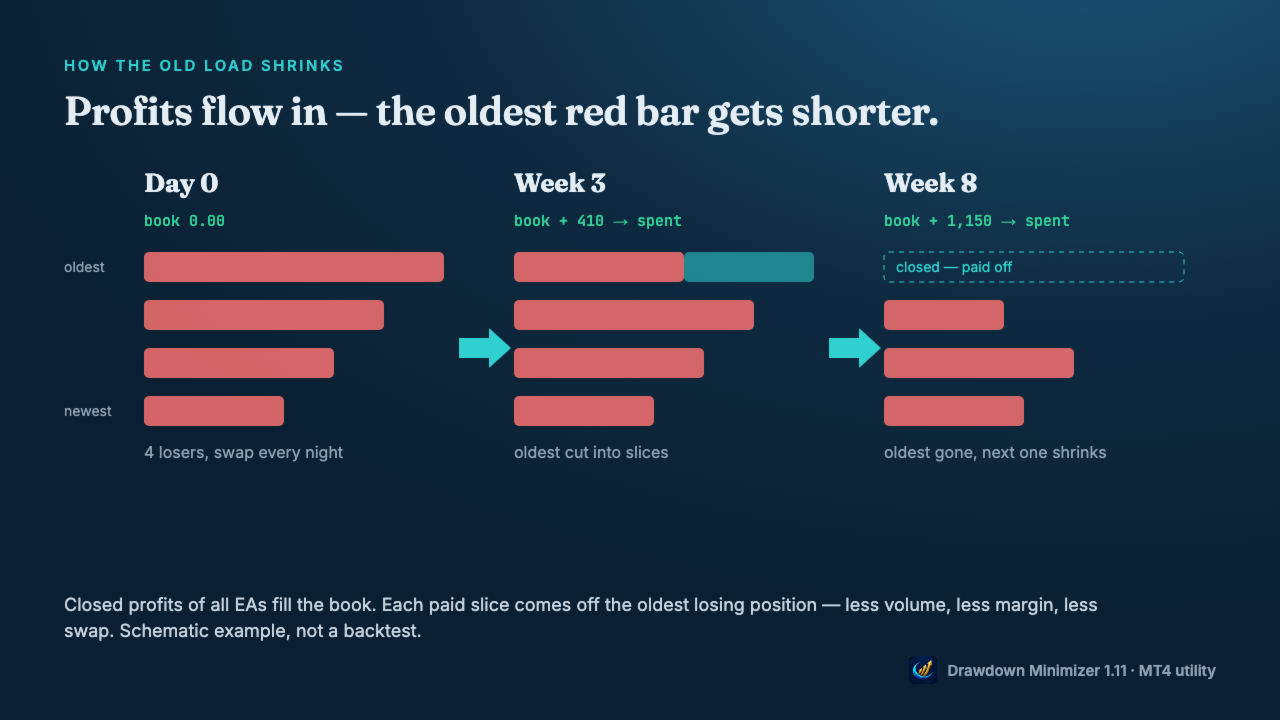
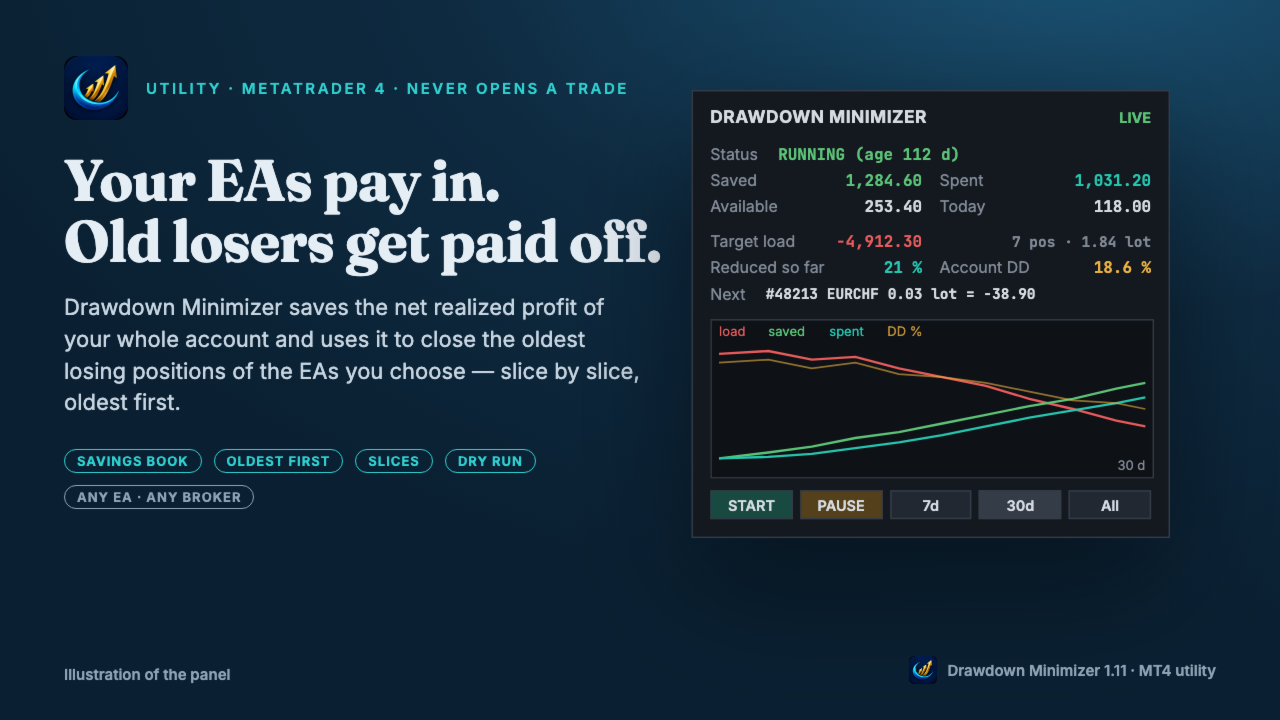
Drawdown Minimizer for MetaTrader 4 - your EAs pay in, old losers get paid off. This utility runs next to your other Expert Advisors and never opens a trade. It keeps a savings book of the net realized profit of your whole account and uses it to close the oldest losing positions of the EAs you choose - slice by slice, oldest first.

WHY IT EXISTS

Made by traders, for traders. One of our grid EAs got stuck in drawdown for months. The old positions did not come back, and they paid swap every single night. At the same time the account kept booking profits that just sat on the balance. Drawdown Minimizer connects the two.

THE SAVINGS BOOK

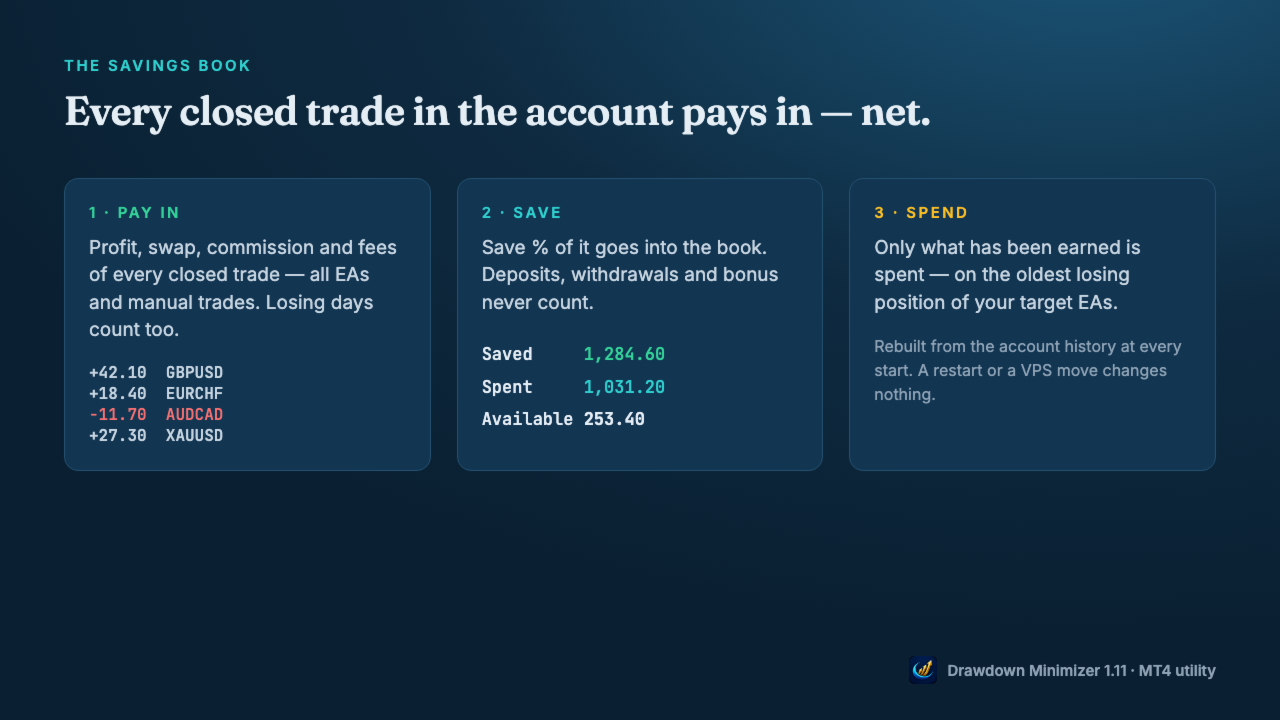
  • Every closed trade in the account pays in: profit, swap and commission - all EAs and manual trades. Losing days count too.
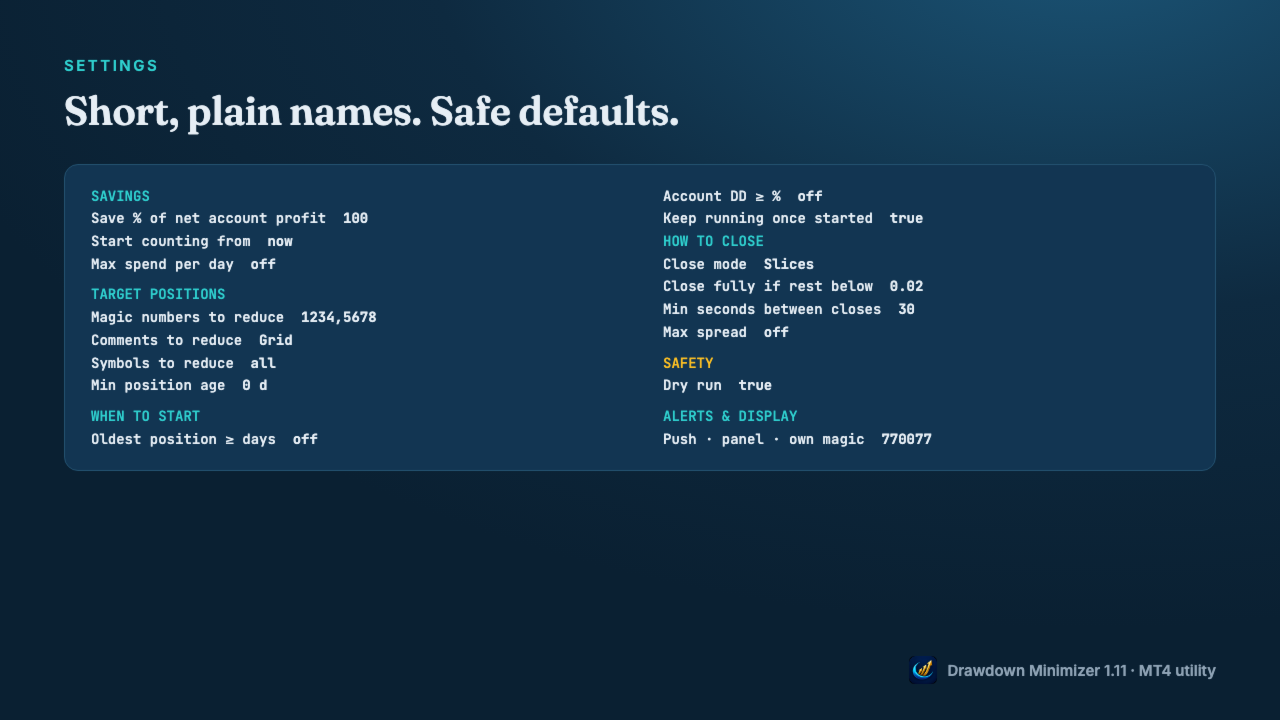
  • Save % decides how much of the net result goes into the book (default 100 %).
  • Deposits, withdrawals, credit and bonus never count, and neither do the tool's own closes.
  • Only what has been earned is spent. If the book drops below what was already spent, the reduction waits until money has been earned again.
  • The book is rebuilt from the account history at every start, so a restart changes nothing. In MT4 the tool recognises its own closes by a ticket list in the terminal's MQL4\Files folder - copy the DDMin_* files from there when you move to another terminal or VPS. Without them the book starts again from zero.
  • The savings book is a counter, not a separate account - the money stays on your balance and stays at risk.

OLDEST FIRST, IN SLICES

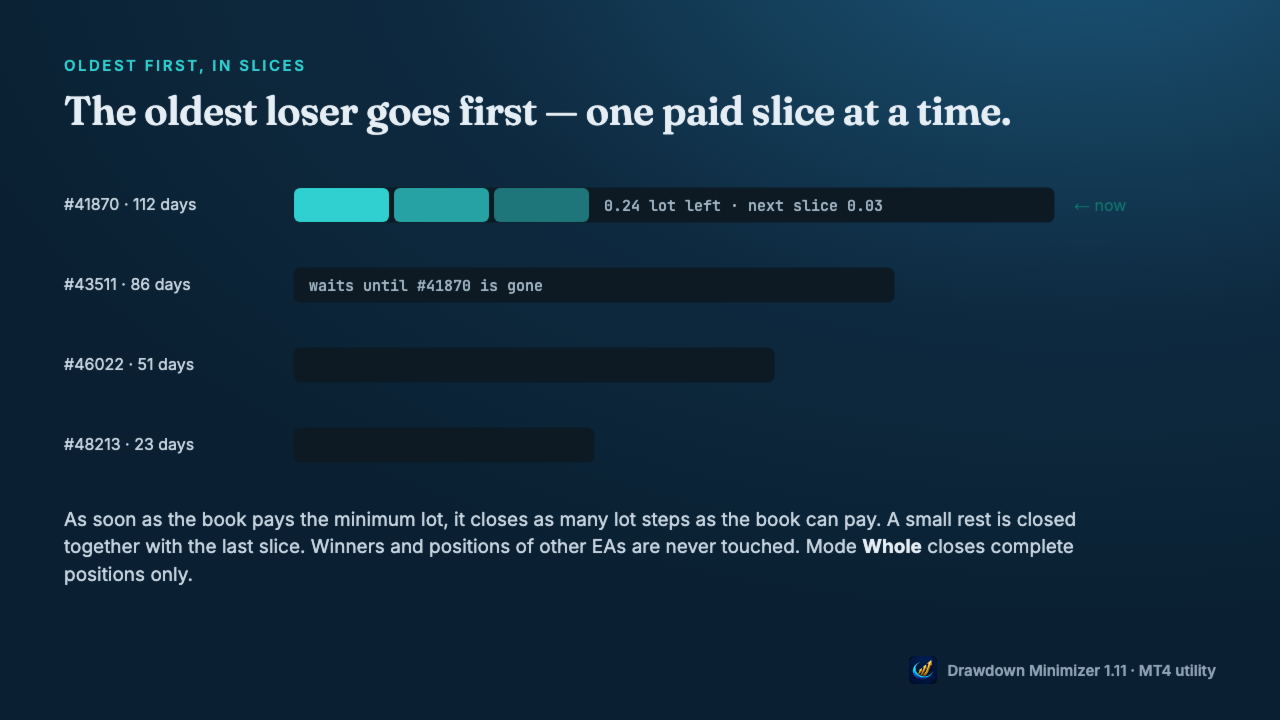
  • Only losing positions of the EAs you choose are reduced - by magic number, by a magic range like 1000-1999 (for EAs that give every grid level its own magic) or by a text in the trade comment. Winners and all other positions are never touched.
  • The oldest losing position goes first. A younger one is never preferred because it is cheaper. If the oldest one is blocked (spread, closed market, broker error), the next one in line is used.
  • As soon as the book pays the minimum lot, the tool closes as many lot steps as the book can pay. With a large book, the first close can be a big part of the position, or all of it. A small rest is closed together with the last slice.
  • Mode Whole closes complete positions only.
  • At most one close per set interval, optional spread limit, retry with pause on broker errors.

YOU DECIDE WHEN

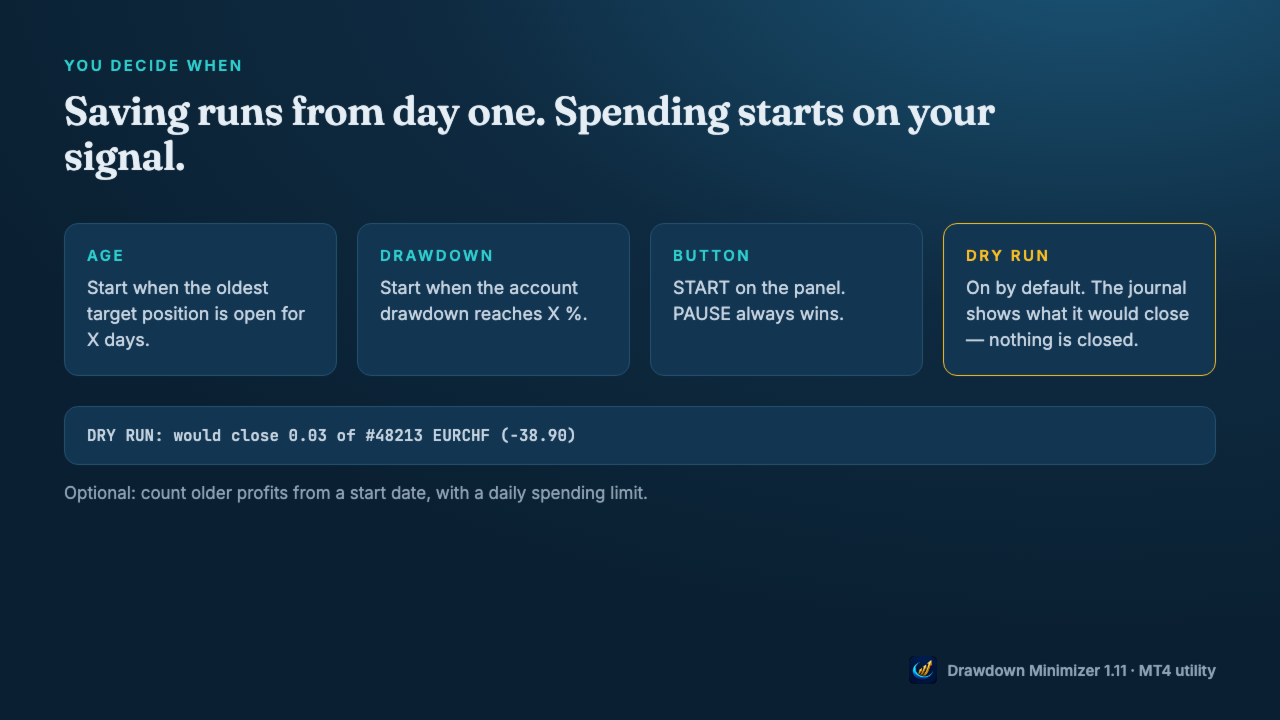
  • Saving runs from the moment the tool is attached. Spending starts when the oldest target position reaches an age, when the account drawdown reaches a level, or when you press START.
  • Once a trigger has fired, spending goes on even if the drawdown recovers (Keep running), until you press PAUSE or no target position is left. PAUSE always wins.
  • Dry run is on by default: the journal shows what it would close, nothing is closed.
  • Optional: count older profits from a start date, with a daily spending limit.

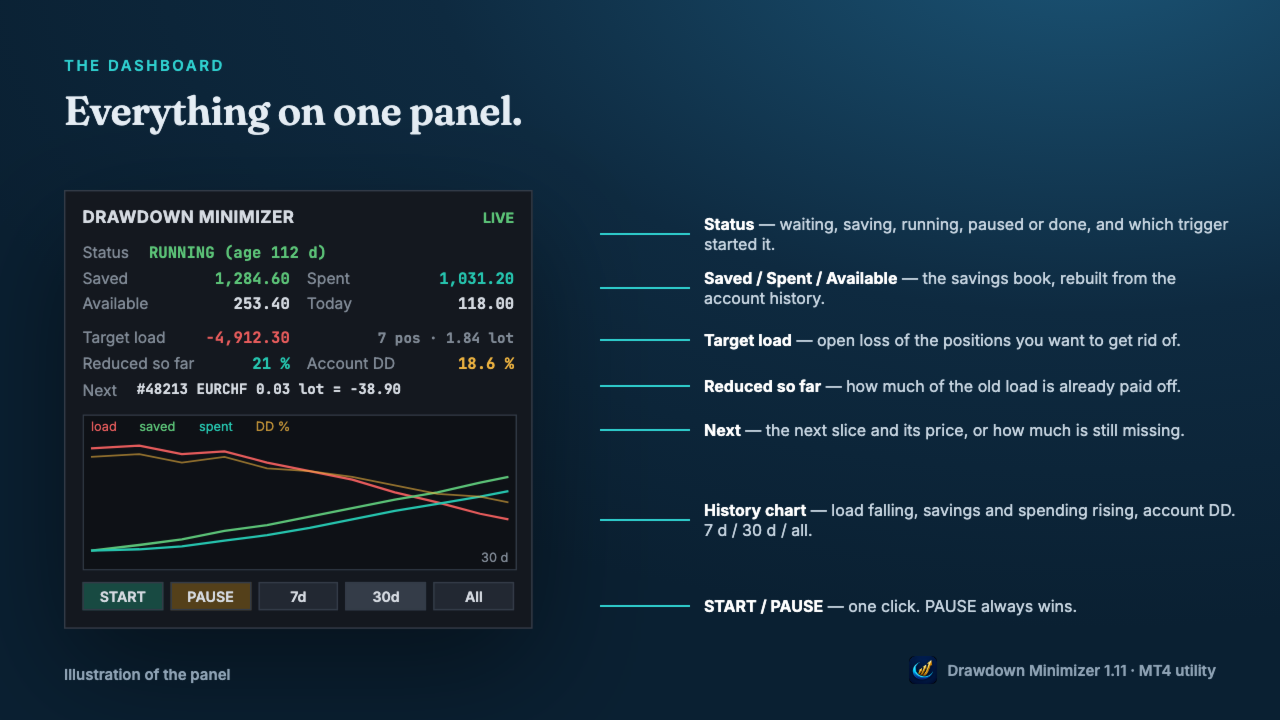
DASHBOARD

  • Status, Saved, Spent, Available and today's spending.
  • Open loss of the target positions and how much of it is already reduced.
  • The next slice and its price, or how much is still missing.
  • History chart: target load, savings, spending and account drawdown over 7 days, 30 days or all.
  • Push notifications for full closes, start and pause, a daily summary, and an alert when a close fails repeatedly.

WHAT IT CHANGES - AND WHAT IT DOES NOT

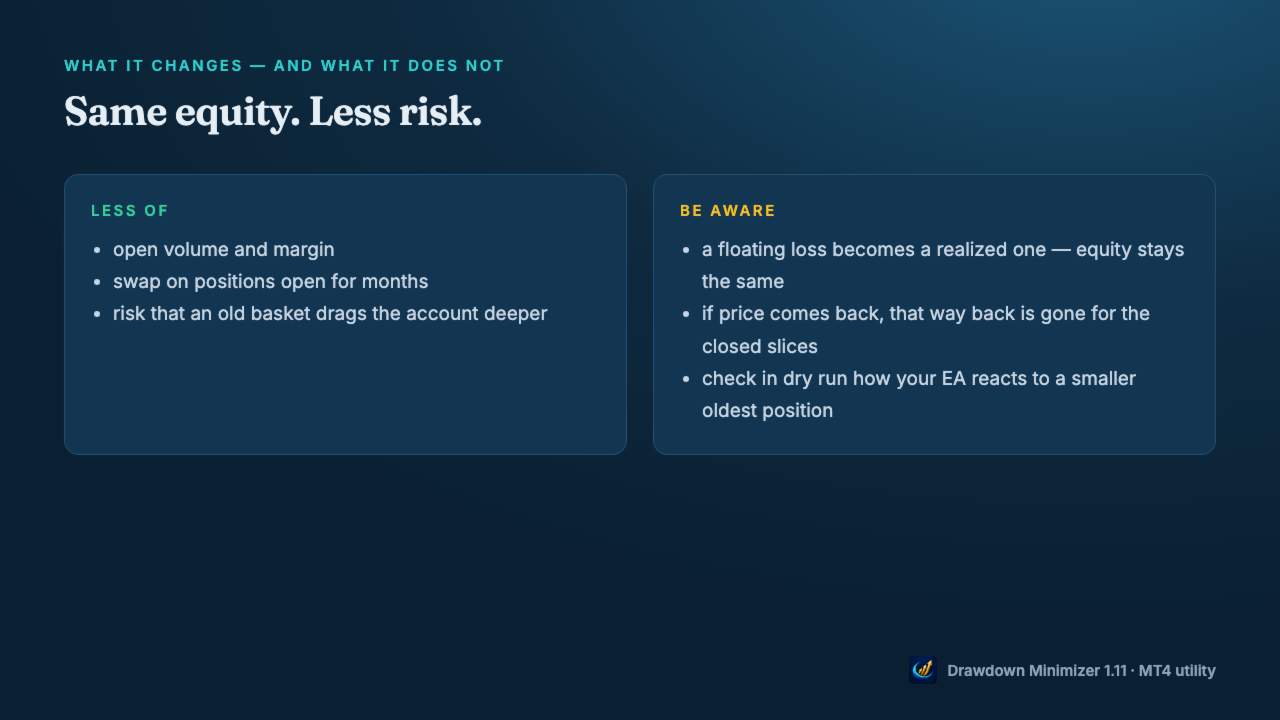
  • Closing a loser with saved profit does not change your equity, apart from slippage. A floating loss becomes a realized one.
  • What changes is the risk: less open volume, less margin, no more swap on the closed volume, and a smaller chance that an old basket drags the account deeper.
  • The price: if the market would have come back, that way back is gone for the closed slices.
  • Check in dry run how your EA reacts when part of its oldest position is closed - some grid EAs size the next level from the open volume.

MT4: PARTIAL CLOSES

  • When a slice is closed, MetaTrader 4 gives the rest of the position a new ticket with the comment "from #<old ticket>". The open time and the magic number stay the same.
  • Drawdown Minimizer follows this chain: the rest stays the oldest position, and a comment target like Waka still matches after the comment has become "from #...".
  • Your EA may not: grid EAs that identify their basket by trade comment or ticket may no longer recognise the rest. EAs that find their trades by magic number usually still see the rest, but with less volume. EAs that store ticket numbers may lose track of it. Test in dry run first, then start with Close mode Whole or a single slice.

GETTING STARTED

  • Attach the utility to a separate chart (any symbol, any timeframe) - not to the chart of the EA you want to reduce.
  • Enter the magic number(s), a magic range or a comment text of that EA, allow algo trading and press START.
  • Watch the journal in dry run, then set Dry run to false.
  • One instance per account. Hedging accounts only - not for FIFO accounts (US brokers). Set the Account History tab to All History - otherwise the book counts only the part of the history the tab shows.

Trading involves risk. Drawdown Minimizer does not predict the market and does not turn a loss into a profit - it pays old losses off with money the account has already earned.
추천 제품
| Fully-automated Smart Money Concept (ICT) inspired trading solution with multi-strategy capabilities | Built by a grid trader >> for grid traders.  This is MT4 version, click  here  for  Blue CARA MT5  (settings and logics are same in both versions)     Real monitoring signal  -->  Cara Gold Intro Blue CARA EA   ('CARA') - short for  C omprehensive  A lgorithmic R esponsive A dvisor is a next-gen  multi-currency    multi-timeframe  EA base on the widely known (and perhapse most popular) Inn
Vizzion
Joel Protusada
Vizzion is a fully automated scalping Expert Advisor that can be run successfully using GBPJPY currency pair at H1 timeframe. Very Important This Expert Advisor can not run with any EAs in the same account. As part of the money management plan, it calculates and monitors the Margin Level % and assumes that all open trades are created by it. If you want an Expert Advisor that trades in a daily basis, this EA is not for you because using this requires a patience to wait for a few days or weeks on
Harvest GOLD
Sayan Vandenhout
Harvest GOLD USES THE TREND WAVE INDICATOR AND IT CAN IDENTIFY THE BEGINNING AND THE END OF A NEW WAVE TREND MOVEMENT. AS AN OSCILLATOR, THE INDICATOR IDENTIFIES THE OVERBOUGHT AND OVERSOLD ZONES. IT WORKS GREAT TO CATCH THE SHORT TERM PRICE REVERSALS AND USES A MARTINGALE STRATEGY TO CLOSE ALL TRADES IN PROFIT. USE DEFAULT SETTINGS ON H1 OR HIGHER TIME FRAME ON ANY PAIR FOR MORE ACCURATE TRADES WHY THIS EA : Smart entries calculated by 3 great strategies The EA can be run on even a $30000
H4 GBPUSD Trend Scalper is a trend signal scalper The EA trades according to the trend strategy using original built-in indicator for opening and closing orders. The external inputs for limiting trading on Fridays and Mondays are available. The purpose of the strategy is to use the current trend with the most benefit. According to the results of testing and working on demo and real accounts, the best results achieved by using the Н4 timeframe on the GBP/USD pair Works on MetaTrader 4 Build 971+
How the EA works (simple explanation) Trades on   M5   timeframe Uses   H1 timeframe   to analyze global market context Analyzes   2 or 3 timeframes simultaneously On each timeframe: Checks price position relative to one or two Moving Averages Evaluates MA angle and distance between price and MA Entry logic is based on   trend + volatility conditions , not on random signals The full algorithm is illustrated in the screenshots. Recommended usage Symbol:   EURUSD Timeframe:   M5 Trading
Gold Label
Tran Thanh Tuyen
Gold Label  is an Expert Advisor designed specifically for trading gold.  This EA is specifically designed for   XAUUSD  with low risk and can grow your account from small capital. It is based on machine learning cluster analysis and genetic algorithms. EA contains self-adaptive market algorithm, which uses price action patterns and standard trading indicators. Expert showed stable results on XAU in 2011-2020 period. No dangerous methods of money managment used. Suitable for any broker conditi

Market Maestro: Your Ideal Partner for Automated Forex Trading If you're looking for a reliable assistant for trading in the currency market, Market Maestro is exactly what you need. This modern Forex bot is built using the latest technologies and algorithms, allowing it to effectively analyze market data and make informed trading decisions in real-time. Key Features of Market Maestro 1. Multicurrency Capability for Broad Opportunities Market Maestro can work with a wide range of currency pairs,

Magic EA MT4
Kyra Nickaline Watson-gordon
3 (1)
Magic EA is an Expert Advisor based on Scalping, Elliot Waves and with filters such as RSI, Stochastic and 3 other strategies managed and decided with the robot smartly. Large number of inputs and settings are tested and optimized and embedded in the program thus inputs are limited and very simple. Using EA doesn't need any professional information or Forex Trading Knowledge. EA can trade on all symbols and all time frames, using special and unique strategies developed by the author. The EA wo
Gyroscopes
Nadiya Mirosh
Gyroscope        professional forex expert   (for EURUSD, GBPUSD, USDJPY, AUDUSD, USDCHF, EURGBP, EURJPY, NZDUSD, USDCAD, EURCHF, AUDJPY, CADJPY pairs)   alyzing the market using the Elliot Wave Index. Elliott wave theory is the interpretation of processes in financial markets through a system of visual models (waves) on price charts. The author of the theory, Ralph Elliott, identified eight variants of alternating waves (of which five are in the trend and three are against the trend). The mov
Goal Time
Mourad Ezzaki
GOAL TIME is an expert advisor based on the notion of time, it studies the change of price according to time, and it finally detects the best time to execute a good order. The EA is based on an indicator that draws a price curve in relation to time, this curve is deduced by an algorithm that analyzes old data. Then, the EA exploits the generated curve and executes the correct order. In case of incorrect choice, the EA has the mission to limit the losses. After a thorough study of this strategy o
The Arrow Scalper
Fawwaz Abdulmantaser Salim Albaker
1 (2)
Dear Friend..  I share with you this simple Expert Adviser .. it is full automatic  this Expert Adviser following the trend of the pair you install on or any stocks or indices , it is works like that: - when the trend on H4 chart show a start of up trend the expert will wait till the 15M & 1H charts show an up trend the EA will open a buy order directly , and do the same for down trend and open a sell order the buy or sell  order lot size and take profit and stop loss will measured manually  by
FREE
The Infinity Expert Advisor is a scalper. When the resistance and support levels are broken, trades are opened in the direction of the price movement. Open positions are managed by several algorithms based on the current market situation (fixed stop loss and take profit, trailing stop, holding positions in case of trend indication, etc.). Requirements for the broker The EA is sensitive to spread, slippages and execution quality. It is strongly recommended not to use the EA for currencies with s
Reversepro Smartsma ea mt4
AL MOOSAWI ABDULLAH JAFFER BAQER
ReversePro SmartSMA EA – A Fully Customizable Moving Average Strategy ReversePro SmartSMA EA is an advanced yet fully customizable trading tool designed for traders who prefer to fine-tune their strategies. This Expert Advisor (EA) is not pre-optimized, allowing you the flexibility to adjust its settings to fit your trading style, risk management preferences, and market conditions. How It Works This EA is based on the well-known Simple Moving Average (SMA) crossover strategy, enhanced with addi
Jet Punch
Didit Haryadi Saputra
Jet Punch is another best expert advisor for MT4,  can help you make money while you sleep by automatically entering and exiting trades. It trades by opening trades every day and closing them at the right time to ensure you always earn a profit. The software is very simple and can be used by both beginner and experienced traders.  Jet Punch was tested and has successfully passed the stress test with slippage and commission approximate to the real market condition. Recommendations: Currency pair:
KT Renko Patterns Robot MT4
KEENBASE SOFTWARE SOLUTIONS
Renko chart pattern EA: 14 patterns, a stop loss on every trade, half banked at the first target. KT Renko Patterns EA trades the patterns of KT Renko Patterns, which is built in, from double tops to break and retest. What it does for you Enters only when a brick closes through the pattern's breakout, never on a forming brick. Places the stop loss beyond the pattern and measures three targets from its height. Closes half at the first target, moves the stop loss to the entry and holds the rest un
Expert Grid rsi Pro
Mykhailo Zakervashevych
General Description Grid RSI Pro v3.1 is an advanced trading Expert Advisor for MetaTrader 4 that uses a grid strategy with RSI indicator filtering. The EA automatically opens orders at specified levels, creating a grid of orders to capture market fluctuations. Version 3.1 includes enhanced risk management features and improved signal filtering systems. Key Features 1. Trading Strategies RSI Strategy : Position opening when RSI reaches overbought (80) or oversold (20) levels Fixed Points : Posit
RiskGuardian Pro (MT4 Edition) - 궁극의 Prop Firm 계좌 보호 장치 단 한 번의 감정적 거래나 일시적인 리스크 관리 소홀로 인해 Prop Firm 챌린지(FTMO, MFF 등)에 실패하는 것에 지치셨습니까? RiskGuardian Pro는 평가에 합격하고 자금 지원 계좌를 보호하도록 설계된 필수적인 규율 시스템입니다. 핵심 문제 해결: * 안티 틸트 하드 록 (Anti-Tilt Hard Lock): 정의된 최대 일일 손실 한도(예: 4%)에 도달하는 즉시 모든 거래를 청산하고 터미널을 잠급니다. 복수 거래(Revenge Trading)를 완전히 제거합니다. * 원클릭 로트 크기 조정: 수동 계산을 멈추십시오. 원하는 현금 위험만 입력하면 시스템이 자동으로 완벽한 로트 크기를 계산하여 모든 거래가 Prop Firm 규칙을 준수하도록 보장합니다. * 자금 지원 계좌 보호: 엄격한 일일 또는 전체 손실 한도를 절대 위반하지 않도록 보장하여,
VandoraFX Gold
Sayan Vandenhout
VANDORA FX USES THE TREND WAVE INDICATOR AND IT CAN IDENTIFY THE BEGINNING AND THE END OF A NEW WAVE TREND MOVEMENT. AS AN OSCILLATOR, THE INDICATOR IDENTIFIES THE OVERBOUGHT AND OVERSOLD ZONES. IT WORKS GREAT TO CATCH THE SHORT TERM PRICE REVERSALS AND USES A MARTINGALE STRATEGY TO CLOSE ALL TRADES IN PROFIT. USE DEFAULT SETTINGS ON H1 OR HIGHER TIME FRAME ON ANY PAIR FOR MORE ACCURATE TRADES WHY THIS EA : Smart entries calculated by 5 great strategies The EA can be run on even a $20000 a
Special Launch Promotion: $30 (Limited Time Only!) To celebrate our new launch on MQL5, we are offering an exclusive introductory price of $39  for a limited time. Please note that this is a special promotion for our early supporters. The price will be adjusted back to its original retail price of $39  effective from July 31, 2026 . Don’t miss this opportunity to get our professional-grade EA at this special price before it reverts to the standard rate! CAPITAL-BASED TRADING APPROACH When pro
GoldenGrid Scalping Pro EA - Technical Description GoldenGrid Scalping Pro is an automated Expert Advisor designed for trading XAUUSD (Gold) on lower timeframes (primarily M5). The system integrates short-term momentum scalping with a controlled Dollar-Cost Averaging (DCA) position management mechanism. Strategy & Algorithm Overview Signal Confirmation Filters: Uses Average True Range (ATR) to measure volatility and Volume analysis to confirm short-term momentum before initiating entry signals.
Project Oro
Giacomo Donati
Follow us on Instagram: https://www.instagram.com/project_oro_ea Project Oro is a trading algorithm project that I began approximately six years ago. After countless painful and excruciating hours of coding, it is finally ready to be released to the public. The Expert Advisor (EA) is built on a proprietary and unique technique that analyzes the behavior and movement of candlesticks and the price action within the gold market. It searches for short windows of opportunity to strike and exits tr
Gold Coin M5
Andrey Kozak
2.33 (9)
Gold Coin M5 is an automated trading robot designed to trade the gold market (XAUUSD) using the M5 period. This robot is designed for traders who want to trade automatically on short-term time intervals (scalping). Peculiarities: Scalping strategy: The robot uses a scalping strategy based on instant entry and exit from positions based on short-term price movements. Optimized for XAUUSD on M5: The XAUUSD Scalper is specifically tuned to trade the XAUUSD pair on the M5 time frame, allowing it to
The algorithm of the adviser's work: When the Expert Advisor is launched at a specified distance from the price (first_step), BuyStop and SellStop orders are placed. Further, depending on which way the price went, one of them becomes market, and the other begins to crawl after the price. When the price rolls back, it also becomes market. If we have reached a set profit in some direction, the order is closed and a creeping pending order of the same direction is placed again. If the profit is no
The Super scalper universal is a fully automated scalping Expert Advisor, which uses five indicators. Each open position is protected by a hidden stop order managed by an advanced modification algorithm. When searching for the suitable signals, the EA uses the integrated indicator in conjunction with the trend and time filters, as well as the volatility filter. It use dynamic position closure, which considers the location where the order had been opened and the subsequent price action. Profit is
Santa Scalping
Morten Kruse
2.84 (19)
Santa Scalping is a fully automated Expert Advisor with no use of martingale. Night scalping strategy. The SMA indicator filter are used for entries. This EA can be run from very small accounts. As small as 50 EUR. General Recommendations The minimum deposit is 50 USD,  default settings reccomend for eurusd m5 gmt +2 . Please use max spread 10 if you will not have orders change it to -1. Use a broker with good execution and with a spread of 2-5 points. A very fast VPS is required, preferably w
Open Momentum Scalper
Bernard Ndirangu Kago
Open Momentum Scalper Trade the move. Skip the chop. Most scalpers lose money in the same place: sideways markets, where they open trade after trade and give back the week's profit in an afternoon. Open Momentum Scalper is built around one rule: trade only when the market is really moving, and press hard when it is. It runs fully automatically on MetaTrader 4. It's built for Gold (XAUUSD) and index CFDs , with full protection on every trade. Why traders choose it It sits out flat markets. A mult
This Expert Advisor trades based on trend lines, as well as on the basis of volume analysis. Volumes are calculated using minute bars, in order to determine if they were ascending or descending. The trend lines are drawn based on High and Lows in the trade history. There are also additional indicators. Buy or sell signals depend on all those factors. This allows the EA to enter the market with more accuracy and to perform more deals. Input parameters Lots - lot size (if 0, a lot is calculated b
MMM Zig Zag Strategy: The Expert Advisors uses its built-in Zig Zag indicator to determine the prices trends and calculates the signal to decide to open buy or sell positions. It sends an order, closes or moves the Trailing Stop loss position as the indicator works. You can define the time period of each day of the week the EA should not trade (the bad time to trade). Usually the period of day when the impact news are published. General Inputs: Closes orders with any profit of value (currency):
EA211 Reversal Scalp
Jose Francisco Flores Rojas
Clear Reversal Scalper EA This Expert Advisor is designed to identify sharp market reversal opportunities by detecting a predefined number of consecutive bullish or bearish candles, signaling potential exhaustion of the current trend. Once the reversal pattern is detected, the EA enters a trade in the direction of the large reversal candle, capitalizing on momentum for a quick scalp. This strategy works best in volatile sessions. Key Features: Reversal Pattern Detection: Customizable setting to
Classic Market Surfer EA - A Timeless, Proven Strategy for Gold Trading For years, this powerful trading strategy has been hidden from the public-reserved for a select few. Now, for the first time, the Classic Market Surfer EA is available to traders like you.   Built on pure, time-tested trading principles, this EA doesn't rely on trendy gimmicks like AI or machine learning. Instead, it harnesses a classic, robust strategy that has consistently delivered results over the years. This is not a "g
이 제품의 구매자들이 또한 구매함
Trade Manager EA에 오신 것을 환영합니다. 이 도구는 거래를 보다 직관적이고 정확하며 효율적으로 만들기 위해 설계된 궁극적인 리스크 관리 도구 입니다. 단순한 주문 실행 도구가 아닌, 원활한 거래 계획, 포지션 관리 및 리스크 제어를 위한 종합 솔루션입니다. 초보자부터 고급 트레이더, 빠른 실행이 필요한 스캘퍼에 이르기까지 Trade Manager EA는 외환, 지수, 상품, 암호화폐 등 다양한 시장에서 유연성을 제공합니다. Trade Manager EA를 사용하면 복잡한 계산은 이제 과거의 일이 됩니다. 시장을 분석하고 진입, 손절 및 익절 수준을 차트의 수평선으로 표시한 후 리스크를 설정하면, Trade Manager가 이상적인 포지션 크기를 즉시 계산하고 SL 및 TP 값을 실시간으로 표시합니다. 모든 거래가 간편하게 관리됩니다. 주요 기능: 포지션 크기 계산기 : 정의된 리스크에 따라 거래 크기를 즉시 결정합니다. 간단한 거래 계획 : 진입, 손절, 익절을 위한
Exp COPYLOT CLIENT for MT4
Vladislav Andruschenko
4.69 (65)
MetaTrader 4용 전문 트레이드 복사기 MetaTrader 4 용 빠르고 안정적이며 전문적인 트레이드 복사기입니다. COPYLOT 은 MetaTrader 4 와 MetaTrader 5 터미널 간에 Forex 거래를 복사할 수 있으며, 다양한 계좌 유형과 운용 방식에 맞춰 유연한 동기화 환경을 제공합니다. COPYLOT MT4 버전 지원 방식: MetaTrader 4 → MetaTrader 4 MetaTrader 5 Hedge → MetaTrader 4 MetaTrader 5 Netting → MetaTrader 4   MT5 버전 상세 설명 + DEMO + PDF 구매 방법 설치 방법 로그 파일 확인 방법 테스트 및 최적화 방법 Expforex의 모든 제품 MetaTrader 5 버전 을 사용하면 MetaTrader 5 → MetaTrader 5 및 MetaTrader 4 → MetaTrader 5 복사도 지원됩니다: COPYLOT CLIENT for MT5 COPYLOT 은
Local Trade Copier EA MT4
Juvenille Emperor Limited
4.96 (111)
Local Trade Copier EA MT4는 동일한 Windows 컴퓨터 또는 Windows VPS에서 여러 MetaTrader 4 계정 간에 거래를 복사하고 관리할 수 있는 빠르고 유연한 거래 복사기입니다. 로컬 거래 동기화 기능과 함께 Receiver 측에서 로트 크기, 리스크 관리, 거래 필터링, 심볼 매핑, 거래 관리 및 계정 보호를 독립적으로 설정할 수 있습니다. Transmitter와 Receiver 터미널을 약 1분 안에 설정하고, 동일한 브로커 또는 서로 다른 브로커의 계정 간에 수동 거래 또는 EA 거래를 복사할 수 있습니다. 적절한 조건에서는 로컬 MetaTrader 터미널 간의 거래 정보가 0.5초 이내 에 동기화될 수 있습니다. 실제 체결 속도는 브로커 지연 시간, 네트워크 상태, 컴퓨터/VPS 성능 및 터미널 부하에 따라 달라집니다. 구매 전에 무료 데모를 사용해 보세요 MT4 데모 계정에서 Local Trade Copier EA MT4의 모든 기능을
Grid Manual MT4
Alfiya Fazylova
4.71 (17)
"Grid Manual"은 주문 그리드 작업을 위한 거래 패널입니다. 이 유틸리티는 보편적이며 유연한 설정과 직관적인 인터페이스를 제공합니다. 그것은 손실을 평균화하는 방향뿐만 아니라 이익을 증가시키는 방향으로 주문 그리드와 함께 작동합니다. 거래자는 주문 그리드를 만들고 유지할 필요가 없으며 유틸리티에서 수행합니다. 거래자가 주문을 시작하는 것으로 충분하며 "Grid Manual"는 자동으로 그를 위한 주문 그리드를 생성하고 거래가 마감될 때까지 그와 동행할 것입니다. 전체 설명 및 데모 버전 여기 . 유틸리티의 주요 기능: 모바일 터미널을 포함하여 어떤 방식으로든 열린 주문과 함께 작동합니다. "제한" 및 "중지"의 두 가지 유형의 그리드와 함께 작동합니다. 고정 및 동적(ATR 표시기 기반)의 두 가지 유형의 그리드 간격 계산과 함께 작동합니다. 오픈 오더 그리드의 설정을 변경할 수 있습니다. 차트에서 각 주문 그리드의 손익분기점 수준을 표시합니다. 각 주문 그리드에 대한 이익
Trade Indicator Assistant is a powerful MT4 utility designed to turn indicators into automated trading systems. Its main feature is the ability to automatically detect an indicator’s   BUY and SELL signal buffers , without requiring you to know the buffer numbers, search through indicator settings, or modify the indicator source code. Bonus Indicator: After purchasing Trade Indicator Assistant, contact me to receive Trade Signal Pro completely free as a bonus indicator. [Download Demo Version]
TradePanel MT4
Alfiya Fazylova
4.84 (95)
Trade Panel은 다기능 거래 도우미입니다. 이 애플리케이션에는 50개 이상의 수동 거래 기능이 포함되어 있으며 대부분의 거래 작업을 자동화할 수 있습니다. 앱 사용 설명서 : https://www.mql5.com/en/blogs/post/756482 데모 계정용 앱 체험판: https://www.mql5.com/en/blogs/post/750865 앱 설치 방법: https://www.mql5.com/en/blogs/post/756239 시각 모드에서 앱 테스트 방법: https://www.mql5.com/en/blogs/post/770277 VPS MetaTrader에 앱 설치 방법: https://www.mql5.com/en/blogs/post/770190 거래. 한 번의 클릭으로 거래를 수행할 수 있습니다: 리스크 자동 계산과 함께 예약 주문 및 포지션 열기. 한 번의 클릭으로 여러 주문 및 포지션 열기. 주문 그리드 열기. 예약 주문 및 포지션을 그룹별로 닫기. 포지션
Trade Assistant MT4
Evgeniy Kravchenko
4.43 (197)
거래당 위험 계산, 라인을 사용한 손쉬운 신규 주문, 부분 청산 기능을 통한 주문 관리, 7가지 유형의 트레일링 스탑 및 기타 유용한 기능을 제공합니다. 추가 자료 및 지침 설치 지침 - 애플리케이션 지침   라인 기능       - 차트에 개시선, 손절매, 차익실현을 표시합니다. 이 기능을 사용하면 새로운 주문을 쉽게 하고 개봉 전에 추가 특성을 볼 수 있습니다. 위기 관리       -       위험 계산 기능은 설정된 위험과 손절매 주문의 크기를 고려하여 새 주문의 볼륨을 계산합니다. 이를 통해 손절매 크기를 설정하고 동시에 설정된 위험을 존중할 수 있습니다. 로트 계산 버튼 - 위험 계산을 활성화/비활성화합니다. 필요한 위험 값은 위험 필드에 0에서 100 사이의 백분율 또는 예금 통화로 설정됩니다. 설정 탭에서 위험 계산 옵션을 선택합니다. $ 통화, % 잔액, % 지분, % 자유 마진, % 사용자 정의, % AB 이전 일, % AB 이전 주, % AB 이전 월.
News Filter EA: Advanced Algo Trading Assistant News Filter EA is an advanced algo trading assistant designed to enhance your trading experience. By using the   News Filter EA , you can integrate a Forex economic news filter into your existing expert advisor, even if you do not have access to its source code. In addition to the news filter, you can also specify   trading days   and   hours   for your expert. The News Filter EA also includes   risk management   and   equity protection   features
The product will copy all telegram signal to MT4   ( which you are member  ) , also it can work as remote copier.  Easy to set up, copy order instant, can work with almost signal formats, image signal, s upport to translate other language to English Work with all type of channel or group, even channel have "Restrict Saving Content", work with  multi channel, multi MT5 Work as remote copier: with signal have ticket number, it will copy exactly via ticket number. Support to backtest signal. How to
RiskManager
Roman Zhitnik
5 (4)
Risk Manager MT4   is an account protection Expert Advisor for traders who want strict risk control inside MetaTrader 4. The utility monitors your account equity, daily and weekly results, drawdown, open positions, trade count, consecutive losses, and trading hours. When a configured limit is reached, it can automatically close positions, cancel pending orders, stop other EAs, send notifications, or close the terminal. Instead of relying on discipline during a stressful trading session, you defi
PZ Trade Pad Pro MT4
PZ TRADING SLU
3.67 (3)
Effortlessly calculate lot sizes and manage trades to save time and avoid costly errors The Trade Pad Pro EA is a tool for the Metatrader Platform that aims to help traders manage their trades more efficiently and effectively. It has a user-friendly visual interface that allows users to easily place and manage an unlimited number of trades, helping to avoid human errors and enhance their trading activity. [ Installation Guide | Update Guide | Troubleshooting | FAQ | All Products ] One of the k
Trade Manager Pro MT4
Bryan Djoufack Nguessong
This is an Utility to make your trading easier by putting at   one click or a few clicks   time-consuming tasks as order management and risk management. Contact for a free trial. Features Risk Management   Calculates automatically lots based on risk specified in either   % or $  in the risk field and let you enter just   by placing lines for SL TP   etc and display   real-time Risk Reward . TrueRisk   so   it includes commissions when calculating lot size on FX pairs only so you risk 1% with
The Price Action Dashboard is an innovative tool to help the trader to control a large number of financial instruments. This tool is designed to automatically suggest signals and price conditions. The Dashboard analyzes all major Time Frame suggesting price action conditions with graphic elements. The Dashboard can suggest you the strength of the trend identifying directional movement, it is an indispensable tool for those who want to open position themselves using market trends identifiers. The
Trading History MT4
Siarhei Vashchylka
5 (9)
Trading History - A program for trading and money management on the history of quotes in stratagy tester. It can work with pending and immediate orders, and is equipped with trailing stop, breakeven and take profit functions. Very good for training and testing different strategies. Manual (Be sure to read before purchasing) Advantages 1. Allows you to test any trading strategy in the shortest possible time 2. An excellent simulator for trading training. You can gain months of trading experience
Shepherd Safety EA
AW Trading Software Limited
4.92 (13)
AW Shepherd Safety EA는 열린 포지션을 관리하는 EA입니다. 첫 주문은 트레이더가 패널에서 열고, 이후에는 EA가 바스켓을 직접 관리합니다: 추세 필터를 거쳐 복구 주문을 추가하고, TakeProfit, 트레일링 또는 손절로 해당 측을 청산하며, 청산 수준을 차트에 표시합니다. 매수와 매도는 따로 관리되며 양 측을 동시에 열어 둘 수 있습니다. 복구 주문은 가격 간격만으로 열리지 않고, Parabolic SAR, 두 개의 MA 또는 캔들 색상 기준으로 포지션 방향으로의 반전이 확인된 뒤에 열립니다. Orders Magic number가 일치하면 수동으로 또는 다른 EA가 연 포지션도 EA가 넘겨받아 관리합니다. EA가 포지션을 관리하는 방식: 1 트레이더가 Open Buy 또는 Open Sell 버튼으로 Order Size 필드의 거래량만큼 첫 주문을 엽니다. 2 가격이 포지션에 불리한 방향으로 Minimal step between recovery orders만큼 움
Trade Assistant Pro 36 in 1
Makarii Gubaydullin
4.76 (21)
다기능 거래 도구: 로트 계산기, 그리드 주문, 위험/보상 비율, 거래 관리자, 수급 구역, 가격 행동 분석 등 데모 버전   |   사용자 설명서 트레이딩 어시스턴트 는 전략 테스터에서 작동하지 않습니다: 이 유틸리티 를 테스트하려면 데모 버전을 여기서 다운로드하세요. 질문 /개선 아이디어/버그 발견 시 저에게 연락 하세요 MT5 버전이 필요하시면, 여기서 사용 가능합니다 거래 프로세스 를 단순화, 가속화, 자동화하세요. 이 대시보드 로 표준 터미널 기능을 확장합니다. 트레이딩 패널 은 모든 거래 상품에서 작동합니다: 외환, 주식, 지수, 암호화폐 등. 1. 새로운 거래 열기 : 로트/위험/위험보상비 계산: 수동 거래의 위험 관리 로트 계산기 (위험 크기 기반 거래량 계산) 위험 계산기 (로트 크기 기반 위험 금액) 위험 보상 비율 그리드 주문: + 동적 거리 옵션 및 분할 로트 옵션 주문 활성화 트리거, + Buy StopLimit/Sell StopLimit: Mt4에서도 가능
RS Trade Copier - 진짜 그래픽 인터페이스를 갖춘 초고속 로컬 트레이드 카피어입니다. 계좌번호를 일일이 입력하지 마세요. 200개가 넘는 복잡한 입력 파라미터 목록은 이제 끝입니다. 여러 MT4와 MT5 터미널 간 거래 작업을 복사하기 위한 안정적이고 유연한 도구입니다. 이 도구는 경험 많은 트레이더, 신호 서비스, 개인 투자자 모두에게 적합합니다. 하나 또는 여러 시그널 소스(Provider)에서 하나 또는 여러 리시버(Client)로 트레이딩을 동기화 하여 높은 정밀도와 최소 지연 시간을 제공합니다. 간단한 자동 설정부터 고급 수동 구성까지 지원합니다. 수동 또는 다른 EA로 열린 주문에 간섭하지 않습니다. 모든 작업이 MT4 내부에서 로컬로 처리 되며 외부 서버 의존성 없이 실행됩니다. RS Trade Copier와 다른 솔루션 비교 RS Trade Copier 다른 솔루션 설정 시각적 단계별 마법사. 설정에 약 1분 소요. 200개 이상의 불분명한 입력 매개변수.
Telegram to MT4 Multi-Channel Copier   는 Telegram 및 Discord 채널의 트레이딩 시그널을 MetaTrader 4로 자동 복사합니다. 봇도, 브라우저 확장도, 수동 복사도 필요 없습니다. Telegram이나 Discord에 시그널이 도착하면 EA가 몇 초 안에 터미널에서 주문을 실행합니다. 그리고 채널을 복사하기 전에, 내장 백테스터가 그 채널이 내 계좌에서 어떤 결과를 냈을지 보여줍니다. 제품은 두 가지 구성 요소로 이루어집니다: Telegram 채널을 수신하는 Windows 애플리케이션과, MT4 터미널에서 시그널을 실행하는 본 EA입니다. MT5 버전도 제공됩니다   여기 . 구매 전에 사용해 보세요:   애플리케이션은 무료로 다운로드할 수 있습니다. 본인의 채널을 연결하고 각 시그널이 어떻게 읽히는지 확인하세요. Backtest 탭과 실제 거래에는 구매하거나 임대한 EA가 필요합니다. 이 페이지의 무료 데모는 전략 테스터에서만 실행되며
MT4 to Telegram Signal Provider 는 사용하기 쉽고 완전히 사용자 정의가 가능한 도구로, 텔레그램으로 신호를 보내어 계정을 신호 제공자로 변환할 수 있습니다. 메시지 형식은 완전히 사용자 정의가 가능합니다! 그러나 간단한 사용을 위해 미리 정의된 템플릿을 선택하고 메시지의 특정 부분을 활성화하거나 비활성화할 수도 있습니다. [ 데모 ]  [ 매뉴얼 ] [ MT5 버전 ] [ 디스코드 버전 ] [ 텔레그램 채널 ]  New: [ Telegram To MT5 ] 설정 단계별 사용자 가이드 가 제공됩니다. 텔레그램 API에 대한 지식이 필요 없으며, 개발자가 필요한 모든 것을 제공합니다. 주요 기능 구독자에게 보낸 주문 세부 정보를 사용자 정의할 수 있는 기능 예를 들어 브론즈, 실버, 골드와 같은 계층 구독 모델을 만들 수 있습니다. 골드 구독은 모든 신호 등을 받게 됩니다. ID, 심볼 또는 코멘트별 주문 필터링 주문이 실행된 차트의 스크린샷을 포함 보낸
Exit Manager
Victor Christiaanse
5 (2)
Close every trade at the right moment, automatically. Most traders spend their energy on the entry and then close too early, too late, or on a feeling. Exit Manager takes the exit off your hands. Open a trade the way you always do, by hand or with any Expert Advisor, and Exit Manager watches it and closes it, fully or partly, when the indicator signal you chose appears. You can see it working on the chart. A clean panel on your chart shows, for every open trade, which rule will close it next, ho
TradeMirror 은 MT4/MT5 플랫폼을 위해 특별히 설계된 현지화된 주문 복사 도구로, 실시간 거래 작업을 동기화합니다. 튜토리얼 더 많은 튜토리얼을 보려면 Trademirror 튜토리얼 링크를 클릭하세요. 제품 장점 금융 소프트웨어의 보안성, 안정성 및 개인정보 보호에 대한 높은 표준 요구사항을 기반으로, 우리는 세 가지 핵심 차원에서 심층 최적화를 수행했습니다: 직관적이고 간결한 그래픽 인터페이스로 누구나 쉽게 조작 가능 강화된 개인정보 보호 메커니즘으로 금융 환경의 민감한 데이터 격리 요구 충족 밀리초 단위의 주문 동기화로 신호 분배의 정확성과 지연 없음 보장 MT4/MT5 양 플랫폼과 완전히 호환되어 다양한 거래 환경에 원활하게 적용 지능형 시스템 모니터링과 이메일 알림을 결합하여 거래 안정성을 실시간으로 보장 핵심 기능 특성 제품은 다음과 같은 전문적인 복사 기능을 탑재하고 있습니다: 다중 계정 병렬 연결 이메일 실시간 푸시 맞춤형 로트 크기 조정 신호 필터링 메커
Unlimited Trade Copier Pro is a tool to copy trade remotely to multiple MT4, MT5 and cTrader accounts at different computers/locations over internet. This is an ideal solution for you if you are a signal provider and want to copy your trades to other receivers globally on your own rules. One provider can copy trades to multiple receivers and one receiver can get trade from multiple providers as well. The provider can even set the subscription expiry for each receiver, so that receiver will not b
Take a Break
Eric Emmrich
5 (31)
Take a Break pauses your Expert Advisors when trading is a bad idea: before news, after a daily loss, outside your trading hours, or when a rule you wrote yourself says so. When the pause is over, your EAs simply continue. Account protection for all your EAs in one tool: news filter, drawdown and equity protection, time filter and custom rules. One EA on one chart protects the whole account, the free indicator gives every chart its own rules on top. Free demo | What is new in 26.09 | Support Ass
복사기->편리하고 빠른 인터페이스 상호작용으로 사용자가 바로 사용 가능       ->>>> Windows 컴퓨터 또는 VPS Windows에서 사용하는 것이 좋습니다. 특징: 다양하고 개인화된 복사 거래 설정: 1. 다양한 신호 소스에 대해 다양한 로트 모드를 설정할 수 있습니다. 2. 다양한 신호 소스를 포워드 및 리버스 복사 거래에 대해 설정할 수 있습니다. 3. 신호는 주석으로 설정할 수 있습니다. 4. 계약 로트에 따라 로트를 교정할지 여부 다양하고 개인화된 복사 주문 설정 2: 1. 다양한 품종에 대해 다양한 로트 모드를 설정할 수 있습니다. 2. 정방향 및 역방향 복사 주문에 대해 다양한 품종을 설정할 수 있습니다. 3. 주석으로 신호를 설정할 수 있습니다. 4. 계약 로트에 따라 로트를 교정할지 여부 댓글 필터링, MAGIC 필터링, 시그널 로트 필터링, 로컬 제품 필터링 근무시간 설정 역동기화 SLAVE 닫힘 주문 바인딩 기능: 모든 주문은 설정된 신호 소스 주문
Trade Manager MT4 DaneTrades
Levi Dane Benjamin
4.09 (11)
거래 관리자는 위험을 자동으로 계산하는 동시에 거래를 빠르게 시작하고 종료하는 데 도움을 줍니다. 과잉 거래, 복수 거래 및 감정 거래를 방지하는 데 도움이 되는 기능이 포함되어 있습니다. 거래를 자동으로 관리할 수 있으며 계정 성과 지표를 그래프로 시각화할 수 있습니다. 이러한 기능은 이 패널을 모든 수동 거래자에게 이상적으로 만들고 MetaTrader 4 플랫폼을 향상시키는 데 도움이 됩니다. 다중 언어 지원. MT5 버전  |  사용자 가이드 + 데모 트레이드 매니저는 전략 테스터에서 작동하지 않습니다. 데모를 보려면 사용자 가이드로 이동하세요. 위기 관리 % 또는 $를 기준으로 위험 자동 조정 고정 로트 크기 또는 거래량과 핍을 기반으로 한 자동 로트 크기 계산을 사용하는 옵션 RR, Pips 또는 Price를 사용한 손익분기점 손실 설정 추적 중지 손실 설정 목표 달성 시 모든 거래를 자동으로 마감하는 최대 일일 손실률(%)입니다. 과도한 손실로부터 계정을 보호하고 과도한
Trade Dashboard MT4
Fatemeh Ameri
4.96 (55)
Trade Dashboard simplifies how you open, manage, and control your trades, with built-in lot size calculation. It allows you to execute trades, manage risk, and control positions directly on the chart, with tools such as partial close, breakeven, and trailing stop. Designed to reduce manual work and help you stay focused on your trading decisions. A demo version is available for testing. Detailed explanations of features are provided within the MQL5 platform. Installation instructions are include
거래하고자 하는 주요 영역을 파악한 후 자동으로 거래 지원 및 저항 또는 공급 및 수요 구역을 설정합니다. 이 EA를 사용하면 한 번의 클릭으로 매수 및 매도 구역을 그린 다음 가격이 바뀔 것으로 예상되는 정확한 위치에 배치할 수 있습니다. 그런 다음 EA는 해당 구역을 모니터링하고 구역에 대해 지정한 가격 액션에 따라 자동으로 거래를 수행합니다. 초기 거래가 수행되면 EA는 대상 구역이 되는 반대 구역에서 이익을 얻습니다. 그런 다음 거래를 종료하고 진입할 새 구역을 그리거나 이익을 얻고 즉시 반대 방향으로 거래를 역전하여 "항상 시장" 스타일 전략을 만드는 두 가지 선택이 있습니다. 입력 및 전략이 포함된 전체 매뉴얼은 여기에 있습니다: https://www.mql5.com/en/blogs/post/760256 이 EA는 시장에서 고정 또는 하드 스톱 로스를 사용하지 않는 포지션 트레이더 또는 달러 비용 평균 거래 전략을 위해 설계되었습니다. 대신, 다음에 가능한 지지 또는
King Trade Copier MT4
Mohammed Maher Al-sayed Mohammed Ahmed Saleh
5 (1)
King Trade Copier는 같은 컴퓨터나 VPS에서 실행되는 MetaTrader 터미널들을 연결합니다. 한 계좌에서 열린 거래는 다른 계좌에도 나타납니다. 이 파일에는 두 가지 역할이 모두 들어 있어서, 같은 다운로드 파일이 Mode에 무엇을 설정하느냐에 따라 송신 측이 되기도 하고 수신 측이 되기도 합니다. 모든 차트에서 패널은 이 터미널이 송신 중인지 수신 중인지 표시하고, 반대편 계좌의 이름을 알려 주며, 응답한 수신 측의 수를 세고, 마지막 신호가 얼마나 지났는지 보여 줍니다. 복사되지 않은 주문은 사라지지 않고 그 이유를 패널에 남깁니다. 복사되는 항목 시장가 주문, 진입과 청산 대기 주문: 생성, 수정, 삭제 Stop Loss와 Take Profit, 최초 값과 그 이후의 모든 변경 부분 청산과 추가된 거래량 각 변경이 개별적으로 추적되므로, 본전으로 옮겨진 뒤 트레일링되는 스톱도 주문이 열려 있는 동안 수신 계좌에 똑같은 방식으로 전달됩니다. 속도와 무인 운영
VirtualTradePad mt4 Extra
Vladislav Andruschenko
4.85 (61)
한 번의 클릭으로 거래할 수 있는 거래 패널.   위치 및 주문 작업!   차트 또는 키보드에서 거래. 거래 패널을 사용하면 차트에서 클릭 한 번으로 거래하고 표준 MetaTrader 컨트롤보다 30배 빠르게 거래 작업을 수행할 수 있습니다. 거래자의 삶을 더 쉽게 만들고 거래자가 훨씬 빠르고 편리하게 거래 활동을 수행할 수 있도록 도와주는 매개변수 및 기능의 자동 계산. 차트의 무역 거래에 대한 그래픽 팁 및 전체 정보. 새로운 프리미엄 버전 출시:   VirtualTradePad PRO SE 로 트레이딩 워크플로를 업그레이드하세요.   MetaTrader 5   및   MetaTrader 4 를 위한 차세대 전문 트레이딩 패널입니다. MT5 버전 전체 설명   +DEMO +PDF 구입 방법 설치하는 방법     로그 파일을 얻는 방법     테스트 및 최적화 방법     Expforex의 모든 제품 열기 및 닫기, 반전 및 잠금, 부분 닫기/오토로트. 가상/실제 손절매/이익
KT Equity Protector MT4
KEENBASE SOFTWARE SOLUTIONS
3.75 (4)
An equity protection EA for MetaTrader that enforces your loss limits and profit target for you: when your account reaches a rule you set, it closes your trades on every symbol, before one bad day turns into a lost account. It suits prop firm challenges and personal accounts alike. Attach it to one chart, answer a few questions in the on-chart setup wizard, and it watches your whole account in the background while you trade by hand or with other EAs. What it protects Daily loss limit: a percenta
제작자의 제품 더 보기
보너스: Dawnbreak를 구매하시면 LongRunner 또는 Second Wind를 무료로 받으실 수 있습니다. 구매 후 개인 메시지를 보내 주십시오. Dawnbreak 는 MetaTrader 5에서 고정된 세션 레인지의 돌파를 거래합니다. 차트당 하루 한 번만 거래하고, 모든 거래에 손절매를 설정하며, 그리드, 마틴게일, 물타기를 사용하지 않습니다. 금(XAUUSD) 과 DAX(DE40) 에 권장합니다. 모든 구매자에게 업데이트는 무료입니다. 아직 결정하기 어려우시다면 무료 데모를 다운로드하여 사용 중인 브로커의 데이터로 전략 테스터에서 실행해 보십시오. 모든 세트 파일이 포함된 전체 가이드: mql5.com/en/blogs/post/776683 (영어) 실거래 계좌(제 개인 계좌, 동일한 전략, 2026년 2월부터): mql5.com/ko/signals/2372831 업데이트 소식 채널: mql5.com/ko/channels/dawnbreak 보너스 받는 방법 구매 후 MQ
MetaTrader 5용 Drawdown Minimizer – EA가 적립하고, 오래된 손실 포지션을 갚아 나갑니다. 이 유틸리티는 다른 Expert Advisor와 함께 실행되며 절대 거래를 열지 않습니다. 계좌 전체의 실현 순이익을 저축 장부에 기록하고, 이를 사용해 선택한 EA의 가장 오래된 손실 포지션을 조금씩 나누어, 가장 오래된 것부터 청산합니다. 이 툴이 만들어진 이유 트레이더가 트레이더를 위해 만들었습니다. 저희 그리드 EA 중 하나가 몇 달 동안 드로다운에 갇혀 있었습니다. 오래된 포지션은 돌아오지 않았고 매일 밤 스왑을 지불했습니다. 동시에 계좌는 계속 수익을 기록했지만, 그 수익은 잔고에 그대로 머물러 있었습니다. Drawdown Minimizer는 이 둘을 연결합니다. 저축 장부 계좌에서 청산된 모든 거래가 적립됩니다: 수익, 스왑, 커미션, 수수료 – 모든 EA와 수동 거래가 포함됩니다. 손실을 본 날도 계산에 포함됩니다. Save %는 순결과 중 얼마를 장부
MetaTrader 5용 리커버리 EA – Partial Recovery, 그리드 및 존. RecoveryPilot은 반전을 기대하는 대신 손실 포지션을 되찾아 갑니다. 메인 모드인 Partial Recovery (부분 리커버리)는 손실 거래를 락으로 고정하고, 작은 파트로 나눈 뒤, 추세를 따르는 소규모 리커버리 주문으로 손실을 파트별로 상환합니다. 자동 프로필 은 심볼마다 스텝, 랏, 주문 수를 설정합니다. 그리드 물타기와 Zone Recovery가 대체 방식으로 포함되어 있습니다. 사이클을 시작하기 전에 EA는 잃을 수 있는 금액을 계산하며, 그 금액이 계좌에 맞지 않으면 사이클을 시작하지 않습니다. PARTIAL RECOVERY(메인 모드) 락: 거래가 1스텝만큼 손실이 나면 같은 수량의 반대 포지션이 손실을 동결합니다. 이후에는 스왑만 계속 발생합니다. 분할: 손실 수량을 여러 파트로 나눕니다(최대 8개, 랏 스텝 단위로 반올림). 리커버리 주문: 추세 방향(EMA 20/5
하나의 계좌에서 여러 EA를 운용하고, 수동 트레이드도 몇 건 있다고 가정해 보겠습니다. 잔고에는 합계가 표시됩니다. 어느 EA가 돈을 벌고 어느 EA가 그 돈을 다시 잃는지는 표시되지 않습니다. Magic Stats 는 MT5 계좌의 거래 내역을 읽고 매직 넘버마다 한 행 을 표시합니다. 선택한 기간 동안 각 EA가 실제로 어떤 성과를 냈는지 보여 줍니다. 인디케이터이므로 어떤 EA 옆에서도 차트에 올려 둘 수 있습니다. 트레이드를 열거나 수정하거나 청산하는 일은 절대 없습니다. 각 EA(매직 넘버)별로 표시되는 항목 이름 과 거래한 심볼 트레이드 수 , 승률 , 순이익 (손익 + 스왑 + 수수료 + 요금), 계좌 통화와 해당 자릿수로 표시 프로핏 팩터 , 평균 트레이드 EA의 청산된 트레이드 기준 자산 곡선의 최대 드로다운 (금액)과 회복 팩터 (순이익 / 최대 드로다운) 마지막 트레이드 날짜, 현재 보유 포지션 과 그 평가 손익 각 행마다 작은 자산 라인 (최대 20포인트),
FREE
비농업 고용(Non-Farm Payrolls), CPI, 중앙은행 금리 결정 같은 중요도 높은 뉴스는 몇 초 만에 시장을 움직일 수 있습니다. 스프레드가 넓어지고, 가격에 갭이 생기며, 대기 주문이 설정한 위치에서 멀리 떨어진 곳에서 체결됩니다. News Filter 는 MetaTrader 5에 내장된 경제 캘린더를 읽고 뉴스 구간이 다가오면 알려 줍니다. 기능을 켜면 대기 주문 삭제, 포지션 청산, 그리고 직접 사용하는 EA가 읽을 수 있는 일시 정지 플래그 게시도 수행합니다. 무료, 모든 기능 제공, 기간 제한 없음. 귀찮은 안내 창도, 프로그램 내 업그레이드 권유도 없습니다. 거래를 새로 여는 일은 절대 없습니다. 주요 기능 경제 캘린더 : MT5 내장 캘린더로 향후 7일분을 15분마다, 그리고 REFRESH 버튼으로 다시 불러옵니다. 모든 시간은 브로커의 서버 시간 입니다. 뉴스 구간 : 대상이 되는 각 이벤트 전후 X분(기본값 15 / 15). 겹치는 구간은 하나로 합쳐집니
FREE
일일 손실 한도는 지켜질 때만 의미가 있습니다. 무시하고 싶은 날에도 마찬가지입니다. Daily Loss Limit 은 이를 강제합니다. 하루 동안 적용할 선을 하나 정하면, 에퀴티가 그 선에 닿는 순간 Daily Loss Limit이 모든 것을 청산하고 다음 일일 리셋까지 계좌를 무포지션 상태로 유지합니다. 무료, 모든 기능, 기간 제한 없음. 귀찮은 안내 화면도, 프로그램 안의 업그레이드 권유도 없습니다. 사용자의 계좌에서 거래를 여는 일은 절대 없습니다. 기능 일일 손실 한도 를 금액 또는 일일 기준값의 %로 설정합니다(기본값: 5%). 일일 기준값은 일일 리셋 시점의 잔고, 또는 리셋 시점의 잔고와 에퀴티 중 높은 값입니다. 일일 리셋 은 사용자가 정한 시각에 브로커 서버 시간 기준으로 이루어집니다(기본값 00:00). 계좌 전체 : 하나의 차트에서 실행되며 수동 거래, 모바일 앱, 모든 EA를 감시합니다. 헤징 계좌와 네팅 계좌 모두 지원합니다. 청산 후 잠금 : 에퀴티가
FREE
전체 가이드 (모든 설정, 세트 파일, 영어): https://www.mql5.com/en/blogs/post/778433 실계좌 (제 계좌, 동일 전략, 2026년 2월부터)*: mql5.com/ko/signals/2372831 LongRunner 는 하루에 한 번 주가지수를 매수하고 브로커의 일일 롤오버 전에 다시 매도합니다. 주가지수는 장기적으로 상승해 왔지만, CFD로 보유하면 롤오버 때마다 자금 조달 비용(스왑)이 발생합니다. LongRunner는 하루의 움직임을 취하고 이 비용은 피합니다. 고정된 서버 시간에 새로운 매수 포지션을 열고, 같은 서버일의 고정된 시간에 청산합니다. 하루, 심볼당 한 번의 거래입니다. 그리드 없음, 마틴게일 없음, 물타기 없음, 롤오버를 넘겨 보유하는 포지션 없음(청산 시간을 끄지 않는 한). 거래 방식 매수 : 고정된 서버 시간에 매수합니다. 예를 들어 미국 지수는 01:05입니다. 선택 사항으로, 가격이 당일 신고가를 기록한 경우에만 매수합
전체 가이드 (모든 설정, 영어): https://www.mql5.com/en/blogs/post/778504 출시 기념 가격: 처음 10개 판매분은 39 USD입니다. 이후 59 USD, 최종 가격은 79 USD입니다. 조기 구매자는 앞으로의 모든 업데이트를 계속 받습니다. MetaTrader 5용 Trade Panel Sextant – 모든 거래의 크기를 리스크에 맞춰 정합니다. 감수할 리스크를 정하고 차트가 가리키는 곳에 스톱을 두면, Sextant가 랏 크기를 계산하고 주문을 보내며 거래를 관리합니다. 일일 손실 한도, 일일 목표, 거래 횟수 제한을 갖춘 계좌 가드가 나쁜 하루가 나쁜 한 달이 되는 것을 막아 줍니다. 모든 기능은 TRADE, MANAGE, GUARD, INFO 탭으로 구성된 차분한 패널 하나에 모여 있습니다. 세 가지 테마, 모든 컨트롤의 툴팁, 단축키를 제공하며, 모든 값은 심볼별로 기억됩니다. TRADE 탭 거래당 리스크 : 잔고의 %, 에퀴티의 %, 금
FREE
전체 가이드 (모든 설정, 세트 파일, 영어): https://www.mql5.com/en/blogs/post/778434 Second Wind 는 주가지수에서 가장 오래되고 가장 잘 기록된 캘린더 효과 중 하나인 Turnaround Tuesday 전략으로 거래합니다. 주말 뉴스로 인해 월요일에 지수가 밀리는 경우가 많습니다. 지수가 이미 조정 국면에 있을 때 이런 일이 생기면 화요일에는 회복하는 경향이 있었습니다. Second Wind는 월요일에 가격이 이동평균선 아래에 있는 동안 매수하고, 화요일의 정해진 시각에 매도합니다. 심볼당 주 1회 이하 거래. 매수 전용. 그리드, 마틴게일, 물타기 없음. 실계좌 (제 계좌, 동일 전략, 2026년 2월부터)*: mql5.com/ko/signals/2372831 거래 방식 월요일: 시작 시각(예: 서버 시간 01:05)부터 Second Wind는 하루 종일 1분마다 지수를 확인합니다. 필터: Bid가 이동평균선 아래 에 있을 때만 매수합
Relay EA
Pitt Petruschke
전체 가이드 (모든 설정, 영어): https://www.mql5.com/en/blogs/post/778503 Relay 는 세 가지 전략을 하나의 엑스퍼트 어드바이저로 실행합니다: Dawnbreak (아침 레인지 돌파), LongRunner (스왑 없는 일일 지수 롱), Second Wind (Turnaround Tuesday). Relay는 차트 하나에만 적용하면 됩니다. 슬롯마다 차트를 하나씩 열어 해당 전략 고유의 대시보드를 표시하고, 전체 포트폴리오를 하나의 개요 패널에 보여 줍니다. 한 심볼에서 실행되는 하나의 전략을 슬롯 이라고 합니다. Relay에는 13개 슬롯 이 내장되어 있습니다. 각 슬롯은 고유한 매직 넘버와 해당 단일 EA의 공개 예시 세트를 가집니다. 시간과 규칙은 같고, 크기는 아래와 같습니다. 그리드, 마틴게일, 물타기는 없습니다. 세 가지 전략 Dawnbreak (XAUUSD, GBPUSD, US30, DE40, EURJPY, USDJPY, BTCUSD)
Snapback Pro EA
Pitt Petruschke
전체 가이드 (모든 설정, 세트 파일, 영어): mql5.com/en/blogs/post/778006 추천 브로커: mql5.com/en/blogs/post/778007 라이브 시그널 (실계좌, 2026년 10월부터): mql5.com/ko/signals/2397731 Snapback 은 가격이 전일 레인지를 훨씬 넘어 뻗어 나가는 날을 기다립니다. 기본값은 해당 레인지 절반의 4배를 초과하는 움직임입니다. 이런 움직임은 오래 지속되는 경우가 드뭅니다. Snapback은 첫 번째 실제 되돌림이 나타날 때까지 기다린 뒤, 확장 방향과 반대로 진입하여 바스켓 전체를 트레일링 스톱으로 이익 청산할 수 있을 때까지 선형 그리드 방식으로 거래를 관리합니다. 하나의 차트에서 하나의 EA가 최대 20개 통화쌍을 거래합니다. 계좌 전체 규칙에 따라 동시에 리스크에 노출되는 통화쌍은 최대 5개 입니다. 이미 트레일링 이익 구간에 있는 통화쌍은 포함되지 않습니다. 출시 가격: 99 USD. 10카
Fairway
Pitt Petruschke
전체 가이드 (모든 설정, 세트 파일, 영어): https://www.mql5.com/en/blogs/post/778374 Fairway 는 M5에서 AUDCAD를 평균 회귀 방식으로 거래합니다. AUDCAD는 대부분의 시간을 횡보하며, 과도하게 늘어난 움직임은 되돌아오는 경향이 있습니다. Fairway는 가격이 H1의 Envelopes 밴드를 넘어 늘어나면 바스켓을 열고, 가격이 계속 진행하는 동안 점점 넓어지는 간격으로 주문을 추가하며, 되돌아오는 길에 수익이 난 쌍으로 청산합니다. 그리드 EA에는 보통 하나의 약점이 있습니다. 열린 바스켓에 반하는 긴 추세입니다. Fairway는 엄격한 바스켓 스톱 으로 이에 대응합니다. 설정한 손실에 도달한 바스켓은 청산되고, EA는 다음 신호를 기다린 뒤 다시 시작합니다. 한 번의 나쁜 추세로 계좌 전체가 아니라 미리 알 수 있는 금액만 잃습니다. 기본 세트를 사용하는 실계좌: https://www.mql5.com/ko/signals/239
필터:
리뷰 없음
리뷰 답변