Volatility Explosion Scanner
- Indicators
-
Evgenii Sutulov
 Premium components
1. https://www.mql5.com/en/market/product/201632 - Rotation Manager Console - Version: 1.3
- Activations: 20
The board that lights up only when a market genuinely moves. Volatility Explosion Scanner watches up to twenty eight symbols on four timeframes for the bar where momentum first clears both thresholds, grades the burst by how far past the threshold it went, and keeps the oscillator under the board so the burst can be seen before you commit.
The price increases by $10 every 10 purchases.
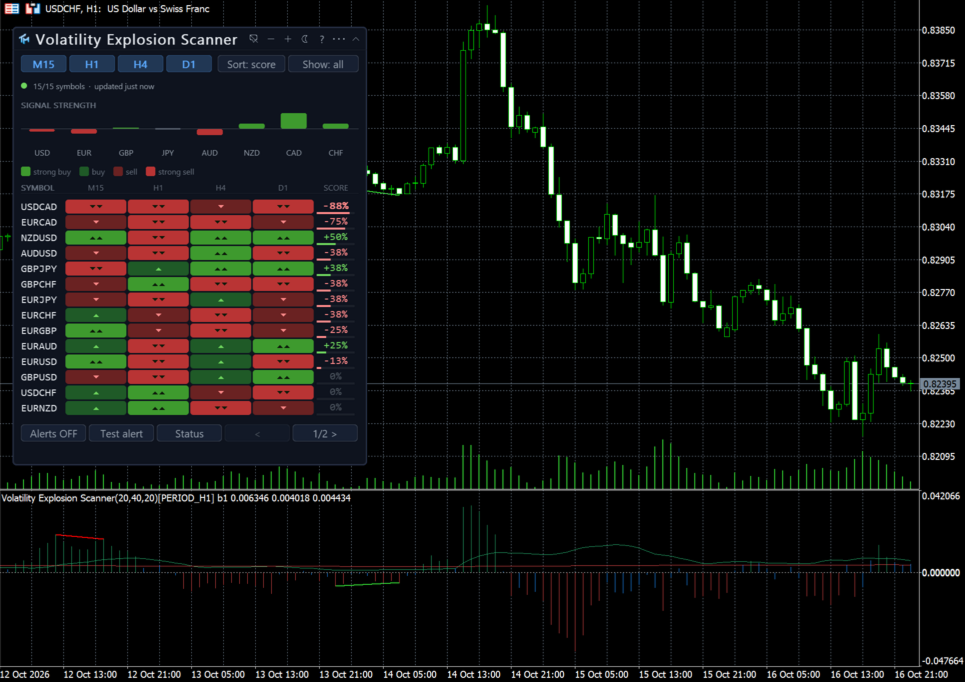
Volatility Explosion Scanner is two products in one file. The first is Volatility Explosion itself, in this chart's own sub window: the two thresholds and the burst histogram between them.
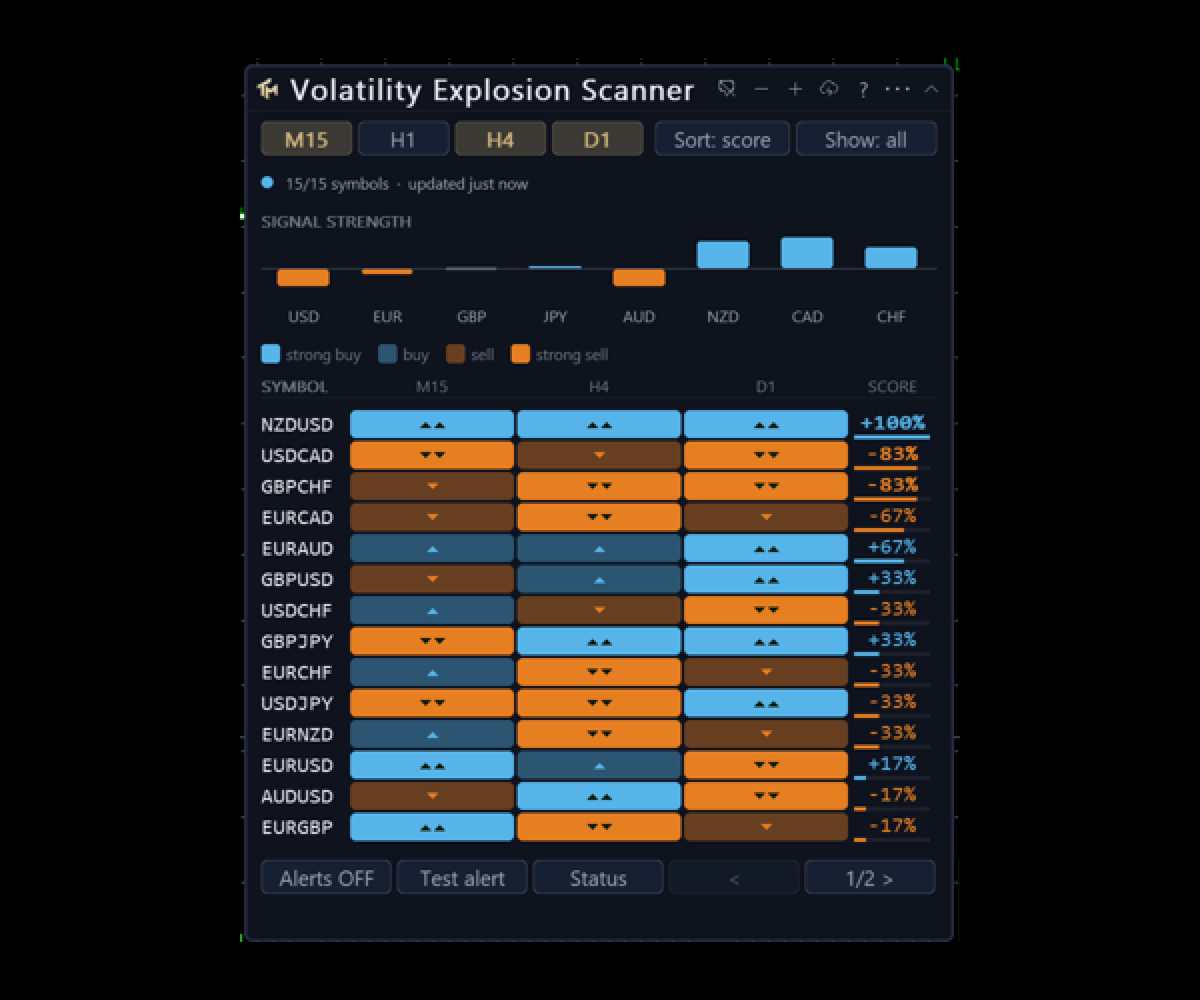
The second is a board that runs the same calculation across a list of symbols on several timeframes at once. The board says which instruments have signalled and how recently; the chart under it shows you what produced the signal, so you do not have to attach a second indicator to act on what the table found.
The board
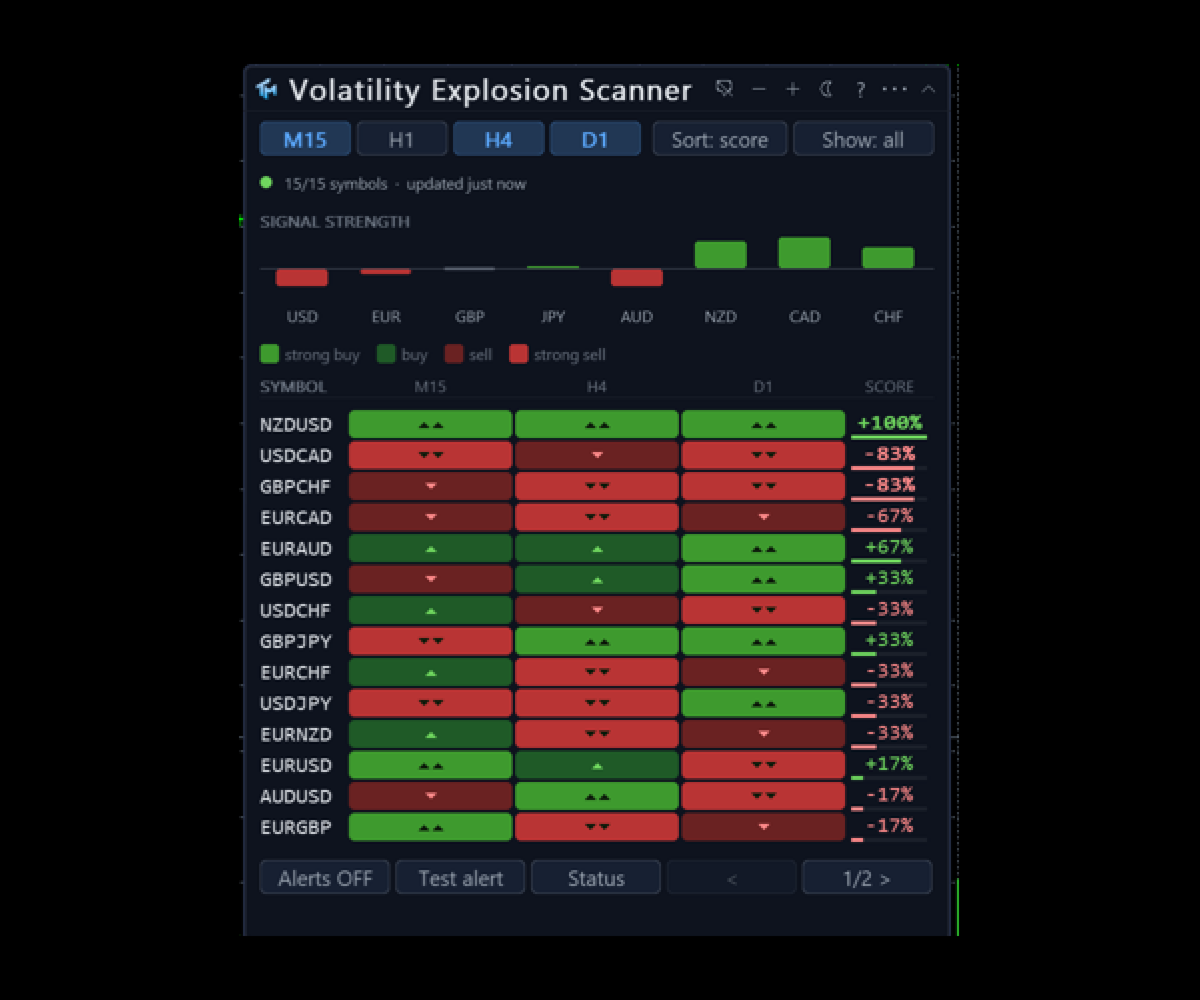
A row per symbol, a column per scanned timeframe, up to four columns and up to twenty eight symbols. It ships scanning fifteen symbols and is raised to twenty eight from one setting. The symbol list is comma separated, or the board can take the Market Watch list instead. Broker prefix and suffix are detected from the chart you are on, or given by hand. Out of the box the board scans four timeframes: M15, H1, H4 and D1.
A cell reads like ^14b G2: which side the signal was on, how many bars ago it fired, and its grade. The word flat means the calculation ran and found no direction. Three dots mean the cell has not been measured yet, and hovering it explains why in words once tooltips are switched on, which they are not by default. A signal older than the freshness threshold keeps its colour but is drawn quieter, so hue says direction and weight says how much it still matters. A row carrying a fresh signal anywhere in it gets a wash of the accent colour.
The AGREE column is the reason to use a board rather than eight charts. For each symbol it takes the visible timeframe columns, finds the majority side, and prints something like v3/4: the direction, and how many of the visible timeframes stand on it. When every visible timeframe agrees, the cell is drawn bold in that side's colour. A tie prints a dash and is deliberately not a verdict. With a single timeframe visible the column is removed entirely rather than printing 1/1, which would only restate the cell beside it.
Column headers are buttons. Click a timeframe header to sort by that column, freshest first, rows with nothing in it at the bottom; click it again to reverse. Click AGREE to sort by agreement, full agreement first. The active header carries the accent colour and a caret, so the sort state lives on the control itself. A separate Sort button cycles freshest, grade and name for a whole-board order.
A Show button cycles all, buys, sells and fresh. Buys and sells follow the AGREE verdict and not any single cell, so a row shown under buys always reads an up glyph in AGREE, and a tie appears under neither. This filters the view and not the calculation: a hidden row is still measured and can still alert.
The legend above the table decodes the notation in one line, including the grade half, which it prints only because this port grades. It can be switched off. Timeframe buttons show and hide a column without stopping the calculation behind it.
The visible row count is fitted to the chart pane and the row setting is a maximum. No page buttons are drawn when everything fits; when it does not, previous and next appear with the page number. Because the board never draws more rows than the pane holds, the page buttons are always on screen and always reachable, however tall the row setting is.
Two status lines are always on show: symbols ready of total, how long since the last update, signals in the lookback window; then either the watchdog line or a sentence explaining why nothing is showing.
Diagnostics
A second panel, off by default, answers the question "why is there no signal": symbol coverage, which series are short of bars, how many signals were found in the window, and how many symbols this indicator switched on in Market Watch to do its work. A cell that could not be measured is explained rather than left blank.
The chart indicator
In its own sub window: the explosion threshold and the dead zone as two lines, and the burst as a histogram whose side is its sign and whose shade says whether it is expanding or fading. Divergence is looked for on the burst series rather than on the threshold, because a threshold has no direction and a divergence on it would be meaningless.
The settings sheet
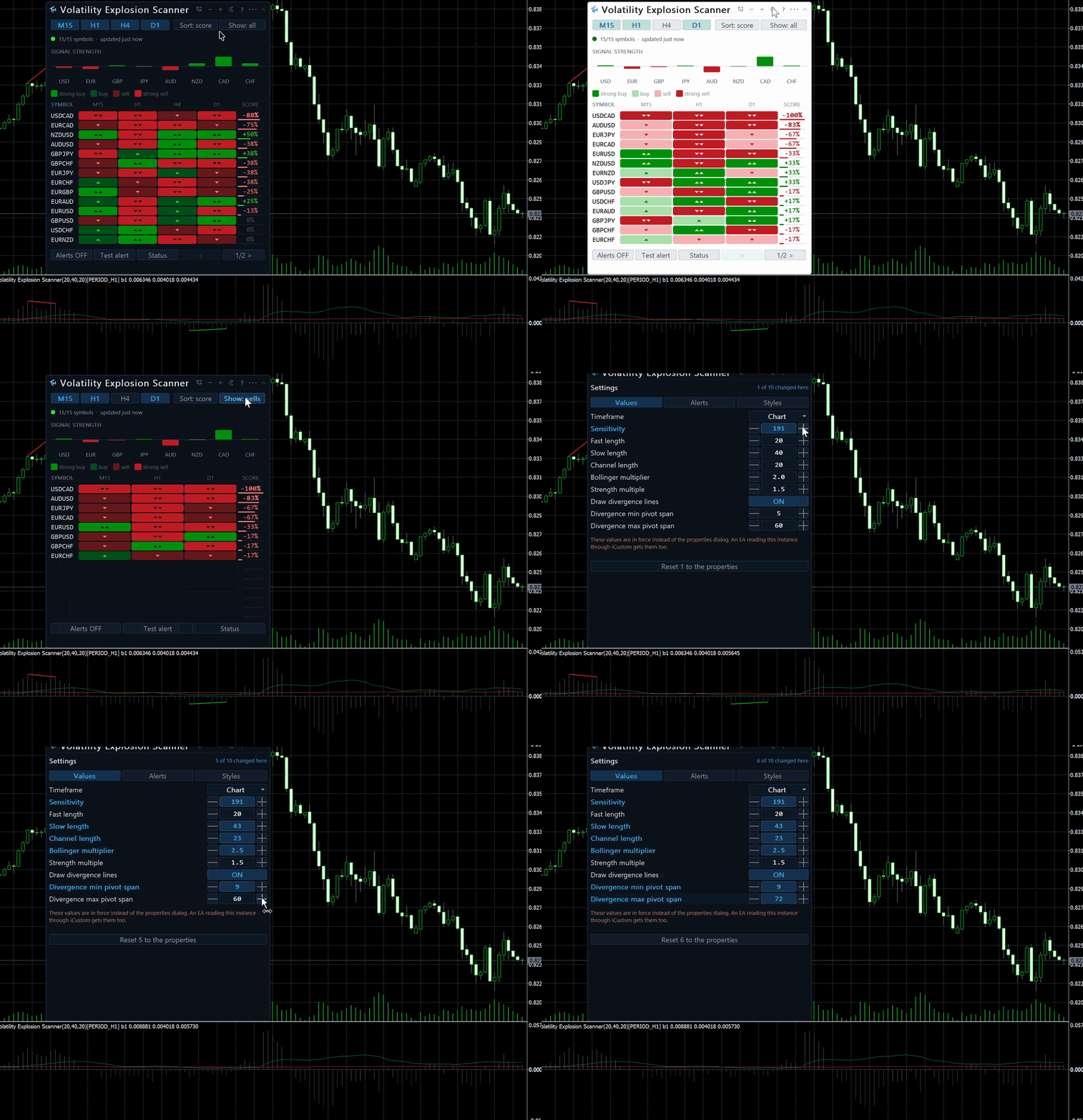
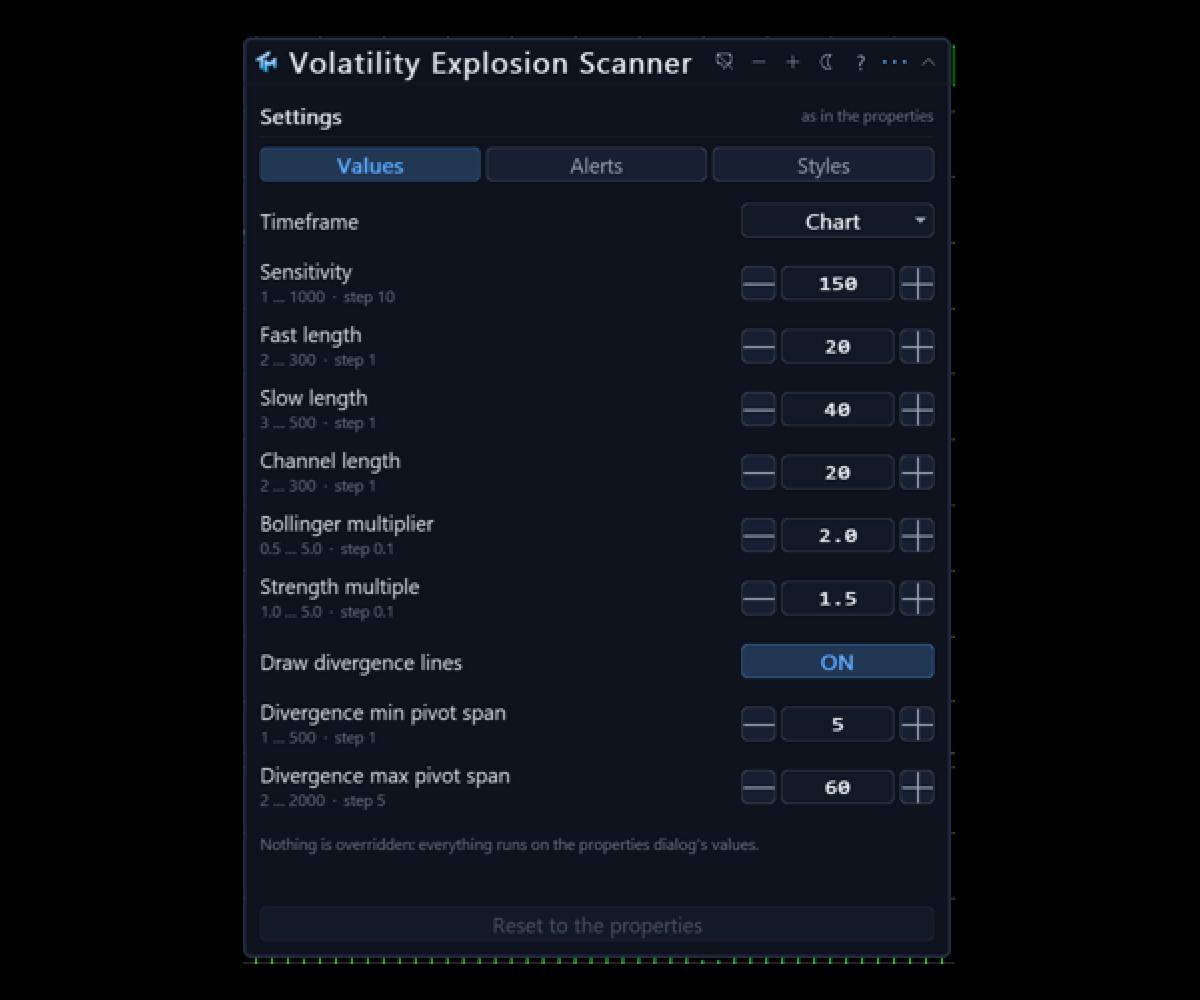
Values covers the timeframe, the sensitivity of one hundred and fifty, the fast and slow lengths of twenty and forty behind the momentum, the channel length of twenty and the Bollinger multiplier of 2.0 behind the threshold, the dead zone multiplier of 3.7, the strength multiple of 1.5 that grades a burst two, and the three divergence rows. Styles covers the palette, the two threshold lines and their width, and the burst histogram. Every Values row has steppers, a range and a sentence of help.
Alerts covers the master switch, the per-event switches, the four channels, the cooldown and a test button.
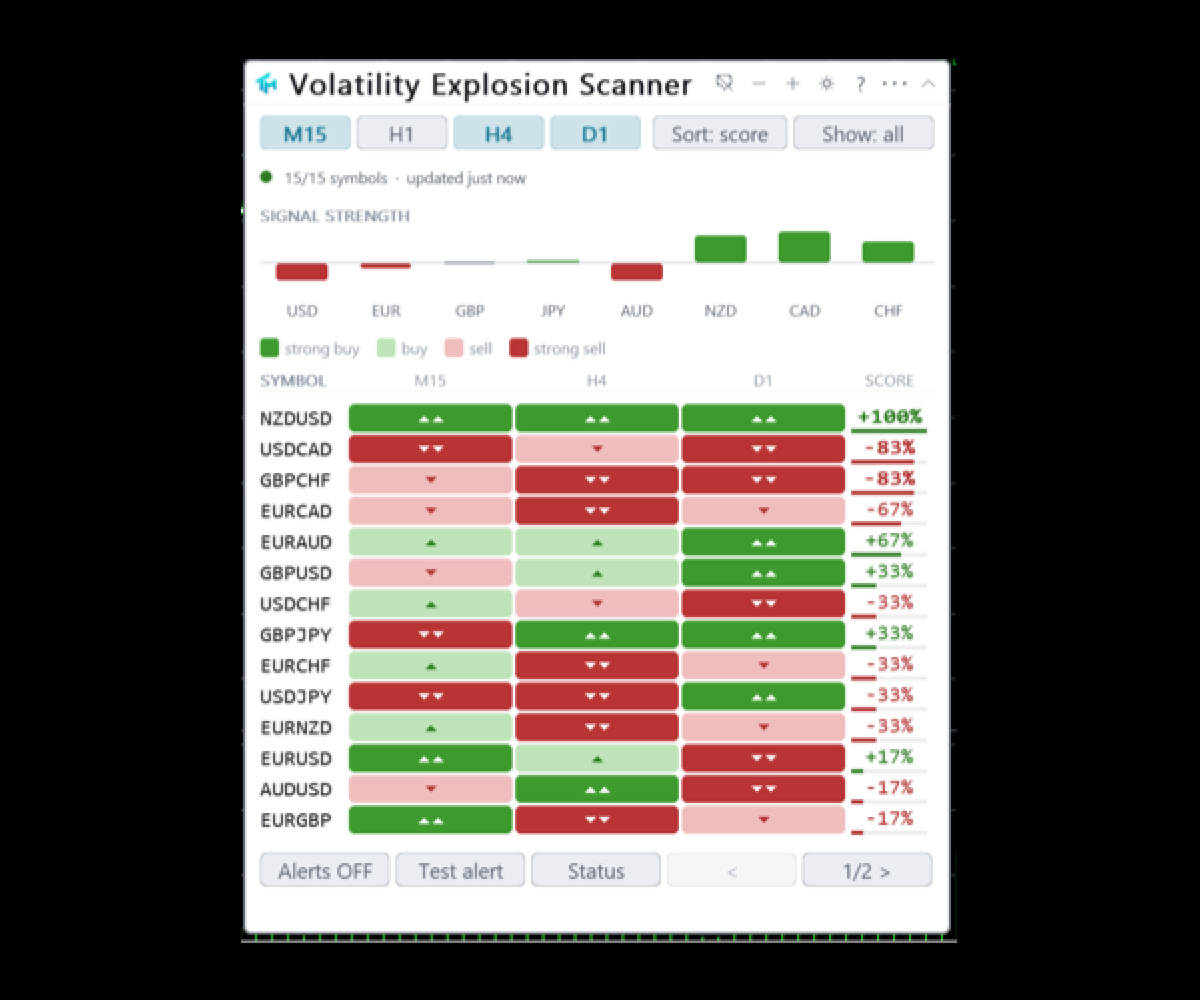
Three colour schemes, including a colour-blind safe one that uses blue and orange rather than red and green. Panel position, scheme, the sort, the filter, which columns are visible and every value changed on the sheet persist per chart across a timeframe change and a terminal restart. The interface is English.
Alerts
Off out of the box. A master switch sits on the panel itself, next to a Test alert button that fires through every channel currently on.
The events are a fresh BUY and a fresh SELL, declared separately for each scanned timeframe, plus data health, which speaks when a symbol loses or regains its data. There is a minimum grade setting, and because this port grades its cells the setting does real work here.
The channels are a popup window, a sound, a push to the mobile terminal and e-mail. The cooldown is kept per cell and per event, thirty minutes by default. Telegram is not part of this product.
Cost
The work is budgeted: a set number of symbols is refreshed per timer tick, so a long list spreads its load instead of stalling the terminal. The first pass is progressive and the panel reports the percentage measured.
Reading it from an EA
The chart indicator publishes eight buffers, all readable through iCustom and CopyBuffer. Buffer 0 is the explosion threshold, the width of a Bollinger band on the closes and buffer 1 is the dead zone, a smoothed true range over one hundred bars times its multiplier. Buffer 2 is the burst itself, the change in the MACD scaled by the sensitivity, drawn as a histogram whose sign gives the side, and buffer 3 is the colour index that paints it. Buffer 4, Signal, is +1 on a BUY bar, -1 on a SELL bar and 0 otherwise. Buffer 5 is the grade of that signal, buffer 6 carries the divergence marks, and buffer 7 is the zero line.
This product has no separate Buy and Sell price buffers, because there is no price to put an arrow at in a sub window. The signal is buffer 4 and it is the contract: filled on every pass whatever the Styles tab says, and present in the Data Window. Hiding a plot is done by taking its colour away and never by emptying a buffer, so every index above stays readable with the display switches off.
This map is the scanner's own. The free single chart indicator publishes the same eight indices and adds an Override buffer at index 8, which the scanner has no use for. Read the list above rather than assuming the two are interchangeable.
The board itself is a panel and not a buffer. It is read by eye and by alert.
The single chart indicator behind this one, Volatility Explosion MTF, is free and carries the same engine. If you follow one symbol, take that one; this scanner exists for watching many at once.
Provenance
This is a port of "Waddah Attar Explosion", from LazyBear's openly published Pine and the second version with the automatic dead zone, which makes a port by formula admissible. The author's name is deliberately not carried into the product name; the reference belongs here in the provenance. Three deviations are declared: Pine writes the second term as the same function called on a shifted series, which after the warm up is identical to the previous bar's MACD and is written that way here; the deviation window and both averages are progressive on the first bars where Pine returns nothing; and divergence is looked for on the burst series, because the first plot slot holds the threshold and a threshold cannot diverge.
The product is called Volatility Explosion Scanner because that is the name of the method, not because authorship of the method is claimed here. The original work belongs to its author.
Honest limits
The board reads closed bars and counts a cell's age in closed bars. The chart indicator under it can show a signal on the bar still forming, and such a signal can be gone by the close. What has been published on a closed bar does not change afterwards.
The oscillator is live on the forming bar. A cross that exists mid-bar can be absent at the close, and the panel line and the grade go with it. Closed bars do not change.
This product measures the size of a move, not its rightness. An explosion is a statement that volatility expanded in a direction, and volatility expands at the end of moves as often as at the start of them.
The sensitivity puts the burst on the price scale, which means the height of the histogram is not comparable between symbols. The board compares them by grade and by freshness instead.
Two thresholds mean two ways to be silent. A genuine move that never clears the dead zone is simply not reported, and lowering the dead zone multiplier to catch it also lets the noise back in.
AGREE counts timeframes, it does not estimate probability. Four timeframes agreeing means four correlated readings of one instrument agreed. A tie produces no verdict on purpose and is hidden by both the buys filter and the sells filter.
Scanning costs. Twenty-eight symbols on four timeframes is a hundred and twelve cells and will be felt on a slow machine; the budget setting is what you turn down.
Symbols your broker does not carry, and series with fewer bars than the settings need, cannot be measured, and the board says which and why rather than leaving the cell blank.
No profit figure, win rate or backtest result is claimed here.