Backtest Data Quality Preflight

Backtest Data Quality Preflight checks the historical data underneath a

backtest before the result is interpreted.


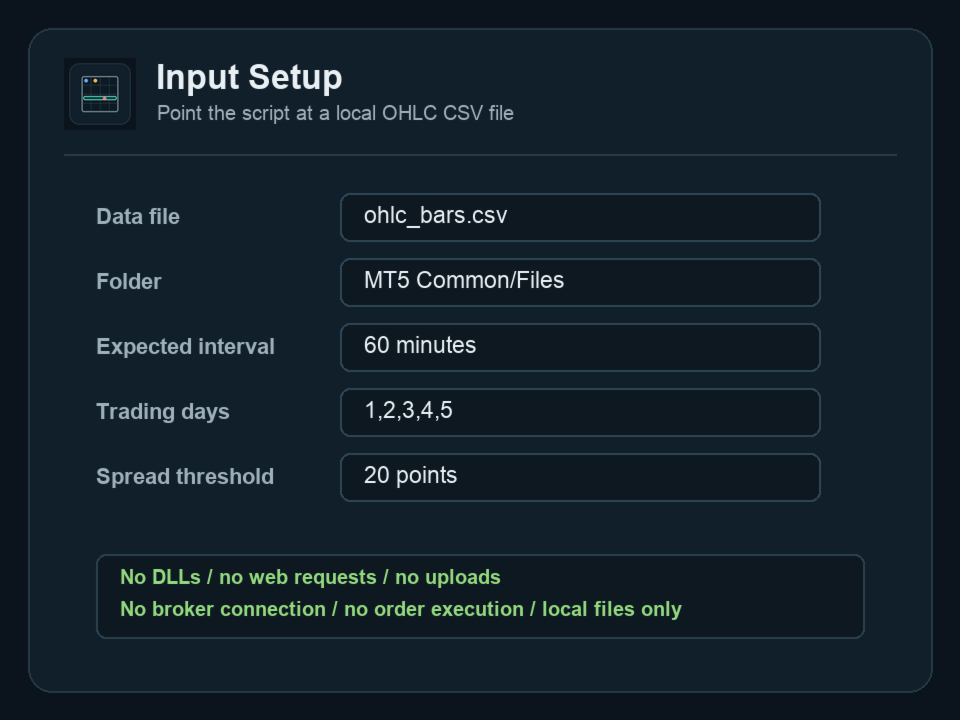
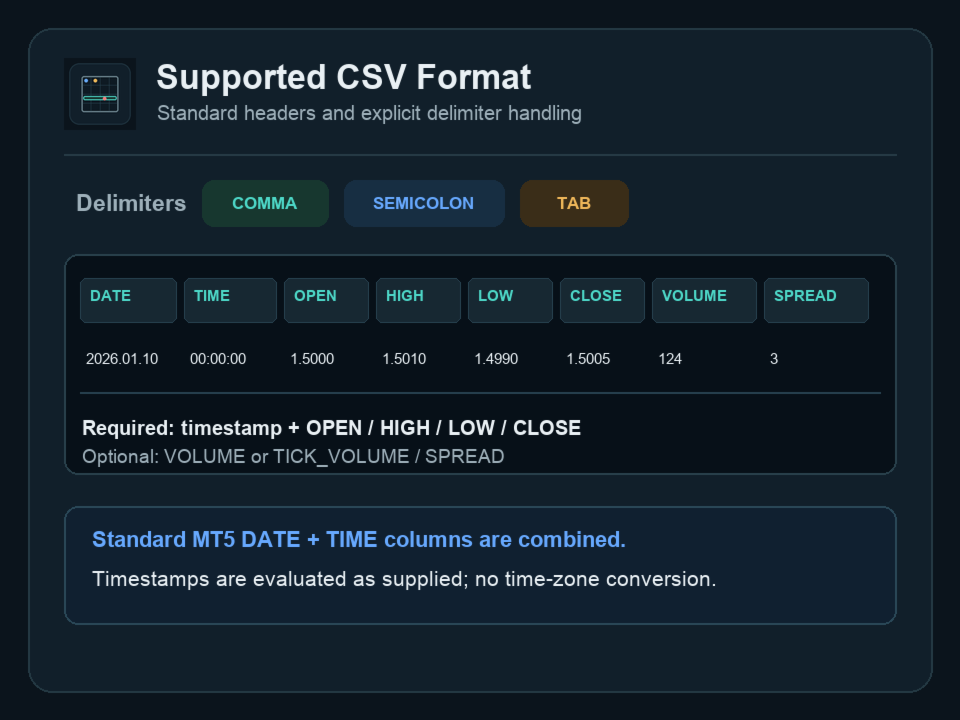
The utility reads an OHLC CSV file from MT5 Common/Files or MQL5/Files. It

accepts comma-, semicolon-, and tab-delimited files with a header row. Required

fields are a timestamp plus open, high, low, and close. Standard MT5 exports

with separate DATE and TIME columns are supported. Volume, tick volume, and

spread columns are optional.


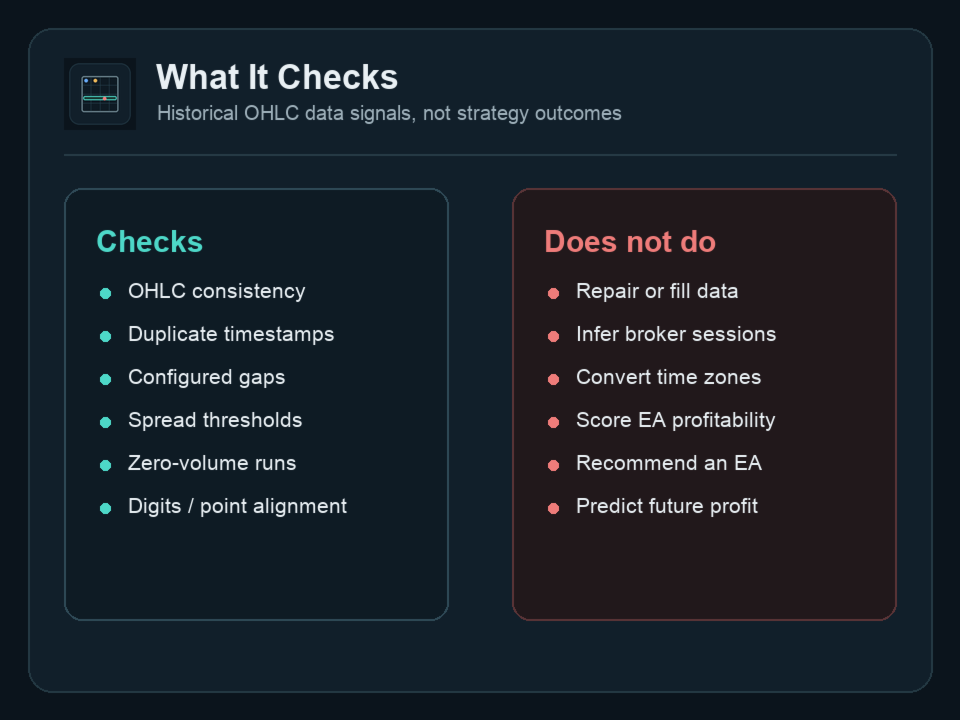
WHAT IT CHECKS


- OHLC consistency and non-positive prices

- Duplicate bar timestamps

- Missing intervals under user-supplied session assumptions

- Spread values above a user-supplied threshold

- Consecutive zero-volume bars when volume is available

- Digits, point, and OHLC price-step alignment when supplied

- Malformed, non-finite, and out-of-range numeric input


The missing-interval check runs only when expected interval and trading days

are both supplied. Spread and digits/point checks also run only when their

inputs are supplied. A missing optional column is reported as not available;

it is not presented as a pass.


SUPPORTED INPUT


- CSV with comma, semicolon, or tab delimiters

- File size up to 50 MB

- A single datetime/timestamp column, or separate DATE and TIME columns

- Required: time, open, high, low, close

- Optional: volume or tick volume, and spread


Numeric values must use a period as the decimal separator. Locale decimal

commas and thousands separators are rejected rather than reinterpreted.


Timestamps are evaluated exactly as supplied. The utility does not infer or

convert time zones, broker sessions, daylight-saving rules, symbol properties,

or trading calendars.


OUTPUT


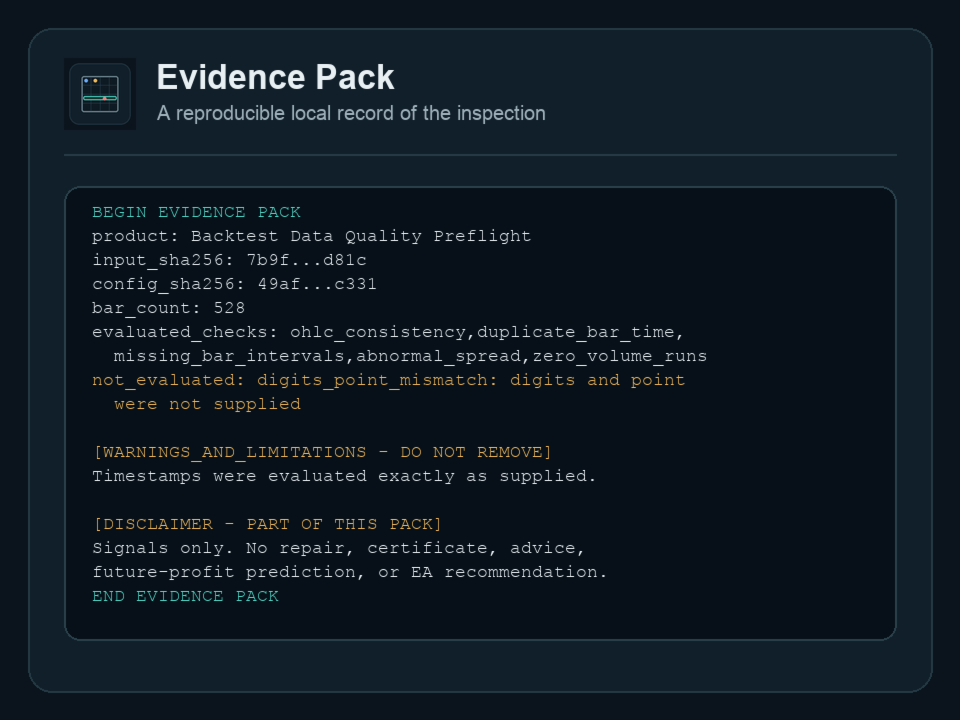
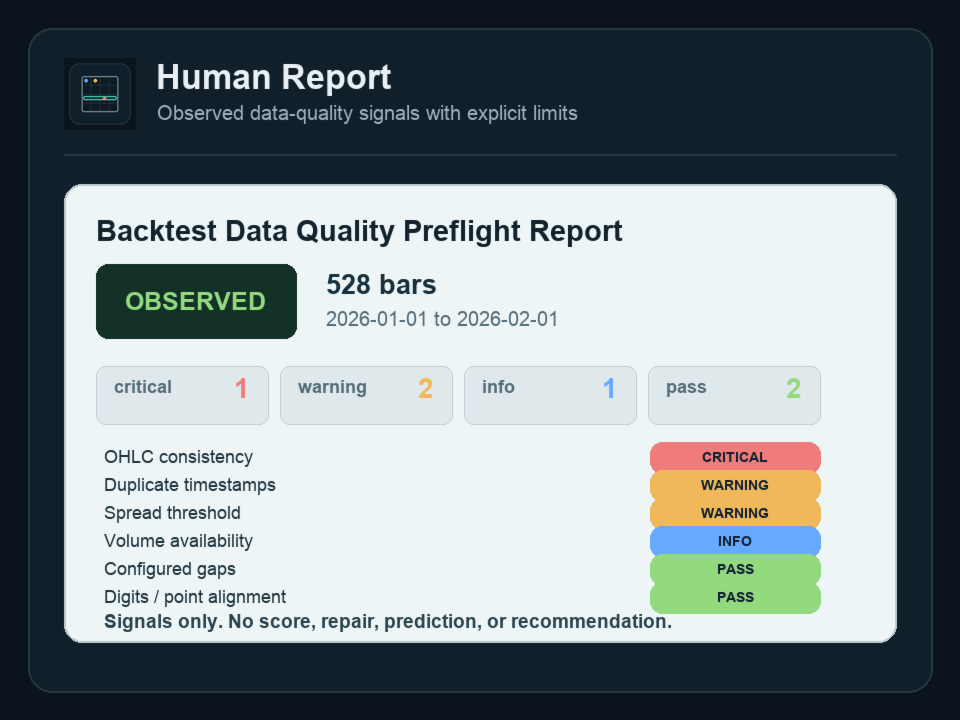
The utility writes two local text files: a plain-English Human Report and an

Evidence Pack containing the input hash, configuration hash, evaluated and

not-evaluated checks, detected signals, warnings, limitations, and disclaimer.


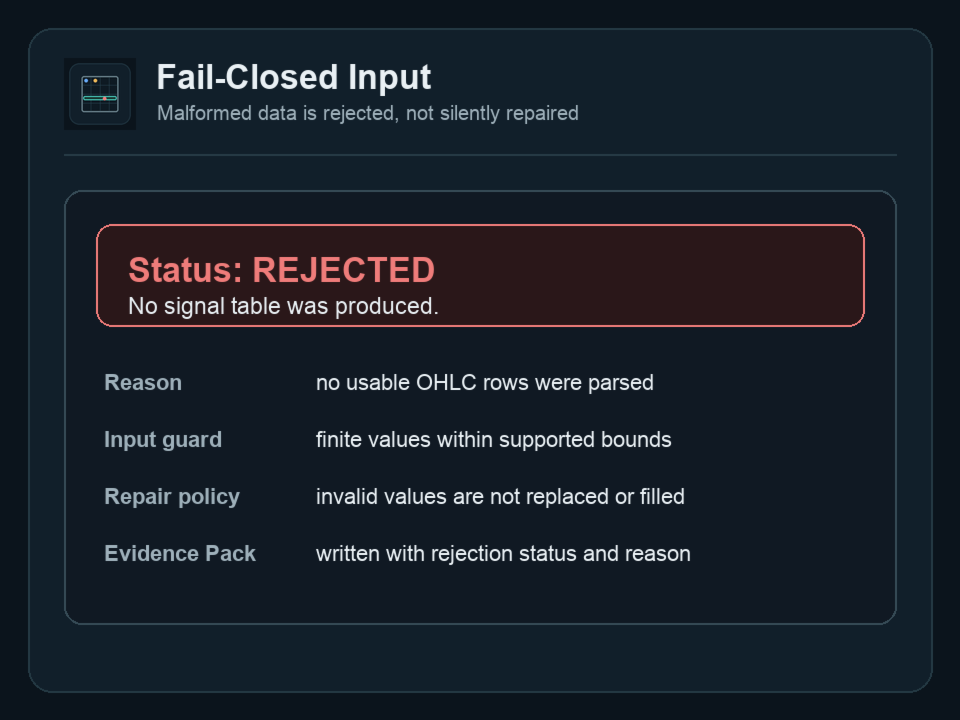
FAIL-CLOSED BEHAVIOR


Invalid files or configurations are rejected. Rejected values are not repaired,

filled, replaced, or silently converted. No data-quality signal table is

produced for rejected input.


LOCAL-ONLY OPERATION


The product runs locally as an EX5 utility. It does not import DLLs, make web

requests, upload files, connect to a broker, or execute orders.


IMPORTANT BOUNDARY


This product records data-quality signals for a supplied historical OHLC file.

It does not certify data, repair market data, estimate corrected strategy

performance, predict future profit, recommend an EA, provide investment or

trading advice, or guarantee prop-firm or account outcomes.


SUPPORT SCOPE


Support covers:


- Installation

- File location

- Supported CSV structure and delimiters

- Basic input and configuration errors

- Output file location

- Meaning of the reported data-quality signals


Support does not cover:


- Repairing, filling, converting, or sourcing market data

- Deciding the correct broker session, time zone, or trading calendar

- EA profitability analysis

- Trading advice or optimization parameter recommendations

- Broker, account, or prop-firm advice

- Rewriting user EAs or third-party exporters


OUTPUT FILES


- `<prefix>__human_report.txt`

- `<prefix>__evidence_pack.txt`


The output prefix is configurable in the script inputs.
Recommended products
️ UMNi-CMND MT5 Remote Command & Trade Control System UMNi-CMND turns Telegram into a full remote control panel for your MetaTrader terminal. Send commands from your phone to open trades, manage positions, query account status, and receive complete trade telemetry — all without touching the platform. KEY FEATURES Full remote trade execution via Telegram Open, close, and manage positions by command Move SL/TP, set breakeven, partial close Live status, account, and position
Quantum panel
Yacine Bouziane
Quantum Trade Panel – The Ultimate Smart Assistant for Flawless Execution & Risk Management Tired of slow executions and calculating lot sizes manually while the market moves? Quantum Trade Panel is the ultimate, feature-rich Trading Assistant Expert Advisor (EA) for MT5 . It is specifically engineered to empower day traders and scalpers to manage, calculate, and execute trades in milliseconds with pinpoint accuracy. Combining a stunning, futuristic Cyber/Neon user interface with powerful und
Institutional Risk Manager
Santiago Nicolas Pla Casuriaga
The Institutional Risk Manager handles position sizing, order execution, scaled exits, trailing stops, portfolio exposure monitoring, and event-based filters — all from a single on-chart panel in MetaTrader 5. Lot size is calculated automatically from account balance and stop distance. Scaled exits execute at configurable R-multiples with a broker-side TP at the final target so the exit holds even if the EA is offline. Risk discipline enforced mechanically, not manually. Risk engine Set a risk p
100% FREE — full version, no limitations, no registration. If Sentinel helps your trading, please take a second to leave a review — it helps us a lot and keeps the tool free. More free tools from the same developer: - Aegis Account Protector (account-wide equity guard): https://www.mql5.com/en/market/product/182632 - Falcon Trailing Stop Manager (universal trailing stop & break-even): https://www.mql5.com/en/market/product/182633 - Rapid Trade Panel (one-click risk-based trading): https://ww
FREE
Trade Utility Pro
Sovannara Voan
3.84 (88)
Trade Utility Pro is a bot utility designed to help you manage trades more easily, quickly, and accurately. This utility features a control panel interface and supports MetaTrader 5 exclusively. This utility does not link to any account information or external sources, ensuring safety. Main Features: Open Trade Support: Lot size calculation Fixed Lot: Custom input lot required Money Risk Lot: Automatically calculated based on stop loss and money risk Account % Risk Lot: Automatically calculated
FREE
rawdown Protector EA is a comprehensive risk management and account protection system designed for MetaTrader 5. This advanced Expert Advisor provides automated monitoring and protection of your trading account through multiple safety mechanisms, profit-taking features, and time-based controls. Whether you're a day trader, swing trader, or algorithmic trader, this EA acts as your ultimate safety net and profit guardian Core Protection Features Drawdown Protection Max Daily Drawdown %: Automatic
LSTM Library
Thalles Nascimento De Carvalho
LSTM Library - Advanced Neural Networks for MetaTrader 5 Professional Neural Network Library for Algorithmic Trading LSTM Library brings the power of recurrent neural networks to your trading strategies in MQL5. This professional-level implementation includes LSTM, BiLSTM, and GRU networks with advanced features typically found only in specialized machine learning frameworks. "The secret to success in Machine Learning for trading lies in proper data treatment. Garbage In, Garbage Out – the quali
Correlation Risk Manager
Eugenio Gustavo Guilarte Homayden
You think you're diversified. Your correlations say otherwise. MetaTrader shows you every position you hold. The margin, the floating P/L, the lot size, all of it. What it doesn't show you is whether your trades are secretly the same bet. And that's usually what takes the account down. Say you open five trades, 1% risk on each. Feels like 5% at stake. Spread out, sensible. But three of them are long the same dollar move under different tickers, so when one bad print hits, all three drop together
Limiter Drawdown EA – Automatic Account Protection for MetaTrader 5 Description Limiter Drawdown EA is a lightweight risk management tool for MetaTrader 5. It monitors your account drawdown in real time and will automatically close all open trades once the threshold you define is reached. This provides a reliable safeguard for any trading strategy. Main Functions Monitors equity versus balance continuously Closes all positions when your chosen drawdown percentage is reached Optionally removes
FREE
HFT Bot Builder
Thomas Bradley Butler
Build an HFT Bot with source code.  This specialized algorithm in the bot will build an HFT bot for you, to alter, enhance and optimize to trade by.  The algorithm in the bot is a special recipe to build an HFT program.  One that you can enhance upon creation. Just follow the steps: Load the bot on a chart Wait for it to load, could takes some time depending on computer, refresh chart if needed (USE DEMO SO IT WON'T MAKE REAL TRADES WHILE YOU BUILD).  THIS IS BEING USED AS A BUILDER NOT AN EA A
Signal Provider Utility Pro (Telegram & Discord) The Professional Solution for Signal Providers. Automated Broadcasting | Smart GUI Panel | Performance Reports Stop managing your signals manually. Signal Provider Utility Pro is the realiable bridge between your MetaTrader 5 terminal and your community on Telegram and Discord. Designed for high-performance signal services, this tool gives you instant control over your broadcasts without ever needing to open the settings window. From real-time tr
Effortlessly take control of your trading routine with the revolutionary Trades Time Manager. This potent tool automates order execution at designated times, transforming your trading approach. Craft personalized task lists for diverse trading actions, from buying to setting orders, all without manual intervention. Trades Time Manager Installation & Inputs Guide If you want to get notifications about the EA add our URL to MT4/MT5 terminal (see screenshot). MT4 Version   https://www.mql5.com/en/m
NeuroTrend Dashboard – Advanced Multi-Asset Market Intelligence NeuroTrend Dashboard is a professional-grade technical analysis suite designed to provide a high-level, "bird’s-eye view" of market momentum across multiple symbols and timeframes simultaneously. By synthesizing complex proprietary momentum, real-time currency strength, and volume flow data, NeuroTrend distills the pulse of the market into a clean, actionable interface. Stop wasting time switching between individual chart windows. N
EAs Manager
Abdeljalil El Kedmiri
5 (1)
The   Ultimate EAs Manager   is a professional risk management and trade assistance tool designed to monitor, control, and optimize all trading activities on your MT5 account. It acts as a   central command center   that oversees every trade - whether opened by other Expert Advisors or manually by you. How it's work with other EAs : Blog post  MT4 version:  https://www.mql5.com/en/market/product/167007 Only 10 copies will be sold at the early-bird price. After 10 copies, the price jumps directly
GRat BybitImport
Ivan Titov
5 (1)
Trade on Bybit with  MT5/MT4 EAs and indicators! GRat_BybitImport   is a tool for manual and automated trading , including ANY available EA, ANY  cryptocurrency on one the most popular crypto exchanges   Bybit  24/7. Features 1. ALL Bybit instruments are available. 2. Import(automatic copying) to the specified Bybit  currency all trades (made manually or by an EA) from an MT5 account (including demo) by the specified symbol and/or magic number. 3. Import(automatic copying)   to the specified By
Algo Scalper EA
Tshepo Michael Motaung
Algo Scalper EA is a confluence day trading robot using market orders and it trades during Trading Sessions. The EA exercise consistency and risk management, it has 2 entry signals produced from  Moving Averages(90 & 120) to harvest the most out of the trending market (on automatic mode). It is capable of allowing you to trade any symbol you want and during the time you want. Profits can only be secured by take profit level. Low spread is highly recommended for this EA, and you will see signific
Chat Ai MT5
Indra Maulana
3 (2)
Friends, this tool does not work in backtesting and you must run it live. Chat Ai assistant a versatile and intelligent AI assistant Talk to the AI, get advice from it, give it orders Can be used in all charts, time frames, symbols, markets and... With a very simple interface This tool is an artificial intelligence assistant that you can chat with. You can give him different commands. for example: Tell him to open a buy order for you. Or tell him to close your sales deals Or tell it to change
Algo Trading Indicaor MT5 The ATC ALGO indicator has been developed to work on the MetaTrader 5 platform. It has the same specifications and zones as the MetaTrader 4 version. There may be slight lag, which we believe is due to differences in MetaTrader 5 programming. We will work on improving it, God willing. MT5 Version                    https://www.mql5.com/en/market/product/170028 MT4 Version                    https://www.mql5.com/en/market/product/88034 With this indicator , you’ll have
Equity Risk Manager EA is a smart, compliance-focused tool designed to protect your trading capital by monitoring equity performance in real time. It automatically blocks new trades when your profit or loss thresholds are reached, based on your selected period — daily, weekly, or monthly. No more accidental overtrading or commission losses: once your target is hit, the EA alerts you and halts further entries. Ideal for disciplined traders who value risk control, clarity, and automation.
Guardian Account Protector — the seatbelt for your trading account Your robots have no brakes. Guardian is the brakes. Guardian does not open trades. It has no grid, no martingale, and no entry logic of any kind. It does one job with complete discipline: it watches your ENTIRE account and enforces the risk limits you set, so that no robot, no strategy, and no bad day can destroy your balance. Think of it like a seatbelt for the driver. A seatbelt does not steer the car and does not make the d
Strategy Manager is a  Multi-Time-Frame & Multi-Currency  Dashboard for  Metatrader 4 and 5. Thanks to a free, external graphical user interface, build your own strategy by combining any indicators and loading them into the dashboard to see the result ! In addition, you can precisely  set-up your Auto-trading & Notifications and use indicators for Stop-Loss, partial profit or limit. Filter your automatic trading & notifications with forex calendar and more. Open and Manage your orders directly w
KopirMT5 Full
Alexandr Gavrilin
4.2 (10)
KopirMT5 (CopierMT5) - transaction copier for the MetaTrader 5 terminal, copies (synchronizes, duplicates) transactions from  hedge accounts  (copier, copy dealers).  Supports copying: MT5 <-> MT5, MT4 -> MT5 Hedge, MT5 Hedge -> MT4 Does not support copying MT5 Hedging < - > MT5 Netting, MT4 < - > MT5 Netting Support:  https://www.mql5.com/ru/messages/01c3f341a058d901 Why exactly our product? The copier has a high speed and is not dependent on ticks. Copy speed - less than 0.5 sec. Transaction
Equity Pulse MT5 Real-time equity, drawdown, and portfolio performance tracking in one clean trading panel. Equity Pulse MT5 is a practical account-monitoring indicator for MetaTrader 5. It helps traders see exactly where they stand across today, yesterday, recent days, the current week, month, and year. Instead of checking account history manually or relying only on the terminal’s floating profit number, Equity Pulse gives you a clear performance snapshot directly on the chart. It is designed
ALPHATREND INSTITUTIONAL STRUCTURE MODE Descripción general: AlphaTrend es un Expert Advisor híbrido para MetaTrader 5 que combina análisis de estructura de mercado con indicadores de momentum. No es un sistema reactivo tradicional. Opera identificando primero la tendencia real mediante máximos y mínimos, luego espera un retroceso o pullback, y finalmente confirma la entrada con ADX y pendiente de media rápida. Esto permite entrar temprano en la dirección correcta, no perseguir el precio. Lógica
Market View MT5
Kyra Nickaline Watson-gordon
Definition : Market View is a dashboard (scanner) to view price graphs of all symbols and all timeframes at a glance. The utility is designed user friendly and added a wide range of customization options. Main features of Market View : Visual settings window on the chart Customizable list of symbols and timeframes Different shapes : Real Candles, Schematic Candles, Arrows Customizable number of candles Changeable size of dashboard (scanner) Highlight timeframes with gaps on candles Open approp
Overview Seventh Heaven Multi Market Grid Trader is a slot-cascade, anchored-grid Expert Advisor for MetaTrader 5 hedging accounts. Developed and hardened on gold and extended to a validated FX set, one product covers eleven optimized markets: XAUUSD, XAUEUR, XAUGBP, EURUSD, GBPUSD, USDJPY, USDCAD, AUDUSD, EURCAD, AUDCAD and EURCHF. Attach it to any of these charts; it trades the chart symbol with that market's preset pack. How It Trades When a slot is empty, the current price becomes its anchor

SMT Trade Planner is a professional on-chart risk calculator and trade execution panel for MetaTrader. It calculates lot sizes based on your risk settings, displays visual Entry, Stop Loss and Take Profit lines that you can drag directly on the chart, validates your trade against configurable risk rules, and lets you execute trades with one click.   How it works Attach the Trade Planner to any chart. The panel displays your account information and a set of quick-select risk buttons. Three horizo
1. Record the price data for each Tick transaction. Data file contents: "Tick time", "ASK price", "BID price", "SPREAD SPREAD", "Tick quoted quantity". 2. Meanwhile, generate a quotation data file with a 1-minute period. Content of 1min data file: "ASK time", "ASK OPEN price", "ASK HIGH price", "ASK LOW price", "ASK CLOSE price", "BID time", "BID OPEN price", "BID HIGH price", "BID LOW price", "BID CLOSE price", "Tick quoted quantity". 3. Save all quotation data in one file every day, which is c

The utility is designed to display on the chart the margin zones built on the basis of margin requirements for futures of the Chicago Mercantile exchange (CME). These margin zones are good levels of resistance and support, as seen in the screenshots. How to use To trade on margin zones, use the following rules: buy after the day has closed above one of the zones to the next zone; sell after the day has closed below one of the zones to the next zone; after opening a sell trade, place limit sell
CChart
Rong Bin Su
Overview In the fast-paced world of forex and financial markets, quick reactions and precise decision-making are crucial. However, the standard MetaTrader 5 terminal only supports a minimum of 1-minute charts, limiting traders' sensitivity to market fluctuations. To address this issue, we introduce the Second-Level Chart Candlestick Indicator , allowing you to effortlessly view and analyze market dynamics from 1 second to 30 seconds on a sub-chart. Key Features Support for Multiple Second-Level
Buyers of this product also purchase
Trade Assistant MT5
Evgeniy Kravchenko
4.43 (214)
It helps to calculate the risk per trade, the easy installation of a new order, order management with partial closing functions, trailing stop of 7 types and other useful functions. Additional materials and instructions Installation instructions - Application instructions - Trial version of the application for a demo account Line function -   shows on the chart the Opening line, Stop Loss, Take Profit. With this function it is easy to set a new order and see its additional characteristics bef
Forex Trade Manager MT5
InvestSoft
4.98 (668)
Trade Manager MT5 is an advanced position size calculator and trade management tool for MetaTrader 5, designed to help traders plan trades faster, control risk more precisely, and manage open positions directly from the chart. It combines order placement, risk based lot calculation, Stop Loss and Take Profit management, Break Even, Trailing Stop, Partial Close, Equity Protection, and external trade management in one panel. Whether you trade forex, indices, metals, commodities, crypto, or future
Local Trade Copier EA MT5
Juvenille Emperor Limited
4.95 (143)
Experience exceptionally fast trade copying with the   Local Trade Copier EA MT5 . With its easy 1-minute setup, this trade copier allows you to copy trades between multiple MetaTrader terminals on the same Windows computer or Windows VPS with lightning-fast copying speeds of under 0.5 seconds. Whether you're a beginner or a professional trader, the   Local Trade Copier EA MT5   offers a wide range of options to customize it to your specific needs. It's the ultimate solution for anyone looking t
Beta Release The Telegram to MT5 Signal Trader is nearly at the official alpha release. Some features are still under development and you may encounter minor bugs. If you experience issues, please report them, your feedback helps improve the software for everyone. Telegram to MT5 Signal Trader is a powerful tool that automatically copies trading signals from Telegram channels or groups directly to your MetaTrader 5 account. It supports both public and private Telegram channels, and you can conn
TradePanel MT5
Alfiya Fazylova
4.88 (162)
Trade Panel is a multi-functional trading assistant. The app contains over 50 trading functions for manual trading and allows you to automate most trading tasks. Before making a purchase, you can test the demo version on a demo account. Download the trial version of the application for a demonstration account: https://www.mql5.com/en/blogs/post/750865 . Full instructions here . Trade. Allows you to perform trading operations in one click: Open pending orders and positions with automatic risk cal
FarmedHedge Pair Trading Dashboard
Tanapisit Tepawarapruek
5 (3)
Farmed Hedge Yield Farming | All Markets (Manual - Hybrid - Semi/Automated EA) MULTI-ASSET SUPPORT Trade any asset available on your broker - Forex: Major, Minor, Exotic pairs - Crypto: BTC, ETH, XRP, SOL, BNB - Stocks: Apple, Tesla, Amazon, Google, etc. - Commodities: Gold, Silver, Oil, Gas - Indices: US30, NAS100, SPX500, DAX40 - Any CFD your broker offers VERIFIED TRADING RESULTS - Farmed Hedge Yield Axi Copy:  https://www.mql5.com/en/signals/2356376 - Farmed Hedge Yield Exn Copy:   https:/
Telegram to MT5 Multi-Channel Copier automatically copies trading signals from your Telegram channels directly into MetaTrader 5. No bots, no browser extensions, no manual copying. You receive a signal on Telegram and the EA opens the trade on your terminal in a few seconds. The product includes two components: a Windows application that listens to your Telegram channels, and this Expert Advisor that executes the signals on your MT5 terminal. An MT4 version is also available. Setup guide and app
Power Candles Strategy Scanner - Self-Optimizing Multi-Symbol Setup Finder Power Candles Strategy Scanner runs the same self-optimizing engine that powers the Power Candles indicator - on every symbol in your Market Watch, side by side. One panel tells you which symbols are statistically tradable right now, which strategy wins on each, the optimal Stop Loss / Take Profit pair, and pings you the moment a fresh signal fires. This tool is part of the Stein Investments ecosystem - 18+ tools plus Max
Anchor Trade Manager
Kalinskie Gilliam
5 (5)
Anchor: The EA Manager Run your full EA portfolio without conflicts, without stacked risk, and without watching every chart yourself. Anchor coordinates up to 64 Expert Advisors on a single account, including daily loss protection built for prop firm rules. Attach Anchor to any chart. Type your EA names and magic numbers in one line. Click OK. Anchor begins coordinating immediately. Built for portfolios. Built for prop firms. Built for discipline. The Problem Running multiple EAs on the same acc
================================================================================ POC BREAKOUT - V20.72. Full Professional Grade Toolkit ================================================================================ POC Breakout is a full MetaTrader 5 trading dashboard for discretionary traders who want breakout signals, Point of Control (POC) context, volume profiles, order flow, market structure, news, alerts, and advanced trade planning in one professional workspace. Attached directly to you
Footprint Chart Pro — Professional OrderFlow EA for MetaTrader 5 Version 6.34 | Professional tool for real traders | Institutional-Grade Visualization DEMO USERS - PLEASE SELECT EVERY TICK / REAL TICK WHEN TESTING AND YOU HAVE DOWNLOADED HISTORICAL DATA. IF YOU SEE A WAITING SCREEN AND IT IS NOT DOWNLOADING, IT MEANS YOU HAVE LOW HISTORICAL DATA. TRY 1 MIN AND 5 MIN FIRST ON 1 DAY DATA. ONE DAY DATA SHOULD BE THE NEWEST AND MOST CURRENT DATE. PLEASE WAIT UNTIL THE MARKET HAS ROLLED OVER PERIOD.
The product will copy all telegram signal to MT5 ( which you are member) , also it can work as remote copier.  Easy to set up, copy order instant, can work with almost signal formats, image signal,  s upport to translate other language to English Work with all type of channel or group, even channel have "Restrict Saving Content", work with  multi channel, multi MT5 Work as remote copier: with signal have ticket number, it will copy exactly via ticket number. Support to backtest signal. How to s
EasyInsight AIO MT5
Alain Verleyen
4.92 (12)
EASY Insight AIO – All-In-One Power for AI-Driven Trading Want to skip the setup and start scanning the entire market – Forex, Gold, Crypto, Indices, and even Stocks – in seconds? EASY Insight AIO is the complete plug-and-play solution for AI-powered trade analysis. It includes all core Stein Investments indicators built-in and automatically exports clean, structured CSV files – perfect for backtesting, AI prompts, and live market decision-making. No need to install or configure indicators manu
Premium Trade Manager - The Trade Panel With a Coach Built In Premium Trade Manager puts a trading coach inside your chart, with a full execution engine underneath it. Set the trade up the way you always do, then let Max, your AI trading coach, read that exact setup against your live account and give you a straight verdict before you commit: is the stop disciplined, is the risk sane, is a high-impact release minutes away, are you near a prop-firm limit. Below sits the engine that runs everything
Trade Manager DaneTrades
Levi Dane Benjamin
4.28 (29)
DaneTrades Trade Manager is a professional trade panel for MetaTrader 5, designed for fast, accurate execution with built‑in risk control. Place market or pending orders directly from the chart while the panel automatically calculates position size from your chosen risk, helping you stay consistent and avoid emotional decision‑making. The Trade Manager is built for manual traders who want structure: clear risk/reward planning, automation for repeatable management, and safeguards that help reduc
EA Auditor
Stephen J Martret
5 (4)
EA Auditor is an independent analysis tool for traders evaluating Expert Advisors and trading signals on MetaTrader 5. It audits backtest reports, reviews posted developer signals, and cross-verifies the two against each other to help traders assess strategies before committing capital. The MQL5 market offers a wide range of Expert Advisors from many developers, with varying approaches, quality, and transparency. EA Auditor provides a consistent, data-driven framework for reviewing them, answer
Seconds Chart MT5
Boris Sedov
4.61 (18)
Seconds Chart is a unique tool for creating second-based charts in MetaTrader 5 . With Seconds Chart , you can construct charts with timeframes set in seconds, providing unparalleled flexibility and precision in analysis that is unavailable with standard minute or hourly charts. For example, the S15 timeframe indicates a chart with candles lasting 15 seconds. You can use any indicators and Expert Advisors that support custom symbols. Working with them is just as convenient as on standard charts.
HINN Lazy Trader
ALGOFLOW OÜ
5 (1)
LIMITED SUMMER SALE -40% ! ONLY $470 insead of $790!  Maximum real discount! The core idea: using the user interface, you configure the parameters the chart must meet before entering a position (or positions), choose which entry models to use, and set the rules for when trading and planning should end. Lazy Trader  handles the rest: it  takes over all the routine chart watching and execution! full description  :: 3 key videos [1] ->  [2]   ->  [3] What can it do? - Understands Larry Williams
Working Demo Download Copy Cat More Trade Copier MT5 is a local trade copier and a complete risk management and execution framework designed for today’s trading challenges. From prop firm challenges to personal portfolio management, it adapts to every situation with a blend of robust execution, capital protection, flexible configuration, and advanced trade handling. The copier works in both Master (sender) and Slave (receiver) modes, with real-time synchronization of market and pending orders,
Quant AI Agents
Ho Tuan Thang
5 (1)
Quant AI Agents are independent trading Expert Advisors. Instead of trading using a fixed strategy like other conventional EAs, Quant AI Agents   is a   multi-agent AI trading framework   that turns natural-language strategy prompts into live.  WANT THE SAME RESULTS AS MY LIVE SIGNAL?   Use the exact same brokers I do:   IC MARKETS , IC TRADING   .  Unlike the centralized stock market, Forex has no single, unified price feed.  Every broker sources liquidity from different providers, creating un
Trade Dashboard MT5
Fatemeh Ameri
4.95 (131)
Trade Dashboard simplifies how you open, manage, and control your trades, with built-in lot size calculation. It allows you to execute trades, manage risk, and control positions directly on the chart, with tools such as partial close, breakeven, and trailing stop. Designed to reduce manual work and help you stay focused on your trading decisions. A demo version is available for testing. Detailed explanations of features are provided within the MQL5 platform. Installation instructions are include
The News Filter MT5
Leolouiski Gan
4.78 (23)
This product filters   all expert advisors and manual charts   during news time.  It is able to remove any of your EA during news and automatically reattach them after news ends. This product also comes with a complete  order management system   that can handle your open positions and pending orders before the release of any news. Once you purchase   The News Filter , you will no longer need to rely on built-in news filters for future expert advisors, as this product can filter them all from her
Trader Evolution
Siarhei Vashchylka
5 (7)
" Trader Evolution " - A utility designed for traders who use wave and technical analysis in their work. One tab of the utility is capable of money management and opening orders, and the other can help in making Elliott wave and technical analysis. Manual (Be sure to read before purchasing) | Version for MT4 Advantages 1. Trading in a few clicks. Immediate and pending orders are available in the panel 2. Money management. The program automatically selects the appropriate lot size 3. Simplifies
EA Performance Tracker
Russell Leeon Tan
5 (2)
EA Performance Tracker (AESTracker) A clean, modern dashboard that shows exactly how your trades and EAs are performing — right on your chart. It reads your full account history automatically and breaks down the numbers by magic number / strategy. Display only — it does not place any trades. What it shows - Account header: live Balance, Equity, and Open (floating) P/L - Profit summary: gross profit, net profit, and the exact commission & swap deducted - Key stats: win rate, profit factor, exp
Welcome to ENTRY IN THE ZONE WITH SMC MULTI TIMEFRAME Entry In The Zone with  SMC Multi Timeframe  is a professional trading indicator built on Smart Money Concepts (SMC), combining market structure analysis with a No Repaint BUY / SELL signal system in a single indicator. It helps traders understand market structure more clearly, identify key price zones, and focus on higher-quality trading opportunities. By combining Multi-Timeframe Analysis, Points of Interest (POIs), and real-time signals, t
YuClusters
Yury Kulikov
4.93 (43)
Attention: You can view the program operation in the free version  YuClusters DEMO .  YuClusters is a professional market analysis system. The trader has unique opportunities to analyze the flow of orders, trade volumes, price movements using various charts, profiles, indicators, and graphical objects. YuClusters operates on data based on Time&Sales or ticks information, depending on what is available in the quotes of a financial instrument. YuClusters allows you to build graphs by combining da
Timeless Charts
Samuel Manoel De Souza
5 (7)
Timeless Charts is an all-in-one trading utility for professional traders. It combines custom chart types such as Seconds Charts and Renko with advanced order flow analysis using Footprints , Clusters , Volume Profiles , VWAP studies, and anchored analysis tools for deeper market insight. Trading and position management are handled directly from the chart through an integrated trade management panel , while Market Replay and Virtual Accounts provide environments for practicing trading skills and
FUTURES ORDERFLOW FOOTPRINT CHART Professional OrderFlow EA for MetaTrader 5 Version 1.01| Professional tool for real traders | Institutional-Grade Visualization STRATEGY TESTER USERS - PLEASE SELECT EVERY REAL TICK WHEN TESTING AND YOU HAVE DOWNLOADED HISTORICAL DATA. IF YOU SEE A WAITING SCREEN AND IT IS NOT DOWNLOADING, IT MEANS YOU HAVE LOW HISTORICAL DATA. TRY 1 MIN AND 5 MIN FIRST ON 1 DAY DATA. ONE DAY DATA SHOULD BE THE NEWEST AND MOST CURRENT DATE. PLEASE WAIT UNTIL THE MARKET HAS ROL
Telegram to MT5 Coppy
Sergey Batudayev
5 (10)
Telegram to MT5: The Ultimate Signal Copying Solution Simplify your trading with Telegram to MT5, the modern tool that copies trading signals directly from Telegram channels and chats to your MetaTrader 5 platform, without the need for DLLs. This powerful solution ensures precise signal execution, extensive customization options, saves time, and boosts your efficiency. [ Instructions and DEMO ] [ FAQ ] [ How atach logs properly ] [ Settings descrition ] Key Features Direct Telegram API Integrati
Auto Trade Copier for MT5
Vu Trung Kien
4.41 (27)
Auto Trade Copier is designed to copy trades to multiple MT4, MT5 and cTrader accounts/terminals with 100% accuracy. The provider and receiver accounts must be on the same PC/VPS. With this tool, you can copy trades to receiver accounts on the same PC/VPS. All trading actions will be copied from provider to receiver perfectly. This version can be used on MT5 accounts only. For MT4 accounts, you must use Auto Trade Copier (for MT4). Reference: - For MT4 receiver, please download Trade Receiver Fr
More from author
Strategy Tester Robustness Lab helps traders review the quality of MT5 Strategy Tester evidence before relying on a backtest. The utility reads a Strategy Tester HTML, HTM, or CSV report from MT5 Common/Files or MQL5/Files, extracts the closed-trade profit series, and calculates a reproducible robustness score with labeled deductions. It then writes two local text files: a plain English report and an Evidence Pack containing the input hash, run settings, metrics, warnings, limitations, and disc
Filter:
No reviews
Reply to review