PipVanta Telegram Notifier
- Utilities
- Version: 1.0
- Activations: 5

PipVanta Telegram Notifier
PipVanta Telegram Notifier is a professional MetaTrader 4 utility designed to send trading activity from MT4 directly to Telegram in real time.
It is built for traders, signal providers, account managers, and private trading communities that need fast, clean, and structured trade notifications without manual posting.
The utility does not open trades, close trades, modify trades, analyze the market, or provide trading signals. It only monitors trading activity on the MT4 account and sends organized Telegram notifications automatically.
Main Features
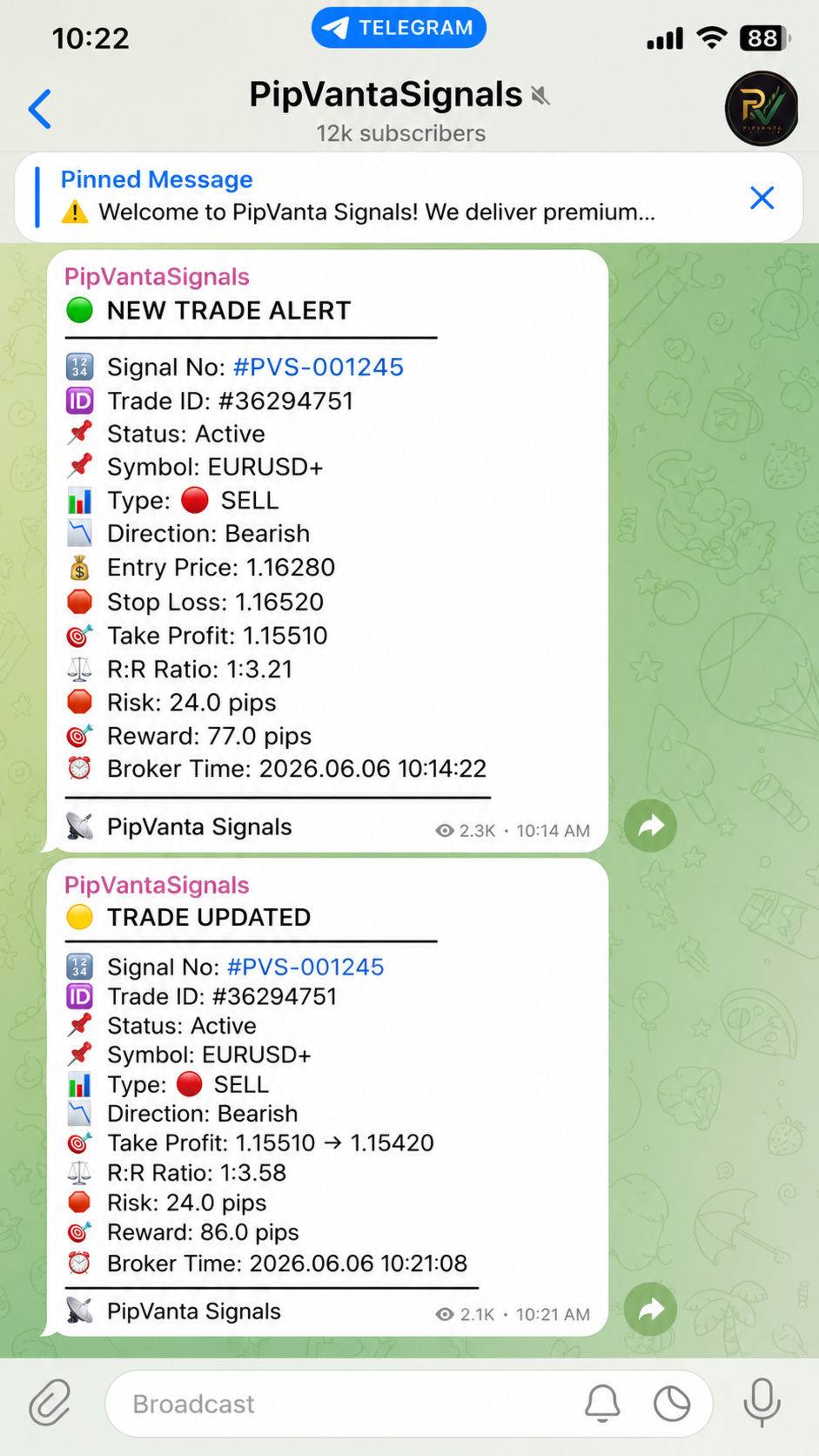
- New market trade alerts
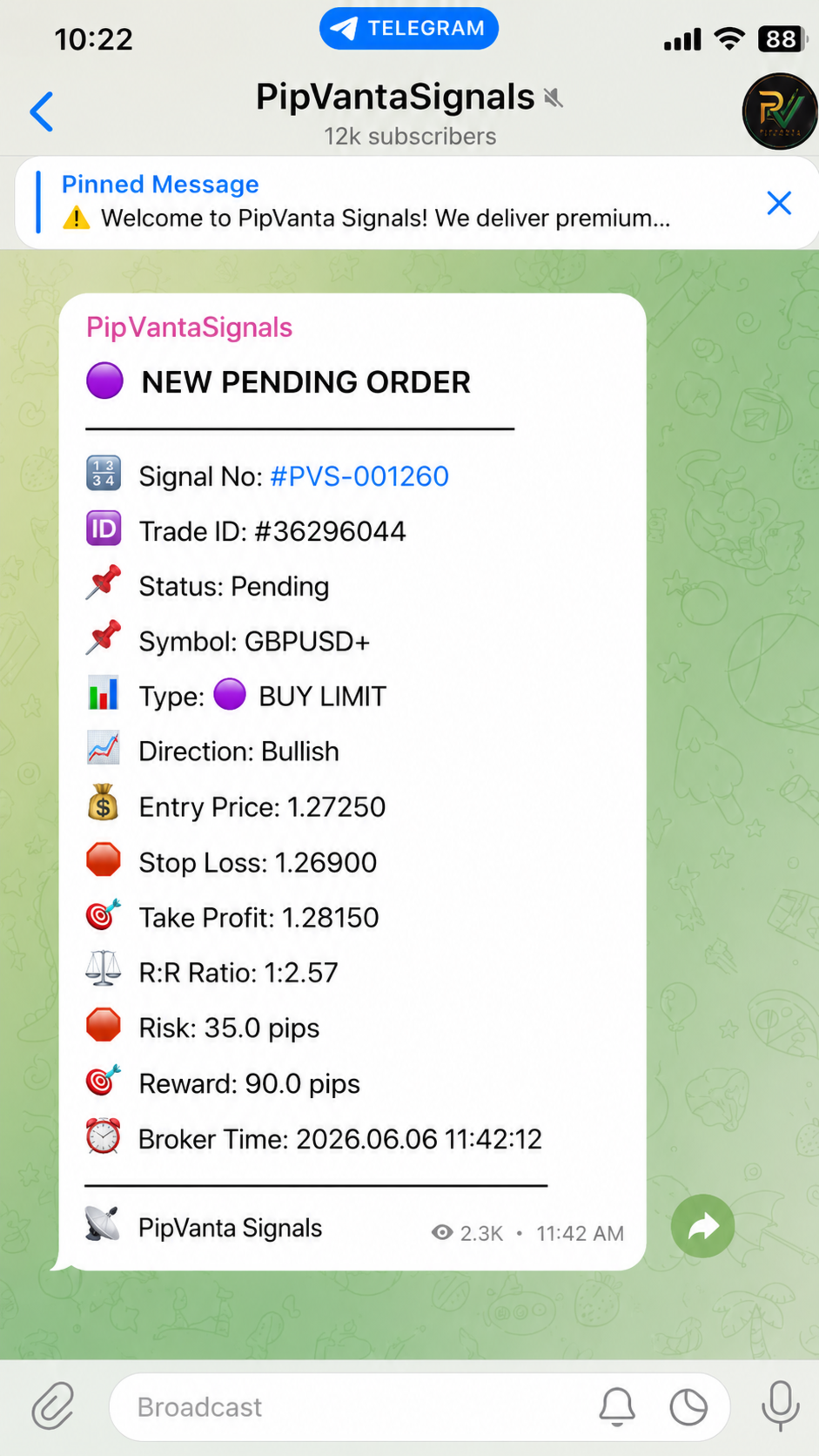
- Pending order alerts
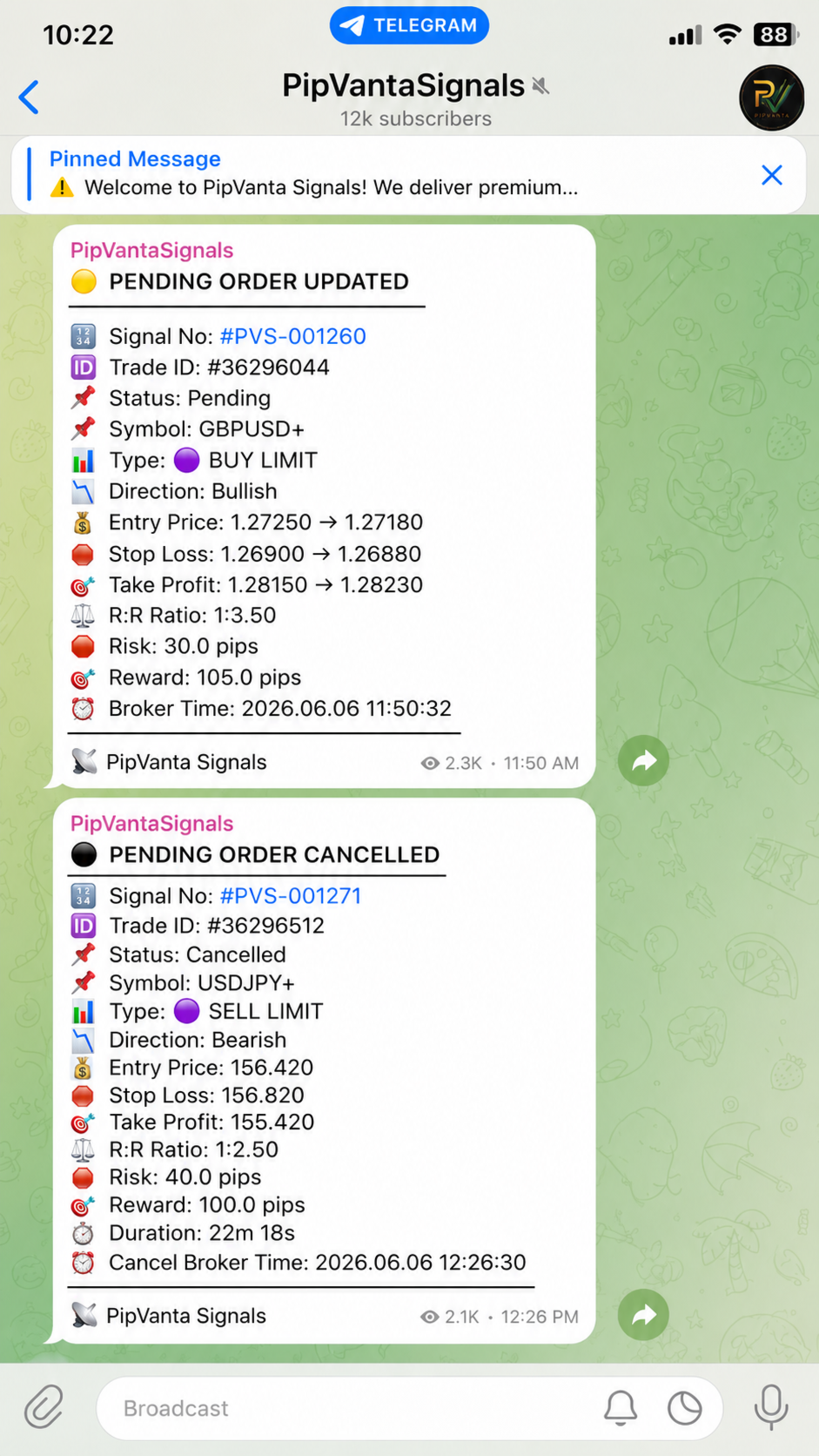
- Pending order update alerts
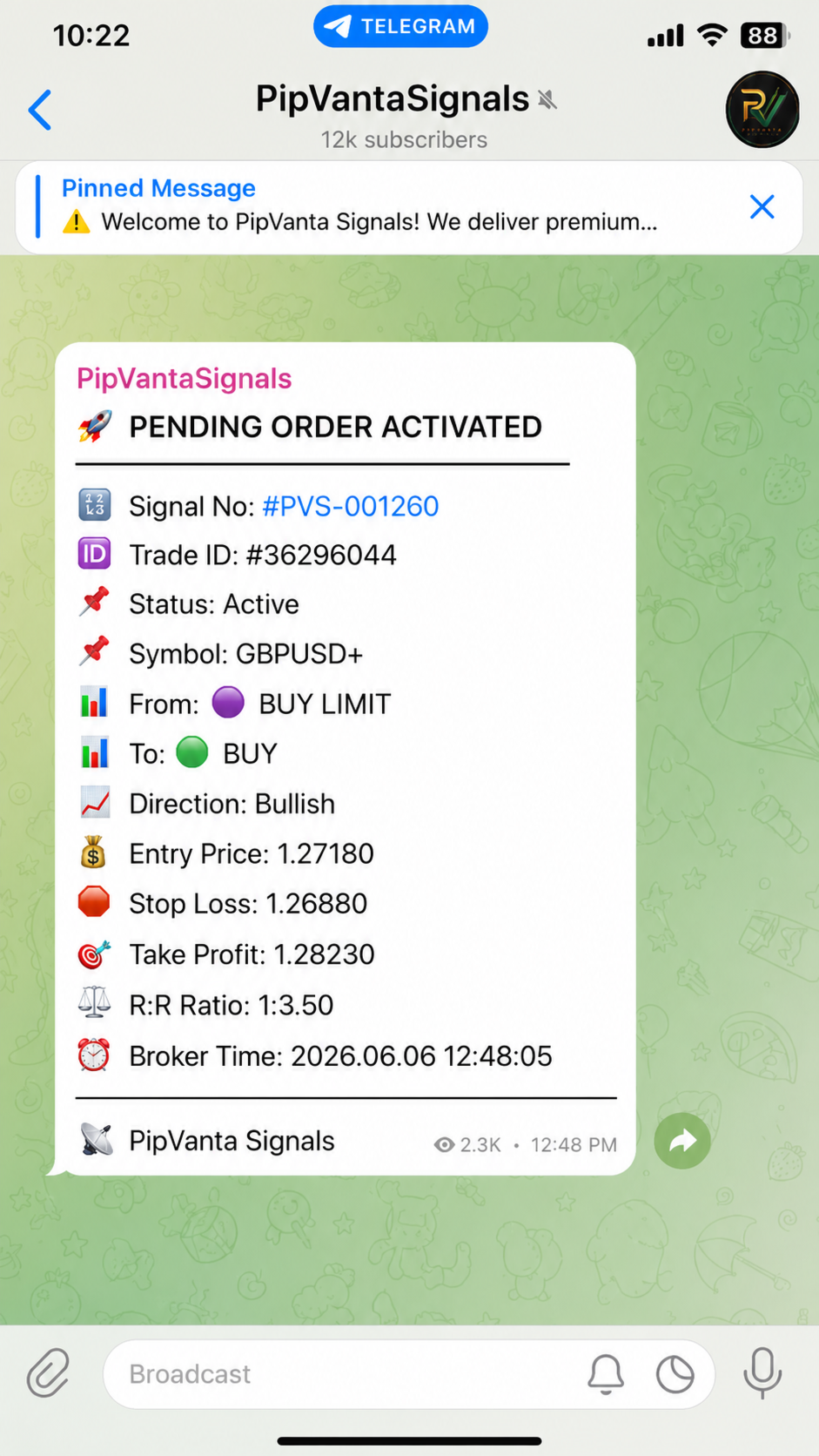
- Pending order activation alerts
- Pending order cancellation alerts
- Entry price update alerts
- Stop Loss update alerts
- Take Profit update alerts
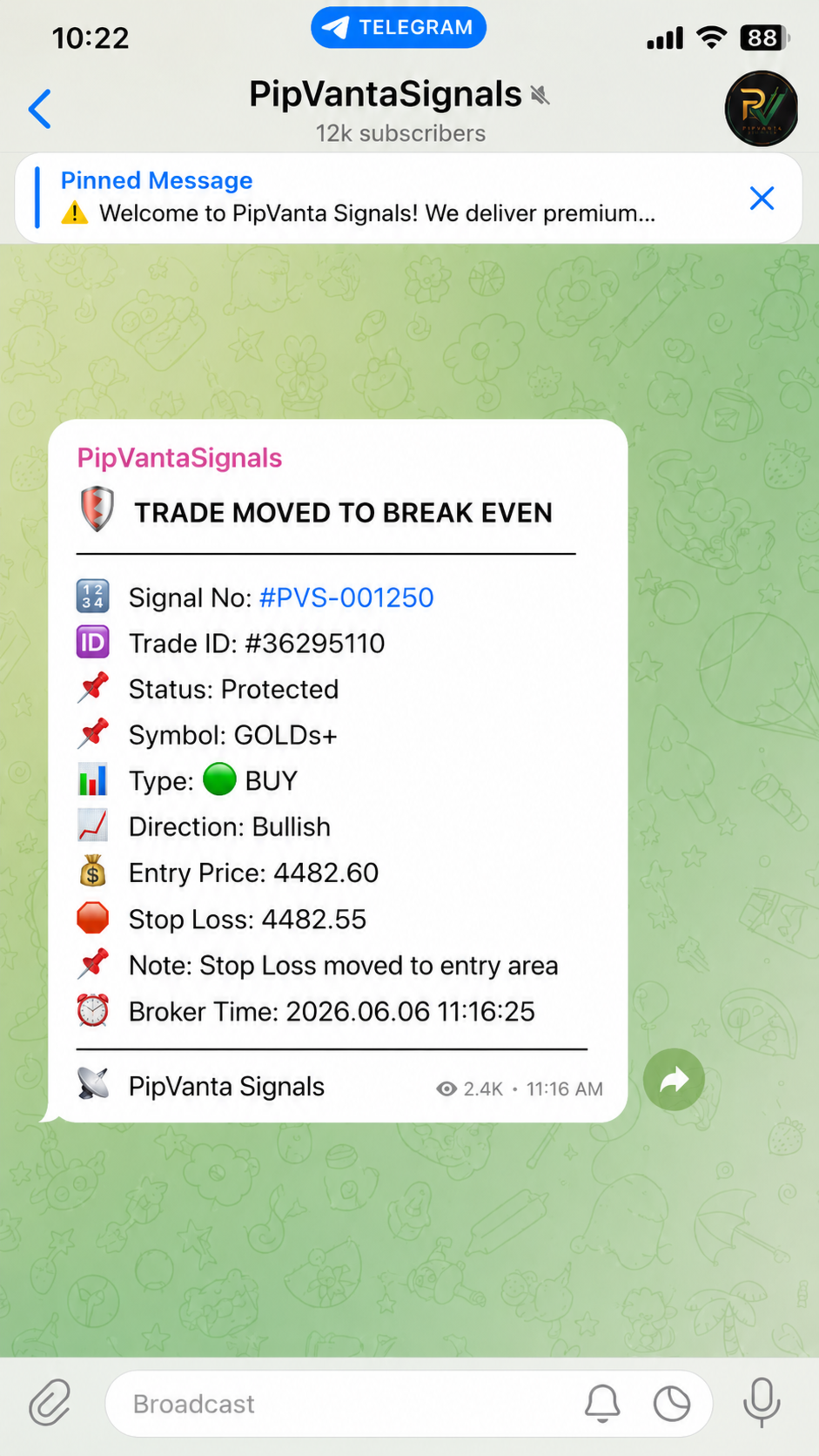
- Break-even notifications
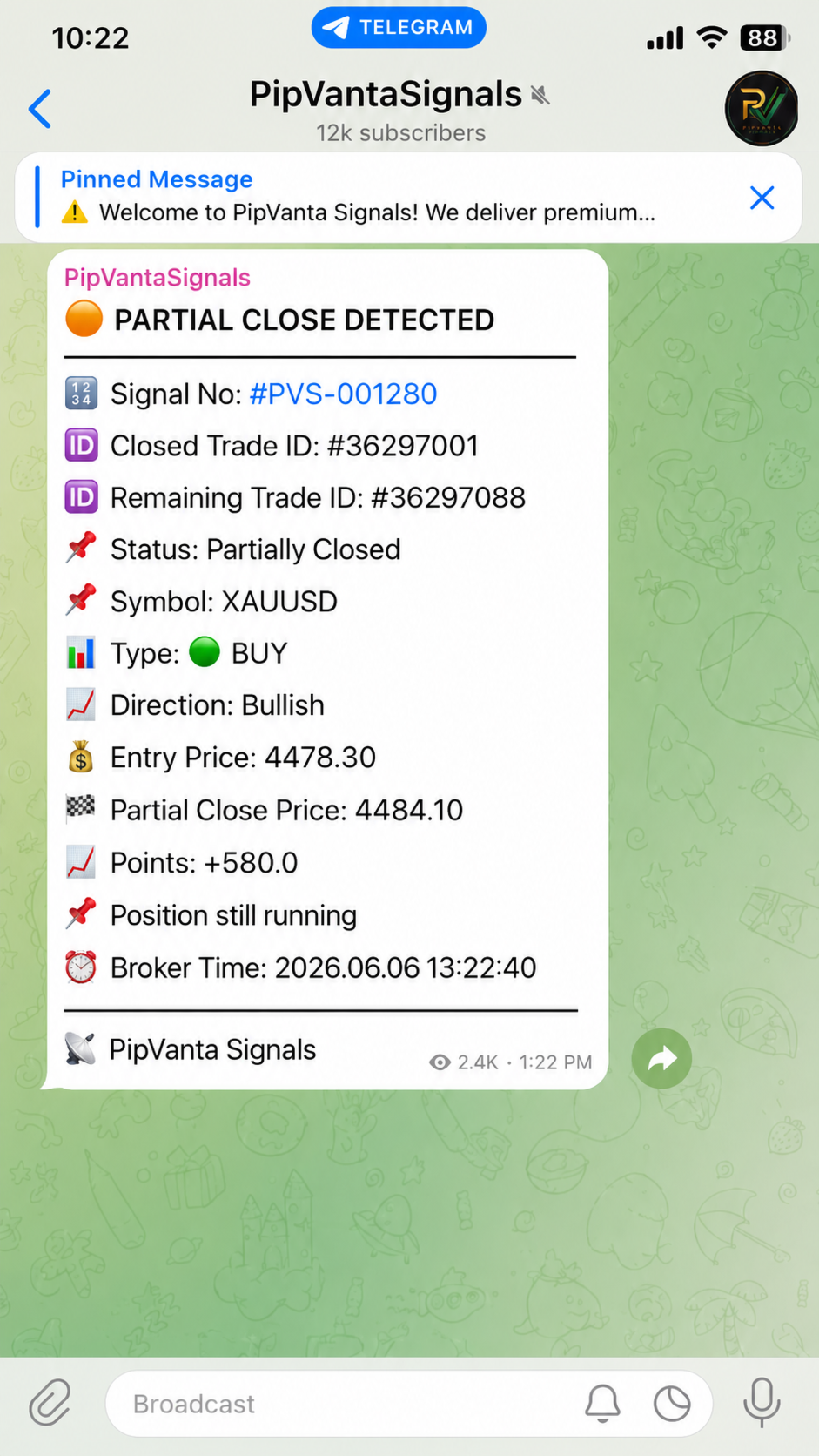
- Smart partial close detection
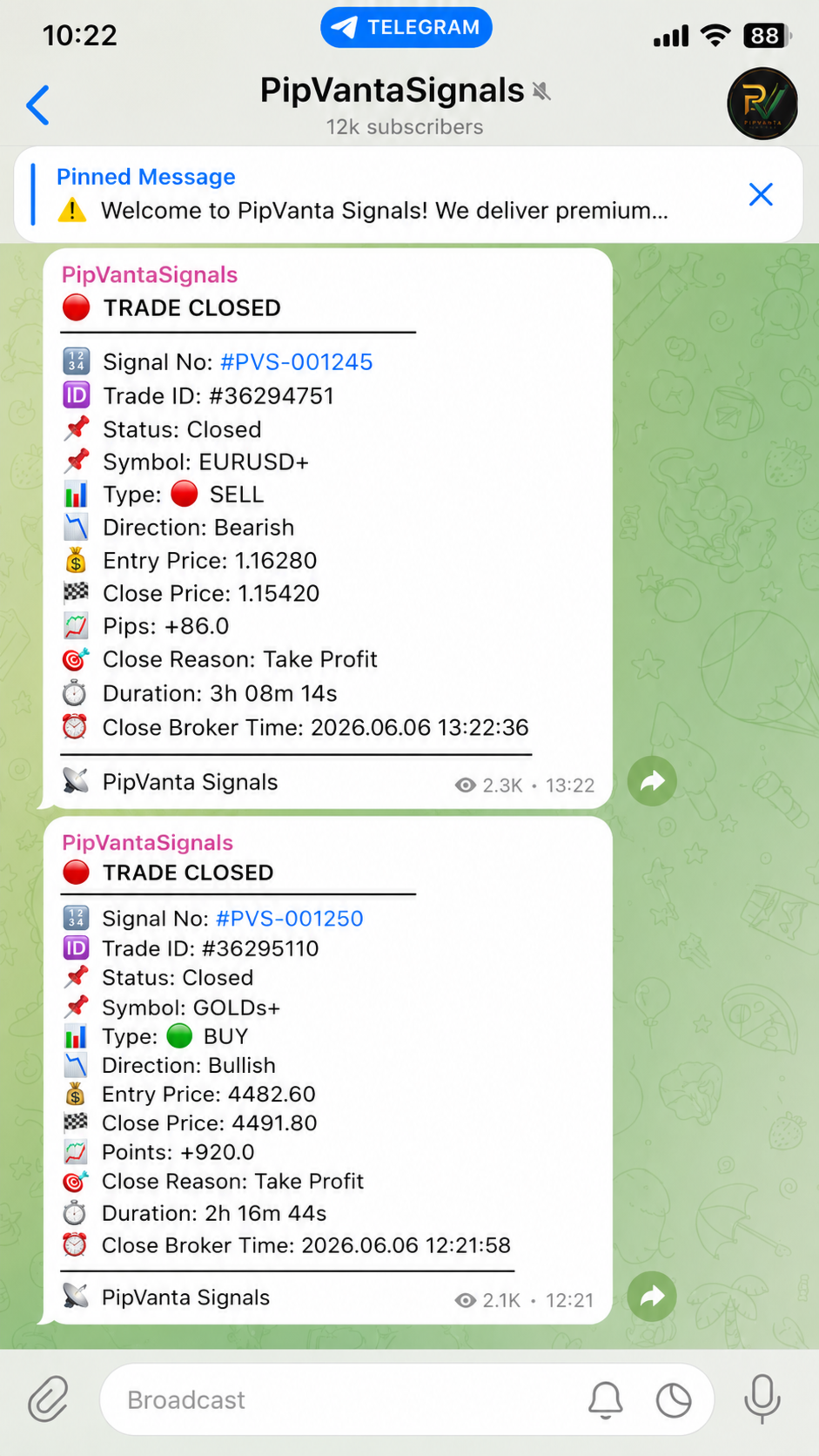
- Trade close reports
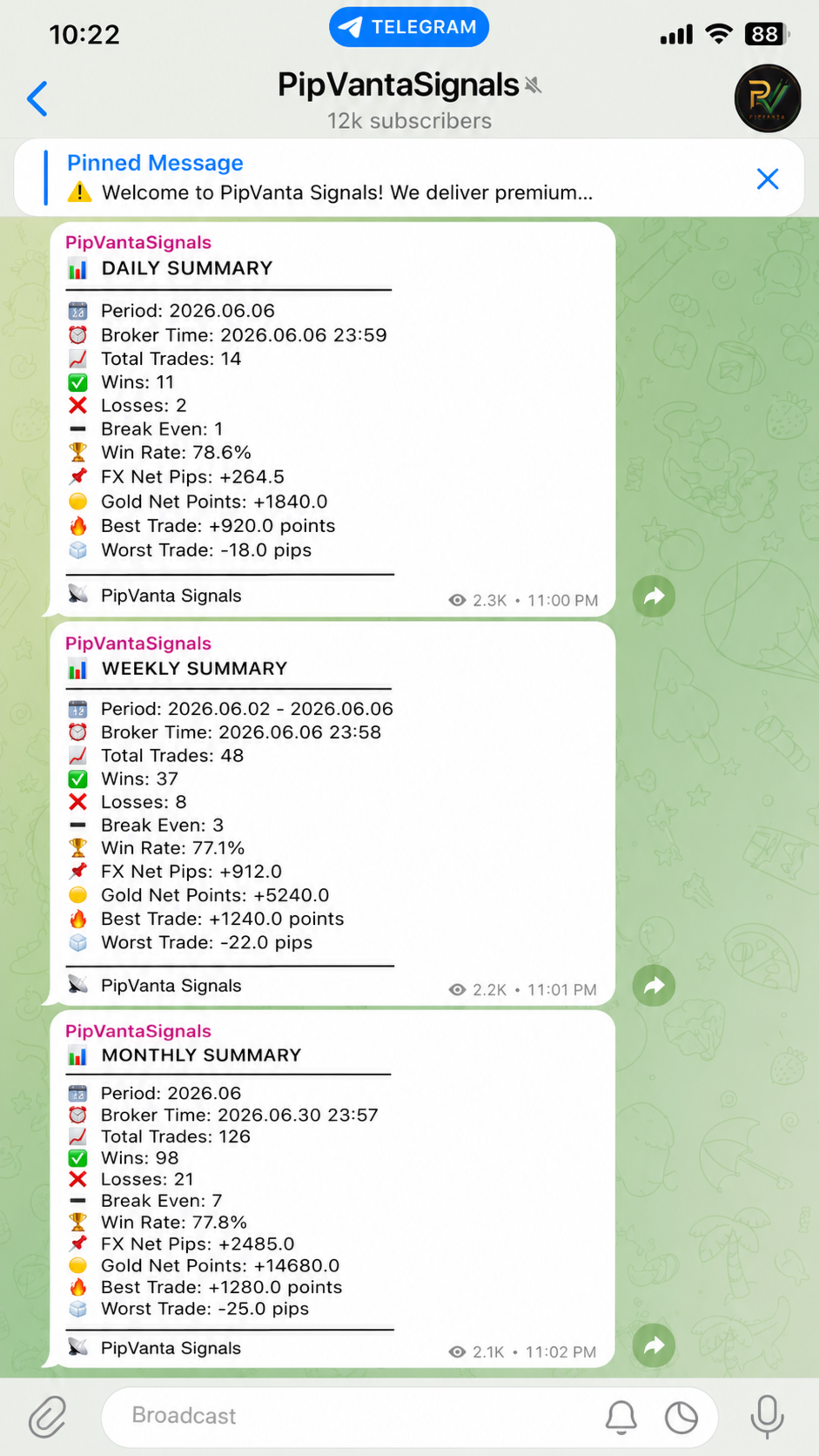
- Daily performance summaries
- Weekly performance summaries
- Monthly performance summaries
- Unique signal number for every trade
- Forex results displayed in pips
- Gold results displayed in points
- Privacy-friendly messages for public or private Telegram channels
Supported Trade Types
- Buy
- Sell
- Buy Limit
- Sell Limit
- Buy Stop
- Sell Stop
Every Trade Alert Can Include
- Signal number
- Trade ID
- Trade status
- Symbol
- Trade type
- Direction
- Entry price
- Stop Loss
- Take Profit
- Risk-to-Reward ratio
- Broker time
Smart Trade Updates
When a trade is modified, the utility sends only the changed values. For example, if only the Stop Loss is changed, the Telegram message shows only the Stop Loss update. This keeps the channel clean and easy to follow.
Pending Order Tracking
The utility detects new pending orders, pending order changes, pending order activation, and pending order cancellation.
Break-Even Alert
When the Stop Loss is moved close to the entry price, the utility can send a break-even notification to show that the trade has moved into a protected area.
Smart Partial Close Detection
Some brokers reduce the volume of the same ticket after a partial close. Other brokers close the original ticket and create a new ticket for the remaining position. PipVanta Telegram Notifier is designed to detect both behaviors whenever possible and preserve the same signal number for the remaining trade.
Trade Close Reports
When a trade is closed, the utility can send:
- Signal number
- Trade ID
- Symbol
- Trade type
- Direction
- Entry price
- Close price
- Result in pips or points
- Close reason
- Trade duration
- Open broker time
- Close broker time
Privacy-Friendly Notifications
The utility does not display:
- Lot size
- Account balance
- Equity
- Profit in money
- Loss in money
- Private account information
This makes it suitable for public channels, private groups, account managers, and signal providers.
Performance Summaries
The utility can send daily, weekly, and monthly summaries including:
- Total trades
- Winning trades
- Losing trades
- Break-even trades
- Win rate
- Forex net pips
- Gold net points
- Best trade
- Worst trade
What You Receive After Purchase
After purchase, PipVanta Telegram Notifier is added automatically to the Purchases section of your MQL5 account.
The buyer receives the protected compiled MetaTrader 4 product through the official MQL5 Market installation system.
The source code is not included.
How to Install After Purchase
1. Open MetaTrader 4.
2. Log in using the same MQL5 account used for the purchase.
3. Open the Market or Purchases section inside MetaTrader 4.
4. Find PipVanta Telegram Notifier.
5. Click Install.
6. Open Navigator and locate the product under Utilities or Expert Advisors.
7. Attach the utility to one active chart.
The utility only needs to be attached to one chart. It monitors eligible trading activity across the entire MT4 account.
Requirements
- MetaTrader 4
- Telegram bot token
- Telegram personal Chat ID, group ID, channel ID, or public channel username
- Permission for the Telegram bot to send messages
- WebRequest enabled for https://api.telegram.org
- MT4 must remain open and connected to the internet
A reliable Windows VPS or MetaTrader VPS is recommended for continuous operation.
How to Set Up
Step 1: Enable WebRequest
In MetaTrader 4, go to:
Tools -> Options -> Expert Advisors
Enable:
Allow WebRequest for listed URL
Add:
DLL imports are not required.
Step 2: Create a Telegram Bot
Open Telegram and search for BotFather.
Send:
/start
Then send:
/newbot
Follow the instructions and save the Bot Token provided by BotFather.
Keep the Bot Token private.
Step 3: Prepare the Telegram Destination
The utility can send messages to:
- Personal chat
- Telegram group
- Telegram channel
For a personal chat, open the bot and send it a message.
For a group, add the bot to the group and send a message in the group.
For a channel, add the bot as an administrator and allow it to post messages.
Step 4: Get the Chat ID
Open this address in a browser:
https://api.telegram.org/botYOUR_BOT_TOKEN/getUpdates
Replace YOUR_BOT_TOKEN with the real bot token.
Find the chat ID in the response.
Personal Chat IDs are usually positive numbers.
Group and private channel IDs are usually negative numbers and often start with -100.
For a public channel, the public username may also be used when supported, for example:
@ChannelUsername
Step 5: Configure the Inputs
Attach the utility to one MT4 chart and open the Inputs tab.
Enter:
BotToken:
The Telegram Bot Token provided by BotFather.
ChatID:
The personal Chat ID, group ID, channel ID, or public channel username.
BrandName:
The name shown at the bottom of Telegram messages.
Recommended first connection test:
IgnoreExistingOrdersOnStart = true
NotifyExistingOrdersOnStart = false
SendActivationMessage = true
Click OK.
If the connection is correct, the utility sends an activation message to Telegram.
After the activation test, set:
SendActivationMessage = false
Recommended Live Settings
IgnoreExistingOrdersOnStart = true
NotifyExistingOrdersOnStart = false
SendActivationMessage = false
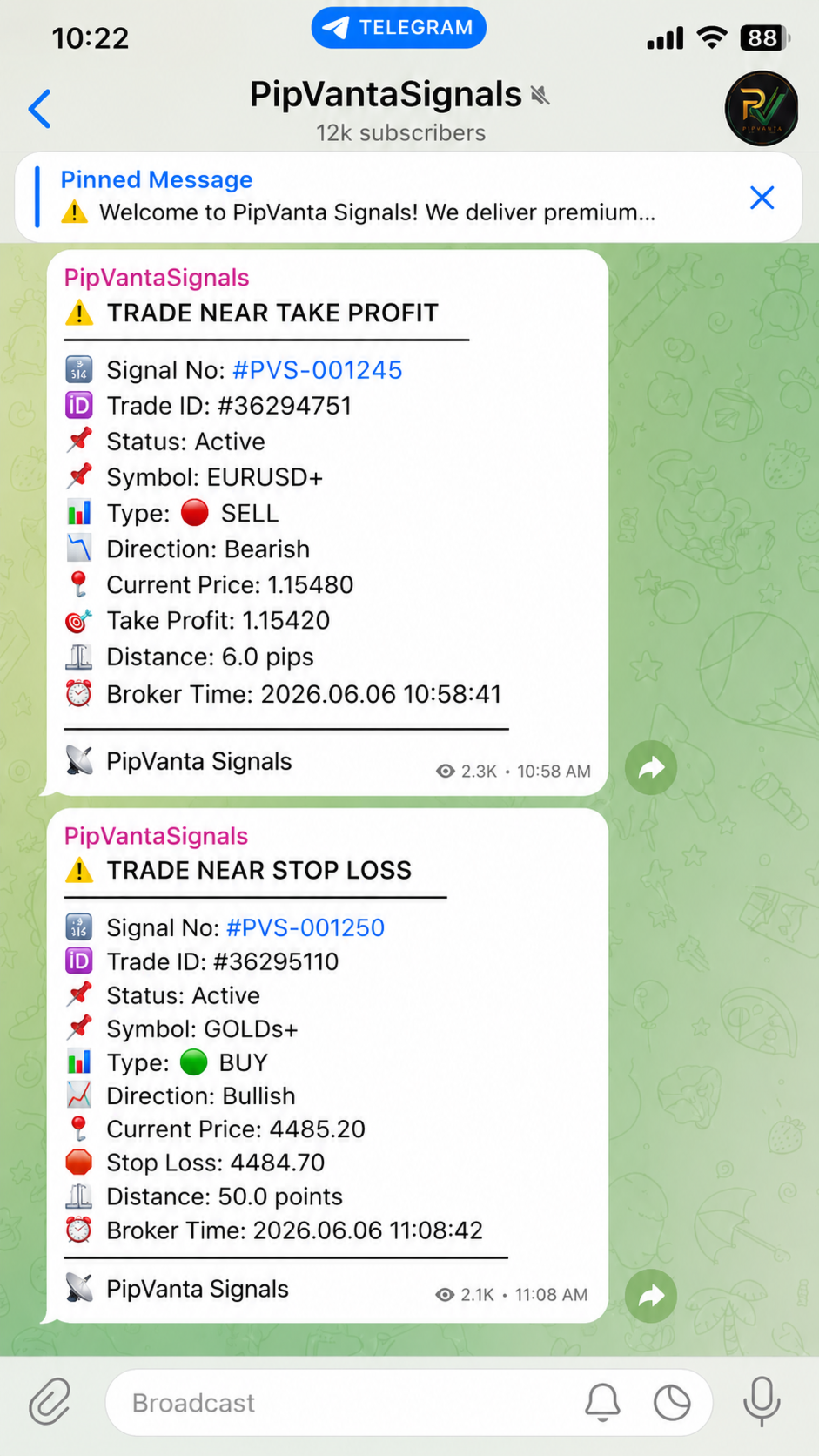
EnableNearAlerts = true
ForexNearTargetPips = 10.0
ForexNearStopLossPips = 10.0
GoldNearTargetPoints = 50.0
GoldNearStopLossPoints = 50.0
EnableBreakEvenAlert = true
BreakEvenTolerancePips = 5.0
EnableSmartPartialCloseDetection = true
PartialCloseMatchWindowSeconds = 30
PartialCloseEntryTolerancePips = 10.0
PartialCloseOpenTimeToleranceSeconds = 30
EnableDailySummary = true
DailySummaryHour = 23
DailySummaryMinute = 59
EnableWeeklySummary = true
WeeklySummaryDayOfWeek = 5
WeeklySummaryHour = 23
WeeklySummaryMinute = 58
EnableMonthlySummary = true
MonthlySummaryHour = 23
MonthlySummaryMinute = 57
CloseReasonTolerancePips = 5.0
Important Usage Notes
- The utility does not open, close, or modify trades.
- It does not provide trading signals.
- It must remain attached to one active chart.
- MetaTrader 4 must remain open and connected to the internet.
- Telegram delivery depends on the Telegram API, internet connection, MT4 terminal status, broker execution, and correct user settings.
- Test the utility on a demo account before using it on a live account.
- Existing open trades can be ignored by keeping IgnoreExistingOrdersOnStart enabled.
Troubleshooting
No Telegram message received:
- Check BotToken and ChatID
- Make sure the bot is active
- Make sure the bot can post messages
- Make sure the bot is an administrator in the channel
- Enable WebRequest for https://api.telegram.org
- Enable AutoTrading in MT4
- Check the Experts tab for error messages
Old trades are reported:
- Set IgnoreExistingOrdersOnStart to true
- Set NotifyExistingOrdersOnStart to false
- Attach the utility before opening new trades
Channel messages are not received:
- Check the channel ID
- Include the negative sign when required
- Private channel IDs often start with -100
- Make sure the bot is an administrator
Support
Support is provided through MQL5 product comments and MQL5 private messages.