PipVanta Telegram Notifier

PipVanta Telegram Notifier

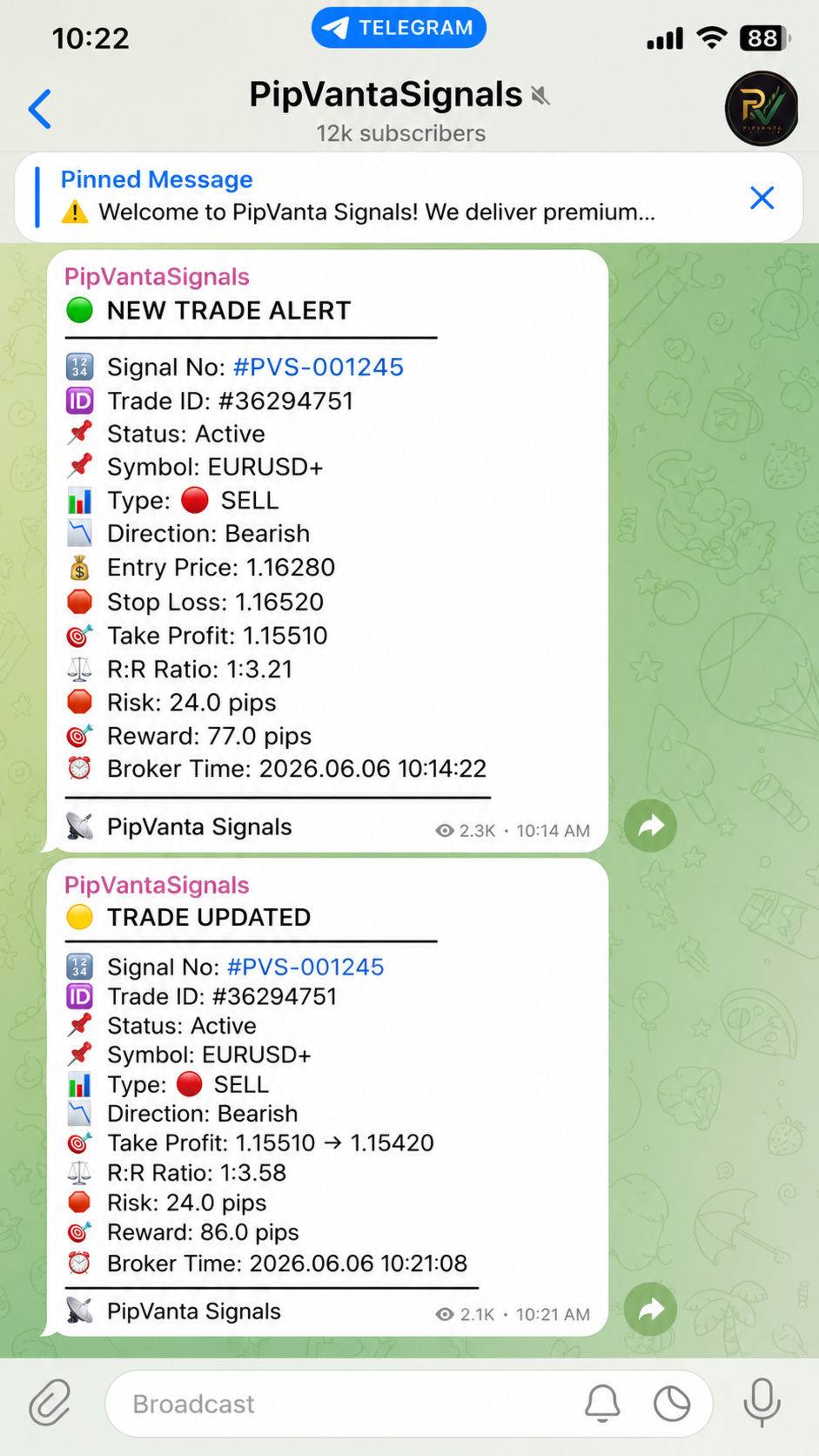
PipVanta Telegram Notifier는 MT4 거래 활동을 실시간으로 Telegram에 전송하는 전문 MetaTrader 4 유틸리티입니다.

수동 게시 없이 빠르고 깔끔하며 구조화된 알림이 필요한 트레이더, 시그널 제공자, 계정 관리자 및 비공개 커뮤니티를 위해 설계되었습니다.

이 유틸리티는 거래를 열거나 닫거나 수정하지 않으며 시장 분석이나 거래 시그널을 제공하지 않습니다. MT4 계정의 거래 활동을 모니터링하고 정리된 Telegram 알림만 자동 전송합니다.

주요 기능

- 신규 시장가 거래 알림
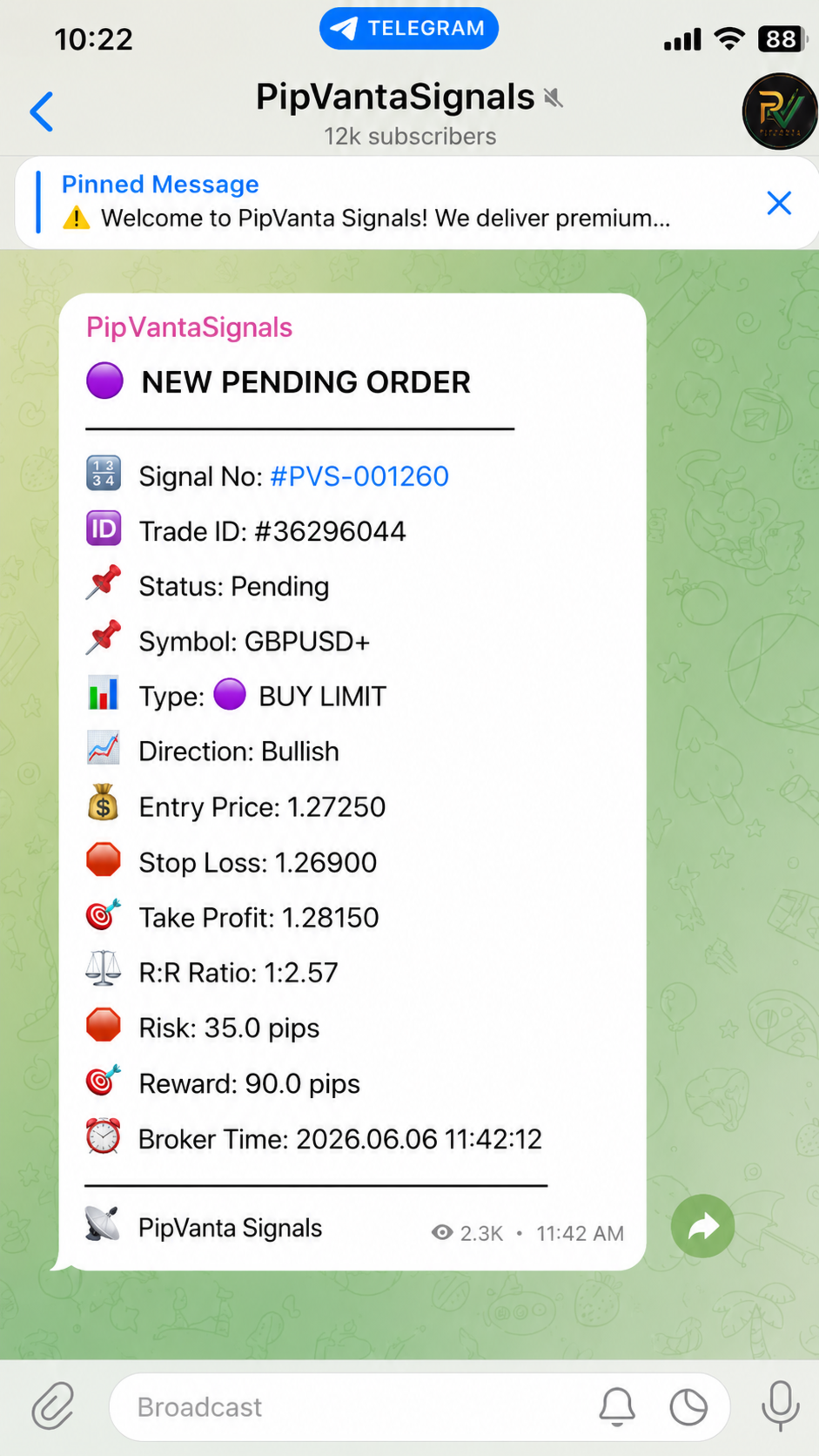
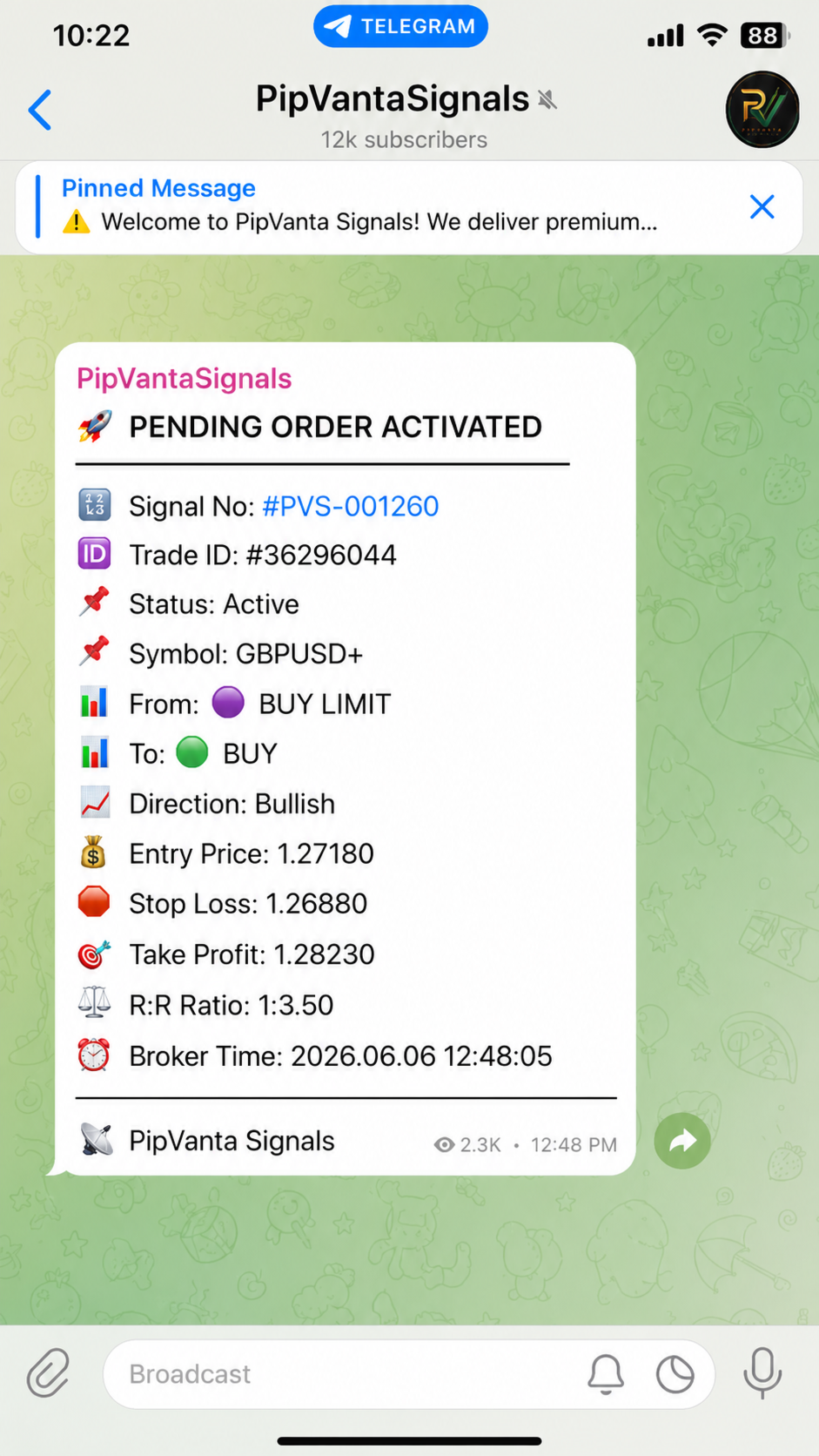
- 신규 대기 주문 알림
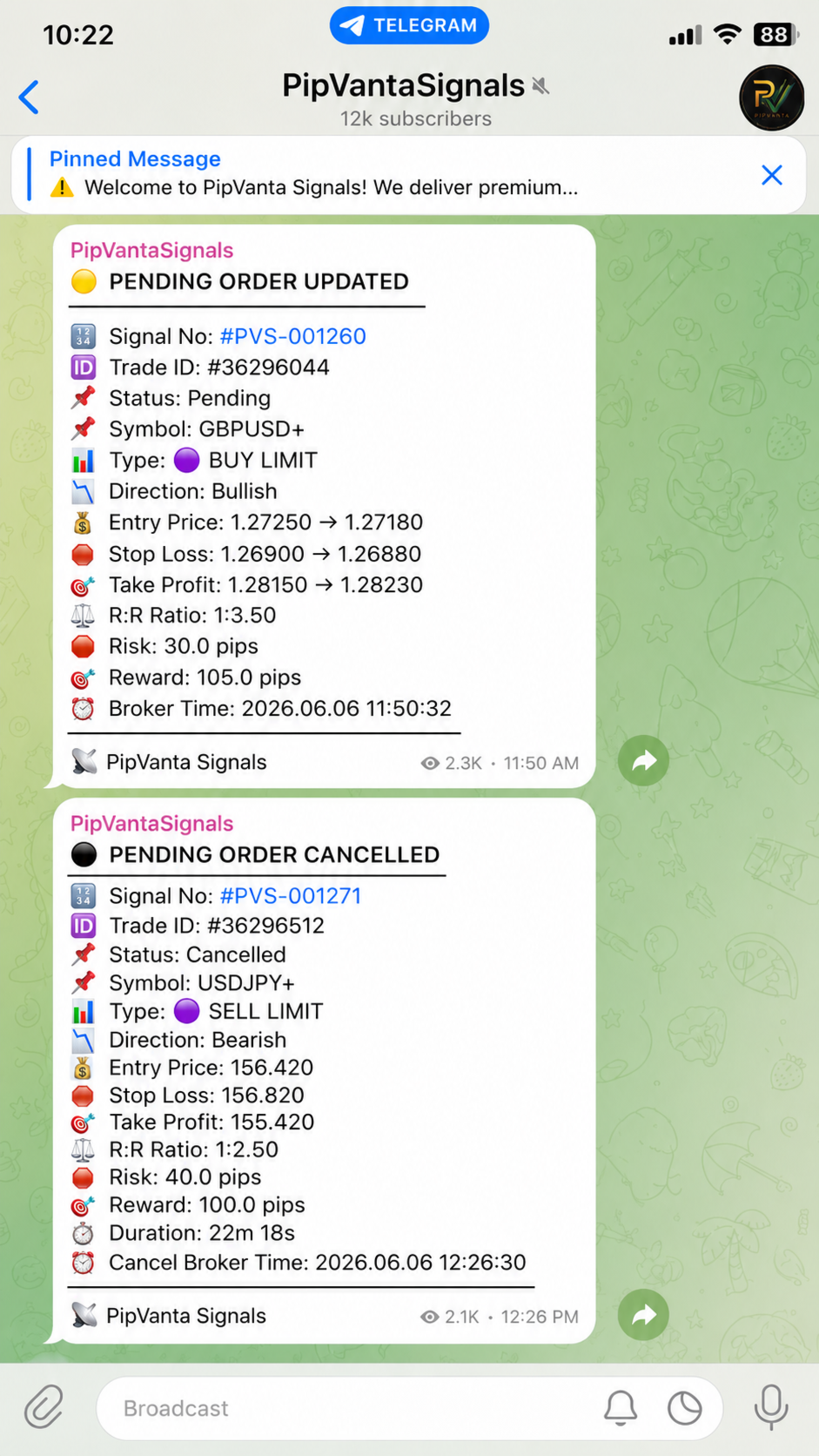
- 대기 주문 수정 알림
- 대기 주문 활성화 알림
- 대기 주문 취소 알림
- 진입가 업데이트
- Stop Loss 업데이트
- Take Profit 업데이트
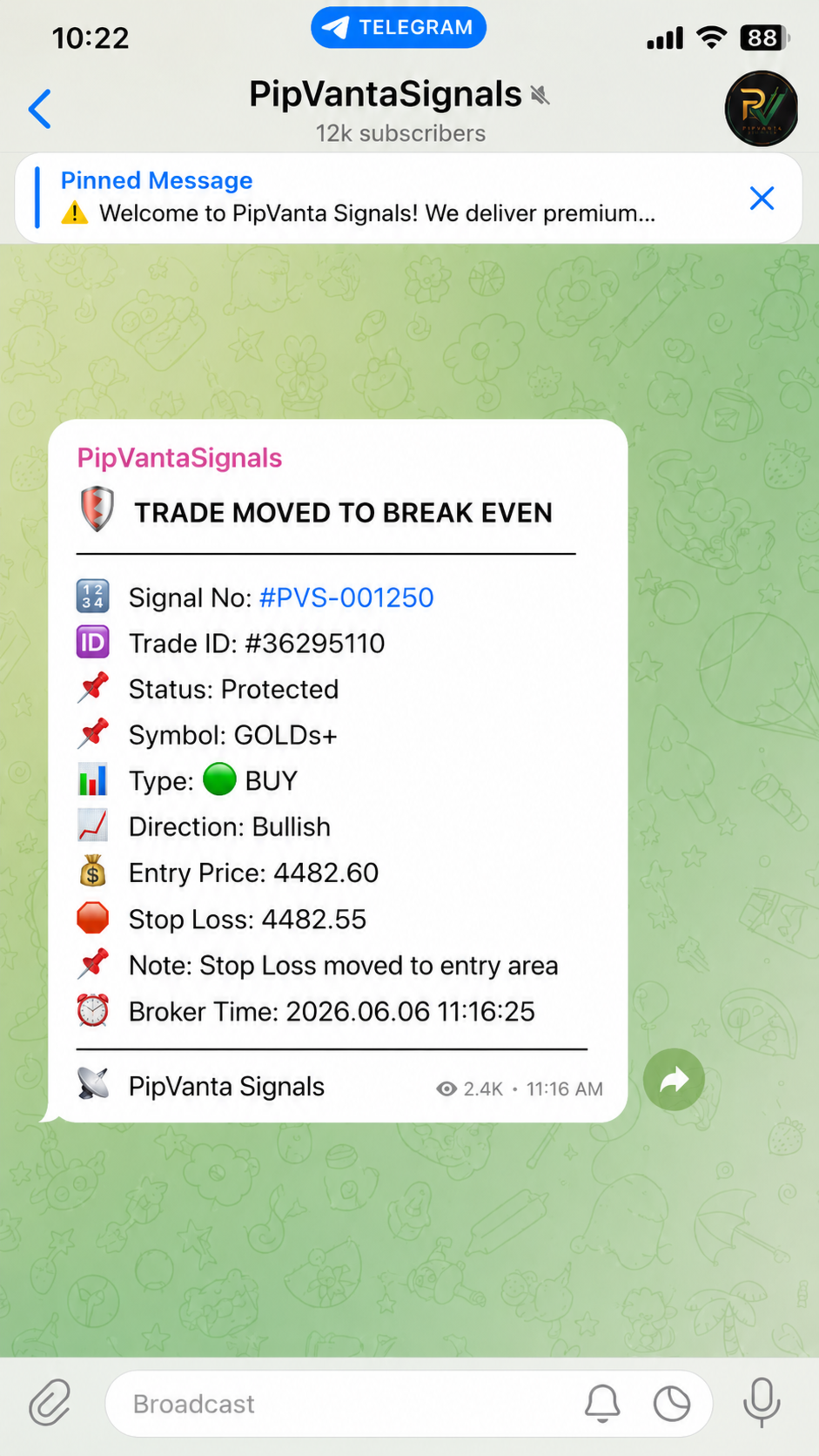
- 손익분기점 알림
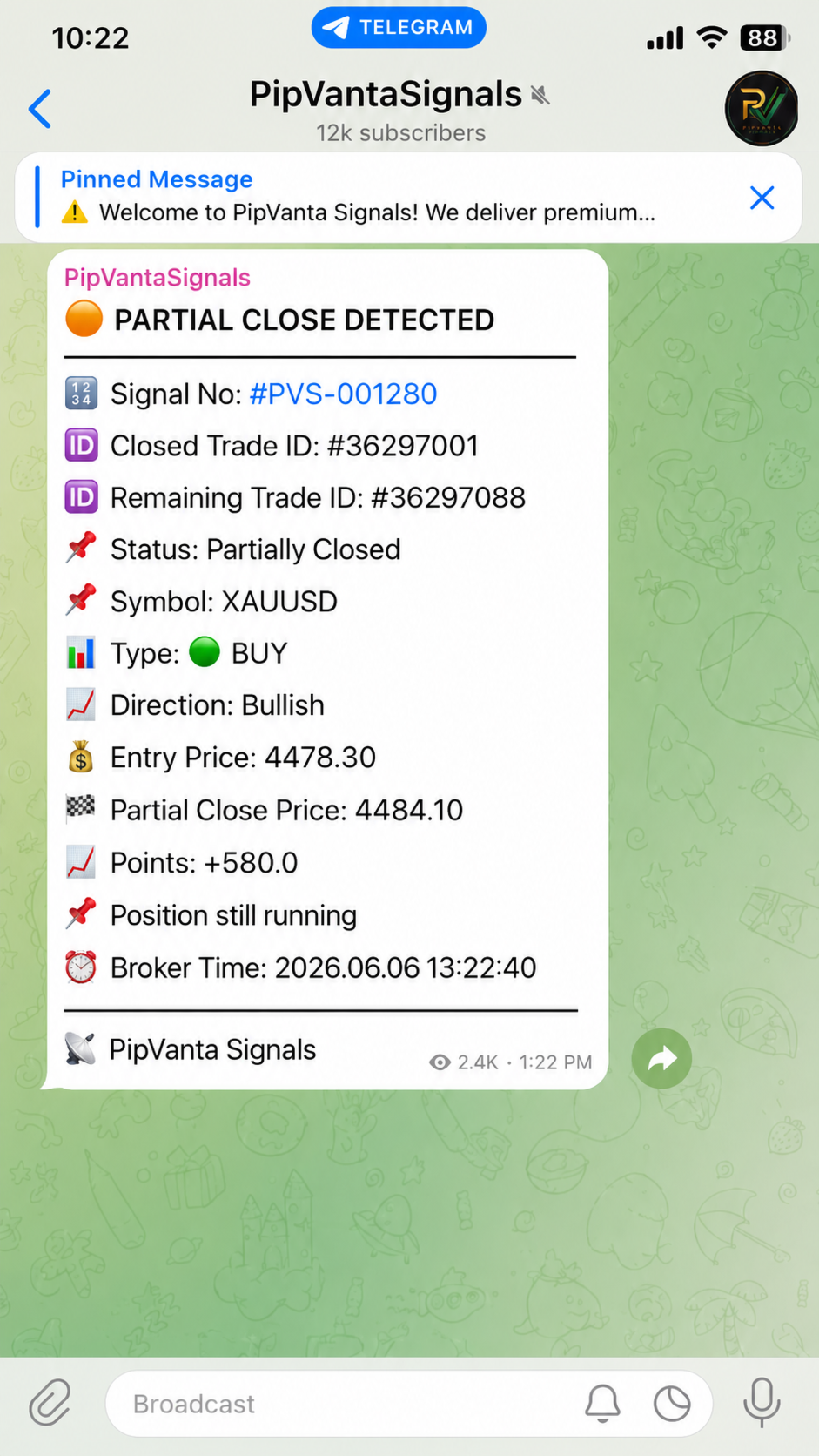
- 부분 청산 스마트 감지
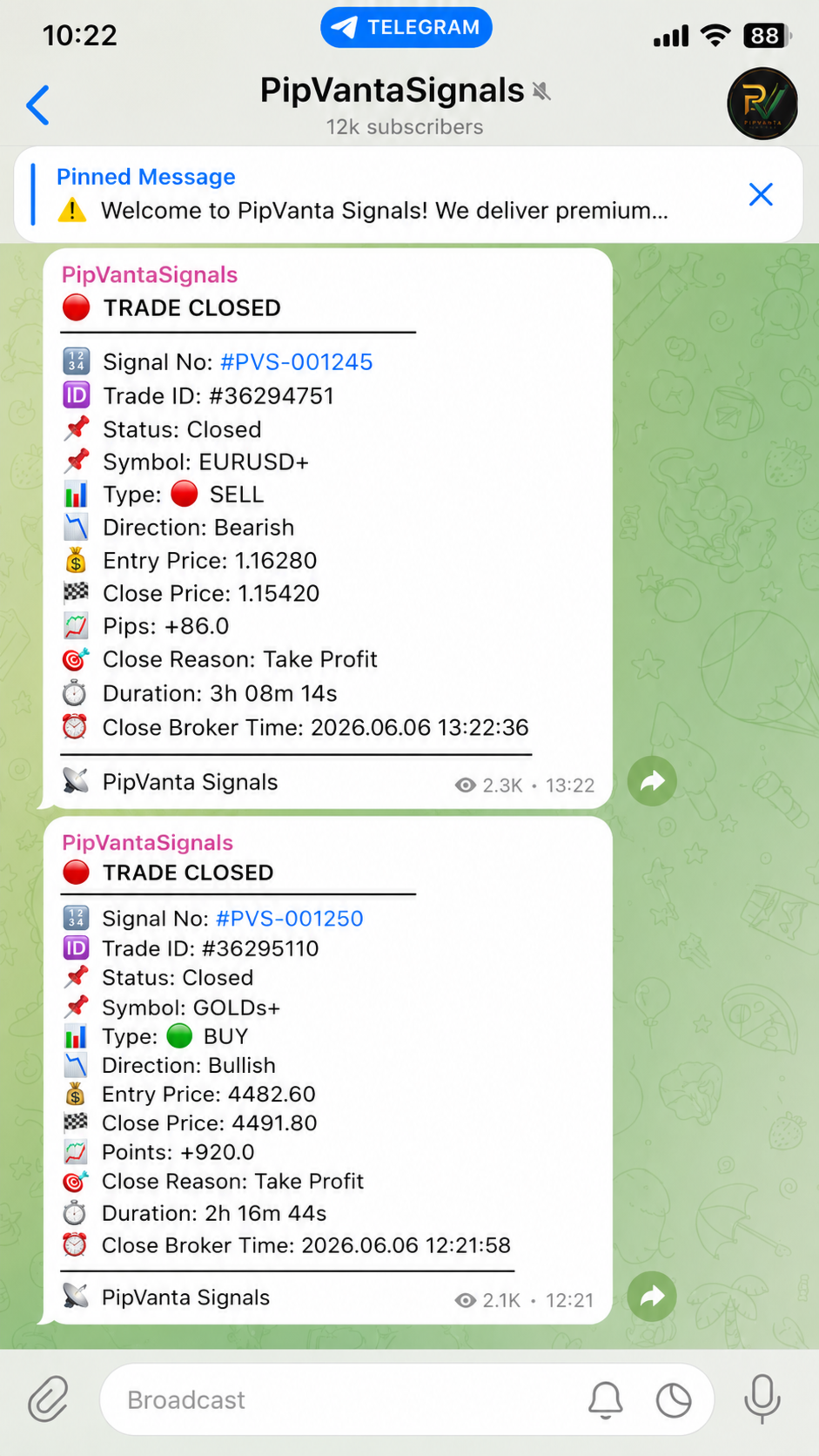
- 거래 종료 보고서
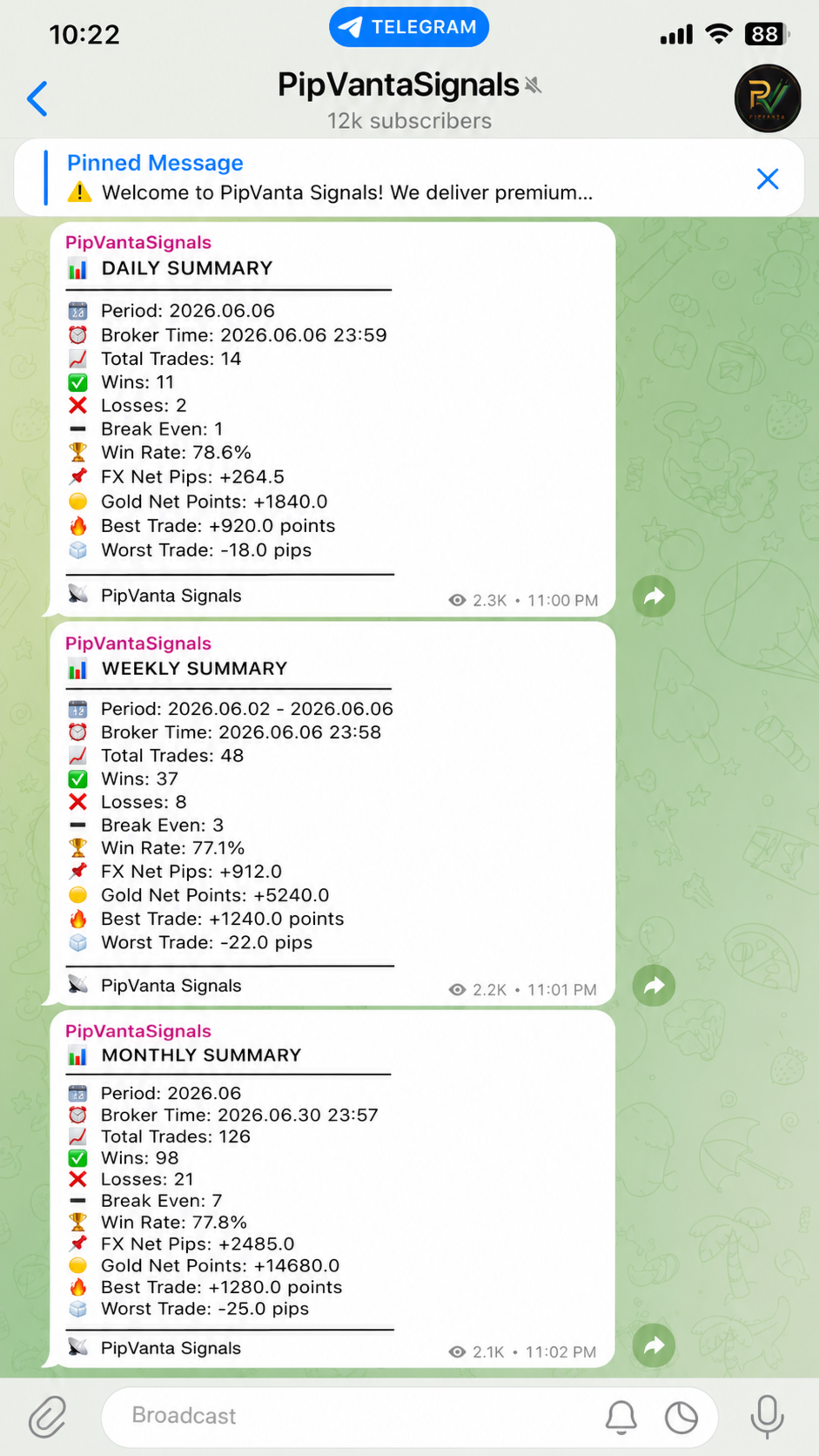
- 일간, 주간, 월간 요약
- 각 거래별 고유 시그널 번호
- Forex 결과를 pips로 표시
- Gold 결과를 points로 표시
- 계정 개인정보를 노출하지 않는 메시지

지원 주문 유형

- Buy
- Sell
- Buy Limit
- Sell Limit
- Buy Stop
- Sell Stop

각 알림에 포함될 수 있는 정보

- 시그널 번호
- Trade ID
- 상태
- 심볼
- 주문 유형
- 방향
- 진입가
- Stop Loss
- Take Profit
- 위험 대비 보상 비율
- 브로커 시간

스마트 업데이트

거래가 수정되면 변경된 값만 전송됩니다. 예를 들어 Stop Loss만 변경되면 Telegram 메시지에는 해당 변경만 표시됩니다.

대기 주문 추적

대기 주문의 생성, 수정, 활성화 및 취소를 감지합니다.

손익분기점 알림

Stop Loss가 진입가 근처로 이동하면 거래가 보호 상태로 이동했음을 알릴 수 있습니다.

부분 청산 스마트 감지

일부 브로커는 동일한 ticket의 거래량을 줄입니다. 다른 브로커는 기존 ticket을 종료하고 남은 포지션에 새 ticket을 생성합니다. 유틸리티는 가능한 한 두 방식을 모두 감지하고 동일한 시그널 번호를 유지합니다.

개인정보 보호

로트 크기, 잔액, Equity, 금액 기준 손익 및 계정 개인정보를 표시하지 않습니다.

성과 요약

총 거래 수, 승리, 손실, 손익분기점, 승률, Forex 순 pips, Gold 순 points, 최고 및 최악의 거래를 포함할 수 있습니다.

구매자가 받는 항목

구매 후 제품은 MQL5 계정의 Purchases 섹션에 자동으로 추가됩니다.

구매자는 공식 MQL5 Market 설치 시스템을 통해 보호된 컴파일 MetaTrader 4 제품을 받습니다.

소스 코드는 포함되지 않습니다.

구매 후 설치

1. MetaTrader 4를 엽니다.
2. 구매에 사용한 동일한 MQL5 계정으로 로그인합니다.
3. Market 또는 Purchases를 엽니다.
4. PipVanta Telegram Notifier를 찾습니다.
5. Install을 클릭합니다.
6. Navigator에서 제품을 찾습니다.
7. 하나의 활성 차트에 유틸리티를 연결합니다.

하나의 차트만으로 전체 MT4 계정의 대상 거래를 모니터링할 수 있습니다.

요구 사항

- MetaTrader 4
- Telegram Bot Token
- Chat ID, Group ID, Channel ID 또는 공개 채널 사용자 이름
- Bot의 메시지 전송 권한
- https://api.telegram.org에 대한 WebRequest 허용
- MT4가 열려 있고 인터넷에 연결되어 있어야 함

지속적인 운영을 위해 안정적인 Windows VPS 또는 MetaTrader VPS를 권장합니다.

설정 방법

1. MT4에서 Tools -> Options -> Expert Advisors를 엽니다.
2. Allow WebRequest for listed URL을 활성화합니다.
3. https://api.telegram.org를 추가합니다.
4. Telegram에서 BotFather를 엽니다.
5. /start 후 /newbot을 전송합니다.
6. Bot Token을 저장합니다.
7. Bot을 채팅, 그룹 또는 채널에 추가합니다.
8. 채널에서는 Bot을 관리자로 설정합니다.
9. 다음 주소에서 Chat ID를 확인합니다:
10. 유틸리티를 하나의 차트에 연결합니다.
11. BotToken, ChatID, BrandName을 입력합니다.
12. 첫 테스트에서는 SendActivationMessage = true로 설정합니다.
13. 테스트 후 SendActivationMessage = false로 변경합니다.

권장 설정

IgnoreExistingOrdersOnStart = true
NotifyExistingOrdersOnStart = false
SendActivationMessage = false
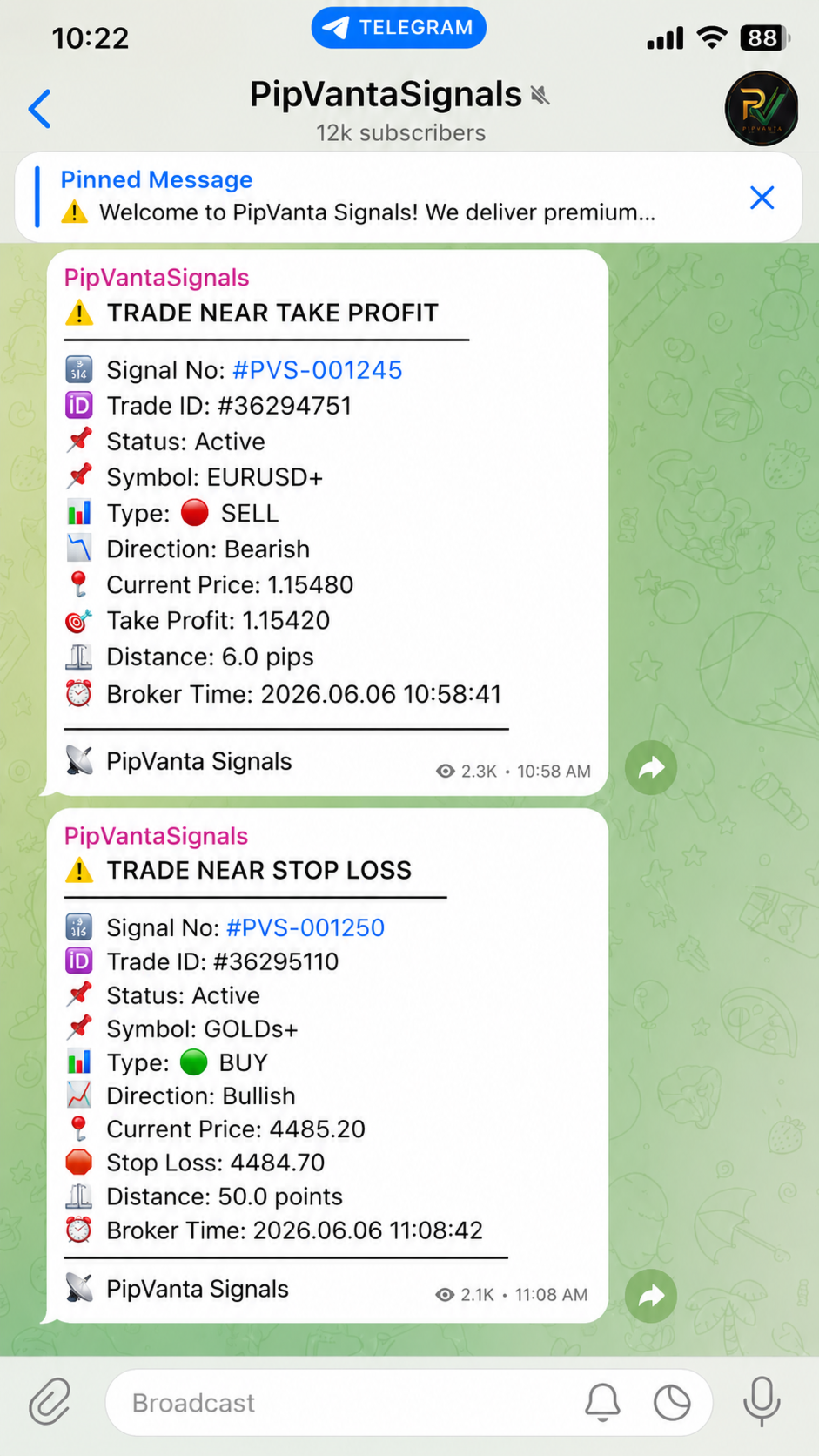
EnableNearAlerts = true
ForexNearTargetPips = 10.0
ForexNearStopLossPips = 10.0
GoldNearTargetPoints = 50.0
GoldNearStopLossPoints = 50.0
EnableBreakEvenAlert = true
EnableSmartPartialCloseDetection = true

중요 사항

- 자동 거래를 하지 않습니다.
- 거래 시그널을 제공하지 않습니다.
- MT4는 계속 열려 있어야 합니다.
- 전송은 Telegram API, 인터넷, MT4 상태 및 올바른 설정에 따라 달라집니다.
- 먼저 데모 계정에서 테스트하십시오.

지원

MQL5 제품 댓글과 MQL5 개인 메시지를 통해 지원합니다.
추천 제품
Account tracker for a personal use. Collect account balance, equity, margin, initial margin, p/l and push to a webserver. Lifetime license. Settings: Allow dll import Allow webrequest for certain urls drag and drop expert advisor on a new chart, minimize the chart and leave on the backgroud. Statistics will be update every 3 second and push it to the server.
DrawDownControl
Andrey Shvecov
This Expert Advisor is designed to control drawdown by the symbol it is set to. The Expert Advisor does not carry out trading operations on opening positions, only closing open positions on the symbol on which it is set under certain conditions! There are three drawdown levels implemented in the Expert Advisor. The drawdown size for each level is set in the input parameters and the profit size is assigned (it can be either positive or negative), upon reaching which the ADVISER will close all po
Partial Close EA
Rimantas Petrauskas
3.25 (4)
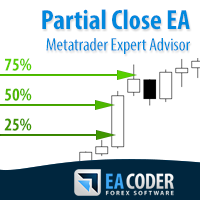
The most simple and easy to use Partial Close EA (by Rimantas Petrauskas ) The main idea of this EA is to apply partial close to your positions. EA will automatically find your open market positions and apply partial close according to your settings. For those who do not know what Partial Close is: it is simply an action to close only a part of your position. For example, if your trade lot size is 1.2 and you close 25% of it (which is 0.3) you will still have 0.9 lot size trade running and exist
Manage trades
Makarii Gubaydullin
활성 및 보류 중인 주문 관리: 자동 무손실, TP/SL 변경, 부분/전체 청산, 차트 상의 레벨 시각적 표시 내 #1  Utility 확인: 66+ 기능, PRO 거래 관리 포함   |    문의하기  질문이 있으면 1) 메인 창: 주문 관리를 위해 특정 심볼 [Symbol]을 설정하거나 모든 심볼 [ALL]을 선택할 수 있습니다 모든 활성 포지션 닫기 [ALL] 모든 수익성 있는 거래 닫기 [profits] 모든 손실 거래 닫기 [losses] 모든 롱 거래(매수) 닫기 [longs] 모든 숏 거래(매도) 닫기 [shorts] 모든 지정가 주문 삭제 [Delete limit orders] 모든 스탑 주문 삭제 [Delete stop order] 오른쪽에는 각 주문 카테고리의 현재 부동 손익(계좌 통화 및 현재 잔고 대비 백분율)이 표시되며, 각 카테고리의 주문 수가 계산됩니다. 2) 수동으로 거래를 무손실로 변경 [- Move SL to BE now -]: SL 레벨이 진입 가격
Drawdown Partial Closure
Jerome Thierry Francois Delobel
Drawdown Partial Closure Expert Advisor Description: The Drawdown Partial Closure Expert Advisor is a tool designed for MetaTrader 4 that assists traders in managing their positions during drawdown periods. It monitors the drawdown of the trading account in real-time and automatically closes a portion of losing positions when the drawdown exceeds a specified threshold. This helps traders to mitigate losses during adverse market conditions while allowing profitable positions to remain open. Featu
The utility is designed to send signals from MT4 to Telegram. It has several unique features, allowing not only the sending of trade signals but also the following functionalities: Send messages directly from the terminal to Telegram Send emojis along with custom text Send text and images from Telegram All of these features enable users to manage a signal channel while focusing on trading and finding quality signals. Customizable Signal Messages You can fully customize the signal message: Specif
Send periodic (Health Check) notification from your MT4 terminal to your mobile phone to be sure that your MT4 terminal is still running. When you did not receive the notification, it means that your terminal is unavailable. Optional information like Account Equity and Trading Pairs are also available. Notification Period - 1 Hour, 2 Hours, 4 Hours, 8 Hours, 12 Hours, 24 Hours Attach EA to any H1 chart
Modify SELL orders
Hafis Mohamed Yacine
Modify SELL orders v1.0    Managing Orders   During trading, you may need to modify   orders, i.e.   to change stop levels or  take profit. This can be done with one click with  the script Modify SELL orders v1.0 The script modifies all orders (market )  with specified Take Profit and Stop Loss.(pip or price) If the take profit or(and) stop loss is incorrect, then the value is not changed. Parameters script : Take Profit (PIP) Stop Loss (PIP) Take Profit (price) Stop Loss (price)
Manual Trade Panel EA MT4
Juvenille Emperor Limited
5 (5)
수동 무역 패널 EA MT4 는 초보자 또는 전문가 트레이더를 위한 혁신적인 솔루션입니다! 수동 무역 패널 EA MT4 는 MT4에서 찾을 수 있는 가장 간단하고 사용하기 쉬운 무역 패널입니다. 추가 창이나 패널을 열 필요 없이 한 표면에 모든 옵션과 기능이 있습니다. 그것은 인터페이스를 사용하기 매우 편리한 하나의 주문 관리, 위험 계산기, 부분 폐쇄 및 계정 보호 유틸리티 모두입니다! 수동 거래 패널 EA MT4 를 사용하면 기존 수동 거래 방법보다 몇 배 더 빠르고 정확하게 거래할 수 있으며 거래 결정에 더 많은 시간과 더 명확한 정신을 집중할 수 있습니다. 계정 보존은 우리의 최우선 순위이므로 Manual Trade Panel EA MT4 는 또한 계정 이익을 얻거나 중지한 후 모든 미결 주문을 닫고 보류 중인 모든 주문을 삭제하며 EA가 첨부된 모든 터미널 차트를 닫을 수 있는 훌륭한 계정 보호 유틸리티입니다. 손실 자산에 도달했습니다. 이것은 이익 조건에서 매우 편리
For MT5: TP SL Calculator This tool helps you to automatically calculate profit at Take - Profit price and loss at Stop - Loss price. Feature: - Calculate profit at TP price. Apply to all operators (BUY / BUY LIMIT / BUY STOP / SELL / SELL LIMIT / SELL STOP), with TP price is greater than 0. Profit is expressed in money and points. - Calculate loss at SL price. Apply to all operators (BUY / BUY LIMIT / BUY STOP / SELL / SELL LIMIT / SELL STOP), with SL price is greater than 0. Loss is express
ReChartPro
Lasha Kvantchiani
This expert advisor is particularly beneficial for traders using paid indicators that include built-in backtesting features. This expert advisor does automation and refreshes charts. With this feature, your indicator's built-in backtest function will do a backtest in the time that you put in 'input' settings. You will have a fresh backtest every time with this expert advisor. It's very necessary for indicators like it. You can set the time you want it to refresh the backtest or the time you want
차트 동기화 표시기 - 터미널 창의 그래픽 개체를 동기화하도록 설계되었습니다. TradePanel 에 추가로 사용할 수 있습니다. 구매하기 전에 데모 계정에서 데모 버전을 테스트할 수 있습니다. 데모는 여기 에서 확인하세요. 객체를 다른 차트로 복사하려는 차트에 표시기를 설치하세요. 이 차트에 생성된 그래픽 개체는 표시기에 의해 동일한 기호가 있는 모든 차트에 자동으로 복사됩니다. 표시기는 그래픽 개체의 변경 사항도 복사합니다. 입력 매개변수: Exception - 복사할 필요가 없는 그래픽 객체의 이름입니다. 여러 이름을 지정하려면 세미콜론(;)으로 구분하여 입력할 수 있습니다. 이름이 동일한 부분을 가지는 경우, '*' 기호를 사용할 수 있습니다. 예를 들어, Btn_1453, Btn_7565, Btn_1453은 공통 부분 Btn_를 가지고 있으므로, 필드에 Btn_*를 입력할 수 있습니다. Custom symbols - 그래픽 개체를 복사(동기화)할 추가 기호입니다. 세미콜론(
RegimeMatrix
Farell Edson Mazarin
Regime Matrix 는 선택한 시간대 전반의 현재 시장 조건을 분류하도록 설계된 멀티 타임프레임 시장 상태 인디케이터입니다. 차트 위에 compact한 분석 패널을 직접 표시하며, iCustom() 을 통해 Expert Advisor용 버퍼를 제공합니다. 이 인디케이터는 시장이 추세, 박스권, 압축, 확장 또는 과도 확장 상태에 있는지를 평가하는 데 도움을 줍니다. 각 시간대는 독립적으로 계산되므로, 단기 조건과 상위 시간대 조건을 하나의 화면에서 비교할 수 있습니다. 패널 열 TF — 분석되는 시간대. STATE — 감지된 시장 레짐. LONG — 0부터 100까지의 방향성 편향 점수. 값이 높을수록 롱 방향 조건이 더 강함을 의미합니다. SHORT — 0부터 100까지의 방향성 편향 점수. 값이 높을수록 숏 방향 조건이 더 강함을 의미합니다. VOL — 정규화된 변동성 점수. 1.00에 가까운 값은 정상 변동성, 1.00 미만은 감소한 변동성, 1.00 초과는 상승한 변동
FREE
Chart Carousel
EARL CRISTOPHER GONZALES BIHIS
Chart Carousel is a utility that helps you manage your charts and symbols. Depending on how many symbols you set, the chart will automatically browse through each symbol in the order you put in the settings.   It will automatically change the symbol in the chart base on the set delay. - Press X to move forward to the next symbol. - Press Z to move backward to the previous symbol. Use comma(,) to separate each symbol.
The ScriptForOrders utility is intended for placing orders with the required Magicnumber parameter manually! Manually opened orders have Magicnumber = 0. Expert Advisors often open orders with a Magicnumber parameter other than zero. This is done so that the EA can distinguish its own orders from those of others, or apply different control algorithms to different orders. Sooner or later, a trader has a situation when he needs to intervene in the work of the adviser and place an order manually
Risk Order Panel Торговая панель для выставления отложенных ордеров при ручной торговле. Панель позволяет не задумываться о расчетах параметров ордера, типа сделки, размера лота. При необходимости выставления ордера достаточно мышью определить точки входа, Stop Loss, Take Profit, указать сумму риска и нажать на кнопку выставления ордера. Всё остальное панель сделает сама. Основные возможности: Установка точек входа, Stop Loss, Take Profit путем перетаскивания линий прямо на графике. Автоматиче
One Click Trader is a tool designed for MetaTrader 4 platform, which enables you to take your trading to the next level. It enables you to open, manage and close your trades in simple an efficient way by just one click of your mouse button. Up arrow minimizes the OCT panel Down arrow maximizes the OCT panel Right arrow displays the next panel with additional features Left arrow hides the panel with additional features Red SELL button enables you to open short market orders Red SELL STOP button e
HotKeys MT4
Alexey Valeev
3 (1)
This utility provides the ability to use hot keys in manual trading instantly responding to the current market situation. You can assign hot keys to open/close positions by their type, close all positions on the current chart and remove all orders on the current chart. You can also assign hot keys for five predefined trade volumes and switch between them if necessary with no need to change the volume manually from time to time. It is also possible to set the auto calculation of a trade volume in
DD Stopper
Michail Manelidis
DD Stopper for MT4 | Protect Your Account from Excess Drawdown DD Stopper is a lightweight and powerful risk management utility for MetaTrader 4 that automatically closes all trades when your account drawdown reaches a defined amount in USD. Protect your capital. Trade with discipline. Eliminate emotional decisions. What This Tool Does DD Stopper continuously monitors your account and: Tracks real-time drawdown (Balance vs Equity or floating loss) Closes all open trades instantly when the
FREE
MTSBSPanel
Andrei Kossarev
MTSBSPanel is a multifunctional trading panel with an integrated risk manager. Main features of the trading panel Placement of pending orders directly from the chart with the ability to divide a position into multiple orders Opening by market in one click with the ability to divide a position into multiple orders Risk management: risk per trade and per day Dynamically calculated lot depending on the specified risk per trade Brief information on the account, result of trades for the day, week, m
The utility is designed for manually placing the first order in trading with a user-defined magic number that corresponds to the magic number of the currently running EA. You can choose the direction for opening an order and open it using "The First Order". After that, disable "The First Order" and enable your trading expert, which picks up the newly placed order and considers it to be its own, managing it accordingly. Trading experience helps traders to better determine the trade direction than
Smart Trail Manager
Joseph Gerard Ganzon Mejia
Smart Trail Manager – The Ultimate Trade Management EA Take Full Control of Your Trades – Smart, Fast & Reliable! Smart Trail Manager is an advanced trade management Expert Advisor (EA) designed for traders who demand precision, automation, and speed . Whether you’re a prop firm trader, scalper, swing trader, or news trader , this EA ensures your trades are managed efficiently and securely with fully customizable features. Key Features & Functionalities: Profit & Loss Management: Set Take
Overview The script displays information about the trade account and the current financial instrument. Information about the trade account: Account - account number and type (Real or Demo); Name - name of the account owner; Company - name of a company that provide the access to trading; Server - trade server name; Connection State - connection state; Trade Allowed - shows whether trading is allowed on the account at the moment; Balance - account balance; Equity - account equity; Credit - amount
Copy Trade EA(Expert Advisor)是一种自动交易软件,可以帮助投资者自动复制其他交易者的交易策略和操作,从而获得类似于其它交易者的交易结果。该软件基于MetaTrader平台,具有易于使用、高效、灵活和自适应的特点,为投资者提供了自动化交易的一站式解决方案。 该软件支持多种交易品种,包括外汇、商品、股票和指数。其主要功能包括: 复制交易:该软件可以在实时模式下复制其他交易者的交易操作,自动将交易操作应用到您的账户中。您可以根据其他交易者的历史表现选择要跟随的交易者,并设置复制比例和风险管理策略,以满足您的投资需求。 风险管理:该软件支持多种风险管理策略,如止损、追踪止损和限价订单,可以帮助投资者最大限度地降低风险和保护资金。此外,该软件还提供了实时的交易报告和交易统计信息,以便投资者对其交易行为进行分析和调整。 自定义设置:该软件支持用户自定义设置,包括复制比例、交易量、止损和追踪止损距离、交易时间和其他参数。这些自定义设置可以根据投资者的偏好和风险承受能力进行调整。 高效运行:该软件基于MetaTrader平台,具有高效、灵活和自适应的特点。该软件
This script searches for all positions for the current currency pair and calculates the sum of all lots for those positions with negative profit and offers to open a hedge (opposite) position with a lot size equal to the calculated sum of lots multiplied by LotCoeff. You just need to drop this script on the chart with a desired currency pair. Before placing opposite orders, the input window is opened allowing you to modify all the input parameters: LotCoeff = 1.5; BuySearch = true; SellSearch =
A Utility used for accounts with multiple open positions with Magic numbers added via Expert Advisors or manually. The Utility closes specific Magic number open positions when a certain profit in currency $ has been reached. The Utility also closes specific Magic numbers open positions with a break-even feature when the Expert Advisors or manually a certain amount of open positions has been placed. The Utility also closes all buy stops and sell stops when the "Take profit sum $" has been reache
News Calculator and Trading Panel is a high-tech exclusive calendar indicator, which shows news for many currencies. At the same time, it is a versatile trading panel. The News Calculator indicator shows the news on the chart in a detailed form and draws vertical lines: for low, medium and high-impact news. The indicator contains multiple features. Many buttons are displayed on the chart, each button is responsible for a certain action. When a news event occurs, the indicator generates notificat
Hidden SL and TP EA Hide Your Stop Loss, Take Profit, and Protect Your Trades from Broker Visibility StealthGuard EA is a professional trade protection tool designed for traders who want complete control over their exits while keeping Stop Loss and Take Profit levels hidden from their broker. Instead of placing SL and TP directly on the trading server, the EA monitors your positions locally and closes trades automatically when your hidden targets are reached. This means your broker only sees an
Nest balance
Yriy Doronin
The robot works by calculating the offset of the balance between buyers and sellers, depending on the market situation, the preservation of previously opened orders continues, upon reaching the profit specified in the settings, profit is fixed and the adviser again becomes in the operating mode. The adviser uses the hedging mode of transactions with a preponderance of more orders in the direction of the trend. The EA works on the MT4 platform. ATTENTION. Before starting work, it is necessary t
The utility is designed to send signals from MT4 to Telegram. It has several unique features, allowing not only the sending of trade signals but also the following functionalities: Send messages directly from the terminal to Telegram All of these features enable users to manage a signal channel while focusing on trading and finding quality signals. User-Friendly Interface Installation Telegram bot Create a Telegram bot that sends messages from the MT4 to the chat, channel or group. Set Up Tele
이 제품의 구매자들이 또한 구매함
Trade Manager EA에 오신 것을 환영합니다. 이 도구는 거래를 보다 직관적이고 정확하며 효율적으로 만들기 위해 설계된 궁극적인 리스크 관리 도구 입니다. 단순한 주문 실행 도구가 아닌, 원활한 거래 계획, 포지션 관리 및 리스크 제어를 위한 종합 솔루션입니다. 초보자부터 고급 트레이더, 빠른 실행이 필요한 스캘퍼에 이르기까지 Trade Manager EA는 외환, 지수, 상품, 암호화폐 등 다양한 시장에서 유연성을 제공합니다. Trade Manager EA를 사용하면 복잡한 계산은 이제 과거의 일이 됩니다. 시장을 분석하고 진입, 손절 및 익절 수준을 차트의 수평선으로 표시한 후 리스크를 설정하면, Trade Manager가 이상적인 포지션 크기를 즉시 계산하고 SL 및 TP 값을 실시간으로 표시합니다. 모든 거래가 간편하게 관리됩니다. 주요 기능: 포지션 크기 계산기 : 정의된 리스크에 따라 거래 크기를 즉시 결정합니다. 간단한 거래 계획 : 진입, 손절, 익절을 위한
Strategy Builder offers an incredible amount of functionality. It combines a trade panel with configurable automation (covert indicators into an EA), real-time statistics (profit & draw down) plus automatic optimization of SL, TP/exit, trading hours, indicator inputs. Multiple indicators can be combined into an single alert/trade signal and can include custom indicators, even if just have ex4 file or purchased from Market. The system is easily configured via a CONFIG button and associated pop-up
PZ Trade Pad Pro MT4
PZ TRADING SLU
3.67 (3)
Effortlessly calculate lot sizes and manage trades to save time and avoid costly errors The Trade Pad Pro EA is a tool for the Metatrader Platform that aims to help traders manage their trades more efficiently and effectively. It has a user-friendly visual interface that allows users to easily place and manage an unlimited number of trades, helping to avoid human errors and enhance their trading activity. [ Installation Guide | Update Guide | Troubleshooting | FAQ | All Products ] One of the k
수동 매매를 위한 전문가용 트레이딩 패널로, 정밀한 진입부터 계좌 보호까지 매매의 전 과정을 차트 위 하나의 창에 담았습니다. 정해진 리스크에 정확히 맞춰 모든 포지션의 거래량을 산정하고, RR Tool로 차트에 직접 라인을 그려 거래를 설계하며, Market 주문과 예약 주문은 물론 Grid와 OCO까지 사용할 수 있습니다. 포지션 관리는 패널이 대신 처리합니다. 최대 다섯 단계 부분 청산, 여섯 가지 트레일링 스탑, 브레이크이븐, Virtual SL/TP를 지원합니다. 일간·주간·월간 한도가 예치금을 지키며, 기준을 넘기는 즉시 자동으로 발동됩니다. 가이드와 무료 Live 데모 무료 Live 데모 버전은 여기에서 이용할 수 있습니다 ( Free Live Demo ). 제품 사용 가이드는 여기에서 확인할 수 있습니다 ( User Manual ). NT Trade Manager는 트레이더의 모든 작업 흐름을 차트 위 작고 간결한 패널 하나에 모아, 터미널 창을 오갈 필요도, 진입할

TradePanel MT4
Alfiya Fazylova
4.84 (95)
Trade Panel은 다기능 거래 도우미입니다. 이 애플리케이션에는 50개 이상의 수동 거래 기능이 포함되어 있으며 대부분의 거래 작업을 자동화할 수 있습니다. 구매하기 전에 데모 계정에서 데모 버전을 테스트할 수 있습니다. 데모 계정용 애플리케이션 체험판 다운로드: https://www.mql5.com/en/blogs/post/750865 . 전체 지침 여기 . 거래. 한 번의 클릭으로 거래를 수행할 수 있습니다: 리스크 자동 계산과 함께 예약 주문 및 포지션 열기. 한 번의 클릭으로 여러 주문 및 포지션 열기. 주문 그리드 열기. 예약 주문 및 포지션을 그룹별로 닫기. 포지션 방향 전환 (Buy 닫기 > Sell 열기, Sell 닫기 > Buy 열기). 포지션 잠금 (부족한 포지션을 열어 Buy와 Sell 포지션의 수량을 동일하게 만들기). 모든 포지션 한 번의 클릭으로 부분적으로 닫기. 모든 포지션의 테이크 프로핏과 스톱로스를 같은 가격 수준에 설정. 모든 포지션의 스톱로스를
The product will copy all telegram signal to MT4   ( which you are member  ) , also it can work as remote copier.  Easy to set up, copy order instant, can work with almost signal formats, image signal, s upport to translate other language to English Work with all type of channel or group, even channel have "Restrict Saving Content", work with  multi channel, multi MT5 Work as remote copier: with signal have ticket number, it will copy exactly via ticket number. Support to backtest signal. How to
MT4 to Telegram Signal Provider 는 사용하기 쉽고 완전히 사용자 정의가 가능한 도구로, 텔레그램으로 신호를 보내어 계정을 신호 제공자로 변환할 수 있습니다. 메시지 형식은 완전히 사용자 정의가 가능합니다! 그러나 간단한 사용을 위해 미리 정의된 템플릿을 선택하고 메시지의 특정 부분을 활성화하거나 비활성화할 수도 있습니다. [ 데모 ]  [ 매뉴얼 ] [ MT5 버전 ] [ 디스코드 버전 ] [ 텔레그램 채널 ]  New: [ Telegram To MT5 ] 설정 단계별 사용자 가이드 가 제공됩니다. 텔레그램 API에 대한 지식이 필요 없으며, 개발자가 필요한 모든 것을 제공합니다. 주요 기능 구독자에게 보낸 주문 세부 정보를 사용자 정의할 수 있는 기능 예를 들어 브론즈, 실버, 골드와 같은 계층 구독 모델을 만들 수 있습니다. 골드 구독은 모든 신호 등을 받게 됩니다. ID, 심볼 또는 코멘트별 주문 필터링 주문이 실행된 차트의 스크린샷을 포함 보낸
TradeMirror 은 MT4/MT5 플랫폼을 위해 특별히 설계된 현지화된 주문 복사 도구로, 실시간 거래 작업을 동기화합니다. 튜토리얼 더 많은 튜토리얼을 보려면 Trademirror 튜토리얼 링크를 클릭하세요. 제품 장점 금융 소프트웨어의 보안성, 안정성 및 개인정보 보호에 대한 높은 표준 요구사항을 기반으로, 우리는 세 가지 핵심 차원에서 심층 최적화를 수행했습니다: 직관적이고 간결한 그래픽 인터페이스로 누구나 쉽게 조작 가능 강화된 개인정보 보호 메커니즘으로 금융 환경의 민감한 데이터 격리 요구 충족 밀리초 단위의 주문 동기화로 신호 분배의 정확성과 지연 없음 보장 MT4/MT5 양 플랫폼과 완전히 호환되어 다양한 거래 환경에 원활하게 적용 지능형 시스템 모니터링과 이메일 알림을 결합하여 거래 안정성을 실시간으로 보장 핵심 기능 특성 제품은 다음과 같은 전문적인 복사 기능을 탑재하고 있습니다: 다중 계정 병렬 연결 이메일 실시간 푸시 맞춤형 로트 크기 조정 신호 필터링 메커
Простая в управлении Торговая панель обеспечит безопасную торговлю. Вычислит объём сделки от заданного уровня Stop Loss и величины убытка. Поможет рассчитать сейф, и в ноль закрыть неверную сделку. Интуитивно понятный интерфейс делает панель удобной в управлении, освобождая внимание трейдера для принятия решения о входе в сделку. Программа сделает все расчёты за вас. Поэтому работа с помощью панели Снайпер - оптимальное решение для торговли с соблюдением Мани-менеджмента. А это главный ключ к по
Trader Evolution MT4
Siarhei Vashchylka
5 (2)
" Trader Evolution " - A utility designed for traders who use wave and technical analysis in their work. One tab of the utility is capable of money management and opening orders, and the other can help in making Elliott wave and technical analysis. Manual (Be sure to read before purchasing) | Version for MT5 Advantages 1. Trading in a few clicks. Immediate and pending orders are available in the panel 2. Money management. The program automatically selects the appropriate lot size 3. Simplifies
Custom Alerts AIO: 다중 시장을 동시에 모니터링 – 설정 없이 즉시 사용 가능 개요 Custom Alerts AIO 는 복잡한 설정 없이 즉시 사용할 수 있는 통합 시장 모니터링 도구입니다. FX Power, FX Volume, FX Dynamic, FX Levels, IX Power 등 필요한 모든 지표가 내장되어 있어 별도의 설치나 구성 없이 알림 기능을 바로 사용할 수 있습니다. 차트 그래픽 없이 작동하며, Forex, 금속, 지수, 암호화폐 등 주요 자산군을 모두 지원합니다. 주식(Symbols)은 별도로 입력하여 추가할 수 있으나, MetaTrader에서는 일반적으로 제한적으로만 사용됩니다. 1. 왜 Custom Alerts AIO를 선택해야 하나요? 추가 라이선스가 필요 없습니다 • 모든 Stein Investments 지표가 내장되어 있어 별도 구매가 필요 없습니다. • 즉시 알림 기능을 시작할 수 있어 빠르고 간편합니다. 모든 시장을 하나의 도구로

EasyInsight AIO MT4
Alain Verleyen
4 (2)
EASY Insight AIO – 스마트하고 손쉬운 트레이딩을 위한 올인원 솔루션 개요 외환, 금, 암호화폐, 지수, 심지어 주식까지 — 전 시장을 몇 초 만에, 수동 차트 확인이나 복잡한 설치, 인디케이터 설정 없이 스캔할 수 있다고 상상해 보세요. EASY Insight AIO 는 AI 기반 트레이딩을 위한 궁극의 플러그 앤 플레이(Plug & Play) 데이터 내보내기 도구입니다. 단 하나의 깔끔한 CSV 파일로 전체 시장 스냅샷을 제공하며, ChatGPT, Claude, Gemini, Perplexity 등 다양한 AI 플랫폼에서 즉시 분석할 수 있습니다. 창 전환, 복잡함, 차트 오버레이는 더 이상 필요 없습니다. 자동으로 내보내지는 순수하고 구조화된 데이터 인사이트만으로, 반복적인 차트 감시 대신 데이터 기반의 스마트한 의사결정에 집중할 수 있습니다. 왜 EASY Insight AIO인가요? 진정한 올인원 • 별도의 설정, 인디케이터 설치, 차트 오버레이가 필요 없습
Trade Manager MT4 DaneTrades
Levi Dane Benjamin
4.09 (11)
거래 관리자는 위험을 자동으로 계산하는 동시에 거래를 빠르게 시작하고 종료하는 데 도움을 줍니다. 과잉 거래, 복수 거래 및 감정 거래를 방지하는 데 도움이 되는 기능이 포함되어 있습니다. 거래를 자동으로 관리할 수 있으며 계정 성과 지표를 그래프로 시각화할 수 있습니다. 이러한 기능은 이 패널을 모든 수동 거래자에게 이상적으로 만들고 MetaTrader 4 플랫폼을 향상시키는 데 도움이 됩니다. 다중 언어 지원. MT5 버전  |  사용자 가이드 + 데모 트레이드 매니저는 전략 테스터에서 작동하지 않습니다. 데모를 보려면 사용자 가이드로 이동하세요. 위기 관리 % 또는 $를 기준으로 위험 자동 조정 고정 로트 크기 또는 거래량과 핍을 기반으로 한 자동 로트 크기 계산을 사용하는 옵션 RR, Pips 또는 Price를 사용한 손익분기점 손실 설정 추적 중지 손실 설정 목표 달성 시 모든 거래를 자동으로 마감하는 최대 일일 손실률(%)입니다. 과도한 손실로부터 계정을 보호하고 과도한
Unlimited Trade Copier Pro is a tool to copy trade remotely to multiple MT4, MT5 and cTrader accounts at different computers/locations over internet. This is an ideal solution for you if you are a signal provider and want to copy your trades to other receivers globally on your own rules. One provider can copy trades to multiple receivers and one receiver can get trade from multiple providers as well. The provider can even set the subscription expiry for each receiver, so that receiver will not b
In the current version this filter will only work with my   night scalpers and the EA Profitection Filter  or with other EAs that utilize the global variables set by this EA.  An MT5 version is availalble   here .  Many scalpers these days have a "normal" news filter, which filters calendar news such as interest rate decisions or CPI releases.  However, this breaking news filter is able to filter non-standard breaking news. It will check every minute for news and if it finds a news event, it w
ManHedger MT4
Peter Mueller
5 (2)
THIS EA IS A SEMI-AUTO EA, IT NEEDS USER INPUT. Manual & Test Version Please TEST this product before   BUYING  and watch my video about it. Contact me for user support or bug reports, or if you want the MT5 version! MT5 Version I do not guarantee any profits or financial success using this EA. With this Expert Advisor, you can: Implement your own   Zone Recovery   strategy to capitalize on trending markets. Create   Grid   trading strategies, to profit from ranging markets. Place orders easil
Smart Channel M4
Vahidreza Heidar Gholami
The trend in the market can be predicted using trend lines but the problem is you don’t know where exactly the price is going to touch the trend line where you can put your pending orders on. Smart Channel Expert Advisor makes it possible to put an advanced channel around the price data, which can be configured to handle placing orders, opening and closing positions, managing risk per trade, spread, slippage, and trailing stop-loss and take-profit automatically. Features Money Management (Calcul
Local Trade Copier EA 는 외부 소스에서 거래 신호를 실행해야 하거나 MAM 또는 PAMM 계정 없이 동시에 여러 계정을 관리해야 하는 개인 거래자 또는 계정 관리자를 위한 솔루션입니다. 최대 8개의 마스터 계정에서 무제한 슬레이브 계정으로 복사합니다. [ 설치 가이드 | 업데이트 가이드 | 문제 해결 | 자주하는 질문 | 모든 제품 ] 100% 자체 호스팅 설치 및 사용이 간편함 설치 프로그램, 구성 파일, 서버, 메모리 파이프 또는 DLL이 사용되지 않음 EA를 영원히 사용하기 위한 1000번의 활성화 로컬 실행, 네트워크 대기 시간 없음 필요한 모든 기능을 구현합니다. 최대 8개의 마스터 계정 및 무제한 슬레이브 계정 모든 브로커 및 DD/NDD/ECN/STP 실행과 함께 작동 다른 계정 통화를 사용하는 계정에서 작동 라이브 계정과 데모 계정 간에 구분 없이 작동 마스터 및 슬레이브 계정에서 기호 이름의 접미사 지원 매직 넘버 및 주문 댓글로 필터링 다른 거래
MT4 to Discord Signal Provider 는 Discord로 직접 거래 신호를 보내는 데에 설계된 사용자 친화적이고 완전히 맞춤화할 수 있는 유틸리티입니다. 이 도구는 귀하의 거래 계좌를 효율적인 신호 제공자로 변환합니다. 귀하의 스타일에 맞게 메시지 형식을 사용자 정의하세요! 사용 편의성을 위해 사전에 디자인된 템플릿을 선택하고 포함하거나 제외할 메시지 요소를 선택할 수 있습니다. [ 데모 ] [ 매뉴얼 ] [ MT5 버전 ] [ Telegram 버전 ]  New: [ Telegram To MT5 ] 설정 간편한 설정을 위해 저희의 상세한 사용자 가이드 를 따르세요. Discord API에 대한 사전 지식이 필요 없습니다; 필요한 모든 도구를 제공합니다. 주요 기능 구독자 업데이트를 위한 주문 세부 정보를 사용자 정의합니다. 각 계층이 다른 수준의 신호 접근을 제공하는 브론즈, 실버, 골드와 같은 계층적 구독 모델을 구현합니다. 주문이 실행된 차트의 스크린샷을 첨
Ultimate Trailing Stop EA
BLAKE STEVEN RODGER
4.33 (15)
This EA Utility allows you to manage (with advanced filtering) unlimited open orders (manual or EA) with 16 trailing stop methods: fixed, percent, ATR Exit, Chandelier Exit, Moving Average, Candle High Low Exit, Bollinger Bands, Parabolic, Envelope, Fractal, Ichimoku Kijun-Sen, Alligator, Exit After X Minutes or Bars, RSI and Stochastic. The trailing stop can be either real or virtual, and you can exit fully or with a partial close percent on touch or bar close.  Moreover, you can add (overrid
Riskless Pyramid
Snapdragon Systems Ltd
5 (1)
Introduction This powerful MT4 trade mangement EA offers a way potentially to aggressively multiply trade profits in a riskfree manner. Once a trade has been entered with a defined stoploss and take profit target then the EA will add three pyramid add-on trades in order to increase the overall level of profit. The user sets the total combined profit target to be gained if everything works out. This can be specified either as a multiple of the original trade profit or as a total dollar amount. Fo
MultiOrder Assistent V3.0   - Your professional trading assistant for MetaTrader 4 The  MultiOrder Manager  is a powerful trading tool designed to optimize your trading while managing risk efficiently. With intuitive features and a user-friendly interface, this Tool is ideal for traders who want to manage multiple orders simultaneously without losing track.   Symbols: FX pairs, gold and cryptocurrencies Here you get a detailed description of the parameters and functions Manual     Features and
The Expert Advisor will help you forward all pop-up alert with screenshot from  MetaTrader 4 to Telegram channel/ group, also forward all notifications to Telegram. Parameters  -  Telegram Bot Token - create bot on Telegram and get token.  -  Telegram Chat ID  - input your Telegram user ID,  group / channel ID  -  Forward Alert - default true, to forward alert.  -  Send message as caption of Screenshot - default false, set true to send message below Screenshot  How to setup and guide  - Telegram
Crystal Trade Manager PRO – MT4 고급 리스크 및 트레이드 관리 시스템 무료 버전: https://www.mql5.com/en/market/product/150632 개요 Crystal Trade Manager PRO(CTM)는 MetaTrader 4를 위한 전문급 거래 실행 및 리스크 관리 유틸리티입니다. 엄격한 실행, 견고한 자본 보호, 그리고 똑똑한 자동화를 필요로 하는 트레이더를 위해 설계되었습니다. 본 시스템은 계좌 리스크를 관리하고, 자본(EQ)을 보호하며, 일일 제한을 적용하고, SL/TP를 자동으로 설정하며, 전문급 기능을 갖춘 초고속 원클릭 트레이딩 패널을 제공합니다. Prop Firm 챌린지, 데이트레이딩, 스캘핑, 포트폴리오 매니저에게 최적화되어 있습니다. MT5 버전도 제공됩니다. 주요 기능 1. 고급 리스크 및 드로우다운 보호 기능 하루 드로우다운을 1%~70% 범위에서 설정 가능 설정한 한도를 초과할 경우 모든 포지션 즉시 종료 조건
RedFox Copier Pro
Rui Manh Tien
4.7 (10)
Time saving and fast execution Whether you’re traveling or sleeping, always know that Telegram To Mt4 performs the trades for you. In other words, Our   Telegram MT4 Signal Trader  will analyze the trading signals you receive on your selected Telegram channels and execute them to your Telegram to MT4 account. Reduce The Risk Telegram To Mt4   defines the whole experience of copying signals from   Telegram signal copier to mt4 platforms. Users not only can follow all instructions from the signa
If you need an advisor on any arrow indicator signals - this utility will definitely help you.  You will be able, with the help of this utility to form an unlimited number of EAs on YOUR signals , with your set of settings, with your copyright and complete source code . You will be able to use the resulting EAs unlimitedly , including adding them to the Market and other resources. Free simple version of the generation script to help you understand how it works - here What does the utility do? 
The product will copy all  Discord  signal   to MT4   ( which you are member  ) , also it can work as remote copier.  Easy to set up. Work with almost signal formats, support to translate other language to English Work with multi channel, multi MT4. Work with Image signal. Copy order instant, auto detect symbol. Work as remote copier: with signal have ticket number, it will copy exactly via ticket number. How to setup and guide: Let read all details about setup and download Discord To MetaTrader
EchoTrade Telegram to MT4 Copier
Perpetual Chinemerem Vincent
5 (2)
EchoTrade Telegram to MT5 Copier Seamless, Instant, and Reliable Signal Copying - Direct from Telegram to MetaTrader 4! The product does not run in the strategy tester but you can get free trial version   here  for testing before purchase. Tired of manually executing trades from Telegram signals? EchoTrade automates the process, instantly copying trades from any Telegram channel or group directly into your MT5 account—accurately, efficiently, and without delay. Key Features: Universal Compatib
Dashboard.mq4 - 간단한 거래 관리자 수동 거래를 즐기고 거래를 간편하게 관리할 수 있는 방법을 찾는 트레이더를 위해 설계된 이 강력한 MQL4 유틸리티는 거래 효율성을 향상시켜 실시간 대시보드를 통해 거래를 관리할 수 있도록 도와줍니다. MetaTrader에 원활하게 통합되어 로트 크기 계산과 리스크 지표 추적을 간편하게 수행합니다. 주요 기능: 리스크 및 마진 표시 : 실시간 로트 크기, 마진 요구 사항 및 승률 계산을 통해 정확한 거래 결정을 지원합니다. 거래 관리 버튼 : 매수/매도 주문을 배치하고, 거래(모두, 수익성 있는 거래 또는 손실 거래)를 종료하거나, 이익 실현 및 손절매를 취소하는 버튼을 한 번의 클릭으로 제공합니다. 사용자 정의 가능한 승률 추적 : 현재 월, 최근 거래 또는 전체 히스토리와 같은 다양한 기간에 걸쳐 거래 성과를 분석할 수 있습니다. 인터랙티브하고 직관적인 UI : 빠른 액션을 위한 사용자 정의 가능한 버튼이 있는 명확하고 쉽게 탐색할


Auto Trade Driver
Vu Trung Kien
4.6 (15)
Auto Trade Driver is an automatic powerful tool (run as Expert Advisor) that helps you to manage risk and control orders and maximize your profit in multi-protect/trailing-stop rules. This tool is very useful for both scalpers and trend followers. It not only calculates the trade risk exactly, but also protects and maximizes your profits in real-time. With this tool, the only thing you have to do is to enter trade by your own strategy, then it will auto-drive your position with exit strategy you

필터:
리뷰 없음
리뷰 답변