Asa VWAP
- Indicatori
-
Panthita Aichoi
 BTC Wallet :
bc1qx685px03km775uapdvje8qz6t839g3fzt0gegv
ETH ERC20
USDT Address:
0x57cF049c965fbE4D25bD2a9aE02B27a04F5574F9 - Versione: 1.0
- Attivazioni: 5
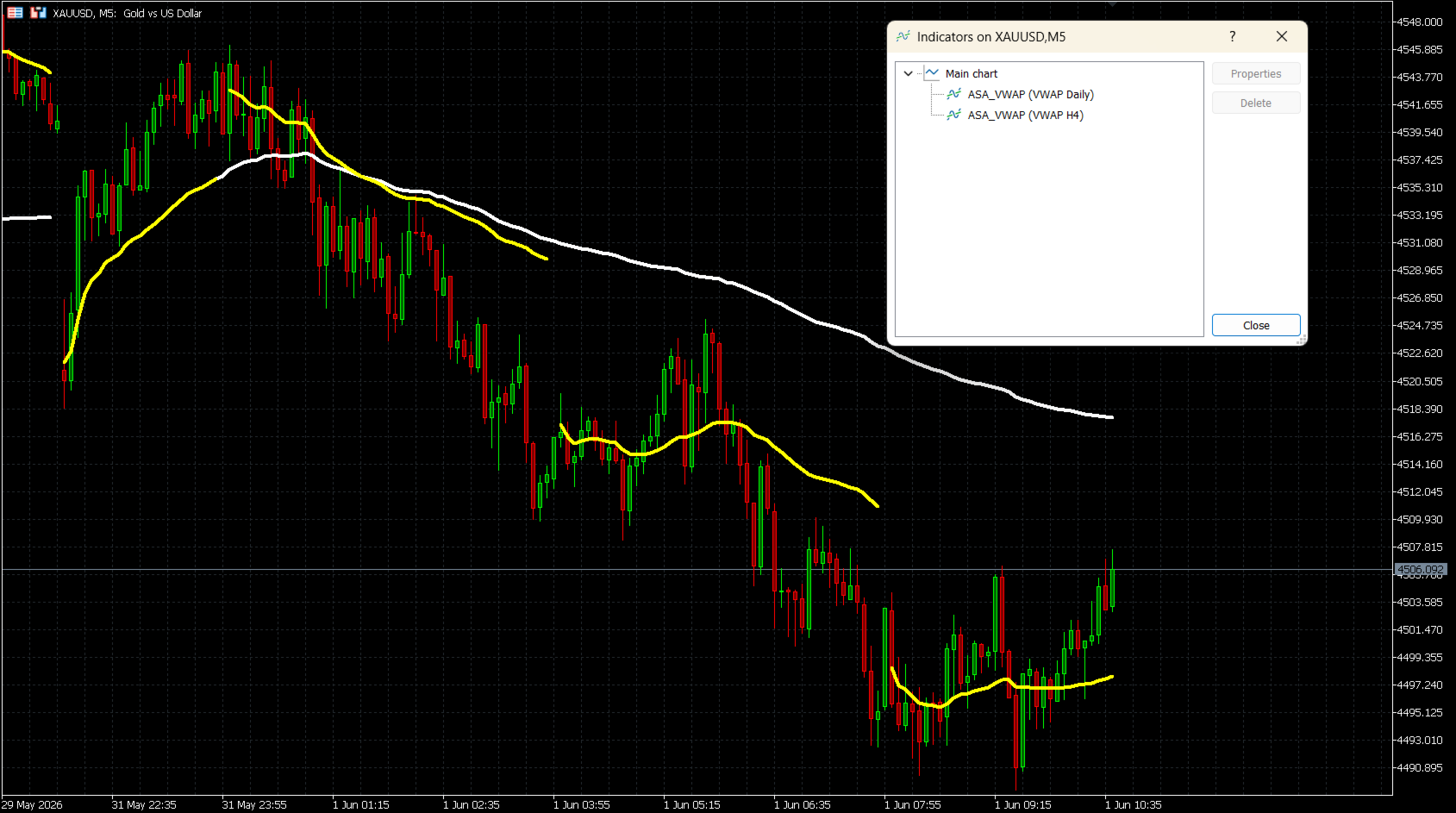
ASA VWAP è un indicatore del prezzo medio ponderato per il volume (Volume Weighted Average Price) per MetaTrader 5 che supporta sette periodi di ripristino (reset): M15, M30, H1, H2, H4, Daily (Giornaliero) e Weekly (Settimanale). A differenza degli strumenti VWAP a sessione fissa, questo indicatore consente ai trader di scegliere l'intervallo di ripristino che meglio si adatta al proprio stile di trading: dallo scalping intraday all'analisi swing su più giorni.
Il calcolo utilizza la formula standard del VWAP:
Prezzo Tipico (TP) = (High + Low + Close) / 3
VWAP = Cumulativo(TP x Volume) / Cumulativo(Volume)
L'indicatore accumula correttamente i dati attraverso gli aggiornamenti delle barre e si resetta in modo pulito all'inizio di ogni nuovo periodo.
COME FUNZIONA
Per i periodi intraday (M15, M30, H1, H2, H4), il reset si basa sulla divisione del timestamp Unix, garantendo un rilevamento accurato degli slot su qualsiasi timeframe. Per i reset Daily e Weekly, l'indicatore utilizza un calcolo del tempo regolato sulla sessione per allinearsi con il vero inizio del giorno di trading, indipendentemente dal fuso orario del broker.
CARATTERISTICHE PRINCIPALI
- Sette periodi di reset: M15, M30, H1, H2, H4, Daily, Weekly
- Modalità Volume di Tick (Tick Volume) e Volume Reale (Real Volume)
- Supporto per l'offset GMT del broker (Broker GMT offset) e l'ora di inizio del giorno personalizzata (Day Start Hour) per il corretto allineamento della sessione giornaliera
- Colore, larghezza e stile della linea completamente personalizzabili
- Opzione "Connetti Linee" (Connect Lines) per mostrare o nascondere i gap ai confini del periodo
- Funziona su tutti i simboli: Forex, Indici, Materie Prime, Azioni, Criptovalute
- Supporta più istanze sullo stesso grafico (ad es. Daily + Weekly insieme)
PARAMETRI DI INGRESSO
VWAP Reset Period (Periodo di Reset del VWAP)
Seleziona l'intervallo di tempo per il reset del VWAP.
Opzioni: M15, M30, H1, H2, H4, Daily (predefinito), Weekly
Volume Mode (Modalità Volume)
Tick Volume (predefinito) — disponibile su tutti i broker.
Real Volume — richiede un broker che fornisca i dati sul volume di scambio (exchange).
Broker GMT Offset (Offset GMT del Broker)
L'offset GMT del server del tuo broker.
GMT+0 = 0, GMT+2 = 2, GMT+3 = 3 (comune per la maggior parte dei broker durante l'ora legale)
Day Start Hour (Ora di Inizio della Giornata)
L'ora del server in cui inizia un nuovo giorno di trading.
Broker GMT+0: usa 22 | Broker GMT+2: usa 0 | Broker GMT+3: usa 1
Line Color (Colore della Linea)
Colore della linea VWAP sul grafico. Predefinito: Bianco (White).
Line Width (Larghezza della Linea)
Spessore della linea VWAP (da 1 a 5). Predefinito: 4.
Line Style (Stile della Linea)
Solid (Continua - predefinito), Dash (Tratteggiata), Dot (Punteggiata), DashDot (Tratto-punto) o DashDotDot.
Connect Lines (Connetti Linee)
false (predefinito): Viene mostrato un gap visibile in ogni punto di reset.
true: La linea viene disegnata continuamente attraverso i confini del periodo.
CONFIGURAZIONE DELL'OFFSET GMT DEL BROKER
L'indicatore calcola il tempo della sessione utilizzando questa formula:
Shift = (24 - DayStartHour) % 24
Impostazioni comuni del broker:
Broker GMT+0, reset del server alle 22:00 → Offset = 0, DayStartHour = 22
Broker GMT+2, reset del server alle 00:00 → Offset = 2, DayStartHour = 0
Broker GMT+3, reset del server alle 01:00 → Offset = 3, DayStartHour = 1
Per trovare l'offset del tuo broker, confronta l'ora del server nella barra di stato di MetaTrader 5 con l'ora UTC corrente.
NOTE SULL'USO
- Applica l'indicatore a qualsiasi grafico. La linea VWAP verrà tracciata immediatamente senza attendere il tick successivo.
- Per ottenere i migliori risultati, utilizza il reset Daily sui grafici M15-H1 e il reset Weekly sui grafici H4-D1.
- È possibile aggiungere più istanze allo stesso grafico con diversi periodi di reset per un'analisi di confluenza multi-periodo.
- Se viene selezionato Real Volume ma non è disponibile presso il tuo broker, l'indicatore utilizza un volume di fallback pari a 1 per barra. In questo caso, passa a Tick Volume.
COMPATIBILITÀ
Piattaforma: MetaTrader 5
Strumenti: Tutti i simboli (Forex, Indici, Materie Prime, Azioni, Criptovalute)
Volume: Volume di Tick (tutti i broker) o Volume Reale (feed ECN/di borsa)
Il calcolo utilizza la formula standard del VWAP:
Prezzo Tipico (TP) = (High + Low + Close) / 3
VWAP = Cumulativo(TP x Volume) / Cumulativo(Volume)
L'indicatore accumula correttamente i dati attraverso gli aggiornamenti delle barre e si resetta in modo pulito all'inizio di ogni nuovo periodo.
COME FUNZIONA
Per i periodi intraday (M15, M30, H1, H2, H4), il reset si basa sulla divisione del timestamp Unix, garantendo un rilevamento accurato degli slot su qualsiasi timeframe. Per i reset Daily e Weekly, l'indicatore utilizza un calcolo del tempo regolato sulla sessione per allinearsi con il vero inizio del giorno di trading, indipendentemente dal fuso orario del broker.
CARATTERISTICHE PRINCIPALI
- Sette periodi di reset: M15, M30, H1, H2, H4, Daily, Weekly
- Modalità Volume di Tick (Tick Volume) e Volume Reale (Real Volume)
- Supporto per l'offset GMT del broker (Broker GMT offset) e l'ora di inizio del giorno personalizzata (Day Start Hour) per il corretto allineamento della sessione giornaliera
- Colore, larghezza e stile della linea completamente personalizzabili
- Opzione "Connetti Linee" (Connect Lines) per mostrare o nascondere i gap ai confini del periodo
- Funziona su tutti i simboli: Forex, Indici, Materie Prime, Azioni, Criptovalute
- Supporta più istanze sullo stesso grafico (ad es. Daily + Weekly insieme)
PARAMETRI DI INGRESSO
VWAP Reset Period (Periodo di Reset del VWAP)
Seleziona l'intervallo di tempo per il reset del VWAP.
Opzioni: M15, M30, H1, H2, H4, Daily (predefinito), Weekly
Volume Mode (Modalità Volume)
Tick Volume (predefinito) — disponibile su tutti i broker.
Real Volume — richiede un broker che fornisca i dati sul volume di scambio (exchange).
Broker GMT Offset (Offset GMT del Broker)
L'offset GMT del server del tuo broker.
GMT+0 = 0, GMT+2 = 2, GMT+3 = 3 (comune per la maggior parte dei broker durante l'ora legale)
Day Start Hour (Ora di Inizio della Giornata)
L'ora del server in cui inizia un nuovo giorno di trading.
Broker GMT+0: usa 22 | Broker GMT+2: usa 0 | Broker GMT+3: usa 1
Line Color (Colore della Linea)
Colore della linea VWAP sul grafico. Predefinito: Bianco (White).
Line Width (Larghezza della Linea)
Spessore della linea VWAP (da 1 a 5). Predefinito: 4.
Line Style (Stile della Linea)
Solid (Continua - predefinito), Dash (Tratteggiata), Dot (Punteggiata), DashDot (Tratto-punto) o DashDotDot.
Connect Lines (Connetti Linee)
false (predefinito): Viene mostrato un gap visibile in ogni punto di reset.
true: La linea viene disegnata continuamente attraverso i confini del periodo.
CONFIGURAZIONE DELL'OFFSET GMT DEL BROKER
L'indicatore calcola il tempo della sessione utilizzando questa formula:
Shift = (24 - DayStartHour) % 24
Impostazioni comuni del broker:
Broker GMT+0, reset del server alle 22:00 → Offset = 0, DayStartHour = 22
Broker GMT+2, reset del server alle 00:00 → Offset = 2, DayStartHour = 0
Broker GMT+3, reset del server alle 01:00 → Offset = 3, DayStartHour = 1
Per trovare l'offset del tuo broker, confronta l'ora del server nella barra di stato di MetaTrader 5 con l'ora UTC corrente.
NOTE SULL'USO
- Applica l'indicatore a qualsiasi grafico. La linea VWAP verrà tracciata immediatamente senza attendere il tick successivo.
- Per ottenere i migliori risultati, utilizza il reset Daily sui grafici M15-H1 e il reset Weekly sui grafici H4-D1.
- È possibile aggiungere più istanze allo stesso grafico con diversi periodi di reset per un'analisi di confluenza multi-periodo.
- Se viene selezionato Real Volume ma non è disponibile presso il tuo broker, l'indicatore utilizza un volume di fallback pari a 1 per barra. In questo caso, passa a Tick Volume.
COMPATIBILITÀ
Piattaforma: MetaTrader 5
Strumenti: Tutti i simboli (Forex, Indici, Materie Prime, Azioni, Criptovalute)
Volume: Volume di Tick (tutti i broker) o Volume Reale (feed ECN/di borsa)