Asa VWAP
- Göstergeler
-
Panthita Aichoi
 BTC Wallet :
bc1qx685px03km775uapdvje8qz6t839g3fzt0gegv
ETH ERC20
USDT Address:
0x57cF049c965fbE4D25bD2a9aE02B27a04F5574F9 - Sürüm: 1.0
- Etkinleştirmeler: 5
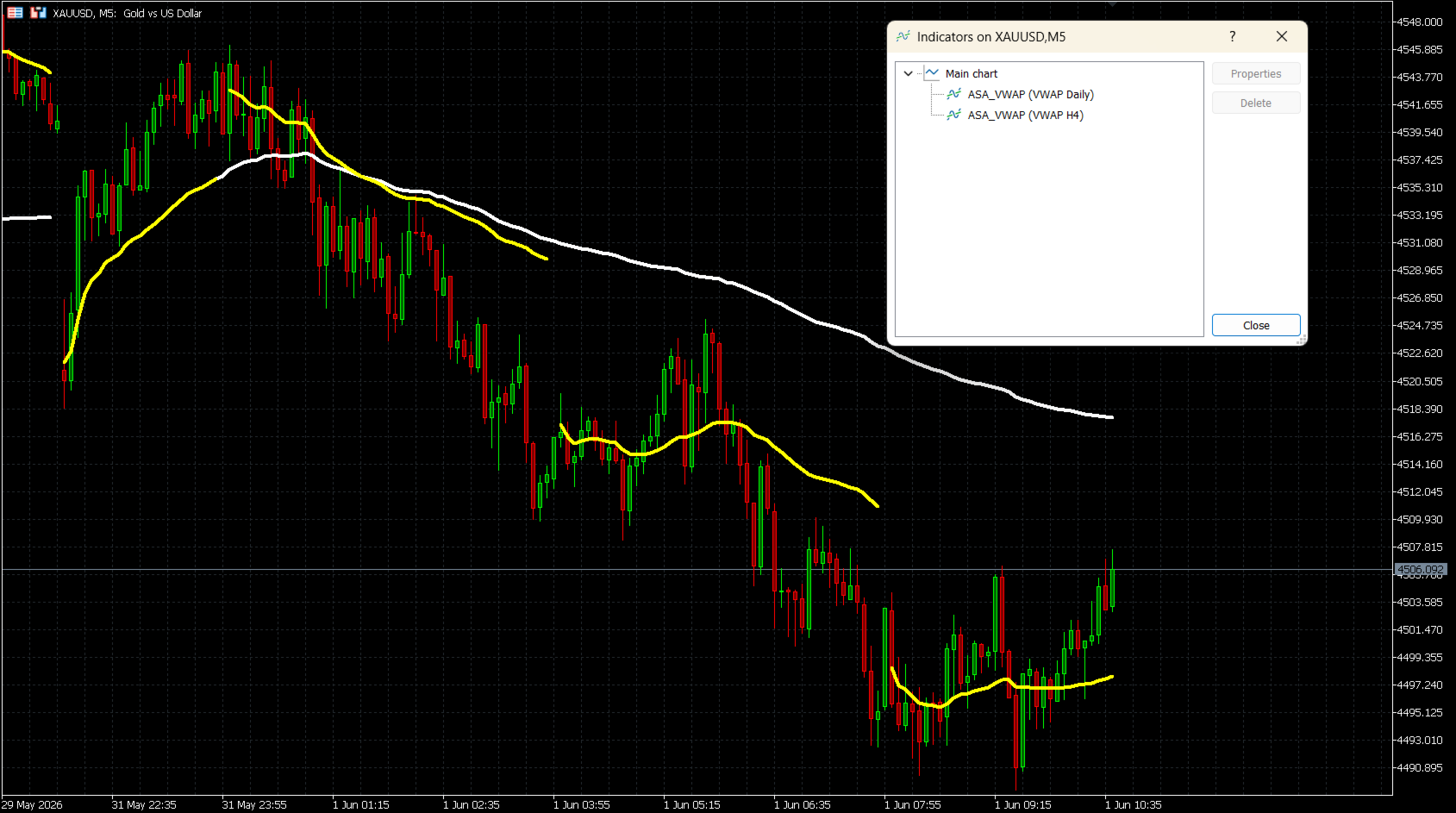
ASA VWAP, yedi sıfırlama (reset) periyodunu destekleyen MetaTrader 5 için bir Hacim Ağırlıklı Ortalama Fiyat (Volume Weighted Average Price) göstergesidir: M15, M30, H1, H2, H4, Daily (Günlük) ve Weekly (Haftalık). Sabit seanslı VWAP araçlarının aksine bu gösterge, yatırımcıların gün içi scalping'den çok günlük swing analizine kadar kendi işlem tarzlarına en uygun sıfırlama aralığını seçmelerine olanak tanır.
Hesaplamada standart VWAP formülü kullanılır:
Tipik Fiyat (TP) = (Yüksek + Düşük + Kapanış) / 3
VWAP = Kümülatif(TP x Hacim) / Kümülatif(Hacim)
Gösterge, bar güncellemeleri boyunca verileri doğru şekilde biriktirir ve her yeni periyodun başında temiz bir şekilde sıfırlanır.
NASIL ÇALIŞIR?
Gün içi periyotlar için (M15, M30, H1, H2, H4), sıfırlama işlemi Unix zaman damgası (timestamp) bölmesine dayanır ve her zaman diliminde doğru zaman dilimi tespitini garanti eder. Günlük (Daily) ve Haftalık (Weekly) sıfırlamalar için gösterge, aracı kurumun (broker) saat diliminden bağımsız olarak gerçek işlem günü başlangıcıyla uyum sağlamak için seans ayarlı bir zaman hesaplaması kullanır.
ANA ÖZELLİKLER
- Yedi sıfırlama periyodu: M15, M30, H1, H2, H4, Daily, Weekly
- Tik Hacmi (Tick Volume) ve Gerçek Hacim (Real Volume) modları
- Doğru günlük seans hizalaması için aracı kurum GMT sapması (Broker GMT offset) ve özel Gün Başlangıç Saati (Day Start Hour) desteği
- Tamamen özelleştirilebilir çizgi rengi, kalınlığı ve stili
- Periyot sınırlarındaki boşlukları göstermek veya gizlemek için isteğe bağlı Çizgileri Bağla (Connect Lines) seçeneği
- Tüm enstrümanlarda çalışır: Forex, Endeksler, Emtialar, Hisseler, Kripto
- Aynı grafikte birden fazla örnek desteklenir (örneğin Daily + Weekly birlikte)
GİRİŞ PARAMETRELERİ
VWAP Reset Period (VWAP Sıfırlama Periyodu)
VWAP sıfırlama için zaman aralığını seçer.
Seçenekler: M15, M30, H1, H2, H4, Daily (varsayılan), Weekly
Volume Mode (Hacim Modu)
Tick Volume (varsayılan) — tüm aracı kurumlarda mevcuttur.
Real Volume — borsa hacim verilerini sağlayan bir aracı kurum gerektirir.
Broker GMT Offset (Aracı Kurum GMT Sapması)
Aracı kurum sunucunuzun GMT sapması.
GMT+0 = 0, GMT+2 = 2, GMT+3 = 3 (Yaz saati uygulaması sırasında çoğu aracı kurum için ortaktır)
Day Start Hour (Gün Başlangıç Saati)
Yeni bir işlem gününün başladığı sunucu saati.
GMT+0 aracı kurum: 22 kullanın | GMT+2 aracı kurum: 0 kullanın | GMT+3 aracı kurum: 1 kullanın
Line Color (Çizgi Rengi)
Grafikteki VWAP çizgisinin rengi. Varsayılan: Beyaz (White).
Line Width (Çizgi Kalınlığı)
VWAP çizgisinin kalınlığı (1 ila 5). Varsayılan: 4.
Line Style (Çizgi Stili)
Solid (Düz - varsayılan), Dash (Kesikli), Dot (Noktalı), DashDot (Çizgi-Nokta) veya DashDotDot.
Connect Lines (Çizgileri Bağla)
false (varsayılan): Her sıfırlama noktasında görünür bir boşluk gösterilir.
true: Çizgi, periyot sınırları boyunca kesintisiz olarak çizilir.
ARACI KURUM GMT SAPMASI KURULUMU
Gösterge seans süresini şu formülü kullanarak hesaplar:
Shift = (24 - DayStartHour) % 24
Yaygın aracı kurum ayarları:
GMT+0 aracı kurum, saat 22:00'de sunucu sıfırlaması → Offset = 0, DayStartHour = 22
GMT+2 aracı kurum, saat 00:00'da sunucu sıfırlaması → Offset = 2, DayStartHour = 0
GMT+3 aracı kurum, saat 01:00'de sunucu sıfırlaması → Offset = 3, DayStartHour = 1
Aracı kurum sapmanızı bulmak için MetaTrader 5 durum çubuğundaki sunucu saati ile mevcut UTC saatini karşılaştırın.
KULLANIM NOTLARI
- Göstergeyi herhangi bir grafiğe uygulayın. VWAP çizgisi bir sonraki tiki beklemeden hemen çizilecektir.
- En iyi sonuçlar için M15-H1 grafiklerinde Daily sıfırlamasını ve H4-D1 grafiklerinde Weekly sıfırlamasını kullanın.
- Çoklu periyot uyum (confluence) analizi için aynı grafiğe farklı sıfırlama periyotlarına sahip birden fazla gösterge eklenebilir.
- Real Volume seçilmişse ancak aracı kurumunuzda mevcut değilse, gösterge bar başına 1'lik bir yedek hacim kullanır. Bu durumda Tick Volume moduna geçiş yapın.
UYUMLULUK
Platform: MetaTrader 5
Enstrümanlar: Tüm semboller (Forex, Endeksler, Emtialar, Hisseler, Kripto)
Hacim: Tik Hacmi (tüm aracı kurumlar) veya Gerçek Hacim (ECN/borsa verileri)
Hesaplamada standart VWAP formülü kullanılır:
Tipik Fiyat (TP) = (Yüksek + Düşük + Kapanış) / 3
VWAP = Kümülatif(TP x Hacim) / Kümülatif(Hacim)
Gösterge, bar güncellemeleri boyunca verileri doğru şekilde biriktirir ve her yeni periyodun başında temiz bir şekilde sıfırlanır.
NASIL ÇALIŞIR?
Gün içi periyotlar için (M15, M30, H1, H2, H4), sıfırlama işlemi Unix zaman damgası (timestamp) bölmesine dayanır ve her zaman diliminde doğru zaman dilimi tespitini garanti eder. Günlük (Daily) ve Haftalık (Weekly) sıfırlamalar için gösterge, aracı kurumun (broker) saat diliminden bağımsız olarak gerçek işlem günü başlangıcıyla uyum sağlamak için seans ayarlı bir zaman hesaplaması kullanır.
ANA ÖZELLİKLER
- Yedi sıfırlama periyodu: M15, M30, H1, H2, H4, Daily, Weekly
- Tik Hacmi (Tick Volume) ve Gerçek Hacim (Real Volume) modları
- Doğru günlük seans hizalaması için aracı kurum GMT sapması (Broker GMT offset) ve özel Gün Başlangıç Saati (Day Start Hour) desteği
- Tamamen özelleştirilebilir çizgi rengi, kalınlığı ve stili
- Periyot sınırlarındaki boşlukları göstermek veya gizlemek için isteğe bağlı Çizgileri Bağla (Connect Lines) seçeneği
- Tüm enstrümanlarda çalışır: Forex, Endeksler, Emtialar, Hisseler, Kripto
- Aynı grafikte birden fazla örnek desteklenir (örneğin Daily + Weekly birlikte)
GİRİŞ PARAMETRELERİ
VWAP Reset Period (VWAP Sıfırlama Periyodu)
VWAP sıfırlama için zaman aralığını seçer.
Seçenekler: M15, M30, H1, H2, H4, Daily (varsayılan), Weekly
Volume Mode (Hacim Modu)
Tick Volume (varsayılan) — tüm aracı kurumlarda mevcuttur.
Real Volume — borsa hacim verilerini sağlayan bir aracı kurum gerektirir.
Broker GMT Offset (Aracı Kurum GMT Sapması)
Aracı kurum sunucunuzun GMT sapması.
GMT+0 = 0, GMT+2 = 2, GMT+3 = 3 (Yaz saati uygulaması sırasında çoğu aracı kurum için ortaktır)
Day Start Hour (Gün Başlangıç Saati)
Yeni bir işlem gününün başladığı sunucu saati.
GMT+0 aracı kurum: 22 kullanın | GMT+2 aracı kurum: 0 kullanın | GMT+3 aracı kurum: 1 kullanın
Line Color (Çizgi Rengi)
Grafikteki VWAP çizgisinin rengi. Varsayılan: Beyaz (White).
Line Width (Çizgi Kalınlığı)
VWAP çizgisinin kalınlığı (1 ila 5). Varsayılan: 4.
Line Style (Çizgi Stili)
Solid (Düz - varsayılan), Dash (Kesikli), Dot (Noktalı), DashDot (Çizgi-Nokta) veya DashDotDot.
Connect Lines (Çizgileri Bağla)
false (varsayılan): Her sıfırlama noktasında görünür bir boşluk gösterilir.
true: Çizgi, periyot sınırları boyunca kesintisiz olarak çizilir.
ARACI KURUM GMT SAPMASI KURULUMU
Gösterge seans süresini şu formülü kullanarak hesaplar:
Shift = (24 - DayStartHour) % 24
Yaygın aracı kurum ayarları:
GMT+0 aracı kurum, saat 22:00'de sunucu sıfırlaması → Offset = 0, DayStartHour = 22
GMT+2 aracı kurum, saat 00:00'da sunucu sıfırlaması → Offset = 2, DayStartHour = 0
GMT+3 aracı kurum, saat 01:00'de sunucu sıfırlaması → Offset = 3, DayStartHour = 1
Aracı kurum sapmanızı bulmak için MetaTrader 5 durum çubuğundaki sunucu saati ile mevcut UTC saatini karşılaştırın.
KULLANIM NOTLARI
- Göstergeyi herhangi bir grafiğe uygulayın. VWAP çizgisi bir sonraki tiki beklemeden hemen çizilecektir.
- En iyi sonuçlar için M15-H1 grafiklerinde Daily sıfırlamasını ve H4-D1 grafiklerinde Weekly sıfırlamasını kullanın.
- Çoklu periyot uyum (confluence) analizi için aynı grafiğe farklı sıfırlama periyotlarına sahip birden fazla gösterge eklenebilir.
- Real Volume seçilmişse ancak aracı kurumunuzda mevcut değilse, gösterge bar başına 1'lik bir yedek hacim kullanır. Bu durumda Tick Volume moduna geçiş yapın.
UYUMLULUK
Platform: MetaTrader 5
Enstrümanlar: Tüm semboller (Forex, Endeksler, Emtialar, Hisseler, Kripto)
Hacim: Tik Hacmi (tüm aracı kurumlar) veya Gerçek Hacim (ECN/borsa verileri)