Asa VWAP
- インディケータ
-
Panthita Aichoi
 BTC Wallet :
bc1qx685px03km775uapdvje8qz6t839g3fzt0gegv
ETH ERC20
USDT Address:
0x57cF049c965fbE4D25bD2a9aE02B27a04F5574F9 - バージョン: 1.0
- アクティベーション: 5
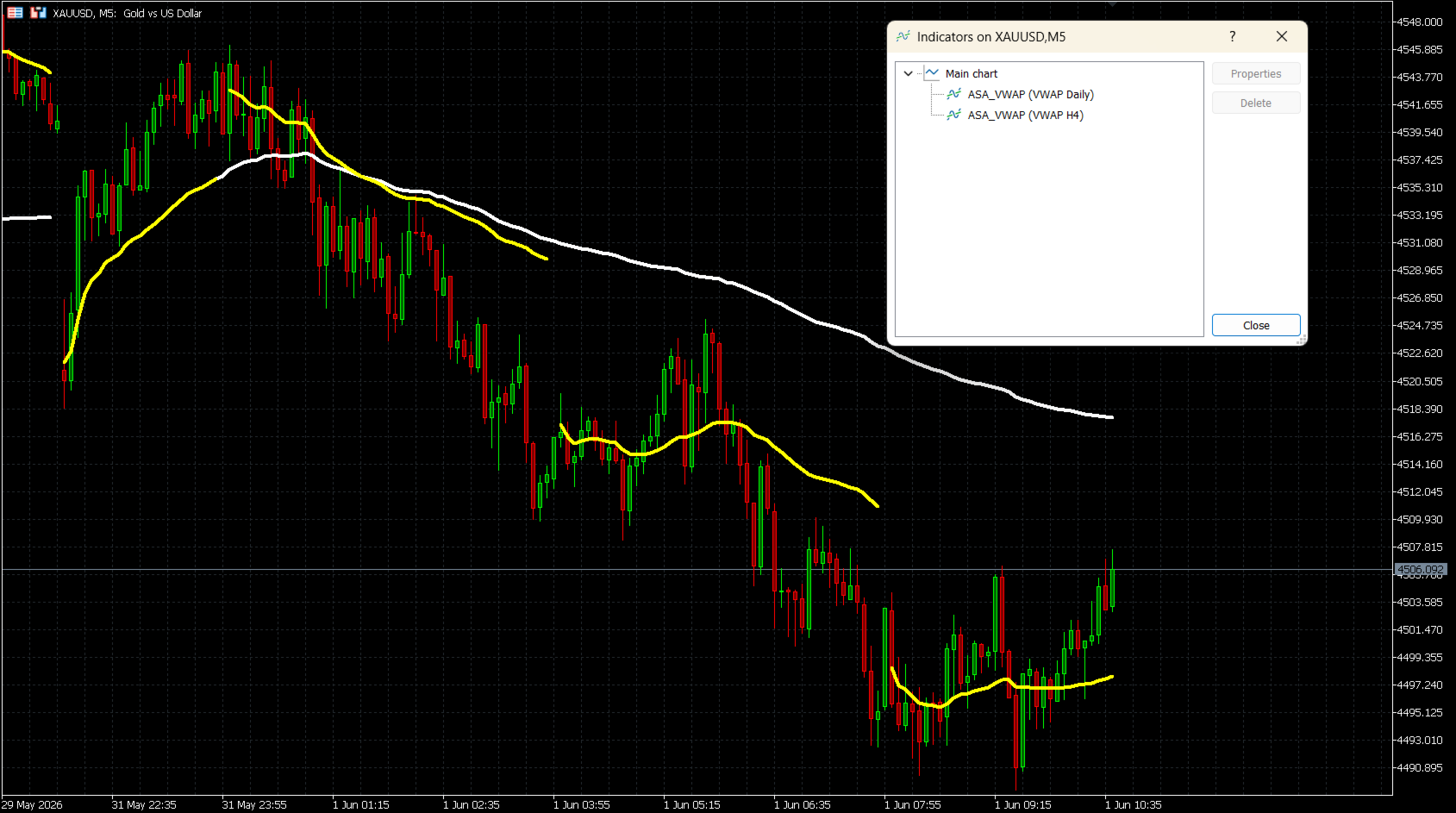
ASA VWAPは、7つのリセット期間(M15、M30、H1、H2、H4、Daily、Weekly)をサポートするMetaTrader 5用の出来高加重平均価格(VWAP)インジケーターです。固定セッションのVWAPツールとは異なり、このインジケーターはトレーダーが自身のトレードスタイル(イントラデイのスキャルピングから複数日数のスイング分析まで)に合わせて、最適なリセット間隔を自由に選択することができます。
計算には標準的なVWAP公式が使用されます:
クローズドプライス (TP) = (High + Low + Close) / 3
VWAP = 累積(TP x Volume) / 累積(Volume)
インジケーターはバーの更新に合わせて正確に累積され、新しい期間の開始時にきれいにリセットされます。
仕組み
イントラデイ期間(M15、M30、H1、H2、H4)では、Unixタイムスタンプの除算に基づいてリセットが行われ、どの時間足でも正確なスロット検出が保証されます。Daily(日次)およびWeekly(週次)のリセットでは、ブローカーの時間帯に関係なく、真の取引日開始時間に合わせるために、セッション調整された時間計算が使用されます。
主な機能
- 7つのリセット期間:M15、M30、H1、H2、H4、Daily、Weekly
- ティックボリューム(Tick Volume)モードとリアルボリューム(Real Volume)モード
- 正しい日次セッション調整のためのブローカーGMTオフセット(Broker GMT offset)およびカスタム取引日開始時間(Day Start Hour)のサポート
- ラインの色、幅、スタイルを完全にカスタマイズ可能
- 期間の境界でのギャップを表示または非表示にするための「ライン接続(Connect Lines)」オプション
- すべての銘柄に対応:FX、インデックス、コモディティ、株式、暗号資産
- 1つのチャートに複数のインスタンスを表示可能(例:Daily + Weeklyの同時表示)
入力パラメーター
VWAP Reset Period(VWAPリセット期間)
VWAPをリセットする時間間隔を選択します。
選択肢:M15, M30, H1, H2, H4, Daily(デフォルト), Weekly
Volume Mode(ボリュームモード)
Tick Volume(デフォルト) — すべてのブローカーで利用可能。
Real Volume — 取引所の出来高データを提供するブローカーが必要です。
Broker GMT Offset(ブローカーGMTオフセット)
ご利用のブローカーサーバーのGMTオフセット。
GMT+0 = 0、GMT+2 = 2、GMT+3 = 3(夏時間中の多くのブローカーで一般的)
Day Start Hour(日開始時間)
新しい取引日が始まるサーバー時間の時間(時)。
GMT+0 ブローカー:22を使用 | GMT+2 ブローカー:0を使用 | GMT+3 ブローカー:1を使用
Line Color(ラインの色)
チャート上のVWAPラインの色。デフォルト:白(White)。
Line Width(ラインの幅)
VWAPラインの太さ(1〜5)。デフォルト:4。
Line Style(ラインのスタイル)
Solid(実線 - デフォルト)、Dash(破線)、Dot(点線)、DashDot(一点鎖線)、またはDashDotDot。
Connect Lines(ライン接続)
false(デフォルト):各リセットポイントに目に見えるギャップが表示されます。
true:期間の境界を越えてラインが連続して描画されます。
ブローカーGMTオフセットの設定
インジケーターは以下の数式を使用してセッション時間を計算します:
Shift = (24 - DayStartHour) % 24
一般的なブローカー設定例:
GMT+0 ブローカー、22:00にサーバーリセット → Offset = 0, DayStartHour = 22
GMT+2 ブローカー、00:00にサーバーリセット → Offset = 2, DayStartHour = 0
GMT+3 ブローカー、01:00にサーバーリセット → Offset = 3, DayStartHour = 1
ブローカーのオフセットを確認するには、MetaTrader 5のステータスバーにあるサーバー時間と現在のUTC時間を比較してください。
使用上の注意
- 任意のチャートにインジケーターを適用します。VWAPラインは次のティックを待たずに即座に描画されます。
- 最良の結果を得るには、M15-H1チャートではDailyリセットを、H4-D1チャートではWeeklyリセットを使用してください。
- 異なるリセット期間を持つ複数のインスタンスを同じチャートに追加して、マルチ期間のコンフルエンス(重なり)分析を行うことができます。
- Real Volumeが選択されているものの、ブローカーから利用できない場合、インジケーターは1バーあたり1の代替ボリュームを使用します。この場合はTick Volumeに切り替えてください。
互換性
プラットフォーム:MetaTrader 5
対象銘柄:すべてのシンボル(FX、インデックス、コモディティ、株式、暗号資産)
ボリューム:ティックボリューム(すべてのブローカー)またはリアルボリューム(ECN/取引所フィード)
計算には標準的なVWAP公式が使用されます:
クローズドプライス (TP) = (High + Low + Close) / 3
VWAP = 累積(TP x Volume) / 累積(Volume)
インジケーターはバーの更新に合わせて正確に累積され、新しい期間の開始時にきれいにリセットされます。
仕組み
イントラデイ期間(M15、M30、H1、H2、H4)では、Unixタイムスタンプの除算に基づいてリセットが行われ、どの時間足でも正確なスロット検出が保証されます。Daily(日次)およびWeekly(週次)のリセットでは、ブローカーの時間帯に関係なく、真の取引日開始時間に合わせるために、セッション調整された時間計算が使用されます。
主な機能
- 7つのリセット期間:M15、M30、H1、H2、H4、Daily、Weekly
- ティックボリューム(Tick Volume)モードとリアルボリューム(Real Volume)モード
- 正しい日次セッション調整のためのブローカーGMTオフセット(Broker GMT offset)およびカスタム取引日開始時間(Day Start Hour)のサポート
- ラインの色、幅、スタイルを完全にカスタマイズ可能
- 期間の境界でのギャップを表示または非表示にするための「ライン接続(Connect Lines)」オプション
- すべての銘柄に対応:FX、インデックス、コモディティ、株式、暗号資産
- 1つのチャートに複数のインスタンスを表示可能(例:Daily + Weeklyの同時表示)
入力パラメーター
VWAP Reset Period(VWAPリセット期間)
VWAPをリセットする時間間隔を選択します。
選択肢:M15, M30, H1, H2, H4, Daily(デフォルト), Weekly
Volume Mode(ボリュームモード)
Tick Volume(デフォルト) — すべてのブローカーで利用可能。
Real Volume — 取引所の出来高データを提供するブローカーが必要です。
Broker GMT Offset(ブローカーGMTオフセット)
ご利用のブローカーサーバーのGMTオフセット。
GMT+0 = 0、GMT+2 = 2、GMT+3 = 3(夏時間中の多くのブローカーで一般的)
Day Start Hour(日開始時間)
新しい取引日が始まるサーバー時間の時間(時)。
GMT+0 ブローカー:22を使用 | GMT+2 ブローカー:0を使用 | GMT+3 ブローカー:1を使用
Line Color(ラインの色)
チャート上のVWAPラインの色。デフォルト:白(White)。
Line Width(ラインの幅)
VWAPラインの太さ(1〜5)。デフォルト:4。
Line Style(ラインのスタイル)
Solid(実線 - デフォルト)、Dash(破線)、Dot(点線)、DashDot(一点鎖線)、またはDashDotDot。
Connect Lines(ライン接続)
false(デフォルト):各リセットポイントに目に見えるギャップが表示されます。
true:期間の境界を越えてラインが連続して描画されます。
ブローカーGMTオフセットの設定
インジケーターは以下の数式を使用してセッション時間を計算します:
Shift = (24 - DayStartHour) % 24
一般的なブローカー設定例:
GMT+0 ブローカー、22:00にサーバーリセット → Offset = 0, DayStartHour = 22
GMT+2 ブローカー、00:00にサーバーリセット → Offset = 2, DayStartHour = 0
GMT+3 ブローカー、01:00にサーバーリセット → Offset = 3, DayStartHour = 1
ブローカーのオフセットを確認するには、MetaTrader 5のステータスバーにあるサーバー時間と現在のUTC時間を比較してください。
使用上の注意
- 任意のチャートにインジケーターを適用します。VWAPラインは次のティックを待たずに即座に描画されます。
- 最良の結果を得るには、M15-H1チャートではDailyリセットを、H4-D1チャートではWeeklyリセットを使用してください。
- 異なるリセット期間を持つ複数のインスタンスを同じチャートに追加して、マルチ期間のコンフルエンス(重なり)分析を行うことができます。
- Real Volumeが選択されているものの、ブローカーから利用できない場合、インジケーターは1バーあたり1の代替ボリュームを使用します。この場合はTick Volumeに切り替えてください。
互換性
プラットフォーム:MetaTrader 5
対象銘柄:すべてのシンボル(FX、インデックス、コモディティ、株式、暗号資産)
ボリューム:ティックボリューム(すべてのブローカー)またはリアルボリューム(ECN/取引所フィード)