Asa VWAP
- 지표
-
Panthita Aichoi
 BTC Wallet :
bc1qx685px03km775uapdvje8qz6t839g3fzt0gegv
ETH ERC20
USDT Address:
0x57cF049c965fbE4D25bD2a9aE02B27a04F5574F9 - 버전: 1.0
- 활성화: 5
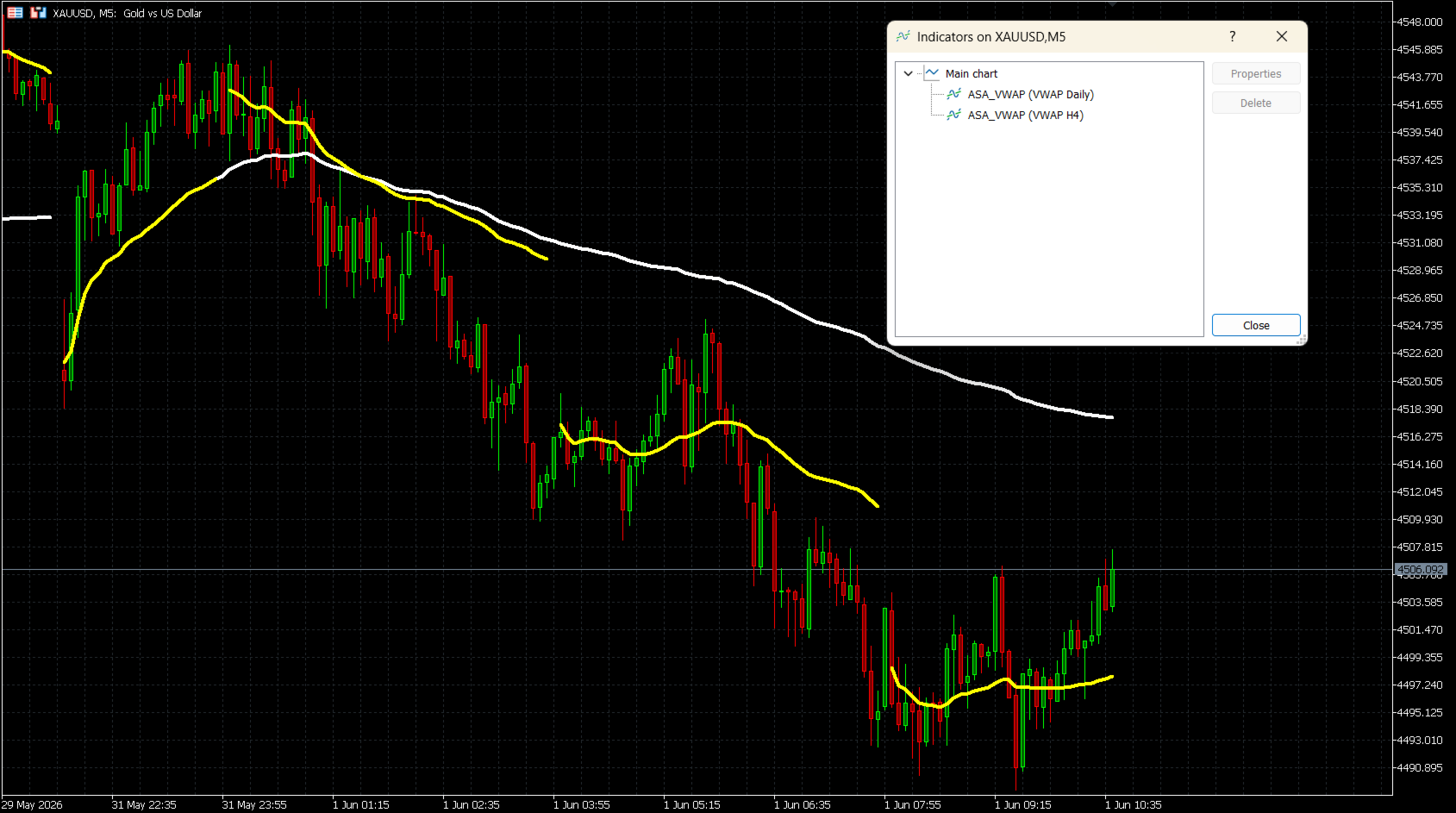
ASA VWAP은 M15, M30, H1, H2, H4, Daily(일간), Weekly(주간)의 7가지 리셋 주기를 지원하는 MetaTrader 5용 거래량 가중 평균 가격(Volume Weighted Average Price) 지표입니다. 고정 세션 VWAP 툴과 달리, 이 지표는 트레이더가 인트라데이 스캘핑부터 다일 스윙 분석에 이르기까지 자신의 매매 스타일에 가장 잘 맞는 리셋 간격을 선택할 수 있도록 합니다.
계산은 표준 VWAP 공식을 사용합니다:
대표 가격 (TP) = (고가 + 저가 + 종가) / 3
VWAP = 누적(TP x 거래량) / 누적(거래량)
이 지표는 바(Bar)가 업데이트될 때 거래량을 올바르게 누적하며, 각 새로운 주기가 시작될 때 깔끔하게 리셋됩니다.
작동 원리
인트라데이 주기(M15, M30, H1, H2, H4)의 경우, 리셋은 Unix 타임스탬프 분할을 기반으로 하여 모든 타임프레임에서 정확한 세션 감지를 보장합니다. Daily 및 Weekly 리셋의 경우, 브로커의 시간대와 관계없이 실제 거래일 시작 시간과 일치하도록 세션 조정된 시간 계산을 사용합니다.
주요 특징
- 7가지 리셋 주기: M15, M30, H1, H2, H4, Daily, Weekly
- 틱 거래량(Tick Volume) 및 실거래량(Real Volume) 모드 지원
- 올바른 일일 세션 정렬을 위한 브로커 GMT 오프셋(Broker GMT offset) 및 사용자 지정 일 시작 시간(Day Start Hour) 지원
- 선 색상, 두께 및 스타일 완전 사용자 지정 가능
- 주기 경계에서 갭(Gap)을 표시하거나 숨길 수 있는 연결선(Connect Lines) 옵션
- 모든 종목에 적용 가능: 외환(Forex), 지수, 원자재, 주식, 암호화폐
- 한 차트에 여러 인스턴스 중복 적용 지원 (예: Daily + Weekly 동시 표시)
입력 매개변수 (INPUT PARAMETERS)
VWAP Reset Period (VWAP 리셋 주기)
VWAP 리셋을 위한 시간 간격을 선택합니다.
옵션: M15, M30, H1, H2, H4, Daily (기본값), Weekly
Volume Mode (거래량 모드)
Tick Volume (기본값) — 모든 브로커에서 사용 가능합니다.
Real Volume — 거래소 거래량 데이터를 제공하는 브로커가 필요합니다.
Broker GMT Offset (브로커 GMT 오프셋)
브로커 서버의 GMT 오프셋 시간입니다.
GMT+0 = 0, GMT+2 = 2, GMT+3 = 3 (일광 절약 시간제 동안 대부분의 브로커가 공통으로 사용)
Day Start Hour (일 시작 시간)
새로운 거래일이 시작되는 서버 시간 기준 시간(Hour)입니다.
GMT+0 브로커: 22 사용 | GMT+2 브로커: 0 사용 | GMT+3 브로커: 1 사용
Line Color (선 색상)
차트에 표시될 VWAP 선의 색상입니다. 기본값: 흰색(White).
Line Width (선 두께)
VWAP 선의 두께 (1 ~ 5). 기본값: 4.
Line Style (선 스타일)
Solid (실선 - 기본값), Dash (파선), Dot (점선), DashDot (일점쇄선) 또는 DashDotDot.
Connect Lines (연결선)
false (기본값): 각 리셋 지점에서 눈에 보이는 갭(끊어짐)이 표시됩니다.
true: 선이 주기 경계를 넘어 연속적으로 그려집니다.
브로커 GMT 오프셋 설정 방법
지표는 다음 공식을 사용하여 세션 시간을 계산합니다:
Shift = (24 - DayStartHour) % 24
일반적인 브로커 설정 예시:
GMT+0 브로커, 22:00에 서버 리셋 → Offset = 0, DayStartHour = 22
GMT+2 브로커, 00:00에 서버 리셋 → Offset = 2, DayStartHour = 0
GMT+3 브로커, 01:00에 서버 리셋 → Offset = 3, DayStartHour = 1
브로커 오프셋을 찾으려면 MetaTrader 5 상태 표시줄의 서버 시간과 현재 UTC 시간을 비교하십시오.
사용 팁
- 지표를 아무 차트에나 적용하세요. VWAP 선은 다음 틱을 기다리지 않고 즉시 그려집니다.
- 최상의 결과를 얻으려면 M15-H1 차트에서는 Daily 리셋을 사용하고, H4-D1 차트에서는 Weekly 리셋을 사용하십시오.
- 다중 주기 중첩(Confluence) 분석을 위해 동일한 차트에 서로 다른 리셋 주기를 가진 여러 지표를 추가할 수 있습니다.
- Real Volume을 선택했으나 브로커가 이를 지원하지 않는 경우, 지표는 바당 1의 대체 거래량을 기본으로 사용합니다. 이 경우 Tick Volume으로 다시 전환하십시오.
호환성
플랫폼: MetaTrader 5
대상 상품: 모든 종목 (외환, 지수, 원자재, 주식, 암호화폐)
거래량: 틱 거래량 (모든 브로커) 또는 실거래량 (ECN/거래소 피드)
계산은 표준 VWAP 공식을 사용합니다:
대표 가격 (TP) = (고가 + 저가 + 종가) / 3
VWAP = 누적(TP x 거래량) / 누적(거래량)
이 지표는 바(Bar)가 업데이트될 때 거래량을 올바르게 누적하며, 각 새로운 주기가 시작될 때 깔끔하게 리셋됩니다.
작동 원리
인트라데이 주기(M15, M30, H1, H2, H4)의 경우, 리셋은 Unix 타임스탬프 분할을 기반으로 하여 모든 타임프레임에서 정확한 세션 감지를 보장합니다. Daily 및 Weekly 리셋의 경우, 브로커의 시간대와 관계없이 실제 거래일 시작 시간과 일치하도록 세션 조정된 시간 계산을 사용합니다.
주요 특징
- 7가지 리셋 주기: M15, M30, H1, H2, H4, Daily, Weekly
- 틱 거래량(Tick Volume) 및 실거래량(Real Volume) 모드 지원
- 올바른 일일 세션 정렬을 위한 브로커 GMT 오프셋(Broker GMT offset) 및 사용자 지정 일 시작 시간(Day Start Hour) 지원
- 선 색상, 두께 및 스타일 완전 사용자 지정 가능
- 주기 경계에서 갭(Gap)을 표시하거나 숨길 수 있는 연결선(Connect Lines) 옵션
- 모든 종목에 적용 가능: 외환(Forex), 지수, 원자재, 주식, 암호화폐
- 한 차트에 여러 인스턴스 중복 적용 지원 (예: Daily + Weekly 동시 표시)
입력 매개변수 (INPUT PARAMETERS)
VWAP Reset Period (VWAP 리셋 주기)
VWAP 리셋을 위한 시간 간격을 선택합니다.
옵션: M15, M30, H1, H2, H4, Daily (기본값), Weekly
Volume Mode (거래량 모드)
Tick Volume (기본값) — 모든 브로커에서 사용 가능합니다.
Real Volume — 거래소 거래량 데이터를 제공하는 브로커가 필요합니다.
Broker GMT Offset (브로커 GMT 오프셋)
브로커 서버의 GMT 오프셋 시간입니다.
GMT+0 = 0, GMT+2 = 2, GMT+3 = 3 (일광 절약 시간제 동안 대부분의 브로커가 공통으로 사용)
Day Start Hour (일 시작 시간)
새로운 거래일이 시작되는 서버 시간 기준 시간(Hour)입니다.
GMT+0 브로커: 22 사용 | GMT+2 브로커: 0 사용 | GMT+3 브로커: 1 사용
Line Color (선 색상)
차트에 표시될 VWAP 선의 색상입니다. 기본값: 흰색(White).
Line Width (선 두께)
VWAP 선의 두께 (1 ~ 5). 기본값: 4.
Line Style (선 스타일)
Solid (실선 - 기본값), Dash (파선), Dot (점선), DashDot (일점쇄선) 또는 DashDotDot.
Connect Lines (연결선)
false (기본값): 각 리셋 지점에서 눈에 보이는 갭(끊어짐)이 표시됩니다.
true: 선이 주기 경계를 넘어 연속적으로 그려집니다.
브로커 GMT 오프셋 설정 방법
지표는 다음 공식을 사용하여 세션 시간을 계산합니다:
Shift = (24 - DayStartHour) % 24
일반적인 브로커 설정 예시:
GMT+0 브로커, 22:00에 서버 리셋 → Offset = 0, DayStartHour = 22
GMT+2 브로커, 00:00에 서버 리셋 → Offset = 2, DayStartHour = 0
GMT+3 브로커, 01:00에 서버 리셋 → Offset = 3, DayStartHour = 1
브로커 오프셋을 찾으려면 MetaTrader 5 상태 표시줄의 서버 시간과 현재 UTC 시간을 비교하십시오.
사용 팁
- 지표를 아무 차트에나 적용하세요. VWAP 선은 다음 틱을 기다리지 않고 즉시 그려집니다.
- 최상의 결과를 얻으려면 M15-H1 차트에서는 Daily 리셋을 사용하고, H4-D1 차트에서는 Weekly 리셋을 사용하십시오.
- 다중 주기 중첩(Confluence) 분석을 위해 동일한 차트에 서로 다른 리셋 주기를 가진 여러 지표를 추가할 수 있습니다.
- Real Volume을 선택했으나 브로커가 이를 지원하지 않는 경우, 지표는 바당 1의 대체 거래량을 기본으로 사용합니다. 이 경우 Tick Volume으로 다시 전환하십시오.
호환성
플랫폼: MetaTrader 5
대상 상품: 모든 종목 (외환, 지수, 원자재, 주식, 암호화폐)
거래량: 틱 거래량 (모든 브로커) 또는 실거래량 (ECN/거래소 피드)