
Major Pairs Hybrid EA
- Experts
-
Bashar Taisir Saleh Al Zubaidi
 Over the years, I have tested and evaluated hundreds of Expert Advisors available on the market, including several premium and high-priced systems. While many looked impressive in backtests or marketing materials, I often found that real trading conditions exposed weaknesses in consistency, risk
 - Version: 1.16
- Updated: 13 September 2026
- Activations: 5
Major Pairs Hybrid EA MT5 is a multi-symbol trading Expert Advisor developed for MetaTrader 5. It is designed to manage major Forex pairs through a structured basket-based system with flexible grid stages, pair activation controls, pair-specific TP targets, and selectable start modes.
The EA is built for traders who prefer organized multi-pair management instead of running many separate charts or independent robots. It allows several symbols to be managed from one system while giving the user detailed control over how each pair, stage, and basket should behave
This Expert Advisor includes independent pair trading, connected basket trading, dual-symbol basket modes, triangular basket modes, and group basket management for enabled pairs
Main Concept
The EA focuses on structured multi-symbol basket management.
Instead of treating every trading pair in the same way, the user can define how each major pair should behave inside each grid stage. This gives the trader more control over symbol activation, TP targets, and start-mode behavior.
The system can manage pairs independently or combine selected pairs into one connected basket depending on the selected trading mode.
Supported Trading Logic
The EA includes several selectable trading approaches:
Standard Major Pair Trading
The EA can trade supported major Forex pairs according to the user’s enabled pair settings. Each pair can have its own activation status, basket TP target, and start mode depending on the selected grid stage.
Stage-Based Pair Configuration
Each of the four grid stages includes separate controls for every major pair.
For each pair and stage, the user can configure:
-
Pair ON/OFF status
-
Pair-specific TP basket target
-
Pair-specific start mode
-
Stage-based trading permission
This allows the EA to use different behavior as the basket develops through the grid stages.
Dual Trading Modes
The EA includes dedicated dual-symbol trading modes:
-
DUAL_TRADING_MODE_1: EURUSD and USDCHF
-
DUAL_TRADING_MODE_2: GBPUSD and USDCHF
-
DUAL_TRADING_MODE_3: AUDUSD and NZDUSD
When a Dual Trading Mode is selected, the EA restricts trading to the assigned two symbols only. All other symbols are blocked, even if they are enabled elsewhere.
The two symbols are treated as one connected basket. The EA calculates the total combined floating profit or loss and closes the full basket only when the selected dual basket TP target is reached.
Triangular Trading Modes
The EA includes triangular trading modes for connected three-symbol basket management.
These modes are designed to manage related currency structures as one basket instead of treating each pair separately. When a triangular mode is active, the EA blocks unrelated symbols and manages the selected triangle as a connected basket.
Group Trading Mode
The EA includes a Group Trading Mode for all pairs enabled as True .
When this mode is active, only the enabled pairs are allowed to trade. All disabled or unrelated symbols are blocked. The enabled pairs can be managed as one connected basket depending on the selected True Pairs TP Basket Management setting.
True Pairs TP Basket Management
A dedicated True Pairs TP Basket Management section allows the user to choose how the EA handles take profit for enabled pairs.
Group Connected Symbol Basket TP
All enabled True pairs are treated as one connected symbol basket.
The EA calculates the combined floating profit or loss of all enabled pairs together. Once the total basket profit reaches the configured TP target, all trades belonging to the connected True Pairs basket are closed together.
Independent Pair Basket TP
Each enabled pair is managed as a separate basket.
When one pair reaches its own configured TP target, the EA closes only that pair’s trades. Other enabled pairs remain open until their own TP targets are reached.
Grid Stage System
The EA uses a four-stage grid structure. Each stage can be configured independently, allowing different behavior as the trading cycle progresses.
The stage system allows the user to define:
-
Which pairs are active in each stage
-
Which TP target applies to each pair
-
Which start mode applies to each pair
-
How connected basket modes behave during later stages
This design gives the trader more control over exposure and basket structure than a simple single-mode grid EA.
Basket Take Profit Management
The EA includes several TP management layers:
-
Pair-specific TP targets
-
Stage-based pair TP targets
-
Dual-mode basket TP targets
-
Triangular-mode basket TP targets
-
Group-mode basket TP target
-
True Pairs connected basket TP
-
Independent pair basket TP
The EA applies the correct TP logic depending on the selected trading mode. Connected basket modes manage profit based on combined basket floating profit or loss, while independent modes allow pairs to close separately.
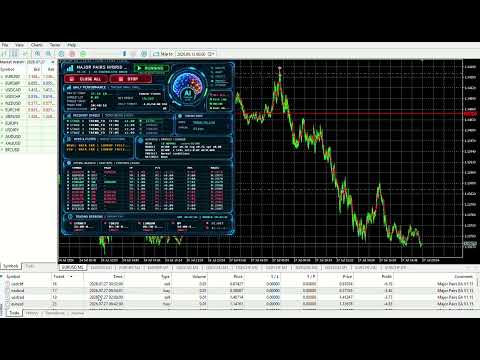
Daily Mimic Panel
The EA includes a clean Daily Mimic Panel for live trading and Strategy Tester monitoring.
The panel displays important information in one compact interface, including:
-
Active symbols
-
Pair status
-
Basket mode status
-
TP target
-
Current floating profit or loss
-
Open positions
-
Magic number
-
Connected basket mode information
The panel is designed to avoid unnecessary chart clutter while keeping key trading information visible.
Visual Strategy Tester Clean Mode
The EA includes a cleaner visual testing experience.
When enabled, the EA avoids unnecessary visual indicator subwindows during Strategy Tester mode. This helps keep the chart focused on price action, trades, and the Daily Mimic Panel.
Supported Pair Structure
The EA is designed around major Forex pairs, including:
-
EURUSD
-
GBPUSD
-
USDJPY
-
USDCHF
-
USDCAD
-
AUDUSD
-
NZDUSD
-
EURJPY
-
EURGBP
Before testing or live use, make sure the required symbols are available in Market Watch and match your broker’s symbol naming format.
Main Features
-
Multi-symbol Expert Advisor for MetaTrader 5
-
Four grid-stage configuration system
-
Pair activation control for each grid stage
-
Pair-specific TP targets for each grid stage
-
Pair-specific start mode selection
-
Dual-symbol trading modes
-
Triangular trading modes
-
Group Trading Mode
-
True Pairs TP Basket Management
-
Connected basket TP logic
-
Independent pair TP logic
-
Compact Daily Mimic Panel
-
Visual Strategy Tester clean mode
-
Symbol filtering for connected basket modes
-
Designed for major Forex pair basket management
-
Flexible inputs for different trading styles and account conditions
Recommended Use
This EA should be tested carefully in the MetaTrader 5 Strategy Tester before being used on a live account.
Recommended testing steps:
-
Start with one or two pairs first.
-
Test each trading mode separately.
-
Use conservative lot sizes during initial testing.
-
Check broker spread, commission, swap, and execution conditions.
-
Run forward testing on a demo account.
-
Avoid using aggressive settings without understanding the drawdown behavior.
Important Risk Notice
This Expert Advisor can use grid and basket-style trade management. Grid systems can increase exposure during unfavorable market conditions. Larger lot sizes, narrow grid distances, and aggressive basket settings can increase drawdown.
No Expert Advisor can remove trading risk. Past testing results do not guarantee future performance. The user is responsible for selecting suitable settings, testing the EA, and managing risk according to account size and broker conditions.
Suggested Screenshot Captions
Use simple captions like these:
-
Daily Mimic Panel showing active symbol basket information
-
Stage-based pair configuration inputs
-
Dual Trading Mode basket settings
-
True Pairs TP Basket Management settings
-
Visual Strategy Tester clean chart view
-
Multi-symbol basket monitoring layout
































User didn't leave any comment to the rating