Quantum FVG AI Manual Trader
- Experts
-
Bashar Taisir Saleh Al Zubaidi
 Over the years, I have tested and evaluated hundreds of Expert Advisors available on the market, including several premium and high-priced systems. While many looked impressive in backtests or marketing materials, I often found that real trading conditions exposed weaknesses in consistency, risk
 - Version: 2.30
- Updated: 1 July 2026
- Activations: 5
Quantum FVG AI Manual Trader V1.0
Professional Manual Trading Assistant for MetaTrader 5
Quantum FVG AI Manual Trader V1.0 is a MetaTrader 5 manual trading assistant designed to help traders analyze market structure, Fair Value Gaps, multi-timeframe direction, support and resistance, RSI behavior, momentum, and trade-management levels from one clear dashboard.
This EA is built for traders who want a professional visual decision-support tool, not a fully automatic black-box robot. It helps the trader read the market faster, organize trade planning, and manage manual orders with more structure and control.
Main Overview
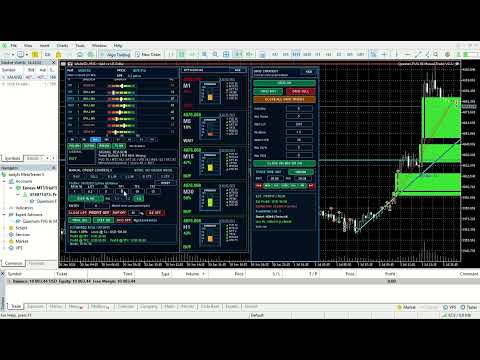
Quantum FVG AI Manual Trader V1.0 combines several market-analysis components inside a compact Daily Mimic Panel. The panel displays the current symbol profile, active timeframe, price, spread, directional bias, strength levels, signal reason, manual order controls, risk settings, RR selection, take-profit levels, and estimated risk/profit information.
The EA is designed to support manual trading decisions by showing useful market context directly on the chart. It can help reduce the need to check many indicators separately because the important information is grouped into one organized interface.
Core Trading Concept
The EA analyzes the chart using multiple internal components:
Fair Value Gap Analysis
Detects bullish and bearish imbalance areas on the chart.
Market Trend Structure
Evaluates the current market direction and trend condition.
Support and Resistance Detection
Displays important price reaction zones to help avoid entries into strong barriers.
RSI Trendline Behavior
Uses RSI-based behavior as part of the total signal explanation.
Momentum and Strength Evaluation
Measures current market pressure and direction strength.
Multi-Timeframe Confirmation
Shows direction and strength across several timeframes.
The EA displays these components through readable values such as FVG, MTS, SRT, VRI, MSE, and ATC, allowing the trader to quickly understand whether the market condition is bullish, bearish, weak, strong, or better to wait.
Daily Mimic Panel
The Daily Mimic Panel is the main control center of the EA. It gives the trader a complete overview of the symbol, signal, structure, risk, and trade controls.
The panel includes:
Current Symbol Profile
Automatically shows the detected trading symbol profile.
Current Price and Spread
Displays live price information and spread condition.
Multi-Timeframe Direction Table
Shows the direction and strength of M1, M5, M15, M30, H1, H4, D1, and W1.
AI Signal Area
Displays the current market suggestion such as BUY, SELL, or WAIT.
Signal Reason Section
Explains why the EA is showing the current signal by listing trend, FVG, RSI, momentum, and score information.
Manual Order Controls
Allows the trader to place BUY, SELL, Buy Limit, Sell Limit, Buy Stop, and Sell Stop orders.
Risk and Lot Control
Supports risk percentage mode and fixed lot mode.
SL / TP Inputs
Allows manual input of Stop Loss, TP1, TP2, and TP3.
RR Selection Switches
Allows quick selection between RR 1:1, RR 1:2, and RR 1:3.
Estimated Risk / Profit Section
Shows estimated risk at SL and estimated profit at TP levels.
Trade Management Buttons
Includes partial close, break-even, trailing, step, OCO, close all, and close profit controls depending on enabled settings.
Multi-Timeframe Market View
The EA monitors multiple timeframes:
M1
M5
M15
M30
H1
H4
D1
W1
Each timeframe displays direction, strength, and value. This helps the trader compare short-term and higher-timeframe behavior from one location.
For example, the trader can quickly see whether M5 and M15 are bullish while H4 or D1 remain bearish. This gives better context before placing manual trades.
Fair Value Gap Detection
The EA can detect and display Fair Value Gap zones directly on the chart.
Fair Value Gaps are market imbalance areas that may act as potential reaction, mitigation, continuation, or rejection zones. The trader can use these areas as part of manual trade planning and confirmation.
The EA can display bullish and bearish FVG zones visually, making it easier to identify possible price reaction areas.
Support and Resistance Analysis
The EA includes automatic Support and Resistance mapping.
It identifies important market levels and displays them on the chart. These levels help the trader understand where price may react and avoid taking trades directly into strong support or resistance zones.
This feature gives additional structure to the trading decision instead of relying only on signal direction.
RSI Trendline and Momentum Logic
The EA includes RSI-based analysis and momentum evaluation.
The Signal Reason section may show details such as:
Trend direction
RSI condition
FVG value
Momentum condition
Setup score
BUY / SELL / WAIT explanation
This makes the dashboard more transparent because the trader can see the reason behind the current signal condition.
Right-Side Sector Layer
The EA includes a compact right-side sector layer that displays selected timeframe information in a clean visual format.
This section shows:
Current price
Timeframe
Strength percentage
Action status
Component scores
Market condition
The sector layer gives a fast overview of important timeframe behavior without reading the full table every time.
Manual Order Controls
The EA includes direct manual trading buttons:
BUY
SELL
Buy Limit
Sell Limit
Buy Stop
Sell Stop
The trader can set lot size, risk percentage, SL, TP1, TP2, and TP3 before placing the trade.
This allows the EA to work as a controlled manual execution panel instead of a random automatic entry system.
RR Selection Switches
The EA includes smart RR selection switches inside the Daily Mimic Panel:
RR 1:1
Activates TP1 only.
TP2 and TP3 are set to 0.
RR 1:2
Activates TP1 and TP2.
TP3 is set to 0.
RR 1:3
Activates TP1, TP2, and TP3 normally.
The default setting is RR 1:3.
This allows the trader to quickly control how many take-profit targets are used without manually changing every TP field.
Risk and Lot Management
The EA supports two risk modes:
Risk Percentage Mode
The EA calculates lot size based on selected risk percentage and stop-loss distance.
Fixed Lot Mode
The trader can manually use a fixed lot value.
The Estimated Risk / Profit section gives an approximate view of risk at SL and expected profit at TP1, TP2, and TP3.
Important: these values are estimates. Real trade results may vary because of broker spread, commission, slippage, contract size, symbol settings, execution speed, and market volatility.
Trade Management Tools
The EA includes several trade-management features:
Partial Close
Allows partial position management.
Break-Even Control
Helps move the trade toward a protected state when conditions allow.
Trailing Management
Supports trailing logic depending on selected settings.
Step Protection
Adds structured movement control for trade management.
OCO Pending Order Option
Allows one-cancels-other style pending order handling when enabled.
Close All / Close Profit Controls
Provides quick trade-management actions from the panel.
Automatic Symbol Profile Detection
The EA can detect symbol profiles and adjust default behavior based on the market type.
Supported examples include:
XAUUSD
BTCUSD
Major Forex Pairs
US30 / Index Profiles
USOIL
Custom Symbols
The symbol profile affects default distance behavior, SL/TP values, and some display calculations.
The trader can still manually adjust the values directly from the panel.
Recommended Use
For best practice, use the EA as a manual decision-support tool.
Suggested workflow:
1. Attach the EA to the chart
Use the preferred symbol and timeframe.
2. Check the multi-timeframe table
Confirm whether short-term and higher-timeframe directions agree.
3. Review the AI Signal area
Look for BUY, SELL, or WAIT.
4. Read the Signal Reason section
Do not trade only because the panel shows BUY or SELL. Check the reason behind the signal.
5. Confirm chart structure
Review FVG zones, support, resistance, and trendline areas.
6. Select risk settings
Use either risk percentage mode or fixed lot mode.
7. Select RR mode
Choose RR 1:1, RR 1:2, or RR 1:3 depending on the trade plan.
8. Execute manually
Use BUY, SELL, or pending order buttons only when the setup matches your own trading strategy.
Who This EA Is For
This EA is suitable for traders who:
Prefer manual control instead of full automation
Use Fair Value Gaps and market structure
Want multi-timeframe confirmation in one panel
Need clear risk and TP planning tools
Want a visual dashboard for faster decision-making
Trade symbols such as Gold, BTCUSD, Forex pairs, indices, or oil
Who This EA Is Not For
This EA is not suitable for traders who expect:
Guaranteed profits
A fully automatic set-and-forget robot
Risk-free trading
Instant results without testing
No-loss trading systems
Trading always involves risk, and every trader should test the EA first before using it on a live account.
Recommended Testing
Before live use, it is strongly recommended to:
Test in the MetaTrader 5 Strategy Tester
Use a demo account first
Start with one symbol only
Use small risk settings
Check broker spread and execution conditions
Confirm SL, TP, and lot calculations before placing trades
Avoid aggressive risk until you fully understand the EA behavior
Important Risk Notice
Trading Forex, CFDs, indices, metals, and crypto-related symbols involves risk. This EA does not guarantee profit and cannot prevent losses.
Market conditions can change quickly. Broker spread, slippage, commission, execution speed, stop levels, contract size, and volatility can affect trade results.
The trader is fully responsible for all trading decisions and should always test the EA before using it on a live account.
Summary
Quantum FVG AI Manual Trader V1.0 is a professional manual trading assistant for MetaTrader 5. It combines Fair Value Gap analysis, support and resistance, RSI trendline behavior, momentum scoring, multi-timeframe direction, RR selection, manual order controls, and risk/profit estimation inside one practical dashboard.
It is designed to help traders analyze better, plan better, and manage manual trades with more structure.
Support
Support is available through the MQL5 product comments section or MQL5 private messages.