MTForge
- Utilities
- Version: 4.0
- Updated: 19 April 2026

The Most Complete On-Chart Order Manager Execution System Built Natively for MetaTrader 5
MT5 Chart Trader brings institutional-grade order execution, bracket management, and risk control to MetaTrader 5 through a sleek, fully interactive on-chart panel. Enter, manage, protect, and exit trades — all without leaving your chart. No external bridges, no DLL dependencies, no third-party platforms. Pure MQL5, running directly inside your MT5 terminal.
Whether you scalp NQ futures on a 1-minute chart, day-trade forex on the 15-minute, or swing-trade gold on the daily — MT5 Chart Trader gives you the execution tools professional traders demand.
WHY MT5 CHART TRADER?
Most MT5 traders choose between the built-in one-click panel (too basic) or complex EA frameworks requiring programming. MT5 Chart Trader fills the gap — a complete trade management workstation on your chart, controlled by buttons and hotkeys, zero coding required.
What sets it apart: ATM bracket templates with up to 3 profit targets, automatic volume splitting, and multi-step trailing stops. OCO logic that cancels remaining brackets when one side fills. A full risk suite with daily loss limits, max trade counts, consecutive loser lockouts, session win caps, trailing drawdown, and spread filtering. Economic calendar news guard that locks entries before high-impact events. Visual chart planning with draggable lines and live risk-reward calculations. Click-to-trade for placing limit/stop entries on the chart. Straddle breakout entries. CSV trade journal. And an advanced trailing drawdown system with step-down ratcheting and profit locks — the same drawdown tracking prop firms use.
All running on a 500ms timer with full hotkey support.
CORE FEATURES
1. ADVANCED TRADE MANAGEMENT (ATM) BRACKET TEMPLATES
The ATM system automates stop-loss and take-profit bracket placement the instant your entry fills — typically within milliseconds. No more scrambling to place protective orders after a fill.
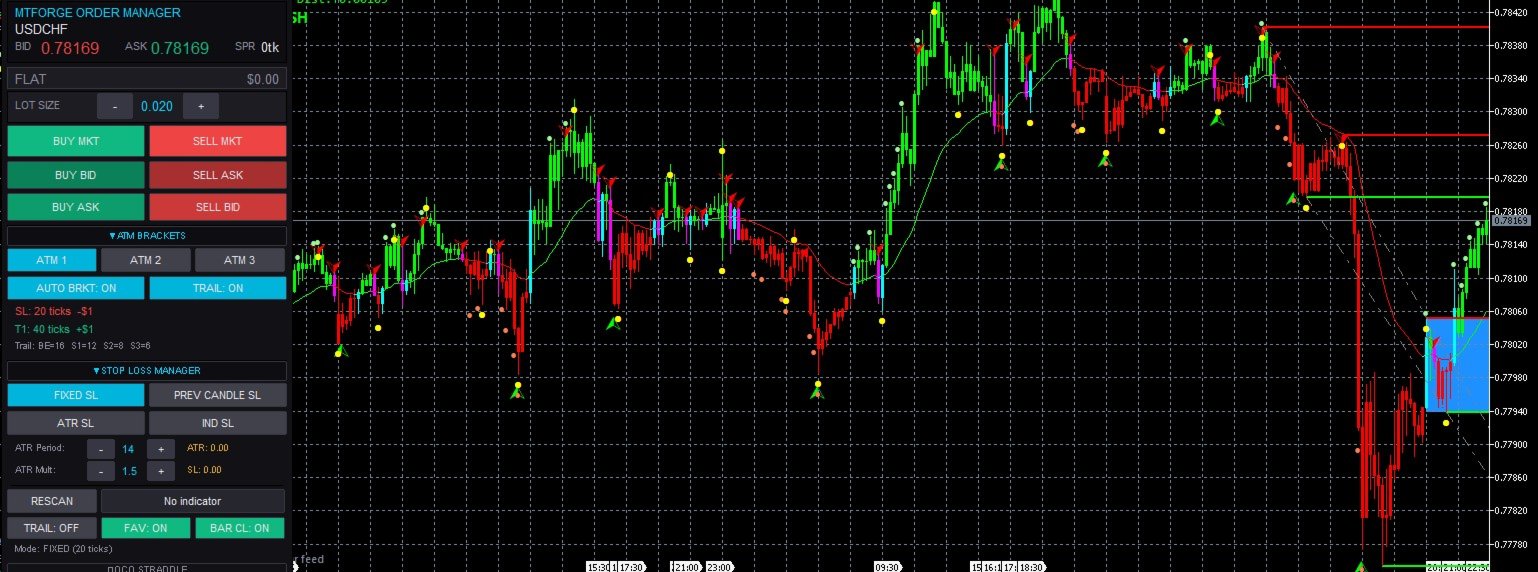
Three pre-configured, fully customizable templates: ATM 1 (Quick Scalp) — tight stop, single target, fast trail (20-tick stop, 40-tick target, 16-tick BE trigger). ATM 2 (Day Trade) — medium stop, two targets with volume splitting (32-tick stop, 32/64-tick targets, 20-tick BE). ATM 3 (Swing Runner) — wider stop, three targets for scaling out in thirds (40-tick stop, 40/80/120-tick targets, 24-tick BE). Switch templates with one click, even mid-session.
For multi-target templates, the EA automatically splits volume across targets (50/50 for 2 targets, thirds for 3), respecting your broker's minimum lot size and lot step. If volume is too small to split, it auto-reduces to the maximum supported number of targets.
Every bracket is an OCO group — when one side fills, the other is cancelled automatically via OnTradeTransaction for maximum speed, with a timer fallback every 2 seconds. OCO groups are tracked by magic number ranges so the EA never interferes with other EAs or manual trades.
Brackets are placed through two independent paths: the OnTradeTransaction callback (primary) and a timer fallback (750ms-2s), ensuring your position is never left unprotected.
2. MULTI-STEP TRAILING STOP SYSTEM
A 3-step progressive trail that tightens as your trade moves into profit:
Step 0 (Break-Even) — When price moves N ticks in your favor, the stop moves to entry plus a small offset, eliminating the risk of a winner turning into a loser. Step 1 (Wide Trail) — The stop begins trailing at the widest distance, giving the trade room to breathe. Step 2 (Medium Trail) — Trail tightens, locking in more profit. Step 3 (Tight Trail) — The stop follows very closely, maximizing captured profit on reversal.
The trail only moves in the favorable direction, runs on the 500ms timer, and all parameters are configurable per ATM template. Toggle trailing on/off via the panel at any time.
3. FOUR STOP-LOSS CALCULATION MODES
Switchable at any time via the panel:
Fixed Ticks — Classic approach, stop placed a fixed number of ticks from entry as defined in the active ATM template.
Previous Candle — Stop at the high/low of the previous completed candle with configurable offset. Tighter stops in quiet markets, wider in volatile markets.
ATR-Based — Stop distance from Average True Range with configurable period and multiplier. Automatically adapts to current volatility.
Indicator-Based — The most advanced mode. Use any indicator's buffer value as the stop price — trail along a moving average, Supertrend, Parabolic SAR, Keltner Channel, or any custom indicator without writing code. Select the indicator and buffer from the panel, with options for bar-close or real-time reads and a "favorable only" toggle that ensures the stop only tightens.
4. CLICK-TO-TRADE SYSTEM
Transform your chart into an interactive order-entry surface. Four modes: Buy Limit (click below market), Sell Limit (click above), Buy Stop (click above), Sell Stop (click below).
A "ghost line" follows your cursor showing the exact price where the order will be placed. Click to place instantly with current ATM brackets. Press ESC to cancel.
5. STRADDLE ENTRY SYSTEM (OCO Breakout Entries)
Places simultaneous buy-stop and sell-stop around the current price for breakout strategies. Set the offset, press "Place Straddle" — when price breaks out and one leg fills, the EA cancels the opposite leg and places brackets on the filled entry.
Double-fill safety: if both legs fill during extreme volatility before cancellation, the EA detects the oversized position and raises an alert for immediate manual action.
6. VISUAL CHART PLANNER
The Chart Planner turns your analysis into executable trades. Instead of mentally tracking "I want to go long at 4150 with a stop at 4140 and target at 4170," you place visual lines directly on the chart and let the EA calculate everything.
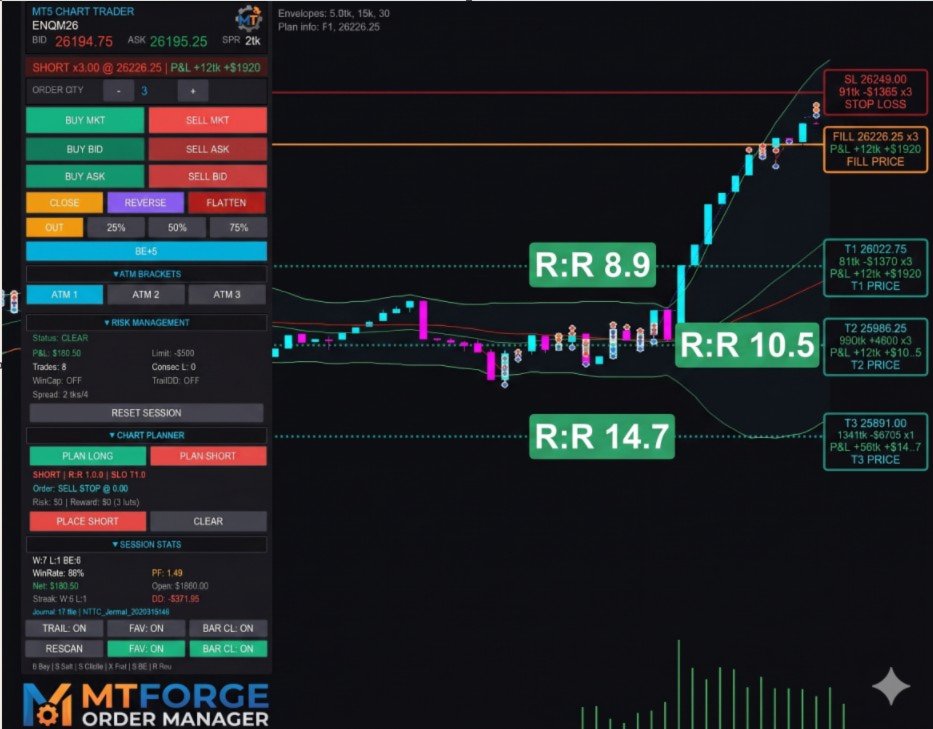
Click "Plan Long" or "Plan Short" on the panel. Draggable horizontal lines appear: Entry, Stop, Target 1, Target 2 (optional), Target 3 (optional). As you drag, the panel updates in real time showing: the order type (Buy Limit, Buy Stop, Sell Limit, or Sell Stop — auto-detected from entry position relative to market), stop and target distances in ticks, risk-reward ratios for each target, and dollar risk/reward based on your account's tick value and configured quantity.
Press "Plan Place" to submit. The EA places the entry order at the line's price and sets brackets to use your plan line prices rather than ATM tick distances. This is invaluable for traders who mark support/resistance levels, Fibonacci retracements, or supply/demand zones on the chart — converting those visual levels directly into executable orders with a single button.
7. COMPREHENSIVE RISK MANAGEMENT SUITE
MT5 Chart Trader includes a complete risk management system designed to enforce discipline and protect your account. All risk controls are optional — enable only what you need.
Daily Loss Limit — Set a maximum dollar loss for the trading session. Once your realized losses reach this threshold, the EA locks out all new entries. This prevents the "revenge trading" spiral that destroys accounts. The lockout persists until the next trading day — the session auto-resets at midnight.
Maximum Trades Per Day — Limit the number of round-trip trades per session. Useful for traders who know they over-trade — set a hard cap and the EA enforces it. A round-trip is counted when a position is fully closed.
Consecutive Loser Lockout — If you hit a streak of N consecutive losing trades (configurable), the EA locks out new entries. This gives you a forced cooling-off period to reassess your approach before risking more capital. The lockout resets when the session resets.
Session Win Cap — The opposite of a daily loss limit. Once you have made a certain amount of profit for the day, the EA stops you from trading further. Many professional traders use this to prevent giving back hard-earned profits. Set a dollar target and the EA locks entries once it is reached.
Trailing Drawdown — A real-time trailing drawdown calculated from your peak equity. As your equity rises, the floor rises with it. If equity drops below the floor, entries are locked. This is the same concept used by prop trading firms to manage funded trader accounts.
Spread Filter — Set a maximum allowable spread in ticks. If the current spread exceeds the limit, all market order entries are blocked — from the panel buttons, from hotkeys, and from internal code paths like Scale-In, Reverse, and auto-entries. This prevents fills at unfavorable prices during illiquid periods or news spikes.
Risk-Based Position Sizing — Enable risk-percent mode and the EA calculates the correct lot size based on your account equity, risk percentage, and stop distance. For example, with a $50,000 account at 1% risk and a 20-tick stop on ES ($12.50/tick): risk = $500, lots = $500 / (20 x $12.50) = 2 contracts. The calculation updates dynamically with your current equity.
Maximum Contracts Per Order — A hard cap on the maximum number of contracts (lots) per single order. Prevents fat-finger errors where you accidentally submit an outsized position.
8. ADVANCED TRAILING DRAWDOWN (TDD) MODULE
Beyond the basic trailing drawdown in the Risk Manager, MT5 Chart Trader includes a dedicated Advanced Trailing Drawdown module with features typically found only in prop firm risk management systems.
Three Calculation Modes:
Fixed Dollar — The drawdown floor trails the peak equity by a fixed dollar amount. For example, with a $500 trailing DD: if your peak equity reaches $52,000, your floor is $51,500. If equity later peaks at $53,000, the floor rises to $52,500. It never goes down.
Percent of Peak Equity — The floor is calculated as a percentage of the current peak. For example, with 2% trailing DD: at a peak of $50,000, the floor is $49,000. At a peak of $55,000, the floor is $53,900. The absolute dollar distance grows as your account grows.
Percent of Starting Balance — Drawdown calculated once at session start as a percentage of opening balance, then trails from peak by that fixed amount.
Step-Down Ratcheting — Instead of the floor moving smoothly tick-by-tick, you can configure a step size. For example, with a $100 step size: the floor only moves up in $100 increments. If your peak equity goes from $50,000 to $50,050, the floor does not move. When peak reaches $50,100, the floor jumps up by $100. This "staircase" effect prevents the floor from tightening on minor equity fluctuations.
Profit Lock Milestones (Up to 2 Levels) — Profit locks let you ratchet the floor to a minimum level once a profit milestone is reached. Profit Lock 1: when total profit reaches $1,000, lock the minimum floor at $500 below peak — guaranteeing you keep at least $500 even if you give back some gains. Profit Lock 2: when profit reaches $2,000, tighten to $1,200 below peak for an even stronger safety net.
Hard Floor (Maximum Loss) — An absolute floor that the trailing DD calculation can never drop below, acting as your ultimate daily maximum loss regardless of what the trailing math produces.
Auto-Flatten on Breach — When the trailing DD floor is breached, the EA automatically flattens the entire position and cancels all pending orders. No hesitation, no second-guessing.
Warning Thresholds — The panel displays the percentage of drawdown consumed. Yellow warning at 75%, red at 90%, giving you advance notice before the floor is breached.
9. NEWS GUARD (ECONOMIC CALENDAR INTEGRATION)
News Guard uses the MT5 Economic Calendar API to automatically detect upcoming high-impact economic events and protect your trading around them.
The EA scans the MT5 calendar for events in the next 8 hours, filtering by impact level (high, medium, low) and by currency relevance — base currency, quote currency, and USD (since USD events affect virtually every market). When a high-impact event is approaching, the EA enters a "blackout" window during which new entries are locked.
Configurable blackout windows: Pre-Event Lockout stops new entries N minutes before the event (default 5 minutes). Post-Event Lockout keeps entries locked for N minutes after (default 5 minutes). For example, if Non-Farm Payrolls is at 8:30 AM with a 5/5 window, entries are locked from 8:25 AM to 8:35 AM.
Auto-Flatten Before News — Enable this to have the EA automatically close all positions and cancel all orders before a high-impact event enters the pre-lockout window. For traders who never want to be exposed to news risk.
Alert System — The EA issues alerts at 15, 5, and 1 minute before a high-impact event, so you have time to manually close or adjust positions if auto-flatten is not enabled.
Panel Display — The News Guard section shows: time until the next high-impact event, the event name, today's event counts by impact level, and the current blackout status (clear or locked).
10. SESSION STATISTICS AND TRADE JOURNAL
Automatic logging to both the panel and CSV. Live panel stats include: Realized/Unrealized/Total P&L, trade count, wins/losses, consecutive loss streak, largest win/loss, and max drawdown from session peak.
CSV export to MQL5/Files/NTTC_Journal_YYYYMMDD.csv with columns: DateTime, Instrument, Side, Quantity, Order Type, Price, Order Name, Signal, ATM flag, P&L, and Notes. Import directly into Excel, Google Sheets, or any journal application.
11. ONE-KEY EXECUTION (HOTKEYS)
Six configurable hotkeys: B (Buy Market), S (Sell Market), C (Close Position), X (Flatten All — close + cancel all orders), E (Break-Even), R (Reverse). All respect risk lockouts. Remap to any key via input parameters.
12. PANEL INTERFACE AND LAYOUT
The panel is a fully draggable, floating interface anchored to the chart window. Dark theme optimized for extended screen time, with high-contrast text and color-coded elements: green for buy/long actions and profit, red for sell/short actions and losses, cyan for accent highlights and active states, gold for risk-reward ratios, orange for close/warning states.
Collapsible Sections — Every section of the panel can be collapsed or expanded independently. If you do not use Straddle, collapse it. If you do not use Chart Planning, collapse it. Customize the panel to show only the features you actively use.
Minimize Mode — A single click collapses the entire panel to just the header bar (instrument name + bid/ask), freeing up chart real estate when you are not actively managing trades.
Position Display — The top always shows your current state: FLAT, LONG x[volume] @ [price], or SHORT x[volume] @ [price], with real-time unrealized P&L. Background color reflects direction — green tint for long, red tint for short.
Order Quantity Spinner — A simple +/- control to adjust quantity for your next trade. Can also be auto-calculated by the risk-based position sizer.
TRADING TIME CONTROLS
Configure allowed trading hours (HH:MM start/end, supports overnight windows). Auto-close at a set time — automatically flattens all positions and cancels orders (e.g., 15:55 for US futures day traders). Fires once per session.
TECHNICAL ARCHITECTURE
Pure MQL5 — No Dependencies: MT5 Chart Trader is written entirely in MQL5. No DLLs, no external bridges, no internet connection beyond what MT5 provides, and no phone-home to any server. It runs entirely within the MetaTrader 5 terminal sandbox.
Modular Design: Specialized manager classes — TradeEngine, BracketManager, StopLossManager, StraddleManager, ClickTradeManager, RiskManager, NewsGuard, ChartPlanner, TrailingDrawdown, SessionStats, and PanelMain — each isolated so that updates to one subsystem never affect another.
High-Precision Timing: All timers use GetTickCount64() for millisecond precision immune to the 49.7-day wrap-around bug. Runs correctly on VPS servers with extended uptime.
Robust Fill Detection: Two independent paths — OnTradeTransaction callback (primary) and timer fallback (750ms-2s). Brackets placed even when the callback misses a fill under heavy load.
Order Identification: Reserved magic number range (55770000-55779999) ensures MTForge orders never interfere with other EAs or manual trades.
Broker Compatibility: Auto-detects the correct fill type (FOK, IOC, or RETURN) for your broker and symbol. Works across futures, forex ECN, and dealing desk brokers without manual configuration.
WHO IS THIS FOR?
Futures Day Traders — ATM brackets, hotkey execution, trailing stops, and session risk controls are built for the fast-paced world of futures scalping and day trading. Break-even automation, multi-target exits, and the auto-close timer are essential tools for futures traders.
Forex Traders — Full support for forex instruments with proper tick value calculations, pip-based stop distances, and spread filtering. The risk-percent position sizer automatically accounts for varying pip values across currency pairs.
Prop Firm Traders — The Advanced Trailing Drawdown module with step-down ratcheting, profit locks, and hard floor mirrors the risk rules used by prop firms. Practice with the same constraints you will face on a funded account, or enforce the rules on a live funded account.
Discretionary Traders Who Want Discipline — If you know your edge but struggle with execution discipline — over-trading, revenge trading, moving stops, or failing to take profits — MT5 Chart Trader enforces your rules mechanically. Set your daily loss limit, max trades, and trailing DD, and the EA locks you out when you reach them.
Visual/Technical Traders — The Chart Planner and Click-to-Trade features are designed for traders who analyze on the chart itself. Mark your levels, drag your lines, and convert analysis into executable orders with a single button click.
INPUT PARAMETERS (60+)
ATM Templates (27): Qty, Stop, Targets 1/2/3, Trail BE Trigger, Trail Steps 1/2/3 per template. Risk Controls (9): Max Contracts, BE Offset, Daily Loss Limit, Risk %, Max Trades, Max Consec Losers, Win Cap, Trailing DD, Max Spread. Advanced TDD (11): Mode, Amount, Trail Type, Step Size, Hard Floor, Auto Flatten, Profit Locks 1/2. Stop Loss (4): Prev Candle Offset, ATR Period/Multiplier, Straddle Offset. News Guard (5): Enabled, Pre/Post Minutes, High Impact Only, Auto-Flatten. Time Controls (3): Start, End, Auto-Close. Hotkeys (6): All remappable. Debug (1): Verbose Logging.
WHAT YOU GET
A single .ex5 Expert Advisor — drop onto any chart and the panel appears. No installers or config files. Works on any MT5 instrument: futures (ES, NQ, YM, RTY, CL, GC), forex, CFDs, indices, metals, energies, crypto.
REQUIREMENTS
MetaTrader 5 (build 2361+). Any MT5 broker. Netting account mode (hedging shows a warning). "Allow Algo Trading" enabled. Timer events permitted (standard).
SUPPORT
Questions, feature requests, or bug reports: use the Comments section or MQL5 messaging. We actively maintain and update this product.
IMPORTANT NOTES - MTForge Chart Trader — Professional On-Chart Trade Execution Panel
MTForge Chart Trader is an execution and trade management tool — it does not generate signals, predict direction, or trade automatically.
YOU decide when to enter and exit. The EA executes those decisions with speed, precision, and discipline.
Trading leveraged instruments involves substantial risk of loss. Always trade with capital you can afford to lose.
Thank you for considering MTForge Order Manager. If this utility meets your expectations, please leave a rating — it helps other traders make informed decisions.