MTForge

네, 알겠습니다. 제품 설명 전문을 한국어 트레이딩 환경에서 사용하는 전문 용어로 다듬어 번역해 드립니다.

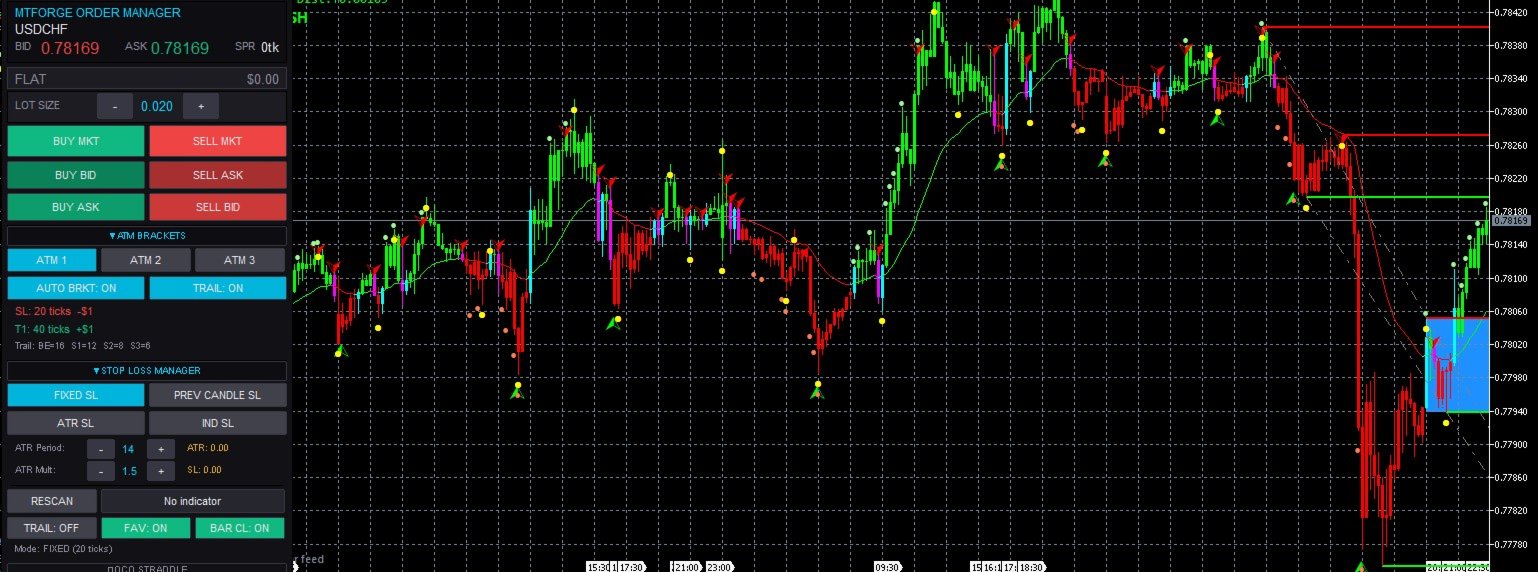
MTForge Chart Trader — 전문가용 차트 기반 거래 집행 및 관리 패널

MetaTrader 5 전용으로 개발된 가장 완벽한 차트 기반 주문 집행 시스템

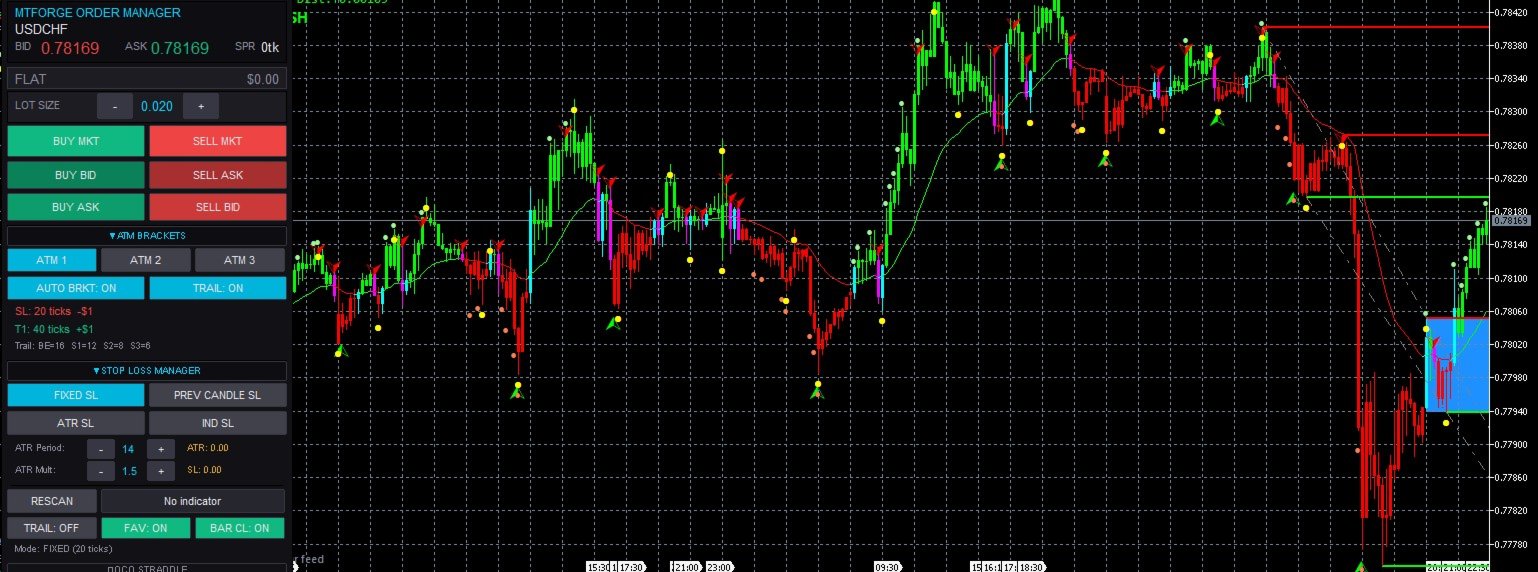
MT5 Chart Trader는 세련되고 직관적인 차트 위 패널을 통해 기관급 주문 집행, 브라켓 관리, 리스크 컨트롤 기능을 MetaTrader 5에 제공합니다. 진입, 관리, 보호, 청산에 필요한 모든 기능을 차트를 벗어나지 않고 사용할 수 있습니다. 외부 브릿지, DLL 의존성, 타사 플랫폼이 전혀 필요 없으며, MT5 터미널 내부에서 직접 실행되는 순수 MQL5로 제작되었습니다.

1분 차트에서 NQ(나스닥) 선물을 스캘핑하든, 15분 차트에서 외환 데이트레이딩을 하든, 일봉 차트에서 골드 스윙 트레이딩을 하든 — MT5 Chart Trader는 전문 트레이더가 요구하는 실행 도구를 제공하며, 분석을 방해하지 않는 현대적이고 깔끔한 인터페이스를 갖추고 있습니다.

왜 MT5 CHART TRADER인가요?

대부분의 MetaTrader 5 트레이더는 두 가지 극단적인 선택지 사이에서 고민합니다. 기능이 너무 단순한 기본 '원클릭 매매' 패널(브라켓, 트레이링, 리스크 컨트롤 부재)을 사용하거나, 설정에 프로그래밍 지식이 필요한 복잡한 EA 프레임워크를 사용하는 것입니다. MT5 Chart Trader는 이 간극을 메워줍니다. 코딩 지식 없이도 버튼과 단축키로 제어할 수 있으며, 차트 위에 상주하는 완벽한 거래 관리 워크스테이션입니다.

MQL5 마켓의 다른 제품들과 차별화되는 핵심 강점:

  • 고급 거래 관리 (ATM): 한 거래당 최대 3개의 익절 타겟, 자동 물량 분할, 수익을 보호하는 다단계 트레이링 스톱을 갖춘 브라켓 템플릿.

  • OCO (One-Cancels-Other) 로직: 한쪽 주문이 체결되면 나머지 브라켓 주문을 자동으로 취소.

  • 종합 리스크 관리 세트: 일일 손실 한도, 최대 거래 횟수, 연속 손실 시 잠금, 세션 수익 캡, 트레이링 드로우다운(Trailing Drawdown) 추적 및 스프레드 필터.

  • 뉴스 가드 (News Guard): 경제 지표 달력과 연동되어 고위험 지표 발표 전 진입을 자동으로 차단.

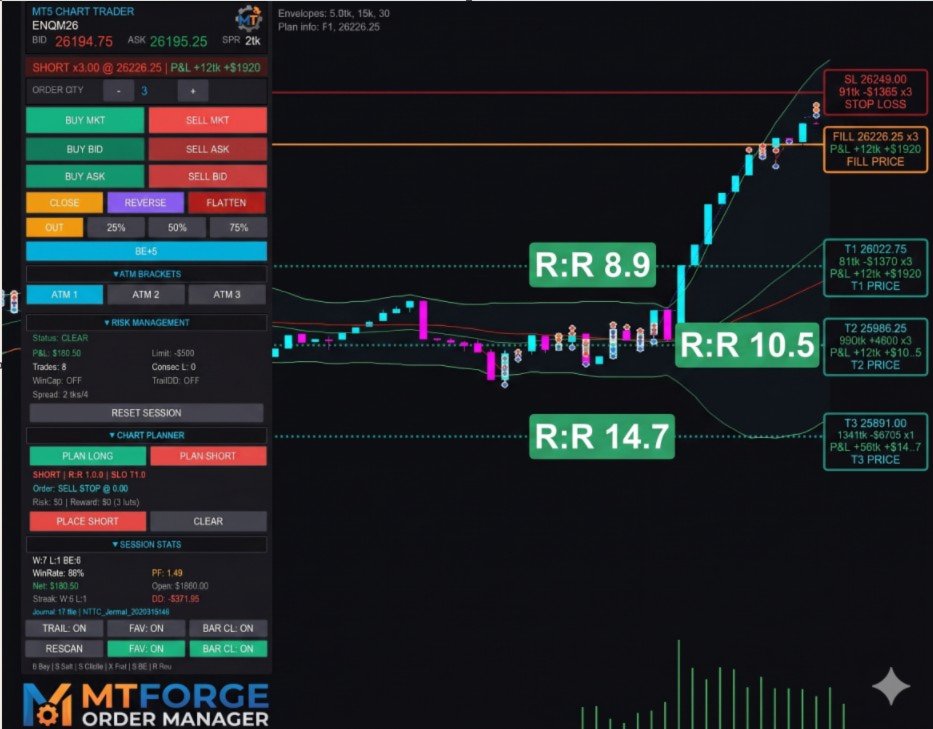
  • 시각적 차트 플래너: 차트 위의 라인을 드래그하여 진입/스톱/타겟 설정 및 실시간 손익비(R:R) 계산.

  • 클릭 투 트레이드 (Click-to-Trade): 차트상의 특정 가격대를 클릭하여 지정가(Limit) 및 역지정가(Stop) 주문 즉시 배치.

  • 고급 트레이링 드로우다운 시스템: 수익 고정 및 자동 전량 청산 기능을 갖춘 시스템으로, 프랍 트레이딩 업체(Prop Firm)에서 사용하는 드로우다운 추적 방식과 동일합니다.

주요 기능

1. 고급 거래 관리 (ATM) 브라켓 템플릿

ATM 시스템은 MT5 Chart Trader의 핵심입니다. 진입이 체결되는 즉시 스톱로스와 익절 브라켓 주문을 자동으로 배치합니다.

  • 3가지 사전 설정 템플릿: 퀵 스캘핑, 데이트레이딩, 스윙/러너용으로 완전 맞춤 설정 가능.

  • 멀티 타겟 물량 분할: 최대 3개의 타겟에 대해 브로커의 최소 로트 단위와 로트 스텝을 고려하여 물량을 지능적으로 분할.

  • 강력한 체결 감지: 서버 부하가 높은 상황에서도 브라켓 주문이 누락되지 않도록 이중 경로 감지 로직을 사용하여 즉각적으로 주문을 배치.

2. 다단계 트레이링 스톱 시스템

단순히 'X 틱 추적'하는 수준을 넘어섭니다. 전문 트레이더의 방식을 모사한 3단계 진행형 트레일을 구현합니다:

  • 0단계 (본전 이동): 가격이 설정한 수익권에 도달하면 스톱을 진입가(+ 미세 수익)로 이동하여 손실 위험을 즉시 제거.

  • 1-3단계: 거래가 유리하게 진행될수록 보호 범위를 기계적으로 좁혀나가며 미실현 수익을 효과적으로 확보.

3. 4가지 스톱로스 산출 모드

  • 고정 틱 (Fixed Ticks): 가장 클래식하고 예측 가능한 방식.

  • 이전 캔들 (Previous Candle): 이전 완성 캔들의 고점/저점에 설정한 오프셋을 더해 스톱을 배치.

  • ATR 기반: 시장 변동성에 따라 스톱 거리를 자동으로 조절.

  • 지표 기반 (Indicator-Based): 최첨단 기능. 이동평균선, Supertrend, Parabolic SAR 등 차트에 로드된 모든 지표의 값을 코딩 없이 스톱 가격으로 활용 가능.

4. 시각적 차트 플래너 (Chart Planner)

분석을 즉시 실행 가능한 주문으로 바꿉니다. 'Plan Long' 또는 'Plan Short'를 클릭하고 라인을 드래그하면 패널에 다음 정보가 실시간으로 업데이트됩니다:

  • 틱 단위 스톱 및 타겟 거리.

  • 손익비 (Risk-Reward Ratio).

  • 계좌 잔고와 틱 가치를 반영한 구체적인 달러($) 단위 리스크 및 보상 금액.

리스크 관리 및 프랍 펌(Prop Firm) 대응

트레이더의 규율을 강제하고 계좌를 보호하도록 설계되었습니다:

  • 일일 손실 한도: 설정한 손실 금액에 도달하면 뇌동 매매를 방지하기 위해 신규 진입을 즉시 차단.

  • 트레이링 드로우다운: 최고 자본(Peak Equity)으로부터의 거리를 실시간으로 계산. 프랍 펌 계좌 관리에 필수적인 기능입니다.

  • 스프레드 필터: 지표 발표 시기나 유동성 부족으로 스프레드가 과도하게 벌어질 경우 진입을 차단.

추가 도구 및 편의 기능

  • 뉴스 가드: MT5 경제 달력 API를 사용하여 주요 뉴스 발표 전후로 거래를 자동 제한.

  • 세션 저널: 모든 체결 내역을 CSV 파일로 자동 내보내기 하여 엑셀 등에서 복기 가능.

  • 단축키 (Hotkeys): 매수, 매도, 전량 청산, 스위칭(Reverse), 본전 이동 등을 키보드 키 하나로 실행.

  • 접이식 인터페이스: 다크 테마가 적용된 세련된 디자인. 필요한 섹션만 펼쳐서 사용하여 차트 공간을 넓게 확보 가능.

기술 아키텍처 및 요구 사항

  • 순수 MQL5: DLL이나 외부 프로그램 의존성 없음. 빠르고 안전함.

  • 호환성: 선물(ES, NQ 등), 외환(FX), CFD, 지수, 금속, 가상자산 등 모든 종목 지원.

  • 계좌 모드: 네팅(Netting) 계좌 모드 전용 설계 (헷징 계좌의 경우 경고 표시).

  • 요구 사항: MetaTrader 5 (빌드 2361 이상 권장), '알고리즘 거래 허용' 설정 필요.

[중요 사항] 본 제품은 주문 집행 및 관리 도구입니다. 매매 신호를 생성하거나 시장 방향을 예측하지 않으며, 완전 자동 매매를 수행하지 않습니다. 진입과 청산의 결정은 트레이더 본인이 하며, EA는 그 결정을 신속하고 정확하며 규율 있게 실행하도록 돕는 역할을 합니다.

지원: 문의 사항이나 기능 제안은 제품 페이지의 댓글 섹션이나 MQL5 메시지 시스템을 통해 연락 주시기 바랍니다. 지속적인 업데이트를 통해 최상의 성능을 유지하고 있습니다.
추천 제품
The utility is designed to display on the chart the margin zones built on the basis of margin requirements for futures of the Chicago Mercantile exchange (CME). These margin zones are good levels of resistance and support, as seen in the screenshots. How to use To trade on margin zones, use the following rules: buy after the day has closed above one of the zones to the next zone; sell after the day has closed below one of the zones to the next zone; after opening a sell trade, place limit sell
The main function of this EA: Quick batch modification stop profit stop loss to the specified price position. For example: you have five XAUUSD  BUY orders, the opening price is 2510, 2508, 2506, 2504, 2495you can through this EA, batch unified change the profit is 2530, stop loss is 2480.Good luck with your deal! Wechat:FX-AIEA QQ:2813871972 Email:lxy284628@163.com Wechat public account: Xinyou Jinke FXAIEA.com Welcome to your attention ( Xinyou Jinke FXAIEA.com) Around A1, big data, cloud com
MT5 Alert Telegram Notifier PRO VERSION   is a specialized toolsdesigned for the MetaTrader 4 (MT4) platform. One of its key features is its ability to operate concurrently with Expert Advisors (EAs) on a single MT4 chart, combining the power of automated analysis with communication convenience. Sending Order Notifications to Telegram Groups or Channels:   This indicator has the capability to send real-time order notifications directly to the Telegram group or channel of your choice using the B
Trading Advanced Panel - Professional Trading Panel for MT5 Transform Your Trading into a More Professional Experience Trading Advanced Panel is the ultimate control panel for traders seeking precision, agility, simplicity, and professional risk management. Developed with the best management experiences from top-tier platforms, this EA revolutionizes how you trade on MetaTrader 5. KEY FEATURES Real-Time Monitoring Position value updated every second - See the exact financial value of your trad
EA Performance Monitor MetaTrader 5용 유틸리티로, 열려 있는 모든 차트에서 활성 Expert Advisor를 자동으로 감지하고, 각 EA를 거래 데이터와 매핑하며, 단일 패널에서 드로다운, 손익, 승률 및 오픈 포지션 지표를 실시간으로 표시합니다. EA Performance Monitor는 MetaTrader 5용 자동 모니터링 유틸리티입니다. 설정 가능한 간격으로 열려 있는 모든 차트를 스캔하고, 매직 넘버와 심볼로 실행 중인 각 Expert Advisor를 식별하며, 차트의 구조화된 패널에 성과 데이터를 표시합니다. 이 도구는 종료된 거래 내역과 실시간 부동 포지션을 모두 추적하여 단일 연결 지점에서 계정의 모든 EA 활동을 통합적으로 볼 수 있습니다.   개요 초기화 시 유틸리티는 연결된 시점부터 계정의 거래 내역을 읽습니다. 활성 매직 넘버를 찾아 모든 오픈 포지션을 스캔하고, 각각을 Expert Advisor가 실행 중인 해당 차트에 매핑합니다.

FREE
지표에 대하여 이 지표는 금융 상품의 종가에 대한 몬테카를로 시뮬레이션을 기반으로 합니다. 몬테카를로는 통계적 기법으로, 이전에 관찰된 결과에 기반한 랜덤 숫자를 사용하여 다양한 결과가 나올 확률을 모델링하는 데 사용됩니다. 어떻게 작동하나요? 이 지표는 과거 데이터를 바탕으로 시간에 따른 랜덤 가격 변화를 모델링하여 특정 종목에 대한 여러 가격 시나리오를 생성합니다. 각 시뮬레이션은 종가 변동을 반영하기 위해 랜덤 변수를 사용하여, 주어진 기간 동안 미래 시장 움직임을 효과적으로 모방합니다. 몬테카를로 시뮬레이션의 장점 - 몬테카를로 시뮬레이션은 다양한 미래 시나리오에 대한 테스트를 통해 여러 거래 전략의 리스크를 분석하는 데 도움을 줍니다. - 희귀한 극단적 사건(꼬리 위험)을 포함하여 다양한 시장 상황에서 전략의 성과를 확인할 수 있습니다. - 단일 예측에 의존하지 않고, 몬테카를로는 관련 확률과 함께 잠재적 결과의 범위를 제공합니다. 이는 수익 또는 손실 가능성을 이해하는
Flow – Hotkey Tool for Discretionary Traders Take full control of MT5 with your keyboard and mouse. Flow is a powerful hotkey-based assistant designed specifically for discretionary traders who want to place orders, draw tools, and operate charts with speed and precision. No more right-click menus or wasting time. Just trade. Key Features Order Execution Place pending Buy/Sell orders (limit or stop) instantly with just a mouse click. Stop Loss and Take Profit lines are automatically attac
Features 1️⃣ Flexible Grid Order Configuration Set price levels and spacing between orders. Customize order sizes and maximum number of positions for better risk control. 2️⃣ Hedge and Netting Modes Hedge Mode : Allows simultaneous long and short positions , ideal for advanced strategies. Netting Mode : Consolidates positions for easier balance management. 3️⃣ Supported Order Types Limit Orders : Buy and sell at predetermined prices. Market Orders : Instant execution. Integrated Take-Profit : Wi
Demo version T Trading Simulator   doesn't work in the strategy tester. The Strategy Tester does not support the processing of ChartEvent. It does not support most of the panel's functionality. Contact me for any questions or ideas for improvement or in case of a bug found. Hi everyone, Trobotrader here. By T Trading Simulator , You can go back to past then analysis and trade with this simulator to develop trading skill. We are going to walk through step-by-step how  you can use T Trading Simul
Crosshair MT5
Daniel Stein
5 (1)
This tool is part of the Stein Investments ecosystem - 18+ tools plus Max, your 1-on-1 AI trading mentor.  Always on, knows every indicator in depth, available the moment you need to think something through.  Meet him at https://stein.investments Crosshair is a fantastic tool that simplifies our chart analysis by bringing the price candles perfectly in line with the indicator values in the subwindows. You can enable and disable it via a single press on the "C" of your keyboard, and it provide
FREE
PipsTrailingEA
Youssef Esseghaiar
Overview PipsTrailing EA   is a lightweight, efficient, and reliable   trailing stop manager   for MetaTrader 5. It automatically adjusts stop losses on your open positions as the market moves in your favor — locking in profits while giving your trades room to breathe. No complex settings. No unnecessary features. Just a pure, functional trailing stop that works on any symbol and any timeframe. Key Features Feature Description Manual & EA trades Works with positions opened manually or by o
MAN Moving Average Notifier
Chukwuemeka Kingsley Anyanwu
[FEEL FREE TO DM ME IF YOU NEED SUPPORT] MANotifier.mq5 - Moving Average Crossover Notification Utility The MANotifier.mq5 is a utility designed for MetaTrader 5 that monitors the crossover of two Moving Averages (MAs) and sends notifications based on the crossing events. The utility supports various notification types, including mobile notifications , email alerts , and on-screen pop-up alerts , making it ideal for traders who want to stay informed of key market events in real-time. Key Feature
NNArbitrage
Marius Ovidiu Sunzuiana
In a market flooded with lagging indicators and overfit strategies, this utility offers a fresh edge: real-time statistical arbitrage powered by an adaptive neural network , built entirely in MQL5—no DLLs, no external dependencies. Key Advantages Smart Spread Modeling It dynamically calculates a hedge ratio between two correlated instruments (like EURUSD vs GBPUSD), forming a synthetic spread that reflects true relative value. This isn’t just correlation—it’s cointegration-aware logic. Neur
Short Description Swing Timing Breakout EA is a smart Expert Advisor for MetaTrader 5 that combines trend filtering, momentum timing, and dynamic risk management to capture high-probability swing and breakout opportunities. Full Description Swing Timing Breakout EA is a professional trading robot designed for MetaTrader 5, suitable for traders who want a balance between automation, control, and disciplined risk management. This EA uses a trend-following and momentum confirmation approach ,
Telegram to mt5 pro
Janet Abu Khalil
3.67 (3)
Telegram to MT5 Pro — Advanced Telegram Signal Copier with Auto-Fix, Multi-TP, Risk Control and Full Trade Management Telegram to MT5 Pro — 전문 텔레그램 신호 복사기 Telegram to MT5 Pro는 텔레그램 신호를 MetaTrader 5 계정으로 자동으로 직접 실행하는 고성능 트레이드 복사기로, 리스크, 실행, 트레이드 관리에 대한 완전한 제어를 제공합니다. 이 시스템은 두 가지 구성 요소로 이루어져 있습니다: • MetaTrader 5 내부에서 실행되는 Expert Advisor (EA) • 텔레그램에 연결되어 신호를 로컬로 EA에 전송하는 데스크톱 브리지 애플리케이션 두 구성 요소는 동일한 컴퓨터에서 실행되어야 합니다. MQL5 플랫폼 제한으로 인해 EA는 텔레그램에 직접 연결할 수 없습니다. 브리지는 텔레그램을 처리하고 EA는 거래를 실행합니다. 지원 및 설치

If you wish to draw Support and Resistance lines, view: daily market opening, classical pivot levels, Fibonacci pivot levels, trend lines, Fibonacci levels, the remaining time to candle closing, and current spread. If you seek to place your orders with the exact lot that meets your desired stop loss risk. If you wish to do all this and more with just one click, then this is the perfect tool to use. This tool will allow you to feel more relaxed when deciding to open orders, as well as predicting
Copiador MT5
Luciana Andrea Maggiori
Copiador – La Mejor Herramienta para Copiar Operaciones en MetaTrader 4 Este no es un simple copiador de operaciones que   únicamente   permite copiar transacciones de forma local entre diferentes cuentas de MetaTrader 4 en cualquier dirección y cantidad. ¡Por supuesto que lo hace!   ¡Pero Copiador hace mucho más!     Descubre sus características y beneficios a continuación FUNCIONALIDADES DESTACADAS:   Copiado entre brokers diferentes : Puedes copiar operaciones desde una cuenta e
UMNi-ALRT MT5 Advanced Trade Alert System UMNi-ALRT delivers structured, detailed Telegram alerts for every stage of your trading activity. More advanced than basic notifications, it provides full trade intelligence — including performance metrics, session context, and market data — in a clean, readable format. KEY FEATURES Full trade open / close alerts with deep detail MFE, MAE and exit efficiency tracking Session-aware candle and bias context Chart updates with spread,
LogEverything EA The LogEverything EA is a comprehensive tool designed for logging and recording various trading metrics, account information, and market data. It is a robust solution for traders who want to track the performance of their trades, analyze historical data, and ensure accurate record-keeping. Key Features: Logs trade executions, including details such as entry price, lot size, stop loss, take profit, and comments. Tracks closed trades with detailed information on profit or loss.
You can see Binance Spot data instantly in Metatrader 5 and it allows you to use all the features that Metatrader has provided to you. You can access the data of all symbols listed on Binance Futures. Don't forget to set the timezone. Binance it's 00:00 UTC. You need to fix it according to your own country You need to install the free Binance Spot Symbol List plugin. https://www.mql5.com/tr/market/product/83507 After loading, it automatically downloads the data of the cryptos in the market obser
AnaliTick
Aleksandr Prozorov
AnaliTIck is a financial instrument analysis and testing program based on the Metatrader5 platform. The object of analysis is the sequence of changes in the prices of Bid and Ask - ticks. The program may be useful to developers of scalping advisers and strategies, those who work on the news. When the program is loaded, an array of ticks for the financial instrument, on the chart of which the program is installed, is filled for the current period. The analyzed period is 4 trading days. On this pe
Session panel
Timo Mario Hoffmann
Session Panel for MT5 Session Panel is a free MT5 indicator that gives you a fast and convenient live overview of the major trading sessions directly from the chart. Monitor Tokyo, London, and New York session times, see which session is currently active, track countdowns to the next session, and view session overlap information in one compact dashboard. Built for traders who want better market timing, clearer session awareness, and a cleaner chart workflow in live market conditions. Session Pan
FREE
AllviewTool Nexus — Advanced Trading Utility Panel for MetaTrader 5 Hurry to buy before the end of the promotion -10% 31.03.2026 AllviewTool Nexus is a professional multi-functional trading utility designed to enhance decision-making, risk management, and market analysis within MetaTrader 5. The application does not execute trades automatically; instead, it provides traders with structured insights, analytical tools, and a clear visual interface to support disciplined and consistent trading. The
Divergent Stochastic Filter II Catch Reversals Early, Filter Noise, Trade with Confidence The Edge: Why This Stochastic is Different  Every trader knows the Stochastic oscillator. But knowing when to trust its signals, that's the real challenge. The Divergent Stochastic Filter II transforms this classic indicator into a precision reversal detection system by adding critical elements: divergence intelligence, signal filtering and exhaustion detection.  While standard Stochastic oscillators fire s
Dear traders and investors! We present to you the MT5 Optimization Booster – an innovative product that will revolutionize your optimization experience on MetaTrader 5! The MT5 Optimization Booster is based on the innovative Quantum Swap Protocol (QSP) algorithm – a unique proprietary optimization strategy that forms the core of the product and elevates the process of finding optimal solutions to a new level. After the purchase , be sure to contact me . The product is designed to enhance the ca
Key Features: 200+ Fully Implemented Patterns   across all categories Advanced Market Structure Analysis Smart Money Integration   (Wyckoff, Order Blocks, Liquidity) Professional Risk Management Multi-Timeframe Analysis AI-Powered Confidence Scoring Advanced Visualization Real-time Alerts Pattern Categories: Single Candle Patterns (Hammer, Doji, Marubozu, etc.) Multi-Candle Patterns (Engulfing, Stars, Harami, etc.) Chart Patterns (Head & Shoulders, Cup & Handle, Triangles, etc.) Harmonic Pattern
FREE
Forget about enabling templates when you launch the window. Auto Template Master Service  is a professional utility tool that runs as a system service in MetaTrader 5, and it will do it for you. Unlike traditional indicators or expert advisors (EAs), the program runs in the background of the entire terminal and doesn't require you to add it to each window individually. As soon as you open a new chart of any instrument (Forex, Stocks, Crypto), the service immediately detects the new window and a
Shadow Ema Pro
Ignacio Agustin Mene Franco
Shadow EMA Pro — Expert Advisor for XAUUSD M5 The smart way to trade Gold on the 5-minute chart Shadow EMA Pro is a 100% automated Expert Advisor, specifically designed for trading XAUUSD (Gold) on the M5 timeframe. It combines classic trend-following logic with high-precision entries through a multi-filter confluence system, achieving consistent performance with robust capital protection built into its core. Recommended initial capital: $1,000 USD Optimized for: XAUUSD · M5 · ECN Broker
Panic Panel MT5
Nikola Miladinovic
Panic Panel is a professional manual trade management tool for MetaTrader 5. It allows traders to control open positions quickly and safely directly from the chart. Main Features: - Symbol-specific position control - One-click Break Even - Manual Stop Loss step adjustment - Partial close: 25% / 50% / 75% - Net profit, position count and volume display - Independent per chart operation The panel works only on the active symbol and does not affect other instruments. This tool does NOT open tr
MT5 to Telegram Notification Hub   is a user-friendly tool that connects MetaTrader 5 (MT5) with Telegram, enabling seamless transmission of trade alerts, updates, and custom messages directly from MT5 to your Telegram account or channel. You can easily adjust and enable or disable specific parts of the notifications, making it ideal for signal providers and traders who want to keep their audience informed with real-time updates Setup guide A setup guide is available here . Key Features: Instan
이 제품의 구매자들이 또한 구매함
Trade Assistant MT5
Evgeniy Kravchenko
4.42 (211)
거래당 위험 계산, 라인을 사용한 손쉬운 신규 주문, 부분 청산 기능을 통한 주문 관리, 7가지 유형의 트레일링 스탑 및 기타 유용한 기능을 제공합니다. 추가 자료 및 지침 설치 지침   -   애플리케이션 지침   -   데모 계정용 애플리케이션 평가판 라인 기능       - 차트에 개시선, 손절매, 차익실현을 표시합니다. 이 기능을 사용하면 새로운 주문을 쉽게 하고 개봉 전에 추가 특성을 볼 수 있습니다. 위기 관리       -       위험 계산 기능은 설정된 위험과 손절매 주문의 크기를 고려하여 새 주문의 볼륨을 계산합니다. 이를 통해 손절매 크기를 설정하고 동시에 설정된 위험을 존중할 수 있습니다. 로트 계산 버튼 - 위험 계산을 활성화/비활성화합니다. 필요한 위험 값은 위험 필드에 0에서 100 사이의 백분율 또는 예금 통화로 설정됩니다. 설정 탭에서 위험 계산 옵션을 선택합니다. $ 통화, % 잔액, % 지분, % 자유 마진, % 사용자 정의, % AB 이전
Trade Manager EA에 오신 것을 환영합니다. 이 도구는 거래를 보다 직관적이고 정확하며 효율적으로 만들기 위해 설계된 궁극적인 리스크 관리 도구 입니다. 단순한 주문 실행 도구가 아닌, 원활한 거래 계획, 포지션 관리 및 리스크 제어를 위한 종합 솔루션입니다. 초보자부터 고급 트레이더, 빠른 실행이 필요한 스캘퍼에 이르기까지 Trade Manager EA는 외환, 지수, 상품, 암호화폐 등 다양한 시장에서 유연성을 제공합니다. Trade Manager EA를 사용하면 복잡한 계산은 이제 과거의 일이 됩니다. 시장을 분석하고 진입, 손절 및 익절 수준을 차트의 수평선으로 표시한 후 리스크를 설정하면, Trade Manager가 이상적인 포지션 크기를 즉시 계산하고 SL 및 TP 값을 실시간으로 표시합니다. 모든 거래가 간편하게 관리됩니다. 주요 기능: 포지션 크기 계산기 : 정의된 리스크에 따라 거래 크기를 즉시 결정합니다. 간단한 거래 계획 : 진입, 손절, 익절을 위한
Local Trade Copier EA MT5
Juvenille Emperor Limited
4.96 (139)
Local Trade Copier EA MT5 를 사용하여 매우 빠른 거래 복사 경험을 해보세요. 1분 안에 간편하게 설정할 수 있으며, 이 거래 복사기를 사용하면 Windows 컴퓨터 또는 Windows VPS에서 여러 개의 MetaTrader 터미널 간에 거래를 0.5초 미만의 초고속 복사 속도로 복사할 수 있습니다. 초보자든 전문가든   Local Trade Copier EA MT5 는 다양한 옵션을 제공하여 사용자의 특정 요구에 맞게 맞춤 설정할 수 있습니다. 이는 수익 잠재력을 높이려는 모든 사람을 위한 최고의 솔루션입니다. 지금 사용해보시고 이것이 왜 시장에서 가장 빠르고 쉬운 무역용 복사기인지 알아보세요! 팁: 여기 에서 데모 계정에서 Local Trade Copier EA MT5 데모 버전을 다운로드하여 사용해 볼 수 있습니다. 다운로드한 무료 데모 파일을 MT5 >> File >> Open Data Folder >> MQL5 >> Experts 폴더에 붙여넣고 터
베타 출시 Telegram to MT5 Signal Trader 는 곧 공식 알파 버전을 출시할 예정입니다. 일부 기능은 아직 개발 중이며, 작은 버그가 발생할 수 있습니다. 문제가 있으면 꼭 보고해 주세요. 여러분의 피드백은 소프트웨어 개선에 도움이 됩니다. Telegram to MT5 Signal Trader 는 Telegram 채널 또는 그룹의 거래 신호를 자동으로 MetaTrader 5 계정으로 복사하는 강력한 도구입니다. 공개 및 비공개 채널을 모두 지원하며, 여러 신호 제공자를 여러 MT5 계정에 연결할 수 있습니다. 소프트웨어는 빠르고 안정적으로 동작하며, 복사된 거래를 완벽히 제어할 수 있습니다. 인터페이스는 깔끔하며 대시보드와 차트가 시각적으로 구성되어 있고, 직관적인 네비게이션이 가능합니다. 여러 Signal Account를 관리하고, 공급자별 설정을 세밀하게 조정하며, 모든 동작을 실시간으로 모니터링할 수 있습니다. 필수 조건 MQL의 제한으로 인해 EA는 Te
AI Agent Supervisor is NOT an Expert Advisor. AI Agent Supervisor   is a   multi-agent AI risk & portfolio supervisor   that watches every EA on your account and intervenes in real time.  WANT AN AI PORTFOLIO MANAGER WATCHING YOUR FLEET 24/7?   Run your fleet on the same brokers I do:   IC MARKETS , IC TRADING   .  Unlike the centralized stock market, Forex has no single, unified price feed.  Every broker sources liquidity from different providers, creating unique data streams. The Supervisor r
TradePanel MT5
Alfiya Fazylova
4.87 (155)
Trade Panel은 다기능 거래 도우미입니다. 이 애플리케이션에는 50개 이상의 수동 거래 기능이 포함되어 있으며 대부분의 거래 작업을 자동화할 수 있습니다. 구매하기 전에 데모 계정에서 데모 버전을 테스트할 수 있습니다. 데모 계정용 애플리케이션 체험판 다운로드: https://www.mql5.com/en/blogs/post/750865 . 전체 지침 여기 . 거래. 한 번의 클릭으로 거래를 수행할 수 있습니다: 리스크 자동 계산과 함께 예약 주문 및 포지션 열기. 한 번의 클릭으로 여러 주문 및 포지션 열기. 주문 그리드 열기. 예약 주문 및 포지션을 그룹별로 닫기. 포지션 방향 전환 (Buy 닫기 > Sell 열기, Sell 닫기 > Buy 열기). 포지션 잠금 (부족한 포지션을 열어 Buy와 Sell 포지션의 수량을 동일하게 만들기). 모든 포지션 한 번의 클릭으로 부분적으로 닫기. 모든 포지션의 테이크 프로핏과 스톱로스를 같은 가격 수준에 설정. 모든 포지션의 스톱로스를
Farmed Hedge Yield Farming | All Markets (Manual - Hybrid - Semi/Automated EA) MULTI-ASSET SUPPORT Trade any asset available on your broker - Forex: Major, Minor, Exotic pairs - Crypto: BTC, ETH, XRP, SOL, BNB - Stocks: Apple, Tesla, Amazon, Google, etc. - Commodities: Gold, Silver, Oil, Gas - Indices: US30, NAS100, SPX500, DAX40 - Any CFD your broker offers VERIFIED TRADING RESULTS - Farmed Hedge Yield Axi Copy:  https://www.mql5.com/en/signals/2356376 - Farmed Hedge Yield Exn Copy:   https:/
Quant AI Agents are independent trading Expert Advisors. Instead of trading using a fixed strategy like other conventional EAs, Quant AI Agents   is a   multi-agent AI trading framework   that turns natural-language strategy prompts into live.  WANT THE SAME RESULTS AS MY LIVE SIGNAL?   Use the exact same brokers I do:   IC MARKETS , IC TRADING   .  Unlike the centralized stock market, Forex has no single, unified price feed.  Every broker sources liquidity from different providers, creating un
Exp COPYLOT CLIENT for MT5
Vladislav Andruschenko
3.91 (33)
MetaTrader 5용 전문 트레이드 복사기 MetaTrader 용 빠르고 전문적이며 신뢰할 수 있는 트레이드 복사기 입니다. COPYLOT 은 MT4와 MT5 터미널 간의 Forex 거래 복사를 지원하며, Hedge 및 Netting 계좌를 모두 지원합니다. COPYLOT MT5 버전 지원 구성: - MT5 Hedge → MT5 Hedge - MT5 Hedge → MT5 Netting - MT5 Netting → MT5 Hedge - MT5 Netting → MT5 Netting - MT4 → MT5 Hedge - MT4 → MT5 Netting MT4 버전 전체 설명 + DEMO + PDF 구매 방법 설치 방법 로그 파일 확인 방법 테스트 및 최적화 방법 Expforex의 모든 제품 MT4 터미널로도 거래를 복사할 수 있습니다(MT4 → MT4, MT5 → MT4): COPYLOT CLIENT for MT4 COPYLOT은 2개, 3개, 심지어 10개의 터미널과 동시에 작동할
Premium Trade Manager - MetaTrader 5를 위한 빠르고 규율 있는 거래 관리 도구 Premium Trade Manager 는 결정에만 집중하고 나머지 루틴은 패널이 처리하길 원하는 트레이더를 위한 도구입니다. 크기 계산, 주문 배치, 분할 청산, 트레일링, 뉴스 대응, 프롭 펌 한도 관리까지, 모든 거래에서 동일하게 규율 있는 방식으로 실행됩니다. MetaTrader 5용 빠른 온차트 패널로, 모든 거래에서 기계적인 작업을 완전히 없애줍니다. 방향, 종목, 타이밍은 당신이 결정합니다. 패널이 리스크에 맞춰 포지션 크기를 계산하고, 스톱과 타겟이 설정된 주문을 배치하고, 분할 청산으로 스케일아웃하고, 나머지를 트레일합니다. 펀디드 트레이더에게는 한 걸음 더 나아갑니다. 8개 주요 외환 프롭 펌의 실제 규칙을 내장하고, 각 한도까지 남은 거리를 실시간으로 표시하며, 하드 한도를 위반할 주문은 차단합니다. 구매 전에 직접 체험해 보세요. 인터랙티브 walkthro
AntiOverfit PRO MT5
Enrique Enguix
5 (6)
EA를 구매하기 전에, 이 시스템이 정말 버티는지 아니면 백테스트에서 운 좋게 좋아 보였던 것뿐인지 먼저 확인하세요. 대부분의 로봇은 보기 좋은 백테스트와 함께 판매됩니다. 우상향 곡선. 좋은 Profit Factor. 의심할 이유가 거의 없어 보입니다. 그런데도 그런 EA들 중 많은 수가 시장이 그 과거 구간처럼 움직이지 않기 시작하는 순간 무너지기 시작합니다. 왜 그럴까요? 백테스트가 증명하는 것은 딱 한 가지뿐이기 때문입니다. 그 전략이 특정한 하나의 가격 경로에서는 작동했다는 것. 다른 경로에서도 버틴다는 뜻은 아닙니다. 견고하다는 뜻도 아닙니다. 당연히 당신의 돈을 쓸 가치가 있다는 뜻도 아닙니다. 당신이 EA를 사는 이유는 과거의 예쁜 곡선을 감상하기 위해서가 아닙니다. 계속 변하는 시장에서 실제로 쓰기 위해서입니다. AntiOverfit PRO가 하는 일 AntiOverfit PRO는 MetaTrader 5용 Expert Advisor가 정말 탄탄한지, 아니면 특정한
Trade Dashboard MT5
Fatemeh Ameri
4.94 (126)
Trade Dashboard simplifies how you open, manage, and control your trades, with built-in lot size calculation. It allows you to execute trades, manage risk, and control positions directly on the chart, with tools such as partial close, breakeven, and trailing stop. Designed to reduce manual work and help you stay focused on your trading decisions. A demo version is available for testing. Detailed explanations of features are provided within the MQL5 platform. Installation instructions are include
Trade copier MT5
Alfiya Fazylova
4.53 (43)
Trade Copier는 거래 계정 간의 거래를 복사하고 동기화하도록 설계된 전문 유틸리티입니다. 복사는 공급자의 계정/단말기에서 동일한 컴퓨터 또는 vps에 설치된 수신자의 계정/단말기로 발생합니다. 프로모션 - 이미 "Trade copier MT5"를 구매하셨다면, "Trade copier MT4"를 무료로 받으실 수 있습니다 (MT4 → MT5 및 MT4 ← MT5 복사용). 조건에 대한 자세한 정보를 원하시면, 개인 메시지를 통해 저희에게 문의해 주시기 바랍니다! 구매하기 전에 데모 계정에서 데모 버전을 테스트할 수 있습니다. 데모 버전 여기 . 전체 지침 여기 . 주요 기능 및 이점: 복사기는 "МТ5> МТ5", "МТ4> МТ5", "МТ5> МТ4" 복사를 지원합니다. 복사기는 데모 계정 > 실 계정, 실 계정 > 데모 계정, 데모 계정 > 데모 계정 및 실제 계정 > 실 계정 복사를 지원합니다. 복사기는 읽기 전용 암호가 적용된 투자자 계정에서 복사를 지원합니다. 하
Copy Cat More Trade Copier MT5 (복사 고양이 MT5) 는 오늘날의 거래 과제를 위해 설계된 로컬 거래 복사기이자 완전한 위험 관리 및 실행 프레임워크입니다. 프롭펌 챌린지부터 개인 포트폴리오 관리까지, 견고한 실행, 자본 보호, 유연한 구성 및 고급 거래 처리의 조합으로 모든 상황에 적응합니다. 복사기는 마스터(송신자)와 슬레이브(수신자) 모드 모두에서 작동하며, 시장 주문과 예약 주문, 거래 수정, 부분 청산 및 헷지 청산 작업의 실시간 동기화를 제공합니다. 데모 및 실계좌, 거래 또는 투자자 로그인과 호환되며, EA, 터미널 또는 VPS가 재시작되어도 지속적인 거래 메모리 시스템을 통해 복구를 보장합니다. 고유 ID로 여러 마스터와 슬레이브를 동시에 관리할 수 있으며, 브로커 간 차이는 접두사/접미사 조정 또는 사용자 정의 심볼 매핑을 통해 자동으로 처리됩니다. 매뉴얼/설정  | Copy Cat More MT4 | 채널  특별 기능: 설정이 간편함 —
파워 캔들 전략 스캐너 - 자체 최적화 다중 종목 설정 찾기 도구 파워 캔들 전략 스캐너는 마켓 워치에 등록된 모든 종목에 대해 파워 캔들 지표와 동일한 자체 최적화 엔진을 동시에 실행합니다. 하나의 패널에서 현재 통계적으로 거래 가능한 종목, 각 종목별 최적의 전략, 최적의 손절매/익절 조합을 알려주며, 새로운 신호가 발생하면 즉시 알림을 전송합니다. 이 도구는 Stein Investments 에코시스템의 일부입니다. 18개 이상의 도구와 함께 당신의 1대1 AI 트레이딩 멘토 Max.  항상 대기 중, 모든 인디케이터를 깊이 있게 이해, 무언가를 차근차근 생각해보고 싶은 순간에 도움을 줍니다.  https://stein.investments 에서 만나보세요 완벽한 시장 모니터링. 종목당 3,000건 이상의 자동 최적화. 2가지 알림 유형. 한 번의 클릭으로 차트를 전환하고 바로 거래하세요. 이 도구가 필요한 이유 대부분의 다중 종목 스캐너는 가격 변동만 보여줍니다. 티커별
HINN MagicEntry Extra
ALGOFLOW OÜ
4.73 (15)
HINN MAGIC ENTRY – the ultimate tool for entry and position management! Place orders by selecting a level directly on the chart! full description   ::  demo-version  :: 60-sec-video-description Key features: - Market, limit, and pending orders - Automatic lot size calculation - Automatic spread and commission accounting - Unlimited partitial take-profits  - Breakeven and trailing stop-loss and take-profit  functions - Invalidation leves - Intuitive, adaptive, and customizable interface - Works
ManHedger MT5
Peter Mueller
4.83 (6)
THIS EA IS A SEMI-AUTO EA, IT NEEDS USER INPUT. Manual & Test Version Please TEST this product before BUYING  and watch my video about it. The price of the ManHedger will increase to 250$ after 20 copies sold. Contact me for user support or bug reports or if you want the MT4 version! MT4 Version  I do not guarantee any profits or financial success using this EA. With this Expert Advisor, you can: Implement your own Zone Recovery strategy to capitalize on trending markets. Create Grid trading s
The News Filter MT5
Leolouiski Gan
4.77 (22)
이 제품은 뉴스 시간 동안 모든 전문가 어드바이저 및 수동 차트를 필터링하여 수동 거래 설정이나 다른 전문가 어드바이저가 입력한 거래가 파괴될 수 있는 급격한 가격 상승으로부터 걱정하지 않아도 됩니다. 이 제품은 또한 뉴스 발표 전에 열린 포지션과 대기 주문을 처리할 수 있는 완전한 주문 관리 시스템이 함께 제공됩니다.   The News Filter  를 구매하면 더 이상 내장 뉴스 필터에 의존할 필요가 없으며 이제부터 모든 전문가 어드바이저를 여기서 필터링할 수 있습니다. 뉴스 선택 뉴스 소스는 Forex Factory의 경제 캘린더에서 얻어집니다. USD, EUR, GBP, JPY, AUD, CAD, CHF, NZD 및 CNY와 같은 어떤 통화 기준으로 선택할 수 있습니다. Non-Farm (NFP), FOMC, CPI 등과 같은 키워드 식별을 기준으로 선택할 수도 있습니다. 저, 중, 고 영향을 가지는 뉴스를 필터링할 수 있도록 선택할 수 있습니다. 차트와 관련된 뉴스만 선
Footprint Chart Pro — Professional OrderFlow EA for MetaTrader 5 Version 6.34 | Professional tool for real traders | Institutional-Grade Visualization DEMO USERS - PLEASE SELECT EVERY TICK / REAL TICK WHEN TESTING AND YOU HAVE DOWNLOADED HISTORICAL DATA. IF YOU SEE A WAITING SCREEN AND IT IS NOT DOWNLOADING, IT MEANS YOU HAVE LOW HISTORICAL DATA. TRY 1 MIN AND 5 MIN FIRST ON 1 DAY DATA. ONE DAY DATA SHOULD BE THE NEWEST AND MOST CURRENT DATE. PLEASE WAIT UNTIL THE MARKET HAS ROLLED OVER PERIOD.
YuClusters
Yury Kulikov
4.93 (43)
Attention: You can view the program operation in the free version  YuClusters DEMO .  YuClusters is a professional market analysis system. The trader has unique opportunities to analyze the flow of orders, trade volumes, price movements using various charts, profiles, indicators, and graphical objects. YuClusters operates on data based on Time&Sales or ticks information, depending on what is available in the quotes of a financial instrument. YuClusters allows you to build graphs by combining da
Timeless Charts
Samuel Manoel De Souza
5 (6)
Timeless Charts is an all-in-one trading utility for professional traders. It combines custom chart types such as Seconds Charts and Renko with advanced order flow analysis using Footprints , Clusters , Volume Profiles , VWAP studies, and anchored analysis tools for deeper market insight. Trading and position management are handled directly from the chart through an integrated trade management panel , while Market Replay and Virtual Accounts provide environments for practicing trading skills and
MT5 to Telegram Signal Provider 는 사용하기 쉽고 완전히 커스터마이즈 가능한 유틸리티로, 특정 신호를 Telegram의 채팅, 채널 또는 그룹으로 전송하고, 귀하의 계정을 신호 제공자 로 만듭니다. 경쟁 제품과 달리 DLL 임포트를 사용하지 않습니다. [ 데모 ] [ 매뉴얼 ] [ MT4 버전 ] [ 디스코드 버전 ] [ 텔레그램 채널 ]  New: [ Telegram To MT5 ] 설정 단계별 사용자 가이드 가 제공됩니다. 텔레그램 API에 대한 지식은 필요하지 않습니다; 개발자가 제공하는 모든 것이 필요합니다. 주요 특징 구독자에게 보낸 주문 상세 정보를 커스터마이즈할 수 있습니다. 예를 들어, 브론즈, 실버, 골드와 같은 계층 구독 모델을 만들 수 있습니다. 골드 구독에서는 모든 신호를 받습니다. id, 심볼, 또는 코멘트로 주문을 필터링할 수 있습니다. 주문이 실행된 차트의 스크린샷이 포함됩니다 보낸 스크린샷에 닫힌 주문을 그려 추가 검증을 합니다
EA Portfolio Analyzer
Jimmy Peter Eriksson
4 (1)
설치 가이드:    여기를 클릭하세요! 여러 전문가 자문가의 의견을 종합적으로 분석합니다. 매직 넘버를 기준으로 EA 결과를 비교해 보세요. 수익성 및 손실 추이 추적 날짜 범위를 기준으로 결과 필터링 시각적 형평성 곡선 및 상세 지표 1분 안에 사용 준비 완료 EA 포트폴리오 분석기 EA 포트폴리오 분석기는   여러 전문가용 투자 자문 시스템(EA)의 실시간 성과를   명확하고 체계적인 방식으로   모니터링하도록 설계된   전문 분석 도구 입니다. 동일한 계정에서 여러 개의 EA를 실행할 때 각 EA가 전체 결과에 어떻게 기여하는지 파악하기 어려울 수 있습니다. EA 포트폴리오 분석기를 사용하면   매직 넘버를 기준으로 EA를 필터링하고 조합하여 특정   EA 하나, 선택한 몇 개의 EA 또는 전체 포트폴리오   의 성과를 확인할 수 있습니다   . 이를 통해 다양한 EA 조합을   쉽게 테스트하고   자산 곡선이 어떻게 함께 움직이는지 확인할 수 있습니다. 이를 통해   보다
Poc Breakout Signal: The Ultimate Institutional Order Flow & Price Action System Elevate your trading with Poc Breakout, a comprehensive technical analysis tool designed to bridge the gap between retail trading and institutional market understanding. This all-in-one system combines powerful Buy/Sell signals, advanced Volume Profile analysis, real-time Order Flow (Depth of Market), and critical macroeconomic data to give you a clear, unambiguous edge in the markets. Poc Breakout Signal decodes c
The product will copy all telegram signal to MT5 ( which you are member) , also it can work as remote copier.  Easy to set up, copy order instant, can work with almost signal formats, image signal,  s upport to translate other language to English Work with all type of channel or group, even channel have "Restrict Saving Content", work with  multi channel, multi MT5 Work as remote copier: with signal have ticket number, it will copy exactly via ticket number. Support to backtest signal. How to s
Telegram To MT5 Receiver
Levi Dane Benjamin
4.31 (16)
가입한 모든 채널에서 (개인 및 제한된 채널 포함) 시그널을 바로 MT5로 복사합니다.   이 도구는 사용자를 고려하여 설계되었으며 거래를 관리하고 모니터하는 데 필요한 많은 기능을 제공합니다. 이 제품은 사용하기 쉽고 시각적으로 매력적인 그래픽 인터페이스로 제공됩니다. 설정을 사용자 정의하고 제품을 몇 분 안에 사용할 수 있습니다! 사용자 가이드 + 데모  | MT4 버전 | 디스코드 버전 데모를 시도하려면 사용자 가이드로 이동하십시오. Telegram To MT5 수신기는 전략 테스터에서 작동하지 않습니다! Telegram To MT5 특징 여러 채널에서 동시에 신호를 복사합니다. 개인 및 제한된 채널에서 신호를 복사합니다. Bot 토큰이나 채팅 ID가 필요하지 않습니다.   (원하는 경우에는 사용할 수 있습니다) 위험 % 또는 고정된 로트로 거래합니다. 특정 심볼을 제외합니다. 모든 신호를 복사할지 또는 복사할 신호를 사용자 정의할지 선택할 수 있습니다. 모든 신호를 인
Trade Manager DaneTrades
Levi Dane Benjamin
4.28 (29)
거래 관리자는 위험을 자동으로 계산하는 동시에 거래를 빠르게 시작하고 종료하는 데 도움을 줍니다. 과잉 거래, 복수 거래 및 감정 거래를 방지하는 데 도움이 되는 기능이 포함되어 있습니다. 거래를 자동으로 관리할 수 있으며 계정 성과 지표를 그래프로 시각화할 수 있습니다. 이러한 기능은 이 패널을 모든 수동 거래자에게 이상적으로 만들고 MetaTrader 5 플랫폼을 향상시키는 데 도움이 됩니다. 다중 언어 지원. MT4 버전  |  사용자 가이드 + 데모 트레이드 매니저는 전략 테스터에서 작동하지 않습니다. 데모를 보려면 사용자 가이드로 이동하세요. 위기 관리 % 또는 $를 기준으로 위험 자동 조정 고정 로트 크기 또는 거래량과 핍을 기반으로 한 자동 로트 크기 계산을 사용하는 옵션 RR, Pips 또는 Price를 사용한 손익분기점 손실 설정 추적 중지 손실 설정 목표 달성 시 모든 거래를 자동으로 마감하는 최대 일일 손실률(%)입니다. 과도한 손실로부터 계정을 보호하고 과도한
KT Equity Protector MT5
KEENBASE SOFTWARE SOLUTIONS
4.25 (4)
모든 MetaTrader 트레이더가 실행해 두어야 하지만, 아직 많은 사람이 사용하지 않는 단 하나의 EA. 대부분의 계좌는 전략이 틀려서 무너지는 것이 아닙니다. 좋지 않은 순간에 손실을 계속 방치하거나, 포지션을 더 키우거나, 주말까지 거래를 들고 가거나, 한 주 동안의 수익을 다시 시장에 돌려주거나, 단 한 번의 잘못된 클릭으로 prop firm의 일일 손실 한도를 잊어버리기 때문에 무너집니다. KT Equity Protector는 이런 일이 일어나지 않도록 막아주는 자동 계좌 보호 EA입니다. 차트 하나에만 설치하세요. 이해하기 쉬운 단계별 설정 마법사에서 일일 손실, 최대 드로다운, 수익 목표, equity 트레일링 스톱, 주말 전 청산 같은 규칙을 한 번만 설정하면 됩니다. 그 순간부터 EA는 전체 MetaTrader 계좌를 실시간으로 감시합니다. 모든 포지션. 모든 심볼. 모든 틱. 설정한 선이 넘어가는 즉시, EA는 사용자가 선택한 동작을 실행합니다. 알림, 손실 거래
Seconds Chart MT5
Boris Sedov
4.59 (17)
Seconds Chart - MetaTrader 5에서 초 단위 차트를 생성하는 독특한 도구입니다. Seconds Chart 를 사용하면 초 단위로 설정된 타임프레임으로 차트를 작성할 수 있어, 표준 분 또는 시간 단위 차트에서는 불가능한 유연성과 정밀한 분석이 가능합니다. 예를 들어, S15 타임프레임은 15초 동안의 캔들로 구성된 차트를 의미합니다. 사용자 정의 심볼을 지원하는 모든 인디케이터와 전문가 어드바이저를 사용할 수 있습니다. 이를 사용하는 것은 표준 차트에서 거래하는 것만큼 편리합니다. 표준 도구와 달리, Seconds Chart 는 초고속 타임프레임에서도 높은 정확도와 지연 없이 작업할 수 있도록 지원합니다. Seconds Chart의 장점 1초부터 900초까지 의 타임프레임 지원. 내장 틱 데이터베이스 덕분에 역사 데이터 즉시 로딩 . 실시간 데이터 업데이트로 지연이나 차이 없음 . 여러 초 단위 차트를 동시에 생성 가능. Seconds Chart가 이상적인 경우
Anchor Trade Manager
Kalinskie Gilliam
5 (2)
Anchor: The EA Manager Run your full EA portfolio without conflicts, without stacked risk, and without watching every chart yourself. Anchor coordinates up to 64 Expert Advisors on a single account. Attach Anchor to any chart. Type your EA names and magic numbers in one line. Click OK. Anchor begins coordinating immediately. Built for portfolios. Built for discipline. Built for prop firms. The Problem Running multiple EAs on the same account creates risk. Two gold EAs can open opposite positions
제작자의 제품 더 보기
MTForge Support Resistance Levels
Hyumilkumar Suryakantbhai Patel
Best used for: Identifying entry/exit zones, setting stop-losses and take-profit targets, breakout trading, range-bound trading, and confirming levels from other analysis methods. This indicator automatically identifies key support and resistance levels using fractal pivot detection, eliminating the need for manual drawing. It scans price history for swing highs and swing lows, then projects R1, R2, R3 (resistance) and S1, S2, S3 (support) levels on your chart with visual trendlines and channe
FREE
MTforge SuperTrend
Hyumilkumar Suryakantbhai Patel
MTForge SuperTrend — Adaptive Trend Following for MT5 A professional-grade SuperTrend indicator built for serious traders. Unlike basic SuperTrend tools, MTForge SuperTrend gives you two trend detection modes and six moving average types, letting you fine-tune the indicator to match any market condition. What It Does The indicator plots a single colored line on your chart that flips between support (green) and resistance (red). When price is trending up, the line sits below price as dynamic supp
FREE
MTForge RSI
Hyumilkumar Suryakantbhai Patel
Short Description (for MQL5 listing title area): MTForge RSI — Premium RSI indicator with colored RSI line, RSI Price level, moving average, fractal S/R lines, cloud fills, and real-time chart labels showing RSI value, delta, slope, distance-to-price, and bullish/bearish signal. One indicator, complete RSI intelligence. Detailed Description: MTForge RSI gives you everything you need from RSI in a single indicator — no clutter, no guesswork. The lower panel shows a fully color-coded RSI line tha
FREE
MTForge Volume AI
Hyumilkumar Suryakantbhai Patel
MTForge Volume AI — User Guide This indicator gives you a real-time dashboard on your chart that breaks down volume into buying and selling pressure, so you can see who's in control — buyers or sellers — at both the daily session level and the individual bar level. SESSION Row — This always shows the full day's picture. It tells you what percentage of today's total volume is buying vs selling, the actual buy and sell volume numbers, the delta (difference between buy and sell), and how imbalance
FREE
MTForge NarTown EA
Hyumilkumar Suryakantbhai Patel
Absolutely — MTForge NarTown . Below is a fully optimized version . MTForge NarTown EA — Trend‑Following Automation for MetaTrader 5 MTForge NarTown is a fully automated trend‑following Expert Advisor built on a smoothed Heiken‑Ashi + Triple Moving Average (TMA) crossover engine. The system focuses on clean directional moves , strict risk control , and a multi‑stage ratchet trailing stop that tightens protection as trades progress. The EA ships with EURUSD M30 tuned defaults, but the logic i
FREE
MTForge Soni EAfor Trading
Hyumilkumar Suryakantbhai Patel
다음은 MTForge Soni EA 에 대한 한국어 전문 설명서입니다. 트레이더들이 이해하기 쉬운 전문 용어를 사용하여 구성하였습니다. MTForge Soni 先물, 외환, 지수, 금속 및 암호화폐용 세션 구조 기반 트레이딩 EA 개요 MTForge Soni 는 세션별로 구조화된 가격 행동(Price Action)을 3중 필터 확인 모델을 통해 거래하는 완전 자동화된 엑스퍼트 어드바이저(EA)입니다. 미국 주식 본장 시간대의 NQ E-mini Nasdaq 선물을 대상으로 설계 및 전진 테스트(Forward-test)를 마쳤으며, 현재 외환, 금속, 지수, 원유 및 주요 암호화폐 CFD 거래에 최적화되어 있습니다. 모든 주문은 전송 시 손절매(SL)와 익절매(TP)가 **원자적(Atomic)**으로 즉시 설정되므로, 포지션이 보호되지 않은 상태로 남지 않습니다. EA는 신호 감지, 진
FREE
필터:
리뷰 없음
리뷰 답변