Farman Feractal Trend M T F
- Indicators
- Aiireza Arjmandi Nezhad
- Version: 9.1
- Activations: 5
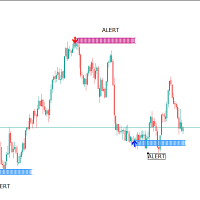
FARMAN PRO is a comprehensive trading system designed to simplify market analysis by combining Trend Filtering, Market Structure (SMC), and Order Blocks into a single, interactive dashboard.
Unlike simple indicators that generate signals based on a single condition, FARMAN PRO uses a Multi-Factor Confluence Algorithm. It is designed for manual traders who need a clean chart and reliable technical context for decision-making.
📊 Trading Logic
The system is built on three core pillars. A signal is valid only when these elements align:
- Farman Trend Filter: A proprietary algorithm (Static or Dynamic mode) that determines the dominant market direction using volume and price action.
- Market Structure (SMC): Automatically identifies Break of Structure (BoS) and Change of Character (CHoCH) to confirm momentum shifts.
- Crystal Order Blocks (MTF): Displays institutional supply/demand zones from the current and higher timeframes (e.g., seeing H4 zones on M15).
🛠 Key Features
- Non-Repainting Signals: Entry arrows appear at the close of the candle and do not vanish or shift.
- Interactive Dashboard: Easily switch timeframes and monitor Trend/OB status directly from the chart buttons.
- Multi-Timeframe Analysis: The indicator scans higher timeframes to prevent trading against major support/resistance levels.
- Session Management: Visualizes active trading sessions (Sydney, Tokyo, London, NY) to highlight liquidity hours.
- Smart Alerts: Notifications via Mobile, Email, and Pop-up when a valid setup occurs (e.g., CHoCH + Trend Match).
⚙️ Parameters & Settings
The indicator is fully customizable via the inputs tab:
- FARMAN Trend:
- Farman_Mode : Choose between Static (smoother) or Dynamic (responsive to volume) calculation.
- Farman_Period : Adjust the sensitivity of the trend line.
- Entry Signals:
- Show_Entry_Signals : Toggle Buy/Sell arrows on/off.
- Entry_Signal_Gap : Adjust the distance of the arrow from the candle.
- Crystal OB (Order Blocks):
- HigherTF_Init : Select the higher timeframe to monitor for zones.
- OB_PreventOverlap : Keeps the chart clean by merging overlapping zones.
- Structure:
- Structure_Sensitivity : Adjusts how minor or major the swing points (HH/LL) should be.
- Show_CHoCH / Show_BoS : Toggle structure lines.
- Sessions:
- Enable or disable specific sessions (e.g., show only London & New York).
💡 Recommendations
- Timeframes: Valid on all timeframes. Recommended: M15 for entries with H1/H4 for Order Block filtering.
- Symbols: Works on all pairs (Forex, Metals, Indices, Crypto).
- Money Management: This tool provides entry precision; always use a stop loss at the nearest structural Low/High or Order Block.
Author's Note:
Please test the FREE Demo version in the strategy tester to understand how the dashboard and structure lines adapt to market movements before purchasing.
[Limited Time Launch Price Available]