Advanced Breakout Scanner Dashboard
- Indicators
- Sivakumar Subbaiya
- Version: 7.0
- Updated: 29 September 2025
- Activations: 20
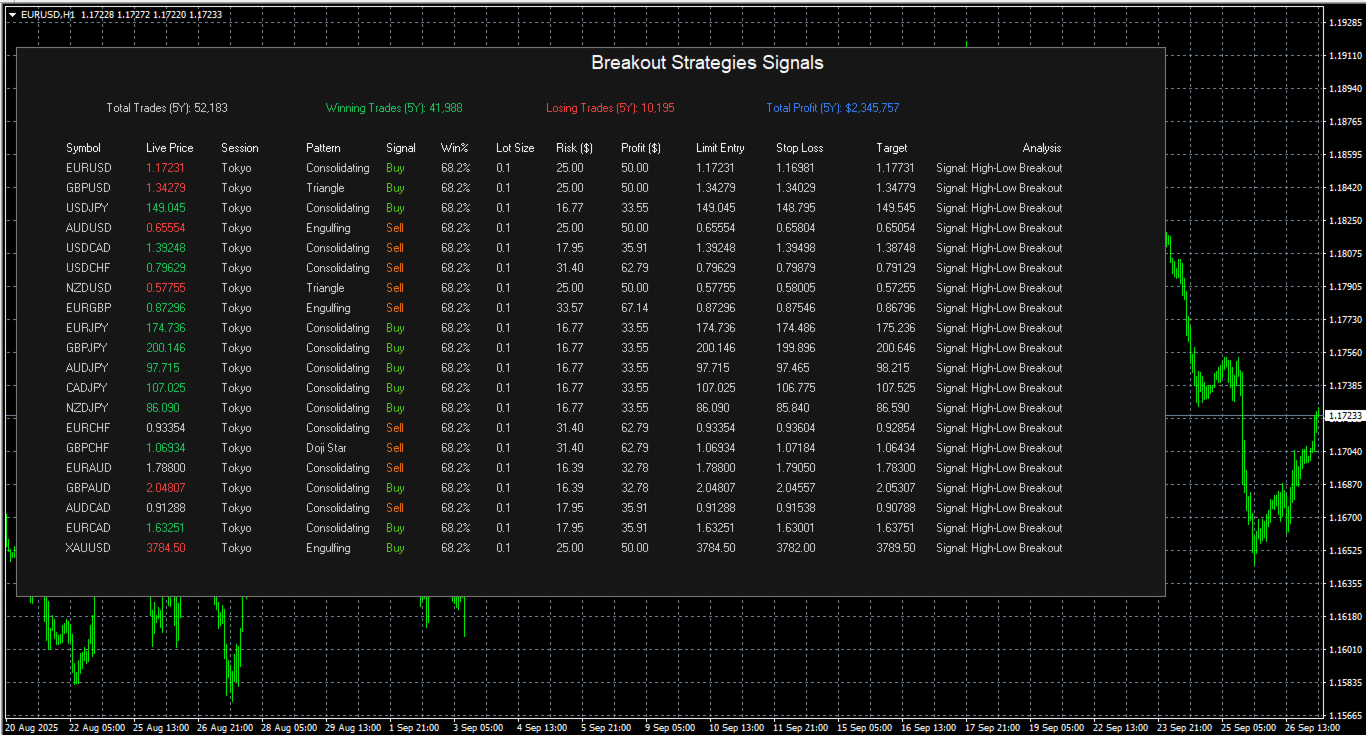
Stop missing powerful breakout opportunities! The Advanced Breakout Scanner Dashboard is a professional-grade trading tool that monitors up to 28 currency pairs in real-time, scanning for ten unique high-probability breakout strategies simultaneously. Attach it to a single chart to get a complete overview of the entire market, instantly identifying the best trading setups as they happen.
This is not just a signal indicator; it's a complete trading dashboard designed for serious breakout traders. Get clear buy/sell signals with precise entry, stop loss, and target levels, plus an instant analysis of the breakout type.
Key Features
-
Comprehensive Multi-Pair Scanning: Monitors all 28 major and cross-currency pairs from one convenient panel.
-
10 Powerful Breakout Strategies: Utilizes a wide range of proven strategies, from session breakouts (Asian, London, New York) to technical patterns (Triangles, Flags) and volatility channels (Bollinger Bands, Keltner Channels).
-
All-in-One Trading Panel: The intuitive dashboard displays everything you need to make informed decisions:
-
Symbol & Live Price: Keep track of every pair.
-
Trigger Strategy: Instantly see which strategy generated the signal.
-
Clear Signal: Bold, color-coded BUY or SELL alerts.
-
Dynamic Win %: A built-in performance statistic that tracks the historical win rate of the most recent signal type for that pair, giving you an edge of confidence.
-
Precise Levels: Automatically calculated Entry, Stop Loss, and Target prices.
-
Quick Analysis: A short description of the breakout pattern (e.g., "Bullish Session BO").
-
-
Fully Customizable: You have complete control. Enable or disable any strategy and customize all key parameters, including session times, indicator periods, risk-to-reward ratio, and dashboard colors.
-
Efficient and Lightweight: The indicator is optimized to run smoothly without slowing down your MT4 terminal.
Strategies Included
-
London Session Breakout
-
New York Session Breakout
-
Asian Range Breakout
-
Opening Range Breakout
-
Previous Day High-Low Breakout
-
Bollinger Band Breakout
-
Keltner Channel Breakout
-
Donchian Channel Breakout
-
Flag & Pennant Pattern Breakout (Simplified)
-
Triangle Pattern Breakout (Simplified)
Whether you are a day trader or a swing trader, the Advanced Breakout Scanner Dashboard is the ultimate tool to streamline your analysis, save you hours of screen time, and help you systematically capture the market's most explosive moves. Gain a powerful edge and take control of your breakout trading today!
Advanced Breakout Scanner Dashboard - FAQ
1. What is the Advanced Breakout Scanner Dashboard and who is it for?
The Advanced Breakout Scanner Dashboard is a professional trading tool for the MT4 platform designed for serious breakout traders, including both day traders and swing traders. It's a comprehensive dashboard that attaches to a single chart to monitor up to 28 currency pairs in real-time. It simultaneously scans for 10 different high-probability breakout strategies to help traders save time and systematically identify the most explosive trading opportunities.
2. Which trading platform is this dashboard compatible with?
The product description explicitly states that the indicator is designed for and optimized to run on the MT4 (MetaTrader 4) terminal.
3. How does the multi-pair scanning work? Do I need to open a chart for all 28 pairs?
No, you do not. A key feature of the dashboard is its efficiency. You only need to attach it to a single chart. From that one chart, the dashboard will automatically monitor all 28 major and cross-currency pairs, giving you a complete overview of the entire market from one convenient panel.
4. Is this just a signal indicator, or does it provide more information?
It is a complete trading dashboard, not just a simple signal indicator. Besides providing clear BUY or SELL alerts, it also gives you precise, automatically calculated levels for Entry, Stop Loss, and Target, along with an instant analysis of the breakout type (e.g., "Bullish Session BO").
5. Can you explain the 'Dynamic Win %' feature?
The 'Dynamic Win %' is a built-in performance statistic. For any given signal that appears on the dashboard, this feature tracks and displays the historical win rate of the most recent signals of that same strategy type for that specific currency pair. This gives you an added layer of confidence by showing how that particular setup has performed in the recent past.
6. I only trade specific breakout strategies. Can I choose which ones are active?
Yes, the dashboard is fully customizable. You have complete control to enable or disable any of the 10 included strategies. This allows you to tailor the scanner to your personal trading plan and only receive alerts for the setups you are interested in.
7. How customizable are the strategy parameters?
The dashboard offers deep customization. You can adjust all key parameters for the strategies, including:
-
Session times (Asian, London, New York)
-
Indicator periods (e.g., for Bollinger Bands, Keltner Channels)
-
The risk-to-reward ratio used for calculating target levels
-
The colors and visual appearance of the dashboard itself
8. What 10 breakout strategies does the scanner use?
The scanner is programmed to detect breakouts from the following 10 strategies:
-
London Session Breakout
-
New York Session Breakout
-
Asian Range Breakout
-
Opening Range Breakout
-
Previous Day High-Low Breakout
-
Bollinger Band Breakout
-
Keltner Channel Breakout
-
Donchian Channel Breakout
-
Flag & Pennant Pattern Breakout (Simplified)
-
Triangle Pattern Breakout (Simplified)
9. Will running the scanner on 28 pairs and 10 strategies slow down my MT4 terminal?
According to the description, the indicator is designed to be efficient and lightweight. It has been optimized to run smoothly without significantly slowing down your MT4 terminal, allowing you to maintain a responsive trading environment.
10. Do the signals repaint?
A breakout signal, by definition, is confirmed once price breaks and closes beyond a specific level (like a session high or a trendline). Therefore, once a valid signal is generated and displayed on the dashboard after the trigger candle has closed, it should be fixed and not repaint.