Drawdown Protector for MT4

  • Utilities
  • Maros Petrik
    Maros Petrik
    Special broker deals for our traders
    I have partnered with the best brokers to offer you better trading conditions: tighter spreads, lower commissions and faster trade execution. These improvements allow my expert advisors to perform at their best and increase your profits.
  • Version: 1.0
  • Activations: 10
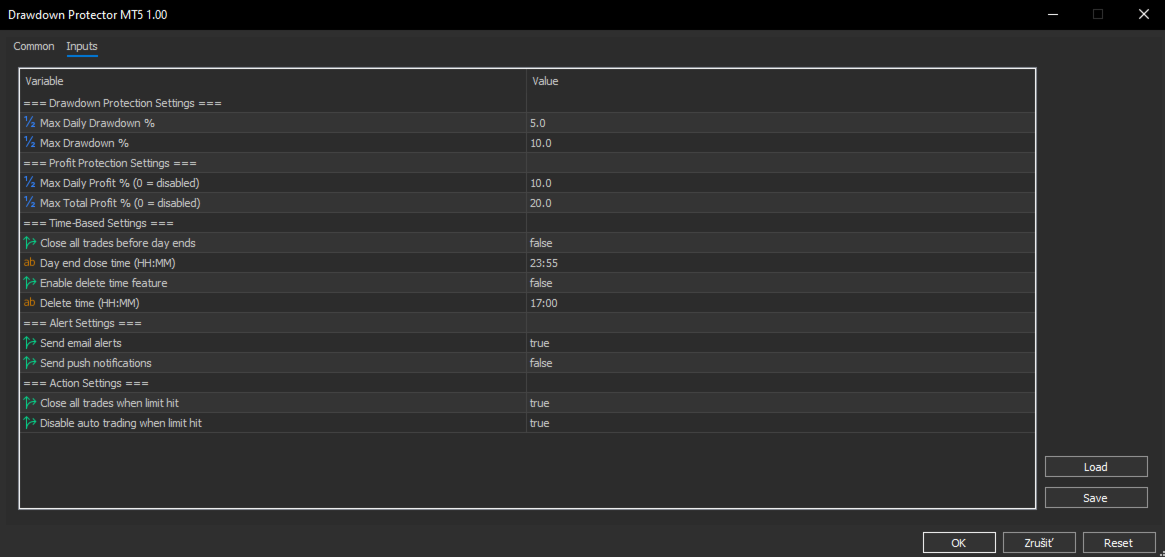
Drawdown Protector EA is a comprehensive risk management and account protection system designed for MetaTrader 4. This advanced Expert Advisor provides automated monitoring and protection of your trading account through multiple safety mechanisms, profit-taking features, and time-based controls. Whether you're a day trader, swing trader, or algorithmic trader, this EA acts as your ultimate safety net and profit guardian

Core Protection Features Drawdown Protection
  • Max Daily Drawdown %: Automatically closes all trades when your daily losses exceed the specified percentage
  • Max Total Drawdown %: Protects against overall account drawdown from your highest equity peak
  • Real-time monitoring: Continuously tracks your account equity and calculates drawdowns
  • Smart calculation: Daily drawdown resets automatically at the start of each trading day
Profit Protection
  • Max Daily Profit %: Secures daily profits by closing all trades when target is reached
  • Max Total Profit %: Locks in overall profits when your total profit target is achieved
  • Flexible settings: Set to 0 to disable either profit limit if not needed
  • Profit preservation: Prevents giving back hard-earned gains during volatile market conditions
 Time-Based Controls Day End Close Feature
  • Automatic daily closure: Closes all trades before the trading day ends
  • Customizable time: Set exact time (default 23:55 - 5 minutes before midnight)
  • Risk elimination: Removes overnight gap risk and weekend exposure
  • Perfect for day traders: Ensures no positions are held overnight
Delete Time Feature
  • Scheduled closure: Closes all trades at a specific time you define
  • Flexible timing: Set any time during the day (e.g., 17:00 for London close)
  • Multiple use cases: End trading at market close, before news events, or personal schedule
  • Daily reset: Automatically reactivates for the next trading day
 Manual Controls One-Click Close Button
  • Instant access: Red button prominently displayed on your chart
  • Emergency closure: Immediately close all positions and pending orders
  • No confirmation needed: Fast execution for urgent situations
  • Always accessible: Button remains visible while EA is active
 Alert System Multi-Channel Notifications
  • Email alerts: Detailed notifications sent to your email when limits are triggered
  • Push notifications: Instant alerts to your mobile device via MT4 app
  • On-screen alerts: Pop-up alerts directly in  terminal
  • Comprehensive information: All alerts include account details, trigger reason, and current equity status
Alert Triggers
  • Drawdown limits exceeded
  • Profit targets reached
  • Time-based closures executed
  • Manual button closure performed
 Advanced Features Smart Monitoring
  • Peak equity tracking: Automatically tracks your highest account equity for drawdown calculations
  • Daily reset functionality: All daily limits reset automatically at start of new trading day
  • Real-time calculations: Instant updates of all percentages and status
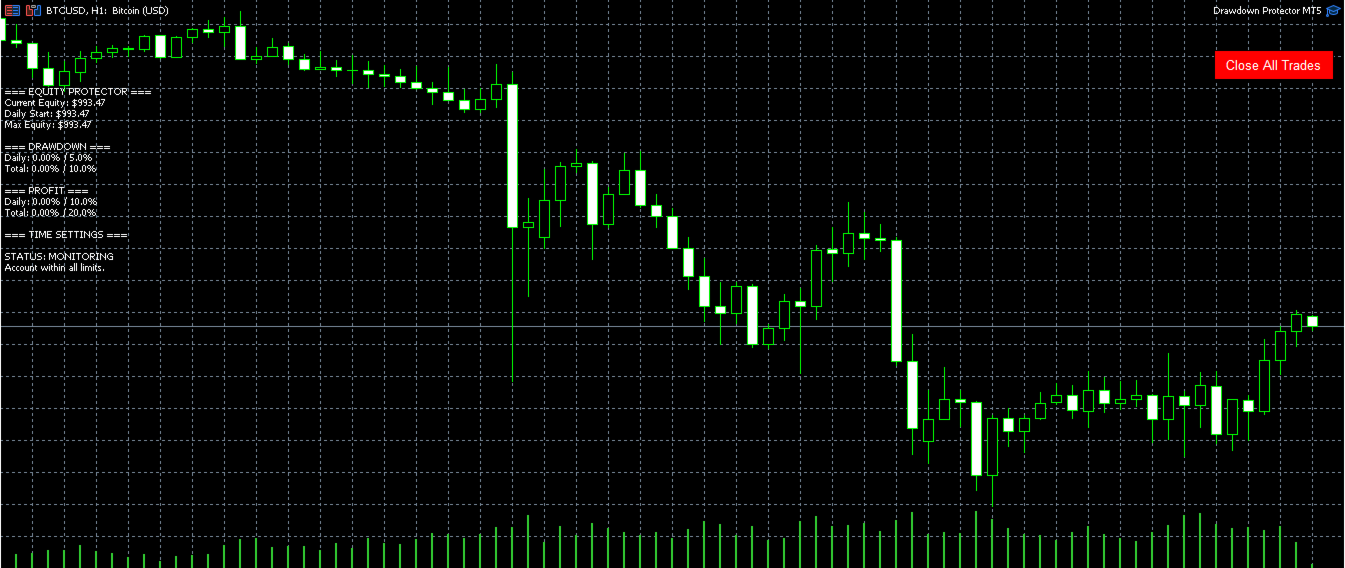
  • Visual status display: Comprehensive information displayed directly on your chart
Auto-Trading Controls
  • Trading disable option: Can automatically disable auto-trading when limits are hit
  • Protection persistence: Once triggered, protection remains active until new trading day
  • Manual override: Use the button to close trades even when auto-trading is disabled
 Status Display Comprehensive Chart Information

The EA displays real-time information directly on your chart including:

Account Information:

  • Current equity amount
  • Daily starting equity
  • Maximum equity reached

Drawdown Status

Profit Status

Time Settings

Overall Status

  • Installation & Setup
    1. Download and Install
    2. Attach to Chart: Drag onto any chart and configure settings
    3. Enable Auto-Trading: Ensure auto-trading is enabled in terminal
    4. Configure Alerts: Set up email/push notifications in terminal settings
    5. Start Trading: The EA immediately begins monitoring your account
Recommended products
️ KiPollator Gemini Tank 7.2 GOLD (MT4 Edition) — Neural Network Trading System of Higher Logic KiPollator Gemini Tank is not just an Expert Advisor. It is a comprehensive trading operating system that combines trend-based grid logic, an independent sniper module, and an AI pattern analytics system. The EA was built with a focus on maximum deposit survivability: it does not use blind martingale, but applies dynamic step calibration, probability analysis from a neural network, and a three-leve
Financial Radar GFX
Yasir Mohammed Sachit Sachit
Gold Trend Rider – Automated Expert Advisor for XAUUSD Trading Disclaimer : Trading Gold (XAUUSD) involves significant risk. Past performance does not guarantee future results. Test on a demo account and apply proper risk management before live trading. Overview Gold Trend Rider is a fully automated Expert Advisor specifically designed for Gold trading. It leverages the Parabolic SAR indicator to detect trend direction and open trades accordingly. Its trailing stop mechanism manages positions d

Exp COPYLOT CLIENT for MT4
Vladislav Andruschenko
4.69 (65)
Professional Trade Copier for MetaTrader 4 Fast, professional, and reliable trade copier for MetaTrader 4 . COPYLOT helps you copy Forex trades between MetaTrader 4 and MetaTrader 5 terminals with flexible synchronization for different account setups. COPYLOT MT4 version supports: MetaTrader 4 to MetaTrader 4 MetaTrader 5 Hedge to MetaTrader 4 MetaTrader 5 Netting to MetaTrader 4   MT5 version Full Description + DEMO + PDF How To Buy How To Install How to get Log Files How To Test and Optimize A
VR Smart Grid
Vladimir Pastushak
4.29 (168)
VR Smart Grid is a full-featured Expert Advisor for MetaTrader 4 and MetaTrader 5, built on the classical grid trading strategy. The robot independently opens positions, manages them and closes them in parts, creating an efficient order grid that adapts to changing market conditions. Over 15 years of development, the EA has gone through thousands of variations and tests — it is the result of systematic refinement on real and demo accounts. Set files, demo versions of the product, instructions an
Stream Z50
Evgeniy Zhdan
Scalping trading robot. The EA monitors the stable direction of the trend and works in its direction. The maximally optimized code of the advisor allows you to work with minimal delays and minimal terminal load. The Expert Advisor has been successfully tested since 2015 with basic settings. It is recommended to use basic settings for EURUSD and GBPUSD trading instruments (with any prefixes and postfixes), timeframe 5 minutes. Trading results will be better with low spreads and low commissio
Cyberosaur Ex
Maryna Shulzhenko
The     Cyberosaurus  bot is an innovative next-generation bot that serves as a powerful tool for trading in the classic Forex market and with cryptocurrencies (for corresponding brokers). It operates with the majority of pairs, so it is advisable to test it before using it on a specific pair. It is specifically designed to work with these markets, without the ability to trade other assets such as stocks or indices. The main control parameters of the bot are presented in a convenient and conci
This robot trades a pair of two symbols at the go and as such it cannot be tested with strategy tester in Metatrader 4. The reason being that Metatrader 4 strategy tester cannot synchronize price timing for more than one symbol at the time. To test this robot successfully, one has to run it in real-time on a demo account and monitor it for days. Statistical Arbitrage Cointegrated Pairs Trading Robot is an expert advisor executable on any PC running Metatrader 4. A linear regression is applied on

An easy-to-use advisor, but with a complex internal algorithm for making trading decisions and subsequent support of open positions. The advisor is not demanding on equipment and network connection speed. It can also work perfectly on a wireless Internet connection. The trading algorithm looks for the best entries to open market positions, but there is no such thing as 100% constant luck in this world. Therefore, the trading volume is not used all at once, but is divided into parts to improve
MTR BTC spot
Eduard Gluhov
MTR BTC spot - алгоритм данного эксперта  покажет, где можно оптимально набирать позиции на споте, открывая сделки в терминале имейте ввиду что торговля с плечом особенно на такой паре как BTC USD очень рискованная, и тем не менее эксперт справляется со своей задачей если не превышать риски. И всё же я бы советовал просто дублировать уровни покупок на споте, эти уровни покажет вам советник открывая сделки, и сообщит вам об открытии по MetaQuotes ID. Торговля ведётся на таймфрейме H4. Я рекомендо
Phoenixvest
Sahar Eisa Rezaei
The "Phoenix vest" Expert Advisor is a powerful solution based on advanced market analysis and data processing technologies. Utilizing cutting-edge algorithms for time series and multitimeframe analysis and complex mathematical models, it ensures high accuracy in forecasts and automates trading processes. The EA is designed to combine performance and reliability, making it an effective tool for trading.   Advantages of The "Phoenix vest" Expert Advisor: Realistic Testing:  Trades executed duri
Carousel
Andriy Sydoruk
Carousel expert system compensates drawdowns. The main indicator is Divergents . The EA allows working in one direction (for example, sell order series), while another direction (for example, buy order series) is in drawdown (compensation mode). If series in both directions operate in normal mode, the system does not switch to compensation mode. If a drawdown is detected in one of the directions, the EA goes into the compensation mode and starts compensating the loss-making series by the profita
Eclipse
Maksim Neimerik
This is a versatile Expert Advisor for trading on any currency pairs. The EA applies only Moving Average in trading. When a price retreats to a preset distance, the robot places a grid of pending orders and averages the profit while they are opened. A news filter has been added to the Expert Advisor! Recommended Usage Low spread; Currency pair - any (recommended - EURUSD and GBPUSD); Timeframe - М30; In the news filter settings, it is recommended to set 30 minutes before and 30 minutes after the
King Grid
Luis Mariano Vazquez Marcos
King Gold Grid Presentamos con orgullo el revolucionario Asesor Experto de Sistema Grid, una obra maestra creada por  Mr Beast. Este excepcional producto se distingue como uno de los mejores en su categoría, destacando por su magnífica gestión de riesgos y especialización en el trabajo con el oro. Diseñado meticulosamente para optimizar la eficiencia y maximizar los beneficios, este asesor experto se erige como un líder indiscutible en el mundo de los sistemas de rejilla. Su capacidad para adapt
Golden Apex Trader
Mazhar Ul Hassan Noorul Hassan Noor Ul Hassan
Golden Apex Trader is a high-performance Expert Advisor specifically designed for trading XAUUSD (Gold) on the M5 timeframe. Built on a custom candlestick pattern strategy developed and tested by the author, this EA is optimized for traders looking for a precise and reliable automated scalping solution in the gold market. Key Features: Specialized for XAUUSD (Gold) on M5 timeframe Advanced candlestick pattern-based trading strategy High-precision scalping entries and exits Fully customizable in
Simple Adn Economic
Luis Mariano Vazquez Marcos
Simple and economic RECOMENDACION EUR USD H1 LOTAJE 0.01 PARA EMPEZAR El asesor experto que he desarrollado se basa en el análisis de velas y el análisis fundamental para tomar decisiones de trading. Combina el estudio de patrones de velas con el monitoreo de eventos económicos relevantes para identificar posibles oportunidades comerciales. Este robot de trading de Forex ha sido desarrollado por MRBEAST como una herramienta para facilitar el trading intradía. Tenga en cuenta que el uso de este r
Requirements Hedging account! EA work with any brokerage conditions EA should run on a VPS continuously Information Working symbol EUR, USD, GBP, GOLD, any pair Working Timeframe: M15/M30/H1 Min deposit: $500 (1 Pair) Min leverage 1:500      MM = TRUE (Automatic lot calculation according to your risk) MM = FALSE (No Automatic lot calculation)  Risk = Risk % will work if your Auto Lot is True  Lot Size= If MM is False then your manual lot will work        Multiplier  = Multiplier lot siz
Jet Punch
Didit Haryadi Saputra
Jet Punch is another best expert advisor for MT4,  can help you make money while you sleep by automatically entering and exiting trades. It trades by opening trades every day and closing them at the right time to ensure you always earn a profit. The software is very simple and can be used by both beginner and experienced traders.  Jet Punch was tested and has successfully passed the stress test with slippage and commission approximate to the real market condition. Recommendations: Currency pair:
Customized Copy MT4
Kyra Nickaline Watson-gordon
Customized Copy is a Multi-Terminal visual trade copying utility that supports Metatrader4 and Metatrader5 for Trade Copying.  You can activate EA on 10 different PCs/VPS. On each PC/VPS can install on Unlimited Terminals. Specifications :     Real Time, Multi Terminal - Multi Account - MT4/MT5 trade copying (support over 50 accounts at same time)     All settings are input visually.     Visual display and modify of copy map and network     Each copy path can be used with different settings

VolnaFX
Roman Meskhidze
4.67 (15)
LAUNCH PROMO Next price:        $349 The price will be rise to limit the number of users for this strategy The "Volna FX" Expert Advisor is a representative of robots trading from levels. Levels can be built automatically, or they can be rigidly set in the parameters of the Expert Advisor. CHECK REAL SIGNAL :  https://www.mql5.com/en/signals/847709 The uniqueness of the advisor is that it can work both with averaging and using the martingale principle, or without it, i.e. use a clear take profi
Goldenclaw
Sigit Hariyono
Goldenclaw EA   is a unique scalping Trading Robot based on multi layered neural network and various default indicators. The algorithm works by calculating values from different timeframes to provide output signal for the current timeframe. This EA does not use dangerous techniques like martingale, averaging, grid or hedging. All orders are protected by stop loss and only one trade direction buy or sell depend on given algorithm. Input Parameters: Expert Name   - EA name and trades comment. M
Hello traders! I present to you Argo Gold Edition - an expert built for gold trading, which is tailored to the specifics of gold movements on international markets. The basis of its logic is that it follows profitable patterns drawn from past periods. Mathematical algorithms are based on the correlation between the values of the indicators used and the corresponding movement of the price of gold. The expert is built on the basis of the ARGO series. It specializes in GOLD / XAUUSD trading. 2 or 3
True HFT
Thomas Bradley Butler
5 (1)
YOU MUST OPTIMIZE BEFORE TESTING AND BUYING TO MAKE SURE IT WORKS FOR YOU. SHOW YOUR SUPPORT MAJOR UPDATE IN TIME SO USER CAN OPTIMIZE.  STILL USE ULTRA VPS FOR UNDER MILLISECONDS.  RESULTS WILL VARY PER BROKER AND VPS FOR ORDERS. MT5 Version:  https://www.mql5.com/en/market/product/102748 High-Frequency Trading EA is best for Pro level true FX accounts that allow HFT + getting filled with real liquidity .   If you have this, you already know what is needed and you have what it takes.   Read on
Quantumcross
Carlos Mendez Sanchez
QuantumCross – The EA You’ve Been Looking For! Recommended currncy pairs: AUDCAD, AUDNZD, NZDCAD Ideal timeframe: M15 ️ Recommended Risk & Leverage Settings To ensure smooth operation and avoid free margin issues, please consider the following recommendations: Leverage 1:100 → Safe to use up to significant risk even on accounts starting from $1000 . Leverage 1:500  → $500 Our EA automatically defaults to low-risk mode for maximum safety, but you always have the flexibility to adjust risk pa
Speedy EA
AL MOOSAWI ABDULLAH JAFFER BAQER
Trading using Experts are the best ways to win in Forex! Here are our second Expert Advisor, where you can Set and forget! Time frame: M1 All currency Pairs will work perfectly on the EA Account type: All (If hedging is not allowed, please disable either Sell or Buy) Please please do not take unnecessary risks. (Trading is risky, and there are no guarantees for winning)   We wish you successful trading. (Trading is risky, and there are no guarantees for winning)   Check our other pro
Hamster Original (Very Fast, Easy Setup, More Power!) You can check live Hamster Original trading  on  Telegram_Channel The  Hamster Original  is a Trading Robot with no use of Classic martingale. Schedule scalping Options. it uses some Indicators as a filter to maximize Correct entries. Recommendations :  Lot = 0.01. ( if autolot enabled  Allow (initial Lot) per (xx)USD  = 50 ). Balance  = 100 USD. Pair = EURUSD. TimeFrame = 5Min. Broker = Trusted Brokers Inputs descriptions :  Initial Lot
Ilan MT4
Andrey Khatimlianskii
5 (1)
The original Ilan EA for MetaTrader 4 This is the original Ilan EA for the MetaTrader 4 trading terminal. The strategy needs no advertising as it is well known even to novice traders. Settings of the Expert Advisor The Expert Advisor can easily be set, while allowing you to adjust any important parameters of the strategy. Available Features: Unique  MagicNumber  for identification of trades; Trade direction option ( Trade direction ): buy only, sell only, or both directions simultaneously; Step
Hello You can copy orders between terminals for any computer via Internet (MT4 to MT4) or (MT4 to MT5) or (MT5 to MT4) or (MT5 to MT5) it's fast Open orders Modification Stop Loss and Take Profit Close Orders This is EA (slave) put it in Experts folder you must buy  (Copy orders for any computer via Internet Master) EA too from this link if you want to copy from MT4 https://www.mql5.com/en/market/product/55096 if you want to copy from MT5 https://www.mql5.com/en/market/product/56397 Please w
Hello You can copy orders between terminals for any computer via Internet (MT4 to MT4) or (MT4 to MT5) or (MT5 to MT4) or (MT5 to MT5) it's fast Open orders Modification Stop Loss and Take Profit Close Orders This is EA (Master) put it in Experts folder you must buy  (Copy orders for any computer via Internet Slave) EA too from this link if you want to copy to MT4   https://www.mql5.com/en/market/product/55097 if you want to copy to MT5   https://www.mql5.com/en/market/product/56414 Please w
Trend BtD
Roman Meskhidze
LAUNCH PROMO Next price:        $249 The price will be rise to limit the number of users for this strategy The "Trend BtD" Expert Advisor is a representative of robots trading breakout levels. Levels built automatically. The uniqueness of the advisor is that it work WITHOUT averaging and using the martingale principle. ALL orders have StopLoss and TakeProfit. VERY IMPORTANT: Always load SET Files for each pair! Adjust Lot size to yours deposit! HOW TO TEST: 1. Choose  H1  TimeFrame 2. Load my  
Elbrus FX
Vitalii Manolaki
The Expert Advisor strategy is based on the intersection of moving averages. Buy - the fast МА (Moving Average) crosses the slow MA upwards, sell - fast МА crosses the slow MA downwards. It uses an adaptive grid and averaging with a time delay. Adapted for 4 and 5-digit quotes. Working timeframe is H1. Recommended initial deposit is at least 1000 units of the base currency. Parameters MaFast_period , MaSlow_period – periods of the fast and slow moving averages; MaFast_method , MaSlow_method – a
Buyers of this product also purchase
Local Trade Copier EA MT4
Juvenille Emperor Limited
4.96 (110)
Experience exceptionally  fast trade copying with the Local Trade Copier EA MT4 . With its easy 1-minute setup, this trade copier allows you to copy trades between multiple MetaTrader terminals on the same Windows computer or Windows VPS with lightning-fast copying speeds of under 0.5 seconds. Whether you're a beginner or a professional trader, the Local Trade Copier EA MT4 offers a wide range of options to customize it to your specific needs. It's the ultimate solution for anyone looking to inc
Forex Trade Manager MT4
InvestSoft
4.98 (443)
Trade Manager MT4 is an advanced position size calculator and trade management tool for MetaTrader 4, designed to help traders plan trades faster, control risk more precisely, and manage open positions directly from the chart. It combines order placement, risk based lot calculation, Stop Loss and Take Profit management, Break Even, Trailing Stop, Partial Close, Equity Protection, and external trade management in one panel. Whether you trade forex, indices, metals, commodities, or crypto, Trade M
Trade Assistant MT4
Evgeniy Kravchenko
4.43 (197)
It helps to calculate the risk per trade, the easy installation of a new order, order management with partial closing functions, trailing stop of 7 types and other useful functions. Additional materials and instructions Installation instructions   -   Application instructions   -   Trial version of the application for a demo account Line function -   shows on the chart the Opening line, Stop Loss, Take Profit. With this function it is easy to set a new order and see its additional characteris
Zone Trader MT4
Lee Samson
5 (1)
Trade support and resistance or supply and demand zones automatically once you have identified the key areas you want to trade from. This EA allows you to draw buy and sell zones with a single click and then place them exactly where you expect price to turn. The EA then monitors those zones and will automatically take trades based on price action you specify for the zones. Once the initial trade is taken, the EA will then get out in profit at the opposite zone you place, which becomes the target

News Filter EA MT4
Rashed Samir
5 (9)
News Filter EA: Advanced Algo Trading Assistant News Filter EA is an advanced algo trading assistant designed to enhance your trading experience. By using the   News Filter EA , you can integrate a Forex economic news filter into your existing expert advisor, even if you do not have access to its source code. In addition to the news filter, you can also specify   trading days   and   hours   for your expert. The News Filter EA also includes   risk management   and   equity protection   features
Automatic profit locking when target profit is reached EquityTargetCloser   — is a utility expert advisor for MetaTrader 5 that automatically closes all market positions and deletes pending orders as soon as   equity exceeds the current balance by a specified profit amount . After all positions are closed, the target automatically increases: the new threshold = new balance + specified profit. The EA does not open trades, it only manages existing positions, helping to reliably lock in profit and
DrawDown Limiter MT4
Haidar Lionel Haj Ali
5 (8)
Drawdown Limiter EA You are in the right place if you were searching for Drawdown control, Drawdown limiter, Balance protection, Equity Protection or Daily Drawdown Limit related to Prop Firm, FTMO, or Funded account trading, or if you want to protect your trading account. Have you suffered from controlling your drawdown when trading funded accounts? This EA is meant for you. Prop firms usually set a rule called “Trader Daily Drawdown”, and if it is not respected, you are disqualified.  I am an
Working Trial Download Copy Cat More Trade Copier MT4 is not just a simple local trade copier; it is a complete risk management and execution framework designed for today’s trading challenges. From prop firm challenges to personal portfolio management, it adapts to every situation with its blend of robust execution, capital protection, flexible configuration, and advanced trade handling. The copier works in both   Master (sender) and Slave (receiver)   modes, with real-time synchronization of
Telegram to MT4 Multi-Channel Copier automatically copies trading signals from your Telegram channels directly into MetaTrader 4. No bots, no browser extensions, no manual copying. You receive a signal on Telegram and the EA opens the trade on your terminal in a few seconds. The product includes two components: a Windows application that listens to your Telegram channels, and this Expert Advisor that executes the signals on your MT4 terminal. An MT5 version is also available. Setup guide and app
TradePanel MT4
Alfiya Fazylova
4.84 (95)
Trade Panel is a multi-functional trading assistant. The app contains over 50 trading functions for manual trading and allows you to automate most trading tasks. Before making a purchase, you can test the demo version on a demo account. Download the trial version of the application for a demonstration account: https://www.mql5.com/en/blogs/post/750865 . Full instructions here . Trade. Allows you to perform trading operations in one click: Open pending orders and positions with automatic risk cal
Master Close via Telegram can help you perform some management tasks on MT4/MT5 remotely via your Telegram by one click, easy to set up & use. Demo here (see more Master Notify   Master Control  ) ************************************************************************************ LIST OF COMMANDS: info_acc -  Get account info info_pen -   Get pending orders details info_pos -   Get positions details info_pos_sum -   Get positions summary close_pen -   Delete all pending orders close_pos_all -
Strategy Builder offers an incredible amount of functionality. It combines a trade panel with configurable automation (covert indicators into an EA), real-time statistics (profit & draw down) plus automatic optimization of SL, TP/exit, trading hours, indicator inputs. Multiple indicators can be combined into an single alert/trade signal and can include custom indicators, even if just have ex4 file or purchased from Market. The system is easily configured via a CONFIG button and associated pop-up
The product will copy all telegram signal to MT4   ( which you are member  ) , also it can work as remote copier.  Easy to set up, copy order instant, can work with almost signal formats, image signal, s upport to translate other language to English Work with all type of channel or group, even channel have "Restrict Saving Content", work with  multi channel, multi MT5 Work as remote copier: with signal have ticket number, it will copy exactly via ticket number. Support to backtest signal. How to
PZ Trade Pad Pro MT4
PZ TRADING SLU
3.67 (3)
Effortlessly calculate lot sizes and manage trades to save time and avoid costly errors The Trade Pad Pro EA is a tool for the Metatrader Platform that aims to help traders manage their trades more efficiently and effectively. It has a user-friendly visual interface that allows users to easily place and manage an unlimited number of trades, helping to avoid human errors and enhance their trading activity. [ Installation Guide | Update Guide | Troubleshooting | FAQ | All Products ] One of the k
MT4 to Telegram Signal Provider   turns your trading account into a signal provider. Every trade action, whether manual, by EA or from your phone, is instantly sent as a message to Telegram. You can fully customize the format or use a ready-made template for quick setup. [ Demo ] [ Manual ] [ MT5 Version ] [ Discord Version ]  New: [ Telegram To MT5 ] Setup A step by step user guide is available. Key Features Ability to customize order details sent to subscribers You can create a tiered subs
A professional panel for manual trading that keeps the whole trade cycle in one window on the chart, from a precise entry to protecting your account. Size every position strictly to a defined risk, build the trade with lines directly on the chart using the RR Tool, and place market and pending orders, grids and OCO. The panel takes position management off your hands: partial closing across up to five levels, six types of trailing stop, breakeven and Virtual SL/TP. Daily, weekly and monthly limit
TradeMirror is a trade copier EA for MT4/MT5 platform. Tutorial Please click the Trademirror Tutorial link to view more tutorials. Why TradeMirror We understand the importance of security, stability and privacy for financial software, so we've gone the extra mile to harden these three elements in detail: Provides a user-friendly graphical interface that is easy to operate Focus on privacy and security, suitable for various financial scenarios with privacy requirements for order distribution Prec
FORBEX Market Watch Trading Hours PRO NEWS  Feel free to contact me for support, installation assistance, and upgrade. Professional Market Session, Trading Schedule & Economic News Dashboard for MetaTrader 4 FORBEX Market Watch Trading Hours PRO NEWS is an advanced all-in-one MT4 dashboard designed to provide traders with real-time market session monitoring, broker trading schedules, live countdowns, intelligent voice alerts, and economic news awareness from one clean professional interface. The
CloseIfProfitorLoss with Trailing
Vladislav Andruschenko
4.87 (31)
Close If Profit or Loss with Trailing for MetaTrader 4 — automatic closing by total profit or loss A reliable trade-management utility for MetaTrader 4 that automatically closes positions when the total profit or total loss reaches the level you set. The Expert Advisor monitors open trades, calculates floating profit and loss, can trail profit, and helps close positions faster than manual reaction. MetaTrader 4 is still used by many manual traders, grid traders, scalpers, and Expert Advisor use
Trade Manager Ultimate (MT4/MT5) - Professional Risk & Trailing Management Welcome to   Trade Manager Ultimate   — the ultimate risk management and trailing solution designed to make your manual trading intuitive, precise, and highly controlled. This is not just a dashboard; it's a comprehensive engine for seamless position management and advanced capital protection. Whether you are a professional scalper or a long-term trend follower, Trade Manager Ultimate adapts to your strategy, offering ins
Trade copier MT4
Alfiya Fazylova
4.56 (32)
Trade Copier is a professional utility designed to copy and synchronize trades between trading accounts. Copying occurs from the account / terminal of the supplier to the account / terminal of the recipient, which are installed on the same computer or VPS . PROMOTION - If you have already purchased the "Trade Copier MT5," you can receive the "Trade Copier MT4" for free (for copying MT4 > MT5 and MT4 < MT5). For more detailed information about the conditions, please contact us via private message
Trade Copier Global
Laszlo Tormasi
5 (15)
Trade Copier Global: The name speaks for itself. This copier allows you to copy orders between MT4 terminals even if they are not installed on the same computer. Features Copying trades between MT4 terminals around the world with a short delay. Automatically recognizes symbol prefixes. Can connect many Slaves to the same Master. Supports pending and market orders. Supports partial order close (with limitations, see below) Can send messages and notifications to the Slaves from the Master Several
Copier->Convenient and fast interface interaction, users can use it right away   ->>>> Recommended to use on Windows computers or VPS Windows Features: Diversified and personalized copy trading settings: 1. Different lot modes can be set for different signal sources 2. Different signal sources can be set for forward and reverse copy trading 3. Signals can be set with comments 4. Whether to calibrate the lot according to the contract lot Diversified and personalized copy order settings 2: 1. Dif
Trade panel Sniper
Andrey Kaunov
5 (4)
Простая в управлении Торговая панель обеспечит безопасную торговлю. Вычислит объём сделки от заданного уровня Stop Loss и величины убытка. Поможет рассчитать сейф, и в ноль закрыть неверную сделку. Интуитивно понятный интерфейс делает панель удобной в управлении, освобождая внимание трейдера для принятия решения о входе в сделку. Программа сделает все расчёты за вас. Поэтому работа с помощью панели Снайпер - оптимальное решение для торговли с соблюдением Мани-менеджмента. А это главный ключ к по
Grid Manual MT4
Alfiya Fazylova
4.71 (17)
Grid Manual is a trading panel for working with grid strategies. The utility is universal, has flexible settings and an intuitive interface. It works with a grid of orders not only in the direction of averaging losses, but also in the direction of increasing profits. The trader does not need to create and maintain a grid of orders, the utility will do it. It is enough to open an order and the Grid manual will automatically create a grid of orders for it and will accompany it until the close. Ful
Auto Trade Copier
Vu Trung Kien
4.76 (85)
Auto Trade Copier is designed to copy trades to multiple MT4, MT5 and cTrader accounts/terminals with 100% accuracy. The provider and receiver accounts must be on the same PC/VPS. With this tool, you can copy trades to receiver accounts on the same PC/VPS. All trading actions will be copied from provider to receiver perfectly. This version can be used on MT4 accounts only. For MT5 accounts, you must use Auto Trade Copier for MT5 . Reference: - For MT4 receiver, please download Trade Receiver Fre
Trader Evolution MT4
Siarhei Vashchylka
5 (2)
" Trader Evolution " - A utility designed for traders who use wave and technical analysis in their work. One tab of the utility is capable of money management and opening orders, and the other can help in making Elliott wave and technical analysis. Manual (Be sure to read before purchasing) | Version for MT5 Advantages 1. Trading in a few clicks. Immediate and pending orders are available in the panel 2. Money management. The program automatically selects the appropriate lot size 3. Simplifies
Trading History MT4
Siarhei Vashchylka
5 (9)
Trading History - A program for trading and money management on the history of quotes in stratagy tester. It can work with pending and immediate orders, and is equipped with trailing stop, breakeven and take profit functions. Very good for training and testing different strategies. Manual (Be sure to read before purchasing) Advantages 1. Allows you to test any trading strategy in the shortest possible time 2. An excellent simulator for trading training. You can gain months of trading experience
Telegram to MT4 Coppy
Sergey Batudayev
4.09 (11)
Telegram to MT4: The Ultimate Signal Copying Solution Streamline your trading with Telegram to MT4 , the cutting-edge utility designed to copy trading signals directly from Telegram channels and chats to your MetaTrader 4 platform—without the need for DLLs. This robust solution ensures seamless execution of signals with unparalleled precision and customization options, saving you time and boosting your efficiency. [ Instructions and DEMO ] [ FAQ ] [ How atach logs properly ] [Settings descrition
Custom Alerts AIO: All-in-One Market Scanner – No Setup Required Overview Custom Alerts AIO is the fastest and easiest way to monitor multiple markets for real-time trading signals—without any setup or extra licenses. It comes with all required Stein Investments indicators already embedded, making it the perfect plug-and-play solution for traders who value simplicity and performance. Just load it to any chart and start receiving alerts across Forex, Metals, Crypto, and Indices. Shares can be a
More from author
Kalman Trend Filter – Professional Adaptive Trend Smoother The most accurate and mathematically optimal trend estimator for MetaTrader 5. Built on the classic Kalman Filter (optimal state estimator used in aerospace, robotics and quantitative finance), this indicator delivers a clean, adaptive trend line that reacts intelligently to market noise. Why Kalman Filter? Unlike moving averages or standard smoothers, the Kalman filter continuously estimates the “true” trend while automatically adjust
FREE
Kalman Trend Filter – Professional Adaptive Trend Smoother The most accurate and mathematically optimal trend estimator for MetaTrader 4. Built on the classic Kalman Filter (optimal state estimator used in aerospace, robotics and quantitative finance), this indicator delivers a clean, adaptive trend line that reacts intelligently to market noise. Why Kalman Filter? Unlike moving averages or standard smoothers, the Kalman filter continuously estimates the “true” trend while automatically adjust
FREE
Instant, professional Telegram alerts for every MT5 trade + automatic performance reports What does the EA do? This Expert Advisor sends clean, well-formatted messages directly to your Telegram (private chat, group or channel) the moment any trade is opened or closed on your MT5 account. It also delivers optional daily, weekly and monthly performance reports. Key Features Real-time notifications for every trade OPEN and CLOSE Full trade details: direction, symbol, lot size, open/close prices, S
Instant, professional Telegram alerts for every MT4 trade + automatic performance reports What does the EA do? This Expert Advisor sends clean, well-formatted messages directly to your Telegram (private chat, group or channel) the moment any trade is opened or closed on your MT4 account. It also delivers optional daily, weekly and monthly performance reports. Key Features Real-time notifications for every trade OPEN and CLOSE Full trade details: direction, symbol, lot size, open/close prices, SL
Spread Monitoring System BRIEF DESCRIPTION A spread monitoring and analysis panel that records spread data per minute, stores it without a time limit, and shows when a symbol is cheap or expensive to trade. OVERVIEW Spread is a real trading cost, and it is not constant. It widens around news releases, at rollover, during low-liquidity hours, and it varies by broker. Most traders only see the current spread number in the Market Watch window, with no record of how it behaved five minutes ago, l
Introduction Range breakout trading is one of the most reliable strategies in forex trading, capitalizing on the natural tendency of markets to consolidate before making significant moves.RangeD Breakout takes this classic concept and enhances it with modern risk management techniques and intelligent filtering systems. Unlike many breakout strategies that focus on intraday ranges, this EA specifically targets daily ranges, which tend to be more reliable and less prone to false breakouts. The str
Introducing  Trend Sniper Pro. Its Range Breakout sýstem developer to catch daily trend of the market No  Martingale,  No  Grid , No Averaging, No AI Live Signals - Link  (FusionMarkets)       FEATURES RangeFilter,Trading Hours,Take Profit,Trailing Stoploss Option to use Fixed Lots or Risk % Trading on USDJPY Note:  Its very important to use  RAW, ECN or Zero SPREAD  accounts for best results! How to Setup: Download the EA on your MT5 terminal  Open the chart M5 timeframe. Load the EA onto th
rawdown Protector EA is a comprehensive risk management and account protection system designed for MetaTrader 5. This advanced Expert Advisor provides automated monitoring and protection of your trading account through multiple safety mechanisms, profit-taking features, and time-based controls. Whether you're a day trader, swing trader, or algorithmic trader, this EA acts as your ultimate safety net and profit guardian Core Protection Features Drawdown Protection Max Daily Drawdown %: Automatic
Volatility Weighted Cloud (VWC) – Adaptive Trend & Volatility Indicator Volatility Weighted Cloud is a next-generation adaptive indicator that combines a smooth price cloud with dynamically adjusting volatility bands and real-time trend-colored candles — giving you a clear, non-repainting picture of market direction and strength. Unlike traditional fixed-width clouds or Bollinger Bands, VWC automatically adapts its band width according to current volatility conditions using a percentile-rank
Spread Monitoring System BRIEF DESCRIPTION A spread monitoring and analysis panel that records tick-exact spread data per minute, stores it without a time limit, and shows when a symbol is cheap or expensive to trade. OVERVIEW Spread is a real trading cost, and it is not constant. It widens around news releases, at rollover, during low-liquidity hours, and it varies by broker. Most traders only see the current spread number in the Market Watch window, with no record of how it behaved five min
Filter:
No reviews
Reply to review