HINN MagicEntry Extra

4.71
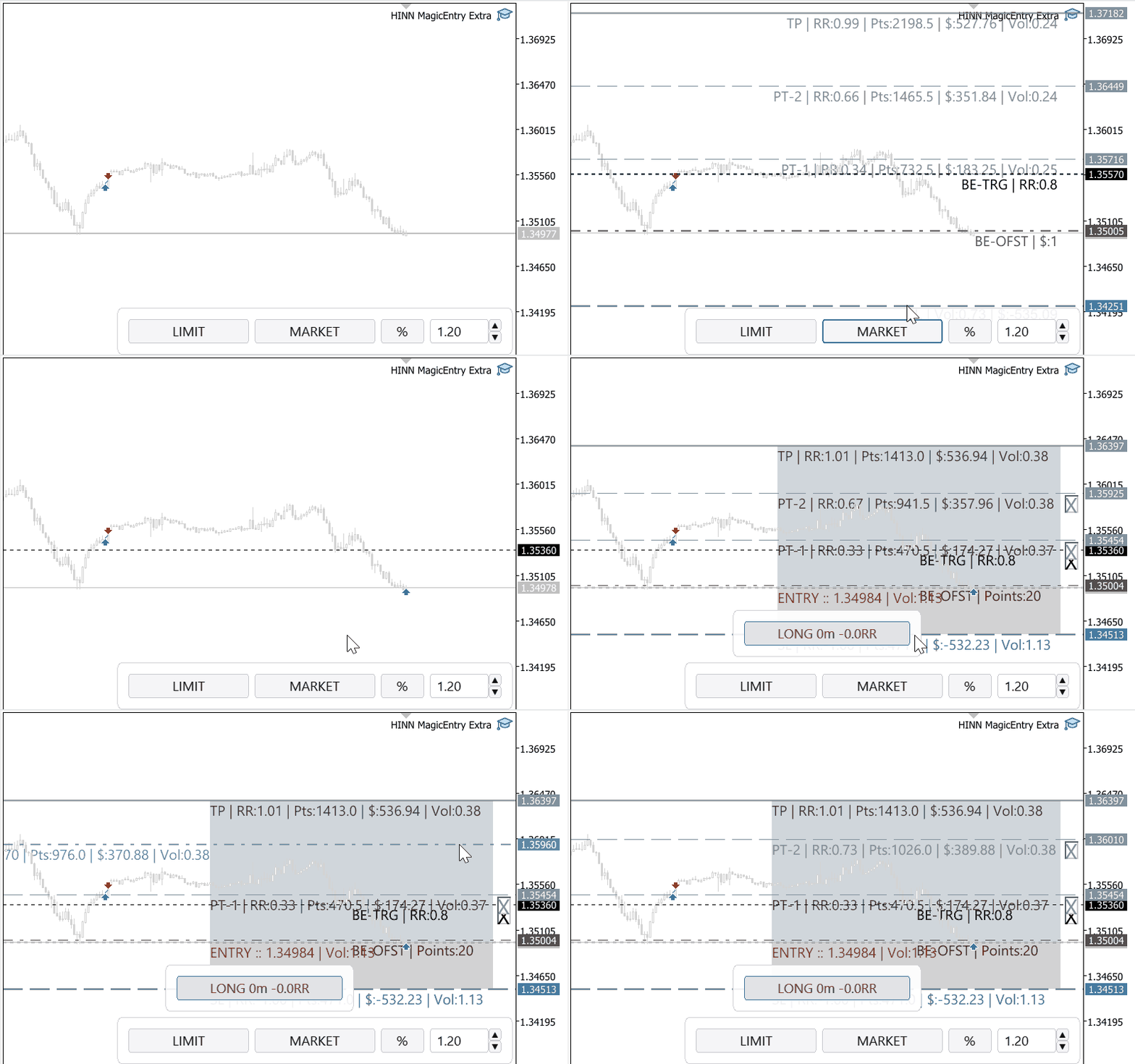
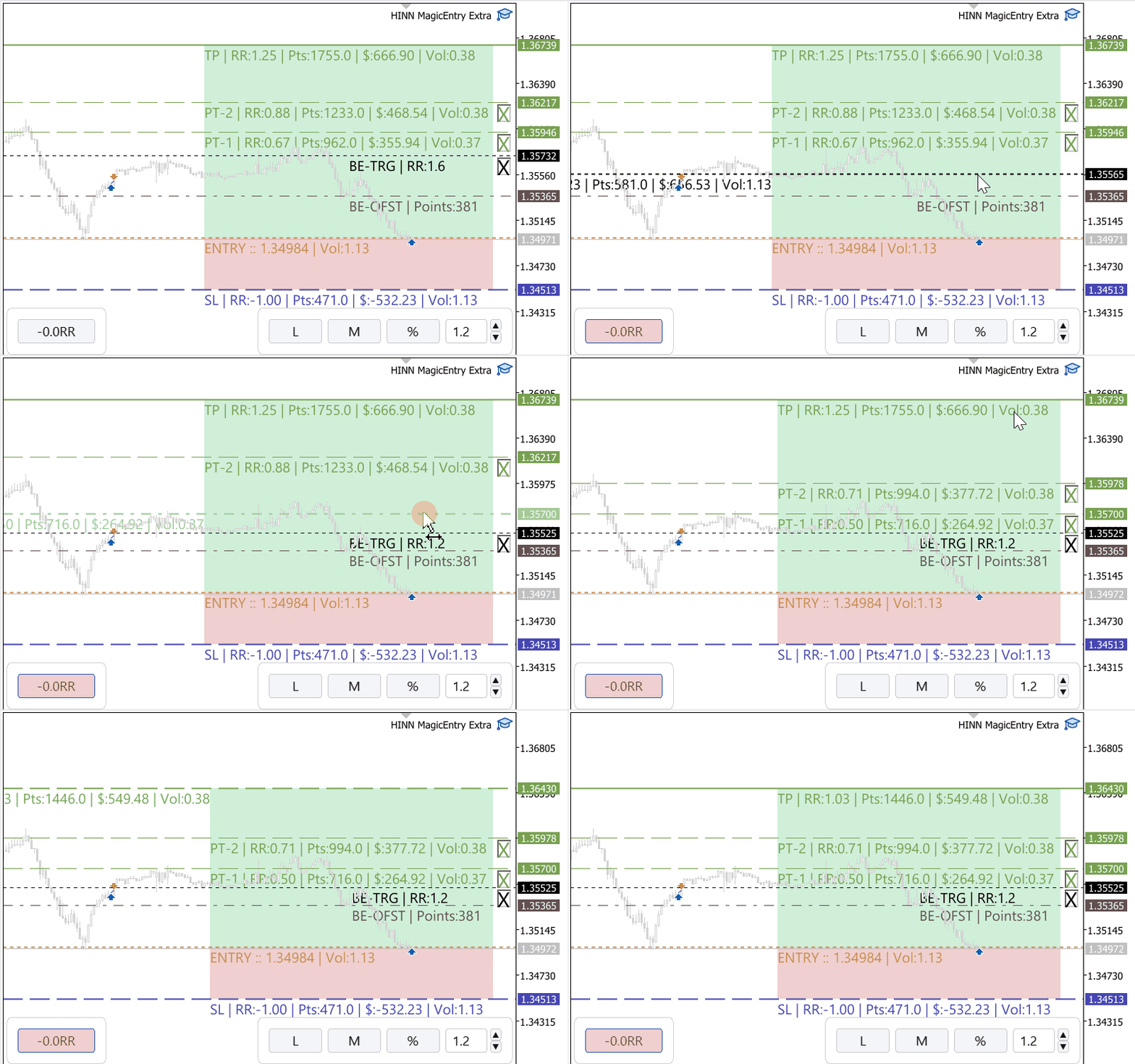
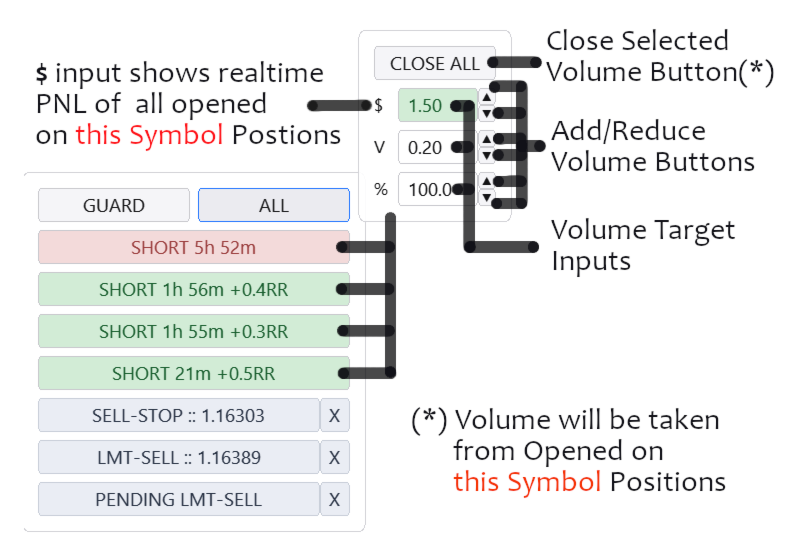
HINN MAGIC ENTRY – the ultimate tool for entry and position management!
Place orders by selecting a level directly on the chart!
Key features:

- Market, limit, and pending orders
- Automatic lot size calculation
- Automatic spread and commission accounting
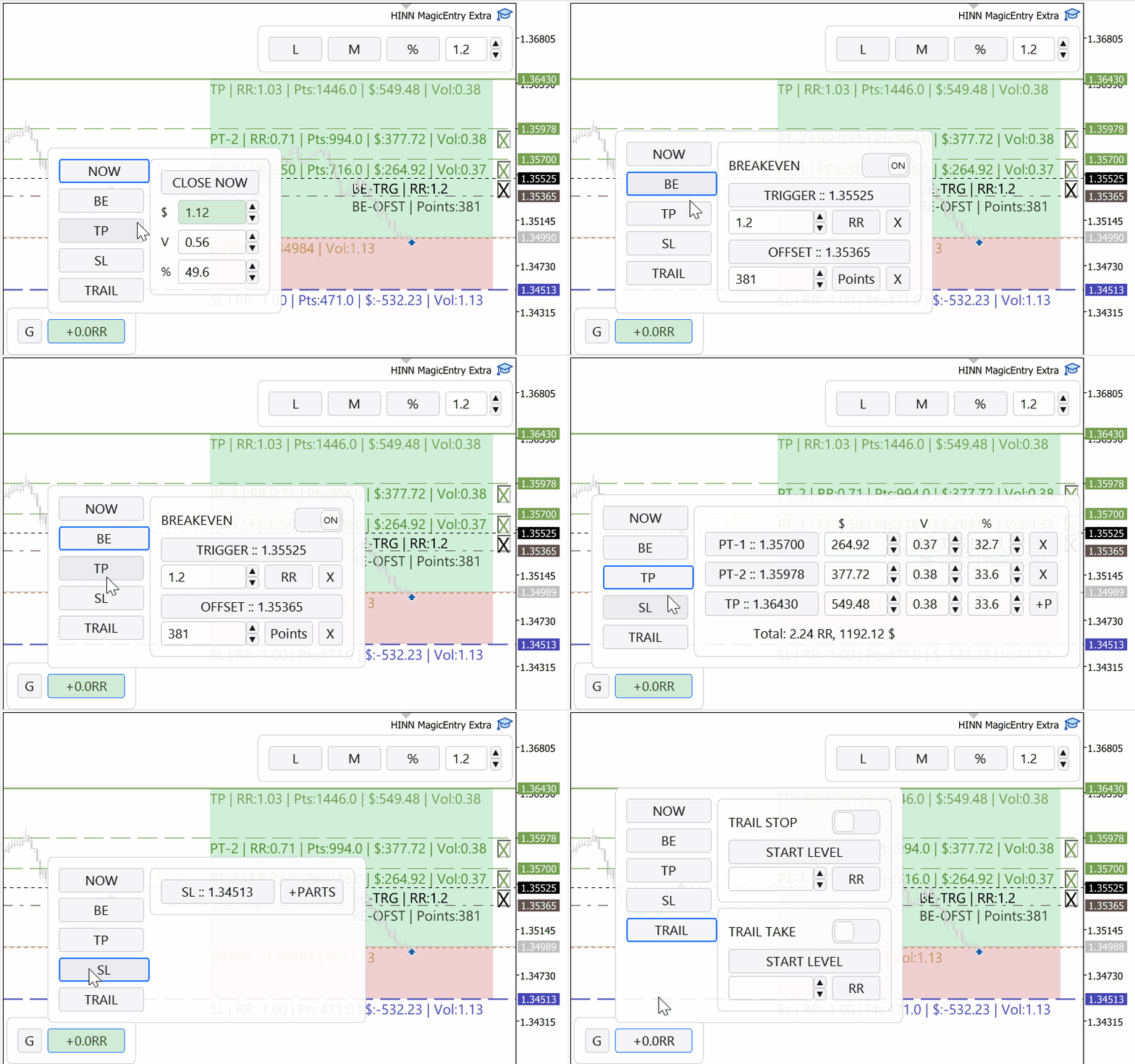
- Unlimited partitial take-profits 
- Breakeven and trailing stop-loss and take-profit functions
- Invalidation leves
- Intuitive, adaptive, and customizable interface
- Works with any assets and account types

Really feels like gamechanging tool. 

Join the ALGOFLOW channel to stay updated and get access to the developers' chat.

レビュー 18
enoruz
668
enoruz 2026.03.10 11:47 
 

good utility thanks

lightman47
31
lightman47 2026.02.27 22:18 
 

Это очень крутой инструмент, я очень рад что купил, хоть и сомневался в начале, нужен ли он мне, но сейчас не знаю как я без него раньше торговал. Пользуюсь около месяца, теперь это незаменимая вещь для меня. Правда БУ глючит иногда при нажатии на кнопку сразу тригерится не давая возможности самому выставить в нужном уровне, а стоп обратно оттянуть не получается, только вручную нужно писать. Так же один раз закрыло позицию полностью когда я нажал кнопку NOW чтобы закрыть часть позы. Но в целом всё супер

halsky_trd
19
halsky_trd 2026.01.08 08:30 
 

Если честно бесплатный был лучше чем платный, ничего лишнего и работал идеально, этот иногда выдает глюки и куча ненужных уровней на графике. Но бесплатного уже нет здесь, так что пользуемся этим

おすすめのプロダクト
このアドバイザーは、複数のペアをワンクリックで取引できるダッシュボードです。 クリック   開ける   選択したペアの注文を開くボタン。 クリック   近い   選択したペアの注文を閉じるボタン。 注文ロットはユーザーが入力した番号です。正の数は買い注文に対応し、負の数は売り注文に対応します。 部分的に閉じるのではなく、注文全体を閉じるには、   「CLOSE」 ボタンをクリックします。クロージングアクションはロット数とは関係ありません。 マジックインプットを 0 に設定すると、アドバイザーが同時に手動注文を閉じるのを手伝ってくれます。 エントリーマジックを別のアドバイザーのマジックで構成すると、アドバイザーは、別のアドバイザーがオープンした注文を同時にクローズするのに役立ちます。 三角生垣   ワンクリックで。 取引シンボルはカスタマイズ可能です。市場観察からインポートするか、ユーザーが入力します。 禁止: Magic - アドバイザーのマジックナンバー。 MaxLots: 最大ロット。ロット数がこのMaxLotsを超える場合、注文ロットはMaxLotsとなります。 StopLo
このツールを使用すると、「すべて閉じる」をクリックするだけで、開いている注文をすべてワンクリックで閉じることができます。 収益性の高い注文のみをクローズしたい場合は、「収益性の高い注文をクローズする」ボタンをクリックすると、すべての変動注文がクローズされます。 変動損失のある注文のみを決済したい場合は、「損失可能注文を決済する」ボタンをクリックすると、変動損失のあるすべての注文が決済されます。 このツールは1年間テストされています. ワンクリックポジションクローズ機能は非常に完成しています. ポジションクローズはタイムリーであり、遅延範囲は小さいです. もちろん、遅延はあなたの地域やネットワーク環境にも関係します.ご注意ください。 履歴データのバックテスト プロセス中、このツールのパフォーマンスはさらに完璧になり、100 件の注文すべてを閉じるのに最長 0.495 秒しかかかりませんでした。 実際の取引プロセス中、私のポジション注文の最大数はわずか 26 で、すべてのポジションが決済されるまでにかかった時間は 1.28 秒でした。
Horizontal Line Trade Assistant EA  Semi-Automated Trading Assistant      IMPORTANT :     On the main/purchased program a user can click on the Horizontal line and change it to Buy or Sell, and drag by double clicking on it. Please keep in mind that this option is not available on demo version, due to some restrictions/limitations of Strategy Tester, some Object related operations are not available in the  Strategy Tester. But, it will not prevent you from Testing, please drop an Object to chart

TradingX Hotkeys
Johannes Stephanus Lombard
Inputs Available Lotsizes Partial Close % You can change lotsizes as you require On an open chart click once to select chart to be able to use hotkeys on specific chart. All Pairs can be used with this expert We created this expert to be able to still trade C300 with a 0.06 Lotsize If you enter a 0.6 lot and close 0.90% you can trade with 0.06 Lot Keys to be used: B -Buy S -Sell C -Close Profitable D -Breakeven (Note if stoploss is set it won't break even) P -Partial close X -Close all
Overview Breakout Meter is a price action tool that identifies key breakout zones based on recent daily price activity. It highlights areas where momentum is likely to trigger, helping traders anticipate breakouts or reversals with minimal configuration. How It Works The EA analyzes a user-defined number of recent daily candles and marks high and low zones where price has shown strong reactions. It automatically updates levels with new data and removes outdated zones to keep charts clear. Users
Panel Trade Basic
Juan Pablo Sanchez Correa
Panel Trade Basic: Speed and Total Control It is the ultimate tool for high-speed manual trading. Trade directly from the chart with a single click or thru keyboard shortcuts, eliminating unnecessary menus. Key Functions Instant execution: Market and Pending Orders (Limit/Stop). Quick management: Total control of Batch, SL, and TP instantly. Pro Interface: Floating, draggable panel and real-time P&L/Margin visualization. Keyboard Shortcuts (Hotkeys) C / V: Buy / Sell. X / Z: Close all / Cle
FREE
The Utilitarian Platform is designed to quickly open a position with established orders, as well as the ability to automatically hedge or shift an order to close a position when losses are stopped. Automatic Increase of a profit taking order when hedging a position. It is possible to enable the automatic increase of the corridor when hedging a position. There is a built-in panel for placing orders to open positions. The order size, step tracking are established in paras.
Trade Guardian Risk Manager is a MT5 utility Expert Advisor dedicated to risk control and equity protection. Many know how to trade. Few know when to stop. Trade Guardian formalizes discipline and mechanically enforces your limits when emotions or over-exposure take over. Risk management utility No trading logic — Does NOT open trades : does not open positions, does not provide signals, contains no strategy, and does not guarantee results. Operating principle — Equity Monitoring + rule enf
It is a utility that posts customized messages on Telegram based on account trading activity. Once the utility is on the chart, with each new position opened from the same chart symbol the utility is added, a customized message will be sent to the Telegram group defined in the input parameters. The utility will post to the Telegram group if a new position is opened and if it is the same symbol as the chart the utility is running on. If you are using an Expert Advisor for Buy and Sell and want to
This Expert Advisor monitors all open positions across all symbols in MetaTrader 5. Whenever a Stop Loss (SL) or Take Profit (TP) is manually set or adjusted on any position, the EA automatically applies that value to all other open positions , regardless of symbol or order type (Buy/Sell). This ensures consistent and synchronized SL and TP levels across your account. Perfect for mobile trading via tablet or smartphone!
Close All Pro MT5 – Fast PnL Control is a powerful trade manager MT5 utility that gives you total control over your trades. With a single click, you can close all MT5 orders, monitor real-time profit and loss, and manage your floating PnL directly from a clean on-chart panel. The tool is lightweight, responsive, and built to help traders save time, reduce emotional stress, and maintain focus. Whether you trade manually or through an EA, this MT5 profit panel provides the visibility and precisio
Quick Simple Trade is a very simple order panel for MT5 to quickly open a trade specifyng Stop Loss and Take Profit calculating and showing the price values. The panel can be also minimized to not interfere with the chart. When the order is open you can instantly move SL and TP directly on the chart. It makes up for one of the shortcomings of MT5, which I find most annoying.
Orders Executor
Claudio Aguiar De Aragao
Introducing Orders Executor , your powerful and efficient trading companion designed to seamlessly execute orders directly from a user-specified text file . This innovative trading tool streamlines your trading process, providing a convenient and automated solution for executing trades with precision and speed. Key Features : **Text File Integration:**     Orders Executor is designed to effortlessly read and interpret orders from a plain text file, eliminating the need for manual input. Simpl
Session Panel for MT5 Session Panel is a free MT5 indicator that gives you a fast and convenient live overview of the major trading sessions directly from the chart. Monitor Tokyo, London, and New York session times, see which session is currently active, track countdowns to the next session, and view session overlap information in one compact dashboard. Built for traders who want better market timing, clearer session awareness, and a cleaner chart workflow in live market conditions. Session Pan
FREE
* Super Assistant is an useful management tool that helps traders perform management tasks on MT4/MT5 account remotely via Telegram such as: - Get info (account, details of positions, pending orders, floating PL, price, economic news, etc) - Open trade (open instantly with preset parameters) - Manage trade (set SLTP automatically, break-even mode, max risk, close time every day, etc) - Close trade (close all, buy, sell, win positions by one click, set awaiting close by PL, time) - Set up notifi
セミオートマーティンシステム 導入 このツールは半自動マーティン取引に使用され、パネルをクリックして注文すると、EAがポジションを管理します トランザクションの方向を決定し、残りはEA管理に任せてください 自動マーティン、設定されたグリッドに従って倉庫を追加し、この機能を無効にすることもできます ワンクリック清算 1つのキーロック機能 時間制御 警告音プロンプト 特性 トレーディングチャート:任意 取引可能な通貨:任意 自動テイクプロフィットクロージング バックテストに使用できます クリアパネルディスプレイ パラメータ 主な設定パラメータ LogLevel = LOG_LEVEL_INFO; //ログの書き込みレベル UseAutoMagic = true; //マジックナンバーを使用するかどうか MagicNumber = 6; //マジックナンバー0-2000を設定します ロット= 0.01; //初期取引量 UseMartin = true; // Martin関数を使用するかどうか ブースター= 1.7; //増加の倍数 NetGap = 10; //グリッドの
TREND RISK MONITOR EA - USER GUIDE ---------------------------------------------------- 1. OVERVIEW The Trend Risk Monitor is not a trading robot that opens new positions. Instead, it is a sophisticated risk management utility designed to work alongside another Expert Advisor (EA) on your trading account. Its primary purpose is to actively monitor trades opened by a specific EA (identified by a "Magic Number") and provide a real-time assessment of the market risk associated with each open posit
This QuickClose help you to close all orders having profit immediately with only ONE CLICK, its work is very fast. You can choose which symbol you want or close all symbols so it will helpful for you in your trading to manage trading faster. This EA can quick close all Buy and Sell Orders by a selected symbol or total, And delete all pending orders. This SymbolButton is designed for closing orders. There is available Manual and Automatic closing functions. Automatic closing function will close t
This is a utility designed to automatically set the stop loss levels of orders according to the specified condition. Two price levels serve as the condition for setting stop loss: Trigger level - when this level is reached, an order is placed. The stop loss value of an order. It is possible to enable or disable traling stop loss. Input parameters Order type for execution - type of orders to be processed by the expert. It can either be BUY, SELL or auto-select. Trigger Level Points - level to pl
Powerful and beautiful trading panel helps you in scheduling or placing multiple trades based on your presets in a single click. It is designed to execute orders immediately or schedule trades in advance to be executed at certain time using multiple filters to avoid non favorable market conditions (wide spread, reduced leverage etc.). Additional functionality developed to sycnhronize two instances of the expert over the internet (Master - Slave Mode), which means trader can open the panel in loc
SymbolAutoChanger PRO MT5   There is also version for MetaTreader4 This tool allows you to automatically change the chart symbols in a row. Example: EUR → GBP → JPY → CHF → CAD → AUD → NZD You need only to set up interval in seconds between auto switch. Also, you can choose whether to switch between all symbols provided by your broker or only between symbols available in the Market Watch window. PRO version  has following featuters: Next button Previous button Pause/Continue botton With this ex
トレーダーの皆さん、こんにちは!私はあなたの取引アシスタントです。あまり話さないで、私の特技を教えてあげましょう: 1.私はあなたの持倉を管理するのが得意で、あなたがどの端で注文しても、私は最初にあなたに合理的な停止線と移動停止線を加えることができます。 2.私はあなたのために上昇や下落を回避し、原則を守れない人間的な弱点を根源から根絶することができます。 3.最適なポイントでモバイル端末のMT 5クライアントに通知メッセージを送信します。参考にしてください。もちろん、モバイルデバイス内のMetaTrader 5 APP内のMetaQuotes IDをMetaTrader 5クライアントに登録する必要があります-->オプション-->通知-->MetaQuotes IDの編集ボックスに登録し、オープン通知ポイントの決定をチェックしてください。 4.ポリシーテストでの手動シミュレーションのためのダッシュボード練習をよくサポートします。 5.追加のAI支援クライアントスーパーアシスタントプログラムを入手できるように連絡してください。 メモ:このプロジェクトでは、お客様が利益を得ることは約束
Telegram Notify MT5 Telegram Notify MT5 is an utility tool to bridge your MetaTrader 5 activities to your Telegram chat/channel. It is useful for monitoring your MetaTrader 5 account by sending a notification to your particular Telegram chat/channel when someone/EA is placing trades, modifying order's TP/SL, closing trades and etc. This EA does not place any trade for your account. This EA also could be a convenient tool for monitoring other's EA trading activities or a tool for publishing your
Complete Pending Orders Grid System opens any combinations of Buy Stop, Sell Stop, Buy Limit and Sell Limit pending orders and closes all existing pending orders. You just need to drop this script on the chart of a desired currency pair. Before placing all pending orders, the input window is opened allowing you to modify all input parameters: DeleteAllPendings – if 'true', then all pending orders (for current currency) are deleted. BuyStop – if 'true', Buy Stop order is opened. SellStop – if 'tr
金融市場でより効率的かつ収益性の高い運営方法をお探しですか? 取引への取り組み方を変えるソリューションをご紹介します。当社の革新的な MQL5 取引ボットにより、単純な自動化を超えたツールを提供します。リアルタイムで適応および最適化し、業務を次のレベルに引き上げるインテリジェントなシステムを提供します。 仕組みは? 完全に制御しながら、投資ロットのサイズを自動的に計算できることを想像してみてください。     あなたの操作について。しかし、ここが私たちのソリューションが際立っているところです。チャート上にストップロスを象徴する赤い線を描く機能のおかげで、私たちのボットはこの参照に基づいてロットサイズを動的に再計算します。これは、継続的な手動介入を必要とせずに、比類のない精度でリスク管理戦略を微調整できることを意味します。 当社のボットを使用すると、取引を自動化するだけでなく、市場の変化に即座かつ正確に適応する能力も向上します。市場の変動に基づいてロットを手動で調整することを心配する必要はもうありません。当社のボットが代わりに調整してくれるため、より多くの情報に基づいた戦略的な意思決定に
This utility provides the ability to use hot keys in manual trading instantly responding to the current market situation. You can assign hot keys to open/close positions by their type, open/close all positions on the current chart and remove all orders on the current chart. You can also assign hot keys for five predefined trade volumes and switch between them if necessary with no need to change the volume manually from time to time. It is also possible to set the auto calculation of a trade volu
Close Assistant (CA)  is a full featured utility for monitoring and closing a set of positions placed by trader or EA. It closes filtered orders in specified time or level or candle patterns or when a certain profit or loss of the total positions is reached. CA uses Zero Profit Lock function to save deposit when total profit falls to zero. Profit and loss levels can be set in fixed amount of account currency or percentage of balance or equity or margin. CA only monitors and works on filtered pos
Make Trades in MetaTrader 5 with Profit Panel! If you are a MetaTrader 5 trader, you know how important it is to act quickly and accurately. With this in mind, we created the Profit Panel – an essential tool for negotiations What is the Profit Panel? Designed to make your daily trading easier. It offers a simplified and intuitive interface where you can open, manage and close transactions with just a few clicks. How does it work? The MT5 Trading Dashboard puts all the most important trading func
Manual Trade Panel PRO for MT5 Product name **Manual Trade Panel PRO for MT5** Short description Advanced manual trading panel for MetaTrader 5 with BUY/SELL and BUY LIMIT/SELL LIMIT execution, balance-based lot sizing, automatic SL/TP, Break Even, trailing stop, partial close, candle timer, and open position pips counter. Full sales description **Manual Trade Panel PRO for MT5** is an advanced Expert Advisor designed for manual and semi-automatic trading in MetaTrader 5. The EA creates a c
Signal Provider Utility Pro (Telegram & Discord) The Professional Solution for Signal Providers. Automated Broadcasting | Smart GUI Panel | Performance Reports Stop managing your signals manually. Signal Provider Utility Pro is the realiable bridge between your MetaTrader 5 terminal and your community on Telegram and Discord. Designed for high-performance signal services, this tool gives you instant control over your broadcasts without ever needing to open the settings window. From real-time tr
このプロダクトを購入した人は以下も購入しています
Trade Assistant MT5
Evgeniy Kravchenko
4.42 (208)
取引 ごとのリスクの 計算、新規注文 の 簡単 な 設置、部分的 な 決済機能 を 持 つ 注文管理、 7 種類 のトレーリングストップなど 、便利 な 機能 を 備 えています 。 追加の資料と説明書 インストール手順   -   アプリケーションの手順   -   デモアカウント用アプリケーションの試用版 ライン機能 チャート上にオープニングライン、ストップロス、テイクプロフィットを表示します。この機能により、新規注文を簡単に設定することができ、注文を出す前にその特徴を確認することができます。   リスク計算 リスク計算機能は、設定されたリスクとストップロス注文のサイズを考慮して、新規注文のボリュームを計算します。ストップロスの大きさを自由に設定できると同時に、設定したリスクを守ることができます。 Lot calc ボタン - リスク 計算 を 有効 / 無効 にします 。 Risk フィールドでは 、必要 なリスクの 値 を 0 から 100 までのパーセンテージまたは 預金通貨 で 設定 します 。 設定」 タブで 、 リスク 計算 の 種類 を 選択 します :「 $ 通
Trade Manager EAへようこそ。これは、取引をより直感的、正確、そして効率的にするために設計された究極の リスク管理ツール です。これは単なるオーダー実行ツールではなく、包括的な取引計画、ポジション管理、リスク管理のためのソリューションです。初心者から上級者、迅速な実行を必要とするスキャルパーまで、Trade Manager EAはあらゆるニーズに対応し、為替、指数、商品、暗号通貨などさまざまな市場で柔軟に対応します。 Trade Manager EAを使用すると、複雑な計算が過去のものになります。市場を分析し、エントリーポイント、ストップロス、テイクプロフィットのレベルをチャート上のラインでマークし、リスクを設定するだけで、Trade Managerが最適なポジションサイズを即座に計算し、SLとTPをピップ、ポイント、口座通貨でリアルタイムに表示します。すべての取引が簡単かつ効果的に管理されます。 主な機能: ポジションサイズ計算機 :定義されたリスクに基づいて取引サイズを瞬時に決定します。 簡単な取引計画 :エントリー、ストップロス、テイクプロフィットを設定するためのド
TradePanel MT5
Alfiya Fazylova
4.87 (151)
Trade Panelは多機能なトレーディングアシスタントです。アプリには手動取引用の50以上のトレーディング機能が搭載されており、ほとんどの取引作業を自動化することができます。 ご注意ください!割引は期間限定で、毎週火曜日に価格が5ドルずつ上昇します(上限100ドルまで)。 購入前に、デモアカウントでアプリのデモ版をテストすることができます。デモアカウント用のアプリの試用版をダウンロードするには、次のリンクをご利用ください: https://www.mql5.com/en/blogs/post/750865 。 完全な手順 こちら 。 取引。 ワンクリックで取引操作を行うことができます: リスクを自動計算して指値注文やポジションを開く。 複数の注文やポジションをワンクリックで開く。 注文のグリッドを開く。 保留中の注文やポジションをグループごとに閉じる。 ポジションの方向を反転(Buyを閉じてSellを開く、またはSellを閉じてBuyを開く)。 ポジションをブロックする(不足している量のポジションを開くことでBuyとSellのポジション量を等しくする)。 すべてのポジションを部分的
ベータリリース Telegram to MT5 Signal Trader はまもなく正式なアルファ版をリリースします。いくつかの機能はまだ開発中で、小さな不具合に遭遇する可能性があります。問題が発生した場合はぜひご報告ください。皆さまのフィードバックがソフトウェア改善に役立ちます。 Telegram to MT5 Signal Trader は、 Telegram のチャンネルやグループからの取引シグナルを自動的に MetaTrader 5 にコピーする強力なツールです。 パブリックおよびプライベートの両方のチャネルに対応し、複数のシグナル提供元を複数のMT5口座に接続可能です。ソフトウェアは高速で安定し、すべての取引を細かく制御できます。 インターフェースは直感的で、ダッシュボードとチャートは見やすく設計されており、リアルタイムで動作状況をモニターできます。 必要環境 MQL の制限により、EA は Telegram と通信するためのデスクトップアプリが必要です。 インストーラーは公式の インストールガイド にあります。 主な機能 マルチプロバイダー: 複数の Telegram
Farmed Hedge Yield Farming | All Markets (Manual - Hybrid - Semi/Automated EA) MULTI-ASSET SUPPORT Trade any asset available on your broker - Forex: Major, Minor, Exotic pairs - Crypto: BTC, ETH, XRP, SOL, BNB - Stocks: Apple, Tesla, Amazon, Google, etc. - Commodities: Gold, Silver, Oil, Gas - Indices: US30, NAS100, SPX500, DAX40 - Any CFD your broker offers VERIFIED TRADING RESULTS - Farmed Hedge Yield Axi Copy:  https://www.mql5.com/en/signals/2356376 - Farmed Hedge Yield Exn Copy:   https:/
Tired of complex order placement and manual calculations? Trade Dashboard is your solution. With its user-friendly interface, placing orders becomes effortless, by a single click, you can open trades, set stop loss and take profit levels, manage trade lot size, and calculate risk to reward ratios, allowing you to only focus on your strategy. Say goodbye to manual calculations and streamline your trading experience with Trade Dashboard. Download  Demo Version  right now. You can find  Details of
Exp COPYLOT CLIENT for MT5
Vladislav Andruschenko
3.82 (34)
MetaTrader 5 用のプロフェッショナル取引コピー機 MetaTrader 向けの高速・高性能・信頼性の高い 取引コピー機 です。 COPYLOT は、MT4 と MT5 のターミナル間で Forex 取引をコピーでき、 Hedge 口座と Netting 口座の両方に対応しています。 COPYLOT MT5 版の対応構成: - MT5 Hedge → MT5 Hedge - MT5 Hedge → MT5 Netting - MT5 Netting → MT5 Hedge - MT5 Netting → MT5 Netting - MT4 → MT5 Hedge - MT4 → MT5 Netting MT4 版 完全な説明 + DEMO + PDF 購入方法 インストール方法 ログファイルの取得方法 テストと最適化の方法 Expforex のすべての製品 MT4 ターミナルへのコピーも可能です(MT4 → MT4、MT5 → MT4): COPYLOT CLIENT for MT4 COPYLOT は、2台、3台、さらには10台のターミナル間で同時に動作できる、プロフェッ
Footprint Chart Pro — Professional OrderFlow EA for MetaTrader 5 Version 6.34 | Professional tool for real traders | Institutional-Grade Visualization DEMO USERS - PLEASE SELECT EVERY TICK / REAL TICK WHEN TESTING AND YOU HAVE DOWNLOADED HISTORICAL DATA. IF YOU SEE A WAITING SCREEN AND IT IS NOT DOWNLOADING, IT MEANS YOU HAVE LOW HISTORICAL DATA. TRY 1 MIN AND 5 MIN FIRST ON 1 DAY DATA. ONE DAY DATA SHOULD BE THE NEWEST AND MOST CURRENT DATE. PLEASE WAIT UNTIL THE MARKET HAS ROLLED OVER PERIOD.
Limited time offer: 20% off for a few days only!  - Annual subscription $360 instead of $450  - Lifetime plan $550 instead of $690 The core idea: using the user interface, you configure the parameters the chart must meet before entering a position (or positions), choose which entry models to use, and set the rules for when trading and planning should end. Lazy Trader  handles the rest: it  takes over all the routine chart watching and execution! full description  :: 3 key videos [1] ->  [2]   -
Copy Cat More Trade Copier MT5 (コピーキャット MT5) は、今日の取引課題に対応して設計されたローカルトレードコピーシステムと完全なリスク管理・実行フレームワークです。プロップファームのチャレンジから個人ポートフォリオ管理まで、堅牢な実行、資本保護、柔軟な設定、高度な取引処理の組み合わせで、あらゆる状況に適応します。 コピーシステムはマスター(送信側)とスレーブ(受信側)の両方のモードで動作し、成行注文と指値注文、取引修正、部分決済、両建て決済操作のリアルタイム同期を行います。デモ口座とライブ口座、取引ログインまたは投資家ログインの両方に対応し、EA、ターミナル、またはVPSが再起動してもパーシスタント取引メモリシステムを通じて復旧を保証します。複数のマスターとスレーブをユニークIDで同時に管理でき、ブローカー間の違いはプレフィックス/サフィックス調整またはカスタムシンボルマッピングを通じて自動的に処理されます。 マニュアル/設定  | Copy Cat More MT4 | チャンネル  特別機能: 設定が簡単 — わずか30秒で完了(ビデオをご覧
MT5 to Telegram Signal Provider は、Telegramのチャット、チャンネル、またはグループに 指定された シグナルを送信することができる、完全にカスタマイズ可能な簡単なユーティリティです。これにより、あなたのアカウントは シグナルプロバイダー になります。 競合する製品とは異なり、DLLのインポートは使用していません。 [ デモ ] [ マニュアル ] [ MT4版 ] [ Discord版 ] [ Telegramチャンネル ]  New: [ Telegram To MT5 ] セットアップ ステップバイステップの ユーザーガイド が利用可能です。 Telegram APIの知識は必要ありません。必要な全ては開発者から提供されます。 主な特長 購読者に送信する注文の詳細をカスタマイズする機能 例えば、Bronze、Silver、Goldといった階層型のサブスクリプションモデルを作成できます。Goldサブスクリプションでは、すべてのシグナルが提供されます。 id、シンボル、またはコメントによって注文をフィルターできます 注文が実行されたチャート
この製品は、ニュースタイム中にすべてのエキスパートアドバイザーと手動チャートをフィルタリングするため、急激な価格変動によるマニュアルトレードのセットアップの破壊や他のエキスパートアドバイザーによって入力された取引について心配する必要はありません。この製品には、ニュースのリリース前にオープンポジションとペンディングオーダーを処理できる完全な注文管理システムも付属しています。 The News Filter  を購入すると、将来のエキスパートアドバイザーのためにビルトインのニュースフィルターに頼る必要はなく、今後はすべてのエキスパートアドバイザーをここからフィルタリングできます。 ニュース選択 ニュースソースは、Forex Factoryの経済カレンダーから取得されます。 USD、EUR、GBP、JPY、AUD、CAD、CHF、NZD、CNYなど、任意の通貨数に基づいて選択できます。 Non-Farm(NFP)、FOMC、CPIなどのキーワード識別に基づいて選択することもできます。 影響レベルによってフィルタリングするニュースを選択することができ、低、中、高の影響範囲から選択できます。
Ultimate Extractor - Professional Trading Analytics for MT5 *****this is the local HTML version of Ultimate Extractor. !!!!!it is not compatible with Cloud!!!! For the online version please reach out to me directly****** Ultimate Extractor transforms your MetaTrader 5 trading history into actionable insights with comprehensive analytics, interactive charts, and real-time performance tracking. What It Does Automatically analyzes your MT5 trading history across all Expert Advisors and generates
Trader Evolution
Siarhei Vashchylka
5 (7)
" Trader Evolution " - A utility designed for traders who use wave and technical analysis in their work. One tab of the utility is capable of money management and opening orders, and the other can help in making Elliott wave and technical analysis. Manual (Be sure to read before purchasing) | Version for MT4 Advantages 1. Trading in a few clicks. Immediate and pending orders are available in the panel 2. Money management. The program automatically selects the appropriate lot size 3. Simplifies
ウォッチリスト全体の極端なバーをリアルタイムでスキャン。 Power Bar Scannerは全てのシンボルを同時に監視し、極端な価格バーが出現した瞬間にアラートを送信します。チャートを切り替える必要はありません。全ての機会を一つのパネルで確認できます。 あらゆる時間足に対応。Forex、Indices、ゴールド、Crypto - 全てを一画面で表示。 仕組み スキャナーはMarket Watch内の各シンボルについて、ローソク足の実体が N x ATR を超えるバーをチェックします。検出すると、そのシンボルが方向(BUY/SELL)、ATR比率、何本前にシグナルが発生したかと共に表示されます。どのシンボルが今アクティブかを一目で確認できます。 ワンクリックナビゲーション スキャナー内の任意のシンボル名をクリックすると、チャートが即座にそのシンボルに切り替わります。シグナルを見つけて、クリックして、分析する。手動でのシンボル切り替えやチャートタブの検索は不要です。 ソート可能なカラム 任意のカラムヘッダーをクリックして、シンボル、価格、シグナル、比率、経過時間でソートできます。最も
Trade Manager DashPlus
Henry Lyubomir Wallace
5 (13)
DashPlus は、MetaTrader 5プラットフォーム上での取引効率と効果を向上させるために設計された高度なトレード管理ツールです。リスク計算、注文管理、高度なグリッドシステム、チャートベースのツール、パフォーマンス分析など、包括的な機能を提供します。 主な機能 1. リカバリーグリッド 逆境の市場環境下で取引を管理するための平均化および柔軟なグリッドシステムを実装します。 取引回復のための戦略的なエントリーおよびエグジットポイントを可能にします。 2. スタックグリッド 強い市場の動きの中でポジションを追加することで、有利な取引での潜在的なリターンを最大化するように設計されています。 トレンド市場で利益を得られるよう、勝ち取引を拡大します。 3. 損益(P&L)ライン チャート上に直接、潜在的な利益と損失のシナリオを視覚的に表示します。 設定を調整し、P&Lラインをドラッグして、実行前にさまざまな取引結果を評価します。 4. バスケットモード 同じシンボルでの複数ポジションの管理を簡素化し、それらを単一の集約ポジションにまとめます。 平均価格に基づいて、ストップロスやテイクプ
Trade Manager は、リスクを自動的に計算しながら、取引を迅速に開始および終了するのに役立ちます。 過剰取引、復讐取引、感情的な取引を防止する機能が含まれています。 取引は自動的に管理され、アカウントのパフォーマンス指標はグラフで視覚化できます。 これらの機能により、このパネルはすべてのマニュアル トレーダーにとって理想的なものとなり、MetaTrader 5 プラットフォームの強化に役立ちます。多言語サポート。 MT4バージョン  |  ユーザーガイド + デモ Trade Manager はストラテジー テスターでは機能しません。 デモについてはユーザーガイドをご覧ください。 危機管理 % または $ に基づくリスクの自動調整 固定ロットサイズを使用するか、ボリュームとピップに基づいた自動ロットサイズ計算を使用するオプション RR、Pips、または価格を使用した損益分岐点ストップロス設定トレーリングストップロス設定 目標に達したときにすべての取引を自動的に終了するための 1 日あたりの最大損失 (%)。 過度のドローダウンからアカウントを保護し、オーバートレードを防ぎます
TelegramからMT5へ: 究極のシグナルコピーソリューション Telegram to MT5 を使えば、取引がシンプルになります。DLL を必要とせず、Telegram のチャンネルやチャットから MetaTrader 5 プラットフォームに取引シグナルを直接コピーできる最新ツールです。この強力なソリューションは、正確なシグナル実行、豊富なカスタマイズオプション、時間の節約、そして効率性の向上を実現します。 [ Instructions and DEMO ] 主な特徴 直接的なTelegram API統合 電話番号とセキュアコードで認証します。 ユーザーフレンドリーな EXE ブリッジを通じてチャット ID を簡単に管理できます。 複数のチャネル/チャットを追加、削除、更新して、同時に信号をコピーします。 高度なフィルターによる信号解析 例外的な単語 (例: 「レポート」、「結果」) を含む不要な信号をスキップします。 柔軟な SL および TP 形式 (価格、ピップ、ポイント) をサポートします。 価格ではなくポイントを指定するシグナルのエントリ ポイントを自動的に計算します。
Smart Stop Scanner – マルチアセット対応の市場構造型ストップロス分析システム 概要 Smart Stop Scanner は、複数の市場にわたるストップロス構造をプロフェッショナル品質で監視するために設計されたツールです。 実際の市場構造、重要なブレイクアウト、価格アクションロジックに基づいて最も意味のあるストップゾーンを自動的に検出し、 高精細(DPI対応)で見やすい統一パネルに表示します。 Forex、ゴールド、インデックス、メタル、暗号資産など幅広い市場に対応しています。 ストップレベルの算出方法 従来型のインジケーターや任意の計算式は使用していません。 代わりに、 ブレイクアウト、より高い高値、より低い安値 といった実際の市場構造イベントを検出します。 ストップレベルはこれらの構造ポイントから直接生成されるため、より自然で信頼性が高く、 実際の市場動向に即したストップ設定が可能になります。 主なハイライト • 高精度のマルチアセット対応 Forex、メタル、ゴールド、インデックス、暗号資産など、幅広い銘柄をサポートし、桁数やティックサイズを自動処
Anchor: The EA Manager A coordination system for traders running multiple EAs. Anchor ensures only one EA can trade at a time, preventing conflicting positions and keeping your portfolio safer. Attach Anchor to any chart. Configure your EAs and their magic numbers. Anchor handles the rest. Built for portfolios. Built for discipline. Built for prop firms. The Problem Running multiple EAs on the same account creates risk. Two gold EAs can open opposite positions on the same candle. Three EA
Easy Trade – シンプルかつ強力なスマートトレード管理 Easy Trade は、リスクを適切にコントロールし、スムーズな取引執行を実現したい MetaTrader ユーザーのためのオールインワン・トレードマネジメントソリューションです。 トレーダーの声をもとにゼロから設計された Easy Trade は、複数シンボルの取引を簡単に実行・監視・管理できるようにし、作業フローを複雑にしません。 手動スキャルピングでも、少数のセットアップを管理するポートフォリオでも、Easy Trade は賢明な判断と安定した成果に集中できるようサポートします。 ⸻ なぜ Easy Trade を使うべきか? 精密なリスク管理:固定ロットサイズまたはパーセンテージによるリスク設定が可能。リアルタイムでリスクとリワード情報を確認。 バスケット型トレーリング:複数の取引の利益を監視。目標到達で部分利益を自動確保。 取引の自動記録:各取引をスクリーンショットで記録。ジャーナル記録やパフォーマンス分析に最適。 時限クローズ機能:指定日時での自動クローズ設定が可能。週末前や取引終了時に便利。 カス
The product will copy all telegram signal to MT5 ( which you are member) , also it can work as remote copier.  Easy to set up, copy order instant, can work with almost signal formats, image signal,  s upport to translate other language to English Work with all type of channel or group, even channel have "Restrict Saving Content", work with  multi channel, multi MT5 Work as remote copier: with signal have ticket number, it will copy exactly via ticket number. Support to backtest signal. How to s
MT5のエキスパートアドバイザーリスクマネージャーは非常に重要であり、私の意見ではすべてのトレーダーにとって必要なプログラムです。 このエキスパートアドバイザーを使用すると、取引口座のリスクを管理することができます。リスクと利益の管理は、金銭的およびパーセンテージの両方で実行できます。 エキスパートアドバイザーが機能するには、それを通貨ペアチャートに添付し、許容可能なリスク値を預金通貨または現在の残高の%で設定するだけです。 [Instruction for Risk Manager parameters] アドバイザ機能 このリスクマネージャーは、リスクの管理を支援します。 -取引のために -1日あたり - 1週間 - ひと月ほど 制御することもできます 1)取引時の最大許容ロット 2)1日あたりの最大注文数 3)1日あたりの最大利益 4)エクイティを引き受ける利益を設定する それだけではありません。設定で自動設定を指定した場合、アドバイザーはデフォルトのSLとTPを設定することもできます。 アドバイザーは各イベントにアラートを添えて、注文を削除する理由を説明し
ManHedger MT5
Peter Mueller
4.83 (6)
THIS EA IS A SEMI-AUTO EA, IT NEEDS USER INPUT. Manual & Test Version Please TEST this product before BUYING  and watch my video about it. The price of the ManHedger will increase to 250$ after 20 copies sold. Contact me for user support or bug reports or if you want the MT4 version! MT4 Version  I do not guarantee any profits or financial success using this EA. With this Expert Advisor, you can: Implement your own Zone Recovery strategy to capitalize on trending markets. Create Grid trading s
EA Pause Manager
David Enrique Barrera Moncayo
3.83 (6)
EA Pause Manager — Your Smart Risk Guard & Scheduler (MT5) What It Does - Stops conflicting trades before they happen (based on active market positions).   - Pauses or resumes your EAs automatically based on:     - A simple “leader” rule: the first EA to trade becomes the leader and blocks the rest.     - A time schedule you set (e.g. no trading in Asian session). - Note : Interlock logic is triggered by executed market orders, not by pending orders (Buy Stop / Sell Stop). Why It Matters - Prot
DrawDown Limiter
Haidar Lionel Haj Ali
5 (20)
Drawdown Limiter EA You are in the right place if you were searching for Drawdown control, Drawdown limiter, Balance protection, Equity Protection or Daily Drawdown Limit related to Prop Firm, FTMO, or Funded account trading, or if you want to protect your trading account. Have you suffered from controlling your drawdown when trading funded accounts? This EA is meant for you. Prop firms usually set a rule called “Trader Daily Drawdown”, and if it is not respected, you are disqualified.  I am an
AntiOverfit PRO:バックテストの不都合な真実 そのEAを買う前に、少し立ち止まってください。 年利250%をうたうシステムを見つけたところです。バックテストは完璧に見えます。販売者の価格は399ドル、あるいは1,999ドルかもしれません。表面上は、すべてが理にかなって見えます。 しかし問題があります。そのバックテストは、あなたが思っていることを証明してはいません。 過去データだけでは、ほとんど何も証明できません。確認できるのは、そのロジックが ある1つの 特定の市場シーケンスで機能したということだけです。価格が別の経路をたどった瞬間に、ロボットは崩れ始めます。 そして高額なEAの多くは、まさにそこで失敗します。 AntiOverfit PROがすること AntiOverfit PROは、システムを売る前にほとんど誰も見せないものを提供します。お金を使う 前に 、その堅牢性を確認する方法です。 数学者である必要はありませんし、難しく考える必要もありません。流れはとてもシンプルです。 MT5のチャートにAntiOverfitを配置します。 AntiOverfitが現実的な
News filter, equity guard & session control for all your EAs — one tool, full protection Take a Break has evolved from a basic news filter into a comprehensive account protection solution . It pauses your other Expert Advisors during news events or based on custom filters. When trading resumes, it automatically restores your entire chart setup , including all EA settings. Why traders choose Take a Break One news filter for all your EAs — no more relying on individual built-in filters that may o
The Expert Advisor is a comprehensive risk manager helping users to control their trading activities. With this tool being a safeguard you can easily configure various risk parameters. When any limit is exceeded, the risk manager can force close opened positions, close other EAs, and even close the terminal to prevent emotional trading that doesn't correspond to your trading strategy. Risk Manager Settings Account Protection Check min equity limit to close all (account currency) - check the min
ワンクリックで取引できるトレーディングパネル。ポジションと注文の操作!チャートまたはキーボードから取引。 当社の取引パネルを使用すると、チャートから直接シングルクリックで取引を実行でき、標準の MetaTrader コントロールよりも 30 倍高速に取引操作を実行できます。 パラメータと関数の自動計算により、トレーダーにとって取引がより速く、より便利になります。 グラフィックのヒント、情報ラベル、取引取引に関する完全な情報はチャート MetaTrader にあります。 MT4のバージョン 完全な説明   +DEMO +PDF 購入する方法 インストールする方法     ログファイルの取得方法     テストと最適化の方法     Expforex のすべての製品 手動取引用の取引パネル。チャート(チャートウィンドウ)またはキーボードから取引できます。  開閉、リバース、ロックポジションと注文を処理する МetaТrader5 のメインオーダーのトレーディングコントロールパネル:売買、売却、売却、売却、売却、閉じる、削除、修正、トレーリングストップ、ストップロス、takeproft
作者のその他のプロダクト
Limited time offer: 20% off for a few days only!  - Annual subscription $360 instead of $450  - Lifetime plan $550 instead of $690 The core idea: using the user interface, you configure the parameters the chart must meet before entering a position (or positions), choose which entry models to use, and set the rules for when trading and planning should end. Lazy Trader  handles the rest: it  takes over all the routine chart watching and execution! full description  :: 3 key videos [1] ->  [2]   -
フィルタ:
enoruz
668
enoruz 2026.03.10 11:47 
 

good utility thanks

ALGOFLOW OÜ
16758
開発者からの返信 Georg Vahi 2026.03.10 11:52
Thank you for the feedback! Glad to hear the tool is useful for you.
lightman47
31
lightman47 2026.02.27 22:18 
 

Это очень крутой инструмент, я очень рад что купил, хоть и сомневался в начале, нужен ли он мне, но сейчас не знаю как я без него раньше торговал. Пользуюсь около месяца, теперь это незаменимая вещь для меня. Правда БУ глючит иногда при нажатии на кнопку сразу тригерится не давая возможности самому выставить в нужном уровне, а стоп обратно оттянуть не получается, только вручную нужно писать. Так же один раз закрыло позицию полностью когда я нажал кнопку NOW чтобы закрыть часть позы. Но в целом всё супер

ALGOFLOW OÜ
16758
開発者からの返信 Georg Vahi 2026.04.09 00:04
Благодарю за фидбек!
У безубытка, как и у прочих настроек, организовано локальное хранение. Вероятно, активируя тумблер включения, в него подставляется прошлое сохраненное значение - так сделано чтобы было удобней контролировать разные позиции на одном инструменте. Попробуйте действовать в следующем порядке: сначала выставляете триггер-уровень, затем переводите тумблер безубытка в состояние ON - тогда гарантированно будет использован выставленный уровень. Либо, что еще проще, используйте хоткей клавиатуры для выставления безубытка - тогда еще и тумблер включится автоматом при выставлении уровня. Закрытие через NOW может закрыть весь объем если таковы требования брокера к минимальному лоттажу. В любом случае, если происходит что-то, что кажется неправильным - присылайте логи - если что-то действительно работает не так как задумано - исправим, если нет - объясним в чем именно дело.
superviki7777
19
superviki7777 2026.02.16 18:56 
 

ユーザーは評価に対して何もコメントを残しませんでした

ALGOFLOW OÜ
16758
開発者からの返信 Georg Vahi 2026.02.17 12:43
Благодарю за фидбек!
halsky_trd
19
halsky_trd 2026.01.08 08:30 
 

Если честно бесплатный был лучше чем платный, ничего лишнего и работал идеально, этот иногда выдает глюки и куча ненужных уровней на графике. Но бесплатного уже нет здесь, так что пользуемся этим

ALGOFLOW OÜ
16758
開発者からの返信 Georg Vahi 2026.04.09 00:04
Благодарю за фидбек! У старой бесплатной версии было достаточно проблем, просто Вы их не заметили, так бывает. В текущей действительно больше функций, часть из которых может быть не всем интересна, например уровни, но их можно отключить в инпутах. Для развития продукта периодически провожу опросы пользователей, если хотите своим голосом внести вклад в развитие продукта, то всегда открыт для фидбека через формы опросов, таких как эта ( https://t.me/algoflowou/42 ), и через чаты поддержки
Vladimir Sheriagin
127
Vladimir Sheriagin 2025.12.23 13:27 
 

ユーザーは評価に対して何もコメントを残しませんでした

ALGOFLOW OÜ
16758
開発者からの返信 Georg Vahi 2025.12.23 13:55
Благодарю за фидбек!
sasho_bg3
25
sasho_bg3 2025.12.20 03:45 
 

Отличная программа. Я очень доволен покупкой. Очень быстрое открытие и закрытие позиций, автоматический расчёт объёма для входа. Настоятельно рекомендую всем, кто торгует на MT5.

ALGOFLOW OÜ
16758
開発者からの返信 Georg Vahi 2025.12.20 13:26
Благодарю за фидбек!
Yerish Dima
23
Yerish Dima 2025.12.15 18:59 
 

как решить проблему- Почему я не могу открыть позицию. пару дней назад все работало. проблему решил) спасибо все супер )))

ALGOFLOW OÜ
16758
開発者からの返信 Georg Vahi 2026.04.09 14:51
В 100 случаях из 100 проблема не в советнике.
Поддержка организована в Телеграме ( https://t.me/+oCULVyza2-MzZDcy ), присылайте туда либо в личные сообщения тут на mql лог из вкладки эксперты если что-то не получается, разберемся!
DiMa150281
19
DiMa150281 2025.12.01 09:32 
 

Отличный советник. Очень экономит время при входе в позицию. Трейлингом, фиксацией частями не пользуюсь, но для тех, кто использует это в своей торговой стратегии приятное дополнение. Всем рекомендую!

ALGOFLOW OÜ
16758
開発者からの返信 Georg Vahi 2025.12.01 10:34
Благодарю за фидбек!
Приятного пользования!
Voron163
19
Voron163 2025.12.01 09:32 
 

Не понятно почему много черных окон на МТ5 при включенном советнике, и они не убираются

ALGOFLOW OÜ
16758
開発者からの返信 Georg Vahi 2026.04.09 14:50
Спасибо за фидбек!
Закройте график и откройте новый чтобы избавиться от этих рудиментов! Этот нюанс действительно временно проявляется, будет выловлен и устранен в ближайших апдейтах! Если заметите еще какие-либо кейсы некорректной работы - можете сообщить о них в Телеграм ( https://t.me/+oCULVyza2-MzZDcy ) для получения более оперативных ответов!
Николай Гричановский
33
Николай Гричановский 2025.11.07 14:41 
 

Можете сделать для MT4

ALGOFLOW OÜ
16758
開発者からの返信 Georg Vahi 2025.11.10 12:56
Благодарю за фидбек!
В обозримом будущем релиза для MT4 не планируется.
Novikov70
19
Novikov70 2025.09.03 23:50 
 

Подскажите пожалуйста как изменить время в советнике ничего не получается , и бывает что выставляешь стоп и тейк , а оно просто не срабатывает , не пойму что делать ?

ALGOFLOW OÜ
16758
開発者からの返信 Georg Vahi 2026.04.09 14:51
Советник сам синхронизирует время с Нью-Йорком, время менять не надо, просто добавьте необходимые ресурсы в список разрешенных в настройках терминала - показывал как это сделать в видео(11:30) https://www.youtube.com/watch?v=WoEhRfD-VBI Стоплосс и финальный тейк всегда хранятся на стороне брокера, их выполнение не зависит от советника. Но промежуточные тейки и прочие уровни - хранятся на стороне клиента (в Вашем терминале на Вашем ПК), то есть для того чтобы они срабатывали - ПК должен быть включен, должен не спать/не быть в режиме гибернации и должен иметь доступ к интернету.
Поддержка этого адвайзера организована в Телеграме ( https://t.me/+oCULVyza2-MzZDcy ), присылайте туда либо в личные сообщения тут на mql лог из вкладки эксперты если что-то не получается, разберемся!
Pavel Sharihin
23
Pavel Sharihin 2025.08.25 16:31 
 

ユーザーは評価に対して何もコメントを残しませんでした

ALGOFLOW OÜ
16758
開発者からの返信 Georg Vahi 2025.08.26 13:54
Благодарю за фидбек!
Gurgen Manukian
520
Gurgen Manukian 2025.08.05 10:49 
 

Спасибо за прекрасный инструмент! Пользуюсь с удовольствием! Очень комфортно управлять ордерами!

ALGOFLOW OÜ
16758
開発者からの返信 Georg Vahi 2025.08.05 10:52
Благодарю за фидбек!
canyon12345
19
canyon12345 2025.07.31 13:12 
 

ユーザーは評価に対して何もコメントを残しませんでした

ALGOFLOW OÜ
16758
開発者からの返信 Georg Vahi 2026.04.09 14:50
Судя по описанию, скорей всего либо выключен алготрейдинг на стороне клиента(его надо включать в двух местах, либо адвайзеры отключены брокером - так бывает, иногда решается через обращение в саппорт брокера).
Поддержка этого адвайзера организована в Телеграме ( https://t.me/+oCULVyza2-MzZDcy ), присылайте туда либо в личные сообщения тут на mql лог из вкладки эксперты, разберемся!
Ksenia Heels
24
Ksenia Heels 2025.07.26 15:05 
 

Потрясающий помощник, значительно облегчает процесс торговли, сокращает время на расчёт рисков и не отвлекает на лишние действия. До этого была бесплатная версия, нисколько не жалею, что приобрела вариант EXTRA, благодарю разработчика, инструмент стоит того, чтобы за него заплатить и отблагодарить создателя! + всегда есть поддержка в тг канале, если возникают тех сложности или вопросы, Georg на связи. Рекомендую!

ALGOFLOW OÜ
16758
開発者からの返信 Georg Vahi 2025.07.26 16:38
Благодарю за фидбек!
Kapkan321
19
Kapkan321 2025.07.26 13:50 
 

лучший ассистент, спасибо

ALGOFLOW OÜ
16758
開発者からの返信 Georg Vahi 2025.07.26 16:38
Благодарю за фидбек!
Dawood  Rahimy
21
Dawood Rahimy 2025.07.26 12:02 
 

It works not in real account

ALGOFLOW OÜ
16758
開発者からの返信 Georg Vahi 2025.07.26 13:13
This Advisor has no restrictions and works on all types of accounts. If it doesn't work with your broker, the limitations come from the broker, not the expert advisor.
vermichelll
47
vermichelll 2025.07.09 18:02 
 

Хороший советник! Для меня решает две основных задачи: 1. Контроль рисков и правильный расчет лотности на различных инструментах 2. Визуализация сделки (RR, SL, TP) чем пользуемся в TradingView, но не было доступно в MetaTrader’е. Помимо всего прочего, промежуточные тейки, трейлинг, безубыток и др. Рекомендую!

ALGOFLOW OÜ
16758
開発者からの返信 Georg Vahi 2025.07.09 18:17
Благодарю за фидбек!
レビューに返信