Recovery Zone EA5
- Experts
- Version: 2.0
- Updated: 28 July 2026
- Activations: 5

Advanced Automated Trading with Candle-Based Entries, Zone Recovery, & Smart Basket Management
Overview
Recovery Zone EA5 is a powerful, fully automated Expert Advisor for MetaTrader 4 (MT4) engineered to turn market volatility into opportunity. By combining a reliable trend-continuation entry based on consecutive closed candles with an intelligent Zone Recovery Mechanism, this EA systematically manages trading cycles using alternating pending orders, flexible lot progression, trailing stops, and comprehensive basket-level protection.
Whether you are trading Forex or precious metals, EA5 is designed to adapt to market conditions while providing a sleek, real-time on-chart dashboard to keep you fully informed.
💡 How Does Recovery Zone EA5 Work?
-
Precision Candle-Based Entry The EA analyzes the last two closed candles on your chosen chart timeframe:
-
Buy Entry: Triggered when both consecutive candles are bullish (green).
-
Sell Entry: Triggered when both consecutive candles are bearish (red).
-
Filters: Initial entries are executed only when the user-defined trading hours, maximum spread limit, margin requirements, and order conditions are met. (Limited to 1 active initial market order per symbol/Magic Number).
-
-
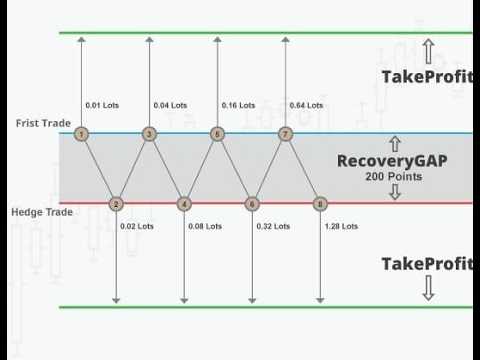
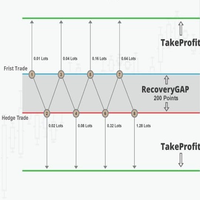
Dynamic Zone Recovery Mechanism If the market moves against the initial position, the EA deploys an alternating pending-order grid based on the configured Step parameter:
-
After a Buy, a Sell Stop order is placed below the entry.
-
After a Sell, a Buy Stop order is placed above the entry.
-
As recovery orders are triggered, the EA continually adapts the grid boundaries to steer the basket toward an overall recovery.
-
Note on Risk: Grid/recovery strategies increase total volume and margin usage during strong, one-directional trends.
-
-
Flexible Lot Progression Modes Tailor your risk and recovery velocity using the Multiplication_Mode parameter:
-
Mode 0 (Fixed Lot): Uses a static base lot size for all recovery orders.
-
Mode 1 (Additive Lot): Adds the base lot to the previous order's lot size.
-
Multiplicative (> 1.0): Multiplies the previous lot size by a custom factor (e.g., 1.8 ), rounded to two decimal places.
-
-
Advanced Trailing Stop Protect your floating profits dynamically with built-in TrailingStop and TrailingStep parameters (fully customizable or disableable by setting them to 0).
-
Smart Basket Profit & Loss Management
-
win_USD : Automatically closes the entire basket of trades once the target floating profit (in deposit currency) is reached.
-
Loss_USD : Serves as a hard safety net to cut losses if the basket floating drawdown reaches the specified threshold.
-
Upon reaching either threshold, the EA instantly closes all active orders and cleans up pending orders for that cycle.
-
✨ Key Features
-
Automated & Rule-Based: Eliminates emotional trading with algorithmic execution.
-
Intelligent Grid Recovery: Alternating Buy/Sell stop orders to navigate market corrections.
-
Customizable Lot Sizing: Fixed, Additive, or Multiplicative progression modes.
-
Auto Lot Sizing via Risk %: Dynamically calculates base lots based on account balance and MaxRisk .
-
Risk Controls: Built-in Max Spread filter, Trading Hours window, and individual TakeProfit/StopLoss options.
-
Comprehensive On-Chart Dashboard: Real-time display of account balance, equity, floating P/L, daily/weekly/monthly closed profits, current spread, and drawdown statistics.
-
Multi-Instance Support: Easily run multiple charts/strategies simultaneously using unique MagicNumber settings.
⚙️ Input Parameters Guide
Lot & Money Management
-
Lot1 : Fixed base lot size when Auto_Lots = false .
-
Auto_Lots : Toggle automatic base-lot sizing (true /false ).
-
MaxRisk : Risk factor used when Auto_Lots = true (approx. formula: Balance * MaxRisk / 100 ). Capped at 1.
Order Protection & Management
-
TakeProfit : Optional TP distance per order (Default: 0 / Disabled).
-
StopLoss : Optional SL distance per order (Default: 0 / Disabled).
-
TrailingStop : Distance to trail floating profits (Default: 100 ).
-
TrailingStep : Price movement step for trailing logic (Default: 50 ).
-
win_USD : Target profit threshold in deposit currency to close the basket (Default: 0 / Disabled).
-
Loss_USD : Maximum allowable loss threshold in deposit currency to close the basket (Default: 0 / Disabled).
Recovery Settings
-
Step : Distance in EA units between the entry price and the recovery pending order (Default: 350 ).
-
Multiplication_Mode : Lot progression type: 0 (Fixed), 1 (Additive), or value > 1 (e.g., 1.8 for Multiplicative).
Trading Filters
-
Max_SPREAD : Maximum allowed spread for initial entries (Default: 30 ).
-
Time_Start / Time_End : Permitted daily trading window based on broker server time (Default: 01:00 to 20:00 ).
Trade Identification
-
MagicNumber : Unique ID to isolate this EA's trades from others on your account (Default: 2027 ).
📊 On-Chart Information Panel Display
The integrated HUD overlays vital metrics directly onto your MetaTrader 4 chart:
-
Account Balance & Equity
-
Live Floating Profit / Loss ($ & Pips)
-
Closed Profit Statistics (Today, This Week, This Month)
-
Real-time Spread & Floating Drawdown tracking
-
Broker Server Time (GMT & Local)
📌 Recommended Best Practices
-
Account Type: Use an MT4 account that fully supports hedging and permits opposite-direction positions.
-
Demo Testing: Always thoroughly test the EA on a demo account across various market conditions before deploying real capital.
-
Strategy Tester: Utilize the MT4 Strategy Tester to optimize parameters for specific currency pairs or gold (XAUUSD).
-
Conservative Settings: Set sensible lot sizes and high recovery steps to withstand strong, extended market trends safely.
⚠️ Risk Warning
Trading foreign exchange (Forex) and CFDs carries a high level of risk and may not be suitable for all investors. Zone recovery and grid-based strategies can accumulate significant margin usage and potential losses during strong, sustained trending markets. Past performance is no guarantee of future results. Always test thoroughly and configure settings according to your personal risk tolerance.