Recovery Zone EA5
- Experts
- Version: 3.0
- Mise à jour: 10 novembre 2026
- Activations: 5

Recovery Zone EA is an advanced automated trading system developed for MetaTrader 4 (MT4). It combines multi-layer technical analysis, trend and momentum filtering, and a configurable recovery zone grid mechanism to identify trading opportunities and manage market movements systematically.
The EA is designed to filter unfavorable market conditions before entering trades and provides customizable trading parameters, recovery management, and account monitoring tools.
🚀 Key Features & Trading Strategy
1. Multi-Layer Trend & Momentum Analysis
Recovery Zone EA uses several technical indicators to evaluate market conditions and filter potential trading entries:
-
Fast & Slow EMAs: Identify market direction and trend alignment.
-
ADX Indicator: Measures trend strength and directional momentum.
-
Choppiness Index: Helps identify sideways and ranging market conditions.
-
ATR Analysis: Evaluates market volatility and candle body conditions.
Combining these filters helps the EA avoid some unfavorable market conditions and focus on more suitable trading opportunities.
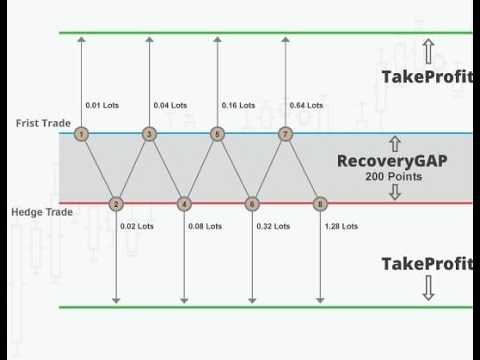
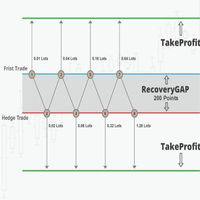
2. Smart Recovery Zone Grid Management
-
Uses a configurable Step distance to manage recovery orders.
-
Supports customizable lot progression through Multiplication_Mode.
-
Provides flexible recovery settings to adapt the trading approach to different market conditions.
-
Allows traders to adjust the recovery mechanism according to their risk tolerance and account size.
3. Advanced Trading Protection
-
Spread Filter: Prevents new entries when the spread exceeds the configured Max_SPREAD value.
-
Trading Session Control: Allows trading only within the specified operating hours.
-
Trailing Stop: Provides automatic trailing stop management based on configured parameters.
-
Profit & Loss Limits: Supports configurable USD profit and loss thresholds to close managed trades when the specified limits are reached.
4. Flexible Lot Management
-
Manual initial lot configuration.
-
Optional automatic lot calculation through Auto_Lots.
-
Adjustable risk percentage when automatic lot sizing is enabled.
-
Customizable recovery lot progression.
5. Real-Time Trading Dashboard
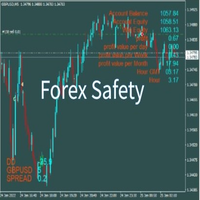
The on-chart dashboard provides useful trading and account information, including:
-
Account Balance
-
Account Equity
-
Drawdown (DD)
-
Current Spread
-
Profit Information
-
Trading Statistics
-
Server Time
⚙️ Recommended Trading Settings
The following settings are suggested as a starting point. Actual performance may vary depending on the broker, instrument, spread, execution conditions, and market volatility.
-
Platform: MetaTrader 4 (MT4)
-
Recommended Instruments: Major Forex pairs and Gold (XAUUSD)
-
Recommended Timeframe: M15
-
Suggested Minimum Capital: $5,000
-
Suggested Leverage: 1:400 or higher
-
Recommended Account Type: Raw Spread / ECN account with competitive spreads and reliable execution.
Important: The recommended capital and leverage are guidelines, not guarantees that the account can withstand every market condition or recovery sequence.
📋 Input Parameters Explained
Lot & Risk Management
-
Lot1: Initial lot size for the first trade. Default: 0.01.
-
Auto_Lots: Enables or disables automatic lot calculation. Default: false.
-
MaxRisk: Risk parameter used when automatic lot sizing is enabled. Default: 0.01.
Stop Management
-
TrailingStop: Trailing stop distance in points. Default: 15.
-
TrailingStep: Minimum trailing adjustment step in points. Default: 7.
Profit & Loss Management
-
win_USD: Configurable USD profit threshold for closing managed trades.
-
Loss_USD: Configurable USD loss threshold for closing managed trades.
Trading Conditions
-
Max_SPREAD: Maximum permitted spread for opening new trades. Default: 10.
-
Time_Start: Start of the trading session. Default: 07:00.
-
Time_End: End of the trading session. Default: 18:00.
Recovery Zone Settings
-
Step: Distance between recovery orders, measured in points. Default: 35.
-
Multiplication_Mode: Controls the lot progression multiplier for recovery orders. Default: 1.8.
Order Management
-
MagicNumber: Unique identifier used to distinguish and manage the EA's orders. Default: 2027.
⚠️ Risk Warning
Recovery and grid-based trading strategies can involve significant risks, particularly during strong market trends, unexpected volatility, or extended periods of unfavorable price movement.
Increasing the number of recovery orders or using larger lot multipliers can significantly increase margin requirements and floating losses.
We strongly recommend:
-
Testing the EA on a demo account before using real funds.
-
Using conservative lot sizes.
-
Maintaining sufficient free margin.
-
Testing different settings through historical data and forward testing.
-
Never investing money you cannot afford to lose.
Past performance does not guarantee future results. No automated trading system can guarantee profits or eliminate trading risks.
Recovery Zone EA – Trade with a structured approach to trend analysis and recovery management.