

From Novice to Expert: Creating an MTF CRT Overlay Indicator in MQL5
 8 349
8 349
 1
1

Candle Range Theory (CRT) provides reliable structural levels on higher timeframes, yet traders struggle to visualize these ranges on lower‑timeframe charts. This article presents an MQL5 indicator that solves this problem by directly plotting higher‑timeframe candle components—full range, body, and wicks—onto the current lower‑timeframe chart. The tool enables traders to identify key price levels, liquidity zones, and contextual entry points without switching between timeframes. It transforms CRT from an abstract concept into a continuously visible reference, supporting more informed decision‑making at the execution level.
Contents
Introduction
Traders who use Candle Range Theory (CRT) face a practical gap: structural levels visible on higher timeframes (H1, H4, Daily) disappear when they drop to execution timeframes (M1–M30). That loss of context leads to misreads—what looks like a breakout on a 5‑minute chart is often an institutional liquidity sweep on the daily chart. Any practical solution must therefore be precise and testable: each lower‑timeframe bar must be unambiguously mapped to its parent higher‑timeframe candle (time‑accurate anchoring), the overlay must not repaint (signals fixed only after the HTF candle closes), and the tool must display the HTF candle's full range, body and wicks directly on the execution chart without manual drawing or window switching.
This article presents an MQL5 implementation that meets these requirements: it projects HTF OHLC onto the current chart, ties every LTF bar to its HTF parent, and confirms CRT patterns only at HTF close—turning CRT from a memory task into a reproducible, execution‑ready overlay.
Concept—CRT Origins and Logic
Candle Range Theory (CRT) draws from two distinct lineages: timeless market principles and modern branded terminology. The principles trace back to Wyckoff’s “Springs” (sweeps below support that reverse) and “Upthrusts” (sweeps above resistance that reverse)—mechanisms later popularized by Linda Bradford Raschke’s “Turtle Soup.” CRT as a named framework, however, is a purely contemporary development, widely attributed to a trader known as Romeotpt (Raid) within the ICT‑adjacent community. Raid codified the Accumulation‑Manipulation‑Distribution (A‑M‑D) cycle into the specific CRT nomenclature used today.
The Core Principle
CRT operates on a simple axiom: every single candle is a range. Each candle has a dealing range (high to low—where liquidity sits) and a real range (open to close—the body, representing accepted value). The wicks show rejection. The critical pivot is the open—price tends to manipulate opposite the intended direction of the real range immediately after the open, sweeping liquidity before reversing.
Higher timeframes (daily, H4) give these levels structural weight. Lower timeframes (M5, M15) hide them entirely—until now.
Constantly switching between timeframes is more than an annoyance. It has a direct impact on execution quality. When a trader watches a 5‑minute chart without the daily or H4 candle ranges, they are effectively blind to the levels where institutional orders cluster. For example, a sharp M5 drop below a recent low may look like a bearish breakout. If that low coincides with the daily open (a key CRT liquidity level), the move is more likely a manipulation sweep and a long entry setup. Without the higher-timeframe overlay, many traders misread the move and enter short at the bottom of a stop hunt. This MTF indicator eliminates guesswork by embedding the structural context directly onto the execution chart, turning a confusing price spike into a recognizable CRT setup.
Why do large players repeatedly reverse price at range extremes? The answer lies in market microstructure: stop orders and pending orders accumulate just beyond obvious highs and lows. By sweeping those levels (the “manipulation” phase), institutions trigger retail stops and fill their own large positions before driving price toward the opposite end of the range (the “distribution” phase). Higher timeframe candles represent the footprint of this activity—daily or H4 ranges are where serious liquidity resides. A CRT pattern on a daily chart signals that a major player has likely finished accumulating or distributing, and price will revert toward the range’s opposite extreme. The indicator does more than draw lines. It shows the institutional footprint on every lower-timeframe bar, so retail traders can align entries with professional logic.
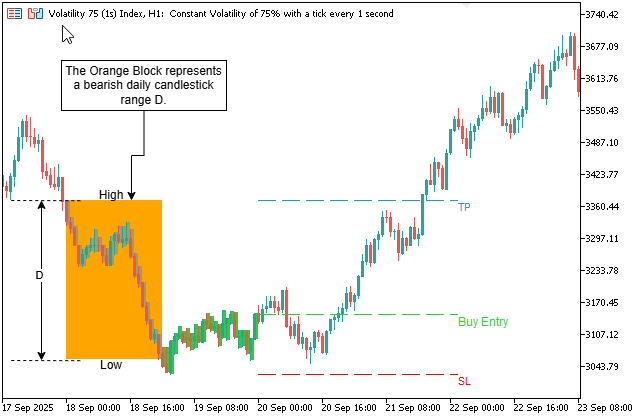
Fig. 1. A bearish daily candle range (orange block) projected onto an H1 chart.
In Fig. 1 above, price sweeps below the daily low (manipulation), reverses, and triggers a buy entry toward the daily high (TP). The indicator draws the range, entry, stop loss, and take profit automatically.
The Indicator Utility
This MTF indicator bridges the context gap. It projects the OHLC of higher‑timeframe candles directly onto your lower‑timeframe chart. You see, for example, whether an M5 sweep is actually hitting the daily open or a previous day’s midpoint—high‑probability reversal zones. Crucially, the indicator is configurable: use completed candles for lagging, backtest‑friendly levels, or use the current open (with projections based on prior ranges) for a leading, real‑time CRT tool. It also filters out Sunday and small candles (e.g., 22:00–00:00 gaps) that otherwise distort range calculations.
The result: a permanent, non‑repainting CRT overlay that keeps your higher timeframe context exactly where you need it—on your execution chart.
Requirements for a Valid Solution
From the problems above, any working solution must meet these non‑negotiable criteria. The table below defines success in testable terms.
| Requirement | Testable Definition |
|---|---|
| Reproducibility: | A CRT pattern on historical data produces the same entry/TP/SL lines on every run. |
| Real‑time detection: | A signal is flagged immediately when the signal candle closes on the higher timeframe. |
| Zero manual drawing: | All rectangles, entry lines, TP, and SL levels appear automatically on the current chart. |
| Alerting | Sound and push notifications when a new setup forms. |
| Performance | Works on thousands of bars without freezing the chart. |
| Flexibility | Adjustable offset, body size filter, TP/SL flip, and line extension length. |
Implementation
The CRT_MTF indicator is built entirely in MQL5 and runs directly on any lower timeframe chart. It loads higher timeframe data, maps every lower bar to its parent higher timeframe candle, detects valid CRT patterns, and draws all visual elements automatically. Below we walk through the implementation step by step, explaining each component’s purpose, the reasoning behind key decisions, and how the indicator handles real‑world market conditions. The full source code is provided separately—here we focus on the essential mechanisms.
Step 1: Indicator Properties and Input Parameters—Defining the Tool’s Behavior
Every MQL5 indicator begins with #property directives that tell MetaTrader 5 how to treat the custom tool. For CRT MTF, we need two arrow buffers (one for sell signals, one for buy signals), and we declare that the indicator draws directly in the chart window (rather than a separate sub‑window). The input parameters follow—they are organized into logical groups: higher timeframe selection, CRT condition tweaks (offset, body multiplier), alert toggles, colors for all drawn elements, arrow settings, and TP/SL line options. These inputs give traders full control over the indicator’s appearance and signal sensitivity without modifying the code.
//+------------------------------------------------------------------+
//|                                                      CRT_MTF.mq5 |
//|                                 Copyright 2026, Clemence Benjamin|
//+------------------------------------------------------------------+
#property copyright "Copyright 2026, Clemence Benjamin"
#property link      "https://www.mql5.com/en/users/billionaire2024/seller"
#property version   "2.90"
#property description "CRT MTF—Intelligent entry and exit levels, plus signal alerts."

#property indicator_chart_window
#property indicator_buffers 2
#property indicator_plots 2

#property indicator_type1 DRAW_ARROW
#property indicator_width1 4
#property indicator_color1 0x8000FF
#property indicator_label1 "Sell Signal"

#property indicator_type2 DRAW_ARROW
#property indicator_width2 4
#property indicator_color2 0xFF9500
#property indicator_label2 "Buy Signal"

//--- input parameters
input ENUM_TIMEFRAMES InpHigherTF = PERIOD_H1;          // Higher Timeframe
input double          InpOffset = 2.0;                  // Range Offset Factor
input double          InpCandleBodyMultiplier = 3.0;    // Body Size Filter
input bool            InpEnableSoundAlerts = true;
input bool            InpEnablePushAlerts = true;

//--- Colors
input color           InpSellRangeColor   = clrLightPink;
input color           InpSellSignalColor  = clrCrimson;
input color           InpBuyRangeColor    = clrPaleGreen;
input color           InpBuySignalColor   = clrLimeGreen;
input color           InpRangeRectColor   = clrOrange;

//--- Arrow settings
input bool            InpDrawArrowOnSignal = true;

//--- TP/SL/Entry lines (fixed length)
input bool            InpDrawEntryLine = true;
input bool            InpDrawTPLine    = true;
input bool            InpDrawSLLine    = true;
input bool            InpFlipTPSL      = false;
input color           InpEntryLineColor = clrWhite;
input color           InpTPLineColor   = clrDodgerBlue;
input color           InpSLLineColor   = clrRed;
input int             InpLineExtendBars = 50;

input bool            InpDebugPrint = false;
Step 2: Global Structures and Variables—Keeping Data Organized
To manage the higher timeframe data efficiently, we define a custom structure named HTFCandle. It holds a single candle’s time, open, high, low, and close. An array of this structure, htfCandles[], will store all loaded higher timeframe candles. We also declare two buffers (BufferSell and BufferBuy) for the arrow plots, a mapping array htfIndexMap that will link each lower bar to its parent higher timeframe candle, and helper variables like point (for price offset), lastAlertTime (to prevent alert spam), and period seconds for both timeframes. These globals are accessible from any function, making the code cleaner and faster.
//--- indicator buffers
double BufferSell[];
double BufferBuy[];

//--- globals
datetime lastAlertTime;
string   indicatorShortName;
double   point;
int      htfPeriodSeconds;
int      currPeriodSeconds;

//+------------------------------------------------------------------+
//| Structure for higher timeframe candle                            |
//+------------------------------------------------------------------+
struct HTFCandle
  {
   datetime          time;
   double            open, high, low, close;
  };
HTFCandle htfCandles[];
int       htfTotal;
int       htfIndexMap[];
Step 3: Initialization (OnInit)—One‑Time Setup
The OnInit function is called automatically when the indicator is attached to a chart. Its job is to prepare the indicator for operation. First, we retrieve the symbol’s point value using SymbolInfoDouble—this accounts for 5‑digit brokers where a point is 0.00001 instead of 0.0001. Then we calculate the period in seconds for both the higher timeframe (htfPeriodSeconds) and the current timeframe (currPeriodSeconds). Next, we set up the two indicator buffers, assign arrow symbols (234 for down, 233 for up), and mark empty values as EMPTY_VALUE so that non‑signal bars display nothing. Finally, we set a short name for the indicator window and return INIT_SUCCEEDED. If any step fails, the indicator would not load—but here the setup is straightforward.
//+------------------------------------------------------------------+
//| Initializes indicator buffers and settings                       |
//+------------------------------------------------------------------+
int OnInit()
  {
   point = SymbolInfoDouble(_Symbol, SYMBOL_POINT);
   htfPeriodSeconds = PeriodSeconds(InpHigherTF);
   currPeriodSeconds = PeriodSeconds(_Period);

   SetIndexBuffer(0, BufferSell, INDICATOR_DATA);
   PlotIndexSetDouble(0, PLOT_EMPTY_VALUE, EMPTY_VALUE);
   PlotIndexSetInteger(0, PLOT_ARROW, 234);   // down arrow for sell

   SetIndexBuffer(1, BufferBuy, INDICATOR_DATA);
   PlotIndexSetDouble(1, PLOT_EMPTY_VALUE, EMPTY_VALUE);
   PlotIndexSetInteger(1, PLOT_ARROW, 233);   // up arrow for buy

   indicatorShortName = "CRT MTF (Signal+Entry)";
   IndicatorSetString(INDICATOR_SHORTNAME, indicatorShortName);
   return(INIT_SUCCEEDED);
  }
Step 4: Loading Higher Timeframe Data—Fetching the Structural Context
In OnCalculate, the first task is to load the higher-timeframe candles. We determine the total number of available higher timeframe bars using the Bars function. If there are fewer than three, we exit early—we need at least two candles (a range candle and a signal candle) plus one extra for alignment. Then we resize the htfCandles array to hold all higher timeframe candles. Using CopyTime, CopyOpen, CopyHigh, CopyLow, and CopyClose, we retrieve the data into temporary arrays. Each of these arrays is then set as a series (index 0 = most recent) to align with the lower timeframe’s indexing. Finally, we copy the values into our htfCandles structure for easy access. This approach loads the entire higher timeframe history in one go, which is efficient and avoids repeated copying on every tick.
//--- load higher TF data
htfTotal = Bars(_Symbol, InpHigherTF);
if(htfTotal < 3)
   return(rates_total);

ArrayResize(htfCandles, htfTotal);
datetime htfTimeArray[];
double htfOpen[], htfHigh[], htfLow[], htfClose[];

if(CopyTime(_Symbol, InpHigherTF, 0, htfTotal, htfTimeArray) <= 0 ||
    CopyOpen(_Symbol, InpHigherTF, 0, htfTotal, htfOpen) <= 0 ||
    CopyHigh(_Symbol, InpHigherTF, 0, htfTotal, htfHigh) <= 0 ||
    CopyLow(_Symbol, InpHigherTF, 0, htfTotal, htfLow) <= 0 ||
    CopyClose(_Symbol, InpHigherTF, 0, htfTotal, htfClose) <= 0)
   return(rates_total);

ArraySetAsSeries(htfTimeArray, true);
ArraySetAsSeries(htfOpen, true);
ArraySetAsSeries(htfHigh, true);
ArraySetAsSeries(htfLow, true);
ArraySetAsSeries(htfClose, true);

for(int i = 0; i < htfTotal; i++)
  {
   htfCandles[i].time = htfTimeArray[i];
   htfCandles[i].open = htfOpen[i];
   htfCandles[i].high = htfHigh[i];
   htfCandles[i].low  = htfLow[i];
   htfCandles[i].close = htfClose[i];
  }
Step 5: Mapping Lower Bars to Higher Timeframe Candles (Binary Search)
To know which higher timeframe candle each lower bar belongs to, we build an index map using binary search. For every lower bar with time bt, we locate the higher timeframe candle where start ≤ bt < end (with end = start + htfPeriodSeconds). This O(log n) approach is efficient even with thousands of bars. We loop through all lower bars, perform the binary search on the htfCandles array, and store the found index in htfIndexMap[i]. If no matching candle is found (for example, before the earliest higher timeframe bar), we store -1 and later skip that bar. This mapping is computed once per OnCalculate call and reused for all signal detection and drawing routines.
//--- map lower bars to HTF indices (binary search)
ArrayResize(htfIndexMap, rates_total);
ArrayInitialize(htfIndexMap, -1);

for(int i = 0; i < rates_total; i++)
  {
   datetime bt = time[i];
   int lo = 0, hi = htfTotal - 1, found = -1;

   while(lo <= hi)
     {
      int mid = (lo + hi) / 2;
      datetime start = htfCandles[mid].time;
      datetime end = start + htfPeriodSeconds;

      if(bt >= start && bt < end)
        {
         found = mid;
         break;
        }
      else if(bt < start)
         lo = mid + 1;
      else
         hi = mid - 1;
     }
   htfIndexMap[i] = found;
  }
Step 6: CRT Signal Detection Logic—The Core Pattern Recognition
The indicator scans each lower bar that is the last bar of its parent higher timeframe candle—because the signal candle must be fully closed before we can confirm a CRT pattern. For those bars, we look one candle back (rangeIdx = signalIdx + 1) and apply the CRT conditions. The sell condition requires a bullish range candle (close > open), a signal candle that breaks above the range high but closes below that high and below its own open, a small body (less than the range divided by the body multiplier), and a low that stays above the range low plus an offset (range range divided by InpOffset). The buy condition is the exact inverse: a bearish range candle, a signal candle that breaks below the range low but closes above it and above its own open, a small body, and a high that stays below the range high minus the offset. These rules are mathematically precise and eliminate subjective interpretation.
//--- Only evaluate when this lower bar is the LAST bar of its HTF candle
bool isLastBarOfThisCandle = false;
if(i == 0)
   isLastBarOfThisCandle = true;
else if(htfIndexMap[i-1] != htfIdx)
   isLastBarOfThisCandle = true;

if(!isLastBarOfThisCandle)
   continue;

//--- CRT condition checks
double rangeRange = rangeHigh - rangeLow;
double sigBody = MathAbs(sigOpen - sigClose);

bool isSell = false, isBuy = false;

if(rangeClose > rangeOpen && sigHigh > rangeHigh && sigClose < rangeHigh &&
    sigClose < sigOpen && sigLow > rangeOpen &&
    sigBody < rangeRange / InpCandleBodyMultiplier &&
    sigLow > rangeLow + (rangeRange / InpOffset))
  {
   isSell = true;
  }
else if(rangeClose < rangeOpen && sigLow < rangeLow && sigClose > rangeLow &&
         sigClose > sigOpen && sigHigh < rangeOpen &&
         sigBody < rangeRange / InpCandleBodyMultiplier &&
         sigHigh < rangeHigh - (rangeRange / InpOffset))
  {
   isBuy = true;
  }
Step 7: Storing Signals and Placing Arrow Buffers—Recording What We Found
When a valid pattern is found, we need to identify the exact lower bar where the signal should be placed—the last lower-timeframe bar of that signal candle. We do this by scanning forward from the current bar index i until the higher timeframe index changes. That final bar (lastIdx) is where the signal candle closes on the lower timeframe. We then store all relevant signal details (range index, signal index, direction, lastIdx, entry price = close[lastIdx]) in a dynamic array of SignalInfo structures. If the user has enabled arrow drawing, we set the corresponding buffer at that bar: for a sell signal, the arrow is placed above the bar’s high plus a small offset; for a buy signal, below the bar’s low minus an offset. This creates a clear marker on the chart.
//--- Find the absolute last lower bar index for this signal candle
int lastIdx = i;
for(int j = i + 1; j < rates_total; j++)
  {
   if(htfIndexMap[j] == signalIdx)
      lastIdx = j;
   else
      break;
  }

SignalInfo sig;
sig.rangeHtfIdx = rangeIdx;
sig.signalHtfIdx = signalIdx;
sig.isSell = isSell;
sig.lastSignalLowerIdx = lastIdx;
sig.entryPrice = close[lastIdx];

ArrayResize(signals, ArraySize(signals) + 1);
signals[ArraySize(signals) - 1] = sig;

//--- Place arrow buffer
if(InpDrawArrowOnSignal)
  {
   if(isSell)
      BufferSell[lastIdx] = high[lastIdx] + InpOffset * point;
   else
      BufferBuy[lastIdx]  = low[lastIdx]  - InpOffset * point;
  }
Step 8: Alert Handling—Notifying the Trader in Real‑Time
Alerts are sent only for the most recent bar (i == rates_total-1) to avoid spamming historical signals when the indicator first loads. The static variable lastAlertTime stores the timestamp of the last alert; if the new signal’s bar time is different, we trigger the alert. The helper function SendAlert checks the user inputs: if sound alerts are enabled, it calls Alert(); if push notifications are enabled, it calls SendNotification. The alert message includes the symbol, current timeframe, signal type (BUY/SELL), and the bar time. This ensures the trader never misses a fresh setup, even when away from the screen.
//--- SIGNAL ALERT: when setup completes (arrow placed)
//--- Only alert on the most recent bar (to avoid spamming historical alerts)
if(i == rates_total - 1 && time[lastIdx] != lastAlertTime)
  {
   string signalType = (isSell) ? "SELL" : "BUY";
   string alertMsg = StringFormat("CRT MTF | %s %s | %s signal at %s",
                                  Symbol(), EnumToString(_Period), signalType, TimeToString(time[lastIdx]));
   SendAlert(alertMsg);
   lastAlertTime = time[lastIdx];
  }
Step 9: Drawing Objects—Colored Candles, Range Rectangle, Entry/TP/SL Lines
All drawing is performed once per new bar to avoid excessive object creation and chart clutter. We first delete all objects with the prefix "CRT_" using ObjectsDeleteAll. Then we rebuild the drawnSignalIds array to track which signal IDs (based on range candle time) have already been processed. For each signal in our signals array, we check if its signalId has already been drawn; if not, we draw all visual elements. These include,
- Colored rectangles behind every lower bar that belongs to the range candle (using InpSellRangeColor or InpBuyRangeColor) and behind every lower bar of the signal candle (using InpSellSignalColor or InpBuySignalColor). This visually highlights the two critical higher timeframe candles.
- A semi‑transparent orange rectangle outlines the full higher timeframe range candle (high to low) across its time period, giving a clear “zone” reference.
- A dashed entry line starting after the signal candle closes (lineStartTime = signal candle time + htfPeriodSeconds) and extending to the right for InpLineExtendBars lower‑timeframe bars. A text label (“Buy Entry” or “Sell Entry”) is placed at the end of the line.
- TP and SL lines (dashed) using the chosen levels—by default, sell TP = range low, SL = signal high; buy TP = range high, SL = signal low. The InpFlipTPSL option swaps these values if desired.
All objects are created with OBJPROP_BACK = true so they sit behind price bars, and OBJPROP_SELECTABLE = false to avoid accidental dragging. This keeps the chart clean and interactive.
//--- Draw objects on new bar only
static datetime lastDrawTime = 0;
datetime curTime = time[rates_total - 1];

if(curTime != lastDrawTime)
  {
   ObjectsDeleteAll(0, "CRT_");
   lastDrawTime = curTime;
  }

//--- Example: drawing entry line
string entryLineName = "CRT_Entry_" + IntegerToString(signalId);
if(ObjectFind(0, entryLineName) < 0)
  {
   ObjectCreate(0, entryLineName, OBJ_TREND, 0, lineStartTime, entryPrice, lineEndTime, entryPrice);
   ObjectSetInteger(0, entryLineName, OBJPROP_COLOR, InpEntryLineColor);
   ObjectSetInteger(0, entryLineName, OBJPROP_STYLE, STYLE_DASH);
   ObjectSetInteger(0, entryLineName, OBJPROP_WIDTH, 1);
   ObjectSetInteger(0, entryLineName, OBJPROP_BACK, false);
   ObjectSetInteger(0, entryLineName, OBJPROP_RAY_RIGHT, false);
  }
Step 10: Optimization and Edge Cases—Making It Robust and Fast
Several design choices ensure the indicator runs efficiently even on large histories. First, the binary search mapping gives O(log n) per lower bar, avoiding linear scans that would slow down on thousands of bars. Second, we evaluate CRT conditions only on bars that are the last bar of a higher timeframe candle—this reduces calculations by up to 95% because most lower bars are interior to a candle. Third, object deduplication using the drawnSignalIds array prevents redrawing the same setup on every tick. Fourth, we exit early if fewer than three higher‑timeframe candles are available, preventing errors.
Edge cases handled: Weekend gaps or irregular market hours do not break the binary search because we compare exact start/end times. Lower bars that fall outside the earliest higher timeframe candle are ignored (htfIndexMap[i] = -1). The optional TP/SL flip is implemented without division by zero or invalid levels. And the indicator never repaints—signals are fixed at the close of the signal candle, making it reliable for backtesting.
Testing and Results
To test the indicator, compile CRT_MTF.mq5 in MetaEditor (press F7). Attach the compiled indicator to any lower timeframe chart (M1, M5, M15, M30, H1). The indicator automatically loads the higher timeframe data and draws all historical CRT setups within the lookback range.
Manual backtesting: Scroll the chart to the left. You will see colored rectangles behind past range and signal candles, entry lines with labels, TP/SL levels, and arrow markers exactly where each signal triggered. Because the indicator does not repaint, past signals remain fixed—ideal for evaluating the strategy’s historical performance.
The animated GIF below demonstrates scrolling back through a live chart, showing how the indicator reveals past CRT setups as you scroll:

Fig. 2. Testing on the Volatility 75 (1s) index, M5.
When a new signal candle closes, the indicator fires an alert (sound and/or push notification) and draws the entry line, TP, SL, and arrows instantly. The lines extend to the right for the number of bars specified in InpLineExtendBars. The indicator has been tested on M1, M5, M15, M30, and H1 charts with higher timeframes ranging from H1 to daily, showing no performance degradation up to 10,000 bars.
Conclusion
We converted the CRT problem statement into an engineering solution: an MQL5 indicator that loads higher‑timeframe OHLC, maps each lower‑timeframe bar to its parent HTF candle, and renders the HTF range, body and wicks on the active chart. CRT pattern detection runs only when the HTF signal candle is complete, guaranteeing non‑repainting signals.
The indicator also marks confirmed entries with arrows, draws Entry/TP/SL levels derived from the range and signal extremes, and issues configurable sound/push alerts. Built-in filters (body size, offsets, exclusion of small/gap candles) and performance optimizations (binary search mapping and last-bar detection) make the overlay suitable for objective backtesting and live execution.
In short: you receive a reproducible, rule‑based MTF CRT tool—compile the attached CRT_MTF.mq5, attach it to any lower‑timeframe chart, set your higher timeframe and preferences, and trade with precise HTF context visible at the execution level.
.
Key Lessons
| Key Lessons | Description |
|---|---|
| 1. Binary Search for Bar Mapping | Using binary search (O(log n)) to map lower timeframe bars to higher timeframe candles is far more efficient than linear scans, especially on large histories. This is a critical optimization for any multi‑timeframe indicator. |
| 2. Last‑Bar Detection for Signal Accuracy: | A CRT signal must be triggered only on the last lower bar of the higher timeframe signal candle. Scanning forward until the higher timeframe index changes ensures the entry price uses the closing price of that bar—eliminating repainting. |
| 3. Non‑Repainting Design for Backtesting | Setting arrow buffers only after the signal candle fully closes, and using fixed entry prices guarantees that historical signals never change. This makes the indicator reliable for manual and automated backtesting. |
| 4. Deduplication of graphical objects using | a static array (drawnSignalIds[]) to track already‑drawn setups prevents duplicate rectangles and lines on every tick. This reduces chart clutter and improves performance. |
| 5. Alert Throttling with Timestamps: | Storing the last alerted bar time (lastAlertTime) and comparing it with the current signal bar prevents repeated alerts for the same setup, even if the indicator recalculates multiple times. |
| 6. Configurable TP/SL from Higher Timeframe Structure | TP and SL levels derived directly from the range and signal candle extremes (with an optional flip) remove subjectivity. This transforms a discretionary pattern into a rule‑based trading system. |
| 7. Binary Search Resilience to Gaps | Using exact start/end time boundaries (start ≤ bar time < start + period) handles weekend gaps and irregular trading hours without breaking the mapping—unlike simple bar counting. |
| 8. Two‑Pass OnCalculate Strategy: | Separating historical signal display (full loop) from real‑time alerting (only the most recent bar) gives traders both backtesting visibility and live notifications without spam. |
| 9. Visual Highlighting of Higher Timeframe Candles | Drawing colored rectangles behind every lower bar of the range and signal candles provides intuitive visual context. Setting OBJPROP_BACK = true keeps price action readable. |
| 10. Extendable lines for planning | entry, TP, and SL lines drawn as horizontal trend lines with a configurable right extension (InpLineExtendBars) help traders visualize future price targets directly on the chart. |
| 11. CRT Condition Mathematics: | The sell/buy rules (bullish range + higher high + close below range high + small body + low offset) are expressed as precise inequalities. This eliminates guesswork and ensures consistent pattern recognition across all market conditions. |
| 12. Multi‑Timeframe Data Synchronization: | Loading higher-timeframe data once per OnCalculate() call and storing it in a custom structure (HTFCandle[]) avoids redundant copying. This pattern is reusable for any indicator that needs higher timeframe context. |
Attachments
| File Name | Type | Version | Description |
|---|---|---|---|
| CRT_MTF.mq5 | Indicator | 2.90 | Complete source code for the CRT multi‑timeframe indicator. Compile in MetaEditor and attach to any lower-timeframe chart. |
Warning: All rights to these materials are reserved by MetaQuotes Ltd. Copying or reprinting of these materials in whole or in part is prohibited.
This article was written by a user of the site and reflects their personal views. MetaQuotes Ltd is not responsible for the accuracy of the information presented, nor for any consequences resulting from the use of the solutions, strategies or recommendations described.

 Beyond the Clock (Part 1): Building Activity and Imbalance Bars in Python and MQL5
 Engineering Trading Discipline into Code (Part 5): Account-Level Risk Enforcement in MQL5
 Three MACD Filters on US_TECH100: Five Years of Broker Data
 Building an Object-Oriented FVG Scanner in MQL5

- Free trading apps
- Over 8,000 signals for copying
- Economic news for exploring financial markets
You agree to website policy and terms of use
thx for code but it LACK DOWN terminal; and journalling as follows :
2026.05.12 13:22:10.388 CB_CRT_MTF (EURUSD,M1) indicator is too slow, 2016 ms. rewrite the indicator, please