

MQL5でのテーブルモデルの実装:MVC概念の適用
 243
243
 9
9

内容
はじめに
プログラミングにおいて、アプリケーションのアーキテクチャは、信頼性、拡張性、保守性を確保する上で非常に重要です。これらの目的を達成する手法のひとつが、MVC (Model-View-Controller)と呼ばれるアーキテクチャパターンの活用です。
MVCの概念は、アプリケーションを3つの相互関連するコンポーネントに分割します。モデル(データとロジックの管理)、ビュー(データの表示)、コントローラー(ユーザー操作の処理)です。この分離により、コードの開発、テスト、保守が容易になり、より構造化され柔軟な設計が可能になります。
本記事では、MQL5言語にMVCの原則を適用してテーブルモデルを実装する方法を考えます。テーブルはデータの格納、処理、表示において重要なツールであり、適切に組織化することで情報の扱いやすさが大きく向上します。テーブルを扱うためのクラスとして、テーブルセル、行、テーブルモデルを作成します。また、行内のセルやテーブルモデル内の行の格納には、MQL5標準ライブラリのリンクリストクラスを使用し、効率的なデータ格納と操作を可能にします。
MVCの概念:概要と必要性
アプリケーションを劇場の舞台に例えてみましょう。物語の筋書きがあり、それが何をすべきかを示しています(これがモデルです)。舞台は観客が目にするものです(これがビューです)。そして最後に、全体の進行を管理し、他の要素をつなぐ監督がいます(これがコントローラーです)。これがMVC (Model-View-Controller)アーキテクチャパターンの構造です。
この概念は、アプリケーション内の責務を分離するのに役立ちます。モデルはデータとロジックを担当し、ビューは表示と見た目を担当し、コントローラーはユーザー操作の処理を担当します。このような分離により、コードはより明確になり、柔軟性が増し、チームでの開発もしやすくなります。
たとえばテーブルを作成する場合を考えましょう。モデルはどの行とセルが含まれているかを把握し、それらをどのように変更するかを知っています。ビューはテーブルを画面に描画します。そしてコントローラーは、ユーザーが「行を追加」をクリックしたときに反応し、そのタスクをモデルに渡し、ビューに更新を指示します。
MVCは、アプリケーションが複雑になる場合に特に有効です。新機能が追加され、インターフェースが変更され、複数の開発者が関わるとき、明確なアーキテクチャがあると変更が容易になり、コンポーネントごとのテストやコードの再利用も簡単になります。
一方で、このアプローチには欠点もあります。非常にシンプルなプロジェクトでは、MVCは過剰となることがあります。数個の関数で済む処理まで分離する必要が出てくるからです。しかし、スケーラブルで本格的なアプリケーションにおいては、この構造はすぐにその価値を発揮します。
要約
MVCは、コードを整理し、理解しやすく、テスト可能で、拡張しやすくする強力なアーキテクチャパターンです。特に、データロジック、ユーザーインターフェース、制御ロジックを分離することが重要な複雑なアプリケーションで有効です。小規模プロジェクトでは、MVCの使用は冗長になることがあります。
MVCパラダイムは、私たちのタスクに非常によく適しています。この方法では、テーブルは独立したオブジェクトから構築されます。
- テーブルセル
実数、整数、または文字列の値を保持するオブジェクトで、値の管理、設定、取得のためのメソッドを備えています。 - テーブル行
テーブルセルオブジェクトのリストを保持するオブジェクトで、セルの管理、位置指定、追加・削除のためのメソッドを備えています。 - テーブルモデル
テーブル行オブジェクトのリストを保持するオブジェクトで、行や列の管理、位置指定、追加および削除のメソッドを備え、セルや行のコントロールにもアクセス可能です。
以下の図は、4x4のテーブルモデルの構造を概略的に示しています。
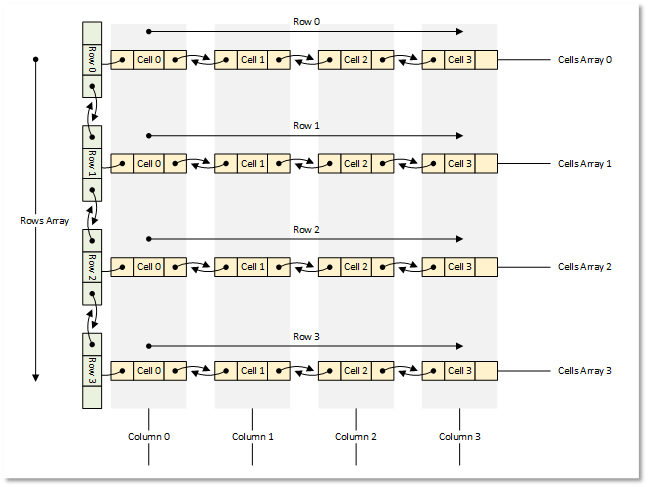
図1:4x4テーブルモデル
それでは理論から実践に移りましょう。
テーブルモデルを構築するためのクラスの作成
すべてのオブジェクトを作成するには、MQL5標準ライブラリを使用します。
各オブジェクトはライブラリの基底クラスの継承クラスとして作成します。これにより、オブジェクトリストにオブジェクトを格納できるようになります。
すべてのクラスは、1つのテストスクリプトファイルにまとめて作成します。これにより、全体が1つのファイルに収まり、可視性が高く、すぐにアクセスできるようになります。将来的には、作成したクラスをそれぞれのインクルードファイルに分割する予定です。
1. 表形式データ格納の基盤としてのリンクリスト
CListリンクリストは、表形式データを格納するのに非常に適しています。同様のCArrayObjリストと異なり、CListは現在の要素の左右にある隣接オブジェクトへのアクセスメソッドを実装しています。これにより、行内のセルの移動や、テーブル内の行の移動、追加、削除が容易になります。同時に、リスト自体が移動、追加、または削除されたオブジェクトのインデックスを正しく管理してくれます。
しかし、1つ注意点があります。リストをファイルに保存するメソッドとファイルから読み込むメソッドをみてみると、後者では、リストクラスは仮想メソッドCreateElement()で新しいオブジェクトを生成する必要があります。
このクラスメソッドは単にNULLを返します。
   //--- method of creating an element of the list
   virtual CObject  *CreateElement(void) { return(NULL); }
これは、リンクリストを使用し、かつファイル操作をおこなう必要がある場合、CListクラスを継承し、その中でこのメソッドを実装しなければならないことを意味します。
標準ライブラリオブジェクトをファイルに保存するメソッドを見ると、オブジェクトのプロパティは次のアルゴリズムで保存されていることが分かります。
- データ開始マーカー(-1)がファイルに書き込まれる
- オブジェクトの型がファイルに書き込まれる
- すべてのオブジェクトプロパティが1つずつファイルに書き込まれる
最初の2つの処理は、標準ライブラリのオブジェクトが持つすべての保存と読み込みのメソッドに共通しています。したがって同じロジックに従い、ファイルから読み込む際に、どの型のオブジェクトを生成すべきかを判断できるようにする必要があります。そのため、CListを継承したリストクラスの仮想メソッドCreateElement()内で、この型に応じたオブジェクトを生成します。
さらに、リストに読み込むことができるすべてのオブジェクトについては、そのクラスがリストクラスの実装前に宣言または定義されていなければなりません。これにより、リストはどのオブジェクトが対象となり、どのオブジェクトを生成すべきかを認識できるようになります。
ターミナルディレクトリ\MQL5\Scripts\TableModel\という新しいフォルダを作成し、その中にテストスクリプトファイルTableModelTest.mq5を新規作成します。
リンクリストファイルをインクルードし、将来のテーブルモデルクラスを宣言します。
//+------------------------------------------------------------------+
//|                                               TableModelTest.mq5 |
//|                                  Copyright 2025, MetaQuotes Ltd. |
//|                                             https://www.mql5.com |
//+------------------------------------------------------------------+
#property copyright "Copyright 2025, MetaQuotes Ltd."
#property link      "https://www.mql5.com"
#property version   "1.00"

//+------------------------------------------------------------------+
//| Include libraries                                                |
//+------------------------------------------------------------------+
#include <Arrays\List.mqh>

//--- Forward declaration of classes
class CTableCell;                   // Table cell class
class CTableRow;                    // Table row class
class CTableModel;                  // Table model class
ここで将来使用するクラスの前方宣言が必要となります。これは、CListを継承するリンクリストクラスが、これらのクラス型を認識し、さらにどの型のオブジェクトを生成すべきかを把握できるようにするためです。そのために、オブジェクト型の列挙体、補助マクロ、およびリストのソート方法を定義する列挙体を記述します。
//+------------------------------------------------------------------+
//| Include libraries                                                |
//+------------------------------------------------------------------+
#include <Arrays\List.mqh>

//--- Forward declaration of classes
class CTableCell;                   // Table cell class
class CTableRow;                    // Table row class
class CTableModel;                  // Table model class

//+------------------------------------------------------------------+
//| Macros                                                           |
//+------------------------------------------------------------------+
#define  MARKER_START_DATA    -1    // Data start marker in a file
#define  MAX_STRING_LENGTH    128   // Maximum length of a string in a cell

//+------------------------------------------------------------------+
//| Enumerations                                                     |
//+------------------------------------------------------------------+
enum ENUM_OBJECT_TYPE               // Enumeration of object types
  {
   OBJECT_TYPE_TABLE_CELL=10000,    // Table cell
   OBJECT_TYPE_TABLE_ROW,           // Table row
   OBJECT_TYPE_TABLE_MODEL,         // Table model
  };

enum ENUM_CELL_COMPARE_MODE         // Table cell comparison modes
  {
   CELL_COMPARE_MODE_COL,           // Comparison by column number
   CELL_COMPARE_MODE_ROW,           // Comparison by string number
   CELL_COMPARE_MODE_ROW_COL,       // Comparison by row and column
  };

//+------------------------------------------------------------------+
//| Functions                                                        |
//+------------------------------------------------------------------+
//--- Return the object type as a string
string TypeDescription(const ENUM_OBJECT_TYPE type)
  {
   string array[];
   int total=StringSplit(EnumToString(type),StringGetCharacter("_",0),array);
   string result="";
   for(int i=2;i<total;i++)
     {
      array[i]+=" ";
      array[i].Lower();
      array[i].SetChar(0,ushort(array[i].GetChar(0)-0x20));
      result+=array[i];
     }
   result.TrimLeft();
   result.TrimRight();
   return result;
  }
//+------------------------------------------------------------------+
//| Classes                                                          |
//+------------------------------------------------------------------+
オブジェクト型の説明を返す関数は、すべてのオブジェクト型定数の名前が「OBJECT_TYPE_」という部分文字列で始まるという前提に基づいています。その後、この部分に続く文字列を取得し、得られた文字列内のすべての文字を小文字に変換し、先頭文字を大文字に変換します。さらに、最終的な文字列の左右にあるすべての空白文字および制御文字を削除します。
それでは、独自のリンクリストクラスを作成していきましょう。以降も、同じファイル内でコードの記述を続けていきます。
//+------------------------------------------------------------------+
//| Classes                                                          |
//+------------------------------------------------------------------+
//+------------------------------------------------------------------+
//| Linked object list class                                         |
//+------------------------------------------------------------------+
class CListObj : public CList
  {
protected:
   ENUM_OBJECT_TYPE  m_element_type;   // Created object type in CreateElement()
public:
//--- Virtual method (1) for loading a list from a file, (2) for creating a list element
   virtual bool      Load(const int file_handle);
   virtual CObject  *CreateElement(void);
  };
CListObjクラスは、標準ライブラリのCListクラスを継承した、新しいリンクリストクラスです。
このクラスで使用する変数は1つだけで、生成されるオブジェクトの型を格納するためのものです。CreateElement()メソッドは仮想関数であり、親クラスのメソッドと完全に同じシグネチャを持つ必要があるため、生成するオブジェクトの型を引数として渡すことはできません。その代わりに、あらかじめ宣言した変数にオブジェクト型を書き込んでその値を読み取ることで、生成するオブジェクトの型を判断します。
このため、親クラスの2つの仮想メソッドをオーバーライドする必要があります。1つはファイルからリストを読み込むメソッド、もう1つは新しいオブジェクトを生成するメソッドです。それぞれについて見ていきましょう。
ファイルからリストを読み込むメソッド
//+------------------------------------------------------------------+
//| Load a list from the file                                        |
//+------------------------------------------------------------------+
bool CListObj::Load(const int file_handle)
  {
//--- Variables
   CObject *node;
   bool     result=true;
//--- Check the handle
   if(file_handle==INVALID_HANDLE)
      return(false);
//--- Load and check the list start marker - 0xFFFFFFFFFFFFFFFF
   if(::FileReadLong(file_handle)!=MARKER_START_DATA)
      return(false);
//--- Load and check the list type
   if(::FileReadInteger(file_handle,INT_VALUE)!=Type())
      return(false);
//--- Read the list size (number of objects)
   uint num=::FileReadInteger(file_handle,INT_VALUE);

//--- Sequentially recreate the list elements by calling the Load() method of node objects
   this.Clear();
   for(uint i=0; i<num; i++)
     {
      //--- Read and check the object data start marker - 0xFFFFFFFFFFFFFFFF
      if(::FileReadLong(file_handle)!=MARKER_START_DATA)
         return false;
      //--- Read the object type
      this.m_element_type=(ENUM_OBJECT_TYPE)::FileReadInteger(file_handle,INT_VALUE);
      node=this.CreateElement();
      if(node==NULL)
         return false;
      this.Add(node);
      //--- Now the file pointer is offset relative to the beginning of the object marker by 12 bytes (8 - marker, 4 - type)
      //--- Set the pointer to the beginning of the object data and load the object properties from the file using the Load() method of the node element.
      if(!::FileSeek(file_handle,-12,SEEK_CUR))
         return false;
      result &=node.Load(file_handle);
     }
//--- Result
   return result;
  }
ここではまず、リストの先頭部分が検証され、リストの型およびサイズ、すなわちリスト内の要素数が確認されます。その後、要素数分のループ処理の中で、各オブジェクトのデータ開始マーカーおよびオブジェクト型がファイルから読み込まれます。読み取られた型は変数m_element_typeに書き込まれ、その後、新しい要素を生成するメソッドが呼び出されます。このメソッド内では、受け取った型に基づいて新しい要素が生成され、その要素はnodeポインタ変数に格納され、最終的にリストへ追加されます。このメソッド全体のロジックは、コメント内で詳細に説明されています。それでは、新しいリスト要素を生成するメソッドを見ていきましょう。
リスト要素を生成するメソッド
//+------------------------------------------------------------------+
//| List element creation method                                     |
//+------------------------------------------------------------------+
CObject *CListObj::CreateElement(void)
  {
//--- Create a new object depending on the object type in m_element_type
   switch(this.m_element_type)
     {
      case OBJECT_TYPE_TABLE_CELL   :  return new CTableCell();
      case OBJECT_TYPE_TABLE_ROW    :  return new CTableRow();
      case OBJECT_TYPE_TABLE_MODEL  :  return new CTableModel();
      default                       :  return NULL;
     }
  }
これは、メソッドを呼び出す前に、生成されるオブジェクトの型がすでに変数m_element_typeに書き込まれていることを意味します。要素の型に応じて、適切な型の新しいオブジェクトが生成され、そのポインタが返されます。将来的に新しいコントロールを開発する際には、それらの型がENUM_OBJECT_TYPE列挙体に追加され、この箇所にも新しいオブジェクト型を生成するためのcaseが追加されることになります。これで、標準ライブラリのCListを基にしたリンクリストクラスは完成です。このクラスは、既知のすべての型のオブジェクトを格納でき、リストをファイルに保存し、ファイルから読み込んで正しく復元することが可能になります。
2. テーブルセルクラス
テーブルセルは、テーブルを構成する最小単位であり、特定の値を保持します。セルはテーブル行を構成するリストの要素であり、それぞれのリストが1つのテーブル行を表します。このテーブルでは、セルは実数、整数、文字列のいずれか1つのみを保持します。
単純な値に加えて、セルにはENUM_OBJECT_TYPE列挙体に定義された既知の型のオブジェクトを1つ割り当てることも可能です。この場合、セルは上記のいずれかの型の値に加えて、オブジェクトへのポインタと、そのオブジェクト型を示す特別な変数を保持します。これにより、将来的にはビューコンポーネントがセル内にそのオブジェクトを表示し、コントローラーコンポーネントを介して操作することが可能になります。
1つのセルに複数の型の値を格納できるため、値の書き込み、保持、取得には共用体を使用します。共用体は、複数のフィールドを同一のメモリ領域に格納する特別なデータ型です。構造体と似ていますが、構造体では各フィールドに個別のメモリ領域が割り当てられるのに対し、共用体ではすべてのフィールドが同じメモリ領域を共有します。
それでは、すでに作成したファイル内でコードの記述を続けていきましょう。まず、新しいクラスの作成から始めます。protectedセクションでは、共用体を記述し、変数を宣言します。
//+------------------------------------------------------------------+
//| Table cell class                                                 |
//+------------------------------------------------------------------+
class CTableCell : public CObject
  {
protected:
//--- Combining for storing cell values (double, long, string)
   union DataType
     {
      protected:
      double         double_value;
      long           long_value;
      ushort         ushort_value[MAX_STRING_LENGTH];

      public:
      //--- Set values
      void           SetValueD(const double value) { this.double_value=value;                   }
      void           SetValueL(const long value)   { this.long_value=value;                     }
      void           SetValueS(const string value) { ::StringToShortArray(value,ushort_value);  }

      //--- Return values
      double         ValueD(void) const { return this.double_value; }
      long           ValueL(void) const { return this.long_value; }
      string         ValueS(void) const
                       {
                        string res=::ShortArrayToString(this.ushort_value);
                        res.TrimLeft();
                        res.TrimRight();
                        return res;
                       }
     };
//--- Variables
   DataType          m_datatype_value;                      // Value
   ENUM_DATATYPE     m_datatype;                            // Data type
   CObject          *m_object;                              // Cell object
   ENUM_OBJECT_TYPE  m_object_type;                         // Object type in the cell
   int               m_row;                                 // Row index
   int               m_col;                                 // Column index
   int               m_digits;                              // Data representation accuracy
   uint              m_time_flags;                          // Date/time display flags
   bool              m_color_flag;                          // Color name display flag
   bool              m_editable;                            // Editable cell flag

public:
publicセクションでは、セルに格納されているさまざまな型のデータのprotected変数、仮想メソッド、およびクラスコンストラクタへのアクセスメソッドを記述します。
public:
//--- Return cell coordinates and properties
   uint              Row(void)                           const { return this.m_row;                            }
   uint              Col(void)                           const { return this.m_col;                            }
   ENUM_DATATYPE     Datatype(void)                      const { return this.m_datatype;                       }
   int               Digits(void)                        const { return this.m_digits;                         }
   uint              DatetimeFlags(void)                 const { return this.m_time_flags;                     }
   bool              ColorNameFlag(void)                 const { return this.m_color_flag;                     }
   bool              IsEditable(void)                    const { return this.m_editable;                       }
//--- Return (1) double, (2) long and (3) string value
   double            ValueD(void)                        const { return this.m_datatype_value.ValueD();        }
   long              ValueL(void)                        const { return this.m_datatype_value.ValueL();        }
   string            ValueS(void)                        const { return this.m_datatype_value.ValueS();        }
//--- Return the value as a formatted string
   string            Value(void) const
                       {
                        switch(this.m_datatype)
                          {
                           case TYPE_DOUBLE  :  return(::DoubleToString(this.ValueD(),this.Digits()));
                           case TYPE_LONG    :  return(::IntegerToString(this.ValueL()));
                           case TYPE_DATETIME:  return(::TimeToString(this.ValueL(),this.m_time_flags));
                           case TYPE_COLOR   :  return(::ColorToString((color)this.ValueL(),this.m_color_flag));
                           default           :  return this.ValueS();
                          }
                       }
   string            DatatypeDescription(void) const
                       {
                        string type=::StringSubstr(::EnumToString(this.m_datatype),5);
                        type.Lower();
                        return type;
                       }
//--- Set variable values
   void              SetRow(const uint row)                    { this.m_row=(int)row;                          }
   void              SetCol(const uint col)                    { this.m_col=(int)col;                          }
   void              SetDatatype(const ENUM_DATATYPE datatype) { this.m_datatype=datatype;                     }
   void              SetDigits(const int digits)               { this.m_digits=digits;                         }
   void              SetDatetimeFlags(const uint flags)        { this.m_time_flags=flags;                      }
   void              SetColorNameFlag(const bool flag)         { this.m_color_flag=flag;                       }
   void              SetEditable(const bool flag)              { this.m_editable=flag;                         }
   void              SetPositionInTable(const uint row,const uint col)
                       {
                        this.SetRow(row);
                        this.SetCol(col);
                       }
//--- Assign an object to a cell
   void              AssignObject(CObject *object)
                       {
                        if(object==NULL)
                          {
                           ::PrintFormat("%s: Error. Empty object passed",__FUNCTION__);
                           return;
                          }
                        this.m_object=object;
                        this.m_object_type=(ENUM_OBJECT_TYPE)object.Type();
                       }
//--- Remove the object assignment
   void              UnassignObject(void)
                       {
                        this.m_object=NULL;
                        this.m_object_type=-1;
                       }

//--- Set double value
   void              SetValue(const double value)
                       {
                        this.m_datatype=TYPE_DOUBLE;
                        if(this.m_editable)
                           this.m_datatype_value.SetValueD(value);
                       }
//--- Set long value
   void              SetValue(const long value)
                       {
                        this.m_datatype=TYPE_LONG;
                        if(this.m_editable)
                           this.m_datatype_value.SetValueL(value);
                       }
//--- Set datetime value
   void              SetValue(const datetime value)
                       {
                        this.m_datatype=TYPE_DATETIME;
                        if(this.m_editable)
                           this.m_datatype_value.SetValueL(value);
                       }
//--- Set color value
   void              SetValue(const color value)
                       {
                        this.m_datatype=TYPE_COLOR;
                        if(this.m_editable)
                           this.m_datatype_value.SetValueL(value);
                       }
//--- Set string value
   void              SetValue(const string value)
                       {
                        this.m_datatype=TYPE_STRING;
                        if(this.m_editable)
                           this.m_datatype_value.SetValueS(value);
                       }
//--- Clear data
   void              ClearData(void)
                       {
                        if(this.Datatype()==TYPE_STRING)
                           this.SetValue("");
                        else
                           this.SetValue(0.0);
                       }
//--- (1) Return and (2) display the object description in the journal
   string            Description(void);
   void              Print(void);

//--- Virtual methods of (1) comparing, (2) saving to file, (3) loading from file, (4) object type
   virtual int       Compare(const CObject *node,const int mode=0) const;
   virtual bool      Save(const int file_handle);
   virtual bool      Load(const int file_handle);
   virtual int       Type(void)                          const { return(OBJECT_TYPE_TABLE_CELL);}


//--- Constructors/destructor
                     CTableCell(void) : m_row(0), m_col(0), m_datatype(-1), m_digits(0), m_time_flags(0), m_color_flag(false), m_editable(true), m_object(NULL), m_object_type(-1)
                       {
                        this.m_datatype_value.SetValueD(0);
                       }
                     //--- Accept a double value
                     CTableCell(const uint row,const uint col,const double value,const int digits) :
                        m_row((int)row), m_col((int)col), m_datatype(TYPE_DOUBLE), m_digits(digits), m_time_flags(0), m_color_flag(false), m_editable(true), m_object(NULL), m_object_type(-1)
                       {
                        this.m_datatype_value.SetValueD(value);
                       }
                     //--- Accept a long value
                     CTableCell(const uint row,const uint col,const long value) :
                        m_row((int)row), m_col((int)col), m_datatype(TYPE_LONG), m_digits(0), m_time_flags(0), m_color_flag(false), m_editable(true), m_object(NULL), m_object_type(-1)
                       {
                        this.m_datatype_value.SetValueL(value);
                       }
                     //--- Accept a datetime value
                     CTableCell(const uint row,const uint col,const datetime value,const uint time_flags) :
                        m_row((int)row), m_col((int)col), m_datatype(TYPE_DATETIME), m_digits(0), m_time_flags(time_flags), m_color_flag(false), m_editable(true), m_object(NULL), m_object_type(-1)
                       {
                        this.m_datatype_value.SetValueL(value);
                       }
                     //--- Accept color value
                     CTableCell(const uint row,const uint col,const color value,const bool color_names_flag) :
                        m_row((int)row), m_col((int)col), m_datatype(TYPE_COLOR), m_digits(0), m_time_flags(0), m_color_flag(color_names_flag), m_editable(true), m_object(NULL), m_object_type(-1)
                       {
                        this.m_datatype_value.SetValueL(value);
                       }
                     //--- Accept string value
                     CTableCell(const uint row,const uint col,const string value) :
                        m_row((int)row), m_col((int)col), m_datatype(TYPE_STRING), m_digits(0), m_time_flags(0), m_color_flag(false), m_editable(true), m_object(NULL), m_object_type(-1)
                       {
                        this.m_datatype_value.SetValueS(value);
                       }
                    ~CTableCell(void) {}
  };
値を設定するメソッドでは、まずセルに格納されている値の型を設定し、次にセル内の値を編集する機能のフラグをチェックします。フラグが設定されている場合にのみ、新しい値がセルに保存されます。
//--- Set double value
   void              SetValue(const double value)
                       {
                        this.m_datatype=TYPE_DOUBLE;
                        if(this.m_editable)
                           this.m_datatype_value.SetValueD(value);
                       }
なぜこのような実装になっているのでしょうか。新しいセルを作成する際、セルは格納される値の実際の型を持った状態で生成されます。値の型を変更したいが、同時にセルを編集不可のままにしたい場合、任意の値を指定して、目的の型の値を設定するメソッドを呼び出すことができます。これにより、格納される値の型は変更されますが、セル自体に保持されている値は影響を受けません。
データをクリアするメソッドでは、数値型の値はゼロに設定され、文字列型の値にはスペースが入力されます。
//--- Clear data
   void              ClearData(void)
                       {
                        if(this.Datatype()==TYPE_STRING)
                           this.SetValue("");
                        else
                           this.SetValue(0.0);
                       }
後ほど、この仕組みは別の方法で実装する予定です。つまり、クリアされたセルには一切データを表示しないようにします。セルを空の状態に保つために、セル用の「空」値を定義し、セルがクリアされた際には、そこに記録され表示されていたすべての値を完全に消去します。というのも、ゼロも1つの有効な値であり、現在の実装ではセルをクリアすると数値データがゼロで埋められてしまいます。これは正しくありません。
クラスのパラメータ付きコンストラクタでは、テーブル内のセルの座標、すなわち行番号と列番号、および指定された型の値(double、long、datetime、color、string)が渡されます。一部の値型では、追加の情報が必要になります。
- double:表示精度(小数点以下の桁数)
- datetime:時刻出力フラグ(日付/時-分/秒)
- color:既知の標準カラー名を表示するかどうかのフラグ
これらの型の値をセルに格納するコンストラクタでは、セル内に表示される値の書式を設定するための追加パラメータが渡されます。
 //--- Accept a double value
 CTableCell(const uint row,const uint col,const double value,const int digits) :
    m_row((int)row), m_col((int)col), m_datatype(TYPE_DOUBLE), m_digits(digits), m_time_flags(0), m_color_flag(false), m_editable(true), m_object(NULL), m_object_type(-1)
   {
    this.m_datatype_value.SetValueD(value);
   }
 //--- Accept a long value
 CTableCell(const uint row,const uint col,const long value) :
    m_row((int)row), m_col((int)col), m_datatype(TYPE_LONG), m_digits(0), m_time_flags(0), m_color_flag(false), m_editable(true), m_object(NULL), m_object_type(-1)
   {
    this.m_datatype_value.SetValueL(value);
   }
 //--- Accept a datetime value
 CTableCell(const uint row,const uint col,const datetime value,const uint time_flags) :
    m_row((int)row), m_col((int)col), m_datatype(TYPE_DATETIME), m_digits(0), m_time_flags(time_flags), m_color_flag(false), m_editable(true), m_object(NULL), m_object_type(-1)
   {
    this.m_datatype_value.SetValueL(value);
   }

 //--- Accept color value
 CTableCell(const uint row,const uint col,const color value,const bool color_names_flag) :
    m_row((int)row), m_col((int)col), m_datatype(TYPE_COLOR), m_digits(0), m_time_flags(0), m_color_flag(color_names_flag), m_editable(true), m_object(NULL), m_object_type(-1)
   {
    this.m_datatype_value.SetValueL(value);
   }
 //--- Accept string value
 CTableCell(const uint row,const uint col,const string value) :
    m_row((int)row), m_col((int)col), m_datatype(TYPE_STRING), m_digits(0), m_time_flags(0), m_color_flag(false), m_editable(true), m_object(NULL), m_object_type(-1)
   {
    this.m_datatype_value.SetValueS(value);
   }
以下は、2つのオブジェクトを比較するメソッドです。
//+------------------------------------------------------------------+
//| Compare two objects                                              |
//+------------------------------------------------------------------+
int CTableCell::Compare(const CObject *node,const int mode=0) const
  {
   const CTableCell *obj=node;
   switch(mode)
     {
      case CELL_COMPARE_MODE_COL :  return(this.Col()>obj.Col() ? 1 : this.Col()<obj.Col() ? -1 : 0);
      case CELL_COMPARE_MODE_ROW :  return(this.Row()>obj.Row() ? 1 : this.Row()<obj.Row() ? -1 : 0);
      //---CELL_COMPARE_MODE_ROW_COL
      default                    :  return
                                      (
                                       this.Row()>obj.Row() ? 1 : this.Row()<obj.Row() ? -1 :
                                       this.Col()>obj.Col() ? 1 : this.Col()<obj.Col() ? -1 : 0
                                      );
     }
  }
このメソッドは、列番号による比較、行番号による比較、および行番号と列番号を同時に用いた比較の3つの比較基準のいずれかに基づいて、2つのオブジェクトのパラメータを比較できるようにします。
このメソッドは、テーブル列の値に基づいてテーブル行をソートするために必要となります。この処理は、後続の記事においてコントローラーコンポーネントが担当します。
以下は、セルのプロパティをファイルに保存するメソッドです。
//+------------------------------------------------------------------+
//| Save to file                                                     |
//+------------------------------------------------------------------+
bool CTableCell::Save(const int file_handle)
  {
//--- Check the handle
   if(file_handle==INVALID_HANDLE)
      return(false);
//--- Save data start marker - 0xFFFFFFFFFFFFFFFF
   if(::FileWriteLong(file_handle,MARKER_START_DATA)!=sizeof(long))
      return(false);
//--- Save the object type
   if(::FileWriteInteger(file_handle,this.Type(),INT_VALUE)!=INT_VALUE)
      return(false);

   //--- Save the data type
   if(::FileWriteInteger(file_handle,this.m_datatype,INT_VALUE)!=INT_VALUE)
      return(false);
   //--- Save the object type in the cell
   if(::FileWriteInteger(file_handle,this.m_object_type,INT_VALUE)!=INT_VALUE)
      return(false);
   //--- Save the row index
   if(::FileWriteInteger(file_handle,this.m_row,INT_VALUE)!=INT_VALUE)
      return(false);
   //--- Save the column index
   if(::FileWriteInteger(file_handle,this.m_col,INT_VALUE)!=INT_VALUE)
      return(false);
   //--- Maintain the accuracy of data representation
   if(::FileWriteInteger(file_handle,this.m_digits,INT_VALUE)!=INT_VALUE)
      return(false);
   //--- Save date/time display flags
   if(::FileWriteInteger(file_handle,this.m_time_flags,INT_VALUE)!=INT_VALUE)
      return(false);
   //--- Save the color name display flag
   if(::FileWriteInteger(file_handle,this.m_color_flag,INT_VALUE)!=INT_VALUE)
      return(false);
   //--- Save the edited cell flag
   if(::FileWriteInteger(file_handle,this.m_editable,INT_VALUE)!=INT_VALUE)
      return(false);
   //--- Save the value
   if(::FileWriteStruct(file_handle,this.m_datatype_value)!=sizeof(this.m_datatype_value))
      return(false);

//--- All is successful
   return true;
  }
開始データマーカーとオブジェクト型をファイルに書き込んだ後、すべてのセルプロパティが順番に保存されます。共用体は、FileWriteStruct()を使用して構造体として保存する必要があります。
以下は、ファイルからセルのプロパティを読み込むメソッドです。
//+------------------------------------------------------------------+
//| Load from file                                                   |
//+------------------------------------------------------------------+
bool CTableCell::Load(const int file_handle)
  {
//--- Check the handle
   if(file_handle==INVALID_HANDLE)
      return(false);
//--- Load and check the data start marker - 0xFFFFFFFFFFFFFFFF
   if(::FileReadLong(file_handle)!=MARKER_START_DATA)
      return(false);
//--- Load the object type
   if(::FileReadInteger(file_handle,INT_VALUE)!=this.Type())
      return(false);

   //--- Load the data type
   this.m_datatype=(ENUM_DATATYPE)::FileReadInteger(file_handle,INT_VALUE);
   //--- Load the object type in the cell
   this.m_object_type=(ENUM_OBJECT_TYPE)::FileReadInteger(file_handle,INT_VALUE);
   //--- Load the row index
   this.m_row=::FileReadInteger(file_handle,INT_VALUE);
   //--- Load the column index
   this.m_col=::FileReadInteger(file_handle,INT_VALUE);
   //--- Load the precision of the data representation
   this.m_digits=::FileReadInteger(file_handle,INT_VALUE);
   //--- Load date/time display flags
   this.m_time_flags=::FileReadInteger(file_handle,INT_VALUE);
   //--- Load the color name display flag
   this.m_color_flag=::FileReadInteger(file_handle,INT_VALUE);
   //--- Load the edited cell flag
   this.m_editable=::FileReadInteger(file_handle,INT_VALUE);
   //--- Load the value
   if(::FileReadStruct(file_handle,this.m_datatype_value)!=sizeof(this.m_datatype_value))
      return(false);

//--- All is successful
   return true;
  }
データ開始マーカーとタイプオブジェクトを読み取って確認した後、オブジェクトのすべてのプロパティが保存された順序で順番に読み込まれます。共用体はFileReadStruct()を使用して読み取られます。
以下は、オブジェクトの説明を返すメソッドです。
//+------------------------------------------------------------------+
//| Return the object description                                    |
//+------------------------------------------------------------------+
string CTableCell::Description(void)
  {
   return(::StringFormat("%s: Row %u, Col %u, %s <%s>Value: %s",
                         TypeDescription((ENUM_OBJECT_TYPE)this.Type()),this.Row(),this.Col(),
                         (this.m_editable ? "Editable" : "Uneditable"),this.DatatypeDescription(),this.Value()));
  }
ここでは、いくつかのセルのパラメータから行が作成され、たとえばdoubleの場合は次の形式で返されます。
Table Cell: Row 2, Col 2, Uneditable <double>Value: 0.00
以下は、オブジェクトの説明をログに出力するメソッドです。
//+------------------------------------------------------------------+
//| Display the object description in the journal                    |
//+------------------------------------------------------------------+
void CTableCell::Print(void)
  {
   ::Print(this.Description());
  }
ここでは、オブジェクトの説明が単純にログに出力されます。
//+------------------------------------------------------------------+
//| Table row class                                                  |
//+------------------------------------------------------------------+
class CTableRow : public CObject
  {
protected:
   CTableCell        m_cell_tmp;                            // Cell object to search in the list
   CListObj          m_list_cells;                          // List of cells
   uint              m_index;                               // Row index

//--- Add the specified cell to the end of the list
   bool              AddNewCell(CTableCell *cell);

public:
//--- (1) Set and (2) return the row index
   void              SetIndex(const uint index)                { this.m_index=index;  }
   uint              Index(void)                         const { return this.m_index; }
//--- Set the row and column positions to all cells
   void              CellsPositionUpdate(void);

//--- Create a new cell and add it to the end of the list
   CTableCell       *CreateNewCell(const double value);
   CTableCell       *CreateNewCell(const long value);
   CTableCell       *CreateNewCell(const datetime value);
   CTableCell       *CreateNewCell(const color value);
   CTableCell       *CreateNewCell(const string value);

//--- Return (1) the cell by index and (2) the number of cells
   CTableCell       *GetCell(const uint index)                 { return this.m_list_cells.GetNodeAtIndex(index);  }
   uint              CellsTotal(void)                    const { return this.m_list_cells.Total();                }

//--- Set the value to the specified cell
   void              CellSetValue(const uint index,const double value);
   void              CellSetValue(const uint index,const long value);
   void              CellSetValue(const uint index,const datetime value);
   void              CellSetValue(const uint index,const color value);
   void              CellSetValue(const uint index,const string value);
//--- (1) assign to a cell and (2) remove an assigned object from the cell
   void              CellAssignObject(const uint index,CObject *object);
   void              CellUnassignObject(const uint index);

//--- (1) Delete and (2) move the cell
   bool              CellDelete(const uint index);
   bool              CellMoveTo(const uint cell_index, const uint index_to);

//--- Reset the data of the row cells
   void              ClearData(void);

//--- (1) Return and (2) display the object description in the journal
   string            Description(void);
   void              Print(const bool detail, const bool as_table=false, const int cell_width=10);

//--- Virtual methods of (1) comparing, (2) saving to file, (3) loading from file, (4) object type
   virtual int       Compare(const CObject *node,const int mode=0) const;
   virtual bool      Save(const int file_handle);
   virtual bool      Load(const int file_handle);
   virtual int       Type(void)                          const { return(OBJECT_TYPE_TABLE_ROW); }

//--- Constructors/destructor
                     CTableRow(void) : m_index(0) {}
                     CTableRow(const uint index) : m_index(index) {}
                    ~CTableRow(void){}
  };
3. テーブル行クラス
テーブル行は、本質的にはセルのリンクリストです。行クラスは、リスト内のセルを追加、削除、別の位置へ移動できる機能を備えていなければなりません。また、セルリストを管理するための最小限かつ十分なメソッド群を持つ必要があります。
引き続き、同じファイル内でコードの記述を進めていきます。クラスのパラメータとして使用される変数はテーブル内での行インデックスのみで、その他はすべて、行のプロパティやセルリストを操作するためのメソッドです。
それでは、クラスの各メソッドを見ていきましょう。
以下は、2つのテーブル行を比較するメソッドです。
//+------------------------------------------------------------------+
//| Compare two objects                                              |
//+------------------------------------------------------------------+
int CTableRow::Compare(const CObject *node,const int mode=0) const
  {
   const CTableRow *obj=node;
   return(this.Index()>obj.Index() ? 1 : this.Index()<obj.Index() ? -1 : 0);
  }
行は1つのパラメータ(行インデックス)のみで比較可能なため、この比較ロジックが実装されています。このメソッドは、テーブル行をソートする際に使用されます。
以下は、異なるデータ型のセルを作成するオーバーロードメソッドです。
//+------------------------------------------------------------------+
//| Create a new double cell and add it to the end of the list       |
//+------------------------------------------------------------------+
CTableCell *CTableRow::CreateNewCell(const double value)
  {
//--- Create a new cell object storing a value of double type
   CTableCell *cell=new CTableCell(this.m_index,this.CellsTotal(),value,2);
   if(cell==NULL)
     {
      ::PrintFormat("%s: Error. Failed to create new cell in row %u at position %u",__FUNCTION__, this.m_index, this.CellsTotal());
      return NULL;
     }
//--- Add the created cell to the end of the list
   if(!this.AddNewCell(cell))
     {
      delete cell;
      return NULL;
     }
//--- Return the pointer to the object
   return cell;
  }
//+------------------------------------------------------------------+
//| Create a new long cell and add it to the end of the list         |
//+------------------------------------------------------------------+
CTableCell *CTableRow::CreateNewCell(const long value)
  {
//--- Create a new cell object storing a long value
   CTableCell *cell=new CTableCell(this.m_index,this.CellsTotal(),value);
   if(cell==NULL)
     {
      ::PrintFormat("%s: Error. Failed to create new cell in row %u at position %u",__FUNCTION__, this.m_index, this.CellsTotal());
      return NULL;
     }
//--- Add the created cell to the end of the list
   if(!this.AddNewCell(cell))
     {
      delete cell;
      return NULL;
     }
//--- Return the pointer to the object
   return cell;
  }
//+------------------------------------------------------------------+
//| Create a new datetime cell and add it to the end of the list     |
//+------------------------------------------------------------------+
CTableCell *CTableRow::CreateNewCell(const datetime value)
  {
//--- Create a new cell object storing a value of datetime type
   CTableCell *cell=new CTableCell(this.m_index,this.CellsTotal(),value,TIME_DATE|TIME_MINUTES|TIME_SECONDS);
   if(cell==NULL)
     {
      ::PrintFormat("%s: Error. Failed to create new cell in row %u at position %u",__FUNCTION__, this.m_index, this.CellsTotal());
      return NULL;
     }
//--- Add the created cell to the end of the list
   if(!this.AddNewCell(cell))
     {
      delete cell;
      return NULL;
     }
//--- Return the pointer to the object
   return cell;
  }
//+------------------------------------------------------------------+
//| Create a new color cell and add it to the end of the list        |
//+------------------------------------------------------------------+
CTableCell *CTableRow::CreateNewCell(const color value)
  {
//--- Create a new cell object storing a value of color type
   CTableCell *cell=new CTableCell(this.m_index,this.CellsTotal(),value,true);
   if(cell==NULL)
     {
      ::PrintFormat("%s: Error. Failed to create new cell in row %u at position %u",__FUNCTION__, this.m_index, this.CellsTotal());
      return NULL;
     }
//--- Add the created cell to the end of the list
   if(!this.AddNewCell(cell))
     {
      delete cell;
      return NULL;
     }
//--- Return the pointer to the object
   return cell;
  }
//+------------------------------------------------------------------+
//| Create a new string cell and add it to the end of the list       |
//+------------------------------------------------------------------+
CTableCell *CTableRow::CreateNewCell(const string value)
  {
//--- Create a new cell object storing a value of string type
   CTableCell *cell=new CTableCell(this.m_index,this.CellsTotal(),value);
   if(cell==NULL)
     {
      ::PrintFormat("%s: Error. Failed to create new cell in row %u at position %u",__FUNCTION__, this.m_index, this.CellsTotal());
      return NULL;
     }
//--- Add the created cell to the end of the list
   if(!this.AddNewCell(cell))
     {
      delete cell;
      return NULL;
     }
//--- Return the pointer to the object
   return cell;
  }
double、long、datetime、color、string型の値を格納するセルを作成し、リストの末尾に追加する5つのメソッドが用意されています。データ表示形式に関する追加パラメータは、デフォルト値で設定されており、セル作成後に変更することが可能です。まず新しいセルオブジェクトを生成し、その後、リストの末尾に追加します。オブジェクトの生成に失敗した場合は、メモリリークを防ぐために削除処理がおこなわれます。
以下は、セルをリストの末尾に追加するメソッドです。
//+------------------------------------------------------------------+
//| Add a cell to the end of the list                                |
//+------------------------------------------------------------------+
bool CTableRow::AddNewCell(CTableCell *cell)
  {
//--- If an empty object is passed, report it and return 'false'
   if(cell==NULL)
     {
      ::PrintFormat("%s: Error. Empty CTableCell object passed",__FUNCTION__);
      return false;
     }
//--- Set the cell index in the list and add the created cell to the end of the list
   cell.SetPositionInTable(this.m_index,this.CellsTotal());
   if(this.m_list_cells.Add(cell)==WRONG_VALUE)
     {
      ::PrintFormat("%s: Error. Failed to add cell (%u,%u) to list",__FUNCTION__,this.m_index,this.CellsTotal());
      return false;
     }
//--- Successful
   return true;
  }
新しく作成されたセルは、常にリストの末尾に追加されます。その後、テーブルモデルクラス(後ほど作成)に用意されるメソッドを使って、適切な位置へ移動できます。
以下は、指定したセルに値を設定するオーバーロードメソッドです。
//+------------------------------------------------------------------+
//| Set the double value to the specified cell                       |
//+------------------------------------------------------------------+
void CTableRow::CellSetValue(const uint index,const double value)
  {
//--- Get the required cell from the list and set a new value into it
   CTableCell *cell=this.GetCell(index);
   if(cell!=NULL)
      cell.SetValue(value);
  }
//+------------------------------------------------------------------+
//| Set a long value to the specified cell                           |
//+------------------------------------------------------------------+
void CTableRow::CellSetValue(const uint index,const long value)
  {
//--- Get the required cell from the list and set a new value into it
   CTableCell *cell=this.GetCell(index);
   if(cell!=NULL)
      cell.SetValue(value);
  }
//+------------------------------------------------------------------+
//| Set the datetime value to the specified cell                     |
//+------------------------------------------------------------------+
void CTableRow::CellSetValue(const uint index,const datetime value)
  {
//--- Get the required cell from the list and set a new value into it
   CTableCell *cell=this.GetCell(index);
   if(cell!=NULL)
      cell.SetValue(value);
  }
//+------------------------------------------------------------------+
//| Set the color value to the specified cell                        |
//+------------------------------------------------------------------+
void CTableRow::CellSetValue(const uint index,const color value)
  {
//--- Get the required cell from the list and set a new value into it
   CTableCell *cell=this.GetCell(index);
   if(cell!=NULL)
      cell.SetValue(value);
  }
//+------------------------------------------------------------------+
//| Set a string value to the specified cell                         |
//+------------------------------------------------------------------+
void CTableRow::CellSetValue(const uint index,const string value)
  {
//--- Get the required cell from the list and set a new value into it
   CTableCell *cell=this.GetCell(index);
   if(cell!=NULL)
      cell.SetValue(value);
  }
インデックスを指定してリストからセルを取得し、そのセルに値を設定します。セルが編集不可の場合、セルオブジェクトのSetValue()メソッドは値の型のみを変更し、実際の値は変更されません。
以下は、セルにオブジェクトを割り当てるメソッドです。
//+------------------------------------------------------------------+
//| Assign an object to the cell                                     |
//+------------------------------------------------------------------+
void CTableRow::CellAssignObject(const uint index,CObject *object)
  {
//--- Get the required cell from the list and set a pointer to the object into it
   CTableCell *cell=this.GetCell(index);
   if(cell!=NULL)
      cell.AssignObject(object);
  }
インデックスでセルを取得し、そのセルのAssignObject()メソッドを使用して、オブジェクトへのポインタを割り当てます。
以下は、セルに割り当てられたオブジェクトを解除するメソッドです。
//+------------------------------------------------------------------+
//| Cancel the assigned object for the cell                          |
//+------------------------------------------------------------------+
void CTableRow::CellUnassignObject(const uint index)
  {
//--- Get the required cell from the list and cancel the pointer to the object and its type in it
   CTableCell *cell=this.GetCell(index);
   if(cell!=NULL)
      cell.UnassignObject();
  }
インデックスでセルを取得し、UnassignObject()メソッドを使用して、セルに割り当てられていたオブジェクトのポインタと型情報を削除します。
以下は、セルを削除するメソッドです。
//+------------------------------------------------------------------+
//| Delete a cell                                                    |
//+------------------------------------------------------------------+
bool CTableRow::CellDelete(const uint index)
  {
//--- Delete a cell in the list by index
   if(!this.m_list_cells.Delete(index))
      return false;
//--- Update the indices for the remaining cells in the list
   this.CellsPositionUpdate();
   return true;
  }
CListクラスのDelete()メソッドを使用して、指定されたセルをリストから削除します。セル削除後は、残りのセルのインデックスが変更されるため、CellsPositionUpdate()メソッドを使用してすべてのセルの位置情報を更新します。
以下は、セルを指定された位置に移動するメソッドです。
//+------------------------------------------------------------------+
//| Moves the cell to the specified position                         |
//+------------------------------------------------------------------+
bool CTableRow::CellMoveTo(const uint cell_index,const uint index_to)
  {
//--- Select the desired cell by index in the list, turning it into the current one
   CTableCell *cell=this.GetCell(cell_index);
//--- Move the current cell to the specified position in the list
   if(cell==NULL || !this.m_list_cells.MoveToIndex(index_to))
      return false;
//--- Update the indices of all cells in the list
   this.CellsPositionUpdate();
   return true;
  }
CListクラスがリスト内のオブジェクトを操作するためには、そのオブジェクトがリスト内で現在選択されている(カレント)状態である必要があります。この状態は、たとえばオブジェクトが選択されたときに設定されます。ここではまず、インデックスを指定してリストからセルオブジェクトを取得します。取得されたセルが現在選択されている状態となり、その後CListクラスのMoveToIndex()メソッドを使用して、リスト内の指定位置にセルを移動させます。オブジェクトを新しい位置に正しく移動させた後は、残りのセルのインデックスを更新する必要があります。これはCellsPositionUpdate()メソッドを使用しておこなわれます。
以下は、セルリスト内の行および列位置を更新するメソッドです。
//+------------------------------------------------------------------+
//| Set the row and column positions to all cells                    |
//+------------------------------------------------------------------+
void CTableRow::CellsPositionUpdate(void)
  {
//--- In the loop through all cells in the list
   for(int i=0;i<this.m_list_cells.Total();i++)
     {
      //--- get the next cell and set the row and column indices in it
      CTableCell *cell=this.GetCell(i);
      if(cell!=NULL)
         cell.SetPositionInTable(this.Index(),this.m_list_cells.IndexOf(cell));
     }
  }
CListクラスでは、リスト内のカレントオブジェクトのインデックスを取得することが可能です。そのためには、オブジェクトが選択された状態である必要があります。ここでは、リスト内のすべてのセルオブジェクトに対してループ処理をおこない、各セルを順に選択してCListクラスのIndexOf()メソッドでインデックスを取得します。取得した行インデックスおよびセルインデックスは、セルオブジェクトのSetPositionInTable()メソッドを使って設定されます。
以下は、行内セルのデータをリセットするメソッドです。
//+------------------------------------------------------------------+
//| Reset the cell data of a row                                     |
//+------------------------------------------------------------------+
void CTableRow::ClearData(void)
  {
//--- In the loop through all cells in the list
   for(uint i=0;i<this.CellsTotal();i++)
     {
      //--- get the next cell and set an empty value to it
      CTableCell *cell=this.GetCell(i);
      if(cell!=NULL)
         cell.ClearData();
     }
  }
ループ内で、リスト内の各セルに対してセルオブジェクトのClearData()メソッドを呼び出し、データをリセットします。文字列データの場合はセルに空文字列が設定され、数値データの場合はゼロが設定されます。
以下は、オブジェクトの説明を返すメソッドです。
//+------------------------------------------------------------------+
//| Return the object description                                    |
//+------------------------------------------------------------------+
string CTableRow::Description(void)
  {
   return(::StringFormat("%s: Position %u, Cells total: %u",
                         TypeDescription((ENUM_OBJECT_TYPE)this.Type()),this.Index(),this.CellsTotal()));
  }
オブジェクトのプロパティとデータから行が収集され、次のような形式で返されます。
Table Row: Position 1, Cells total: 4:
以下は、オブジェクトの説明をログに出力するメソッドです。
//+------------------------------------------------------------------+
//| Display the object description in the journal                    |
//+------------------------------------------------------------------+
void CTableRow::Print(const bool detail, const bool as_table=false, const int cell_width=10)
  {

//--- Number of cells
   int total=(int)this.CellsTotal();

//--- If the output is in tabular form
   string res="";
   if(as_table)
     {
      //--- create a table row from the values of all cells
      string head=" Row "+(string)this.Index();
      string res=::StringFormat("|%-*s |",cell_width,head);
      for(int i=0;i<total;i++)
        {
         CTableCell *cell=this.GetCell(i);
         if(cell==NULL)
            continue;
         res+=::StringFormat("%*s |",cell_width,cell.Value());
        }
      //--- Display a row in the journal
      ::Print(res);
      return;
     }

//--- Display the header as a row description
   ::Print(this.Description()+(detail ? ":" : ""));

//--- If detailed description
   if(detail)
     {

      //--- The output is not in tabular form
      //--- In the loop through the list of cells in the row
      for(int i=0; i<total; i++)
        {
         //--- get the current cell and add its description to the final row
         CTableCell *cell=this.GetCell(i);
         if(cell!=NULL)
            res+="  "+cell.Description()+(i<total-1 ? "\n" : "");
        }
      //--- Send the row created in the loop to the journal
      ::Print(res);
     }
  }
ログに非表形式でデータを出力する場合、まずヘッダとして行の説明がログに表示されます。その後、詳細表示フラグが設定されている場合は、セルリストをループ処理し、各セルの説明を順にログに出力します。
その結果、非表形式でのテーブル行の詳細表示は、次のようになります。
Table Row: Position 0, Cells total: 4:
  Table Cell: Row 0, Col 0, Editable <long>Value: 10
  Table Cell: Row 0, Col 1, Editable <long>Value: 21
  Table Cell: Row 0, Col 2, Editable <long>Value: 32
  Table Cell: Row 0, Col 3, Editable <long>Value: 43
表形式で表示した場合、結果は次のようになります。
| Row 0 | 0 | 1 | 2 | 3 |
以下は、テーブル行をファイルに保存するメソッドです。
//+------------------------------------------------------------------+
//| Save to file                                                     |
//+------------------------------------------------------------------+
bool CTableRow::Save(const int file_handle)
  {
//--- Check the handle
   if(file_handle==INVALID_HANDLE)
      return(false);
//--- Save data start marker - 0xFFFFFFFFFFFFFFFF
   if(::FileWriteLong(file_handle,MARKER_START_DATA)!=sizeof(long))
      return(false);
//--- Save the object type
   if(::FileWriteInteger(file_handle,this.Type(),INT_VALUE)!=INT_VALUE)
      return(false);

//--- Save the index
   if(::FileWriteInteger(file_handle,this.m_index,INT_VALUE)!=INT_VALUE)
      return(false);
//--- Save the list of cells
   if(!this.m_list_cells.Save(file_handle))
      return(false);

//--- Successful
   return true;
  }
まず、データ開始マーカーを保存し、次にオブジェクト型を保存します。これは、ファイル内のすべてのオブジェクトに共通する標準ヘッダです。その後、オブジェクトのプロパティをファイルに書き込みます。ここでは、まず行インデックスを保存し、続いてセルのリスト全体を保存します。
以下は、ファイルから行を読み込むメソッドです。
//+------------------------------------------------------------------+
//| Load from file                                                   |
//+------------------------------------------------------------------+
bool CTableRow::Load(const int file_handle)
  {
//--- Check the handle
   if(file_handle==INVALID_HANDLE)
      return(false);
//--- Load and check the data start marker - 0xFFFFFFFFFFFFFFFF
   if(::FileReadLong(file_handle)!=MARKER_START_DATA)
      return(false);
//--- Load the object type
   if(::FileReadInteger(file_handle,INT_VALUE)!=this.Type())
      return(false);

//--- Load the index
   this.m_index=::FileReadInteger(file_handle,INT_VALUE);
//--- Load the list of cells
   if(!this.m_list_cells.Load(file_handle))
      return(false);

//--- Successful
   return true;
  }
ここでは、保存時とまったく同じ順序で処理がおこなわれます。まず、データ開始マーカーとオブジェクト型を読み込み、検証します。次に、行インデックスおよびセルのリスト全体を読み込みます。
4. テーブルモデルクラス
最も単純な形では、テーブルモデルは行のリンクリストであり、各行はセルのリンクリストを保持しています。本日作成するモデルは、入力として5種類の型のいずれか(二次元配列)(double、long、datetime、color、string)を受け取り、そこから仮想テーブルを構築します。今後、このクラスを拡張して、他の入力データからテーブルを生成するための引数を受け取れるようにする予定です。このモデルは、デフォルトのテーブルモデルとして扱います。
引き続き、同じファイル\MQL5\Scripts\TableModel\TableModelTest.mq5内でコードを記述していきます。
テーブルモデルクラスは、基本的には行のリンクリストであり、行や列、セルを管理するためのメソッドを持っています。まずクラス本体を、すべての変数とメソッドとともに作成し、その後、宣言されたメソッドについて説明します。
//+------------------------------------------------------------------+
//| Table model class                                                |
//+------------------------------------------------------------------+
class CTableModel : public CObject
  {
protected:
   CTableRow         m_row_tmp;                             // Row object to search in the list
   CListObj          m_list_rows;                           // List of table rows
//--- Create a table model from a two-dimensional array
template<typename T>
   void              CreateTableModel(T &array[][]);
//--- Return the correct data type
   ENUM_DATATYPE     GetCorrectDatatype(string type_name)
                       {
                        return
                          (
                           //--- Integer value
                           type_name=="bool" || type_name=="char"    || type_name=="uchar"   ||
                           type_name=="short"|| type_name=="ushort"  || type_name=="int"     ||
                           type_name=="uint" || type_name=="long"    || type_name=="ulong"   ?  TYPE_LONG      :
                           //--- Real value
                           type_name=="float"|| type_name=="double"                          ?  TYPE_DOUBLE    :
                           //--- Date/time value
                           type_name=="datetime"                                             ?  TYPE_DATETIME  :
                           //--- Color value
                           type_name=="color"                                                ?  TYPE_COLOR     :
                           /*--- String value */                                          TYPE_STRING    );
                       }

//--- Create and add a new empty string to the end of the list
   CTableRow        *CreateNewEmptyRow(void);
//--- Add a string to the end of the list
   bool              AddNewRow(CTableRow *row);
//--- Set the row and column positions to all table cells
   void              CellsPositionUpdate(void);

public:
//--- Return (1) cell, (2) row by index, number (3) of rows, cells (4) in the specified row and (5) in the table
   CTableCell       *GetCell(const uint row, const uint col);
   CTableRow        *GetRow(const uint index)                  { return this.m_list_rows.GetNodeAtIndex(index);   }
   uint              RowsTotal(void)                     const { return this.m_list_rows.Total();  }
   uint              CellsInRow(const uint index);
   uint              CellsTotal(void);

//--- Set (1) value, (2) precision, (3) time display flags and (4) color name display flag to the specified cell
template<typename T>
   void              CellSetValue(const uint row, const uint col, const T value);
   void              CellSetDigits(const uint row, const uint col, const int digits);
   void              CellSetTimeFlags(const uint row, const uint col, const uint flags);
   void              CellSetColorNamesFlag(const uint row, const uint col, const bool flag);
//--- (1) Assign and (2) cancel the object in the cell
   void              CellAssignObject(const uint row, const uint col,CObject *object);
   void              CellUnassignObject(const uint row, const uint col);
//--- (1) Delete and (2) move the cell
   bool              CellDelete(const uint row, const uint col);
   bool              CellMoveTo(const uint row, const uint cell_index, const uint index_to);

//--- (1) Return and (2) display the cell description and (3) the object assigned to the cell
   string            CellDescription(const uint row, const uint col);
   void              CellPrint(const uint row, const uint col);
   CObject          *CellGetObject(const uint row, const uint col);

public:
//--- Create a new string and (1) add it to the end of the list, (2) insert to the specified list position
   CTableRow        *RowAddNew(void);
   CTableRow        *RowInsertNewTo(const uint index_to);
//--- (1) Remove or (2) relocate the row, (3) clear the row data
   bool              RowDelete(const uint index);
   bool              RowMoveTo(const uint row_index, const uint index_to);
   void              RowResetData(const uint index);
//--- (1) Return and (2) display the row description in the journal
   string            RowDescription(const uint index);
   void              RowPrint(const uint index,const bool detail);

//--- (1) Remove or (2) relocate the column, (3) clear the column data
   bool              ColumnDelete(const uint index);
   bool              ColumnMoveTo(const uint row_index, const uint index_to);
   void              ColumnResetData(const uint index);

//--- (1) Return and (2) display the table description in the journal
   string            Description(void);
   void              Print(const bool detail);
   void              PrintTable(const int cell_width=10);

//--- (1) Clear the data, (2) destroy the model
   void              ClearData(void);
   void              Destroy(void);

//--- Virtual methods of (1) comparing, (2) saving to file, (3) loading from file, (4) object type
   virtual int       Compare(const CObject *node,const int mode=0) const;
   virtual bool      Save(const int file_handle);
   virtual bool      Load(const int file_handle);
   virtual int       Type(void)                          const { return(OBJECT_TYPE_TABLE_MODEL);  }

//--- Constructors/destructor
                     CTableModel(void){}
                     CTableModel(double &array[][])   { this.CreateTableModel(array); }
                     CTableModel(long &array[][])     { this.CreateTableModel(array); }
                     CTableModel(datetime &array[][]) { this.CreateTableModel(array); }
                     CTableModel(color &array[][])    { this.CreateTableModel(array); }
                     CTableModel(string &array[][])   { this.CreateTableModel(array); }
                    ~CTableModel(void){}
  };
基本的には、テーブル行のリンクリストを保持するオブジェクトは1つだけであり、行、セル、列を管理するためのメソッドと、異なる型の二次元配列を受け取るコンストラクタを持っています。
クラスのコンストラクタに配列を渡すと、テーブルモデルを作成するメソッドが呼び出されます。
//+------------------------------------------------------------------+
//| Create the table model from a two-dimensional array              |
//+------------------------------------------------------------------+
template<typename T>
void CTableModel::CreateTableModel(T &array[][])
  {
//--- Get the number of table rows and columns from the array properties
   int rows_total=::ArrayRange(array,0);
   int cols_total=::ArrayRange(array,1);
//--- In a loop by row indices
   for(int r=0; r<rows_total; r++)
     {
      //--- create a new empty row and add it to the end of the list of rows
      CTableRow *row=this.CreateNewEmptyRow();
      //--- If a row is created and added to the list,
      if(row!=NULL)
        {
         //--- In the loop by the number of cells in a row,
         //--- create all the cells, adding each new one to the end of the list of cells in the row
         for(int c=0; c<cols_total; c++)
            row.CreateNewCell(array[r][c]);
        }
     }
  }
メソッドのロジックはコメント内で説明されています。配列の第1次元がテーブル行を表し、第2次元が各行のセルを表します。セルを作成する際には、配列の型として渡された同じデータ型が使用されます。
このようにして、最初に異なる型のデータ(double、long、datetime、color、string)を格納する複数のテーブルモデルを作成することができます。後からテーブルモデルを作成した後でも、セルに格納されるデータ型を変更することが可能です。
以下は、新しい空の行を作成し、リストの末尾に追加するメソッドです。
//+------------------------------------------------------------------+
//| Create a new empty string and add it to the end of the list      |
//+------------------------------------------------------------------+
CTableRow *CTableModel::CreateNewEmptyRow(void)
  {
//--- Create a new row object
   CTableRow *row=new CTableRow(this.m_list_rows.Total());
   if(row==NULL)
     {
      ::PrintFormat("%s: Error. Failed to create new row at position %u",__FUNCTION__, this.m_list_rows.Total());
      return NULL;
     }
//--- If failed to add the row to the list, remove the newly created object and return NULL
   if(!this.AddNewRow(row))
     {
      delete row;
      return NULL;
     }

//--- Success - return the pointer to the created object
   return row;
  }
このメソッドは、CTableRowクラスの新しいオブジェクトを作成し、AddNewRow()メソッドを使用して行リストの末尾に追加します。追加時にエラーが発生した場合、作成されたオブジェクトは削除され、NULLが返されます。成功した場合、リストに新たに追加された行へのポインタが返されます。
以下は、行オブジェクトをリストの末尾に追加するメソッドです。
//+------------------------------------------------------------------+
//| Add a row to the end of the list                                 |
//+------------------------------------------------------------------+
bool CTableModel::AddNewRow(CTableRow *row)
  {
//--- If an empty object is passed, report this and return 'false'
   if(row==NULL)
     {
      ::PrintFormat("%s: Error. Empty CTableRow object passed",__FUNCTION__);
      return false;
     }
//--- Set the row index in the list and add it to the end of the list
   row.SetIndex(this.RowsTotal());
   if(this.m_list_rows.Add(row)==WRONG_VALUE)
     {
      ::PrintFormat("%s: Error. Failed to add row (%u) to list",__FUNCTION__,row.Index());
      return false;
     }

//--- Successful
   return true;
  }
上で説明した両方のメソッドはクラスのprotectedセクションに配置されており、ペアで動作します。テーブルに新しい行を追加する際に内部的に使用されます。
以下は、新しい行を作成してリストの末尾に追加するメソッドです。
//+------------------------------------------------------------------+
//| Create a new string and add it to the end of the list            |
//+------------------------------------------------------------------+
CTableRow *CTableModel::RowAddNew(void)
  {
//--- Create a new empty row and add it to the end of the list of rows
   CTableRow *row=this.CreateNewEmptyRow();
   if(row==NULL)
      return NULL;

//--- Create cells equal to the number of cells in the first row
   for(uint i=0;i<this.CellsInRow(0);i++)
      row.CreateNewCell(0.0);
   row.ClearData();

//--- Success - return the pointer to the created object
   return row;
  }
これはpublicメソッドです。セルを含む新しい行をテーブルに追加するために使用されます。作成された行のセルの数は、テーブルの最初の行から取得されます。
以下は、指定されたリストの位置に新しい行を作成して追加するメソッドです。
//+------------------------------------------------------------------+
//| Create and add a new string to the specified position in the list|
//+------------------------------------------------------------------+
CTableRow *CTableModel::RowInsertNewTo(const uint index_to)
  {
//--- Create a new empty row and add it to the end of the list of rows
   CTableRow *row=this.CreateNewEmptyRow();
   if(row==NULL)
      return NULL;

//--- Create cells equal to the number of cells in the first row
   for(uint i=0;i<this.CellsInRow(0);i++)
      row.CreateNewCell(0.0);
   row.ClearData();

//--- Shift the row to index_to
   this.RowMoveTo(this.m_list_rows.IndexOf(row),index_to);

//--- Success - return the pointer to the created object
   return row;
  }
時には、新しい行を行リストの末尾ではなく、既存の行の間に挿入する必要があります。このメソッドは、まずリストの末尾に新しい行を作成し、セルで埋め、セルをクリアした後、行を目的の位置に移動します。
以下は、指定されたセルに値を設定するメソッドです。
//+------------------------------------------------------------------+
//| Set the value to the specified cell                              |
//+------------------------------------------------------------------+
template<typename T>
void CTableModel::CellSetValue(const uint row,const uint col,const T value)
  {
//--- Get a cell by row and column indices
   CTableCell *cell=this.GetCell(row,col);
   if(cell==NULL)
      return;
//--- Get the correct type of the data being set (double, long, datetime, color, string)
   ENUM_DATATYPE type=this.GetCorrectDatatype(typename(T));
//--- Depending on the data type, we call the corresponding
//--- cell method for setting the value, explicitly specifying the required type
   switch(type)
     {
      case TYPE_DOUBLE  :  cell.SetValue((double)value);    break;
      case TYPE_LONG    :  cell.SetValue((long)value);      break;
      case TYPE_DATETIME:  cell.SetValue((datetime)value);  break;
      case TYPE_COLOR   :  cell.SetValue((color)value);     break;
      case TYPE_STRING  :  cell.SetValue((string)value);    break;
      default           :  break;
     }
  }
まず、行と列の座標から目的のセルへのポインタを取得し、次に値を設定します。セルに設定するためにメソッドに渡された値が何であっても、メソッドはインストールする正しい型(double、long、datetime、color、string)のみを選択します。
以下は、指定したセルの表示精度を設定するメソッドです。
//+------------------------------------------------------------------+
//| Set the precision of data display in the specified cell          |
//+------------------------------------------------------------------+
void CTableModel::CellSetDigits(const uint row,const uint col,const int digits)
  {
//--- Get a cell by row and column indices and
//--- call its corresponding method to set the value
   CTableCell *cell=this.GetCell(row,col);
   if(cell!=NULL)
      cell.SetDigits(digits);
  }
このメソッドは、実数型の値を保持するセルにのみ関係があります。セルに表示される値の小数点以下の桁数を指定するために使用されます。
以下は、指定されたセルに時間表示フラグを設定するメソッドです。
//+------------------------------------------------------------------+
//| Set the time display flags to the specified cell                 |
//+------------------------------------------------------------------+
void CTableModel::CellSetTimeFlags(const uint row,const uint col,const uint flags)
  {
//--- Get a cell by row and column indices and
//--- call its corresponding method to set the value
   CTableCell *cell=this.GetCell(row,col);
   if(cell!=NULL)
      cell.SetDatetimeFlags(flags);
  }
日時型の値を表示するセルに関連するメソッドです。セルごとの時間表示形式を設定します(TIME_DATE|TIME_MINUTES|TIME_SECONDSのいずれか、またはそれらの組み合わせ)
TIME_DATE:「yyyy.mm.dd」で表示
TIME_MINUTES:「hh:mi」で表示
TIME_SECONDS:「hh:mi:ss」で表示
以下は、指定されたセルに色名表示フラグを設定するメソッドです。
//+------------------------------------------------------------------+
//| Set the flag for displaying color names in the specified cell    |
//+------------------------------------------------------------------+
void CTableModel::CellSetColorNamesFlag(const uint row,const uint col,const bool flag)
  {
//--- Get a cell by row and column indices and
//--- call its corresponding method to set the value
   CTableCell *cell=this.GetCell(row,col);
   if(cell!=NULL)
      cell.SetColorNameFlag(flag);
  }
色値を表示するセルにのみ関連するメソッドです。セルに格納された色がカラーテーブルに存在する場合、その色名を表示する必要があることを示します。
以下は、セルにオブジェクトを割り当てるメソッドです。
//+------------------------------------------------------------------+
//| Assign an object to a cell                                       |
//+------------------------------------------------------------------+
void CTableModel::CellAssignObject(const uint row,const uint col,CObject *object)
  {
//--- Get a cell by row and column indices and
//--- call its corresponding method to set the value
   CTableCell *cell=this.GetCell(row,col);
   if(cell!=NULL)
      cell.AssignObject(object);
  }
以下は、セルのオブジェクトの割り当てを解除するメソッドです。
//+------------------------------------------------------------------+
//| Unassign an object from a cell                                   |
//+------------------------------------------------------------------+
void CTableModel::CellUnassignObject(const uint row,const uint col)
  {
//--- Get a cell by row and column indices and
//--- call its corresponding method to set the value
   CTableCell *cell=this.GetCell(row,col);
   if(cell!=NULL)
      cell.UnassignObject();
  }
上記の2つのメソッドは、セルにオブジェクトを割り当てる、または割り当てを解除するためのものです。割り当てるオブジェクトはCObjectクラスの派生クラスである必要があります。テーブルに関する記事の文脈では、オブジェクトとはたとえばENUM_OBJECT_TYPE列挙型に含まれる既知のオブジェクトのいずれかを指します。現時点ではリストにはセルオブジェクト、行、テーブルモデルのみが含まれており、これらをセルに割り当てる意味はありません。しかし、ビューコンポーネントに関する記事を進める中で、この列挙型は拡張されます。その際、セルに割り当てるのが適切なオブジェクト、たとえば「ドロップダウンリスト」コントロールなどが登場します。
以下は、指定されたセルを削除するメソッドです。
//+------------------------------------------------------------------+
//| Delete a cell                                                    |
//+------------------------------------------------------------------+
bool CTableModel::CellDelete(const uint row,const uint col)
  {
//--- Get the row by index and return the result of deleting the cell from the list
   CTableRow *row_obj=this.GetRow(row);
   return(row_obj!=NULL ? row_obj.CellDelete(col) : false);
  }
このメソッドは、行のインデックスから行オブジェクトを取得し、指定されたセルを削除するメソッドを呼び出します。単一の行の単一セルに対して使用すると意味がありません。なぜなら、この操作はその行内のセル数を減らすだけで、隣接する行とのセルの整合性が崩れる可能性があるためです。現時点では、削除されたセルの隣のセルを2セル分に拡張するなど、テーブル構造を崩さずに処理する仕組みは実装されていません。しかし、このメソッドは、テーブルの列を削除する際に使用されます。その場合、全行のセルが一度に削除され、テーブル全体の整合性は保持されます。
以下は、テーブルのセルを移動するメソッドでうs。
//+------------------------------------------------------------------+
//| Move the cell                                                    |
//+------------------------------------------------------------------+
bool CTableModel::CellMoveTo(const uint row,const uint cell_index,const uint index_to)
  {
//--- Get the row by index and return the result of moving the cell to a new position
   CTableRow *row_obj=this.GetRow(row);
   return(row_obj!=NULL ? row_obj.CellMoveTo(cell_index,index_to) : false);
  }
行オブジェクトをインデックスで取得し、指定されたセルを削除するメソッドを呼び出します。
以下は、指定された行のセルの数を返すメソッドです。
//+------------------------------------------------------------------+
//| Return the number of cells in the specified row                  |
//+------------------------------------------------------------------+
uint CTableModel::CellsInRow(const uint index)
  {
   CTableRow *row=this.GetRow(index);
   return(row!=NULL ? row.CellsTotal() : 0);
  }
インデックスで行を取得し、行のCellsTotal()メソッドを呼び出して、その行内のセル数を返します。
以下は、テーブルのセルの数を返すメソッドです。
//+------------------------------------------------------------------+
//| Return the number of cells in the table                          |
//+------------------------------------------------------------------+
uint CTableModel::CellsTotal(void)
  {
//--- count cells in a loop by rows (slow with a large number of rows)
   uint res=0, total=this.RowsTotal();
   for(int i=0; i<(int)total; i++)
     {
      CTableRow *row=this.GetRow(i);
      res+=(row!=NULL ? row.CellsTotal() : 0);
     }
   return res;
  }
このメソッドはテーブル内のすべての行を順に処理し、各行のセル数を合計に加え、最終的な合計値を返します。テーブルの行数が多い場合、この計算は遅くなる可能性があります。今後、セル数に影響を与えるすべてのメソッドが作成された後は、セル数が変化したときのみ合計を更新するように考慮します。
以下は、指定されたテーブルセルを返すメソッドです。
//+------------------------------------------------------------------+
//| Return the specified table cell                                  |
//+------------------------------------------------------------------+
CTableCell *CTableModel::GetCell(const uint row,const uint col)
  {
//--- get the row by index row and return the row cell by 'row' index by 'col' index
   CTableRow *row_obj=this.GetRow(row);
   return(row_obj!=NULL ? row_obj.GetCell(col) : NULL);
  }
行インデックスで行オブジェクトを取得し、列インデックスを指定してその行オブジェクトのGetCell()メソッドを使い、セルオブジェクトへのポインタを返します。
以下は、セルの説明を返すメソッドです。
//+------------------------------------------------------------------+
//| Return the cell description                                      |
//+------------------------------------------------------------------+
string CTableModel::CellDescription(const uint row,const uint col)
  {
   CTableCell *cell=this.GetCell(row,col);
   return(cell!=NULL ? cell.Description() : "");
  }
行インデックスで行オブジェクトを取得し、その行からセルを取得して、セルの説明を返します。
以下は、セルの説明をログに出力するメソッドです。
//+------------------------------------------------------------------+
//| Display a cell description in the journal                        |
//+------------------------------------------------------------------+
void CTableModel::CellPrint(const uint row,const uint col)
  {
//--- Get a cell by row and column index and return its description
   CTableCell *cell=this.GetCell(row,col);
   if(cell!=NULL)
      cell.Print();
  }
行と列のインデックスでセルへのポインタを取得し、セルオブジェクトのPrint()メソッドを使用して、ログにその説明を表示します。
以下は、指定された行を削除するメソッドです。
//+------------------------------------------------------------------+
//| Delete a row                                                     |
//+------------------------------------------------------------------+
bool CTableModel::RowDelete(const uint index)
  {
//--- Remove a string from the list by index
   if(!this.m_list_rows.Delete(index))
      return false;
//--- After deleting a row, be sure to update all indices of all table cells
   this.CellsPositionUpdate();
   return true;
  }
CListクラスのDelete()メソッドを使用して、指定したインデックスの行オブジェクトをリストから削除します。行を削除した後、残りの行およびそれらの中のセルのインデックスは実際の位置と一致しなくなるため、これらを更新する必要があります。
以下は、行を指定された位置に移動するメソッドです。
//+------------------------------------------------------------------+
//| Move a string to a specified position                            |
//+------------------------------------------------------------------+
bool CTableModel::RowMoveTo(const uint row_index,const uint index_to)
  {
//--- Get the row by index, turning it into the current one
   CTableRow *row=this.GetRow(row_index);
//--- Move the current string to the specified position in the list
   if(row==NULL || !this.m_list_rows.MoveToIndex(index_to))
      return false;
//--- After moving a row, it is necessary to update all indices of all table cells
   this.CellsPositionUpdate();
   return true;
  }
CListクラスでは、多くのメソッドが「カレント(現在の)」リストオブジェクトを操作します。必要な行のポインタを取得してその行をカレントにし、CListクラスのMoveToIndex()メソッドを使って指定の位置に移動させます。行を新しい位置に移動した後は、残りの行のインデックスを更新する必要があり、これをCellsPositionUpdate()メソッドでおこないます。
以下は、すべてのセルの行および列位置を更新するメソッドです。
//+------------------------------------------------------------------+
//| Set the row and column positions to all cells                    |
//+------------------------------------------------------------------+
void CTableModel::CellsPositionUpdate(void)
  {
//--- In the loop by the list of rows
   for(int i=0;i<this.m_list_rows.Total();i++)
     {
      //--- get the next row
      CTableRow *row=this.GetRow(i);
      if(row==NULL)
         continue;
      //--- set the index, found by the IndexOf() method of the list, to the row
      row.SetIndex(this.m_list_rows.IndexOf(row));
      //--- Update the row cell position indices
      row.CellsPositionUpdate();
     }
  }
テーブル内のすべての行のリストを順に処理し、各行を選択してCListクラスのIndexOf()メソッドで取得した正しいインデックスを設定します。その後、各行のCellsPositionUpdate()メソッドを呼び出し、行内のすべてのセルに正しいインデックスを設定します。
以下は、行内のすべてのセルのデータをクリアするメソッドです。
//+------------------------------------------------------------------+
//| Clear the row (only the data in the cells)                       |
//+------------------------------------------------------------------+
void CTableModel::RowResetData(const uint index)
  {
//--- Get a row from the list and clear the data of the row cells using the ClearData() method
   CTableRow *row=this.GetRow(index);
   if(row!=NULL)
      row.ClearData();
  }
行内の各セルは「空」の値にリセットされます。現時点では簡略化のため、数値セルの空の値はゼロとしていますが、これは後で変更される予定です。ゼロもまたセルに表示される値であるためです。 また、値をリセットするということは、セルのフィールドを空として表示することを意味します。
以下は、テーブルのすべてのセルのデータをクリアするメソッドです。
//+------------------------------------------------------------------+
//| Clear the table (data of all cells)                              |
//+------------------------------------------------------------------+
void CTableModel::ClearData(void)
  {
//--- Clear the data of each row in the loop through all the table rows
   for(uint i=0;i<this.RowsTotal();i++)
      this.RowResetData(i);
  }
テーブル内のすべての行を順に処理し、各行に対して前述のRowResetData()メソッドを呼び出します。
以下は、行の説明を返すメソッドです。
//+------------------------------------------------------------------+
//| Return the row description                                       |
//+------------------------------------------------------------------+
string CTableModel::RowDescription(const uint index)
  {
//--- Get a row by index and return its description
   CTableRow *row=this.GetRow(index);
   return(row!=NULL ? row.Description() : "");
  }
インデックスで行へのポインタを取得し、その説明を返します。
以下は、行の説明をログに出力するメソッドです。
//+------------------------------------------------------------------+
//| Display the row description in the journal                       |
//+------------------------------------------------------------------+
void CTableModel::RowPrint(const uint index,const bool detail)
  {
   CTableRow *row=this.GetRow(index);
   if(row!=NULL)
      row.Print(detail);
  }
行へのポインタを取得し、受け取ったオブジェクトのPrint()メソッドを呼び出します。
以下は、テーブルの列を削除するメソッドです。
//+------------------------------------------------------------------+
//| Remove the column                                                |
//+------------------------------------------------------------------+
bool CTableModel::ColumnDelete(const uint index)
  {
   bool res=true;
   for(uint i=0;i<this.RowsTotal();i++)
     {
      CTableRow *row=this.GetRow(i);
      if(row!=NULL)
         res &=row.CellDelete(index);
     }
   return res;
  }
テーブルのすべての行をループして、各行を取得し、列インデックスでその中の必要なセルを削除します。これにより、テーブル内の同じ列インデックスを持つすべてのセルが削除されます。
以下は、テーブルの列を移動するメソッドです。
//+------------------------------------------------------------------+
//| Move the column                                                  |
//+------------------------------------------------------------------+
bool CTableModel::ColumnMoveTo(const uint col_index,const uint index_to)
  {
   bool res=true;
   for(uint i=0;i<this.RowsTotal();i++)
     {
      CTableRow *row=this.GetRow(i);
      if(row!=NULL)
         res &=row.CellMoveTo(col_index,index_to);
     }
   return res;
  }
テーブルのすべての行をループして、各行を取得し、必要なセルを新しい位置に移動します。これにより、テーブル内の同じ列インデックスを持つすべてのセルが移動します。
以下は、列のセルのデータをクリアするメソッドです。
//+------------------------------------------------------------------+
//| Clear the column data                                            |
//+------------------------------------------------------------------+
void CTableModel::ColumnResetData(const uint index)
  {
//--- In a loop through all table rows
   for(uint i=0;i<this.RowsTotal();i++)
     {
      //--- get the cell with the column index from each row and clear it
      CTableCell *cell=this.GetCell(i, index);
      if(cell!=NULL)
         cell.ClearData();
     }
  }
テーブルのすべての行をループして、各行を取得し、必要なセルのデータをクリアします。これにより、テーブル内の同じ列インデックスを持つすべてのセルがクリアされます。
以下は、オブジェクトの説明を返すメソッドです。
//+------------------------------------------------------------------+
//| Return the object description                                    |
//+------------------------------------------------------------------+
string CTableModel::Description(void)
  {
   return(::StringFormat("%s: Rows %u, Cells in row %u, Cells Total %u",
                         TypeDescription((ENUM_OBJECT_TYPE)this.Type()),this.RowsTotal(),this.CellsInRow(0),this.CellsTotal()));
  }
テーブルモデルのいくつかのパラメータから次の形式で行が作成され、返されます。
Table Model: Rows 4, Cells in row 4, Cells Total 16:
以下は、オブジェクトの説明をログに出力するメソッドです。
//+------------------------------------------------------------------+
//| Display the object description in the journal                    |
//+------------------------------------------------------------------+
void CTableModel::Print(const bool detail)
  {
//--- Display the header in the journal
   ::Print(this.Description()+(detail ? ":" : ""));
//--- If detailed description,
   if(detail)
     {
      //--- In a loop through all table rows
      for(uint i=0; i<this.RowsTotal(); i++)
        {
         //--- get the next row and display its detailed description to the journal
         CTableRow *row=this.GetRow(i);
         if(row!=NULL)
            row.Print(true,false);
        }
     }
  }
まず、モデルの説明としてヘッダが出力され、詳細出力フラグが設定されている場合は、ループ内でテーブルモデルのすべての行の詳細な説明が出力されます。
以下は、オブジェクトの説明をテーブル形式でログに出力するメソッドです。
//+------------------------------------------------------------------+
//| Display the object description as a table in the journal         |
//+------------------------------------------------------------------+
void CTableModel::PrintTable(const int cell_width=10)
  {
//--- Get the pointer to the first row (index 0)
   CTableRow *row=this.GetRow(0);
   if(row==NULL)
      return;
   //--- Create a table header row based on the number of cells in the first row of the table
   uint total=row.CellsTotal();
   string head=" n/n";
   string res=::StringFormat("|%*s |",cell_width,head);
   for(uint i=0;i<total;i++)
     {
      if(this.GetCell(0, i)==NULL)
         continue;
      string cell_idx=" Column "+(string)i;
      res+=::StringFormat("%*s |",cell_width,cell_idx);
     }
   //--- Display the header row in the journal
   ::Print(res);

   //--- Iterate through all table rows and display them in tabular form
   for(uint i=0;i<this.RowsTotal();i++)
     {
      CTableRow *row=this.GetRow(i);
      if(row!=NULL)
         row.Print(true,true,cell_width);
     }
  }
まず、テーブルの最初の行のセルの数に基づいて、テーブル列の名前を含むテーブルヘッダを作成し、ログに出力します。次に、テーブルのすべての行をループで処理し、各行を表形式で出力します。
以下は、テーブルモデルを破棄するメソッドです。
//+------------------------------------------------------------------+
//| Destroy the model                                                |
//+------------------------------------------------------------------+
void CTableModel::Destroy(void)
  {
//--- Clear cell list
   m_list_rows.Clear();
  }
CListクラスのClear()メソッドを使用して、テーブル行のリストが単純にクリアされ、すべてのオブジェクトが破棄されます。
以下は、テーブルモデルをファイルに保存するメソッドです。
//+------------------------------------------------------------------+
//| Save to file                                                     |
//+------------------------------------------------------------------+
bool CTableModel::Save(const int file_handle)
  {
//--- Check the handle
   if(file_handle==INVALID_HANDLE)
      return(false);
//--- Save data start marker - 0xFFFFFFFFFFFFFFFF
   if(::FileWriteLong(file_handle,MARKER_START_DATA)!=sizeof(long))
      return(false);
//--- Save the object type
   if(::FileWriteInteger(file_handle,this.Type(),INT_VALUE)!=INT_VALUE)
      return(false);

   //--- Save the list of rows
   if(!this.m_list_rows.Save(file_handle))
      return(false);

//--- Successful
   return true;
  }
データ開始マーカーとリストの型を保存した後、CListクラスのSave()メソッドを使用して行のリストをファイルに保存します。
以下は、テーブルモデルをファイルから読み込むメソッドです。
//+------------------------------------------------------------------+
//| Load from file                                                   |
//+------------------------------------------------------------------+
bool CTableModel::Load(const int file_handle)
  {
//--- Check the handle
   if(file_handle==INVALID_HANDLE)
      return(false);
//--- Load and check the data start marker - 0xFFFFFFFFFFFFFFFF
   if(::FileReadLong(file_handle)!=MARKER_START_DATA)
      return(false);
//--- Load the object type
   if(::FileReadInteger(file_handle,INT_VALUE)!=this.Type())
      return(false);

   //--- Load the list of rows
   if(!this.m_list_rows.Load(file_handle))
      return(false);

//--- Successful
   return true;
  }
データ開始マーカーとリストタイプを読み込んで確認した後、記事の冒頭で説明したCListObjクラスのLoad()メソッドを使用して、ファイルから行リストを読み込みます。
テーブルモデルを作成するためのすべてのクラスが準備できました。次に、モデルの動作を確認するスクリプトを書きます。
動作確認
同じファイル内でコードの記述を進めていきます。スクリプトでは、たとえばlong型の4x4の二次元配列(4行x4セル)を作成します。次に、テーブルモデルのデータを書き込むためのファイルを開き、ファイルからデータをテーブルに読み込みます。テーブルモデルを作成し、そのいくつかのメソッドが正しく動作するか確認します。
テーブルを変更するたびに、TableModelPrint()関数を使って結果をログに出力します。この関数は、テーブルモデルの表示方法を選択します。マクロPRINT_AS_TABLEの値がtrueの場合はCTableModelクラスのPrintTable()メソッドを使ってログ出力し、falseの場合は同クラスのPrint()メソッドを使います。
スクリプトでは、まずテーブルモデルを作成し、表形式で出力してからモデルをファイルに保存します。その後、行を追加したり、列を削除したり、編集権限を変更したりします。
次に、初期状態のテーブルを再びファイルから読み込み、結果を出力します。
#define  PRINT_AS_TABLE    true  // Display the model as a table
//+------------------------------------------------------------------+
//| Script program start function                                    |
//+------------------------------------------------------------------+
void OnStart()
  {
//--- Declare and fill the 4x4 array
//--- Acceptable array types: double, long, datetime, color, string
   long array[4][4]={{ 1,  2,  3,  4},
                     { 5,  6,  7,  8},
                     { 9, 10, 11, 12},
                     {13, 14, 15, 16}};

//--- Create a table model from the 4x4 long array created above
   CTableModel *tm=new CTableModel(array);

//--- Leave if the model is not created
   if(tm==NULL)
      return;

//--- Print the model in tabular form
   Print("The table model has been successfully created:");
   tm.PrintTable();

//--- Delete the table model object
   delete tm;
  }
その結果、スクリプトのログには次のような出力が得られます。
The table model has been successfully created:
|       n/n |  Column 0 |  Column 1 |  Column 2 |  Column 3 |
| Row 0     |         1 |         2 |         3 |         4 |
| Row 1     |         5 |         6 |         7 |         8 |
| Row 2     |         9 |        10 |        11 |        12 |
| Row 3     |        13 |        14 |        15 |        16 |
テーブルモデルでの行や列の追加、削除、移動や、ファイル操作の動作を確認するために、スクリプトを完成させます。
#define  PRINT_AS_TABLE    true  // Display the model as a table
//+------------------------------------------------------------------+
//| Script program start function                                    |
//+------------------------------------------------------------------+
void OnStart()
  {
//--- Declare and fill the 4x4 array
//--- Acceptable array types: double, long, datetime, color, string
   long array[4][4]={{ 1,  2,  3,  4},
                     { 5,  6,  7,  8},
                     { 9, 10, 11, 12},
                     {13, 14, 15, 16}};

//--- Create a table model from the 4x4 long array created above
   CTableModel *tm=new CTableModel(array);

//--- Leave if the model is not created
   if(tm==NULL)
      return;

//--- Print the model in tabular form
   Print("The table model has been successfully created:");
   tm.PrintTable();


//--- Check handling files and the functionality of the table model
//--- Open a file to write table model data into it
   int handle=FileOpen(MQLInfoString(MQL_PROGRAM_NAME)+".bin",FILE_READ|FILE_WRITE|FILE_BIN|FILE_COMMON);
   if(handle==INVALID_HANDLE)
      return;

   //--- Save the original created table to the file
   if(tm.Save(handle))
      Print("\nThe table model has been successfully saved to file.");

//--- Now insert a new row into the table at position 2
//--- Get the last cell of the created row and make it non-editable
//--- Print the modified table model in the journal
   if(tm.RowInsertNewTo(2))
     {
      Print("\nInsert a new row at position 2 and set cell 3 to non-editable");
      CTableCell *cell=tm.GetCell(2,3);
      if(cell!=NULL)
         cell.SetEditable(false);
      TableModelPrint(tm);
     }

//--- Now delete the table column with index 1 and
//--- print the resulting table model in the journal
   if(tm.ColumnDelete(1))
     {
      Print("\nRemove column from position 1");
      TableModelPrint(tm);
     }

//--- When saving table data, the file pointer was shifted to the last set data
//--- Place the pointer at the beginning of the file, load the previously saved original table and print it
   if(FileSeek(handle,0,SEEK_SET) && tm.Load(handle))
     {
      Print("\nLoad the original table view from the file:");
      TableModelPrint(tm);
     }

//--- Close the open file and delete the table model object
   FileClose(handle);
   delete tm;
  }
//+------------------------------------------------------------------+
//| Display the table model                                          |
//+------------------------------------------------------------------+
void TableModelPrint(CTableModel *tm)
  {
   if(PRINT_AS_TABLE)
      tm.PrintTable();  // Print the model as a table
   else
      tm.Print(true);   // Print detailed table data
  }
ログに次の結果が出力されます。
The table model has been successfully created:
|       n/n |  Column 0 |  Column 1 |  Column 2 |  Column 3 |
| Row 0     |         1 |         2 |         3 |         4 |
| Row 1     |         5 |         6 |         7 |         8 |
| Row 2     |         9 |        10 |        11 |        12 |
| Row 3     |        13 |        14 |        15 |        16 |

The table model has been successfully saved to file.

Insert a new row at position 2 and set cell 3 to non-editable
|       n/n |  Column 0 |  Column 1 |  Column 2 |  Column 3 |
| Row 0     |         1 |         2 |         3 |         4 |
| Row 1     |         5 |         6 |         7 |         8 |
| Row 2     |      0.00 |      0.00 |      0.00 |      0.00 |
| Row 3     |         9 |        10 |        11 |        12 |
| Row 4     |        13 |        14 |        15 |        16 |

Remove column from position 1
|       n/n |  Column 0 |  Column 1 |  Column 2 |
| Row 0     |         1 |         3 |         4 |
| Row 1     |         5 |         7 |         8 |
| Row 2     |      0.00 |      0.00 |      0.00 |
| Row 3     |         9 |        11 |        12 |
| Row 4     |        13 |        15 |        16 |

Load the original table view from the file:
|       n/n |  Column 0 |  Column 1 |  Column 2 |  Column 3 |
| Row 0     |         1 |         2 |         3 |         4 |
| Row 1     |         5 |         6 |         7 |         8 |
| Row 2     |         9 |        10 |        11 |        12 |
| Row 3     |        13 |        14 |        15 |        16 |
テーブルモデルから非表形式データをログに出力する場合は、PRINT_AS_TABLEマクロでfalseを設定します。
#define PRINT_AS_TABLE false // Display the model as a table
この場合、ログには次のように出力されます。
The table model has been successfully created:
|       n/n |  Column 0 |  Column 1 |  Column 2 |  Column 3 |
| Row 0     |         1 |         2 |         3 |         4 |
| Row 1     |         5 |         6 |         7 |         8 |
| Row 2     |         9 |        10 |        11 |        12 |
| Row 3     |        13 |        14 |        15 |        16 |

The table model has been successfully saved to file.

Insert a new row at position 2 and set cell 3 to non-editable
Table Model: Rows 5, Cells in row 4, Cells Total 20:
Table Row: Position 0, Cells total: 4:
  Table Cell: Row 0, Col 0, Editable <long>Value: 1
  Table Cell: Row 0, Col 1, Editable <long>Value: 2
  Table Cell: Row 0, Col 2, Editable <long>Value: 3
  Table Cell: Row 0, Col 3, Editable <long>Value: 4
Table Row: Position 1, Cells total: 4:
  Table Cell: Row 1, Col 0, Editable <long>Value: 5
  Table Cell: Row 1, Col 1, Editable <long>Value: 6
  Table Cell: Row 1, Col 2, Editable <long>Value: 7
  Table Cell: Row 1, Col 3, Editable <long>Value: 8
Table Row: Position 2, Cells total: 4:
  Table Cell: Row 2, Col 0, Editable <double>Value: 0.00
  Table Cell: Row 2, Col 1, Editable <double>Value: 0.00
  Table Cell: Row 2, Col 2, Editable <double>Value: 0.00
  Table Cell: Row 2, Col 3, Uneditable <double>Value: 0.00
Table Row: Position 3, Cells total: 4:
  Table Cell: Row 3, Col 0, Editable <long>Value: 9
  Table Cell: Row 3, Col 1, Editable <long>Value: 10
  Table Cell: Row 3, Col 2, Editable <long>Value: 11
  Table Cell: Row 3, Col 3, Editable <long>Value: 12
Table Row: Position 4, Cells total: 4:
  Table Cell: Row 4, Col 0, Editable <long>Value: 13
  Table Cell: Row 4, Col 1, Editable <long>Value: 14
  Table Cell: Row 4, Col 2, Editable <long>Value: 15
  Table Cell: Row 4, Col 3, Editable <long>Value: 16

Remove column from position 1
Table Model: Rows 5, Cells in row 3, Cells Total 15:
Table Row: Position 0, Cells total: 3:
  Table Cell: Row 0, Col 0, Editable <long>Value: 1
  Table Cell: Row 0, Col 1, Editable <long>Value: 3
  Table Cell: Row 0, Col 2, Editable <long>Value: 4
Table Row: Position 1, Cells total: 3:
  Table Cell: Row 1, Col 0, Editable <long>Value: 5
  Table Cell: Row 1, Col 1, Editable <long>Value: 7
  Table Cell: Row 1, Col 2, Editable <long>Value: 8
Table Row: Position 2, Cells total: 3:
  Table Cell: Row 2, Col 0, Editable <double>Value: 0.00
  Table Cell: Row 2, Col 1, Editable <double>Value: 0.00
  Table Cell: Row 2, Col 2, Uneditable <double>Value: 0.00
Table Row: Position 3, Cells total: 3:
  Table Cell: Row 3, Col 0, Editable <long>Value: 9
  Table Cell: Row 3, Col 1, Editable <long>Value: 11
  Table Cell: Row 3, Col 2, Editable <long>Value: 12
Table Row: Position 4, Cells total: 3:
  Table Cell: Row 4, Col 0, Editable <long>Value: 13
  Table Cell: Row 4, Col 1, Editable <long>Value: 15
  Table Cell: Row 4, Col 2, Editable <long>Value: 16

Load the original table view from the file:
Table Model: Rows 4, Cells in row 4, Cells Total 16:
Table Row: Position 0, Cells total: 4:
  Table Cell: Row 0, Col 0, Editable <long>Value: 1
  Table Cell: Row 0, Col 1, Editable <long>Value: 2
  Table Cell: Row 0, Col 2, Editable <long>Value: 3
  Table Cell: Row 0, Col 3, Editable <long>Value: 4
Table Row: Position 1, Cells total: 4:
  Table Cell: Row 1, Col 0, Editable <long>Value: 5
  Table Cell: Row 1, Col 1, Editable <long>Value: 6
  Table Cell: Row 1, Col 2, Editable <long>Value: 7
  Table Cell: Row 1, Col 3, Editable <long>Value: 8
Table Row: Position 2, Cells total: 4:
  Table Cell: Row 2, Col 0, Editable <long>Value: 9
  Table Cell: Row 2, Col 1, Editable <long>Value: 10
  Table Cell: Row 2, Col 2, Editable <long>Value: 11
  Table Cell: Row 2, Col 3, Editable <long>Value: 12
Table Row: Position 3, Cells total: 4:
  Table Cell: Row 3, Col 0, Editable <long>Value: 13
  Table Cell: Row 3, Col 1, Editable <long>Value: 14
  Table Cell: Row 3, Col 2, Editable <long>Value: 15
  Table Cell: Row 3, Col 3, Editable <long>Value: 16
この出力は、より多くのデバッグ情報を提供します。たとえば、セルに編集禁止フラグを設定した場合、その内容がプログラムのログに表示されることがわかります。
記載されたすべての機能は期待通りに動作します。行の追加や移動、列の削除、セルのプロパティ変更、ファイル操作も問題なくおこなえます。
結論
これは、二次元配列のデータからテーブルを作成できるシンプルなテーブルモデルの初版です。次回以降は、より専門的なテーブルモデルの作成、ビューコンポーネントの作成を行い、将来的にはユーザーインターフェースのコントロールのひとつとして、完全な表形式データ操作が可能になります。
本記事には、今回作成したクラスを含むスクリプトファイルを添付しています。自習用にダウンロードしてください。
MetaQuotes Ltdによってロシア語から翻訳されました。
元の記事: https://www.mql5.com/ru/articles/17653
警告: これらの資料についてのすべての権利はMetaQuotes Ltd.が保有しています。これらの資料の全部または一部の複製や再プリントは禁じられています。
この記事はサイトのユーザーによって執筆されたものであり、著者の個人的な見解を反映しています。MetaQuotes Ltdは、提示された情報の正確性や、記載されているソリューション、戦略、または推奨事項の使用によって生じたいかなる結果についても責任を負いません。

 FX裁定取引:合成マーケットメーカーボット入門
 初心者からエキスパートへ:ローソク足のヒゲを読み解く
 レストラン経営達人アルゴリズム(SRA)
 ビリヤード最適化アルゴリズム(BOA)

- 無料取引アプリ
- 8千を超えるシグナルをコピー
- 金融ニュースで金融マーケットを探索
このSomeObjectのLoad()メソッドを呼び出すことで、SomeObjectのクラスがファイルからロードされると、「本当にファイルから読み込んだのか?もしそうでなければ、何かが間違っていたことを意味するので、それ以上ロードする意味はない。
ここにあるのは、ファイルからオブジェクト・タイプを読み込むリスト(CListObj)だ。リストは、ファイルに何があるか(どんなオブジェクトか)を知らない。しかし、CreateElement()メソッドでオブジェクトを生成するためには、このオブジェクト・タイプを知っていなければなりません。だから、ファイルから読み込まれたオブジェクトの型をチェックしないのです。結局のところ、このメソッドではオブジェクトではなくリストの型を返すType()と比較することになる。
ありがとう、わかりました。
私はそれを読み、そしてまた読み直した。
MVCにおける "モデル "以外の何物でもない。例えば
どうだろう。この方法でpythonやRのdataframesに類似したものを得ることは可能でしょうか?このようなテーブルでは、異なるカラムに異なる型(文字列を含む限られた型)のデータを格納することができます。
できます。もし1つのテーブルの異なるカラムについて話しているのであれば、説明した実装ではテーブルの各セルは異なるデータ型を持つことができます。