
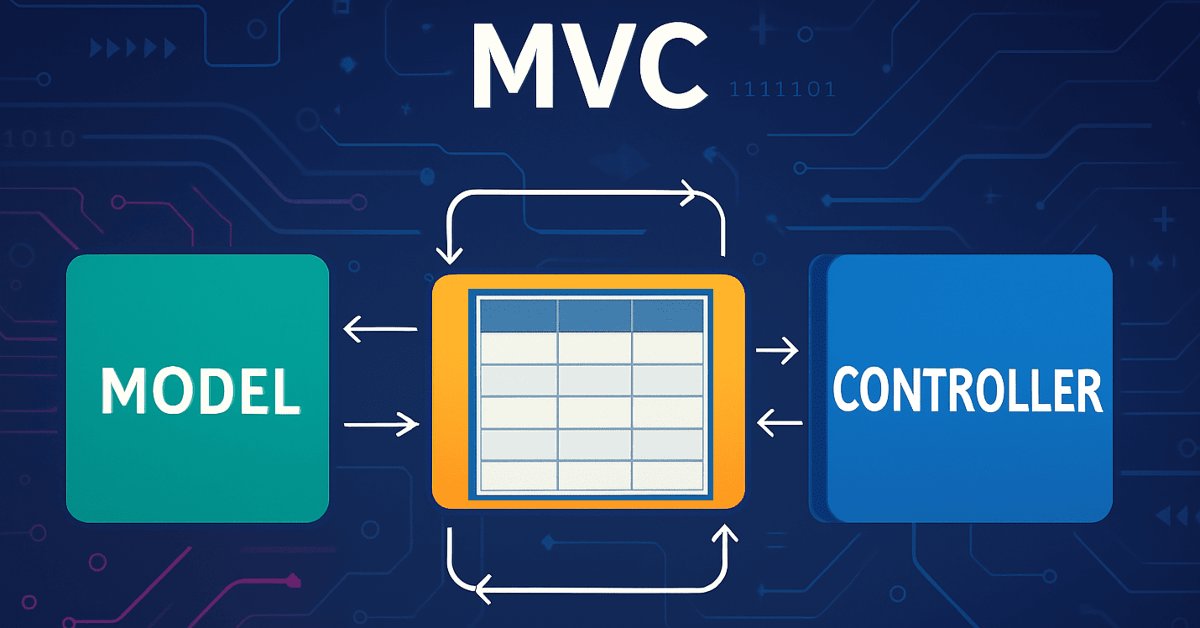
MQL5에서 테이블 모델 구현: MVC 개념 적용
 515
515
 9
9

콘텐츠
소개
프로그래밍에서 애플리케이션 아키텍처는 안정성, 확장성, 지원 용이성을 보장하는 데 중요한 역할을 합니다. 이러한 목표를 달성하는 데 도움이 되는 접근 방식 중 하나는 MVC(모델-뷰-컨트롤러) 라는 아키텍처 패턴을 활용하는 것입니다.
MVC 개념을 사용하면 애플리케이션을 세 가지의 상호 연관된 구성 요소, 즉 모델 (데이터 및 로직 관리), 뷰 (데이터 표시), 컨트롤러 (사용자 작업 처리)로 나눌 수 있습니다. 이러한 분리를 통해 코드 개발, 테스트, 유지관리가 간소화되어 코드가 더욱 체계적이고 유연 해집니다.
이 글에서는 MQL5 언어로 테이블 모델을 구현하기 위해 MVC 원칙을 적용하는 방법을 살펴보겠습니다. 테이블은 데이터를 저장, 처리, 표시하는 데 중요한 도구이며 테이블을 올바르게 구성하면 정보를 처리하는 작업이 훨씬 쉬워질 수 있습니다. 우리는 테이블 작업을 위한 클래스를 만들어 볼 것입니다: 테이블 셀, 행, 테이블 모델 테이블 모델 내의 행과 행 내에 셀을 저장하기 위해 MQL5 표준 라이브러리의 linked list(연결 목록) 클래스를 사용합니다. 이 클래스를 사용하면 데이터를 효율적으로 저장하고 사용할 수 있습니다.
MVC 개념에 대해 간략히 설명하겠습니다. MVC란 무엇이고 왜 필요할까요?
이 애플리케이션을 연극을 제작하는 것으로 상상해보세요. 무슨 일이 일어나야 하는지 설명하는 시나리오가 있습니다(이것이 모델입니다). 무대가 있습니다. 시청자가 보는 것(이것이 뷰 입니다). 마지막으로 전체 과정을 관리하고 다른 요소들을 연결하는 디렉터(컨트롤러)가 있습니다. 이것이 MVC(모델-뷰-컨트롤러) 아키텍처 패턴이 작동하는 방식입니다.
이 개념은 애플리케이션 내에서 책임을 분리하는 데 도움이 됩니다. 모델은 데이터와 논리를 담당하고 뷰는 표시와 모양을 담당하며 컨트롤러는 사용자 작업을 처리하는 역할을 합니다. 이렇게 분리하면 코드가 더 명확해지고 더 유연해지고 팀워크에 더 편리해 집니다.
예를 들어 테이블을 만든다고 가정해 보겠습니다. 모델은 어떤 행과 셀이 포함되어 있는지 알고 이를 어떻게 변경해야 할지 알고 있습니다. 뷰는 화면에 테이블을 그립니다. 사용자가 "행 추가"를 클릭하면 컨트롤러가 반응하여 모델에 작업을 전달한 다음 뷰에 업데이트를 지시합니다.
MVC는 새로운 기능이 추가되고, 인터페이스가 변경되고, 여러 개발자가 작업하는 경우와 같이 애플리케이션이 더 복잡해질 때 특히 유용합니다. 아키텍처가 명확하면 변경 사항을 적용하고 구성 요소를 개별적으로 테스트하고 코드를 재사용하기가 더 쉽습니다.
이 접근 방식에도 몇 가지 단점이 있습니다. 매우 간단한 프로젝트의 경우 MVC는 낭비일 수 있습니다. 심지어 여러 함수에 적합한 것들도 분리해야 할 것입니다. 하지만 확장 가능하고 중요한 애플리케이션의 경우 이 구조는 빠르게 효과를 발휘합니다.
요약하면:
MVC는 코드를 구성하고 이해하기 쉽고 테스트하기 쉽고 확장하기 쉽게 만드는 데 도움이 되는 강력한 아키텍처 템플릿입니다. 특히 데이터 로직, 사용자 인터페이스, 관리 등을 분리하는 것이 중요한 복잡한 애플리케이션에 유용합니다. 작은 프로젝트에서는 MVC를 사용하는 것은 불필요합니다.
모델-뷰-컨트롤러 패러다임은 우리의 작업에 매우 적합합니다. 테이블은 독립적인 객체로부터 생성됩니다.
- 테이블 셀.
실수, 정수 또는 문자열 중 하나의 값을 저장하는 객체에는 값을 관리하고 설정하고 검색하기 위한 도구가 탑재되어 있습니다. - 테이블 행.
테이블 셀에 있는 객체 목록을 저장하는 객체에는 셀, 셀 위치, 셀의 추가 및 삭제를 관리하는 도구가 탑재되어 있습니다. - 테이블 모델.
테이블 문자열 객체 목록을 저장하는 객체에는 테이블 문자열과 열, 해당 위치, 추가 및 삭제를 관리하는 도구가 갖춰져 있으며 문자열 및 셀 컨트롤에 액세스할 수도 있습니다.
아래 그림은 4x4 테이블 모델의 구조를 개략적으로 보여줍니다.
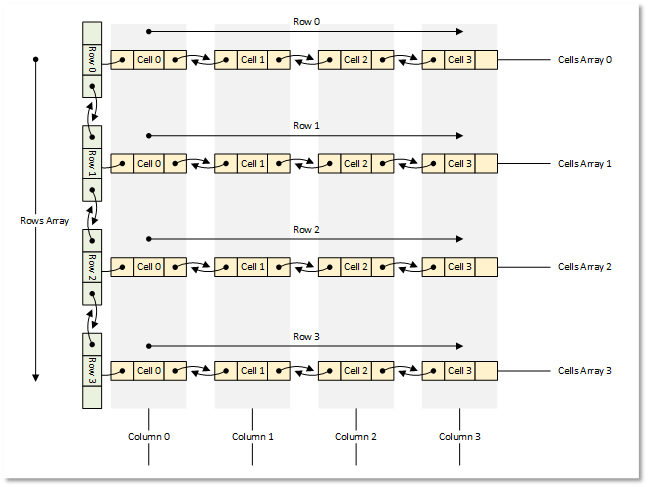
그림 1 4x4 테이블 모델
이제 이론에서 실천으로 넘어가겠습니다.
테이블 모델을 구축하기 위한 클래스 작성
MQL5 표준 라이브러리를 사용하여 모든 객체를 생성합니다.
각각의 객체는 라이브러리의 기본 클래스를 상속하게 됩니다. 이렇게 하면 이러한 객체를 객체 목록에 저장할 수 있습니다.
모든 클래스를 하나의 테스트 스크립트 파일에 작성하여 모든 것이 하나의 파일에 있고 눈에 보이고 빠르게 접근할 수 있도록 하겠습니다. 앞으로는 작성된 클래스를 별도의 include 파일로 배포할 예정입니다.
1. 테이블 형식 데이터를 저장하기 위한 기반으로서의 연결 리스트
CList 연결 목록은 테이블 형식의 데이터를 저장하는 데 매우 적합합니다. 비슷한 CArrayObj 리스트와는 달리 이 목록은 현재 목록의 왼쪽과 오른쪽에 위치한 이웃 목록 객체에 대한 액세스 메서드를 구현합니다. 이렇게 하면 행에서 셀을 쉽게 이동하거나 테이블에서 행을 이동하고 행을 추가하고 삭제할 수 있습니다. 동시에 목록 자체가 목록에서 이동, 추가 또는 삭제된 객체의 올바른 인덱싱을 처리합니다.
하지만 여기에는 한 가지 미묘한 차이가 있습니다. 파일에 목록을 로드하고 저장하는 메서드를 살펴보면 파일에서 로드 할 때 목록 클래스는 가상 CreateElement() 메서드에서 새로운 객체를 생성해야 한다는 것을 알 수 있습니다.
이 클래스의 이 메서드는 단순히 NULL을 반환합니다.
   //--- method of creating an element of the list
   virtual CObject  *CreateElement(void) { return(NULL); }
즉 연결 리스트를 사용하고 파일 작업이 필요하다면 CList 클래스를 상속하고 클래스에서 이 메서드를 구현해야 합니다.
표준 라이브러리 객체를 파일에 저장하는 메서드를 살펴보면 객체 속성을 저장하기 위한 다음과 같은 알고리즘을 확인할 수 있습니다.
- 데이터 시작 마커(-1)가 파일에 기록됩니다.
- 객체 유형이 파일에 기록됩니다.
- 모든 객체 속성은 하나씩 파일에 기록됩니다.
첫 번째와 두 번째 사항은 표준 라이브러리 객체가 구현한 모든 save/load 메서드에 내재되어 있습니다. 같은 논리에 따라 우리는 목록에 저장된 객체의 유형을 알고 싶어합니다. 그러므로 파일에서 읽을 때우리는 CList에서 상속받은 목록 클래스의 가상 CreateElement() 메서드에서 이 유형의 객체를 생성할 수 있습니다.
또한 목록에 로드 할 수 있는 모든 객체의 클래스는 목록 클래스가 구현되기 전에 선언되거나 생성되어야 합니다. 이 경우 목록은 어떤 객체가 "문제"이고 어떤 객체를 생성해야 하는지 "알게" 됩니다.
터미널 디렉토리 \MQL5\Scripts\에 새 폴더 TableModel\을 만들고 그 안에 테스트 스크립트 TableModelTest.mq5의 새 파일을 만듭니다.
연결 목록 파일을 연결하고 테이블 모델 클래스를 선언합니다.
//+------------------------------------------------------------------+
//|                                               TableModelTest.mq5 |
//|                                  Copyright 2025, MetaQuotes Ltd. |
//|                                             https://www.mql5.com |
//+------------------------------------------------------------------+
#property copyright "Copyright 2025, MetaQuotes Ltd."
#property link      "https://www.mql5.com"
#property version   "1.00"

//+------------------------------------------------------------------+
//| Include libraries                                                |
//+------------------------------------------------------------------+
#include <Arrays\List.mqh>

//--- Forward declaration of classes
class CTableCell;                   // Table cell class
class CTableRow;                    // Table row class
class CTableModel;                  // Table model class
여기서 미래 클래스의 전방 선언이 필요한 이유는 CList에서 상속받은 연결 리스트 클래스가 이러한 유형의 클래스와 생성해야 할 객체의 유형을 알 수 있도록 하기 위해서입니다. 이를 위해 객체 유형의 열거형, 보조 매크로, 목록을 정렬하는 방법의 열거형을 작성합니다.
//+------------------------------------------------------------------+
//| Include libraries                                                |
//+------------------------------------------------------------------+
#include <Arrays\List.mqh>

//--- Forward declaration of classes
class CTableCell;                   // Table cell class
class CTableRow;                    // Table row class
class CTableModel;                  // Table model class

//+------------------------------------------------------------------+
//| Macros                                                           |
//+------------------------------------------------------------------+
#define  MARKER_START_DATA    -1    // Data start marker in a file
#define  MAX_STRING_LENGTH    128   // Maximum length of a string in a cell

//+------------------------------------------------------------------+
//| Enumerations                                                     |
//+------------------------------------------------------------------+
enum ENUM_OBJECT_TYPE               // Enumeration of object types
  {
   OBJECT_TYPE_TABLE_CELL=10000,    // Table cell
   OBJECT_TYPE_TABLE_ROW,           // Table row
   OBJECT_TYPE_TABLE_MODEL,         // Table model
  };

enum ENUM_CELL_COMPARE_MODE         // Table cell comparison modes
  {
   CELL_COMPARE_MODE_COL,           // Comparison by column number
   CELL_COMPARE_MODE_ROW,           // Comparison by string number
   CELL_COMPARE_MODE_ROW_COL,       // Comparison by row and column
  };

//+------------------------------------------------------------------+
//| Functions                                                        |
//+------------------------------------------------------------------+
//--- Return the object type as a string
string TypeDescription(const ENUM_OBJECT_TYPE type)
  {
   string array[];
   int total=StringSplit(EnumToString(type),StringGetCharacter("_",0),array);
   string result="";
   for(int i=2;i<total;i++)
     {
      array[i]+=" ";
      array[i].Lower();
      array[i].SetChar(0,ushort(array[i].GetChar(0)-0x20));
      result+=array[i];
     }
   result.TrimLeft();
   result.TrimRight();
   return result;
  }
//+------------------------------------------------------------------+
//| Classes                                                          |
//+------------------------------------------------------------------+
객체 유형에 대한 설명을 반환하는 함수는 모든 객체 유형 상수의 이름이 "OBJECT_TYPE_" 하위 문자열로 시작한다는 가정에 기반합니다. 그런 다음 이 문자열 다음의 부분 문자열을 가져와서 결과 행의 모든 문자를 소문자로 변환하고 첫 번째 문자를 대문자로 변환한 다음 왼쪽과 오른쪽의 최종 문자열에서 모든 공백과 제어 문자를 지웁니다.
우리만의 연결 목록 클래스를 작성해 보겠습니다. 우리는 같은 파일에 코드를 계속해서 작성할 것입니다:
//+------------------------------------------------------------------+
//| Classes                                                          |
//+------------------------------------------------------------------+
//+------------------------------------------------------------------+
//| Linked object list class                                         |
//+------------------------------------------------------------------+
class CListObj : public CList
  {
protected:
   ENUM_OBJECT_TYPE  m_element_type;   // Created object type in CreateElement()
public:
//--- Virtual method (1) for loading a list from a file, (2) for creating a list element
   virtual bool      Load(const int file_handle);
   virtual CObject  *CreateElement(void);
  };
CListObj 클래스는 표준 라이브러리 CList 클래스에서 상속받은 새로운 연결 목록 클래스입니다.
클래스의 유일한 변수는 생성되는 객체의 유형이 기록되는 변수입니다. CreateElement() 메서드는 가상이고 부모 클래스 메서드와 정확히 동일한 시그니처를 가져야 하므로 생성되는 객체의 유형을 전달할 수 없습니다. 하지만 선언된 변수에 이 유형을 쓰고 이 유형에서 생성되는 객체의 유형을 읽을 수 있습니다.
우리는 부모 클래스의 두 가지 가상 메서드 즉 파일에서 업로드하는 메서드와 새로운 객체를 만드는 메서드를 다시 정의해야 합니다. 이들에 대해 살펴봅시다.
파일에서 목록을 업로드하는 메서드:
//+------------------------------------------------------------------+
//| Load a list from the file                                        |
//+------------------------------------------------------------------+
bool CListObj::Load(const int file_handle)
  {
//--- Variables
   CObject *node;
   bool     result=true;
//--- Check the handle
   if(file_handle==INVALID_HANDLE)
      return(false);
//--- Load and check the list start marker - 0xFFFFFFFFFFFFFFFF
   if(::FileReadLong(file_handle)!=MARKER_START_DATA)
      return(false);
//--- Load and check the list type
   if(::FileReadInteger(file_handle,INT_VALUE)!=Type())
      return(false);
//--- Read the list size (number of objects)
   uint num=::FileReadInteger(file_handle,INT_VALUE);

//--- Sequentially recreate the list elements by calling the Load() method of node objects
   this.Clear();
   for(uint i=0; i<num; i++)
     {
      //--- Read and check the object data start marker - 0xFFFFFFFFFFFFFFFF
      if(::FileReadLong(file_handle)!=MARKER_START_DATA)
         return false;
      //--- Read the object type
      this.m_element_type=(ENUM_OBJECT_TYPE)::FileReadInteger(file_handle,INT_VALUE);
      node=this.CreateElement();
      if(node==NULL)
         return false;
      this.Add(node);
      //--- Now the file pointer is offset relative to the beginning of the object marker by 12 bytes (8 - marker, 4 - type)
      //--- Set the pointer to the beginning of the object data and load the object properties from the file using the Load() method of the node element.
      if(!::FileSeek(file_handle,-12,SEEK_CUR))
         return false;
      result &=node.Load(file_handle);
     }
//--- Result
   return result;
  }
여기서는 먼저 목록의 시작을 제어하고 목록의 요소 수인 유형과 크기를 제어합니다. 그런 다음 루프를 통해 요소 수에 따라 각 객체의 데이터 시작 표시자와 유형을 파일에서 읽습니다. 결과 유형은 m_element_type 변수에 기록되고 새로운 요소를 생성하는 메서드가 호출됩니다. 이 메서드에서는 수신된 유형을 갖는 새로운 요소가 생성되어 노드 포인터 변수에 기록되고 이 변수는 다시 목록에 추가됩니다. 이 메서드의 전체 논리는 주석에 자세히 설명되어 있습니다. 새로운 목록 항목을 만드는 메서드를 살펴보겠습니다.
목록 항목을 만드는 메서드:
//+------------------------------------------------------------------+
//| List element creation method                                     |
//+------------------------------------------------------------------+
CObject *CListObj::CreateElement(void)
  {
//--- Create a new object depending on the object type in m_element_type
   switch(this.m_element_type)
     {
      case OBJECT_TYPE_TABLE_CELL   :  return new CTableCell();
      case OBJECT_TYPE_TABLE_ROW    :  return new CTableRow();
      case OBJECT_TYPE_TABLE_MODEL  :  return new CTableModel();
      default                       :  return NULL;
     }
  }
이는 메서드를 호출하기 전에 생성되는 객체의 유형이 이미 m_element_type 변수에 작성되어 있다는 의미입니다. 항목 유형에 따라 적절한 유형의 새로운 객체가 생성되고 해당 객체에 대한 포인터가 반환됩니다. 앞으로 새로운 컨트롤을 개발할 때 해당 유형은 ENUM_OBJECT_TYPE 열거형으로 작성될 것입니다. 그리고 여기에 새로운 사례가 추가되어 새로운 유형의 객체가 생성됩니다. 표준 CList 기반의 연결 목록 클래스가 준비되었습니다. 이제 알려진 유형의 모든 객체를 저장하고 목록을 파일에 저장하고 파일에서 이를 업로드하여 올바르게 복원할 수 있습니다.
2. 테이블 셀 클래스
테이블 셀은 특정 값을 저장하는 테이블의 가장 간단한 요소입니다. 셀은 테이블 행을 나타내는 목록을 구성합니다. 각 목록은 하나의 테이블 행을 나타냅니다. 우리의 테이블에서 셀은 한 번에 여러 유형의 값(실수, 정수 또는 문자열 값) 중 하나만 저장할 수 있을 것입니다.
간단한 값 외에도 셀에는 ENUM_OBJECT_TYPE 열거형에서 알려진 유형의 객체 하나가 할당될 수 있습니다. 이 경우 셀은 나열된 모든 유형의 값과 객체에 대한 포인터를 저장할 수 있으며 객체의 유형은 특수 변수에 기록됩니다. 따라서 앞으로 View 구성 요소는 Controller 구성 요소를 사용하여 셀에 해당 객체를 표시하도록 지시 받아 해당 객체와 상호 작용할 수 있습니다.
여러 유형의 값을 하나의 셀에 저장할 수 있으므로 공용체(union)를 사용하여 값을 쓰고 저장하고 반환합니다. 공용체(Union)는 동일한 메모리 영역에 여러 필드를 저장하는 특수한 유형의 데이터입니다. 공용체는 구조체와 유사하지만 구조체와는 달리 공용체의 서로 다른 항목은 같은 메모리 영역에 속합니다. 구조 내에서 각 필드에는 자체 메모리 영역이 할당됩니다.
이미 생성된 파일에 코드를 계속 작성해 보겠습니다. 새로운 클래스를 작성해 보겠습니다. 보호된 섹션에서 우리는 공용체를 작성하고 변수들을 선언 합니다 :
//+------------------------------------------------------------------+
//| Table cell class                                                 |
//+------------------------------------------------------------------+
class CTableCell : public CObject
  {
protected:
//--- Combining for storing cell values (double, long, string)
   union DataType
     {
      protected:
      double         double_value;
      long           long_value;
      ushort         ushort_value[MAX_STRING_LENGTH];

      public:
      //--- Set values
      void           SetValueD(const double value) { this.double_value=value;                   }
      void           SetValueL(const long value)   { this.long_value=value;                     }
      void           SetValueS(const string value) { ::StringToShortArray(value,ushort_value);  }

      //--- Return values
      double         ValueD(void) const { return this.double_value; }
      long           ValueL(void) const { return this.long_value; }
      string         ValueS(void) const
                       {
                        string res=::ShortArrayToString(this.ushort_value);
                        res.TrimLeft();
                        res.TrimRight();
                        return res;
                       }
     };
//--- Variables
   DataType          m_datatype_value;                      // Value
   ENUM_DATATYPE     m_datatype;                            // Data type
   CObject          *m_object;                              // Cell object
   ENUM_OBJECT_TYPE  m_object_type;                         // Object type in the cell
   int               m_row;                                 // Row index
   int               m_col;                                 // Column index
   int               m_digits;                              // Data representation accuracy
   uint              m_time_flags;                          // Date/time display flags
   bool              m_color_flag;                          // Color name display flag
   bool              m_editable;                            // Editable cell flag

public:
공개 섹션에서는 셀에 저장된 다양한 유형의 데이터에 대한 보호된 변수, 가상 메서드 및 클래스 생성자에 대한 액세스 메서드를 작성합니다.
public:
//--- Return cell coordinates and properties
   uint              Row(void)                           const { return this.m_row;                            }
   uint              Col(void)                           const { return this.m_col;                            }
   ENUM_DATATYPE     Datatype(void)                      const { return this.m_datatype;                       }
   int               Digits(void)                        const { return this.m_digits;                         }
   uint              DatetimeFlags(void)                 const { return this.m_time_flags;                     }
   bool              ColorNameFlag(void)                 const { return this.m_color_flag;                     }
   bool              IsEditable(void)                    const { return this.m_editable;                       }
//--- Return (1) double, (2) long and (3) string value
   double            ValueD(void)                        const { return this.m_datatype_value.ValueD();        }
   long              ValueL(void)                        const { return this.m_datatype_value.ValueL();        }
   string            ValueS(void)                        const { return this.m_datatype_value.ValueS();        }
//--- Return the value as a formatted string
   string            Value(void) const
                       {
                        switch(this.m_datatype)
                          {
                           case TYPE_DOUBLE  :  return(::DoubleToString(this.ValueD(),this.Digits()));
                           case TYPE_LONG    :  return(::IntegerToString(this.ValueL()));
                           case TYPE_DATETIME:  return(::TimeToString(this.ValueL(),this.m_time_flags));
                           case TYPE_COLOR   :  return(::ColorToString((color)this.ValueL(),this.m_color_flag));
                           default           :  return this.ValueS();
                          }
                       }
   string            DatatypeDescription(void) const
                       {
                        string type=::StringSubstr(::EnumToString(this.m_datatype),5);
                        type.Lower();
                        return type;
                       }
//--- Set variable values
   void              SetRow(const uint row)                    { this.m_row=(int)row;                          }
   void              SetCol(const uint col)                    { this.m_col=(int)col;                          }
   void              SetDatatype(const ENUM_DATATYPE datatype) { this.m_datatype=datatype;                     }
   void              SetDigits(const int digits)               { this.m_digits=digits;                         }
   void              SetDatetimeFlags(const uint flags)        { this.m_time_flags=flags;                      }
   void              SetColorNameFlag(const bool flag)         { this.m_color_flag=flag;                       }
   void              SetEditable(const bool flag)              { this.m_editable=flag;                         }
   void              SetPositionInTable(const uint row,const uint col)
                       {
                        this.SetRow(row);
                        this.SetCol(col);
                       }
//--- Assign an object to a cell
   void              AssignObject(CObject *object)
                       {
                        if(object==NULL)
                          {
                           ::PrintFormat("%s: Error. Empty object passed",__FUNCTION__);
                           return;
                          }
                        this.m_object=object;
                        this.m_object_type=(ENUM_OBJECT_TYPE)object.Type();
                       }
//--- Remove the object assignment
   void              UnassignObject(void)
                       {
                        this.m_object=NULL;
                        this.m_object_type=-1;
                       }

//--- Set double value
   void              SetValue(const double value)
                       {
                        this.m_datatype=TYPE_DOUBLE;
                        if(this.m_editable)
                           this.m_datatype_value.SetValueD(value);
                       }
//--- Set long value
   void              SetValue(const long value)
                       {
                        this.m_datatype=TYPE_LONG;
                        if(this.m_editable)
                           this.m_datatype_value.SetValueL(value);
                       }
//--- Set datetime value
   void              SetValue(const datetime value)
                       {
                        this.m_datatype=TYPE_DATETIME;
                        if(this.m_editable)
                           this.m_datatype_value.SetValueL(value);
                       }
//--- Set color value
   void              SetValue(const color value)
                       {
                        this.m_datatype=TYPE_COLOR;
                        if(this.m_editable)
                           this.m_datatype_value.SetValueL(value);
                       }
//--- Set string value
   void              SetValue(const string value)
                       {
                        this.m_datatype=TYPE_STRING;
                        if(this.m_editable)
                           this.m_datatype_value.SetValueS(value);
                       }
//--- Clear data
   void              ClearData(void)
                       {
                        if(this.Datatype()==TYPE_STRING)
                           this.SetValue("");
                        else
                           this.SetValue(0.0);
                       }
//--- (1) Return and (2) display the object description in the journal
   string            Description(void);
   void              Print(void);

//--- Virtual methods of (1) comparing, (2) saving to file, (3) loading from file, (4) object type
   virtual int       Compare(const CObject *node,const int mode=0) const;
   virtual bool      Save(const int file_handle);
   virtual bool      Load(const int file_handle);
   virtual int       Type(void)                          const { return(OBJECT_TYPE_TABLE_CELL);}


//--- Constructors/destructor
                     CTableCell(void) : m_row(0), m_col(0), m_datatype(-1), m_digits(0), m_time_flags(0), m_color_flag(false), m_editable(true), m_object(NULL), m_object_type(-1)
                       {
                        this.m_datatype_value.SetValueD(0);
                       }
                     //--- Accept a double value
                     CTableCell(const uint row,const uint col,const double value,const int digits) :
                        m_row((int)row), m_col((int)col), m_datatype(TYPE_DOUBLE), m_digits(digits), m_time_flags(0), m_color_flag(false), m_editable(true), m_object(NULL), m_object_type(-1)
                       {
                        this.m_datatype_value.SetValueD(value);
                       }
                     //--- Accept a long value
                     CTableCell(const uint row,const uint col,const long value) :
                        m_row((int)row), m_col((int)col), m_datatype(TYPE_LONG), m_digits(0), m_time_flags(0), m_color_flag(false), m_editable(true), m_object(NULL), m_object_type(-1)
                       {
                        this.m_datatype_value.SetValueL(value);
                       }
                     //--- Accept a datetime value
                     CTableCell(const uint row,const uint col,const datetime value,const uint time_flags) :
                        m_row((int)row), m_col((int)col), m_datatype(TYPE_DATETIME), m_digits(0), m_time_flags(time_flags), m_color_flag(false), m_editable(true), m_object(NULL), m_object_type(-1)
                       {
                        this.m_datatype_value.SetValueL(value);
                       }
                     //--- Accept color value
                     CTableCell(const uint row,const uint col,const color value,const bool color_names_flag) :
                        m_row((int)row), m_col((int)col), m_datatype(TYPE_COLOR), m_digits(0), m_time_flags(0), m_color_flag(color_names_flag), m_editable(true), m_object(NULL), m_object_type(-1)
                       {
                        this.m_datatype_value.SetValueL(value);
                       }
                     //--- Accept string value
                     CTableCell(const uint row,const uint col,const string value) :
                        m_row((int)row), m_col((int)col), m_datatype(TYPE_STRING), m_digits(0), m_time_flags(0), m_color_flag(false), m_editable(true), m_object(NULL), m_object_type(-1)
                       {
                        this.m_datatype_value.SetValueS(value);
                       }
                    ~CTableCell(void) {}
  };
값을 설정하는 메서드에서는 먼저 셀에 저장된 값의 유형을 설정한 후 셀의 값을 편집할 수 있는 기능의 플래그를 체크하도록 합니다. 플래그가 설정된 경우에만 새로운 값이 셀에 저장됩니다.
//--- Set double value
   void              SetValue(const double value)
                       {
                        this.m_datatype=TYPE_DOUBLE;
                        if(this.m_editable)
                           this.m_datatype_value.SetValueD(value);
                       }
왜 이런 식으로 하는 걸까요? 새로운 셀을 생성할 때 저장된 값의 실제 유형으로 생성됩니다. 값의 유형을 변경하고 싶지만 동시에 셀을 편집할 수 없는 경우에 메서드를 호출하여 원하는 유형의 값을 임의의 값으로 설정할 수 있습니다. 저장된 값의 유형은 변경되지만 셀 자체의 값에는 영향을 미치지 않습니다.
데이터 정리 메서드는 숫자 값을 0으로 설정하고 문자열 값에 공백을 입력합니다.
//--- Clear data
   void              ClearData(void)
                       {
                        if(this.Datatype()==TYPE_STRING)
                           this.SetValue("");
                        else
                           this.SetValue(0.0);
                       }
나중에는 다른 방식으로 작업할 것입니다. 즉 지워진 셀에 아무 데이터도 표시되지 않도록 셀을 비워두기 위해 셀에 "빈" 값을 만든 다음 셀을 지울 때 기록되고 표시된 모든 값이 지워집니다. 결국 0 역시 완전한 값이며 이제 셀이 지워지면 디지털 데이터는 0으로 채워집니다. 이는 잘못된 내용입니다.
클래스의 매개변수 생성자에서 테이블의 셀 좌표가 전달됩니다. 즉 행과 열의 수와 필요한 유형( double, long, datetime, color, string )의 값이 전달됩니다. 일부 유형의 값에는 추가 정보가 필요합니다.
- double— 출력 값의 정확도(소수점 자릿수)
- datetime—시간 출력 플래그(날짜/시-분/초),
- color— 표준 색상의 이름을 표시하기 위한 플래그.
셀에 저장된 이러한 유형의 값을 사용하는 생성자에서는 셀에 표시되는 값의 형식을 설정하기 위해 추가 매개변수가 전달됩니다.
 //--- Accept a double value
 CTableCell(const uint row,const uint col,const double value,const int digits) :
    m_row((int)row), m_col((int)col), m_datatype(TYPE_DOUBLE), m_digits(digits), m_time_flags(0), m_color_flag(false), m_editable(true), m_object(NULL), m_object_type(-1)
   {
    this.m_datatype_value.SetValueD(value);
   }
 //--- Accept a long value
 CTableCell(const uint row,const uint col,const long value) :
    m_row((int)row), m_col((int)col), m_datatype(TYPE_LONG), m_digits(0), m_time_flags(0), m_color_flag(false), m_editable(true), m_object(NULL), m_object_type(-1)
   {
    this.m_datatype_value.SetValueL(value);
   }
 //--- Accept a datetime value
 CTableCell(const uint row,const uint col,const datetime value,const uint time_flags) :
    m_row((int)row), m_col((int)col), m_datatype(TYPE_DATETIME), m_digits(0), m_time_flags(time_flags), m_color_flag(false), m_editable(true), m_object(NULL), m_object_type(-1)
   {
    this.m_datatype_value.SetValueL(value);
   }

 //--- Accept color value
 CTableCell(const uint row,const uint col,const color value,const bool color_names_flag) :
    m_row((int)row), m_col((int)col), m_datatype(TYPE_COLOR), m_digits(0), m_time_flags(0), m_color_flag(color_names_flag), m_editable(true), m_object(NULL), m_object_type(-1)
   {
    this.m_datatype_value.SetValueL(value);
   }
 //--- Accept string value
 CTableCell(const uint row,const uint col,const string value) :
    m_row((int)row), m_col((int)col), m_datatype(TYPE_STRING), m_digits(0), m_time_flags(0), m_color_flag(false), m_editable(true), m_object(NULL), m_object_type(-1)
   {
    this.m_datatype_value.SetValueS(value);
   }
두 객체를 비교하는 메서드:
//+------------------------------------------------------------------+
//| Compare two objects                                              |
//+------------------------------------------------------------------+
int CTableCell::Compare(const CObject *node,const int mode=0) const
  {
   const CTableCell *obj=node;
   switch(mode)
     {
      case CELL_COMPARE_MODE_COL :  return(this.Col()>obj.Col() ? 1 : this.Col()<obj.Col() ? -1 : 0);
      case CELL_COMPARE_MODE_ROW :  return(this.Row()>obj.Row() ? 1 : this.Row()<obj.Row() ? -1 : 0);
      //---CELL_COMPARE_MODE_ROW_COL
      default                    :  return
                                      (
                                       this.Row()>obj.Row() ? 1 : this.Row()<obj.Row() ? -1 :
                                       this.Col()>obj.Col() ? 1 : this.Col()<obj.Col() ? -1 : 0
                                      );
     }
  }
이 메서드를 사용하면 두 객체의 매개변수를 세 가지 비교 기준(열 번호, 행 번호, 행 번호와 열 번호를 동시에 비교) 중 하나를 사용하여 비교할 수 있습니다.
이 메서드는 테이블 열의 값을 기준으로 테이블 행을 정렬하는 데 필요합니다. 이 부분은 이후 관련 문서에서 컨트롤러에 의해 처리됩니다.
셀 속성을 파일에 저장하는 메서드:
//+------------------------------------------------------------------+
//| Save to file                                                     |
//+------------------------------------------------------------------+
bool CTableCell::Save(const int file_handle)
  {
//--- Check the handle
   if(file_handle==INVALID_HANDLE)
      return(false);
//--- Save data start marker - 0xFFFFFFFFFFFFFFFF
   if(::FileWriteLong(file_handle,MARKER_START_DATA)!=sizeof(long))
      return(false);
//--- Save the object type
   if(::FileWriteInteger(file_handle,this.Type(),INT_VALUE)!=INT_VALUE)
      return(false);

   //--- Save the data type
   if(::FileWriteInteger(file_handle,this.m_datatype,INT_VALUE)!=INT_VALUE)
      return(false);
   //--- Save the object type in the cell
   if(::FileWriteInteger(file_handle,this.m_object_type,INT_VALUE)!=INT_VALUE)
      return(false);
   //--- Save the row index
   if(::FileWriteInteger(file_handle,this.m_row,INT_VALUE)!=INT_VALUE)
      return(false);
   //--- Save the column index
   if(::FileWriteInteger(file_handle,this.m_col,INT_VALUE)!=INT_VALUE)
      return(false);
   //--- Maintain the accuracy of data representation
   if(::FileWriteInteger(file_handle,this.m_digits,INT_VALUE)!=INT_VALUE)
      return(false);
   //--- Save date/time display flags
   if(::FileWriteInteger(file_handle,this.m_time_flags,INT_VALUE)!=INT_VALUE)
      return(false);
   //--- Save the color name display flag
   if(::FileWriteInteger(file_handle,this.m_color_flag,INT_VALUE)!=INT_VALUE)
      return(false);
   //--- Save the edited cell flag
   if(::FileWriteInteger(file_handle,this.m_editable,INT_VALUE)!=INT_VALUE)
      return(false);
   //--- Save the value
   if(::FileWriteStruct(file_handle,this.m_datatype_value)!=sizeof(this.m_datatype_value))
      return(false);

//--- All is successful
   return true;
  }
시작 데이터 마커와 객체 유형을 파일에 작성한 후 모든 셀 속성이 차례대로 저장됩니다. FileWriteStruct()를 사용하여 공용체를 구조체로 저장해야 합니다.
파일에서 셀 속성을 로드하는 메서드:
//+------------------------------------------------------------------+
//| Load from file                                                   |
//+------------------------------------------------------------------+
bool CTableCell::Load(const int file_handle)
  {
//--- Check the handle
   if(file_handle==INVALID_HANDLE)
      return(false);
//--- Load and check the data start marker - 0xFFFFFFFFFFFFFFFF
   if(::FileReadLong(file_handle)!=MARKER_START_DATA)
      return(false);
//--- Load the object type
   if(::FileReadInteger(file_handle,INT_VALUE)!=this.Type())
      return(false);

   //--- Load the data type
   this.m_datatype=(ENUM_DATATYPE)::FileReadInteger(file_handle,INT_VALUE);
   //--- Load the object type in the cell
   this.m_object_type=(ENUM_OBJECT_TYPE)::FileReadInteger(file_handle,INT_VALUE);
   //--- Load the row index
   this.m_row=::FileReadInteger(file_handle,INT_VALUE);
   //--- Load the column index
   this.m_col=::FileReadInteger(file_handle,INT_VALUE);
   //--- Load the precision of the data representation
   this.m_digits=::FileReadInteger(file_handle,INT_VALUE);
   //--- Load date/time display flags
   this.m_time_flags=::FileReadInteger(file_handle,INT_VALUE);
   //--- Load the color name display flag
   this.m_color_flag=::FileReadInteger(file_handle,INT_VALUE);
   //--- Load the edited cell flag
   this.m_editable=::FileReadInteger(file_handle,INT_VALUE);
   //--- Load the value
   if(::FileReadStruct(file_handle,this.m_datatype_value)!=sizeof(this.m_datatype_value))
      return(false);

//--- All is successful
   return true;
  }
데이터 시작 마커와 유형 객체를 읽고 확인한 후 객체의 모든 속성은 저장된 순서대로 차례로 로드됩니다. 공용체는 FileReadStruct()를 사용하여 읽습니다.
객체에 대한 설명을 반환하는 메서드:
//+------------------------------------------------------------------+
//| Return the object description                                    |
//+------------------------------------------------------------------+
string CTableCell::Description(void)
  {
   return(::StringFormat("%s: Row %u, Col %u, %s <%s>Value: %s",
                         TypeDescription((ENUM_OBJECT_TYPE)this.Type()),this.Row(),this.Col(),
                         (this.m_editable ? "Editable" : "Uneditable"),this.DatatypeDescription(),this.Value()));
  }
여기서는 일부 셀 매개변수에서 행이 생성되고 예를 들어 double의 경우 다음 형식으로 반환됩니다.
Table Cell: Row 2, Col 2, Uneditable <double>Value: 0.00
로그에 객체 설명을 출력하는 메서드:
//+------------------------------------------------------------------+
//| Display the object description in the journal                    |
//+------------------------------------------------------------------+
void CTableCell::Print(void)
  {
   ::Print(this.Description());
  }
여기서는 객체 설명이 단순히 로그에 인쇄됩니다.
//+------------------------------------------------------------------+
//| Table row class                                                  |
//+------------------------------------------------------------------+
class CTableRow : public CObject
  {
protected:
   CTableCell        m_cell_tmp;                            // Cell object to search in the list
   CListObj          m_list_cells;                          // List of cells
   uint              m_index;                               // Row index

//--- Add the specified cell to the end of the list
   bool              AddNewCell(CTableCell *cell);

public:
//--- (1) Set and (2) return the row index
   void              SetIndex(const uint index)                { this.m_index=index;  }
   uint              Index(void)                         const { return this.m_index; }
//--- Set the row and column positions to all cells
   void              CellsPositionUpdate(void);

//--- Create a new cell and add it to the end of the list
   CTableCell       *CreateNewCell(const double value);
   CTableCell       *CreateNewCell(const long value);
   CTableCell       *CreateNewCell(const datetime value);
   CTableCell       *CreateNewCell(const color value);
   CTableCell       *CreateNewCell(const string value);

//--- Return (1) the cell by index and (2) the number of cells
   CTableCell       *GetCell(const uint index)                 { return this.m_list_cells.GetNodeAtIndex(index);  }
   uint              CellsTotal(void)                    const { return this.m_list_cells.Total();                }

//--- Set the value to the specified cell
   void              CellSetValue(const uint index,const double value);
   void              CellSetValue(const uint index,const long value);
   void              CellSetValue(const uint index,const datetime value);
   void              CellSetValue(const uint index,const color value);
   void              CellSetValue(const uint index,const string value);
//--- (1) assign to a cell and (2) remove an assigned object from the cell
   void              CellAssignObject(const uint index,CObject *object);
   void              CellUnassignObject(const uint index);

//--- (1) Delete and (2) move the cell
   bool              CellDelete(const uint index);
   bool              CellMoveTo(const uint cell_index, const uint index_to);

//--- Reset the data of the row cells
   void              ClearData(void);

//--- (1) Return and (2) display the object description in the journal
   string            Description(void);
   void              Print(const bool detail, const bool as_table=false, const int cell_width=10);

//--- Virtual methods of (1) comparing, (2) saving to file, (3) loading from file, (4) object type
   virtual int       Compare(const CObject *node,const int mode=0) const;
   virtual bool      Save(const int file_handle);
   virtual bool      Load(const int file_handle);
   virtual int       Type(void)                          const { return(OBJECT_TYPE_TABLE_ROW); }

//--- Constructors/destructor
                     CTableRow(void) : m_index(0) {}
                     CTableRow(const uint index) : m_index(index) {}
                    ~CTableRow(void){}
  };
3. Table Row 클래스
테이블 행(Table Row)은 본질적으로 셀의 연결 목록입니다. 행 클래스는 목록에서 셀을 새로운 위치에 추가, 삭제, 재정렬하는 기능을 지원해야 합니다. 클래스에는 목록의 셀을 관리하기 위한 최소한의 충분한 메서드 세트가 있어야 합니다.
같은 파일에 코드를 계속 작성해 보겠습니다. 클래스 매개변수에서 사용 가능한 변수는 테이블의 행 인덱스 하나 뿐입니다. 나머지는 모두 행 속성과 셀 목록을 다루는 메서드입니다.
클래스 메서드에 대해 살펴보겠습니다.
두 개의 테이블 행을 비교하는 메서드:
//+------------------------------------------------------------------+
//| Compare two objects                                              |
//+------------------------------------------------------------------+
int CTableRow::Compare(const CObject *node,const int mode=0) const
  {
   const CTableRow *obj=node;
   return(this.Index()>obj.Index() ? 1 : this.Index()<obj.Index() ? -1 : 0);
  }
행은 단일 매개변수(행 인덱스)로만 비교할 수 있습니다. 그래서 여기서는 이 비교를 구현했습니다. 이 메서드는 테이블 행을 정렬하는 데 필요합니다.
다양한 유형의 저장된 데이터를 사용하여 셀을 생성하기 위한 오버로드된 메서드:
//+------------------------------------------------------------------+
//| Create a new double cell and add it to the end of the list       |
//+------------------------------------------------------------------+
CTableCell *CTableRow::CreateNewCell(const double value)
  {
//--- Create a new cell object storing a value of double type
   CTableCell *cell=new CTableCell(this.m_index,this.CellsTotal(),value,2);
   if(cell==NULL)
     {
      ::PrintFormat("%s: Error. Failed to create new cell in row %u at position %u",__FUNCTION__, this.m_index, this.CellsTotal());
      return NULL;
     }
//--- Add the created cell to the end of the list
   if(!this.AddNewCell(cell))
     {
      delete cell;
      return NULL;
     }
//--- Return the pointer to the object
   return cell;
  }
//+------------------------------------------------------------------+
//| Create a new long cell and add it to the end of the list         |
//+------------------------------------------------------------------+
CTableCell *CTableRow::CreateNewCell(const long value)
  {
//--- Create a new cell object storing a long value
   CTableCell *cell=new CTableCell(this.m_index,this.CellsTotal(),value);
   if(cell==NULL)
     {
      ::PrintFormat("%s: Error. Failed to create new cell in row %u at position %u",__FUNCTION__, this.m_index, this.CellsTotal());
      return NULL;
     }
//--- Add the created cell to the end of the list
   if(!this.AddNewCell(cell))
     {
      delete cell;
      return NULL;
     }
//--- Return the pointer to the object
   return cell;
  }
//+------------------------------------------------------------------+
//| Create a new datetime cell and add it to the end of the list     |
//+------------------------------------------------------------------+
CTableCell *CTableRow::CreateNewCell(const datetime value)
  {
//--- Create a new cell object storing a value of datetime type
   CTableCell *cell=new CTableCell(this.m_index,this.CellsTotal(),value,TIME_DATE|TIME_MINUTES|TIME_SECONDS);
   if(cell==NULL)
     {
      ::PrintFormat("%s: Error. Failed to create new cell in row %u at position %u",__FUNCTION__, this.m_index, this.CellsTotal());
      return NULL;
     }
//--- Add the created cell to the end of the list
   if(!this.AddNewCell(cell))
     {
      delete cell;
      return NULL;
     }
//--- Return the pointer to the object
   return cell;
  }
//+------------------------------------------------------------------+
//| Create a new color cell and add it to the end of the list        |
//+------------------------------------------------------------------+
CTableCell *CTableRow::CreateNewCell(const color value)
  {
//--- Create a new cell object storing a value of color type
   CTableCell *cell=new CTableCell(this.m_index,this.CellsTotal(),value,true);
   if(cell==NULL)
     {
      ::PrintFormat("%s: Error. Failed to create new cell in row %u at position %u",__FUNCTION__, this.m_index, this.CellsTotal());
      return NULL;
     }
//--- Add the created cell to the end of the list
   if(!this.AddNewCell(cell))
     {
      delete cell;
      return NULL;
     }
//--- Return the pointer to the object
   return cell;
  }
//+------------------------------------------------------------------+
//| Create a new string cell and add it to the end of the list       |
//+------------------------------------------------------------------+
CTableCell *CTableRow::CreateNewCell(const string value)
  {
//--- Create a new cell object storing a value of string type
   CTableCell *cell=new CTableCell(this.m_index,this.CellsTotal(),value);
   if(cell==NULL)
     {
      ::PrintFormat("%s: Error. Failed to create new cell in row %u at position %u",__FUNCTION__, this.m_index, this.CellsTotal());
      return NULL;
     }
//--- Add the created cell to the end of the list
   if(!this.AddNewCell(cell))
     {
      delete cell;
      return NULL;
     }
//--- Return the pointer to the object
   return cell;
  }
새로운 셀을 생성하고 목록 끝에 추가하는 5가지 메서드 (double, long, datetime, color, string) 셀에 대한 데이터 출력 형식의 추가 매개변수는 기본값으로 설정되며 셀이 생성된 후에 변경될 수 있습니다. 먼저 새로운 셀 객체가 만들어진 후 목록 끝에 추가됩니다. 객체가 생성되지 않은 경우 메모리 누수를 방지하기 위해 삭제됩니다.
목록 끝에 셀을 추가하는 메서드:
//+------------------------------------------------------------------+
//| Add a cell to the end of the list                                |
//+------------------------------------------------------------------+
bool CTableRow::AddNewCell(CTableCell *cell)
  {
//--- If an empty object is passed, report it and return 'false'
   if(cell==NULL)
     {
      ::PrintFormat("%s: Error. Empty CTableCell object passed",__FUNCTION__);
      return false;
     }
//--- Set the cell index in the list and add the created cell to the end of the list
   cell.SetPositionInTable(this.m_index,this.CellsTotal());
   if(this.m_list_cells.Add(cell)==WRONG_VALUE)
     {
      ::PrintFormat("%s: Error. Failed to add cell (%u,%u) to list",__FUNCTION__,this.m_index,this.CellsTotal());
      return false;
     }
//--- Successful
   return true;
  }
새로 생성된 셀은 항상 목록 끝에 추가됩니다. 이후 나중에 생성될 테이블 모델 클래스의 메서드를 사용하여 적절한 위치로 옮길 수 있습니다.
지정된 셀에 값을 설정하기 위한 오버로드 된 메서드:
//+------------------------------------------------------------------+
//| Set the double value to the specified cell                       |
//+------------------------------------------------------------------+
void CTableRow::CellSetValue(const uint index,const double value)
  {
//--- Get the required cell from the list and set a new value into it
   CTableCell *cell=this.GetCell(index);
   if(cell!=NULL)
      cell.SetValue(value);
  }
//+------------------------------------------------------------------+
//| Set a long value to the specified cell                           |
//+------------------------------------------------------------------+
void CTableRow::CellSetValue(const uint index,const long value)
  {
//--- Get the required cell from the list and set a new value into it
   CTableCell *cell=this.GetCell(index);
   if(cell!=NULL)
      cell.SetValue(value);
  }
//+------------------------------------------------------------------+
//| Set the datetime value to the specified cell                     |
//+------------------------------------------------------------------+
void CTableRow::CellSetValue(const uint index,const datetime value)
  {
//--- Get the required cell from the list and set a new value into it
   CTableCell *cell=this.GetCell(index);
   if(cell!=NULL)
      cell.SetValue(value);
  }
//+------------------------------------------------------------------+
//| Set the color value to the specified cell                        |
//+------------------------------------------------------------------+
void CTableRow::CellSetValue(const uint index,const color value)
  {
//--- Get the required cell from the list and set a new value into it
   CTableCell *cell=this.GetCell(index);
   if(cell!=NULL)
      cell.SetValue(value);
  }
//+------------------------------------------------------------------+
//| Set a string value to the specified cell                         |
//+------------------------------------------------------------------+
void CTableRow::CellSetValue(const uint index,const string value)
  {
//--- Get the required cell from the list and set a new value into it
   CTableCell *cell=this.GetCell(index);
   if(cell!=NULL)
      cell.SetValue(value);
  }
인덱스를 사용하여 목록에서 필요한 셀을 가져오고 해당 값을 설정합니다. 셀을 편집할 수 없는 경우 셀 객체의 SetValue() 메서드는 셀에 대해 설정되는 값의 유형만 설정합니다. 값 자체는 설정되지 않습니다.
셀에 객체를 할당하는 메서드:
//+------------------------------------------------------------------+
//| Assign an object to the cell                                     |
//+------------------------------------------------------------------+
void CTableRow::CellAssignObject(const uint index,CObject *object)
  {
//--- Get the required cell from the list and set a pointer to the object into it
   CTableCell *cell=this.GetCell(index);
   if(cell!=NULL)
      cell.AssignObject(object);
  }
인덱스로 셀 객체를 얻고 AssignObject() 메서드를 사용하여 객체에 대한 포인터를 셀에 할당합니다.
셀에 할당된 객체를 취소하는 메서드:
//+------------------------------------------------------------------+
//| Cancel the assigned object for the cell                          |
//+------------------------------------------------------------------+
void CTableRow::CellUnassignObject(const uint index)
  {
//--- Get the required cell from the list and cancel the pointer to the object and its type in it
   CTableCell *cell=this.GetCell(index);
   if(cell!=NULL)
      cell.UnassignObject();
  }
인덱스로 셀 객체를 가져온 다음 UnassignObject() 메서드를 사용하여 셀에 할당된 객체에 대한 포인터를 제거합니다.
셀을 삭제하는 메서드:
//+------------------------------------------------------------------+
//| Delete a cell                                                    |
//+------------------------------------------------------------------+
bool CTableRow::CellDelete(const uint index)
  {
//--- Delete a cell in the list by index
   if(!this.m_list_cells.Delete(index))
      return false;
//--- Update the indices for the remaining cells in the list
   this.CellsPositionUpdate();
   return true;
  }
CList 클래스의 Delete() 메서드를 사용하여 목록에서 셀을 삭제합니다. 목록에서 셀이 삭제된 후에는 남아 있는 셀의 인덱스가 변경됩니다. CellsPositionUpdate() 메서드를 사용하여 목록에 남아 있는 모든 셀의 인덱스를 업데이트합니다.
셀을 지정된 위치로 이동하는 메서드:
//+------------------------------------------------------------------+
//| Moves the cell to the specified position                         |
//+------------------------------------------------------------------+
bool CTableRow::CellMoveTo(const uint cell_index,const uint index_to)
  {
//--- Select the desired cell by index in the list, turning it into the current one
   CTableCell *cell=this.GetCell(cell_index);
//--- Move the current cell to the specified position in the list
   if(cell==NULL || !this.m_list_cells.MoveToIndex(index_to))
      return false;
//--- Update the indices of all cells in the list
   this.CellsPositionUpdate();
   return true;
  }
CList 클래스가 객체에 대해 작업을 수행하려면 목록에 있는 해당 객체가 현재 객체여야 합니다. 예를 들어 해당 객체를 선택하면 현재 객체가 됩니다. 따라서 여기서 우리는 먼저 인덱스를 통해 목록에서 셀 객체를 가져옵니다. 해당 셀이 현재 셀이 되고 CList 클래스의 MoveToIndex() 메서드를 사용하여 객체를 목록의 필요한 위치로 이동합니다. 객체를 새로운 위치로 성공적으로 이동한 후에는 나머지 객체의 인덱스를 조정해야 하는데 이는 CellsPositionUpdate() 메서드를 사용하여 수행됩니다.
목록의 모든 셀에 대한 행과 열 위치를 설정하는 메서드:
//+------------------------------------------------------------------+
//| Set the row and column positions to all cells                    |
//+------------------------------------------------------------------+
void CTableRow::CellsPositionUpdate(void)
  {
//--- In the loop through all cells in the list
   for(int i=0;i<this.m_list_cells.Total();i++)
     {
      //--- get the next cell and set the row and column indices in it
      CTableCell *cell=this.GetCell(i);
      if(cell!=NULL)
         cell.SetPositionInTable(this.Index(),this.m_list_cells.IndexOf(cell));
     }
  }
CList 클래스를 사용하면 목록에서 현재 객체 인덱스를 찾을 수 있습니다. 그렇게 하려면 객체를 선택해야 합니다. 여기서는 목록에 있는 모든 셀 객체를 루프 반복하고 각 객체를 선택한 다음 CList 클래스의 IndexOf() 메서드를 사용하여 해당 인덱스를 찾습니다. 행 인덱스와 찾은 셀 인덱스는 SetPositionInTable() 메서드를 사용하여 셀 객체에 설정됩니다.
행 셀의 데이터를 재설정하는 메서드:
//+------------------------------------------------------------------+
//| Reset the cell data of a row                                     |
//+------------------------------------------------------------------+
void CTableRow::ClearData(void)
  {
//--- In the loop through all cells in the list
   for(uint i=0;i<this.CellsTotal();i++)
     {
      //--- get the next cell and set an empty value to it
      CTableCell *cell=this.GetCell(i);
      if(cell!=NULL)
         cell.ClearData();
     }
  }
루프에서 ClearData() 셀 객체 메서드를 사용하여 목록의 각 다음번 셀을 재설정합니다. 문자열 데이터의 경우 셀에 빈 행이 기록되고 숫자 데이터의 경우 0이 기록됩니다.
객체에 대한 설명을 반환하는 메서드:
//+------------------------------------------------------------------+
//| Return the object description                                    |
//+------------------------------------------------------------------+
string CTableRow::Description(void)
  {
   return(::StringFormat("%s: Position %u, Cells total: %u",
                         TypeDescription((ENUM_OBJECT_TYPE)this.Type()),this.Index(),this.CellsTotal()));
  }
객체의 속성과 데이터에서 행이 수집되어 다음과 같은 형식으로 반환됩니다. 예:
Table Row: Position 1, Cells total: 4:
로그에 객체 설명을 출력하는 메서드:
//+------------------------------------------------------------------+
//| Display the object description in the journal                    |
//+------------------------------------------------------------------+
void CTableRow::Print(const bool detail, const bool as_table=false, const int cell_width=10)
  {

//--- Number of cells
   int total=(int)this.CellsTotal();

//--- If the output is in tabular form
   string res="";
   if(as_table)
     {
      //--- create a table row from the values of all cells
      string head=" Row "+(string)this.Index();
      string res=::StringFormat("|%-*s |",cell_width,head);
      for(int i=0;i<total;i++)
        {
         CTableCell *cell=this.GetCell(i);
         if(cell==NULL)
            continue;
         res+=::StringFormat("%*s |",cell_width,cell.Value());
        }
      //--- Display a row in the journal
      ::Print(res);
      return;
     }

//--- Display the header as a row description
   ::Print(this.Description()+(detail ? ":" : ""));

//--- If detailed description
   if(detail)
     {

      //--- The output is not in tabular form
      //--- In the loop through the list of cells in the row
      for(int i=0; i<total; i++)
        {
         //--- get the current cell and add its description to the final row
         CTableCell *cell=this.GetCell(i);
         if(cell!=NULL)
            res+="  "+cell.Description()+(i<total-1 ? "\n" : "");
        }
      //--- Send the row created in the loop to the journal
      ::Print(res);
     }
  }
로그에 표 형식이 아닌 데이터가 표시되는 경우 헤더는 먼저 로그에 행 설명으로 표시됩니다. 그런 다음 자세한 표시 플래그가 설정된 경우 각 셀에 대한 설명이 셀 목록을 루프 순환하여 로그에 표시됩니다.
그 결과로 로그에 대한 테이블 행의 상세 표시는 다음과 같습니다(비표형 보기의 경우):
Table Row: Position 0, Cells total: 4:
  Table Cell: Row 0, Col 0, Editable <long>Value: 10
  Table Cell: Row 0, Col 1, Editable <long>Value: 21
  Table Cell: Row 0, Col 2, Editable <long>Value: 32
  Table Cell: Row 0, Col 3, Editable <long>Value: 43
테이블 형식으로 표시하는 경우 결과는 다음과 같습니다.
| Row 0 | 0 | 1 | 2 | 3 |
테이블 행을 파일에 저장하는 메서드:
//+------------------------------------------------------------------+
//| Save to file                                                     |
//+------------------------------------------------------------------+
bool CTableRow::Save(const int file_handle)
  {
//--- Check the handle
   if(file_handle==INVALID_HANDLE)
      return(false);
//--- Save data start marker - 0xFFFFFFFFFFFFFFFF
   if(::FileWriteLong(file_handle,MARKER_START_DATA)!=sizeof(long))
      return(false);
//--- Save the object type
   if(::FileWriteInteger(file_handle,this.Type(),INT_VALUE)!=INT_VALUE)
      return(false);

//--- Save the index
   if(::FileWriteInteger(file_handle,this.m_index,INT_VALUE)!=INT_VALUE)
      return(false);
//--- Save the list of cells
   if(!this.m_list_cells.Save(file_handle))
      return(false);

//--- Successful
   return true;
  }
데이터 시작 마커를 저장한 다음 객체 유형을 저장합니다. 이는 파일의 각 객체에 대한 표준 헤더입니다. 그 다음에는 객체의 속성 파일에 대한 항목이 이어집니다. 여기서는 행 인덱스가 파일에 저장되고 그 다음에 셀 목록이 저장됩니다.
파일에서 행을 업로드하는 메서드:
//+------------------------------------------------------------------+
//| Load from file                                                   |
//+------------------------------------------------------------------+
bool CTableRow::Load(const int file_handle)
  {
//--- Check the handle
   if(file_handle==INVALID_HANDLE)
      return(false);
//--- Load and check the data start marker - 0xFFFFFFFFFFFFFFFF
   if(::FileReadLong(file_handle)!=MARKER_START_DATA)
      return(false);
//--- Load the object type
   if(::FileReadInteger(file_handle,INT_VALUE)!=this.Type())
      return(false);

//--- Load the index
   this.m_index=::FileReadInteger(file_handle,INT_VALUE);
//--- Load the list of cells
   if(!this.m_list_cells.Load(file_handle))
      return(false);

//--- Successful
   return true;
  }
여기서는 모든 것이 저장할 때와 같은 순서로 정렬됩니다. 먼저 데이터 시작 마커와 객체 유형을 로드 하여 확인합니다. 그런 다음 행 인덱스와 전체 셀 목록이 로드 됩니다.
4. 테이블 모델 클래스
가장 간단한 형태의 테이블 모델은 행의 연결 리스트이며 행은 다시 셀의 연결 리스트를 포함합니다. 오늘 우리가 만드는 모델은 다섯 가지 유형(double, long, datetime, color, string) 중 하나의 2차원 배열을 입력으로 받고 이를 기반으로 가상 테이블을 구축할 것입니다. 나아가 다른 입력 데이터로부터 테이블을 생성하기 위한 다른 인수를 허용하도록 이 클래스를 확장할 것입니다. 동일한 모델이 기본 모델로 간주됩니다.
같은 파일 \MQL5\Scripts\TableModel\TableModelTest.mq5에 코드를 계속 작성해 보겠습니다.
테이블 모델 클래스는 기본적으로 행, 열, 셀을 관리하는 메서드가 있는 행의 연결 목록입니다. 모든 변수와 메서드를 포함하는 클래스 본문을 작성한 다음 클래스의 선언된 메서드를 살펴 보겠습니다.
//+------------------------------------------------------------------+
//| Table model class                                                |
//+------------------------------------------------------------------+
class CTableModel : public CObject
  {
protected:
   CTableRow         m_row_tmp;                             // Row object to search in the list
   CListObj          m_list_rows;                           // List of table rows
//--- Create a table model from a two-dimensional array
template<typename T>
   void              CreateTableModel(T &array[][]);
//--- Return the correct data type
   ENUM_DATATYPE     GetCorrectDatatype(string type_name)
                       {
                        return
                          (
                           //--- Integer value
                           type_name=="bool" || type_name=="char"    || type_name=="uchar"   ||
                           type_name=="short"|| type_name=="ushort"  || type_name=="int"     ||
                           type_name=="uint" || type_name=="long"    || type_name=="ulong"   ?  TYPE_LONG      :
                           //--- Real value
                           type_name=="float"|| type_name=="double"                          ?  TYPE_DOUBLE    :
                           //--- Date/time value
                           type_name=="datetime"                                             ?  TYPE_DATETIME  :
                           //--- Color value
                           type_name=="color"                                                ?  TYPE_COLOR     :
                           /*--- String value */                                          TYPE_STRING    );
                       }

//--- Create and add a new empty string to the end of the list
   CTableRow        *CreateNewEmptyRow(void);
//--- Add a string to the end of the list
   bool              AddNewRow(CTableRow *row);
//--- Set the row and column positions to all table cells
   void              CellsPositionUpdate(void);

public:
//--- Return (1) cell, (2) row by index, number (3) of rows, cells (4) in the specified row and (5) in the table
   CTableCell       *GetCell(const uint row, const uint col);
   CTableRow        *GetRow(const uint index)                  { return this.m_list_rows.GetNodeAtIndex(index);   }
   uint              RowsTotal(void)                     const { return this.m_list_rows.Total();  }
   uint              CellsInRow(const uint index);
   uint              CellsTotal(void);

//--- Set (1) value, (2) precision, (3) time display flags and (4) color name display flag to the specified cell
template<typename T>
   void              CellSetValue(const uint row, const uint col, const T value);
   void              CellSetDigits(const uint row, const uint col, const int digits);
   void              CellSetTimeFlags(const uint row, const uint col, const uint flags);
   void              CellSetColorNamesFlag(const uint row, const uint col, const bool flag);
//--- (1) Assign and (2) cancel the object in the cell
   void              CellAssignObject(const uint row, const uint col,CObject *object);
   void              CellUnassignObject(const uint row, const uint col);
//--- (1) Delete and (2) move the cell
   bool              CellDelete(const uint row, const uint col);
   bool              CellMoveTo(const uint row, const uint cell_index, const uint index_to);

//--- (1) Return and (2) display the cell description and (3) the object assigned to the cell
   string            CellDescription(const uint row, const uint col);
   void              CellPrint(const uint row, const uint col);
   CObject          *CellGetObject(const uint row, const uint col);

public:
//--- Create a new string and (1) add it to the end of the list, (2) insert to the specified list position
   CTableRow        *RowAddNew(void);
   CTableRow        *RowInsertNewTo(const uint index_to);
//--- (1) Remove or (2) relocate the row, (3) clear the row data
   bool              RowDelete(const uint index);
   bool              RowMoveTo(const uint row_index, const uint index_to);
   void              RowResetData(const uint index);
//--- (1) Return and (2) display the row description in the journal
   string            RowDescription(const uint index);
   void              RowPrint(const uint index,const bool detail);

//--- (1) Remove or (2) relocate the column, (3) clear the column data
   bool              ColumnDelete(const uint index);
   bool              ColumnMoveTo(const uint row_index, const uint index_to);
   void              ColumnResetData(const uint index);

//--- (1) Return and (2) display the table description in the journal
   string            Description(void);
   void              Print(const bool detail);
   void              PrintTable(const int cell_width=10);

//--- (1) Clear the data, (2) destroy the model
   void              ClearData(void);
   void              Destroy(void);

//--- Virtual methods of (1) comparing, (2) saving to file, (3) loading from file, (4) object type
   virtual int       Compare(const CObject *node,const int mode=0) const;
   virtual bool      Save(const int file_handle);
   virtual bool      Load(const int file_handle);
   virtual int       Type(void)                          const { return(OBJECT_TYPE_TABLE_MODEL);  }

//--- Constructors/destructor
                     CTableModel(void){}
                     CTableModel(double &array[][])   { this.CreateTableModel(array); }
                     CTableModel(long &array[][])     { this.CreateTableModel(array); }
                     CTableModel(datetime &array[][]) { this.CreateTableModel(array); }
                     CTableModel(color &array[][])    { this.CreateTableModel(array); }
                     CTableModel(string &array[][])   { this.CreateTableModel(array); }
                    ~CTableModel(void){}
  };
기본적으로 테이블 행의 연결 리스트에는 하나의 객체만 있고 행, 셀, 열을 관리하는 메서드도 있습니다. 그리고 다양한 유형의 2차원 배열을 허용하는 생성자도 있습니다.
배열이 클래스 생성자에 전달되고 테이블 모델을 생성하는 메서드가 호출됩니다.
//+------------------------------------------------------------------+
//| Create the table model from a two-dimensional array              |
//+------------------------------------------------------------------+
template<typename T>
void CTableModel::CreateTableModel(T &array[][])
  {
//--- Get the number of table rows and columns from the array properties
   int rows_total=::ArrayRange(array,0);
   int cols_total=::ArrayRange(array,1);
//--- In a loop by row indices
   for(int r=0; r<rows_total; r++)
     {
      //--- create a new empty row and add it to the end of the list of rows
      CTableRow *row=this.CreateNewEmptyRow();
      //--- If a row is created and added to the list,
      if(row!=NULL)
        {
         //--- In the loop by the number of cells in a row,
         //--- create all the cells, adding each new one to the end of the list of cells in the row
         for(int c=0; c<cols_total; c++)
            row.CreateNewCell(array[r][c]);
        }
     }
  }
이 메서드의 로직은 주석에 설명되어 있습니다. 배열의 첫 번째 차원은 테이블 행이고 두 번째 차원은 각 행의 셀입니다. 셀을 생성할 때는 메서드에 전달되는 배열 유형과 동일한 데이터 유형을 사용합니다.
이렇게 하면 여러 개의 테이블 모델을 만들 수 있으며 각 셀은 처음에 서로 다른 유형의 데이터(double, long, datetime, color, string)를 저장합니다. 나중에 테이블 모델을 만든 후 셀에 저장된 데이터 유형을 변경할 수 있습니다.
새로운 빈 행을 생성하고 목록의 끝에 추가하는 메서드:
//+------------------------------------------------------------------+
//| Create a new empty string and add it to the end of the list      |
//+------------------------------------------------------------------+
CTableRow *CTableModel::CreateNewEmptyRow(void)
  {
//--- Create a new row object
   CTableRow *row=new CTableRow(this.m_list_rows.Total());
   if(row==NULL)
     {
      ::PrintFormat("%s: Error. Failed to create new row at position %u",__FUNCTION__, this.m_list_rows.Total());
      return NULL;
     }
//--- If failed to add the row to the list, remove the newly created object and return NULL
   if(!this.AddNewRow(row))
     {
      delete row;
      return NULL;
     }

//--- Success - return the pointer to the created object
   return row;
  }
이 메서드는 CTableRow 클래스의 새로운 객체를 만들고 AddNewRow() 메서드를 사용하여 행 목록의 끝에 추가합니다. 추가 오류가 발생하면 생성된 새로운 객체가 삭제되고 NULL이 반환됩니다. 성공하면 이 메서드는 목록에 새로 추가된 행에 대한 포인터를 반환합니다.
목록 끝에 행 객체를 추가하는 메서드:
//+------------------------------------------------------------------+
//| Add a row to the end of the list                                 |
//+------------------------------------------------------------------+
bool CTableModel::AddNewRow(CTableRow *row)
  {
//--- If an empty object is passed, report this and return 'false'
   if(row==NULL)
     {
      ::PrintFormat("%s: Error. Empty CTableRow object passed",__FUNCTION__);
      return false;
     }
//--- Set the row index in the list and add it to the end of the list
   row.SetIndex(this.RowsTotal());
   if(this.m_list_rows.Add(row)==WRONG_VALUE)
     {
      ::PrintFormat("%s: Error. Failed to add row (%u) to list",__FUNCTION__,row.Index());
      return false;
     }

//--- Successful
   return true;
  }
위에서 설명한 두 가지 메서드는 모두 클래스의 보호된 섹션에 위치하고 쌍으로 작동하며 테이블에 새로운 행을 추가할 때 내부적으로 사용됩니다.
새로운 행을 생성하고 목록 끝에 추가하는 메서드:
//+------------------------------------------------------------------+
//| Create a new string and add it to the end of the list            |
//+------------------------------------------------------------------+
CTableRow *CTableModel::RowAddNew(void)
  {
//--- Create a new empty row and add it to the end of the list of rows
   CTableRow *row=this.CreateNewEmptyRow();
   if(row==NULL)
      return NULL;

//--- Create cells equal to the number of cells in the first row
   for(uint i=0;i<this.CellsInRow(0);i++)
      row.CreateNewCell(0.0);
   row.ClearData();

//--- Success - return the pointer to the created object
   return row;
  }
이것은 공개 메서드로 테이블에 셀이 있는 새로운 행을 추가하는 데 사용됩니다. 생성된 행의 셀 수는 표의 첫 번째 행에서 가져옵니다.
지정된 목록 위치에 새로운 행을 만들고 추가하는 메서드:
//+------------------------------------------------------------------+
//| Create and add a new string to the specified position in the list|
//+------------------------------------------------------------------+
CTableRow *CTableModel::RowInsertNewTo(const uint index_to)
  {
//--- Create a new empty row and add it to the end of the list of rows
   CTableRow *row=this.CreateNewEmptyRow();
   if(row==NULL)
      return NULL;

//--- Create cells equal to the number of cells in the first row
   for(uint i=0;i<this.CellsInRow(0);i++)
      row.CreateNewCell(0.0);
   row.ClearData();

//--- Shift the row to index_to
   this.RowMoveTo(this.m_list_rows.IndexOf(row),index_to);

//--- Success - return the pointer to the created object
   return row;
  }
때로는 행 목록의 끝이 아닌 기존의 행 사이에 새로운 행을 삽입해야 할 때가 있습니다. 이 메서드는 먼저 목록의 끝에 새 행을 만들고, 셀로 채우고, 셀을 지운 다음, 행을 원하는 위치로 이동합니다.
지정된 셀에 값을 설정하는 메서드:
//+------------------------------------------------------------------+
//| Set the value to the specified cell                              |
//+------------------------------------------------------------------+
template<typename T>
void CTableModel::CellSetValue(const uint row,const uint col,const T value)
  {
//--- Get a cell by row and column indices
   CTableCell *cell=this.GetCell(row,col);
   if(cell==NULL)
      return;
//--- Get the correct type of the data being set (double, long, datetime, color, string)
   ENUM_DATATYPE type=this.GetCorrectDatatype(typename(T));
//--- Depending on the data type, we call the corresponding
//--- cell method for setting the value, explicitly specifying the required type
   switch(type)
     {
      case TYPE_DOUBLE  :  cell.SetValue((double)value);    break;
      case TYPE_LONG    :  cell.SetValue((long)value);      break;
      case TYPE_DATETIME:  cell.SetValue((datetime)value);  break;
      case TYPE_COLOR   :  cell.SetValue((color)value);     break;
      case TYPE_STRING  :  cell.SetValue((string)value);    break;
      default           :  break;
     }
  }
먼저 행과 열의 좌표로 원하는 셀에 대한 포인터를 가져온 다음 해당 셀에 값을 설정합니다. 셀에 설치하기 위해 메서드에 전달된 값이 무엇이든 메서드는 설치를 위해 올바른 유형(double, long, datetime, color 또는 string) 만 선택합니다.
지정된 셀에 데이터를 표시하는 정확도를 설정하는 메서드 :
//+------------------------------------------------------------------+
//| Set the precision of data display in the specified cell          |
//+------------------------------------------------------------------+
void CTableModel::CellSetDigits(const uint row,const uint col,const int digits)
  {
//--- Get a cell by row and column indices and
//--- call its corresponding method to set the value
   CTableCell *cell=this.GetCell(row,col);
   if(cell!=NULL)
      cell.SetDigits(digits);
  }
이 메서드는 실제 값 유형을 저장하는 셀에만 적용됩니다. 셀에 표시되는 값의 소수점 자릿수를 지정하는 데 사용됩니다.
지정된 셀에 시간 표시 플래그를 설정하는 메서드 :
//+------------------------------------------------------------------+
//| Set the time display flags to the specified cell                 |
//+------------------------------------------------------------------+
void CTableModel::CellSetTimeFlags(const uint row,const uint col,const uint flags)
  {
//--- Get a cell by row and column indices and
//--- call its corresponding method to set the value
   CTableCell *cell=this.GetCell(row,col);
   if(cell!=NULL)
      cell.SetDatetimeFlags(flags);
  }
datetime 값을 표시하는 셀과 관련이 있습니다. 셀별로 시간 표시 형식을 설정합니다( TIME_DATE | TIME_MINUTES | TIME_SECONDS 중 하나 또는 이들의 조합)
TIME_DATE는 "yyyy.mm.dd" 입니다.
TIME_MINUTES는 "hh:mi" 입니다.
TIME_SECONDS는 " hh:mi:ss" 입니다.
지정된 셀에 색상 이름 표시 플래그를 설정하는 메서드 :
//+------------------------------------------------------------------+
//| Set the flag for displaying color names in the specified cell    |
//+------------------------------------------------------------------+
void CTableModel::CellSetColorNamesFlag(const uint row,const uint col,const bool flag)
  {
//--- Get a cell by row and column indices and
//--- call its corresponding method to set the value
   CTableCell *cell=this.GetCell(row,col);
   if(cell!=NULL)
      cell.SetColorNameFlag(flag);
  }
색상 값을 표시하는 셀에만 해당됩니다. 셀에 저장된 색상이 색상표 에 있는 경우 색상 이름을 표시해야 한다는 것을 나타냅니다.
셀에 객체를 할당하는 메서드:
//+------------------------------------------------------------------+
//| Assign an object to a cell                                       |
//+------------------------------------------------------------------+
void CTableModel::CellAssignObject(const uint row,const uint col,CObject *object)
  {
//--- Get a cell by row and column indices and
//--- call its corresponding method to set the value
   CTableCell *cell=this.GetCell(row,col);
   if(cell!=NULL)
      cell.AssignObject(object);
  }
셀에서 객체 할당을 취소하는 메서드:
//+------------------------------------------------------------------+
//| Unassign an object from a cell                                   |
//+------------------------------------------------------------------+
void CTableModel::CellUnassignObject(const uint row,const uint col)
  {
//--- Get a cell by row and column indices and
//--- call its corresponding method to set the value
   CTableCell *cell=this.GetCell(row,col);
   if(cell!=NULL)
      cell.UnassignObject();
  }
위에 제시된 두 가지 메서드를 사용하면 셀에 객체를 할당하거나 할당을 제거할 수 있습니다. 객체는 CObject 클래스의 자손이어야 합니다. 테이블에 대한 문서의 맥락에서 객체는 예를 들어 ENUM_OBJECT_TYPE 열거형의 알려진 객체 목록 중 하나일 수 있습니다. 현재 목록에는 셀 객체, 행, 테이블 모델만 포함되어 있습니다. 이를 셀에 할당하는 것은 의미가 없습니다. 하지만 컨트롤이 생성되는 View 구성 요소에 대한 문서를 작성함에 따라 열거형이 확장될 것입니다. 예를 들어 "드롭다운 목록" 컨트롤을 셀에 할당하는 것이 편리할 것입니다.
지정된 셀을 삭제하는 메서드:
//+------------------------------------------------------------------+
//| Delete a cell                                                    |
//+------------------------------------------------------------------+
bool CTableModel::CellDelete(const uint row,const uint col)
  {
//--- Get the row by index and return the result of deleting the cell from the list
   CTableRow *row_obj=this.GetRow(row);
   return(row_obj!=NULL ? row_obj.CellDelete(col) : false);
  }
이 메서드는 인덱스로 행 객체를 가져오고 지정된 셀을 삭제하기 위해 해당 메서드를 호출합니다. 단일 행의 단일 셀의 경우 이 메서드는 아직 의미가 없습니다. 테이블의 한 행에 있는 셀의 개수만 줄어들기 때문입니다. 이로 인해 셀이 이웃 행과 동기화되지 않게 됩니다. 지금까지 삭제된 셀 옆의 셀을 두 셀의 크기로 "확장"하여 테이블 구조가 깨지지 않도록 하는 삭제 처리는 없었습니다. 하지만 이 메서드는 테이블 열 삭제 메서드의 일부로 사용되는데 이는 전체 테이블의 무결성을 침해하지 않고 모든 행의 셀을 한 번에 삭제하는 방식입니다.
테이블 셀을 이동하는 메서드:
//+------------------------------------------------------------------+
//| Move the cell                                                    |
//+------------------------------------------------------------------+
bool CTableModel::CellMoveTo(const uint row,const uint cell_index,const uint index_to)
  {
//--- Get the row by index and return the result of moving the cell to a new position
   CTableRow *row_obj=this.GetRow(row);
   return(row_obj!=NULL ? row_obj.CellMoveTo(cell_index,index_to) : false);
  }
인덱스로 행 객체를 가져온 다음 해당 셀을 삭제하기 위한 메서드를 호출합니다.
지정된 행에 있는 셀의 개수를 반환하는 메서드:
//+------------------------------------------------------------------+
//| Return the number of cells in the specified row                  |
//+------------------------------------------------------------------+
uint CTableModel::CellsInRow(const uint index)
  {
   CTableRow *row=this.GetRow(index);
   return(row!=NULL ? row.CellsTotal() : 0);
  }
인덱스로 행을 가져온 다음 CellsTotal() 행 메서드를 호출하여 해당 행에 있는 셀의 개수를 반환합니다.
테이블의 셀 개수를 반환하는 메서드 :
//+------------------------------------------------------------------+
//| Return the number of cells in the table                          |
//+------------------------------------------------------------------+
uint CTableModel::CellsTotal(void)
  {
//--- count cells in a loop by rows (slow with a large number of rows)
   uint res=0, total=this.RowsTotal();
   for(int i=0; i<(int)total; i++)
     {
      CTableRow *row=this.GetRow(i);
      res+=(row!=NULL ? row.CellsTotal() : 0);
     }
   return res;
  }
이 메서드는 테이블의 모든 행을 살펴보고 각 행의 셀 수를 전체 결과에 더해 반환합니다. 테이블에 행의 수가 많으면 계산이 느릴 수 있습니다. 테이블의 셀 개수에 영향을 미치는 모든 메서드를 만든 후에는 셀 개수가 변경될 때만 해당 메서드를 고려합니다.
지정된 테이블 셀을 반환하는 메서드 :
//+------------------------------------------------------------------+
//| Return the specified table cell                                  |
//+------------------------------------------------------------------+
CTableCell *CTableModel::GetCell(const uint row,const uint col)
  {
//--- get the row by index row and return the row cell by 'row' index by 'col' index
   CTableRow *row_obj=this.GetRow(row);
   return(row_obj!=NULL ? row_obj.GetCell(col) : NULL);
  }
GetCell() 메서드를 사용하여 행 인덱스별로 행을 가져오고 열 인덱스별로 셀 객체에 대한 포인터를 반환합니다.
셀에 대한 설명을 반환하는 메서드 :
//+------------------------------------------------------------------+
//| Return the cell description                                      |
//+------------------------------------------------------------------+
string CTableModel::CellDescription(const uint row,const uint col)
  {
   CTableCell *cell=this.GetCell(row,col);
   return(cell!=NULL ? cell.Description() : "");
  }
인덱스로 행을 가져오고 행에서 셀을 가져와서 해당 설명을 반환합니다.
로그에 셀 설명을 표시하는 메서드:
//+------------------------------------------------------------------+
//| Display a cell description in the journal                        |
//+------------------------------------------------------------------+
void CTableModel::CellPrint(const uint row,const uint col)
  {
//--- Get a cell by row and column index and return its description
   CTableCell *cell=this.GetCell(row,col);
   if(cell!=NULL)
      cell.Print();
  }
행과 열 인덱스로 셀에 대한 포인터를 가져오고 셀 객체의 Print() 메서드를 사용하여 로그에 해당 설명을 표시합니다.
지정된 행을 삭제하는 메서드:
//+------------------------------------------------------------------+
//| Delete a row                                                     |
//+------------------------------------------------------------------+
bool CTableModel::RowDelete(const uint index)
  {
//--- Remove a string from the list by index
   if(!this.m_list_rows.Delete(index))
      return false;
//--- After deleting a row, be sure to update all indices of all table cells
   this.CellsPositionUpdate();
   return true;
  }
CList 클래스의 Delete() 메서드를 사용하여 인덱스별로 목록에서 행 객체를 삭제합니다. 행을 삭제한 후에는 나머지 행과 그 안의 셀의 인덱스는 실제와 일치하지 않으며 이들은 CellsPositionUpdate() 메서드를 사용하여 조정되어야 합니다.
행을 지정된 위치로 이동하는 메서드:
//+------------------------------------------------------------------+
//| Move a string to a specified position                            |
//+------------------------------------------------------------------+
bool CTableModel::RowMoveTo(const uint row_index,const uint index_to)
  {
//--- Get the row by index, turning it into the current one
   CTableRow *row=this.GetRow(row_index);
//--- Move the current string to the specified position in the list
   if(row==NULL || !this.m_list_rows.MoveToIndex(index_to))
      return false;
//--- After moving a row, it is necessary to update all indices of all table cells
   this.CellsPositionUpdate();
   return true;
  }
CList 클래스에서는 많은 메서드가 현재 목록 객체를 사용하여 작동합니다. 필요한 행에 대한 포인터를 가져와 현재 행으로 만들고 CList 클래스의 MoveToIndex() 메서드를 사용하여 필요한 위치로 이동합니다. 행을 새로운 위치로 옮긴 후에는 나머지 행의 인덱스를 업데이트해야 하는데 이를 위해 우리는 CellsPositionUpdate() 메서드를 사용합니다.
모든 셀의 행과 열 위치를 설정하는 메서드:
//+------------------------------------------------------------------+
//| Set the row and column positions to all cells                    |
//+------------------------------------------------------------------+
void CTableModel::CellsPositionUpdate(void)
  {
//--- In the loop by the list of rows
   for(int i=0;i<this.m_list_rows.Total();i++)
     {
      //--- get the next row
      CTableRow *row=this.GetRow(i);
      if(row==NULL)
         continue;
      //--- set the index, found by the IndexOf() method of the list, to the row
      row.SetIndex(this.m_list_rows.IndexOf(row));
      //--- Update the row cell position indices
      row.CellsPositionUpdate();
     }
  }
테이블의 모든 행 목록을 살펴보고 각 하위 행을 선택한 다음 CList 클래스의 IndexOf() 메서드를 사용하여 찾은 올바른 인덱스를 설정합니다. 그런 다음 CellsPositionUpdate() 행 메서드를 호출하여 행의 각 셀에 대한 올바른 인덱스를 설정합니다.
행의 모든 셀의 데이터를 지우는 메서드:
//+------------------------------------------------------------------+
//| Clear the row (only the data in the cells)                       |
//+------------------------------------------------------------------+
void CTableModel::RowResetData(const uint index)
  {
//--- Get a row from the list and clear the data of the row cells using the ClearData() method
   CTableRow *row=this.GetRow(index);
   if(row!=NULL)
      row.ClearData();
  }
행의 각 셀은 "빈" 값으로 재설정됩니다. 지금은 단순화를 위해 숫자 셀의 빈 값은 0이지만 0도 셀에 표시되어야 하는 값이기 때문에 나중에 이를 변경할 것입니다. 값을 재설정한다는 것은 빈 셀 필드를 표시하는 것을 의미합니다.
테이블의 모든 셀의 데이터를 지우는 메서드 :
//+------------------------------------------------------------------+
//| Clear the table (data of all cells)                              |
//+------------------------------------------------------------------+
void CTableModel::ClearData(void)
  {
//--- Clear the data of each row in the loop through all the table rows
   for(uint i=0;i<this.RowsTotal();i++)
      this.RowResetData(i);
  }
테이블의 모든 행을 살펴보고 각 행에 대해 위에서 설명한 RowResetData() 메서드를 호출합니다.
행에 대한 설명을 반환하는 메서드:
//+------------------------------------------------------------------+
//| Return the row description                                       |
//+------------------------------------------------------------------+
string CTableModel::RowDescription(const uint index)
  {
//--- Get a row by index and return its description
   CTableRow *row=this.GetRow(index);
   return(row!=NULL ? row.Description() : "");
  }
인덱스로 행에 대한 포인터를 가져와서 설명을 반환합니다.
로그에 행 설명을 표시하는 메서드:
//+------------------------------------------------------------------+
//| Display the row description in the journal                       |
//+------------------------------------------------------------------+
void CTableModel::RowPrint(const uint index,const bool detail)
  {
   CTableRow *row=this.GetRow(index);
   if(row!=NULL)
      row.Print(detail);
  }
행에 대한 포인터를 가져와서 받은 객체의 Print() 메서드를 호출합니다.
테이블 열을 삭제하는 메서드:
//+------------------------------------------------------------------+
//| Remove the column                                                |
//+------------------------------------------------------------------+
bool CTableModel::ColumnDelete(const uint index)
  {
   bool res=true;
   for(uint i=0;i<this.RowsTotal();i++)
     {
      CTableRow *row=this.GetRow(i);
      if(row!=NULL)
         res &=row.CellDelete(index);
     }
   return res;
  }
테이블의 모든 행을 반복하면서 각각의 행을 가져오고 열 인덱스별로 필요한 셀을 삭제합니다. 이렇게 하면 테이블에서 동일한 열 인덱스를 가진 모든 셀이 삭제됩니다.
테이블 열을 이동하는 메서드:
//+------------------------------------------------------------------+
//| Move the column                                                  |
//+------------------------------------------------------------------+
bool CTableModel::ColumnMoveTo(const uint col_index,const uint index_to)
  {
   bool res=true;
   for(uint i=0;i<this.RowsTotal();i++)
     {
      CTableRow *row=this.GetRow(i);
      if(row!=NULL)
         res &=row.CellMoveTo(col_index,index_to);
     }
   return res;
  }
테이블의 모든 행을 반복하면서 각 행을 가져오고 필요한 셀을 새로운 위치로 이동합니다. 이렇게 하면 테이블에서 동일한 열 인덱스를 가진 모든 셀이 이동합니다.
열 셀의 데이터를 지우는 메서드:
//+------------------------------------------------------------------+
//| Clear the column data                                            |
//+------------------------------------------------------------------+
void CTableModel::ColumnResetData(const uint index)
  {
//--- In a loop through all table rows
   for(uint i=0;i<this.RowsTotal();i++)
     {
      //--- get the cell with the column index from each row and clear it
      CTableCell *cell=this.GetCell(i, index);
      if(cell!=NULL)
         cell.ClearData();
     }
  }
테이블의 모든 행을 반복하여 각 행을 가져온 다음 필요한 셀의 데이터를 지웁니다. 이렇게 하면 테이블에서 동일한 열 인덱스를 가진 모든 셀이 지워집니다.
객체에 대한 설명을 반환하는 메서드:
//+------------------------------------------------------------------+
//| Return the object description                                    |
//+------------------------------------------------------------------+
string CTableModel::Description(void)
  {
   return(::StringFormat("%s: Rows %u, Cells in row %u, Cells Total %u",
                         TypeDescription((ENUM_OBJECT_TYPE)this.Type()),this.RowsTotal(),this.CellsInRow(0),this.CellsTotal()));
  }
테이블 모델의 일부 매개변수에서 행이 생성되어 다음 형식으로 반환됩니다.
Table Model: Rows 4, Cells in row 4, Cells Total 16:
로그에 객체 설명을 출력하는 메서드:
//+------------------------------------------------------------------+
//| Display the object description in the journal                    |
//+------------------------------------------------------------------+
void CTableModel::Print(const bool detail)
  {
//--- Display the header in the journal
   ::Print(this.Description()+(detail ? ":" : ""));
//--- If detailed description,
   if(detail)
     {
      //--- In a loop through all table rows
      for(uint i=0; i<this.RowsTotal(); i++)
        {
         //--- get the next row and display its detailed description to the journal
         CTableRow *row=this.GetRow(i);
         if(row!=NULL)
            row.Print(true,false);
        }
     }
  }
먼저 헤더가 모델에 대한 설명으로 출력되고 자세한 출력 플래그가 설정된 경우 테이블 모델의 모든 행에 대한 자세한 설명이 루프로 인쇄됩니다.
로그 테이블 형식으로 객체 설명을 출력하는 메서드 :
//+------------------------------------------------------------------+
//| Display the object description as a table in the journal         |
//+------------------------------------------------------------------+
void CTableModel::PrintTable(const int cell_width=10)
  {
//--- Get the pointer to the first row (index 0)
   CTableRow *row=this.GetRow(0);
   if(row==NULL)
      return;
   //--- Create a table header row based on the number of cells in the first row of the table
   uint total=row.CellsTotal();
   string head=" n/n";
   string res=::StringFormat("|%*s |",cell_width,head);
   for(uint i=0;i<total;i++)
     {
      if(this.GetCell(0, i)==NULL)
         continue;
      string cell_idx=" Column "+(string)i;
      res+=::StringFormat("%*s |",cell_width,cell_idx);
     }
   //--- Display the header row in the journal
   ::Print(res);

   //--- Iterate through all table rows and display them in tabular form
   for(uint i=0;i<this.RowsTotal();i++)
     {
      CTableRow *row=this.GetRow(i);
      if(row!=NULL)
         row.Print(true,true,cell_width);
     }
  }
먼저, 테이블의 첫 번째 행에 있는 셀의 개수를 기준으로 로그에 있는 테이블 열의 이름이 적힌 테이블 머리글을 만들고 인쇄합니다. 그런 다음 테이블의 모든 행을 루프로 살펴보고 각 행을 테이블 형식으로 인쇄합니다.
테이블 모델을 파괴하는 메서드:
//+------------------------------------------------------------------+
//| Destroy the model                                                |
//+------------------------------------------------------------------+
void CTableModel::Destroy(void)
  {
//--- Clear cell list
   m_list_rows.Clear();
  }
CList 클래스의 Clear() 메서드를 사용하여 테이블 행의 목록을 간단히 지우고 모든 객체를 파괴합니다.
테이블 모델을 파일에 저장하는 메서드:
//+------------------------------------------------------------------+
//| Save to file                                                     |
//+------------------------------------------------------------------+
bool CTableModel::Save(const int file_handle)
  {
//--- Check the handle
   if(file_handle==INVALID_HANDLE)
      return(false);
//--- Save data start marker - 0xFFFFFFFFFFFFFFFF
   if(::FileWriteLong(file_handle,MARKER_START_DATA)!=sizeof(long))
      return(false);
//--- Save the object type
   if(::FileWriteInteger(file_handle,this.Type(),INT_VALUE)!=INT_VALUE)
      return(false);

   //--- Save the list of rows
   if(!this.m_list_rows.Save(file_handle))
      return(false);

//--- Successful
   return true;
  }
데이터 시작 마커와 목록 유형을 저장한 후 CList 클래스의 Save() 메서드를 사용하여 행 목록을 파일에 저장합니다.
파일에서 테이블 모델을 로드 하는 메서드:
//+------------------------------------------------------------------+
//| Load from file                                                   |
//+------------------------------------------------------------------+
bool CTableModel::Load(const int file_handle)
  {
//--- Check the handle
   if(file_handle==INVALID_HANDLE)
      return(false);
//--- Load and check the data start marker - 0xFFFFFFFFFFFFFFFF
   if(::FileReadLong(file_handle)!=MARKER_START_DATA)
      return(false);
//--- Load the object type
   if(::FileReadInteger(file_handle,INT_VALUE)!=this.Type())
      return(false);

   //--- Load the list of rows
   if(!this.m_list_rows.Load(file_handle))
      return(false);

//--- Successful
   return true;
  }
데이터 시작 마커와 목록 유형을 로드하고 확인한 후 이 문서의 시작 부분에서 설명한 대로 CListObj 클래스의 Load() 메서드를 사용하여 파일에서 행 목록을 로드 합니다.
테이블 모델을 만드는 데 필요한 모든 클래스가 준비되었습니다. 이제 모델 작동을 테스트하는 스크립트를 작성해 보겠습니다.
결과를 테스트합니다.
같은 파일에 코드를 계속 작성하세요. 예를 들어 long과 같은 유형을 갖는 2차원 4x4 배열(각각 4개 셀로 구성된 4개 행)을 생성하는 스크립트를 작성하세요. 다음으로 테이블 모델의 데이터를 써 넣기 위한 파일을 열고 파일에서 테이블로 데이터를 로드합니다. 테이블 모델을 만들고 일부 메서드의 작동을 확인하세요.
테이블이 변경될 때마다 TableModelPrint() 함수를 사용하여 수신된 결과를 기록합니다. 이 함수는 테이블 모델을 어떻게 출력할지를 선택합니다. PRINT_AS_TABLE 매크로의 값이 true 이면 CTableModel 클래스의 PrintTable() 메서드를 사용하여 로깅이 수행되고 값이 false 이면 같은 클래스의 Print() 메서드를 사용합니다.
스크립트에서 테이블 모델을 만들고 테이블 형식으로 출력한 다음 모델을 파일에 저장합니다. 그런 다음 행을 추가하고 열을 삭제하고 편집 권한을 변경합니다.
그런 다음 파일에서 테이블의 원래 버전을 다시 다운로드 하고 결과를 출력합니다.
#define  PRINT_AS_TABLE    true  // Display the model as a table
//+------------------------------------------------------------------+
//| Script program start function                                    |
//+------------------------------------------------------------------+
void OnStart()
  {
//--- Declare and fill the 4x4 array
//--- Acceptable array types: double, long, datetime, color, string
   long array[4][4]={{ 1,  2,  3,  4},
                     { 5,  6,  7,  8},
                     { 9, 10, 11, 12},
                     {13, 14, 15, 16}};

//--- Create a table model from the 4x4 long array created above
   CTableModel *tm=new CTableModel(array);

//--- Leave if the model is not created
   if(tm==NULL)
      return;

//--- Print the model in tabular form
   Print("The table model has been successfully created:");
   tm.PrintTable();

//--- Delete the table model object
   delete tm;
  }
그 결과 로그에 다음과 같은 스크립트 결과가 출력됩니다.
The table model has been successfully created:
|       n/n |  Column 0 |  Column 1 |  Column 2 |  Column 3 |
| Row 0     |         1 |         2 |         3 |         4 |
| Row 1     |         5 |         6 |         7 |         8 |
| Row 2     |         9 |        10 |        11 |        12 |
| Row 3     |        13 |        14 |        15 |        16 |
테이블 모델 작업, 행과 열 추가, 삭제, 이동, 파일 작업을 테스트하려면 다음 스크립트를 완성하세요.
#define  PRINT_AS_TABLE    true  // Display the model as a table
//+------------------------------------------------------------------+
//| Script program start function                                    |
//+------------------------------------------------------------------+
void OnStart()
  {
//--- Declare and fill the 4x4 array
//--- Acceptable array types: double, long, datetime, color, string
   long array[4][4]={{ 1,  2,  3,  4},
                     { 5,  6,  7,  8},
                     { 9, 10, 11, 12},
                     {13, 14, 15, 16}};

//--- Create a table model from the 4x4 long array created above
   CTableModel *tm=new CTableModel(array);

//--- Leave if the model is not created
   if(tm==NULL)
      return;

//--- Print the model in tabular form
   Print("The table model has been successfully created:");
   tm.PrintTable();


//--- Check handling files and the functionality of the table model
//--- Open a file to write table model data into it
   int handle=FileOpen(MQLInfoString(MQL_PROGRAM_NAME)+".bin",FILE_READ|FILE_WRITE|FILE_BIN|FILE_COMMON);
   if(handle==INVALID_HANDLE)
      return;

   //--- Save the original created table to the file
   if(tm.Save(handle))
      Print("\nThe table model has been successfully saved to file.");

//--- Now insert a new row into the table at position 2
//--- Get the last cell of the created row and make it non-editable
//--- Print the modified table model in the journal
   if(tm.RowInsertNewTo(2))
     {
      Print("\nInsert a new row at position 2 and set cell 3 to non-editable");
      CTableCell *cell=tm.GetCell(2,3);
      if(cell!=NULL)
         cell.SetEditable(false);
      TableModelPrint(tm);
     }

//--- Now delete the table column with index 1 and
//--- print the resulting table model in the journal
   if(tm.ColumnDelete(1))
     {
      Print("\nRemove column from position 1");
      TableModelPrint(tm);
     }

//--- When saving table data, the file pointer was shifted to the last set data
//--- Place the pointer at the beginning of the file, load the previously saved original table and print it
   if(FileSeek(handle,0,SEEK_SET) && tm.Load(handle))
     {
      Print("\nLoad the original table view from the file:");
      TableModelPrint(tm);
     }

//--- Close the open file and delete the table model object
   FileClose(handle);
   delete tm;
  }
//+------------------------------------------------------------------+
//| Display the table model                                          |
//+------------------------------------------------------------------+
void TableModelPrint(CTableModel *tm)
  {
   if(PRINT_AS_TABLE)
      tm.PrintTable();  // Print the model as a table
   else
      tm.Print(true);   // Print detailed table data
  }
로그에서 다음 결과를 얻으세요:
The table model has been successfully created:
|       n/n |  Column 0 |  Column 1 |  Column 2 |  Column 3 |
| Row 0     |         1 |         2 |         3 |         4 |
| Row 1     |         5 |         6 |         7 |         8 |
| Row 2     |         9 |        10 |        11 |        12 |
| Row 3     |        13 |        14 |        15 |        16 |

The table model has been successfully saved to file.

Insert a new row at position 2 and set cell 3 to non-editable
|       n/n |  Column 0 |  Column 1 |  Column 2 |  Column 3 |
| Row 0     |         1 |         2 |         3 |         4 |
| Row 1     |         5 |         6 |         7 |         8 |
| Row 2     |      0.00 |      0.00 |      0.00 |      0.00 |
| Row 3     |         9 |        10 |        11 |        12 |
| Row 4     |        13 |        14 |        15 |        16 |

Remove column from position 1
|       n/n |  Column 0 |  Column 1 |  Column 2 |
| Row 0     |         1 |         3 |         4 |
| Row 1     |         5 |         7 |         8 |
| Row 2     |      0.00 |      0.00 |      0.00 |
| Row 3     |         9 |        11 |        12 |
| Row 4     |        13 |        15 |        16 |

Load the original table view from the file:
|       n/n |  Column 0 |  Column 1 |  Column 2 |  Column 3 |
| Row 0     |         1 |         2 |         3 |         4 |
| Row 1     |         5 |         6 |         7 |         8 |
| Row 2     |         9 |        10 |        11 |        12 |
| Row 3     |        13 |        14 |        15 |        16 |
테이블 모델에서 테이블 형식이 아닌 데이터를 로그로 출력하려면 PRINT_AS_TABLE 매크로에서 false를 설정합니다.
#define PRINT_AS_TABLE false // Display the model as a table
이 경우 로그에 다음 내용이 표시됩니다.
The table model has been successfully created:
|       n/n |  Column 0 |  Column 1 |  Column 2 |  Column 3 |
| Row 0     |         1 |         2 |         3 |         4 |
| Row 1     |         5 |         6 |         7 |         8 |
| Row 2     |         9 |        10 |        11 |        12 |
| Row 3     |        13 |        14 |        15 |        16 |

The table model has been successfully saved to file.

Insert a new row at position 2 and set cell 3 to non-editable
Table Model: Rows 5, Cells in row 4, Cells Total 20:
Table Row: Position 0, Cells total: 4:
  Table Cell: Row 0, Col 0, Editable <long>Value: 1
  Table Cell: Row 0, Col 1, Editable <long>Value: 2
  Table Cell: Row 0, Col 2, Editable <long>Value: 3
  Table Cell: Row 0, Col 3, Editable <long>Value: 4
Table Row: Position 1, Cells total: 4:
  Table Cell: Row 1, Col 0, Editable <long>Value: 5
  Table Cell: Row 1, Col 1, Editable <long>Value: 6
  Table Cell: Row 1, Col 2, Editable <long>Value: 7
  Table Cell: Row 1, Col 3, Editable <long>Value: 8
Table Row: Position 2, Cells total: 4:
  Table Cell: Row 2, Col 0, Editable <double>Value: 0.00
  Table Cell: Row 2, Col 1, Editable <double>Value: 0.00
  Table Cell: Row 2, Col 2, Editable <double>Value: 0.00
  Table Cell: Row 2, Col 3, Uneditable <double>Value: 0.00
Table Row: Position 3, Cells total: 4:
  Table Cell: Row 3, Col 0, Editable <long>Value: 9
  Table Cell: Row 3, Col 1, Editable <long>Value: 10
  Table Cell: Row 3, Col 2, Editable <long>Value: 11
  Table Cell: Row 3, Col 3, Editable <long>Value: 12
Table Row: Position 4, Cells total: 4:
  Table Cell: Row 4, Col 0, Editable <long>Value: 13
  Table Cell: Row 4, Col 1, Editable <long>Value: 14
  Table Cell: Row 4, Col 2, Editable <long>Value: 15
  Table Cell: Row 4, Col 3, Editable <long>Value: 16

Remove column from position 1
Table Model: Rows 5, Cells in row 3, Cells Total 15:
Table Row: Position 0, Cells total: 3:
  Table Cell: Row 0, Col 0, Editable <long>Value: 1
  Table Cell: Row 0, Col 1, Editable <long>Value: 3
  Table Cell: Row 0, Col 2, Editable <long>Value: 4
Table Row: Position 1, Cells total: 3:
  Table Cell: Row 1, Col 0, Editable <long>Value: 5
  Table Cell: Row 1, Col 1, Editable <long>Value: 7
  Table Cell: Row 1, Col 2, Editable <long>Value: 8
Table Row: Position 2, Cells total: 3:
  Table Cell: Row 2, Col 0, Editable <double>Value: 0.00
  Table Cell: Row 2, Col 1, Editable <double>Value: 0.00
  Table Cell: Row 2, Col 2, Uneditable <double>Value: 0.00
Table Row: Position 3, Cells total: 3:
  Table Cell: Row 3, Col 0, Editable <long>Value: 9
  Table Cell: Row 3, Col 1, Editable <long>Value: 11
  Table Cell: Row 3, Col 2, Editable <long>Value: 12
Table Row: Position 4, Cells total: 3:
  Table Cell: Row 4, Col 0, Editable <long>Value: 13
  Table Cell: Row 4, Col 1, Editable <long>Value: 15
  Table Cell: Row 4, Col 2, Editable <long>Value: 16

Load the original table view from the file:
Table Model: Rows 4, Cells in row 4, Cells Total 16:
Table Row: Position 0, Cells total: 4:
  Table Cell: Row 0, Col 0, Editable <long>Value: 1
  Table Cell: Row 0, Col 1, Editable <long>Value: 2
  Table Cell: Row 0, Col 2, Editable <long>Value: 3
  Table Cell: Row 0, Col 3, Editable <long>Value: 4
Table Row: Position 1, Cells total: 4:
  Table Cell: Row 1, Col 0, Editable <long>Value: 5
  Table Cell: Row 1, Col 1, Editable <long>Value: 6
  Table Cell: Row 1, Col 2, Editable <long>Value: 7
  Table Cell: Row 1, Col 3, Editable <long>Value: 8
Table Row: Position 2, Cells total: 4:
  Table Cell: Row 2, Col 0, Editable <long>Value: 9
  Table Cell: Row 2, Col 1, Editable <long>Value: 10
  Table Cell: Row 2, Col 2, Editable <long>Value: 11
  Table Cell: Row 2, Col 3, Editable <long>Value: 12
Table Row: Position 3, Cells total: 4:
  Table Cell: Row 3, Col 0, Editable <long>Value: 13
  Table Cell: Row 3, Col 1, Editable <long>Value: 14
  Table Cell: Row 3, Col 2, Editable <long>Value: 15
  Table Cell: Row 3, Col 3, Editable <long>Value: 16
이 출력은 더 많은 디버깅 정보를 제공합니다. 예를 들어 여기서는 셀에 편집 금지 플래그를 설정하면 프로그램 로그에 표시되는 것을 볼 수 있습니다.
모든 기능은 예상대로 작동합니다. 행을 추가하고, 이동하고, 열을 삭제하고, 셀 속성을 변경하고, 파일 작업을 할 수 있습니다.
결론
이는 2차원 데이터 배열에서 테이블을 생성할 수 있는 간단한 테이블 모델의 첫 번째 버전입니다. 다음에는 다른 특수 테이블 모델을 만들고 View 테이블 구성 요소를 생성해 본 후 사용자 그래픽 인터페이스의 컨트롤 중 하나로서 테이블 형식 데이터를 사용하여 본격적인 작업을 진행해 보겠습니다.
오늘 작성된 스크립트 파일과 해당 스크립트에 포함된 클래스는 기사에 첨부되어 있습니다. 여러분 스스로 학습하기 위해 다운로드할 수 있습니다.
MetaQuotes 소프트웨어 사를 통해 러시아어가 번역됨.
원본 기고글: https://www.mql5.com/ru/articles/17653
경고: 이 자료들에 대한 모든 권한은 MetaQuotes(MetaQuotes Ltd.)에 있습니다. 이 자료들의 전부 또는 일부에 대한 복제 및 재출력은 금지됩니다.
이 글은 사이트 사용자가 작성했으며 개인의 견해를 반영합니다. Metaquotes Ltd는 제시된 정보의 정확성 또는 설명 된 솔루션, 전략 또는 권장 사항의 사용으로 인한 결과에 대해 책임을 지지 않습니다.

 윌리엄 간 메서드(1부): 간 각도 지표 생성하기

 윌리엄 간 메서드(2부): 간 스퀘어 지표 만들기
 MQL5 Algo Forge로 이동하기(4부): 버전 및 릴리스 작업

바로 이 일부 오브젝트의 Load() 메서드를 호출하여 파일에서 일부 오브젝트의 클래스를 로드하면 "내가 정말 파일에서 나 자신을 읽었나?"를 확인합니다(질문하신 내용입니다). 그렇지 않다면 뭔가 잘못되었다는 뜻이므로 더 이상 로드할 필요가 없습니다.
여기에는 파일에서 객체 유형을 읽는 LIST(CListObj)가 있습니다. 이 목록은 파일에 무엇이 있는지(어떤 객체인지) 알지 못합니다. 하지만 CreateElement() 메서드에서 객체 유형을 생성하려면 이 객체 유형을 알고 있어야 합니다. 그렇기 때문에 파일에서 로드된 객체의 유형을 확인하지 않습니다. 결국 이 메서드에서는 객체가 아닌 목록의 유형을 반환하는 Type()과 비교하게 됩니다.
고마워요, 이제 알겠습니다.
읽고 또 읽었습니다.
는 MVC에서 "모델"이 아닌 다른 것입니다. 예를 들어 일부 ListStorage는
궁금합니다. 이런 식으로 파이썬과 R 데이터 프레임의 아날로그를 얻을 수 있나요? 이러한 테이블은 서로 다른 열에 서로 다른 유형의 데이터(제한된 유형 집합에서 문자열 포함)가 포함될 수 있는 테이블입니다.
가능합니다. 한 테이블의 다른 열에 대해 이야기하는 경우 설명 된 구현에서 테이블의 각 셀은 다른 데이터 유형을 가질 수 있습니다.