

MQL5中表格模型的实现:应用MVC概念
 363
363
 9
9

内容
概述
对于编程而言,应用程序架构对于确保可靠性、可扩展性和易于维护起着关键作用。有助于实现这些目标的方法之一,是采用名为MVC(模型-视图-控制器)的架构模式。
MVC概念允许将应用程序划分为三个相互关联的组件:模型(负责数据和逻辑管理)、视图(负责数据展示)和控制器(负责处理用户操作)。这种分离简化了代码的开发、测试和维护,使其更加结构化和灵活。
在本文中,我们将探讨如何运用MVC原则,在MQL5语言中实现一个表格模型。表格是存储、处理和展示数据的重要工具,合理组织表格能极大地简化信息处理工作。我们将创建用于操作表格的类:包括表格单元格类、表格行类以及表格模型类。为了在表格行内存储单元格,以及在表格模型内存储行,我们将使用MQL5标准库中的链表类,这些类能够高效地存储和使用数据。
关于MVC概念的一点介绍:它是什么,我们为何需要它?
想象一下应用程序就像一场戏剧演出。有一个剧本,描述了应该发生什么(这就是模型)。有舞台,即观众所看到的(这就是视图)。最后,还有导演,他管理整个过程并连接其他元素(这就是控制器)。这就是架构模式MVC——模型-视图-控制器的工作方式。
这一概念有助于在应用程序内部划分职责。模型负责数据和逻辑,视图负责展示和外观,控制器负责处理用户操作。这种划分使代码更加清晰、灵活,更便于团队协作。
假设您正在创建一个表格。模型知道它包含哪些行和单元格,并知道如何更改它们。视图在屏幕上绘制表格。当用户点击“添加行”时,控制器会做出反应,将任务交给模型,然后告诉视图进行更新。
当应用程序变得更加复杂时,MVC尤其有用:需要添加新功能、界面在变化,而且有多个开发人员参与工作。有了清晰的架构,进行更改、单独测试组件以及重用代码都变得更加容易。
但这种做法也有一些缺点。对于非常简单的项目,MVC可能显得多余——甚至不得不将本可以放在几个函数中的内容也进行分离。然而,对于可扩展的、严肃的应用程序,这种结构很快就会带来回报。
总结:
MVC是一种强大的架构模板,有助于组织代码,使其更易于理解、可测试和可扩展。对于需要分离数据逻辑、用户界面和管理的复杂应用程序,MVC尤其有用。对于小型项目,使用它则显得冗余。
模型-视图-控制器范式非常适合我们的任务。表格将由独立对象构成:
- 表格单元格。
一个对象,存储实数、整数或字符串类型之一的值,并配备有管理该值、设置值和获取值的工具; - 表格行。
一个对象,存储表格单元格对象列表,并配备有管理单元格、其位置、添加和删除的工具; - 表格模型。
一个对象,存储表格行对象列表,并配备有管理表格行和列、其位置、添加和删除的工具,还具有访问行和单元格控制的权限。
下图示意性地展示了4x4表格模型的结构:
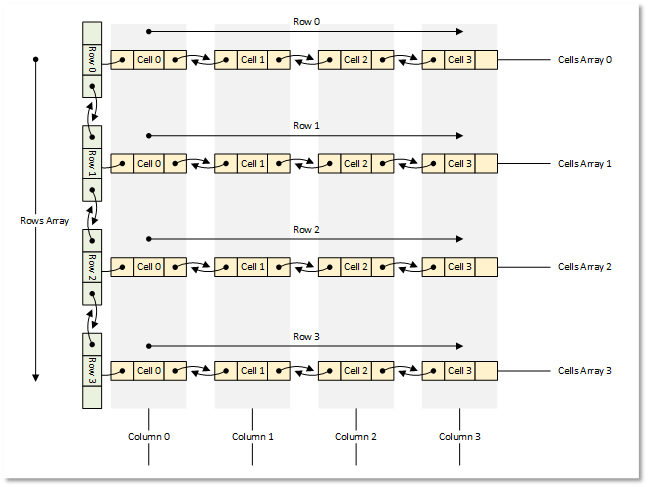
图1. 4x4表格模型
现在,让我们从理论转向实践。
编写用于构建表格模型的类
我们将使用MQL5标准库来创建所有对象。
每个对象都将成为该库基类的派生类。这将使您能够将这些对象存储在对象列表中。
我们将把所有类都写在一个测试脚本文件中,这样所有内容都集中在一个文件中,便于查看和快速访问。未来,我们会将所编写的类分配到各自独立的包含文件中。
1. 以链表作为存储表格数据的基础
CList链表非常适合存储表格数据。与类似的CArrayObj列表不同,它实现了访问位于当前对象左侧和右侧相邻列表对象的方法。这将便于在行内移动单元格,或在表格中移动行,以及添加和删除它们。同时,列表本身会负责正确索引列表中移动、添加或删除的对象。
但这里有一个细节需要注意。如果您查阅将列表加载和保存到文件的方法,就会发现从文件加载时,列表类必须在虚拟的CreateElement()方法中创建一个新对象。
此类中的该方法只是简单地返回NULL:
   //--- method of creating an element of the list
   virtual CObject  *CreateElement(void) { return(NULL); }
这意味着为了使用链表,并且假设需要文件操作,我们就必须从CList类继承并实现这个方法。
如果您查看将标准库对象保存到文件的方法,可以看到保存对象属性的以下算法:
- 将数据起始标记(-1)写入文件,
- 将对象类型写入文件,
- 将所有对象属性逐一写入文件。
第一点和第二点是所有标准库对象所实现的保存/加载方法所共有的。因此,按照同样的逻辑,我们希望知道列表中保存的对象类型,以便在从文件读取时,能够在从CList继承的列表类的虚拟CreateElement()方法中创建该类型的对象。
此外,所有可以加载到列表中的对象——必须在实现列表类之前声明或创建它们的类。这样一来,列表就会“知道”哪些对象是“候选对象”,以及需要创建哪些对象。
在终端目录\MQL5\Scripts\中,创建一个新文件夹TableModel\,并在其中创建一个新的测试脚本文件TableModelTest.mq5。
连接链表文件并声明未来的表格模型类:
//+------------------------------------------------------------------+
//|                                               TableModelTest.mq5 |
//|                                  Copyright 2025, MetaQuotes Ltd. |
//|                                             https://www.mql5.com |
//+------------------------------------------------------------------+
#property copyright "Copyright 2025, MetaQuotes Ltd."
#property link      "https://www.mql5.com"
#property version   "1.00"

//+------------------------------------------------------------------+
//| Include libraries                                                |
//+------------------------------------------------------------------+
#include <Arrays\List.mqh>

//--- Forward declaration of classes
class CTableCell;                   // Table cell class
class CTableRow;                    // Table row class
class CTableModel;                  // Table model class
此处对未来类的前置声明是必要的,这样从CList继承而来的链表类就能了解这些类的类型,以及了解它必须创建的对象类型。为此,我们将编写对象类型枚举、辅助宏和列表排序方式枚举:
//+------------------------------------------------------------------+
//| Include libraries                                                |
//+------------------------------------------------------------------+
#include <Arrays\List.mqh>

//--- Forward declaration of classes
class CTableCell;                   // Table cell class
class CTableRow;                    // Table row class
class CTableModel;                  // Table model class

//+------------------------------------------------------------------+
//| Macros                                                           |
//+------------------------------------------------------------------+
#define  MARKER_START_DATA    -1    // Data start marker in a file
#define  MAX_STRING_LENGTH    128   // Maximum length of a string in a cell

//+------------------------------------------------------------------+
//| Enumerations                                                     |
//+------------------------------------------------------------------+
enum ENUM_OBJECT_TYPE               // Enumeration of object types
  {
   OBJECT_TYPE_TABLE_CELL=10000,    // Table cell
   OBJECT_TYPE_TABLE_ROW,           // Table row
   OBJECT_TYPE_TABLE_MODEL,         // Table model
  };

enum ENUM_CELL_COMPARE_MODE         // Table cell comparison modes
  {
   CELL_COMPARE_MODE_COL,           // Comparison by column number
   CELL_COMPARE_MODE_ROW,           // Comparison by string number
   CELL_COMPARE_MODE_ROW_COL,       // Comparison by row and column
  };

//+------------------------------------------------------------------+
//| Functions                                                        |
//+------------------------------------------------------------------+
//--- Return the object type as a string
string TypeDescription(const ENUM_OBJECT_TYPE type)
  {
   string array[];
   int total=StringSplit(EnumToString(type),StringGetCharacter("_",0),array);
   string result="";
   for(int i=2;i<total;i++)
     {
      array[i]+=" ";
      array[i].Lower();
      array[i].SetChar(0,ushort(array[i].GetChar(0)-0x20));
      result+=array[i];
     }
   result.TrimLeft();
   result.TrimRight();
   return result;
  }
//+------------------------------------------------------------------+
//| Classes                                                          |
//+------------------------------------------------------------------+
返回对象类型描述的函数基于这样一个假设:所有对象类型常量的名称都以子字符串“OBJECT_TYPE_”开头。然后,您可以截取该子字符串之后的部分,将所得字符串中的所有字符转换为小写,将首字母转换为大写,并清除最终字符串左右两侧的所有空格和控制字符。
让我们编写自己的链表类。我们将在同一文件中继续编写后续代码:
//+------------------------------------------------------------------+
//| Classes                                                          |
//+------------------------------------------------------------------+
//+------------------------------------------------------------------+
//| Linked object list class                                         |
//+------------------------------------------------------------------+
class CListObj : public CList
  {
protected:
   ENUM_OBJECT_TYPE  m_element_type;   // Created object type in CreateElement()
public:
//--- Virtual method (1) for loading a list from a file, (2) for creating a list element
   virtual bool      Load(const int file_handle);
   virtual CObject  *CreateElement(void);
  };
CListObj类是我们新的链表类,它继承自标准库的CList类。
该类中唯一的变量将用于记录所创建对象的类型。由于CreateElement()方法是虚拟的,并且必须与父类方法的签名完全相同,因此我们无法将所创建对象的类型传递给它。但是,我们可以将这个类型写入已声明的变量中,并从该变量中读取所创建对象的类型。
我们必须重新定义父类的两个虚拟方法:从文件上传的方法和创建新对象的方法。让我们来探讨一下。
从文件上传列表的方法如下:
//+------------------------------------------------------------------+
//| Load a list from the file                                        |
//+------------------------------------------------------------------+
bool CListObj::Load(const int file_handle)
  {
//--- Variables
   CObject *node;
   bool     result=true;
//--- Check the handle
   if(file_handle==INVALID_HANDLE)
      return(false);
//--- Load and check the list start marker - 0xFFFFFFFFFFFFFFFF
   if(::FileReadLong(file_handle)!=MARKER_START_DATA)
      return(false);
//--- Load and check the list type
   if(::FileReadInteger(file_handle,INT_VALUE)!=Type())
      return(false);
//--- Read the list size (number of objects)
   uint num=::FileReadInteger(file_handle,INT_VALUE);

//--- Sequentially recreate the list elements by calling the Load() method of node objects
   this.Clear();
   for(uint i=0; i<num; i++)
     {
      //--- Read and check the object data start marker - 0xFFFFFFFFFFFFFFFF
      if(::FileReadLong(file_handle)!=MARKER_START_DATA)
         return false;
      //--- Read the object type
      this.m_element_type=(ENUM_OBJECT_TYPE)::FileReadInteger(file_handle,INT_VALUE);
      node=this.CreateElement();
      if(node==NULL)
         return false;
      this.Add(node);
      //--- Now the file pointer is offset relative to the beginning of the object marker by 12 bytes (8 - marker, 4 - type)
      //--- Set the pointer to the beginning of the object data and load the object properties from the file using the Load() method of the node element.
      if(!::FileSeek(file_handle,-12,SEEK_CUR))
         return false;
      result &=node.Load(file_handle);
     }
//--- Result
   return result;
  }
在此过程中,首先会检查列表的起始部分,包括其类型和大小(即列表中的元素数量);然后,根据元素数量循环,从文件中读取每个对象的数据起始标记及其类型。将得到的类型写入变量 m_element_type ,并调用创建新元素的方法。在该方法中,根据接收到的类型创建一个新元素,并将其写入node指针变量,该变量随后被添加到列表中。该方法的完整逻辑已在注释中详细说明。让我们来探究一下创建新列表项的方法。
创建列表项的方法如下:
//+------------------------------------------------------------------+
//| List element creation method                                     |
//+------------------------------------------------------------------+
CObject *CListObj::CreateElement(void)
  {
//--- Create a new object depending on the object type in m_element_type
   switch(this.m_element_type)
     {
      case OBJECT_TYPE_TABLE_CELL   :  return new CTableCell();
      case OBJECT_TYPE_TABLE_ROW    :  return new CTableRow();
      case OBJECT_TYPE_TABLE_MODEL  :  return new CTableModel();
      default                       :  return NULL;
     }
  }
这意味着在调用该方法之前,待创建对象的类型已写入m_element_type 变量中。根据项的类型,创建相应类型的新对象,并返回指向该对象的指针。未来开发新控件时,它们的类型将被写入ENUM_OBJECT_TYPE枚举中。同时,此处将添加新的情况以创建新类型的对象。基于标准CList的链表类现已准备就绪。现在,它可以存储所有已知类型的对象,将列表保存到文件,从文件上传列表并正确恢复它们。
2. 表格单元格类
表格单元格是表格中最简单的元素,用于存储某个值。单元格组成表示表格行的列表。每个列表代表表格的一行。在我们的表格中,单元格一次只能存储多种类型中的一个值——实数、整数或字符串值。
除简单值外,还可以为单元格分配ENUM_OBJECT_TYPE枚举中已知类型的一个对象。在这种情况下,单元格可以存储上述任一类型的值,外加一个指向对象的指针,该对象的类型写入一个特殊变量中。因此,未来可以指示视图组件在单元格中显示此类对象,以便使用控制器组件与其交互。
由于一个单元格可以存储几种不同类型的值,我们将使用联合体来写入、存储和返回它们。联合体是一种特殊类型的数据,它在同一内存区域中存储多个字段。联合体类似于结构体,但与结构体不同,联合体的不同项属于同一内存区域。而在结构体中,每个字段都分配有自己的内存区域。
让我们继续在已创建的文件中编写代码。让我们开始编写一个新类。在受保护的部分中,我们编写一个联合体并声明变量:
//+------------------------------------------------------------------+
//| Table cell class                                                 |
//+------------------------------------------------------------------+
class CTableCell : public CObject
  {
protected:
//--- Combining for storing cell values (double, long, string)
   union DataType
     {
      protected:
      double         double_value;
      long           long_value;
      ushort         ushort_value[MAX_STRING_LENGTH];

      public:
      //--- Set values
      void           SetValueD(const double value) { this.double_value=value;                   }
      void           SetValueL(const long value)   { this.long_value=value;                     }
      void           SetValueS(const string value) { ::StringToShortArray(value,ushort_value);  }

      //--- Return values
      double         ValueD(void) const { return this.double_value; }
      long           ValueL(void) const { return this.long_value; }
      string         ValueS(void) const
                       {
                        string res=::ShortArrayToString(this.ushort_value);
                        res.TrimLeft();
                        res.TrimRight();
                        return res;
                       }
     };
//--- Variables
   DataType          m_datatype_value;                      // Value
   ENUM_DATATYPE     m_datatype;                            // Data type
   CObject          *m_object;                              // Cell object
   ENUM_OBJECT_TYPE  m_object_type;                         // Object type in the cell
   int               m_row;                                 // Row index
   int               m_col;                                 // Column index
   int               m_digits;                              // Data representation accuracy
   uint              m_time_flags;                          // Date/time display flags
   bool              m_color_flag;                          // Color name display flag
   bool              m_editable;                            // Editable cell flag

public:
在公有部分,编写访问受保护变量的方法、虚方法,以及针对单元格中存储的各类数据类型的类构造函数:
public:
//--- Return cell coordinates and properties
   uint              Row(void)                           const { return this.m_row;                            }
   uint              Col(void)                           const { return this.m_col;                            }
   ENUM_DATATYPE     Datatype(void)                      const { return this.m_datatype;                       }
   int               Digits(void)                        const { return this.m_digits;                         }
   uint              DatetimeFlags(void)                 const { return this.m_time_flags;                     }
   bool              ColorNameFlag(void)                 const { return this.m_color_flag;                     }
   bool              IsEditable(void)                    const { return this.m_editable;                       }
//--- Return (1) double, (2) long and (3) string value
   double            ValueD(void)                        const { return this.m_datatype_value.ValueD();        }
   long              ValueL(void)                        const { return this.m_datatype_value.ValueL();        }
   string            ValueS(void)                        const { return this.m_datatype_value.ValueS();        }
//--- Return the value as a formatted string
   string            Value(void) const
                       {
                        switch(this.m_datatype)
                          {
                           case TYPE_DOUBLE  :  return(::DoubleToString(this.ValueD(),this.Digits()));
                           case TYPE_LONG    :  return(::IntegerToString(this.ValueL()));
                           case TYPE_DATETIME:  return(::TimeToString(this.ValueL(),this.m_time_flags));
                           case TYPE_COLOR   :  return(::ColorToString((color)this.ValueL(),this.m_color_flag));
                           default           :  return this.ValueS();
                          }
                       }
   string            DatatypeDescription(void) const
                       {
                        string type=::StringSubstr(::EnumToString(this.m_datatype),5);
                        type.Lower();
                        return type;
                       }
//--- Set variable values
   void              SetRow(const uint row)                    { this.m_row=(int)row;                          }
   void              SetCol(const uint col)                    { this.m_col=(int)col;                          }
   void              SetDatatype(const ENUM_DATATYPE datatype) { this.m_datatype=datatype;                     }
   void              SetDigits(const int digits)               { this.m_digits=digits;                         }
   void              SetDatetimeFlags(const uint flags)        { this.m_time_flags=flags;                      }
   void              SetColorNameFlag(const bool flag)         { this.m_color_flag=flag;                       }
   void              SetEditable(const bool flag)              { this.m_editable=flag;                         }
   void              SetPositionInTable(const uint row,const uint col)
                       {
                        this.SetRow(row);
                        this.SetCol(col);
                       }
//--- Assign an object to a cell
   void              AssignObject(CObject *object)
                       {
                        if(object==NULL)
                          {
                           ::PrintFormat("%s: Error. Empty object passed",__FUNCTION__);
                           return;
                          }
                        this.m_object=object;
                        this.m_object_type=(ENUM_OBJECT_TYPE)object.Type();
                       }
//--- Remove the object assignment
   void              UnassignObject(void)
                       {
                        this.m_object=NULL;
                        this.m_object_type=-1;
                       }

//--- Set double value
   void              SetValue(const double value)
                       {
                        this.m_datatype=TYPE_DOUBLE;
                        if(this.m_editable)
                           this.m_datatype_value.SetValueD(value);
                       }
//--- Set long value
   void              SetValue(const long value)
                       {
                        this.m_datatype=TYPE_LONG;
                        if(this.m_editable)
                           this.m_datatype_value.SetValueL(value);
                       }
//--- Set datetime value
   void              SetValue(const datetime value)
                       {
                        this.m_datatype=TYPE_DATETIME;
                        if(this.m_editable)
                           this.m_datatype_value.SetValueL(value);
                       }
//--- Set color value
   void              SetValue(const color value)
                       {
                        this.m_datatype=TYPE_COLOR;
                        if(this.m_editable)
                           this.m_datatype_value.SetValueL(value);
                       }
//--- Set string value
   void              SetValue(const string value)
                       {
                        this.m_datatype=TYPE_STRING;
                        if(this.m_editable)
                           this.m_datatype_value.SetValueS(value);
                       }
//--- Clear data
   void              ClearData(void)
                       {
                        if(this.Datatype()==TYPE_STRING)
                           this.SetValue("");
                        else
                           this.SetValue(0.0);
                       }
//--- (1) Return and (2) display the object description in the journal
   string            Description(void);
   void              Print(void);

//--- Virtual methods of (1) comparing, (2) saving to file, (3) loading from file, (4) object type
   virtual int       Compare(const CObject *node,const int mode=0) const;
   virtual bool      Save(const int file_handle);
   virtual bool      Load(const int file_handle);
   virtual int       Type(void)                          const { return(OBJECT_TYPE_TABLE_CELL);}


//--- Constructors/destructor
                     CTableCell(void) : m_row(0), m_col(0), m_datatype(-1), m_digits(0), m_time_flags(0), m_color_flag(false), m_editable(true), m_object(NULL), m_object_type(-1)
                       {
                        this.m_datatype_value.SetValueD(0);
                       }
                     //--- Accept a double value
                     CTableCell(const uint row,const uint col,const double value,const int digits) :
                        m_row((int)row), m_col((int)col), m_datatype(TYPE_DOUBLE), m_digits(digits), m_time_flags(0), m_color_flag(false), m_editable(true), m_object(NULL), m_object_type(-1)
                       {
                        this.m_datatype_value.SetValueD(value);
                       }
                     //--- Accept a long value
                     CTableCell(const uint row,const uint col,const long value) :
                        m_row((int)row), m_col((int)col), m_datatype(TYPE_LONG), m_digits(0), m_time_flags(0), m_color_flag(false), m_editable(true), m_object(NULL), m_object_type(-1)
                       {
                        this.m_datatype_value.SetValueL(value);
                       }
                     //--- Accept a datetime value
                     CTableCell(const uint row,const uint col,const datetime value,const uint time_flags) :
                        m_row((int)row), m_col((int)col), m_datatype(TYPE_DATETIME), m_digits(0), m_time_flags(time_flags), m_color_flag(false), m_editable(true), m_object(NULL), m_object_type(-1)
                       {
                        this.m_datatype_value.SetValueL(value);
                       }
                     //--- Accept color value
                     CTableCell(const uint row,const uint col,const color value,const bool color_names_flag) :
                        m_row((int)row), m_col((int)col), m_datatype(TYPE_COLOR), m_digits(0), m_time_flags(0), m_color_flag(color_names_flag), m_editable(true), m_object(NULL), m_object_type(-1)
                       {
                        this.m_datatype_value.SetValueL(value);
                       }
                     //--- Accept string value
                     CTableCell(const uint row,const uint col,const string value) :
                        m_row((int)row), m_col((int)col), m_datatype(TYPE_STRING), m_digits(0), m_time_flags(0), m_color_flag(false), m_editable(true), m_object(NULL), m_object_type(-1)
                       {
                        this.m_datatype_value.SetValueS(value);
                       }
                    ~CTableCell(void) {}
  };
设置值的方法中,首先会设置单元格中存储的值的类型,然后检查单元格中编辑值功能的标识位。只有当设置该标识位时,新值才会被保存到单元格中:
//--- Set double value
   void              SetValue(const double value)
                       {
                        this.m_datatype=TYPE_DOUBLE;
                        if(this.m_editable)
                           this.m_datatype_value.SetValueD(value);
                       }
为何要如此设计?在创建新单元格时,其存储值的类型默认为实数类型。如果要更改值的类型,但同时单元格处于不可编辑状态,此时调用设置目标类型值的方法并传入任意值。存储值的类型会被修改,但单元格本身的值不会受到影响。
数据清理方法会将数值型值设置为0,字符串型值设置为空格:
//--- Clear data
   void              ClearData(void)
                       {
                        if(this.Datatype()==TYPE_STRING)
                           this.SetValue("");
                        else
                           this.SetValue(0.0);
                       }
后续我们会改进这一设计——清空单元格时不显示任何数据——为使单元格保持空白状态,我们将为单元格定义一个“空值”标记,清空单元格时,所有记录并显示的值都会被彻底清除。毕竟0本身也是一个有效值,而当前清空单元格时数字数据会用0填充。这显然是不合理的。
该类的参数化构造函数会接收表格中单元格的坐标(行号和列号)以及所需类型的值(双精度型、长整型、日期时间型、颜色、字符串)。某些类型的值需要附加信息:
- 双精度型——输出值的精度(小数位数),
- 日期时间型——时间显示标识(日期/时-分/秒),
- 颜色——是否显示已知标准颜色名称的标识。
对于存储这些类型值的单元格构造函数,会传递附加参数以设置单元格中显示值的格式:
 //--- Accept a double value
 CTableCell(const uint row,const uint col,const double value,const int digits) :
    m_row((int)row), m_col((int)col), m_datatype(TYPE_DOUBLE), m_digits(digits), m_time_flags(0), m_color_flag(false), m_editable(true), m_object(NULL), m_object_type(-1)
   {
    this.m_datatype_value.SetValueD(value);
   }
 //--- Accept a long value
 CTableCell(const uint row,const uint col,const long value) :
    m_row((int)row), m_col((int)col), m_datatype(TYPE_LONG), m_digits(0), m_time_flags(0), m_color_flag(false), m_editable(true), m_object(NULL), m_object_type(-1)
   {
    this.m_datatype_value.SetValueL(value);
   }
 //--- Accept a datetime value
 CTableCell(const uint row,const uint col,const datetime value,const uint time_flags) :
    m_row((int)row), m_col((int)col), m_datatype(TYPE_DATETIME), m_digits(0), m_time_flags(time_flags), m_color_flag(false), m_editable(true), m_object(NULL), m_object_type(-1)
   {
    this.m_datatype_value.SetValueL(value);
   }

 //--- Accept color value
 CTableCell(const uint row,const uint col,const color value,const bool color_names_flag) :
    m_row((int)row), m_col((int)col), m_datatype(TYPE_COLOR), m_digits(0), m_time_flags(0), m_color_flag(color_names_flag), m_editable(true), m_object(NULL), m_object_type(-1)
   {
    this.m_datatype_value.SetValueL(value);
   }
 //--- Accept string value
 CTableCell(const uint row,const uint col,const string value) :
    m_row((int)row), m_col((int)col), m_datatype(TYPE_STRING), m_digits(0), m_time_flags(0), m_color_flag(false), m_editable(true), m_object(NULL), m_object_type(-1)
   {
    this.m_datatype_value.SetValueS(value);
   }
比较两个对象的方法如下:
//+------------------------------------------------------------------+
//| Compare two objects                                              |
//+------------------------------------------------------------------+
int CTableCell::Compare(const CObject *node,const int mode=0) const
  {
   const CTableCell *obj=node;
   switch(mode)
     {
      case CELL_COMPARE_MODE_COL :  return(this.Col()>obj.Col() ? 1 : this.Col()<obj.Col() ? -1 : 0);
      case CELL_COMPARE_MODE_ROW :  return(this.Row()>obj.Row() ? 1 : this.Row()<obj.Row() ? -1 : 0);
      //---CELL_COMPARE_MODE_ROW_COL
      default                    :  return
                                      (
                                       this.Row()>obj.Row() ? 1 : this.Row()<obj.Row() ? -1 :
                                       this.Col()>obj.Col() ? 1 : this.Col()<obj.Col() ? -1 : 0
                                      );
     }
  }
该方法允许您根据三种比较标准之一(按列号、按行号、同时按行号和列号)比较两个对象的参数。
该方法对于能够按表格列的值对表格行进行排序是必要的。后续文章中将由控制器(Controller)处理此功能。
将单元格属性保存至文件的方法如下:
//+------------------------------------------------------------------+
//| Save to file                                                     |
//+------------------------------------------------------------------+
bool CTableCell::Save(const int file_handle)
  {
//--- Check the handle
   if(file_handle==INVALID_HANDLE)
      return(false);
//--- Save data start marker - 0xFFFFFFFFFFFFFFFF
   if(::FileWriteLong(file_handle,MARKER_START_DATA)!=sizeof(long))
      return(false);
//--- Save the object type
   if(::FileWriteInteger(file_handle,this.Type(),INT_VALUE)!=INT_VALUE)
      return(false);

   //--- Save the data type
   if(::FileWriteInteger(file_handle,this.m_datatype,INT_VALUE)!=INT_VALUE)
      return(false);
   //--- Save the object type in the cell
   if(::FileWriteInteger(file_handle,this.m_object_type,INT_VALUE)!=INT_VALUE)
      return(false);
   //--- Save the row index
   if(::FileWriteInteger(file_handle,this.m_row,INT_VALUE)!=INT_VALUE)
      return(false);
   //--- Save the column index
   if(::FileWriteInteger(file_handle,this.m_col,INT_VALUE)!=INT_VALUE)
      return(false);
   //--- Maintain the accuracy of data representation
   if(::FileWriteInteger(file_handle,this.m_digits,INT_VALUE)!=INT_VALUE)
      return(false);
   //--- Save date/time display flags
   if(::FileWriteInteger(file_handle,this.m_time_flags,INT_VALUE)!=INT_VALUE)
      return(false);
   //--- Save the color name display flag
   if(::FileWriteInteger(file_handle,this.m_color_flag,INT_VALUE)!=INT_VALUE)
      return(false);
   //--- Save the edited cell flag
   if(::FileWriteInteger(file_handle,this.m_editable,INT_VALUE)!=INT_VALUE)
      return(false);
   //--- Save the value
   if(::FileWriteStruct(file_handle,this.m_datatype_value)!=sizeof(this.m_datatype_value))
      return(false);

//--- All is successful
   return true;
  }
在将起始数据标记和对象类型写入文件后,所有单元格属性将依次保存。联合体必须通过FileWriteStruct()以结构体形式进行保存。
从文件加载单元格属性的方法如下:
//+------------------------------------------------------------------+
//| Load from file                                                   |
//+------------------------------------------------------------------+
bool CTableCell::Load(const int file_handle)
  {
//--- Check the handle
   if(file_handle==INVALID_HANDLE)
      return(false);
//--- Load and check the data start marker - 0xFFFFFFFFFFFFFFFF
   if(::FileReadLong(file_handle)!=MARKER_START_DATA)
      return(false);
//--- Load the object type
   if(::FileReadInteger(file_handle,INT_VALUE)!=this.Type())
      return(false);

   //--- Load the data type
   this.m_datatype=(ENUM_DATATYPE)::FileReadInteger(file_handle,INT_VALUE);
   //--- Load the object type in the cell
   this.m_object_type=(ENUM_OBJECT_TYPE)::FileReadInteger(file_handle,INT_VALUE);
   //--- Load the row index
   this.m_row=::FileReadInteger(file_handle,INT_VALUE);
   //--- Load the column index
   this.m_col=::FileReadInteger(file_handle,INT_VALUE);
   //--- Load the precision of the data representation
   this.m_digits=::FileReadInteger(file_handle,INT_VALUE);
   //--- Load date/time display flags
   this.m_time_flags=::FileReadInteger(file_handle,INT_VALUE);
   //--- Load the color name display flag
   this.m_color_flag=::FileReadInteger(file_handle,INT_VALUE);
   //--- Load the edited cell flag
   this.m_editable=::FileReadInteger(file_handle,INT_VALUE);
   //--- Load the value
   if(::FileReadStruct(file_handle,this.m_datatype_value)!=sizeof(this.m_datatype_value))
      return(false);

//--- All is successful
   return true;
  }
在读取并校验数据起始标识符和对象类型后,所有对象属性将按照保存时的相同顺序依次加载。联合体使用FileReadStruct()进行读取。
返回对象描述信息的方法如下:
//+------------------------------------------------------------------+
//| Return the object description                                    |
//+------------------------------------------------------------------+
string CTableCell::Description(void)
  {
   return(::StringFormat("%s: Row %u, Col %u, %s <%s>Value: %s",
                         TypeDescription((ENUM_OBJECT_TYPE)this.Type()),this.Row(),this.Col(),
                         (this.m_editable ? "Editable" : "Uneditable"),this.DatatypeDescription(),this.Value()));
  }
在此方法中,会从单元格的部分参数中构建一行信息并返回,例如对于双精度型,格式如下:
Table Cell: Row 2, Col 2, Uneditable <double>Value: 0.00
将对象描述信息输出到日志的方法如下:
//+------------------------------------------------------------------+
//| Display the object description in the journal                    |
//+------------------------------------------------------------------+
void CTableCell::Print(void)
  {
   ::Print(this.Description());
  }
在此方法中,对象描述信息会被直接打印到日志中。
//+------------------------------------------------------------------+
//| Table row class                                                  |
//+------------------------------------------------------------------+
class CTableRow : public CObject
  {
protected:
   CTableCell        m_cell_tmp;                            // Cell object to search in the list
   CListObj          m_list_cells;                          // List of cells
   uint              m_index;                               // Row index

//--- Add the specified cell to the end of the list
   bool              AddNewCell(CTableCell *cell);

public:
//--- (1) Set and (2) return the row index
   void              SetIndex(const uint index)                { this.m_index=index;  }
   uint              Index(void)                         const { return this.m_index; }
//--- Set the row and column positions to all cells
   void              CellsPositionUpdate(void);

//--- Create a new cell and add it to the end of the list
   CTableCell       *CreateNewCell(const double value);
   CTableCell       *CreateNewCell(const long value);
   CTableCell       *CreateNewCell(const datetime value);
   CTableCell       *CreateNewCell(const color value);
   CTableCell       *CreateNewCell(const string value);

//--- Return (1) the cell by index and (2) the number of cells
   CTableCell       *GetCell(const uint index)                 { return this.m_list_cells.GetNodeAtIndex(index);  }
   uint              CellsTotal(void)                    const { return this.m_list_cells.Total();                }

//--- Set the value to the specified cell
   void              CellSetValue(const uint index,const double value);
   void              CellSetValue(const uint index,const long value);
   void              CellSetValue(const uint index,const datetime value);
   void              CellSetValue(const uint index,const color value);
   void              CellSetValue(const uint index,const string value);
//--- (1) assign to a cell and (2) remove an assigned object from the cell
   void              CellAssignObject(const uint index,CObject *object);
   void              CellUnassignObject(const uint index);

//--- (1) Delete and (2) move the cell
   bool              CellDelete(const uint index);
   bool              CellMoveTo(const uint cell_index, const uint index_to);

//--- Reset the data of the row cells
   void              ClearData(void);

//--- (1) Return and (2) display the object description in the journal
   string            Description(void);
   void              Print(const bool detail, const bool as_table=false, const int cell_width=10);

//--- Virtual methods of (1) comparing, (2) saving to file, (3) loading from file, (4) object type
   virtual int       Compare(const CObject *node,const int mode=0) const;
   virtual bool      Save(const int file_handle);
   virtual bool      Load(const int file_handle);
   virtual int       Type(void)                          const { return(OBJECT_TYPE_TABLE_ROW); }

//--- Constructors/destructor
                     CTableRow(void) : m_index(0) {}
                     CTableRow(const uint index) : m_index(index) {}
                    ~CTableRow(void){}
  };
3. 表格行类
表格行本质上是一个由单元格组成的链表。行类必须支持在链表中添加、删除单元格,以及将单元格重新排序至新位置。该类必须具备管理链表中单元格的最小必要方法集。
我们继续在同一个文件中编写代码。类参数中仅有一个可用变量——表格中的行索引。其余均为用于操作行属性及其单元格链表的方法。
下面让我们来探究类方法。
比较两行表格的方法如下:
//+------------------------------------------------------------------+
//| Compare two objects                                              |
//+------------------------------------------------------------------+
int CTableRow::Compare(const CObject *node,const int mode=0) const
  {
   const CTableRow *obj=node;
   return(this.Index()>obj.Index() ? 1 : this.Index()<obj.Index() ? -1 : 0);
  }
由于行只能通过其唯一参数(行索引)进行比较,因此在此处实现该比较逻辑。该方法将用于对表格行进行排序。
为创建存储不同类型数据的单元格而重载的方法如下:
//+------------------------------------------------------------------+
//| Create a new double cell and add it to the end of the list       |
//+------------------------------------------------------------------+
CTableCell *CTableRow::CreateNewCell(const double value)
  {
//--- Create a new cell object storing a value of double type
   CTableCell *cell=new CTableCell(this.m_index,this.CellsTotal(),value,2);
   if(cell==NULL)
     {
      ::PrintFormat("%s: Error. Failed to create new cell in row %u at position %u",__FUNCTION__, this.m_index, this.CellsTotal());
      return NULL;
     }
//--- Add the created cell to the end of the list
   if(!this.AddNewCell(cell))
     {
      delete cell;
      return NULL;
     }
//--- Return the pointer to the object
   return cell;
  }
//+------------------------------------------------------------------+
//| Create a new long cell and add it to the end of the list         |
//+------------------------------------------------------------------+
CTableCell *CTableRow::CreateNewCell(const long value)
  {
//--- Create a new cell object storing a long value
   CTableCell *cell=new CTableCell(this.m_index,this.CellsTotal(),value);
   if(cell==NULL)
     {
      ::PrintFormat("%s: Error. Failed to create new cell in row %u at position %u",__FUNCTION__, this.m_index, this.CellsTotal());
      return NULL;
     }
//--- Add the created cell to the end of the list
   if(!this.AddNewCell(cell))
     {
      delete cell;
      return NULL;
     }
//--- Return the pointer to the object
   return cell;
  }
//+------------------------------------------------------------------+
//| Create a new datetime cell and add it to the end of the list     |
//+------------------------------------------------------------------+
CTableCell *CTableRow::CreateNewCell(const datetime value)
  {
//--- Create a new cell object storing a value of datetime type
   CTableCell *cell=new CTableCell(this.m_index,this.CellsTotal(),value,TIME_DATE|TIME_MINUTES|TIME_SECONDS);
   if(cell==NULL)
     {
      ::PrintFormat("%s: Error. Failed to create new cell in row %u at position %u",__FUNCTION__, this.m_index, this.CellsTotal());
      return NULL;
     }
//--- Add the created cell to the end of the list
   if(!this.AddNewCell(cell))
     {
      delete cell;
      return NULL;
     }
//--- Return the pointer to the object
   return cell;
  }
//+------------------------------------------------------------------+
//| Create a new color cell and add it to the end of the list        |
//+------------------------------------------------------------------+
CTableCell *CTableRow::CreateNewCell(const color value)
  {
//--- Create a new cell object storing a value of color type
   CTableCell *cell=new CTableCell(this.m_index,this.CellsTotal(),value,true);
   if(cell==NULL)
     {
      ::PrintFormat("%s: Error. Failed to create new cell in row %u at position %u",__FUNCTION__, this.m_index, this.CellsTotal());
      return NULL;
     }
//--- Add the created cell to the end of the list
   if(!this.AddNewCell(cell))
     {
      delete cell;
      return NULL;
     }
//--- Return the pointer to the object
   return cell;
  }
//+------------------------------------------------------------------+
//| Create a new string cell and add it to the end of the list       |
//+------------------------------------------------------------------+
CTableCell *CTableRow::CreateNewCell(const string value)
  {
//--- Create a new cell object storing a value of string type
   CTableCell *cell=new CTableCell(this.m_index,this.CellsTotal(),value);
   if(cell==NULL)
     {
      ::PrintFormat("%s: Error. Failed to create new cell in row %u at position %u",__FUNCTION__, this.m_index, this.CellsTotal());
      return NULL;
     }
//--- Add the created cell to the end of the list
   if(!this.AddNewCell(cell))
     {
      delete cell;
      return NULL;
     }
//--- Return the pointer to the object
   return cell;
  }
提供五种创建新单元格的方法(双精度型、长整型、 日期时间型、颜色、字符串),并将其添加至链表末尾。单元格数据输出格式的附加参数均设置默认值。可在单元格创建后进行修改。首先创建新单元格对象,然后将其添加至链表末尾。如果对象创建失败,则立即释放以避免内存泄漏。
将单元格添加至链表末尾的方法如下:
//+------------------------------------------------------------------+
//| Add a cell to the end of the list                                |
//+------------------------------------------------------------------+
bool CTableRow::AddNewCell(CTableCell *cell)
  {
//--- If an empty object is passed, report it and return 'false'
   if(cell==NULL)
     {
      ::PrintFormat("%s: Error. Empty CTableCell object passed",__FUNCTION__);
      return false;
     }
//--- Set the cell index in the list and add the created cell to the end of the list
   cell.SetPositionInTable(this.m_index,this.CellsTotal());
   if(this.m_list_cells.Add(cell)==WRONG_VALUE)
     {
      ::PrintFormat("%s: Error. Failed to add cell (%u,%u) to list",__FUNCTION__,this.m_index,this.CellsTotal());
      return false;
     }
//--- Successful
   return true;
  }
任何新创建的单元格都会被自动添加至链表末尾。随后,可通过后续将创建的表格模型类的方法,将其移动至合适位置。
为指定单元格设置值的重载方法如下:
//+------------------------------------------------------------------+
//| Set the double value to the specified cell                       |
//+------------------------------------------------------------------+
void CTableRow::CellSetValue(const uint index,const double value)
  {
//--- Get the required cell from the list and set a new value into it
   CTableCell *cell=this.GetCell(index);
   if(cell!=NULL)
      cell.SetValue(value);
  }
//+------------------------------------------------------------------+
//| Set a long value to the specified cell                           |
//+------------------------------------------------------------------+
void CTableRow::CellSetValue(const uint index,const long value)
  {
//--- Get the required cell from the list and set a new value into it
   CTableCell *cell=this.GetCell(index);
   if(cell!=NULL)
      cell.SetValue(value);
  }
//+------------------------------------------------------------------+
//| Set the datetime value to the specified cell                     |
//+------------------------------------------------------------------+
void CTableRow::CellSetValue(const uint index,const datetime value)
  {
//--- Get the required cell from the list and set a new value into it
   CTableCell *cell=this.GetCell(index);
   if(cell!=NULL)
      cell.SetValue(value);
  }
//+------------------------------------------------------------------+
//| Set the color value to the specified cell                        |
//+------------------------------------------------------------------+
void CTableRow::CellSetValue(const uint index,const color value)
  {
//--- Get the required cell from the list and set a new value into it
   CTableCell *cell=this.GetCell(index);
   if(cell!=NULL)
      cell.SetValue(value);
  }
//+------------------------------------------------------------------+
//| Set a string value to the specified cell                         |
//+------------------------------------------------------------------+
void CTableRow::CellSetValue(const uint index,const string value)
  {
//--- Get the required cell from the list and set a new value into it
   CTableCell *cell=this.GetCell(index);
   if(cell!=NULL)
      cell.SetValue(value);
  }
通过索引从链表中获取目标单元格,并为其设置对应值。如果单元格为不可编辑状态,单元格对象的SetValue()方法将仅更新待设置值的类型信息。而不会实际修改值本身。
将对象赋值给单元格的方法如下:
//+------------------------------------------------------------------+
//| Assign an object to the cell                                     |
//+------------------------------------------------------------------+
void CTableRow::CellAssignObject(const uint index,CObject *object)
  {
//--- Get the required cell from the list and set a pointer to the object into it
   CTableCell *cell=this.GetCell(index);
   if(cell!=NULL)
      cell.AssignObject(object);
  }
我们通过索引获取单元格对象,并调用其AssignObject()方法将对象指针赋值给该单元格。
取消单元格已分配对象的方法如下:
//+------------------------------------------------------------------+
//| Cancel the assigned object for the cell                          |
//+------------------------------------------------------------------+
void CTableRow::CellUnassignObject(const uint index)
  {
//--- Get the required cell from the list and cancel the pointer to the object and its type in it
   CTableCell *cell=this.GetCell(index);
   if(cell!=NULL)
      cell.UnassignObject();
  }
我们通过索引获取单元格对象,并调用其UnassignObject()方法移除已分配给该单元格的对象指针。
删除单元格的方法如下:
//+------------------------------------------------------------------+
//| Delete a cell                                                    |
//+------------------------------------------------------------------+
bool CTableRow::CellDelete(const uint index)
  {
//--- Delete a cell in the list by index
   if(!this.m_list_cells.Delete(index))
      return false;
//--- Update the indices for the remaining cells in the list
   this.CellsPositionUpdate();
   return true;
  }
我们使用CList类的Delete()方法从链表中删除该单元格。删除单元格后,链表中剩余单元格的索引会发生变化。通过调用CellsPositionUpdate()方法,我们更新链表中所有剩余单元格的索引。
将单元格移动到指定位置的方法如下:
//+------------------------------------------------------------------+
//| Moves the cell to the specified position                         |
//+------------------------------------------------------------------+
bool CTableRow::CellMoveTo(const uint cell_index,const uint index_to)
  {
//--- Select the desired cell by index in the list, turning it into the current one
   CTableCell *cell=this.GetCell(cell_index);
//--- Move the current cell to the specified position in the list
   if(cell==NULL || !this.m_list_cells.MoveToIndex(index_to))
      return false;
//--- Update the indices of all cells in the list
   this.CellsPositionUpdate();
   return true;
  }
为了让CList类对链表中的某个对象进行操作,该对象必须为当前选中对象。例如通过选中操作使其成为当前对象。因此,我们首先通过索引从链表中获取目标单元格对象。使其成为当前对象,随后,调用CList类的MoveToIndex()方法将该对象移动到链表中的指定位置。成功移动对象后,必须调整剩余对象的索引,这一操作通过CellsPositionUpdate()方法完成。
为链表中所有单元格设置行和列位置的方法如下:
//+------------------------------------------------------------------+
//| Set the row and column positions to all cells                    |
//+------------------------------------------------------------------+
void CTableRow::CellsPositionUpdate(void)
  {
//--- In the loop through all cells in the list
   for(int i=0;i<this.m_list_cells.Total();i++)
     {
      //--- get the next cell and set the row and column indices in it
      CTableCell *cell=this.GetCell(i);
      if(cell!=NULL)
         cell.SetPositionInTable(this.Index(),this.m_list_cells.IndexOf(cell));
     }
  }
CList类允许您查找链表中当前选中对象的索引。但前提是该对象必须处于选中状态。在此方法中,我们遍历链表中的所有单元格对象,依次选中每个单元格,并使用CList类的IndexOf()方法获取其索引。随后,通过单元格对象的SetPositionInTable()方法,将行索引和查找到的单元格索引设置到该单元格对象中。
重置行单元格数据的方法如下:
//+------------------------------------------------------------------+
//| Reset the cell data of a row                                     |
//+------------------------------------------------------------------+
void CTableRow::ClearData(void)
  {
//--- In the loop through all cells in the list
   for(uint i=0;i<this.CellsTotal();i++)
     {
      //--- get the next cell and set an empty value to it
      CTableCell *cell=this.GetCell(i);
      if(cell!=NULL)
         cell.ClearData();
     }
  }
在循环中,通过调用单元格对象的ClearData()方法,依次重置链表中的下一个单元格。对于字符串类型数据,向单元格写入空行;对于数值类型数据,则写入0值。
返回对象描述信息的方法如下:
//+------------------------------------------------------------------+
//| Return the object description                                    |
//+------------------------------------------------------------------+
string CTableRow::Description(void)
  {
   return(::StringFormat("%s: Position %u, Cells total: %u",
                         TypeDescription((ENUM_OBJECT_TYPE)this.Type()),this.Index(),this.CellsTotal()));
  }
从对象的属性和数据中收集一行信息,并按照以下格式返回,例如:
Table Row: Position 1, Cells total: 4:
将对象描述信息输出到日志的方法如下:
//+------------------------------------------------------------------+
//| Display the object description in the journal                    |
//+------------------------------------------------------------------+
void CTableRow::Print(const bool detail, const bool as_table=false, const int cell_width=10)
  {

//--- Number of cells
   int total=(int)this.CellsTotal();

//--- If the output is in tabular form
   string res="";
   if(as_table)
     {
      //--- create a table row from the values of all cells
      string head=" Row "+(string)this.Index();
      string res=::StringFormat("|%-*s |",cell_width,head);
      for(int i=0;i<total;i++)
        {
         CTableCell *cell=this.GetCell(i);
         if(cell==NULL)
            continue;
         res+=::StringFormat("%*s |",cell_width,cell.Value());
        }
      //--- Display a row in the journal
      ::Print(res);
      return;
     }

//--- Display the header as a row description
   ::Print(this.Description()+(detail ? ":" : ""));

//--- If detailed description
   if(detail)
     {

      //--- The output is not in tabular form
      //--- In the loop through the list of cells in the row
      for(int i=0; i<total; i++)
        {
         //--- get the current cell and add its description to the final row
         CTableCell *cell=this.GetCell(i);
         if(cell!=NULL)
            res+="  "+cell.Description()+(i<total-1 ? "\n" : "");
        }
      //--- Send the row created in the loop to the journal
      ::Print(res);
     }
  }
对于日志中非表格形式的数据展示,首先会在日志中显示表头作为行描述信息。随后,如果启用了详细显示标识,则会通过遍历单元格列表,在日志中逐项输出每个单元格的描述信息。
因此,表格行的详细日志输出效果如下(以非表格视图为例):
Table Row: Position 0, Cells total: 4:
  Table Cell: Row 0, Col 0, Editable <long>Value: 10
  Table Cell: Row 0, Col 1, Editable <long>Value: 21
  Table Cell: Row 0, Col 2, Editable <long>Value: 32
  Table Cell: Row 0, Col 3, Editable <long>Value: 43
对于表格形式的展示,输出结果示例如下:
| Row 0 | 0 | 1 | 2 | 3 |
将表格行数据保存到文件的方法如下:
//+------------------------------------------------------------------+
//| Save to file                                                     |
//+------------------------------------------------------------------+
bool CTableRow::Save(const int file_handle)
  {
//--- Check the handle
   if(file_handle==INVALID_HANDLE)
      return(false);
//--- Save data start marker - 0xFFFFFFFFFFFFFFFF
   if(::FileWriteLong(file_handle,MARKER_START_DATA)!=sizeof(long))
      return(false);
//--- Save the object type
   if(::FileWriteInteger(file_handle,this.Type(),INT_VALUE)!=INT_VALUE)
      return(false);

//--- Save the index
   if(::FileWriteInteger(file_handle,this.m_index,INT_VALUE)!=INT_VALUE)
      return(false);
//--- Save the list of cells
   if(!this.m_list_cells.Save(file_handle))
      return(false);

//--- Successful
   return true;
  }
先保存数据的起始标记,随后保存对象类型。这是文件中每个对象的标准头部信息。之后,在对象的属性文件中写入对应条目。这里,将行索引保存至文件,随后保存至单元格列表。
从文件加载表格行数据的方法如下:
//+------------------------------------------------------------------+
//| Load from file                                                   |
//+------------------------------------------------------------------+
bool CTableRow::Load(const int file_handle)
  {
//--- Check the handle
   if(file_handle==INVALID_HANDLE)
      return(false);
//--- Load and check the data start marker - 0xFFFFFFFFFFFFFFFF
   if(::FileReadLong(file_handle)!=MARKER_START_DATA)
      return(false);
//--- Load the object type
   if(::FileReadInteger(file_handle,INT_VALUE)!=this.Type())
      return(false);

//--- Load the index
   this.m_index=::FileReadInteger(file_handle,INT_VALUE);
//--- Load the list of cells
   if(!this.m_list_cells.Load(file_handle))
      return(false);

//--- Successful
   return true;
  }
所有数据的加载顺序与保存时完全一致。首先,加载数据起始标记和对象类型,并进行校验。随后,加载行索引和完整的单元格列表。
4. 表格模型类
最简单的表格模型是行链表结构,而每行又包含单元格的链表。我们今天构建的模型将接收一个二维数组作为输入(双精度型、长整型、日期时间型、颜色、字符串),并基于此构建虚拟表格。后续,我们将扩展此类,使其支持通过其他输入数据创建表格。该模型将作为默认模型使用。
让我们继续在文件\MQL5\Scripts\TableModel\TableModelTest.mq5中编写代码。
表格模型类本质上是行的链表结构,包含管理行、列和单元格的方法。编写类主体(包含所有变量和方法),随后分析该类已声明的方法:
//+------------------------------------------------------------------+
//| Table model class                                                |
//+------------------------------------------------------------------+
class CTableModel : public CObject
  {
protected:
   CTableRow         m_row_tmp;                             // Row object to search in the list
   CListObj          m_list_rows;                           // List of table rows
//--- Create a table model from a two-dimensional array
template<typename T>
   void              CreateTableModel(T &array[][]);
//--- Return the correct data type
   ENUM_DATATYPE     GetCorrectDatatype(string type_name)
                       {
                        return
                          (
                           //--- Integer value
                           type_name=="bool" || type_name=="char"    || type_name=="uchar"   ||
                           type_name=="short"|| type_name=="ushort"  || type_name=="int"     ||
                           type_name=="uint" || type_name=="long"    || type_name=="ulong"   ?  TYPE_LONG      :
                           //--- Real value
                           type_name=="float"|| type_name=="double"                          ?  TYPE_DOUBLE    :
                           //--- Date/time value
                           type_name=="datetime"                                             ?  TYPE_DATETIME  :
                           //--- Color value
                           type_name=="color"                                                ?  TYPE_COLOR     :
                           /*--- String value */                                          TYPE_STRING    );
                       }

//--- Create and add a new empty string to the end of the list
   CTableRow        *CreateNewEmptyRow(void);
//--- Add a string to the end of the list
   bool              AddNewRow(CTableRow *row);
//--- Set the row and column positions to all table cells
   void              CellsPositionUpdate(void);

public:
//--- Return (1) cell, (2) row by index, number (3) of rows, cells (4) in the specified row and (5) in the table
   CTableCell       *GetCell(const uint row, const uint col);
   CTableRow        *GetRow(const uint index)                  { return this.m_list_rows.GetNodeAtIndex(index);   }
   uint              RowsTotal(void)                     const { return this.m_list_rows.Total();  }
   uint              CellsInRow(const uint index);
   uint              CellsTotal(void);

//--- Set (1) value, (2) precision, (3) time display flags and (4) color name display flag to the specified cell
template<typename T>
   void              CellSetValue(const uint row, const uint col, const T value);
   void              CellSetDigits(const uint row, const uint col, const int digits);
   void              CellSetTimeFlags(const uint row, const uint col, const uint flags);
   void              CellSetColorNamesFlag(const uint row, const uint col, const bool flag);
//--- (1) Assign and (2) cancel the object in the cell
   void              CellAssignObject(const uint row, const uint col,CObject *object);
   void              CellUnassignObject(const uint row, const uint col);
//--- (1) Delete and (2) move the cell
   bool              CellDelete(const uint row, const uint col);
   bool              CellMoveTo(const uint row, const uint cell_index, const uint index_to);

//--- (1) Return and (2) display the cell description and (3) the object assigned to the cell
   string            CellDescription(const uint row, const uint col);
   void              CellPrint(const uint row, const uint col);
   CObject          *CellGetObject(const uint row, const uint col);

public:
//--- Create a new string and (1) add it to the end of the list, (2) insert to the specified list position
   CTableRow        *RowAddNew(void);
   CTableRow        *RowInsertNewTo(const uint index_to);
//--- (1) Remove or (2) relocate the row, (3) clear the row data
   bool              RowDelete(const uint index);
   bool              RowMoveTo(const uint row_index, const uint index_to);
   void              RowResetData(const uint index);
//--- (1) Return and (2) display the row description in the journal
   string            RowDescription(const uint index);
   void              RowPrint(const uint index,const bool detail);

//--- (1) Remove or (2) relocate the column, (3) clear the column data
   bool              ColumnDelete(const uint index);
   bool              ColumnMoveTo(const uint row_index, const uint index_to);
   void              ColumnResetData(const uint index);

//--- (1) Return and (2) display the table description in the journal
   string            Description(void);
   void              Print(const bool detail);
   void              PrintTable(const int cell_width=10);

//--- (1) Clear the data, (2) destroy the model
   void              ClearData(void);
   void              Destroy(void);

//--- Virtual methods of (1) comparing, (2) saving to file, (3) loading from file, (4) object type
   virtual int       Compare(const CObject *node,const int mode=0) const;
   virtual bool      Save(const int file_handle);
   virtual bool      Load(const int file_handle);
   virtual int       Type(void)                          const { return(OBJECT_TYPE_TABLE_MODEL);  }

//--- Constructors/destructor
                     CTableModel(void){}
                     CTableModel(double &array[][])   { this.CreateTableModel(array); }
                     CTableModel(long &array[][])     { this.CreateTableModel(array); }
                     CTableModel(datetime &array[][]) { this.CreateTableModel(array); }
                     CTableModel(color &array[][])    { this.CreateTableModel(array); }
                     CTableModel(string &array[][])   { this.CreateTableModel(array); }
                    ~CTableModel(void){}
  };
本质上,该类仅包含一个用于管理表格行链表的对象,以及用于操作行、单元格和列的方法。同时提供支持不同类型二维数组的构造函数。
将数组传递给类构造函数后,会调用创建表格模型的方法:
//+------------------------------------------------------------------+
//| Create the table model from a two-dimensional array              |
//+------------------------------------------------------------------+
template<typename T>
void CTableModel::CreateTableModel(T &array[][])
  {
//--- Get the number of table rows and columns from the array properties
   int rows_total=::ArrayRange(array,0);
   int cols_total=::ArrayRange(array,1);
//--- In a loop by row indices
   for(int r=0; r<rows_total; r++)
     {
      //--- create a new empty row and add it to the end of the list of rows
      CTableRow *row=this.CreateNewEmptyRow();
      //--- If a row is created and added to the list,
      if(row!=NULL)
        {
         //--- In the loop by the number of cells in a row,
         //--- create all the cells, adding each new one to the end of the list of cells in the row
         for(int c=0; c<cols_total; c++)
            row.CreateNewCell(array[r][c]);
        }
     }
  }
方法的逻辑已经在注释中说明。数组的第一维对应表格的行,第二维对应每行的单元格。创建单元格时,其数据类型与传入方法的数组类型一致。
因此,我们可以创建多个表格模型,其单元格初始存储不同类型的数据(双精度型、长整型、日期时间型、颜色以及字符串)。后续,在表格模型创建完成后,单元格中存储的数据类型仍可修改。
创建一个新空行并添加到列表末尾的方法:
//+------------------------------------------------------------------+
//| Create a new empty string and add it to the end of the list      |
//+------------------------------------------------------------------+
CTableRow *CTableModel::CreateNewEmptyRow(void)
  {
//--- Create a new row object
   CTableRow *row=new CTableRow(this.m_list_rows.Total());
   if(row==NULL)
     {
      ::PrintFormat("%s: Error. Failed to create new row at position %u",__FUNCTION__, this.m_list_rows.Total());
      return NULL;
     }
//--- If failed to add the row to the list, remove the newly created object and return NULL
   if(!this.AddNewRow(row))
     {
      delete row;
      return NULL;
     }

//--- Success - return the pointer to the created object
   return row;
  }
该方法会创建一个新的CTableRow类对象,并通过AddNewRow()方法将其添加到行列表的末尾。如果添加过程中发生错误,则删除已创建的新对象并返回NULL。成功时,该方法返回指向新添加行的指针。
将行对象添加到列表末尾的方法如下:
//+------------------------------------------------------------------+
//| Add a row to the end of the list                                 |
//+------------------------------------------------------------------+
bool CTableModel::AddNewRow(CTableRow *row)
  {
//--- If an empty object is passed, report this and return 'false'
   if(row==NULL)
     {
      ::PrintFormat("%s: Error. Empty CTableRow object passed",__FUNCTION__);
      return false;
     }
//--- Set the row index in the list and add it to the end of the list
   row.SetIndex(this.RowsTotal());
   if(this.m_list_rows.Add(row)==WRONG_VALUE)
     {
      ::PrintFormat("%s: Error. Failed to add row (%u) to list",__FUNCTION__,row.Index());
      return false;
     }

//--- Successful
   return true;
  }
由于上述两个方法均位于类的受保护 区域,需成对使用,且在向表格添加新行时由内部调用。
创建新行并添加到列表末尾的方法如下:
//+------------------------------------------------------------------+
//| Create a new string and add it to the end of the list            |
//+------------------------------------------------------------------+
CTableRow *CTableModel::RowAddNew(void)
  {
//--- Create a new empty row and add it to the end of the list of rows
   CTableRow *row=this.CreateNewEmptyRow();
   if(row==NULL)
      return NULL;

//--- Create cells equal to the number of cells in the first row
   for(uint i=0;i<this.CellsInRow(0);i++)
      row.CreateNewCell(0.0);
   row.ClearData();

//--- Success - return the pointer to the created object
   return row;
  }
这是一个公有方法。它用于向表格中添加一行包含单元格的新行。新创建行的单元格数量将与表格首行的单元格数量保持一致。
在指定列表位置创建并添加新行的方法如下:
//+------------------------------------------------------------------+
//| Create and add a new string to the specified position in the list|
//+------------------------------------------------------------------+
CTableRow *CTableModel::RowInsertNewTo(const uint index_to)
  {
//--- Create a new empty row and add it to the end of the list of rows
   CTableRow *row=this.CreateNewEmptyRow();
   if(row==NULL)
      return NULL;

//--- Create cells equal to the number of cells in the first row
   for(uint i=0;i<this.CellsInRow(0);i++)
      row.CreateNewCell(0.0);
   row.ClearData();

//--- Shift the row to index_to
   this.RowMoveTo(this.m_list_rows.IndexOf(row),index_to);

//--- Success - return the pointer to the created object
   return row;
  }
有时您需要在行列表的末尾之外的位置插入新行,例如在现有行之间插入。该方法会先在列表末尾创建新行并填充单元格,随后清空这些单元格,最后将该行移动到目标位置。
为指定单元格设置值的方法如下:
//+------------------------------------------------------------------+
//| Set the value to the specified cell                              |
//+------------------------------------------------------------------+
template<typename T>
void CTableModel::CellSetValue(const uint row,const uint col,const T value)
  {
//--- Get a cell by row and column indices
   CTableCell *cell=this.GetCell(row,col);
   if(cell==NULL)
      return;
//--- Get the correct type of the data being set (double, long, datetime, color, string)
   ENUM_DATATYPE type=this.GetCorrectDatatype(typename(T));
//--- Depending on the data type, we call the corresponding
//--- cell method for setting the value, explicitly specifying the required type
   switch(type)
     {
      case TYPE_DOUBLE  :  cell.SetValue((double)value);    break;
      case TYPE_LONG    :  cell.SetValue((long)value);      break;
      case TYPE_DATETIME:  cell.SetValue((datetime)value);  break;
      case TYPE_COLOR   :  cell.SetValue((color)value);     break;
      case TYPE_STRING  :  cell.SetValue((string)value);    break;
      default           :  break;
     }
  }
首先,通过行和列的坐标获取目标单元格的指针,然后为其设置值。无论传入该方法用于填充单元格的值是什么类型,该方法均会自动选择正确的数据类型进行存储——双精度型、长整型、日期时间型、颜色或字符串。
设置指定单元格数据显示精度的方法如下:
//+------------------------------------------------------------------+
//| Set the precision of data display in the specified cell          |
//+------------------------------------------------------------------+
void CTableModel::CellSetDigits(const uint row,const uint col,const int digits)
  {
//--- Get a cell by row and column indices and
//--- call its corresponding method to set the value
   CTableCell *cell=this.GetCell(row,col);
   if(cell!=NULL)
      cell.SetDigits(digits);
  }
该方法仅适用于存储实数类型的单元格。其用于指定单元格显示数值时保留的小数位数。
为指定单元格设置时间显示标识的方法如下:
//+------------------------------------------------------------------+
//| Set the time display flags to the specified cell                 |
//+------------------------------------------------------------------+
void CTableModel::CellSetTimeFlags(const uint row,const uint col,const uint flags)
  {
//--- Get a cell by row and column indices and
//--- call its corresponding method to set the value
   CTableCell *cell=this.GetCell(row,col);
   if(cell!=NULL)
      cell.SetDatetimeFlags(flags);
  }
适用于显示日期时间值的单元格。通过单元格设置时间显示格式(可选值包括:TIME_DATE|TIME_MINUTES|TIME_SECONDS,或它们的组合)
TIME_DATE显示结果为 "yyyy.mm.dd",
TIME_MINUTES显示结果为 "hh:mi",
TIME_SECONDS显示结果为 "hh:mi:ss"。
为指定单元格设置颜色名称显示标识的方法如下:
//+------------------------------------------------------------------+
//| Set the flag for displaying color names in the specified cell    |
//+------------------------------------------------------------------+
void CTableModel::CellSetColorNamesFlag(const uint row,const uint col,const bool flag)
  {
//--- Get a cell by row and column indices and
//--- call its corresponding method to set the value
   CTableCell *cell=this.GetCell(row,col);
   if(cell!=NULL)
      cell.SetColorNameFlag(flag);
  }
仅适用于显示颜色值的单元格。当单元格中存储的颜色存在于颜色表中时,该方法用于指示需要显示对应的颜色名称。
将对象赋值给单元格的方法如下:
//+------------------------------------------------------------------+
//| Assign an object to a cell                                       |
//+------------------------------------------------------------------+
void CTableModel::CellAssignObject(const uint row,const uint col,CObject *object)
  {
//--- Get a cell by row and column indices and
//--- call its corresponding method to set the value
   CTableCell *cell=this.GetCell(row,col);
   if(cell!=NULL)
      cell.AssignObject(object);
  }
取消单元格已分配对象的方法如下:
//+------------------------------------------------------------------+
//| Unassign an object from a cell                                   |
//+------------------------------------------------------------------+
void CTableModel::CellUnassignObject(const uint row,const uint col)
  {
//--- Get a cell by row and column indices and
//--- call its corresponding method to set the value
   CTableCell *cell=this.GetCell(row,col);
   if(cell!=NULL)
      cell.UnassignObject();
  }
上述两种方法允许您为单元格分配对象或取消分配。该对象必须是CObject类的派生类。在关于表格的文章中,对象可以是例如来自ENUM_OBJECT_TYPE枚举的已知对象列表之一。目前,该列表仅包含单元格对象、行和表格模型。将它们分配给单元格并无实际意义。但随着我们撰写关于视图组件的文章(其中将创建控件),该枚举范围会逐步扩展。届时将控件(例如“下拉列表”控件)分配给单元格才具有实际价值。
删除指定单元格的方法如下:
//+------------------------------------------------------------------+
//| Delete a cell                                                    |
//+------------------------------------------------------------------+
bool CTableModel::CellDelete(const uint row,const uint col)
  {
//--- Get the row by index and return the result of deleting the cell from the list
   CTableRow *row_obj=this.GetRow(row);
   return(row_obj!=NULL ? row_obj.CellDelete(col) : false);
  }
该方法通过行索引获取行对象,并调用其删除指定单元格的方法。对于单行中的单个单元格,此方法目前尚无实际意义,因为它仅会减少表格中某一行的单元格数量。导致该行单元格与相邻行不同步。目前尚未实现此类删除操作的处理逻辑(例如将删除单元格旁的单元格“扩展”为两个单元格的宽度以维持表格结构)。然而,使用该方法作为表格列删除方法的一部分——在列删除操作中,所有行的对应单元格会被一次性删除,从而确保整个表格的完整性不受破坏。
移动表格单元格的方法如下:
//+------------------------------------------------------------------+
//| Move the cell                                                    |
//+------------------------------------------------------------------+
bool CTableModel::CellMoveTo(const uint row,const uint cell_index,const uint index_to)
  {
//--- Get the row by index and return the result of moving the cell to a new position
   CTableRow *row_obj=this.GetRow(row);
   return(row_obj!=NULL ? row_obj.CellMoveTo(cell_index,index_to) : false);
  }
通过行索引获取行对象,并调用其删除指定单元格的方法。
返回指定行中单元格数量的方法如下:
//+------------------------------------------------------------------+
//| Return the number of cells in the specified row                  |
//+------------------------------------------------------------------+
uint CTableModel::CellsInRow(const uint index)
  {
   CTableRow *row=this.GetRow(index);
   return(row!=NULL ? row.CellsTotal() : 0);
  }
通过行索引获取行对象,并调用CellsTotal()方法返回该行中的单元格数量。
返回表格中单元格总数的方法如下:
//+------------------------------------------------------------------+
//| Return the number of cells in the table                          |
//+------------------------------------------------------------------+
uint CTableModel::CellsTotal(void)
  {
//--- count cells in a loop by rows (slow with a large number of rows)
   uint res=0, total=this.RowsTotal();
   for(int i=0; i<(int)total; i++)
     {
      CTableRow *row=this.GetRow(i);
      res+=(row!=NULL ? row.CellsTotal() : 0);
     }
   return res;
  }
该方法遍历表格中的所有行,将每行的单元格数量累加到总结果中并返回。当表格包含大量行时,这种逐行计数的方式可能会比较耗时。建议在所有影响表格单元格数量的方法创建完成后,仅在单元格数量发生变化时才重新计算总数。
返回指定表格单元格的方法如下:
//+------------------------------------------------------------------+
//| Return the specified table cell                                  |
//+------------------------------------------------------------------+
CTableCell *CTableModel::GetCell(const uint row,const uint col)
  {
//--- get the row by index row and return the row cell by 'row' index by 'col' index
   CTableRow *row_obj=this.GetRow(row);
   return(row_obj!=NULL ? row_obj.GetCell(col) : NULL);
  }
通过行索引获取行对象,再利用行对象的 GetCell() 方法根据列索引返回指向单元格对象的指针。
返回单元格描述信息的方法如下:
//+------------------------------------------------------------------+
//| Return the cell description                                      |
//+------------------------------------------------------------------+
string CTableModel::CellDescription(const uint row,const uint col)
  {
   CTableCell *cell=this.GetCell(row,col);
   return(cell!=NULL ? cell.Description() : "");
  }
通过索引获取行对象,从行中获取单元格并返回其描述信息。
将单元格描述信息输出到日志的方法如下:
//+------------------------------------------------------------------+
//| Display a cell description in the journal                        |
//+------------------------------------------------------------------+
void CTableModel::CellPrint(const uint row,const uint col)
  {
//--- Get a cell by row and column index and return its description
   CTableCell *cell=this.GetCell(row,col);
   if(cell!=NULL)
      cell.Print();
  }
通过行索引和列索引获取指向单元格的指针,并利用单元格对象的Print()方法将其描述信息输出到日志中。
删除指定行的方法如下:
//+------------------------------------------------------------------+
//| Delete a row                                                     |
//+------------------------------------------------------------------+
bool CTableModel::RowDelete(const uint index)
  {
//--- Remove a string from the list by index
   if(!this.m_list_rows.Delete(index))
      return false;
//--- After deleting a row, be sure to update all indices of all table cells
   this.CellsPositionUpdate();
   return true;
  }
使用CList类的Delete()方法,根据索引从列表中删除对应的行对象。删除行后,剩余行及其单元格的索引将与实际不符,必须通过CellsPositionUpdate()方法进行调整以恢复正确的索引对应关系。
将行移动到指定位置的方法如下:
//+------------------------------------------------------------------+
//| Move a string to a specified position                            |
//+------------------------------------------------------------------+
bool CTableModel::RowMoveTo(const uint row_index,const uint index_to)
  {
//--- Get the row by index, turning it into the current one
   CTableRow *row=this.GetRow(row_index);
//--- Move the current string to the specified position in the list
   if(row==NULL || !this.m_list_rows.MoveToIndex(index_to))
      return false;
//--- After moving a row, it is necessary to update all indices of all table cells
   this.CellsPositionUpdate();
   return true;
  }
在CList类中,许多方法均针对当前列表对象进行操作。先获取目标行的指针并将其设为当前行,再通过CList类的MoveToIndex()方法将其移动到指定位置。将行移动至新位置后,需更新剩余行的索引信息,这一操作通过CellsPositionUpdate()方法完成。
为所有单元格设置行和列位置的方法如下:
//+------------------------------------------------------------------+
//| Set the row and column positions to all cells                    |
//+------------------------------------------------------------------+
void CTableModel::CellsPositionUpdate(void)
  {
//--- In the loop by the list of rows
   for(int i=0;i<this.m_list_rows.Total();i++)
     {
      //--- get the next row
      CTableRow *row=this.GetRow(i);
      if(row==NULL)
         continue;
      //--- set the index, found by the IndexOf() method of the list, to the row
      row.SetIndex(this.m_list_rows.IndexOf(row));
      //--- Update the row cell position indices
      row.CellsPositionUpdate();
     }
  }
遍历表格中的所有行列表,依次选取每一行,并使用CList类的IndexOf()方法为其设置正确的索引值。随后调用行的CellsPositionUpdate()方法,为该行中的每个单元格设置正确的索引。
清空一行中所有单元格数据的方法如下:
//+------------------------------------------------------------------+
//| Clear the row (only the data in the cells)                       |
//+------------------------------------------------------------------+
void CTableModel::RowResetData(const uint index)
  {
//--- Get a row from the list and clear the data of the row cells using the ClearData() method
   CTableRow *row=this.GetRow(index);
   if(row!=NULL)
      row.ClearData();
  }
该行中的每个单元格均被重置为“空”值。目前为简化处理,数值型单元格的空值设为0,但后续会修改此设定(因为0本身也是需要显示的单元格值)。重置值意味着显示为空单元格字段。
清空表格中所有单元格数据的方法如下:
//+------------------------------------------------------------------+
//| Clear the table (data of all cells)                              |
//+------------------------------------------------------------------+
void CTableModel::ClearData(void)
  {
//--- Clear the data of each row in the loop through all the table rows
   for(uint i=0;i<this.RowsTotal();i++)
      this.RowResetData(i);
  }
遍历表格中的所有行,并对每一行调用上述RowResetData()方法。
返回行描述信息的方法如下:
//+------------------------------------------------------------------+
//| Return the row description                                       |
//+------------------------------------------------------------------+
string CTableModel::RowDescription(const uint index)
  {
//--- Get a row by index and return its description
   CTableRow *row=this.GetRow(index);
   return(row!=NULL ? row.Description() : "");
  }
通过索引获取行指针,并返回该行的描述信息。
将行描述信息输出到日志的方法如下:
//+------------------------------------------------------------------+
//| Display the row description in the journal                       |
//+------------------------------------------------------------------+
void CTableModel::RowPrint(const uint index,const bool detail)
  {
   CTableRow *row=this.GetRow(index);
   if(row!=NULL)
      row.Print(detail);
  }
获取指向行的指针,并调用该对象的Print()方法。
删除表格列的方法如下:
//+------------------------------------------------------------------+
//| Remove the column                                                |
//+------------------------------------------------------------------+
bool CTableModel::ColumnDelete(const uint index)
  {
   bool res=true;
   for(uint i=0;i<this.RowsTotal();i++)
     {
      CTableRow *row=this.GetRow(i);
      if(row!=NULL)
         res &=row.CellDelete(index);
     }
   return res;
  }
遍历表格中的所有行,依次获取每一行,并根据列索引删除其中对应的单元格。此操作将删除表格中所有具有相同列索引的单元格。
移动表格列的方法如下:
//+------------------------------------------------------------------+
//| Move the column                                                  |
//+------------------------------------------------------------------+
bool CTableModel::ColumnMoveTo(const uint col_index,const uint index_to)
  {
   bool res=true;
   for(uint i=0;i<this.RowsTotal();i++)
     {
      CTableRow *row=this.GetRow(i);
      if(row!=NULL)
         res &=row.CellMoveTo(col_index,index_to);
     }
   return res;
  }
遍历表格中的所有行,依次获取每一行,并将指定列索引的单元格移动到新位置。此操作会移动表格中所有具有相同列索引的单元格。
清空列单元格数据的方法如下:
//+------------------------------------------------------------------+
//| Clear the column data                                            |
//+------------------------------------------------------------------+
void CTableModel::ColumnResetData(const uint index)
  {
//--- In a loop through all table rows
   for(uint i=0;i<this.RowsTotal();i++)
     {
      //--- get the cell with the column index from each row and clear it
      CTableCell *cell=this.GetCell(i, index);
      if(cell!=NULL)
         cell.ClearData();
     }
  }
遍历表格中的所有行,依次获取每一行,并清空指定列索引的单元格数据。此操作会清空表格中所有具有相同列索引的单元格数据。
返回对象描述信息的方法如下:
//+------------------------------------------------------------------+
//| Return the object description                                    |
//+------------------------------------------------------------------+
string CTableModel::Description(void)
  {
   return(::StringFormat("%s: Rows %u, Cells in row %u, Cells Total %u",
                         TypeDescription((ENUM_OBJECT_TYPE)this.Type()),this.RowsTotal(),this.CellsInRow(0),this.CellsTotal()));
  }
根据表格模型的某些参数创建一行,并且按照以下格式返回:
Table Model: Rows 4, Cells in row 4, Cells Total 16:
将对象描述信息输出到日志的方法如下:
//+------------------------------------------------------------------+
//| Display the object description in the journal                    |
//+------------------------------------------------------------------+
void CTableModel::Print(const bool detail)
  {
//--- Display the header in the journal
   ::Print(this.Description()+(detail ? ":" : ""));
//--- If detailed description,
   if(detail)
     {
      //--- In a loop through all table rows
      for(uint i=0; i<this.RowsTotal(); i++)
        {
         //--- get the next row and display its detailed description to the journal
         CTableRow *row=this.GetRow(i);
         if(row!=NULL)
            row.Print(true,false);
        }
     }
  }
首先,将表头作为模型描述打印输出,随后,如果启用了详细输出标识,则在循环中逐行打印表格模型的所有详细描述信息。
以表格形式将对象描述输出至日志的方法如下:
//+------------------------------------------------------------------+
//| Display the object description as a table in the journal         |
//+------------------------------------------------------------------+
void CTableModel::PrintTable(const int cell_width=10)
  {
//--- Get the pointer to the first row (index 0)
   CTableRow *row=this.GetRow(0);
   if(row==NULL)
      return;
   //--- Create a table header row based on the number of cells in the first row of the table
   uint total=row.CellsTotal();
   string head=" n/n";
   string res=::StringFormat("|%*s |",cell_width,head);
   for(uint i=0;i<total;i++)
     {
      if(this.GetCell(0, i)==NULL)
         continue;
      string cell_idx=" Column "+(string)i;
      res+=::StringFormat("%*s |",cell_width,cell_idx);
     }
   //--- Display the header row in the journal
   ::Print(res);

   //--- Iterate through all table rows and display them in tabular form
   for(uint i=0;i<this.RowsTotal();i++)
     {
      CTableRow *row=this.GetRow(i);
      if(row!=NULL)
         row.Print(true,true,cell_width);
     }
  }
首先,根据表格首行的单元格数量创建表头,并将列名称打印到日志中。然后,通过循环遍历表格的所有行,并以表格形式逐行打印。
销毁表格模型的方法如下:
//+------------------------------------------------------------------+
//| Destroy the model                                                |
//+------------------------------------------------------------------+
void CTableModel::Destroy(void)
  {
//--- Clear cell list
   m_list_rows.Clear();
  }
表格行列表会直接被清空,并通过调用CList类的Clear()方法销毁所有对象。
将表格模型保存到文件的方法如下:
//+------------------------------------------------------------------+
//| Save to file                                                     |
//+------------------------------------------------------------------+
bool CTableModel::Save(const int file_handle)
  {
//--- Check the handle
   if(file_handle==INVALID_HANDLE)
      return(false);
//--- Save data start marker - 0xFFFFFFFFFFFFFFFF
   if(::FileWriteLong(file_handle,MARKER_START_DATA)!=sizeof(long))
      return(false);
//--- Save the object type
   if(::FileWriteInteger(file_handle,this.Type(),INT_VALUE)!=INT_VALUE)
      return(false);

   //--- Save the list of rows
   if(!this.m_list_rows.Save(file_handle))
      return(false);

//--- Successful
   return true;
  }
在保存数据起始标记和列表类型后,使用CList类的 Save()方法将行列表保存到文件中。
从文件加载表格模型的方法如下:
//+------------------------------------------------------------------+
//| Load from file                                                   |
//+------------------------------------------------------------------+
bool CTableModel::Load(const int file_handle)
  {
//--- Check the handle
   if(file_handle==INVALID_HANDLE)
      return(false);
//--- Load and check the data start marker - 0xFFFFFFFFFFFFFFFF
   if(::FileReadLong(file_handle)!=MARKER_START_DATA)
      return(false);
//--- Load the object type
   if(::FileReadInteger(file_handle,INT_VALUE)!=this.Type())
      return(false);

   //--- Load the list of rows
   if(!this.m_list_rows.Load(file_handle))
      return(false);

//--- Successful
   return true;
  }
在加载并检查数据起始标记和列表类型后,使用文章开头介绍的CListObj类的Load()方法从文件中加载行列表。
所有用于创建表格模型的类已准备就绪。现在,编写一个脚本来测试模型的功能。
测试结果
继续在同一文件中编写代码。编写一个脚本,创建一个4x4的二维数组(4行,每行4个单元格),类型例如为 long。接着,打开一个文件,将表格模型的数据写入其中,并从文件加载数据到表格中。创建表格模型并测试其部分方法的运行情况。
每次表格发生更改时,我们将使用TableModelPrint()函数记录结果,该函数决定如何打印表格模型。如果宏PRINT_AS_TABLE的值为true,则使用CTableModel类的PrintTable()方法记录日志;如果值为false,则使用同一类的Print()方法。
在脚本中,创建一个表格模型,以表格形式打印出来,并将模型保存到文件中。然后添加行、删除列,并修改编辑权限……
接下来,再次从文件中加载表格的初始原始版本,并打印结果。
#define  PRINT_AS_TABLE    true  // Display the model as a table
//+------------------------------------------------------------------+
//| Script program start function                                    |
//+------------------------------------------------------------------+
void OnStart()
  {
//--- Declare and fill the 4x4 array
//--- Acceptable array types: double, long, datetime, color, string
   long array[4][4]={{ 1,  2,  3,  4},
                     { 5,  6,  7,  8},
                     { 9, 10, 11, 12},
                     {13, 14, 15, 16}};

//--- Create a table model from the 4x4 long array created above
   CTableModel *tm=new CTableModel(array);

//--- Leave if the model is not created
   if(tm==NULL)
      return;

//--- Print the model in tabular form
   Print("The table model has been successfully created:");
   tm.PrintTable();

//--- Delete the table model object
   delete tm;
  }
最终,我们在日志中得到的脚本运行结果如下:
The table model has been successfully created:
|       n/n |  Column 0 |  Column 1 |  Column 2 |  Column 3 |
| Row 0     |         1 |         2 |         3 |         4 |
| Row 1     |         5 |         6 |         7 |         8 |
| Row 2     |         9 |        10 |        11 |        12 |
| Row 3     |        13 |        14 |        15 |        16 |
为测试表格模型的操作(包括添加、删除和移动行列,以及文件读写功能),完成以下脚本:
#define  PRINT_AS_TABLE    true  // Display the model as a table
//+------------------------------------------------------------------+
//| Script program start function                                    |
//+------------------------------------------------------------------+
void OnStart()
  {
//--- Declare and fill the 4x4 array
//--- Acceptable array types: double, long, datetime, color, string
   long array[4][4]={{ 1,  2,  3,  4},
                     { 5,  6,  7,  8},
                     { 9, 10, 11, 12},
                     {13, 14, 15, 16}};

//--- Create a table model from the 4x4 long array created above
   CTableModel *tm=new CTableModel(array);

//--- Leave if the model is not created
   if(tm==NULL)
      return;

//--- Print the model in tabular form
   Print("The table model has been successfully created:");
   tm.PrintTable();


//--- Check handling files and the functionality of the table model
//--- Open a file to write table model data into it
   int handle=FileOpen(MQLInfoString(MQL_PROGRAM_NAME)+".bin",FILE_READ|FILE_WRITE|FILE_BIN|FILE_COMMON);
   if(handle==INVALID_HANDLE)
      return;

   //--- Save the original created table to the file
   if(tm.Save(handle))
      Print("\nThe table model has been successfully saved to file.");

//--- Now insert a new row into the table at position 2
//--- Get the last cell of the created row and make it non-editable
//--- Print the modified table model in the journal
   if(tm.RowInsertNewTo(2))
     {
      Print("\nInsert a new row at position 2 and set cell 3 to non-editable");
      CTableCell *cell=tm.GetCell(2,3);
      if(cell!=NULL)
         cell.SetEditable(false);
      TableModelPrint(tm);
     }

//--- Now delete the table column with index 1 and
//--- print the resulting table model in the journal
   if(tm.ColumnDelete(1))
     {
      Print("\nRemove column from position 1");
      TableModelPrint(tm);
     }

//--- When saving table data, the file pointer was shifted to the last set data
//--- Place the pointer at the beginning of the file, load the previously saved original table and print it
   if(FileSeek(handle,0,SEEK_SET) && tm.Load(handle))
     {
      Print("\nLoad the original table view from the file:");
      TableModelPrint(tm);
     }

//--- Close the open file and delete the table model object
   FileClose(handle);
   delete tm;
  }
//+------------------------------------------------------------------+
//| Display the table model                                          |
//+------------------------------------------------------------------+
void TableModelPrint(CTableModel *tm)
  {
   if(PRINT_AS_TABLE)
      tm.PrintTable();  // Print the model as a table
   else
      tm.Print(true);   // Print detailed table data
  }
在日志中获取以下结果:
The table model has been successfully created:
|       n/n |  Column 0 |  Column 1 |  Column 2 |  Column 3 |
| Row 0     |         1 |         2 |         3 |         4 |
| Row 1     |         5 |         6 |         7 |         8 |
| Row 2     |         9 |        10 |        11 |        12 |
| Row 3     |        13 |        14 |        15 |        16 |

The table model has been successfully saved to file.

Insert a new row at position 2 and set cell 3 to non-editable
|       n/n |  Column 0 |  Column 1 |  Column 2 |  Column 3 |
| Row 0     |         1 |         2 |         3 |         4 |
| Row 1     |         5 |         6 |         7 |         8 |
| Row 2     |      0.00 |      0.00 |      0.00 |      0.00 |
| Row 3     |         9 |        10 |        11 |        12 |
| Row 4     |        13 |        14 |        15 |        16 |

Remove column from position 1
|       n/n |  Column 0 |  Column 1 |  Column 2 |
| Row 0     |         1 |         3 |         4 |
| Row 1     |         5 |         7 |         8 |
| Row 2     |      0.00 |      0.00 |      0.00 |
| Row 3     |         9 |        11 |        12 |
| Row 4     |        13 |        15 |        16 |

Load the original table view from the file:
|       n/n |  Column 0 |  Column 1 |  Column 2 |  Column 3 |
| Row 0     |         1 |         2 |         3 |         4 |
| Row 1     |         5 |         6 |         7 |         8 |
| Row 2     |         9 |        10 |        11 |        12 |
| Row 3     |        13 |        14 |        15 |        16 |
如果您需要以非表格形式将表格模型的数据输出到日志中,请将宏PRINT_AS_TABLE设置为false:
#define PRINT_AS_TABLE false // Display the model as a table
此时,日志中将显示以下内容:
The table model has been successfully created:
|       n/n |  Column 0 |  Column 1 |  Column 2 |  Column 3 |
| Row 0     |         1 |         2 |         3 |         4 |
| Row 1     |         5 |         6 |         7 |         8 |
| Row 2     |         9 |        10 |        11 |        12 |
| Row 3     |        13 |        14 |        15 |        16 |

The table model has been successfully saved to file.

Insert a new row at position 2 and set cell 3 to non-editable
Table Model: Rows 5, Cells in row 4, Cells Total 20:
Table Row: Position 0, Cells total: 4:
  Table Cell: Row 0, Col 0, Editable <long>Value: 1
  Table Cell: Row 0, Col 1, Editable <long>Value: 2
  Table Cell: Row 0, Col 2, Editable <long>Value: 3
  Table Cell: Row 0, Col 3, Editable <long>Value: 4
Table Row: Position 1, Cells total: 4:
  Table Cell: Row 1, Col 0, Editable <long>Value: 5
  Table Cell: Row 1, Col 1, Editable <long>Value: 6
  Table Cell: Row 1, Col 2, Editable <long>Value: 7
  Table Cell: Row 1, Col 3, Editable <long>Value: 8
Table Row: Position 2, Cells total: 4:
  Table Cell: Row 2, Col 0, Editable <double>Value: 0.00
  Table Cell: Row 2, Col 1, Editable <double>Value: 0.00
  Table Cell: Row 2, Col 2, Editable <double>Value: 0.00
  Table Cell: Row 2, Col 3, Uneditable <double>Value: 0.00
Table Row: Position 3, Cells total: 4:
  Table Cell: Row 3, Col 0, Editable <long>Value: 9
  Table Cell: Row 3, Col 1, Editable <long>Value: 10
  Table Cell: Row 3, Col 2, Editable <long>Value: 11
  Table Cell: Row 3, Col 3, Editable <long>Value: 12
Table Row: Position 4, Cells total: 4:
  Table Cell: Row 4, Col 0, Editable <long>Value: 13
  Table Cell: Row 4, Col 1, Editable <long>Value: 14
  Table Cell: Row 4, Col 2, Editable <long>Value: 15
  Table Cell: Row 4, Col 3, Editable <long>Value: 16

Remove column from position 1
Table Model: Rows 5, Cells in row 3, Cells Total 15:
Table Row: Position 0, Cells total: 3:
  Table Cell: Row 0, Col 0, Editable <long>Value: 1
  Table Cell: Row 0, Col 1, Editable <long>Value: 3
  Table Cell: Row 0, Col 2, Editable <long>Value: 4
Table Row: Position 1, Cells total: 3:
  Table Cell: Row 1, Col 0, Editable <long>Value: 5
  Table Cell: Row 1, Col 1, Editable <long>Value: 7
  Table Cell: Row 1, Col 2, Editable <long>Value: 8
Table Row: Position 2, Cells total: 3:
  Table Cell: Row 2, Col 0, Editable <double>Value: 0.00
  Table Cell: Row 2, Col 1, Editable <double>Value: 0.00
  Table Cell: Row 2, Col 2, Uneditable <double>Value: 0.00
Table Row: Position 3, Cells total: 3:
  Table Cell: Row 3, Col 0, Editable <long>Value: 9
  Table Cell: Row 3, Col 1, Editable <long>Value: 11
  Table Cell: Row 3, Col 2, Editable <long>Value: 12
Table Row: Position 4, Cells total: 3:
  Table Cell: Row 4, Col 0, Editable <long>Value: 13
  Table Cell: Row 4, Col 1, Editable <long>Value: 15
  Table Cell: Row 4, Col 2, Editable <long>Value: 16

Load the original table view from the file:
Table Model: Rows 4, Cells in row 4, Cells Total 16:
Table Row: Position 0, Cells total: 4:
  Table Cell: Row 0, Col 0, Editable <long>Value: 1
  Table Cell: Row 0, Col 1, Editable <long>Value: 2
  Table Cell: Row 0, Col 2, Editable <long>Value: 3
  Table Cell: Row 0, Col 3, Editable <long>Value: 4
Table Row: Position 1, Cells total: 4:
  Table Cell: Row 1, Col 0, Editable <long>Value: 5
  Table Cell: Row 1, Col 1, Editable <long>Value: 6
  Table Cell: Row 1, Col 2, Editable <long>Value: 7
  Table Cell: Row 1, Col 3, Editable <long>Value: 8
Table Row: Position 2, Cells total: 4:
  Table Cell: Row 2, Col 0, Editable <long>Value: 9
  Table Cell: Row 2, Col 1, Editable <long>Value: 10
  Table Cell: Row 2, Col 2, Editable <long>Value: 11
  Table Cell: Row 2, Col 3, Editable <long>Value: 12
Table Row: Position 3, Cells total: 4:
  Table Cell: Row 3, Col 0, Editable <long>Value: 13
  Table Cell: Row 3, Col 1, Editable <long>Value: 14
  Table Cell: Row 3, Col 2, Editable <long>Value: 15
  Table Cell: Row 3, Col 3, Editable <long>Value: 16
这种输出方式提供了更详细的调试信息。例如,由此可见,将单元格的编辑禁止标识设置为有效时,会在程序日志中显示。
所有声明的功能均按预期运行:可以添加和移动行、删除列、修改单元格属性,并支持文件操作。
结论
这是首个简易表格模型的版本,其支持通过二维数据数组创建表格。接下来,我们将开发其他专用表格模型,创建表格视图组件,并逐步实现完整的表格数据处理功能,使其成为用户图形界面中的核心控件之一。
当前创建的包含所有类的脚本文件已随文章附上。您可以下载用于自主学习。
本文由MetaQuotes Ltd译自俄文
原文地址: https://www.mql5.com/ru/articles/17653
注意: MetaQuotes Ltd.将保留所有关于这些材料的权利。全部或部分复制或者转载这些材料将被禁止。
本文由网站的一位用户撰写,反映了他们的个人观点。MetaQuotes Ltd 不对所提供信息的准确性负责,也不对因使用所述解决方案、策略或建议而产生的任何后果负责。

 从新手到专家:对K线进行编程
 开发多币种 EA 交易(第 23 部分):整理自动项目优化阶段的输送机(二)
 使用MQL5经济日历进行交易(第七部分):基于资源型新闻事件分析的策略测试准备
 开发多币种 EA 交易(第 22 部分):开始向设置的热插拔过渡

当调用 SomeObject 的 Load() 方法从文件中加载 SomeObject 类时,它会检查 "我是否真的从文件中读取了自己?如果没有,就意味着出错了,所以没有必要继续加载。
我这里所使用的是一个从文件中读取对象类型的列表(CListObj)。列表不知道文件中有什么(什么对象)。但它必须知道该对象类型,才能在 CreateElement() 方法中创建该对象。这就是它不检查从文件中加载的对象类型的原因。毕竟,Type() 方法返回的是列表类型,而不是对象类型。
谢谢,我想明白了,我明白了。
我读了一遍,又重读了一遍。
是 MVC 中 "模型 "以外的任何东西。例如一些 ListStorage
我想知道有没有可能以这种方式获得类似 python 和 R 数据框的数据?在这些表格中,不同列可以包含不同类型的数据(来自一组有限的类型,但包括字符串)。
可以。如果我们说的是一个表格的不同列,那么在所述实现中,表格的每个单元格都可以有不同的数据类型。