

MQL5'te bir tablo modelinin uygulanması: MVC konseptini uygulama
 414
414
 9
9

İçindekiler
- Giriş
- MVC konsepti (Model-View-Controller) hakkında biraz bilgi
- Bir tablo modeli oluşturmak için sınıflar yazma
- Tablo verilerini depolamanın temeli olarak bağlantılı listeler
- Tablo hücresi sınıfı
- Tablo satırı sınıfı
- Tablo modeli sınıfı
- Sonucun test edilmesi
- Sonuç
Giriş
Programlamada, uygulama mimarisi güvenilirlik, ölçeklenebilirlik ve destek kolaylığı sağlamada önemli bir rol oynar. Bu tür hedeflere ulaşmaya yardımcı olan yaklaşımlardan biri, MVC (Model-View-Controller) mimari modelden yararlanmaktır.
MVC konsepti, bir uygulamayı birbiriyle ilişkili üç bileşene ayırmanıza olanak tanır: model (veri ve mantık yönetimi), görünüm (veri görüntüleme) ve kontrolcü (kullanıcı eylemlerini işleme). Bu ayrım, kod geliştirme, test ve bakımı basitleştirerek daha yapılandırılmış ve esnek hale getirir.
Bu makalede, MQL5 dilinde bir tablo modeli uygulamak için MVC ilkelerinin nasıl uygulanacağını ele alacağız. Tablolar verilerin depolanması, işlenmesi ve görüntülenmesi için önemli bir araçtır ve uygun şekilde düzenlenmeleri bilgilerle çalışmayı çok daha kolay hale getirebilir. Tablolarla çalışmak için sınıflar oluşturacağız: tablo hücresi, tablo satırı ve tablo modeli. Hücreleri satırlar içinde ve satırları tablo modeli içinde depolamak için, verilerin verimli bir şekilde depolanmasına ve kullanılmasına olanak tanıyan MQL5 Standart Kütüphanesindeki bağlantılı liste sınıflarını kullanacağız.
MVC konsepti hakkında biraz bilgi: Nedir ve neden istiyoruz?
Uygulamayı bir tiyatro prodüksiyonu olarak düşünün. Nelerin olması gerektiğini tanımlayan bir senaryo vardır (bu modeldir). Sahne vardır - izleyicinin gördüğü şey (bu görünümdür). Ve son olarak, tüm süreci yöneten ve diğer unsurları birbirine bağlayan bir yönetmen vardır (bu kontrolcüdür). MVC (Model-View-Controller) mimari modelinin çalışma şekli budur.
Bu konsept, uygulama içindeki sorumlulukların ayrılmasına yardımcı olur. Model veri ve mantıktan sorumludur, görünüm görüntüleme ve görsellikten sorumludur ve kontrolcü kullanıcı eylemlerini işlemekten sorumludur. Bu tür bir ayrım, kodu daha net, daha esnek ve ekip çalışması için daha uygun hale getirir.
Diyelim ki bir tablo oluşturuyorsunuz. Model, hangi satırları ve hücreleri içerdiğini ve bunların nasıl değiştirileceğini bilir. Görünüm ekrana bir tablo çizer. Kullanıcı "Satır ekle" seçeneğine tıkladığında kontrolcü tepki verir ve görevi modele iletir ve ardından görünüme güncelleme yapmasını söyler.
MVC özellikle uygulama daha karmaşık hale geldiğinde kullanışlıdır: yeni özellikler eklendiğinde, arayüz değiştiğinde ve birkaç geliştirici çalıştığında. Net bir mimari ile değişiklikler yapmak, bileşenleri ayrı ayrı test etmek ve kodu yeniden kullanmak daha kolaydır.
Bu yaklaşımın bazı dezavantajları da vardır. Çok basit projeler için MVC gereksiz olabilir - birkaç fonksiyona sığabilecek şeyleri bile ayırmak gerekecektir. Ancak ölçeklenebilir, ciddi uygulamalar için bu yapı hızlı bir şekilde karşılığını verir.
Özetlersek:
MVC, kodu organize etmeye, daha anlaşılır, test edilebilir ve ölçeklenebilir hale getirmeye yardımcı olan güçlü bir mimari şablondur. Özellikle veri mantığı, kullanıcı arayüzü ve yönetimin birbirinden ayrılmasının önemli olduğu karmaşık uygulamalar için kullanışlıdır. Küçük projeler için kullanımı gereksizdir.
Model-View-Controller paradigması bizim görevimize çok iyi uyuyor. Tablo bağımsız nesnelerden oluşturulacaktır:
- Tablo hücresi.
Reel, tamsayı veya dizge türlerinden birinin değerini depolayan bir nesnedir. Değeri yönetmek, ayarlamak ve almak için araçlara sahiptir; - Tablo satırı.
Tablo hücresi nesnelerinin bir listesini depolayan bir nesnedir. Hücreleri, bunların konumlarını, ekleme ve silme işlemlerini yönetmek için araçlara sahiptir; - Tablo modeli.
Tablo satırı nesnelerinin bir listesini depolayan bir nesnedir. Tablo satırlarını ve sütunlarını, bunların konumlarını, ekleme ve silme işlemlerini yönetmek için araçlara sahiptir ve ayrıca satır ve hücre kontrollerine erişimi vardır.
Aşağıdaki şekil şematik olarak bir 4x4 tablo modelinin yapısını göstermektedir:
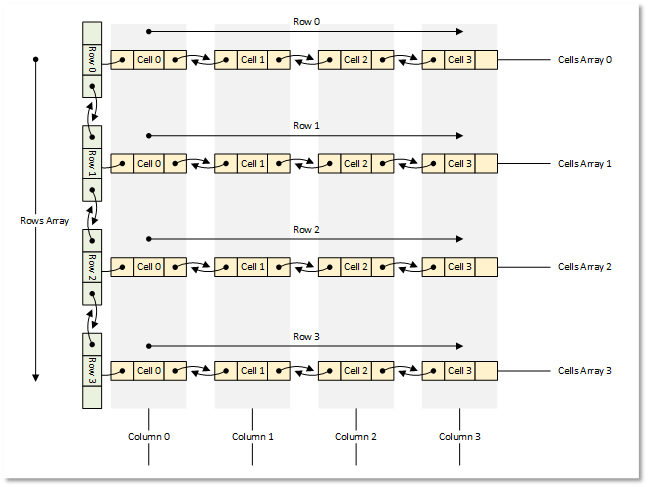
Şekil 1. 4x4 tablo modeli
Şimdi teoriden pratiğe geçelim.
Bir tablo modeli oluşturmak için sınıflar yazma
Tüm nesneleri oluşturmak için MQL5 Standart Kütüphanesini kullanacağız.
Her nesne kütüphanenin temel sınıfından kalıtılacaktır. Böylece bu nesneleri nesne listelerinde depolayabileceğiz.
Tüm sınıfları tek bir test komut dosyasına yazacağız, böylece her şey tek bir dosyada, görünür ve hızlı bir şekilde erişilebilir olacaktır. Gelecekte, yazdığımız sınıfları ayrı include dosyalarına dağıtacağız.
1. Tablo verilerini depolamanın temeli olarak bağlantılı listeler
CList bağlantılı liste, tablo verilerini depolamak için çok uygundur. Benzer CArrayObj listesinden farklı olarak, mevcut nesnenin solunda ve sağında bulunan komşu liste nesnelerine erişim metotlarına sahiptir. Bu, bir satırdaki hücreleri taşımayı veya bir tablodaki satırları taşımayı, eklemeyi ve silmeyi kolaylaştıracaktır. Aynı zamanda, listedeki taşınan, eklenen veya silinen nesnelerin doğru şekilde indekslenmesini de listenin kendisi sağlayacaktır.
Ancak burada bir nüans var. Bir listeyi bir dosyadan yükleme ve bir dosyaya kaydetme metotlarına bakarsanız, bir dosyadan yükleme yaparken liste sınıfının sanal CreateElement() metodunda yeni bir nesne oluşturması gerektiğini görebilirsiniz.
Bu sınıftaki bu metot basitçe NULL geri döndürür:
   //--- method of creating an element of the list
   virtual CObject  *CreateElement(void) { return(NULL); }
Bu, bağlantılı listelerle çalışmak için ve dosya işlemlerine ihtiyacımız olması durumunda, CList sınıfından kalıtım almamız ve bu metodu sınıfımızda uygulamamız gerektiği anlamına gelir.
Standart Kütüphane nesnelerini bir dosyaya kaydetme metotlarına bakarsanız, nesne özelliklerini kaydetme algoritmasının şu şekilde olduğunu görebilirsiniz:
- Veri başlangıcı işareti (-1) dosyaya yazılır,
- Nesne türü dosyaya yazılır,
- Tüm nesne özellikleri dosyaya teker teker yazılır.
Birinci ve ikinci maddeler, Standart Kütüphane nesnelerinin sahip olduğu tüm kaydetme/yükleme metotlarında mevcuttur. Buna göre, aynı mantığı izleyerek, listede depolanan nesnenin türünü bilmek istiyoruz, böylece bir dosyadan okurken, CList'ten kalıtılan liste sınıfının sanal CreateElement() metodunda bu türde bir nesne oluşturabiliriz.
Ayrıca, listeye yüklenebilecek tüm nesneler (sınıfları) liste sınıfı uygulanmadan önce bildirilmeli veya oluşturulmalıdır. Bu durumda, liste hangi nesnelerin "söz konusu" olduğunu ve hangilerinin oluşturulması gerektiğini "bilecektir".
\MQL5\Scripts\ terminal dizininde yeni bir TableModel\ klasörü ve içinde yeni bir TableModelTest.mq5 test komut dosyası oluşturalım.
Bağlantılı liste dosyasını bağlayalım ve gelecekteki tablo modeli sınıflarını bildirelim:
//+------------------------------------------------------------------+
//|                                               TableModelTest.mq5 |
//|                                  Copyright 2025, MetaQuotes Ltd. |
//|                                             https://www.mql5.com |
//+------------------------------------------------------------------+
#property copyright "Copyright 2025, MetaQuotes Ltd."
#property link      "https://www.mql5.com"
#property version   "1.00"

//+------------------------------------------------------------------+
//| Include libraries                                                |
//+------------------------------------------------------------------+
#include <Arrays\List.mqh>

//--- Forward declaration of classes
class CTableCell;                   // Table cell class
class CTableRow;                    // Table row class
class CTableModel;                  // Table model class
CList'ten kalıtılan bağlantılı liste sınıfının bu sınıflar hakkında bilgi sahibi olması ve oluşturması gereken nesne türlerini bilmesi için gelecekte kullanılacak sınıfların burada ileriye dönük olarak bildirilmesi gereklidir. Bunu yapmak için, nesne türlerinin numaralandırmasını, yardımcı makroları ve listeleri sıralama yöntemlerinin numaralandırmasını yazacağız:
//+------------------------------------------------------------------+
//| Include libraries                                                |
//+------------------------------------------------------------------+
#include <Arrays\List.mqh>

//--- Forward declaration of classes
class CTableCell;                   // Table cell class
class CTableRow;                    // Table row class
class CTableModel;                  // Table model class

//+------------------------------------------------------------------+
//| Macros                                                           |
//+------------------------------------------------------------------+
#define  MARKER_START_DATA    -1    // Data start marker in a file
#define  MAX_STRING_LENGTH    128   // Maximum length of a string in a cell

//+------------------------------------------------------------------+
//| Enumerations                                                     |
//+------------------------------------------------------------------+
enum ENUM_OBJECT_TYPE               // Enumeration of object types
  {
   OBJECT_TYPE_TABLE_CELL=10000,    // Table cell
   OBJECT_TYPE_TABLE_ROW,           // Table row
   OBJECT_TYPE_TABLE_MODEL,         // Table model
  };

enum ENUM_CELL_COMPARE_MODE         // Table cell comparison modes
  {
   CELL_COMPARE_MODE_COL,           // Comparison by column number
   CELL_COMPARE_MODE_ROW,           // Comparison by string number
   CELL_COMPARE_MODE_ROW_COL,       // Comparison by row and column
  };

//+------------------------------------------------------------------+
//| Functions                                                        |
//+------------------------------------------------------------------+
//--- Return the object type as a string
string TypeDescription(const ENUM_OBJECT_TYPE type)
  {
   string array[];
   int total=StringSplit(EnumToString(type),StringGetCharacter("_",0),array);
   string result="";
   for(int i=2;i<total;i++)
     {
      array[i]+=" ";
      array[i].Lower();
      array[i].SetChar(0,ushort(array[i].GetChar(0)-0x20));
      result+=array[i];
     }
   result.TrimLeft();
   result.TrimRight();
   return result;
  }
//+------------------------------------------------------------------+
//| Classes                                                          |
//+------------------------------------------------------------------+
Nesne türünün açıklamasını geri döndüren fonksiyon, nesne türü sabitlerinin tüm adlarının "OBJECT_TYPE_" alt dizgesiyle başladığı varsayımına dayanır. Ardından, bunu izleyen alt dizgeyi alabilir, ortaya çıkan dizgedeki tüm karakterleri küçük harfe dönüştürebilir, ilk karakteri büyük harfe dönüştürebilir ve soldaki ve sağdaki son dizgeden tüm boşlukları ve kontrol karakterlerini temizleyebiliriz.
Kendi bağlantılı liste sınıfımızı yazalım. Kodu aynı dosyada yazmaya devam edeceğiz:
//+------------------------------------------------------------------+
//| Classes                                                          |
//+------------------------------------------------------------------+
//+------------------------------------------------------------------+
//| Linked object list class                                         |
//+------------------------------------------------------------------+
class CListObj : public CList
  {
protected:
   ENUM_OBJECT_TYPE  m_element_type;   // Created object type in CreateElement()
public:
//--- Virtual method (1) for loading a list from a file, (2) for creating a list element
   virtual bool      Load(const int file_handle);
   virtual CObject  *CreateElement(void);
  };
CListObj sınıfı, Standart Kütüphane CList sınıfından kalıtılan yeni bağlantılı liste sınıfımızdır.
Sınıftaki tek değişken, oluşturulmakta olan nesnenin türünün yazılacağı değişken olacaktır. CreateElement() metodu sanal olduğundan ve üst sınıf metoduyla tam olarak aynı imzaya sahip olması gerektiğinden, oluşturulan nesnenin türünü bu metoda iletemeyiz. Ancak bu türü bildirilen bir değişkene yazabilir ve oluşturulan nesnenin türünü buradan okuyabiliriz.
Üst sınıfın iki sanal metodunu yeniden tanımlamalıyız: bir dosyadan yükleme metodu ve yeni bir nesne oluşturma metodu. Şimdi bunları inceleyelim.
Bir dosyadan liste yükleme metodu:
//+------------------------------------------------------------------+
//| Load a list from the file                                        |
//+------------------------------------------------------------------+
bool CListObj::Load(const int file_handle)
  {
//--- Variables
   CObject *node;
   bool     result=true;
//--- Check the handle
   if(file_handle==INVALID_HANDLE)
      return(false);
//--- Load and check the list start marker - 0xFFFFFFFFFFFFFFFF
   if(::FileReadLong(file_handle)!=MARKER_START_DATA)
      return(false);
//--- Load and check the list type
   if(::FileReadInteger(file_handle,INT_VALUE)!=Type())
      return(false);
//--- Read the list size (number of objects)
   uint num=::FileReadInteger(file_handle,INT_VALUE);

//--- Sequentially recreate the list elements by calling the Load() method of node objects
   this.Clear();
   for(uint i=0; i<num; i++)
     {
      //--- Read and check the object data start marker - 0xFFFFFFFFFFFFFFFF
      if(::FileReadLong(file_handle)!=MARKER_START_DATA)
         return false;
      //--- Read the object type
      this.m_element_type=(ENUM_OBJECT_TYPE)::FileReadInteger(file_handle,INT_VALUE);
      node=this.CreateElement();
      if(node==NULL)
         return false;
      this.Add(node);
      //--- Now the file pointer is offset relative to the beginning of the object marker by 12 bytes (8 - marker, 4 - type)
      //--- Set the pointer to the beginning of the object data and load the object properties from the file using the Load() method of the node element.
      if(!::FileSeek(file_handle,-12,SEEK_CUR))
         return false;
      result &=node.Load(file_handle);
     }
//--- Result
   return result;
  }
Burada, önce listenin başlangıcı, türü ve boyutu, yani listedeki eleman sayısı kontrol edilir; daha sonra, eleman sayısına göre bir döngü içinde, her nesnenin veri başlangıcı işareti ve türü dosyadan okunur. Elde edilen tür m_element_type değişkenine yazılır ve yeni bir eleman oluşturmak için bir metot çağrılır. Bu metotta, elde edilen türde yeni bir eleman oluşturulur ve node işaretçi (pointer) değişkenine yazılır, bu da listeye eklenir. Metodun tüm mantığı yorumlarda ayrıntılı olarak açıklanmıştır. Yeni bir liste öğesi oluşturma metodunu ele alalım.
Liste öğesi oluşturma metodu:
//+------------------------------------------------------------------+
//| List element creation method                                     |
//+------------------------------------------------------------------+
CObject *CListObj::CreateElement(void)
  {
//--- Create a new object depending on the object type in m_element_type
   switch(this.m_element_type)
     {
      case OBJECT_TYPE_TABLE_CELL   :  return new CTableCell();
      case OBJECT_TYPE_TABLE_ROW    :  return new CTableRow();
      case OBJECT_TYPE_TABLE_MODEL  :  return new CTableModel();
      default                       :  return NULL;
     }
  }
Bu, metot çağrılmadan önce, oluşturulmakta olan nesnenin türünün m_element_type değişkenine zaten yazılmış olduğu anlamına gelir. Öğe türüne bağlı olarak, uygun türde yeni bir nesne oluşturulur ve buna bir işaretçi (pointer) geri döndürülür. Gelecekte, yeni kontroller geliştirilirken, türleri ENUM_OBJECT_TYPE numaralandırmasına yazılacaktır. Ve yeni nesne türleri oluşturmak için buraya yeni durumlar eklenecektir. Standart CList'i temel alan bağlantılı liste sınıfı hazırdır. Artık bilinen türlerdeki tüm nesneleri depolayabilir, listeleri bir dosyaya kaydedebilir ve bir dosyadan yükleyebilir ve doğru şekilde geri getirebilir.
2. Tablo hücresi sınıfı
Bir tablo hücresi, bir tablonun belirli bir değeri depolayan en basit öğesidir. Hücreler, tablo satırlarını temsil eden listeleri oluşturur. Her liste bir tablo satırını temsil eder. Tablomuzda, hücreler bir seferde birkaç türden yalnızca bir değer depolayabilecektir - reel, tamsayı veya dizge değeri.
Basit bir değere ek olarak, bir hücreye ENUM_OBJECT_TYPE numaralandırmasından bilinen türde bir nesne atanabilir. Bu durumda, hücre listelenen türlerden herhangi birinin değerini ve ayrıca türü özel bir değişkene yazılan bir nesnenin işaretçisini depolayabilir. Böylece, gelecekte Görünüm bileşenine, Kontrolcü bileşenini kullanarak etkileşimde bulunmak için bir hücrede böyle bir nesneyi görüntülemesi talimatı verilebilir.
Bir hücrede birkaç farklı türde değer depolanabileceğinden, bunları yazmak, depolamak ve geri döndürmek için birlik (union) kullanacağız. Birlik, birkaç alanı (field) aynı bellek bölümünde depolayan özel bir veri türüdür. Birlik bir yapıya benzer, ancak burada, bir yapıdan farklı olarak, birliğin farklı üyeleri aynı bellek bölümüne aittir. Yapı içindeyken, her alana (field) kendi bellek bölümü tahsis edilir.
Kodu önceden oluşturulmuş dosyaya yazmaya devam edelim. Yeni bir sınıf yazmaya başlayalım. Protected bölümde, bir birlik yazıyoruz ve değişkenleri bildiriyoruz:
//+------------------------------------------------------------------+
//| Table cell class                                                 |
//+------------------------------------------------------------------+
class CTableCell : public CObject
  {
protected:
//--- Combining for storing cell values (double, long, string)
   union DataType
     {
      protected:
      double         double_value;
      long           long_value;
      ushort         ushort_value[MAX_STRING_LENGTH];

      public:
      //--- Set values
      void           SetValueD(const double value) { this.double_value=value;                   }
      void           SetValueL(const long value)   { this.long_value=value;                     }
      void           SetValueS(const string value) { ::StringToShortArray(value,ushort_value);  }

      //--- Return values
      double         ValueD(void) const { return this.double_value; }
      long           ValueL(void) const { return this.long_value; }
      string         ValueS(void) const
                       {
                        string res=::ShortArrayToString(this.ushort_value);
                        res.TrimLeft();
                        res.TrimRight();
                        return res;
                       }
     };
//--- Variables
   DataType          m_datatype_value;                      // Value
   ENUM_DATATYPE     m_datatype;                            // Data type
   CObject          *m_object;                              // Cell object
   ENUM_OBJECT_TYPE  m_object_type;                         // Object type in the cell
   int               m_row;                                 // Row index
   int               m_col;                                 // Column index
   int               m_digits;                              // Data representation accuracy
   uint              m_time_flags;                          // Date/time display flags
   bool              m_color_flag;                          // Color name display flag
   bool              m_editable;                            // Editable cell flag

public:
Public bölümde, bir hücrede depolanan çeşitli veri türleri için protected değişkenlere, sanal metotlara ve sınıf yapıcılarına erişim metotları yazıyoruz:
public:
//--- Return cell coordinates and properties
   uint              Row(void)                           const { return this.m_row;                            }
   uint              Col(void)                           const { return this.m_col;                            }
   ENUM_DATATYPE     Datatype(void)                      const { return this.m_datatype;                       }
   int               Digits(void)                        const { return this.m_digits;                         }
   uint              DatetimeFlags(void)                 const { return this.m_time_flags;                     }
   bool              ColorNameFlag(void)                 const { return this.m_color_flag;                     }
   bool              IsEditable(void)                    const { return this.m_editable;                       }
//--- Return (1) double, (2) long and (3) string value
   double            ValueD(void)                        const { return this.m_datatype_value.ValueD();        }
   long              ValueL(void)                        const { return this.m_datatype_value.ValueL();        }
   string            ValueS(void)                        const { return this.m_datatype_value.ValueS();        }
//--- Return the value as a formatted string
   string            Value(void) const
                       {
                        switch(this.m_datatype)
                          {
                           case TYPE_DOUBLE  :  return(::DoubleToString(this.ValueD(),this.Digits()));
                           case TYPE_LONG    :  return(::IntegerToString(this.ValueL()));
                           case TYPE_DATETIME:  return(::TimeToString(this.ValueL(),this.m_time_flags));
                           case TYPE_COLOR   :  return(::ColorToString((color)this.ValueL(),this.m_color_flag));
                           default           :  return this.ValueS();
                          }
                       }
   string            DatatypeDescription(void) const
                       {
                        string type=::StringSubstr(::EnumToString(this.m_datatype),5);
                        type.Lower();
                        return type;
                       }
//--- Set variable values
   void              SetRow(const uint row)                    { this.m_row=(int)row;                          }
   void              SetCol(const uint col)                    { this.m_col=(int)col;                          }
   void              SetDatatype(const ENUM_DATATYPE datatype) { this.m_datatype=datatype;                     }
   void              SetDigits(const int digits)               { this.m_digits=digits;                         }
   void              SetDatetimeFlags(const uint flags)        { this.m_time_flags=flags;                      }
   void              SetColorNameFlag(const bool flag)         { this.m_color_flag=flag;                       }
   void              SetEditable(const bool flag)              { this.m_editable=flag;                         }
   void              SetPositionInTable(const uint row,const uint col)
                       {
                        this.SetRow(row);
                        this.SetCol(col);
                       }
//--- Assign an object to a cell
   void              AssignObject(CObject *object)
                       {
                        if(object==NULL)
                          {
                           ::PrintFormat("%s: Error. Empty object passed",__FUNCTION__);
                           return;
                          }
                        this.m_object=object;
                        this.m_object_type=(ENUM_OBJECT_TYPE)object.Type();
                       }
//--- Remove the object assignment
   void              UnassignObject(void)
                       {
                        this.m_object=NULL;
                        this.m_object_type=-1;
                       }

//--- Set double value
   void              SetValue(const double value)
                       {
                        this.m_datatype=TYPE_DOUBLE;
                        if(this.m_editable)
                           this.m_datatype_value.SetValueD(value);
                       }
//--- Set long value
   void              SetValue(const long value)
                       {
                        this.m_datatype=TYPE_LONG;
                        if(this.m_editable)
                           this.m_datatype_value.SetValueL(value);
                       }
//--- Set datetime value
   void              SetValue(const datetime value)
                       {
                        this.m_datatype=TYPE_DATETIME;
                        if(this.m_editable)
                           this.m_datatype_value.SetValueL(value);
                       }
//--- Set color value
   void              SetValue(const color value)
                       {
                        this.m_datatype=TYPE_COLOR;
                        if(this.m_editable)
                           this.m_datatype_value.SetValueL(value);
                       }
//--- Set string value
   void              SetValue(const string value)
                       {
                        this.m_datatype=TYPE_STRING;
                        if(this.m_editable)
                           this.m_datatype_value.SetValueS(value);
                       }
//--- Clear data
   void              ClearData(void)
                       {
                        if(this.Datatype()==TYPE_STRING)
                           this.SetValue("");
                        else
                           this.SetValue(0.0);
                       }
//--- (1) Return and (2) display the object description in the journal
   string            Description(void);
   void              Print(void);

//--- Virtual methods of (1) comparing, (2) saving to file, (3) loading from file, (4) object type
   virtual int       Compare(const CObject *node,const int mode=0) const;
   virtual bool      Save(const int file_handle);
   virtual bool      Load(const int file_handle);
   virtual int       Type(void)                          const { return(OBJECT_TYPE_TABLE_CELL);}


//--- Constructors/destructor
                     CTableCell(void) : m_row(0), m_col(0), m_datatype(-1), m_digits(0), m_time_flags(0), m_color_flag(false), m_editable(true), m_object(NULL), m_object_type(-1)
                       {
                        this.m_datatype_value.SetValueD(0);
                       }
                     //--- Accept a double value
                     CTableCell(const uint row,const uint col,const double value,const int digits) :
                        m_row((int)row), m_col((int)col), m_datatype(TYPE_DOUBLE), m_digits(digits), m_time_flags(0), m_color_flag(false), m_editable(true), m_object(NULL), m_object_type(-1)
                       {
                        this.m_datatype_value.SetValueD(value);
                       }
                     //--- Accept a long value
                     CTableCell(const uint row,const uint col,const long value) :
                        m_row((int)row), m_col((int)col), m_datatype(TYPE_LONG), m_digits(0), m_time_flags(0), m_color_flag(false), m_editable(true), m_object(NULL), m_object_type(-1)
                       {
                        this.m_datatype_value.SetValueL(value);
                       }
                     //--- Accept a datetime value
                     CTableCell(const uint row,const uint col,const datetime value,const uint time_flags) :
                        m_row((int)row), m_col((int)col), m_datatype(TYPE_DATETIME), m_digits(0), m_time_flags(time_flags), m_color_flag(false), m_editable(true), m_object(NULL), m_object_type(-1)
                       {
                        this.m_datatype_value.SetValueL(value);
                       }
                     //--- Accept color value
                     CTableCell(const uint row,const uint col,const color value,const bool color_names_flag) :
                        m_row((int)row), m_col((int)col), m_datatype(TYPE_COLOR), m_digits(0), m_time_flags(0), m_color_flag(color_names_flag), m_editable(true), m_object(NULL), m_object_type(-1)
                       {
                        this.m_datatype_value.SetValueL(value);
                       }
                     //--- Accept string value
                     CTableCell(const uint row,const uint col,const string value) :
                        m_row((int)row), m_col((int)col), m_datatype(TYPE_STRING), m_digits(0), m_time_flags(0), m_color_flag(false), m_editable(true), m_object(NULL), m_object_type(-1)
                       {
                        this.m_datatype_value.SetValueS(value);
                       }
                    ~CTableCell(void) {}
  };
Değerleri ayarlama metotlarında, önce hücrede depolanan değerin türü ayarlanır ve ardından hücredeki değerleri düzenleme özelliğinin bayrağı kontrol edilir. Ve yalnızca bayrak ayarlandığında, yeni değer hücreye depolanır:
//--- Set double value
   void              SetValue(const double value)
                       {
                        this.m_datatype=TYPE_DOUBLE;
                        if(this.m_editable)
                           this.m_datatype_value.SetValueD(value);
                       }
Neden bu şekilde yapılıyor? Yeni bir hücre oluşturulurken, depolanan değerin türüyle oluşturulur. Değerin türünü değiştirmek istiyorsanız, ancak aynı zamanda hücre düzenlenebilir değilse, istenen türü ayarlamak için metodu çağırabilirsiniz. Depolanan değerin türü değiştirilecek, ancak hücredeki değer etkilenmeyecektir.
Veri temizleme metodu sayısal değerleri sıfıra, dizge değerlerini ise boş olarak ayarlar:
//--- Clear data
   void              ClearData(void)
                       {
                        if(this.Datatype()==TYPE_STRING)
                           this.SetValue("");
                        else
                           this.SetValue(0.0);
                       }
Daha sonra, temizlenen hücrelerde hiçbir veri görüntülenmemesi için bunu farklı şekilde yapacağız. Hücreyi boş hale getirmek için, hücre için bir “boş” değer oluşturacağız ve böylece hücre temizlendiğinde, içinde depolanan ve görüntülenen tüm değerler silinecektir. Sonuçta, sıfır da tam teşekküllü bir değerdir ve şu anda hücre temizlendiğinde sayısal veriler sıfırlarla doldurulur. Bu yanlıştır.
Sınıfın parametrik yapıcılarında, tablodaki hücre koordinatları iletilir - satır ve sütun numarası ve gerekli tür (double, long, datetime, color, string). Bazı türler ek bilgi gerektirir:
- double - çıktı değerinin doğruluğu (ondalık basamak sayısı),
- datetime - zaman çıktısı bayrakları (tarih/saat-dakika/saniye),
- color - bilinen standart renklerin adlarını görüntülemek için bayrak.
Hücrelerde depolanan bu tür değerlere sahip yapıcılarda, hücrelerde görüntülenen değerlerin biçimini ayarlamak için ek parametreler iletilir:
 //--- Accept a double value
 CTableCell(const uint row,const uint col,const double value,const int digits) :
    m_row((int)row), m_col((int)col), m_datatype(TYPE_DOUBLE), m_digits(digits), m_time_flags(0), m_color_flag(false), m_editable(true), m_object(NULL), m_object_type(-1)
   {
    this.m_datatype_value.SetValueD(value);
   }
 //--- Accept a long value
 CTableCell(const uint row,const uint col,const long value) :
    m_row((int)row), m_col((int)col), m_datatype(TYPE_LONG), m_digits(0), m_time_flags(0), m_color_flag(false), m_editable(true), m_object(NULL), m_object_type(-1)
   {
    this.m_datatype_value.SetValueL(value);
   }
 //--- Accept a datetime value
 CTableCell(const uint row,const uint col,const datetime value,const uint time_flags) :
    m_row((int)row), m_col((int)col), m_datatype(TYPE_DATETIME), m_digits(0), m_time_flags(time_flags), m_color_flag(false), m_editable(true), m_object(NULL), m_object_type(-1)
   {
    this.m_datatype_value.SetValueL(value);
   }

 //--- Accept color value
 CTableCell(const uint row,const uint col,const color value,const bool color_names_flag) :
    m_row((int)row), m_col((int)col), m_datatype(TYPE_COLOR), m_digits(0), m_time_flags(0), m_color_flag(color_names_flag), m_editable(true), m_object(NULL), m_object_type(-1)
   {
    this.m_datatype_value.SetValueL(value);
   }
 //--- Accept string value
 CTableCell(const uint row,const uint col,const string value) :
    m_row((int)row), m_col((int)col), m_datatype(TYPE_STRING), m_digits(0), m_time_flags(0), m_color_flag(false), m_editable(true), m_object(NULL), m_object_type(-1)
   {
    this.m_datatype_value.SetValueS(value);
   }
İki nesneyi karşılaştırma metodu:
//+------------------------------------------------------------------+
//| Compare two objects                                              |
//+------------------------------------------------------------------+
int CTableCell::Compare(const CObject *node,const int mode=0) const
  {
   const CTableCell *obj=node;
   switch(mode)
     {
      case CELL_COMPARE_MODE_COL :  return(this.Col()>obj.Col() ? 1 : this.Col()<obj.Col() ? -1 : 0);
      case CELL_COMPARE_MODE_ROW :  return(this.Row()>obj.Row() ? 1 : this.Row()<obj.Row() ? -1 : 0);
      //---CELL_COMPARE_MODE_ROW_COL
      default                    :  return
                                      (
                                       this.Row()>obj.Row() ? 1 : this.Row()<obj.Row() ? -1 :
                                       this.Col()>obj.Col() ? 1 : this.Col()<obj.Col() ? -1 : 0
                                      );
     }
  }
Metot, iki nesnenin parametrelerini üç karşılaştırma kriterinden biriyle karşılaştırmaya olanak tanır - sütun numarasına göre, satır numarasına göre ve aynı anda satır ve sütun numaralarına göre.
Bu metot, tablo satırlarını tablo sütunlarının değerlerine göre sıralayabilmek için gereklidir. Bu, sonraki makalelerde Kontrolcü tarafından işlenecektir.
Hücre özelliklerini bir dosyaya kaydetme metodu:
//+------------------------------------------------------------------+
//| Save to file                                                     |
//+------------------------------------------------------------------+
bool CTableCell::Save(const int file_handle)
  {
//--- Check the handle
   if(file_handle==INVALID_HANDLE)
      return(false);
//--- Save data start marker - 0xFFFFFFFFFFFFFFFF
   if(::FileWriteLong(file_handle,MARKER_START_DATA)!=sizeof(long))
      return(false);
//--- Save the object type
   if(::FileWriteInteger(file_handle,this.Type(),INT_VALUE)!=INT_VALUE)
      return(false);

   //--- Save the data type
   if(::FileWriteInteger(file_handle,this.m_datatype,INT_VALUE)!=INT_VALUE)
      return(false);
   //--- Save the object type in the cell
   if(::FileWriteInteger(file_handle,this.m_object_type,INT_VALUE)!=INT_VALUE)
      return(false);
   //--- Save the row index
   if(::FileWriteInteger(file_handle,this.m_row,INT_VALUE)!=INT_VALUE)
      return(false);
   //--- Save the column index
   if(::FileWriteInteger(file_handle,this.m_col,INT_VALUE)!=INT_VALUE)
      return(false);
   //--- Maintain the accuracy of data representation
   if(::FileWriteInteger(file_handle,this.m_digits,INT_VALUE)!=INT_VALUE)
      return(false);
   //--- Save date/time display flags
   if(::FileWriteInteger(file_handle,this.m_time_flags,INT_VALUE)!=INT_VALUE)
      return(false);
   //--- Save the color name display flag
   if(::FileWriteInteger(file_handle,this.m_color_flag,INT_VALUE)!=INT_VALUE)
      return(false);
   //--- Save the edited cell flag
   if(::FileWriteInteger(file_handle,this.m_editable,INT_VALUE)!=INT_VALUE)
      return(false);
   //--- Save the value
   if(::FileWriteStruct(file_handle,this.m_datatype_value)!=sizeof(this.m_datatype_value))
      return(false);

//--- All is successful
   return true;
  }
Veri başlangıcı işareti ve nesne türü dosyaya yazıldıktan sonra, tüm hücre özellikleri sırayla kaydedilir. Birlik, FileWriteStruct() kullanılarak bir yapı olarak kaydedilmelidir.
Bir dosyadan hücre özellikleri yükleme metodu:
//+------------------------------------------------------------------+
//| Load from file                                                   |
//+------------------------------------------------------------------+
bool CTableCell::Load(const int file_handle)
  {
//--- Check the handle
   if(file_handle==INVALID_HANDLE)
      return(false);
//--- Load and check the data start marker - 0xFFFFFFFFFFFFFFFF
   if(::FileReadLong(file_handle)!=MARKER_START_DATA)
      return(false);
//--- Load the object type
   if(::FileReadInteger(file_handle,INT_VALUE)!=this.Type())
      return(false);

   //--- Load the data type
   this.m_datatype=(ENUM_DATATYPE)::FileReadInteger(file_handle,INT_VALUE);
   //--- Load the object type in the cell
   this.m_object_type=(ENUM_OBJECT_TYPE)::FileReadInteger(file_handle,INT_VALUE);
   //--- Load the row index
   this.m_row=::FileReadInteger(file_handle,INT_VALUE);
   //--- Load the column index
   this.m_col=::FileReadInteger(file_handle,INT_VALUE);
   //--- Load the precision of the data representation
   this.m_digits=::FileReadInteger(file_handle,INT_VALUE);
   //--- Load date/time display flags
   this.m_time_flags=::FileReadInteger(file_handle,INT_VALUE);
   //--- Load the color name display flag
   this.m_color_flag=::FileReadInteger(file_handle,INT_VALUE);
   //--- Load the edited cell flag
   this.m_editable=::FileReadInteger(file_handle,INT_VALUE);
   //--- Load the value
   if(::FileReadStruct(file_handle,this.m_datatype_value)!=sizeof(this.m_datatype_value))
      return(false);

//--- All is successful
   return true;
  }
Veri başlangıcı işareti ve nesne türü okunduktan ve kontrol edildikten sonra, nesnenin tüm özellikleri kaydedildikleri sırayla yüklenir. Birlikler FileReadStruct() kullanılarak okunur.
Nesne açıklamasını geri döndüren metot:
//+------------------------------------------------------------------+
//| Return the object description                                    |
//+------------------------------------------------------------------+
string CTableCell::Description(void)
  {
   return(::StringFormat("%s: Row %u, Col %u, %s <%s>Value: %s",
                         TypeDescription((ENUM_OBJECT_TYPE)this.Type()),this.Row(),this.Col(),
                         (this.m_editable ? "Editable" : "Uneditable"),this.DatatypeDescription(),this.Value()));
  }
Burada, bazı hücre parametrelerinden bir dizge oluşturulur ve örneğin double için şu formatta geri döndürülür:
Table Cell: Row 2, Col 2, Uneditable <double>Value: 0.00
Nesne açıklamasını günlüğe yazdıran metot:
//+------------------------------------------------------------------+
//| Display the object description in the journal                    |
//+------------------------------------------------------------------+
void CTableCell::Print(void)
  {
   ::Print(this.Description());
  }
Burada, nesne açıklaması basitçe günlüğe yazdırılır.
//+------------------------------------------------------------------+
//| Table row class                                                  |
//+------------------------------------------------------------------+
class CTableRow : public CObject
  {
protected:
   CTableCell        m_cell_tmp;                            // Cell object to search in the list
   CListObj          m_list_cells;                          // List of cells
   uint              m_index;                               // Row index

//--- Add the specified cell to the end of the list
   bool              AddNewCell(CTableCell *cell);

public:
//--- (1) Set and (2) return the row index
   void              SetIndex(const uint index)                { this.m_index=index;  }
   uint              Index(void)                         const { return this.m_index; }
//--- Set the row and column positions to all cells
   void              CellsPositionUpdate(void);

//--- Create a new cell and add it to the end of the list
   CTableCell       *CreateNewCell(const double value);
   CTableCell       *CreateNewCell(const long value);
   CTableCell       *CreateNewCell(const datetime value);
   CTableCell       *CreateNewCell(const color value);
   CTableCell       *CreateNewCell(const string value);

//--- Return (1) the cell by index and (2) the number of cells
   CTableCell       *GetCell(const uint index)                 { return this.m_list_cells.GetNodeAtIndex(index);  }
   uint              CellsTotal(void)                    const { return this.m_list_cells.Total();                }

//--- Set the value to the specified cell
   void              CellSetValue(const uint index,const double value);
   void              CellSetValue(const uint index,const long value);
   void              CellSetValue(const uint index,const datetime value);
   void              CellSetValue(const uint index,const color value);
   void              CellSetValue(const uint index,const string value);
//--- (1) assign to a cell and (2) remove an assigned object from the cell
   void              CellAssignObject(const uint index,CObject *object);
   void              CellUnassignObject(const uint index);

//--- (1) Delete and (2) move the cell
   bool              CellDelete(const uint index);
   bool              CellMoveTo(const uint cell_index, const uint index_to);

//--- Reset the data of the row cells
   void              ClearData(void);

//--- (1) Return and (2) display the object description in the journal
   string            Description(void);
   void              Print(const bool detail, const bool as_table=false, const int cell_width=10);

//--- Virtual methods of (1) comparing, (2) saving to file, (3) loading from file, (4) object type
   virtual int       Compare(const CObject *node,const int mode=0) const;
   virtual bool      Save(const int file_handle);
   virtual bool      Load(const int file_handle);
   virtual int       Type(void)                          const { return(OBJECT_TYPE_TABLE_ROW); }

//--- Constructors/destructor
                     CTableRow(void) : m_index(0) {}
                     CTableRow(const uint index) : m_index(index) {}
                    ~CTableRow(void){}
  };
3. Tablo satırı sınıfı
Bir tablo satırı esasen hücrelerin bağlantılı bir listesidir. Satır sınıfı, yeni hücreler ekleyebilmeli, listedeki mevcut hücreleri silebilmeli ve yeni konumlara taşıyabilmelidir. Sınıf, listedeki hücreleri yönetmek için asgari düzeyde yeterli bir metot kümesine sahip olmalıdır.
Kodu aynı dosyaya yazmaya devam edelim. Sınıf parametrelerinde yalnızca bir değişken mevcuttur - tablodaki satır indeksi. Geri kalan her şey satır özellikleriyle ve hücrelerinin listesiyle çalışmaya yönelik metotlardır.
Sınıf metotlarını inceleyelim.
İki tablo satırını karşılaştırma metodu:
//+------------------------------------------------------------------+
//| Compare two objects                                              |
//+------------------------------------------------------------------+
int CTableRow::Compare(const CObject *node,const int mode=0) const
  {
   const CTableRow *obj=node;
   return(this.Index()>obj.Index() ? 1 : this.Index()<obj.Index() ? -1 : 0);
  }
Satırlar yalnızca tek bir parametreyle (satır indeksi) karşılaştırılabildiğinden, bu karşılaştırma burada gerçekleştirilir. Bu metot tablo satırlarını sıralamak için gerekli olacaktır.
Farklı türde depolanmış verilere sahip hücreler oluşturmak için aşırı yüklenmiş metotlar:
//+------------------------------------------------------------------+
//| Create a new double cell and add it to the end of the list       |
//+------------------------------------------------------------------+
CTableCell *CTableRow::CreateNewCell(const double value)
  {
//--- Create a new cell object storing a value of double type
   CTableCell *cell=new CTableCell(this.m_index,this.CellsTotal(),value,2);
   if(cell==NULL)
     {
      ::PrintFormat("%s: Error. Failed to create new cell in row %u at position %u",__FUNCTION__, this.m_index, this.CellsTotal());
      return NULL;
     }
//--- Add the created cell to the end of the list
   if(!this.AddNewCell(cell))
     {
      delete cell;
      return NULL;
     }
//--- Return the pointer to the object
   return cell;
  }
//+------------------------------------------------------------------+
//| Create a new long cell and add it to the end of the list         |
//+------------------------------------------------------------------+
CTableCell *CTableRow::CreateNewCell(const long value)
  {
//--- Create a new cell object storing a long value
   CTableCell *cell=new CTableCell(this.m_index,this.CellsTotal(),value);
   if(cell==NULL)
     {
      ::PrintFormat("%s: Error. Failed to create new cell in row %u at position %u",__FUNCTION__, this.m_index, this.CellsTotal());
      return NULL;
     }
//--- Add the created cell to the end of the list
   if(!this.AddNewCell(cell))
     {
      delete cell;
      return NULL;
     }
//--- Return the pointer to the object
   return cell;
  }
//+------------------------------------------------------------------+
//| Create a new datetime cell and add it to the end of the list     |
//+------------------------------------------------------------------+
CTableCell *CTableRow::CreateNewCell(const datetime value)
  {
//--- Create a new cell object storing a value of datetime type
   CTableCell *cell=new CTableCell(this.m_index,this.CellsTotal(),value,TIME_DATE|TIME_MINUTES|TIME_SECONDS);
   if(cell==NULL)
     {
      ::PrintFormat("%s: Error. Failed to create new cell in row %u at position %u",__FUNCTION__, this.m_index, this.CellsTotal());
      return NULL;
     }
//--- Add the created cell to the end of the list
   if(!this.AddNewCell(cell))
     {
      delete cell;
      return NULL;
     }
//--- Return the pointer to the object
   return cell;
  }
//+------------------------------------------------------------------+
//| Create a new color cell and add it to the end of the list        |
//+------------------------------------------------------------------+
CTableCell *CTableRow::CreateNewCell(const color value)
  {
//--- Create a new cell object storing a value of color type
   CTableCell *cell=new CTableCell(this.m_index,this.CellsTotal(),value,true);
   if(cell==NULL)
     {
      ::PrintFormat("%s: Error. Failed to create new cell in row %u at position %u",__FUNCTION__, this.m_index, this.CellsTotal());
      return NULL;
     }
//--- Add the created cell to the end of the list
   if(!this.AddNewCell(cell))
     {
      delete cell;
      return NULL;
     }
//--- Return the pointer to the object
   return cell;
  }
//+------------------------------------------------------------------+
//| Create a new string cell and add it to the end of the list       |
//+------------------------------------------------------------------+
CTableCell *CTableRow::CreateNewCell(const string value)
  {
//--- Create a new cell object storing a value of string type
   CTableCell *cell=new CTableCell(this.m_index,this.CellsTotal(),value);
   if(cell==NULL)
     {
      ::PrintFormat("%s: Error. Failed to create new cell in row %u at position %u",__FUNCTION__, this.m_index, this.CellsTotal());
      return NULL;
     }
//--- Add the created cell to the end of the list
   if(!this.AddNewCell(cell))
     {
      delete cell;
      return NULL;
     }
//--- Return the pointer to the object
   return cell;
  }
Yeni bir hücre (double, long, datetime, color, string) oluşturmak ve liste sonuna eklemek için beş metot. Hücreye veri çıktı formatının ek parametreleri varsayılan değerlerle ayarlanır. Hücre oluşturulduktan sonra değiştirilebilirler. Önce yeni bir hücre nesnesi oluşturulur ve ardından liste sonuna eklenir. Nesne oluşturulmamışsa, bellek sızıntılarını önlemek için silinir.
Liste sonuna bir hücre ekleyen metot:
//+------------------------------------------------------------------+
//| Add a cell to the end of the list                                |
//+------------------------------------------------------------------+
bool CTableRow::AddNewCell(CTableCell *cell)
  {
//--- If an empty object is passed, report it and return 'false'
   if(cell==NULL)
     {
      ::PrintFormat("%s: Error. Empty CTableCell object passed",__FUNCTION__);
      return false;
     }
//--- Set the cell index in the list and add the created cell to the end of the list
   cell.SetPositionInTable(this.m_index,this.CellsTotal());
   if(this.m_list_cells.Add(cell)==WRONG_VALUE)
     {
      ::PrintFormat("%s: Error. Failed to add cell (%u,%u) to list",__FUNCTION__,this.m_index,this.CellsTotal());
      return false;
     }
//--- Successful
   return true;
  }
Yeni oluşturulan herhangi bir hücre her zaman liste sonuna eklenir. Ardından, daha sonra oluşturulacak olan tablo modeli sınıfının metotları kullanılarak uygun konuma taşınabilir.
Belirtilen hücreye bir değer ayarlamak için aşırı yüklenmiş metotlar:
//+------------------------------------------------------------------+
//| Set the double value to the specified cell                       |
//+------------------------------------------------------------------+
void CTableRow::CellSetValue(const uint index,const double value)
  {
//--- Get the required cell from the list and set a new value into it
   CTableCell *cell=this.GetCell(index);
   if(cell!=NULL)
      cell.SetValue(value);
  }
//+------------------------------------------------------------------+
//| Set a long value to the specified cell                           |
//+------------------------------------------------------------------+
void CTableRow::CellSetValue(const uint index,const long value)
  {
//--- Get the required cell from the list and set a new value into it
   CTableCell *cell=this.GetCell(index);
   if(cell!=NULL)
      cell.SetValue(value);
  }
//+------------------------------------------------------------------+
//| Set the datetime value to the specified cell                     |
//+------------------------------------------------------------------+
void CTableRow::CellSetValue(const uint index,const datetime value)
  {
//--- Get the required cell from the list and set a new value into it
   CTableCell *cell=this.GetCell(index);
   if(cell!=NULL)
      cell.SetValue(value);
  }
//+------------------------------------------------------------------+
//| Set the color value to the specified cell                        |
//+------------------------------------------------------------------+
void CTableRow::CellSetValue(const uint index,const color value)
  {
//--- Get the required cell from the list and set a new value into it
   CTableCell *cell=this.GetCell(index);
   if(cell!=NULL)
      cell.SetValue(value);
  }
//+------------------------------------------------------------------+
//| Set a string value to the specified cell                         |
//+------------------------------------------------------------------+
void CTableRow::CellSetValue(const uint index,const string value)
  {
//--- Get the required cell from the list and set a new value into it
   CTableCell *cell=this.GetCell(index);
   if(cell!=NULL)
      cell.SetValue(value);
  }
İndeksi kullanarak, listeden gerekli hücreyi alır ve onun için bir değer ayarlarız. Hücre düzenlenebilir değilse, hücre nesnesinin SetValue() metodu hücre için yalnızca ayarlanan değerin türünü ayarlar. Değerin kendisi ayarlanmayacaktır.
Bir hücreye nesne atayan metot:
//+------------------------------------------------------------------+
//| Assign an object to the cell                                     |
//+------------------------------------------------------------------+
void CTableRow::CellAssignObject(const uint index,CObject *object)
  {
//--- Get the required cell from the list and set a pointer to the object into it
   CTableCell *cell=this.GetCell(index);
   if(cell!=NULL)
      cell.AssignObject(object);
  }
Hücre nesnesini indeksine göre alırız ve AssignObject() metodunu kullanarak nesnenin işaretçisini hücreye atarız.
Hücre için atanmış nesneyi iptal eden metot:
//+------------------------------------------------------------------+
//| Cancel the assigned object for the cell                          |
//+------------------------------------------------------------------+
void CTableRow::CellUnassignObject(const uint index)
  {
//--- Get the required cell from the list and cancel the pointer to the object and its type in it
   CTableCell *cell=this.GetCell(index);
   if(cell!=NULL)
      cell.UnassignObject();
  }
Hücre nesnesini indeksine göre alırız ve hücreye atanmış nesnenin işaretçisini kaldırmak için UnassignObject() metodunu kullanırız.
Bir hücreyi silen metot:
//+------------------------------------------------------------------+
//| Delete a cell                                                    |
//+------------------------------------------------------------------+
bool CTableRow::CellDelete(const uint index)
  {
//--- Delete a cell in the list by index
   if(!this.m_list_cells.Delete(index))
      return false;
//--- Update the indices for the remaining cells in the list
   this.CellsPositionUpdate();
   return true;
  }
CList sınıfının Delete() metodunu kullanarak listeden hücreyi sileriz. Listeden bir hücre silindikten sonra, kalan hücrelerin indeksleri değiştirilir. CellsPositionUpdate() metodunu kullanarak, listede kalan tüm hücrelerin indekslerini güncelleriz.
Bir hücreyi belirtilen konuma taşıyan metot:
//+------------------------------------------------------------------+
//| Moves the cell to the specified position                         |
//+------------------------------------------------------------------+
bool CTableRow::CellMoveTo(const uint cell_index,const uint index_to)
  {
//--- Select the desired cell by index in the list, turning it into the current one
   CTableCell *cell=this.GetCell(cell_index);
//--- Move the current cell to the specified position in the list
   if(cell==NULL || !this.m_list_cells.MoveToIndex(index_to))
      return false;
//--- Update the indices of all cells in the list
   this.CellsPositionUpdate();
   return true;
  }
CList sınıfının bir nesne üzerinde işlem yapabilmesi için, listedeki bu nesnenin geçerli nesne olması gerekir. Örneğin, seçildiğinde geçerli hale gelir. Bu nedenle, burada önce listeden hücre nesnesini indeksine göre alırız. Hücre geçerli hücre haline gelir ve ardından CList sınıfının MoveToIndex() metodunu kullanarak nesneyi listede istenen konuma taşırız. Bir nesneyi başarıyla yeni bir konuma taşıdıktan sonra, kalan nesnelerin indeksleri ayarlanmalıdır; bu da CellsPositionUpdate() metodu kullanılarak yapılır.
Listedeki tüm hücreler için satır ve sütun konumlarını ayarlayan metot:
//+------------------------------------------------------------------+
//| Set the row and column positions to all cells                    |
//+------------------------------------------------------------------+
void CTableRow::CellsPositionUpdate(void)
  {
//--- In the loop through all cells in the list
   for(int i=0;i<this.m_list_cells.Total();i++)
     {
      //--- get the next cell and set the row and column indices in it
      CTableCell *cell=this.GetCell(i);
      if(cell!=NULL)
         cell.SetPositionInTable(this.Index(),this.m_list_cells.IndexOf(cell));
     }
  }
CList sınıfı, listedeki geçerli nesne indeksini bulmamızı sağlar. Bunu yapmak için nesne seçilmelidir. Burada listedeki tüm hücre nesneleri arasında döngü yapar, her birini seçer ve CList sınıfının IndexOf() metodunu kullanarak indeksini buluruz. Satır indeksi ve bulunan hücre indeksi, SetPositionInTable() metodu kullanılarak hücre nesnesine ayarlanır.
Satır hücrelerinin verilerini sıfırlayan metot:
//+------------------------------------------------------------------+
//| Reset the cell data of a row                                     |
//+------------------------------------------------------------------+
void CTableRow::ClearData(void)
  {
//--- In the loop through all cells in the list
   for(uint i=0;i<this.CellsTotal();i++)
     {
      //--- get the next cell and set an empty value to it
      CTableCell *cell=this.GetCell(i);
      if(cell!=NULL)
         cell.ClearData();
     }
  }
Bir döngü içinde, ClearData() hücre nesnesi metodunu kullanarak listedeki her bir sonraki hücreyi sıfırlarız. Dizge verileri için hücreye boş bir dizge yazılır, sayısal veriler için ise sıfır yazılır.
Nesne açıklamasını geri döndüren metot:
//+------------------------------------------------------------------+
//| Return the object description                                    |
//+------------------------------------------------------------------+
string CTableRow::Description(void)
  {
   return(::StringFormat("%s: Position %u, Cells total: %u",
                         TypeDescription((ENUM_OBJECT_TYPE)this.Type()),this.Index(),this.CellsTotal()));
  }
Nesnenin özelliklerinden ve verilerinden bir dizge toplanır ve aşağıdaki biçimde geri döndürülür, örneğin:
Table Row: Position 1, Cells total: 4:
Nesne açıklamasını günlüğe yazdıran metot:
//+------------------------------------------------------------------+
//| Display the object description in the journal                    |
//+------------------------------------------------------------------+
void CTableRow::Print(const bool detail, const bool as_table=false, const int cell_width=10)
  {

//--- Number of cells
   int total=(int)this.CellsTotal();

//--- If the output is in tabular form
   string res="";
   if(as_table)
     {
      //--- create a table row from the values of all cells
      string head=" Row "+(string)this.Index();
      string res=::StringFormat("|%-*s |",cell_width,head);
      for(int i=0;i<total;i++)
        {
         CTableCell *cell=this.GetCell(i);
         if(cell==NULL)
            continue;
         res+=::StringFormat("%*s |",cell_width,cell.Value());
        }
      //--- Display a row in the journal
      ::Print(res);
      return;
     }

//--- Display the header as a row description
   ::Print(this.Description()+(detail ? ":" : ""));

//--- If detailed description
   if(detail)
     {

      //--- The output is not in tabular form
      //--- In the loop through the list of cells in the row
      for(int i=0; i<total; i++)
        {
         //--- get the current cell and add its description to the final row
         CTableCell *cell=this.GetCell(i);
         if(cell!=NULL)
            res+="  "+cell.Description()+(i<total-1 ? "\n" : "");
        }
      //--- Send the row created in the loop to the journal
      ::Print(res);
     }
  }
Günlüğe tablo biçiminde olmayan veri çıktısı için, önce başlık satır açıklaması olarak günlüğe yazdırılır. Ardından, ayrıntılı çıktı bayrağı ayarlanmışsa, her bir hücrenin açıklaması hücre listesi boyunca bir döngü içinde günlüğe yazdırılır.
Sonuç olarak, bir tablo satırının günlüğe ayrıntılı olarak çıktısı örneğin aşağıdaki gibi görünür (tablo biçiminde olmayan görünüm için):
Table Row: Position 0, Cells total: 4:
  Table Cell: Row 0, Col 0, Editable <long>Value: 10
  Table Cell: Row 0, Col 1, Editable <long>Value: 21
  Table Cell: Row 0, Col 2, Editable <long>Value: 32
  Table Cell: Row 0, Col 3, Editable <long>Value: 43
Tablo biçiminde görünüm için sonuç örneğin aşağıdaki gibi olacaktır:
| Row 0 | 0 | 1 | 2 | 3 |
Bir tablo satırını bir dosyaya kaydetme metodu:
//+------------------------------------------------------------------+
//| Save to file                                                     |
//+------------------------------------------------------------------+
bool CTableRow::Save(const int file_handle)
  {
//--- Check the handle
   if(file_handle==INVALID_HANDLE)
      return(false);
//--- Save data start marker - 0xFFFFFFFFFFFFFFFF
   if(::FileWriteLong(file_handle,MARKER_START_DATA)!=sizeof(long))
      return(false);
//--- Save the object type
   if(::FileWriteInteger(file_handle,this.Type(),INT_VALUE)!=INT_VALUE)
      return(false);

//--- Save the index
   if(::FileWriteInteger(file_handle,this.m_index,INT_VALUE)!=INT_VALUE)
      return(false);
//--- Save the list of cells
   if(!this.m_list_cells.Save(file_handle))
      return(false);

//--- Successful
   return true;
  }
Veri başlangıcı işaretini, ardından nesne türünü kaydederiz. Bu, dosyadaki her nesnenin standart başlığıdır. Bundan sonra, nesne özellikleri dosyaya kaydedilir. Burada satır indeksi ve ardından hücre listesi dosyaya yazılır.
Bir dosyadan satır yükleme metodu:
//+------------------------------------------------------------------+
//| Load from file                                                   |
//+------------------------------------------------------------------+
bool CTableRow::Load(const int file_handle)
  {
//--- Check the handle
   if(file_handle==INVALID_HANDLE)
      return(false);
//--- Load and check the data start marker - 0xFFFFFFFFFFFFFFFF
   if(::FileReadLong(file_handle)!=MARKER_START_DATA)
      return(false);
//--- Load the object type
   if(::FileReadInteger(file_handle,INT_VALUE)!=this.Type())
      return(false);

//--- Load the index
   this.m_index=::FileReadInteger(file_handle,INT_VALUE);
//--- Load the list of cells
   if(!this.m_list_cells.Load(file_handle))
      return(false);

//--- Successful
   return true;
  }
Burada her şey kaydederken olduğu gibi aynı sıradadır. İlk olarak, veri başlangıcı işareti ve nesne türü yüklenir ve kontrol edilir. Sonrasında satır indeksi ve tüm hücre listesi yüklenir.
4. Tablo modeli sınıfı
En basit haliyle, tablo modeli satırlardan oluşan bağlantılı bir listedir, ki bu satırlar da hücrelerden oluşan bağlantılı listelerdir. Bugün oluşturacağımız model, girdi olarak beş türden (double, long, datetime, color, string) birinin iki boyutlu bir dizisini alacak ve bundan sanal bir tablo oluşturacaktır. Gelecekte, bu sınıfı diğer girdi verilerinden tablolar oluşturmak için başka argümanlar kabul edecek şekilde genişleteceğiz. Aynı model varsayılan model olarak kabul edilecektir.
Kodu aynı \MQL5\Scripts\TableModel\TableModelTest.mq5 dosyasına yazmaya devam edelim.
Tablo modeli sınıfı esasen satırları, sütunları ve hücreleri yönetmek için metotları olan bağlantılı bir satır listesidir. Tüm değişkenler ve metotlarla birlikte sınıf gövdesini yazalım ve ardından sınıfın bildirilen metotlarını inceleyelim:
//+------------------------------------------------------------------+
//| Table model class                                                |
//+------------------------------------------------------------------+
class CTableModel : public CObject
  {
protected:
   CTableRow         m_row_tmp;                             // Row object to search in the list
   CListObj          m_list_rows;                           // List of table rows
//--- Create a table model from a two-dimensional array
template<typename T>
   void              CreateTableModel(T &array[][]);
//--- Return the correct data type
   ENUM_DATATYPE     GetCorrectDatatype(string type_name)
                       {
                        return
                          (
                           //--- Integer value
                           type_name=="bool" || type_name=="char"    || type_name=="uchar"   ||
                           type_name=="short"|| type_name=="ushort"  || type_name=="int"     ||
                           type_name=="uint" || type_name=="long"    || type_name=="ulong"   ?  TYPE_LONG      :
                           //--- Real value
                           type_name=="float"|| type_name=="double"                          ?  TYPE_DOUBLE    :
                           //--- Date/time value
                           type_name=="datetime"                                             ?  TYPE_DATETIME  :
                           //--- Color value
                           type_name=="color"                                                ?  TYPE_COLOR     :
                           /*--- String value */                                          TYPE_STRING    );
                       }

//--- Create and add a new empty string to the end of the list
   CTableRow        *CreateNewEmptyRow(void);
//--- Add a string to the end of the list
   bool              AddNewRow(CTableRow *row);
//--- Set the row and column positions to all table cells
   void              CellsPositionUpdate(void);

public:
//--- Return (1) cell, (2) row by index, number (3) of rows, cells (4) in the specified row and (5) in the table
   CTableCell       *GetCell(const uint row, const uint col);
   CTableRow        *GetRow(const uint index)                  { return this.m_list_rows.GetNodeAtIndex(index);   }
   uint              RowsTotal(void)                     const { return this.m_list_rows.Total();  }
   uint              CellsInRow(const uint index);
   uint              CellsTotal(void);

//--- Set (1) value, (2) precision, (3) time display flags and (4) color name display flag to the specified cell
template<typename T>
   void              CellSetValue(const uint row, const uint col, const T value);
   void              CellSetDigits(const uint row, const uint col, const int digits);
   void              CellSetTimeFlags(const uint row, const uint col, const uint flags);
   void              CellSetColorNamesFlag(const uint row, const uint col, const bool flag);
//--- (1) Assign and (2) cancel the object in the cell
   void              CellAssignObject(const uint row, const uint col,CObject *object);
   void              CellUnassignObject(const uint row, const uint col);
//--- (1) Delete and (2) move the cell
   bool              CellDelete(const uint row, const uint col);
   bool              CellMoveTo(const uint row, const uint cell_index, const uint index_to);

//--- (1) Return and (2) display the cell description and (3) the object assigned to the cell
   string            CellDescription(const uint row, const uint col);
   void              CellPrint(const uint row, const uint col);
   CObject          *CellGetObject(const uint row, const uint col);

public:
//--- Create a new string and (1) add it to the end of the list, (2) insert to the specified list position
   CTableRow        *RowAddNew(void);
   CTableRow        *RowInsertNewTo(const uint index_to);
//--- (1) Remove or (2) relocate the row, (3) clear the row data
   bool              RowDelete(const uint index);
   bool              RowMoveTo(const uint row_index, const uint index_to);
   void              RowResetData(const uint index);
//--- (1) Return and (2) display the row description in the journal
   string            RowDescription(const uint index);
   void              RowPrint(const uint index,const bool detail);

//--- (1) Remove or (2) relocate the column, (3) clear the column data
   bool              ColumnDelete(const uint index);
   bool              ColumnMoveTo(const uint row_index, const uint index_to);
   void              ColumnResetData(const uint index);

//--- (1) Return and (2) display the table description in the journal
   string            Description(void);
   void              Print(const bool detail);
   void              PrintTable(const int cell_width=10);

//--- (1) Clear the data, (2) destroy the model
   void              ClearData(void);
   void              Destroy(void);

//--- Virtual methods of (1) comparing, (2) saving to file, (3) loading from file, (4) object type
   virtual int       Compare(const CObject *node,const int mode=0) const;
   virtual bool      Save(const int file_handle);
   virtual bool      Load(const int file_handle);
   virtual int       Type(void)                          const { return(OBJECT_TYPE_TABLE_MODEL);  }

//--- Constructors/destructor
                     CTableModel(void){}
                     CTableModel(double &array[][])   { this.CreateTableModel(array); }
                     CTableModel(long &array[][])     { this.CreateTableModel(array); }
                     CTableModel(datetime &array[][]) { this.CreateTableModel(array); }
                     CTableModel(color &array[][])    { this.CreateTableModel(array); }
                     CTableModel(string &array[][])   { this.CreateTableModel(array); }
                    ~CTableModel(void){}
  };
Temel olarak, tablo satırlarının bağlantılı listesi için yalnızca bir nesne ve satırları, hücreleri ve sütunları yönetmek için metotlar vardır. Ve iki boyutlu dizilerin farklı türlerini kabul eden yapıcılar.
Sınıf yapıcısına bir dizi iletilir ve bir tablo modeli oluşturmak için bir metot çağrılır:
//+------------------------------------------------------------------+
//| Create the table model from a two-dimensional array              |
//+------------------------------------------------------------------+
template<typename T>
void CTableModel::CreateTableModel(T &array[][])
  {
//--- Get the number of table rows and columns from the array properties
   int rows_total=::ArrayRange(array,0);
   int cols_total=::ArrayRange(array,1);
//--- In a loop by row indices
   for(int r=0; r<rows_total; r++)
     {
      //--- create a new empty row and add it to the end of the list of rows
      CTableRow *row=this.CreateNewEmptyRow();
      //--- If a row is created and added to the list,
      if(row!=NULL)
        {
         //--- In the loop by the number of cells in a row,
         //--- create all the cells, adding each new one to the end of the list of cells in the row
         for(int c=0; c<cols_total; c++)
            row.CreateNewCell(array[r][c]);
        }
     }
  }
Metodun mantığı yorumlarda açıklanmıştır. Dizinin ilk boyutu tablo satırları, ikinci boyutu ise her satırın hücreleridir. Hücreler oluşturulurken, metoda iletilen veri türü kullanılır.
Böylece, hücrelerin başlangıçta farklı veri türlerini (double, long, datetime, color, string) depoladığı birkaç tablo modeli oluşturabiliriz. Daha sonra, tablo modeli oluşturulduktan sonra, hücrelerde depolanan veri türleri değiştirilebilir.
Yeni bir boş satır oluşturan ve listenin sonuna ekleyen metot:
//+------------------------------------------------------------------+
//| Create a new empty string and add it to the end of the list      |
//+------------------------------------------------------------------+
CTableRow *CTableModel::CreateNewEmptyRow(void)
  {
//--- Create a new row object
   CTableRow *row=new CTableRow(this.m_list_rows.Total());
   if(row==NULL)
     {
      ::PrintFormat("%s: Error. Failed to create new row at position %u",__FUNCTION__, this.m_list_rows.Total());
      return NULL;
     }
//--- If failed to add the row to the list, remove the newly created object and return NULL
   if(!this.AddNewRow(row))
     {
      delete row;
      return NULL;
     }

//--- Success - return the pointer to the created object
   return row;
  }
Metot, CTableRow sınıfının yeni bir nesnesini oluşturur ve AddNewRow() metodunu kullanarak satır listesinin sonuna ekler. Bir ekleme hatası oluşursa, oluşturulan yeni nesne silinir ve NULL geri döndürülür. Başarılı olduğunda, metot listeye yeni eklenen satırın işaretçisini geri döndürür.
Liste sonuna bir satır nesnesi ekleyen metot:
//+------------------------------------------------------------------+
//| Add a row to the end of the list                                 |
//+------------------------------------------------------------------+
bool CTableModel::AddNewRow(CTableRow *row)
  {
//--- If an empty object is passed, report this and return 'false'
   if(row==NULL)
     {
      ::PrintFormat("%s: Error. Empty CTableRow object passed",__FUNCTION__);
      return false;
     }
//--- Set the row index in the list and add it to the end of the list
   row.SetIndex(this.RowsTotal());
   if(this.m_list_rows.Add(row)==WRONG_VALUE)
     {
      ::PrintFormat("%s: Error. Failed to add row (%u) to list",__FUNCTION__,row.Index());
      return false;
     }

//--- Successful
   return true;
  }
Yukarıda bahsedilen metotların her ikisi de sınıfın protected bölümünde yer alır, çift olarak çalışır ve tabloya yeni satırlar eklenirken dahili olarak kullanılır.
Yeni bir satır oluşturan ve liste sonuna ekleyen metot:
//+------------------------------------------------------------------+
//| Create a new string and add it to the end of the list            |
//+------------------------------------------------------------------+
CTableRow *CTableModel::RowAddNew(void)
  {
//--- Create a new empty row and add it to the end of the list of rows
   CTableRow *row=this.CreateNewEmptyRow();
   if(row==NULL)
      return NULL;

//--- Create cells equal to the number of cells in the first row
   for(uint i=0;i<this.CellsInRow(0);i++)
      row.CreateNewCell(0.0);
   row.ClearData();

//--- Success - return the pointer to the created object
   return row;
  }
Bu public bir metottur. Tabloya hücreli yeni bir satır eklemek için kullanılır. Oluşturulan satır için hücre sayısı tablonun ilk satırından alınır.
Yeni bir satır oluşturan ve belirtilen liste konumuna ekleyen metot:
//+------------------------------------------------------------------+
//| Create and add a new string to the specified position in the list|
//+------------------------------------------------------------------+
CTableRow *CTableModel::RowInsertNewTo(const uint index_to)
  {
//--- Create a new empty row and add it to the end of the list of rows
   CTableRow *row=this.CreateNewEmptyRow();
   if(row==NULL)
      return NULL;

//--- Create cells equal to the number of cells in the first row
   for(uint i=0;i<this.CellsInRow(0);i++)
      row.CreateNewCell(0.0);
   row.ClearData();

//--- Shift the row to index_to
   this.RowMoveTo(this.m_list_rows.IndexOf(row),index_to);

//--- Success - return the pointer to the created object
   return row;
  }
Bazen satır listesinin sonuna değil, mevcut satırların arasına yeni bir satır eklememiz gerekir. Bu metot önce listenin sonunda yeni bir satır oluşturur, bu satırı hücrelerle doldurur, hücreleri temizler ve ardından satırı istenen konuma taşır.
Belirtilen hücreye bir değer ayarlayan metot:
//+------------------------------------------------------------------+
//| Set the value to the specified cell                              |
//+------------------------------------------------------------------+
template<typename T>
void CTableModel::CellSetValue(const uint row,const uint col,const T value)
  {
//--- Get a cell by row and column indices
   CTableCell *cell=this.GetCell(row,col);
   if(cell==NULL)
      return;
//--- Get the correct type of the data being set (double, long, datetime, color, string)
   ENUM_DATATYPE type=this.GetCorrectDatatype(typename(T));
//--- Depending on the data type, we call the corresponding
//--- cell method for setting the value, explicitly specifying the required type
   switch(type)
     {
      case TYPE_DOUBLE  :  cell.SetValue((double)value);    break;
      case TYPE_LONG    :  cell.SetValue((long)value);      break;
      case TYPE_DATETIME:  cell.SetValue((datetime)value);  break;
      case TYPE_COLOR   :  cell.SetValue((color)value);     break;
      case TYPE_STRING  :  cell.SetValue((string)value);    break;
      default           :  break;
     }
  }
İlk olarak, satır ve sütun koordinatlarına göre istenen hücrenin işaretçisini alırız ve ardından ona bir değer ayarlarız. Hücreye ayarlamak için metoda iletilen değer ne olursa olsun, metot ayarlama için yalnızca doğru türü seçecektir - double, long, datetime, color veya string.
Belirtilen hücreye verilerin görüntülenme hassasiyetini ayarlayan metot:
//+------------------------------------------------------------------+
//| Set the precision of data display in the specified cell          |
//+------------------------------------------------------------------+
void CTableModel::CellSetDigits(const uint row,const uint col,const int digits)
  {
//--- Get a cell by row and column indices and
//--- call its corresponding method to set the value
   CTableCell *cell=this.GetCell(row,col);
   if(cell!=NULL)
      cell.SetDigits(digits);
  }
Metot yalnızca reel değer türünü depolayan hücrelerle ilgilidir. Hücre tarafından görüntülenen değer için ondalık basamak sayısını belirtmek için kullanılır.
Belirtilen hücreye zaman görüntüleme bayraklarını ayarlayan metot:
//+------------------------------------------------------------------+
//| Set the time display flags to the specified cell                 |
//+------------------------------------------------------------------+
void CTableModel::CellSetTimeFlags(const uint row,const uint col,const uint flags)
  {
//--- Get a cell by row and column indices and
//--- call its corresponding method to set the value
   CTableCell *cell=this.GetCell(row,col);
   if(cell!=NULL)
      cell.SetDatetimeFlags(flags);
  }
Yalnızca datetime değerlerini görüntüleyen hücrelerle ilgilidir. Hücre tarafından görüntülenen zaman biçimini ayarlar (TIME_DATE|TIME_MINUTES|TIME_SECONDS veya bunların kombinasyonlarından biri)
TIME_DATE bayrağı sonucu: "yyyy.mm.dd"
TIME_MINUTES bayrağı sonucu: "hh:mi"
TIME_SECONDS bayrağı sonucu: "hh:mi:ss"
Belirtilen hücreye renk adı görüntüleme bayrağını ayarlayan metot:
//+------------------------------------------------------------------+
//| Set the flag for displaying color names in the specified cell    |
//+------------------------------------------------------------------+
void CTableModel::CellSetColorNamesFlag(const uint row,const uint col,const bool flag)
  {
//--- Get a cell by row and column indices and
//--- call its corresponding method to set the value
   CTableCell *cell=this.GetCell(row,col);
   if(cell!=NULL)
      cell.SetColorNameFlag(flag);
  }
Yalnızca color değerlerini görüntüleyen hücrelerle ilgilidir. Hücrede depolanan renk, renk tablosunda mevcutsa renk adının görüntülenmesi gerektiğini belirtir.
Bir hücreye nesne atayan metot:
//+------------------------------------------------------------------+
//| Assign an object to a cell                                       |
//+------------------------------------------------------------------+
void CTableModel::CellAssignObject(const uint row,const uint col,CObject *object)
  {
//--- Get a cell by row and column indices and
//--- call its corresponding method to set the value
   CTableCell *cell=this.GetCell(row,col);
   if(cell!=NULL)
      cell.AssignObject(object);
  }
Hücre için atanmış nesneyi iptal eden metot:
//+------------------------------------------------------------------+
//| Unassign an object from a cell                                   |
//+------------------------------------------------------------------+
void CTableModel::CellUnassignObject(const uint row,const uint col)
  {
//--- Get a cell by row and column indices and
//--- call its corresponding method to set the value
   CTableCell *cell=this.GetCell(row,col);
   if(cell!=NULL)
      cell.UnassignObject();
  }
Yukarıda sunulan iki metot, bir hücreye bir nesne atamanıza veya atamayı kaldırmanıza olanak tanır. Nesne, CObject sınıfının bir alt nesnesi olmalıdır. Tablolarla ilgili makaleler bağlamında, bir nesne örneğin ENUM_OBJECT_TYPE numaralandırmasındaki bilinen nesneler listesinden biri olabilir. Şu anda listede sadece hücre, satır ve tablo modeli nesneleri bulunmaktadır. Bunların bir hücreye atanması anlamlı değildir. Ancak kontrollerin oluşturulacağı Görünüm bileşeni hakkında makaleler yazdıkça numaralandırma genişleyecektir. Örneğin “açılır liste” kontrolünü bir hücreye atamak uygun olacaktır.
Belirtilen hücreyi silen metot:
//+------------------------------------------------------------------+
//| Delete a cell                                                    |
//+------------------------------------------------------------------+
bool CTableModel::CellDelete(const uint row,const uint col)
  {
//--- Get the row by index and return the result of deleting the cell from the list
   CTableRow *row_obj=this.GetRow(row);
   return(row_obj!=NULL ? row_obj.CellDelete(col) : false);
  }
Metot, satır nesnesini indeksine göre alır ve belirtilen hücreyi silmek için metodunu çağırır. Tek bir satırdaki tek bir hücre için bu metot henüz bir anlam ifade etmez, çünkü tablonun yalnızca bir satırındaki hücre sayısını azaltacaktır. Bu, hücrelerin komşu satırlarla senkronize olmamasına neden olacaktır. Şimdiye kadar, tablo yapısının bozulmaması için silinen hücrenin yanındaki hücrenin iki hücre boyutuna "genişletilmesinin" gerekli olduğu bu tür bir silme işlemi yoktur. Ancak bu metot, tablo sütunu silme metodunun bir parçası olarak kullanılır; burada tüm satırlardaki hücreler tablonun bütünlüğünü ihlal etmeden bir kerede silinir.
Bir tablo hücresini taşıma metodu:
//+------------------------------------------------------------------+
//| Move the cell                                                    |
//+------------------------------------------------------------------+
bool CTableModel::CellMoveTo(const uint row,const uint cell_index,const uint index_to)
  {
//--- Get the row by index and return the result of moving the cell to a new position
   CTableRow *row_obj=this.GetRow(row);
   return(row_obj!=NULL ? row_obj.CellMoveTo(cell_index,index_to) : false);
  }
Satır nesnesini indeksine göre alırız ve belirtilen hücreyi taşımak için metodunu çağırırız.
Belirtilen satırdaki hücre sayısını geri döndüren metot:
//+------------------------------------------------------------------+
//| Return the number of cells in the specified row                  |
//+------------------------------------------------------------------+
uint CTableModel::CellsInRow(const uint index)
  {
   CTableRow *row=this.GetRow(index);
   return(row!=NULL ? row.CellsTotal() : 0);
  }
Satırı indeksine göre alırız ve CellsTotal() satır metodunu çağırarak içindeki hücre sayısını geri döndürürüz.
Tablodaki hücre sayısını geri döndüren metot:
//+------------------------------------------------------------------+
//| Return the number of cells in the table                          |
//+------------------------------------------------------------------+
uint CTableModel::CellsTotal(void)
  {
//--- count cells in a loop by rows (slow with a large number of rows)
   uint res=0, total=this.RowsTotal();
   for(int i=0; i<(int)total; i++)
     {
      CTableRow *row=this.GetRow(i);
      res+=(row!=NULL ? row.CellsTotal() : 0);
     }
   return res;
  }
Metot, tablonun tüm satırlarının üzerinden geçer ve her satırdaki hücre sayısını geri döndürülecek toplam sonuca ekler. Tabloda çok sayıda satır varsa, bu tür bir sayım yavaş olabilir. Tablodaki hücre sayısını etkileyen tüm metotlar oluşturulduktan sonra ve yalnızca hücre sayısı değiştiğinde sayım yaparız.
Belirtilen tablo hücresini geri döndüren metot:
//+------------------------------------------------------------------+
//| Return the specified table cell                                  |
//+------------------------------------------------------------------+
CTableCell *CTableModel::GetCell(const uint row,const uint col)
  {
//--- get the row by index row and return the row cell by 'row' index by 'col' index
   CTableRow *row_obj=this.GetRow(row);
   return(row_obj!=NULL ? row_obj.GetCell(col) : NULL);
  }
Satır indeksine göre satırı alırız ve satır nesnesinin GetCell() metodunu kullanarak sütun indeksine göre hücre nesnesinin işaretçisini geri döndürürüz.
Hücre açıklamasını geri döndüren metot:
//+------------------------------------------------------------------+
//| Return the cell description                                      |
//+------------------------------------------------------------------+
string CTableModel::CellDescription(const uint row,const uint col)
  {
   CTableCell *cell=this.GetCell(row,col);
   return(cell!=NULL ? cell.Description() : "");
  }
Satırı indeksine göre alırız, satırdan hücreyi elde ederiz ve açıklamasını geri döndürürüz.
Hücre açıklamasını günlüğe yazdıran metot:
//+------------------------------------------------------------------+
//| Display a cell description in the journal                        |
//+------------------------------------------------------------------+
void CTableModel::CellPrint(const uint row,const uint col)
  {
//--- Get a cell by row and column index and return its description
   CTableCell *cell=this.GetCell(row,col);
   if(cell!=NULL)
      cell.Print();
  }
Satır ve sütun indekslerine göre hücrenin işaretçisini alırız ve hücre nesnesinin Print() metodunu kullanarak açıklamasını günlükte görüntüleriz.
Belirtilen satırı silen metot:
//+------------------------------------------------------------------+
//| Delete a row                                                     |
//+------------------------------------------------------------------+
bool CTableModel::RowDelete(const uint index)
  {
//--- Remove a string from the list by index
   if(!this.m_list_rows.Delete(index))
      return false;
//--- After deleting a row, be sure to update all indices of all table cells
   this.CellsPositionUpdate();
   return true;
  }
CList sınıfının Delete() metodunu kullanarak indeksine göre satır nesnesini listeden sileriz. Satır silindikten sonra, kalan satırların ve içindeki hücrelerin indeksleri gerçeğe uymaz ve CellsPositionUpdate() metodu kullanılarak ayarlanmaları gerekir.
Bir satırı belirtilen konuma taşıyan metot:
//+------------------------------------------------------------------+
//| Move a string to a specified position                            |
//+------------------------------------------------------------------+
bool CTableModel::RowMoveTo(const uint row_index,const uint index_to)
  {
//--- Get the row by index, turning it into the current one
   CTableRow *row=this.GetRow(row_index);
//--- Move the current string to the specified position in the list
   if(row==NULL || !this.m_list_rows.MoveToIndex(index_to))
      return false;
//--- After moving a row, it is necessary to update all indices of all table cells
   this.CellsPositionUpdate();
   return true;
  }
CList sınıfında, birçok metot geçerli liste nesnesiyle çalışır. Gerekli satırın işaretçisini alırız, bunu geçerli satır haline getiririz ve CList sınıfının MoveToIndex() metodunu kullanarak gerekli konuma taşırız. Satırı yeni bir konuma taşıdıktan sonra, kalan satırlar için indeksleri güncellemek gerekir; bunu CellsPositionUpdate() metodunu kullanarak yaparız.
Tüm hücreler için satır ve sütun konumlarını ayarlayan metot:
//+------------------------------------------------------------------+
//| Set the row and column positions to all cells                    |
//+------------------------------------------------------------------+
void CTableModel::CellsPositionUpdate(void)
  {
//--- In the loop by the list of rows
   for(int i=0;i<this.m_list_rows.Total();i++)
     {
      //--- get the next row
      CTableRow *row=this.GetRow(i);
      if(row==NULL)
         continue;
      //--- set the index, found by the IndexOf() method of the list, to the row
      row.SetIndex(this.m_list_rows.IndexOf(row));
      //--- Update the row cell position indices
      row.CellsPositionUpdate();
     }
  }
Tablodaki tüm satır listesinin üzerinden geçeriz, sonraki her satırı seçeriz ve CList sınıfının IndexOf() metodunu kullanarak bulunan doğru indeksi ayarlarız. Ardından, satırdaki her hücre için doğru indeksi ayarlayan CellsPositionUpdate() satır metodunu çağırırız.
Bir satırdaki tüm hücrelerin verilerini temizleyen metot:
//+------------------------------------------------------------------+
//| Clear the row (only the data in the cells)                       |
//+------------------------------------------------------------------+
void CTableModel::RowResetData(const uint index)
  {
//--- Get a row from the list and clear the data of the row cells using the ClearData() method
   CTableRow *row=this.GetRow(index);
   if(row!=NULL)
      row.ClearData();
  }
Satırdaki her hücre "boş" bir değere sıfırlanır. Şimdilik, basitleştirme amacıyla, sayısal hücreler için boş değer sıfırdır, ancak sıfır da hücrede görüntülenmesi gereken bir değer olduğu için bu daha sonra değiştirilecektir. Ve bir değerin sıfırlanması, boş bir hücre alanının görüntülenmesi anlamına gelir.
Tablodaki tüm hücrelerin verilerini temizleyen metot:
//+------------------------------------------------------------------+
//| Clear the table (data of all cells)                              |
//+------------------------------------------------------------------+
void CTableModel::ClearData(void)
  {
//--- Clear the data of each row in the loop through all the table rows
   for(uint i=0;i<this.RowsTotal();i++)
      this.RowResetData(i);
  }
Tablodaki tüm satırların üzerinden geçeriz ve her satır için yukarıda bahsedilen RowResetData() metodunu çağırırız.
Satır açıklamasını geri döndüren metot:
//+------------------------------------------------------------------+
//| Return the row description                                       |
//+------------------------------------------------------------------+
string CTableModel::RowDescription(const uint index)
  {
//--- Get a row by index and return its description
   CTableRow *row=this.GetRow(index);
   return(row!=NULL ? row.Description() : "");
  }
İndeksine göre satırın işaretçisini alırız ve açıklamasını geri döndürürüz.
Satır açıklamasını günlüğe yazdıran metot:
//+------------------------------------------------------------------+
//| Display the row description in the journal                       |
//+------------------------------------------------------------------+
void CTableModel::RowPrint(const uint index,const bool detail)
  {
   CTableRow *row=this.GetRow(index);
   if(row!=NULL)
      row.Print(detail);
  }
İndeksine göre satırın işaretçisini alırız ve elde edilen nesnenin Print() metodunu çağırırız.
Bir tablo sütununu silen metot:
//+------------------------------------------------------------------+
//| Remove the column                                                |
//+------------------------------------------------------------------+
bool CTableModel::ColumnDelete(const uint index)
  {
   bool res=true;
   for(uint i=0;i<this.RowsTotal();i++)
     {
      CTableRow *row=this.GetRow(i);
      if(row!=NULL)
         res &=row.CellDelete(index);
     }
   return res;
  }
Tablonun tüm satırları boyunca bir döngü içinde, her bir sonraki satırı alırız ve sütun indeksine göre içindeki gerekli hücreyi sileriz. Bu, tablodaki aynı sütun indekslerine sahip tüm hücreleri siler.
Bir tablo sütununu taşıyan metot:
//+------------------------------------------------------------------+
//| Move the column                                                  |
//+------------------------------------------------------------------+
bool CTableModel::ColumnMoveTo(const uint col_index,const uint index_to)
  {
   bool res=true;
   for(uint i=0;i<this.RowsTotal();i++)
     {
      CTableRow *row=this.GetRow(i);
      if(row!=NULL)
         res &=row.CellMoveTo(col_index,index_to);
     }
   return res;
  }
Tablonun tüm satırları boyunca bir döngü içinde, her bir sonraki satırı alırız ve gerekli hücreyi yeni konuma taşırız. Bu, tablodaki aynı sütun indekslerine sahip tüm hücreleri taşır.
Sütun hücrelerinin verilerini temizleyen metot:
//+------------------------------------------------------------------+
//| Clear the column data                                            |
//+------------------------------------------------------------------+
void CTableModel::ColumnResetData(const uint index)
  {
//--- In a loop through all table rows
   for(uint i=0;i<this.RowsTotal();i++)
     {
      //--- get the cell with the column index from each row and clear it
      CTableCell *cell=this.GetCell(i, index);
      if(cell!=NULL)
         cell.ClearData();
     }
  }
Tablonun tüm satırları boyunca bir döngü içinde, her bir sonraki satırı alırız ve gerekli hücredeki verileri temizleriz. Bu, tablodaki aynı sütun indekslerine sahip tüm hücreleri temizler.
Nesne açıklamasını geri döndüren metot:
//+------------------------------------------------------------------+
//| Return the object description                                    |
//+------------------------------------------------------------------+
string CTableModel::Description(void)
  {
   return(::StringFormat("%s: Rows %u, Cells in row %u, Cells Total %u",
                         TypeDescription((ENUM_OBJECT_TYPE)this.Type()),this.RowsTotal(),this.CellsInRow(0),this.CellsTotal()));
  }
Tablo modelinin bazı parametrelerinden şu formatta bir dizge oluşturulur ve geri döndürülür:
Table Model: Rows 4, Cells in row 4, Cells Total 16:
Nesne açıklamasını günlüğe yazdıran metot:
//+------------------------------------------------------------------+
//| Display the object description in the journal                    |
//+------------------------------------------------------------------+
void CTableModel::Print(const bool detail)
  {
//--- Display the header in the journal
   ::Print(this.Description()+(detail ? ":" : ""));
//--- If detailed description,
   if(detail)
     {
      //--- In a loop through all table rows
      for(uint i=0; i<this.RowsTotal(); i++)
        {
         //--- get the next row and display its detailed description to the journal
         CTableRow *row=this.GetRow(i);
         if(row!=NULL)
            row.Print(true,false);
        }
     }
  }
Önce modelin açıklaması şeklinde başlık yazdırılır ve ardından, ayrıntılı çıktı bayrağı ayarlanmışsa, tablo modelinin tüm satırlarının ayrıntılı açıklamaları bir döngü içinde yazdırılır.
Nesne açıklamasını tablo biçiminde günlüğe yazdıran metot:
//+------------------------------------------------------------------+
//| Display the object description as a table in the journal         |
//+------------------------------------------------------------------+
void CTableModel::PrintTable(const int cell_width=10)
  {
//--- Get the pointer to the first row (index 0)
   CTableRow *row=this.GetRow(0);
   if(row==NULL)
      return;
   //--- Create a table header row based on the number of cells in the first row of the table
   uint total=row.CellsTotal();
   string head=" n/n";
   string res=::StringFormat("|%*s |",cell_width,head);
   for(uint i=0;i<total;i++)
     {
      if(this.GetCell(0, i)==NULL)
         continue;
      string cell_idx=" Column "+(string)i;
      res+=::StringFormat("%*s |",cell_width,cell_idx);
     }
   //--- Display the header row in the journal
   ::Print(res);

   //--- Iterate through all table rows and display them in tabular form
   for(uint i=0;i<this.RowsTotal();i++)
     {
      CTableRow *row=this.GetRow(i);
      if(row!=NULL)
         row.Print(true,true,cell_width);
     }
  }
İlk olarak, tablonun ilk satırındaki hücre sayısına bağlı olarak, tablo sütunlarının adlarını içeren bir tablo başlığı oluştururuz ve günlüğe yazdırırız. Ardından, bir döngü içinde tablonun tüm satırlarının üzerinden geçeriz ve her birini tablo biçiminde yazdırırız.
Tablo modelini ortadan kaldıran metot:
//+------------------------------------------------------------------+
//| Destroy the model                                                |
//+------------------------------------------------------------------+
void CTableModel::Destroy(void)
  {
//--- Clear cell list
   m_list_rows.Clear();
  }
Tablo satırları listesi basitçe temizlenir ve tüm nesneler CList sınıfının Clear() metodu kullanılarak ortadan kaldırılır.
Tablo modelini bir dosyaya kaydetme metodu:
//+------------------------------------------------------------------+
//| Save to file                                                     |
//+------------------------------------------------------------------+
bool CTableModel::Save(const int file_handle)
  {
//--- Check the handle
   if(file_handle==INVALID_HANDLE)
      return(false);
//--- Save data start marker - 0xFFFFFFFFFFFFFFFF
   if(::FileWriteLong(file_handle,MARKER_START_DATA)!=sizeof(long))
      return(false);
//--- Save the object type
   if(::FileWriteInteger(file_handle,this.Type(),INT_VALUE)!=INT_VALUE)
      return(false);

   //--- Save the list of rows
   if(!this.m_list_rows.Save(file_handle))
      return(false);

//--- Successful
   return true;
  }
Veri başlangıcı işaretini ve liste türünü kaydettikten sonra, CList sınıfının Save() metodunu kullanarak satır listesini bir dosyaya kaydederiz.
Bir dosyadan tablo modeli yükleme metodu:
//+------------------------------------------------------------------+
//| Load from file                                                   |
//+------------------------------------------------------------------+
bool CTableModel::Load(const int file_handle)
  {
//--- Check the handle
   if(file_handle==INVALID_HANDLE)
      return(false);
//--- Load and check the data start marker - 0xFFFFFFFFFFFFFFFF
   if(::FileReadLong(file_handle)!=MARKER_START_DATA)
      return(false);
//--- Load the object type
   if(::FileReadInteger(file_handle,INT_VALUE)!=this.Type())
      return(false);

   //--- Load the list of rows
   if(!this.m_list_rows.Load(file_handle))
      return(false);

//--- Successful
   return true;
  }
Veri başlangıcı işaretini ve liste türünü yükleyip kontrol ettikten sonra, makalenin başında bahsedilen CListObj sınıfının Load() metodunu kullanarak dosyadan satır listesini yükleriz.
Bir tablo modeli oluşturmak için tüm sınıflar hazırdır. Şimdi, modelin çalışmasını test etmek için bir komut dosyası yazalım.
Sonucun test edilmesi
Kodu aynı dosyaya yazmaya devam edelim. Örneğin long türünde iki boyutlu 4x4'lük bir dizi (her biri 4 hücreden oluşan 4 satır) oluşturacağımız bir komut dosyası yazalım. Ardından, tablo modelinin verilerini içine yazmak için bir dosya açalım ve verileri dosyadan tabloya yükleyelim. Bir tablo modeli oluşturalım ve bazı metotlarının çalışmasını kontrol edelim.
Tablo her değiştirildiğinde, tablo modelinin nasıl yazdırılacağını seçen TableModelPrint() fonksiyonunu kullanarak elde edilen sonucu günlüğe yazdıracağız. PRINT_AS_TABLE makrosunun değeri true ise, CTableModel sınıfının PrintTable() metodu kullanılarak, değer false ise aynı sınıfın Print() metodu kullanılarak günlüğe yazdırma yapılır.
Komut dosyasında bir tablo modeli oluşturalım, tablo biçiminde yazdıralım ve modeli bir dosyaya kaydedelim. Ardından satırlar ekleyelim, sütunlar silelim, düzenleme iznini değiştirelim...
Sonrasında, tablonun orijinal halini dosyadan tekrar yükleyelim ve sonucu yazdıralım.
#define  PRINT_AS_TABLE    true  // Display the model as a table
//+------------------------------------------------------------------+
//| Script program start function                                    |
//+------------------------------------------------------------------+
void OnStart()
  {
//--- Declare and fill the 4x4 array
//--- Acceptable array types: double, long, datetime, color, string
   long array[4][4]={{ 1,  2,  3,  4},
                     { 5,  6,  7,  8},
                     { 9, 10, 11, 12},
                     {13, 14, 15, 16}};

//--- Create a table model from the 4x4 long array created above
   CTableModel *tm=new CTableModel(array);

//--- Leave if the model is not created
   if(tm==NULL)
      return;

//--- Print the model in tabular form
   Print("The table model has been successfully created:");
   tm.PrintTable();

//--- Delete the table model object
   delete tm;
  }
Böylece, günlükte komut dosyasının aşağıdaki sonucunu alırız:
The table model has been successfully created:
|       n/n |  Column 0 |  Column 1 |  Column 2 |  Column 3 |
| Row 0     |         1 |         2 |         3 |         4 |
| Row 1     |         5 |         6 |         7 |         8 |
| Row 2     |         9 |        10 |        11 |        12 |
| Row 3     |        13 |        14 |        15 |        16 |
Tablo modeliyle çalışmayı, satırlar ve sütunlar eklemeyi, silmeyi ve taşımayı ve dosyayla çalışmayı test etmek için komut dosyasını tamamlayalım:
#define  PRINT_AS_TABLE    true  // Display the model as a table
//+------------------------------------------------------------------+
//| Script program start function                                    |
//+------------------------------------------------------------------+
void OnStart()
  {
//--- Declare and fill the 4x4 array
//--- Acceptable array types: double, long, datetime, color, string
   long array[4][4]={{ 1,  2,  3,  4},
                     { 5,  6,  7,  8},
                     { 9, 10, 11, 12},
                     {13, 14, 15, 16}};

//--- Create a table model from the 4x4 long array created above
   CTableModel *tm=new CTableModel(array);

//--- Leave if the model is not created
   if(tm==NULL)
      return;

//--- Print the model in tabular form
   Print("The table model has been successfully created:");
   tm.PrintTable();


//--- Check handling files and the functionality of the table model
//--- Open a file to write table model data into it
   int handle=FileOpen(MQLInfoString(MQL_PROGRAM_NAME)+".bin",FILE_READ|FILE_WRITE|FILE_BIN|FILE_COMMON);
   if(handle==INVALID_HANDLE)
      return;

   //--- Save the original created table to the file
   if(tm.Save(handle))
      Print("\nThe table model has been successfully saved to file.");

//--- Now insert a new row into the table at position 2
//--- Get the last cell of the created row and make it non-editable
//--- Print the modified table model in the journal
   if(tm.RowInsertNewTo(2))
     {
      Print("\nInsert a new row at position 2 and set cell 3 to non-editable");
      CTableCell *cell=tm.GetCell(2,3);
      if(cell!=NULL)
         cell.SetEditable(false);
      TableModelPrint(tm);
     }

//--- Now delete the table column with index 1 and
//--- print the resulting table model in the journal
   if(tm.ColumnDelete(1))
     {
      Print("\nRemove column from position 1");
      TableModelPrint(tm);
     }

//--- When saving table data, the file pointer was shifted to the last set data
//--- Place the pointer at the beginning of the file, load the previously saved original table and print it
   if(FileSeek(handle,0,SEEK_SET) && tm.Load(handle))
     {
      Print("\nLoad the original table view from the file:");
      TableModelPrint(tm);
     }

//--- Close the open file and delete the table model object
   FileClose(handle);
   delete tm;
  }
//+------------------------------------------------------------------+
//| Display the table model                                          |
//+------------------------------------------------------------------+
void TableModelPrint(CTableModel *tm)
  {
   if(PRINT_AS_TABLE)
      tm.PrintTable();  // Print the model as a table
   else
      tm.Print(true);   // Print detailed table data
  }
Günlükte aşağıdaki sonucu alırız:
The table model has been successfully created:
|       n/n |  Column 0 |  Column 1 |  Column 2 |  Column 3 |
| Row 0     |         1 |         2 |         3 |         4 |
| Row 1     |         5 |         6 |         7 |         8 |
| Row 2     |         9 |        10 |        11 |        12 |
| Row 3     |        13 |        14 |        15 |        16 |

The table model has been successfully saved to file.

Insert a new row at position 2 and set cell 3 to non-editable
|       n/n |  Column 0 |  Column 1 |  Column 2 |  Column 3 |
| Row 0     |         1 |         2 |         3 |         4 |
| Row 1     |         5 |         6 |         7 |         8 |
| Row 2     |      0.00 |      0.00 |      0.00 |      0.00 |
| Row 3     |         9 |        10 |        11 |        12 |
| Row 4     |        13 |        14 |        15 |        16 |

Remove column from position 1
|       n/n |  Column 0 |  Column 1 |  Column 2 |
| Row 0     |         1 |         3 |         4 |
| Row 1     |         5 |         7 |         8 |
| Row 2     |      0.00 |      0.00 |      0.00 |
| Row 3     |         9 |        11 |        12 |
| Row 4     |        13 |        15 |        16 |

Load the original table view from the file:
|       n/n |  Column 0 |  Column 1 |  Column 2 |  Column 3 |
| Row 0     |         1 |         2 |         3 |         4 |
| Row 1     |         5 |         6 |         7 |         8 |
| Row 2     |         9 |        10 |        11 |        12 |
| Row 3     |        13 |        14 |        15 |        16 |
Tablo modelindeki verilerin günlüğe tablo biçiminde olmayan çıktısını almak istiyorsanız, PRINT_AS_TABLE makrosunda false değerini ayarlayın:
#define PRINT_AS_TABLE false // Display the model as a table
Bu durumda, günlükte aşağıdaki çıktı görüntülenir:
The table model has been successfully created:
|       n/n |  Column 0 |  Column 1 |  Column 2 |  Column 3 |
| Row 0     |         1 |         2 |         3 |         4 |
| Row 1     |         5 |         6 |         7 |         8 |
| Row 2     |         9 |        10 |        11 |        12 |
| Row 3     |        13 |        14 |        15 |        16 |

The table model has been successfully saved to file.

Insert a new row at position 2 and set cell 3 to non-editable
Table Model: Rows 5, Cells in row 4, Cells Total 20:
Table Row: Position 0, Cells total: 4:
  Table Cell: Row 0, Col 0, Editable <long>Value: 1
  Table Cell: Row 0, Col 1, Editable <long>Value: 2
  Table Cell: Row 0, Col 2, Editable <long>Value: 3
  Table Cell: Row 0, Col 3, Editable <long>Value: 4
Table Row: Position 1, Cells total: 4:
  Table Cell: Row 1, Col 0, Editable <long>Value: 5
  Table Cell: Row 1, Col 1, Editable <long>Value: 6
  Table Cell: Row 1, Col 2, Editable <long>Value: 7
  Table Cell: Row 1, Col 3, Editable <long>Value: 8
Table Row: Position 2, Cells total: 4:
  Table Cell: Row 2, Col 0, Editable <double>Value: 0.00
  Table Cell: Row 2, Col 1, Editable <double>Value: 0.00
  Table Cell: Row 2, Col 2, Editable <double>Value: 0.00
  Table Cell: Row 2, Col 3, Uneditable <double>Value: 0.00
Table Row: Position 3, Cells total: 4:
  Table Cell: Row 3, Col 0, Editable <long>Value: 9
  Table Cell: Row 3, Col 1, Editable <long>Value: 10
  Table Cell: Row 3, Col 2, Editable <long>Value: 11
  Table Cell: Row 3, Col 3, Editable <long>Value: 12
Table Row: Position 4, Cells total: 4:
  Table Cell: Row 4, Col 0, Editable <long>Value: 13
  Table Cell: Row 4, Col 1, Editable <long>Value: 14
  Table Cell: Row 4, Col 2, Editable <long>Value: 15
  Table Cell: Row 4, Col 3, Editable <long>Value: 16

Remove column from position 1
Table Model: Rows 5, Cells in row 3, Cells Total 15:
Table Row: Position 0, Cells total: 3:
  Table Cell: Row 0, Col 0, Editable <long>Value: 1
  Table Cell: Row 0, Col 1, Editable <long>Value: 3
  Table Cell: Row 0, Col 2, Editable <long>Value: 4
Table Row: Position 1, Cells total: 3:
  Table Cell: Row 1, Col 0, Editable <long>Value: 5
  Table Cell: Row 1, Col 1, Editable <long>Value: 7
  Table Cell: Row 1, Col 2, Editable <long>Value: 8
Table Row: Position 2, Cells total: 3:
  Table Cell: Row 2, Col 0, Editable <double>Value: 0.00
  Table Cell: Row 2, Col 1, Editable <double>Value: 0.00
  Table Cell: Row 2, Col 2, Uneditable <double>Value: 0.00
Table Row: Position 3, Cells total: 3:
  Table Cell: Row 3, Col 0, Editable <long>Value: 9
  Table Cell: Row 3, Col 1, Editable <long>Value: 11
  Table Cell: Row 3, Col 2, Editable <long>Value: 12
Table Row: Position 4, Cells total: 3:
  Table Cell: Row 4, Col 0, Editable <long>Value: 13
  Table Cell: Row 4, Col 1, Editable <long>Value: 15
  Table Cell: Row 4, Col 2, Editable <long>Value: 16

Load the original table view from the file:
Table Model: Rows 4, Cells in row 4, Cells Total 16:
Table Row: Position 0, Cells total: 4:
  Table Cell: Row 0, Col 0, Editable <long>Value: 1
  Table Cell: Row 0, Col 1, Editable <long>Value: 2
  Table Cell: Row 0, Col 2, Editable <long>Value: 3
  Table Cell: Row 0, Col 3, Editable <long>Value: 4
Table Row: Position 1, Cells total: 4:
  Table Cell: Row 1, Col 0, Editable <long>Value: 5
  Table Cell: Row 1, Col 1, Editable <long>Value: 6
  Table Cell: Row 1, Col 2, Editable <long>Value: 7
  Table Cell: Row 1, Col 3, Editable <long>Value: 8
Table Row: Position 2, Cells total: 4:
  Table Cell: Row 2, Col 0, Editable <long>Value: 9
  Table Cell: Row 2, Col 1, Editable <long>Value: 10
  Table Cell: Row 2, Col 2, Editable <long>Value: 11
  Table Cell: Row 2, Col 3, Editable <long>Value: 12
Table Row: Position 3, Cells total: 4:
  Table Cell: Row 3, Col 0, Editable <long>Value: 13
  Table Cell: Row 3, Col 1, Editable <long>Value: 14
  Table Cell: Row 3, Col 2, Editable <long>Value: 15
  Table Cell: Row 3, Col 3, Editable <long>Value: 16
Bu çıktı daha fazla hata ayıklama bilgisi sağlar. Örneğin, burada bir hücreye düzenleme yasağı bayrağının ayarlanmasının program günlüğünde görüntülendiğini görüyoruz.
Belirtilen tüm işlevler beklendiği gibi çalışıyor; satırlar ekleyebiliyor, taşıyabiliyor, sütunları silebiliyor, hücre özelliklerini değiştirebiliyor ve dosyalarla çalışabiliyoruz.
Sonuç
Bu, iki boyutlu bir veri dizisinden tablo oluşturulmasına olanak tanıyan basit bir tablo modelinin ilk sürümüdür. Daha sonra, diğer özel tablo modellerini oluşturacağız, Görünüm tablo bileşenini geliştireceğiz ve ileride kullanıcı grafik arayüzünün kontrollerinden biri olarak tablo verileriyle tam teşekküllü çalışacağız.
İçerdiği sınıflarla birlikte bugün oluşturduğumuz komut dosyası makaleye eklenmiştir. Kendi kendinize çalışmak için indirebilirsiniz.
MetaQuotes Ltd tarafından Rusçadan çevrilmiştir.
Orijinal makale: https://www.mql5.com/ru/articles/17653
Uyarı: Bu materyallerin tüm hakları MetaQuotes Ltd'ye aittir. Bu materyallerin tamamen veya kısmen kopyalanması veya yeniden yazdırılması yasaktır.
Bu makale sitenin bir kullanıcısı tarafından yazılmıştır ve kendi kişisel görüşlerini yansıtmaktadır. MetaQuotes Ltd, sunulan bilgilerin doğruluğundan veya açıklanan çözümlerin, stratejilerin veya tavsiyelerin kullanımından kaynaklanan herhangi bir sonuçtan sorumlu değildir.

 MQL5'te tablo modelini temel alan tablo ve başlık sınıfları: MVC konseptini uygulama
 MetaTrader 5'i kullanarak Python'da özel döviz paritesi formasyonları bulma
 MQL5'te bir piyasa yapıcı algoritma oluşturma
 MetaTrader 5'i kullanarak Python'da yüksek frekanslı arbitraj alım-satım sistemi

- Ücretsiz alım-satım uygulamaları
- İşlem kopyalama için 8.000'den fazla sinyal
- Finansal piyasaları keşfetmek için ekonomik haberler
Web sitesi politikasını ve kullanım şartlarını kabul edersiniz
SomeObject'in bir sınıfı, bu SomeObject'in Load() yöntemi çağrılarak bir dosyadan yüklendiğinde, "kendimi gerçekten dosyadan okudum mu?" diye kontrol eder (sorduğunuz şey budur). Aksi takdirde, bir şeylerin yanlış gittiği anlamına gelir, bu nedenle daha fazla yüklemenin bir anlamı yoktur.
Burada sahip olduğum şey, bir dosyadan bir nesne türünü okuyan bir LİSTE (CListObj). Liste dosyada ne olduğunu (hangi nesne) bilmiyor. Ancak CreateElement() metodunda oluşturmak için bu nesne türünü bilmesi gerekir. Bu yüzden dosyadan yüklenen nesnenin türünü kontrol etmez. Sonuçta, bu yöntemde bir nesnenin değil, bir listenin türünü döndüren Type() ile bir karşılaştırma yapılacaktır.
Teşekkürler, anladım, anladım.
Okudum ve sonra tekrar okudum.
MVC'de bir "model "den başka bir şey değildir. Örneğin bazı ListStorage
Merak ediyorum. Bu şekilde python ve R veri çerçevelerinin bir benzerini elde etmek mümkün mü? Bunlar, farklı sütunların farklı türlerde (sınırlı bir tür kümesinden, ancak dize dahil) veri içerebileceği tablolardır.
Yapabilirsiniz. Bir tablonun farklı sütunlarından bahsediyorsak, açıklanan uygulamada tablonun her hücresi farklı bir veri türüne sahip olabilir.