

事後取引分析:ストラテジーテスターにおけるトレーリングストップと新しいストップレベルの選択
 329
329
 4
4

内容
はじめに
前回の記事では、実際の口座で得られた取引結果をもとに、クライアントターミナルのストラテジーテスターで取引をおこなうEAを作成しました。さらに、異なるストップ注文サイズを使用してテストできるよう、StopLossおよびTakeProfitの値を変更できる機能を追加しました。その結果は意外なものでした。損失ではなく、実際の取引で発生した損失とほぼ同等の利益が得られたのです。つまり、もしテスター上で利益を出せたStopLossおよびTakeProfitの値を実際の取引口座で使用していれば、実際の取引でも同様に利益を上げられたことになります。これは単にストップサイズを変更しただけの結果です。では、ここにトレーリングストップを加えたらどうなるでしょうか。取引結果はどのように変化するでしょうか。
今回は、いくつかの異なるトレーリングストップをEAに組み込み、ストラテジーテスターでテストをおこないます。どのような結果が得られるか確認していきましょう。
ポジショントレーリングストップのクラス選択と改良
ここでは、パラボリックSARと移動平均を利用したトレーリング機能をEAに組み込んでみます。パラボリックSARは、その名称(SAR = Stop And Reverse)と説明からも分かるように、価格変動に応じてストップラインを動かすのに非常に適したインジケーターです。
パラボリックSARは、トレンド相場を分析するために開発されたインジケーターです。このインジケーターは価格チャートで作成されます。このインジケーターは移動平均に似ています に似ていますが、より高い加速度で移動し、価格の面でその位置が変化する可能性があるという唯一の違いがあります。ブル相場(上昇トレンド)ではインジケーターは価格の下にあります。ベア市場(下降トレンド)の時はインジケーターは価格の上に表示されます。
価格がパラボリックSARのラインを超えると、インジケーターは転換し、さらにその値は価格の反対側に位置します。上記のようなインジケーターの転換が起こった場合、1つ前の期間の高値か安値が起点となります。インジケーターが転換した場合、トレンドの終わり(調整またはフラット)かトレンドの転換の印となります。
パラボリックSARは、決済タイミングを見出すインジケーターとして優秀です。買いポジションは、価格がSARより下がった時に決済するべきです。売りポジションは、価格がSARよりも上がった時に決済するべきです。つまり、パラボリックSARの方向を追跡し、パラボリックSARと同じ方向にあるポジションのみを保有する必要があります。このインジケーターはよくトレール注文として使用されます。
買いポジションを持った場合(つまり、価格がSARよりも上にある場合)、パラボリックSARは価格の方向に関わらず上がります。パラボリックSARラインの移動量は、値動きの大きさによって異なります。
一方、移動平均線も、その性質上、価格にやや遅れて追従するため、ストップラインを価格に追随させる用途にも適しています。ロングポジションでは、移動平均線が価格より下にある場合、その値を基準にストップを価格に追従させることができます。価格が移動平均線を下回ると、ストップが発動します。逆にショートポジションの場合は、価格が移動平均線より下にあるときに、その線を基準としてストップを追従させます。
以前の「あらゆるタイプのトレーリングストップを開発してEAに接続する方法」では、トレーリング機能をクラス化し、それをEAに組み込む手法を紹介しました。
今回もその考え方を活用します。ただし、前回の実装では各銘柄やマジックナンバーごとに独自のポジションループが存在していました。これは改善が必要ですが、修正自体は容易です。
記事に添付されているTrailings.mqhファイルをダウンロードします。これは現在必要な唯一のファイルです。 前回の記事では、取引履歴による取引用のクラスとEAファイルを含むフォルダ(\MQL5\Experts\TradingByHistoryDeals)を作成しました。 ダウンロードしたTrailings.mqhファイルを保存し、MetaEditorで開きます。
プログラムから呼び出される中心的なメソッドはRun()です。コードを確認すると、このメソッドがポジションを順に処理するループを実装していることがわかります。
//+------------------------------------------------------------------+
//| Launch simple trailing with StopLoss offset from the price       |
//+------------------------------------------------------------------+
bool CSimpleTrailing::Run(void)
  {
//--- if disabled, leave
   if(!this.m_active)
      return false;
//--- trailing variables
   MqlTick tick = {};                           // price structure
   bool    res  = true;                         // result of modification of all positions
//--- check the correctness of the data by symbol
   if(this.m_point==0)
     {
      //--- let's try to get the data again
      ::ResetLastError();
      this.SetSymbol(this.m_symbol);
      if(this.m_point==0)
        {
         ::PrintFormat("%s: Correct data was not received for the %s symbol. Error %d",__FUNCTION__, this.m_symbol, ::GetLastError());
         return false;
        }
     }

//--- in a loop by the total number of open positions
   int total =::PositionsTotal();
   for(int i = total - 1; i >= 0; i--)
     {
      //--- get the ticket of the next position
      ulong  pos_ticket =::PositionGetTicket(i);
      if(pos_ticket == 0)
         continue;

      //--- get the symbol and position magic
      string pos_symbol = ::PositionGetString(POSITION_SYMBOL);
      long   pos_magic  = ::PositionGetInteger(POSITION_MAGIC);

      //--- if the position does not match the filter by symbol and magic number, leave
      if((this.m_magic != -1 && pos_magic != this.m_magic) || (pos_symbol != this.m_symbol))
         continue;

      //--- if failed to get the prices, move on
      if(!::SymbolInfoTick(this.m_symbol, tick))
         continue;

      //--- get the position type, its opening price and StopLoss level
      ENUM_POSITION_TYPE pos_type = (ENUM_POSITION_TYPE)::PositionGetInteger(POSITION_TYPE);
      double             pos_open =::PositionGetDouble(POSITION_PRICE_OPEN);
      double             pos_sl   =::PositionGetDouble(POSITION_SL);

      //--- get the calculated StopLoss level
      double value_sl = this.GetStopLossValue(pos_type, tick);

      //--- if StopLoss modification conditions are suitable, modify the position stop level and add the result to the res variable
      if(this.CheckCriterion(pos_type, pos_open, pos_sl, value_sl, tick))
         res &=this.ModifySL(pos_ticket, value_sl);
     }
//--- at the end of the loop, return the result of modifying each position that matches the "symbol/magic" filter
   return res;
  }
このメソッドを各銘柄の取引オブジェクトごとに呼び出すと(前回の記事を参照)、ループの回数が使用している銘柄数だけ増えてしまいます。これは処理効率の面で望ましくありません。したがって、すべてのポジションを処理するループはプログラム本体に統合し、そこから各トレーリングメソッドを呼び出すように設計するのが理想です。ただし、既存のRun()には内部ループがあるため、ポジションのチケット番号を指定して個別にストップを動かせる新しいRun()メソッドを作成し、それをメインループから呼び出す形にします。
まず、シンプルなトレーリングクラスに、対象ポジションのチケットを受け取り処理できる新しいメソッドを宣言します。
//+------------------------------------------------------------------+
//| Class of the position StopLoss simple trailing                   |
//+------------------------------------------------------------------+
class CSimpleTrailing : public CObject
  {
private:
//--- check the criteria for modifying the StopLoss position and return the flag
   bool              CheckCriterion(ENUM_POSITION_TYPE pos_type, double pos_open, double pos_sl, double value_sl, MqlTick &tick);

//--- modify StopLoss of a position by its ticket
   bool              ModifySL(const ulong ticket, const double stop_loss);

//--- return StopLevel in points
   int               StopLevel(void);

protected:
   string            m_symbol;                        // trading symbol
   long              m_magic;                         // EA ID
   double            m_point;                         // Symbol Point
   int               m_digits;                        // Symbol digits
   int               m_offset;                        // stop distance from price
   int               m_trail_start;                   // profit in points for launching trailing
   uint              m_trail_step;                    // trailing step
   uint              m_spread_mlt;                    // spread multiplier for returning StopLevel value
   bool              m_active;                        // trailing activity flag

//--- calculate and return the StopLoss level of the selected position
   virtual double    GetStopLossValue(ENUM_POSITION_TYPE pos_type, MqlTick &tick);

public:
//--- set trailing parameters
   void              SetSymbol(const string symbol)
                       {
                        this.m_symbol = (symbol==NULL || symbol=="" ? ::Symbol() : symbol);
                        this.m_point  =::SymbolInfoDouble(this.m_symbol, SYMBOL_POINT);
                        this.m_digits = (int)::SymbolInfoInteger(this.m_symbol, SYMBOL_DIGITS);
                       }
   void              SetMagicNumber(const long magic)       { this.m_magic = magic;       }
   void              SetStopLossOffset(const int offset)    { this.m_offset = offset;     }
   void              SetTrailingStart(const int start)      { this.m_trail_start = start; }
   void              SetTrailingStep(const uint step)       { this.m_trail_step = step;   }
   void              SetSpreadMultiplier(const uint value)  { this.m_spread_mlt = value;  }
   void              SetActive(const bool flag)             { this.m_active = flag;       }

//--- return trailing parameters
   string            Symbol(void)                     const { return this.m_symbol;       }
   long              MagicNumber(void)                const { return this.m_magic;        }
   int               StopLossOffset(void)             const { return this.m_offset;       }
   int               TrailingStart(void)              const { return this.m_trail_start;  }
   uint              TrailingStep(void)               const { return this.m_trail_step;   }
   uint              SpreadMultiplier(void)           const { return this.m_spread_mlt;   }
   bool              IsActive(void)                   const { return this.m_active;       }

//--- launch trailing with StopLoss offset from the price
   bool              Run(void);
   bool              Run(const ulong pos_ticket);

//--- constructors
                     CSimpleTrailing() : m_symbol(::Symbol()), m_point(::Point()), m_digits(::Digits()),
                                         m_magic(-1), m_trail_start(0), m_trail_step(0), m_offset(0), m_spread_mlt(2) {}
                     CSimpleTrailing(const string symbol, const long magic,
                                     const int trailing_start, const uint trailing_step, const int offset);
//--- destructor
                    ~CSimpleTrailing() {}
  };
続いて、この新しいメソッドの実装をクラス本体の外側に記述します。
//+------------------------------------------------------------------+
//| Launch simple trailing with StopLoss offset from the price       |
//+------------------------------------------------------------------+
bool CSimpleTrailing::Run(const ulong pos_ticket)
  {
//--- if trailing is disabled, or the ticket is invalid, we leave
   if(!this.m_active || pos_ticket==0)
      return false;

//--- trailing variables
   MqlTick tick = {};   // price structure

//--- check the correctness of the data by symbol
   ::ResetLastError();
   if(this.m_point==0)
     {
      //--- let's try to get the data again
      this.SetSymbol(this.m_symbol);
      if(this.m_point==0)
        {
         ::PrintFormat("%s: Correct data was not received for the %s symbol. Error %d",__FUNCTION__, this.m_symbol, ::GetLastError());
         return false;
        }
     }
//--- select a position by ticket
   if(!::PositionSelectByTicket(pos_ticket))
     {
      ::PrintFormat("%s: PositionSelectByTicket(%I64u) failed. Error %d",__FUNCTION__, pos_ticket, ::GetLastError());
      return false;
     }

//--- if prices could not be obtained, return 'false'
   if(!::SymbolInfoTick(this.m_symbol, tick))
      return false;

//--- get the position type, its opening price and StopLoss level
   ENUM_POSITION_TYPE pos_type = (ENUM_POSITION_TYPE)::PositionGetInteger(POSITION_TYPE);
   double             pos_open =::PositionGetDouble(POSITION_PRICE_OPEN);
   double             pos_sl   =::PositionGetDouble(POSITION_SL);

//--- get the calculated StopLoss level
   double value_sl = this.GetStopLossValue(pos_type, tick);

   //--- if the conditions for modifying StopLoss are suitable, return the result of modifying the position stop
   if(this.CheckCriterion(pos_type, pos_open, pos_sl, value_sl, tick))
      return(this.ModifySL(pos_ticket, value_sl));
//--- conditions for modification are not suitable
   return false;
  }
ここで、このメソッドは、仮パラメータを持たないものの、すべてのポジションを巡回するループが構成されているRun()メソッドから呼び出されるか、必要なチケットが渡されたプログラムから直接呼び出されます。
仮パラメータなしでRun()メソッドを改良してみましょう。ループ内のコードブロックを削除します。
   for(int i = total - 1; i >= 0; i--)
     {
      //--- get the ticket of the next position
      ulong  pos_ticket =::PositionGetTicket(i);
      if(pos_ticket == 0)
         continue;

      //--- get the symbol and position magic
      string pos_symbol = ::PositionGetString(POSITION_SYMBOL);
      long   pos_magic  = ::PositionGetInteger(POSITION_MAGIC);

      //--- if the position does not match the filter by symbol and magic number, leave
      if((this.m_magic != -1 && pos_magic != this.m_magic) || (pos_symbol != this.m_symbol))
         continue;

      //--- if failed to get the prices, move on
      if(!::SymbolInfoTick(this.m_symbol, tick))
         continue;

      //--- get the position type, its opening price and StopLoss level
      ENUM_POSITION_TYPE pos_type = (ENUM_POSITION_TYPE)::PositionGetInteger(POSITION_TYPE);
      double             pos_open =::PositionGetDouble(POSITION_PRICE_OPEN);
      double             pos_sl   =::PositionGetDouble(POSITION_SL);

      //--- get the calculated StopLoss level
      double value_sl = this.GetStopLossValue(pos_type, tick);

      //--- if StopLoss modification conditions are suitable, modify the position stop level and add the result to the res variable
      if(this.CheckCriterion(pos_type, pos_open, pos_sl, value_sl, tick))
         res &=this.ModifySL(pos_ticket, value_sl);
     }
代わりに新しいメソッドの呼び出しを追加します。
//+------------------------------------------------------------------+
//| Launch simple trailing with StopLoss offset from the price       |
//+------------------------------------------------------------------+
bool CSimpleTrailing::Run(void)
  {
//--- if disabled, leave
   if(!this.m_active)
      return false;
//--- trailing variables
   bool res  = true; // result of modification of all positions

//--- check the correctness of the data by symbol
   if(this.m_point==0)
     {
      //--- let's try to get the data again
      ::ResetLastError();
      this.SetSymbol(this.m_symbol);
      if(this.m_point==0)
        {
         ::PrintFormat("%s: Correct data was not received for the %s symbol. Error %d",__FUNCTION__, this.m_symbol, ::GetLastError());
         return false;
        }
     }

//--- in a loop by the total number of open positions
   int total =::PositionsTotal();
   for(int i = total - 1; i >= 0; i--)
     {
      //--- get the ticket of the next position
      ulong  pos_ticket =::PositionGetTicket(i);
      if(pos_ticket == 0)
         continue;

      //--- get the symbol and position magic
      string pos_symbol = ::PositionGetString(POSITION_SYMBOL);
      long   pos_magic  = ::PositionGetInteger(POSITION_MAGIC);

      //--- if the position does not match the filter by symbol and magic number, leave
      if((this.m_magic != -1 && pos_magic != this.m_magic) || (pos_symbol != this.m_symbol))
         continue;

      res &=this.Run(pos_ticket);
     }
//--- at the end of the loop, return the result of modifying each position that matches the "symbol/magic" filter
   return res;
  }
指定された値を使用するトレーリングクラスでは、ポジションチケットを指定する新しいRun()メソッドも宣言します。
//+------------------------------------------------------------------+
//| Trailing class based on a specified value                        |
//+------------------------------------------------------------------+
class CTrailingByValue : public CSimpleTrailing
  {
protected:
   double            m_value_sl_long;     // StopLoss level for long positions
   double            m_value_sl_short;    // StopLoss level for short positions

//--- calculate and return the StopLoss level of the selected position
   virtual double    GetStopLossValue(ENUM_POSITION_TYPE pos_type, MqlTick &tick);

public:
//--- return StopLoss level for (2) long and (2) short positions
   double            StopLossValueLong(void)    const { return this.m_value_sl_long;   }
   double            StopLossValueShort(void)   const { return this.m_value_sl_short;  }

//--- launch trailing with the specified StopLoss offset from the price
   bool              Run(const double value_sl_long, double value_sl_short);
   bool              Run(const ulong pos_ticket, const double value_sl_long, double value_sl_short);

//--- constructors
                     CTrailingByValue(void) : CSimpleTrailing(::Symbol(), -1, 0, 0, 0), m_value_sl_long(0), m_value_sl_short(0) {}

                     CTrailingByValue(const string symbol, const long magic, const int trail_start, const uint trail_step, const int trail_offset) :
                                      CSimpleTrailing(symbol, magic, trail_start, trail_step, trail_offset), m_value_sl_long(0), m_value_sl_short(0) {}
//--- destructor
                    ~CTrailingByValue(void){}
  };
クラス本体の外側で実装します。
//+------------------------------------------------------------------+
//| Launch trailing with the specified StopLoss offset from the price|
//+------------------------------------------------------------------+
bool CTrailingByValue::Run(const ulong pos_ticket,const double value_sl_long,double value_sl_short)
  {
   this.m_value_sl_long =value_sl_long;
   this.m_value_sl_short=value_sl_short;
   return CSimpleTrailing::Run(pos_ticket);
  }
ここでは、指定されたポジションチケットとともに、シンプルトレーリングクラスに追加されたRun()メソッドを呼び出します。
トレーリングストップのファイルを取得した記事で、トレーリングクラスの詳細を確認してください。
前回の記事で作成した銘柄取引用クラスは、取引履歴のリストと、標準ライブラリのCTrade取引クラスを保持しています。このクラスにトレーリングクラスを組み込むために修正を加えるのは避けたいので、新しいクラスをこのクラスを基に作成し、そこにトレーリングクラスの処理を追加します。
ターミナルの\MQL5\Experts\TradingByHistoryDeals\フォルダに、CSymbolTradeExtクラスの新しいファイル「SymbolTradeExt.mqh」を作成してください。 このファイルには、トレーリングクラスのファイルとCSymbolTradeクラスのファイルをインクルードする必要があります。新たに作成するクラスは、後者を継承します。
//+------------------------------------------------------------------+
//|                                               SymbolTradeExt.mqh |
//|                                  Copyright 2024, MetaQuotes Ltd. |
//|                                             https://www.mql5.com |
//+------------------------------------------------------------------+
#property copyright "Copyright 2024, MetaQuotes Ltd."
#property link      "https://www.mql5.com"
#property version   "1.00"

#include "Trailings.mqh"
#include "SymbolTrade.mqh"

class CSymbolTradeExt : public CSymbolTrade
  {
  }
記事から取得したトレーリングストップクラスを使用すると、パラボリックSARや、すべての種類の標準移動平均に対応したトレーリングストップを利用することができます。このクラスには、指定した値に基づくトレーリング機能も備わっていますが、今回は使用しません。この機能を使用するには、独自のプログラム内でストップレベルを計算し、それをトレーリングクラスのRun()メソッドのパラメータとして渡す必要があるためです。たとえば、ATRインジケーターを計算し、その値をトレーリングクラスに渡すといった方法が考えられます。
トレーリングモードの列挙型を実装してみましょう。
//+------------------------------------------------------------------+
//|                                               SymbolTradeExt.mqh |
//|                                  Copyright 2024, MetaQuotes Ltd. |
//|                                             https://www.mql5.com |
//+------------------------------------------------------------------+
#property copyright "Copyright 2024, MetaQuotes Ltd."
#property link      "https://www.mql5.com"
#property version   "1.00"

#include "Trailings.mqh"
#include "SymbolTrade.mqh"

enum ENUM_TRAILING_MODE    // Enumeration of trailing modes
  {
   TRAILING_MODE_SIMPLE=2, // Simple trailing
   TRAILING_MODE_SAR,      // Trailing by Parabolic SAR
   TRAILING_MODE_AMA,      // Trailing by adjustable moving average
   TRAILING_MODE_DEMA,     // Trailing by double exponential moving average
   TRAILING_MODE_FRAMA,    // Trailing by fractal adaptive moving average
   TRAILING_MODE_MA,       // Trailing by simple moving average
   TRAILING_MODE_TEMA,     // Trailing by triple exponential moving average
   TRAILING_MODE_VIDYA,    // Trailing by moving average with dynamic averaging period
  };

class CSymbolTradeExt : public CSymbolTrade
  {
  }
列挙定数値が0ではなく2で始まるのはなぜでしょうか。これを使用して新たに作成するEAには、次のようなテストモードを列挙した部分もあります。
enum ENUM_TESTING_MODE
  {
   TESTING_MODE_ORIGIN,    /* Original trading                          */
   TESTING_MODE_SLTP,      /* Specified StopLoss and TakeProfit values  */
  };
ここでは2つの定数、つまり、元の取引「0」と、指定したストップオーダー値を用いた取引「1」が定義されています。後ほど、この部分にトレーリングの列挙型に対応する新しい定数を追加します。そのため、トレーリングの列挙定数の値は2から始まっています。
クラスのprivateセクションでは、トレーリングストップクラスのオブジェクトへのポインタと、トレーリングで使用するインジケーターを計算するためのチャート時間軸を格納する変数を宣言します。publicセクションでは、トレーリングのパラメータを設定するメソッド、ポジションのトレーリングを開始するメソッド、そしてコンストラクタとデストラクタを宣言します。
class CSymbolTradeExt : public CSymbolTrade { private: CSimpleTrailing *m_trailing; // Trailing class object ENUM_TIMEFRAMES m_timeframe; // Timeframe for calculating the indicator for trailing public: //--- Set trailing and its parameters bool SetTrailing(const ENUM_TRAILING_MODE trailing_mode, const int data_index, const long magic, const int start, const int step, const int offset, const MqlParam ¶m[]); //--- Start a trail of the position specified by the ticket void Trailing(const ulong pos_ticket); //--- Constructor/destructor CSymbolTradeExt() : m_trailing(NULL), m_timeframe(::Period()) { this.SetSymbol(::Symbol()); } CSymbolTradeExt(const string symbol, const ENUM_TIMEFRAMES timeframe); ~CSymbolTradeExt(); };
クラスコンストラクタでは、初期化リストにおいて銘柄を親クラスのコンストラクタに渡しています。仮引数で渡された値はインジケーター計算用の時間軸として設定され、トレーリングクラスオブジェクトへのポインタはNULLで初期化されます。
//+------------------------------------------------------------------+
//| Constructor                                                      |
//+------------------------------------------------------------------+
CSymbolTradeExt::CSymbolTradeExt(const string symbol, const ENUM_TIMEFRAMES timeframe) : CSymbolTrade(symbol)
  {
   this.m_trailing=NULL;
   this.m_timeframe=timeframe;
  }
作成されたトレーリングオブジェクトが存在する場合、デストラクタ内でそれを削除します。
//+------------------------------------------------------------------+
//| Destructor                                                       |
//+------------------------------------------------------------------+
CSymbolTradeExt::~CSymbolTradeExt()
  {
//--- delete the created trailing object
   if(this.m_trailing!=NULL)
      delete this.m_trailing;
  }
異なる種類のトレーリングストップは、それぞれ異なるタイプのインジケータを基に動作し、異なる設定パラメータを持ちます。そのため、トレーリングストップのパラメータを設定するメソッドには、これらすべてのパラメータをMqlParam構造体を通じて渡します。各トレーリングでは独自のパラメータセットを持ち、構造体の各フィールドはそのインジケータ固有のパラメータ値を保持します。
//+------------------------------------------------------------------+ //| Set trailing parameters | //+------------------------------------------------------------------+ bool CSymbolTradeExt::SetTrailing(const ENUM_TRAILING_MODE trailing_mode, const int data_index, const long magic, const int start, const int step, const int offset, const MqlParam ¶m[]) { //--- Set trailing parameters (only necessary structure fields are used for each indicator type) int ma_period = (int)param[0].integer_value; int ma_shift = (int)param[1].integer_value; ENUM_APPLIED_PRICE ma_price = (ENUM_APPLIED_PRICE)param[2].integer_value; ENUM_MA_METHOD ma_method = (ENUM_MA_METHOD)param[3].integer_value; int fast_ema = (int)param[4].integer_value; int slow_ema = (int)param[5].integer_value; int period_cmo = (int)param[6].integer_value; double sar_step = param[0].double_value; double sar_max = param[1].double_value; //--- depending on the trailing type, we create a trailing object //--- if the value passed as the calculation period is less than the allowed value, then each indicator is assigned its own default value switch(trailing_mode) { case TRAILING_MODE_SIMPLE : this.m_trailing=new CSimpleTrailing(this.Symbol(), magic, start, step, offset); break; case TRAILING_MODE_AMA : this.m_trailing=new CTrailingByAMA(this.Symbol(), this.m_timeframe, magic, (ma_period<1 ? 9 : ma_period), (fast_ema<1 ? 2 : fast_ema), (slow_ema<1 ? 30 : slow_ema), ma_shift, ma_price, start, step, offset); break; case TRAILING_MODE_DEMA : this.m_trailing=new CTrailingByDEMA(this.Symbol(), this.m_timeframe, magic, (ma_period==0 ? 14 : ma_period), ma_shift, ma_price, start, step, offset); break; case TRAILING_MODE_FRAMA : this.m_trailing=new CTrailingByFRAMA(this.Symbol(), this.m_timeframe, magic, (ma_period==0 ? 14 : ma_period), ma_shift, ma_price, start, step, offset); break; case TRAILING_MODE_MA : this.m_trailing=new CTrailingByMA(this.Symbol(), this.m_timeframe, magic, ma_period, (ma_period==0 ? 10 : ma_period), ma_method, ma_price, start, step, offset); break; case TRAILING_MODE_TEMA : this.m_trailing=new CTrailingByTEMA(this.Symbol(), this.m_timeframe, magic, (ma_period==0 ? 14 : ma_period), ma_shift, ma_price, start, step, offset); break; case TRAILING_MODE_VIDYA : this.m_trailing=new CTrailingByVIDYA(this.Symbol(), this.m_timeframe, magic, (period_cmo<1 ? 9 : period_cmo), (ma_period==0 ? 12 : ma_period), ma_shift, ma_price, start, step, offset); break; case TRAILING_MODE_SAR : this.m_trailing=new CTrailingBySAR(this.Symbol(), this.m_timeframe, magic, (sar_step<0.0001 ? 0.02 : sar_step), (sar_max<0.02 ? 0.2 : sar_max), start, step, offset); break; default : break; } //--- something went wrong - return 'false' if(this.m_trailing==NULL) return false; //--- all is well - make the trail active and return 'true' this.m_trailing.SetActive(true); return true; }
異なるトレーリングタイプでこのメソッドを呼び出す際には、MqlParam構造体を正しく設定することが重要です。これについては、EAをトレーリングに対応させる際に確認します。
以下は、チケットで指定されたポジションのトレーリングを開始するメソッドです。
//+------------------------------------------------------------------+
//| Start trailing of the position specified by the ticket           |
//+------------------------------------------------------------------+
void CSymbolTradeExt::Trailing(const ulong pos_ticket)
  {
    if(this.m_trailing!=NULL)
      this.m_trailing.Run(pos_ticket);
  }
EAの保有ポジションをループ処理する際(ポジションの銘柄に応じて)、リストから銘柄取引オブジェクトを取得します。そのオブジェクトから、チケットを引数として渡すことで、ポジションのストップをトレーリングするメソッドを呼び出します。トレーリングオブジェクトが存在する場合、そのRun()メソッドが指定されたポジションチケットで実行されます。
各種トレーリングストップのテスト
テストを実行するために、前回の記事のTradingByHistoryDeals_SLTP.mq5 EAを使用し、同じフォルダ\MQL5\Experts\TradingByHistoryDeals\にTradingByHistoryDeals_Ext.mq5という名前で保存します。
CSymbolTradeクラスファイルのインクルードは、CSymbolTradeExtクラスファイルのインクルードに置き換えます。また、トレーリングクラスのファイルをインクルードし、テストモードの列挙に必要なトレーリングの選択肢を追加して定数リストを拡張します。
//+------------------------------------------------------------------+
//|                                    TradingByHistoryDeals_Ext.mq5 |
//|                                  Copyright 2024, MetaQuotes Ltd. |
//|                                             https://www.mql5.com |
//+------------------------------------------------------------------+
#property copyright "Copyright 2024, MetaQuotes Ltd."
#property link      "https://www.mql5.com"
#property version   "1.00"

#include "SymbolTradeExt.mqh"
#include "Trailings.mqh"

enum ENUM_TESTING_MODE
  {
   TESTING_MODE_ORIGIN,       /* Original trading                          */
   TESTING_MODE_SLTP,         /* Specified StopLoss and TakeProfit values  */
   TESTING_MODE_TRAIL_SIMPLE, /* Simple Trailing                           */
   TESTING_MODE_TRAIL_SAR,    /* Trailing by Parabolic SAR indicator       */
   TESTING_MODE_TRAIL_AMA,    /* Trailing by AMA indicator                 */
   TESTING_MODE_TRAIL_DEMA,   /* Trailing by DEMA indicator                */
   TESTING_MODE_TRAIL_FRAMA,  /* Trailing by FRAMA indicator               */
   TESTING_MODE_TRAIL_MA,     /* Trailing by MA indicator                  */
   TESTING_MODE_TRAIL_TEMA,   /* Trailing by TEMA indicator                */
   TESTING_MODE_TRAIL_VIDYA,  /* Trailing by VIDYA indicator               */
  };

//+------------------------------------------------------------------+
//| Expert                                                           |
//+------------------------------------------------------------------+
EAの入力パラメータに、トレーリングパラメータを選択するための変数を追加します。
//+------------------------------------------------------------------+
//| Expert                                                           |
//+------------------------------------------------------------------+
//--- input parameters
input    group                " - Strategy parameters - "
input    string               InpTestedSymbol   =  "";                  /* The symbol being tested in the tester        */
input    long                 InpTestedMagic    =  -1;                  /* The magic number being tested in the tester  */
sinput   bool                 InpShowDataInLog  =  false;               /* Show collected data in the log               */

input    group                " - Stops parameters - "
input    ENUM_TESTING_MODE    InpTestingMode    =  TESTING_MODE_ORIGIN; /* Testing Mode                                 */
input    int                  InpStopLoss       =  300;                 /* StopLoss in points                           */
input    int                  InpTakeProfit     =  500;                 /* TakeProfit in points                         */

input    group                " - Trailing Parameters -"
input    bool                 InpSetStopLoss    =  true;                /* Set Initial StopLoss                         */
input    bool                 InpSetTakeProfit  =  true;                /* Set Initial TakeProfit                       */
input    int                  InpTrailingStart  =  150;                 /* Trailing start                               */ // Profit in points to start trailing
input    int                  InpTrailingStep   =  50;                  /* Trailing step in points                      */
input    int                  InpTrailingOffset =  0;                   /* Trailing offset in points                    */

input    group                " - Indicator Parameters -"
input    ENUM_TIMEFRAMES      InpIndTimeframe   =  PERIOD_CURRENT;      /* Indicator's timeframe                        */ // Timeframe of the indicator used in trailing calculation
input    int                  InpMAPeriod       =  0;                   /* MA Period                                    */
input    int                  InpMAShift        =  0;                   /* MA Shift                                     */
input    int                  InpFastEMAPeriod  =  2;                   /* AMA Fast EMA Period                          */
input    int                  InpSlowEMAPeriod  =  30;                  /* AMA Slow EMA Period                          */
input    int                  InpCMOPeriod      =  9;                   /* VIDYA CMO Period                             */
input    double               InpSARStep        =  0.02;                /* Parabolic SAR Step                           */
input    double               InpSARMax         =  0.2;                 /* Parabolic SAR Max                            */
input    ENUM_APPLIED_PRICE   InpAppliedPrice   =  PRICE_CLOSE;         /* MA Applied Price                             */
input    ENUM_MA_METHOD       InpMAMethod       =  MODE_SMA;            /* MA Smoothing Method                          */
input    int                  InpDataIndex      =  1;                   /* Indicator data index                         */ // Bar of data received frrom the indicator
ここでInpMAPeriodはデフォルトでゼロに設定されています。その理由は、各種類の移動平均にはそれぞれ独自のデフォルト期間値があるためです。このパラメータがゼロに設定されている場合、インジケーターに設定されたデフォルト値がトレーリングクラスに渡されます。トレーリングで使用されるインジケーターに単純なデフォルト値が必要な場合でも、すべてのデータが正しく処理されます。
コード全体で、すべてのCSymbolTradeをCSymbolTradeExtに置き換えます。これで、新しい銘柄取引オブジェクトクラスCSymbolTradeExtが前回の記事で実装したCSymbolTradeクラスを継承して作成されました。このクラス内では、トレーリングクラスオブジェクトが宣言されています。したがって、以前のクラス型を新しいものに置き換えました。実際のところ、これはすべての箇所でおこなう必要はなく、トレーリングが必要な箇所だけで十分です。ここではクラス継承の詳細には踏み込みませんが、単純に古いクラスを新しいクラスに置き換えます。
トレーリングは、各ポジションのチケットごとに呼び出されます。ポジションのトレーリングにアクセスするには、そのポジションが開かれている銘柄の取引オブジェクトをリストから取得する必要があります。そのため、銘柄名で取引オブジェクトへのポインタをリストから返す関数を実装します。
//+------------------------------------------------------------------+
//| Return the pointer to the symbol trading object by name          |
//+------------------------------------------------------------------+
CSymbolTrade *GetSymbolTrade(const string symbol, CArrayObj *list)
  {
   SymbTradeTmp.SetSymbol(symbol);
   list.Sort();
   int index=list.Search(&SymbTradeTmp);
   return list.At(index);
  }
この関数は、取引オブジェクトを返すべき銘柄名と、銘柄の取引オブジェクトへのポインタを格納したリストへのポインタを受け取ります。関数に渡された銘柄名を一時的な取引オブジェクトに設定し、その銘柄名を持つオブジェクトのインデックスをリスト内で検索します。結果として、目的のオブジェクトへのポインタがインデックスによってリストから返されます。そのようなオブジェクトがリストに存在しない場合、インデックスは-1となり、リストからNULLが返されます。
使用する銘柄の配列を作成する際に、銘柄取引オブジェクトが生成され、入力で指定されたトレーリングストップがそれらに初期化される必要があります。次に、使用する銘柄の配列を作成する関数を改良します。
//+------------------------------------------------------------------+
//| Creates an array of used symbols                                 |
//+------------------------------------------------------------------+
bool CreateListSymbolTrades(SDeal &array_deals[], CArrayObj *list_symbols)
  {
   bool res=true;                      // result
   MqlParam param[7]={};               // trailing parameters
   int total=(int)array_deals.Size();  // total number of deals in the array

//--- if the deal array is empty, return 'false'
   if(total==0)
     {
      PrintFormat("%s: Error! Empty deals array passed",__FUNCTION__);
      return false;
     }

//--- in a loop through the deal array
   CSymbolTradeExt *SymbolTrade=NULL;
   for(int i=0; i<total; i++)
     {
      //--- get the next deal and, if it is neither buy nor sell, move on to the next one
      SDeal deal_str=array_deals[i];
      if(deal_str.type!=DEAL_TYPE_BUY && deal_str.type!=DEAL_TYPE_SELL)
         continue;

      //--- find a trading object in the list whose symbol is equal to the deal symbol
      string symbol=deal_str.Symbol();
      SymbTradeTmp.SetSymbol(symbol);
      list_symbols.Sort();
      int index=list_symbols.Search(&SymbTradeTmp);

      //--- if the index of the desired object in the list is -1, there is no such object in the list
      if(index==WRONG_VALUE)
        {
         //--- we create a new trading symbol object and, if creation fails,
         //--- add 'false' to the result and move on to the next deal
         SymbolTrade=new CSymbolTradeExt(symbol, InpIndTimeframe);
         if(SymbolTrade==NULL)
           {
            res &=false;
            continue;
           }
         //--- if failed to add a symbol trading object to the list,
         //--- delete the newly created object, add 'false' to the result
         //--- and we move on to the next deal
         if(!list_symbols.Add(SymbolTrade))
           {
            delete SymbolTrade;
            res &=false;
            continue;
           }
         //--- initialize trailing specified in the settings in the trading object
         ENUM_TRAILING_MODE mode=(ENUM_TRAILING_MODE)InpTestingMode;
         SetTrailingParams(mode, param);
         SymbolTrade.SetTrailing(mode, InpDataIndex, InpTestedMagic, InpTrailingStart, InpTrailingStep, InpTrailingOffset, param);

        }
      //--- otherwise, if the trading object already exists in the list, we get it by index
      else
        {
         SymbolTrade=list_symbols.At(index);
         if(SymbolTrade==NULL)
            continue;
        }

      //--- if the current deal is not yet in the list of deals of the symbol trading object
      if(SymbolTrade.GetDealByTime(deal_str.time)==NULL)
        {
         //--- create a deal object according to its sample structure
         CDeal *deal=CreateDeal(deal_str);
         if(deal==NULL)
           {
            res &=false;
            continue;
           }
         //--- add the result of adding the deal object to the list of deals of a symbol trading object to the result value
         res &=SymbolTrade.AddDeal(deal);
        }
     }
//--- return the final result of creating trading objects and adding deals to their lists
   return res;
  }
ここでは、インジケーター入力パラメータ構造体の宣言と、取引オブジェクト内でトレーリングを初期化する小さなコードブロックを追加しました。
指定されたトレーリングのパラメータを設定する専用関数を実装します。
//+------------------------------------------------------------------+ //| Set the trailing parameters according to its selected type | //+------------------------------------------------------------------+ void SetTrailingParams(const ENUM_TRAILING_MODE mode, MqlParam ¶m[]) { //--- reset all parameters ZeroMemory(param); //--- depending on the selected trailing type, we set the indicator parameters switch(mode) { case TRAILING_MODE_SAR : param[0].type=TYPE_DOUBLE; param[0].double_value=InpSARStep; param[1].type=TYPE_DOUBLE; param[1].double_value=InpSARMax; break; case TRAILING_MODE_AMA : param[0].type=TYPE_INT; param[0].integer_value=InpMAPeriod; param[1].type=TYPE_INT; param[1].integer_value=InpMAShift; param[2].type=TYPE_INT; param[2].integer_value=InpAppliedPrice; param[4].type=TYPE_INT; param[4].integer_value=InpFastEMAPeriod; param[5].type=TYPE_INT; param[5].integer_value=InpSlowEMAPeriod; break; case TRAILING_MODE_DEMA : param[0].type=TYPE_INT; param[0].integer_value=InpMAPeriod; param[1].type=TYPE_INT; param[1].integer_value=InpMAShift; param[2].type=TYPE_INT; param[2].integer_value=InpAppliedPrice; break; case TRAILING_MODE_FRAMA : param[0].type=TYPE_INT; param[0].integer_value=InpMAPeriod; param[1].type=TYPE_INT; param[1].integer_value=InpMAShift; param[2].type=TYPE_INT; param[2].integer_value=InpAppliedPrice; break; case TRAILING_MODE_MA : param[0].type=TYPE_INT; param[0].integer_value=InpMAPeriod; param[1].type=TYPE_INT; param[1].integer_value=InpMAShift; param[2].type=TYPE_INT; param[2].integer_value=InpAppliedPrice; param[3].type=TYPE_INT; param[3].integer_value=InpMAMethod; break; case TRAILING_MODE_TEMA : param[0].type=TYPE_INT; param[0].integer_value=InpMAPeriod; param[1].type=TYPE_INT; param[1].integer_value=InpMAShift; param[2].type=TYPE_INT; param[2].integer_value=InpAppliedPrice; break; case TRAILING_MODE_VIDYA : param[0].type=TYPE_INT; param[0].integer_value=InpMAPeriod; param[1].type=TYPE_INT; param[1].integer_value=InpMAShift; param[2].type=TYPE_INT; param[2].integer_value=InpAppliedPrice; param[6].type=TYPE_INT; param[6].integer_value=InpCMOPeriod; break; case TRAILING_MODE_SIMPLE : break; default: break; } }
ここでは、各トレーリングタイプに応じて、トレーリングで使用されるインジケーターの値をEA入力で指定されたものに設定しています。 構造体のフィールドに代入された値は、新しい銘柄取引オブジェクトクラス「CSymbolTradeExt」内で検証され、適切に調整されます。
次に、取引履歴に基づいた取引関数を改良します。ここでは、使用しているテストタイプを明確に区別する必要があります。
元の取引をテストする場合、ストップオーダーを設定する必要はありません。すべてのポジションは、履歴上の決済済み取引に基づいてクローズされます。
異なるストップ注文サイズでのテスト取引をおこなう場合、正しいサイズを取得し、開かれるポジションに対して設定する必要があります。。トレーリングストップをテストする場合、ストップを設定することは必須ではありませんが、大きなドローダウンや長期保有を避けるため、初期ストップを設定することを推奨します。 その後、トレーリングストップが指定されたロジックに従ってそれらを移動します。EAの設定には、初期ストップ注文を設定するかどうかを決定するパラメータがあります。
input    bool                 InpSetStopLoss    =  true;                /* Set Initial StopLoss                         */
input    bool                 InpSetTakeProfit  =  true;                /* Set Initial TakeProfit                       */
これらを使用する際は、正しいストップサイズを取得し、開かれるポジションに設定する必要があります。
//+------------------------------------------------------------------+
//| Trading by history                                               |
//+------------------------------------------------------------------+
void TradeByHistory(const string symbol="", const long magic=-1)
  {
   datetime time=0;
   int total=ExtListSymbols.Total();   // number of trading objects in the list

//--- in a loop by all symbol trading objects
   for(int i=0; i<total; i++)
     {
      //--- get another trading object
      CSymbolTradeExt *obj=ExtListSymbols.At(i);
      if(obj==NULL)
         continue;

      //--- get the current deal pointed to by the deal list index
      CDeal *deal=obj.GetDealCurrent();
      if(deal==NULL)
         continue;

      //--- sort the deal by magic number and symbol
      if((magic>-1 && deal.Magic()!=magic) || (symbol!="" && deal.Symbol()!=symbol))
         continue;

      //--- sort the deal by type (only buy/sell deals)
      ENUM_DEAL_TYPE type=deal.TypeDeal();
      if(type!=DEAL_TYPE_BUY && type!=DEAL_TYPE_SELL)
         continue;

      //--- if this is a deal already handled in the tester, move on to the next one
      if(deal.TicketTester()>0)
         continue;

      //--- if the deal time has not yet arrived, move to the next trading object of the next symbol
      if(!obj.CheckTime(deal.Time()))
         continue;

      //--- in case of a market entry deal
      ENUM_DEAL_ENTRY entry=deal.Entry();
      if(entry==DEAL_ENTRY_IN)
        {
         //--- set the sizes of stop orders depending on the stop setting method
         //--- stop orders are not used initially (for original trading)
         ENUM_ORDER_TYPE order_type=(deal.TypeDeal()==DEAL_TYPE_BUY ? ORDER_TYPE_BUY : ORDER_TYPE_SELL);
         double sl=0;
         double tp=0;
         //--- in case of the mode for setting the specified stop order values
         if(InpTestingMode==TESTING_MODE_SLTP)
           {
            //--- get correct values for StopLoss and TakeProfit
            sl=CorrectStopLoss(deal.Symbol(), order_type, ExtStopLoss);
            tp=CorrectTakeProfit(deal.Symbol(), order_type, ExtTakeProfit);
           }
         //--- otherwise, if testing with trailing stops
         else
           {
            if(InpTestingMode!=TESTING_MODE_ORIGIN)
              {
               //--- if allowed in the settings, we set correct stop orders for the positions being opened
               if(InpSetStopLoss)
                  sl=CorrectStopLoss(deal.Symbol(), order_type, ExtStopLoss);
               if(InpSetTakeProfit)
                  tp=CorrectTakeProfit(deal.Symbol(), order_type, ExtTakeProfit);
              }
           }

         //--- open a position by deal type
         ulong ticket=(type==DEAL_TYPE_BUY  ? obj.Buy(deal.Volume(), deal.Magic(), sl, tp, deal.Comment()) :
                       type==DEAL_TYPE_SELL ? obj.Sell(deal.Volume(),deal.Magic(), sl, tp, deal.Comment()) : 0);

         //--- if a position is opened (we received its ticket)
         if(ticket>0)
           {
            //--- increase the number of deals handled by the tester and write the deal ticket in the tester to the properties of the deal object
            obj.SetNumProcessedDeals(obj.NumProcessedDeals()+1);
            deal.SetTicketTester(ticket);
            //--- get the position ID in the tester and write it to the properties of the deal object
            long pos_id_tester=0;
            if(HistoryDealSelect(ticket))
              {
               pos_id_tester=HistoryDealGetInteger(ticket, DEAL_POSITION_ID);
               deal.SetPosIDTester(pos_id_tester);
              }
           }
        }

      //--- in case of a market exit deal
      if(entry==DEAL_ENTRY_OUT || entry==DEAL_ENTRY_INOUT || entry==DEAL_ENTRY_OUT_BY)
        {
         //--- get a deal a newly opened position is based on
         CDeal *deal_in=obj.GetDealInByPosID(deal.PositionID());
         if(deal_in==NULL)
            continue;

         //--- get the position ticket in the tester from the properties of the opening deal
         //--- if the ticket is zero, then most likely the position in the tester is already closed
         ulong ticket_tester=deal_in.TicketTester();
         if(ticket_tester==0)
           {
            PrintFormat("Could not get position ticket, apparently position #%I64d (#%I64d) is already closed \n", deal.PositionID(), deal_in.PosIDTester());
            obj.SetNextDealIndex();
            continue;
           }
         //--- if we reproduce the original trading history in the tester,
         if(InpTestingMode==TESTING_MODE_ORIGIN)
           {
            //--- if the position is closed by ticket
            if(obj.ClosePos(ticket_tester))
              {
               //--- increase the number of deals handled by the tester and write the deal ticket in the tester to the properties of the deal object
               obj.SetNumProcessedDeals(obj.NumProcessedDeals()+1);
               deal.SetTicketTester(ticket_tester);
              }
           }
         //--- otherwise, in the tester we work with stop orders placed according to different algorithms, and closing deals are skipped;
         //--- accordingly, for the closing deal, we simply increase the number of deals handled by the tester and
         //--- write the deal ticket in the tester to the properties of the deal object
         else
           {
            obj.SetNumProcessedDeals(obj.NumProcessedDeals()+1);
            deal.SetTicketTester(ticket_tester);
           }
        }
      //--- if a ticket is now set in the deal object, then the deal has been successfully handled -
      //--- set the deal index in the list to the next deal
      if(deal.TicketTester()>0)
        {
         obj.SetNextDealIndex();
        }
     }
  }
次に、ポジションをトレーリングする関数を実装します。
//+------------------------------------------------------------------+
//| Trail positions                                                  |
//+------------------------------------------------------------------+
void Trailing(void)
  {
//--- variables for getting position properties
   long   magic=-1;
   string symbol="";

//--- in a loop through all positions
   int total=PositionsTotal();
   for(int i=total-1; i>=0; i--)
     {
      //--- get the ticket of the next position
      ulong ticket=PositionGetTicket(i);
      if(ticket==0)
         continue;

      //--- get the magic number and position symbol
      ResetLastError();
      if(!PositionGetInteger(POSITION_MAGIC, magic))
        {
         Print("PositionGetInteger() failed. Error ", GetLastError());
         continue;
        }
      if(!PositionGetString(POSITION_SYMBOL, symbol))
        {
         Print("PositionGetString() failed. Error ", GetLastError());
         continue;
        }

      //--- if the position does not meet the specified conditions of the magic number and symbol, we move to the next one
      if((InpTestedMagic>-1 && magic!=InpTestedMagic) || (InpTestedSymbol!="" && symbol!=InpTestedSymbol))
         continue;

      //--- get a trading object by a symbol name and call its method for trailing a position by ticket
      CSymbolTradeExt *obj=GetSymbolTrade(symbol, &ExtListSymbols);
      if(obj!=NULL)
         obj.Trailing(ticket);
     }
  }
ここではすべてがシンプルです。ループで各ポジションを選択し、そのマジックナンバーと銘柄がEA設定で指定されたものと一致するかを確認します。該当するポジションであれば、そのポジションの銘柄に対応する取引オブジェクトを取得し、ポジションチケットを指定してトレーリングを呼び出します。
EAのOnTick()ハンドラ内でこの関数を呼び出す処理を実装します。
//+------------------------------------------------------------------+
//| Expert tick function                                             |
//+------------------------------------------------------------------+
void OnTick()
  {
//--- work only in the strategy tester
   if(!MQLInfoInteger(MQL_TESTER))
      return;

//--- Trail open positions
   Trailing();

//---  Handle the list of deals from the file
   TradeByHistory(InpTestedSymbol, InpTestedMagic);
  }
すべての準備が整いました。EAは完成です。完全なEAコードは、記事に添付されているファイルで確認できます。
次に、異なる種類のトレーリングストップをテストし、元の取引と、異なるアルゴリズムを使用したトレーリングストップ取引の結果を比較してみましょう。
EAをチャート上で起動すると、取引履歴が収集され、ファイルに書き込まれ、テスターの設定(初期テスト日、初期証拠金、レバレッジ)に関するアラートが表示されます。
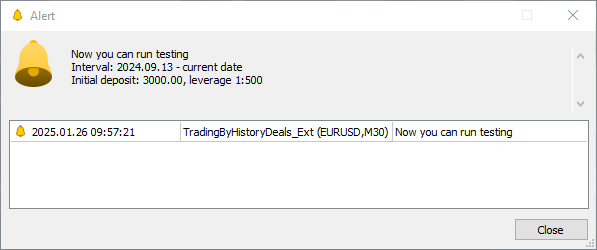
操作ログには、取引に使用された銘柄と、それぞれの銘柄で実行された取引の数が表示されます。
Alert: Now you can run testing
Interval: 2024.09.13 - current date
Initial deposit: 3000.00, leverage 1:500
Symbols used in trading:
  1. AUDUSD trade object. Total deals: 222
  2. EURJPY trade object. Total deals: 120
  3. EURUSD trade object. Total deals: 526
  4. GBPUSD trade object. Total deals: 352
  5. NZDUSD trade object. Total deals: 182
  6. USDCAD trade object. Total deals: 22
  7. USDCHF trade object. Total deals: 250
  8. USDJPY trade object. Total deals: 150
  9. XAUUSD trade object. Total deals: 118
では、アラートに表示され、銘柄にも重複して記録されている推奨テスター設定を使用して、EAをテスターで実行してみましょう。
元の取引
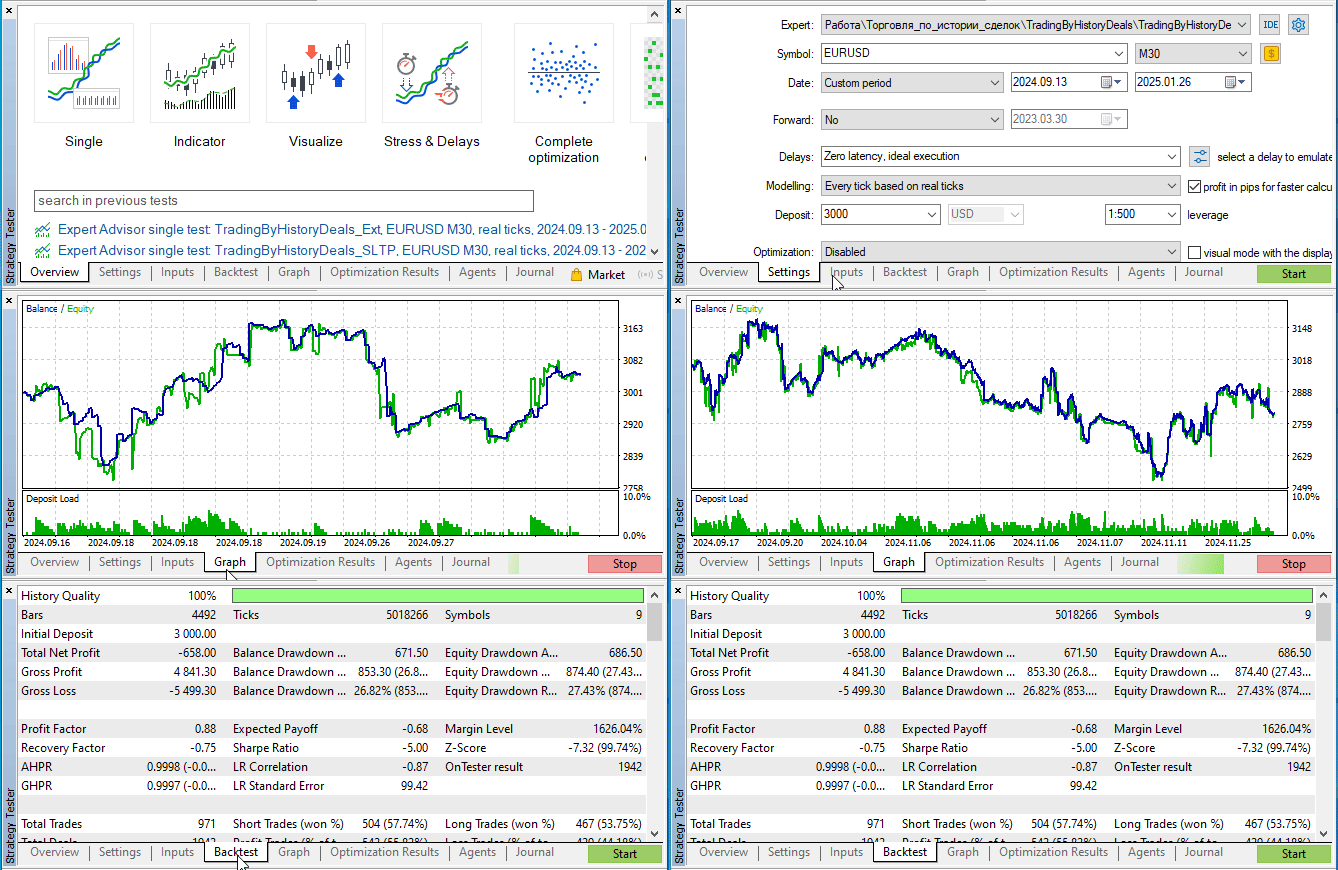
元の取引では、USD 658の損失が発生しました。
次に、さまざまなトレーリングストップを試してみます。初期ストップを100ポイントに設定し、その他のパラメータを変更せずに、
各トレーリング注文をテスターで順番に実行します。これにより、取引の結果がどのように変化するかを確認します。
シンプルトレーリングの場合
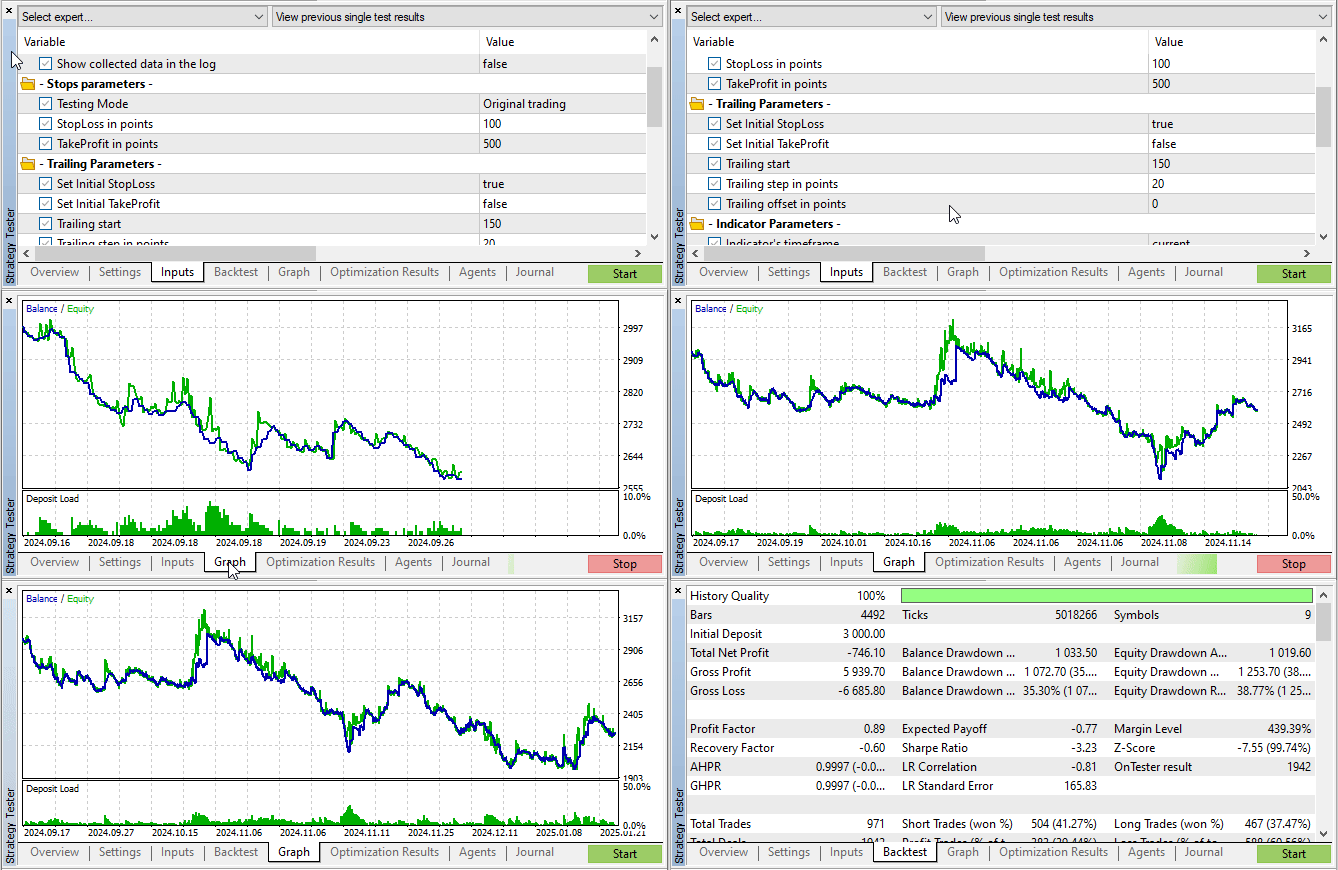
損失はUSD 746.1となり、元の取引よりもさらに悪化しました。
インジケーターを使用したトレーリングを確認します。
パラボリックSARによるトレーリング
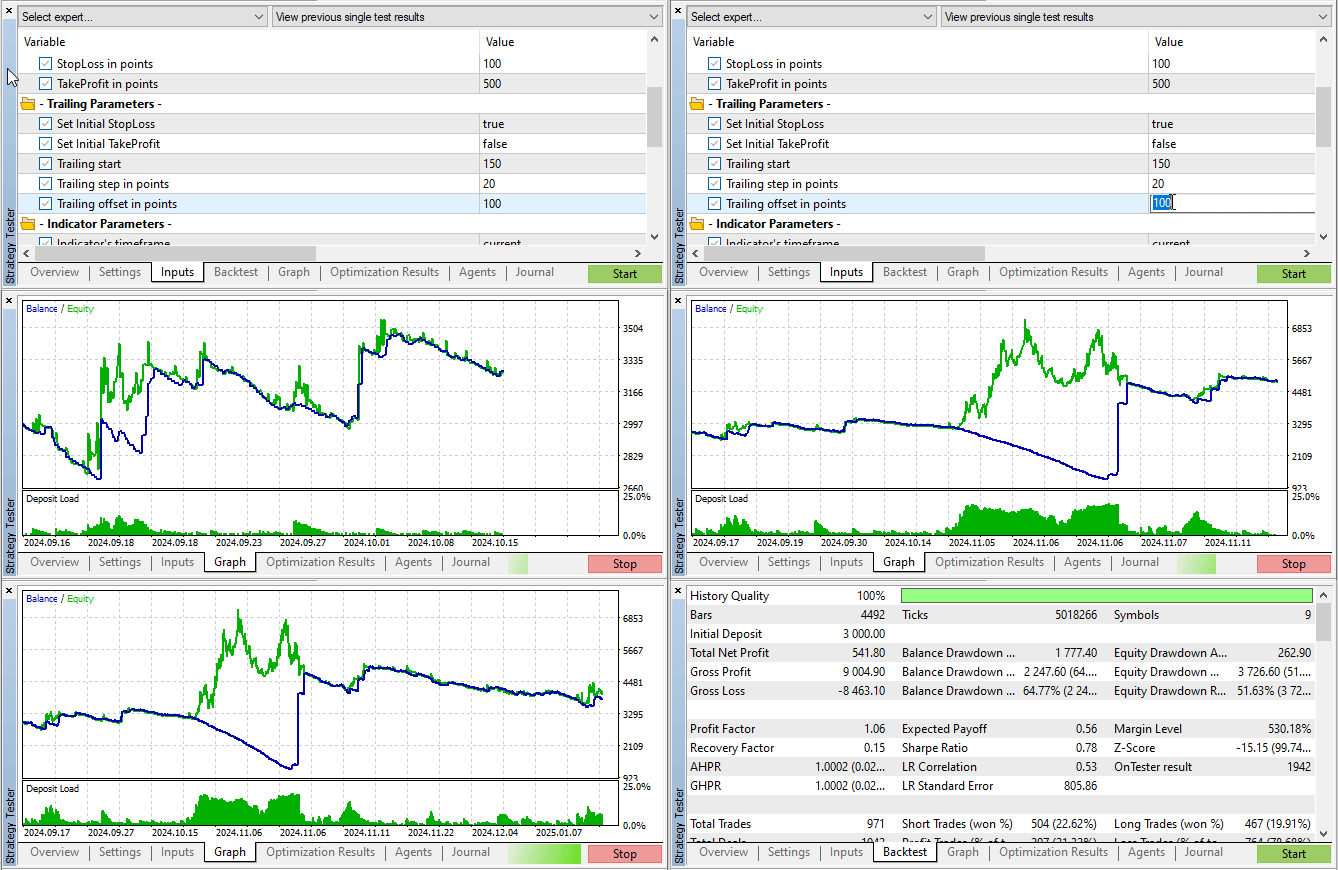
利益はUSD 541.8でした。
異なる種類の移動平均を使用したトレーリングストップを見てみましょう。
AMAによるトレーリング
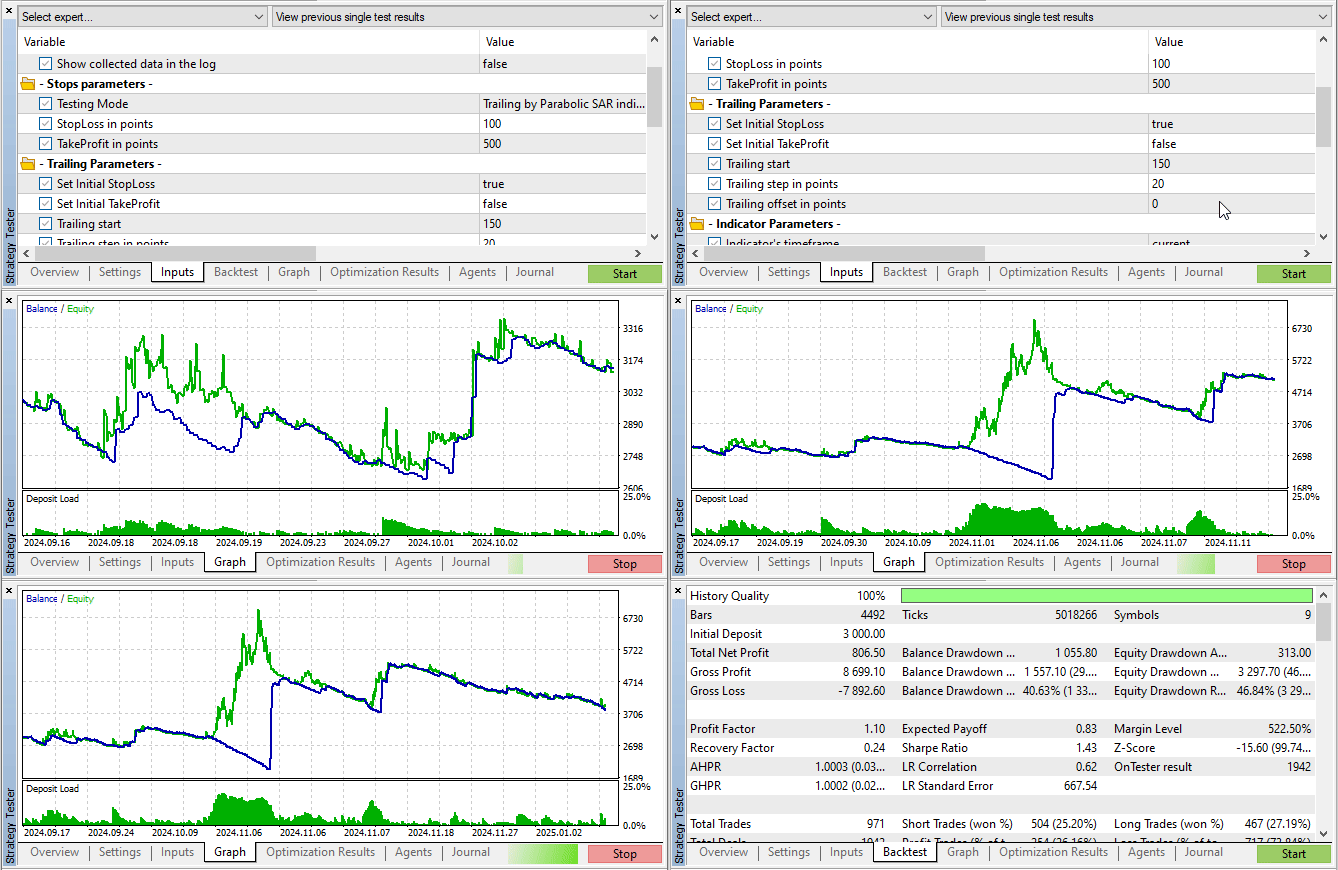
利益はUSD 806.5でした。
DEMAによるトレーリング
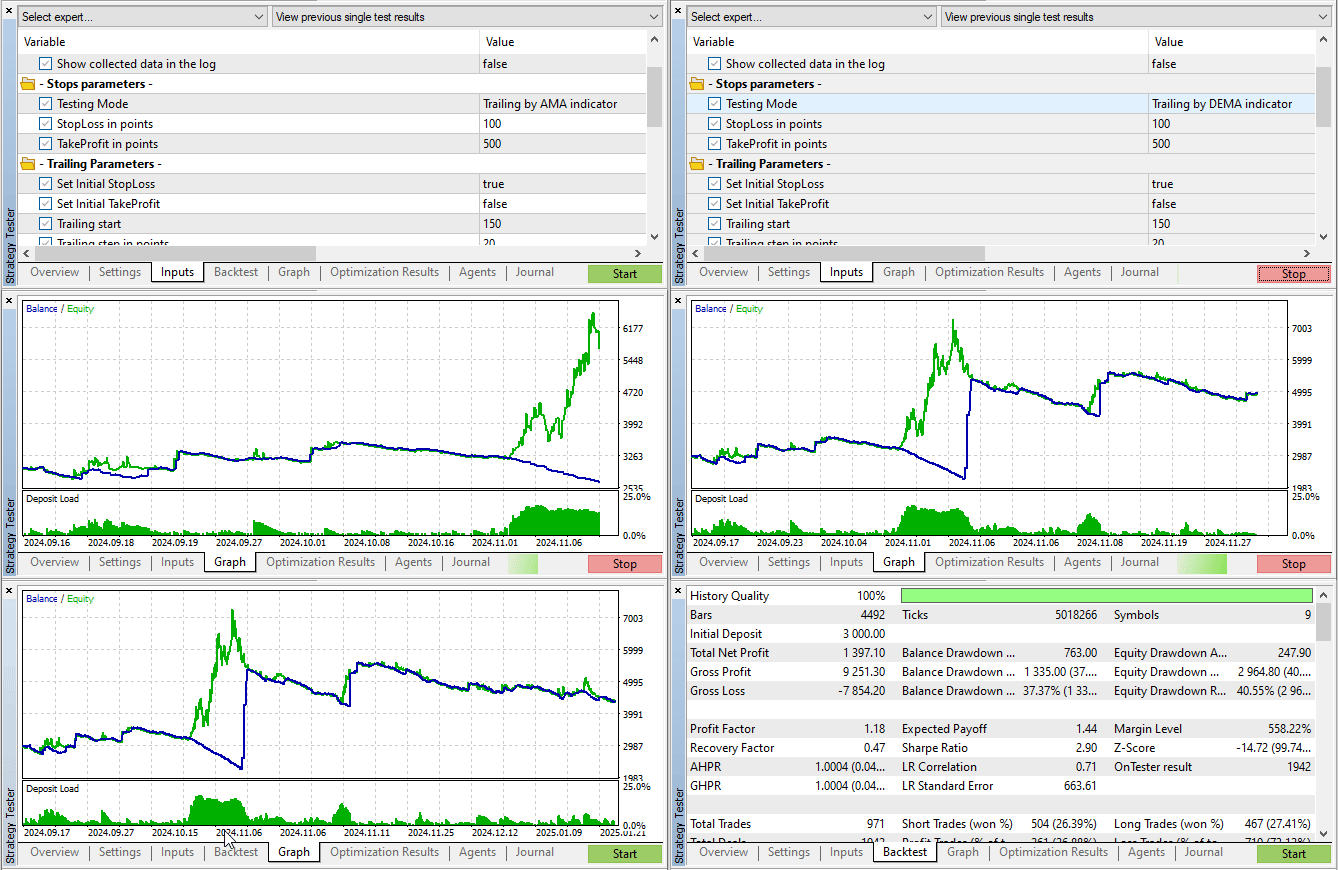
利益はUSD 1397.1でした。
FRAMAによるトレーリング
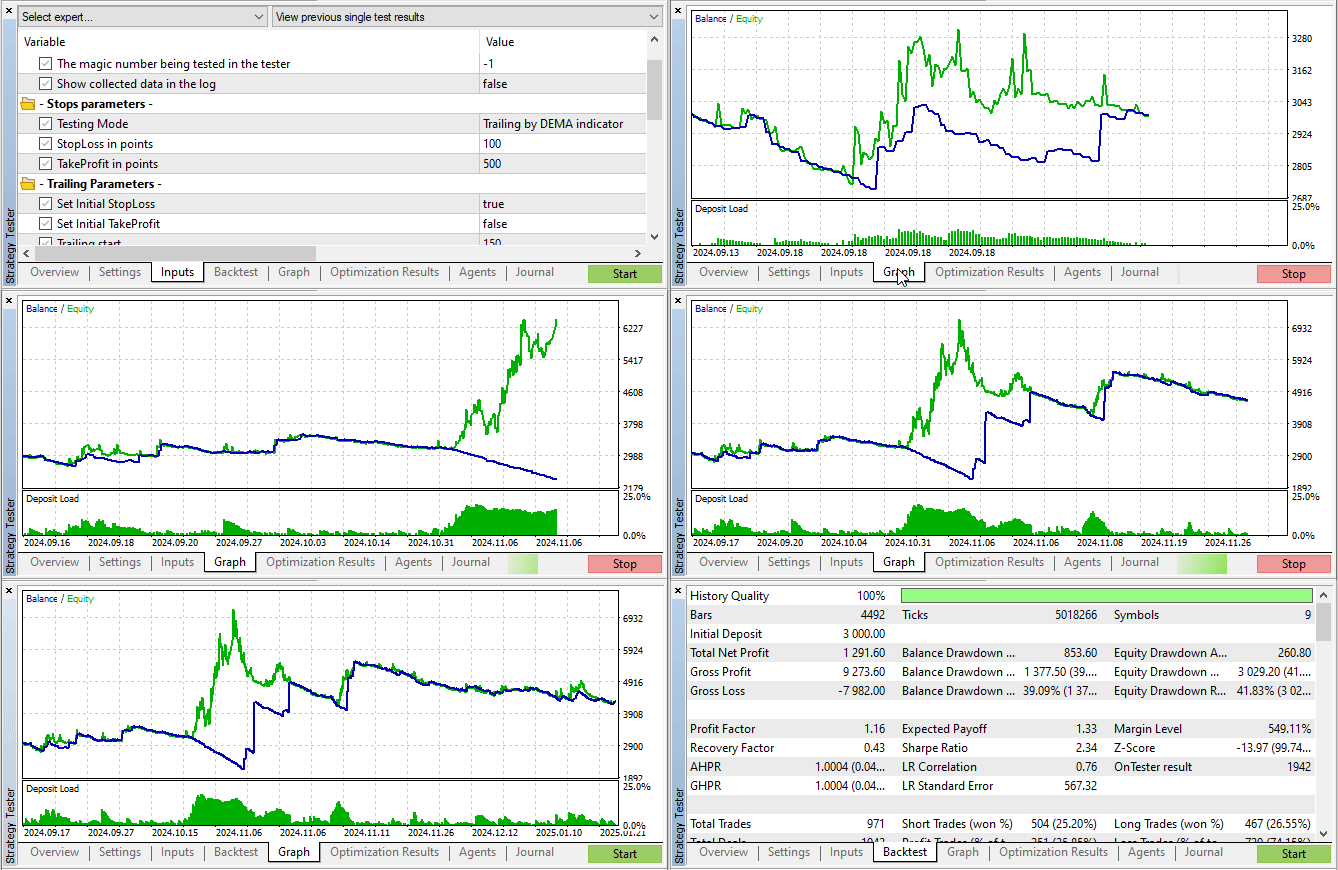
利益はUSD 1291.6でした。
MAによるトレーリング
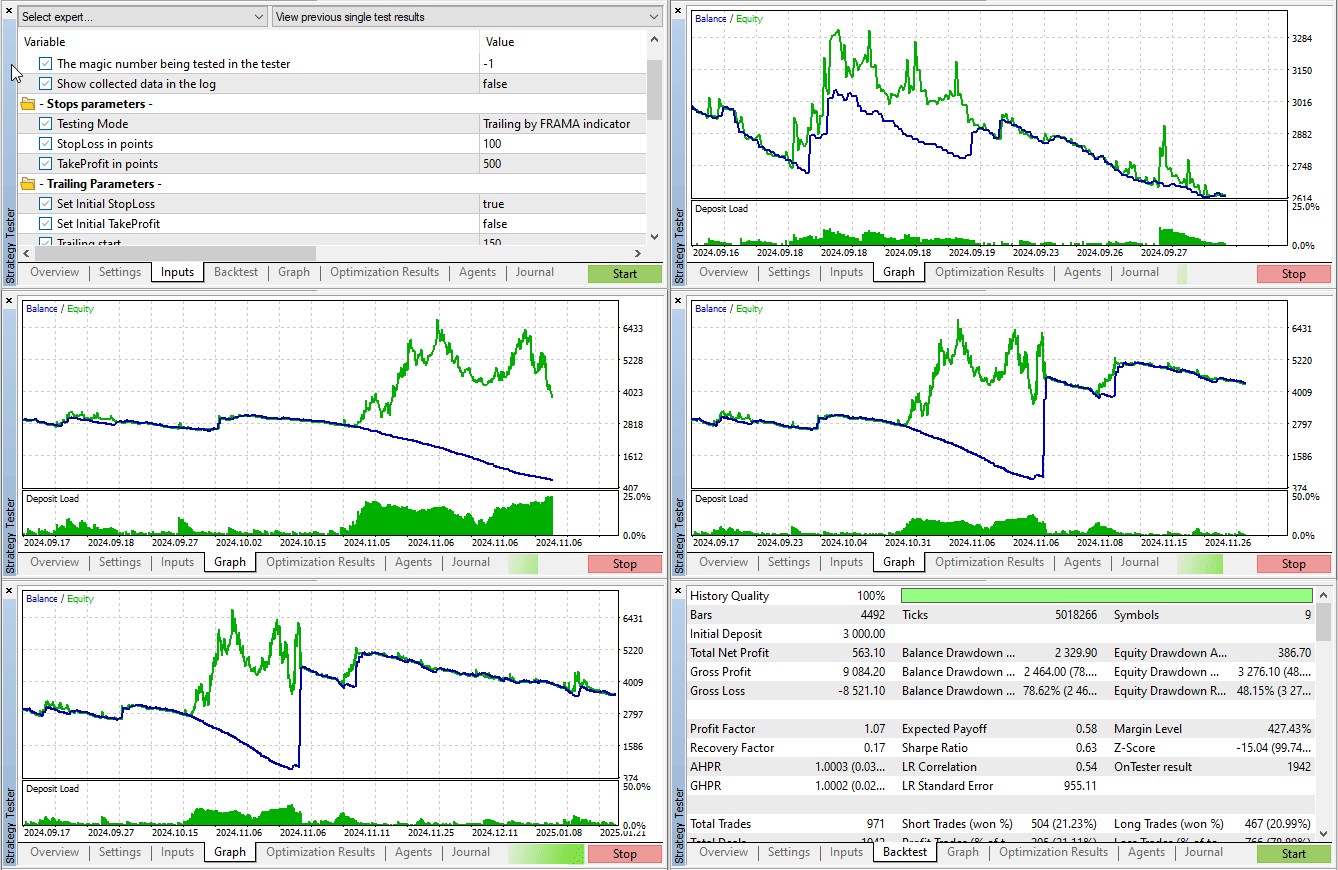
利益はUSD 563.1でした。
TEMAによるトレーリング
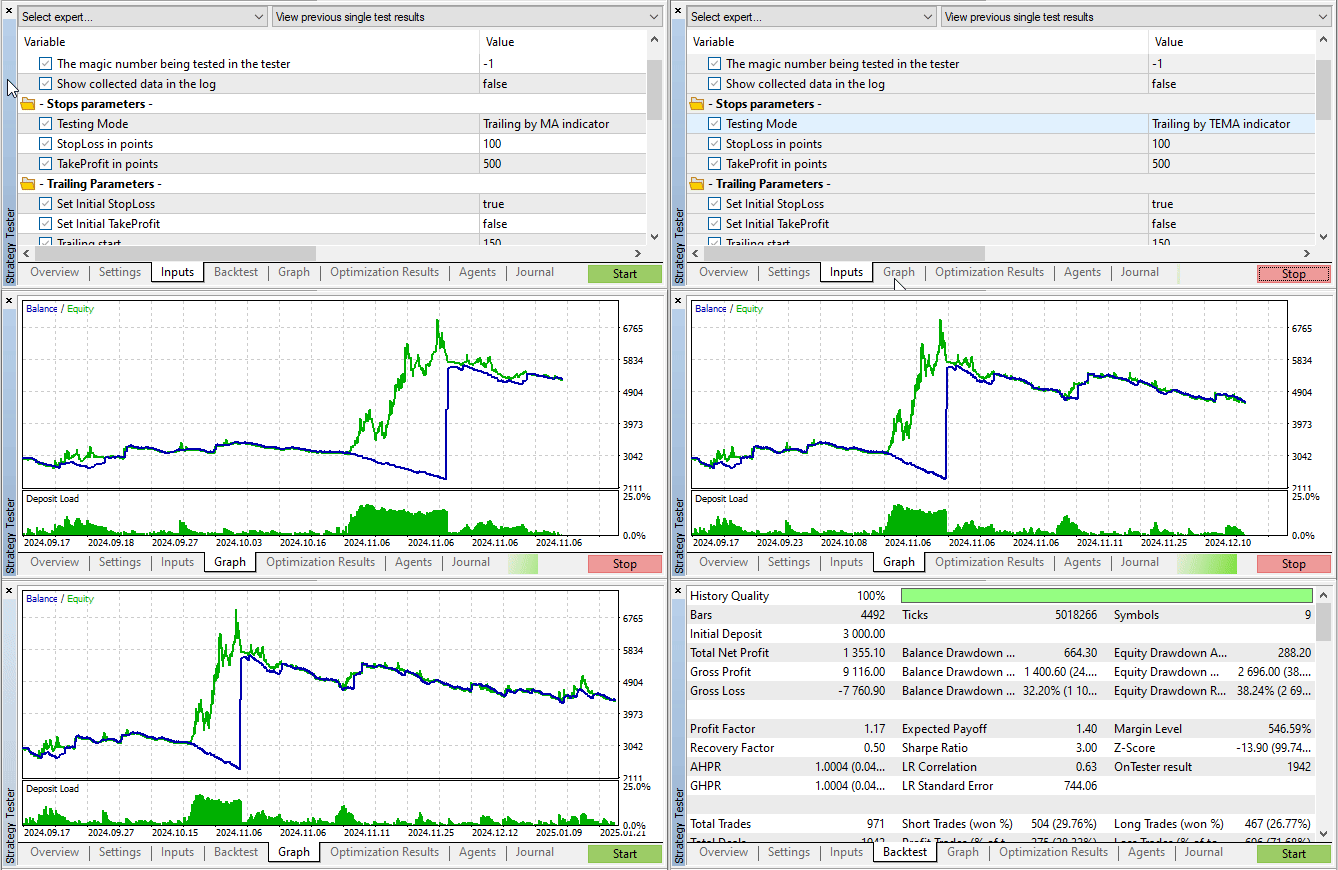
利益はUSD 1355.1でした。
VIDYAによるトレーリング
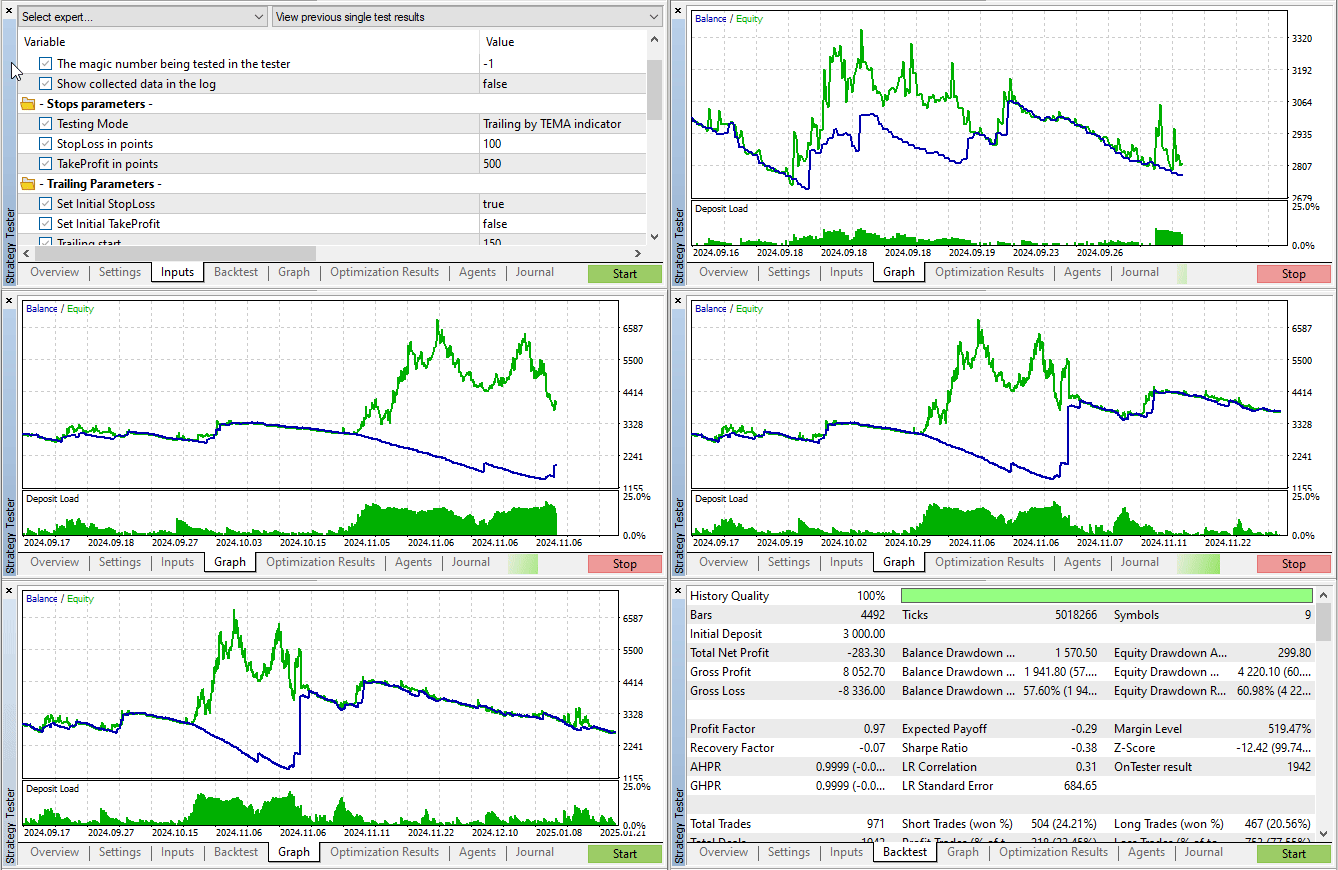
利益はUSD 283.3でした。
最終的な結果を、元の取引との比較表にまとめると、以下のようになります。
| # | トレーリングの種類 | ストップロス幅 | テイクプロフィット幅 | 総利益 |
|---|---|---|---|---|
| 1 | 元の取引 | 100 | 500 | - 658.0 |
| 2 | シンプルトレーリングストップ | 初期100、価格から100ポイントで追随 | 0 | - 746.1 |
| 3 | パラボリックSARによるトレーリングストップ | 初期100、インジケーター値に基づく | 0 | + 541.8 |
| 4 | VIDYAによるトレーリングストップ | 初期100、インジケーター値に基づく | 0 | -283.3 |
| 5 | MAによるトレーリングストップ | 初期100、インジケーター値に基づく | 0 | + 563.1 |
| 6 | АМАによるトレーリングストップ | 初期100、インジケーター値に基づく | 0 | + 806.5 |
| 7 | FRAMAによるトレーリングストップ | 初期100、インジケーター値に基づく | 0 | + 1291.6 |
| 8 | TEMAによるトレーリングストップ | 初期100、インジケーター値に基づく | 0 | + 1355.1 |
| 9 | DEMAによるトレーリングストップ | 初期100、インジケーター値に基づく | 0 | + 1397.1 |
結果として、元の取引が損失で終わった場合、クライアントターミナルの通常のシンプルトレーリングと同等の方法では、損失がさらに拡大することが分かりました。一方で、反転とストップレベルを示すインジケーターとして知られるパラボリックSAR (Stop And Reverse)に基づいたトレーリングでは、インジケーターラインに沿ってストップロスレベルを移動させたことで、USD 540の利益が得られました。
次に、異なるタイプの移動平均の値に基づいてストップを移動させた場合の結果を見てみましょう。VIDYAを使用したトレーリングではUSD 280の損失となりましたが、その他のすべての方法では利益を示しました。特に、単純移動平均(MA)に沿ったトレーリングでは、パラボリックSARよりも大きな利益を得ることができました。最も優れた結果を示したのは、二重指数移動平均(DEMA)によるトレーリングで、最終的な利益はUSD 1397となりました。
結論
ストラテジーテスターで取引を検証し、自分の取引スタイルに最も適したトレーリングストップを選択できるEAを開発しました。なお、トレーリングテストで使用したすべてのインジケーターのパラメータは標準値であり、トレーリングの設定はランダムに選ばれたものです。
最も正しいアプローチは、各通貨ペアごとに個別のテストを実施し、その銘柄の値動きやボラティリティの特性を考慮して適切なトレーリング設定を選択することです。しかし、このEAには各取引銘柄ごとに個別パラメーターを設定する機能は備わっていません。とはいえ、今回の目的は、ストラテジーテスターを使って取引を検証し、分析、改善できる可能性を示すことにあり、その目的は十分に達成されました。つまり、このEAはさらに発展させることで、各銘柄に対して独自のパラメータを設定できるようにすることも可能です。これはそれほど難しいことではありません。
この記事には、すべてのクラスファイルおよびEAが添付されています。また、アーカイブファイルも含まれており、解凍するとすぐに必要なターミナルフォルダ内でテスト用のファイルを使用できます。
以下は本稿で使用されているプログラムです。
| # | 名前 | 種類 | 詳細 |
|---|---|---|---|
| 1 | Trailings.mqh | クラスライブラリ | トレーリングクラスライブラリ |
| 2 | SymbolTrade.mqh | クラスライブラリ | 取引構造および銘柄取引クラス |
| 3 | SymbolTradeExt.mqh | クラスライブラリ | 銘柄およびトレーリング取引クラス |
| 4 | TradingByHistoryDeals_Ext.mq5 | EA | ストラテジーテスターおよび実際の取引における取引のストップロス、テイクプロフィット、トレーリングストップを表示・変更するEA |
| 5 | MQL5.zip | ZIPアーカイブ | 上記のファイルのアーカイブは、クライアントターミナルのMQL5ディレクトリに解凍できます。 |
MetaQuotes Ltdによってロシア語から翻訳されました。
元の記事: https://www.mql5.com/ru/articles/16991
警告: これらの資料についてのすべての権利はMetaQuotes Ltd.が保有しています。これらの資料の全部または一部の複製や再プリントは禁じられています。
この記事はサイトのユーザーによって執筆されたものであり、著者の個人的な見解を反映しています。MetaQuotes Ltdは、提示された情報の正確性や、記載されているソリューション、戦略、または推奨事項の使用によって生じたいかなる結果についても責任を負いません。

 強化学習と弱者淘汰を組み合わせた進化型取引アルゴリズム(ETARE)
 初級から中級まで:テンプレートとtypename(IV)
 時間進化移動アルゴリズム(TETA)
 Pythonの価格変動離散化手法

- 無料取引アプリ
- 8千を超えるシグナルをコピー
- 金融ニュースで金融マーケットを探索
Трал по VIDYA:
利益 - 283.3ドルエラー:損失-283.3ドル。
エラー:損失-283.3ドル。
記事中、利益のマイナス値が書かれている。
しかし、マイナスの後のスペースが誤って挿入された。