

Implementación de un modelo de tabla en MQL5: Aplicación del concepto MVC (Modelo-Vista-Controlador)
 323
323
 9
9

Contenido
- Introducción
- Un poco sobre el concepto MVC (Modelo-Vista-Controlador)
- Clases de escritura para crear un modelo de tabla
- Lista enlazada (CList) como base para almacenar datos tabulares
- Clase de celda de tabla
- Clase de fila de tabla
- Clase de modelo de tabla
- Probando el resultado
- Conclusión
Introducción
En programación, la arquitectura de las aplicaciones desempeña un papel fundamental a la hora de garantizar la fiabilidad, la escalabilidad y la facilidad de soporte. Uno de los enfoques que ayuda a alcanzar dichos objetivos es aprovechar el patrón de arquitectura denominado MVC (Modelo-Vista-Controlador).
El concepto MVC permite dividir una aplicación en tres componentes interrelacionados: modelo (gestión de datos y lógica), vista (visualización de datos) y controlador (procesamiento de las acciones del usuario). Esta separación simplifica el desarrollo, las pruebas y el mantenimiento del código, haciéndolo más estructurado y flexible.
En este artículo, analizamos cómo aplicar los principios MVC para implementar un modelo de tabla en el lenguaje MQL5. Las tablas son una herramienta importante para almacenar, procesar y mostrar datos, y organizarlas adecuadamente puede facilitar mucho el trabajo con la información. Crearemos clases para trabajar con tablas: celdas de tabla, filas y modelo de tabla. Para almacenar celdas dentro de filas y filas dentro del modelo de tabla, utilizaremos las clases de lista enlazada (CList) de la biblioteca estándar MQL5, que permiten un almacenamiento y uso eficientes de los datos.
Un poco sobre el concepto MVC: ¿qué es y por qué lo queremos?
Imagina la aplicación como una producción teatral. Hay un escenario que describe lo que debería suceder (este es el modelo). Está el escenario: lo que ve el espectador (esto es la vista). Y, por último, está el director que gestiona todo el proceso y conecta otros elementos (este es el controlador). Así es como funciona el patrón arquitectónico MVC (Modelo-Vista-Controlador).
Este concepto ayuda a separar las responsabilidades dentro de la aplicación. El modelo es responsable de los datos y la lógica, la vista es responsable de la visualización y la apariencia, y el controlador es responsable de procesar las acciones del usuario. Esta separación hace que el código sea más claro, más flexible y más conveniente para el trabajo en equipo.
Supongamos que estás creando una tabla. El modelo sabe qué filas y celdas contiene y sabe cómo cambiarlas. La vista dibuja una tabla en la pantalla. Y el controlador reacciona cuando el usuario hace clic en «Añadir fila» y pasa la tarea al modelo, y luego le indica a la vista que se actualice.
MVC resulta especialmente útil cuando la aplicación se vuelve más compleja: se añaden nuevas funciones, la interfaz cambia y hay varios desarrolladores trabajando en ella. Con una arquitectura clara, es más fácil realizar cambios, probar los componentes individualmente y reutilizar el código.
Este enfoque también tiene algunas desventajas. Para proyectos muy sencillos, MVC puede resultar redundante, ya que habrá que separar incluso lo que podría caber en un par de funciones. Sin embargo, para aplicaciones escalables y serias, esta estructura se amortiza rápidamente.
En resumen:
MVC es una potente plantilla arquitectónica que ayuda a organizar el código, haciéndolo más comprensible, fácil de probar y escalable. Es especialmente útil para aplicaciones complejas en las que es importante separar la lógica de los datos, la interfaz de usuario y la gestión. Para proyectos pequeños, su uso es redundante.
El paradigma Modelo-Vista-Controlador se adapta muy bien a nuestra tarea. La tabla se creará a partir de objetos independientes:
- Celda de la tabla
Un objeto que almacena un valor de uno de los tipos (real, entero (int) o de cadena (string)) está equipado con herramientas para gestionar el valor, establecerlo y recuperarlo. - Fila de la tabla
Objeto que almacena una lista de objetos en celdas de tabla y está equipado con herramientas para gestionar celdas, su ubicación, añadir y eliminar. - Modelo de la tabla
Objeto que almacena una lista de objetos de cadena de tabla que está equipado con herramientas para gestionar cadenas (string) y columnas de tabla, su ubicación, añadir y eliminar, y también tiene acceso a controles de cadena y celdas.
La siguiente figura muestra esquemáticamente la estructura de un modelo de tabla 4x4:
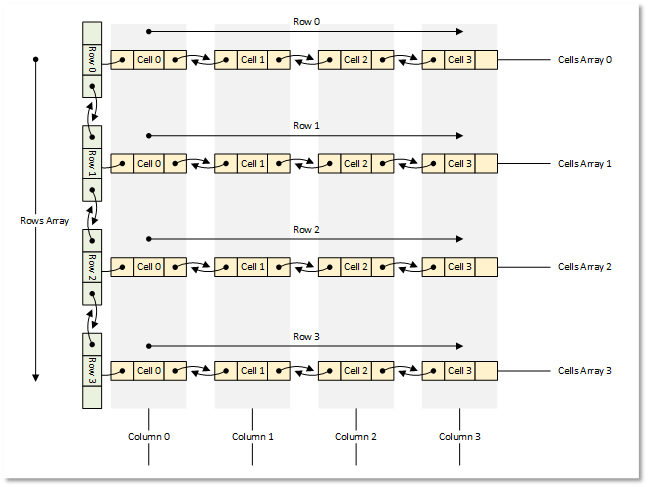
Figura 1: Modelo de tabla 4x4.
Ahora pasemos de la teoría a la práctica.
Clases de escritura para crear un modelo de tabla
Utilizaremos la Biblioteca estándar MQL5 para crear todos los objetos.
Cada objeto será heredero de la clase base de la biblioteca. Esto le permitirá almacenar estos objetos en la listas de objetos.
Escribiremos todas las clases en un único archivo de prueba para que todo esté en un solo archivo, visible y rápidamente accesible. En el futuro, distribuiremos las clases escritas en sus archivos de inclusión separados.
1. Lista enlazada (CList) como base para almacenar datos tabulares
La lista enlazada CList es muy adecuada para almacenar datos tabulares. A diferencia de la lista similar CArrayObj, implementa métodos de acceso a objetos de lista vecinos situados a la izquierda y a la derecha del actual. Esto facilitará mover celdas en una fila, o mover filas en una tabla, añadirlas y eliminarlas. Al mismo tiempo, la propia lista se encargará de indexar correctamente los objetos movidos, añadidos o eliminados de la lista.
Pero hay un matiz aquí. Si consulta los métodos para cargar y guardar una lista en un archivo, verá que al cargarla desde un archivo, la clase de lista debe crear un nuevo objeto en el método virtual CreateElement().
Este método en esta clase simplemente devuelve NULL:
   //--- method of creating an element of the list
   virtual CObject  *CreateElement(void) { return(NULL); }
Esto significa que para trabajar con listas enlazadas, y siempre que necesitemos operaciones con archivos, debemos heredar de la clase CList e implementar este método en nuestra clase.
Si observamos los métodos para guardar objetos de la biblioteca estándar en un archivo, podemos ver el siguiente algoritmo para guardar las propiedades de los objetos:
- El marcador de inicio de datos (-1) se escribe en el archivo.
- El tipo de objeto se escribe en el archivo.
- Todas las propiedades del objeto se escriben en el archivo una por una.
El primer y segundo punto son inherentes a todos los métodos de guardado/carga implementados que poseen los objetos de la biblioteca estándar. Por consiguiente, siguiendo la misma lógica, queremos conocer el tipo del objeto guardado en la lista, de modo que al leer desde un archivo, podamos crear un objeto con este tipo en el método virtual CreateElement() de la clase lista heredada de CList.
Además, todos los objetos que se pueden cargar en la lista deben tener sus clases declaradas o creadas antes de implementar la clase de la lista. En este caso, la lista «sabrá» qué objetos están «en cuestión» y cuáles deben crearse.
En el directorio terminal \MQL5\Scripts\, cree una nueva carpeta TableModel\, y en ella, un nuevo archivo de script de prueba TableModelTest.mq5.
Conecta el archivo de lista enlazada y declara las clases del modelo de tabla futura:
//+------------------------------------------------------------------+
//|                                               TableModelTest.mq5 |
//|                                  Copyright 2025, MetaQuotes Ltd. |
//|                                             https://www.mql5.com |
//+------------------------------------------------------------------+
#property copyright "Copyright 2025, MetaQuotes Ltd."
#property link      "https://www.mql5.com"
#property version   "1.00"

//+------------------------------------------------------------------+
//| Include libraries                                                |
//+------------------------------------------------------------------+
#include <Arrays\List.mqh>

//--- Forward declaration of classes
class CTableCell;                   // Table cell class
class CTableRow;                    // Table row class
class CTableModel;                  // Table model class
La declaración anticipada de clases futuras es necesaria aquí para que la clase de lista enlazada que hereda de CList conozca estos tipos de clases, así como los tipos de objetos que tendrá que crear. Para ello, escribiremos enumeración de tipos de objetos, macros auxiliares y enumeración de formas de ordenar listas:
//+------------------------------------------------------------------+
//| Include libraries                                                |
//+------------------------------------------------------------------+
#include <Arrays\List.mqh>

//--- Forward declaration of classes
class CTableCell;                   // Table cell class
class CTableRow;                    // Table row class
class CTableModel;                  // Table model class

//+------------------------------------------------------------------+
//| Macros                                                           |
//+------------------------------------------------------------------+
#define  MARKER_START_DATA    -1    // Data start marker in a file
#define  MAX_STRING_LENGTH    128   // Maximum length of a string in a cell

//+------------------------------------------------------------------+
//| Enumerations                                                     |
//+------------------------------------------------------------------+
enum ENUM_OBJECT_TYPE               // Enumeration of object types
  {
   OBJECT_TYPE_TABLE_CELL=10000,    // Table cell
   OBJECT_TYPE_TABLE_ROW,           // Table row
   OBJECT_TYPE_TABLE_MODEL,         // Table model
  };

enum ENUM_CELL_COMPARE_MODE         // Table cell comparison modes
  {
   CELL_COMPARE_MODE_COL,           // Comparison by column number
   CELL_COMPARE_MODE_ROW,           // Comparison by string number
   CELL_COMPARE_MODE_ROW_COL,       // Comparison by row and column
  };

//+------------------------------------------------------------------+
//| Functions                                                        |
//+------------------------------------------------------------------+
//--- Return the object type as a string
string TypeDescription(const ENUM_OBJECT_TYPE type)
  {
   string array[];
   int total=StringSplit(EnumToString(type),StringGetCharacter("_",0),array);
   string result="";
   for(int i=2;i<total;i++)
     {
      array[i]+=" ";
      array[i].Lower();
      array[i].SetChar(0,ushort(array[i].GetChar(0)-0x20));
      result+=array[i];
     }
   result.TrimLeft();
   result.TrimRight();
   return result;
  }
//+------------------------------------------------------------------+
//| Classes                                                          |
//+------------------------------------------------------------------+
La función que devuelve la descripción del tipo de objeto se basa en el supuesto de que todos los nombres de las constantes de tipo de objeto comienzan con la subcadena «OBJECT_TYPE_». A continuación, puede tomar la subcadena que sigue a esta, convertir todos los caracteres de la fila resultante a minúsculas, convertir el primer carácter a mayúscula y borrar todos los espacios y caracteres de control de la cadena final a la izquierda y a la derecha.
Escribamos nuestra propia clase de lista enlazada. Continuaremos escribiendo el código en el mismo archivo:
//+------------------------------------------------------------------+
//| Classes                                                          |
//+------------------------------------------------------------------+
//+------------------------------------------------------------------+
//| Linked object list class                                         |
//+------------------------------------------------------------------+
class CListObj : public CList
  {
protected:
   ENUM_OBJECT_TYPE  m_element_type;   // Created object type in CreateElement()
public:
//--- Virtual method (1) for loading a list from a file, (2) for creating a list element
   virtual bool      Load(const int file_handle);
   virtual CObject  *CreateElement(void);
  };
La clase CListObj es nuestra nueva clase de lista enlazada, heredada de la clase CList de la biblioteca estándar.
La única variable de la clase será aquella en la que se escribirá el tipo del objeto que se está creando. Dado que el método CreateElement() es virtual y debe tener exactamente la misma firma que el método de la clase principal, no podemos pasarle el tipo del objeto que se está creando. Pero podemos escribir este tipo en una variable declarada y leer el tipo del objeto que se está creando a partir de ella.
Debemos redefinir dos métodos virtuales de la clase principal: el método de carga desde un archivo y el método de creación de un nuevo objeto. Consideremos algunos de ellos.
Método para cargar la lista desde un archivo:
//+------------------------------------------------------------------+
//| Load a list from the file                                        |
//+------------------------------------------------------------------+
bool CListObj::Load(const int file_handle)
  {
//--- Variables
   CObject *node;
   bool     result=true;
//--- Check the handle
   if(file_handle==INVALID_HANDLE)
      return(false);
//--- Load and check the list start marker - 0xFFFFFFFFFFFFFFFF
   if(::FileReadLong(file_handle)!=MARKER_START_DATA)
      return(false);
//--- Load and check the list type
   if(::FileReadInteger(file_handle,INT_VALUE)!=Type())
      return(false);
//--- Read the list size (number of objects)
   uint num=::FileReadInteger(file_handle,INT_VALUE);

//--- Sequentially recreate the list elements by calling the Load() method of node objects
   this.Clear();
   for(uint i=0; i<num; i++)
     {
      //--- Read and check the object data start marker - 0xFFFFFFFFFFFFFFFF
      if(::FileReadLong(file_handle)!=MARKER_START_DATA)
         return false;
      //--- Read the object type
      this.m_element_type=(ENUM_OBJECT_TYPE)::FileReadInteger(file_handle,INT_VALUE);
      node=this.CreateElement();
      if(node==NULL)
         return false;
      this.Add(node);
      //--- Now the file pointer is offset relative to the beginning of the object marker by 12 bytes (8 - marker, 4 - type)
      //--- Set the pointer to the beginning of the object data and load the object properties from the file using the Load() method of the node element.
      if(!::FileSeek(file_handle,-12,SEEK_CUR))
         return false;
      result &=node.Load(file_handle);
     }
//--- Result
   return result;
  }
Aquí, primero se controla el comienzo de la lista, su tipo y tamaño, es decir, el número de elementos en la lista; y luego, en un bucle por el número de elementos, se leen desde el archivo los marcadores de comienzo de datos de cada objeto y su tipo. El tipo resultante se escribe en la variable m_element_type y se invoca un método para crear un nuevo elemento. En este método, se crea un nuevo elemento con el tipo recibido y se escribe en la variable puntero node, que, a su vez, se añade a la lista. Toda la lógica del método se explica detalladamente en los comentarios. Consideremos un método para crear un nuevo elemento de la lista.
Método para crear un elemento de lista:
//+------------------------------------------------------------------+
//| List element creation method                                     |
//+------------------------------------------------------------------+
CObject *CListObj::CreateElement(void)
  {
//--- Create a new object depending on the object type in m_element_type
   switch(this.m_element_type)
     {
      case OBJECT_TYPE_TABLE_CELL   :  return new CTableCell();
      case OBJECT_TYPE_TABLE_ROW    :  return new CTableRow();
      case OBJECT_TYPE_TABLE_MODEL  :  return new CTableModel();
      default                       :  return NULL;
     }
  }
Esto significa que antes de llamar al método, el tipo del objeto que se está creando ya está escrito en la variable m_element_type. Dependiendo del tipo de elemento, se crea un nuevo objeto del tipo adecuado y se devuelve un puntero al mismo. En el futuro, cuando se desarrollen nuevos controles, sus tipos se escribirán en la enumeración ENUM_OBJECT_TYPE. Y aquí se añadirán nuevos casos para crear nuevos tipos de objetos. La clase de lista enlazada basada en la CList estándar está lista. Ahora puede almacenar todos los objetos de tipos conocidos, guardar listas en un archivo, cargarlas desde el archivo y restaurarlas correctamente.
2. Clase de celda de tabla
Una celda de tabla es el elemento más simple de una tabla que almacena un valor determinado. Las celdas componen listas que representan filas de la tabla. Cada lista representa una fila de la tabla. En nuestra tabla, las celdas solo podrán almacenar un valor de varios tipos a la vez: un valor real, entero o de cadena.
Además de un valor simple, a una celda se le puede asignar un objeto de un tipo conocido de la enumeración ENUM_OBJECT_TYPE. En este caso, la celda puede almacenar un valor de cualquiera de los tipos enumerados, más un puntero a un objeto, cuyo tipo se escribe en una variable especial. De este modo, en el futuro, se podrá ordenar al componente Vista que muestre dicho objeto en una celda para poder interactuar con él mediante el componente Controlador.
Dado que se pueden almacenar varios tipos diferentes de valores en una celda, utilizaremos la unión para escribirlos, almacenarlos y devolverlos. Union es un tipo especial de datos que almacena varios campos en la misma área de memoria. Union es similar a una estructura, pero aquí, a diferencia de una estructura, los diferentes términos de la unión pertenecen a la misma área de memoria. Dentro de la estructura, a cada campo se le asigna su propia área de memoria.
Continuemos escribiendo el código en el archivo ya creado. Comencemos a escribir una nueva clase. En la sección protegida, escribimos un union y declaramos las variables:
//+------------------------------------------------------------------+
//| Table cell class                                                 |
//+------------------------------------------------------------------+
class CTableCell : public CObject
  {
protected:
//--- Combining for storing cell values (double, long, string)
   union DataType
     {
      protected:
      double         double_value;
      long           long_value;
      ushort         ushort_value[MAX_STRING_LENGTH];

      public:
      //--- Set values
      void           SetValueD(const double value) { this.double_value=value;                   }
      void           SetValueL(const long value)   { this.long_value=value;                     }
      void           SetValueS(const string value) { ::StringToShortArray(value,ushort_value);  }

      //--- Return values
      double         ValueD(void) const { return this.double_value; }
      long           ValueL(void) const { return this.long_value; }
      string         ValueS(void) const
                       {
                        string res=::ShortArrayToString(this.ushort_value);
                        res.TrimLeft();
                        res.TrimRight();
                        return res;
                       }
     };
//--- Variables
   DataType          m_datatype_value;                      // Value
   ENUM_DATATYPE     m_datatype;                            // Data type
   CObject          *m_object;                              // Cell object
   ENUM_OBJECT_TYPE  m_object_type;                         // Object type in the cell
   int               m_row;                                 // Row index
   int               m_col;                                 // Column index
   int               m_digits;                              // Data representation accuracy
   uint              m_time_flags;                          // Date/time display flags
   bool              m_color_flag;                          // Color name display flag
   bool              m_editable;                            // Editable cell flag

public:
En la sección pública, escriba métodos de acceso a variables protegidas, métodos virtuales y constructores de clases para varios tipos de datos almacenados en una celda:
public:
//--- Return cell coordinates and properties
   uint              Row(void)                           const { return this.m_row;                            }
   uint              Col(void)                           const { return this.m_col;                            }
   ENUM_DATATYPE     Datatype(void)                      const { return this.m_datatype;                       }
   int               Digits(void)                        const { return this.m_digits;                         }
   uint              DatetimeFlags(void)                 const { return this.m_time_flags;                     }
   bool              ColorNameFlag(void)                 const { return this.m_color_flag;                     }
   bool              IsEditable(void)                    const { return this.m_editable;                       }
//--- Return (1) double, (2) long and (3) string value
   double            ValueD(void)                        const { return this.m_datatype_value.ValueD();        }
   long              ValueL(void)                        const { return this.m_datatype_value.ValueL();        }
   string            ValueS(void)                        const { return this.m_datatype_value.ValueS();        }
//--- Return the value as a formatted string
   string            Value(void) const
                       {
                        switch(this.m_datatype)
                          {
                           case TYPE_DOUBLE  :  return(::DoubleToString(this.ValueD(),this.Digits()));
                           case TYPE_LONG    :  return(::IntegerToString(this.ValueL()));
                           case TYPE_DATETIME:  return(::TimeToString(this.ValueL(),this.m_time_flags));
                           case TYPE_COLOR   :  return(::ColorToString((color)this.ValueL(),this.m_color_flag));
                           default           :  return this.ValueS();
                          }
                       }
   string            DatatypeDescription(void) const
                       {
                        string type=::StringSubstr(::EnumToString(this.m_datatype),5);
                        type.Lower();
                        return type;
                       }
//--- Set variable values
   void              SetRow(const uint row)                    { this.m_row=(int)row;                          }
   void              SetCol(const uint col)                    { this.m_col=(int)col;                          }
   void              SetDatatype(const ENUM_DATATYPE datatype) { this.m_datatype=datatype;                     }
   void              SetDigits(const int digits)               { this.m_digits=digits;                         }
   void              SetDatetimeFlags(const uint flags)        { this.m_time_flags=flags;                      }
   void              SetColorNameFlag(const bool flag)         { this.m_color_flag=flag;                       }
   void              SetEditable(const bool flag)              { this.m_editable=flag;                         }
   void              SetPositionInTable(const uint row,const uint col)
                       {
                        this.SetRow(row);
                        this.SetCol(col);
                       }
//--- Assign an object to a cell
   void              AssignObject(CObject *object)
                       {
                        if(object==NULL)
                          {
                           ::PrintFormat("%s: Error. Empty object passed",__FUNCTION__);
                           return;
                          }
                        this.m_object=object;
                        this.m_object_type=(ENUM_OBJECT_TYPE)object.Type();
                       }
//--- Remove the object assignment
   void              UnassignObject(void)
                       {
                        this.m_object=NULL;
                        this.m_object_type=-1;
                       }

//--- Set double value
   void              SetValue(const double value)
                       {
                        this.m_datatype=TYPE_DOUBLE;
                        if(this.m_editable)
                           this.m_datatype_value.SetValueD(value);
                       }
//--- Set long value
   void              SetValue(const long value)
                       {
                        this.m_datatype=TYPE_LONG;
                        if(this.m_editable)
                           this.m_datatype_value.SetValueL(value);
                       }
//--- Set datetime value
   void              SetValue(const datetime value)
                       {
                        this.m_datatype=TYPE_DATETIME;
                        if(this.m_editable)
                           this.m_datatype_value.SetValueL(value);
                       }
//--- Set color value
   void              SetValue(const color value)
                       {
                        this.m_datatype=TYPE_COLOR;
                        if(this.m_editable)
                           this.m_datatype_value.SetValueL(value);
                       }
//--- Set string value
   void              SetValue(const string value)
                       {
                        this.m_datatype=TYPE_STRING;
                        if(this.m_editable)
                           this.m_datatype_value.SetValueS(value);
                       }
//--- Clear data
   void              ClearData(void)
                       {
                        if(this.Datatype()==TYPE_STRING)
                           this.SetValue("");
                        else
                           this.SetValue(0.0);
                       }
//--- (1) Return and (2) display the object description in the journal
   string            Description(void);
   void              Print(void);

//--- Virtual methods of (1) comparing, (2) saving to file, (3) loading from file, (4) object type
   virtual int       Compare(const CObject *node,const int mode=0) const;
   virtual bool      Save(const int file_handle);
   virtual bool      Load(const int file_handle);
   virtual int       Type(void)                          const { return(OBJECT_TYPE_TABLE_CELL);}


//--- Constructors/destructor
                     CTableCell(void) : m_row(0), m_col(0), m_datatype(-1), m_digits(0), m_time_flags(0), m_color_flag(false), m_editable(true), m_object(NULL), m_object_type(-1)
                       {
                        this.m_datatype_value.SetValueD(0);
                       }
                     //--- Accept a double value
                     CTableCell(const uint row,const uint col,const double value,const int digits) :
                        m_row((int)row), m_col((int)col), m_datatype(TYPE_DOUBLE), m_digits(digits), m_time_flags(0), m_color_flag(false), m_editable(true), m_object(NULL), m_object_type(-1)
                       {
                        this.m_datatype_value.SetValueD(value);
                       }
                     //--- Accept a long value
                     CTableCell(const uint row,const uint col,const long value) :
                        m_row((int)row), m_col((int)col), m_datatype(TYPE_LONG), m_digits(0), m_time_flags(0), m_color_flag(false), m_editable(true), m_object(NULL), m_object_type(-1)
                       {
                        this.m_datatype_value.SetValueL(value);
                       }
                     //--- Accept a datetime value
                     CTableCell(const uint row,const uint col,const datetime value,const uint time_flags) :
                        m_row((int)row), m_col((int)col), m_datatype(TYPE_DATETIME), m_digits(0), m_time_flags(time_flags), m_color_flag(false), m_editable(true), m_object(NULL), m_object_type(-1)
                       {
                        this.m_datatype_value.SetValueL(value);
                       }
                     //--- Accept color value
                     CTableCell(const uint row,const uint col,const color value,const bool color_names_flag) :
                        m_row((int)row), m_col((int)col), m_datatype(TYPE_COLOR), m_digits(0), m_time_flags(0), m_color_flag(color_names_flag), m_editable(true), m_object(NULL), m_object_type(-1)
                       {
                        this.m_datatype_value.SetValueL(value);
                       }
                     //--- Accept string value
                     CTableCell(const uint row,const uint col,const string value) :
                        m_row((int)row), m_col((int)col), m_datatype(TYPE_STRING), m_digits(0), m_time_flags(0), m_color_flag(false), m_editable(true), m_object(NULL), m_object_type(-1)
                       {
                        this.m_datatype_value.SetValueS(value);
                       }
                    ~CTableCell(void) {}
  };
En los métodos para establecer valores, se hace de manera que primero se establezca el tipo de valor almacenado en la celda y, a continuación, se compruebe el indicador de la función para editar valores en la celda. Y solo cuando se establece el indicador, el nuevo valor se guarda en la celda:
//--- Set double value
   void              SetValue(const double value)
                       {
                        this.m_datatype=TYPE_DOUBLE;
                        if(this.m_editable)
                           this.m_datatype_value.SetValueD(value);
                       }
¿Por qué se hace así? Al crear una nueva celda, esta se crea con el tipo real del valor almacenado. Si desea cambiar el tipo de valor, pero al mismo tiempo la celda no es editable, puede llamar al método para establecer el valor del tipo deseado con cualquier valor. Se cambiará el tipo del valor almacenado, pero el valor en la celda en sí no se verá afectado.
El método de limpieza de datos establece los valores numéricos en cero e ingresa un espacio en los valores de cadena:
//--- Clear data
   void              ClearData(void)
                       {
                        if(this.Datatype()==TYPE_STRING)
                           this.SetValue("");
                        else
                           this.SetValue(0.0);
                       }
Más adelante, lo haremos de otra manera, de modo que no se muestren datos en las celdas borradas, para mantener la celda vacía, crearemos un valor «vacío» para la celda y, luego, cuando se borre la celda, se borrarán todos los valores registrados y mostrados en ella. Después de todo, el cero también es un valor completo, y ahora, cuando se borra la celda, los datos digitales se rellenan con ceros. Esto es incorrecto.
En los constructores paramétricos de la clase, se pasan las coordenadas de las celdas de la tabla: el número de fila y columna y el valor del tipo requerido (double, long, datetime, color, string). Algunos tipos de valores requieren información adicional:
- double: Precisión del valor de salida (número de decimales).
- datetime: Indicadores de tiempo (fecha/horas/minutos/segundos).
- color: Indicador para mostrar los nombres de los colores estándar conocidos.
En los constructores con este tipo de valores almacenados en celdas, se pasan parámetros adicionales para establecer el formato de los valores que se muestran en las celdas:
 //--- Accept a double value
 CTableCell(const uint row,const uint col,const double value,const int digits) :
    m_row((int)row), m_col((int)col), m_datatype(TYPE_DOUBLE), m_digits(digits), m_time_flags(0), m_color_flag(false), m_editable(true), m_object(NULL), m_object_type(-1)
   {
    this.m_datatype_value.SetValueD(value);
   }
 //--- Accept a long value
 CTableCell(const uint row,const uint col,const long value) :
    m_row((int)row), m_col((int)col), m_datatype(TYPE_LONG), m_digits(0), m_time_flags(0), m_color_flag(false), m_editable(true), m_object(NULL), m_object_type(-1)
   {
    this.m_datatype_value.SetValueL(value);
   }
 //--- Accept a datetime value
 CTableCell(const uint row,const uint col,const datetime value,const uint time_flags) :
    m_row((int)row), m_col((int)col), m_datatype(TYPE_DATETIME), m_digits(0), m_time_flags(time_flags), m_color_flag(false), m_editable(true), m_object(NULL), m_object_type(-1)
   {
    this.m_datatype_value.SetValueL(value);
   }

 //--- Accept color value
 CTableCell(const uint row,const uint col,const color value,const bool color_names_flag) :
    m_row((int)row), m_col((int)col), m_datatype(TYPE_COLOR), m_digits(0), m_time_flags(0), m_color_flag(color_names_flag), m_editable(true), m_object(NULL), m_object_type(-1)
   {
    this.m_datatype_value.SetValueL(value);
   }
 //--- Accept string value
 CTableCell(const uint row,const uint col,const string value) :
    m_row((int)row), m_col((int)col), m_datatype(TYPE_STRING), m_digits(0), m_time_flags(0), m_color_flag(false), m_editable(true), m_object(NULL), m_object_type(-1)
   {
    this.m_datatype_value.SetValueS(value);
   }
Método para comparar dos objetos:
//+------------------------------------------------------------------+
//| Compare two objects                                              |
//+------------------------------------------------------------------+
int CTableCell::Compare(const CObject *node,const int mode=0) const
  {
   const CTableCell *obj=node;
   switch(mode)
     {
      case CELL_COMPARE_MODE_COL :  return(this.Col()>obj.Col() ? 1 : this.Col()<obj.Col() ? -1 : 0);
      case CELL_COMPARE_MODE_ROW :  return(this.Row()>obj.Row() ? 1 : this.Row()<obj.Row() ? -1 : 0);
      //---CELL_COMPARE_MODE_ROW_COL
      default                    :  return
                                      (
                                       this.Row()>obj.Row() ? 1 : this.Row()<obj.Row() ? -1 :
                                       this.Col()>obj.Col() ? 1 : this.Col()<obj.Col() ? -1 : 0
                                      );
     }
  }
El método permite comparar los parámetros de dos objetos mediante uno de los tres criterios de comparación: por número de columna, por número de fila y simultáneamente por números de fila y columna.
Este método es necesario para poder ordenar las filas de la tabla según los valores de las columnas de la tabla. El Controlador se ocupará de esto en artículos posteriores.
Método para guardar las propiedades de la celda en un archivo:
//+------------------------------------------------------------------+
//| Save to file                                                     |
//+------------------------------------------------------------------+
bool CTableCell::Save(const int file_handle)
  {
//--- Check the handle
   if(file_handle==INVALID_HANDLE)
      return(false);
//--- Save data start marker - 0xFFFFFFFFFFFFFFFF
   if(::FileWriteLong(file_handle,MARKER_START_DATA)!=sizeof(long))
      return(false);
//--- Save the object type
   if(::FileWriteInteger(file_handle,this.Type(),INT_VALUE)!=INT_VALUE)
      return(false);

   //--- Save the data type
   if(::FileWriteInteger(file_handle,this.m_datatype,INT_VALUE)!=INT_VALUE)
      return(false);
   //--- Save the object type in the cell
   if(::FileWriteInteger(file_handle,this.m_object_type,INT_VALUE)!=INT_VALUE)
      return(false);
   //--- Save the row index
   if(::FileWriteInteger(file_handle,this.m_row,INT_VALUE)!=INT_VALUE)
      return(false);
   //--- Save the column index
   if(::FileWriteInteger(file_handle,this.m_col,INT_VALUE)!=INT_VALUE)
      return(false);
   //--- Maintain the accuracy of data representation
   if(::FileWriteInteger(file_handle,this.m_digits,INT_VALUE)!=INT_VALUE)
      return(false);
   //--- Save date/time display flags
   if(::FileWriteInteger(file_handle,this.m_time_flags,INT_VALUE)!=INT_VALUE)
      return(false);
   //--- Save the color name display flag
   if(::FileWriteInteger(file_handle,this.m_color_flag,INT_VALUE)!=INT_VALUE)
      return(false);
   //--- Save the edited cell flag
   if(::FileWriteInteger(file_handle,this.m_editable,INT_VALUE)!=INT_VALUE)
      return(false);
   //--- Save the value
   if(::FileWriteStruct(file_handle,this.m_datatype_value)!=sizeof(this.m_datatype_value))
      return(false);

//--- All is successful
   return true;
  }
Después de escribir el marcador de datos inicial y el tipo de objeto en el archivo, todas las propiedades de la celda se guardan a su vez. La unión debe guardarse como una estructura utilizando FileWriteStruct().
Método para cargar las propiedades de las celdas desde un archivo:
//+------------------------------------------------------------------+
//| Load from file                                                   |
//+------------------------------------------------------------------+
bool CTableCell::Load(const int file_handle)
  {
//--- Check the handle
   if(file_handle==INVALID_HANDLE)
      return(false);
//--- Load and check the data start marker - 0xFFFFFFFFFFFFFFFF
   if(::FileReadLong(file_handle)!=MARKER_START_DATA)
      return(false);
//--- Load the object type
   if(::FileReadInteger(file_handle,INT_VALUE)!=this.Type())
      return(false);

   //--- Load the data type
   this.m_datatype=(ENUM_DATATYPE)::FileReadInteger(file_handle,INT_VALUE);
   //--- Load the object type in the cell
   this.m_object_type=(ENUM_OBJECT_TYPE)::FileReadInteger(file_handle,INT_VALUE);
   //--- Load the row index
   this.m_row=::FileReadInteger(file_handle,INT_VALUE);
   //--- Load the column index
   this.m_col=::FileReadInteger(file_handle,INT_VALUE);
   //--- Load the precision of the data representation
   this.m_digits=::FileReadInteger(file_handle,INT_VALUE);
   //--- Load date/time display flags
   this.m_time_flags=::FileReadInteger(file_handle,INT_VALUE);
   //--- Load the color name display flag
   this.m_color_flag=::FileReadInteger(file_handle,INT_VALUE);
   //--- Load the edited cell flag
   this.m_editable=::FileReadInteger(file_handle,INT_VALUE);
   //--- Load the value
   if(::FileReadStruct(file_handle,this.m_datatype_value)!=sizeof(this.m_datatype_value))
      return(false);

//--- All is successful
   return true;
  }
Después de leer y comprobar los marcadores de inicio de datos y el tipo de objeto, todas las propiedades del objeto se cargan por orden, tal y como se guardaron. Los conjuntos se leen utilizando FileReadStruct().
Método que devuelve la descripción del objeto:
//+------------------------------------------------------------------+
//| Return the object description                                    |
//+------------------------------------------------------------------+
string CTableCell::Description(void)
  {
   return(::StringFormat("%s: Row %u, Col %u, %s <%s>Value: %s",
                         TypeDescription((ENUM_OBJECT_TYPE)this.Type()),this.Row(),this.Col(),
                         (this.m_editable ? "Editable" : "Uneditable"),this.DatatypeDescription(),this.Value()));
  }
Aquí, se crea una fila a partir de algunos de los parámetros de celda y se devuelve, por ejemplo, para double, en este formato:
Table Cell: Row 2, Col 2, Uneditable <double>Value: 0.00
Método que envía la descripción del objeto al registro:
//+------------------------------------------------------------------+
//| Display the object description in the journal                    |
//+------------------------------------------------------------------+
void CTableCell::Print(void)
  {
   ::Print(this.Description());
  }
Aquí, la descripción del objeto simplemente se imprime en el registro.
//+------------------------------------------------------------------+
//| Table row class                                                  |
//+------------------------------------------------------------------+
class CTableRow : public CObject
  {
protected:
   CTableCell        m_cell_tmp;                            // Cell object to search in the list
   CListObj          m_list_cells;                          // List of cells
   uint              m_index;                               // Row index

//--- Add the specified cell to the end of the list
   bool              AddNewCell(CTableCell *cell);

public:
//--- (1) Set and (2) return the row index
   void              SetIndex(const uint index)                { this.m_index=index;  }
   uint              Index(void)                         const { return this.m_index; }
//--- Set the row and column positions to all cells
   void              CellsPositionUpdate(void);

//--- Create a new cell and add it to the end of the list
   CTableCell       *CreateNewCell(const double value);
   CTableCell       *CreateNewCell(const long value);
   CTableCell       *CreateNewCell(const datetime value);
   CTableCell       *CreateNewCell(const color value);
   CTableCell       *CreateNewCell(const string value);

//--- Return (1) the cell by index and (2) the number of cells
   CTableCell       *GetCell(const uint index)                 { return this.m_list_cells.GetNodeAtIndex(index);  }
   uint              CellsTotal(void)                    const { return this.m_list_cells.Total();                }

//--- Set the value to the specified cell
   void              CellSetValue(const uint index,const double value);
   void              CellSetValue(const uint index,const long value);
   void              CellSetValue(const uint index,const datetime value);
   void              CellSetValue(const uint index,const color value);
   void              CellSetValue(const uint index,const string value);
//--- (1) assign to a cell and (2) remove an assigned object from the cell
   void              CellAssignObject(const uint index,CObject *object);
   void              CellUnassignObject(const uint index);

//--- (1) Delete and (2) move the cell
   bool              CellDelete(const uint index);
   bool              CellMoveTo(const uint cell_index, const uint index_to);

//--- Reset the data of the row cells
   void              ClearData(void);

//--- (1) Return and (2) display the object description in the journal
   string            Description(void);
   void              Print(const bool detail, const bool as_table=false, const int cell_width=10);

//--- Virtual methods of (1) comparing, (2) saving to file, (3) loading from file, (4) object type
   virtual int       Compare(const CObject *node,const int mode=0) const;
   virtual bool      Save(const int file_handle);
   virtual bool      Load(const int file_handle);
   virtual int       Type(void)                          const { return(OBJECT_TYPE_TABLE_ROW); }

//--- Constructors/destructor
                     CTableRow(void) : m_index(0) {}
                     CTableRow(const uint index) : m_index(index) {}
                    ~CTableRow(void){}
  };
3. Clase de fila de tabla
Una fila de tabla es esencialmente una lista enlazada de celdas. La clase de fila debe permitir agregar, eliminar y reordenar celdas en la lista en una nueva ubicación. La clase debe tener un conjunto mínimo suficiente de métodos para administrar celdas en la lista.
Continuemos escribiendo el código en el mismo archivo. Solo hay una variable disponible en los parámetros de clase: el índice de fila en la tabla. El resto son métodos para trabajar con las propiedades de las filas y con una lista de sus celdas.
Consideremos los métodos de clase.
Método para comparar dos filas de una tabla:
//+------------------------------------------------------------------+
//| Compare two objects                                              |
//+------------------------------------------------------------------+
int CTableRow::Compare(const CObject *node,const int mode=0) const
  {
   const CTableRow *obj=node;
   return(this.Index()>obj.Index() ? 1 : this.Index()<obj.Index() ? -1 : 0);
  }
Dado que las filas solo se pueden comparar por su único parámetro (índice de fila), esta comparación se implementa aquí. Este método será necesario para ordenar las filas de la tabla.
Métodos sobrecargados para crear celdas con diferentes tipos de datos almacenados:
//+------------------------------------------------------------------+
//| Create a new double cell and add it to the end of the list       |
//+------------------------------------------------------------------+
CTableCell *CTableRow::CreateNewCell(const double value)
  {
//--- Create a new cell object storing a value of double type
   CTableCell *cell=new CTableCell(this.m_index,this.CellsTotal(),value,2);
   if(cell==NULL)
     {
      ::PrintFormat("%s: Error. Failed to create new cell in row %u at position %u",__FUNCTION__, this.m_index, this.CellsTotal());
      return NULL;
     }
//--- Add the created cell to the end of the list
   if(!this.AddNewCell(cell))
     {
      delete cell;
      return NULL;
     }
//--- Return the pointer to the object
   return cell;
  }
//+------------------------------------------------------------------+
//| Create a new long cell and add it to the end of the list         |
//+------------------------------------------------------------------+
CTableCell *CTableRow::CreateNewCell(const long value)
  {
//--- Create a new cell object storing a long value
   CTableCell *cell=new CTableCell(this.m_index,this.CellsTotal(),value);
   if(cell==NULL)
     {
      ::PrintFormat("%s: Error. Failed to create new cell in row %u at position %u",__FUNCTION__, this.m_index, this.CellsTotal());
      return NULL;
     }
//--- Add the created cell to the end of the list
   if(!this.AddNewCell(cell))
     {
      delete cell;
      return NULL;
     }
//--- Return the pointer to the object
   return cell;
  }
//+------------------------------------------------------------------+
//| Create a new datetime cell and add it to the end of the list     |
//+------------------------------------------------------------------+
CTableCell *CTableRow::CreateNewCell(const datetime value)
  {
//--- Create a new cell object storing a value of datetime type
   CTableCell *cell=new CTableCell(this.m_index,this.CellsTotal(),value,TIME_DATE|TIME_MINUTES|TIME_SECONDS);
   if(cell==NULL)
     {
      ::PrintFormat("%s: Error. Failed to create new cell in row %u at position %u",__FUNCTION__, this.m_index, this.CellsTotal());
      return NULL;
     }
//--- Add the created cell to the end of the list
   if(!this.AddNewCell(cell))
     {
      delete cell;
      return NULL;
     }
//--- Return the pointer to the object
   return cell;
  }
//+------------------------------------------------------------------+
//| Create a new color cell and add it to the end of the list        |
//+------------------------------------------------------------------+
CTableCell *CTableRow::CreateNewCell(const color value)
  {
//--- Create a new cell object storing a value of color type
   CTableCell *cell=new CTableCell(this.m_index,this.CellsTotal(),value,true);
   if(cell==NULL)
     {
      ::PrintFormat("%s: Error. Failed to create new cell in row %u at position %u",__FUNCTION__, this.m_index, this.CellsTotal());
      return NULL;
     }
//--- Add the created cell to the end of the list
   if(!this.AddNewCell(cell))
     {
      delete cell;
      return NULL;
     }
//--- Return the pointer to the object
   return cell;
  }
//+------------------------------------------------------------------+
//| Create a new string cell and add it to the end of the list       |
//+------------------------------------------------------------------+
CTableCell *CTableRow::CreateNewCell(const string value)
  {
//--- Create a new cell object storing a value of string type
   CTableCell *cell=new CTableCell(this.m_index,this.CellsTotal(),value);
   if(cell==NULL)
     {
      ::PrintFormat("%s: Error. Failed to create new cell in row %u at position %u",__FUNCTION__, this.m_index, this.CellsTotal());
      return NULL;
     }
//--- Add the created cell to the end of the list
   if(!this.AddNewCell(cell))
     {
      delete cell;
      return NULL;
     }
//--- Return the pointer to the object
   return cell;
  }
Cinco métodos para crear una nueva celda (double, long, datetime, color, string) y añadirla al final de la lista. Los parámetros adicionales del formato de salida de datos en la celda se establecen con valores predeterminados. Se pueden cambiar después de crear la celda. Primero, se crea un nuevo objeto de celda y luego se agrega al final de la lista. Si el objeto no se creó, se elimina para evitar pérdidas de memoria.
Método que agrega una celda al final de la lista:
//+------------------------------------------------------------------+
//| Add a cell to the end of the list                                |
//+------------------------------------------------------------------+
bool CTableRow::AddNewCell(CTableCell *cell)
  {
//--- If an empty object is passed, report it and return 'false'
   if(cell==NULL)
     {
      ::PrintFormat("%s: Error. Empty CTableCell object passed",__FUNCTION__);
      return false;
     }
//--- Set the cell index in the list and add the created cell to the end of the list
   cell.SetPositionInTable(this.m_index,this.CellsTotal());
   if(this.m_list_cells.Add(cell)==WRONG_VALUE)
     {
      ::PrintFormat("%s: Error. Failed to add cell (%u,%u) to list",__FUNCTION__,this.m_index,this.CellsTotal());
      return false;
     }
//--- Successful
   return true;
  }
Cualquier celda recién creada siempre se agrega al final de la lista. A continuación, se puede mover a la posición adecuada utilizando los métodos de la clase de modelo de tabla, que se creará más adelante.
Métodos sobrecargados para establecer valores en la celda especificada:
//+------------------------------------------------------------------+
//| Set the double value to the specified cell                       |
//+------------------------------------------------------------------+
void CTableRow::CellSetValue(const uint index,const double value)
  {
//--- Get the required cell from the list and set a new value into it
   CTableCell *cell=this.GetCell(index);
   if(cell!=NULL)
      cell.SetValue(value);
  }
//+------------------------------------------------------------------+
//| Set a long value to the specified cell                           |
//+------------------------------------------------------------------+
void CTableRow::CellSetValue(const uint index,const long value)
  {
//--- Get the required cell from the list and set a new value into it
   CTableCell *cell=this.GetCell(index);
   if(cell!=NULL)
      cell.SetValue(value);
  }
//+------------------------------------------------------------------+
//| Set the datetime value to the specified cell                     |
//+------------------------------------------------------------------+
void CTableRow::CellSetValue(const uint index,const datetime value)
  {
//--- Get the required cell from the list and set a new value into it
   CTableCell *cell=this.GetCell(index);
   if(cell!=NULL)
      cell.SetValue(value);
  }
//+------------------------------------------------------------------+
//| Set the color value to the specified cell                        |
//+------------------------------------------------------------------+
void CTableRow::CellSetValue(const uint index,const color value)
  {
//--- Get the required cell from the list and set a new value into it
   CTableCell *cell=this.GetCell(index);
   if(cell!=NULL)
      cell.SetValue(value);
  }
//+------------------------------------------------------------------+
//| Set a string value to the specified cell                         |
//+------------------------------------------------------------------+
void CTableRow::CellSetValue(const uint index,const string value)
  {
//--- Get the required cell from the list and set a new value into it
   CTableCell *cell=this.GetCell(index);
   if(cell!=NULL)
      cell.SetValue(value);
  }
Usando el índice, obtenemos la celda requerida de la lista y establecemos el valor para ella. Si la celda no es editable, el método SetValue() del objeto de celda establecerá para la celda únicamente el tipo de valor que se está estableciendo. El valor en sí no se establecerá.
Un método que asigna un objeto a una celda:
//+------------------------------------------------------------------+
//| Assign an object to the cell                                     |
//+------------------------------------------------------------------+
void CTableRow::CellAssignObject(const uint index,CObject *object)
  {
//--- Get the required cell from the list and set a pointer to the object into it
   CTableCell *cell=this.GetCell(index);
   if(cell!=NULL)
      cell.AssignObject(object);
  }
Obtenemos un objeto de celda por su índice y usamos su método AssignObject() para asignar un puntero al objeto a la celda.
Método que cancela un objeto asignado para una celda:
//+------------------------------------------------------------------+
//| Cancel the assigned object for the cell                          |
//+------------------------------------------------------------------+
void CTableRow::CellUnassignObject(const uint index)
  {
//--- Get the required cell from the list and cancel the pointer to the object and its type in it
   CTableCell *cell=this.GetCell(index);
   if(cell!=NULL)
      cell.UnassignObject();
  }
Obtenemos el objeto de celda por su índice y usamos su método UnassignObject() para eliminar el puntero al objeto asignado a la celda.
Método que elimina una celda:
//+------------------------------------------------------------------+
//| Delete a cell                                                    |
//+------------------------------------------------------------------+
bool CTableRow::CellDelete(const uint index)
  {
//--- Delete a cell in the list by index
   if(!this.m_list_cells.Delete(index))
      return false;
//--- Update the indices for the remaining cells in the list
   this.CellsPositionUpdate();
   return true;
  }
Utilizando el método Delete() de la clase CList, eliminamos la celda de la lista. Después de eliminar una celda de la lista, se modifican los índices de las celdas restantes. Usando el método CellsPositionUpdate(), actualizamos los índices de todas las celdas restantes en la lista.
Método que mueve una celda a la posición especificada:
//+------------------------------------------------------------------+
//| Moves the cell to the specified position                         |
//+------------------------------------------------------------------+
bool CTableRow::CellMoveTo(const uint cell_index,const uint index_to)
  {
//--- Select the desired cell by index in the list, turning it into the current one
   CTableCell *cell=this.GetCell(cell_index);
//--- Move the current cell to the specified position in the list
   if(cell==NULL || !this.m_list_cells.MoveToIndex(index_to))
      return false;
//--- Update the indices of all cells in the list
   this.CellsPositionUpdate();
   return true;
  }
Para que la clase CList opere en un objeto, este objeto en la lista debe ser el actual. Se vuelve actual, por ejemplo, cuando se selecciona. Por lo tanto, aquí primero obtenemos el objeto de celda de la lista por índice. La celda se convierte en la actual y, a continuación, utilizando el método MoveToIndex() de la clase CList, movemos el objeto a la posición requerida en la lista. Después de mover con éxito un objeto a una nueva posición, se deben ajustar los índices de los objetos restantes, lo que se hace utilizando el método CellsPositionUpdate().
Método que establece las posiciones de filas y columnas para todas las celdas de la lista:
//+------------------------------------------------------------------+
//| Set the row and column positions to all cells                    |
//+------------------------------------------------------------------+
void CTableRow::CellsPositionUpdate(void)
  {
//--- In the loop through all cells in the list
   for(int i=0;i<this.m_list_cells.Total();i++)
     {
      //--- get the next cell and set the row and column indices in it
      CTableCell *cell=this.GetCell(i);
      if(cell!=NULL)
         cell.SetPositionInTable(this.Index(),this.m_list_cells.IndexOf(cell));
     }
  }
La clase CList le permite encontrar el índice del objeto actual en la lista. Para ello es necesario seleccionar el objeto. Aquí recorremos todos los objetos de celda de la lista, seleccionamos cada uno de ellos y averiguamos su índice utilizando el método IndexOf() de la clase CList. El índice de fila y el índice de celda encontrado se establecen en el objeto de celda utilizando su método SetPositionInTable().
Método que restablece los datos de las celdas de la fila:
//+------------------------------------------------------------------+
//| Reset the cell data of a row                                     |
//+------------------------------------------------------------------+
void CTableRow::ClearData(void)
  {
//--- In the loop through all cells in the list
   for(uint i=0;i<this.CellsTotal();i++)
     {
      //--- get the next cell and set an empty value to it
      CTableCell *cell=this.GetCell(i);
      if(cell!=NULL)
         cell.ClearData();
     }
  }
En el bucle, restablezca cada celda siguiente en la lista utilizando el método de objeto de celda ClearData(). Para datos de cadena, se escribe una fila vacía en la celda, y para datos numéricos, se escribe cero.
Método que devuelve la descripción del objeto:
//+------------------------------------------------------------------+
//| Return the object description                                    |
//+------------------------------------------------------------------+
string CTableRow::Description(void)
  {
   return(::StringFormat("%s: Position %u, Cells total: %u",
                         TypeDescription((ENUM_OBJECT_TYPE)this.Type()),this.Index(),this.CellsTotal()));
  }
Se recopila una fila de las propiedades y los datos del objeto y se devuelve en el siguiente formato, por ejemplo:
Table Row: Position 1, Cells total: 4:
Método que envía la descripción del objeto al registro:
//+------------------------------------------------------------------+
//| Display the object description in the journal                    |
//+------------------------------------------------------------------+
void CTableRow::Print(const bool detail, const bool as_table=false, const int cell_width=10)
  {

//--- Number of cells
   int total=(int)this.CellsTotal();

//--- If the output is in tabular form
   string res="";
   if(as_table)
     {
      //--- create a table row from the values of all cells
      string head=" Row "+(string)this.Index();
      string res=::StringFormat("|%-*s |",cell_width,head);
      for(int i=0;i<total;i++)
        {
         CTableCell *cell=this.GetCell(i);
         if(cell==NULL)
            continue;
         res+=::StringFormat("%*s |",cell_width,cell.Value());
        }
      //--- Display a row in the journal
      ::Print(res);
      return;
     }

//--- Display the header as a row description
   ::Print(this.Description()+(detail ? ":" : ""));

//--- If detailed description
   if(detail)
     {

      //--- The output is not in tabular form
      //--- In the loop through the list of cells in the row
      for(int i=0; i<total; i++)
        {
         //--- get the current cell and add its description to the final row
         CTableCell *cell=this.GetCell(i);
         if(cell!=NULL)
            res+="  "+cell.Description()+(i<total-1 ? "\n" : "");
        }
      //--- Send the row created in the loop to the journal
      ::Print(res);
     }
  }
Para la visualización de datos no tabulares en el registro, el encabezado se muestra primero en el registro como descripción de fila. Luego, si se establece la bandera de visualización detallada, las descripciones de cada celda se muestran en el registro en un bucle a través de la lista de celdas.
Como resultado, la visualización detallada de una fila de la tabla en el registro se ve así, por ejemplo (para una vista no tabular):
Table Row: Position 0, Cells total: 4:
  Table Cell: Row 0, Col 0, Editable <long>Value: 10
  Table Cell: Row 0, Col 1, Editable <long>Value: 21
  Table Cell: Row 0, Col 2, Editable <long>Value: 32
  Table Cell: Row 0, Col 3, Editable <long>Value: 43
Para la visualización en forma de tabla, el resultado será, por ejemplo, el siguiente:
| Row 0 | 0 | 1 | 2 | 3 |
Método que guarda una fila de la tabla en un archivo:
//+------------------------------------------------------------------+
//| Save to file                                                     |
//+------------------------------------------------------------------+
bool CTableRow::Save(const int file_handle)
  {
//--- Check the handle
   if(file_handle==INVALID_HANDLE)
      return(false);
//--- Save data start marker - 0xFFFFFFFFFFFFFFFF
   if(::FileWriteLong(file_handle,MARKER_START_DATA)!=sizeof(long))
      return(false);
//--- Save the object type
   if(::FileWriteInteger(file_handle,this.Type(),INT_VALUE)!=INT_VALUE)
      return(false);

//--- Save the index
   if(::FileWriteInteger(file_handle,this.m_index,INT_VALUE)!=INT_VALUE)
      return(false);
//--- Save the list of cells
   if(!this.m_list_cells.Save(file_handle))
      return(false);

//--- Successful
   return true;
  }
Guarde los marcadores de inicio de datos y luego el tipo de objeto. Este es el encabezado estándar de cada objeto en el archivo. Después de esto, sigue una entrada en el archivo de propiedades del objeto. Aquí se guarda en el archivo el índice de fila y luego la lista de celdas.
Método para cargar la fila desde un archivo:
//+------------------------------------------------------------------+
//| Load from file                                                   |
//+------------------------------------------------------------------+
bool CTableRow::Load(const int file_handle)
  {
//--- Check the handle
   if(file_handle==INVALID_HANDLE)
      return(false);
//--- Load and check the data start marker - 0xFFFFFFFFFFFFFFFF
   if(::FileReadLong(file_handle)!=MARKER_START_DATA)
      return(false);
//--- Load the object type
   if(::FileReadInteger(file_handle,INT_VALUE)!=this.Type())
      return(false);

//--- Load the index
   this.m_index=::FileReadInteger(file_handle,INT_VALUE);
//--- Load the list of cells
   if(!this.m_list_cells.Load(file_handle))
      return(false);

//--- Successful
   return true;
  }
Aquí todo está en el mismo orden que al guardar. Primero se cargan y verifican el marcador de inicio de datos y el tipo de objeto. Luego se carga el índice de fila y la lista completa de celdas.
4. Clase de modelos de tabla
En su forma más simple, el modelo de tabla es una lista enlazada de filas que, a su vez, contienen listas enlazadas de celdas. El modelo que creamos hoy recibirá una matriz bidimensional de uno de los cinco tipos en la entrada (double, long, datetime, color, string) y construirá una tabla virtual a partir de ella. Además, ampliaremos esta clase para aceptar otros argumentos para crear tablas a partir de otros datos de entrada. El mismo modelo se considerará el modelo predeterminado.
Continuemos escribiendo el código en el mismo archivo \MQL5\Scripts\TableModel\TableModelTest.mq5.
La clase del modelo de tabla es esencialmente una lista enlazada de filas con métodos para administrar filas, columnas y celdas. Escriba el cuerpo de la clase con todas las variables y métodos, y luego considere los métodos declarados de la clase:
//+------------------------------------------------------------------+
//| Table model class                                                |
//+------------------------------------------------------------------+
class CTableModel : public CObject
  {
protected:
   CTableRow         m_row_tmp;                             // Row object to search in the list
   CListObj          m_list_rows;                           // List of table rows
//--- Create a table model from a two-dimensional array
template<typename T>
   void              CreateTableModel(T &array[][]);
//--- Return the correct data type
   ENUM_DATATYPE     GetCorrectDatatype(string type_name)
                       {
                        return
                          (
                           //--- Integer value
                           type_name=="bool" || type_name=="char"    || type_name=="uchar"   ||
                           type_name=="short"|| type_name=="ushort"  || type_name=="int"     ||
                           type_name=="uint" || type_name=="long"    || type_name=="ulong"   ?  TYPE_LONG      :
                           //--- Real value
                           type_name=="float"|| type_name=="double"                          ?  TYPE_DOUBLE    :
                           //--- Date/time value
                           type_name=="datetime"                                             ?  TYPE_DATETIME  :
                           //--- Color value
                           type_name=="color"                                                ?  TYPE_COLOR     :
                           /*--- String value */                                          TYPE_STRING    );
                       }

//--- Create and add a new empty string to the end of the list
   CTableRow        *CreateNewEmptyRow(void);
//--- Add a string to the end of the list
   bool              AddNewRow(CTableRow *row);
//--- Set the row and column positions to all table cells
   void              CellsPositionUpdate(void);

public:
//--- Return (1) cell, (2) row by index, number (3) of rows, cells (4) in the specified row and (5) in the table
   CTableCell       *GetCell(const uint row, const uint col);
   CTableRow        *GetRow(const uint index)                  { return this.m_list_rows.GetNodeAtIndex(index);   }
   uint              RowsTotal(void)                     const { return this.m_list_rows.Total();  }
   uint              CellsInRow(const uint index);
   uint              CellsTotal(void);

//--- Set (1) value, (2) precision, (3) time display flags and (4) color name display flag to the specified cell
template<typename T>
   void              CellSetValue(const uint row, const uint col, const T value);
   void              CellSetDigits(const uint row, const uint col, const int digits);
   void              CellSetTimeFlags(const uint row, const uint col, const uint flags);
   void              CellSetColorNamesFlag(const uint row, const uint col, const bool flag);
//--- (1) Assign and (2) cancel the object in the cell
   void              CellAssignObject(const uint row, const uint col,CObject *object);
   void              CellUnassignObject(const uint row, const uint col);
//--- (1) Delete and (2) move the cell
   bool              CellDelete(const uint row, const uint col);
   bool              CellMoveTo(const uint row, const uint cell_index, const uint index_to);

//--- (1) Return and (2) display the cell description and (3) the object assigned to the cell
   string            CellDescription(const uint row, const uint col);
   void              CellPrint(const uint row, const uint col);
   CObject          *CellGetObject(const uint row, const uint col);

public:
//--- Create a new string and (1) add it to the end of the list, (2) insert to the specified list position
   CTableRow        *RowAddNew(void);
   CTableRow        *RowInsertNewTo(const uint index_to);
//--- (1) Remove or (2) relocate the row, (3) clear the row data
   bool              RowDelete(const uint index);
   bool              RowMoveTo(const uint row_index, const uint index_to);
   void              RowResetData(const uint index);
//--- (1) Return and (2) display the row description in the journal
   string            RowDescription(const uint index);
   void              RowPrint(const uint index,const bool detail);

//--- (1) Remove or (2) relocate the column, (3) clear the column data
   bool              ColumnDelete(const uint index);
   bool              ColumnMoveTo(const uint row_index, const uint index_to);
   void              ColumnResetData(const uint index);

//--- (1) Return and (2) display the table description in the journal
   string            Description(void);
   void              Print(const bool detail);
   void              PrintTable(const int cell_width=10);

//--- (1) Clear the data, (2) destroy the model
   void              ClearData(void);
   void              Destroy(void);

//--- Virtual methods of (1) comparing, (2) saving to file, (3) loading from file, (4) object type
   virtual int       Compare(const CObject *node,const int mode=0) const;
   virtual bool      Save(const int file_handle);
   virtual bool      Load(const int file_handle);
   virtual int       Type(void)                          const { return(OBJECT_TYPE_TABLE_MODEL);  }

//--- Constructors/destructor
                     CTableModel(void){}
                     CTableModel(double &array[][])   { this.CreateTableModel(array); }
                     CTableModel(long &array[][])     { this.CreateTableModel(array); }
                     CTableModel(datetime &array[][]) { this.CreateTableModel(array); }
                     CTableModel(color &array[][])    { this.CreateTableModel(array); }
                     CTableModel(string &array[][])   { this.CreateTableModel(array); }
                    ~CTableModel(void){}
  };
Básicamente, solo hay un objeto para una lista vinculada de filas de tabla y métodos para administrar filas, celdas y columnas. Y constructores que aceptan diferentes tipos de matrices bidimensionales.
Se pasa una matriz al constructor de la clase y se llama a un método para crear un modelo de tabla:
//+------------------------------------------------------------------+
//| Create the table model from a two-dimensional array              |
//+------------------------------------------------------------------+
template<typename T>
void CTableModel::CreateTableModel(T &array[][])
  {
//--- Get the number of table rows and columns from the array properties
   int rows_total=::ArrayRange(array,0);
   int cols_total=::ArrayRange(array,1);
//--- In a loop by row indices
   for(int r=0; r<rows_total; r++)
     {
      //--- create a new empty row and add it to the end of the list of rows
      CTableRow *row=this.CreateNewEmptyRow();
      //--- If a row is created and added to the list,
      if(row!=NULL)
        {
         //--- In the loop by the number of cells in a row,
         //--- create all the cells, adding each new one to the end of the list of cells in the row
         for(int c=0; c<cols_total; c++)
            row.CreateNewCell(array[r][c]);
        }
     }
  }
La lógica del método se explica en los comentarios. La primera dimensión de la matriz son las filas de la tabla, la segunda son las celdas de cada fila. Al crear celdas, se utiliza el mismo tipo de datos que el tipo de matriz que se pasa al método.
De este modo, podemos crear varios modelos de tabla, cuyas celdas almacenan inicialmente diferentes tipos de datos (double, long, datetime, color y string). Posteriormente, después de crear el modelo de tabla, se pueden cambiar los tipos de datos almacenados en las celdas.
Un método que crea una nueva fila vacía y la agrega al final de la lista:
//+------------------------------------------------------------------+
//| Create a new empty string and add it to the end of the list      |
//+------------------------------------------------------------------+
CTableRow *CTableModel::CreateNewEmptyRow(void)
  {
//--- Create a new row object
   CTableRow *row=new CTableRow(this.m_list_rows.Total());
   if(row==NULL)
     {
      ::PrintFormat("%s: Error. Failed to create new row at position %u",__FUNCTION__, this.m_list_rows.Total());
      return NULL;
     }
//--- If failed to add the row to the list, remove the newly created object and return NULL
   if(!this.AddNewRow(row))
     {
      delete row;
      return NULL;
     }

//--- Success - return the pointer to the created object
   return row;
  }
El método crea un nuevo objeto de la clase CTableRow y lo añade al final de la lista de filas utilizando el método AddNewRow(). Si se produce un error de adición, se elimina el nuevo objeto creado y se devuelve NULL. Si se realiza correctamente, el método devuelve un puntero a la fila recién añadida a la lista.
Método que añade un objeto fila al final de la lista:
//+------------------------------------------------------------------+
//| Add a row to the end of the list                                 |
//+------------------------------------------------------------------+
bool CTableModel::AddNewRow(CTableRow *row)
  {
//--- If an empty object is passed, report this and return 'false'
   if(row==NULL)
     {
      ::PrintFormat("%s: Error. Empty CTableRow object passed",__FUNCTION__);
      return false;
     }
//--- Set the row index in the list and add it to the end of the list
   row.SetIndex(this.RowsTotal());
   if(this.m_list_rows.Add(row)==WRONG_VALUE)
     {
      ::PrintFormat("%s: Error. Failed to add row (%u) to list",__FUNCTION__,row.Index());
      return false;
     }

//--- Successful
   return true;
  }
Los dos métodos mencionados anteriormente se encuentran en la sección protegida de la clase, funcionan por pares y se utilizan internamente al añadir nuevas filas a la tabla.
Método para crear una nueva fila y añadirla al final de la lista:
//+------------------------------------------------------------------+
//| Create a new string and add it to the end of the list            |
//+------------------------------------------------------------------+
CTableRow *CTableModel::RowAddNew(void)
  {
//--- Create a new empty row and add it to the end of the list of rows
   CTableRow *row=this.CreateNewEmptyRow();
   if(row==NULL)
      return NULL;

//--- Create cells equal to the number of cells in the first row
   for(uint i=0;i<this.CellsInRow(0);i++)
      row.CreateNewCell(0.0);
   row.ClearData();

//--- Success - return the pointer to the created object
   return row;
  }
Este es un método público. Se utiliza para agregar una nueva fila con celdas a la tabla. El número de celdas de la fila creada se toma de la primera fila de la tabla.
Método para crear y agregar una nueva fila a una posición de lista especificada:
//+------------------------------------------------------------------+
//| Create and add a new string to the specified position in the list|
//+------------------------------------------------------------------+
CTableRow *CTableModel::RowInsertNewTo(const uint index_to)
  {
//--- Create a new empty row and add it to the end of the list of rows
   CTableRow *row=this.CreateNewEmptyRow();
   if(row==NULL)
      return NULL;

//--- Create cells equal to the number of cells in the first row
   for(uint i=0;i<this.CellsInRow(0);i++)
      row.CreateNewCell(0.0);
   row.ClearData();

//--- Shift the row to index_to
   this.RowMoveTo(this.m_list_rows.IndexOf(row),index_to);

//--- Success - return the pointer to the created object
   return row;
  }
A veces es necesario insertar una nueva fila no al final de la lista de filas, sino entre las existentes. Este método primero crea una nueva fila al final de la lista, la llena con celdas, las borra y luego mueve la fila a la posición deseada.
Método que establece valores en la celda especificada:
//+------------------------------------------------------------------+
//| Set the value to the specified cell                              |
//+------------------------------------------------------------------+
template<typename T>
void CTableModel::CellSetValue(const uint row,const uint col,const T value)
  {
//--- Get a cell by row and column indices
   CTableCell *cell=this.GetCell(row,col);
   if(cell==NULL)
      return;
//--- Get the correct type of the data being set (double, long, datetime, color, string)
   ENUM_DATATYPE type=this.GetCorrectDatatype(typename(T));
//--- Depending on the data type, we call the corresponding
//--- cell method for setting the value, explicitly specifying the required type
   switch(type)
     {
      case TYPE_DOUBLE  :  cell.SetValue((double)value);    break;
      case TYPE_LONG    :  cell.SetValue((long)value);      break;
      case TYPE_DATETIME:  cell.SetValue((datetime)value);  break;
      case TYPE_COLOR   :  cell.SetValue((color)value);     break;
      case TYPE_STRING  :  cell.SetValue((string)value);    break;
      default           :  break;
     }
  }
Primero, obtenga un puntero a la celda deseada mediante las coordenadas de su fila y columna, y luego asígnele un valor. Sea cual sea el valor pasado al método para instalarlo en la celda, el método seleccionará solo el tipo correcto para la instalación: double, long, datetime, color o string.
Método que establece la precisión de la visualización de datos en la celda especificada:
//+------------------------------------------------------------------+
//| Set the precision of data display in the specified cell          |
//+------------------------------------------------------------------+
void CTableModel::CellSetDigits(const uint row,const uint col,const int digits)
  {
//--- Get a cell by row and column indices and
//--- call its corresponding method to set the value
   CTableCell *cell=this.GetCell(row,col);
   if(cell!=NULL)
      cell.SetDigits(digits);
  }
El método solo es relevante para las celdas que almacenan el tipo de valor real. Se utiliza para especificar el número de decimales para el valor mostrado por la celda.
Método que establece los indicadores de visualización de la hora en la celda especificada:
//+------------------------------------------------------------------+
//| Set the time display flags to the specified cell                 |
//+------------------------------------------------------------------+
void CTableModel::CellSetTimeFlags(const uint row,const uint col,const uint flags)
  {
//--- Get a cell by row and column indices and
//--- call its corresponding method to set the value
   CTableCell *cell=this.GetCell(row,col);
   if(cell!=NULL)
      cell.SetDatetimeFlags(flags);
  }
Relevante para las celdas que muestran valores datetime. Establece el formato de visualización de la hora por celda (uno de TIME_DATE|TIME_MINUTES|TIME_SECONDS, o combinaciones de los mismos).
TIME_DATE obtiene el resultado como «aaaa.mm.dd»
TIME_MINUTES obtiene el resultado como «hh:mm»
TIME_SECONDS obtiene el resultado como «hh:mm:ss»
Método que establece los indicadores de visualización del nombre del color en la celda especificada:
//+------------------------------------------------------------------+
//| Set the flag for displaying color names in the specified cell    |
//+------------------------------------------------------------------+
void CTableModel::CellSetColorNamesFlag(const uint row,const uint col,const bool flag)
  {
//--- Get a cell by row and column indices and
//--- call its corresponding method to set the value
   CTableCell *cell=this.GetCell(row,col);
   if(cell!=NULL)
      cell.SetColorNameFlag(flag);
  }
Solo es relevante para las celdas que muestran valores color. Indica la necesidad de mostrar los nombres de los colores si el color almacenado en la celda está presente en la tabla de colores.
Método que asigna un objeto a una celda:
//+------------------------------------------------------------------+
//| Assign an object to a cell                                       |
//+------------------------------------------------------------------+
void CTableModel::CellAssignObject(const uint row,const uint col,CObject *object)
  {
//--- Get a cell by row and column indices and
//--- call its corresponding method to set the value
   CTableCell *cell=this.GetCell(row,col);
   if(cell!=NULL)
      cell.AssignObject(object);
  }
Método que cancela la asignación de un objeto en una celda:
//+------------------------------------------------------------------+
//| Unassign an object from a cell                                   |
//+------------------------------------------------------------------+
void CTableModel::CellUnassignObject(const uint row,const uint col)
  {
//--- Get a cell by row and column indices and
//--- call its corresponding method to set the value
   CTableCell *cell=this.GetCell(row,col);
   if(cell!=NULL)
      cell.UnassignObject();
  }
Los dos métodos presentados anteriormente le permiten asignar un objeto a una celda o eliminar su asignación. El objeto debe ser descendiente de la clase CObject. En el contexto de artículos sobre tablas, un objeto puede ser, por ejemplo, uno de la lista de objetos conocidos de la enumeración ENUM_OBJECT_TYPE. Por el momento, la lista solo contiene objetos de celda, filas y modelos de tabla. Asignarlos a una celda no tiene sentido. Pero la enumeración se ampliará a medida que escribamos artículos sobre el componente Vista, donde se crearán controles. Es a ellos a los que sería conveniente asignar a una celda, por ejemplo, el control "lista desplegable".
Método que elimina la celda especificada:
//+------------------------------------------------------------------+
//| Delete a cell                                                    |
//+------------------------------------------------------------------+
bool CTableModel::CellDelete(const uint row,const uint col)
  {
//--- Get the row by index and return the result of deleting the cell from the list
   CTableRow *row_obj=this.GetRow(row);
   return(row_obj!=NULL ? row_obj.CellDelete(col) : false);
  }
El método obtiene el objeto de fila por su índice y llama a su método para eliminar la celda especificada. Para una sola celda en una sola fila, el método aún no tiene sentido, ya que reducirá el número de celdas en solo una fila de la tabla. Esto hará que las celdas no estén sincronizadas con las filas vecinas. Hasta el momento, no existe ningún procesamiento de tal eliminación, donde es necesario "expandir" la celda contigua a la eliminada al tamaño de dos celdas para que no se altere la estructura de la tabla. Sin embargo, este método se utiliza como parte del método de eliminación de columnas de la tabla, donde las celdas de todas las filas se eliminan a la vez sin violar la integridad de toda la tabla.
Método para mover una celda de la tabla:
//+------------------------------------------------------------------+
//| Move the cell                                                    |
//+------------------------------------------------------------------+
bool CTableModel::CellMoveTo(const uint row,const uint cell_index,const uint index_to)
  {
//--- Get the row by index and return the result of moving the cell to a new position
   CTableRow *row_obj=this.GetRow(row);
   return(row_obj!=NULL ? row_obj.CellMoveTo(cell_index,index_to) : false);
  }
Obtener el objeto de fila por su índice y llamar a su método para eliminar la celda especificada.
Método que devuelve el número de celdas en la fila especificada:
//+------------------------------------------------------------------+
//| Return the number of cells in the specified row                  |
//+------------------------------------------------------------------+
uint CTableModel::CellsInRow(const uint index)
  {
   CTableRow *row=this.GetRow(index);
   return(row!=NULL ? row.CellsTotal() : 0);
  }
Obtenga la fila por índice y devuelva el número de celdas en ella llamando al método de fila CellsTotal().
Método que devuelve el número de celdas de la tabla:
//+------------------------------------------------------------------+
//| Return the number of cells in the table                          |
//+------------------------------------------------------------------+
uint CTableModel::CellsTotal(void)
  {
//--- count cells in a loop by rows (slow with a large number of rows)
   uint res=0, total=this.RowsTotal();
   for(int i=0; i<(int)total; i++)
     {
      CTableRow *row=this.GetRow(i);
      res+=(row!=NULL ? row.CellsTotal() : 0);
     }
   return res;
  }
El método recorre todas las filas de la tabla y suma el número de celdas de cada fila al resultado total, que se devuelve. Con una gran cantidad de filas en la tabla, dicho conteo puede ser lento. Una vez creados todos los métodos que afectan el número de celdas en la tabla, tómelos en cuenta solo cuando cambie su número.
Método que devuelve la celda de tabla especificada:
//+------------------------------------------------------------------+
//| Return the specified table cell                                  |
//+------------------------------------------------------------------+
CTableCell *CTableModel::GetCell(const uint row,const uint col)
  {
//--- get the row by index row and return the row cell by 'row' index by 'col' index
   CTableRow *row_obj=this.GetRow(row);
   return(row_obj!=NULL ? row_obj.GetCell(col) : NULL);
  }
Obtenga la fila por índice de fila y devuelva el puntero al objeto de celda por índice de columna usando el método GetCell() del objeto de fila.
Método que devuelve descripción de la celda:
//+------------------------------------------------------------------+
//| Return the cell description                                      |
//+------------------------------------------------------------------+
string CTableModel::CellDescription(const uint row,const uint col)
  {
   CTableCell *cell=this.GetCell(row,col);
   return(cell!=NULL ? cell.Description() : "");
  }
Obtenga la fila por índice, obtenga la celda de la fila y devuelva su descripción.
Método que muestra la descripción de la celda en el registro:
//+------------------------------------------------------------------+
//| Display a cell description in the journal                        |
//+------------------------------------------------------------------+
void CTableModel::CellPrint(const uint row,const uint col)
  {
//--- Get a cell by row and column index and return its description
   CTableCell *cell=this.GetCell(row,col);
   if(cell!=NULL)
      cell.Print();
  }
Obtenga un puntero a la celda por índices de fila y columna y, utilizando el método Print() del objeto de celda, muestre su descripción en el registro.
Método que elimina la fila especificada:
//+------------------------------------------------------------------+
//| Delete a row                                                     |
//+------------------------------------------------------------------+
bool CTableModel::RowDelete(const uint index)
  {
//--- Remove a string from the list by index
   if(!this.m_list_rows.Delete(index))
      return false;
//--- After deleting a row, be sure to update all indices of all table cells
   this.CellsPositionUpdate();
   return true;
  }
Utilizando el método Delete() de la clase CList, elimina el objeto fila por índice de la lista. Después de eliminar la fila, los índices de las filas restantes y las celdas que contienen no se corresponden con la realidad, por lo que deben ajustarse utilizando el método CellsPositionUpdate().
Método que mueve una fila a la posición especificada:
//+------------------------------------------------------------------+
//| Move a string to a specified position                            |
//+------------------------------------------------------------------+
bool CTableModel::RowMoveTo(const uint row_index,const uint index_to)
  {
//--- Get the row by index, turning it into the current one
   CTableRow *row=this.GetRow(row_index);
//--- Move the current string to the specified position in the list
   if(row==NULL || !this.m_list_rows.MoveToIndex(index_to))
      return false;
//--- After moving a row, it is necessary to update all indices of all table cells
   this.CellsPositionUpdate();
   return true;
  }
En la clase CList, muchos métodos funcionan con el objeto de lista actual. Obtenga un puntero a la fila requerida, convirtiéndola en la fila actual, y muévala a la posición requerida utilizando el método MoveToIndex() de la clase CList. Después de cambiar la fila a una nueva posición, es necesario actualizar los índices de las filas restantes, lo que hacemos utilizando el método CellsPositionUpdate().
Método que establece las posiciones de fila y columna para todas las celdas:
//+------------------------------------------------------------------+
//| Set the row and column positions to all cells                    |
//+------------------------------------------------------------------+
void CTableModel::CellsPositionUpdate(void)
  {
//--- In the loop by the list of rows
   for(int i=0;i<this.m_list_rows.Total();i++)
     {
      //--- get the next row
      CTableRow *row=this.GetRow(i);
      if(row==NULL)
         continue;
      //--- set the index, found by the IndexOf() method of the list, to the row
      row.SetIndex(this.m_list_rows.IndexOf(row));
      //--- Update the row cell position indices
      row.CellsPositionUpdate();
     }
  }
Recorra la lista de todas las filas de la tabla, seleccione cada fila sucesiva y establezca un índice correcto para ella, que se encuentra utilizando el método IndexOf() de la clase CList. A continuación, llama al método row CellsPositionUpdate(), que establece el índice correcto para cada celda de la fila.
Método que borra los datos de todas las celdas de una fila:
//+------------------------------------------------------------------+
//| Clear the row (only the data in the cells)                       |
//+------------------------------------------------------------------+
void CTableModel::RowResetData(const uint index)
  {
//--- Get a row from the list and clear the data of the row cells using the ClearData() method
   CTableRow *row=this.GetRow(index);
   if(row!=NULL)
      row.ClearData();
  }
Cada celda de la fila se restablece a un valor «vacío». Por ahora, para simplificar, el valor vacío de las celdas numéricas es cero, pero esto se cambiará más adelante, ya que el cero también es un valor que debe mostrarse en la celda. Y restablecer un valor implica mostrar un campo de celda vacío.
Método que borra los datos de todas las celdas de la tabla:
//+------------------------------------------------------------------+
//| Clear the table (data of all cells)                              |
//+------------------------------------------------------------------+
void CTableModel::ClearData(void)
  {
//--- Clear the data of each row in the loop through all the table rows
   for(uint i=0;i<this.RowsTotal();i++)
      this.RowResetData(i);
  }
Recorra todas las filas de la tabla y, para cada fila, llame al método RowResetData() descrito anteriormente.
Método que devuelve la descripción de la fila:
//+------------------------------------------------------------------+
//| Return the row description                                       |
//+------------------------------------------------------------------+
string CTableModel::RowDescription(const uint index)
  {
//--- Get a row by index and return its description
   CTableRow *row=this.GetRow(index);
   return(row!=NULL ? row.Description() : "");
  }
Obtiene un puntero a la fila por índice y devuelve su descripción.
Método que muestra la descripción de la fila en el registro:
//+------------------------------------------------------------------+
//| Display the row description in the journal                       |
//+------------------------------------------------------------------+
void CTableModel::RowPrint(const uint index,const bool detail)
  {
   CTableRow *row=this.GetRow(index);
   if(row!=NULL)
      row.Print(detail);
  }
Obtenga un puntero a la fila y llame al método Print() del objeto recibido.
Método que elimina la columna de la tabla:
//+------------------------------------------------------------------+
//| Remove the column                                                |
//+------------------------------------------------------------------+
bool CTableModel::ColumnDelete(const uint index)
  {
   bool res=true;
   for(uint i=0;i<this.RowsTotal();i++)
     {
      CTableRow *row=this.GetRow(i);
      if(row!=NULL)
         res &=row.CellDelete(index);
     }
   return res;
  }
En un bucle a través de todas las filas de la tabla, obtenga cada fila siguiente y elimine una celda requerida en ella por índice de columna. Esto elimina todas las celdas de la tabla que tengan los mismos índices de columna.
Método que mueve una columna de la tabla:
//+------------------------------------------------------------------+
//| Move the column                                                  |
//+------------------------------------------------------------------+
bool CTableModel::ColumnMoveTo(const uint col_index,const uint index_to)
  {
   bool res=true;
   for(uint i=0;i<this.RowsTotal();i++)
     {
      CTableRow *row=this.GetRow(i);
      if(row!=NULL)
         res &=row.CellMoveTo(col_index,index_to);
     }
   return res;
  }
En un bucle a través de todas las filas de la tabla, obtenga cada fila siguiente y mueva una celda requerida a una nueva posición. Esto mueve todas las celdas de la tabla que tienen los mismos índices de columna.
Método que borra los datos de las celdas de la columna:
//+------------------------------------------------------------------+
//| Clear the column data                                            |
//+------------------------------------------------------------------+
void CTableModel::ColumnResetData(const uint index)
  {
//--- In a loop through all table rows
   for(uint i=0;i<this.RowsTotal();i++)
     {
      //--- get the cell with the column index from each row and clear it
      CTableCell *cell=this.GetCell(i, index);
      if(cell!=NULL)
         cell.ClearData();
     }
  }
En un bucle a través de todas las filas de la tabla, obtenga cada fila y borre los datos en la celda requerida. Esto borra todas las celdas de la tabla que tengan los mismos índices de columna.
Método que devuelve la descripción del objeto:
//+------------------------------------------------------------------+
//| Return the object description                                    |
//+------------------------------------------------------------------+
string CTableModel::Description(void)
  {
   return(::StringFormat("%s: Rows %u, Cells in row %u, Cells Total %u",
                         TypeDescription((ENUM_OBJECT_TYPE)this.Type()),this.RowsTotal(),this.CellsInRow(0),this.CellsTotal()));
  }
Se crea y se devuelve una fila a partir de algunos parámetros del modelo de tabla en este formato:
Table Model: Rows 4, Cells in row 4, Cells Total 16:
Método que envía la descripción del objeto al registro:
//+------------------------------------------------------------------+
//| Display the object description in the journal                    |
//+------------------------------------------------------------------+
void CTableModel::Print(const bool detail)
  {
//--- Display the header in the journal
   ::Print(this.Description()+(detail ? ":" : ""));
//--- If detailed description,
   if(detail)
     {
      //--- In a loop through all table rows
      for(uint i=0; i<this.RowsTotal(); i++)
        {
         //--- get the next row and display its detailed description to the journal
         CTableRow *row=this.GetRow(i);
         if(row!=NULL)
            row.Print(true,false);
        }
     }
  }
En primer lugar, se imprime el encabezado como descripción del modelo y, a continuación, si se ha activado el indicador de salida detallada, se imprimen en el bucle las descripciones detalladas de todas las filas del modelo de tabla.
Método que genera la descripción del objeto en el registro en forma de tabla:
//+------------------------------------------------------------------+
//| Display the object description as a table in the journal         |
//+------------------------------------------------------------------+
void CTableModel::PrintTable(const int cell_width=10)
  {
//--- Get the pointer to the first row (index 0)
   CTableRow *row=this.GetRow(0);
   if(row==NULL)
      return;
   //--- Create a table header row based on the number of cells in the first row of the table
   uint total=row.CellsTotal();
   string head=" n/n";
   string res=::StringFormat("|%*s |",cell_width,head);
   for(uint i=0;i<total;i++)
     {
      if(this.GetCell(0, i)==NULL)
         continue;
      string cell_idx=" Column "+(string)i;
      res+=::StringFormat("%*s |",cell_width,cell_idx);
     }
   //--- Display the header row in the journal
   ::Print(res);

   //--- Iterate through all table rows and display them in tabular form
   for(uint i=0;i<this.RowsTotal();i++)
     {
      CTableRow *row=this.GetRow(i);
      if(row!=NULL)
         row.Print(true,true,cell_width);
     }
  }
En primer lugar, basándose en el número de celdas de la primera fila de la tabla, cree e imprima el encabezado de la tabla con los nombres de las columnas de la tabla en el registro. A continuación, recorra todas las filas de la tabla en un bucle e imprima cada una de ellas en forma de tabla.
Método que destruye el modelo de tabla:
//+------------------------------------------------------------------+
//| Destroy the model                                                |
//+------------------------------------------------------------------+
void CTableModel::Destroy(void)
  {
//--- Clear cell list
   m_list_rows.Clear();
  }
La lista de filas de la tabla simplemente se borra y todos los objetos se destruyen utilizando el método Clear() de la clase CList.
Método para guardar el modelo de tabla en un archivo:
//+------------------------------------------------------------------+
//| Save to file                                                     |
//+------------------------------------------------------------------+
bool CTableModel::Save(const int file_handle)
  {
//--- Check the handle
   if(file_handle==INVALID_HANDLE)
      return(false);
//--- Save data start marker - 0xFFFFFFFFFFFFFFFF
   if(::FileWriteLong(file_handle,MARKER_START_DATA)!=sizeof(long))
      return(false);
//--- Save the object type
   if(::FileWriteInteger(file_handle,this.Type(),INT_VALUE)!=INT_VALUE)
      return(false);

   //--- Save the list of rows
   if(!this.m_list_rows.Save(file_handle))
      return(false);

//--- Successful
   return true;
  }
Después de guardar el marcador de inicio de datos y el tipo de lista, guarde la lista de filas en el archivo utilizando el método Save() de la clase CList.
Método para cargar el modelo de tabla desde un archivo:
//+------------------------------------------------------------------+
//| Load from file                                                   |
//+------------------------------------------------------------------+
bool CTableModel::Load(const int file_handle)
  {
//--- Check the handle
   if(file_handle==INVALID_HANDLE)
      return(false);
//--- Load and check the data start marker - 0xFFFFFFFFFFFFFFFF
   if(::FileReadLong(file_handle)!=MARKER_START_DATA)
      return(false);
//--- Load the object type
   if(::FileReadInteger(file_handle,INT_VALUE)!=this.Type())
      return(false);

   //--- Load the list of rows
   if(!this.m_list_rows.Load(file_handle))
      return(false);

//--- Successful
   return true;
  }
Después de cargar y comprobar el marcador de inicio de datos y el tipo de lista, cargue la lista de filas del archivo utilizando el método Load() de la clase CListObj, descrito al principio del artículo.
Todas las clases para crear un modelo de tabla están listas. Ahora, escribamos un script para probar el funcionamiento del modelo.
Probando el resultado
Continúe escribiendo el código en el mismo archivo. Escribe un script en el que crearemos una matriz bidimensional de 4x4 (4 filas de 4 celdas cada una) con el tipo, por ejemplo, long. A continuación, abra un archivo para escribir los datos del modelo de tabla en él y cargue los datos en la tabla desde el archivo. Cree un modelo de tabla y compruebe el funcionamiento de algunos de sus métodos.
Cada vez que se modifique la tabla, registraremos el resultado recibido utilizando la función TableModelPrint(), que selecciona cómo imprimir el modelo de tabla. Si el valor de la macro PRINT_AS_TABLE es true, el registro se realiza utilizando el método PrintTable() de la clase CTableModel; si el valor es false, se utiliza el método Print() de la misma clase.
En el script, cree un modelo de tabla, imprímalo en forma de tabla y guarde el modelo en un archivo. A continuación, añada filas, elimine columnas y cambie los permisos de edición...
Luego descargue nuevamente la versión original inicial de la tabla desde el archivo e imprima el resultado.
#define  PRINT_AS_TABLE    true  // Display the model as a table
//+------------------------------------------------------------------+
//| Script program start function                                    |
//+------------------------------------------------------------------+
void OnStart()
  {
//--- Declare and fill the 4x4 array
//--- Acceptable array types: double, long, datetime, color, string
   long array[4][4]={{ 1,  2,  3,  4},
                     { 5,  6,  7,  8},
                     { 9, 10, 11, 12},
                     {13, 14, 15, 16}};

//--- Create a table model from the 4x4 long array created above
   CTableModel *tm=new CTableModel(array);

//--- Leave if the model is not created
   if(tm==NULL)
      return;

//--- Print the model in tabular form
   Print("The table model has been successfully created:");
   tm.PrintTable();

//--- Delete the table model object
   delete tm;
  }
Como resultado, obtenemos el siguiente resultado del script en el registro:
The table model has been successfully created:
|       n/n |  Column 0 |  Column 1 |  Column 2 |  Column 3 |
| Row 0     |         1 |         2 |         3 |         4 |
| Row 1     |         5 |         6 |         7 |         8 |
| Row 2     |         9 |        10 |        11 |        12 |
| Row 3     |        13 |        14 |        15 |        16 |
Para probar el trabajo con el modelo de tabla, agregando, eliminando y moviendo filas y columnas, trabajando con un archivo, complete el script:
#define  PRINT_AS_TABLE    true  // Display the model as a table
//+------------------------------------------------------------------+
//| Script program start function                                    |
//+------------------------------------------------------------------+
void OnStart()
  {
//--- Declare and fill the 4x4 array
//--- Acceptable array types: double, long, datetime, color, string
   long array[4][4]={{ 1,  2,  3,  4},
                     { 5,  6,  7,  8},
                     { 9, 10, 11, 12},
                     {13, 14, 15, 16}};

//--- Create a table model from the 4x4 long array created above
   CTableModel *tm=new CTableModel(array);

//--- Leave if the model is not created
   if(tm==NULL)
      return;

//--- Print the model in tabular form
   Print("The table model has been successfully created:");
   tm.PrintTable();


//--- Check handling files and the functionality of the table model
//--- Open a file to write table model data into it
   int handle=FileOpen(MQLInfoString(MQL_PROGRAM_NAME)+".bin",FILE_READ|FILE_WRITE|FILE_BIN|FILE_COMMON);
   if(handle==INVALID_HANDLE)
      return;

   //--- Save the original created table to the file
   if(tm.Save(handle))
      Print("\nThe table model has been successfully saved to file.");

//--- Now insert a new row into the table at position 2
//--- Get the last cell of the created row and make it non-editable
//--- Print the modified table model in the journal
   if(tm.RowInsertNewTo(2))
     {
      Print("\nInsert a new row at position 2 and set cell 3 to non-editable");
      CTableCell *cell=tm.GetCell(2,3);
      if(cell!=NULL)
         cell.SetEditable(false);
      TableModelPrint(tm);
     }

//--- Now delete the table column with index 1 and
//--- print the resulting table model in the journal
   if(tm.ColumnDelete(1))
     {
      Print("\nRemove column from position 1");
      TableModelPrint(tm);
     }

//--- When saving table data, the file pointer was shifted to the last set data
//--- Place the pointer at the beginning of the file, load the previously saved original table and print it
   if(FileSeek(handle,0,SEEK_SET) && tm.Load(handle))
     {
      Print("\nLoad the original table view from the file:");
      TableModelPrint(tm);
     }

//--- Close the open file and delete the table model object
   FileClose(handle);
   delete tm;
  }
//+------------------------------------------------------------------+
//| Display the table model                                          |
//+------------------------------------------------------------------+
void TableModelPrint(CTableModel *tm)
  {
   if(PRINT_AS_TABLE)
      tm.PrintTable();  // Print the model as a table
   else
      tm.Print(true);   // Print detailed table data
  }
Obtenga este resultado en el registro:
The table model has been successfully created:
|       n/n |  Column 0 |  Column 1 |  Column 2 |  Column 3 |
| Row 0     |         1 |         2 |         3 |         4 |
| Row 1     |         5 |         6 |         7 |         8 |
| Row 2     |         9 |        10 |        11 |        12 |
| Row 3     |        13 |        14 |        15 |        16 |

The table model has been successfully saved to file.

Insert a new row at position 2 and set cell 3 to non-editable
|       n/n |  Column 0 |  Column 1 |  Column 2 |  Column 3 |
| Row 0     |         1 |         2 |         3 |         4 |
| Row 1     |         5 |         6 |         7 |         8 |
| Row 2     |      0.00 |      0.00 |      0.00 |      0.00 |
| Row 3     |         9 |        10 |        11 |        12 |
| Row 4     |        13 |        14 |        15 |        16 |

Remove column from position 1
|       n/n |  Column 0 |  Column 1 |  Column 2 |
| Row 0     |         1 |         3 |         4 |
| Row 1     |         5 |         7 |         8 |
| Row 2     |      0.00 |      0.00 |      0.00 |
| Row 3     |         9 |        11 |        12 |
| Row 4     |        13 |        15 |        16 |

Load the original table view from the file:
|       n/n |  Column 0 |  Column 1 |  Column 2 |  Column 3 |
| Row 0     |         1 |         2 |         3 |         4 |
| Row 1     |         5 |         6 |         7 |         8 |
| Row 2     |         9 |        10 |        11 |        12 |
| Row 3     |        13 |        14 |        15 |        16 |
Si desea enviar a registro los datos que no están en forma tabular desde el modelo de tabla, establezca false en la macro PRINT_AS_TABLE:
#define PRINT_AS_TABLE false // Display the model as a table
En este caso, se muestra lo siguiente en el registro:
The table model has been successfully created:
|       n/n |  Column 0 |  Column 1 |  Column 2 |  Column 3 |
| Row 0     |         1 |         2 |         3 |         4 |
| Row 1     |         5 |         6 |         7 |         8 |
| Row 2     |         9 |        10 |        11 |        12 |
| Row 3     |        13 |        14 |        15 |        16 |

The table model has been successfully saved to file.

Insert a new row at position 2 and set cell 3 to non-editable
Table Model: Rows 5, Cells in row 4, Cells Total 20:
Table Row: Position 0, Cells total: 4:
  Table Cell: Row 0, Col 0, Editable <long>Value: 1
  Table Cell: Row 0, Col 1, Editable <long>Value: 2
  Table Cell: Row 0, Col 2, Editable <long>Value: 3
  Table Cell: Row 0, Col 3, Editable <long>Value: 4
Table Row: Position 1, Cells total: 4:
  Table Cell: Row 1, Col 0, Editable <long>Value: 5
  Table Cell: Row 1, Col 1, Editable <long>Value: 6
  Table Cell: Row 1, Col 2, Editable <long>Value: 7
  Table Cell: Row 1, Col 3, Editable <long>Value: 8
Table Row: Position 2, Cells total: 4:
  Table Cell: Row 2, Col 0, Editable <double>Value: 0.00
  Table Cell: Row 2, Col 1, Editable <double>Value: 0.00
  Table Cell: Row 2, Col 2, Editable <double>Value: 0.00
  Table Cell: Row 2, Col 3, Uneditable <double>Value: 0.00
Table Row: Position 3, Cells total: 4:
  Table Cell: Row 3, Col 0, Editable <long>Value: 9
  Table Cell: Row 3, Col 1, Editable <long>Value: 10
  Table Cell: Row 3, Col 2, Editable <long>Value: 11
  Table Cell: Row 3, Col 3, Editable <long>Value: 12
Table Row: Position 4, Cells total: 4:
  Table Cell: Row 4, Col 0, Editable <long>Value: 13
  Table Cell: Row 4, Col 1, Editable <long>Value: 14
  Table Cell: Row 4, Col 2, Editable <long>Value: 15
  Table Cell: Row 4, Col 3, Editable <long>Value: 16

Remove column from position 1
Table Model: Rows 5, Cells in row 3, Cells Total 15:
Table Row: Position 0, Cells total: 3:
  Table Cell: Row 0, Col 0, Editable <long>Value: 1
  Table Cell: Row 0, Col 1, Editable <long>Value: 3
  Table Cell: Row 0, Col 2, Editable <long>Value: 4
Table Row: Position 1, Cells total: 3:
  Table Cell: Row 1, Col 0, Editable <long>Value: 5
  Table Cell: Row 1, Col 1, Editable <long>Value: 7
  Table Cell: Row 1, Col 2, Editable <long>Value: 8
Table Row: Position 2, Cells total: 3:
  Table Cell: Row 2, Col 0, Editable <double>Value: 0.00
  Table Cell: Row 2, Col 1, Editable <double>Value: 0.00
  Table Cell: Row 2, Col 2, Uneditable <double>Value: 0.00
Table Row: Position 3, Cells total: 3:
  Table Cell: Row 3, Col 0, Editable <long>Value: 9
  Table Cell: Row 3, Col 1, Editable <long>Value: 11
  Table Cell: Row 3, Col 2, Editable <long>Value: 12
Table Row: Position 4, Cells total: 3:
  Table Cell: Row 4, Col 0, Editable <long>Value: 13
  Table Cell: Row 4, Col 1, Editable <long>Value: 15
  Table Cell: Row 4, Col 2, Editable <long>Value: 16

Load the original table view from the file:
Table Model: Rows 4, Cells in row 4, Cells Total 16:
Table Row: Position 0, Cells total: 4:
  Table Cell: Row 0, Col 0, Editable <long>Value: 1
  Table Cell: Row 0, Col 1, Editable <long>Value: 2
  Table Cell: Row 0, Col 2, Editable <long>Value: 3
  Table Cell: Row 0, Col 3, Editable <long>Value: 4
Table Row: Position 1, Cells total: 4:
  Table Cell: Row 1, Col 0, Editable <long>Value: 5
  Table Cell: Row 1, Col 1, Editable <long>Value: 6
  Table Cell: Row 1, Col 2, Editable <long>Value: 7
  Table Cell: Row 1, Col 3, Editable <long>Value: 8
Table Row: Position 2, Cells total: 4:
  Table Cell: Row 2, Col 0, Editable <long>Value: 9
  Table Cell: Row 2, Col 1, Editable <long>Value: 10
  Table Cell: Row 2, Col 2, Editable <long>Value: 11
  Table Cell: Row 2, Col 3, Editable <long>Value: 12
Table Row: Position 3, Cells total: 4:
  Table Cell: Row 3, Col 0, Editable <long>Value: 13
  Table Cell: Row 3, Col 1, Editable <long>Value: 14
  Table Cell: Row 3, Col 2, Editable <long>Value: 15
  Table Cell: Row 3, Col 3, Editable <long>Value: 16
Esta salida proporciona más información de depuración. Por ejemplo, aquí vemos que al establecer la bandera de prohibición de edición en una celda se muestra en los registros del programa.
Todas las funciones indicadas funcionan según lo previsto: se añaden y mueven filas, se eliminan columnas, se pueden cambiar las propiedades de las celdas y se puede trabajar con archivos.
Conclusión
Esta es la primera versión de un modelo de tabla sencillo que permite crear una tabla a partir de una matriz bidimensional de datos. A continuación, crearemos otros modelos de tabla especializados, crearemos el componente de tabla View y, más adelante, trabajaremos plenamente con datos tabulares como uno de los controles de la interfaz gráfica de usuario.
El archivo del script creado hoy con las clases incluidas en él se adjunta al artículo. Puedes descargarlo para estudiar por tu cuenta.
Traducción del ruso hecha por MetaQuotes Ltd.
Artículo original: https://www.mql5.com/ru/articles/17653
Advertencia: todos los derechos de estos materiales pertenecen a MetaQuotes Ltd. Queda totalmente prohibido el copiado total o parcial.
Este artículo ha sido escrito por un usuario del sitio web y refleja su punto de vista personal. MetaQuotes Ltd. no se responsabiliza de la exactitud de la información ofrecida, ni de las posibles consecuencias del uso de las soluciones, estrategias o recomendaciones descritas.

 Redes neuronales en el trading: Jerarquía de habilidades para el comportamiento adaptativo de agentes (HiSSD)
 Asesor experto de scalping Ilan 3.0 Ai con aprendizaje automático
 Técnicas avanzadas de gestión y optimización de la memoria en MQL5
 Automatización de estrategias de trading en MQL5 (Parte 13): Algoritmo de trading para patrón Hombro-Cabeza-Hombro

- Aplicaciones de trading gratuitas
- 8 000+ señales para copiar
- Noticias económicas para analizar los mercados financieros
Usted acepta la política del sitio web y las condiciones de uso
Cuando se carga una clase de SomeObject desde un fichero llamando al método Load() de este mismo SomeObject, se comprueba "¿realmente me he leído desde el fichero?" (eso es lo que está preguntando). Si no es así, significa que algo ha ido mal, por lo que no tiene sentido seguir cargando.
Lo que tengo aquí es una LISTA (CListObj) leyendo un tipo de objeto de un archivo. La lista no sabe qué hay (qué objeto) en el fichero. Pero debe conocer este tipo de objeto para crearlo en su método CreateElement(). Por eso no comprueba el tipo del objeto cargado desde el fichero. Después de todo, habrá una comparación con Type(), que en este método devuelve el tipo de una lista, no de un objeto.
Gracias, ya lo he entendido.
Lo leí y lo volví a releer.
es cualquier cosa que no sea un "modelo" en MVC. Algún ListStorage por ejemplo
Me pregunto. ¿Es posible obtener algún análogo de python y R dataframes de esta manera? Se trata de tablas en las que diferentes columnas pueden contener datos de diferentes tipos (de un conjunto limitado de tipos, pero incluyendo string).
Se puede. Si estamos hablando de diferentes columnas de una tabla, entonces en la implementación descrita cada celda de la tabla puede tener un tipo de datos diferente.