Telegram Alerts for MT5

4.8

This application is now replaced by Ofir Notify Light Edition (Free) or Ofir Notify (paid).
Thank all for your positive feedbacks.


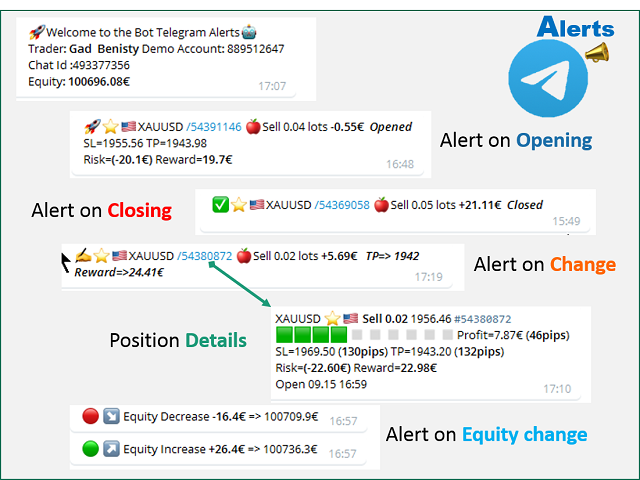
Telegram Alerts is a tool which send alerts on trades to Telegram

  1. Alert on any event concerning a position : Opening, Closing, modification (SL, TP)
  2. Alert on Equity change
  3. Display Risk, Reward and progress of profit/lost for each position
  4. Send signals from your indicators or experts
  5. Multi-lingual

If you are facing any issue using this utility, please contact me to be solved


Telegram Setup instruction

  1. Open your Telegram APP and search for "BotFather"
  2. Type /start and click/type /newbot to create a new bot
  3. Give your bot a nickname and username (e.g., nickname: MyNameAlerts and username: MyNameAlertsBot <-- username has to be ended by 'bot')
  4. Congratulations! You have created your Telegram bot.
  5. Save your bot API token (e.g. 1324115883:AAH2Z9PlxKX3Fce1e_m_w3AB7vA2EZZ_GAD)
  6. Back in MetaTrader 4, go to Tools > Options > Expert Advisors > tick 'Allowed WebRequest for listed URL' and add https://api.telegram.org.
  7. Attach the utility into your MetaTrader 4 chart and enter the Telegram Bot Token (from step 5)
  8. In Telegram open the Bot (search Bot username and start a chat with it)
  9. Press Start or enter /start
  10. You should get a message that the Chat Id is not correct. This message shows your Chat ID
  11. In Metatrader, open the utility properties and enter the Chat ID with the correct ID. This makes sure you are the only one who can use the Bot
  12. Back to Telegram, type /start . You should get information on your trading account number and equity
  13. Telegram Alerts is ready to work for you

Properties

  1. Bot Api Token: The unique token of your bot. Do not share this information.
  2. Chat ID: Your Telegram Chat ID
  3. Language: Choose English, French,  Spanish or Brazilian portugues (contact me if need more)
  4. Rounding digits: How to display currency values. By default, digits=0, means rounded to the nearest integer (e.g 35€ instead of 35.23€)
  5. Alerts on events: Choose All if you want to be alerted on any events (Open, Closed and Modified). Otherwise choose Open & Closed
  6. Magic Numbers: Enter magic numbers (separated by space) if you want to be alerted on filtered orders (e.g generated by a robot)
  7. Alert Start Time: Choose the time you want to start receiving alerts (from 0 to 24)
  8. Alert End Time: Choose the time you want to stop receiving alerts (from 0 to 24)
  9. % of Equity alert: If you want to be alerted when Equity changes, enter the percentage (e.g 1 for 1%) if Equity variation. Keep 0 for not being alerted. Equity Alert works around the clock (24/24), not taking into account the Alert Start and End time parameters.

Integration with your own indicators and experts

This utility can be used by your own indicators and EA to send signals to Telegram. They just have to create a text file, containing the signal, to the following directory:
<Data Folder>/Telegram Alerts/<Your trading account Number/signals
You can use the following code in your indicator or EA:


string directory="Telegram Alerts/"+IntegerToString(AccountInfoInteger(ACCOUNT_LOGIN))+"/signals";
string filename="Test.txt";
string signal="BUY EURUSD 1.20202 SL=1.201 TP=1.203";
saveStringFile(signal,directory+"/"+filename);

bool saveStringFile(string s,string fileName)
  {
   int handle=FileOpen(fileName,FILE_WRITE|FILE_TXT);
   if(handle==INVALID_HANDLE)
      return(false);
   FileWriteString(handle,s);
   FileClose(handle);
   return(true);
  }


Reviews 11
Jafari Sina
18
Jafari Sina 2025.03.31 09:17 
 

really fast . really and easy to setup

Michel
121
Michel 2022.01.11 00:57 
 

EA works without a problem. It sends alerts almost immediately. Very useful to keep me informed and safeguard my account. Thank you!

Rubi Jihantoro
528
Rubi Jihantoro 2021.12.09 19:16 
 

nice, working as expected

Recommended products
SphereSample
MetaQuotes Ltd.
The script SphereSample.mq5 illustrates control of graphic objects using the classes from the Standard Library (Base class of objects array CArrayObj , CChartObjectText ).
FREE
General Description This indicator is an enhanced version of the classic Donchian Channel , upgraded with practical trading functions. In addition to the standard three lines (high, low, and middle), the system detects breakouts and displays them visually with arrows on the chart, showing only the line opposite to the current trend direction for a cleaner view. The indicator includes: Visual signals : colored arrows on breakout Automatic notifications : popup, push, and email RSI filter : to val
FREE
Look Back My Trading History MT5
Sa No Tsuyoshi Kokorozashi
5 (2)
Description This is a utility tool for MT5 reminding traders of all the entry points by highlighting trading history. For those who just started to learn trading, one of the most efficient tips to improve their trading skill is to look back their own trading history. However, trade history arrow shown on MT5 chart is simply too small to find out, which will keep traders away from reviewing their trade, especially stupid mistakes like overtrading. By clearly showing their trade history and face i
FREE
Free automatic Fibonacci is an indicator that automatically plots a Fibonacci retracement based on the number of bars you select on the BarsToScan setting in the indicator. The Fibonacci is automatically updated in real time as new highest and lowest values appears amongst the selected bars. You can select which level values to be displayed in the indicator settings. You can also select the color of the levels thus enabling the trader to be able to attach the indicator several times with differe
FREE
The script illustrates the usage of the OBJPROP_XOFFSET and OBJPROP_YOFFSET properties. It displays the specified fragment of the .BMP image.
FREE
Reversal Composite Candles
MetaQuotes Ltd.
3.67 (15)
The idea of the system is to indentify the reversal patterns using the calculation of the composite candle. The reversal patterns is similar to the "Hammer" and "Hanging Man" patterns in Japanese candlestick analysis. But it uses the composite candle instead the single candle and doesn't need the small body of the composite candle to confirm the reversal. Input parameters: Range - maximal number of bars, used in the calculation of the composite candle. Minimum - minimal size of the composite can
FREE
The RSI-Based Automatic Buy Strategy Expert Advisor (EA) is designed to automatically open buy positions when the RSI indicator enters the oversold zone. It smartly spaces new trades by maintaining a minimum distance between open positions to prevent excessive exposure. With adjustable take profit (TP) levels and lot sizes, this EA is specifically tailored for the XAUUSD (Gold) pair on the M5 timeframe. This Expert Advisor offers reliable and disciplined trade management for traders who want to
Chart Handler
Gediminas Rucinskas
5 (2)
Have you ever been in a situation when you could not control the chart conveniently or had to make additional clicks to be able to scroll the history or set the scale fix numbers manually to be able to stretch the chart?  Features: Chart centering. Automatic scale fix. Automatic scroll control. This tool is one of many features included in "Trading Essentials" utility application, which can be found on mql5.com
FREE
RegularExpressionsExamples — is an expert, which contains the graphical interface for running examples from the " RegularExpressions in MQL5 " library. The codes of these examples can be found in the library itself. These examples are for demonstration purposes only. They serve only to evaluate the library operation and its capabilities. They can also be found on the official Microsoft‎ website, in the descriptions of classes in the System.Text.RegularExpressions namespace. Each example can be
FREE
The script is intended for synchronization and loading into the Terminal of the desired (or maximum possible) history of quotes of the timeframes specified by the user for the symbols in the "Market Watch" window. The first download of the full history for one "new" symbol takes approximately one and a half to two minutes. Input parameters for running the script: 1. Desired history length (bars) - here we indicate the number of bars in the quote history that we would like to receive from t
FREE
The Scaled Awesome Oscillator (SAO) represents a refined adaptation of the Awesome Oscillator, aimed at establishing consistent benchmarks for identifying market edges. Unlike the standard Awesome Oscillator, which records the variation in pips across different commodities, the only unchanging reference point is the zero line. This limitation hampers investors and traders from pinpointing specific levels for trend reversals or continuations using the traditional Awesome Indicator, a creation of
FREE
ObjChartSample
MetaQuotes Ltd.
The script ObjChartSample.mql5 illustrates control of chart properties using the classes from the Standard Library .
FREE
RSI abcd
Francisco Gomes Da Silva
3 (1)
RSI ABCD Pattern Finder: Technical Strategy 1. How the Indicator Works Combines the classic RSI with automatic detection of ABCD harmonic patterns . Key Components Standard RSI (adjustable period) Peak and Trough Markers (arrows) ABCD Patterns (green/red lines) Overbought (70) and Oversold (30) Filters 2. MT5 Setup period = 14 ; // RSI period size = 4 ; // Maximum pattern size OverBought = 70 ; // Overbought level OverSold = 30 ; // Oversold level Filter = USE_FILTER_ YES ; // Confirmation filte
FREE
Quick Style MT5
Maxim Polishchuk
4.73 (11)
The Quick Style utility is designed for facilitation and acceleration of working with the properties of graphical objects. Left-click a graphical object while holding the Shift key to open the quick access window for configuring the object properties. In the window, you can change the color, style and line width with one click, including those of other graphical objects. All changes are displayed immediately. To close the Quick Style , simply click the free space on the chart. The utility is eas
FREE
RenkoExpert
Andrey Goida
3.8 (5)
Renko Expert Advisor based on Renko bar simulation.    The EA has two options for building Renko bars. Classic and ATR. In the classic version, renko bars are marked with areas on the main chart; in the ATR version, renko bars are modeled and drawn in the indicator window. Modeling renko bars inside the EA allows you to optimize the robot better than drawing renko bars offline.   Our new product based on artificial intelligence   https://www.mql5.com/ru/market/product/127820   Telegramm channel
FREE
Sylvan Crash500 Heiken Ashi
Quintin Francois Vanwyk
4.83 (6)
FOR CRASH 500 ONLY!! MT5 *This is a smooth heiken ashi setup meant to be used on CRASH 500 in combination with other indicators. *You are welcome to test it on other markets aswell. *I will be posting other indicators aswell to help with trading the crash 500 market. *You can use this to help smooth out price if you do struggle with reading the charts as is. * Just note heiken ashi doesnt represent real price action only smoothes it out for ease of read.
FREE
Follow The Line MT5
Oliver Gideon Amofa Appiah
4.59 (34)
This indicator obeys the popular maxim that: "THE TREND IS YOUR FRIEND" It paints a GREEN line for BUY and also paints a RED line for SELL. (you can change the colors). It gives alarms and alerts of all kinds. IT DOES NOT REPAINT and can be used for all currency pairs and timeframes. Yes, as easy and simple as that. Even a newbie can use it to make great and reliable trades. NB: For best results, get my other premium indicators for more powerful and reliable signals. Get them here: https://www.m
FREE
Click Trading
Jawad Tauheed
5 (1)
One Click Trading – Auto TP SL Developer TraderLinkz Version 1.00 Category Utility What it does Adds missing TP and SL to your manual trades and pending orders Sets them once per ticket Lets you move TP and SL afterward Works on hedging and netting accounts Scans on every tick and reacts on trade events Why you want it You place faster entries You get consistent risk and exit targets You reduce fat finger errors You keep full manual control Quick start Attach the EA to any chart Keep TP and SL e
FREE
Show Pips for MT5
Roman Podpora
4.67 (24)
This information indicator will be useful for those who always want to be aware of the current situation on the account. - More useful indicators The indicator displays data such as profit in points, percentage and currency, as well as the spread for the current pair and the time until the bar closes on the current timeframe. There are several options for placing the information line on the chart: - To the right of the price (runs behind the price); - As a comment (in the upper left corner of
FREE
Coral Indi
Dinh Duong Luong
Coral trend is   a trend-following indicator that is widely popular among FOREX traders . It is usually used as a confluence with other indicators. It uses combinations of moving averages with complex smoothing formulas! It has two configurable parameters: Coefficient   - smoothing ratio (*) Applied price Calculation: Coral = (-0.064) * B6 + 0.672 * B5 - 2.352 * B4 + 2.744 * B3
FREE
Portfolio Aggregator
Keni Chetankumar Gajanan -
Portfolio Aggregator — One dashboard, total clarity across all your trading accounts. Portfolio Aggregator unifies account data from multiple brokers and currencies into a single, transparent dashboard. It provides real‑time visibility into equity, margin, P&L, and risk metrics, helping traders maintain control and confidence across diversified strategies. Features Multi‑Currency Consolidation — Converts all values into a chosen base currency with live FX rates. Portfolio Dashboard — Displays e
FREE
AP Fibonacci Retracement PRO (MT5) Overview AP Fibonacci Retracement PRO is a trend-continuation pullback EA. It waits for a confirmed swing, calculates the Fibonacci retracement zone, and looks for entries in the direction of the original move. No grid, no martingale. Strategy logic Detects the last valid swing high/low using Fractals on the selected signal timeframe. Calculates the retracement zone between 38.2% and 61.8% (configurable). On a closed bar, if price is inside the zone (with opti
FREE
ET1 for MT5
Hui Qiu
4 (5)
ET1 for MT5 is new and completely free!! ET1 for MT5 v4.20 Updated!! Now use on XAUUSD(Gold) !!  The success rate is more than 75%   !!! important update: Merge ET9 's breakout strategy Warning!! You can use ET1 completely free, but we do not guarantee ET1 stability, It is recommended that the more powerful ET9 for MT5 version includes the ET1 strategy and guarantees complete and stable returns. The Best Expert Advisor  on   XAUUSD   any timeframes  ET9  for MT5 Updated v4.70 !!  https://www
FREE
This indicator is a zero-lag indicator and displays  strength of trend change . True Trend  Oscillator Pro works best in combination with True Trend Moving Average Pro that displays exact trend as is. Oscillator value is exact price change in given direction of the trend. True Trend Moving Average Pro: https://www.mql5.com/en/market/product/103586 If you set PERIOD input parameter to 1 this indicator becomes a sharpshooter for binary options. Developers can use True Trend Oscillator in Exper
FREE
PZ The Zone MT5
PZ TRADING SLU
5 (1)
This indicator displays buy or sell signals according to Bill Williams' definition of the Trading Zone. [ Installation Guide | Update Guide | Troubleshooting | FAQ | All Products ] Easy to use and understand Avoid trading flat markets Deterministic indicator with clear rules The indicator is non-repainting It implements alerts of all kinds It has straightforward trading implications. A blue arrow is a buy signal A red arrow is a sell signal According to Bill Williams trading in the zone helps t
FREE
Are you tired of drawing trendlines every time you're analyzing charts? Or perhaps you would like more consistency in your technical analysis. Then this is for you. This indicator will draw trend lines automatically when dropped on a chart. How it works Works similar to standard deviation channel found on mt4 and mt5. It has 2 parameters: 1. Starting Bar 2. Number of bars for calculation The   starting bar   is the bar which drawing of the trend lines will begin, while the   number of bars for c
FREE
This indicator is especially for the binary trading. Time frame is 1 minutes and exp time 5 or 3 minutes only. You must be use martingale 3 step. So you must put lots size is 10 % at most. You should use Mt2 trading platform to connect with my indicator to get more signal without human working. This indicator wining rate is over 80% but you may get 100% of profit by using martingale 3 step. You should use MT2 Trading Platform to connect meta trader platform and binary platform . You can get mt2
FREE
Bar Color Trend
Germano Chagas
4.38 (8)
Combining the best of Price Action , Directional Movement , and Divergence/Convergence analysis, Candle Color Trend is a easy and reliable way to identify trend direction. The indicator automatically paints the candles according to the assumption that an uptrend is defined by prices that form a series of higher highs and higher lows. In contrast, a downtrend is defined by prices that form a series of lower highs and lower lows. Additionally, ADX Wilder indicator is used to measure trend weakness
FREE
MACD Enhanced
Nikita Berdnikov
5 (2)
Introducing the MACD  Enhanced – an advanced MACD (Moving Average Convergence Divergence) indicator that provides traders with extended capabilities for trend and momentum analysis in financial markets. The indicator uses the difference between the fast and slow exponential moving averages to determine momentum, direction, and strength of the trend, creating clear visual signals for potential entry and exit points. Attention! To achieve the best results, it is recommended to adapt the indicator
FREE
High Low Open Close
Alexandre Borela
4.98 (42)
If you like this project, leave a 5 star review. This indicator draws the open, high, low and closing prices for the specified period and it can be adjusted for a specific timezone. These are important levels looked by many institutional and professional traders and can be useful for you to know the places where they might be more active. The available periods are: Previous Day. Previous Week. Previous Month. Previous Quarter. Previous year. Or: Current Day. Current Week. Current Month. Current
FREE
Buyers of this product also purchase
Trade Assistant MT5
Evgeniy Kravchenko
4.42 (204)
It helps to calculate the risk per trade, the easy installation of a new order, order management with partial closing functions, trailing stop of 7 types and other useful functions. Additional materials and instructions Installation instructions - Application instructions - Trial version of the application for a demo account Line function -   shows on the chart the Opening line, Stop Loss, Take Profit. With this function it is easy to set a new order and see its additional characteristics bef
Forex Trade Manager MT5
InvestSoft
4.98 (574)
Welcome to Trade Manager MT5 - the ultimate risk management tool designed to make trading more intuitive, precise, and efficient. This is not just an order placement tool; it's a comprehensive solution for seamless trade planning, position management, and enhanced control over risk. Whether you're a beginner taking your first steps, an advanced trader, or a scalper needing rapid executions, Trade Manager MT5 adapts to your needs, offering flexibility across all markets, from forex and indices t
Local Trade Copier EA MT5
Juvenille Emperor Limited
4.96 (116)
Experience exceptionally fast trade copying with the   Local Trade Copier EA MT5 . With its easy 1-minute setup, this trade copier allows you to copy trades between multiple MetaTrader terminals on the same Windows computer or Windows VPS with lightning-fast copying speeds of under 0.5 seconds. Whether you're a beginner or a professional trader, the   Local Trade Copier EA MT5   offers a wide range of options to customize it to your specific needs. It's the ultimate solution for anyone looking t
TradePanel MT5
Alfiya Fazylova
4.86 (143)
Trade Panel is a multifunctional trading assistant. The application contains more than 50 trading functions for manual trading and allows you to automate most trading operations. Attention, the application does not work in the strategy tester. Before purchasing, you can test the demo version on a demo account. The demo version is here . Full instructions here . Trade. Allows you to perform trading operations in one click: Open pending orders and positions with automatic risk calculation. Open mu
Trade Dashboard MT5
Fatemeh Ameri
4.96 (103)
Tired of complex order placement and manual calculations? Trade Dashboard is your solution. With its user-friendly interface, placing orders becomes effortless, by a single click, you can open trades, set stop loss and take profit levels, manage trade lot size, and calculate risk to reward ratios, allowing you to only focus on your strategy. Say goodbye to manual calculations and streamline your trading experience with Trade Dashboard. Download  Demo Version  right now. You can find  Details of
Ultimate Extractor
Clifton Creath
5 (7)
Ultimate Extractor - Professional Trading Analytics for MT5 Ultimate Extractor transforms your MetaTrader 5 trading history into actionable insights with comprehensive analytics, interactive charts, and real-time performance tracking. What It Does Automatically analyzes your MT5 trading history across all Expert Advisors and generates detailed HTML reports with interactive visualizations. Tracks live performance metrics including open positions, floating P/L, and drawdown in real-time. Supports
Beta Release The Telegram to MT5 Signal Trader is nearly at the official alpha release. Some features are still under development and you may encounter minor bugs. If you experience issues, please report them, your feedback helps improve the software for everyone. The price will increase after 20 sales. Remaining copies at $90: 2/20 . Telegram to MT5 Signal Trader is a powerful tool that automatically copies trading signals from Telegram channels or groups directly to your MetaTrader 5 account
Smart Stop Scanner – Multi-Asset Stop-Loss Intelligence for Modern Traders Overview The Smart Stop Scanner brings professional stop-loss monitoring to every chart. It analyzes market structure, detects meaningful breakouts, and identifies the most relevant protective levels across Forex, Gold, Indices, Metals, Crypto, and more. All results appear inside one clean, DPI-aware dashboard designed for clarity, speed, and instant decision-making. How Stop-Loss Levels Are Identified Instead of rely
Copy Cat More Trade Copier MT5 is a local trade copier and a complete risk management and execution framework designed for today’s trading challenges. From prop firm challenges to personal portfolio management, it adapts to every situation with a blend of robust execution, capital protection, flexible configuration, and advanced trade handling. The copier works in both Master (sender) and Slave (receiver) modes, with real-time synchronization of market and pending orders, trade modifications, pa
Smart Stop Manager – Automated Stop-Loss Execution with Professional Precision Overview The Smart Stop Manager is the execution layer of the Smart Stop lineup, built for traders who require structured, reliable, and fully automated stop-loss management across multiple open positions. It continuously monitors active trades, calculates the optimal stop level using Smart Stop market-structure logic, and updates stops automatically with clean, transparent rules. Whether managing a single asset or
Trade Manager DashPlus
Henry Lyubomir Wallace
5 (11)
DashPlus is an advanced trade management tool designed to enhance your trading efficiency and effectiveness on the MetaTrader 5 platform. It offers a comprehensive suite of features, including risk calculation, order management, advanced grid systems, chart-based tools, and performance analytics. Key Features 1. Recovery Grid Implements an averaging and flexible grid system to manage trades during adverse market conditions. Allows for strategic entry and exit points to optimize trade recovery
MT5 to Telegram Signal Provider turns your trading account into a signal provider. Every trade action, whether manual, by EA or from your phone, is instantly sent as a message to Telegram. You can fully customize the format or use a ready-made template for quick setup. [ Demo ] [ Manual ] [ MT4 Version ] [ Discord Version ]     New: [ Telegram To MT5 ] Setup A step by step user guide is available. Key Features Ability to customize order details sent to subscribers You can create a tiered subs
Grid Manual MT5
Alfiya Fazylova
4.9 (20)
Grid Manual is a trading panel for working with grid strategies. The utility is universal, has flexible settings and an intuitive interface. It works with a grid of orders not only in the direction of averaging losses, but also in the direction of increasing profits. The trader does not need to create and maintain a grid of orders, the utility will do it. It is enough to open an order and the "Grid manual" will automatically create a grid of orders for it and will accompany it until the close. F
Seconds Chart MT5
Boris Sedov
4.59 (17)
Seconds Chart is a unique tool for creating second-based charts in MetaTrader 5 . With Seconds Chart , you can construct charts with timeframes set in seconds, providing unparalleled flexibility and precision in analysis that is unavailable with standard minute or hourly charts. For example, the S15 timeframe indicates a chart with candles lasting 15 seconds. You can use any indicators and Expert Advisors that support custom symbols. Working with them is just as convenient as on standard charts.
HINN MagicEntry Extra
ALGOFLOW OÜ
4.6 (10)
HINN MAGIC ENTRY – the ultimate tool for entry and position management! Place orders by selecting a level directly on the chart! Key features: - Market, limit, and pending orders - Automatic lot size calculation - Automatic spread and commission accounting - Unlimited partitial take-profits  - Breakeven and trailing stop-loss  functions - Intuitive, adaptive, and customizable interface - Session and strong algorithmic level visualization - Works with any assets and account types Join the   ALG
Exp COPYLOT CLIENT for MT5
Vladislav Andruschenko
3.82 (34)
Trade copier for MT5 is a trade copier for the МetaТrader 5 platform. It copies forex trades  between any accounts   MT5 - MT5, MT4 - MT5 for the COPYLOT MT5 version (or MT4 - MT4 MT5 - MT4 for the COPYLOT MT4 version)    Reliable copier!         MT4 version Full Description +DEMO +PDF   How To Buy    How To Install     How to get Log Files    How To Test and Optimize    All products from Expforex You can also copy trades in the МТ4 terminal (МТ4 - МТ4, МТ5 - МТ4):     COPYLOT CLIENT for MT4
ChartSync MT5
Alfiya Fazylova
5 (2)
Chart Sync indicator - designed to synchronize graphic objects in terminal windows. Can be used as an addition to TradePanel . Before purchasing, you can test the Demo version on a demo account. Demo here . To work, install the indicator on the chart from which you want to copy objects. Graphic objects created on this chart will be automatically copied by the indicator to all charts with the same symbol. The indicator will also copy any changes in graphical objects. Input parameters: exception -
KT Equity Protector MT5
KEENBASE SOFTWARE SOLUTIONS
4.25 (4)
Safeguard Your Trading Capital Effortlessly Protecting your trading capital is just as important as growing it. The KT Equity Protector is your personal risk manager, continuously watching your account equity and automatically stepping in to prevent losses or lock in profits by closing all active and pending orders when predefined profit targets or stop-loss levels are reached. No more emotional decisions, no guesswork—just reliable equity protection working tirelessly on your behalf. KT Equity
Trade Manager DaneTrades
Levi Dane Benjamin
4.33 (27)
Trade Manager to help you quickly enter and exit trades while automatically calculating your risk. Including features to help prevent you from Over Trading, Revenge Trading and Emotional Trading. Trades can be managed automatically and the account performance metrics can be visualised in a graph. These features make this panel ideal for all manual traders and it helps to enhance the MetaTrader 5 platform. Multi Language support. MT4 Version  |  User Guide + Demo The Trade Manager does not work i
EasyInsight AIO MT5
Alain Verleyen
4.91 (11)
EASY Insight AIO – All-In-One Power for AI-Driven Trading Want to skip the setup and start scanning the entire market – Forex, Gold, Crypto, Indices, and even Stocks – in seconds? EASY Insight AIO is the complete plug-and-play solution for AI-powered trade analysis. It includes all core Stein Investments indicators built-in and automatically exports clean, structured CSV files – perfect for backtesting, AI prompts, and live market decision-making. No need to install or configure indicators manu
Cerberus Equity Watcher
Samuel Bandi Roccatello
5 (3)
Cerberus the Equity Watcher  is a risk management tool that constantly monitors your account equity and avoid major drawdowns, caused by faulty EAs or by your emotional behaviour if you are a discretional trader. It is extremely useful for systematic traders that rely on EAs that might contain bugs, or that might not performed well in unexpected market conditions.  Cerberus let you set a minimum equity value and (optionally) a  maximum value , if either of those are reached all positioned are f
VirtualTradePad One Click Trading Panel
Vladislav Andruschenko
4.58 (72)
Trading Panel for trading in One click.  Working with positions and orders!  Trading from the  chart  or the  keyboard . With our trading panel, you can execute trades with a single click directly from the chart and perform trading operations 30 times faster than with the standard MetaTrader control. Automatic calculations of parameters and functions make trading faster and more convenient for traders. Graphic tips, info labels, and full information on trade deals are on the chart MetaTrader.  
Telegram to MT5 Coppy
Sergey Batudayev
5 (7)
Telegram to MT5: The Ultimate Signal Copying Solution Simplify your trading with Telegram to MT5, the modern tool that copies trading signals directly from Telegram channels and chats to your MetaTrader 5 platform, without the need for DLLs. This powerful solution ensures precise signal execution, extensive customization options, saves time, and boosts your efficiency. [ Instructions and DEMO ] Key Features Direct Telegram API Integration Authenticate via phone number and secure code. Easily man
Trade Assistant 38 in 1
Makarii Gubaydullin
4.91 (22)
Ultimate Trade Assistant MT5 — Multifunctional Trading Panel All-in-one trading assistant with over 66 professional tools for smart, fast, and precise trading. This advanced trading utility combines risk management, order automation, technical analysis, and portfolio control in one powerful and intuitive dashboard. It helps traders reduce manual work, minimize mistakes, and make more confident trading decisions. Why Traders Choose This Tool Open, manage, and close trades faster — everything from
Trade copier MT5
Alfiya Fazylova
4.58 (33)
Trade Copier is a professional utility designed to copy and synchronize trades between trading accounts. Copying occurs from the account / terminal of the supplier to the account / terminal of the recipient, which are installed on the same computer or VPS . Before buying, you can test the demo version on a demo account. Demo version here . Full instruction here . Main functionality and benefits: Supports copying MT5> MT5, MT4> MT5, MT5> MT4, including MT5 netting accounts. * Supports copying Dem
Zentral Trading Manager
Ray Zeanrik Parreno Fredeluces
5 (4)
Zentral Trading Manager Your Command Center for Precision Trading — Now Stronger than Ever Take control of your trades like never before. Zentral Trading Manager is your all-in-one manual trading panel for MetaTrader 5 — built for scalpers, day traders, and serious strategy execution. Fully compatible with both Mac and Windows laptops. High-DPI safe. No more layout issues. Key Features (Latest 2025 Update): • One-Click Close – Instantly close Buy/Sell, winning/losing trades, or even half positi
Copier->Convenient and fast interface interaction, users can use it right away   ->>>> Recommended to use on Windows computers or VPS Windows Features: Diversified and personalized copy trading settings: 1. Different lot modes can be set for different signal sources 2. Different signal sources can be set for forward and reverse copy trading 3. Signals can be set with comments 4. Whether to calibrate the lot according to the contract lot Diversified and personalized copy order settings 2: 1. Dif
MT5 To Tradovate
Laurent Xavier Richer
MT5 → Tradovate Bridge (Prop-Firm Ready) Mirror your MT5 trades into Tradovate in real time—perfect for running your favorite indices/gold EA on MT5 while meeting the rules of top prop firms like Apex , etc. What it does Live mirroring: Replicates MT5 market executions (open/close) to Tradovate as market orders. Symbol routing:  Map your chart (e.g., US100/USTEC) to the right futures contract (MNQ/NQ/MES/ES/…); roll-aware (quarterly/monthly). Position cap: Limit how many MT5 positions are mirro
The product will copy all telegram signal to MT5 ( which you are member) , also it can work as remote copier.  Easy to set up, copy order instant, can work with almost signal formats, image signal,  s upport to translate other language to English Work with all type of channel or group, even channel have "Restrict Saving Content", work with  multi channel, multi MT5 Work as remote copier: with signal have ticket number, it will copy exactly via ticket number. Support to backtest signal. How to s
OrderManager MT5
Lukas Roth
4.83 (24)
Introducing the Order Manager : A Revolutionary Utility for MT5 Manage your trades like a pro with the all-new Order Manager utility for MetaTrader 5. Designed with simplicity and ease-of-use in mind, the Order Manager allows you to effortlessly define and visualize the risk associated with each trade, enabling you to make informed decisions and optimize your trading strategy. For more information about the OrderManager, please refear to the manual. [ Demo ]  [ Manual ]  [ MT4 Version ]  [ Teleg
More from author
NEW :  integration with Ofir Signals to send personalized alerts Ofir Notify is a tool which send alerts on trades to Telegram Alert on any event concerning a position : Opening, Closing, modification (SL, TP) Send alerts to Chats, Groups and Channel Alert on Equity change Display Risk, Reward and progress of profit/lost for each position Customization of alerts Sending charts screenshots with alerts Send signals from your indicators or experts Multi-lingual NEW  : version 2 brings integration
FREE
Telegram Alerts
Gad Benisty
4.72 (18)
This application is now replaced by Ofir Notify Light Edition (Free) or Ofir Notify (paid). Thank all for your positive feedbacks. Ofir Notify is a tool which send alerts on trades to Telegram Alert on any event concerning a position : Opening, Closing, modification (SL, TP) Send alerts to Chats, Groups and Channel Alert on Equity change Display Risk, Reward and progress of profit/lost for each position Customization of alerts ( only in full edition ) Sending charts screenshots with alerts   
FREE
Ofir Blue exporter is a handy utility to export your orders history to a JSON file . You'll need it if you want to back-test Ofir blue or Ofir Hedging , using your own trading history. How it works: Install the indicator on a chart Press export all or export <current symbol> (for example GBPUSD) The indicator will create the json file in the directory files/ofirblue/export. This directory is in the common file area. The file will be automatically taken in charge by Ofir blue strategy tester
FREE
This free utility is a must to manage your risk. Very easy to calculate a new position size (number of lots), based on: Your equity Your risk per trade (% of equity) Your entry price Your stop loss This utility gives the right information to enter the market. A paid version is also available, Ofir Calculator+, to open the trade by a single click. Telegram Setup instruction Open your Telegram APP and search for "BotFather" Type  /start  and click/type  /newbot  to create a new bot Give your bot
FREE
NEW :    integration with Ofir Signals to send personalized alerts Ofir Notify is a tool which send alerts on trades to Telegram Alert on any event concerning a position : Opening, Closing, modification (SL, TP) Send alerts to Chats, Groups and Channel Alert on Equity change Display Risk, Reward and progress of profit/lost for each position Customization of alerts Sending charts screenshots with alerts Send signals from your indicators or experts Multi-lingual NEW  : version 2 brings integratio
FREE
Ofir blue is the first full trading application for Telegram. It is proposed in 2 versions : OfirBlueLite (without trading) and OfirBluePro (with trading). The Pro version is still in beta (available on request).  To access Ofir Blue Lite, go to Telegram and open the bot @OfirBlueLite. All demos, tutorials and docs are available in Telegram. Join the Telegram group @OfirBlueUserGroup to get updated information and support. Features: Dashboard  ️ Account summary ️» Profit of the day ️» Eq
FREE
NEW :    integration with Ofir Signals to send personalized alerts Ofir Notify is a tool which send alerts on trades to Telegram Alert on any event concerning a position : Opening, Closing, modification (SL, TP) Send alerts to Chats, Groups and Channel Alert on Equity change Display Risk, Reward and progress of profit/lost for each position Customization of alerts Sending charts screenshots with alerts Send signals from your indicators or experts Daily, weekly and monthly summaries Reply mode:
Ofir Dashboard is the first level of the Ofir trading solutions. We are building the first full trading application from Telegram. The Dashboard is focused on giving you the best information about your account, positions, risk,... when you are away from keyboard. Everything is accessible from Telegram. More info in my Blog Enjoy! Ofir Notify, our very successful application for sending Notifications to Telegram (chat, channels, groups) is included in Ofir Dashboard.
MQL Tool "Ofir Email to Telegram": Never Miss a Trading Alert Again! Tired of missing important alerts from your indicators and Expert Advisors (EAs)? Ofir Email to Telegram   is the solution you've been waiting for!   This revolutionary MQL tool automatically forwards all email alerts from your indicators and EAs directly to your Telegram account. Never again will you miss a trading opportunity or important notification! Here are just a few of the benefits of Ofir Email to Telegram: Quick and e
NEW :    integration with Ofir Signals to send personalized alerts Ofir Notify is a tool which send alerts on trades to Telegram Alert on any event concerning a position : Opening, Closing, modification (SL, TP) Send alerts to Chats, Groups and Channel Alert on Equity change Display Risk, Reward and progress of profit/lost for each position Customization of alerts Sending charts screenshots with alerts Send signals from your indicators or experts Multi-lingual  NEW  : version 2 brings integrati
MQL Tool "Ofir Email to Telegram": Never Miss a Trading Alert Again! Tired of missing important alerts from your indicators and Expert Advisors (EAs)? Ofir Email to Telegram is the solution you've been waiting for! This revolutionary MQL tool automatically forwards all email alerts from your indicators and EAs directly to your Telegram account. Never again will you miss a trading opportunity or important notification! Here are just a few of the benefits of Ofir Email to Telegram: Quick and easy
Filter:
Jafari Sina
18
Jafari Sina 2025.03.31 09:17 
 

really fast . really and easy to setup

Sashin Sobrun
58
Sashin Sobrun 2023.11.09 10:05 
 

I managed to get everything set up and it works extremely well, the only issue I have is when I make my channel private it stops working, does it only work on public telegram channels?

Gad Benisty
11483
Reply from developer Gad Benisty 2024.03.24 23:05
This indicator is deprecated, it has been replaced by Ofir Notify (search for it here in marketplace).
cbarryftmo
214
cbarryftmo 2023.07.26 05:30 
 

User didn't leave any comment to the rating

Stefano Sharawi
21
Stefano Sharawi 2023.03.04 12:59 
 

User didn't leave any comment to the rating

Gad Benisty
11483
Reply from developer Gad Benisty 2023.03.04 13:02
This indicator is deprecated, it has been replaced by Ofir Notify (search for it here in marketplace). You can send alert from indicator if you have the source code of this indicator (just a few lines to add in order to send alert through Ofir Notify). Otherwise, contact me in Telegram (GadBen75), I have a tool to export alerts from indicator, even if you don't have the source code.
Michel
121
Michel 2022.01.11 00:57 
 

EA works without a problem. It sends alerts almost immediately. Very useful to keep me informed and safeguard my account. Thank you!

Michael Masanga
370
Michael Masanga 2021.12.22 05:46 
 

the only thing it alerts is the welcome when you open and equity it does nothing when you open or close please explain what could be wrong

Rubi Jihantoro
528
Rubi Jihantoro 2021.12.09 19:16 
 

nice, working as expected

100pips_eth
15
100pips_eth 2021.07.21 12:51 
 

User didn't leave any comment to the rating

Sebastian Schmidt
1351
Sebastian Schmidt 2020.12.09 02:23 
 

genial nice tool!!

Lau Ka Shun
576
Lau Ka Shun 2020.12.05 06:21 
 

User didn't leave any comment to the rating

Haleim Shah
18
Haleim Shah 2020.11.30 15:52 
 

User didn't leave any comment to the rating

Reply to review