Smart RR Trade Manager4
- Experts
-
Simon Draxler
 DRX – Tools for MetaTrader 5 and 4
Indicators, utilities and Expert Advisors. All DRX products run together on one chart.
TRADE MANAGEMENT - Version: 7.1
- Activations: 5
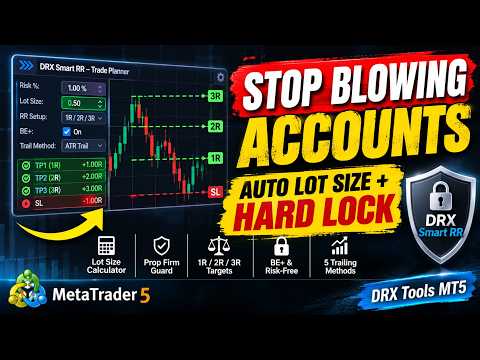
Know your risk before you click. DRX Smart RR is a trade manager for manual traders on MetaTrader 5. Draw the trade on your chart, see the money at the stop and at the target, get the correct lot size, and send it with one held button. After that, manage it with one click, and let a hard risk guard stop you at your limits.
Most accounts are not lost on a bad strategy. They are lost on one bad afternoon: a trade too big, a moved stop, revenge trades after the daily limit. Smart RR puts a rule between you and that afternoon. It is built for prop firm challenges, funded accounts and your own account, and it also works as a plain risk reward tool with no limits at all.
Full guide, part 1: setup and trading ---> Click
Full guide, part 2: risk guard and prop firms ---> Click
Smart RR is a tool for manual trading. It has no signals and no strategy, and it never opens a trade on its own. Every trade starts with your hand on the button. It runs as an Expert Advisor because it sends your orders and watches your account.
Visual trade planner and lot size calculator- Risk reward planner on the chart: entry, stop loss and take profit right of the last candle, so the planner never covers the price.
- Money on every line: loss at the stop, profit at the target, lots, reward:risk and the expectancy of the plan.
- Automatic position size from your risk and your stop, with the real tick value of the symbol. Forex, gold, indices, oil, crypto and stocks work the same way.
- Five risk bases: percent of start capital, equity or balance, fixed money, or fixed lots.
- Drag or type: drag any line, or double-click a card and enter pips or a price.
- 1R, 2R, 3R set the target with one click.
- SMART setup: stop behind the nearest support or resistance zone, target at the next one.
- Up to three partial targets, each with its own take profit at the broker (hedging accounts).
- Scalp and swing profiles with their own risk and reward:risk, and a mini planner for small screens.
- Hold to send: BUY and SELL are held for a moment, so a slip of the mouse sends nothing.
- Market, limit and stop orders. Right click at a price to plan a pending order there.
- Number keys for all main actions, with a second press for the risky ones.
- Quick bar on the chart, also in focus mode.
- Checks before sending: limits, plan, margin and broker stop level. If something blocks you, the reason is on the screen.
- Expectancy check: if a plan cannot pay at your win rate, you are asked once more.
- Position tags on the chart with lots and live profit. Click one for the menu, and drag its stop and target directly.
- BE+: stop to entry plus real costs, commission and swap included.
- Risk-free: closes exactly enough that the rest can no longer lose money at its stop.
- Partial close and reduce by percent or by a typed lot size. Close winners, close losers, reverse.
- Trailing stop with five methods: ATR, points, bar high or low, fractal, EMA.
- Auto break-even and auto partial close at a chosen R. All automation is off by default.
- Pending order tags with delete, execute at market and new price, plus OCO.
- Price alarms with a push message to your phone.
On the first start, an assistant sets up your mode and your limits in four steps and shows them in money. After that, in the guarded modes, the limits can only get stricter from inside the tool.
- Four modes: Challenge, Funded, Personal and Free.
- Rule profiles for common account rules, or your own exact values.
- Max drawdown: fixed, trailing, or trailing until the start, measured on equity, with an emergency brake in front of it.
- Daily loss limit: from balance, equity or the higher one, with your own reset hour, and a day stop at 60 % of the limit.
- Hard lock: closes everything on the account, closes anything new at once, and stays after a restart.
- Safe mode: one loss can only cost a share of what is left today, so your size shrinks with your room.
- Max open risk, trades per day, break after losses, trading hours, spread block and max lots.
- News filter from the economic calendar built into MT5, with a countdown and a warning sound.
- Phone and web trades: a trade from your phone gets a stop, and lots above your maximum are cut, while MT5 runs.
- Time and goals: daily close, Friday close, day goal, close at the challenge target.
- Pass chance: a Monte Carlo estimate from your own trades and your current account state. Click another risk size and watch it change.
- Target progress, EV, half Kelly and buffer: how many losers you can still take.
- P/L calendar: every day as a colored cell, with profit factor, win days, best and worst day and consistency.
- Pass card when the target and the minimum trading days are reached.
- Support and resistance zones from H1, H4 and D1, scored 0 to 100 %, and the tooltip tells you why a zone exists.
- Key levels: previous day and week high and low, day open. Planner lines snap to them.
- Trade journal: a CSV line and a screenshot for every trade, without typing.
- Result marks in R and money at every exit, and sessions on the chart.
- Top strip with state, today, equity, next news, candle timer and server time.
- Four themes, focus mode, sound sets, English and German.
- Settings in the chart: nearly everything changes without opening the input window.
- Install it, turn on Algo Trading, and drag it onto a chart.
- Follow the assistant: mode, limits, plan, summary.
- On a demo account, drag the stop, click 2R and hold BUY.
- Click the position tag and try BE+, risk-free and close.
- MetaTrader 5 only. Any broker. No DLL and no web addresses are needed.
- The guard acts on the whole account. At a lock, it closes all positions on all symbols, including those of other Expert Advisors.
- MT5 must be running for the guard, trailing, alarms and time rules. Stops and targets at the broker work anyway. A VPS or a computer that stays on is the safest place.
- Closing at a limit is a market order. A fast market or a gap can fill past it, so set your limits with some room.
- Profiles are templates. Enter your provider's exact rules. Your provider's numbers always count, and you should check that it allows trade managers.
- Partial targets need a hedging account. Netting accounts get one trade with the full target.
- Strategy Tester: MT5 does not pass clicks to an Expert Advisor there. The demo shows the display with automatic test trades.
- Does it trade by itself? No. It has no signals and no strategy. Every trade starts with you.
- Can I use it without limits? Yes. Free mode gives you the planner, lots and management, and nothing locks.
- Can I lift a lock? A daily lock ends with the next trading day. For a real mistake, an input lifts it once in 7 days. Max drawdown stays hard until you reset for a new challenge.
- Does it work on several symbols? One chart guards the whole account. The planner and trailing act on the symbol of their chart.
- Can I use it next to my Expert Advisor? Yes, on another chart and with a different magic number. Only a lock closes the other trades.
- Does it work with DRX DrawPad? Yes. It makes room when the DrawPad toolbar is docked.
- Is there a guide? Yes, see the two links at the top.
DRX Smart RR – know your risk before you click. Trade manager, risk reward planner, lot size calculator, trade panel and prop firm risk guard in one Expert Advisor for MetaTrader 5.
Trading leveraged products involves a high risk of losing money. This is a software tool. It gives no investment advice and makes no promise of profit, of passing a challenge or of keeping an account. Simulated numbers are estimates. Test on a demo account first.