Hedge Recovery Trigger MT4 EA
- Experts
- Version: 1.0
- Activations: 20

Hedge Recovery Trigger MT4 EA is an automated MetaTrader 4 Expert Advisor based on a structured hedge recovery system.
The EA can start a trading cycle manually or automatically and then manage the recovery sequence using configurable lot sizes, recovery distance, take-profit, and maximum trade settings.
Key Features
Manual or Automatic First Trade
Choose how the first trade is opened:
- Manually — Open the first trade directly from the chart.
- Auto — Allow the EA to automatically open the first trade.
When using automatic mode, you can select the first trade direction: Buy or Sell.
Hedge Recovery System
After the first trade is opened, the EA monitors the position and can place the next recovery order when price reaches the configured recovery distance.
The recovery sequence alternates between Buy and Sell positions, creating a structured hedge/recovery cycle.
Configurable Lot Size
Set the initial lot size used to start each recovery cycle.
You can then configure the lot-size multiplier used for subsequent recovery trades.
Configurable Recovery Distance
Control how far price must move before the next recovery order is placed.
This gives you flexibility to test different recovery distances according to the symbol and trading conditions.
Take Profit
Configure the take-profit distance for the trading cycle.
Maximum Open Trades
Set a maximum number of trades allowed in the recovery sequence, giving you control over the maximum size of the cycle.
External Inputs
First Trade Option
Input: First Trade Option (Manually/Auto)
Choose whether the first trade is opened manually or automatically.
First Trade Direction
Input: First Trade Direction (if first trade is auto)
Choose the direction of the first automatic trade:
- Buy
- Sell
Initial Lot Size
Input: Initial Lot Size
Set the initial lot size for the first trade.
Lot Size Multiplier
Input: Lot Size Multiplier
Set the multiplier used for subsequent recovery trades.
For example, with an initial lot size of 0.01 and a multiplier of 2:
0.01 → 0.02 → 0.04 → 0.08 → ...
Recovery Distance
Input: Recovery Distance (pips)
Set the distance in pips between recovery levels.
Take Profit
Input: TakeProfit (pips)
Set the take-profit distance in pips.
Maximum Open Trades
Input: Max Open Trades
Set the maximum number of trades allowed in the recovery sequence.
Manual Trading Panel
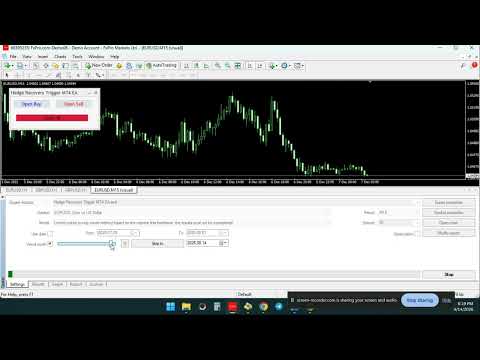
When First Trade Option (Manually/Auto) is set to Manual, the EA provides convenient buttons directly on the chart:
- Open Buy
- Open Sell
- Close All
This allows you to manually choose the starting direction while the EA manages the subsequent recovery sequence.
Recovery Sequence
The EA is designed to manage a structured recovery cycle.
After the initial trade, when price moves the configured Recovery Distance, the EA can place an opposite pending recovery order.
The process can continue according to the configured Lot Size Multiplier and Max Open Trades settings.
This allows traders to create different recovery configurations and test them across different symbols and market conditions.
Risk Warning
This Expert Advisor uses a hedge/recovery trading methodology. Opening additional recovery positions can increase market exposure and drawdown during prolonged adverse price movements.
A recovery strategy does not guarantee profits and can result in significant losses.
The Lot Size Multiplier and Max Open Trades settings can have a significant effect on risk and exposure. Traders should carefully test their chosen configuration before using the EA on a live account.
Always test the EA thoroughly in the MT4 Strategy Tester and on a demo account before using real funds.
Use appropriate lot sizes and carefully consider your account balance, leverage, broker conditions, and risk tolerance.
Hedge Recovery Trigger MT4 EA — structured hedge recovery automation with flexible entry and recovery settings.