
This is part 2 of the guide. Part 1 covers the first start, the planner, position size and managing a trade.
DRX Smart RR on the MQL5 Market →
10. The limits
The guard compares your equity with your limits, on every tick and four times a second. So you can hit a limit without closing a trade.
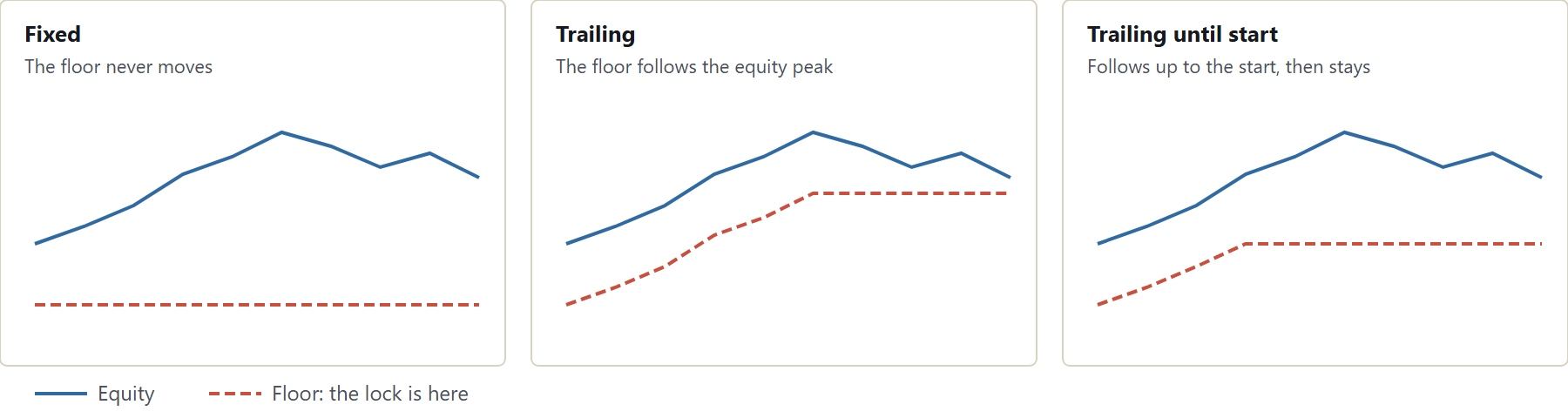
| Type | The floor | 100,000 $, 10 %, peak 104,000 $ |
|---|---|---|
| Fixed | Start capital minus the limit | 90,000 $ |
| Trailing | Highest equity minus the limit | 94,000 $ |
| Trailing until start | Follows up to the start, then stays | 94,000 $, at most 100,000 $ |

Set the reset hour in server time. A wrong reset hour is the most common reason for a difference from your provider's numbers.
The emergency brake works only below your max drawdown. With an 8 % or 6 % limit, the default of 8 % does nothing. Set it lower, for example 6.5 % or 5 %.
11. The lock

When a limit is reached, all positions close on all symbols, pending orders are deleted, and anything new is closed at once. The state is stored, so a restart does not lift it.
The guard acts on the whole account, on every magic number. If another EA trades on this account, its trades are closed too.
| Lock | Ends |
|---|---|
| Daily limit | With the next trading day |
| Max drawdown | Only with a reset |
| Emergency brake | Only with a reset |
There are two ways out, both in the input window on purpose (F7):
- Lift TODAY's daily lock once. For a real mistake. Once in 7 days, daily lock only. Set it back to false.
- Reset stored status + limits ONCE. For a new challenge. Set it back to false right away.
12. Discipline rules
These block new trades only. Open positions stay under your control.
| Rule | Default |
|---|---|
| Day stop at 60 % of the daily limit | On |
| Trades per day | 3 |
| Break after losses in a row | 3 losses, 30 min |
| News lock before and after high impact | 15 min each |
| Max open risk of all positions | 3 % |
| Spread block | Off |
| Trading hours | Off |
| Max lots per trade | Off |
| Day goal, closes all and stops for today | Off |
| Close at a time, Friday close | Off |
Phone protection is on by default. A trade from your phone gets a stop by your risk, and lots above your maximum are cut, as long as MT5 runs.
13. Safe mode
Safe mode shows what your account can really take. One loss can only cost a share of what is left today.

Example. 100,000 $, daily limit 5 %, down 3,000 $, one open trade risking 500 $. Room: 2,000 - 500 = 1,500 $. At 33 % that is 495 $. Your 0.75 % chip would risk 750 $, so the size is cut, and the card shows SAFE.
14. Running a challenge
First check that your provider allows trade managers or EAs on your account type.
- Write down the account size, target, daily loss, max loss, drawdown type, reset time and minimum days.
- Enter the start capital and the reset hour.
- Run the assistant in Challenge with the fitting profile, or Custom.
- Open a tiny trade, and compare the numbers with your provider's dashboard.
| Setting (example, 100,000 $ two-step) | Value |
|---|---|
| Profile | 2-Step |
| Risk base, risk | Start capital, 0.5 % = 500 $ |
| Reward:risk | 2R |
| Trades per day | 3 |
| Day stop, safe mode, news lock | On |
This shows the method, not a recommendation. When the target and the minimum days are reached, a card offers Switch to funded.
15. Pass chance, EV, Kelly, buffer, calendar
Open the Calendar page. The pass chance plays through 2,000 simulated challenges from your current account state, with your own win rate and payoff.
Click each risk chip in turn and watch the pass chance. Most traders are surprised how fast it falls as the risk grows.
| Number | Meaning |
|---|---|
| EV | Average result per trade in R |
| Kelly ½ | Half Kelly. An upper limit, not a size to use. |
| Buffer | How many full losses you can still take |
The calendar shows each day as a colored cell, plus win days, profit factor, best and worst day, win rate and consistency.
These are estimates from your past trades, not forecasts. Consistency is a display. It warns, but it does not block.
16. Funded accounts and news
On a funded account, the target becomes your payout target, 5 % by default. Many traders lower their risk here, because losing the account costs income.
| Rule on your account | Tool |
|---|---|
| No trades around news | News lock with your minutes |
| No weekend holding | Friday: close all |
| Max lots | Max lots per trade |
| Consistency | Calendar |
| Certain hours only | New trades from / until |
News comes from the calendar built into MT5, for the symbol's two currencies. You see it in the top strip, on the News page, and as a sound 5 minutes before.
The news lock blocks sending, not filling. Delete pending orders before news.
17. Keys
| Key | Action |
|---|---|
| 1 / 2 | BUY / SELL (press twice) |
| 3 | Close symbol (press twice) |
| 4 / 5 / 6 | BE+ / risk-free / partial |
| 7 | Reverse (press twice) |
| 8 / 9 / 0 | Market or pending / planner / focus |
| - | Fold the panel |
| Esc | One step back |
| Del | Delete the pending order under the mouse |
18. Questions
Nothing happens when I hold BUY. Check that Algo Trading is green, "Allow Algo Trading" is ticked, the market is open, and read the line under the buttons.
My right-click menu has gone. The last item, MT5 menu, opens it on the next right click, or turn off Own right-click menu.
My daily loss differs from my provider's. Check the reset hour, then "Daily loss counted from", then the start capital.
The lots look too small. Look for SAFE on the entry card, and check the risk base.
Does the guard work when my PC is off? No. Use a VPS, or leave MT5 running. Your stops at the broker work anyway.
Do I need it on every symbol? No, one chart guards the whole account. Planner and trailing act on their own chart's symbol.
Why can I not click in the Strategy Tester? MT5 does not pass clicks to an EA there. The demo shows the display with automatic test trades.
Does it work with my EA? Yes, with a different magic number. Only a lock closes the other EA's trades.
Limits you should know
- The guard, trailing, alarms and time rules need MT5 running with Algo Trading on.
- Closing at a limit is a market order. A fast market or gap can fill past it.
- Your provider's numbers are the ones that count. The profiles are templates.
- MetaTrader 5 only. No signals, no strategy.
This post covers the essentials. The PDF has 97 pages, with every setting, every input and every message.
Download the guide (PDF, English)
DRX Smart RR on the MQL5 Market →
Trading leveraged products involves a high risk of losing money. DRX Smart RR is a software tool. It gives no investment advice and makes no promise of profit, of passing a challenge or of keeping an account. Simulated numbers are estimates. Test on a demo account first.




