TPO Profile
- Indicators
-
Simon Draxler
 # 🛠️ Professional Trading Infrastructure & Indicators for MetaTrader
 - Version: 5.0
- Updated: 6 October 2026
- Activations: 5
DRX Market Profile TPO — classic Market Profile (TPO chart) for MetaTrader 5
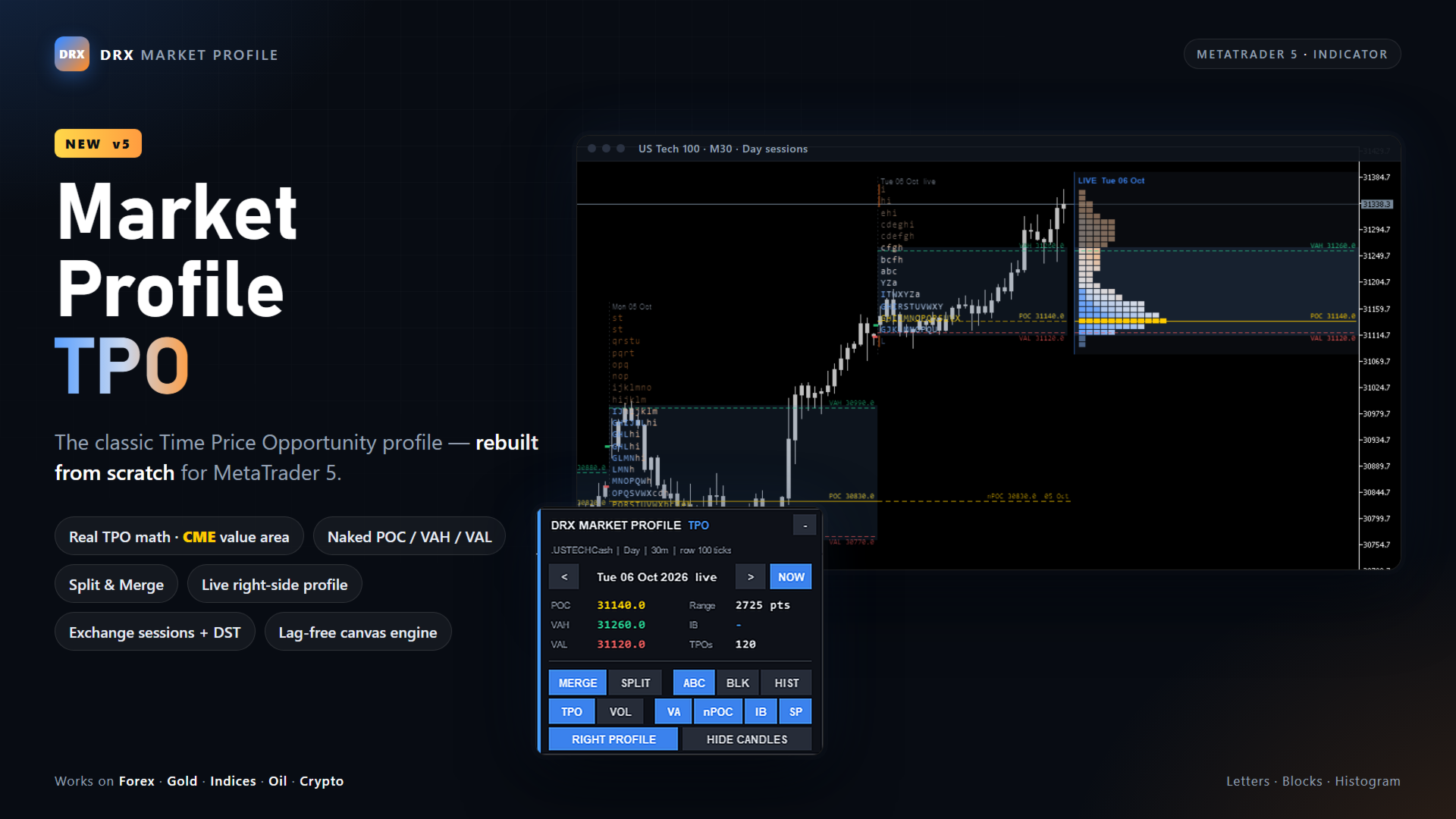
DRX Market Profile TPO draws real Time Price Opportunity profiles directly on your MT5 chart: TPO letters, Point of Control (POC), Value Area High and Value Area Low (VAH / VAL), Initial Balance, single prints and naked POCs — for every session, on any symbol.
Version 5 is a complete rebuild: a lag-free canvas engine instead of thousands of chart objects, correct TPO math, exchange session presets with daylight saving time, split and merge view, a live right-side profile and an on-chart control panel.
How does Market Profile work? Read the guide
Key features
- Real TPO calculation — one TPO per period and price row, POC and value area by the CME 2-row method
- POC and value area based on TPO count or on volume — switch with one click
- Classic TPO letters, blocks or histogram — split or merged profiles
- Letters colored by time: early periods blue, late periods orange
- Naked POC, VAH and VAL extended until price trades back to them
- Live profile of the running session at the right chart edge
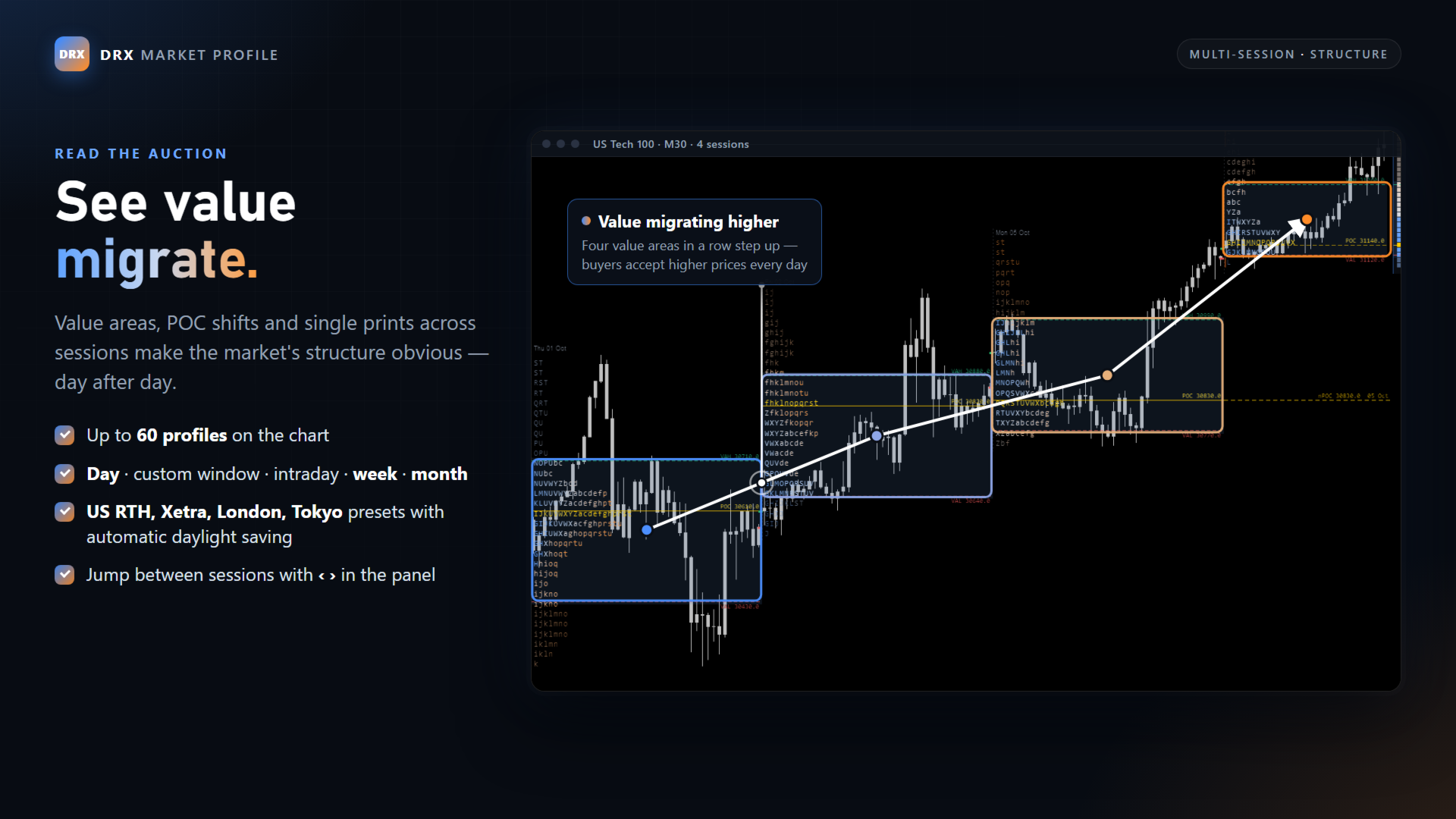
- Session presets: day, custom window, US RTH, Xetra, London, Tokyo, intraday blocks, week, month
- Automatic daylight saving time for exchange sessions
- Initial balance with extensions, single prints and excess tails
- On-chart panel with session navigation, key levels and all view switches
- Up to 60 profiles on the chart, instant redraw on zoom and scroll
Real TPO math — POC and value area you can trust
Every session is divided into periods (30 minutes by default). Each period prints one TPO on every price row between its high and low. The Point of Control is the row with the most TPOs; ties are resolved toward the middle of the range. The value area is built outward from the POC by the CME method — two rows above are compared with two rows below — until the chosen percentage is reached (70 % by default, adjustable).
Prefer a volume profile view of value? Switch the basis to Volume and POC and value area are calculated from traded volume (real volume where your broker provides it, tick volume otherwise). The TPO letters stay the same.
All sessions share one price grid, so POCs and value areas of different days can be compared exactly. The row size is chosen automatically from the typical session range, or set manually in ticks.
Letters, blocks or histogram — split or merge
Merge shows the classic Market Profile shape: all periods collapse to the left and form the distribution. Split places every period in its own time column, aligned with the candles, so you see how the auction built the day period by period.
The display stays readable at every zoom level. When you zoom out, price rows are merged automatically instead of shrinking the font. If the letters of a profile no longer fit into the width of its session, the indicator switches to blocks or a histogram — profiles never overlap the next session.
Pure TPO mode hides the candles with one click and restores your chart colors when you switch back or remove the indicator. Colors adapt automatically to dark and light chart backgrounds.
Naked POC, VAH and VAL
A naked POC is the Point of Control of a finished session that price has not traded back to yet. The indicator extends it to the right with price and date until it is touched. Naked VAH and VAL can be enabled as well. Up to 60 past sessions are scanned.
Live right-side profile
The developing profile of the running session is shown a second time in the chart shift area at the right edge — next to the current price, with live POC, VAH and VAL and price labels.
Sessions and time zones
- Day — 24 hours from a configurable day start (server time)
- Custom window — any start and end time, also across midnight
- US stocks RTH — 09:30 to 16:00 New York time
- Xetra — 09:00 to 17:30 Frankfurt time
- London — 08:00 to 16:30 London time
- Tokyo — 09:00 to 15:00 Tokyo time
- Intraday blocks of 1, 2, 3, 4, 6, 8 or 12 hours
- Week and month
Exchange presets are converted from exchange time to your broker's server time, including daylight saving time in the USA and Europe. The broker's GMT offset is detected automatically. Weekends and days without data are skipped.
Initial balance, single prints and tails
The initial balance (first hour by default) is marked with a bar at the start of each profile and dotted IB high / IB low lines. Extensions of the IB range (1.5x and 2x by default, freely configurable) show typical targets. Single prints inside the profile and excess tails at the extremes are marked automatically.
On-chart control panel
- Step through past sessions with ‹ › or Ctrl + arrow keys — NOW jumps back to the live session
- POC, VAH, VAL, range, initial balance and TPO count of the selected session
- Merge / Split, Letters / Blocks / Histogram, TPO / Volume
- Value area, naked levels, initial balance, single prints, right profile and candles on or off
- Collapse the panel to a slim title bar — your settings survive timeframe changes
Fast and clean
The whole profile is drawn on a single canvas: no thousands of chart objects, no flicker, instant redraw when you zoom or scroll — even on weekends when no ticks arrive. Only the running session is recalculated live.
How traders use Market Profile
- Value area as the zone of accepted prices — watch the edges and the return into value
- Naked POCs as targets and reaction levels
- Initial balance breakouts and IB extensions
- Single prints and tails to spot fast, one-sided moves and rejected prices
- Value migration across sessions to read the direction of the auction
DRX Market Profile TPO is an analysis tool. It does not open trades.
Markets and timeframes
Works on Forex pairs, gold and silver (XAUUSD, XAGUSD), stock indices (US100, US500, GER40 and more), oil, crypto and every other symbol in MetaTrader 5. The row size adapts to the tick size of each instrument. Recommended chart timeframes: M5 to M30 for daily sessions, H1 for weekly profiles.
Inputs
- Session: session type, day start, custom window, intraday block length, number of profiles
- Time zone: automatic broker offset, manual offset, daylight saving rule
- TPO calculation: period length, ticks per row or auto, TPO or volume basis, value area %, initial balance periods and extensions
- Display: layout, style, coloring, minimum row height, font, profiles in front of or behind candles, every level on or off
- Naked levels, right-side profile, panel position, colors, refresh interval
Tip for the free demo
Run the demo in the Strategy Tester in visual mode on an M15 or M30 chart. The broker GMT offset cannot be detected in the tester — for the exchange presets set it in the inputs (default: GMT+2 with US daylight saving time).
Questions or ideas for the next version? Send me a private message on MQL5.