Prop Sizing Trade Copier EA

💭 DOES THIS SOUND FAMILIAR?

  • Do you find the lot calculation slow and boring?
  • Does it get worse with every new currency pair?
  • Are you afraid of hitting a loss limit and losing the account?
  • Does every lost account hurt more than the last one?

I was caught in this loop myself. I built this tool for my own use.

📌 WHAT THIS IS

This is an Expert Advisor.

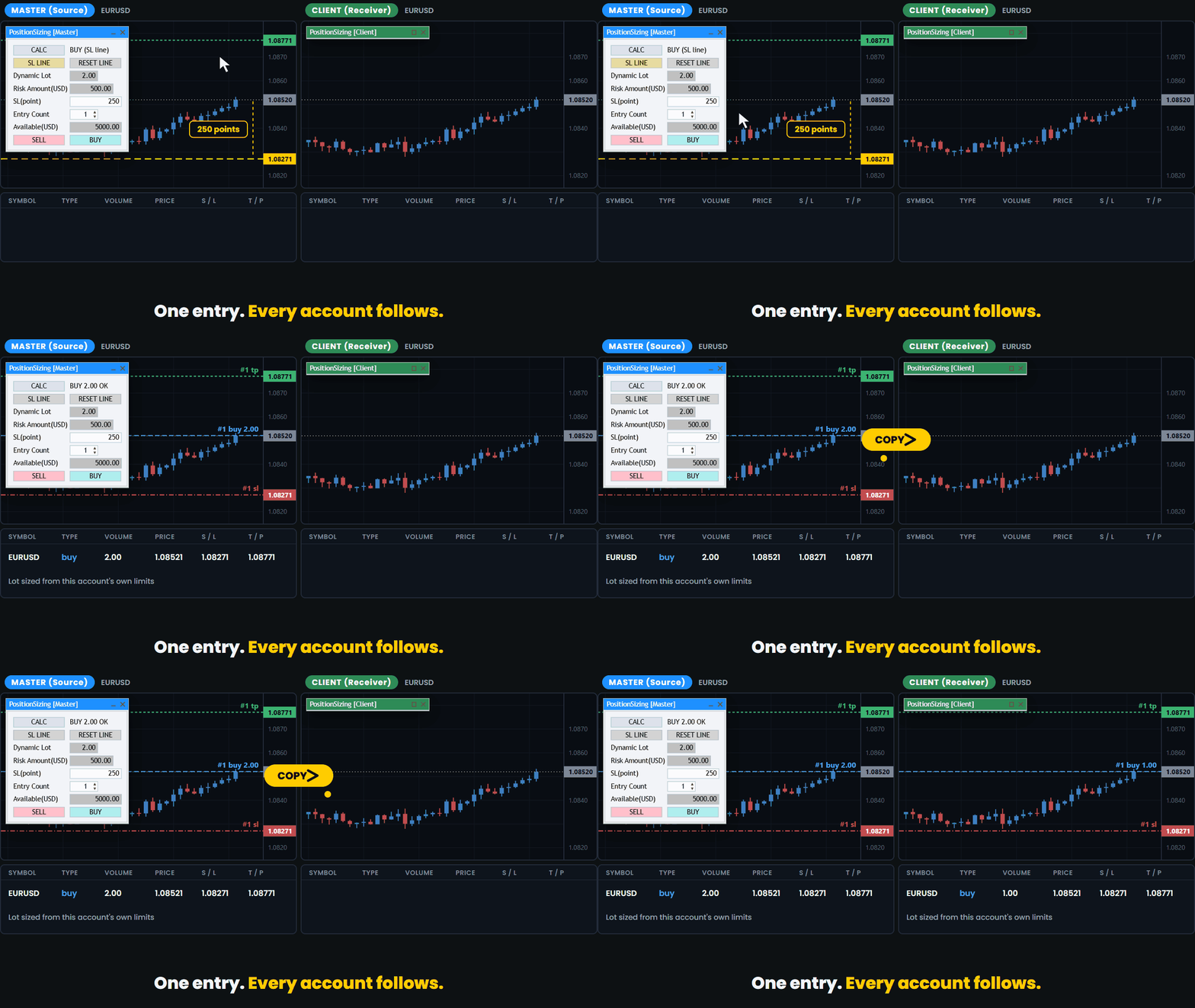
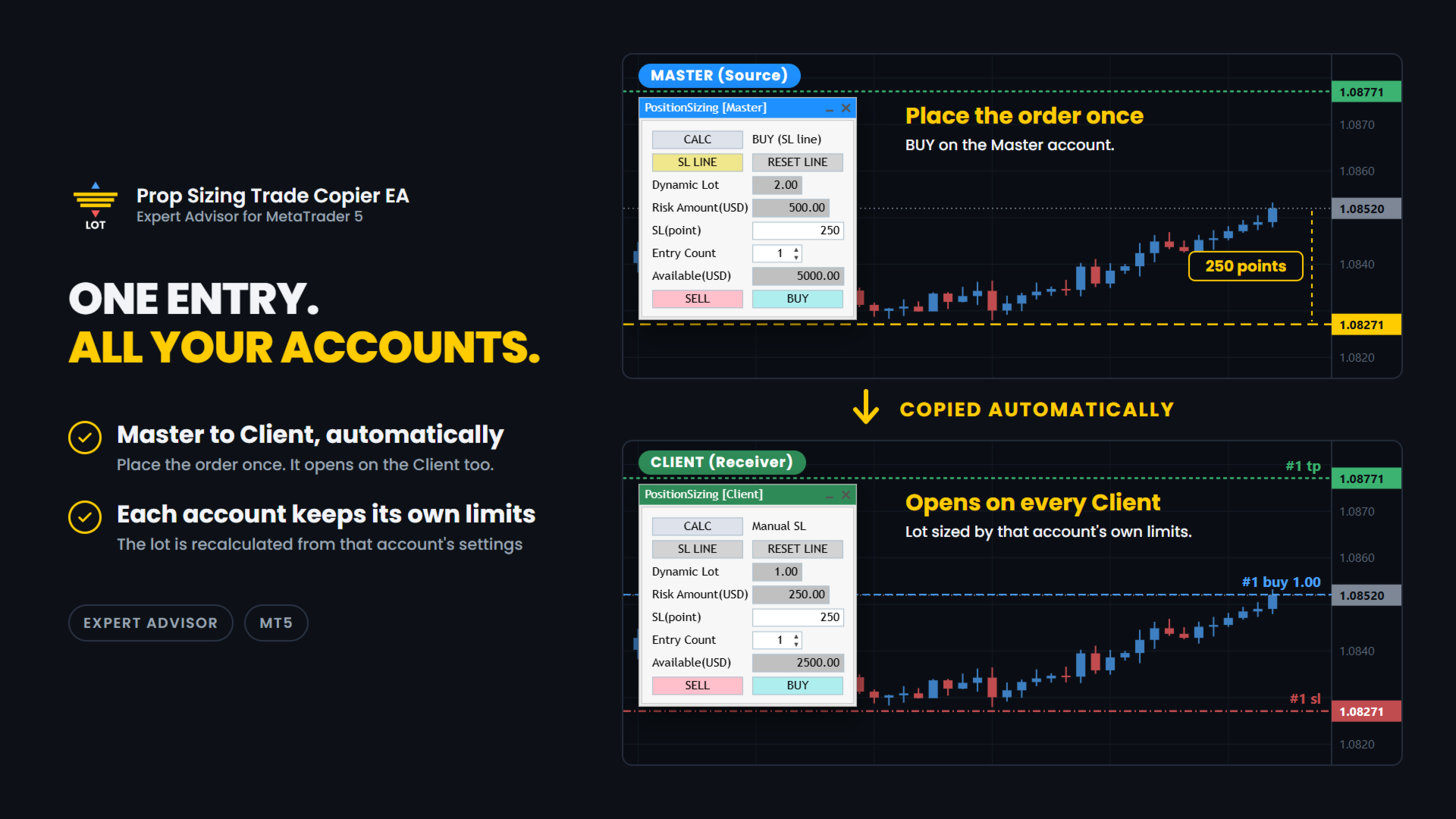
It lets you run several prop firm accounts from one PC. You enter on your main account and the trade is copied to the other accounts.
Each account calculates its own lot from its own balance and its own loss limits.

✅ WHAT IT DOES

Pick the role and match the magic number. That is the setup.

Copy:

  • Master and Client roles. One terminal is the Master, which is the source.
    The others are Clients, which receive.
    The title bar is colour coded so you can see the role at a glance: blue for Master, green for Client.
  • Copying happens between MT5 terminals on the same PC, through a shared file.
    This is not an internet signal service and nothing is sent outside your computer.
  • If a Master and a Client are set up inside the same MT5 terminal by mistake, the one that started later is disabled automatically and a warning is shown.
  • The Master can hold up to 100 positions.
  • A cooldown stops the same position from being copied twice while the first copy is still waiting to be confirmed.
    The default is 10 seconds and you can change it.
  • Each Client sizes its own lot.
    A 50,000 account and a 10,000 account do not take the same lot for the same trade.

Trade panel (included):

  • Drag the stop-loss line and the lot size updates at once.
  • BUY and SELL buttons send the order with the calculated lot.
    The stop loss is the price of the line.
  • Direction is read from the line. Below the price is BUY. Above the price is SELL.
  • Auto TP. The TP is set from your Risk-Reward setting, and the TP preview line follows the stop-loss line.
    You can turn it off with the Auto TP Setting input.
  • The risk is shown in your account currency, not only in percent.
  • Available shows how much of your allowed loss is still left, in your account currency.
  • Round-trip commission is measured from your own trade history.
    It is shown for reference and is not included in the risk amount.
  • Entry Count from 1 to 10 for split entries. Lot and risk are shown for one entry.
    An "x2", "x3" ... mark appears next to the risk.
  • Fixed lot mode when you do not want the calculation.
  • Entry Count and the stop-loss line are stored per chart.
  • The panel can be collapsed to its title bar.
  • I use it live on FX majors and crosses.
    It has also been checked on gold (XAUUSD), BTCUSD and indices such as US30. Brokers set symbols differently, so check with a small lot first.

Order safety:

  • If the button you pressed and the line do not agree, no order is sent.
  • If the line is inside the spread, no order is sent.
  • The spread is checked again when you press the button.
    If it is wider than your Maximum spread setting, the order is cancelled.
  • If the stop-loss distance is zero or less, no order is sent.
  • If the calculated lot is zero, no order is sent.
    This also happens when no lot fits inside the risk you allowed.
  • A double-click on the button does not send two orders.
  • If the currency conversion for your account is not available, the tool stops.
    It does not send a guessed lot.
  • After the order is filled, the preview lines are removed.

🧪 HOW THE LOT IS CALCULATED

The tool works in four steps. Every account does this for itself.

1. Available. How much you can still lose.
It comes from your Initial Balance, Maximum Overall Loss (%) and Maximum Daily Loss (%).
The limit you would hit first is used.

2. Divide by Maximum allowed losses. This is how many losing trades in a row you want to survive.

3. Cap the risk. Maximum Risk per Trade (%) of your Initial Balance is the most one trade can risk, so the risk stays the same from trade to trade.
Set it to 0 to turn the cap off.

4. Work back from the stop. The distance to your stop-loss line is turned into a lot size for the current symbol.

You enter the limits your firm gives you. The tool does the rest.

🔧 SETTINGS

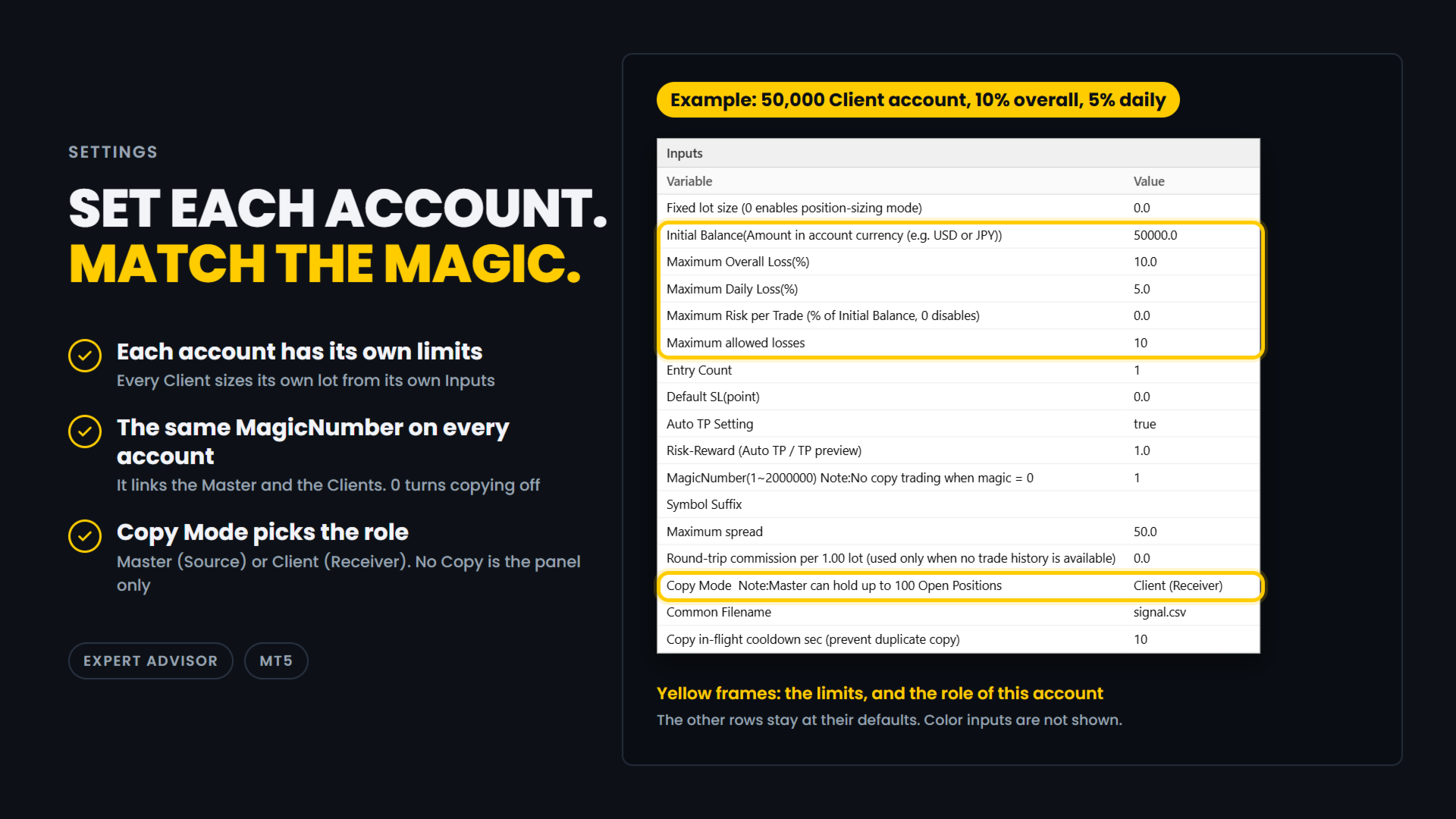
Example: a 50,000 Client account with a 10% overall loss limit and a 5% daily loss limit.

  • Fixed lot size: 0.0
    0 means each account calculates its own lot.
    Enter a lot size only if you want a fixed lot, copied orders included.
  • Initial Balance: 50000.0
    The starting balance of this account, in its currency.
    Every account has its own settings. Set 0 to use the current balance instead.
  • Maximum Overall Loss(%): 10.0
    The overall loss limit, in percent of Initial Balance.
  • Maximum Daily Loss(%): 5.0
    The daily loss limit, in percent.
    It is measured from the balance at the start of the day.
  • Maximum Risk per Trade: 0.0
    A cap on the risk of one entry, in percent of Initial Balance.
    0 turns the cap off.
    If your firm limits the risk of a single trade, entering about half of its limit leaves a margin.
  • Maximum allowed losses: 10
    How many losing trades in a row you want to survive.
  • Entry Count: 1
    How many orders one press of BUY or SELL sends on this account, from 1 to 10. Each order has the calculated lot.
    It is not part of the lot calculation.
    With Maximum allowed losses 10 and Entry Count 2, the number of losing trades you survive is 5 (10 / 2).
  • Default SL(point): 0.0
    The starting distance of the stop-loss line, in points.
    0 places the line at half the range of the last 20 bars.
  • Auto TP Setting: true
    true sets a TP on every order, copied orders included. false sends orders without a TP.
  • Risk-Reward: 1.0
    The TP distance as a multiple of the stop-loss distance.
    1.0 puts the TP as far from the entry as the stop loss.
  • MagicNumber(1~2000000): 1
    The link between the Master and the Clients. Use the same number on all of them.
    0 turns copying off.
  • Symbol Suffix: empty
    The ending your broker adds to symbol names, such as .m.
    Enter the one of the account this EA runs on, and leave it empty if there is none.
    It lets EURUSD on one broker match EURUSD.m on another.
    It is also used to find the currency pair that converts the risk into your account currency.
  • Maximum spread: 50.0
    The spread limit, in points (50.0 is 5 pips on a 5-digit symbol).
    If the spread is wider when an order is about to be sent, a copied order included, the order is cancelled.
    0 means no limit: the spread is not checked.
  • Round-trip commission per 1.00 lot: 0.0
    Used only when there is no trade history to measure from.
    It is shown for reference and is not included in the risk amount.
  • Copy Mode: Client (Receiver)
    No Copy is the panel only.
    Master (Source) copies the trades you enter on this account.
    Client (Receiver) copies the Master's trades.
    The title bar is blue for Master and green for Client.
  • Common Filename: signal.csv
    Leave it as it is.
    The Master and the Clients share this file through the MetaTrader Common folder, so use the same name on all of them.
  • Copy in-flight cooldown sec: 10
    After a Client sends a copy order, it waits this many seconds before it copies the same position again.
    This stops double copies.

In this example, on a day that starts with a balance of 50,000, Available is 2500.00, because the 5% daily limit is reached before the 10% overall limit.
The Client sizes its own lot from the risk of one entry, which is 250.00 (2500.00 / 10).

⚠️ IMPORTANT

  • When DefaultSL is 0, which is the default, the first stop-loss line is placed below the current price, at half the range of the last 20 bars of the timeframe you are on.
    Because the distance comes from the range, it may be an odd number such as 119 pips, and it changes when you switch timeframe.
    This is intended.
    Set DefaultSL to a fixed value if you want the same starting distance every time.
  • This EA and Prop Sizing Lot Size Calculator cannot run on the same chart.
    If the indicator is attached to the same chart, this EA will notify you and remove it.
    The stop-loss line position is not carried over. This is by design.
  • The older free Prop Sizing EA does not have this detection.
    Do not run it on the same chart as Prop Sizing Lot Size Calculator.

📋 ABOUT PROP FIRM RULES

Prop firms have different rules about third-party tools.
Some do not allow Expert Advisors that you did not write yourself.
Some also restrict third-party indicators, even ones that only calculate the lot size.
Some firms also limit copying between your own accounts. Rules can change.
Check the rules of your own firm before you use this product.
Whether to use it is your decision.

🎯 ONE THING ONLY

This tool does one thing. You enter on one account, the others follow, and each of them sizes its own lot.

🔗 ALSO AVAILABLE

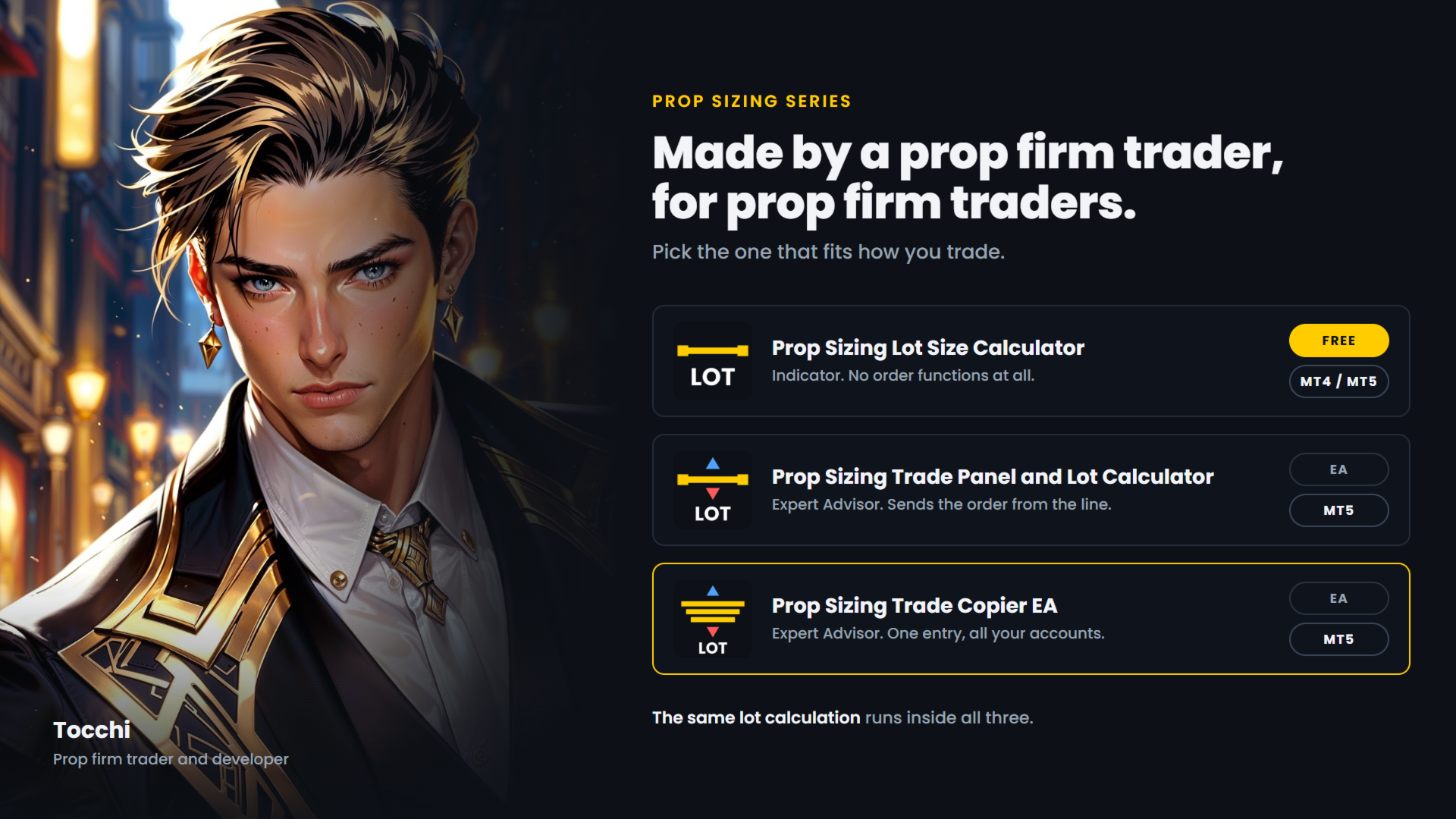
  • Prop Sizing Lot Size Calculator - free.
    Calculation and stop-loss line only, no order functions. MetaTrader 5.
  • Prop Sizing Lot Size Calculator MT4 - the same indicator for MetaTrader 4. Free.
  • Prop Sizing Trade Panel and Lot Calculator - the trade panel without the copy function.
    MetaTrader 5.
Recommended products
Follow a master account from another terminal on the same computer. CopyTrade Local Receiver is the follower side of a trade copier. Paste the Receiver code shown on CopyTrade Local Sender (CT-XXXX-XXXX) into its inputs, and this account opens, modifies and closes the same trades as the master. The data is exchanged through the common data folder of MetaTrader on the same computer. Nothing is sent over the internet. The master may be MT4 or MT5 and may be with a different broker. What is copied
LT Trade Copy MT5   is a high-performance utility designed for traders who need to replicate trades between MetaTrader 5 (and MetaTrader 4) terminals on the same computer or local network with minimal latency and absolute precision. Whether you are an account manager, a signal provider, or a trader operating across multiple brokers simultaneously, this tool provides the comprehensive control you require. Key Features: Dual Mode (Sender/Receiver):   The same Expert Advisor can act as a   Sender
A local trade copier for MetaTrader 5. It copies positions between MT5 terminals on the same Windows PC or VPS and sizes each copy from both brokers' contract specifications (contract size, tick value, account currency), so a copy carries the same exposure even when the two brokers define a lot differently. It never opens a second copy of the same master position. What it does You attach the same EA to one chart in each terminal: In the master terminal, set the Mode input to Master. In each rece
Trade Copier Simple Guide Trade Copier is an Expert Advisor (EA) for MetaTrader 5 (MT5) that lets you automatically copy trades from one account (the "Master") to another (the "Receiver"). It's designed for users who want to duplicate trading strategies across multiple accounts on the  same computer . No internet or external servers are needed—it uses a shared file on your machine to transfer trade info securely and quickly. How It Works Master Mode : Attach the EA to a chart on your main tradin
Signalator Local Trade Copier MT5 is a fast local trade copier for running Master and Receiver terminals on the same computer or VPS. It supports cross-platform copying between MT4, MT5 and cTrader terminals in any direction: MT4 ↔ MT5 ↔ cTrader , and all other combinations. Copy trades locally without an external cloud relay. The Master publishes trade activity into a local bridge, and each Receiver controls what to copy, which Master accounts to accept, how to map symbols, how to size lots, an
Fast copier for sending trades to multiple MT4 / MT5 accounts. MT5 Trade Copier Master EA sends trades instantly from your master account to one or multiple slave accounts. Supports copying to: • MT5 accounts • MT4 accounts Perfect for: • Multi-account traders • Signal providers • Account managers • Personal account mirroring Main Features • Fast local trade copying • Low latency execution • Multiple slave accounts support • Copy open positions on startup • Stable file-based communication • Easy
OB FVG Trade Copier: Unified Master & Slave EA Version: 2.00 Type: Trade Copier / Risk Management Utility Compatibility: MetaTrader 4 & MetaTrader 5 (Cross-compatible codebase) Overview The OB FVG Trade Copier is a professional-grade, unified trade copying system designed to mirror trades between Master and Slave accounts seamlessly. Built with a unified architecture, a single EA file serves as both the sender (Master) and receiver (Slave) simply by toggling the EA Mode in the settings. It uti
FREE
Nasdaq Reversion
Jaume Sancho Serra
Nasdaq Reversion A lightweight long-side mean-reversion Expert Advisor for the Nasdaq 100 index (NQ / USATECHIDXUSD) on H1. No martingale. No grid. No hedging. One position at a time. A hard stop on every trade. It waits for the index to get oversold within its trend, then takes one clean long with a fixed stop. No averaging into losers, no recovery games. How it works Oversold trigger: an RSI-based entry when the Nasdaq dips into oversold territory. Trend filter: an EMA filter keeps entries ali
FREE
Professional Trade Panel — All-in-One Smart Trading Tool This is a professional visual trading panel designed for the MetaTrader platform. It consolidates the most frequently used trading operations into a single compact and draggable interface, significantly improving execution efficiency and reducing the risk of misoperations. Core Features One-Click Close All: Close all open positions on the current symbol with a single click. The button displays real-time total floating profit and loss s
OTE Trade Copier MT5
Olaoluwa Oluwaseun Bamitale
OTE Trade Copier MT5 Trade Copier & Prop Firm Risk Manager Copy trades locally between MT5 terminals and across MT4/MT5 platforms on the same PC or VPS while protecting your funded accounts with advanced risk controls. IMPORTANT: Send me a message for the Complete User Manual Before Installation Why Traders Choose OTE Trade Copier MT5 Supports MT5 to MT5 trade copying Supports MT4 to MT5 and MT5 to MT4 when used with the MT4 version Designed for prop firm and funded account traders Daily drawd
EA Local Trade Copier Pro MT5: The Ultimate DLL-Free Trade Duplicator Are you tired of complicated trade copiers that require unsafe external DLLs, crash your terminal, or confuse you with separate "Master" and "Client" files? Experience the next generation of trade copying with EA Local Trade Copier Pro MT5. Engineered for maximum stability, lightning-fast execution, and ultimate simplicity, this utility allows you to seamlessly copy trades between multiple MetaTrader terminals on the same Wind
SonicTradeCopier MT5
Farrukh Aleem
5 (1)
SonicTradeCopier: (Best for scalping) Easy Fast Reliable trade copier. Copy trades from one terminal to an other (internet copy feature coming soon.) MT4 to MT4. MT4 to MT5. MT5 to MT5. MT5 to MT4. MT4/MT5 to any other platform copy possibility for custom made solutions. Reverse trading. Advance filters for traders. Features: (Setting up copying policies) Sender only has to setup  signal name and start sending signals [ You must start signal sender first always ]. Receiver sets up  signal nam
News Risk Guard protects the positions you already hold when a scheduled economic release is about to hit. It is a risk tool. It does not predict direction, it does not look for entries of its own, and it makes no claim about profit. The calendar is built into the product: 4,101 releases covering 15 recurring events. No internet permission, no DLL, no file to install, and it behaves the same in the Strategy Tester as it does on a live chart. WHAT IT DOES 1. Event protection window    A confi
Utility for copying transactions from one MT5 account or MT4 account to another MT5 account.  Demo-version can be downloaded   here . You can copy positions between Netting and Hedging accounts in any combination. You can set filters by the name of the instrument and the magic numbers of the positions that will be copied. So far, the source sends information only about market positions. Pending orders are processed when they turn into open market positions. On one terminal, the advisor is laun
Local Trade Copier copies positions and orders from one MetaTrader 5 terminal (master) to one or more MetaTrader 5 terminals (receivers) on the same computer. It works locally and does not send data over the internet. Key features - One master, multiple receivers, separated by channel name. - Volume modes: multiplier, fixed lot, balance ratio, equity ratio or risk-based (requires a stop loss). - Symbol mapping between brokers (InpSymbolMap, prefix and suffix); ambiguous or unavailable symbols a
Copy MT5 MT5
Andriy Motuzka
Copier of deals from MetaTrader 5 to MetaTrader 5 ( MetaTrader 4<->MetaTrader 4 version is available ; with both versions, you can copy MetaTrader 5<->MetaTrader 4, MetaTrader 4<->MetaTrader 5, MetaTrader 5<->MetaTrader 5, MetaTrader 4<->MetaTrader 4). There is a demo version (restricting by grades and by lots) Works only in the mode of hedging Spread filter. Select the best price (start copying positions with a profit or loss). Configure the lot size, fixed or ratio-based (provider signals can
Trade Dispensary Connect is an MT5 EA utility designed to send trades in JSON format to Trade Dispensary trade copier via Webhook. If Trade Dispensary is running on your local machine, simply use http://127.0.0.1 :5000/webhook/mt5/[ACCOUNT_ID] as webhook URL. If Trade Dispensary is running on another pc, obtain the address/domain of the machine. A tunneling service such as Pinggy or Ngrok is recommended for this scenario. This MT5 EA is specifically designed to work with Trade Dispensary trade
FREE
Trading Motivation Display MT5
AL MOOSAWI ABDULLAH JAFFER BAQER
• Please test the product in the Strategy Tester before purchasing to understand how it works. • If you face any issues, contact me via private message—I’m always available to help. • After purchase, send me a screenshot of your order to receive a   FREE EA   as a gift. Trading Motivation Display – Stay Inspired, Stay Profitable! Trading is a game of patience, discipline, and resilience. Staying motivated is crucial for long-term success in the markets. That's where Trading Motivation Display c
The Superior Remote Trade Copier is a comprehensive MT5 utility that copies trades remotely and privately via Telegram, eliminating the need for external VPS bridges or third-party web servers. The ecosystem consists of a Master EA, a free Desktop App, and a Client EA. Master (Transmitter) Trade Broadcasting: Transmits market orders, pending orders, position modifications, and partial/full closures directly via Telegram. UI Dashboard: Interactive on-chart panel for quick bulk actions (Close All,
Reverse copier
Mariia Rudkovska
Try turning dust to gold with Reverse copier! Unprofitable EA or strategy can become profitable with reversing the direction of it's trades. As of now only MT5 → MT4 bridge is available, new functions will be added accordingly. EA's that work best with Reverse trade system is single-shot or scalping EA's. How it works: When a trade is executed on Master account, Reverse copier sends special log to the common txt file with a command to "open/close, buy/sell, symbol, volume...etc".  Reverse slave
FREE
Please download Master EA here =   https://www.mql5.com/en/market/product/186073 MT4 Version =  https://www.mql5.com/en/market/product/186079 Free Demo Version =  https://c.mql5.com/6/1033/COPYTRADE_BIN7D.zip User Manual : download here Best Trade Coppier for MT5. EA Trade Copier is a powerful and reliable trade copying solution that transfers trades from one Master account to multiple Slave accounts in real time. Whether you manage multiple trading accounts, investor accounts, VPS terminals, o
TradePulse Commander Pannel
AL MOOSAWI ABDULLAH JAFFER BAQER
• Please test the product in the Strategy Tester before purchasing to understand how it works. • If you face any issues, contact me via private message—I’m always available to help. • After purchase, send me a screenshot of your order to receive a   FREE EA   as a gift. Introducing the ultimate Trade Management Panel designed to streamline your trading operations and boost your efficiency! Our advanced panel is packed with powerful features to simplify your trading tasks and provide real-time
QBrain Strategy Auditor
Nesrine Emilie Darragi
QBrain Strategy Auditor helps users identify incomplete or weak evidence before drawing conclusions from closed MetaTrader 5 outcomes. The utility is designed for strategy review. It does not open, modify, or close trades. It does not predict returns and does not certify a strategy. Main functions - Reads closed terminal account history in a selected date range or a normalized CSV placed in the MT5 file sandbox. - Checks whether the available evidence is sufficient for analysis. - Displays k
Gold Veritas MT5
Marat Baiburin
3.19 (21)
Discount on all my products until 01.05.  Gold Veritas   is a fully automatic Forex Expert Advisor for quiet hours. Monitoring the work of the adviser:  https://www.mql5.com/en/users/bayburinmarat/seller Attention, from 20.02.2023 it is planned to increase prices for all my products by 30%. Correct GMT setting:   https://www.mql5.com/en/blogs/post/743531 All the parameters necessary for the most understandable and simple optimization are available in just 6 settings. You can adapt the adviser to
Currency Meter Dashboard Trader All 28 symbols should be added to market watch, then the utility starts to load data and the it does the calculations! What does this utility do? This utility shows the strength of each 8 major currencies. These eight major currencies are AUD - CAD - CHF - EUR - GBP - JPY - NZD - USD. For calculating the METER of each currency, we calculate the average of each symbol which has this currency in it. (all of them are 28 symbols like EURUSD) We have two sides: posit
• Please test the product in the Strategy Tester before purchasing to understand how it works. • If you face any issues, contact me via private message—I’m always available to help. • After purchase, send me a screenshot of your order to receive a   FREE EA   as a gift. Hedge Fragmentation Utility - Comprehensive Product Description Overview The Hedge Fragmentation Utility is a professional-grade MetaTrader 5 tool designed for forex traders who employ hedging strategies. This sophisticated util
Copier Master RAlabs (receiver) and Copier Provider RAlabs (signal source) — a system for local copying of trades between MetaTrader terminals on a single PC/VPS. It consists of two products: Provider (signal source) and Master (receiver/copier with a control panel). Provider is installed on the donor account (the account whose trades are being copied) — it publishes the trades. Master is installed on the recipient account — it reads the donors and opens copies; it hosts the entire copy setting
Trade Copier Pro for MT5
Kuldeep Krishnat Konde
MT5 to MT5 Trade Copier – Fast and Reliable Trade Copying Solution The MT5 Trade Copier is a powerful tool designed to copy trades seamlessly between MetaTrader 5 accounts with minimal latency and high accuracy. Built for speed, flexibility, and ease of use, the copier works across different brokers, even when symbols use different prefixes or suffixes. This Expert Advisor is suitable for professional traders, signal providers, fund managers, and traders who manage multiple accounts. Key Featur
Elite Telegram Trade Copier & Community Manager (v3.94) Welcome to the ultimate solution for professional Telegram signal copying and community management. This Expert Advisor is not just a standard copier – it is a fully automated Trade Management Engine , a Signal Analytics Tool , and a Marketing Funnel for your own Telegram channels. Whether you want to automate trades from your favorite signal providers or manage your own VIP and Follower channels simultaneously, this EA handles everything:
FREE
Multi Close Manager
Nourdin Ben Youssef
Multi Close Manager Multi Close Manager is a MetaTrader 5 trade management utility designed to manage existing positions without opening new trades. The utility can be used with manually opened positions or positions opened by another Expert Advisor. It provides several independent position-closing methods, stop management, take-profit management, Telegram notifications, scheduled protection zones and an on-chart emergency close button. The individual management functions can be enabled or disab
FREE
Buyers of this product also purchase
Trade Assistant MT5
Evgeniy Kravchenko
4.43 (216)
It helps to calculate the risk per trade, the easy installation of a new order, order management with partial closing functions, trailing stop of 7 types and other useful functions. Additional materials and instructions Installation instructions - Application instructions Line function -   shows on the chart the Opening line, Stop Loss, Take Profit. With this function it is easy to set a new order and see its additional characteristics before opening.   Risk management  - The risk calculation
Forex Trade Manager MT5
InvestSoft
4.98 (689)
Trade Manager MT5 is an advanced position size calculator and trade management tool for MetaTrader 5, designed to help traders plan trades faster, control risk more precisely, and manage open positions directly from the chart. It combines order placement, risk based lot calculation, Stop Loss and Take Profit management, Break Even, Trailing Stop, Partial Close, Equity Protection, and external trade management in one panel. Whether you trade forex, indices, metals, commodities, crypto, or future
Local Trade Copier EA MT5
Juvenille Emperor Limited
4.94 (149)
Local Trade Copier EA MT5 is a fast and flexible trade copier for copying and managing trades between multiple MetaTrader 5 accounts on the same Windows computer or Windows VPS. It combines local trade synchronization with Receiver-side controls for lot sizing, risk management, trade filtering, symbol mapping, trade management and account protection. Set up your Transmitter and Receiver terminals in about 1 minute and copy manual or EA trades between accounts at the same or different brokers. U
Telegram to MT5 MultiChannel Copier
Sergio Marquez Uroz
4.67 (21)
Telegram to MT5 Multi-Channel Copier   automatically copies trading signals from your Telegram and Discord channels straight to MetaTrader 5. No bots, no browser extensions, no manual copying. A signal arrives in Telegram or Discord and the EA opens the trade in your terminal within seconds. And before you copy a channel, the built-in backtester shows you what that channel would have done in your account. The product has two components: a Windows application that listens to your Telegram channel

News Trade EA MT5
Konstantin Kulikov
4.55 (11)
Present to you the useful robot that I have been using for several years. It can be used in both semi-automatic mode and fully automatic mode. >>> Chat <<< The program contains flexible settings for trading on the news of the economic calendar. It cannot be checked in the strategy tester. Only real work. In the terminal settings, you need to add the news site to the list of allowed URLs. Click Tools > Options > Expert Advisors. Check the option "Allow WebRequests for listed URL:". Add this (de
TradePanel MT5
Alfiya Fazylova
4.88 (170)
Trade Panel is a multi-functional trading assistant. The app contains over 50 trading functions for manual trading and allows you to automate most trading tasks. Application instructions: https://www.mql5.com/en/blogs/post/756482 Trial version of the application for a demo account: https://www.mql5.com/en/blogs/post/750865 How to install the application: https://www.mql5.com/en/blogs/post/756239 How to test the application in visual mode: https://www.mql5.com/en/blogs/post/770277 How to install
Copy Telegram signals with your own trading rules Telegram to MT5 Signal Trader automatically copies text-based trading signals from public and private Telegram channels and groups into MetaTrader 5. Manage multiple providers and MT5 accounts from one desktop app, with individual risk and trade settings for each provider . No Telegram bot or API setup needed for copying. Simply sign in with your own Telegram account by phone or QR code and select the channels or groups you have already joined. Y
FarmedHedge Pair Trading Dashboard
Tanapisit Tepawarapruek
5 (7)
Farmed Hedge Yield Farming | All Markets (Manual - Hybrid - Semi/Automated EA) VERIFIED TRADING RESULTS - Farmed Hedge Yield Axi Copy:  https://www.mql5.com/en/signals/2356376 - Farmed Hedge Yield Exn Copy:   https://www.mql5.com/en/signals/2356404 - Farmed Hedge Yield V Copy:  https://www.mql5.com/en/signals/2357156 IMPORTANT NOTICE: FarmedHedge is a MANUAL-FOCUSED TRADING UTILITY ,not a fully automated EA. Results shown on this Signal include manual trades and overall strategic management.
================================================================================ POC BREAKOUT - V20.72. Full Professional Grade Toolkit ================================================================================ POC Breakout is a full MetaTrader 5 trading dashboard for discretionary traders who want breakout signals, Point of Control (POC) context, volume profiles, order flow, market structure, news, alerts, and advanced trade planning in one professional workspace. Attached directly to you
Dealer Panel
Mian Rameez Ali
Dealer's Panel No signal decides anything here — a hand does. One click, and the panel calculates what's underneath: lot size from risk, target from a 30-step balance ladder that remembers exactly how far an account has climbed. Toggle between market and pending without touching an input field. Set a stop, and the take-profit can write itself — a fixed share of the balance, translated into price with no arithmetic left for the trader to get wrong. One trade live at a time; it won't let a seco
Exp COPYLOT CLIENT for MT5
Vladislav Andruschenko
3.97 (35)
Professional Trade Copier for MetaTrader 5 Fast, professional, and reliable trade copier for MetaTrader . COPYLOT allows you to copy Forex trades between MT4 and MT5 terminals with support for Hedge and Netting accounts. COPYLOT MT5 version supports: - MT5 Hedge to MT5 Hedge - MT5 Hedge to MT5 Netting - MT5 Netting to MT5 Hedge - MT5 Netting to MT5 Netting - MT4 to MT5 Hedge - MT4 to MT5 Netting MT4 version Full Description +DEMO +PDF How To Buy How To Install How to get Log Files H
Next Update — Version 2.52 Coming Soon! [NEW] Get Ready for 4 Major New Features Designed to Enhance Your Market Analysis and Trading Workflow We’re taking market analysis to the next level with 4   new features designed to meet your trading needs. Introducing: TRADE OVERVIEW DASHBOARD CONFLUENCE AT ZONE STRONG & WEAK HIGH/LOW OTE 1. TADE OVERVIEW DASHBOARD  A dashboard that helps you understand the overall market picture more easily, providing guidance to support your trading decisions and h
The product will copy all telegram signal to MT5 ( which you are member) , also it can work as remote copier.  Easy to set up, copy order instant, can work with almost signal formats, image signal,  s upport to translate other language to English Work with all type of channel or group, even channel have "Restrict Saving Content", work with  multi channel, multi MT5 Work as remote copier: with signal have ticket number, it will copy exactly via ticket number. Support to backtest signal. How to s
RETAILBERG FOOTPRINT CHART PRO — Order-Flow Workspace for MetaTrader 5 Version 7.00  |  Professional System  |  31 tools  |  One chart A full 150-page illustrated User Manual is included. Please read the full manual to understand this feature packed footprint chart elements and ui. https://www.mql5.com/en/blogs/post/777982 DEMO / STRATEGY TESTER — PLEASE READ FIRST
Grid Manual MT5
Alfiya Fazylova
4.73 (22)
Grid Manual is a trading panel for working with grid strategies. The utility is universal, has flexible settings and an intuitive interface. It works with a grid of orders not only in the direction of averaging losses, but also in the direction of increasing profits. The trader does not need to create and maintain a grid of orders, the utility will do it. It is enough to open an order and the "Grid manual" will automatically create a grid of orders for it and will accompany it until the close. F
MT5 to Telegram Signal Provider turns your trading account into a signal provider. Every trade action, whether manual, by EA or from your phone, is instantly sent as a message to Telegram. You can fully customize the format or use a ready-made template for quick setup. [ Demo ] [ Manual ] [ MT4 Version ] [ Discord Version ]     New: [ Telegram To MT5 ] Setup A step by step user guide is available. Key Features Ability to customize order details sent to subscribers You can create a tiered subs
The Patch
Mian Rameez Ali
The Patch It never opens a trade. It walks behind the ones that did. Every open position, every pending order — checked twice a second for the one thing that's easy to forget: a stop, a target. Found bare, it doesn't ask. It writes the missing number in, measured in points from wherever the position began, and moves on to the next. No strategy, no opinion on direction. Just the quiet assumption that nothing should ever sit on the market unprotected — not because someone decided it shouldn't,
Signal Trading View to MT5 Pro
Mirel Daniel Gheonu
4.5 (2)
Signal TradingView to MT5 Pro  Instant professional execution between TradingView and MetaTrader 5 Automate your trading strategy with the most robust communication bridge between TradingView alerts and real execution in MT5. Designed for traders who demand speed, flexibility, and impeccable risk management, this Expert Advisor transforms any alert message into a precise market or limit order.   Install and TEST the TRIAL version HERE STRENGTHS AND ADVANTAGES Universal Parsing Engine (Propriet
Power Candles Strategy Scanner - Self-Optimizing Multi-Symbol Setup Finder Self-optimizing settings work one chart at a time, and finding where they pay off right now means opening chart after chart. Power Candles Strategy Scanner runs the same self-optimizing engine as the Power Candles indicator on every symbol in your Market Watch, side by side. One panel ranks where it pays off: the winning strategy per symbol, its optimized Stop Loss and Take Profit. An alert fires the moment a fresh signal
Anchor Trade Manager
Kalinskie Gilliam
5 (9)
Your EAs cannot see each other, but Anchor can. Anchor gives you one place to coordinate your EAs, manage risk, and decide when trading is allowed. It works alongside the trading bots you already use without any changes to them. The Problem One EA opens a trade. Then another starts trading. The next thing you know, you wake up to multiple grids built across your account. Each EA may be doing exactly what it was designed to do, but together they can place far more risk on your account than you in
VirtualTradePad PRO SE MT5 — professional trading control center for MetaTrader 5 VirtualTradePad PRO SE is a premium chart-based trading panel and trade-management workspace for MetaTrader 5 . It is designed for traders who want faster execution, clearer position control, structured trade management, visual level planning and a professional workflow directly from the chart. This is not only a BUY / SELL panel. PRO SE combines manual trading, pending orders, position management, partial exits, b
Prop Guardian Risk Manager MT5 – Drawdown, Risk & Hedge Protection for Prop Firm and Managed Accounts Prop Guardian Risk Manager is a professional risk-control utility for MetaTrader 5, designed for prop firm traders, money managers and anyone who wants strict account-level risk protection. It does not generate trading signals, strategy entries or trading decisions. Instead, it runs in the background, monitors your account risk and can automatically block new exposure, close managed positions or
The News Filter MT5
Leolouiski Gan
4.79 (24)
This product filters   all expert advisors and manual charts   during news time.  It is able to remove any of your EA during news and automatically reattach them after news ends. This product also comes with a complete  order management system   that can handle your open positions and pending orders before the release of any news. Once you purchase   The News Filter , you will no longer need to rely on built-in news filters for future expert advisors, as this product can filter them all from her
Floor Watch
Syed Tauqeer Hussain Shah
Floor Watch One number, watched every thirty seconds: how far equity has fallen since the day began — or since its highest point, if it's told to trail the peak instead of the open. Cross the line and it doesn't argue. Every open position closes, every pending order vanishes, and anything that slips through afterward gets shut the moment it appears. Not asked. Removed. The floor holds until the clock turns 5 AM Pakistan time — then, and only then, does the day start over. One rule. No except
VirtualTradePad One Click Trading Panel
Vladislav Andruschenko
4.59 (74)
Trading Panel for MetaTrader 5 — professional one-click trading from chart and keyboard A powerful trading panel for active manual trading, designed to open, manage, and close trades far faster and more efficiently than the standard MetaTrader interface. This panel is built for traders who want full control over positions, pending orders, profit management, and trading execution inside one professional workspace. This is not just another utility. It is a complete trading cockpit for MetaTrader
EA Auditor
Stephen J Martret
5 (6)
EA Auditor is an independent analysis tool for traders evaluating Expert Advisors and trading signals on MetaTrader 5. It audits backtest reports, reviews posted developer signals, and cross-verifies the two against each other to help traders assess strategies before committing capital. The MQL5 market offers a wide range of Expert Advisors from many developers, with varying approaches, quality, and transparency. EA Auditor provides a consistent, data-driven framework for reviewing them, answer

RS Trade Copier - the ultra-fast local trade copier with a real graphical interface. Stop typing account numbers manually. No more 200+ cryptic inputs. A reliable and flexible tool for copying trading operations between multiple MT5 and MT4 terminals. It suits experienced traders, signal providers, and individual investors. It enables trade synchronization from one or multiple Providers to one or multiple Clients with high precision and minimal latency. It supports simple automatic configuration
Trade Manager DashPlus
Henry Lyubomir Wallace
4.85 (13)
DashPlus is an advanced trade management tool designed to enhance your trading efficiency and effectiveness on the MetaTrader 5 platform. It offers a comprehensive suite of features, including risk calculation, order management, advanced grid systems, chart-based tools, and performance analytics. Key Features 1. Recovery Grid Implements an averaging and flexible grid system to manage trades during adverse market conditions. Allows for strategic entry and exit points to optimize trade recovery
YuClusters
Yury Kulikov
4.93 (43)
Attention: You can view the program operation in the free version  YuClusters DEMO .  YuClusters is a professional market analysis system. The trader has unique opportunities to analyze the flow of orders, trade volumes, price movements using various charts, profiles, indicators, and graphical objects. YuClusters operates on data based on Time&Sales or ticks information, depending on what is available in the quotes of a financial instrument. YuClusters allows you to build graphs by combining da
Trade Copier Ultimate
Janitha Sandaruwan Amaradasa Wickramasingha Arachchilage
5 (5)
Trade Copier Ultimate - Telegram to MT5 Signal Copier Trade Copier Ultimate automatically copies Telegram trading signals into MetaTrader 5. The EA can read signal messages, detect the symbol, order type, entry price, Stop Loss, Take Profit levels and selected update commands, then execute or manage the trade in MT5 using your lot and risk settings. It is more than a basic Telegram to MT5 copier. TCU also supports Bot API and user-account Bridge workflows, Discord signal routing, local MT5 to MT
More from author
DOES THIS SOUND FAMILIAR? Do you find the lot calculation slow and boring? Does it get worse with every new currency pair? Are you afraid of hitting a loss limit and losing the account? Does every lost account hurt more than the last one? I was caught in this loop myself. I built this tool for my own use. WHAT THIS IS This is an indicator. It contains no order functions at all. It cannot open, modify or close an order. This is the MetaTrader 4 version. Drag the stop-loss line on your chart
FREE
Prop Sizing EA
Toshimichi Hirasawa
お知らせ:新しいシリーズがあります この製品に新しい機能を追加する予定はありません。同じロット計算を使い、チャート上でドラッグできる損切りラインなどを備えた新しいシリーズがあります。 ・Prop Sizing Lot Size Calculator(MetaTrader 5用インジケーター・無料) ・Prop Sizing Lot Size Calculator MT4(MetaTrader 4用インジケーター・無料) ・Prop Sizing Trade Panel and Lot Calculator(MetaTrader 5用EA・有料) ・Prop Sizing Trade Copier EA(MetaTrader 5用EA・有料) MQL5マーケットで、これらの名前を検索してください。 この製品は、新しいインジケーターと同じチャートで一緒に使わないでください。 以下は、この製品のもとの説明文です。 !!ご自身の戦略と合っているのか必ず確認してください!! ※勝率重視の戦略に適しています プロップファームを経験した人なら、 一度はこう思ったことがあるはずです。 最大損失率に合
FREE
DOES THIS SOUND FAMILIAR? Do you find the lot calculation slow and boring? Does it get worse with every new currency pair? Are you afraid of hitting a loss limit and losing the account? Does every lost account hurt more than the last one? I was caught in this loop myself. I built this tool for my own use. WHAT THIS IS This is an indicator. It contains no order functions at all. It cannot open, modify or close a position. Drag the stop-loss line on your chart and the lot size is calculated
FREE
DOES THIS SOUND FAMILIAR? Do you find the lot calculation slow and boring? Does it get worse with every new currency pair? Are you afraid of hitting a loss limit and losing the account? Does every lost account hurt more than the last one? I was caught in this loop myself. I built this tool for my own use. WHAT THIS IS This is an Expert Advisor. It is a one-click trade panel with prop firm lot sizing built in. Drag the stop-loss line, read the lot size, and send the order from the same pane
Filter:
No reviews
Reply to review