Prop Sizing Trade Copier EA

💭 DOES THIS SOUND FAMILIAR?

  • Do you find the lot calculation slow and boring?
  • Does it get worse with every new currency pair?
  • Are you afraid of hitting a loss limit and losing the account?
  • Does every lost account hurt more than the last one?

I was caught in this loop myself. I built this tool for my own use.

📌 WHAT THIS IS

This is an Expert Advisor.

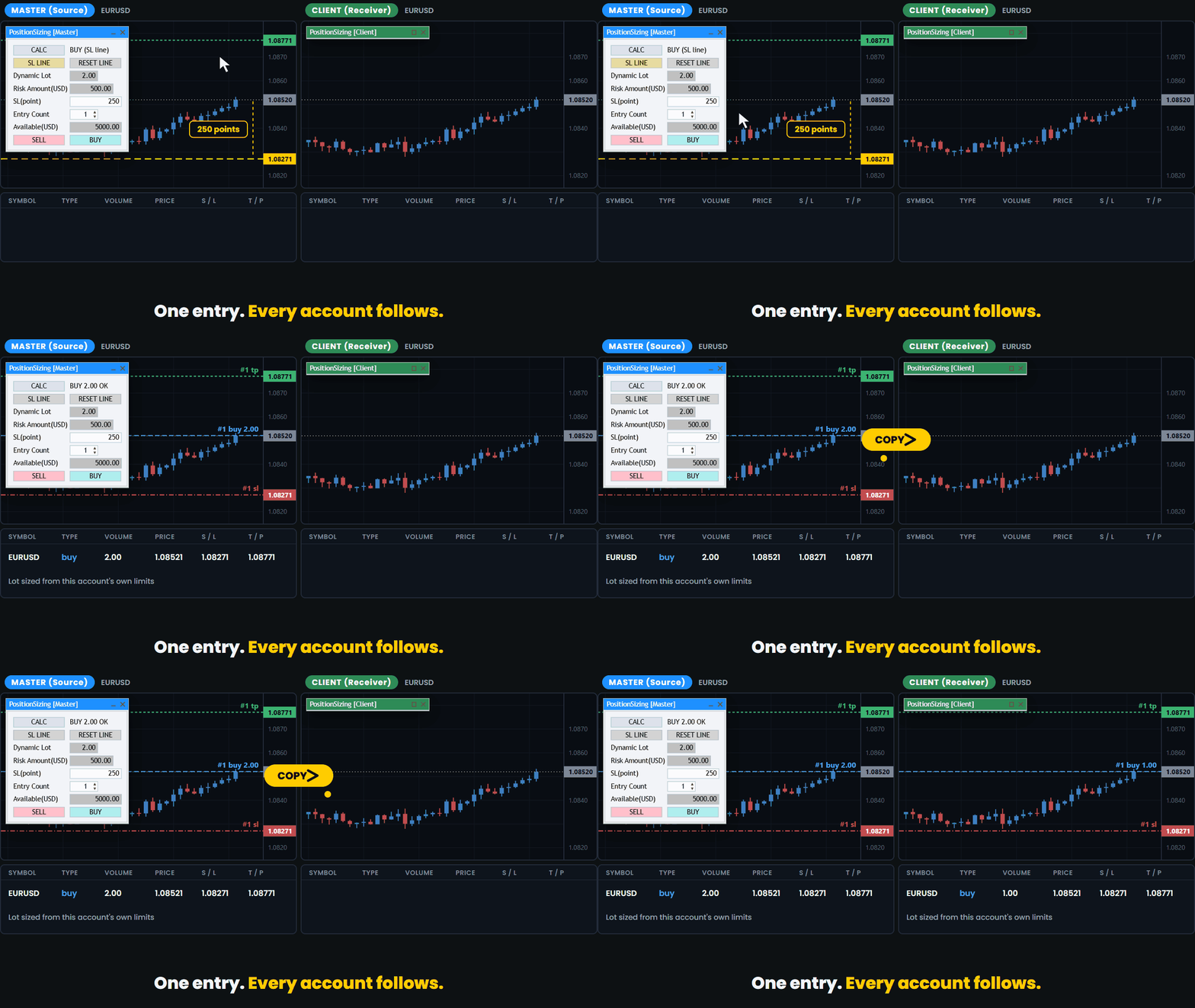
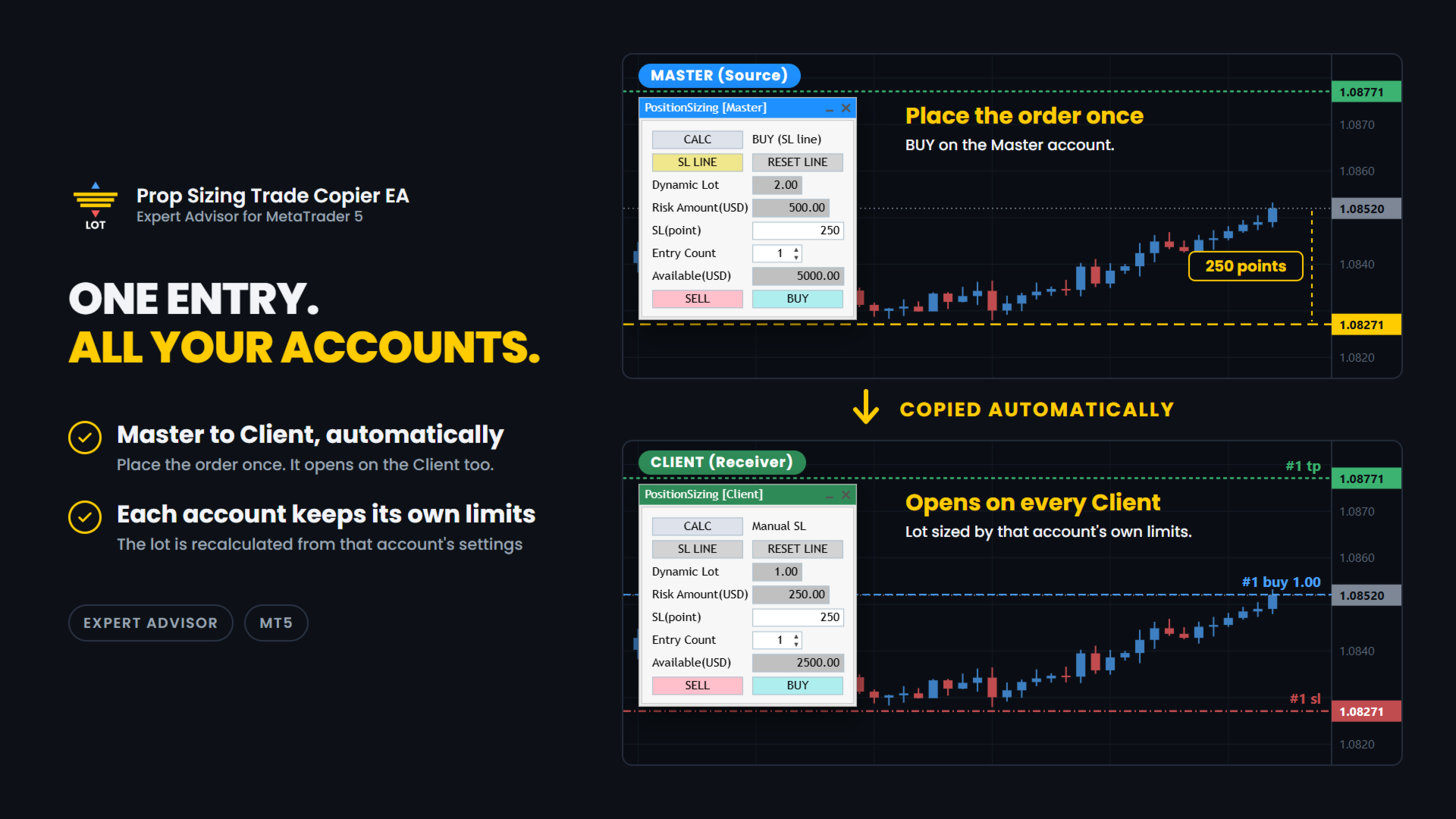
It lets you run several prop firm accounts from one PC. You enter on your main account and the trade is copied to the other accounts.
Each account calculates its own lot from its own balance and its own loss limits.

✅ WHAT IT DOES

Pick the role and match the magic number. That is the setup.

Copy:

  • Master and Client roles. One terminal is the Master, which is the source.
    The others are Clients, which receive.
    The title bar is colour coded so you can see the role at a glance: blue for Master, green for Client.
  • Copying happens between MT5 terminals on the same PC, through a shared file.
    This is not an internet signal service and nothing is sent outside your computer.
  • If a Master and a Client are set up inside the same MT5 terminal by mistake, the one that started later is disabled automatically and a warning is shown.
  • The Master can hold up to 100 positions.
  • A cooldown stops the same position from being copied twice while the first copy is still waiting to be confirmed.
    The default is 10 seconds and you can change it.
  • Each Client sizes its own lot.
    A 50,000 account and a 10,000 account do not take the same lot for the same trade.

Trade panel (included):

  • Drag the stop-loss line and the lot size updates at once.
  • BUY and SELL buttons send the order with the calculated lot.
    The stop loss is the price of the line.
  • Direction is read from the line. Below the price is BUY. Above the price is SELL.
  • Auto TP. The TP is set from your Risk-Reward setting, and the TP preview line follows the stop-loss line.
    You can turn it off with the Auto TP Setting input.
  • The risk is shown in your account currency, not only in percent.
  • Available shows how much of your allowed loss is still left, in your account currency.
  • Round-trip commission is measured from your own trade history.
    It is shown for reference and is not included in the risk amount.
  • Entry Count from 1 to 10 for split entries. Lot and risk are shown for one entry.
    An "x2", "x3" ... mark appears next to the risk.
  • Fixed lot mode when you do not want the calculation.
  • Entry Count and the stop-loss line are stored per chart.
  • The panel can be collapsed to its title bar.
  • I use it live on FX majors and crosses.
    It has also been checked on gold (XAUUSD), BTCUSD and indices such as US30. Brokers set symbols differently, so check with a small lot first.

Order safety:

  • If the button you pressed and the line do not agree, no order is sent.
  • If the line is inside the spread, no order is sent.
  • The spread is checked again when you press the button.
    If it is wider than your Maximum spread setting, the order is cancelled.
  • If the stop-loss distance is zero or less, no order is sent.
  • If the calculated lot is zero, no order is sent.
    This also happens when no lot fits inside the risk you allowed.
  • A double-click on the button does not send two orders.
  • If the currency conversion for your account is not available, the tool stops.
    It does not send a guessed lot.
  • After the order is filled, the preview lines are removed.

🧪 HOW THE LOT IS CALCULATED

The tool works in four steps. Every account does this for itself.

1. Available. How much you can still lose.
It comes from your Initial Balance, Maximum Overall Loss (%) and Maximum Daily Loss (%).
The limit you would hit first is used.

2. Divide by Maximum allowed losses. This is how many losing trades in a row you want to survive.

3. Cap the risk. Maximum Risk per Trade (%) of your Initial Balance is the most one trade can risk, so the risk stays the same from trade to trade.
Set it to 0 to turn the cap off.

4. Work back from the stop. The distance to your stop-loss line is turned into a lot size for the current symbol.

You enter the limits your firm gives you. The tool does the rest.

🔧 SETTINGS

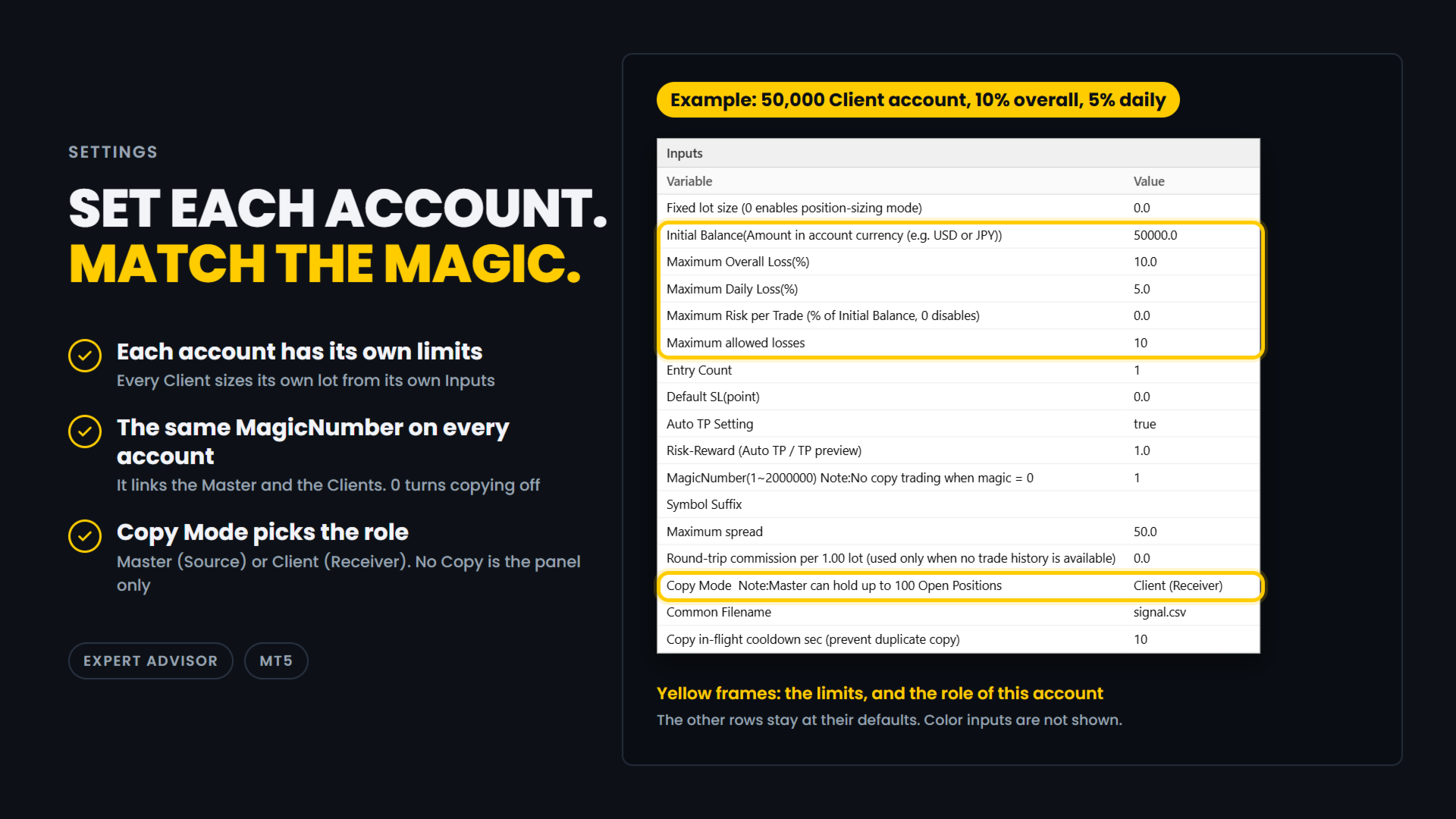
Example: a 50,000 Client account with a 10% overall loss limit and a 5% daily loss limit.

  • Fixed lot size: 0.0
    0 means each account calculates its own lot.
    Enter a lot size only if you want a fixed lot, copied orders included.
  • Initial Balance: 50000.0
    The starting balance of this account, in its currency.
    Every account has its own settings. Set 0 to use the current balance instead.
  • Maximum Overall Loss(%): 10.0
    The overall loss limit, in percent of Initial Balance.
  • Maximum Daily Loss(%): 5.0
    The daily loss limit, in percent.
    It is measured from the balance at the start of the day.
  • Maximum Risk per Trade: 0.0
    A cap on the risk of one entry, in percent of Initial Balance.
    0 turns the cap off.
    If your firm limits the risk of a single trade, entering about half of its limit leaves a margin.
  • Maximum allowed losses: 10
    How many losing trades in a row you want to survive.
  • Entry Count: 1
    How many orders one press of BUY or SELL sends on this account, from 1 to 10. Each order has the calculated lot.
    It is not part of the lot calculation.
    With Maximum allowed losses 10 and Entry Count 2, the number of losing trades you survive is 5 (10 / 2).
  • Default SL(point): 0.0
    The starting distance of the stop-loss line, in points.
    0 places the line at half the range of the last 20 bars.
  • Auto TP Setting: true
    true sets a TP on every order, copied orders included. false sends orders without a TP.
  • Risk-Reward: 1.0
    The TP distance as a multiple of the stop-loss distance.
    1.0 puts the TP as far from the entry as the stop loss.
  • MagicNumber(1~2000000): 1
    The link between the Master and the Clients. Use the same number on all of them.
    0 turns copying off.
  • Symbol Suffix: empty
    The ending your broker adds to symbol names, such as .m.
    Enter the one of the account this EA runs on, and leave it empty if there is none.
    It lets EURUSD on one broker match EURUSD.m on another.
    It is also used to find the currency pair that converts the risk into your account currency.
  • Maximum spread: 50.0
    The spread limit, in points (50.0 is 5 pips on a 5-digit symbol).
    If the spread is wider when an order is about to be sent, a copied order included, the order is cancelled.
    0 means no limit: the spread is not checked.
  • Round-trip commission per 1.00 lot: 0.0
    Used only when there is no trade history to measure from.
    It is shown for reference and is not included in the risk amount.
  • Copy Mode: Client (Receiver)
    No Copy is the panel only.
    Master (Source) copies the trades you enter on this account.
    Client (Receiver) copies the Master's trades.
    The title bar is blue for Master and green for Client.
  • Common Filename: signal.csv
    Leave it as it is.
    The Master and the Clients share this file through the MetaTrader Common folder, so use the same name on all of them.
  • Copy in-flight cooldown sec: 10
    After a Client sends a copy order, it waits this many seconds before it copies the same position again.
    This stops double copies.

In this example, on a day that starts with a balance of 50,000, Available is 2500.00, because the 5% daily limit is reached before the 10% overall limit.
The Client sizes its own lot from the risk of one entry, which is 250.00 (2500.00 / 10).

⚠️ IMPORTANT

  • When DefaultSL is 0, which is the default, the first stop-loss line is placed below the current price, at half the range of the last 20 bars of the timeframe you are on.
    Because the distance comes from the range, it may be an odd number such as 119 pips, and it changes when you switch timeframe.
    This is intended.
    Set DefaultSL to a fixed value if you want the same starting distance every time.
  • This EA and Prop Sizing Lot Size Calculator cannot run on the same chart.
    If the indicator is attached to the same chart, this EA will notify you and remove it.
    The stop-loss line position is not carried over. This is by design.
  • The older free Prop Sizing EA does not have this detection.
    Do not run it on the same chart as Prop Sizing Lot Size Calculator.

📋 ABOUT PROP FIRM RULES

Prop firms have different rules about third-party tools.
Some do not allow Expert Advisors that you did not write yourself.
Some also restrict third-party indicators, even ones that only calculate the lot size.
Some firms also limit copying between your own accounts. Rules can change.
Check the rules of your own firm before you use this product.
Whether to use it is your decision.

🎯 ONE THING ONLY

This tool does one thing. You enter on one account, the others follow, and each of them sizes its own lot.

🔗 ALSO AVAILABLE

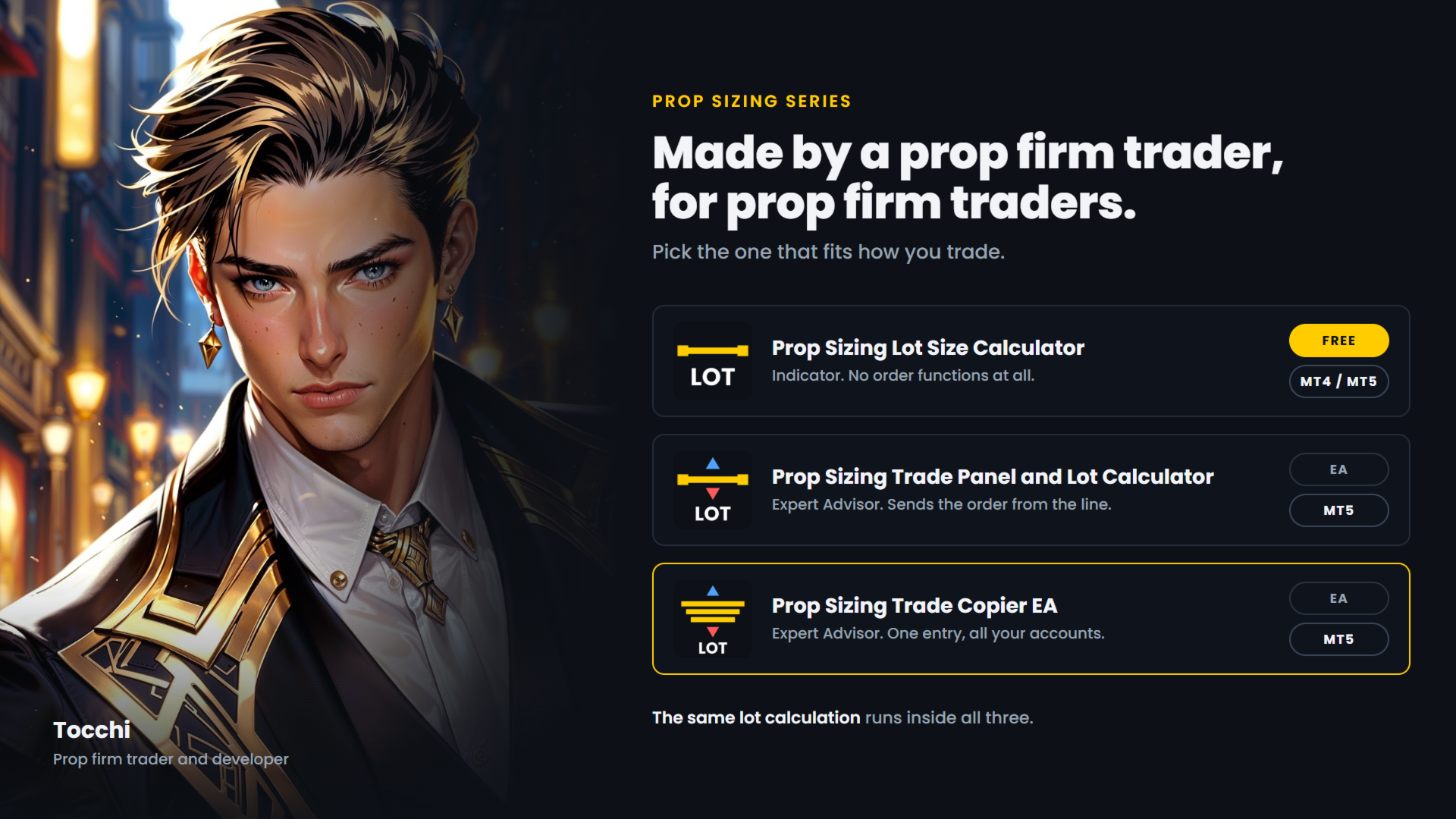
  • Prop Sizing Lot Size Calculator - free.
    Calculation and stop-loss line only, no order functions. MetaTrader 5.
  • Prop Sizing Lot Size Calculator MT4 - the same indicator for MetaTrader 4. Free.
  • Prop Sizing Trade Panel and Lot Calculator - the trade panel without the copy function.
    MetaTrader 5.
Produits recommandés
Follow a master account from another terminal on the same computer. CopyTrade Local Receiver is the follower side of a trade copier. Paste the Receiver code shown on CopyTrade Local Sender (CT-XXXX-XXXX) into its inputs, and this account opens, modifies and closes the same trades as the master. The data is exchanged through the common data folder of MetaTrader on the same computer. Nothing is sent over the internet. The master may be MT4 or MT5 and may be with a different broker. What is copied
LT Trade Copy MT5 - Copieur de Trades Haute Performance et Haute Précision LT Trade Copy MT5 est un outil de haute performance conçu pour les traders qui ont besoin de répliquer leurs opérations entre différents terminaux MetaTrader 5 (et MetaTrader 4) sur le même ordinateur ou sur un réseau local (LAN), avec une latence minimale et une précision absolue. Que vous soyez gestionnaire de comptes, fournisseur de signaux ou trader opérant simultanément chez plusieurs courtiers (brokers), cet utilita
Un copieur de trades local pour MetaTrader 5. Il copie les positions entre terminaux MT5 sur le même PC Windows ou VPS et dimensionne chaque copie à partir des spécifications de contrat des deux courtiers (taille du contrat, valeur du tick, devise du compte), de sorte qu'une copie porte la même exposition même lorsque les deux courtiers définissent un lot différemment. Il n'ouvre jamais une seconde copie d'une même position du maître. Ce qu'il fait Vous attachez le même EA à un graphique dans ch
Trade Copier Simple Guide Trade Copier is an Expert Advisor (EA) for MetaTrader 5 (MT5) that lets you automatically copy trades from one account (the "Master") to another (the "Receiver"). It's designed for users who want to duplicate trading strategies across multiple accounts on the  same computer . No internet or external servers are needed—it uses a shared file on your machine to transfer trade info securely and quickly. How It Works Master Mode : Attach the EA to a chart on your main tradin
Signalator Local Trade Copier MT5 est un copieur de trades local rapide conçu pour faire fonctionner des terminaux Master et Receiver sur le même ordinateur ou VPS. Il prend en charge la copie multiplateforme entre les terminaux MT4, MT5 et cTrader dans toutes les directions : MT4 ↔ MT5 ↔ cTrader , ainsi que toutes les autres combinaisons. Copiez les trades localement sans relais cloud externe. Le Master publie l'activité de trading via une bridge locale, et chaque Receiver contrôle ce qu'il doi
Fast copier for sending trades to multiple MT4 / MT5 accounts. MT5 Trade Copier Master EA sends trades instantly from your master account to one or multiple slave accounts. Supports copying to: • MT5 accounts • MT4 accounts Perfect for: • Multi-account traders • Signal providers • Account managers • Personal account mirroring Main Features • Fast local trade copying • Low latency execution • Multiple slave accounts support • Copy open positions on startup • Stable file-based communication • Easy
OB FVG Trade Copier: Unified Master & Slave EA Version: 2.00 Type: Trade Copier / Risk Management Utility Compatibility: MetaTrader 4 & MetaTrader 5 (Cross-compatible codebase) Overview The OB FVG Trade Copier is a professional-grade, unified trade copying system designed to mirror trades between Master and Slave accounts seamlessly. Built with a unified architecture, a single EA file serves as both the sender (Master) and receiver (Slave) simply by toggling the EA Mode in the settings. It uti
FREE
Nasdaq Reversion
Jaume Sancho Serra
Nasdaq Reversion A lightweight long-side mean-reversion Expert Advisor for the Nasdaq 100 index (NQ / USATECHIDXUSD) on H1. No martingale. No grid. No hedging. One position at a time. A hard stop on every trade. It waits for the index to get oversold within its trend, then takes one clean long with a fixed stop. No averaging into losers, no recovery games. How it works Oversold trigger: an RSI-based entry when the Nasdaq dips into oversold territory. Trend filter: an EMA filter keeps entries ali
FREE
Professional Trade Panel — All-in-One Smart Trading Tool This is a professional visual trading panel designed for the MetaTrader platform. It consolidates the most frequently used trading operations into a single compact and draggable interface, significantly improving execution efficiency and reducing the risk of misoperations. Core Features One-Click Close All: Close all open positions on the current symbol with a single click. The button displays real-time total floating profit and loss s
OTE Trade Copier MT5
Olaoluwa Oluwaseun Bamitale
OTE Trade Copier MT5 Trade Copier & Prop Firm Risk Manager Copy trades locally between MT5 terminals and across MT4/MT5 platforms on the same PC or VPS while protecting your funded accounts with advanced risk controls. IMPORTANT: Send me a message for the Complete User Manual Before Installation Why Traders Choose OTE Trade Copier MT5 Supports MT5 to MT5 trade copying Supports MT4 to MT5 and MT5 to MT4 when used with the MT4 version Designed for prop firm and funded account traders Daily drawd
EA Local Trade Copier Pro MT5: The Ultimate DLL-Free Trade Duplicator Êtes-vous fatigué des duplicateurs de transactions compliqués qui nécessitent des DLL externes non sécurisées, font planter votre terminal ou vous embrouillent avec des fichiers "Master" et "Client" séparés ? Découvrez la nouvelle génération de copie de transactions avec EA Local Trade Copier Pro MT5. Conçu pour une stabilité maximale, une exécution ultra-rapide et une simplicité ultime, cet utilitaire vous permet de copier de
SonicTradeCopier: (Best for scalping) Easy Fast Reliable trade copier. Copy trades from one terminal to an other (internet copy feature coming soon.) MT4 to MT4. MT4 to MT5. MT5 to MT5. MT5 to MT4. MT4/MT5 to any other platform copy possibility for custom made solutions. Reverse trading. Advance filters for traders. Features: (Setting up copying policies) Sender only has to setup  signal name and start sending signals [ You must start signal sender first always ]. Receiver sets up  signal nam
News Risk Guard protects the positions you already hold when a scheduled economic release is about to hit. It is a risk tool. It does not predict direction, it does not look for entries of its own, and it makes no claim about profit. The calendar is built into the product: 4,101 releases covering 15 recurring events. No internet permission, no DLL, no file to install, and it behaves the same in the Strategy Tester as it does on a live chart. WHAT IT DOES 1. Event protection window    A confi
Utilitaire pour copier des transactions d'un compte MT5 ou d'un compte MT4 vers un autre compte MT5. Demo-version can be downloaded   here . Vous pouvez copier des positions entre les comptes netting et Hedging dans n'importe quelle combinaison. Vous pouvez définir des filtres en fonction du nom de l'outil et des numéros de position magiques à copier. Jusqu'à présent, la source envoie des informations uniquement sur les positions du marché. Les ordres en attente sont traités au moment où ils d
Local Trade Copier copies positions and orders from one MetaTrader 5 terminal (master) to one or more MetaTrader 5 terminals (receivers) on the same computer. It works locally and does not send data over the internet. Key features - One master, multiple receivers, separated by channel name. - Volume modes: multiplier, fixed lot, balance ratio, equity ratio or risk-based (requires a stop loss). - Symbol mapping between brokers (InpSymbolMap, prefix and suffix); ambiguous or unavailable symbols a
Copier of deals from MetaTrader 5 to MetaTrader 5 ( MetaTrader 4<->MetaTrader 4 version is available ; with both versions, you can copy MetaTrader 5<->MetaTrader 4, MetaTrader 4<->MetaTrader 5, MetaTrader 5<->MetaTrader 5, MetaTrader 4<->MetaTrader 4). There is a demo version (restricting by grades and by lots) Works only in the mode of hedging Spread filter. Select the best price (start copying positions with a profit or loss). Configure the lot size, fixed or ratio-based (provider signals can
Trade Dispensary Connect est un utilitaire EA MT5 conçu pour envoyer des ordres au format JSON au copieur de transactions Trade Dispensary via Webhook. Si Trade Dispensary est installé sur votre machine locale, utilisez simplement http://127.0.0.1 :5000/webhook/mt5/[ACCOUNT_ID] comme URL de webhook. Si Trade Dispensary est installé sur un autre ordinateur, récupérez l'adresse IP/le nom de domaine de cette machine. Un service de tunneling tel que Pinggy ou Ngrok est recommandé dans ce cas. Cet
FREE
Trading Motivation Display MT5
AL MOOSAWI ABDULLAH JAFFER BAQER
• Please test the product in the Strategy Tester before purchasing to understand how it works. • If you face any issues, contact me via private message—I’m always available to help. • After purchase, send me a screenshot of your order to receive a   FREE EA   as a gift. Trading Motivation Display – Stay Inspired, Stay Profitable! Trading is a game of patience, discipline, and resilience. Staying motivated is crucial for long-term success in the markets. That's where Trading Motivation Display c
The Superior Remote Trade Copier is a comprehensive MT5 utility that copies trades remotely and privately via Telegram, eliminating the need for external VPS bridges or third-party web servers. The ecosystem consists of a Master EA, a free Desktop App, and a Client EA. Master (Transmitter) Trade Broadcasting: Transmits market orders, pending orders, position modifications, and partial/full closures directly via Telegram. UI Dashboard: Interactive on-chart panel for quick bulk actions (Close All,
Reverse copier
Mariia Rudkovska
Try turning dust to gold with Reverse copier! Unprofitable EA or strategy can become profitable with reversing the direction of it's trades. As of now only MT5 → MT4 bridge is available, new functions will be added accordingly. EA's that work best with Reverse trade system is single-shot or scalping EA's. How it works: When a trade is executed on Master account, Reverse copier sends special log to the common txt file with a command to "open/close, buy/sell, symbol, volume...etc".  Reverse slave
FREE
Please download Master EA here =   https://www.mql5.com/en/market/product/186073 MT4 Version =  https://www.mql5.com/en/market/product/186079 Free Demo Version =  https://c.mql5.com/6/1033/COPYTRADE_BIN7D.zip User Manual : download here Best Trade Coppier for MT5. EA Trade Copier is a powerful and reliable trade copying solution that transfers trades from one Master account to multiple Slave accounts in real time. Whether you manage multiple trading accounts, investor accounts, VPS terminals, o
TradePulse Commander Pannel
AL MOOSAWI ABDULLAH JAFFER BAQER
Nous vous présentons le **Panneau de Gestion des Transactions** ultime, conçu pour optimiser vos opérations de trading et augmenter votre efficacité ! Notre panneau avancé est doté de puissantes fonctionnalités pour simplifier vos tâches de trading et fournir des informations en temps réel : - **Gestion des TP et SL en un clic** : Supprimez facilement tous les niveaux de Take Profit (TP) et Stop Loss (SL) de l'ensemble de votre compte ou pour des paires spécifiques en appuyant simplement sur u
QBrain Strategy Auditor
Nesrine Emilie Darragi
QBrain Strategy Auditor helps users identify incomplete or weak evidence before drawing conclusions from closed MetaTrader 5 outcomes. The utility is designed for strategy review. It does not open, modify, or close trades. It does not predict returns and does not certify a strategy. Main functions - Reads closed terminal account history in a selected date range or a normalized CSV placed in the MT5 file sandbox. - Checks whether the available evidence is sufficient for analysis. - Displays k
Gold Veritas MT5
Marat Baiburin
3.19 (21)
Discount on all my products until 01.05.  Gold Veritas   est un conseiller expert Forex entièrement automatique pour les heures calmes. Suivi du travail du conseiller :  https://www.mql5.com/en/users/bayburinmarat/seller Paramètre GMT correct :   https://www.mql5.com/en/blogs/post/743531 Tous les paramètres nécessaires à l'optimisation la plus compréhensible et la plus simple sont disponibles dans seulement 6 paramètres.Vous pouvez adapter le conseiller à vos préférences : ajustez les niveaux de
Currency Meter Dashboard Trader All 28 symbols should be added to market watch, then the utility starts to load data and the it does the calculations! What does this utility do? This utility shows the strength of each 8 major currencies. These eight major currencies are AUD - CAD - CHF - EUR - GBP - JPY - NZD - USD. For calculating the METER of each currency, we calculate the average of each symbol which has this currency in it. (all of them are 28 symbols like EURUSD) We have two sides: posit
• Please test the product in the Strategy Tester before purchasing to understand how it works. • If you face any issues, contact me via private message—I’m always available to help. • After purchase, send me a screenshot of your order to receive a   FREE EA   as a gift. Hedge Fragmentation Utility - Comprehensive Product Description Overview The Hedge Fragmentation Utility is a professional-grade MetaTrader 5 tool designed for forex traders who employ hedging strategies. This sophisticated util
Copier Master RAlabs (receiver) and Copier Provider RAlabs (signal source) — a system for local copying of trades between MetaTrader terminals on a single PC/VPS. It consists of two products: Provider (signal source) and Master (receiver/copier with a control panel). Provider is installed on the donor account (the account whose trades are being copied) — it publishes the trades. Master is installed on the recipient account — it reads the donors and opens copies; it hosts the entire copy setting
MT5 to MT5 Trade Copier – Fast and Reliable Trade Copying Solution The MT5 Trade Copier is a powerful tool designed to copy trades seamlessly between MetaTrader 5 accounts with minimal latency and high accuracy. Built for speed, flexibility, and ease of use, the copier works across different brokers, even when symbols use different prefixes or suffixes. This Expert Advisor is suitable for professional traders, signal providers, fund managers, and traders who manage multiple accounts. Key Featur
Elite Telegram Trade Copier & Community Manager (v3.94) Welcome to the ultimate solution for professional Telegram signal copying and community management. This Expert Advisor is not just a standard copier – it is a fully automated Trade Management Engine , a Signal Analytics Tool , and a Marketing Funnel for your own Telegram channels. Whether you want to automate trades from your favorite signal providers or manage your own VIP and Follower channels simultaneously, this EA handles everything:
FREE
Multi Close Manager Multi Close Manager est un utilitaire de gestion de trades pour MetaTrader 5 conçu pour gérer des positions existantes sans ouvrir automatiquement de nouvelles positions. L'utilitaire peut être utilisé avec des positions ouvertes manuellement ou avec des positions ouvertes par un autre Expert Advisor. Il propose plusieurs méthodes indépendantes de fermeture de positions, la gestion du Stop Loss, la gestion du Take Profit, des notifications Telegram, des zones de protection pl
FREE
Les acheteurs de ce produit ont également acheté
Trade Assistant MT5
Evgeniy Kravchenko
4.43 (216)
It helps to calculate the risk per trade, the easy installation of a new order, order management with partial closing functions, trailing stop of 7 types and other useful functions. Additional materials and instructions Installation instructions - Application instructions Line function -   shows on the chart the Opening line, Stop Loss, Take Profit. With this function it is easy to set a new order and see its additional characteristics before opening.   Risk management  - The risk calculation
Bienvenue sur Trade Manager EA, l’outil ultime de gestion des risques conçu pour rendre le trading plus intuitif, précis et efficace. Ce n’est pas seulement un outil d’exécution d’ordres ; c’est une solution complète pour la planification des trades, la gestion des positions et le contrôle des risques. Que vous soyez débutant, trader expérimenté ou scalpeur ayant besoin d’une exécution rapide, Trade Manager EA s’adapte à vos besoins, offrant une flexibilité sur tous les marchés, des devises et i
Local Trade Copier EA MT5
Juvenille Emperor Limited
4.94 (149)
Local Trade Copier EA MT5 est un copieur de trades rapide et flexible permettant de copier et de gérer des trades entre plusieurs comptes MetaTrader 5 sur le même ordinateur Windows ou Windows VPS. Il combine la synchronisation locale des trades avec des contrôles côté Receiver pour la taille des lots, la gestion du risque, le filtrage des trades, le mappage des symboles, la gestion des trades et la protection du compte. Configurez vos terminaux Transmitter et Receiver en environ 1 minute et co
Telegram to MT5 Multi-Channel Copier   copie automatiquement les signaux de trading de vos canaux Telegram et Discord directement vers MetaTrader 5. Pas de bots, pas d'extensions de navigateur, pas de copie manuelle. Un signal arrive sur Telegram ou Discord et l'EA ouvre le trade dans votre terminal en quelques secondes. Et avant de copier un canal, le backtester intégré vous montre ce que ce canal aurait fait sur votre compte. Le produit comprend deux composants : une application Windows qui éc

Copiez les signaux Telegram avec vos propres règles de trading Telegram to MT5 Signal Trader copie automatiquement les signaux de trading au format texte provenant de canaux et de groupes Telegram publics et privés vers MetaTrader 5. Gérez plusieurs fournisseurs et comptes MT5 depuis une seule application de bureau, avec des paramètres de risque et de trading propres à chaque fournisseur . Aucun bot Telegram ni configuration d'API n'est nécessaire pour copier les signaux. Connectez-vous simpleme
TradePanel MT5
Alfiya Fazylova
4.88 (170)
Trade Panel est un assistant commercial multifonction. L'application contient plus de 50 fonctions de trading pour le trading manuel et permet d'automatiser la plupart des tâches commerciales. Instructions d'utilisation : https://www.mql5.com/fr/blogs/post/762589 Version d'essai de l'application pour un compte démo : https://www.mql5.com/fr/blogs/post/762644 Comment installer l'application : https://www.mql5.com/fr/blogs/post/762645 Comment tester l'application en mode visuel : https://www.mql5.
Farmed Hedge Yield Farming | All Markets (Manual - Hybrid - Semi/Automated EA) VERIFIED TRADING RESULTS - Farmed Hedge Yield Axi Copy:  https://www.mql5.com/en/signals/2356376 - Farmed Hedge Yield Exn Copy:   https://www.mql5.com/en/signals/2356404 - Farmed Hedge Yield V Copy:  https://www.mql5.com/en/signals/2357156 IMPORTANT NOTICE: FarmedHedge is a MANUAL-FOCUSED TRADING UTILITY ,not a fully automated EA. Results shown on this Signal include manual trades and overall strategic management.
================================================================================ POC BREAKOUT - V20.72. Full Professional Grade Toolkit ================================================================================ POC Breakout is a full MetaTrader 5 trading dashboard for discretionary traders who want breakout signals, Point of Control (POC) context, volume profiles, order flow, market structure, news, alerts, and advanced trade planning in one professional workspace. Attached directly to you
News Trade EA MT5
Konstantin Kulikov
4.55 (11)
Je voudrais vous présenter un robot efficace que j'utilise depuis plusieurs années. Il peut être utilisé en mode semi-automatique, comme en mode totalement automatique. >>> Chat <<< Le programme comporte des paramètres souples pour le commerce sur les nouvelles du calendrier économique. Il est impossible de le vérifier dans le testeur des stratégies. Ce qu’il faut, c’est le travail réel. Il faut ajouter à la liste des URL autorisées, dans les paramètres du terminal, un site d'actualités. Cliqu
Dealer Panel
Mian Rameez Ali
Dealer's Panel No signal decides anything here — a hand does. One click, and the panel calculates what's underneath: lot size from risk, target from a 30-step balance ladder that remembers exactly how far an account has climbed. Toggle between market and pending without touching an input field. Set a stop, and the take-profit can write itself — a fixed share of the balance, translated into price with no arithmetic left for the trader to get wrong. One trade live at a time; it won't let a seco
RETAILBERG FOOTPRINT CHART PRO — Order-Flow Workspace for MetaTrader 5 Version 7.00  |  Professional System  |  31 tools  |  One chart A full 150-page illustrated User Manual is included. Please read the full manual to understand this feature packed footprint chart elements and ui. https://www.mql5.com/en/blogs/post/777982 DEMO / STRATEGY TESTER — PLEASE READ FIRST
Prochaine mise à jour — Version 2.52 bientôt disponible ! [NOUVEAU] Préparez-vous à découvrir 4 nouvelles fonctionnalités majeures conçues pour améliorer votre analyse du marché et votre flux de travail de trading Nous faisons passer l’analyse du marché au niveau supérieur avec 4 nouvelles fonctionnalités conçues pour répondre à vos besoins en trading. Découvrez : 1. TRADE OVERVIEW DASHBOARD 2. CONFLUENCE AT ZONE 3. STRONG & WEAK HIGH/LOW 4. OTE 1. TRADE OVERVIEW DASHBOARD Un tableau de bord qu
Exp COPYLOT CLIENT for MT5
Vladislav Andruschenko
3.97 (35)
Copieur professionnel de trades pour MetaTrader 5 Un copieur de trades rapide, professionnel et fiable pour MetaTrader . COPYLOT permet de copier des trades Forex entre les terminaux MT4 et MT5 avec prise en charge des comptes Hedge et Netting . La version MT5 de COPYLOT prend en charge : - MT5 Hedge → MT5 Hedge - MT5 Hedge → MT5 Netting - MT5 Netting → MT5 Hedge - MT5 Netting → MT5 Netting - MT4 → MT5 Hedge - MT4 → MT5 Netting Version MT4 Description complète + DEMO + PDF Comment acheter Comme
Grid Manual MT5
Alfiya Fazylova
4.73 (22)
Grid Manual est un panneau de trading permettant de travailler avec une grille d'ordres. L'utilitaire est universel, possède des paramètres flexibles et une interface intuitive. Il fonctionne avec une grille d'ordres non seulement dans le sens des pertes, mais aussi dans le sens de l'augmentation des profits. Le commerçant n'a pas besoin de créer et de maintenir une grille d'ordres, l'utilitaire le fera. Il suffit d'ouvrir une ordre et "Grid Manual" créera automatiquement une grille de ordres po
MT5 to Telegram Signal Provider est un utilitaire facile à utiliser et entièrement personnalisable qui permet l'envoi de signaux spécifiés vers un chat, un canal ou un groupe Telegram, transformant ainsi votre compte en fournisseur de signaux. Contrairement à la plupart des produits concurrents, il n'utilise pas d'importations DLL. [ Démonstration ] [ Manuel ] [ Version MT4 ] [ Version Discord ] [ Canal Telegram ]  New: [ Telegram To MT5 ] Configuration Un guide utilisateur étape par étape est
Anchor Trade Manager
Kalinskie Gilliam
5 (9)
Your EAs cannot see each other, but Anchor can. Anchor gives you one place to coordinate your EAs, manage risk, and decide when trading is allowed. It works alongside the trading bots you already use without any changes to them. The Problem One EA opens a trade. Then another starts trading. The next thing you know, you wake up to multiple grids built across your account. Each EA may be doing exactly what it was designed to do, but together they can place far more risk on your account than you in
The Patch
Mian Rameez Ali
The Patch It never opens a trade. It walks behind the ones that did. Every open position, every pending order — checked twice a second for the one thing that's easy to forget: a stop, a target. Found bare, it doesn't ask. It writes the missing number in, measured in points from wherever the position began, and moves on to the next. No strategy, no opinion on direction. Just the quiet assumption that nothing should ever sit on the market unprotected — not because someone decided it shouldn't,
RS Trade Copier - le copieur de trades local ultra-rapide avec une véritable interface graphique. Arrêtez de saisir les numéros de compte manuellement. Fini les listes interminables de 200+ paramètres dans l'onglet Inputs. Un outil fiable et flexible pour copier les opérations de trading entre plusieurs terminaux MT5 et MT4. Il convient aux traders expérimentés, aux services de signaux ainsi qu'aux investisseurs privés. Il permet la synchronisation du trading d'un ou plusieurs Providers vers un
Power Candles Strategy Scanner - Outil de recherche de configurations multi-symboles à optimisation automatique Le Power Candles Strategy Scanner utilise le même moteur d'auto-optimisation que celui qui alimente l'indicateur Power Candles, pour chaque symbole de votre Market Watch, en parallèle. Un panneau vous indique quels symboles sont statistiquement négociables à l'instant, quelle stratégie est la plus performante pour chacun, la paire Stop Loss / Take Profit optimale, et vous alerte dès qu
VirtualTradePad PRO SE MT5 — centre de contrôle de trading professionnel pour MetaTrader 5 VirtualTradePad PRO SE est un panneau de trading premium basé sur le graphique et un espace de gestion des trades pour MetaTrader 5 . Il est conçu pour les traders qui souhaitent une exécution plus rapide, un contrôle plus clair des positions, une gestion structurée des trades, une planification visuelle des niveaux et un flux de travail professionnel directement depuis le graphique. Ce n’est pas seulement
Prop Guardian Risk Manager MT5 – Drawdown, Risk & Hedge Protection for Prop Firm and Managed Accounts Prop Guardian Risk Manager is a professional risk-control utility for MetaTrader 5, designed for prop firm traders, money managers and anyone who wants strict account-level risk protection. It does not generate trading signals, strategy entries or trading decisions. Instead, it runs in the background, monitors your account risk and can automatically block new exposure, close managed positions or
The product will copy all telegram signal to MT5 ( which you are member) , also it can work as remote copier.  Easy to set up, copy order instant, can work with almost signal formats, image signal,  s upport to translate other language to English Work with all type of channel or group, even channel have "Restrict Saving Content", work with  multi channel, multi MT5 Work as remote copier: with signal have ticket number, it will copy exactly via ticket number. Support to backtest signal. How to s
Floor Watch
Syed Tauqeer Hussain Shah
Floor Watch One number, watched every thirty seconds: how far equity has fallen since the day began — or since its highest point, if it's told to trail the peak instead of the open. Cross the line and it doesn't argue. Every open position closes, every pending order vanishes, and anything that slips through afterward gets shut the moment it appears. Not asked. Removed. The floor holds until the clock turns 5 AM Pakistan time — then, and only then, does the day start over. One rule. No except
Panneau de trading pour MetaTrader 5 — contrôle professionnel du trading en un clic depuis le graphique et le clavier Un panneau de trading avancé conçu pour les traders actifs, afin d’ouvrir, gérer et clôturer des positions bien plus rapidement qu’avec l’interface standard de MetaTrader. Cette solution s’adresse à ceux qui veulent contrôler positions, ordres en attente, profit global et exécution depuis un seul espace de travail professionnel. Il ne s’agit pas d’un simple utilitaire. C’est un
EA Auditor
Stephen J Martret
5 (6)
EA Auditor is an independent analysis tool for traders evaluating Expert Advisors and trading signals on MetaTrader 5. It audits backtest reports, reviews posted developer signals, and cross-verifies the two against each other to help traders assess strategies before committing capital. The MQL5 market offers a wide range of Expert Advisors from many developers, with varying approaches, quality, and transparency. EA Auditor provides a consistent, data-driven framework for reviewing them, answer

Telegram to MT5 Coppy
Sergey Batudayev
5 (10)
Télégramme vers MT5 :   la solution ultime pour copier des signaux Simplifiez votre trading avec Telegram vers MT5, l'outil moderne qui copie les signaux de trading directement des canaux et chats Telegram vers votre plateforme MetaTrader 5, sans DLL. Cette solution puissante garantit une exécution précise des signaux, de nombreuses options de personnalisation, un gain de temps et une efficacité accrue. [ Instructions and DEMO ] Caractéristiques principales Intégration directe de l'API Telegram
Trade Manager DashPlus
Henry Lyubomir Wallace
4.85 (13)
DashPlus est un outil de gestion de trading avancé conçu pour améliorer l'efficacité et la performance de vos transactions sur la plateforme MetaTrader 5. Il offre un ensemble complet de fonctionnalités, incluant le calcul des risques, la gestion des ordres, des systèmes de grilles avancés, des outils basés sur les graphiques et des analyses de performance. Fonctionnalités principales 1. Grille de récupération Implémente un système de grille flexible et de moyenne pour gérer les transactions dan
YuClusters
Yury Kulikov
4.93 (43)
Attention: You can view the program operation in the free version  YuClusters DEMO .  YuClusters is a professional market analysis system. The trader has unique opportunities to analyze the flow of orders, trade volumes, price movements using various charts, profiles, indicators, and graphical objects. YuClusters operates on data based on Time&Sales or ticks information, depending on what is available in the quotes of a financial instrument. YuClusters allows you to build graphs by combining da
Trade Copier Ultimate
Janitha Sandaruwan Amaradasa Wickramasingha Arachchilage
5 (5)
Trade Copier Ultimate - Telegram to MT5 Signal Copier Trade Copier Ultimate automatically copies Telegram trading signals into MetaTrader 5. The EA can read signal messages, detect the symbol, order type, entry price, Stop Loss, Take Profit levels and selected update commands, then execute or manage the trade in MT5 using your lot and risk settings. It is more than a basic Telegram to MT5 copier. TCU also supports Bot API and user-account Bridge workflows, Discord signal routing, local MT5 to MT
Un seul achat. Tous mes indicateurs et robots de trading (EA) pour MT4 et MT5, disponibles aujourd’hui et publiés à l’avenir, sans frais supplémentaires. Contactez-moi après l’achat pour connaître la procédure de réception. Il est prévu d’augmenter le prix de 50$ toutes les 10 ventes, jusqu’à 999$. Le prix du Market au moment du paiement fait foi. Gardez l’indicateur auquel vous faites confiance. Automatisez les tâches qui l’entourent. Votre signal. Vos règles. Votre exécution. Vous utilisez dé
Plus de l'auteur
DOES THIS SOUND FAMILIAR? Do you find the lot calculation slow and boring? Does it get worse with every new currency pair? Are you afraid of hitting a loss limit and losing the account? Does every lost account hurt more than the last one? I was caught in this loop myself. I built this tool for my own use. WHAT THIS IS This is an indicator. It contains no order functions at all. It cannot open, modify or close an order. This is the MetaTrader 4 version. Drag the stop-loss line on your chart
FREE
Prop Sizing EA
Toshimichi Hirasawa
お知らせ:新しいシリーズがあります この製品に新しい機能を追加する予定はありません。同じロット計算を使い、チャート上でドラッグできる損切りラインなどを備えた新しいシリーズがあります。 ・Prop Sizing Lot Size Calculator(MetaTrader 5用インジケーター・無料) ・Prop Sizing Lot Size Calculator MT4(MetaTrader 4用インジケーター・無料) ・Prop Sizing Trade Panel and Lot Calculator(MetaTrader 5用EA・有料) ・Prop Sizing Trade Copier EA(MetaTrader 5用EA・有料) MQL5マーケットで、これらの名前を検索してください。 この製品は、新しいインジケーターと同じチャートで一緒に使わないでください。 以下は、この製品のもとの説明文です。 !!ご自身の戦略と合っているのか必ず確認してください!! ※勝率重視の戦略に適しています プロップファームを経験した人なら、 一度はこう思ったことがあるはずです。 最大損失率に合
FREE
DOES THIS SOUND FAMILIAR? Do you find the lot calculation slow and boring? Does it get worse with every new currency pair? Are you afraid of hitting a loss limit and losing the account? Does every lost account hurt more than the last one? I was caught in this loop myself. I built this tool for my own use. WHAT THIS IS This is an indicator. It contains no order functions at all. It cannot open, modify or close a position. Drag the stop-loss line on your chart and the lot size is calculated
FREE
DOES THIS SOUND FAMILIAR? Do you find the lot calculation slow and boring? Does it get worse with every new currency pair? Are you afraid of hitting a loss limit and losing the account? Does every lost account hurt more than the last one? I was caught in this loop myself. I built this tool for my own use. WHAT THIS IS This is an Expert Advisor. It is a one-click trade panel with prop firm lot sizing built in. Drag the stop-loss line, read the lot size, and send the order from the same pane
Filtrer:
Aucun avis
Répondre à l'avis