Prop Sizing Trade Copier EA

💭 DOES THIS SOUND FAMILIAR?

  • Do you find the lot calculation slow and boring?
  • Does it get worse with every new currency pair?
  • Are you afraid of hitting a loss limit and losing the account?
  • Does every lost account hurt more than the last one?

I was caught in this loop myself. I built this tool for my own use.

📌 WHAT THIS IS

This is an Expert Advisor.

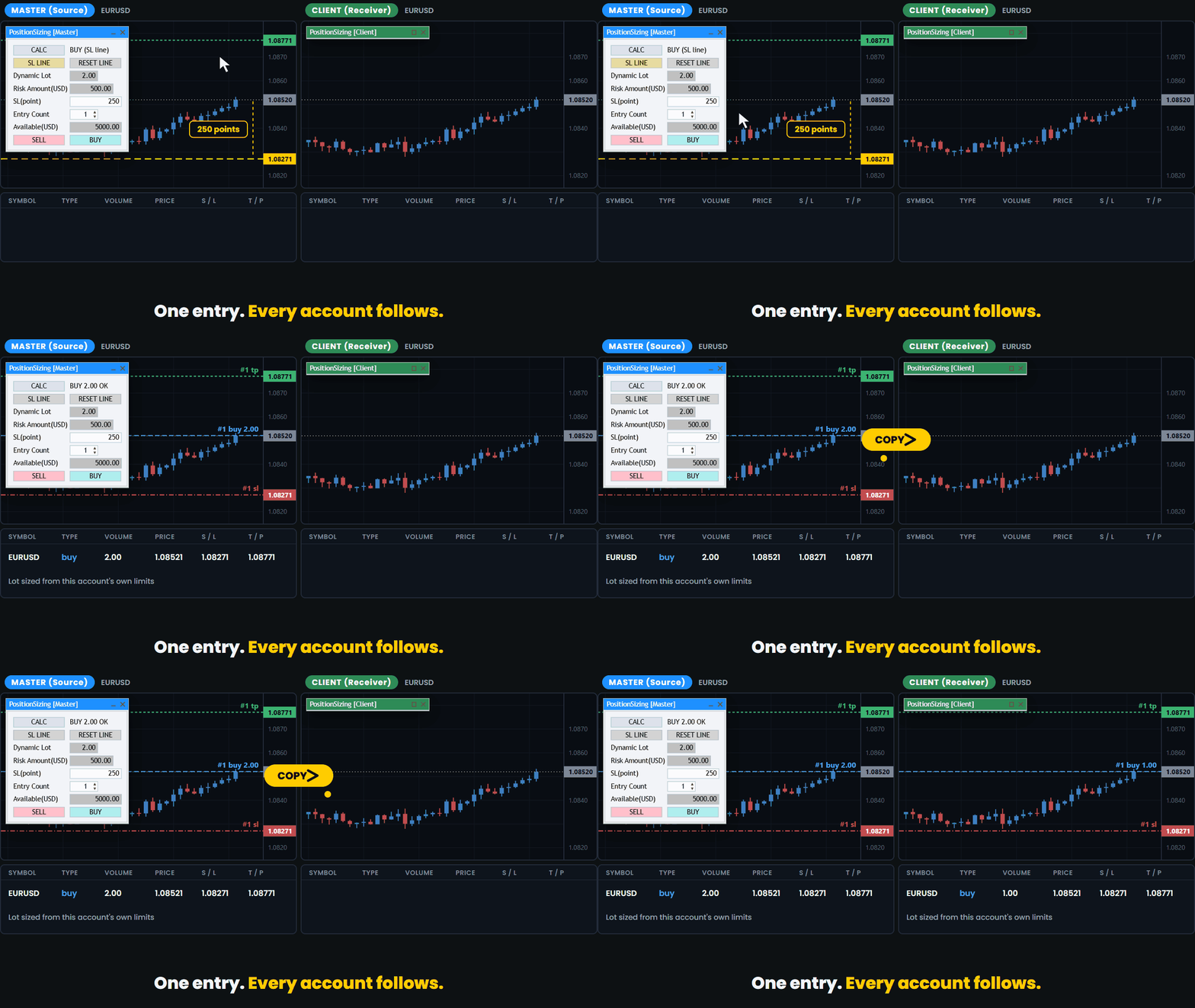
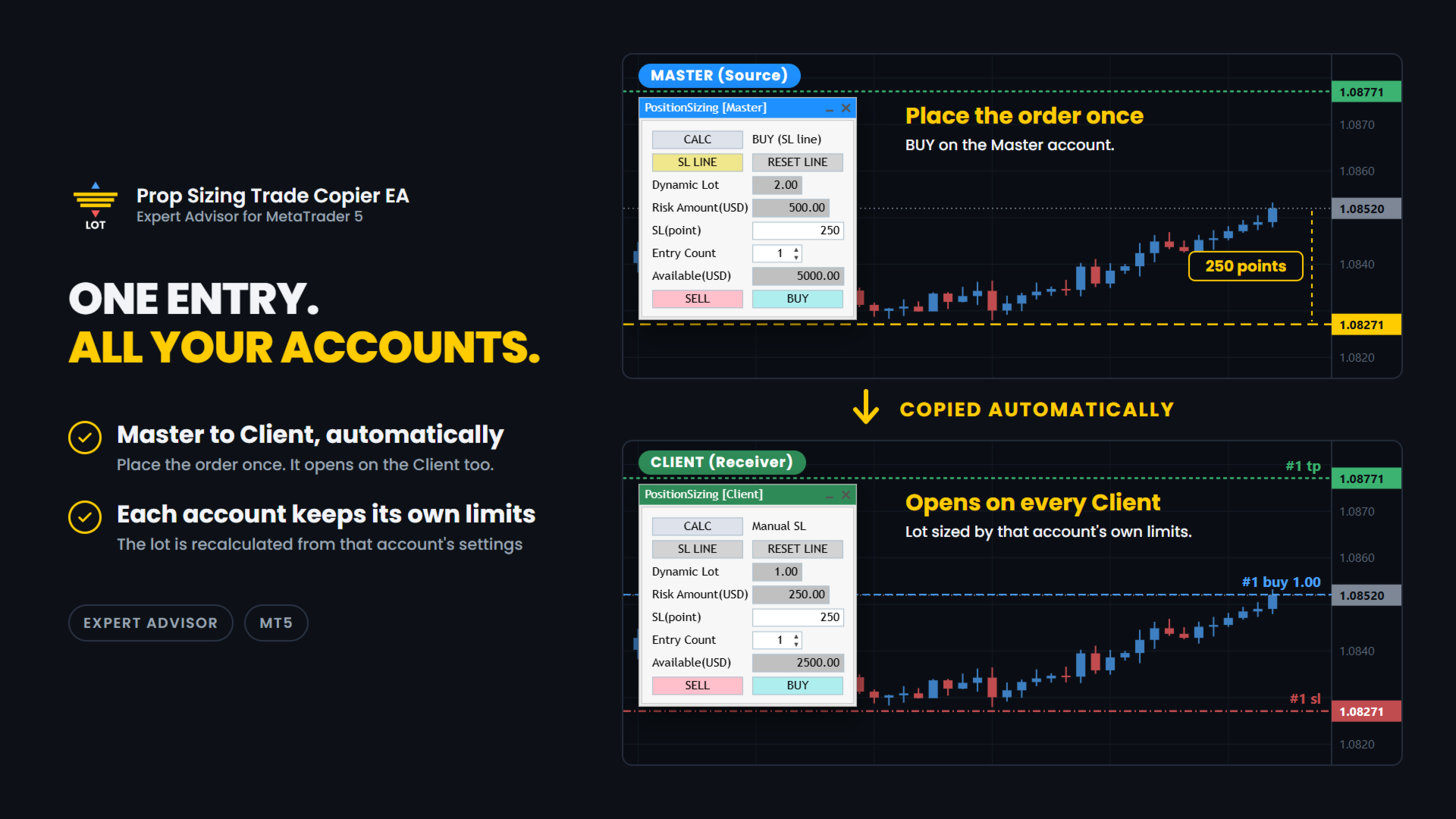
It lets you run several prop firm accounts from one PC. You enter on your main account and the trade is copied to the other accounts.
Each account calculates its own lot from its own balance and its own loss limits.

✅ WHAT IT DOES

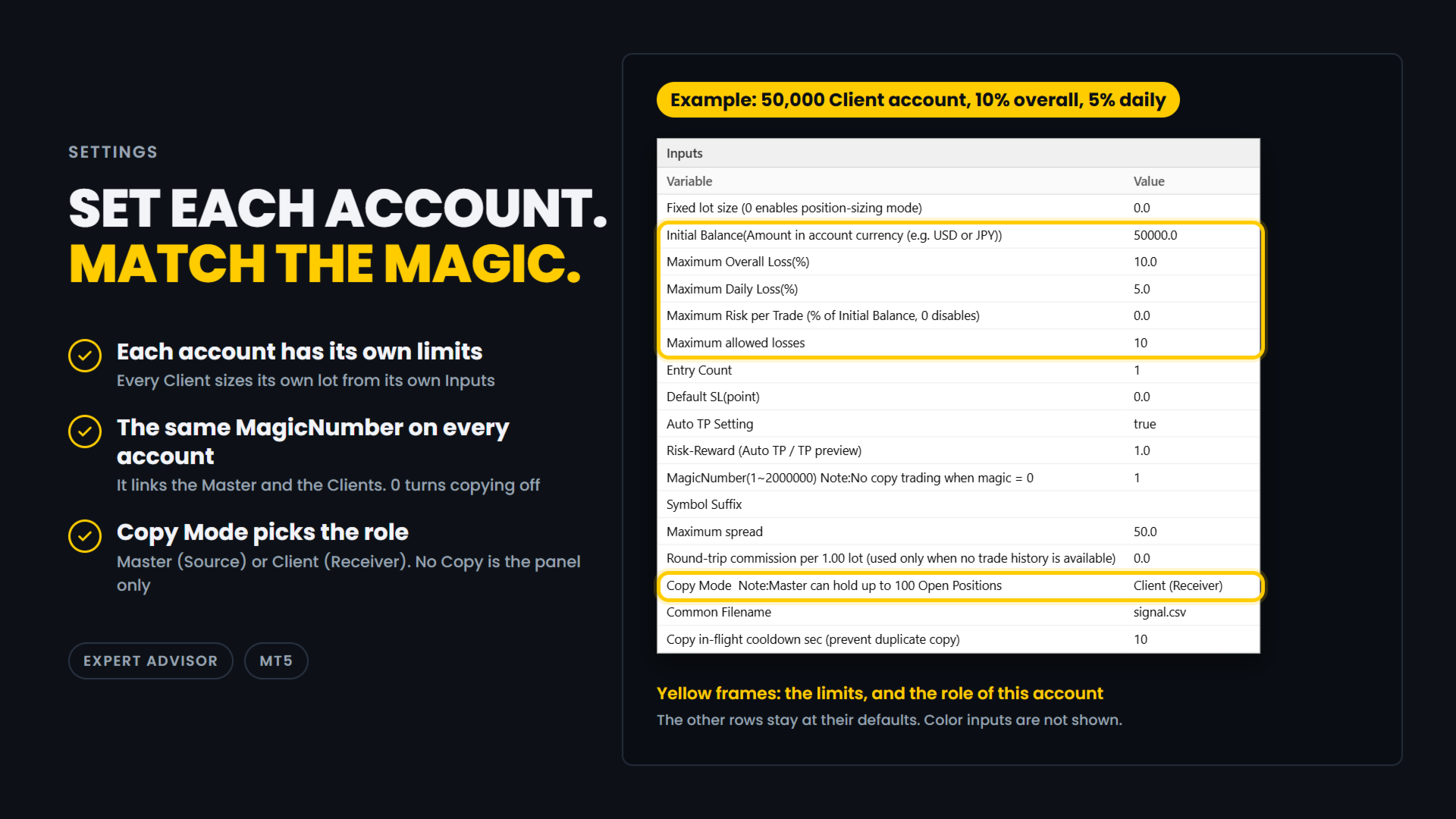
Pick the role and match the magic number. That is the setup.

Copy:

  • Master and Client roles. One terminal is the Master, which is the source.
    The others are Clients, which receive.
    The title bar is colour coded so you can see the role at a glance: blue for Master, green for Client.
  • Copying happens between MT5 terminals on the same PC, through a shared file.
    This is not an internet signal service and nothing is sent outside your computer.
  • If a Master and a Client are set up inside the same MT5 terminal by mistake, the one that started later is disabled automatically and a warning is shown.
  • The Master can hold up to 100 positions.
  • A cooldown stops the same position from being copied twice while the first copy is still waiting to be confirmed.
    The default is 10 seconds and you can change it.
  • Each Client sizes its own lot.
    A 50,000 account and a 10,000 account do not take the same lot for the same trade.

Trade panel (included):

  • Drag the stop-loss line and the lot size updates at once.
  • BUY and SELL buttons send the order with the calculated lot.
    The stop loss is the price of the line.
  • Direction is read from the line. Below the price is BUY. Above the price is SELL.
  • Auto TP. The TP is set from your Risk-Reward setting, and the TP preview line follows the stop-loss line.
    You can turn it off with the Auto TP Setting input.
  • The risk is shown in your account currency, not only in percent.
  • Available shows how much of your allowed loss is still left, in your account currency.
  • Round-trip commission is measured from your own trade history.
    It is shown for reference and is not included in the risk amount.
  • Entry Count from 1 to 10 for split entries. Lot and risk are shown for one entry.
    An "x2", "x3" ... mark appears next to the risk.
  • Fixed lot mode when you do not want the calculation.
  • Entry Count and the stop-loss line are stored per chart.
  • The panel can be collapsed to its title bar.
  • I use it live on FX majors and crosses.
    It has also been checked on gold (XAUUSD), BTCUSD and indices such as US30. Brokers set symbols differently, so check with a small lot first.

Order safety:

  • If the button you pressed and the line do not agree, no order is sent.
  • If the line is inside the spread, no order is sent.
  • The spread is checked again when you press the button.
    If it is wider than your Maximum spread setting, the order is cancelled.
  • If the stop-loss distance is zero or less, no order is sent.
  • If the calculated lot is zero, no order is sent.
    This also happens when no lot fits inside the risk you allowed.
  • A double-click on the button does not send two orders.
  • If the currency conversion for your account is not available, the tool stops.
    It does not send a guessed lot.
  • After the order is filled, the preview lines are removed.

🧪 HOW THE LOT IS CALCULATED

The tool works in four steps. Every account does this for itself.

1. Available. How much you can still lose.
It comes from your Initial Balance, Maximum Overall Loss (%) and Maximum Daily Loss (%).
The limit you would hit first is used.

2. Divide by Maximum allowed losses. This is how many losing trades in a row you want to survive.

3. Cap the risk. Maximum Risk per Trade (%) of your Initial Balance is the most one trade can risk, so the risk stays the same from trade to trade.
Set it to 0 to turn the cap off.

4. Work back from the stop. The distance to your stop-loss line is turned into a lot size for the current symbol.

You enter the limits your firm gives you. The tool does the rest.

🔧 SETTINGS

Example: a 50,000 Client account with a 10% overall loss limit and a 5% daily loss limit.

  • Fixed lot size: 0.0
    0 means each account calculates its own lot.
    Enter a lot size only if you want a fixed lot, copied orders included.
  • Initial Balance: 50000.0
    The starting balance of this account, in its currency.
    Every account has its own settings. Set 0 to use the current balance instead.
  • Maximum Overall Loss(%): 10.0
    The overall loss limit, in percent of Initial Balance.
  • Maximum Daily Loss(%): 5.0
    The daily loss limit, in percent.
    It is measured from the balance at the start of the day.
  • Maximum Risk per Trade: 0.0
    A cap on the risk of one entry, in percent of Initial Balance.
    0 turns the cap off.
    If your firm limits the risk of a single trade, entering about half of its limit leaves a margin.
  • Maximum allowed losses: 10
    How many losing trades in a row you want to survive.
  • Entry Count: 1
    How many orders one press of BUY or SELL sends on this account, from 1 to 10. Each order has the calculated lot.
    It is not part of the lot calculation.
    With Maximum allowed losses 10 and Entry Count 2, the number of losing trades you survive is 5 (10 / 2).
  • Default SL(point): 0.0
    The starting distance of the stop-loss line, in points.
    0 places the line at half the range of the last 20 bars.
  • Auto TP Setting: true
    true sets a TP on every order, copied orders included. false sends orders without a TP.
  • Risk-Reward: 1.0
    The TP distance as a multiple of the stop-loss distance.
    1.0 puts the TP as far from the entry as the stop loss.
  • MagicNumber(1~2000000): 1
    The link between the Master and the Clients. Use the same number on all of them.
    0 turns copying off.
  • Symbol Suffix: empty
    The ending your broker adds to symbol names, such as .m.
    Enter the one of the account this EA runs on, and leave it empty if there is none.
    It lets EURUSD on one broker match EURUSD.m on another.
    It is also used to find the currency pair that converts the risk into your account currency.
  • Maximum spread: 50.0
    The spread limit, in points (50.0 is 5 pips on a 5-digit symbol).
    If the spread is wider when an order is about to be sent, a copied order included, the order is cancelled.
    0 means no limit: the spread is not checked.
  • Round-trip commission per 1.00 lot: 0.0
    Used only when there is no trade history to measure from.
    It is shown for reference and is not included in the risk amount.
  • Copy Mode: Client (Receiver)
    No Copy is the panel only.
    Master (Source) copies the trades you enter on this account.
    Client (Receiver) copies the Master's trades.
    The title bar is blue for Master and green for Client.
  • Common Filename: signal.csv
    Leave it as it is.
    The Master and the Clients share this file through the MetaTrader Common folder, so use the same name on all of them.
  • Copy in-flight cooldown sec: 10
    After a Client sends a copy order, it waits this many seconds before it copies the same position again.
    This stops double copies.

In this example, on a day that starts with a balance of 50,000, Available is 2500.00, because the 5% daily limit is reached before the 10% overall limit.
The Client sizes its own lot from the risk of one entry, which is 250.00 (2500.00 / 10).

⚠️ IMPORTANT

  • When DefaultSL is 0, which is the default, the first stop-loss line is placed below the current price, at half the range of the last 20 bars of the timeframe you are on.
    Because the distance comes from the range, it may be an odd number such as 119 pips, and it changes when you switch timeframe.
    This is intended.
    Set DefaultSL to a fixed value if you want the same starting distance every time.
  • This EA and Prop Sizing Lot Size Calculator cannot run on the same chart.
    If the indicator is attached to the same chart, this EA will notify you and remove it.
    The stop-loss line position is not carried over. This is by design.
  • The older free Prop Sizing EA does not have this detection.
    Do not run it on the same chart as Prop Sizing Lot Size Calculator.

📋 ABOUT PROP FIRM RULES

Prop firms have different rules about third-party tools.
Some do not allow Expert Advisors that you did not write yourself.
Some also restrict third-party indicators, even ones that only calculate the lot size.
Some firms also limit copying between your own accounts. Rules can change.
Check the rules of your own firm before you use this product.
Whether to use it is your decision.

🎯 ONE THING ONLY

This tool does one thing. You enter on one account, the others follow, and each of them sizes its own lot.

🔗 ALSO AVAILABLE

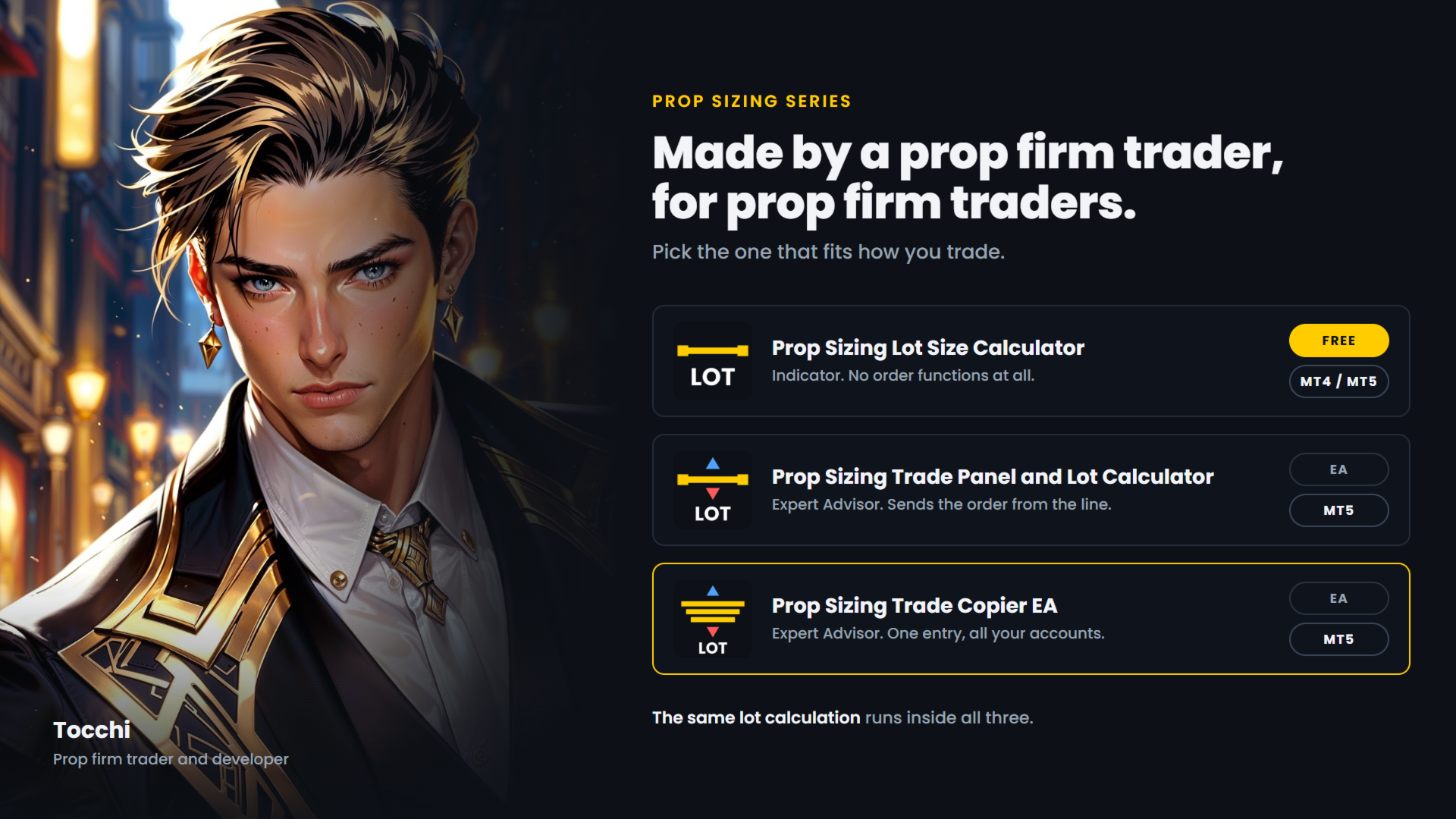
  • Prop Sizing Lot Size Calculator - free.
    Calculation and stop-loss line only, no order functions. MetaTrader 5.
  • Prop Sizing Lot Size Calculator MT4 - the same indicator for MetaTrader 4. Free.
  • Prop Sizing Trade Panel and Lot Calculator - the trade panel without the copy function.
    MetaTrader 5.
Önerilen ürünler
Follow a master account from another terminal on the same computer. CopyTrade Local Receiver is the follower side of a trade copier. Paste the Receiver code shown on CopyTrade Local Sender (CT-XXXX-XXXX) into its inputs, and this account opens, modifies and closes the same trades as the master. The data is exchanged through the common data folder of MetaTrader on the same computer. Nothing is sent over the internet. The master may be MT4 or MT5 and may be with a different broker. What is copied
LT Trade Copy MT5 - Yüksek Performanslı ve Minimum Gecikmeli Hesaplar Arası İşlem Kopyalayıcı LT Trade Copy MT5, aynı bilgisayardaki veya yerel ağdaki (LAN) MetaTrader 5 (ve MetaTrader 4) terminalleri arasında işlemlerini minimum gecikme (latenzi) ve mutlak hassasiyetle çoğaltması/kopyalaması gereken yatırımcılar için geliştirilmiş yüksek performanslı bir araçtır. Hesap yöneticisi, sinyal sağlayıcı veya aynı anda birden fazla aracı kurumda işlem yapan bir trader olun, bu yazılım ihtiyacınız olan
MetaTrader 5 için yerel bir işlem kopyalayıcı. Aynı Windows bilgisayar veya VPS üzerindeki MT5 terminalleri arasında pozisyonları kopyalar ve her kopyanın büyüklüğünü iki aracı kurumun kontrat özelliklerinden (kontrat büyüklüğü, tick değeri, hesap para birimi) hesaplar; böylece iki aracı kurum lotu farklı tanımlasa bile kopya aynı maruziyeti (exposure) taşır. Aynı master pozisyonunun ikinci bir kopyasını asla açmaz. Ne yapar Her terminalde aynı EA'yı bir grafiğe eklersiniz: Master terminalde Mod
Trade Copier Simple Guide Trade Copier is an Expert Advisor (EA) for MetaTrader 5 (MT5) that lets you automatically copy trades from one account (the "Master") to another (the "Receiver"). It's designed for users who want to duplicate trading strategies across multiple accounts on the  same computer . No internet or external servers are needed—it uses a shared file on your machine to transfer trade info securely and quickly. How It Works Master Mode : Attach the EA to a chart on your main tradin
Signalator Local Trade Copier MT5 , Master ve Receiver terminallerini aynı bilgisayar veya VPS üzerinde çalıştırmak için geliştirilmiş hızlı bir yerel trade copier'dır. MT4, MT5 ve cTrader terminalleri arasında her yönde çapraz platform kopyalamayı destekler: MT4 ↔ MT5 ↔ cTrader ve diğer tüm kombinasyonlar. Harici bir bulut relay kullanmadan işlemleri yerel olarak kopyalayın. Master, işlem etkinliğini yerel bir bridge üzerinden yayınlar; her Receiver ise neyin kopyalanacağını, hangi Master hesap
Fast copier for sending trades to multiple MT4 / MT5 accounts. MT5 Trade Copier Master EA sends trades instantly from your master account to one or multiple slave accounts. Supports copying to: • MT5 accounts • MT4 accounts Perfect for: • Multi-account traders • Signal providers • Account managers • Personal account mirroring Main Features • Fast local trade copying • Low latency execution • Multiple slave accounts support • Copy open positions on startup • Stable file-based communication • Easy
OB FVG Trade Copier: Unified Master & Slave EA Version: 2.00 Type: Trade Copier / Risk Management Utility Compatibility: MetaTrader 4 & MetaTrader 5 (Cross-compatible codebase) Overview The OB FVG Trade Copier is a professional-grade, unified trade copying system designed to mirror trades between Master and Slave accounts seamlessly. Built with a unified architecture, a single EA file serves as both the sender (Master) and receiver (Slave) simply by toggling the EA Mode in the settings. It uti
FREE
Nasdaq Reversion
Jaume Sancho Serra
Nasdaq Reversion A lightweight long-side mean-reversion Expert Advisor for the Nasdaq 100 index (NQ / USATECHIDXUSD) on H1. No martingale. No grid. No hedging. One position at a time. A hard stop on every trade. It waits for the index to get oversold within its trend, then takes one clean long with a fixed stop. No averaging into losers, no recovery games. How it works Oversold trigger: an RSI-based entry when the Nasdaq dips into oversold territory. Trend filter: an EMA filter keeps entries ali
FREE
Professional Trade Panel — All-in-One Smart Trading Tool This is a professional visual trading panel designed for the MetaTrader platform. It consolidates the most frequently used trading operations into a single compact and draggable interface, significantly improving execution efficiency and reducing the risk of misoperations. Core Features One-Click Close All: Close all open positions on the current symbol with a single click. The button displays real-time total floating profit and loss s
OTE Trade Copier MT5
Olaoluwa Oluwaseun Bamitale
OTE Trade Copier MT5 Trade Copier & Prop Firm Risk Manager Copy trades locally between MT5 terminals and across MT4/MT5 platforms on the same PC or VPS while protecting your funded accounts with advanced risk controls. IMPORTANT: Send me a message for the Complete User Manual Before Installation Why Traders Choose OTE Trade Copier MT5 Supports MT5 to MT5 trade copying Supports MT4 to MT5 and MT5 to MT4 when used with the MT4 version Designed for prop firm and funded account traders Daily drawd
EA Local Trade Copier Pro MT5: The Ultimate DLL-Free Trade Duplicator Güvenli olmayan harici DLL'ler gerektiren, terminalinizi çökerten veya sizi ayrı "Master" ve "Client" dosyalarıyla kafanızı karıştıran karmaşık işlem kopyalayıcılardan bıktınız mı? EA Local Trade Copier Pro MT5 ile yeni nesil işlem kopyalamayı deneyimleyin. Maksimum kararlılık, aydınlık hızında yürütme ve nihai basitlik için tasarlanan bu yardımcı program, aynı Windows PC veya VPS üzerindeki birden fazla MetaTrader terminali a
SonicTradeCopier: (Best for scalping) Easy Fast Reliable trade copier. Copy trades from one terminal to an other (internet copy feature coming soon.) MT4 to MT4. MT4 to MT5. MT5 to MT5. MT5 to MT4. MT4/MT5 to any other platform copy possibility for custom made solutions. Reverse trading. Advance filters for traders. Features: (Setting up copying policies) Sender only has to setup  signal name and start sending signals [ You must start signal sender first always ]. Receiver sets up  signal nam

News Risk Guard protects the positions you already hold when a scheduled economic release is about to hit. It is a risk tool. It does not predict direction, it does not look for entries of its own, and it makes no claim about profit. The calendar is built into the product: 4,101 releases covering 15 recurring events. No internet permission, no DLL, no file to install, and it behaves the same in the Strategy Tester as it does on a live chart. WHAT IT DOES 1. Event protection window    A confi
İşlemleri bir MT5 hesabından veya MT4 hesabından başka bir MT5 hesabına kopyalamak için yardımcı program.  Demo-version can be downloaded   here . Herhangi bir kombinasyonda Netting ve Hedging hesapları arasındaki konumları kopyalayabilirsiniz. Filtreleri, kopyalanacak olan araç adına ve sihirli konum numaralarına göre ayarlayabilirsiniz. Şimdiye kadar, kaynak sadece piyasa pozisyonları hakkında bilgi gönderiyor. Bekleyen emirler, açık piyasa pozisyonlarına dönüştürüldükleri anda işlenir. Bir
Local Trade Copier copies positions and orders from one MetaTrader 5 terminal (master) to one or more MetaTrader 5 terminals (receivers) on the same computer. It works locally and does not send data over the internet. Key features - One master, multiple receivers, separated by channel name. - Volume modes: multiplier, fixed lot, balance ratio, equity ratio or risk-based (requires a stop loss). - Symbol mapping between brokers (InpSymbolMap, prefix and suffix); ambiguous or unavailable symbols a
Copier of deals from MetaTrader 5 to MetaTrader 5 ( MetaTrader 4<->MetaTrader 4 version is available ; with both versions, you can copy MetaTrader 5<->MetaTrader 4, MetaTrader 4<->MetaTrader 5, MetaTrader 5<->MetaTrader 5, MetaTrader 4<->MetaTrader 4). There is a demo version (restricting by grades and by lots) Works only in the mode of hedging Spread filter. Select the best price (start copying positions with a profit or loss). Configure the lot size, fixed or ratio-based (provider signals can
Trade Dispensary Connect, işlemleri JSON formatında Webhook aracılığıyla Trade Dispensary işlem kopyalayıcısına göndermek için tasarlanmış bir MT5 EA yardımcı programıdır. Trade Dispensary yerel bilgisayarınızda çalışıyorsa, webhook URL'si olarak http://127.0.0.1 :5000/webhook/mt5/[HESAP_KİMLİĞİ] adresini kullanmanız yeterlidir. Trade Dispensary başka bir bilgisayarda çalışıyorsa, makinenin adresini/alan adını edinin. Bu senaryo için Pinggy veya Ngrok gibi bir tünelleme hizmeti önerilir. Bu MT
FREE
• Please test the product in the Strategy Tester before purchasing to understand how it works. • If you face any issues, contact me via private message—I’m always available to help. • After purchase, send me a screenshot of your order to receive a   FREE EA   as a gift. Trading Motivation Display – Stay Inspired, Stay Profitable! Trading is a game of patience, discipline, and resilience. Staying motivated is crucial for long-term success in the markets. That's where Trading Motivation Display c
The Superior Remote Trade Copier is a comprehensive MT5 utility that copies trades remotely and privately via Telegram, eliminating the need for external VPS bridges or third-party web servers. The ecosystem consists of a Master EA, a free Desktop App, and a Client EA. Master (Transmitter) Trade Broadcasting: Transmits market orders, pending orders, position modifications, and partial/full closures directly via Telegram. UI Dashboard: Interactive on-chart panel for quick bulk actions (Close All,
Try turning dust to gold with Reverse copier! Unprofitable EA or strategy can become profitable with reversing the direction of it's trades. As of now only MT5 → MT4 bridge is available, new functions will be added accordingly. EA's that work best with Reverse trade system is single-shot or scalping EA's. How it works: When a trade is executed on Master account, Reverse copier sends special log to the common txt file with a command to "open/close, buy/sell, symbol, volume...etc".  Reverse slave
FREE
Please download Master EA here =   https://www.mql5.com/en/market/product/186073 MT4 Version =  https://www.mql5.com/en/market/product/186079 Free Demo Version =  https://c.mql5.com/6/1033/COPYTRADE_BIN7D.zip User Manual : download here Best Trade Coppier for MT5. EA Trade Copier is a powerful and reliable trade copying solution that transfers trades from one Master account to multiple Slave accounts in real time. Whether you manage multiple trading accounts, investor accounts, VPS terminals, o
TradePulse Commander Pannel
AL MOOSAWI ABDULLAH JAFFER BAQER
**Ticaret Yönetim Paneli** ile tanışın, işlemlerinizi optimize etmek ve verimliliğinizi artırmak için tasarlanmış nihai çözüm! Gelişmiş panelimiz, ticaret görevlerinizi basitleştirmek ve gerçek zamanlı bilgiler sunmak için güçlü özelliklerle donatılmıştır: - **Tek Tıklamada TP ve SL Yönetimi**: Take Profit (TP) ve Stop Loss (SL) seviyelerini tüm hesabınızda veya belirli paritelerde kolayca bir butona basarak silin. - **Gerçek Zamanlı Emir Takibi**: Ticaret etkinliğinizi canlı güncellemelerle
QBrain Strategy Auditor helps users identify incomplete or weak evidence before drawing conclusions from closed MetaTrader 5 outcomes. The utility is designed for strategy review. It does not open, modify, or close trades. It does not predict returns and does not certify a strategy. Main functions - Reads closed terminal account history in a selected date range or a normalized CSV placed in the MT5 file sandbox. - Checks whether the available evidence is sufficient for analysis. - Displays k
Gold Veritas MT5
Marat Baiburin
3.19 (21)
Discount on all my products until 01.05.  Gold Veritas   , sessiz saatler için tam otomatik bir Forex Uzman Danışmanıdır. Danışmanın çalışmalarının izlenmesi:  https://www.mql5.com/en/users/bayburinmarat/seller Doğru GMT ayarı:   https://www.mql5.com/en/blogs/post/743531 En anlaşılır ve basit optimizasyon için gerekli tüm parametreler sadece 6 ayarda mevcuttur Danışmanı tercihlerinize göre uyarlayabilirsiniz: risk seviyelerini ayarlayın veya belirli bir komisyoncu için kendiniz özelleştirin. 4 p
Currency Meter Dashboard Trader All 28 symbols should be added to market watch, then the utility starts to load data and the it does the calculations! What does this utility do? This utility shows the strength of each 8 major currencies. These eight major currencies are AUD - CAD - CHF - EUR - GBP - JPY - NZD - USD. For calculating the METER of each currency, we calculate the average of each symbol which has this currency in it. (all of them are 28 symbols like EURUSD) We have two sides: posit
• Please test the product in the Strategy Tester before purchasing to understand how it works. • If you face any issues, contact me via private message—I’m always available to help. • After purchase, send me a screenshot of your order to receive a   FREE EA   as a gift. Hedge Fragmentation Utility - Comprehensive Product Description Overview The Hedge Fragmentation Utility is a professional-grade MetaTrader 5 tool designed for forex traders who employ hedging strategies. This sophisticated util
Copier Master RAlabs (receiver) and Copier Provider RAlabs (signal source) — a system for local copying of trades between MetaTrader terminals on a single PC/VPS. It consists of two products: Provider (signal source) and Master (receiver/copier with a control panel). Provider is installed on the donor account (the account whose trades are being copied) — it publishes the trades. Master is installed on the recipient account — it reads the donors and opens copies; it hosts the entire copy setting
MT5 to MT5 Trade Copier – Fast and Reliable Trade Copying Solution The MT5 Trade Copier is a powerful tool designed to copy trades seamlessly between MetaTrader 5 accounts with minimal latency and high accuracy. Built for speed, flexibility, and ease of use, the copier works across different brokers, even when symbols use different prefixes or suffixes. This Expert Advisor is suitable for professional traders, signal providers, fund managers, and traders who manage multiple accounts. Key Featur
Elite Telegram Trade Copier & Community Manager (v3.94) Welcome to the ultimate solution for professional Telegram signal copying and community management. This Expert Advisor is not just a standard copier – it is a fully automated Trade Management Engine , a Signal Analytics Tool , and a Marketing Funnel for your own Telegram channels. Whether you want to automate trades from your favorite signal providers or manage your own VIP and Follower channels simultaneously, this EA handles everything:
FREE
Multi Close Manager Multi Close Manager , yeni işlemleri otomatik olarak açmadan mevcut pozisyonları yönetmek için tasarlanmış bir MetaTrader 5 işlem yönetim aracıdır. Araç, manuel olarak açılmış pozisyonlarla veya başka bir Expert Advisor tarafından açılmış pozisyonlarla kullanılabilir. Birden fazla bağımsız pozisyon kapatma yöntemi, Stop Loss yönetimi, Take Profit yönetimi, Telegram bildirimleri, zamanlanmış koruma bölgeleri ve grafik üzerinde acil kapatma düğmesi sunar. Her yönetim fonksiyonu
FREE
Bu ürünün alıcıları ayrıca şunları da satın alıyor
Trade Assistant MT5
Evgeniy Kravchenko
4.43 (216)
It helps to calculate the risk per trade, the easy installation of a new order, order management with partial closing functions, trailing stop of 7 types and other useful functions. Additional materials and instructions Installation instructions - Application instructions Line function -   shows on the chart the Opening line, Stop Loss, Take Profit. With this function it is easy to set a new order and see its additional characteristics before opening.   Risk management  - The risk calculation
Trade Manager EA’ye hoş geldiniz! Ticaretin daha sezgisel, hassas ve verimli hale gelmesi için tasarlanmış nihai risk yönetim aracı ile tanışın. Bu sadece bir emir verme aracı değil; ticaret planlaması, pozisyon yönetimi ve risk kontrolü için kapsamlı bir çözüm. İster yeni başlayan bir yatırımcı olun, ister deneyimli bir trader ya da hızlı emir gerektiren bir scalper, Trade Manager EA ihtiyaçlarınıza uyum sağlar ve forex, endeksler, emtialar ve kripto paralar dahil tüm piyasalarda esneklik sunar
Local Trade Copier EA MT5
Juvenille Emperor Limited
4.94 (149)
Local Trade Copier EA MT5, aynı Windows bilgisayarı veya Windows VPS üzerinde çalışan birden fazla MetaTrader 5 hesabı arasında işlemleri kopyalamak ve yönetmek için hızlı ve esnek bir işlem kopyalayıcıdır. Yerel işlem senkronizasyonunu, Receiver tarafında lot büyüklüğü, risk yönetimi, işlem filtreleme, sembol eşleştirme, işlem yönetimi ve hesap koruması kontrolleriyle birleştirir. Transmitter ve Receiver terminallerinizi yaklaşık 1 dakika içinde ayarlayın ve aynı veya farklı brokerlardaki hesa
Telegram to MT5 Multi-Channel Copier   , Telegram ve Discord kanallarınızdaki alım-satım sinyallerini doğrudan MetaTrader 5'e otomatik kopyalar. Bot yok, tarayıcı uzantısı yok, elle kopyalama yok. Sinyal Telegram'a veya Discord'a düşer ve EA birkaç saniye içinde terminalinizde işlemi açar. Ve bir kanalı kopyalamadan önce, yerleşik backtester o kanalın hesabınızda ne yapmış olacağını gösterir. Ürün iki bileşenden oluşur: Telegram kanallarınızı dinleyen bir Windows uygulaması ve sinyalleri MT5 ter
Farmed Hedge Yield Farming | All Markets (Manual - Hybrid - Semi/Automated EA) VERIFIED TRADING RESULTS - Farmed Hedge Yield Axi Copy:  https://www.mql5.com/en/signals/2356376 - Farmed Hedge Yield Exn Copy:   https://www.mql5.com/en/signals/2356404 - Farmed Hedge Yield V Copy:  https://www.mql5.com/en/signals/2357156 IMPORTANT NOTICE: FarmedHedge is a MANUAL-FOCUSED TRADING UTILITY ,not a fully automated EA. Results shown on this Signal include manual trades and overall strategic management.
Telegram sinyallerini kendi işlem kurallarınızla kopyalayın Telegram to MT5 Signal Trader , herkese açık ve özel Telegram kanallarındaki ve gruplarındaki metin tabanlı işlem sinyallerini otomatik olarak MetaTrader 5'e kopyalar. Tek bir masaüstü uygulamasından birden fazla sinyal sağlayıcısını ve MT5 hesabını yönetin; her sağlayıcı için ayrı risk ve işlem ayarları belirleyin. Sinyal kopyalamak için Telegram botu veya API kurulumu gerekmez. Kendi Telegram hesabınızla telefon numarası veya QR kod k
News Trade EA MT5
Konstantin Kulikov
4.55 (11)
Birkaç yıldır kullandığım çok yararlı bir robotu tanıtıyorum. Hem yarı otomatik hem de tam otomatik modlarda kullanılabilir. >>> Chat <<< Program, ekonomik takvim haberlerinde esnek ticaret ayarlarını içeriyor. Stratejiler test cihazında kontrol edilemez. Sadece gerçek bir iş. Terminal ayarlarında, haberler sitesini izin verilen URL'ler listesine eklemeniz gerekir. Servisler > Araçlar > Danışmanlar'a tıklayın. "Aşağıdaki URL'ler için WebRequest'e İzin Ver:" kutucuğunu işaretle. Aşağıdakini ekl
================================================================================ POC BREAKOUT - V20.72. Full Professional Grade Toolkit ================================================================================ POC Breakout is a full MetaTrader 5 trading dashboard for discretionary traders who want breakout signals, Point of Control (POC) context, volume profiles, order flow, market structure, news, alerts, and advanced trade planning in one professional workspace. Attached directly to you
TradePanel MT5
Alfiya Fazylova
4.88 (170)
Trade Panel, çok işlevli bir ticaret asistanıdır. Uygulama, manuel ticaret için 50'den fazla ticaret fonksiyonu içerir ve çoğu ticaret görevini otomatikleştirmeyi mümkün kılar. Uygulama talimatları: https://www.mql5.com/en/blogs/post/756482 Demo hesabı için uygulamanın deneme sürümü: https://www.mql5.com/en/blogs/post/750865 Uygulamayı nasıl kurulur: https://www.mql5.com/en/blogs/post/756239 Uygulamayı görsel modda nasıl test edilir: https://www.mql5.com/en/blogs/post/770277 Uygulamayı VPS MetaT
Dealer's Panel No signal decides anything here — a hand does. One click, and the panel calculates what's underneath: lot size from risk, target from a 30-step balance ladder that remembers exactly how far an account has climbed. Toggle between market and pending without touching an input field. Set a stop, and the take-profit can write itself — a fixed share of the balance, translated into price with no arithmetic left for the trader to get wrong. One trade live at a time; it won't let a seco
Exp COPYLOT CLIENT for MT5
Vladislav Andruschenko
3.97 (35)
MetaTrader 5 için profesyonel işlem kopyalayıcı MetaTrader için hızlı, profesyonel ve güvenilir bir işlem kopyalayıcı . COPYLOT , MT4 ve MT5 terminalleri arasında Forex işlemlerini kopyalamanıza olanak tanır ve Hedge ile Netting hesaplarını destekler. COPYLOT MT5 sürümü şunları destekler: - MT5 Hedge → MT5 Hedge - MT5 Hedge → MT5 Netting - MT5 Netting → MT5 Hedge - MT5 Netting → MT5 Netting - MT4 → MT5 Hedge - MT4 → MT5 Netting MT4 sürümü Tam açıklama + DEMO + PDF Nasıl satın alınır Nasıl kurul
Sonraki Güncelleme — Sürüm 2.52 Çok Yakında! [YENİ] Piyasa Analizinizi ve İşlem Sürecinizi Geliştirmek İçin Tasarlanmış 4 Büyük Yeni Özelliğe Hazır Olun İşlem ihtiyaçlarınızı karşılamak üzere tasarlanmış 4 yeni özellikle piyasa analizini bir üst seviyeye taşıyoruz. İşte yeni özellikler: TRADE OVERVIEW DASHBOARD CONFLUENCE AT ZONE STRONG & WEAK HIGH/LOW OTE 1. TRADE OVERVIEW DASHBOARD Piyasanın genel görünümünü daha kolay anlamanıza yardımcı olan, işlem kararlarınızı desteklemek için rehberlik s
RETAILBERG FOOTPRINT CHART PRO — Order-Flow Workspace for MetaTrader 5 Version 7.00  |  Professional System  |  31 tools  |  One chart A full 150-page illustrated User Manual is included. Please read the full manual to understand this feature packed footprint chart elements and ui. https://www.mql5.com/en/blogs/post/777982 DEMO / STRATEGY TESTER — PLEASE READ FIRST
The product will copy all telegram signal to MT5 ( which you are member) , also it can work as remote copier.  Easy to set up, copy order instant, can work with almost signal formats, image signal,  s upport to translate other language to English Work with all type of channel or group, even channel have "Restrict Saving Content", work with  multi channel, multi MT5 Work as remote copier: with signal have ticket number, it will copy exactly via ticket number. Support to backtest signal. How to s
EASY Insight AIO – Akıllı ve zahmetsiz yatırım için hepsi bir arada çözüm Genel Bakış Tüm piyasayı — Forex, Altın, Kripto, Endeksler ve hatta Hisseler — saniyeler içinde, manuel grafik incelemesi, gösterge kurulumu ya da karmaşık ayarlar olmadan analiz edebildiğinizi hayal edin. EASY Insight AIO , yapay zekâ destekli yatırım için nihai, kullanıma hazır dışa aktarma aracınızdır. Tüm piyasanın kapsamlı bir anlık görüntüsünü tek bir temiz CSV dosyasında sunar; bu dosya ChatGPT, Claude, Gemini, Pe
MT5 to Telegram Signal Provider , hesabınızı bir sinyal sağlayıcı haline getirerek belirtilen sinyalleri Telegram'ın sohbetine, kanalına veya grubuna göndermeyi sağlayan kullanımı kolay, tamamen özelleştirilebilir bir araçtır. Rakip ürünlerin çoğunun aksine, DLL içe aktarması yapmaz. [ Demo ] [ Kılavuz ] [ MT4 Versiyonu ] [ Discord Versiyonu ] [ Telegram Kanalı ]  New: [ Telegram To MT5 ] Kurulum Adım adım bir kullanıcı kılavuzu mevcuttur. Telegram API'si hakkında bilgi gerekmemektedir; ihtiyac
The Patch It never opens a trade. It walks behind the ones that did. Every open position, every pending order — checked twice a second for the one thing that's easy to forget: a stop, a target. Found bare, it doesn't ask. It writes the missing number in, measured in points from wherever the position began, and moves on to the next. No strategy, no opinion on direction. Just the quiet assumption that nothing should ever sit on the market unprotected — not because someone decided it shouldn't,
Grid Manual MT5
Alfiya Fazylova
4.73 (22)
Grid Manual, sipariş ızgarasıyla çalışmak için kullanılan bir ticaret yardımcı programıdır. Yardımcı program evrenseldir, esnek ayarlara ve sezgisel bir arayüze sahiptir. Sadece kayıpların ortalaması yönünde değil, aynı zamanda kazanç artışı yönünde de bir emir ızgarası ile çalışır. Tüccarın bir emir ızgarası oluşturmasına ve eşlik etmesine gerek yoktur, bu yardımcı programı yapacaktır. Emri açmanız yeterlidir ve Grid manual otomatik olarak ona bir emir ızgarası oluşturacak ve kapanana kadar ona
Signal TradingView to MT5 Pro Automator TradingView ve MetaTrader 5 arasında anında profesyonel uygulama TradingView alarmları ile MT5'teki gerçek uygulama arasındaki en güçlü iletişim köprüsüyle ticaret stratejinizi otomatikleştirin. Hız, esneklik ve kusursuz risk yönetimi talep eden yatırımcılar için tasarlanan bu Uzman Danışman (Expert Advisor), herhangi bir alarm mesajını hassas bir piyasa (market) veya limit emrine dönüştürür. GÜÇLÜ YÖNLER VE AVANTAJLAR Evrensel Ayrıştırma Motoru (Tescilli)
Power Candles Strateji Tarayıcısı - Kendi Kendini Optimize Eden Çoklu Sembol Kurulum Bulucu Power Candles Strateji Tarayıcısı , Power Candles göstergesini çalıştıran aynı kendinden optimize edici motoru, Piyasa İzleyicinizdeki her sembol üzerinde yan yana çalıştırır. Tek bir panel, şu anda istatistiksel olarak hangi sembollerin işlem yapılabilir olduğunu, her birinde hangi stratejinin kazandığını, en uygun Stop Loss / Take Profit çiftini gösterir ve yeni bir sinyal geldiği anda size bildirim gön
Prop Guardian Risk Manager MT5 – Drawdown, Risk & Hedge Protection for Prop Firm and Managed Accounts Prop Guardian Risk Manager is a professional risk-control utility for MetaTrader 5, designed for prop firm traders, money managers and anyone who wants strict account-level risk protection. It does not generate trading signals, strategy entries or trading decisions. Instead, it runs in the background, monitors your account risk and can automatically block new exposure, close managed positions or
Your EAs cannot see each other, but Anchor can. Anchor gives you one place to coordinate your EAs, manage risk, and decide when trading is allowed. It works alongside the trading bots you already use without any changes to them. The Problem One EA opens a trade. Then another starts trading. The next thing you know, you wake up to multiple grids built across your account. Each EA may be doing exactly what it was designed to do, but together they can place far more risk on your account than you in
VirtualTradePad PRO SE MT5 — MetaTrader 5 için profesyonel işlem kontrol merkezi VirtualTradePad PRO SE , MetaTrader 5 için grafik tabanlı premium bir işlem paneli ve trade yönetim çalışma alanıdır. Daha hızlı emir yürütme, daha net pozisyon kontrolü, yapılandırılmış trade yönetimi, görsel seviye planlama ve doğrudan grafik üzerinden profesyonel bir çalışma akışı isteyen traderlar için tasarlanmıştır. Bu yalnızca basit bir BUY / SELL paneli değildir. PRO SE; manuel işlem, bekleyen emirler, pozis
Bu ürün, haber saatlerinde tüm uzman danışmanları ve manüel grafikleri filtreler, böylece manüel ticaret kurulumlarınızı veya diğer uzman danışmanlar tarafından girilen işlemleri yok edebilecek ani fiyat dalgalanmaları konusunda endişelenmenize gerek kalmaz. Bu ürün, herhangi bir haber yayınlanmadan önce açık pozisyonlarınızı ve bekleyen emirlerinizi yönetebilen tam bir sipariş yönetim sistemi ile birlikte gelir.   The News Filter'ı   satın aldığınızda, gelecekteki uzman danışmanlar için yerleşi
Trader Evolution
Siarhei Vashchylka
5 (7)
" Trader Evolution " - A utility designed for traders who use wave and technical analysis in their work. One tab of the utility is capable of money management and opening orders, and the other can help in making Elliott wave and technical analysis. Manual (Be sure to read before purchasing) | Version for MT4 Advantages 1. Trading in a few clicks. Immediate and pending orders are available in the panel 2. Money management. The program automatically selects the appropriate lot size 3. Simplifies
Floor Watch
Syed Tauqeer Hussain Shah
Floor Watch One number, watched every thirty seconds: how far equity has fallen since the day began — or since its highest point, if it's told to trail the peak instead of the open. Cross the line and it doesn't argue. Every open position closes, every pending order vanishes, and anything that slips through afterward gets shut the moment it appears. Not asked. Removed. The floor holds until the clock turns 5 AM Pakistan time — then, and only then, does the day start over. One rule. No except
MetaTrader 5 için Trading Panel — grafik ve klavyeden profesyonel tek tıkla işlem kontrolü Aktif traderlar için geliştirilmiş güçlü bir Trading Panel; işlemleri standart MetaTrader arayüzüne göre çok daha hızlı açmanıza, yönetmenize ve kapatmanıza yardımcı olur. Bu çözüm; pozisyonları, bekleyen emirleri, toplam kârı ve işlem yürütmesini tek bir profesyonel çalışma alanında kontrol etmek isteyen kullanıcılar için tasarlanmıştır. Bu sadece sıradan bir yardımcı araç değildir. MetaTrader 5 için ger
Desteğe mi ihtiyacınız var? Nasıl kurulur? Sorunuz mu var? Buradan kendi dilinizde sorun, hızlı yanıt: https://www.mql5.com/en/market/product/139088/comments Çalışan Demo İndir Copy Cat More (Taklitçi Kedi) — İşlem Kopyalayıcı (Trade Copier) MT5 , yerel bir işlem kopyalayıcı ve bugünün ticaret zorlukları için tasarlanmış eksiksiz bir risk yönetimi ve yürütme çerçevesidir. Prop firm challenge'larından kişisel portföy yönetimine kadar, sağlam yürütme, sermaye koruması, esnek yapılandırma ve geli
Seconds Chart - MetaTrader 5 için saniye bazlı grafikler oluşturmanıza olanak sağlayan eşsiz bir araçtır. Seconds Chart sayesinde saniye cinsinden zaman dilimleriyle grafik oluşturabilir, standart dakika veya saatlik grafiklerde mümkün olmayan esneklik ve analiz hassasiyetine ulaşabilirsiniz. Örneğin, S15 zaman dilimi 15 saniyelik mum çubuklarını ifade eder. Desteklenen özel sembollerle herhangi bir gösterge ve danışman kullanabilirsiniz. Onlarla çalışmak, standart grafiklerde işlem yapmak kadar
YuClusters
Yury Kulikov
4.93 (43)
Attention: You can view the program operation in the free version  YuClusters DEMO .  YuClusters is a professional market analysis system. The trader has unique opportunities to analyze the flow of orders, trade volumes, price movements using various charts, profiles, indicators, and graphical objects. YuClusters operates on data based on Time&Sales or ticks information, depending on what is available in the quotes of a financial instrument. YuClusters allows you to build graphs by combining da
Yazarın diğer ürünleri
お知らせ:新しいシリーズがあります この製品に新しい機能を追加する予定はありません。同じロット計算を使い、チャート上でドラッグできる損切りラインなどを備えた新しいシリーズがあります。 ・Prop Sizing Lot Size Calculator(MetaTrader 5用インジケーター・無料) ・Prop Sizing Lot Size Calculator MT4(MetaTrader 4用インジケーター・無料) ・Prop Sizing Trade Panel and Lot Calculator(MetaTrader 5用EA・有料) ・Prop Sizing Trade Copier EA(MetaTrader 5用EA・有料) MQL5マーケットで、これらの名前を検索してください。 この製品は、新しいインジケーターと同じチャートで一緒に使わないでください。 以下は、この製品のもとの説明文です。 !!ご自身の戦略と合っているのか必ず確認してください!! ※勝率重視の戦略に適しています プロップファームを経験した人なら、 一度はこう思ったことがあるはずです。 最大損失率に合
FREE
DOES THIS SOUND FAMILIAR? Do you find the lot calculation slow and boring? Does it get worse with every new currency pair? Are you afraid of hitting a loss limit and losing the account? Does every lost account hurt more than the last one? I was caught in this loop myself. I built this tool for my own use. WHAT THIS IS This is an indicator. It contains no order functions at all. It cannot open, modify or close an order. This is the MetaTrader 4 version. Drag the stop-loss line on your chart
FREE
DOES THIS SOUND FAMILIAR? Do you find the lot calculation slow and boring? Does it get worse with every new currency pair? Are you afraid of hitting a loss limit and losing the account? Does every lost account hurt more than the last one? I was caught in this loop myself. I built this tool for my own use. WHAT THIS IS This is an indicator. It contains no order functions at all. It cannot open, modify or close a position. Drag the stop-loss line on your chart and the lot size is calculated
FREE
DOES THIS SOUND FAMILIAR? Do you find the lot calculation slow and boring? Does it get worse with every new currency pair? Are you afraid of hitting a loss limit and losing the account? Does every lost account hurt more than the last one? I was caught in this loop myself. I built this tool for my own use. WHAT THIS IS This is an Expert Advisor. It is a one-click trade panel with prop firm lot sizing built in. Drag the stop-loss line, read the lot size, and send the order from the same pane
Filtrele:
Değerlendirme yok
Değerlendirmeye yanıt